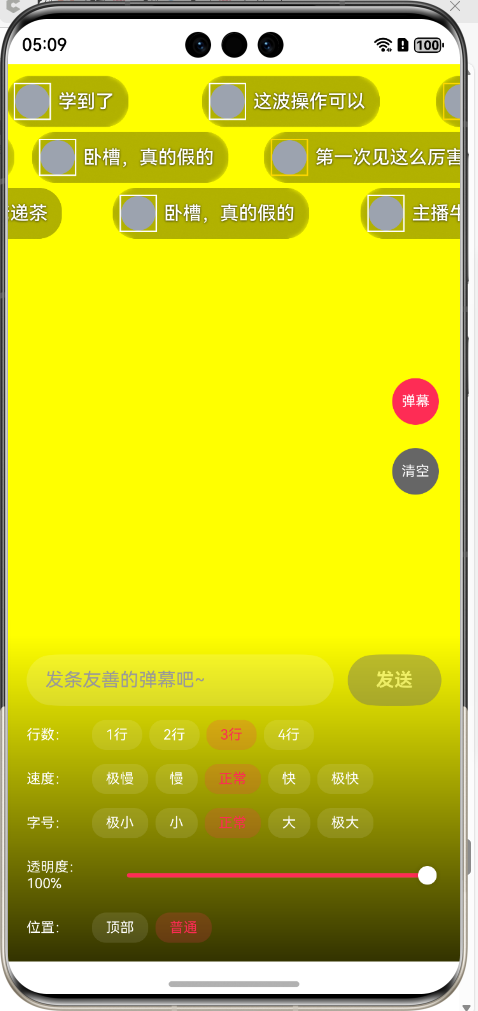
鸿蒙弹幕效果
·
import { LazyDataSourceV2 } from "./LazyDataSourceV2"

/**
 * 弹幕数据模型
 */
export interface DanmakuData {
  id: number | string
  content: string
  avatar?: ResourceStr
  username?: string
  isVip?: boolean
  color?: ResourceColor
  trackIndex?: number // 弹幕所在的轨道索引
}

@ObservedV2
export class DanmakuModel implements DanmakuData {
  @Trace id: number | string
  @Trace content: string
  @Trace avatar?: ResourceStr
  @Trace username?: string
  @Trace isVip?: boolean
  @Trace color?: ResourceColor
  @Trace trackIndex?: number
  @Trace offsetX: number = 0
  @Trace opacity: number = 1

  constructor(data: DanmakuData) {
    this.id = data.id
    this.content = data.content
    this.avatar = data.avatar
    this.username = data.username
    this.isVip = data.isVip || false
    this.color = data.color || Color.White
    this.trackIndex = data.trackIndex
  }
}

/**
 * 弹幕配置常量
 */
export class DanmakuConstant {
  static readonly COLOR_WHITE = '#FFFFFF'
  static readonly COLOR_VIP_GOLD = '#FFD700'
  static readonly COLOR_BG_TRANSPARENT = 'rgba(0, 0, 0, 0.3)'
  static readonly SINGLE_TRACK_HEIGHT = 44
  static readonly TRACK_GAP_SIZE = 4
  static readonly DENSITY_LOW_VALUE = 0.5
  static readonly DENSITY_NORMAL_VALUE = 1.0
  static readonly DENSITY_HIGH_VALUE = 1.5
  static readonly TRACK_RELEASE_DELAY = 1500
  static readonly AVATAR_SIZE = 32
  static readonly AVATAR_BORDER_WIDTH = 1.5
  static readonly TEXT_ESTIMATED_WIDTH_PER_CHAR = 15
  // 速度配置(毫秒)- 5个档位
  static readonly SPEED_SLOWEST = 15000 // 极慢
  static readonly SPEED_SLOW = 12000 // 慢
  static readonly SPEED_NORMAL = 8000 // 正常
  static readonly SPEED_FAST = 5000 // 快
  static readonly SPEED_FASTEST = 3000 // 极快

  // 字体大小配置 - 5个档位
  static readonly FONT_SIZE_SMALLEST = 12 // 极小
  static readonly FONT_SIZE_SMALL = 14 // 小
  static readonly FONT_SIZE_NORMAL = 16 // 正常
  static readonly FONT_SIZE_LARGE = 18 // 大
  static readonly FONT_SIZE_XLARGE = 20 // 极大
}


/**
 * 轨道信息类
 */
class TrackInfoModel {
  occupied: boolean = false
  lastSendTime: number = 0

  constructor(occupied: boolean = false, lastSendTime: number = 0) {
    this.occupied = occupied
    this.lastSendTime = lastSendTime
  }
}

@ComponentV2
export struct DanmakuContainerView {
  @Param @Require danmakuDataSource: LazyDataSourceV2<DanmakuModel>
  @Param containerHeight: number = 400
  @Param enableDanmaku: boolean = true
  @Param maxTracks: number = 3
  @Param animationDuration: number = DanmakuConstant.SPEED_NORMAL
  @Param fontSize: number = DanmakuConstant.FONT_SIZE_NORMAL
  @Param danmakuOpacity: number = 1.0
  @Param showAtTop: boolean = false
  @Local screenWidth: number = 0
  @Event onRemoveDanmaku?: (id: number | string) => void
  @Event onScreenWidthChange?: (width: number) => void

  build() {
    Stack() {
      if (this.enableDanmaku) {
        if (this.screenWidth > 0) {
          LazyForEach(this.danmakuDataSource, (danmakuItem: DanmakuModel, index: number) => {
            this.buildDanmakuItem(danmakuItem)
          }, (danmakuItem: DanmakuModel, index: number) => `danmaku_${danmakuItem.id.toString()}`)
        } else {
          Text('正在初始化弹幕容器...')
            .fontSize(12)
            .fontColor('#666666')
            .position({ x: 10, y: 10 })
        }
      }

      if (this.danmakuDataSource.totalCount() > 0) {
        Text(`弹幕: ${this.danmakuDataSource.totalCount()} | 宽度: ${Math.round(this.screenWidth)}`)
          .fontSize(10)
          .fontColor(Color.White)
          .position({ x: 10, y: 10 })
          .backgroundColor('rgba(0,0,0,0.6)')
          .padding(6)
          .borderRadius(4)
      }
    }
    .width('100%')
    .height(this.containerHeight)
    .clip(true)
    .onAreaChange((oldValue: Area, newValue: Area) => {
      const newWidth = newValue.width as number
      if (newWidth > 0 && this.screenWidth !== newWidth) {
        this.screenWidth = newWidth
        if (this.onScreenWidthChange) {
          this.onScreenWidthChange(newWidth)
        }
      }
    })
  }

  private calculateYPosition(danmakuItem: DanmakuModel): number {
    const trackIndex = danmakuItem.trackIndex ?? 0
    const yPos = trackIndex * (DanmakuConstant.SINGLE_TRACK_HEIGHT + DanmakuConstant.TRACK_GAP_SIZE)
    return yPos + 10
  }

  @Builder
  private buildDanmakuItem(danmakuItem: DanmakuModel) {
    Row({ space: 6 }) {
      if (danmakuItem.avatar) {
        Image(danmakuItem.avatar)
          .width(DanmakuConstant.AVATAR_SIZE)
          .height(DanmakuConstant.AVATAR_SIZE)
          .borderRadius(DanmakuConstant.AVATAR_SIZE / 2)
          .border({
            width: DanmakuConstant.AVATAR_BORDER_WIDTH,
            color: danmakuItem.isVip ? DanmakuConstant.COLOR_VIP_GOLD : DanmakuConstant.COLOR_WHITE
          })
      } else {
        Circle({ width: DanmakuConstant.AVATAR_SIZE, height: DanmakuConstant.AVATAR_SIZE })
          .fill('#9CA3AF')
          .border({
            width: DanmakuConstant.AVATAR_BORDER_WIDTH,
            color: danmakuItem.isVip ? DanmakuConstant.COLOR_VIP_GOLD : DanmakuConstant.COLOR_WHITE
          })
      }

      Text(danmakuItem.content)
        .fontSize(this.fontSize)
        .fontColor(DanmakuConstant.COLOR_WHITE)
        .fontWeight(FontWeight.Medium)
        .maxLines(1)
        .textOverflow({ overflow: TextOverflow.Ellipsis })
        .textShadow({
          radius: 3,
          color: 'rgba(0, 0, 0, 0.8)',
          offsetX: 0,
          offsetY: 1
        })
    }
    .padding({
      left: 6,
      right: 12,
      top: 6,
      bottom: 6
    })
    .backgroundColor(DanmakuConstant.COLOR_BG_TRANSPARENT)
    .backdropBlur(10)
    .borderRadius(20)
    .translate({ x: danmakuItem.offsetX })
    .position({ x: this.screenWidth, y: this.calculateYPosition(danmakuItem) })
    .opacity(danmakuItem.opacity * this.danmakuOpacity)
    .onAppear(() => {
      // 已在飞行中的不重复启动
      if (danmakuItem.offsetX !== 0 || this.screenWidth <= 0) {
        return
      }

      // 估算宽度并启动位移动画
      const estimatedTextWidth = danmakuItem.content.length * DanmakuConstant.TEXT_ESTIMATED_WIDTH_PER_CHAR
      const estimatedItemWidth = DanmakuConstant.AVATAR_SIZE + 6 + estimatedTextWidth + 20
      const totalMoveDistance = this.screenWidth + estimatedItemWidth

      animateTo({
        duration: this.animationDuration,
        curve: Curve.Linear,
        onFinish: () => {
          // 结束后淡出并回调移除
          animateTo({
            duration: 800,
            onFinish: () => {
              if (this.onRemoveDanmaku) {
                this.onRemoveDanmaku(danmakuItem.id)
              }
            }
          }, () => {
            danmakuItem.opacity = 0
          })
        }
      }, () => {
        danmakuItem.offsetX = -totalMoveDistance
      })
    })
  }
}

/**
 * 弹幕管理器(负责弹幕逻辑)
 */
export class DanmakuManager {
  private trackInfoArray: TrackInfoModel[] = []
  private trackCount: number = 9 // 默认轨道数,会在 initializeTracks 中根据容器高度重新计算
  private containerHeight: number = 400
  private densityValue: number = DanmakuConstant.DENSITY_NORMAL_VALUE
  private currentMaxTracks: number = 9 // 当前使用的最大轨道数
  private currentAnimationDuration: number = DanmakuConstant.SPEED_NORMAL // 当前动画时长
  private screenWidth: number = 1260 // 屏幕宽度
  // 缓存的最小间隔(ms),用于避免在切到更快速度时反而变大
  private cachedMinIntervalMs: number = 0
  private lastDurationMs: number = DanmakuConstant.SPEED_NORMAL
  // 轮转指针,尽量让各轨道均匀使用
  private nextTrackIndex: number = 0

  constructor(containerHeight: number = 400, density: number = DanmakuConstant.DENSITY_NORMAL_VALUE) {
    this.containerHeight = containerHeight
    this.densityValue = density
    this.initializeTracks()
  }

  updateScreenWidth(width: number) {
    this.screenWidth = width
  }

  initializeTracks() {
    this.trackCount = Math.floor(
      this.containerHeight / (DanmakuConstant.SINGLE_TRACK_HEIGHT + DanmakuConstant.TRACK_GAP_SIZE)
    )
    this.trackInfoArray = new Array(this.trackCount).fill(null).map(() => new TrackInfoModel())
  }

  updateMaxTracks(maxTracks: number) {
    console.log(`[DANMAKU] 更新轨道数: ${this.currentMaxTracks} -> ${maxTracks}`)
    this.currentMaxTracks = maxTracks
    // 防止指针越界
    const useTrackCount = Math.min(this.currentMaxTracks, this.trackCount)
    if (useTrackCount > 0) {
      this.nextTrackIndex = this.nextTrackIndex % useTrackCount
    } else {
      this.nextTrackIndex = 0
    }
  }

  updateAnimationDuration(duration: number) {
    this.currentAnimationDuration = duration
    const useTrackCount = Math.min(this.currentMaxTracks, this.trackCount)
    const computedMinInterval = this.computeMinIntervalMs(duration, useTrackCount)

    // 当切换到更快速度(duration 变小)时,最小间隔不允许上升
    const faster = duration < this.lastDurationMs
    const adoptedMinInterval = faster && this.cachedMinIntervalMs > 0
      ? Math.min(computedMinInterval, this.cachedMinIntervalMs)
      : computedMinInterval

    // 适度放宽200ms,避免切速瞬间出现间隔临界导致短时少行
    this.cachedMinIntervalMs = Math.max(0, adoptedMinInterval - 200)
    this.lastDurationMs = duration

    console.log(`[DANMAKU] 更新动画时长: ${duration}ms, 计算间隔=${Math.round(computedMinInterval)}ms, 采用间隔=${Math.round(adoptedMinInterval)}ms, 缓存(放宽)=${Math.round(this.cachedMinIntervalMs)}ms`)

    // 速度变快时,按照新间隔主动释放已满足条件的轨道,避免短时只显示少于期望的行数
    const now = Date.now()
    let releasedCount = 0
    for (let i = 0; i < useTrackCount; i++) {
      const track = this.trackInfoArray[i]
      const timeSinceLast = now - track.lastSendTime
      if (track.occupied && (track.lastSendTime === 0 || timeSinceLast >= this.cachedMinIntervalMs)) {
        track.occupied = false
        releasedCount++
      }
    }
    if (releasedCount > 0) {
      console.log(`[DANMAKU] 按新速度提前释放轨道: ${releasedCount}/${useTrackCount}`)
    }
  }

  findAvailableTrack(): number {
    // 只在当前设置的轨道数范围内查找
    const useTrackCount = Math.min(this.currentMaxTracks, this.trackCount)
    const now = Date.now()

    // 统一通过工具函数计算最小间隔
    const computedMinInterval = this.computeMinIntervalMs(this.currentAnimationDuration, useTrackCount)
    const minInterval = this.cachedMinIntervalMs > 0
      ? Math.min(computedMinInterval, this.cachedMinIntervalMs)
      : computedMinInterval

    // 首次计算时输出日志
    if (this.trackInfoArray[0].lastSendTime === 0) {
      const safeGap = this.getSafeGapForTracks(useTrackCount)
      const fullyEnter = Math.round(computedMinInterval - safeGap)
      console.log(`[DANMAKU] 弹幕间隔策略: 完全进入=${fullyEnter}ms + 安全间隔=${safeGap}ms = ${Math.round(minInterval)}ms`)
    }

    // 尝试从轮转指针开始查找可用轨道,保证三条轨道均匀使用
    for (let k = 0; k < useTrackCount; k++) {
      const i = (this.nextTrackIndex + k) % useTrackCount
      const timeSinceLast = now - this.trackInfoArray[i].lastSendTime
      if (!this.trackInfoArray[i].occupied &&
        (this.trackInfoArray[i].lastSendTime === 0 || timeSinceLast >= minInterval)) {
        this.nextTrackIndex = (i + 1) % useTrackCount
        return i
      }
    }

    // 如果所有轨道都不满足条件,找最早发送的轨道(但仍然要检查时间间隔)
    let earliestIndex = 0
    let earliestTime = this.trackInfoArray[0].lastSendTime

    for (let i = 1; i < useTrackCount; i++) {
      if (this.trackInfoArray[i].lastSendTime < earliestTime) {
        earliestTime = this.trackInfoArray[i].lastSendTime
        earliestIndex = i
      }
    }

    const timeSinceEarliest = now - earliestTime

    if (timeSinceEarliest < minInterval) {
      // console.log(`[DANMAKU] 间隔不足,拒绝发送 (${timeSinceEarliest}ms < ${minInterval}ms)`)
      return -1 // 暂时不发送,避免覆盖
    }

    return earliestIndex
  }

  createDanmaku(text: string, avatarSrc?: ResourceStr, userName?: string, vipStatus?: boolean): DanmakuModel | null {
    if (!text.trim()) {
      return null
    }

    const availableTrackIndex = this.findAvailableTrack()
    if (availableTrackIndex === -1) {
      console.warn('[DANMAKU] 所有轨道都被占用或间隔不足')
      return null
    }

    const newDanmaku = new DanmakuModel({
      id: Date.now() + Math.random(),
      content: text,
      avatar: avatarSrc,
      username: userName,
      isVip: vipStatus,
      trackIndex: availableTrackIndex // 保存轨道索引
    })

    console.log(`[DANMAKU] 创建: track=${availableTrackIndex}, "${text}"`)

    this.trackInfoArray[availableTrackIndex].occupied = true
    this.trackInfoArray[availableTrackIndex].lastSendTime = Date.now()

    // 轨道释放延迟与选择策略保持一致,优先使用缓存后的最小间隔
    const useTrackCountForRelease = Math.min(this.currentMaxTracks, this.trackCount)
    const strategyMinInterval = this.cachedMinIntervalMs > 0
      ? this.cachedMinIntervalMs
      : this.computeMinIntervalMs(this.currentAnimationDuration, useTrackCountForRelease)
    const releaseDelay = strategyMinInterval

    setTimeout(() => {
      this.trackInfoArray[availableTrackIndex].occupied = false
      // console.log(`[DANMAKU] 轨道${availableTrackIndex}已释放`)
    }, releaseDelay)

    return newDanmaku
  }

  clearTracks() {
    console.log(`[DANMAKU] 清空所有轨道状态`)
    this.trackInfoArray.forEach(track => {
      track.occupied = false
      track.lastSendTime = 0
    })
  }

  updateDensity(density: number) {
    this.densityValue = density
  }

  // 计算安全间隔(ms):轨道越多,安全间隔越小
  private getSafeGapForTracks(useTrackCount: number): number {
    return useTrackCount === 1 ? 100 :
      useTrackCount === 2 ? 150 :
        useTrackCount === 3 ? 100 : 50
  }

  // 统一最小间隔计算(ms):完全进入屏幕时间 + 安全间隔
  private computeMinIntervalMs(durationMs: number, useTrackCount: number): number {
    const avgDanmakuWidth = 208
    const totalDistance = this.screenWidth + avgDanmakuWidth
    const moveSpeed = totalDistance / durationMs // px/ms
    const fullyEnterTime = avgDanmakuWidth / moveSpeed
    return fullyEnterTime + this.getSafeGapForTracks(useTrackCount)
  }
}

/**
 * 弹幕演示页面(修复版)
 */
@Entry
@ComponentV2
struct DanmakuPage {
  @Local userInputText: string = ''
  @Local danmakuSwitchEnabled: boolean = true
  @Local currentDensity: number = DanmakuConstant.DENSITY_NORMAL_VALUE
  @Local maxTracks: number = 3 // 弹幕行数,默认3行
  @Local animationSpeed: number = DanmakuConstant.SPEED_NORMAL // 弹幕速度
  @Local fontSize: number = DanmakuConstant.FONT_SIZE_NORMAL // 字体大小
  @Local danmakuOpacity: number = 1.0 // 不透明度
  @Local showAtTop: boolean = false // 是否在顶部显示
  danmakuDataSource: LazyDataSourceV2<DanmakuModel> = new LazyDataSourceV2<DanmakuModel>()
  private danmakuManager: DanmakuManager = new DanmakuManager(500, this.currentDensity)
  private autoSendTimer: number = -1
  private pendingRemoveIds: Set<number | string> = new Set()
  private cleanupTimer: number = -1
  private pauseAutoSend: boolean = false // 暂停自动发送标志
  private testTextList: string[] = [
    '666666',
    '主播牛逼!',
    '这也太好看了吧',
    '哈哈哈哈哈',
    '关注了关注了',
    '爱了爱了',
    '第一次见这么厉害的',
    '太强了',
    '给大佬递茶',
    '学到了',
    '卧槽,真的假的',
    '这波操作可以',
    '太秀了'
  ]

  aboutToAppear(): void {
    // 初始化轨道数和动画时长
    this.danmakuManager.updateMaxTracks(this.maxTracks)
    this.danmakuManager.updateAnimationDuration(this.animationSpeed)
    this.startAutoSendTest()
    this.startCleanupTimer()
  }

  aboutToDisappear(): void {
    if (this.autoSendTimer !== -1) {
      clearInterval(this.autoSendTimer)
    }
    if (this.cleanupTimer !== -1) {
      clearInterval(this.cleanupTimer)
    }
  }

  startCleanupTimer() {
    // 每3秒检查一次,只在弹幕数量很多时才大批量清理
    this.cleanupTimer = setInterval(() => {
      // 只有当数组中有超过 30 个弹幕且有超过 10 个待移除时才清理
      if (this.danmakuDataSource.totalCount() > 30 && this.pendingRemoveIds.size > 10) {
        const beforeCount = this.danmakuDataSource.totalCount()

        // 从后往前删除,避免索引问题
        const dataList = this.danmakuDataSource.getDataList()
        for (let i = dataList.length - 1; i >= 0; i--) {
          if (this.pendingRemoveIds.has(dataList[i].id)) {
            this.danmakuDataSource.deleteData(i)
          }
        }

        const cleanedCount = beforeCount - this.danmakuDataSource.totalCount()
        console.log('[DANMAKU] 🧹 清理', cleanedCount, '条,剩余:', this.danmakuDataSource.totalCount())
        this.pendingRemoveIds.clear()
      }
    }, 3000)
  }

  startAutoSendTest() {
    this.autoSendTimer = setInterval(() => {
      if (this.danmakuSwitchEnabled && !this.pauseAutoSend) {
        const randomText = this.testTextList[Math.floor(Math.random() * this.testTextList.length)]
        const randomVip = Math.random() > 0.7
        this.sendDanmaku(randomText, undefined, '测试用户' + Math.floor(Math.random() * 10000), randomVip)
      }
    }, 1000)
  }

  sendDanmaku(text: string, avatarSrc?: ResourceStr, userName?: string, vipStatus?: boolean) {
    if (!this.danmakuSwitchEnabled) {
      return
    }

    const newDanmaku = this.danmakuManager.createDanmaku(text, avatarSrc, userName, vipStatus)
    if (newDanmaku) {
      // 使用 LazyDataSource 添加数据
      this.danmakuDataSource.pushData(newDanmaku)
      // console.log('[DANMAKU] ➕ 添加:', text, '| 总数:', this.danmakuDataSource.totalCount())
    }
  }

  removeDanmaku(id: number | string) {
    // 不立即移除,而是加入待移除队列
    this.pendingRemoveIds.add(id)
  }

  clearAllDanmaku() {
    // 暂停自动发送
    this.pauseAutoSend = true

    console.log('[DANMAKU] 🧹 清空弹幕,暂停1000ms')

    // 清空数据源
    this.danmakuDataSource.clear()
    this.pendingRemoveIds.clear()
    this.danmakuManager.clearTracks()

    // 1000ms 后恢复自动发送
    setTimeout(() => {
      this.pauseAutoSend = false
      console.log('[DANMAKU] ✅ 恢复自动发送')
    }, 1000)
  }

  sendUserDanmaku() {
    if (this.userInputText.trim() !== '') {
      this.sendDanmaku(this.userInputText, undefined, '我', false)
      this.userInputText = ''
    }
  }

  build() {
    Stack({ alignContent: Alignment.Bottom }) {
      // 背景层
      Column()
        .width('100%')
        .height('100%')
        .linearGradient({
          angle: 180,
          colors: [[0x1a1a1a, 0.0], [0x000000, 1.0]]
        })

      // 弹幕显示层
      DanmakuContainerView({
        danmakuDataSource: this.danmakuDataSource,
        containerHeight: 500,
        enableDanmaku: this.danmakuSwitchEnabled,
        maxTracks: this.maxTracks,
        animationDuration: this.animationSpeed,
        fontSize: this.fontSize,
        danmakuOpacity: this.danmakuOpacity,
        showAtTop: this.showAtTop,
        onRemoveDanmaku: (id: number | string) => {
          this.removeDanmaku(id)
        },
        onScreenWidthChange: (width: number) => {
          this.danmakuManager.updateScreenWidth(width)
        }
      })
        .width('100%').height('100%')
        .backgroundColor(Color.Yellow)

      // 右侧控制栏
      this.buildRightControlBar()

      // 底部输入区域
      this.buildBottomInputArea()
    }
    .width('100%')
    .height('100%')
    .backgroundColor('#000000')
  }

  @Builder
  buildRightControlBar() {
    Column({ space: 20 }) {
      Column({ space: 4 }) {
        Text(this.danmakuSwitchEnabled ? '弹幕' : '关闭')
          .width(40)
          .height(40)
          .textAlign(TextAlign.Center)
          .fontSize(12)
          .fontColor(Color.White)
          .borderRadius(20)
          .backgroundColor(this.danmakuSwitchEnabled ? '#FE2C55' : '#666666')
      }
      .onClick(() => {
        this.danmakuSwitchEnabled = !this.danmakuSwitchEnabled
      })

      Column({ space: 4 }) {
        Text('清空')
          .width(40)
          .height(40)
          .textAlign(TextAlign.Center)
          .fontSize(12)
          .fontColor(Color.White)
          .borderRadius(20)
          .backgroundColor('#666666')
      }
      .onClick(() => {
        this.clearAllDanmaku()
      })
    }
    .position({ x: '85%', y: '35%' })
  }

  @Builder
  buildBottomInputArea() {
    Column({ space: 12 }) {
      Row({ space: 12 }) {
        TextInput({
          placeholder: '发条友善的弹幕吧~',
          text: $$this.userInputText
        })
          .placeholderColor('#999999')
          .backgroundColor('rgba(255, 255, 255, 0.15)')
          .fontColor(Color.White)
          .height(44)
          .borderRadius(22)
          .padding({ left: 16, right: 16 })
          .layoutWeight(1)

        Button('发送')
          .height(44)
          .padding({ left: 24, right: 24 })
          .backgroundColor(this.userInputText.trim() !== '' ? '#FE2C55' : '#666666')
          .fontColor(Color.White)
          .borderRadius(22)
          .fontWeight(FontWeight.Bold)
          .enabled(this.userInputText.trim() !== '')
          .onClick(() => {
            this.sendUserDanmaku()
          })
      }
      .width('100%')

      // 弹幕行数设置
      Row({ space: 6 }) {
        Text('行数:')
          .fontSize(12)
          .fontColor(Color.White)
          .width(50)

        Row({ space: 6 }) {
          this.buildOption('1行', 1, this.maxTracks, (val: number) => {
            this.maxTracks = val
            this.danmakuManager.updateMaxTracks(val)
          })
          this.buildOption('2行', 2, this.maxTracks, (val: number) => {
            this.maxTracks = val
            this.danmakuManager.updateMaxTracks(val)
          })
          this.buildOption('3行', 3, this.maxTracks, (val: number) => {
            this.maxTracks = val
            this.danmakuManager.updateMaxTracks(val)
          })
          this.buildOption('4行', 4, this.maxTracks, (val: number) => {
            this.maxTracks = val
            this.danmakuManager.updateMaxTracks(val)
          })
        }
      }
      .width('100%')

      // 弹幕速度设置
      Row({ space: 6 }) {
        Text('速度:')
          .fontSize(12)
          .fontColor(Color.White)
          .width(50)

        Row({ space: 6 }) {
          this.buildOption('极慢', DanmakuConstant.SPEED_SLOWEST, this.animationSpeed,
            (val: number) => {
              this.animationSpeed = val
              this.danmakuManager.updateAnimationDuration(val)
            })
          this.buildOption('慢', DanmakuConstant.SPEED_SLOW, this.animationSpeed,
            (val: number) => {
              this.animationSpeed = val
              this.danmakuManager.updateAnimationDuration(val)
            })
          this.buildOption('正常', DanmakuConstant.SPEED_NORMAL, this.animationSpeed,
            (val: number) => {
              this.animationSpeed = val
              this.danmakuManager.updateAnimationDuration(val)
            })
          this.buildOption('快', DanmakuConstant.SPEED_FAST, this.animationSpeed,
            (val: number) => {
              this.animationSpeed = val
              this.danmakuManager.updateAnimationDuration(val)
            })
          this.buildOption('极快', DanmakuConstant.SPEED_FASTEST, this.animationSpeed,
            (val: number) => {
              this.animationSpeed = val
              this.danmakuManager.updateAnimationDuration(val)
            })
        }
      }
      .width('100%')

      // 字体大小设置
      Row({ space: 6 }) {
        Text('字号:')
          .fontSize(12)
          .fontColor(Color.White)
          .width(50)

        Row({ space: 6 }) {
          this.buildOption('极小', DanmakuConstant.FONT_SIZE_SMALLEST, this.fontSize,
            (val: number) => {
              this.fontSize = val
            })
          this.buildOption('小', DanmakuConstant.FONT_SIZE_SMALL, this.fontSize,
            (val: number) => {
              this.fontSize = val
            })
          this.buildOption('正常', DanmakuConstant.FONT_SIZE_NORMAL, this.fontSize,
            (val: number) => {
              this.fontSize = val
            })
          this.buildOption('大', DanmakuConstant.FONT_SIZE_LARGE, this.fontSize,
            (val: number) => {
              this.fontSize = val
            })
          this.buildOption('极大', DanmakuConstant.FONT_SIZE_XLARGE, this.fontSize,
            (val: number) => {
              this.fontSize = val
            })
        }
      }
      .width('100%')

      // 不透明度设置
      Row({ space: 6 }) {
        Text(`透明度:${Math.round(this.danmakuOpacity * 100)}%`)
          .fontSize(12)
          .fontColor(Color.White)
          .width(70)

        Slider({
          value: this.danmakuOpacity * 100,
          min: 20,
          max: 100,
          step: 10
        })
          .layoutWeight(1)
          .trackColor('rgba(255, 255, 255, 0.2)')
          .selectedColor('#FE2C55')
          .blockColor(Color.White)
          .onChange((value: number) => {
            this.danmakuOpacity = value / 100
          })
      }
      .width('100%')

      // 弹幕位置设置
      Row({ space: 6 }) {
        Text('位置:')
          .fontSize(12)
          .fontColor(Color.White)
          .width(50)

        Row({ space: 6 }) {
          this.buildOption('顶部', true, this.showAtTop,
            (val: boolean) => {
              this.showAtTop = val
            })
          this.buildOption('普通', false, this.showAtTop,
            (val: boolean) => {
              this.showAtTop = val
            })
        }
      }
      .width('100%')
    }
    .width('100%')
    .padding(16)
    .linearGradient({
      angle: 180,
      colors: [['rgba(0, 0, 0, 0)', 0.0], ['rgba(0, 0, 0, 0.8)', 1.0]]
    })
  }

  @Builder
  buildOption<T>(label: string, value: T, currentValue: T, onChange: (val: T) => void) {
    Text(label)
      .fontSize(12)
      .fontColor(currentValue === value ? '#FE2C55' : Color.White)
      .padding({
        left: 12,
        right: 12,
        top: 6,
        bottom: 6
      })
      .backgroundColor(currentValue === value ?
        'rgba(254, 44, 85, 0.2)' : 'rgba(255, 255, 255, 0.1)')
      .borderRadius(12)
      .onClick(() => {
        onChange(value)
      })
  }

  @Builder
  buildDensityOption(label: string, value: number) {
    Text(label)
      .fontSize(12)
      .fontColor(this.currentDensity === value ? '#FE2C55' : Color.White)
      .padding({
        left: 12,
        right: 12,
        top: 6,
        bottom: 6
      })
      .backgroundColor(this.currentDensity === value ?
        'rgba(254, 44, 85, 0.2)' : 'rgba(255, 255, 255, 0.1)')
      .borderRadius(12)
      .onClick(() => {
        this.currentDensity = value
        this.danmakuManager.updateDensity(value)
      })
  }
}
/**
 * BasicDataSource 实现了 IDataSource 接口,
 * 用于管理数据源及其变更监听,支持数据的增删改查和通知监听者数据变化。
 */
class BasicDataSourceV2<T> implements IDataSource {
  /**
   * 存储所有注册的数据变更监听器
   */
  private listeners: DataChangeListener[] = [];

  /**
   * 获取数据总数
   * @returns 数据项的数量
   */
  public totalCount(): number {
    return 0; // 基类不直接管理数据,由子类实现
  }

  /**
   * 根据索引获取指定数据
   * @param index 数据索引
   * @returns 对应的 T 对象
   */
  public getData(index: number): T {
    throw new Error('Method not implemented in base class');
  }

  /**
   * 注册数据变更监听器
   * @param listener 监听器对象
   */
  registerDataChangeListener(listener: DataChangeListener): void {
    if (this.listeners.indexOf(listener) < 0) {
      console.info('add listener');
      this.listeners.push(listener);
    }
  }

  /**
   * 注销数据变更监听器
   * @param listener 监听器对象
   */
  unregisterDataChangeListener(listener: DataChangeListener): void {
    const pos = this.listeners.indexOf(listener);
    if (pos >= 0) {
      console.info('remove listener');
      this.listeners.splice(pos, 1);
    }
  }

  /**
   * 通知所有监听器数据已重新加载
   */
  notifyDataReload(): void {
    this.listeners.forEach(listener => {
      listener.onDataReloaded();
    });
  }

  /**
   * 通知所有监听器有新数据添加
   * @param index 新增数据的索引
   */
  notifyDataAdd(index: number): void {
    this.listeners.forEach(listener => {
      listener.onDataAdd(index);
    });
  }

  /**
   * 通知所有监听器有数据发生变化
   * @param index 发生变化的数据索引
   */
  notifyDataChange(index: number): void {
    this.listeners.forEach(listener => {
      listener.onDataChange(index);
    });
  }

  /**
   * 通知所有监听器有数据被删除
   * @param index 被删除数据的索引
   */
  notifyDataDelete(index: number): void {
    this.listeners.forEach(listener => {
      listener.onDataDelete(index);
    });
  }

  /**
   * 通知所有监听器有数据移动
   * @param from 原始索引
   * @param to 目标索引
   */
  notifyDataMove(from: number, to: number): void {
    this.listeners.forEach(listener => {
      listener.onDataMove(from, to);
    });
  }

  /**
   * 通知所有监听器数据集发生批量操作
   * @param operations 数据操作数组
   */
  notifyDatasetChange(operations: DataOperation[]): void {
    this.listeners.forEach(listener => {
      listener.onDatasetChange(operations);
    });
  }
}

@ObservedV2
export class LazyDataSourceV2<T> extends BasicDataSourceV2<T> {
  dataArray: T[] = [];

  /**
   * 获取数据总数
   */
  public totalCount(): number {
    return this.dataArray.length;
  }

  /**
   * 获取指定索引的数据
   * @param index 数据索引
   */
  public getData(index: number): T {
    return this.dataArray[index];
  }

  /**
   * 在指定位置插入一条数据
   * @param index 插入位置
   * @param data 插入的数据
   */
  public addData(index: number, data: T): void {
    this.dataArray.splice(index, 0, data);
    this.notifyDataAdd(index);
  }

  /**
   * 在数据末尾添加一条数据
   * @param data 添加的数据
   */
  public pushData(data: T): void {
    this.dataArray.push(data);
    this.notifyDataAdd(this.dataArray.length - 1);
  }

  /**
   * 用新数组替换当前数据(会清空原有数据)
   * @param newData 新的数据数组
   */
  public pushArrayData(newData: T[]): void {
    this.clear();
    this.dataArray.push(...newData);
    this.notifyDataReload();
  }

  /**
   * 在当前数据末尾追加一组数据
   * @param addData 追加的数据数组
   */
  public appendArrayData(addData: T[]): void {
    this.dataArray.push(...addData);
    this.notifyDataReload();
  }

  /**
   * 删除指定索引的数据
   * @param index 删除的数据索引
   */
  public deleteData(index: number): void {
    this.dataArray.splice(index, 1);
    this.notifyDataDelete(index);
  }

  /**
   * 获取当前所有数据
   */
  public getDataList(): T[] {
    return this.dataArray;
  }

  /**
   * 清空所有数据
   */
  public clear(): void {
    this.dataArray.splice(0, this.dataArray.length);
  }

  /**
   * 判断数据是否为空
   */
  public isEmpty(): boolean {
    return this.dataArray.length === 0;
  }
}

讨论HarmonyOS开发技术,专注于API与组件、DevEco Studio、测试、元服务和应用上架分发等。
更多推荐

 1
1 0
0- 0


 已为社区贡献23条内容

所有评论(0)