Flutter 框架跨平台鸿蒙开发 - 免费听力训练应用开发教程
·
Flutter免费听力训练应用开发教程
项目简介
这是一个英语听力训练应用,提供多种类型的听力材料和练习题目。用户可以通过听音频、做题目来提高英语听力水平,应用完全免费。
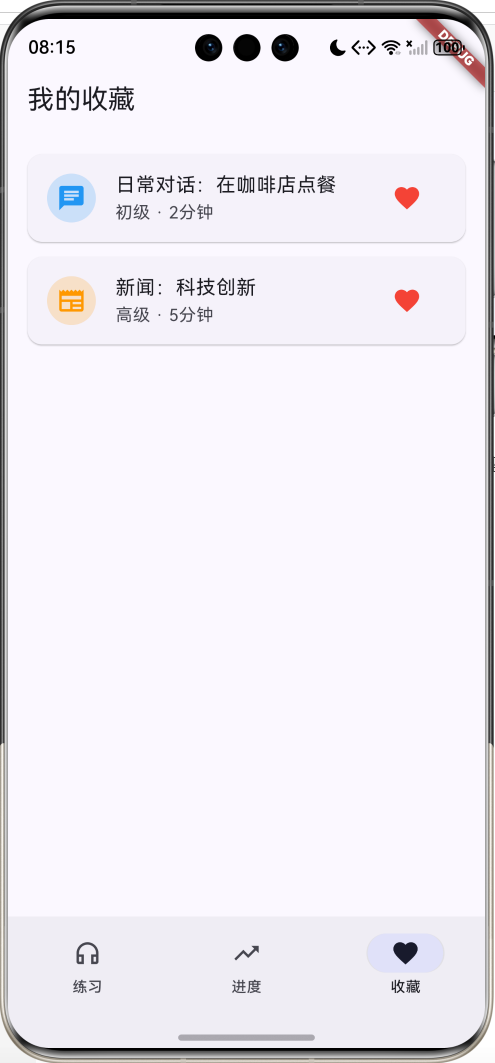
运行效果图
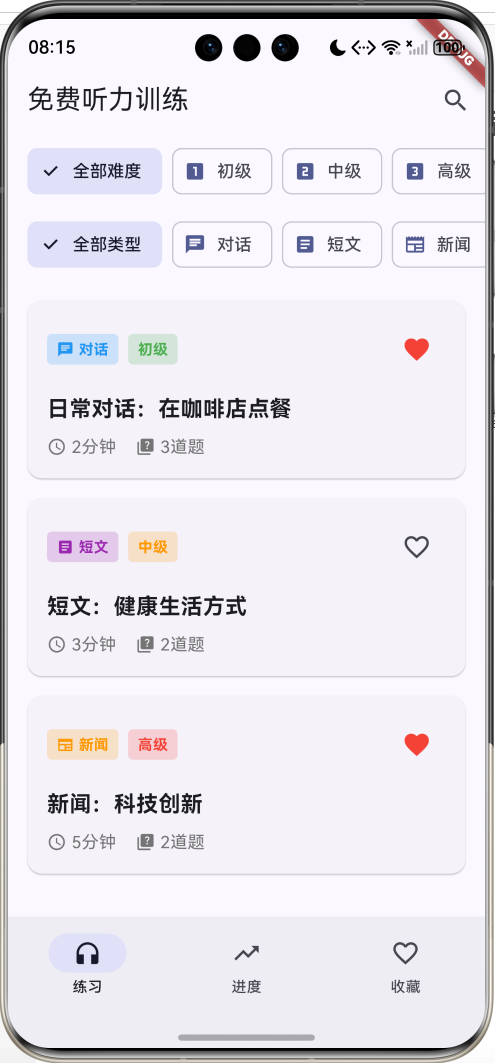
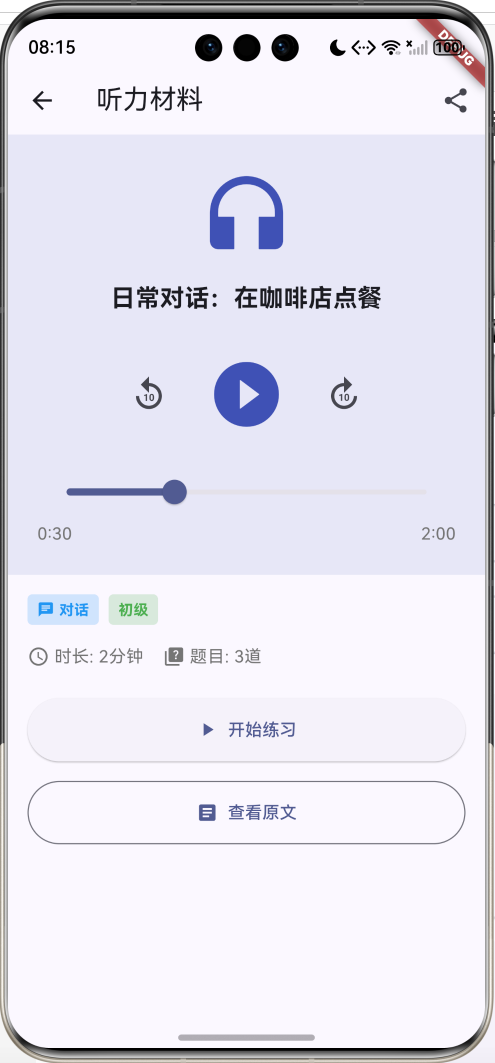
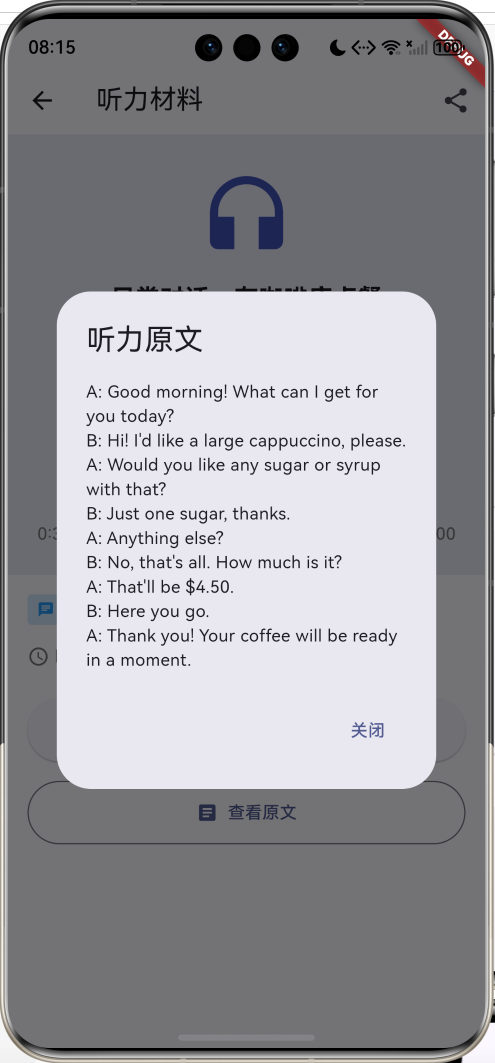
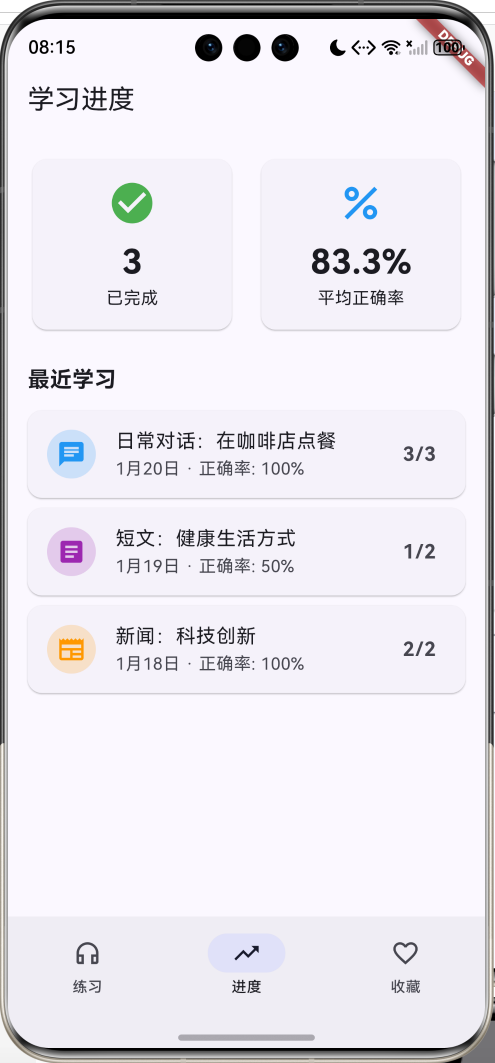
主要功能
- 🎧 听力材料库(对话、短文、新闻、讲座、听写)
- 📊 3个难度等级(初级、中级、高级)
- 🎯 听力练习(选择题)
- 📈 学习进度追踪
- ⭐ 收藏功能
- 📝 听力原文查看
- 🎵 音频播放控制
应用特色
- 材料丰富:多种类型的听力材料
- 难度分级:适合不同水平的学习者
- 即时反馈:练习后立即查看结果
- 进度追踪:记录学习历史和正确率
- 完全免费:所有功能免费使用
数据模型设计
1. 难度等级枚举(DifficultyLevel)
enum DifficultyLevel {
  beginner('初级', Icons.looks_one, Colors.green),
  intermediate('中级', Icons.looks_two, Colors.orange),
  advanced('高级', Icons.looks_3, Colors.red);

  final String label;
  final IconData icon;
  final Color color;
  const DifficultyLevel(this.label, this.icon, this.color);
}
2. 练习类型枚举(ExerciseType)
enum ExerciseType {
  conversation('对话', Icons.chat, Colors.blue),
  passage('短文', Icons.article, Colors.purple),
  news('新闻', Icons.newspaper, Colors.orange),
  lecture('讲座', Icons.school, Colors.green),
  dictation('听写', Icons.edit, Colors.pink);

  final String label;
  final IconData icon;
  final Color color;
  const ExerciseType(this.label, this.icon, this.color);
}
3. 听力材料模型(ListeningMaterial)
class ListeningMaterial {
  final String id;
  final String title;
  final ExerciseType type;
  final DifficultyLevel level;
  final int duration;
  final String audioUrl;
  final String transcript;
  final List<Question> questions;
  final DateTime addedDate;
  bool isCompleted;
  bool isFavorite;
}
4. 问题模型(Question)
class Question {
  final String id;
  final String question;
  final List<String> options;
  final int correctAnswer;
}
5. 学习记录模型(StudyRecord)
class StudyRecord {
  final String materialId;
  final DateTime date;
  final int score;
  final int totalQuestions;
  final int timeSpent;

  double get accuracy => (score / totalQuestions * 100);
}
核心功能实现
1. 材料列表展示
展示听力材料,支持按难度和类型筛选。
Widget _buildMaterialCard(ListeningMaterial material) {
  return Card(
    child: InkWell(
      onTap: () => Navigator.push(...),
      child: Padding(
        padding: EdgeInsets.all(16),
        child: Column(
          children: [
            // 类型和难度标签
            Row(
              children: [
                Container(
                  decoration: BoxDecoration(
                    color: material.type.color.withOpacity(0.2),
                  ),
                  child: Text(material.type.label),
                ),
                Container(
                  decoration: BoxDecoration(
                    color: material.level.color.withOpacity(0.2),
                  ),
                  child: Text(material.level.label),
                ),
              ],
            ),
            // 标题
            Text(material.title),
            // 时长和题目数
            Row(
              children: [
                Icon(Icons.access_time),
                Text('${material.duration}分钟'),
                Icon(Icons.quiz),
                Text('${material.questions.length}道题'),
              ],
            ),
          ],
        ),
      ),
    ),
  );
}
2. 音频播放器
提供播放、暂停、快进、快退等控制。
// 播放控制
Row(
  mainAxisAlignment: MainAxisAlignment.center,
  children: [
    IconButton(
      icon: Icon(Icons.replay_10),
      onPressed: () => rewind10Seconds(),
    ),
    IconButton(
      icon: Icon(Icons.play_circle_filled),
      iconSize: 64,
      onPressed: () => togglePlay(),
    ),
    IconButton(
      icon: Icon(Icons.forward_10),
      onPressed: () => forward10Seconds(),
    ),
  ],
)
3. 练习答题
展示题目和选项,记录用户答案。
// 选项列表
...List.generate(question.options.length, (index) {
  final isSelected = _answers[_currentQuestion] == index;
  return Card(
    color: isSelected ? Colors.indigo.withOpacity(0.1) : null,
    child: InkWell(
      onTap: () {
        setState(() {
          _answers[_currentQuestion] = index;
        });
      },
      child: Row(
        children: [
          CircleAvatar(
            child: Text(String.fromCharCode(65 + index)),
          ),
          Text(question.options[index]),
        ],
      ),
    ),
  );
})
4. 结果统计
计算正确率并展示结果。
void _showResults() {
  int correctCount = 0;
  for (int i = 0; i < questions.length; i++) {
    if (_answers[i] == questions[i].correctAnswer) {
      correctCount++;
    }
  }

  showDialog(
    context: context,
    builder: (context) => AlertDialog(
      title: Text('练习完成'),
      content: Column(
        children: [
          Icon(Icons.emoji_events, size: 64),
          Text('正确率: ${(correctCount / questions.length * 100).toStringAsFixed(0)}%'),
          Text('答对 $correctCount 题,共 ${questions.length} 题'),
        ],
      ),
    ),
  );
}
UI组件结构
整体架构
应用采用3页NavigationBar结构:
┌─────────────────────────────────┐
│       练习页(材料列表)         │
│  ┌───────────────────────────┐  │
│  │   难度筛选栏               │  │
│  │  [全部][初级][中级][高级]  │  │
│  └───────────────────────────┘  │
│  ┌───────────────────────────┐  │
│  │   类型筛选栏               │  │
│  │  [全部][对话][短文]...    │  │
│  └───────────────────────────┘  │
│  ┌───────────────────────────┐  │
│  │ [对话][初级]         [❤️] │  │
│  │ 日常对话:在咖啡店点餐     │  │
│  │ ⏰ 2分钟  📝 3道题        │  │
│  └───────────────────────────┘  │
└─────────────────────────────────┘
┌─────────────────────────────────┐
│       进度页(学习进度)         │
│  ┌──────┐  ┌──────┐            │
│  │  ✅   │  │  📊   │            │
│  │   3   │  │ 83.3% │            │
│  │已完成 │  │平均正确率│          │
│  └──────┘  └──────┘            │
│  最近学习                       │
│  [💬] 日常对话:在咖啡店点餐   │
│       12月20日 · 正确率:100%   │
└─────────────────────────────────┘
┌─────────────────────────────────┐
│       收藏页(我的收藏)         │
│  [💬] 日常对话:在咖啡店点餐   │
│       初级 · 2分钟        [❤️] │
│  [📰] 新闻:科技创新           │
│       高级 · 5分钟        [❤️] │
└─────────────────────────────────┘
功能扩展建议
1. 音频播放
集成真实的音频播放功能。
import 'package:audioplayers/audioplayers.dart';

class AudioPlayerController {
  final AudioPlayer _player = AudioPlayer();

  Future<void> play(String url) async {
    await _player.play(UrlSource(url));
  }

  Future<void> pause() async {
    await _player.pause();
  }

  Future<void> seek(Duration position) async {
    await _player.seek(position);
  }
}
2. 语音识别
添加口语练习功能。
import 'package:speech_to_text/speech_to_text.dart';

class SpeechRecognition {
  final SpeechToText _speech = SpeechToText();

  Future<void> startListening() async {
    await _speech.listen(
      onResult: (result) {
        print(result.recognizedWords);
      },
    );
  }
}
3. 离线下载
支持下载音频离线学习。
import 'package:dio/dio.dart';

Future<void> downloadAudio(String url, String savePath) async {
  final dio = Dio();
  await dio.download(
    url,
    savePath,
    onReceiveProgress: (received, total) {
      print('${(received / total * 100).toStringAsFixed(0)}%');
    },
  );
}
4. 学习提醒
设置每日学习提醒。
import 'package:flutter_local_notifications/flutter_local_notifications.dart';

class NotificationService {
  final FlutterLocalNotificationsPlugin _notifications =
      FlutterLocalNotificationsPlugin();

  Future<void> scheduleDailyReminder() async {
    await _notifications.zonedSchedule(
      0,
      '听力训练提醒',
      '今天还没有练习听力哦!',
      _nextInstanceOfTime(20, 0),
      const NotificationDetails(),
      uiLocalNotificationDateInterpretation:
          UILocalNotificationDateInterpretation.absoluteTime,
      matchDateTimeComponents: DateTimeComponents.time,
    );
  }
}
5. 社区功能
添加学习打卡和排行榜。
class Community {
  final String userId;
  final int totalDays;
  final int continuousDays;
  final int ranking;
}
部署指南
环境要求
- Flutter SDK: 3.0+
- Dart SDK: 3.0+
- 支持平台: Android、iOS、Web、HarmonyOS
依赖包配置
dependencies:
  flutter:
    sdk: flutter
  cupertino_icons: ^1.0.2
运行步骤
- 安装依赖
flutter pub get
- 运行应用
flutter run
- 打包发布
# Android
flutter build apk --release

# iOS
flutter build ios --release

# HarmonyOS
flutter build hap --release
技术要点
1. 枚举的使用
使用增强型枚举定义难度等级和练习类型。
2. 状态管理
使用StatefulWidget管理答题状态。
3. 对话框
使用AlertDialog展示结果。
4. 进度指示器
使用LinearProgressIndicator显示答题进度。
注意事项
1. 音频资源
- 使用合法的音频资源
- 注意版权问题
- 提供音频来源说明
2. 用户体验
- 提供清晰的音频质量
- 支持调节播放速度
- 提供字幕选项
3. 学习效果
- 提供详细的错题解析
- 记录学习曲线
- 推荐适合的材料
总结
本教程介绍了免费听力训练应用的开发过程,包括数据模型设计、核心功能实现、UI组件构建等。应用功能实用,界面友好,是学习英语听力的好工具。
欢迎加入开源鸿蒙跨平台社区:https://openharmonycrossplatform.csdn.net

讨论HarmonyOS开发技术,专注于API与组件、DevEco Studio、测试、元服务和应用上架分发等。
更多推荐

 18
18 0
0- 0


 已为社区贡献29条内容

所有评论(0)