Flutter 框架跨平台鸿蒙开发 - 手工皮具制作记录:打造专业级皮具制作管理工具
Flutter手工皮具制作记录:打造专业级皮具制作管理工具
项目简介
手工皮具制作记录是一款专为皮具手工爱好者设计的Flutter应用,帮助用户系统化管理皮具制作项目。从材料准备、工具清单到制作步骤,全方位记录每一个制作细节,让手工制作更加专业和有条理。
运行效果图
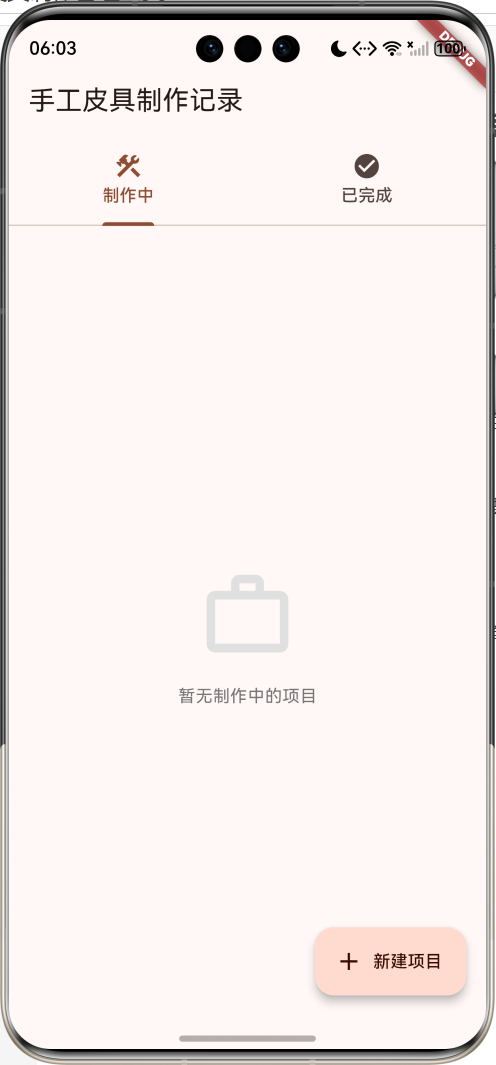
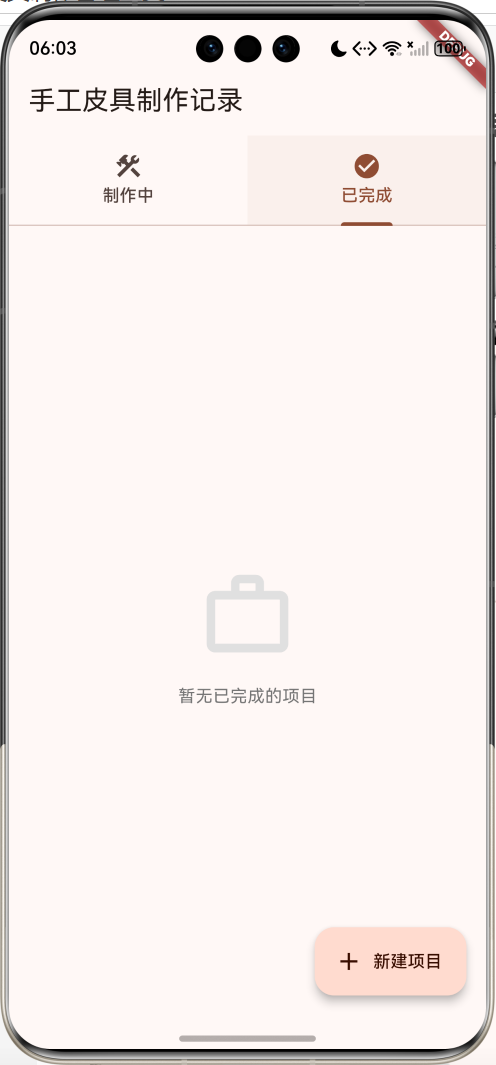
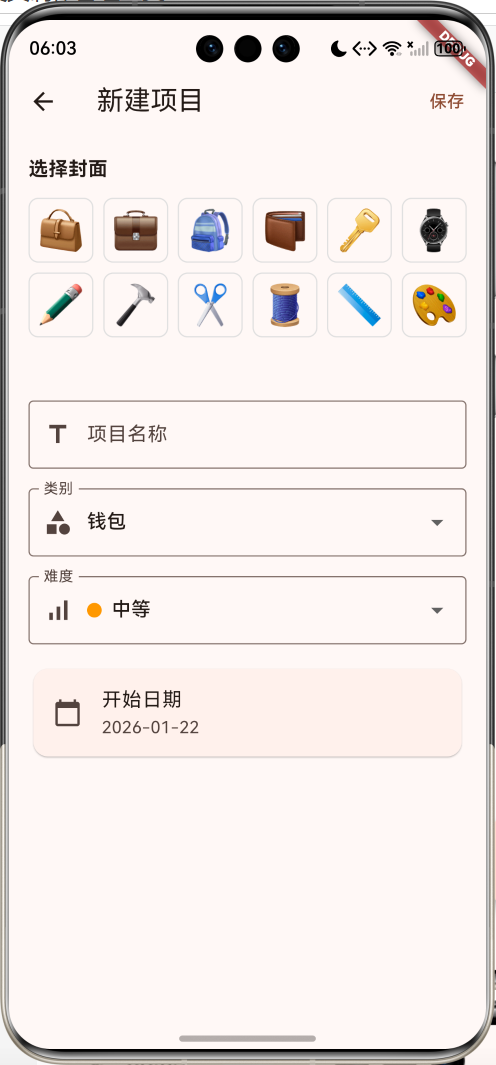
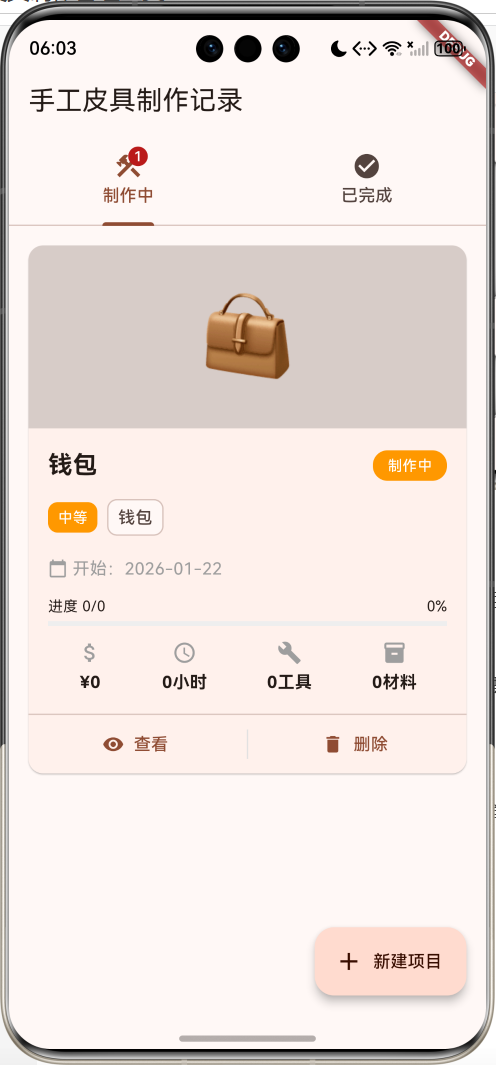
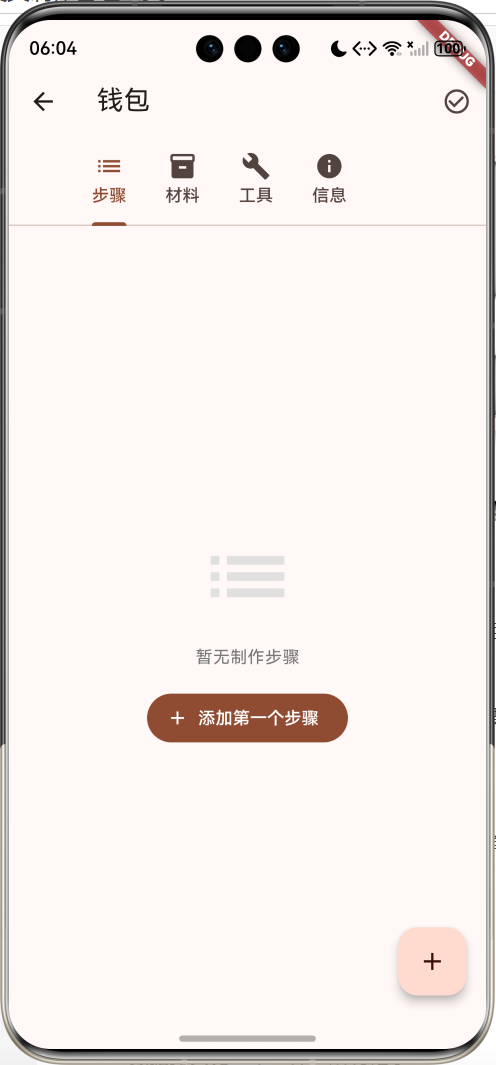
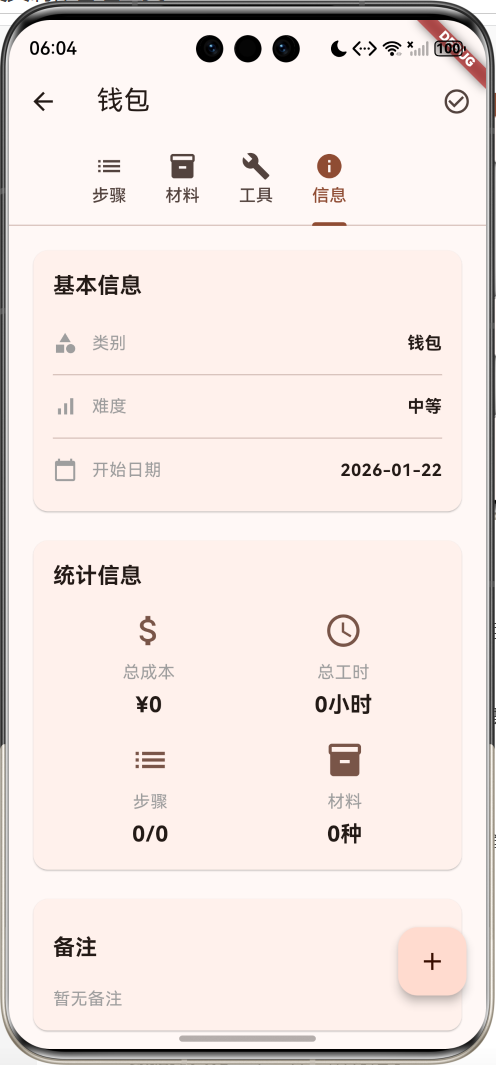
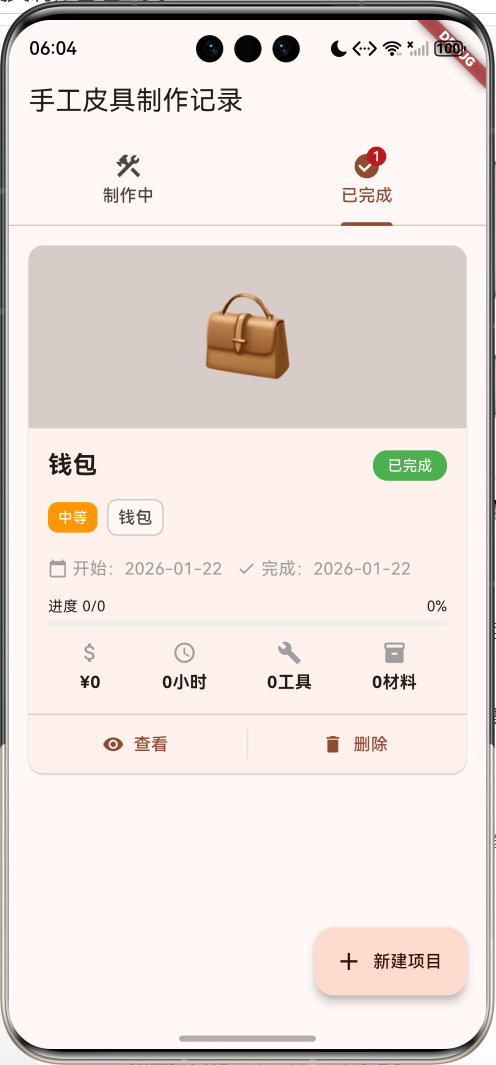
核心功能
- 项目管理:创建、查看、删除皮具制作项目
- 状态分类:制作中和已完成两种状态
- 8种类别:钱包、手包、卡包、钥匙包、腰带、表带、笔袋、其他
- 难度分级:简单、中等、困难三个等级
- 步骤管理:可拖拽排序的制作步骤列表
- 材料清单:记录材料名称、规格、数量、单价
- 工具清单:管理所需工具及拥有状态
- 成本统计:自动计算材料总成本
- 进度追踪:实时显示项目完成进度
- 时间记录:记录每个步骤的预计时间
- 数据持久化:本地保存所有记录
技术特点
- Material Design 3设计风格
- TabBar多页面架构
- ReorderableListView拖拽排序
- Badge徽章提醒
- 进度条可视化
- 响应式卡片布局
- SharedPreferences数据持久化
- 完整的表单验证
核心代码实现
1. 皮具项目数据模型
class LeatherworkProject {
  String id;
  String name;              // 项目名称
  String category;          // 类别
  DateTime startDate;       // 开始日期
  DateTime? completedDate;  // 完成日期
  String difficulty;        // 难度
  List<Material> materials; // 材料列表
  List<Tool> tools;         // 工具列表
  List<Step> steps;         // 步骤列表
  double totalCost;         // 总成本
  int totalHours;           // 总工时
  String coverImage;        // 封面图标
  List<String> photos;      // 照片列表
  String notes;             // 备注

  // 是否完成
  bool get isCompleted => completedDate != null;

  // 状态文本
  String get statusText => isCompleted ? '已完成' : '制作中';

  // 已完成步骤数
  int get completedSteps => steps.where((s) => s.isCompleted).length;

  // 进度百分比
  double get progress {
    if (steps.isEmpty) return 0;
    return completedSteps / steps.length;
  }
}
模型字段说明:
| 字段 | 类型 | 说明 |
|---|---|---|
| id | String | 唯一标识符 |
| name | String | 项目名称 |
| category | String | 类别(钱包/手包等) |
| startDate | DateTime | 开始日期 |
| completedDate | DateTime? | 完成日期(可选) |
| difficulty | String | 难度等级 |
| materials | List | 材料列表 |
| tools | List | 工具列表 |
| steps | List | 制作步骤列表 |
| totalCost | double | 总成本 |
| totalHours | int | 总工时 |
| coverImage | String | 封面emoji |
| photos | List | 照片列表 |
| notes | String | 备注信息 |
计算属性:
isCompleted:判断项目是否完成statusText:返回状态文本completedSteps:已完成的步骤数量progress:计算完成进度(0-1)
2. 材料模型
class Material {
  String name;              // 材料名称
  String specification;     // 规格
  double quantity;          // 数量
  String unit;              // 单位
  double price;             // 单价

  // 计算总价
  double get totalPrice => quantity * price;
}
材料字段说明:
| 字段 | 类型 | 说明 |
|---|---|---|
| name | String | 材料名称(如:植鞣革) |
| specification | String | 规格(如:2.0mm厚) |
| quantity | double | 数量 |
| unit | String | 单位(张/米/个等) |
| price | double | 单价 |
3. 工具模型
class Tool {
  String name;    // 工具名称
  String type;    // 工具类型
  bool owned;     // 是否已有

  Tool({
    required this.name,
    required this.type,
    this.owned = true,
  });
}
工具类型:
- 切割工具:美工刀、裁皮刀等
- 打孔工具:菱斩、圆斩等
- 缝合工具:针、线等
- 打磨工具:砂纸、磨边器等
- 测量工具:尺子、划线器等
- 其他工具
4. 制作步骤模型
class Step {
  String title;              // 步骤标题
  String description;        // 步骤描述
  int estimatedMinutes;      // 预计时间(分钟)
  bool isCompleted;          // 是否完成
  DateTime? completedTime;   // 完成时间
  String photo;              // 照片emoji

  Step({
    required this.title,
    required this.description,
    this.estimatedMinutes = 30,
    this.isCompleted = false,
    this.completedTime,
    this.photo = '',
  });
}
5. TabBar双状态布局
class _LeatherworkListPageState extends State<LeatherworkListPage>
with SingleTickerProviderStateMixin {
late TabController _tabController;
List<LeatherworkProject> _projects = [];
void initState() {
super.initState();
_tabController = TabController(length: 2, vsync: this);
_loadProjects();
}
Widget build(BuildContext context) {
return Scaffold(
appBar: AppBar(
title: const Text('手工皮具制作记录'),
bottom: TabBar(
controller: _tabController,
tabs: [
Tab(
text: '制作中',
icon: Badge(
label: Text('${_ongoingProjects.length}'),
isLabelVisible: _ongoingProjects.isNotEmpty,
child: const Icon(Icons.construction),
),
),
Tab(
text: '已完成',
icon: Badge(
label: Text('${_completedProjects.length}'),
isLabelVisible: _completedProjects.isNotEmpty,
child: const Icon(Icons.check_circle),
),
),
],
),
),
body: TabBarView(
controller: _tabController,
children: [
_buildProjectList(_ongoingProjects, '暂无制作中的项目'),
_buildProjectList(_completedProjects, '暂无已完成的项目'),
],
),
);
}
List<LeatherworkProject> get _ongoingProjects {
return _projects.where((p) => !p.isCompleted).toList()
..sort((a, b) => b.startDate.compareTo(a.startDate));
}
List<LeatherworkProject> get _completedProjects {
return _projects.where((p) => p.isCompleted).toList()
..sort((a, b) => b.completedDate!.compareTo(a.completedDate!));
}
}
TabBar要点:
- 使用
SingleTickerProviderStateMixin提供动画支持 TabController管理2个Tab页面Badge显示每个状态的项目数量- 自动根据完成状态分类显示
6. ReorderableListView拖拽排序
Widget _buildStepsTab() {
  return ReorderableListView.builder(
    padding: const EdgeInsets.all(16),
    itemCount: widget.project.steps.length,
    onReorder: (oldIndex, newIndex) {
      setState(() {
        if (newIndex > oldIndex) {
          newIndex -= 1;
        }
        final step = widget.project.steps.removeAt(oldIndex);
        widget.project.steps.insert(newIndex, step);
      });
      Navigator.pop(context, true);
    },
    itemBuilder: (context, index) {
      final step = widget.project.steps[index];
      return Card(
        key: ValueKey(step.title + index.toString()),
        child: ListTile(
          leading: Checkbox(
            value: step.isCompleted,
            onChanged: (value) {
              setState(() {
                step.isCompleted = value!;
                if (value) {
                  step.completedTime = DateTime.now();
                }
              });
            },
          ),
          title: Text('${index + 1}. ${step.title}'),
          trailing: const Icon(Icons.drag_handle),
        ),
      );
    },
  );
}
拖拽排序要点:
- 每个item必须有唯一的
key onReorder回调处理排序逻辑newIndex > oldIndex时需要减1- 使用
drag_handle图标提示可拖拽
7. 进度条可视化
Row(
  children: [
    Expanded(
      child: Column(
        children: [
          Row(
            mainAxisAlignment: MainAxisAlignment.spaceBetween,
            children: [
              Text('进度 ${project.completedSteps}/${project.steps.length}'),
              Text('${(project.progress * 100).toStringAsFixed(0)}%'),
            ],
          ),
          LinearProgressIndicator(
            value: project.progress,
            backgroundColor: Colors.grey[200],
            color: Colors.brown,
          ),
        ],
      ),
    ),
  ],
)
进度计算:
- 已完成步骤数 / 总步骤数
- 实时更新显示
- 进度条可视化
8. 材料成本统计
Widget _buildMaterialsTab() {
  final totalCost = widget.project.materials.fold(
    0.0,
    (sum, m) => sum + m.totalPrice,
  );

  return Column(
    children: [
      Container(
        padding: const EdgeInsets.all(16),
        color: Colors.brown[50],
        child: Row(
          mainAxisAlignment: MainAxisAlignment.spaceBetween,
          children: [
            const Text('材料总成本'),
            Text(
              '¥${totalCost.toStringAsFixed(2)}',
              style: const TextStyle(
                fontSize: 20,
                fontWeight: FontWeight.bold,
                color: Colors.red,
              ),
            ),
          ],
        ),
      ),
      // 材料列表...
    ],
  );
}
成本统计特点:
- 自动计算总成本
- 显示每项材料小计
- 红色醒目显示总价
9. 难度等级颜色
Color _getDifficultyColor(String difficulty) {
  switch (difficulty) {
    case '简单':
      return Colors.green;
    case '中等':
      return Colors.orange;
    case '困难':
      return Colors.red;
    default:
      return Colors.grey;
  }
}
难度颜色映射:
- 简单:绿色
- 中等:橙色
- 困难:红色
技术要点详解
ReorderableListView详解
ReorderableListView实现拖拽排序:
ReorderableListView.builder(
  itemCount: items.length,
  onReorder: (oldIndex, newIndex) {
    setState(() {
      if (newIndex > oldIndex) {
        newIndex -= 1;
      }
      final item = items.removeAt(oldIndex);
      items.insert(newIndex, item);
    });
  },
  itemBuilder: (context, index) {
    return ListTile(
      key: ValueKey(items[index].id),
      title: Text(items[index].name),
      trailing: const Icon(Icons.drag_handle),
    );
  },
)
关键点:
- 每个item必须有唯一的
key newIndex > oldIndex时需要减1- 使用
removeAt和insert重新排序 trailing显示拖拽手柄图标
Checkbox状态管理
管理步骤完成状态:
Checkbox(
  value: step.isCompleted,
  onChanged: (value) {
    setState(() {
      step.isCompleted = value!;
      if (value) {
        step.completedTime = DateTime.now();
      } else {
        step.completedTime = null;
      }
    });
  },
)
状态更新:
- 勾选时记录完成时间
- 取消勾选时清除完成时间
- 自动更新UI显示
List.fold累加计算
计算列表总和:
final totalCost = materials.fold(
  0.0,  // 初始值
  (sum, material) => sum + material.totalPrice,
);

// 等价于
double totalCost = 0.0;
for (var material in materials) {
  totalCost += material.totalPrice;
}
fold方法:
- 第一个参数:初始值
- 第二个参数:累加函数
- 返回累加结果
Slider滑块组件
选择预计时间:
Row(
  children: [
    const Text('预计时间:'),
    Expanded(
      child: Slider(
        value: _estimatedMinutes.toDouble(),
        min: 10,
        max: 240,
        divisions: 23,
        label: '$_estimatedMinutes分钟',
        onChanged: (value) {
          setState(() {
            _estimatedMinutes = value.toInt();
          });
        },
      ),
    ),
    Text('$_estimatedMinutes分钟'),
  ],
)
Slider属性:
value:当前值min:最小值max:最大值divisions:分段数label:显示标签onChanged:值改变回调
SwitchListTile开关
工具拥有状态切换:
SwitchListTile(
  title: const Text('是否已有'),
  value: _owned,
  onChanged: (value) {
    setState(() {
      _owned = value;
    });
  },
)
SwitchListTile特点:
- 包含标题和开关
- 点击整行都可切换
- 自动处理动画
DropdownButtonFormField下拉选择
选择类别和难度:
DropdownButtonFormField<String>(
  value: _category,
  decoration: const InputDecoration(
    labelText: '类别',
    prefixIcon: Icon(Icons.category),
    border: OutlineInputBorder(),
  ),
  items: _categories.map((category) {
    return DropdownMenuItem(
      value: category,
      child: Text(category),
    );
  }).toList(),
  onChanged: (value) {
    setState(() {
      _category = value!;
    });
  },
)
下拉选择特点:
- 支持表单验证
- 可自定义装饰
- 支持泛型类型
皮具制作功能详解
制作步骤管理
步骤管理是核心功能:
步骤管理流程:
- 添加步骤信息
- 显示在可拖拽列表
- 支持排序调整
- 勾选标记完成
- 自动更新进度
材料成本计算
材料成本自动计算:
class MaterialCostCalculator {
  // 计算单项材料成本
  double calculateItemCost(Material material) {
    return material.quantity * material.price;
  }

  // 计算总成本
  double calculateTotalCost(List<Material> materials) {
    return materials.fold(0.0, (sum, m) => sum + m.totalPrice);
  }

  // 按类型统计
  Map<String, double> calculateByType(List<Material> materials) {
    final costByType = <String, double>{};
    for (var material in materials) {
      final type = material.name.split(' ')[0];
      costByType[type] = (costByType[type] ?? 0) + material.totalPrice;
    }
    return costByType;
  }
}
工具清单管理
工具管理帮助准备:
class ToolManager {
  // 获取已有工具
  List<Tool> getOwnedTools(List<Tool> tools) {
    return tools.where((t) => t.owned).toList();
  }

  // 获取需购买工具
  List<Tool> getNeededTools(List<Tool> tools) {
    return tools.where((t) => !t.owned).toList();
  }

  // 按类型分组
  Map<String, List<Tool>> groupByType(List<Tool> tools) {
    final grouped = <String, List<Tool>>{};
    for (var tool in tools) {
      if (!grouped.containsKey(tool.type)) {
        grouped[tool.type] = [];
      }
      grouped[tool.type]!.add(tool);
    }
    return grouped;
  }
}
进度追踪算法
实时计算项目进度:
class ProgressTracker {
  // 计算完成百分比
  double calculateProgress(List<Step> steps) {
    if (steps.isEmpty) return 0;
    final completed = steps.where((s) => s.isCompleted).length;
    return completed / steps.length;
  }

  // 预计剩余时间
  int estimateRemainingTime(List<Step> steps) {
    return steps
        .where((s) => !s.isCompleted)
        .fold(0, (sum, s) => sum + s.estimatedMinutes);
  }

  // 已用时间
  int calculateUsedTime(List<Step> steps) {
    return steps
        .where((s) => s.isCompleted)
        .fold(0, (sum, s) => sum + s.estimatedMinutes);
  }
}
功能扩展建议
1. 图片上传功能
添加真实照片记录:
import 'package:image_picker/image_picker.dart';
import 'dart:io';

class PhotoManager {
  final ImagePicker _picker = ImagePicker();

  // 拍照
  Future<String?> takePhoto() async {
    final XFile? photo = await _picker.pickImage(
      source: ImageSource.camera,
      maxWidth: 1920,
      maxHeight: 1080,
      imageQuality: 85,
    );
    return photo?.path;
  }

  // 从相册选择
  Future<List<String>> pickPhotos() async {
    final List<XFile> images = await _picker.pickMultiImage(
      maxWidth: 1920,
      maxHeight: 1080,
      imageQuality: 85,
    );
    return images.map((img) => img.path).toList();
  }

  // 显示照片网格
  Widget buildPhotoGrid(List<String> photos) {
    return GridView.builder(
      gridDelegate: const SliverGridDelegateWithFixedCrossAxisCount(
        crossAxisCount: 3,
        crossAxisSpacing: 4,
        mainAxisSpacing: 4,
      ),
      itemCount: photos.length,
      itemBuilder: (context, index) {
        return Image.file(
          File(photos[index]),
          fit: BoxFit.cover,
        );
      },
    );
  }
}
2. 模板功能
预设常见皮具制作模板:
class ProjectTemplate {
  String name;
  String category;
  String difficulty;
  List<String> materials;
  List<String> tools;
  List<String> steps;

  ProjectTemplate({
    required this.name,
    required this.category,
    required this.difficulty,
    required this.materials,
    required this.tools,
    required this.steps,
  });
}

// 预设模板
final templates = [
  ProjectTemplate(
    name: '简易卡包',
    category: '卡包',
    difficulty: '简单',
    materials: ['植鞣革 2.0mm', '蜡线', '边油'],
    tools: ['美工刀', '菱斩', '针'],
    steps: [
      '裁剪皮料',
      '打孔',
      '缝合',
      '修边',
      '上边油',
    ],
  ),
  ProjectTemplate(
    name: '长款钱包',
    category: '钱包',
    difficulty: '中等',
    materials: ['植鞣革 2.0mm', '里皮 1.0mm', '拉链', '蜡线'],
    tools: ['裁皮刀', '菱斩', '针', '削边器'],
    steps: [
      '设计版型',
      '裁剪外皮',
      '裁剪里皮',
      '安装拉链',
      '缝合卡位',
      '组装钱包',
      '修边处理',
      '上边油',
    ],
  ),
];

// 使用模板创建项目
LeatherworkProject createFromTemplate(ProjectTemplate template) {
  final project = LeatherworkProject(
    id: DateTime.now().millisecondsSinceEpoch.toString(),
    name: template.name,
    category: template.category,
    difficulty: template.difficulty,
    startDate: DateTime.now(),
  );

  // 添加材料
  for (var materialName in template.materials) {
    project.materials.add(Material(
      name: materialName,
      specification: '',
      quantity: 1,
      unit: '份',
      price: 0,
    ));
  }

  // 添加工具
  for (var toolName in template.tools) {
    project.tools.add(Tool(
      name: toolName,
      type: '常用工具',
      owned: false,
    ));
  }

  // 添加步骤
  for (var i = 0; i < template.steps.length; i++) {
    project.steps.add(Step(
      title: template.steps[i],
      description: '',
      estimatedMinutes: 30,
    ));
  }

  return project;
}
3. 时间统计功能
详细的时间统计:
class TimeStatistics {
  List<LeatherworkProject> projects;

  TimeStatistics(this.projects);

  // 总制作时间
  int get totalHours {
    return projects.fold(0, (sum, p) => sum + p.totalHours);
  }

  // 平均每个项目时间
  double get averageHours {
    if (projects.isEmpty) return 0;
    return totalHours / projects.length;
  }

  // 按难度统计时间
  Map<String, int> getHoursByDifficulty() {
    final hours = <String, int>{};
    for (var project in projects) {
      hours[project.difficulty] =
          (hours[project.difficulty] ?? 0) + project.totalHours;
    }
    return hours;
  }

  // 按类别统计时间
  Map<String, int> getHoursByCategory() {
    final hours = <String, int>{};
    for (var project in projects) {
      hours[project.category] =
          (hours[project.category] ?? 0) + project.totalHours;
    }
    return hours;
  }
}
4. 成本分析功能
详细的成本分析:
class CostAnalysis {
  List<LeatherworkProject> projects;

  CostAnalysis(this.projects);

  // 总成本
  double get totalCost {
    return projects.fold(0.0, (sum, p) => sum + p.totalCost);
  }

  // 平均成本
  double get averageCost {
    if (projects.isEmpty) return 0;
    return totalCost / projects.length;
  }

  // 按类别统计成本
  Map<String, double> getCostByCategory() {
    final costs = <String, double>{};
    for (var project in projects) {
      costs[project.category] =
          (costs[project.category] ?? 0) + project.totalCost;
    }
    return costs;
  }

  // 材料成本占比
  Map<String, double> getMaterialCostRatio() {
    final ratios = <String, double>{};
    for (var project in projects) {
      for (var material in project.materials) {
        final ratio = material.totalPrice / project.totalCost;
        ratios[material.name] = (ratios[material.name] ?? 0) + ratio;
      }
    }
    return ratios;
  }
}
5. 视频教程集成
添加视频教程链接:
class VideoTutorial {
  String title;
  String url;
  int duration;
  String thumbnail;

  VideoTutorial({
    required this.title,
    required this.url,
    required this.duration,
    required this.thumbnail,
  });
}

class TutorialManager {
  List<VideoTutorial> tutorials = [];

  // 添加教程到步骤
  void addTutorialToStep(Step step, VideoTutorial tutorial) {
    // 在步骤描述中添加教程链接
    step.description += '\n\n视频教程:${tutorial.title}\n${tutorial.url}';
  }

  // 播放教程
  Future<void> playTutorial(String url) async {
    // 使用url_launcher打开视频
    // await launch(url);
  }
}
6. 分享功能
分享制作过程:
import 'package:share_plus/share_plus.dart';

class ShareService {
  // 分享项目
  Future<void> shareProject(LeatherworkProject project) async {
    final text = '''
我的手工皮具作品:${project.name}
类别:${project.category}
难度:${project.difficulty}
制作时间:${project.totalHours}小时
材料成本:¥${project.totalCost.toStringAsFixed(2)}
进度:${(project.progress * 100).toStringAsFixed(0)}%
    ''';

    await Share.share(text);
  }

  // 分享步骤
  Future<void> shareStep(Step step, int index) async {
    final text = '''
制作步骤 ${index + 1}:${step.title}
${step.description}
预计时间:${step.estimatedMinutes}分钟
    ''';

    await Share.share(text);
  }

  // 分享材料清单
  Future<void> shareMaterials(List<Material> materials) async {
    final text = '材料清单:\n' +
        materials.map((m) {
          return '${m.name} ${m.specification} ${m.quantity}${m.unit} ¥${m.price}';
        }).join('\n');

    await Share.share(text);
  }
}
7. 云端同步
使用Firebase同步数据:
import 'package:cloud_firestore/cloud_firestore.dart';

class CloudSyncService {
  final FirebaseFirestore _firestore = FirebaseFirestore.instance;

  // 上传项目
  Future<void> uploadProject(LeatherworkProject project) async {
    await _firestore
        .collection('projects')
        .doc(project.id)
        .set(project.toJson());
  }

  // 下载项目
  Future<LeatherworkProject?> downloadProject(String projectId) async {
    final doc = await _firestore
        .collection('projects')
        .doc(projectId)
        .get();

    if (doc.exists) {
      return LeatherworkProject.fromJson(doc.data()!);
    }
    return null;
  }

  // 同步所有项目
  Future<void> syncProjects(List<LeatherworkProject> localProjects) async {
    for (var project in localProjects) {
      await uploadProject(project);
    }
  }

  // 监听项目变化
  Stream<List<LeatherworkProject>> watchProjects(String userId) {
    return _firestore
        .collection('projects')
        .where('userId', isEqualTo: userId)
        .snapshots()
        .map((snapshot) {
      return snapshot.docs
          .map((doc) => LeatherworkProject.fromJson(doc.data()))
          .toList();
    });
  }
}
8. 统计图表
使用fl_chart显示统计:
import 'package:fl_chart/fl_chart.dart';
class StatisticsChartPage extends StatelessWidget {
final List<LeatherworkProject> projects;
const StatisticsChartPage({super.key, required this.projects});
Widget build(BuildContext context) {
return Scaffold(
appBar: AppBar(title: const Text('统计图表')),
body: ListView(
padding: const EdgeInsets.all(16),
children: [
_buildCostChart(),
const SizedBox(height: 24),
_buildTimeChart(),
const SizedBox(height: 24),
_buildCategoryChart(),
],
),
);
}
// 成本趋势图
Widget _buildCostChart() {
final sortedProjects = projects.toList()
..sort((a, b) => a.startDate.compareTo(b.startDate));
return Card(
child: Padding(
padding: const EdgeInsets.all(16),
child: Column(
crossAxisAlignment: CrossAxisAlignment.start,
children: [
const Text('成本趋势', style: TextStyle(fontSize: 18, fontWeight: FontWeight.bold)),
const SizedBox(height: 16),
SizedBox(
height: 200,
child: LineChart(
LineChartData(
lineBarsData: [
LineChartBarData(
spots: sortedProjects.asMap().entries.map((entry) {
return FlSpot(
entry.key.toDouble(),
entry.value.totalCost,
);
}).toList(),
isCurved: true,
color: Colors.brown,
),
],
),
),
),
],
),
),
);
}
// 时间统计图
Widget _buildTimeChart() {
final timeByCategory = <String, int>{};
for (var project in projects) {
timeByCategory[project.category] =
(timeByCategory[project.category] ?? 0) + project.totalHours;
}
return Card(
child: Padding(
padding: const EdgeInsets.all(16),
child: Column(
crossAxisAlignment: CrossAxisAlignment.start,
children: [
const Text('时间分布', style: TextStyle(fontSize: 18, fontWeight: FontWeight.bold)),
const SizedBox(height: 16),
SizedBox(
height: 200,
child: BarChart(
BarChartData(
barGroups: timeByCategory.entries.map((entry) {
return BarChartGroupData(
x: timeByCategory.keys.toList().indexOf(entry.key),
barRods: [
BarChartRodData(
toY: entry.value.toDouble(),
color: Colors.brown,
),
],
);
}).toList(),
),
),
),
],
),
),
);
}
// 类别分布图
Widget _buildCategoryChart() {
final categoryCount = <String, int>{};
for (var project in projects) {
categoryCount[project.category] =
(categoryCount[project.category] ?? 0) + 1;
}
return Card(
child: Padding(
padding: const EdgeInsets.all(16),
child: Column(
crossAxisAlignment: CrossAxisAlignment.start,
children: [
const Text('类别分布', style: TextStyle(fontSize: 18, fontWeight: FontWeight.bold)),
const SizedBox(height: 16),
SizedBox(
height: 200,
child: PieChart(
PieChartData(
sections: categoryCount.entries.map((entry) {
return PieChartSectionData(
value: entry.value.toDouble(),
title: entry.key,
color: Colors.primaries[
categoryCount.keys.toList().indexOf(entry.key) %
Colors.primaries.length
],
);
}).toList(),
),
),
),
],
),
),
);
}
}
常见问题解答
Q1: 如何批量导入材料清单?
A: 可以通过CSV文件导入:
import 'package:csv/csv.dart';
import 'dart:io';

class MaterialImporter {
  Future<List<Material>> importFromCSV(String filePath) async {
    final file = File(filePath);
    final csvString = await file.readAsString();
    final rows = const CsvToListConverter().convert(csvString);

    final materials = <Material>[];
    for (var i = 1; i < rows.length; i++) {  // 跳过表头
      final row = rows[i];
      materials.add(Material(
        name: row[0],
        specification: row[1],
        quantity: double.parse(row[2].toString()),
        unit: row[3],
        price: double.parse(row[4].toString()),
      ));
    }

    return materials;
  }

  // 导出为CSV
  Future<void> exportToCSV(List<Material> materials, String filePath) async {
    final rows = [
      ['材料名称', '规格', '数量', '单位', '单价'],
      ...materials.map((m) => [
        m.name,
        m.specification,
        m.quantity,
        m.unit,
        m.price,
      ]),
    ];

    final csv = const ListToCsvConverter().convert(rows);
    final file = File(filePath);
    await file.writeAsString(csv);
  }
}
Q2: 如何设置步骤提醒?
A: 使用本地通知:
import 'package:flutter_local_notifications/flutter_local_notifications.dart';

class StepReminderService {
  final FlutterLocalNotificationsPlugin _notifications =
      FlutterLocalNotificationsPlugin();

  Future<void> initialize() async {
    const androidSettings = AndroidInitializationSettings('@mipmap/ic_launcher');
    const iosSettings = DarwinInitializationSettings();
    const settings = InitializationSettings(
      android: androidSettings,
      iOS: iosSettings,
    );

    await _notifications.initialize(settings);
  }

  // 设置步骤提醒
  Future<void> scheduleStepReminder(
    LeatherworkProject project,
    Step step,
    DateTime reminderTime,
  ) async {
    await _notifications.zonedSchedule(
      step.title.hashCode,
      '制作提醒',
      '${project.name} - ${step.title}',
      tz.TZDateTime.from(reminderTime, tz.local),
      NotificationDetails(
        android: AndroidNotificationDetails(
          'step_reminder',
          '步骤提醒',
          importance: Importance.high,
        ),
      ),
      uiLocalNotificationDateInterpretation:
          UILocalNotificationDateInterpretation.absoluteTime,
    );
  }
}
Q3: 如何实现项目复制功能?
A: 创建项目副本:
LeatherworkProject copyProject(LeatherworkProject original) {
  return LeatherworkProject(
    id: DateTime.now().millisecondsSinceEpoch.toString(),
    name: '${original.name} (副本)',
    category: original.category,
    startDate: DateTime.now(),
    difficulty: original.difficulty,
    materials: original.materials.map((m) => Material(
      name: m.name,
      specification: m.specification,
      quantity: m.quantity,
      unit: m.unit,
      price: m.price,
    )).toList(),
    tools: original.tools.map((t) => Tool(
      name: t.name,
      type: t.type,
      owned: t.owned,
    )).toList(),
    steps: original.steps.map((s) => Step(
      title: s.title,
      description: s.description,
      estimatedMinutes: s.estimatedMinutes,
      photo: s.photo,
    )).toList(),
    coverImage: original.coverImage,
    notes: original.notes,
  );
}
Q4: 如何添加工具购买链接?
A: 在工具模型中添加链接字段:
class Tool {
  String name;
  String type;
  bool owned;
  String? purchaseUrl;  // 购买链接
  double? price;        // 价格

  Tool({
    required this.name,
    required this.type,
    this.owned = true,
    this.purchaseUrl,
    this.price,
  });
}

// 打开购买链接
Future<void> openPurchaseLink(String url) async {
  if (await canLaunch(url)) {
    await launch(url);
  }
}

// UI显示
ListTile(
  title: Text(tool.name),
  subtitle: tool.price != null
      ? Text('¥${tool.price!.toStringAsFixed(2)}')
      : null,
  trailing: tool.purchaseUrl != null
      ? IconButton(
          icon: const Icon(Icons.shopping_cart),
          onPressed: () => openPurchaseLink(tool.purchaseUrl!),
        )
      : null,
)
Q5: 如何实现项目归档功能?
A: 添加归档状态:
class LeatherworkProject {
  // ... 其他字段
  bool isArchived;  // 是否归档

  LeatherworkProject({
    // ... 其他参数
    this.isArchived = false,
  });
}

// 归档管理
class ArchiveManager {
  // 归档项目
  void archiveProject(LeatherworkProject project) {
    project.isArchived = true;
  }

  // 取消归档
  void unarchiveProject(LeatherworkProject project) {
    project.isArchived = false;
  }

  // 获取归档项目
  List<LeatherworkProject> getArchivedProjects(
    List<LeatherworkProject> projects,
  ) {
    return projects.where((p) => p.isArchived).toList();
  }

  // 获取活跃项目
  List<LeatherworkProject> getActiveProjects(
    List<LeatherworkProject> projects,
  ) {
    return projects.where((p) => !p.isArchived).toList();
  }
}
项目总结
实现的功能
✅ 皮具项目管理(增删改查)
✅ 双状态分类(制作中/已完成)
✅ 8种皮具类别
✅ 3级难度分级
✅ 可拖拽排序的步骤列表
✅ 材料清单与成本统计
✅ 工具清单与拥有状态
✅ 进度实时追踪
✅ 时间预估功能
✅ 12种封面图标
✅ 备注功能
✅ 数据本地持久化
技术亮点
- ReorderableListView:拖拽排序步骤
- 四Tab架构:步骤/材料/工具/信息分页
- 自动成本计算:实时统计材料总成本
- 进度可视化:进度条实时显示完成度
- Checkbox管理:步骤完成状态追踪
- Slider时间选择:直观的时间预估
- 难度颜色编码:绿/橙/红三色区分
- 数据持久化:完整的JSON序列化
应用场景
- 🎨 个人皮具制作记录
- 📚 皮具制作教学
- 🏪 皮具工作室项目管理
- 📊 成本核算分析
- ⏱️ 时间管理优化
- 📝 制作经验积累
- 🛠️ 工具清单管理
- 💰 材料采购计划
数据流程图
制作流程图
手工皮具制作记录是一款专业的皮具制作管理应用,通过系统化的项目管理、详细的步骤记录、精确的成本统计,帮助皮具爱好者和从业者更好地管理制作过程,积累制作经验,提升制作效率。
欢迎加入开源鸿蒙跨平台社区:https://openharmonycrossplatform.csdn.net

讨论HarmonyOS开发技术,专注于API与组件、DevEco Studio、测试、元服务和应用上架分发等。
更多推荐



 17
17 0
0- 0


 已为社区贡献29条内容

所有评论(0)