Flutter 框架跨平台鸿蒙开发——图片重复模式
·
一、ImageRepeat概述
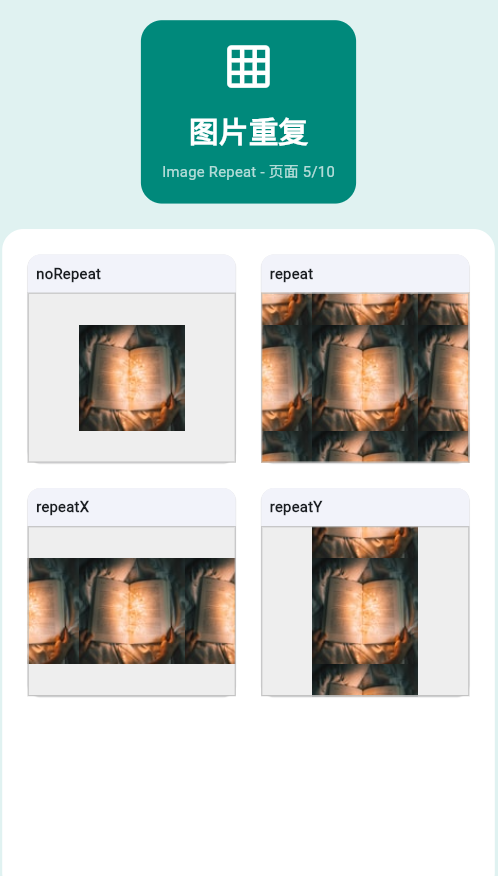
ImageRepeat控制图片的重复方式,常用于创建背景图案。
ImageRepeat类型
| ImageRepeat | 说明 | 使用场景 |
|---|---|---|
| noRepeat | 不重复(默认) | 单张图片显示 |
| repeat | 水平垂直重复 | 背景图案 |
| repeatX | 只水平重复 | 条纹背景 |
| repeatY | 只垂直重复 | 条纹背景 |
二、使用DecorationImage
Container(
  width: 200,
  height: 200,
  decoration: BoxDecoration(
    image: DecorationImage(
      image: AssetImage('assets/pattern.png'),
      repeat: ImageRepeat.repeat,
    ),
  ),
)
三、不同重复模式
noRepeat
Container(
  width: 200,
  height: 200,
  decoration: BoxDecoration(
    image: DecorationImage(
      image: AssetImage('assets/pattern.png'),
      repeat: ImageRepeat.noRepeat,
    ),
  ),
)
repeat
Container(
  width: 200,
  height: 200,
  decoration: BoxDecoration(
    image: DecorationImage(
      image: AssetImage('assets/pattern.png'),
      repeat: ImageRepeat.repeat,
    ),
  ),
)
repeatX
Container(
  width: 200,
  height: 200,
  decoration: BoxDecoration(
    image: DecorationImage(
      image: AssetImage('assets/pattern.png'),
      repeat: ImageRepeat.repeatX,
    ),
  ),
)
repeatY
Container(
  width: 200,
  height: 200,
  decoration: BoxDecoration(
    image: DecorationImage(
      image: AssetImage('assets/pattern.png'),
      repeat: ImageRepeat.repeatY,
    ),
  ),
)
四、完整示例
class ImageRepeatExample extends StatelessWidget {
const ImageRepeatExample({super.key});
Widget build(BuildContext context) {
return Scaffold(
appBar: AppBar(title: Text('图片重复')),
body: GridView.count(
crossAxisCount: 2,
padding: EdgeInsets.all(16),
mainAxisSpacing: 16,
crossAxisSpacing: 16,
children: [
_buildRepeatCard('noRepeat', ImageRepeat.noRepeat),
_buildRepeatCard('repeat', ImageRepeat.repeat),
_buildRepeatCard('repeatX', ImageRepeat.repeatX),
_buildRepeatCard('repeatY', ImageRepeat.repeatY),
],
),
);
}
Widget _buildRepeatCard(String label, ImageRepeat repeat) {
return Card(
child: Column(
children: [
Text(label, style: TextStyle(fontWeight: FontWeight.bold)),
Expanded(
child: Container(
width: double.infinity,
decoration: BoxDecoration(
color: Colors.grey.shade200,
image: DecorationImage(
image: AssetImage('assets/pattern.png'),
repeat: repeat,
),
),
),
),
],
),
);
}
}
欢迎加入开源鸿蒙跨平台社区:https://openharmonycrossplatform.csdn.net

讨论HarmonyOS开发技术,专注于API与组件、DevEco Studio、测试、元服务和应用上架分发等。
更多推荐

 14
14 0
0- 0



 已为社区贡献19条内容

所有评论(0)