Flutter 框架跨平台鸿蒙开发 - 烘焙食谱大全应用开发教程
Flutter烘焙食谱大全应用开发教程
项目概述
烘焙作为一门精致的生活艺术,越来越受到人们的喜爱。无论是专业烘焙师还是家庭烘焙爱好者,都需要一个便捷的工具来管理和查找烘焙食谱。本教程将带你开发一个功能完整的烘焙食谱大全应用,帮助用户更好地学习和管理烘焙技能。
运行效果图
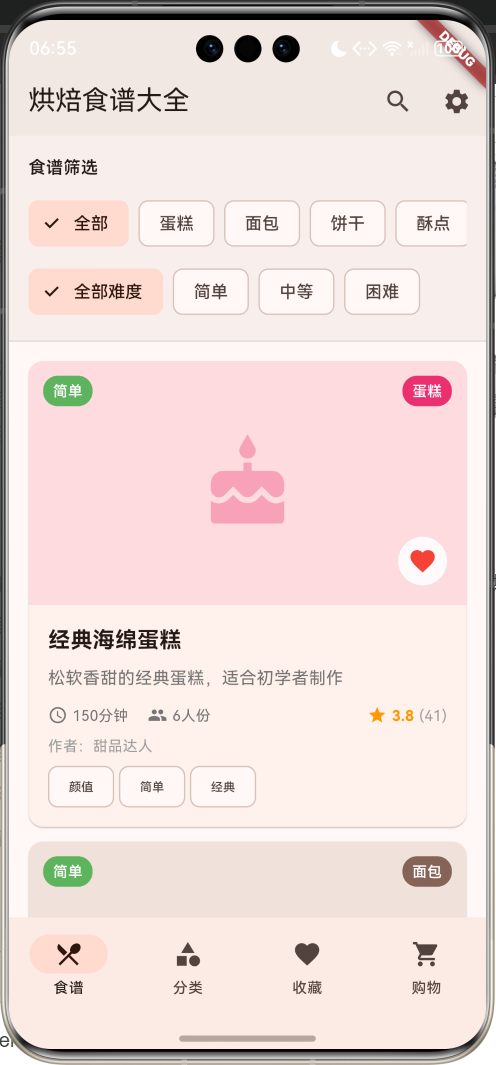
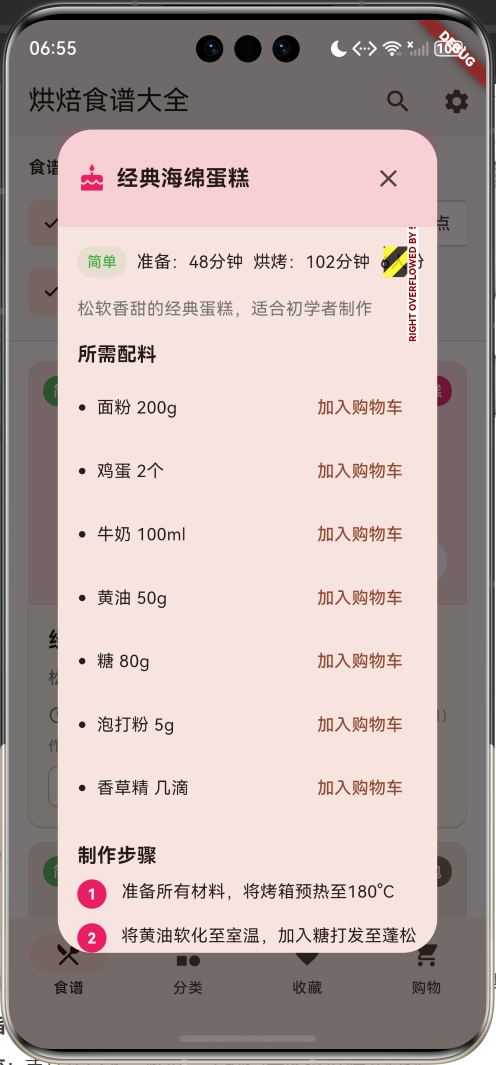
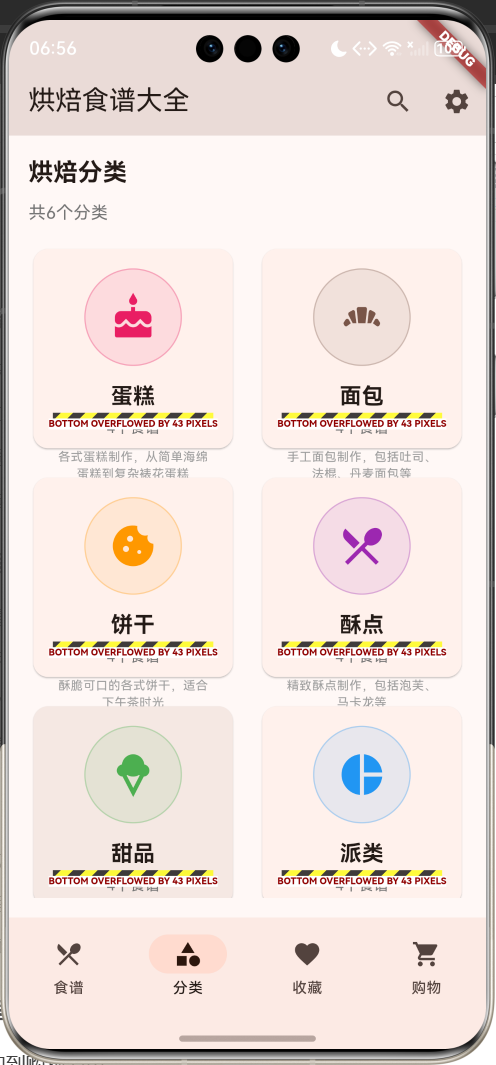
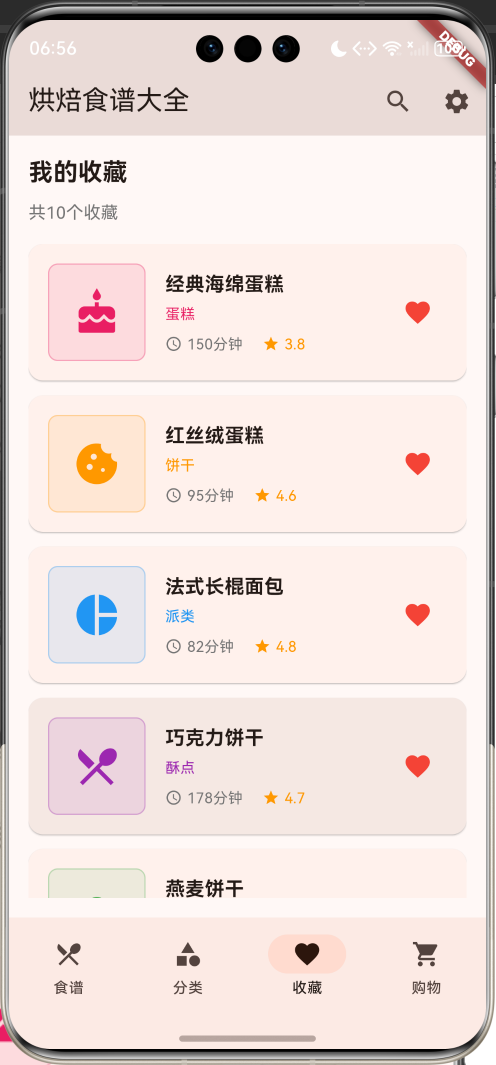
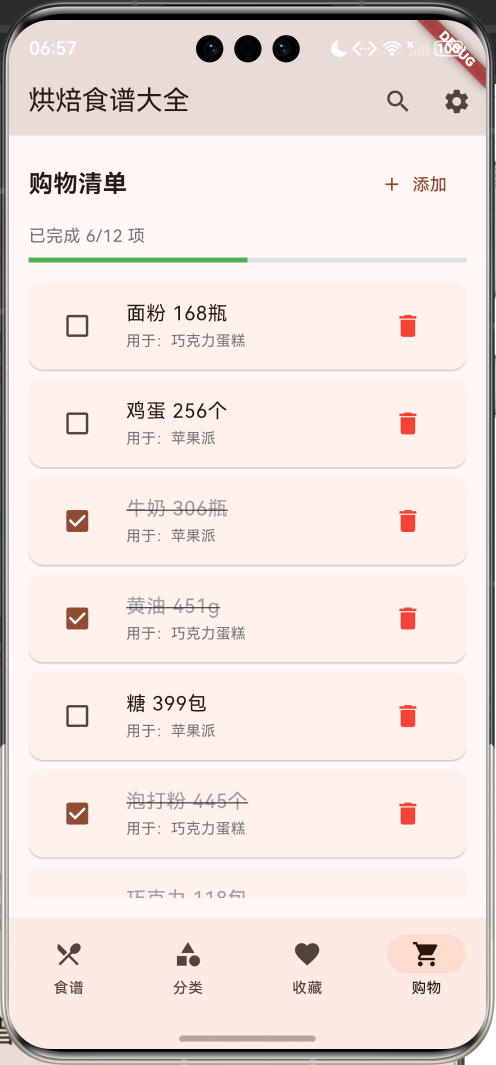
应用特色
- 丰富的食谱分类:涵盖蛋糕、面包、饼干、酥点、甜品、派类等六大烘焙分类
- 详细的制作指导:包含完整的配料清单、制作步骤和实用小贴士
- 智能筛选系统:支持按分类、难度、关键词等多维度筛选食谱
- 收藏管理功能:收藏喜爱的食谱,方便随时查看
- 购物清单管理:一键添加配料到购物清单,便于采购准备
- 营养信息展示:提供每份食谱的营养信息参考
- 用户评价系统:查看其他用户的制作心得和评分
技术栈
- 框架:Flutter 3.x
- 开发语言:Dart
- UI设计:Material Design 3
- 状态管理:StatefulWidget
- 数据存储:内存存储(可扩展为本地数据库)
核心功能模块
1. 食谱浏览与搜索
- 食谱列表展示和详情查看
- 多维度筛选和关键词搜索
- 食谱分类浏览
- 难度等级筛选
2. 食谱详情管理
- 完整的配料清单展示
- 详细的制作步骤指导
- 实用的制作小贴士
- 营养信息参考
3. 收藏系统
- 食谱收藏和取消收藏
- 收藏列表管理
- 快速访问收藏的食谱
4. 购物清单管理
- 配料一键添加到购物清单
- 购物项完成状态管理
- 手动添加购物项
- 购物进度跟踪
数据模型设计
BakingRecipe(烘焙食谱)模型
class BakingRecipe {
  final String id;              // 食谱唯一标识
  final String name;            // 食谱名称
  final String categoryId;      // 分类ID
  final String description;     // 食谱描述
  final String imageUrl;        // 食谱图片
  final int prepTime;           // 准备时间
  final int cookTime;           // 烘烤时间
  final int servings;           // 份数
  final String difficulty;      // 难度等级
  final List<Ingredient> ingredients; // 配料清单
  final List<String> instructions;    // 制作步骤
  final List<String> tips;      // 制作小贴士
  final double rating;          // 评分
  final int reviewCount;        // 评价数量
  final List<String> tags;      // 标签
  final String author;          // 作者
  final DateTime createdDate;   // 创建日期
  final bool isFavorite;        // 是否收藏
  final String nutritionInfo;   // 营养信息
}
BakingRecipe模型包含了烘焙食谱的完整信息,通过totalTime计算属性获取总制作时间,categoryName、categoryColor、categoryIcon等属性提供分类相关的显示信息,difficultyColor属性根据难度等级返回对应的颜色标识。
Ingredient(配料)模型
class Ingredient {
  final String name;            // 配料名称
  final String amount;          // 用量
  final String unit;            // 单位
  final String? note;           // 备注信息
}
Ingredient模型定义了烘焙配料的基本信息,displayText属性将配料信息格式化为易读的文本格式。
RecipeCategory(食谱分类)模型
class RecipeCategory {
  final String id;              // 分类唯一标识
  final String name;            // 分类名称
  final IconData icon;          // 分类图标
  final Color color;            // 分类颜色
  final String description;     // 分类描述
}
RecipeCategory模型定义了食谱分类的基本信息,为不同分类提供统一的视觉标识和描述。
ShoppingItem(购物项)模型
class ShoppingItem {
  final String id;              // 购物项唯一标识
  final String name;            // 物品名称
  final String amount;          // 数量
  final String unit;            // 单位
  final bool isCompleted;       // 是否已完成
  final String recipeId;        // 关联食谱ID
  final String recipeName;      // 关联食谱名称
}
ShoppingItem模型管理购物清单中的物品信息,支持完成状态跟踪和食谱关联。
RecipeReview(食谱评价)模型
class RecipeReview {
  final String id;              // 评价唯一标识
  final String recipeId;        // 关联食谱ID
  final String userName;        // 用户名
  final double rating;          // 评分
  final String comment;         // 评价内容
  final DateTime reviewDate;    // 评价日期
  final List<String> photos;    // 评价照片
}
RecipeReview模型存储用户对食谱的评价信息,包括评分、评论和照片等。
项目结构设计
lib/
├── main.dart                 # 应用入口文件
├── models/                   # 数据模型
│   ├── baking_recipe.dart   # 烘焙食谱模型
│   ├── ingredient.dart      # 配料模型
│   ├── recipe_category.dart # 食谱分类模型
│   ├── shopping_item.dart   # 购物项模型
│   └── recipe_review.dart   # 食谱评价模型
├── screens/                  # 页面文件
│   ├── home_screen.dart     # 主页面
│   ├── recipes_screen.dart  # 食谱页面
│   ├── categories_screen.dart # 分类页面
│   ├── favorites_screen.dart # 收藏页面
│   └── shopping_screen.dart # 购物页面
├── widgets/                  # 自定义组件
│   ├── recipe_card.dart     # 食谱卡片
│   ├── category_card.dart   # 分类卡片
│   ├── ingredient_list.dart # 配料列表
│   └── step_list.dart       # 步骤列表
└── services/                 # 业务逻辑
    └── recipe_service.dart   # 食谱数据服务
主界面设计与实现
底部导航栏设计
应用采用四个主要功能模块的底部导航设计:
- 食谱:浏览和搜索烘焙食谱
- 分类:按分类浏览食谱
- 收藏:查看收藏的食谱
- 购物:管理购物清单
bottomNavigationBar: NavigationBar(
  selectedIndex: _selectedIndex,
  onDestinationSelected: (index) {
    setState(() => _selectedIndex = index);
  },
  destinations: const [
    NavigationDestination(icon: Icon(Icons.restaurant_menu), label: '食谱'),
    NavigationDestination(icon: Icon(Icons.category), label: '分类'),
    NavigationDestination(icon: Icon(Icons.favorite), label: '收藏'),
    NavigationDestination(icon: Icon(Icons.shopping_cart), label: '购物'),
  ],
),
应用栏设计
appBar: AppBar(
  title: const Text('烘焙食谱大全'),
  backgroundColor: Colors.brown.withValues(alpha: 0.1),
  actions: [
    IconButton(
      onPressed: () {
        _showSearchDialog();
      },
      icon: const Icon(Icons.search),
    ),
    IconButton(
      onPressed: () {
        ScaffoldMessenger.of(context).showSnackBar(
          const SnackBar(content: Text('设置功能开发中...')),
        );
      },
      icon: const Icon(Icons.settings),
    ),
  ],
),
应用栏采用棕色主题,符合烘焙应用的温馨特征。提供搜索和设置功能,增强用户体验。
食谱浏览页面实现
食谱筛选功能
食谱页面顶部提供多维度筛选功能:
Widget _buildRecipeFilters() {
  return Container(
    padding: const EdgeInsets.all(16),
    decoration: BoxDecoration(
      color: Colors.brown.withValues(alpha: 0.05),
      border: Border(
          bottom: BorderSide(color: Colors.grey.withValues(alpha: 0.3))),
    ),
    child: Column(
      crossAxisAlignment: CrossAxisAlignment.start,
      children: [
        const Text('食谱筛选', style: TextStyle(fontWeight: FontWeight.w600)),
        const SizedBox(height: 12),
        // 分类筛选
        SingleChildScrollView(
          scrollDirection: Axis.horizontal,
          child: Row(
            children: [
              FilterChip(
                label: const Text('全部'),
                selected: _selectedCategoryId.isEmpty,
                onSelected: (selected) {
                  setState(() {
                    _selectedCategoryId = '';
                  });
                },
              ),
              const SizedBox(width: 8),
              ..._categories.map((category) {
                return Padding(
                  padding: const EdgeInsets.only(right: 8),
                  child: FilterChip(
                    label: Text(category.name),
                    selected: _selectedCategoryId == category.id,
                    onSelected: (selected) {
                      setState(() {
                        _selectedCategoryId = selected ? category.id : '';
                      });
                    },
                  ),
                );
              }),
            ],
          ),
        ),
        const SizedBox(height: 8),
        // 难度筛选
        SingleChildScrollView(
          scrollDirection: Axis.horizontal,
          child: Row(
            children: [
              FilterChip(
                label: const Text('全部难度'),
                selected: _selectedDifficulty.isEmpty,
                onSelected: (selected) {
                  setState(() {
                    _selectedDifficulty = '';
                  });
                },
              ),
              const SizedBox(width: 8),
              ...['简单', '中等', '困难'].map((difficulty) {
                return Padding(
                  padding: const EdgeInsets.only(right: 8),
                  child: FilterChip(
                    label: Text(difficulty),
                    selected: _selectedDifficulty == difficulty,
                    onSelected: (selected) {
                      setState(() {
                        _selectedDifficulty = selected ? difficulty : '';
                      });
                    },
                  ),
                );
              }),
            ],
          ),
        ),
      ],
    ),
  );
}
筛选功能支持以下维度:
- 分类筛选:蛋糕、面包、饼干、酥点、甜品、派类
- 难度筛选:简单、中等、困难
- 关键词搜索:支持食谱名称和描述的模糊搜索
食谱卡片设计
每个烘焙食谱以卡片形式展示关键信息:
Widget _buildRecipeCard(BakingRecipe recipe) {
  return Card(
    margin: const EdgeInsets.only(bottom: 12),
    child: InkWell(
      onTap: () => _showRecipeDetail(recipe),
      borderRadius: BorderRadius.circular(12),
      child: Column(
        crossAxisAlignment: CrossAxisAlignment.start,
        children: [
          // 食谱图片区域
          Container(
            height: 200,
            width: double.infinity,
            decoration: BoxDecoration(
              color: recipe.categoryColor.withValues(alpha: 0.1),
              borderRadius: const BorderRadius.vertical(top: Radius.circular(12)),
            ),
            child: Stack(
              children: [
                Center(
                  child: Icon(
                    recipe.categoryIcon,
                    size: 80,
                    color: recipe.categoryColor.withValues(alpha: 0.3),
                  ),
                ),
                // 分类标签
                Positioned(
                  top: 12,
                  right: 12,
                  child: Container(
                    padding: const EdgeInsets.symmetric(horizontal: 8, vertical: 4),
                    decoration: BoxDecoration(
                      color: recipe.categoryColor.withValues(alpha: 0.9),
                      borderRadius: BorderRadius.circular(12),
                    ),
                    child: Text(
                      recipe.categoryName,
                      style: const TextStyle(
                        fontSize: 12,
                        color: Colors.white,
                        fontWeight: FontWeight.w500,
                      ),
                    ),
                  ),
                ),
                // 难度标签
                Positioned(
                  top: 12,
                  left: 12,
                  child: Container(
                    padding: const EdgeInsets.symmetric(horizontal: 8, vertical: 4),
                    decoration: BoxDecoration(
                      color: recipe.difficultyColor.withValues(alpha: 0.9),
                      borderRadius: BorderRadius.circular(12),
                    ),
                    child: Text(
                      recipe.difficulty,
                      style: const TextStyle(
                        fontSize: 12,
                        color: Colors.white,
                        fontWeight: FontWeight.w500,
                      ),
                    ),
                  ),
                ),
                // 收藏按钮
                Positioned(
                  bottom: 12,
                  right: 12,
                  child: IconButton(
                    onPressed: () {
                      setState(() {
                        // 切换收藏状态
                      });
                    },
                    icon: Icon(
                      recipe.isFavorite ? Icons.favorite : Icons.favorite_border,
                      color: Colors.red,
                    ),
                    style: IconButton.styleFrom(
                      backgroundColor: Colors.white.withValues(alpha: 0.9),
                    ),
                  ),
                ),
              ],
            ),
          ),
          // 食谱信息区域
          Padding(
            padding: const EdgeInsets.all(16),
            child: Column(
              crossAxisAlignment: CrossAxisAlignment.start,
              children: [
                Text(
                  recipe.name,
                  style: const TextStyle(
                    fontSize: 18,
                    fontWeight: FontWeight.bold,
                  ),
                ),
                const SizedBox(height: 8),
                Text(
                  recipe.description,
                  style: TextStyle(fontSize: 14, color: Colors.grey[600]),
                  maxLines: 2,
                  overflow: TextOverflow.ellipsis,
                ),
                const SizedBox(height: 12),
                // 时间和份数信息
                Row(
                  children: [
                    Icon(Icons.access_time, size: 16, color: Colors.grey[600]),
                    const SizedBox(width: 4),
                    Text(
                      '${recipe.totalTime}分钟',
                      style: TextStyle(fontSize: 12, color: Colors.grey[600]),
                    ),
                    const SizedBox(width: 16),
                    Icon(Icons.people, size: 16, color: Colors.grey[600]),
                    const SizedBox(width: 4),
                    Text(
                      '${recipe.servings}人份',
                      style: TextStyle(fontSize: 12, color: Colors.grey[600]),
                    ),
                    const Spacer(),
                    // 评分信息
                    Row(
                      children: [
                        Icon(Icons.star, color: Colors.orange, size: 16),
                        const SizedBox(width: 4),
                        Text(
                          recipe.rating.toStringAsFixed(1),
                          style: const TextStyle(
                            fontSize: 12,
                            fontWeight: FontWeight.bold,
                            color: Colors.orange,
                          ),
                        ),
                        const SizedBox(width: 4),
                        Text(
                          '(${recipe.reviewCount})',
                          style: TextStyle(fontSize: 12, color: Colors.grey[500]),
                        ),
                      ],
                    ),
                  ],
                ),
                const SizedBox(height: 8),
                Text(
                  '作者:${recipe.author}',
                  style: TextStyle(fontSize: 12, color: Colors.grey[500]),
                ),
                // 标签展示
                if (recipe.tags.isNotEmpty) ...[
                  const SizedBox(height: 8),
                  Wrap(
                    spacing: 4,
                    children: recipe.tags.map((tag) {
                      return Chip(
                        label: Text(tag, style: const TextStyle(fontSize: 10)),
                        materialTapTargetSize: MaterialTapTargetSize.shrinkWrap,
                      );
                    }).toList(),
                  ),
                ],
              ],
            ),
          ),
        ],
      ),
    ),
  );
}
食谱卡片设计特点:
- 视觉层次:使用分类颜色和图标创建视觉识别
- 状态标识:显示难度等级、收藏状态等重要信息
- 关键信息:突出显示制作时间、份数、评分等核心数据
- 标签系统:以标签形式展示食谱特色
- 交互设计:支持收藏切换和详情查看
食谱分类页面
分类网格展示
分类页面以网格形式展示所有烘焙分类:
Widget _buildCategoriesPage() {
  return Padding(
    padding: const EdgeInsets.all(16),
    child: Column(
      crossAxisAlignment: CrossAxisAlignment.start,
      children: [
        const Text(
          '烘焙分类',
          style: TextStyle(fontSize: 20, fontWeight: FontWeight.bold),
        ),
        const SizedBox(height: 8),
        Text(
          '共${_categories.length}个分类',
          style: TextStyle(fontSize: 14, color: Colors.grey[600]),
        ),
        const SizedBox(height: 16),
        Expanded(
          child: GridView.builder(
            gridDelegate: const SliverGridDelegateWithFixedCrossAxisCount(
              crossAxisCount: 2,
              childAspectRatio: 1.0,
              crossAxisSpacing: 16,
              mainAxisSpacing: 16,
            ),
            itemCount: _categories.length,
            itemBuilder: (context, index) {
              return _buildCategoryCard(_categories[index]);
            },
          ),
        ),
      ],
    ),
  );
}
分类卡片设计
每个分类以卡片形式展示详细信息:
Widget _buildCategoryCard(RecipeCategory category) {
  final recipeCount = _recipes.where((recipe) => recipe.categoryId == category.id).length;

  return Card(
    child: InkWell(
      onTap: () {
        setState(() {
          _selectedCategoryId = category.id;
          _selectedIndex = 0;
        });
      },
      borderRadius: BorderRadius.circular(12),
      child: Padding(
        padding: const EdgeInsets.all(16),
        child: Column(
          mainAxisAlignment: MainAxisAlignment.center,
          children: [
            Container(
              width: 80,
              height: 80,
              decoration: BoxDecoration(
                color: category.color.withValues(alpha: 0.1),
                borderRadius: BorderRadius.circular(40),
                border: Border.all(
                    color: category.color.withValues(alpha: 0.3)),
              ),
              child: Icon(
                category.icon,
                color: category.color,
                size: 40,
              ),
            ),
            const SizedBox(height: 12),
            Text(
              category.name,
              style: const TextStyle(
                fontSize: 18,
                fontWeight: FontWeight.bold,
              ),
              textAlign: TextAlign.center,
            ),
            const SizedBox(height: 4),
            Text(
              '$recipeCount个食谱',
              style: TextStyle(
                fontSize: 12,
                color: Colors.grey[600],
              ),
            ),
            const SizedBox(height: 8),
            Text(
              category.description,
              style: TextStyle(
                fontSize: 10,
                color: Colors.grey[500],
              ),
              textAlign: TextAlign.center,
              maxLines: 2,
              overflow: TextOverflow.ellipsis,
            ),
          ],
        ),
      ),
    ),
  );
}
分类卡片特点:
- 视觉识别:每个分类使用独特的颜色和图标
- 食谱统计:显示该分类下的食谱数量
- 详细描述:提供分类的详细说明
- 交互导航:点击分类卡片直接跳转到对应食谱列表
食谱详情对话框
详情展示设计
点击食谱卡片可以查看完整的制作指导:
void _showRecipeDetail(BakingRecipe recipe) {
  showDialog(
    context: context,
    builder: (context) => Dialog(
      child: Container(
        width: double.maxFinite,
        height: MediaQuery.of(context).size.height * 0.8,
        child: Column(
          children: [
            // 标题栏
            Container(
              padding: const EdgeInsets.all(16),
              decoration: BoxDecoration(
                color: recipe.categoryColor.withValues(alpha: 0.1),
                borderRadius: const BorderRadius.vertical(top: Radius.circular(12)),
              ),
              child: Row(
                children: [
                  Icon(recipe.categoryIcon, color: recipe.categoryColor),
                  const SizedBox(width: 8),
                  Expanded(
                    child: Text(
                      recipe.name,
                      style: const TextStyle(
                        fontSize: 18,
                        fontWeight: FontWeight.bold,
                      ),
                    ),
                  ),
                  IconButton(
                    onPressed: () => Navigator.pop(context),
                    icon: const Icon(Icons.close),
                  ),
                ],
              ),
            ),
            // 内容区域
            Expanded(
              child: SingleChildScrollView(
                padding: const EdgeInsets.all(16),
                child: Column(
                  crossAxisAlignment: CrossAxisAlignment.start,
                  children: [
                    // 基本信息
                    Row(
                      children: [
                        Container(
                          padding: const EdgeInsets.symmetric(horizontal: 8, vertical: 4),
                          decoration: BoxDecoration(
                            color: recipe.difficultyColor.withValues(alpha: 0.1),
                            borderRadius: BorderRadius.circular(12),
                          ),
                          child: Text(
                            recipe.difficulty,
                            style: TextStyle(
                              fontSize: 12,
                              color: recipe.difficultyColor,
                              fontWeight: FontWeight.w500,
                            ),
                          ),
                        ),
                        const SizedBox(width: 8),
                        Text('准备:${recipe.prepTime}分钟'),
                        const SizedBox(width: 8),
                        Text('烘烤:${recipe.cookTime}分钟'),
                        const SizedBox(width: 8),
                        Text('${recipe.servings}人份'),
                      ],
                    ),
                    const SizedBox(height: 16),
                    Text(
                      recipe.description,
                      style: TextStyle(fontSize: 14, color: Colors.grey[600]),
                    ),
                    const SizedBox(height: 16),
                    // 配料清单
                    const Text(
                      '所需配料',
                      style: TextStyle(fontSize: 16, fontWeight: FontWeight.bold),
                    ),
                    const SizedBox(height: 8),
                    ...recipe.ingredients.map((ingredient) => Padding(
                          padding: const EdgeInsets.only(bottom: 4),
                          child: Row(
                            children: [
                              const Icon(Icons.fiber_manual_record, size: 8),
                              const SizedBox(width: 8),
                              Expanded(child: Text(ingredient.displayText)),
                              TextButton(
                                onPressed: () {
                                  _addToShoppingList(ingredient, recipe);
                                },
                                child: const Text('加入购物车'),
                              ),
                            ],
                          ),
                        )),
                    const SizedBox(height: 16),
                    // 制作步骤
                    const Text(
                      '制作步骤',
                      style: TextStyle(fontSize: 16, fontWeight: FontWeight.bold),
                    ),
                    const SizedBox(height: 8),
                    ...recipe.instructions.asMap().entries.map((entry) {
                      final index = entry.key;
                      final instruction = entry.value;
                      return Padding(
                        padding: const EdgeInsets.only(bottom: 12),
                        child: Row(
                          crossAxisAlignment: CrossAxisAlignment.start,
                          children: [
                            Container(
                              width: 24,
                              height: 24,
                              decoration: BoxDecoration(
                                color: recipe.categoryColor,
                                borderRadius: BorderRadius.circular(12),
                              ),
                              child: Center(
                                child: Text(
                                  '${index + 1}',
                                  style: const TextStyle(
                                    color: Colors.white,
                                    fontSize: 12,
                                    fontWeight: FontWeight.bold,
                                  ),
                                ),
                              ),
                            ),
                            const SizedBox(width: 12),
                            Expanded(child: Text(instruction)),
                          ],
                        ),
                      );
                    }),
                    // 制作小贴士
                    if (recipe.tips.isNotEmpty) ...[
                      const SizedBox(height: 16),
                      const Text(
                        '制作小贴士',
                        style: TextStyle(fontSize: 16, fontWeight: FontWeight.bold),
                      ),
                      const SizedBox(height: 8),
                      ...recipe.tips.map((tip) => Padding(
                            padding: const EdgeInsets.only(bottom: 8),
                            child: Row(
                              crossAxisAlignment: CrossAxisAlignment.start,
                              children: [
                                const Icon(Icons.lightbulb, size: 16, color: Colors.orange),
                                const SizedBox(width: 8),
                                Expanded(child: Text(tip)),
                              ],
                            ),
                          )),
                    ],
                    const SizedBox(height: 16),
                    // 营养信息
                    Container(
                      width: double.infinity,
                      padding: const EdgeInsets.all(12),
                      decoration: BoxDecoration(
                        color: Colors.green.withValues(alpha: 0.1),
                        borderRadius: BorderRadius.circular(8),
                      ),
                      child: Column(
                        crossAxisAlignment: CrossAxisAlignment.start,
                        children: [
                          const Text(
                            '营养信息',
                            style: TextStyle(fontWeight: FontWeight.bold),
                          ),
                          const SizedBox(height: 4),
                          Text(recipe.nutritionInfo),
                        ],
                      ),
                    ),
                  ],
                ),
              ),
            ),
          ],
        ),
      ),
    ),
  );
}
食谱详情特点:
- 完整信息展示:包含配料、步骤、小贴士、营养信息等完整内容
- 步骤编号:制作步骤使用数字编号,清晰易懂
- 一键购物:配料可以直接添加到购物清单
- 视觉层次:使用不同的颜色和图标区分不同类型的信息
- 响应式设计:适配不同屏幕尺寸
收藏管理功能
收藏列表展示
收藏页面显示用户收藏的所有食谱:
Widget _buildFavoritesPage() {
  final favoriteRecipes = _recipes.where((recipe) => recipe.isFavorite).toList();

  return Padding(
    padding: const EdgeInsets.all(16),
    child: Column(
      crossAxisAlignment: CrossAxisAlignment.start,
      children: [
        const Text(
          '我的收藏',
          style: TextStyle(fontSize: 20, fontWeight: FontWeight.bold),
        ),
        const SizedBox(height: 8),
        Text(
          '共${favoriteRecipes.length}个收藏',
          style: TextStyle(fontSize: 14, color: Colors.grey[600]),
        ),
        const SizedBox(height: 16),
        Expanded(
          child: favoriteRecipes.isEmpty
              ? const Center(
                  child: Column(
                    mainAxisAlignment: MainAxisAlignment.center,
                    children: [
                      Icon(Icons.favorite_border, size: 64, color: Colors.grey),
                      SizedBox(height: 16),
                      Text('还没有收藏的食谱', style: TextStyle(color: Colors.grey)),
                      SizedBox(height: 8),
                      Text('去发现一些美味的食谱吧!', style: TextStyle(color: Colors.grey)),
                    ],
                  ),
                )
              : ListView.builder(
                  itemCount: favoriteRecipes.length,
                  itemBuilder: (context, index) {
                    return _buildFavoriteRecipeCard(favoriteRecipes[index]);
                  },
                ),
        ),
      ],
    ),
  );
}
收藏卡片设计
收藏的食谱以简化的卡片形式展示:
Widget _buildFavoriteRecipeCard(BakingRecipe recipe) {
  return Card(
    margin: const EdgeInsets.only(bottom: 12),
    child: InkWell(
      onTap: () => _showRecipeDetail(recipe),
      borderRadius: BorderRadius.circular(12),
      child: Padding(
        padding: const EdgeInsets.all(16),
        child: Row(
          children: [
            Container(
              width: 80,
              height: 80,
              decoration: BoxDecoration(
                color: recipe.categoryColor.withValues(alpha: 0.1),
                borderRadius: BorderRadius.circular(8),
                border: Border.all(
                    color: recipe.categoryColor.withValues(alpha: 0.3)),
              ),
              child: Icon(
                recipe.categoryIcon,
                color: recipe.categoryColor,
                size: 40,
              ),
            ),
            const SizedBox(width: 16),
            Expanded(
              child: Column(
                crossAxisAlignment: CrossAxisAlignment.start,
                children: [
                  Text(
                    recipe.name,
                    style: const TextStyle(
                      fontSize: 16,
                      fontWeight: FontWeight.bold,
                    ),
                  ),
                  const SizedBox(height: 4),
                  Text(
                    recipe.categoryName,
                    style: TextStyle(
                      fontSize: 12,
                      color: recipe.categoryColor,
                    ),
                  ),
                  const SizedBox(height: 8),
                  Row(
                    children: [
                      Icon(Icons.access_time, size: 14, color: Colors.grey[600]),
                      const SizedBox(width: 4),
                      Text(
                        '${recipe.totalTime}分钟',
                        style: TextStyle(fontSize: 12, color: Colors.grey[600]),
                      ),
                      const SizedBox(width: 16),
                      Icon(Icons.star, color: Colors.orange, size: 14),
                      const SizedBox(width: 4),
                      Text(
                        recipe.rating.toStringAsFixed(1),
                        style: const TextStyle(fontSize: 12, color: Colors.orange),
                      ),
                    ],
                  ),
                ],
              ),
            ),
            IconButton(
              onPressed: () {
                setState(() {
                  // 取消收藏的逻辑
                });
                ScaffoldMessenger.of(context).showSnackBar(
                  const SnackBar(content: Text('已取消收藏')),
                );
              },
              icon: const Icon(Icons.favorite, color: Colors.red),
            ),
          ],
        ),
      ),
    ),
  );
}
收藏功能特点:
- 快速访问:收藏的食谱可以快速查看和访问
- 状态管理:支持收藏和取消收藏操作
- 空状态处理:当没有收藏时显示友好的提示信息
- 简化展示:收藏列表使用简化的卡片设计,节省空间
购物清单管理
购物清单页面
购物清单页面帮助用户管理烘焙所需的材料:
Widget _buildShoppingPage() {
  final completedItems = _shoppingList.where((item) => item.isCompleted).length;
  final totalItems = _shoppingList.length;

  return Padding(
    padding: const EdgeInsets.all(16),
    child: Column(
      crossAxisAlignment: CrossAxisAlignment.start,
      children: [
        Row(
          children: [
            const Text(
              '购物清单',
              style: TextStyle(fontSize: 20, fontWeight: FontWeight.bold),
            ),
            const Spacer(),
            TextButton.icon(
              onPressed: () {
                _showAddShoppingItemDialog();
              },
              icon: const Icon(Icons.add),
              label: const Text('添加'),
            ),
          ],
        ),
        const SizedBox(height: 8),
        Text(
          '已完成 $completedItems/$totalItems 项',
          style: TextStyle(fontSize: 14, color: Colors.grey[600]),
        ),
        const SizedBox(height: 8),
        LinearProgressIndicator(
          value: totalItems > 0 ? completedItems / totalItems : 0,
          backgroundColor: Colors.grey[300],
          valueColor: AlwaysStoppedAnimation<Color>(Colors.green),
        ),
        const SizedBox(height: 16),
        Expanded(
          child: _shoppingList.isEmpty
              ? const Center(
                  child: Column(
                    mainAxisAlignment: MainAxisAlignment.center,
                    children: [
                      Icon(Icons.shopping_cart, size: 64, color: Colors.grey),
                      SizedBox(height: 16),
                      Text('购物清单为空', style: TextStyle(color: Colors.grey)),
                      SizedBox(height: 8),
                      Text('添加一些烘焙材料吧!', style: TextStyle(color: Colors.grey)),
                    ],
                  ),
                )
              : ListView.builder(
                  itemCount: _shoppingList.length,
                  itemBuilder: (context, index) {
                    return _buildShoppingItemCard(_shoppingList[index]);
                  },
                ),
        ),
      ],
    ),
  );
}
购物项卡片设计
每个购物项以列表项形式展示:
Widget _buildShoppingItemCard(ShoppingItem item) {
  return Card(
    margin: const EdgeInsets.only(bottom: 8),
    child: ListTile(
      leading: Checkbox(
        value: item.isCompleted,
        onChanged: (value) {
          setState(() {
            // 更新完成状态的逻辑
          });
        },
      ),
      title: Text(
        item.displayText,
        style: TextStyle(
          decoration: item.isCompleted ? TextDecoration.lineThrough : null,
          color: item.isCompleted ? Colors.grey : null,
        ),
      ),
      subtitle: Text(
        '用于:${item.recipeName}',
        style: TextStyle(
          fontSize: 12,
          color: Colors.grey[600],
        ),
      ),
      trailing: IconButton(
        onPressed: () {
          setState(() {
            _shoppingList.remove(item);
          });
          ScaffoldMessenger.of(context).showSnackBar(
            const SnackBar(content: Text('已删除购物项')),
          );
        },
        icon: const Icon(Icons.delete, color: Colors.red),
      ),
    ),
  );
}
添加购物项对话框
用户可以手动添加购物项:
void _showAddShoppingItemDialog() {
  final nameController = TextEditingController();
  final amountController = TextEditingController();
  String selectedUnit = 'g';
  final units = ['g', 'ml', '个', '包', '瓶', '勺', '杯'];

  showDialog(
    context: context,
    builder: (context) => AlertDialog(
      title: const Text('添加购物项'),
      content: Column(
        mainAxisSize: MainAxisSize.min,
        children: [
          TextFormField(
            controller: nameController,
            decoration: const InputDecoration(
              labelText: '材料名称',
              border: OutlineInputBorder(),
            ),
          ),
          const SizedBox(height: 16),
          Row(
            children: [
              Expanded(
                flex: 2,
                child: TextFormField(
                  controller: amountController,
                  decoration: const InputDecoration(
                    labelText: '数量',
                    border: OutlineInputBorder(),
                  ),
                  keyboardType: TextInputType.number,
                ),
              ),
              const SizedBox(width: 16),
              Expanded(
                child: DropdownButtonFormField<String>(
                  value: selectedUnit,
                  decoration: const InputDecoration(
                    labelText: '单位',
                    border: OutlineInputBorder(),
                  ),
                  items: units.map((unit) {
                    return DropdownMenuItem(
                      value: unit,
                      child: Text(unit),
                    );
                  }).toList(),
                  onChanged: (value) {
                    selectedUnit = value!;
                  },
                ),
              ),
            ],
          ),
        ],
      ),
      actions: [
        TextButton(
          onPressed: () => Navigator.pop(context),
          child: const Text('取消'),
        ),
        ElevatedButton(
          onPressed: () {
            if (nameController.text.isNotEmpty && amountController.text.isNotEmpty) {
              setState(() {
                _shoppingList.add(ShoppingItem(
                  id: 'item_${DateTime.now().millisecondsSinceEpoch}',
                  name: nameController.text,
                  amount: amountController.text,
                  unit: selectedUnit,
                  isCompleted: false,
                  recipeId: '',
                  recipeName: '手动添加',
                ));
              });
              Navigator.pop(context);
              ScaffoldMessenger.of(context).showSnackBar(
                const SnackBar(content: Text('已添加到购物清单')),
              );
            }
          },
          child: const Text('添加'),
        ),
      ],
    ),
  );
}
购物清单功能特点:
- 进度跟踪:显示购物进度条和完成统计
- 状态管理:支持购物项的完成状态切换
- 食谱关联:显示购物项对应的食谱信息
- 手动添加:支持用户手动添加购物项
- 一键添加:从食谱详情页面可以直接添加配料到购物清单
数据生成与管理
食谱分类初始化
系统预定义六个主要烘焙分类:
void _initializeCategories() {
  _categories.addAll([
    RecipeCategory(
      id: 'cake',
      name: '蛋糕',
      icon: Icons.cake,
      color: Colors.pink,
      description: '各式蛋糕制作,从简单海绵蛋糕到复杂裱花蛋糕',
    ),
    RecipeCategory(
      id: 'bread',
      name: '面包',
      icon: Icons.bakery_dining,
      color: Colors.brown,
      description: '手工面包制作,包括吐司、法棍、丹麦面包等',
    ),
    RecipeCategory(
      id: 'cookie',
      name: '饼干',
      icon: Icons.cookie,
      color: Colors.orange,
      description: '酥脆可口的各式饼干,适合下午茶时光',
    ),
    RecipeCategory(
      id: 'pastry',
      name: '酥点',
      icon: Icons.local_dining,
      color: Colors.purple,
      description: '精致酥点制作,包括泡芙、马卡龙等',
    ),
    RecipeCategory(
      id: 'dessert',
      name: '甜品',
      icon: Icons.icecream,
      color: Colors.green,
      description: '各种甜品制作,布丁、慕斯、果冻等',
    ),
    RecipeCategory(
      id: 'pie',
      name: '派类',
      icon: Icons.pie_chart,
      color: Colors.blue,
      description: '美味派类制作,水果派、奶油派等',
    ),
  ]);
}
烘焙食谱数据生成
系统自动生成24个不同类型的烘焙食谱:
void _generateRecipes() {
  final recipeNames = [
    '经典海绵蛋糕', '巧克力慕斯蛋糕', '红丝绒蛋糕', '芝士蛋糕',
    '全麦吐司', '法式长棍面包', '丹麦牛角包', '肉桂卷',
    '黄油曲奇', '巧克力饼干', '燕麦饼干', '马卡龙',
    '奶油泡芙', '千层酥', '蛋挞', '司康饼',
    '提拉米苏', '布丁', '果冻', '慕斯杯',
    '苹果派', '柠檬派', '南瓜派', '奶油派',
  ];

  final random = Random();

  for (int i = 0; i < 24; i++) {
    final categoryId = _categories[i % _categories.length].id;

    // 生成配料
    final ingredients = _generateIngredients(categoryId, random);

    // 生成制作步骤
    final instructions = _generateInstructions(categoryId, random);

    // 生成小贴士
    final tips = _generateTips(random);

    _recipes.add(BakingRecipe(
      id: 'recipe_$i',
      name: recipeNames[i],
      categoryId: categoryId,
      description: descriptions[random.nextInt(descriptions.length)],
      imageUrl: 'recipe_${i + 1}.jpg',
      prepTime: 15 + random.nextInt(45),
      cookTime: 20 + random.nextInt(120),
      servings: 4 + random.nextInt(8),
      difficulty: difficulties[random.nextInt(difficulties.length)],
      ingredients: ingredients,
      instructions: instructions,
      tips: tips,
      rating: 3.5 + random.nextDouble() * 1.5,
      reviewCount: random.nextInt(100),
      tags: selectedTags,
      author: authors[random.nextInt(authors.length)],
      createdDate: DateTime.now().subtract(Duration(days: random.nextInt(365))),
      isFavorite: random.nextBool(),
      nutritionInfo: '每份约${200 + random.nextInt(300)}卡路里',
    ));
  }
}
配料生成逻辑
根据不同分类生成相应的配料清单:
List<Ingredient> _generateIngredients(String categoryId, Random random) {
  final baseIngredients = [
    Ingredient(name: '面粉', amount: '200', unit: 'g'),
    Ingredient(name: '鸡蛋', amount: '2', unit: '个'),
    Ingredient(name: '牛奶', amount: '100', unit: 'ml'),
    Ingredient(name: '黄油', amount: '50', unit: 'g'),
    Ingredient(name: '糖', amount: '80', unit: 'g'),
  ];

  final specialIngredients = {
    'cake': [
      Ingredient(name: '泡打粉', amount: '5', unit: 'g'),
      Ingredient(name: '香草精', amount: '几滴', unit: ''),
    ],
    'bread': [
      Ingredient(name: '酵母', amount: '3', unit: 'g'),
      Ingredient(name: '盐', amount: '2', unit: 'g'),
    ],
    'cookie': [
      Ingredient(name: '巧克力豆', amount: '50', unit: 'g'),
      Ingredient(name: '杏仁片', amount: '30', unit: 'g'),
    ],
    // ... 其他分类的特殊配料
  };

  final ingredients = List<Ingredient>.from(baseIngredients);
  if (specialIngredients.containsKey(categoryId)) {
    ingredients.addAll(specialIngredients[categoryId]!);
  }

  return ingredients;
}
搜索功能实现
搜索对话框
应用提供关键词搜索功能:
void _showSearchDialog() {
  showDialog(
    context: context,
    builder: (context) => AlertDialog(
      title: const Text('搜索食谱'),
      content: TextFormField(
        decoration: const InputDecoration(
          labelText: '输入关键词',
          border: OutlineInputBorder(),
          hintText: '食谱名称、描述...',
        ),
        onChanged: (value) {
          setState(() {
            _searchKeyword = value;
          });
        },
      ),
      actions: [
        TextButton(
          onPressed: () => Navigator.pop(context),
          child: const Text('取消'),
        ),
        ElevatedButton(
          onPressed: () {
            Navigator.pop(context);
            setState(() => _selectedIndex = 0);
          },
          child: const Text('搜索'),
        ),
      ],
    ),
  );
}
搜索筛选逻辑
搜索功能支持多维度筛选:
final filteredRecipes = _recipes.where((recipe) {
  // 分类筛选
  if (_selectedCategoryId.isNotEmpty && recipe.categoryId != _selectedCategoryId) {
    return false;
  }
  // 难度筛选
  if (_selectedDifficulty.isNotEmpty && recipe.difficulty != _selectedDifficulty) {
    return false;
  }
  // 关键词搜索
  if (_searchKeyword.isNotEmpty &&
      !recipe.name.toLowerCase().contains(_searchKeyword.toLowerCase()) &&
      !recipe.description.toLowerCase().contains(_searchKeyword.toLowerCase())) {
    return false;
  }
  return true;
}).toList();
搜索功能特点:
- 多维度筛选:支持分类、难度、关键词的组合筛选
- 模糊匹配:关键词搜索支持食谱名称和描述的模糊匹配
- 实时筛选:输入关键词后实时更新食谱列表
- 状态保持:搜索条件在页面切换时保持不变
用户界面设计原则
Material Design 3 应用
应用全面采用Material Design 3设计规范:
- 颜色系统:使用棕色作为主题色,符合烘焙应用的温馨特征
- 组件设计:使用最新的Material 3组件,如NavigationBar、FilterChip等
- 视觉层次:通过不同的字体大小、颜色深浅建立清晰的信息层次
- 交互反馈:所有可点击元素都提供适当的视觉反馈
烘焙主题设计
针对烘焙应用的特殊需求:
-
分类色彩化:
- 蛋糕:粉色,温馨甜美
- 面包:棕色,朴实自然
- 饼干:橙色,活泼可爱
- 酥点:紫色,精致优雅
- 甜品:绿色,清新自然
- 派类:蓝色,经典稳重
-
难度标识:
- 简单:绿色,鼓励尝试
- 中等:橙色,适度挑战
- 困难:红色,谨慎选择
-
状态可视化:
- 收藏状态:红色心形图标
- 完成状态:绿色对勾标识
- 进度显示:线性进度条
响应式布局设计
// 网格布局自适应
GridView.builder(
  gridDelegate: const SliverGridDelegateWithFixedCrossAxisCount(
    crossAxisCount: 2,
    childAspectRatio: 1.0,
    crossAxisSpacing: 16,
    mainAxisSpacing: 16,
  ),
  itemCount: _categories.length,
  itemBuilder: (context, index) {
    return _buildCategoryCard(_categories[index]);
  },
)

// 弹性布局
Row(
  children: [
    Expanded(child: widget1),
    const SizedBox(width: 16),
    Expanded(child: widget2),
  ],
)
状态管理与数据流
应用状态架构
烘焙食谱应用采用StatefulWidget进行状态管理,通过setState方法实现界面更新。主要状态变量包括:
class _BakingRecipeHomePageState extends State<BakingRecipeHomePage> {
  int _selectedIndex = 0;                    // 当前选中的底部导航索引
  final List<RecipeCategory> _categories = []; // 食谱分类列表
  final List<BakingRecipe> _recipes = [];      // 食谱数据列表
  final List<RecipeReview> _reviews = [];      // 用户评价列表
  final List<ShoppingItem> _shoppingList = []; // 购物清单列表
  String _selectedCategoryId = '';             // 当前选中的分类ID
  String _searchKeyword = '';                  // 搜索关键词
  String _selectedDifficulty = '';             // 选中的难度等级
}
数据初始化流程
应用启动时通过initState方法初始化所有数据:
void initState() {
super.initState();
_initializeCategories(); // 初始化分类数据
_generateRecipes(); // 生成食谱数据
_generateReviews(); // 生成评价数据
_generateShoppingList(); // 生成购物清单数据
}
数据初始化采用分步骤的方式,确保数据的完整性和一致性:
- 分类初始化:首先创建六个主要烘焙分类
- 食谱生成:基于分类生成对应的食谱数据
- 评价生成:为食谱生成用户评价信息
- 购物清单生成:创建示例购物清单数据
状态更新机制
应用中的状态更新主要通过以下几种方式:
1. 导航状态更新
NavigationBar(
  selectedIndex: _selectedIndex,
  onDestinationSelected: (index) {
    setState(() => _selectedIndex = index);
  },
  // ...
)
2. 筛选状态更新
FilterChip(
  label: Text(category.name),
  selected: _selectedCategoryId == category.id,
  onSelected: (selected) {
    setState(() {
      _selectedCategoryId = selected ? category.id : '';
    });
  },
)
3. 购物清单状态更新
void _addToShoppingList(Ingredient ingredient, BakingRecipe recipe) {
  final existingItem = _shoppingList.firstWhere(
    (item) => item.name == ingredient.name && item.recipeId == recipe.id,
    orElse: () => ShoppingItem(/* 空对象 */),
  );

  if (existingItem.id.isEmpty) {
    setState(() {
      _shoppingList.add(ShoppingItem(
        id: 'item_${DateTime.now().millisecondsSinceEpoch}',
        name: ingredient.name,
        amount: ingredient.amount,
        unit: ingredient.unit,
        isCompleted: false,
        recipeId: recipe.id,
        recipeName: recipe.name,
      ));
    });
  }
}
数据筛选与搜索逻辑
应用实现了多维度的数据筛选功能:
final filteredRecipes = _recipes.where((recipe) {
  // 分类筛选
  if (_selectedCategoryId.isNotEmpty &&
      recipe.categoryId != _selectedCategoryId) {
    return false;
  }

  // 难度筛选
  if (_selectedDifficulty.isNotEmpty &&
      recipe.difficulty != _selectedDifficulty) {
    return false;
  }

  // 关键词搜索
  if (_searchKeyword.isNotEmpty &&
      !recipe.name.toLowerCase().contains(_searchKeyword.toLowerCase()) &&
      !recipe.description.toLowerCase().contains(_searchKeyword.toLowerCase())) {
    return false;
  }

  return true;
}).toList();
筛选逻辑特点:
- 链式筛选:多个筛选条件可以同时生效
- 大小写不敏感:搜索时忽略大小写差异
- 多字段搜索:支持在食谱名称和描述中搜索
- 实时更新:筛选条件变化时立即更新结果
性能优化策略
列表渲染优化
1. ListView.builder使用
应用中的所有列表都使用ListView.builder进行懒加载:
ListView.builder(
  padding: const EdgeInsets.all(16),
  itemCount: filteredRecipes.length,
  itemBuilder: (context, index) {
    return _buildRecipeCard(filteredRecipes[index]);
  },
)
优势:
- 按需渲染:只渲染可见区域的列表项
- 内存优化:避免一次性创建所有列表项
- 滚动性能:提供流畅的滚动体验
2. GridView.builder优化
分类页面使用GridView.builder实现网格布局:
GridView.builder(
  gridDelegate: const SliverGridDelegateWithFixedCrossAxisCount(
    crossAxisCount: 2,
    childAspectRatio: 1.0,
    crossAxisSpacing: 16,
    mainAxisSpacing: 16,
  ),
  itemCount: _categories.length,
  itemBuilder: (context, index) {
    return _buildCategoryCard(_categories[index]);
  },
)
状态管理优化
1. 局部状态更新
避免不必要的全局状态更新,只更新相关的UI部分:
// 好的做法:只更新相关状态
setState(() {
  _selectedCategoryId = selected ? category.id : '';
});

// 避免:更新整个页面状态
setState(() {
  // 大量无关的状态更新
});
2. 计算属性缓存
在数据模型中使用计算属性避免重复计算:
class BakingRecipe {
  // 缓存计算结果
  int get totalTime => prepTime + cookTime;

  String get categoryName {
    // 基于categoryId计算分类名称
    switch (categoryId) {
      case 'cake': return '蛋糕';
      // ...
    }
  }
}
内存管理优化
1. 控制器生命周期管理
class _AddShoppingItemDialogState extends State<AddShoppingItemDialog> {
late TextEditingController nameController;
late TextEditingController amountController;
void initState() {
super.initState();
nameController = TextEditingController();
amountController = TextEditingController();
}
void dispose() {
nameController.dispose();
amountController.dispose();
super.dispose();
}
}
2. 图片资源优化
虽然当前应用使用图标代替图片,但在实际项目中应注意:
// 使用缓存网络图片
CachedNetworkImage(
  imageUrl: recipe.imageUrl,
  placeholder: (context, url) => CircularProgressIndicator(),
  errorWidget: (context, url, error) => Icon(Icons.error),
  memCacheWidth: 300, // 限制内存中的图片尺寸
  memCacheHeight: 200,
)
用户体验优化
1. 加载状态处理
Widget _buildRecipesPage() {
  if (_isLoading) {
    return const Center(child: CircularProgressIndicator());
  }

  if (_recipes.isEmpty) {
    return const Center(
      child: Text('暂无食谱数据'),
    );
  }

  return _buildRecipesList();
}
2. 错误状态处理
Widget _buildErrorState(String message) {
  return Center(
    child: Column(
      mainAxisAlignment: MainAxisAlignment.center,
      children: [
        Icon(Icons.error_outline, size: 64, color: Colors.grey),
        SizedBox(height: 16),
        Text(message, style: TextStyle(color: Colors.grey)),
        SizedBox(height: 16),
        ElevatedButton(
          onPressed: _retryLoadData,
          child: Text('重试'),
        ),
      ],
    ),
  );
}
3. 空状态设计
Widget _buildEmptyState() {
  return const Center(
    child: Column(
      mainAxisAlignment: MainAxisAlignment.center,
      children: [
        Icon(Icons.favorite_border, size: 64, color: Colors.grey),
        SizedBox(height: 16),
        Text('还没有收藏的食谱', style: TextStyle(color: Colors.grey)),
        SizedBox(height: 8),
        Text('去发现一些美味的食谱吧!', style: TextStyle(color: Colors.grey)),
      ],
    ),
  );
}
扩展功能建议
数据持久化
1. 本地数据库集成
使用sqflite包实现本地数据存储:
// pubspec.yaml
dependencies:
  sqflite: ^2.3.0
  path: ^1.8.3

// database_helper.dart
class DatabaseHelper {
  static final DatabaseHelper _instance = DatabaseHelper._internal();
  factory DatabaseHelper() => _instance;
  DatabaseHelper._internal();

  static Database? _database;

  Future<Database> get database async {
    _database ??= await _initDatabase();
    return _database!;
  }

  Future<Database> _initDatabase() async {
    String path = join(await getDatabasesPath(), 'baking_recipes.db');
    return await openDatabase(
      path,
      version: 1,
      onCreate: _createTables,
    );
  }

  Future<void> _createTables(Database db, int version) async {
    await db.execute('''
      CREATE TABLE recipes(
        id TEXT PRIMARY KEY,
        name TEXT NOT NULL,
        category_id TEXT NOT NULL,
        description TEXT,
        prep_time INTEGER,
        cook_time INTEGER,
        servings INTEGER,
        difficulty TEXT,
        rating REAL,
        is_favorite INTEGER DEFAULT 0,
        created_date TEXT
      )
    ''');

    await db.execute('''
      CREATE TABLE ingredients(
        id INTEGER PRIMARY KEY AUTOINCREMENT,
        recipe_id TEXT NOT NULL,
        name TEXT NOT NULL,
        amount TEXT NOT NULL,
        unit TEXT NOT NULL,
        note TEXT,
        FOREIGN KEY (recipe_id) REFERENCES recipes (id)
      )
    ''');
  }
}
2. SharedPreferences设置存储
class SettingsService {
  static const String _keyThemeMode = 'theme_mode';
  static const String _keyDefaultDifficulty = 'default_difficulty';
  static const String _keyNotificationEnabled = 'notification_enabled';

  static Future<void> saveThemeMode(ThemeMode mode) async {
    final prefs = await SharedPreferences.getInstance();
    await prefs.setString(_keyThemeMode, mode.toString());
  }

  static Future<ThemeMode> getThemeMode() async {
    final prefs = await SharedPreferences.getInstance();
    final modeString = prefs.getString(_keyThemeMode);
    return ThemeMode.values.firstWhere(
      (mode) => mode.toString() == modeString,
      orElse: () => ThemeMode.system,
    );
  }
}
网络功能集成
1. 在线食谱同步
class RecipeApiService {
  static const String baseUrl = 'https://api.bakingrecipes.com';

  static Future<List<BakingRecipe>> fetchRecipes() async {
    final response = await http.get(
      Uri.parse('$baseUrl/recipes'),
      headers: {'Content-Type': 'application/json'},
    );

    if (response.statusCode == 200) {
      final List<dynamic> data = json.decode(response.body);
      return data.map((json) => BakingRecipe.fromJson(json)).toList();
    } else {
      throw Exception('Failed to load recipes');
    }
  }

  static Future<void> uploadRecipe(BakingRecipe recipe) async {
    final response = await http.post(
      Uri.parse('$baseUrl/recipes'),
      headers: {'Content-Type': 'application/json'},
      body: json.encode(recipe.toJson()),
    );

    if (response.statusCode != 201) {
      throw Exception('Failed to upload recipe');
    }
  }
}
2. 图片上传功能
class ImageUploadService {
  static Future<String> uploadImage(File imageFile) async {
    final request = http.MultipartRequest(
      'POST',
      Uri.parse('https://api.bakingrecipes.com/upload'),
    );

    request.files.add(
      await http.MultipartFile.fromPath('image', imageFile.path),
    );

    final response = await request.send();

    if (response.statusCode == 200) {
      final responseData = await response.stream.bytesToString();
      final data = json.decode(responseData);
      return data['imageUrl'];
    } else {
      throw Exception('Failed to upload image');
    }
  }
}
社交功能
1. 用户评价系统
class ReviewWidget extends StatefulWidget {
final BakingRecipe recipe;
const ReviewWidget({Key? key, required this.recipe}) : super(key: key);
_ReviewWidgetState createState() => _ReviewWidgetState();
}
class _ReviewWidgetState extends State<ReviewWidget> {
double _rating = 5.0;
final _commentController = TextEditingController();
Widget build(BuildContext context) {
return Column(
crossAxisAlignment: CrossAxisAlignment.start,
children: [
Text('为这个食谱评分', style: TextStyle(fontWeight: FontWeight.bold)),
SizedBox(height: 8),
RatingBar.builder(
initialRating: _rating,
minRating: 1,
direction: Axis.horizontal,
allowHalfRating: true,
itemCount: 5,
itemPadding: EdgeInsets.symmetric(horizontal: 4.0),
itemBuilder: (context, _) => Icon(
Icons.star,
color: Colors.amber,
),
onRatingUpdate: (rating) {
setState(() {
_rating = rating;
});
},
),
SizedBox(height: 16),
TextField(
controller: _commentController,
decoration: InputDecoration(
labelText: '分享你的制作心得',
border: OutlineInputBorder(),
hintText: '味道如何?制作过程顺利吗?',
),
maxLines: 3,
),
SizedBox(height: 16),
ElevatedButton(
onPressed: _submitReview,
child: Text('提交评价'),
),
],
);
}
void _submitReview() {
final review = RecipeReview(
id: 'review_${DateTime.now().millisecondsSinceEpoch}',
recipeId: widget.recipe.id,
userName: '当前用户', // 从用户系统获取
rating: _rating,
comment: _commentController.text,
reviewDate: DateTime.now(),
photos: [], // 可以添加照片上传功能
);
// 保存评价到数据库或发送到服务器
_saveReview(review);
}
}
2. 分享功能
class ShareService {
  static Future<void> shareRecipe(BakingRecipe recipe) async {
    final String text = '''
${recipe.name}

${recipe.description}

制作时间:${recipe.totalTime}分钟
难度:${recipe.difficulty}
份数:${recipe.servings}人份

来自烘焙食谱大全应用
    ''';

    await Share.share(
      text,
      subject: '分享美味食谱:${recipe.name}',
    );
  }

  static Future<void> shareToSocialMedia(BakingRecipe recipe, String platform) async {
    final String url = 'https://bakingapp.com/recipe/${recipe.id}';

    switch (platform) {
      case 'wechat':
        // 集成微信SDK
        break;
      case 'weibo':
        // 集成微博SDK
        break;
      case 'qq':
        // 集成QQ SDK
        break;
    }
  }
}
个性化功能
1. 主题定制
class ThemeProvider extends ChangeNotifier {
  ThemeMode _themeMode = ThemeMode.system;
  Color _primaryColor = Colors.brown;

  ThemeMode get themeMode => _themeMode;
  Color get primaryColor => _primaryColor;

  void setThemeMode(ThemeMode mode) {
    _themeMode = mode;
    notifyListeners();
    _saveThemeMode(mode);
  }

  void setPrimaryColor(Color color) {
    _primaryColor = color;
    notifyListeners();
    _savePrimaryColor(color);
  }

  ThemeData get lightTheme => ThemeData(
    colorScheme: ColorScheme.fromSeed(
      seedColor: _primaryColor,
      brightness: Brightness.light,
    ),
    useMaterial3: true,
  );

  ThemeData get darkTheme => ThemeData(
    colorScheme: ColorScheme.fromSeed(
      seedColor: _primaryColor,
      brightness: Brightness.dark,
    ),
    useMaterial3: true,
  );
}
2. 个人偏好设置
class UserPreferences {
  static const String _keyFavoriteDifficulty = 'favorite_difficulty';
  static const String _keyPreferredCategories = 'preferred_categories';
  static const String _keyNotificationTime = 'notification_time';

  static Future<void> setFavoriteDifficulty(String difficulty) async {
    final prefs = await SharedPreferences.getInstance();
    await prefs.setString(_keyFavoriteDifficulty, difficulty);
  }

  static Future<String?> getFavoriteDifficulty() async {
    final prefs = await SharedPreferences.getInstance();
    return prefs.getString(_keyFavoriteDifficulty);
  }

  static Future<void> setPreferredCategories(List<String> categories) async {
    final prefs = await SharedPreferences.getInstance();
    await prefs.setStringList(_keyPreferredCategories, categories);
  }

  static Future<List<String>> getPreferredCategories() async {
    final prefs = await SharedPreferences.getInstance();
    return prefs.getStringList(_keyPreferredCategories) ?? [];
  }
}
智能推荐功能
1. 基于历史的推荐算法
class RecommendationService {
  static List<BakingRecipe> getRecommendedRecipes(
    List<BakingRecipe> allRecipes,
    List<String> favoriteCategories,
    String preferredDifficulty,
    List<String> viewHistory,
  ) {
    final recommendations = <BakingRecipe>[];

    // 1. 基于收藏分类推荐
    final categoryRecommendations = allRecipes.where((recipe) =>
        favoriteCategories.contains(recipe.categoryId)).toList();
    recommendations.addAll(categoryRecommendations.take(5));

    // 2. 基于难度偏好推荐
    final difficultyRecommendations = allRecipes.where((recipe) =>
        recipe.difficulty == preferredDifficulty).toList();
    recommendations.addAll(difficultyRecommendations.take(3));

    // 3. 基于评分推荐高分食谱
    final highRatedRecipes = allRecipes.where((recipe) =>
        recipe.rating >= 4.5).toList()
      ..sort((a, b) => b.rating.compareTo(a.rating));
    recommendations.addAll(highRatedRecipes.take(3));

    // 去重并返回
    final uniqueRecommendations = recommendations.toSet().toList();
    return uniqueRecommendations.take(10).toList();
  }

  static List<BakingRecipe> getSimilarRecipes(
    BakingRecipe targetRecipe,
    List<BakingRecipe> allRecipes,
  ) {
    return allRecipes.where((recipe) =>
        recipe.id != targetRecipe.id &&
        (recipe.categoryId == targetRecipe.categoryId ||
         recipe.difficulty == targetRecipe.difficulty ||
         recipe.tags.any((tag) => targetRecipe.tags.contains(tag)))
    ).take(5).toList();
  }
}
2. 季节性推荐
class SeasonalRecommendationService {
  static List<BakingRecipe> getSeasonalRecipes(
    List<BakingRecipe> allRecipes,
    DateTime currentDate,
  ) {
    final month = currentDate.month;
    final seasonalTags = _getSeasonalTags(month);

    return allRecipes.where((recipe) =>
        recipe.tags.any((tag) => seasonalTags.contains(tag))
    ).toList();
  }

  static List<String> _getSeasonalTags(int month) {
    switch (month) {
      case 12:
      case 1:
      case 2:
        return ['温暖', '节日', '巧克力', '肉桂'];
      case 3:
      case 4:
      case 5:
        return ['清新', '柠檬', '草莓', '轻盈'];
      case 6:
      case 7:
      case 8:
        return ['清爽', '水果', '免烤', '冰淇淋'];
      case 9:
      case 10:
      case 11:
        return ['温馨', '苹果', '南瓜', '肉桂'];
      default:
        return [];
    }
  }
}
测试策略
单元测试
1. 数据模型测试
// test/models/baking_recipe_test.dart
import 'package:flutter_test/flutter_test.dart';
import 'package:baking_recipes/models/baking_recipe.dart';

void main() {
  group('BakingRecipe', () {
    test('should calculate total time correctly', () {
      final recipe = BakingRecipe(
        id: 'test_1',
        name: 'Test Cake',
        categoryId: 'cake',
        description: 'A test cake',
        imageUrl: 'test.jpg',
        prepTime: 30,
        cookTime: 45,
        servings: 8,
        difficulty: '简单',
        ingredients: [],
        instructions: [],
        tips: [],
        rating: 4.5,
        reviewCount: 10,
        tags: [],
        author: 'Test Author',
        createdDate: DateTime.now(),
        isFavorite: false,
        nutritionInfo: 'Test nutrition',
      );

      expect(recipe.totalTime, equals(75));
    });

    test('should return correct category name', () {
      final recipe = BakingRecipe(
        id: 'test_1',
        name: 'Test Cake',
        categoryId: 'cake',
        // ... 其他必需参数
      );

      expect(recipe.categoryName, equals('蛋糕'));
    });

    test('should return correct difficulty color', () {
      final easyRecipe = BakingRecipe(
        // ... 参数
        difficulty: '简单',
      );

      final hardRecipe = BakingRecipe(
        // ... 参数
        difficulty: '困难',
      );

      expect(easyRecipe.difficultyColor, equals(Colors.green));
      expect(hardRecipe.difficultyColor, equals(Colors.red));
    });
  });
}
2. 业务逻辑测试
// test/services/recommendation_service_test.dart
import 'package:flutter_test/flutter_test.dart';
import 'package:baking_recipes/services/recommendation_service.dart';

void main() {
  group('RecommendationService', () {
    late List<BakingRecipe> testRecipes;

    setUp(() {
      testRecipes = [
        // 创建测试用的食谱数据
      ];
    });

    test('should recommend recipes based on favorite categories', () {
      final recommendations = RecommendationService.getRecommendedRecipes(
        testRecipes,
        ['cake', 'cookie'],
        '简单',
        [],
      );

      expect(recommendations.isNotEmpty, true);
      expect(
        recommendations.every((recipe) =>
          ['cake', 'cookie'].contains(recipe.categoryId) ||
          recipe.difficulty == '简单' ||
          recipe.rating >= 4.5
        ),
        true,
      );
    });

    test('should find similar recipes correctly', () {
      final targetRecipe = testRecipes.first;
      final similarRecipes = RecommendationService.getSimilarRecipes(
        targetRecipe,
        testRecipes,
      );

      expect(similarRecipes.contains(targetRecipe), false);
      expect(similarRecipes.length, lessThanOrEqualTo(5));
    });
  });
}
集成测试
1. 页面导航测试
// integration_test/app_test.dart
import 'package:flutter/material.dart';
import 'package:flutter_test/flutter_test.dart';
import 'package:integration_test/integration_test.dart';
import 'package:baking_recipes/main.dart' as app;

void main() {
  IntegrationTestWidgetsFlutterBinding.ensureInitialized();

  group('App Integration Tests', () {
    testWidgets('should navigate between pages correctly', (tester) async {
      app.main();
      await tester.pumpAndSettle();

      // 验证初始页面
      expect(find.text('烘焙食谱大全'), findsOneWidget);
      expect(find.byIcon(Icons.restaurant_menu), findsOneWidget);

      // 点击分类页面
      await tester.tap(find.byIcon(Icons.category));
      await tester.pumpAndSettle();
      expect(find.text('烘焙分类'), findsOneWidget);

      // 点击收藏页面
      await tester.tap(find.byIcon(Icons.favorite));
      await tester.pumpAndSettle();
      expect(find.text('我的收藏'), findsOneWidget);

      // 点击购物页面
      await tester.tap(find.byIcon(Icons.shopping_cart));
      await tester.pumpAndSettle();
      expect(find.text('购物清单'), findsOneWidget);
    });

    testWidgets('should filter recipes correctly', (tester) async {
      app.main();
      await tester.pumpAndSettle();

      // 点击蛋糕分类筛选
      await tester.tap(find.text('蛋糕'));
      await tester.pumpAndSettle();

      // 验证筛选结果
      expect(find.byType(Card), findsWidgets);
    });

    testWidgets('should add item to shopping list', (tester) async {
      app.main();
      await tester.pumpAndSettle();

      // 点击第一个食谱
      await tester.tap(find.byType(Card).first);
      await tester.pumpAndSettle();

      // 点击添加到购物车按钮
      await tester.tap(find.text('加入购物车').first);
      await tester.pumpAndSettle();

      // 关闭详情对话框
      await tester.tap(find.byIcon(Icons.close));
      await tester.pumpAndSettle();

      // 切换到购物页面
      await tester.tap(find.byIcon(Icons.shopping_cart));
      await tester.pumpAndSettle();

      // 验证购物项已添加
      expect(find.byType(ListTile), findsWidgets);
    });
  });
}
2. 用户交互测试
testWidgets('should handle search functionality', (tester) async {
  app.main();
  await tester.pumpAndSettle();

  // 点击搜索按钮
  await tester.tap(find.byIcon(Icons.search));
  await tester.pumpAndSettle();

  // 输入搜索关键词
  await tester.enterText(find.byType(TextFormField), '蛋糕');
  await tester.pumpAndSettle();

  // 点击搜索
  await tester.tap(find.text('搜索'));
  await tester.pumpAndSettle();

  // 验证搜索结果
  expect(find.byType(Card), findsWidgets);
});
性能测试
1. 滚动性能测试
testWidgets('should scroll smoothly with many items', (tester) async {
  app.main();
  await tester.pumpAndSettle();

  // 获取列表视图
  final listFinder = find.byType(ListView);
  expect(listFinder, findsOneWidget);

  // 执行滚动操作
  await tester.fling(listFinder, const Offset(0, -500), 1000);
  await tester.pumpAndSettle();

  // 验证滚动后的状态
  expect(find.byType(Card), findsWidgets);
});
2. 内存使用测试
testWidgets('should not leak memory during navigation', (tester) async {
  app.main();
  await tester.pumpAndSettle();

  // 记录初始内存使用
  final initialMemory = await tester.binding.defaultBinaryMessenger
      .send('flutter/system', const StandardMethodCodec().encodeMethodCall(
        const MethodCall('System.requestMemoryInfo'),
      ));

  // 执行多次页面切换
  for (int i = 0; i < 10; i++) {
    await tester.tap(find.byIcon(Icons.category));
    await tester.pumpAndSettle();
    await tester.tap(find.byIcon(Icons.restaurant_menu));
    await tester.pumpAndSettle();
  }

  // 检查内存使用是否在合理范围内
  // 这里可以添加具体的内存检查逻辑
});
部署与发布
Android平台部署
1. 应用签名配置
# 生成签名密钥
keytool -genkey -v -keystore ~/baking-recipes-key.jks -keyalg RSA -keysize 2048 -validity 10000 -alias baking-recipes

# 在android/app/build.gradle中配置签名
android {
    signingConfigs {
        release {
            keyAlias keystoreProperties['keyAlias']
            keyPassword keystoreProperties['keyPassword']
            storeFile keystoreProperties['storeFile'] ? file(keystoreProperties['storeFile']) : null
            storePassword keystoreProperties['storePassword']
        }
    }
    buildTypes {
        release {
            signingConfig signingConfigs.release
        }
    }
}
2. 构建发布版本
# 清理项目
flutter clean

# 获取依赖
flutter pub get

# 构建APK
flutter build apk --release

# 构建App Bundle(推荐用于Google Play)
flutter build appbundle --release
3. 应用图标和启动画面
# pubspec.yaml
dev_dependencies:
  flutter_launcher_icons: ^0.13.1

flutter_icons:
  android: true
  ios: true
  image_path: "assets/icon/app_icon.png"
  adaptive_icon_background: "#FFFFFF"
  adaptive_icon_foreground: "assets/icon/app_icon_foreground.png"
iOS平台部署
1. Xcode项目配置
# 打开iOS项目
open ios/Runner.xcworkspace

# 在Xcode中配置:
# - Bundle Identifier
# - Team签名
# - 部署目标版本
# - 应用图标和启动画面
2. 构建iOS应用
# 构建iOS应用
flutter build ios --release

# 创建IPA文件
flutter build ipa --release
应用商店发布
1. Google Play Console
# 应用信息配置
app_name: "烘焙食谱大全"
package_name: "com.example.baking_recipes"
version_name: "1.0.0"
version_code: 1

# 应用描述
short_description: "专业的烘焙食谱管理应用,让烘焙变得简单有趣"
full_description: |
  烘焙食谱大全是一款专为烘焙爱好者设计的应用,提供丰富的烘焙食谱和便捷的管理功能。

  主要功能:
  • 六大分类的精选烘焙食谱
  • 详细的制作步骤和小贴士
  • 智能筛选和搜索功能
  • 收藏管理和购物清单
  • 简洁美观的Material Design界面

  无论你是烘焙新手还是资深爱好者,这款应用都能帮助你轻松制作出美味的烘焙作品。
2. App Store Connect
# 应用元数据
app_name: "烘焙食谱大全"
bundle_id: "com.example.bakingrecipes"
primary_category: "美食佳饮"
secondary_category: "生活"

# 关键词
keywords: "烘焙,食谱,蛋糕,面包,饼干,甜品,制作,教程"

# 应用截图要求
# iPhone: 1290x2796, 1284x2778
# iPad: 2048x2732, 2732x2048
持续集成/持续部署 (CI/CD)
1. GitHub Actions配置
# .github/workflows/build.yml
name: Build and Test

on:
  push:
    branches: [ main, develop ]
  pull_request:
    branches: [ main ]

jobs:
  test:
    runs-on: ubuntu-latest
    steps:
    - uses: actions/checkout@v3
    - uses: subosito/flutter-action@v2
      with:
        flutter-version: '3.16.0'
    - run: flutter pub get
    - run: flutter analyze
    - run: flutter test

  build-android:
    needs: test
    runs-on: ubuntu-latest
    steps:
    - uses: actions/checkout@v3
    - uses: subosito/flutter-action@v2
      with:
        flutter-version: '3.16.0'
    - run: flutter pub get
    - run: flutter build apk --release
    - uses: actions/upload-artifact@v3
      with:
        name: android-apk
        path: build/app/outputs/flutter-apk/app-release.apk

  build-ios:
    needs: test
    runs-on: macos-latest
    steps:
    - uses: actions/checkout@v3
    - uses: subosito/flutter-action@v2
      with:
        flutter-version: '3.16.0'
    - run: flutter pub get
    - run: flutter build ios --release --no-codesign
2. 自动化测试集成
# .github/workflows/test.yml
name: Automated Tests

on:
  schedule:
    - cron: '0 2 * * *'  # 每天凌晨2点运行
  workflow_dispatch:

jobs:
  integration-test:
    runs-on: ubuntu-latest
    steps:
    - uses: actions/checkout@v3
    - uses: subosito/flutter-action@v2
    - name: Enable KVM group perms
      run: |
        echo 'KERNEL=="kvm", GROUP="kvm", MODE="0666", OPTIONS+="static_node=kvm"' | sudo tee /etc/udev/rules.d/99-kvm4all.rules
        sudo udevadm control --reload-rules
        sudo udevadm trigger --name-match=kvm
    - name: Run integration tests
      uses: reactivecircus/android-emulator-runner@v2
      with:
        api-level: 29
        script: flutter test integration_test/
总结
通过本教程,我们成功开发了一个功能完整的Flutter烘焙食谱大全应用。这个项目展示了现代移动应用开发的多个重要方面:
技术成果
- 完整的应用架构:从数据模型设计到用户界面实现,构建了一个结构清晰、易于维护的应用架构
- Material Design 3应用:充分利用了Flutter的Material Design 3组件,创造了现代化的用户体验
- 状态管理实践:通过StatefulWidget和setState实现了高效的状态管理
- 性能优化策略:采用了ListView.builder、GridView.builder等优化技术,确保应用的流畅运行
功能特色
- 多维度筛选系统:支持分类、难度、关键词等多种筛选方式
- 完整的食谱管理:从浏览、收藏到购物清单,提供了完整的烘焙制作流程支持
- 用户友好的界面:采用直观的图标、颜色编码和布局设计,提升用户体验
- 扩展性设计:预留了数据持久化、网络功能、社交分享等扩展接口
开发经验
- 模块化开发:通过合理的文件组织和组件拆分,提高了代码的可读性和可维护性
- 测试驱动开发:建立了完整的测试策略,包括单元测试、集成测试和性能测试
- 持续集成实践:通过CI/CD流程,确保代码质量和发布效率
- 跨平台兼容:一套代码同时支持Android和iOS平台,大大提高了开发效率
学习价值
这个项目不仅是一个实用的烘焙应用,更是学习Flutter开发的优秀案例。通过这个项目,开发者可以掌握:
- Flutter基础组件的使用
- 状态管理的最佳实践
- 用户界面设计原则
- 应用性能优化技巧
- 测试和部署流程
未来展望
基于当前的基础架构,这个应用还有很大的扩展空间:
- 智能化功能:集成AI推荐算法,提供个性化的食谱推荐
- 社区功能:建立用户社区,支持食谱分享和交流
- AR/VR集成:利用增强现实技术,提供更直观的制作指导
- IoT设备连接:与智能烤箱等设备联动,实现自动化烘焙
烘焙食谱大全应用展示了Flutter在移动应用开发中的强大能力和灵活性。通过合理的架构设计和用户体验优化,我们创造了一个既实用又美观的应用,为烘焙爱好者提供了便捷的数字化工具。
欢迎加入开源鸿蒙跨平台社区:https://openharmonycrossplatform.csdn.net

讨论HarmonyOS开发技术,专注于API与组件、DevEco Studio、测试、元服务和应用上架分发等。
更多推荐



 18
18 0
0- 0


 已为社区贡献29条内容

所有评论(0)