Flutter 框架跨平台鸿蒙开发——Image Widget渐进式加载
·
Image Widget渐进式加载
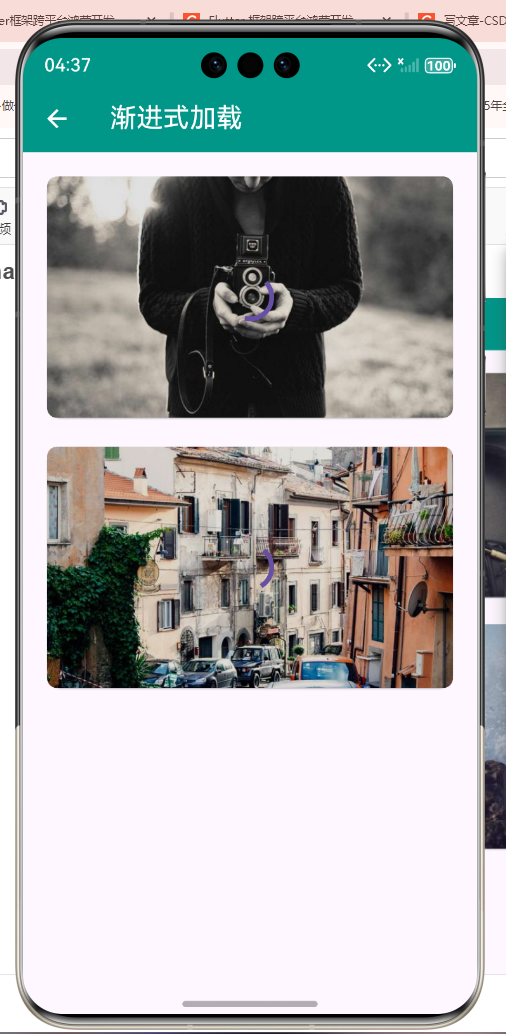
一概述
渐进式加载技术通过先加载低分辨率图片,再逐步加载高分辨率图片,从而提升用户体验。这种技术特别适合网络环境不稳定的场景,能够让用户快速看到图片预览,减少等待时间。
二渐进式加载原理
三渐进式加载的优势
| 优势 | 说明 | 效果 |
|---|---|---|
| 快速显示 | 先显示低分辨率预览 | 减少等待时间 |
| 网络友好 | 适应不同网络环境 | 在弱网下也能快速显示 |
| 流畅体验 | 平滑的视觉过渡 | 提升用户体验 |
| 带宽节省 | 按需加载 | 节省数据流量 |
| 性能优化 | 降低首屏加载时间 | 提高应用性能 |
四基础实现
1. 简单渐进式加载
class ProgressiveImage extends StatefulWidget {
final String imageUrl;
final String? thumbnailUrl;
const ProgressiveImage({
super.key,
required this.imageUrl,
this.thumbnailUrl,
});
State<ProgressiveImage> createState() => _ProgressiveImageState();
}
class _ProgressiveImageState extends State<ProgressiveImage> {
ImageProvider? _currentImageProvider;
bool _isLoadingHighRes = false;
void initState() {
super.initState();
_loadImages();
}
void _loadImages() {
// 先加载缩略图
if (widget.thumbnailUrl != null) {
_currentImageProvider = NetworkImage(widget.thumbnailUrl!);
// 延迟加载高清图
Future.delayed(const Duration(milliseconds: 100), () {
_loadHighResImage();
});
} else {
_loadHighResImage();
}
}
void _loadHighResImage() {
if (mounted) {
setState(() {
_isLoadingHighRes = true;
_currentImageProvider = NetworkImage(widget.imageUrl);
});
}
}
Widget build(BuildContext context) {
return Stack(
children: [
_currentImageProvider != null
? Image(
image: _currentImageProvider!,
fit: BoxFit.cover,
)
: Container(color: Colors.grey.shade200),
if (_isLoadingHighRes)
Container(
color: Colors.black12,
child: const Center(
child: CircularProgressIndicator(),
),
),
],
);
}
}
2. 带淡入效果的渐进式加载
class ProgressiveImageWithFade extends StatefulWidget {
final String imageUrl;
final String? thumbnailUrl;
final Duration fadeDuration;
const ProgressiveImageWithFade({
super.key,
required this.imageUrl,
this.thumbnailUrl,
this.fadeDuration = const Duration(milliseconds: 300),
});
State<ProgressiveImageWithFade> createState() =>
_ProgressiveImageWithFadeState();
}
class _ProgressiveImageWithFadeState extends State<ProgressiveImageWithFade>
with SingleTickerProviderStateMixin {
late AnimationController _controller;
late Animation<double> _fadeAnimation;
ImageProvider? _currentImageProvider;
ImageProvider? _thumbnailImageProvider;
bool _showHighRes = false;
void initState() {
super.initState();
_controller = AnimationController(
duration: widget.fadeDuration,
vsync: this,
);
_fadeAnimation = Tween<double>(begin: 0.0, end: 1.0).animate(
CurvedAnimation(parent: _controller, curve: Curves.easeInOut),
);
_loadImages();
}
void dispose() {
_controller.dispose();
super.dispose();
}
void _loadImages() {
if (widget.thumbnailUrl != null) {
_thumbnailImageProvider = NetworkImage(widget.thumbnailUrl!);
setState(() {
_currentImageProvider = _thumbnailImageProvider;
});
Future.delayed(const Duration(milliseconds: 100), () {
_loadHighResImage();
});
} else {
_loadHighResImage();
}
}
Future<void> _loadHighResImage() async {
final imageProvider = NetworkImage(widget.imageUrl);
final completer = Completer<void>();
imageProvider.resolve(const ImageConfiguration()).addListener(
ImageStreamListener((ImageInfo info, bool synchronousCall) {
if (mounted) {
completer.complete();
}
}),
);
await completer.future;
if (mounted) {
_controller.forward();
Future.delayed(widget.fadeDuration, () {
if (mounted) {
setState(() {
_showHighRes = true;
_currentImageProvider = imageProvider;
});
}
});
}
}
Widget build(BuildContext context) {
return Stack(
children: [
if (_thumbnailImageProvider != null && !_showHighRes)
Image(
image: _thumbnailImageProvider!,
fit: BoxFit.cover,
),
if (_showHighRes && _currentImageProvider != null)
FadeTransition(
opacity: _fadeAnimation,
child: Image(
image: _currentImageProvider!,
fit: BoxFit.cover,
),
),
if (_isLoadingHighRes && !_showHighRes)
Container(
color: Colors.black12,
child: const Center(
child: CircularProgressIndicator(),
),
),
],
);
}
}
3. 带模糊到清晰的渐进式加载
class ProgressiveImageWithBlur extends StatefulWidget {
final String imageUrl;
final String? thumbnailUrl;
const ProgressiveImageWithBlur({
super.key,
required this.imageUrl,
this.thumbnailUrl,
});
State<ProgressiveImageWithBlur> createState() =>
_ProgressiveImageWithBlurState();
}
class _ProgressiveImageWithBlurState extends State<ProgressiveImageWithBlur>
with SingleTickerProviderStateMixin {
late AnimationController _controller;
late Animation<double> _blurAnimation;
ImageProvider? _currentImageProvider;
bool _isLoading = true;
void initState() {
super.initState();
_controller = AnimationController(
duration: const Duration(milliseconds: 500),
vsync: this,
)..forward();
_blurAnimation = Tween<double>(begin: 10.0, end: 0.0).animate(
CurvedAnimation(parent: _controller, curve: Curves.easeOut),
);
_loadImages();
}
void dispose() {
_controller.dispose();
super.dispose();
}
void _loadImages() {
// 先加载缩略图(作为模糊背景)
if (widget.thumbnailUrl != null) {
setState(() {
_currentImageProvider = NetworkImage(widget.thumbnailUrl!);
});
// 延迟加载高清图
Future.delayed(const Duration(milliseconds: 200), () {
_loadHighResImage();
});
} else {
_loadHighResImage();
}
}
void _loadHighResImage() {
if (mounted) {
setState(() {
_currentImageProvider = NetworkImage(widget.imageUrl);
});
Future.delayed(const Duration(milliseconds: 100), () {
if (mounted) {
setState(() {
_isLoading = false;
});
}
});
}
}
Widget build(BuildContext context) {
return AnimatedBuilder(
animation: _blurAnimation,
builder: (context, child) {
return Stack(
children: [
if (_currentImageProvider != null)
Image(
image: _currentImageProvider!,
fit: BoxFit.cover,
frameBuilder: (context, child, frame, wasSynchronouslyLoaded) {
if (frame == null) return child;
return child;
},
),
if (_isLoading)
BackdropFilter(
filter: ImageFilter.blur(
sigmaX: _blurAnimation.value,
sigmaY: _blurAnimation.value,
),
child: Container(
color: Colors.black12,
child: const Center(
child: CircularProgressIndicator(),
),
),
),
],
);
},
);
}
}
五高级实现
4. 智能渐进式加载
class SmartProgressiveImage extends StatefulWidget {
final String imageUrl;
final String? thumbnailUrl;
final int thumbnailSize;
final bool useLowQuality;
const SmartProgressiveImage({
super.key,
required this.imageUrl,
this.thumbnailUrl,
this.thumbnailSize = 150,
this.useLowQuality = true,
});
State<SmartProgressiveImage> createState() => _SmartProgressiveImageState();
}
class _SmartProgressiveImageState extends State<SmartProgressiveImage>
with SingleTickerProviderStateMixin {
late AnimationController _controller;
late Animation<double> _opacityAnimation;
late Animation<double> _blurAnimation;
ImageProvider? _thumbnailProvider;
ImageProvider? _highResProvider;
ImageProvider? _currentProvider;
bool _showHighRes = false;
bool _isLoading = true;
void initState() {
super.initState();
_controller = AnimationController(
duration: const Duration(milliseconds: 400),
vsync: this,
);
_opacityAnimation = Tween<double>(begin: 0.0, end: 1.0).animate(
CurvedAnimation(parent: _controller, curve: Curves.easeInOut),
);
_blurAnimation = Tween<double>(begin: 5.0, end: 0.0).animate(
CurvedAnimation(parent: _controller, curve: Curves.easeOut),
);
_loadImages();
}
void dispose() {
_controller.dispose();
super.dispose();
}
String _generateThumbnailUrl(String url) {
// 如果没有提供缩略图URL,自动生成
final uri = Uri.parse(url);
final segments = uri.pathSegments;
if (segments.length >= 2) {
final filename = segments.last;
final parts = filename.split('.');
if (parts.length >= 2) {
final base = parts.sublist(0, parts.length - 1).join('.');
final ext = parts.last;
return '$uri/${widget.thumbnailSize}x$widget.thumbnailSize/$base.$ext';
}
}
return url;
}
Future<void> _loadImages() async {
// 加载缩略图
final thumbUrl = widget.thumbnailUrl ?? _generateThumbnailUrl(widget.imageUrl);
_thumbnailProvider = NetworkImage(thumbUrl);
_currentProvider = _thumbnailProvider;
setState(() {});
// 预加载高清图
await _preloadHighResImage();
}
Future<void> _preloadHighResImage() async {
_highResProvider = NetworkImage(widget.imageUrl);
try {
final completer = Completer<void>();
_highResProvider!.resolve(const ImageConfiguration()).addListener(
ImageStreamListener((ImageInfo info, bool synchronousCall) {
completer.complete();
}),
);
await completer.future;
if (mounted) {
await _controller.forward();
if (mounted) {
setState(() {
_showHighRes = true;
_currentProvider = _highResProvider;
_isLoading = false;
});
}
}
} catch (e) {
debugPrint('加载高清图失败: $e');
}
}
Widget build(BuildContext context) {
return AnimatedBuilder(
animation: _opacityAnimation,
builder: (context, child) {
return Stack(
children: [
if (_thumbnailProvider != null && !_showHighRes)
Image(
image: _thumbnailProvider!,
fit: BoxFit.cover,
),
if (_showHighRes && _highResProvider != null)
Opacity(
opacity: _opacityAnimation.value,
child: Image(
image: _highResProvider!,
fit: BoxFit.cover,
),
),
if (_isLoading && !_showHighRes)
Container(
color: Colors.black12,
child: const Center(
child: CircularProgressIndicator(),
),
),
],
);
},
);
}
}
六使用示例
class MyPage extends StatelessWidget {
Widget build(BuildContext context) {
return ListView(
padding: const EdgeInsets.all(16),
children: [
const Text('基础渐进式加载', style: TextStyle(fontSize: 18)),
const SizedBox(height: 8),
SizedBox(
height: 200,
child: Card(
child: ProgressiveImage(
imageUrl: 'https://picsum.photos/600/400',
thumbnailUrl: 'https://picsum.photos/150/100',
),
),
),
const SizedBox(height: 24),
const Text('带淡入效果', style: TextStyle(fontSize: 18)),
const SizedBox(height: 8),
SizedBox(
height: 200,
child: Card(
child: ProgressiveImageWithFade(
imageUrl: 'https://picsum.photos/600/400',
thumbnailUrl: 'https://picsum.photos/150/100',
),
),
),
const SizedBox(height: 24),
const Text('模糊到清晰', style: TextStyle(fontSize: 18)),
const SizedBox(height: 8),
SizedBox(
height: 200,
child: Card(
child: ProgressiveImageWithBlur(
imageUrl: 'https://picsum.photos/600/400',
thumbnailUrl: 'https://picsum.photos/150/100',
),
),
),
const SizedBox(height: 24),
const Text('智能渐进式加载', style: TextStyle(fontSize: 18)),
const SizedBox(height: 8),
SizedBox(
height: 200,
child: Card(
child: SmartProgressiveImage(
imageUrl: 'https://picsum.photos/600/400',
thumbnailUrl: 'https://picsum.photos/150/100',
useLowQuality: true,
),
),
),
],
);
}
}
七最佳实践
- 合理的缩略图尺寸:缩略图尺寸应在100-300px之间
- 优化加载时机:在缩略图加载后再加载高清图
- 流畅的过渡效果:使用淡入、模糊等动画增强体验
- 缓存管理:合理使用缓存避免重复加载
- 网络感知:根据网络状况调整加载策略
- 失败降级:高清图加载失败时保留缩略图
- 内存管理:及时释放不需要的图片资源
八总结
渐进式加载技术通过先显示低分辨率预览再加载高清图,显著提升了用户体验。在实现时要注意过渡效果的流畅性、加载时机的合理性以及失败情况的处理。合理使用这种技术可以让应用在各种网络环境下都能提供良好的图片加载体验。
欢迎加入开源鸿蒙跨平台社区:https://openharmonycrossplatform.csdn.net

讨论HarmonyOS开发技术,专注于API与组件、DevEco Studio、测试、元服务和应用上架分发等。
更多推荐

 18
18 0
0- 0



 已为社区贡献19条内容

所有评论(0)