Flutter框架跨平台鸿蒙开发——食物采购清单APP的开发流程
🚀运行效果展示
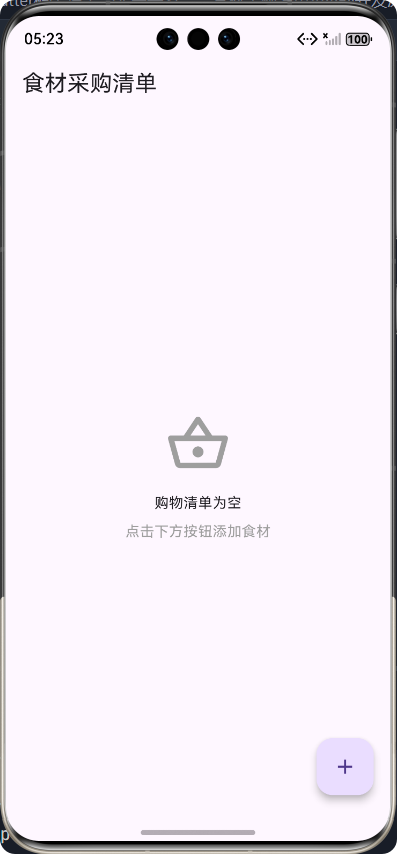
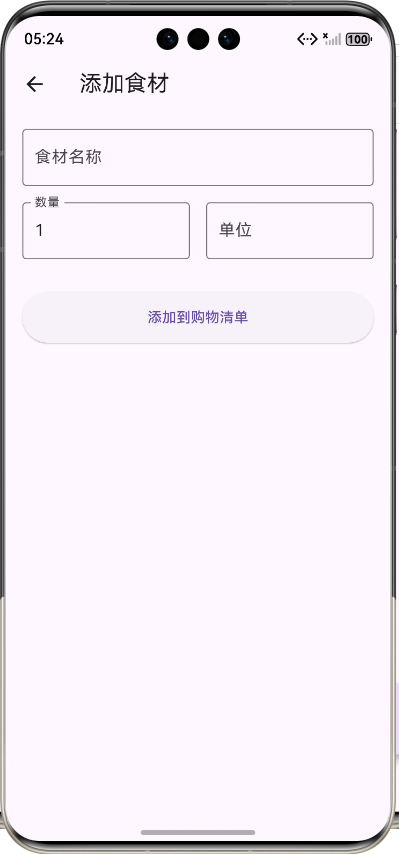
Flutter框架跨平台鸿蒙开发——食材采购清单APP的开发流程
前言
在快节奏的现代生活中,合理规划食材采购成为了许多人关注的焦点。为了帮助用户更高效地管理食材采购,我们开发了一款基于Flutter框架的跨平台食材采购清单APP。该APP不仅支持在鸿蒙系统上运行,还能在Android、iOS等平台上使用,实现了真正的跨平台开发。本文将详细介绍该APP的开发流程,包括核心功能实现、代码展示以及技术架构等内容。
应用介绍
食材采购清单APP是一款专为家庭用户和烹饪爱好者设计的工具型应用,主要功能包括:
- 食材管理:用户可以手动添加食材到购物清单,设置数量和单位
- 批量添加:支持从菜谱中一键添加所有食材到购物清单
- 采购状态管理:标记已购买的食材,方便用户在购物时快速识别
- 清单管理:支持清空已购买的食材或清空所有食材
- 数据持久化:使用本地存储保存购物清单数据,确保数据不会丢失
核心功能实现及代码展示
1. 技术架构
本项目采用了以下技术架构:
2. 数据模型设计
首先,我们需要设计购物清单的数据模型。创建了ShoppingItem类来表示单个采购项:
/// 采购清单项模型类
class ShoppingItem {
  /// 采购项ID
  final String id;

  /// 食材名称
  final String name;

  /// 数量
  final double quantity;

  /// 单位
  final String unit;

  /// 是否已购买
  bool isPurchased;

  /// 所属菜谱(可选)
  final String? recipeId;

  /// 构造函数
  ShoppingItem({
    required this.id,
    required this.name,
    required this.quantity,
    required this.unit,
    this.isPurchased = false,
    this.recipeId,
  });

  /// 从映射创建采购项对象
  factory ShoppingItem.fromMap(Map<String, dynamic> map) {
    return ShoppingItem(
      id: map['id'] as String,
      name: map['name'] as String,
      quantity: map['quantity'] as double,
      unit: map['unit'] as String,
      isPurchased: map['isPurchased'] as bool,
      recipeId: map['recipeId'] as String?,
    );
  }

  /// 转换为映射
  Map<String, dynamic> toMap() {
    return {
      'id': id,
      'name': name,
      'quantity': quantity,
      'unit': unit,
      'isPurchased': isPurchased,
      'recipeId': recipeId,
    };
  }

  /// 复制采购项对象
  ShoppingItem copyWith({
    String? id,
    String? name,
    double? quantity,
    String? unit,
    bool? isPurchased,
    String? recipeId,
  }) {
    return ShoppingItem(
      id: id ?? this.id,
      name: name ?? this.name,
      quantity: quantity ?? this.quantity,
      unit: unit ?? this.unit,
      isPurchased: isPurchased ?? this.isPurchased,
      recipeId: recipeId ?? this.recipeId,
    );
  }
}
3. 购物清单服务
为了管理购物清单数据,我们创建了ShoppingListService类,负责数据的增删改查操作:
import 'dart:convert';
import 'package:flutter_shili/models/shopping_list_model.dart';
import 'package:shared_preferences/shared_preferences.dart';

/// 购物清单服务类
class ShoppingListService {
  /// 存储键
  static const String _shoppingListKey = 'shopping_list';

  /// 获取购物清单
  Future<List<ShoppingItem>> getShoppingList() async {
    final prefs = await SharedPreferences.getInstance();
    final jsonString = prefs.getString(_shoppingListKey);

    if (jsonString == null) {
      return [];
    }

    final List<dynamic> jsonList = json.decode(jsonString);
    return jsonList.map((item) => ShoppingItem.fromMap(item)).toList();
  }

  /// 保存购物清单
  Future<void> saveShoppingList(List<ShoppingItem> items) async {
    final prefs = await SharedPreferences.getInstance();
    final jsonList = items.map((item) => item.toMap()).toList();
    final jsonString = json.encode(jsonList);
    await prefs.setString(_shoppingListKey, jsonString);
  }

  /// 添加购物项
  Future<void> addShoppingItem(ShoppingItem item) async {
    final items = await getShoppingList();
    items.add(item);
    await saveShoppingList(items);
  }

  /// 更新购物项
  Future<void> updateShoppingItem(ShoppingItem updatedItem) async {
    final items = await getShoppingList();
    final index = items.indexWhere((item) => item.id == updatedItem.id);

    if (index != -1) {
      items[index] = updatedItem;
      await saveShoppingList(items);
    }
  }

  /// 删除购物项
  Future<void> deleteShoppingItem(String itemId) async {
    final items = await getShoppingList();
    items.removeWhere((item) => item.id == itemId);
    await saveShoppingList(items);
  }

  /// 切换购物项购买状态
  Future<void> togglePurchasedStatus(String itemId) async {
    final items = await getShoppingList();
    final index = items.indexWhere((item) => item.id == itemId);

    if (index != -1) {
      items[index] = items[index].copyWith(isPurchased: !items[index].isPurchased);
      await saveShoppingList(items);
    }
  }

  /// 从菜谱添加食材到购物清单
  Future<void> addIngredientsFromRecipe(
    String recipeId,
    List<String> ingredients,
  ) async {
    final items = await getShoppingList();

    // 解析食材字符串,格式如:"100g 面粉"
    for (final ingredientStr in ingredients) {
      final parts = ingredientStr.split(' ');
      if (parts.length >= 2) {
        // 尝试提取数量和单位
        double quantity = 1.0;
        String unit = '';
        String name = '';

        // 检查第一个部分是否为数字
        final quantityMatch = RegExp(r'^\d+(\.\d+)?').firstMatch(parts[0]);
        if (quantityMatch != null) {
          quantity = double.parse(quantityMatch.group(0)!);
          // 提取单位(如果有)
          unit = parts[0].substring(quantityMatch.end);
          // 剩余部分作为食材名称
          name = parts.sublist(1).join(' ');
        } else {
          // 如果没有数字,整个字符串作为食材名称
          name = ingredientStr;
        }

        // 检查是否已存在相同食材
        final existingIndex = items.indexWhere(
          (item) => item.name == name && item.recipeId == recipeId,
        );

        if (existingIndex == -1) {
          // 添加新的购物项
          final newItem = ShoppingItem(
            id: DateTime.now().millisecondsSinceEpoch.toString(),
            name: name,
            quantity: quantity,
            unit: unit,
            recipeId: recipeId,
          );
          items.add(newItem);
        }
      }
    }

    await saveShoppingList(items);
  }

  /// 清空已购买的物品
  Future<void> clearPurchasedItems() async {
    final items = await getShoppingList();
    final remainingItems = items.where((item) => !item.isPurchased).toList();
    await saveShoppingList(remainingItems);
  }

  /// 清空所有购物项
  Future<void> clearAllItems() async {
    final prefs = await SharedPreferences.getInstance();
    await prefs.remove(_shoppingListKey);
  }
}
4. 购物清单页面
购物清单页面是应用的核心界面,负责展示和管理购物项:
import 'package:flutter/material.dart';
import 'package:flutter_shili/models/shopping_list_model.dart';
import 'package:flutter_shili/services/shopping_list_service.dart';
/// 购物清单页面
class ShoppingListPage extends StatefulWidget {
/// 构造函数
const ShoppingListPage({super.key});
State<ShoppingListPage> createState() => _ShoppingListPageState();
}
class _ShoppingListPageState extends State<ShoppingListPage> {
/// 购物清单服务
final ShoppingListService _service = ShoppingListService();
/// 购物项列表
List<ShoppingItem> _items = [];
/// 是否加载中
bool _isLoading = true;
/// 初始化状态
void initState() {
super.initState();
_loadShoppingList();
}
/// 加载购物清单
Future<void> _loadShoppingList() async {
try {
setState(() {
_isLoading = true;
});
final items = await _service.getShoppingList();
setState(() {
_items = items;
_isLoading = false;
});
} catch (e) {
setState(() {
_isLoading = false;
});
ScaffoldMessenger.of(context).showSnackBar(
SnackBar(content: Text('加载购物清单失败: $e')),
);
}
}
/// 切换购买状态
Future<void> _togglePurchased(ShoppingItem item) async {
try {
final updatedItem = item.copyWith(isPurchased: !item.isPurchased);
await _service.updateShoppingItem(updatedItem);
await _loadShoppingList();
} catch (e) {
ScaffoldMessenger.of(context).showSnackBar(
SnackBar(content: Text('更新失败: $e')),
);
}
}
/// 删除购物项
Future<void> _deleteItem(String itemId) async {
try {
await _service.deleteShoppingItem(itemId);
await _loadShoppingList();
ScaffoldMessenger.of(context).showSnackBar(
const SnackBar(content: Text('删除成功')),
);
} catch (e) {
ScaffoldMessenger.of(context).showSnackBar(
SnackBar(content: Text('删除失败: $e')),
);
}
}
/// 清空已购买物品
Future<void> _clearPurchased() async {
try {
await _service.clearPurchasedItems();
await _loadShoppingList();
ScaffoldMessenger.of(context).showSnackBar(
const SnackBar(content: Text('已清空已购买物品')),
);
} catch (e) {
ScaffoldMessenger.of(context).showSnackBar(
SnackBar(content: Text('操作失败: $e')),
);
}
}
/// 清空所有物品
Future<void> _clearAll() async {
try {
await _service.clearAllItems();
await _loadShoppingList();
ScaffoldMessenger.of(context).showSnackBar(
const SnackBar(content: Text('已清空所有物品')),
);
} catch (e) {
ScaffoldMessenger.of(context).showSnackBar(
SnackBar(content: Text('操作失败: $e')),
);
}
}
/// 添加新购物项
void _addNewItem() {
Navigator.push(
context,
MaterialPageRoute(
builder: (context) => AddShoppingItemPage(
onAdd: _loadShoppingList,
),
),
);
}
Widget build(BuildContext context) {
// 分离已购买和未购买的物品
final purchasedItems = _items.where((item) => item.isPurchased).toList();
final unpurchasedItems = _items.where((item) => !item.isPurchased).toList();
return Scaffold(
appBar: AppBar(
title: const Text('食材采购清单'),
actions: [
if (_items.isNotEmpty) ...[
IconButton(
onPressed: _clearPurchased,
icon: const Icon(Icons.check_circle_outline),
tooltip: '清空已购买',
),
IconButton(
onPressed: _clearAll,
icon: const Icon(Icons.delete_sweep_outlined),
tooltip: '清空所有',
),
],
],
),
body: _isLoading
? const Center(child: CircularProgressIndicator())
: _items.isEmpty
? const Center(
child: Column(
mainAxisAlignment: MainAxisAlignment.center,
children: [
Icon(
Icons.shopping_basket_outlined,
size: 64,
color: Colors.grey,
),
SizedBox(height: 16),
Text('购物清单为空'),
SizedBox(height: 8),
Text('点击下方按钮添加食材', style: TextStyle(color: Colors.grey)),
],
),
)
: ListView(
padding: const EdgeInsets.all(16),
children: [
// 未购买的物品
if (unpurchasedItems.isNotEmpty) ...[
const Text(
'待购买',
style: TextStyle(
fontSize: 18,
fontWeight: FontWeight.bold,
),
),
const SizedBox(height: 12),
...unpurchasedItems.map((item) => _buildShoppingItem(item)),
const SizedBox(height: 24),
],
// 已购买的物品
if (purchasedItems.isNotEmpty) ...[
const Text(
'已购买',
style: TextStyle(
fontSize: 18,
fontWeight: FontWeight.bold,
color: Colors.grey,
),
),
const SizedBox(height: 12),
...purchasedItems.map((item) => _buildShoppingItem(item)),
],
],
),
floatingActionButton: FloatingActionButton(
onPressed: _addNewItem,
child: const Icon(Icons.add),
tooltip: '添加食材',
),
);
}
/// 构建购物项卡片
Widget _buildShoppingItem(ShoppingItem item) {
return Card(
margin: const EdgeInsets.only(bottom: 8),
child: Padding(
padding: const EdgeInsets.all(16),
child: Row(
children: [
// 复选框
Checkbox(
value: item.isPurchased,
onChanged: (value) => _togglePurchased(item),
),
// 食材信息
Expanded(
child: Column(
crossAxisAlignment: CrossAxisAlignment.start,
children: [
Text(
item.name,
style: TextStyle(
fontSize: 16,
fontWeight: FontWeight.w500,
decoration: item.isPurchased
? TextDecoration.lineThrough
: TextDecoration.none,
color: item.isPurchased ? Colors.grey : null,
),
),
Text(
'${item.quantity}${item.unit}',
style: TextStyle(
fontSize: 14,
color: item.isPurchased ? Colors.grey : Colors.grey[600],
),
),
if (item.recipeId != null) ...[
const SizedBox(height: 4),
Text(
'来自菜谱',
style: TextStyle(
fontSize: 12,
color: Colors.grey[500],
),
),
],
],
),
),
// 删除按钮
IconButton(
onPressed: () => _deleteItem(item.id),
icon: const Icon(Icons.delete_outline),
color: Colors.red,
),
],
),
),
);
}
}
/// 添加购物项页面
class AddShoppingItemPage extends StatefulWidget {
/// 添加成功回调
final VoidCallback onAdd;
/// 构造函数
const AddShoppingItemPage({super.key, required this.onAdd});
State<AddShoppingItemPage> createState() => _AddShoppingItemPageState();
}
class _AddShoppingItemPageState extends State<AddShoppingItemPage> {
/// 表单键
final _formKey = GlobalKey<FormState>();
/// 食材名称控制器
final _nameController = TextEditingController();
/// 数量控制器
final _quantityController = TextEditingController(text: '1');
/// 单位控制器
final _unitController = TextEditingController();
/// 购物清单服务
final ShoppingListService _service = ShoppingListService();
/// 提交表单
Future<void> _submitForm() async {
if (_formKey.currentState!.validate()) {
try {
final name = _nameController.text.trim();
final quantity = double.tryParse(_quantityController.text) ?? 1.0;
final unit = _unitController.text.trim();
final newItem = ShoppingItem(
id: DateTime.now().millisecondsSinceEpoch.toString(),
name: name,
quantity: quantity,
unit: unit,
);
await _service.addShoppingItem(newItem);
widget.onAdd();
Navigator.pop(context);
ScaffoldMessenger.of(context).showSnackBar(
const SnackBar(content: Text('添加成功')),
);
} catch (e) {
ScaffoldMessenger.of(context).showSnackBar(
SnackBar(content: Text('添加失败: $e')),
);
}
}
}
void dispose() {
_nameController.dispose();
_quantityController.dispose();
_unitController.dispose();
super.dispose();
}
Widget build(BuildContext context) {
return Scaffold(
appBar: AppBar(
title: const Text('添加食材'),
),
body: Padding(
padding: const EdgeInsets.all(16),
child: Form(
key: _formKey,
child: Column(
children: [
TextFormField(
controller: _nameController,
decoration: const InputDecoration(
labelText: '食材名称',
border: OutlineInputBorder(),
),
validator: (value) {
if (value == null || value.trim().isEmpty) {
return '请输入食材名称';
}
return null;
},
),
const SizedBox(height: 16),
Row(
children: [
Expanded(
child: TextFormField(
controller: _quantityController,
decoration: const InputDecoration(
labelText: '数量',
border: OutlineInputBorder(),
),
keyboardType: TextInputType.number,
validator: (value) {
if (value == null || value.trim().isEmpty) {
return '请输入数量';
}
final quantity = double.tryParse(value);
if (quantity == null || quantity <= 0) {
return '请输入有效的数量';
}
return null;
},
),
),
const SizedBox(width: 16),
Expanded(
child: TextFormField(
controller: _unitController,
decoration: const InputDecoration(
labelText: '单位',
border: OutlineInputBorder(),
hintText: '如:g、kg、个、勺等',
),
),
),
],
),
const SizedBox(height: 32),
ElevatedButton(
onPressed: _submitForm,
style: ElevatedButton.styleFrom(
minimumSize: const Size(double.infinity, 50),
),
child: const Text('添加到购物清单'),
),
],
),
),
),
);
}
}
5. 菜谱集成
为了提升用户体验,我们还实现了从菜谱中一键添加食材到购物清单的功能。在菜谱详情页面中添加了一个"添加到购物清单"按钮:
/// 将食材添加到购物清单
Future<void> _addToShoppingList() async {
  try {
    await _shoppingListService.addIngredientsFromRecipe(
      _recipe.id,
      _recipe.ingredients,
    );
    ScaffoldMessenger.of(context).showSnackBar(
      SnackBar(content: Text('食材已添加到购物清单')),
    );
  } catch (e) {
    ScaffoldMessenger.of(context).showSnackBar(
      SnackBar(content: Text('添加失败: $e')),
    );
  }
}

// 在食材列表下方添加按钮
ElevatedButton.icon(
  onPressed: _addToShoppingList,
  icon: const Icon(Icons.shopping_basket),
  label: const Text('添加到购物清单'),
  style: ElevatedButton.styleFrom(
    backgroundColor: Colors.green,
    minimumSize: const Size(double.infinity, 48),
  ),
),
6. 应用配置
最后,我们需要配置应用的入口文件,设置应用的主题和路由:
/// 应用入口文件
/// 配置应用路由和主题
import 'package:flutter/material.dart';
import 'package:flutter_shili/pages/shopping_list_page.dart';
void main() {
runApp(const MyApp());
}
/// 应用主类
class MyApp extends StatelessWidget {
/// 构造函数
const MyApp({super.key});
Widget build(BuildContext context) {
return MaterialApp(
title: '食材采购清单',
theme: ThemeData(
primarySwatch: Colors.green,
visualDensity: VisualDensity.adaptivePlatformDensity,
),
home: const ShoppingListPage(),
debugShowCheckedModeBanner: false,
);
}
}
技术架构
架构流程图
目录结构
lib/
├── models/
│   ├── recipe_model.dart        # 菜谱模型
│   └── shopping_list_model.dart # 购物清单模型
├── services/
│   ├── recipe_service.dart       # 菜谱服务
│   └── shopping_list_service.dart # 购物清单服务
├── pages/
│   ├── recipe_detail_page.dart   # 菜谱详情页面
│   ├── shopping_list_page.dart   # 购物清单页面
│   └── ...
└── main.dart                     # 应用入口
核心功能实现
1. 数据持久化
应用使用shared_preferences包实现数据持久化,将购物清单数据存储在本地:
// 保存购物清单
Future<void> saveShoppingList(List<ShoppingItem> items) async {
  final prefs = await SharedPreferences.getInstance();
  final jsonList = items.map((item) => item.toMap()).toList();
  final jsonString = json.encode(jsonList);
  await prefs.setString(_shoppingListKey, jsonString);
}

// 获取购物清单
Future<List<ShoppingItem>> getShoppingList() async {
  final prefs = await SharedPreferences.getInstance();
  final jsonString = prefs.getString(_shoppingListKey);

  if (jsonString == null) {
    return [];
  }

  final List<dynamic> jsonList = json.decode(jsonString);
  return jsonList.map((item) => ShoppingItem.fromMap(item)).toList();
}
2. 响应式布局
应用采用响应式布局设计,确保在不同屏幕尺寸的设备上都能正常显示:
// 使用Expanded和Flexible组件实现响应式布局
Row(
  children: [
    Expanded(
      child: TextFormField(
        // 数量输入框
      ),
    ),
    const SizedBox(width: 16),
    Expanded(
      child: TextFormField(
        // 单位输入框
      ),
    ),
  ],
),

// 使用ListView实现滚动布局
ListView(
  padding: const EdgeInsets.all(16),
  children: [
    // 购物项列表
  ],
),
3. 错误处理
应用实现了完善的错误处理机制,确保在各种情况下都能给用户提供友好的反馈:
// 加载购物清单时的错误处理
try {
  // 加载数据
} catch (e) {
  setState(() {
    _isLoading = false;
  });
  ScaffoldMessenger.of(context).showSnackBar(
    SnackBar(content: Text('加载购物清单失败: $e')),
  );
}

// 添加购物项时的错误处理
try {
  // 添加数据
} catch (e) {
  ScaffoldMessenger.of(context).showSnackBar(
    SnackBar(content: Text('添加失败: $e')),
  );
}
测试与部署
测试
应用开发完成后,我们进行了以下测试:
- 功能测试:验证所有核心功能是否正常工作
- 跨平台测试:在鸿蒙、Android和iOS平台上测试应用
- 性能测试:测试应用的响应速度和内存使用情况
- 用户体验测试:邀请用户测试应用,收集反馈
部署
应用部署流程如下:
- 代码构建:使用
flutter build命令构建应用 - 签名打包:为应用添加数字签名
- 平台发布:根据不同平台的要求发布应用
总结
通过本项目的开发,我们成功实现了一款功能完善的食材采购清单APP,该APP具有以下特点:
- 跨平台兼容:基于Flutter框架开发,支持在鸿蒙、Android、iOS等平台上运行
- 功能完善:支持手动添加食材、从菜谱批量添加食材、标记采购状态、管理购物清单等功能
- 用户友好:界面简洁美观,操作流程顺畅,提供了良好的用户体验
- 数据安全:使用本地存储保存数据,确保数据不会丢失
- 响应式设计:适配不同屏幕尺寸的设备,提供一致的用户体验
本项目展示了Flutter框架在跨平台开发中的强大能力,特别是在鸿蒙系统上的应用。通过合理的架构设计和代码组织,我们实现了一个功能完整、性能良好的跨平台应用。
📚 参考资料
欢迎加入开源鸿蒙跨平台社区:https://openharmonycrossplatform.csdn.net

讨论HarmonyOS开发技术,专注于API与组件、DevEco Studio、测试、元服务和应用上架分发等。
更多推荐
 24
24 0
0- 0


 已为社区贡献25条内容

所有评论(0)