【开源鸿蒙跨平台开发先锋训练营】DAY8~DAY13底部导航栏Tab选项卡3-打卡记录
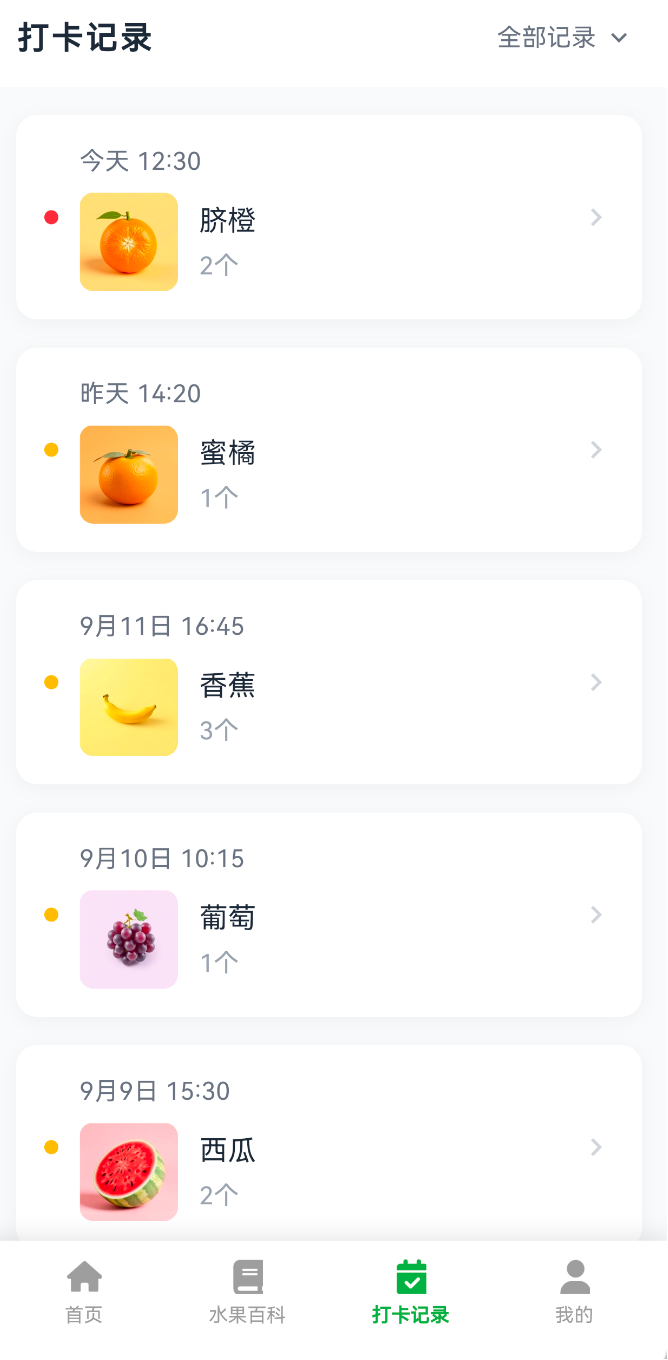
1.打卡记录页面的开发先看截图效果
2.打卡记录页面实现
2.1 页面功能
这是一个展示用户水果打卡记录的页面。
按照最新的时间记录从上到下展示
今天的记录有个红点,历史记录是橙点(后面会根据真实接口返回的是吃的水果的主题色来)
每条记录显示:时间、水果图片、名称、吃了几个
点击可以跳转到水果详情(后面的文章会说这个页面)
右上角有个"全部记录"筛选按钮(目前点击无响应还没有弹出框,后续再加上)
没数据的时候会提示"暂无打卡记录"文案
2.2 相关代码
页面用的是 `StatefulWidget`,因为需要管理记录列表和加载状态。
class CheckInRecord {

final String time; // 打卡时间,比如"今天 12:30"

final Fruit fruit; // 水果对象(复用现有的 Fruit )

final int count; // 吃了几个

final bool isToday; // 是不是今天的记录

}
目前用的是假数据,从水果 API 拿到真实水果,然后再写
Future<void> _loadCheckInRecords() async {

setState(() => _loading = true);

final result = await FruitApi.getFruitList(page: 1, pageSize: 10);

if (result != null && result.list.isNotEmpty) {

setState(() {

_records = [

CheckInRecord(

time: '今天 12:30',

fruit: result.list[0],

count: 2,

isToday: true,

),

// 更多记录

];

_loading = false;

});

}

}
后面可以改成调用真实的打卡记录 API。
2.2.1 顶部导航栏
AppBar(

backgroundColor: Colors.white,

elevation: 0,

title: const Text('打卡记录'),

actions: [

TextButton(

onPressed: () {

// 没有 筛选功能

},

child: Row(

children: [

const Text('全部记录'),

Icon(Icons.keyboard_arrow_down), // 下拉箭头

],

),

),

],

)
2.2.2 列表渲染
用 `ListView.builder` 渲染列表,这样即使有很多记录也不会卡:
ListView.builder(

padding: const EdgeInsets.all(16),

itemCount: _records.length,

itemBuilder: (context, index) {

return _buildCheckInItem(_records[index]);

},

)
2.2.3. 单条记录的卡片
每条记录是一个白色卡片
Widget _buildCheckInItem(CheckInRecord record) {

return GestureDetector(

onTap: () {

// 跳转到水果详情页

Navigator.push(

context,

MaterialPageRoute(

builder: (context) => FruitDetailPage(fruit: record.fruit),

),

);

},

child: Container(

margin: const EdgeInsets.only(bottom: 16),

padding: const EdgeInsets.all(16),

decoration: BoxDecoration(

color: Colors.white,

borderRadius: BorderRadius.circular(12),

boxShadow: [

BoxShadow(

color: Colors.black.withValues(alpha: 0.04),

blurRadius: 8,

offset: const Offset(0, 2),

),

],

),

child: Row(

children: [

// 左边的小圆点

Container(

width: 8,

height: 8,

decoration: BoxDecoration(

color: record.isToday

? const Color(0xFFEF4444) // 红色

: const Color(0xFFFBBF24), // 橙色

shape: BoxShape.circle,

),

),

const SizedBox(width: 12),

// 中间的内容区域

Expanded(

child: Column(

crossAxisAlignment: CrossAxisAlignment.start,

children: [

// 时间

Text(record.time),

const SizedBox(height: 8),

// 水果信息

Row(

children: [

// 水果图片

ClipRRect(

borderRadius: BorderRadius.circular(8),

child: Image.network(

record.fruit.colorImageUrl,

width: 56,

height: 56,

fit: BoxFit.cover,

errorBuilder: (context, error, stackTrace) {

// 图片加载失败显示占位图标

return Container(

width: 56,

height: 56,

color: Colors.grey[200],

child: Icon(Icons.image_not_supported),

);

},

),

),

const SizedBox(width: 12),

// 名称和数量

Column(

crossAxisAlignment: CrossAxisAlignment.start,

children: [

Text(record.fruit.chinese), // 水果名

Text('${record.count}个'), // 数量

],

),

],

),

],

),

),

// 右边的箭头

Icon(Icons.chevron_right, color: Color(0xFFD1D5DB)),

],

),

),

);

}
3.相关颜色借鉴
整个页面的颜色可参考
背景色: Color(0xFFF9FAFB) // 浅灰色背景
卡片: Colors.white // 白色卡片
今日指示点: Color(0xFFEF4444) // 红色
历史指示点: Color(0xFFFBBF24) // 橙色
主文字: Color(0xFF1F2937) // 深灰
次要文字: Color(0xFF6B7280) // 中灰
辅助文字: Color(0xFF9CA3AF) // 浅灰
4.附上该页面全部代码
import 'package:flutter/material.dart';
import '../../models/fruit_model.dart';
import '../../api/fruit_api.dart';
import '../fruit_detail/fruit_detail_page.dart';
/// 打卡页面
class CheckInPage extends StatefulWidget {
const CheckInPage({super.key});
@override
State<CheckInPage> createState() => _CheckInPageState();
}
class _CheckInPageState extends State<CheckInPage> {
// 打卡记录数据
List<CheckInRecord> _records = [];
bool _loading = true;
@override
void initState() {
super.initState();
_loadCheckInRecords();
}
// 加载打卡记录(模拟数据,使用真实水果)
Future<void> _loadCheckInRecords() async {
setState(() {
_loading = true;
});
// 获取水果列表
final result = await FruitApi.getFruitList(page: 1, pageSize: 10);
if (result != null && result.list.isNotEmpty) {
// 模拟打卡记录,使用真实水果数据
setState(() {
_records = [
CheckInRecord(
time: '今天 12:30',
fruit: result.list[0], // 使用第一个水果
count: 2,
isToday: true,
),
CheckInRecord(
time: '昨天 14:20',
fruit: result.list.length > 1 ? result.list[1] : result.list[0],
count: 1,
isToday: false,
),
CheckInRecord(
time: '9月11日 16:45',
fruit: result.list.length > 2 ? result.list[2] : result.list[0],
count: 3,
isToday: false,
),
CheckInRecord(
time: '9月10日 10:15',
fruit: result.list.length > 3 ? result.list[3] : result.list[0],
count: 1,
isToday: false,
),
CheckInRecord(
time: '9月9日 15:30',
fruit: result.list.length > 4 ? result.list[4] : result.list[0],
count: 2,
isToday: false,
),
];
_loading = false;
});
} else {
setState(() {
_loading = false;
});
}
}
@override
Widget build(BuildContext context) {
return Scaffold(
backgroundColor: const Color(0xFFF9FAFB),
appBar: AppBar(
backgroundColor: Colors.white,
elevation: 0,
title: const Text(
'打卡记录',
style: TextStyle(
color: Color(0xFF1F2937),
fontSize: 18,
fontWeight: FontWeight.w600,
),
),
actions: [
TextButton(
onPressed: () {
// TODO: 查看全部记录
},
child: Row(
children: [
const Text(
'全部记录',
style: TextStyle(color: Color(0xFF6B7280), fontSize: 14),
),
const SizedBox(width: 4),
Icon(
Icons.keyboard_arrow_down,
color: const Color(0xFF6B7280),
size: 18,
),
],
),
),
const SizedBox(width: 8),
],
),
body: _loading
? const Center(child: CircularProgressIndicator())
: _records.isEmpty
? const Center(child: Text('暂无打卡记录'))
: ListView.builder(
padding: const EdgeInsets.all(16),
itemCount: _records.length,
itemBuilder: (context, index) {
final record = _records[index];
return _buildCheckInItem(record);
},
),
);
}
Widget _buildCheckInItem(CheckInRecord record) {
return GestureDetector(
onTap: () {
// 跳转到水果详情页
Navigator.push(
context,
MaterialPageRoute(
builder: (context) => FruitDetailPage(fruit: record.fruit),
),
);
},
child: Container(
margin: const EdgeInsets.only(bottom: 16),
padding: const EdgeInsets.all(16),
decoration: BoxDecoration(
color: Colors.white,
borderRadius: BorderRadius.circular(12),
boxShadow: [
BoxShadow(
color: Colors.black.withValues(alpha: 0.04),
blurRadius: 8,
offset: const Offset(0, 2),
),
],
),
child: Row(
children: [
// 状态指示点
Container(
width: 8,
height: 8,
decoration: BoxDecoration(
color: record.isToday
? const Color(0xFFEF4444)
: const Color(0xFFFBBF24),
shape: BoxShape.circle,
),
),
const SizedBox(width: 12),
// 时间和水果信息
Expanded(
child: Column(
crossAxisAlignment: CrossAxisAlignment.start,
children: [
Text(
record.time,
style: const TextStyle(
color: Color(0xFF6B7280),
fontSize: 14,
),
),
const SizedBox(height: 8),
Row(
children: [
// 水果图片
ClipRRect(
borderRadius: BorderRadius.circular(8),
child: Image.network(
record.fruit.colorImageUrl,
width: 56,
height: 56,
fit: BoxFit.cover,
errorBuilder: (context, error, stackTrace) {
return Container(
width: 56,
height: 56,
decoration: BoxDecoration(
color: Colors.grey[200],
borderRadius: BorderRadius.circular(8),
),
child: const Icon(
Icons.image_not_supported,
size: 28,
),
);
},
),
),
const SizedBox(width: 12),
// 水果名称和数量
Column(
crossAxisAlignment: CrossAxisAlignment.start,
children: [
Text(
record.fruit.chinese,
style: const TextStyle(
color: Color(0xFF1F2937),
fontSize: 16,
fontWeight: FontWeight.w500,
),
),
const SizedBox(height: 4),
Text(
'${record.count}个',
style: const TextStyle(
color: Color(0xFF9CA3AF),
fontSize: 14,
),
),
],
),
],
),
],
),
),
// 箭头
const Icon(Icons.chevron_right, color: Color(0xFFD1D5DB), size: 20),
],
),
),
);
}
}
/// 打卡记录数据模型
class CheckInRecord {
final String time;
final Fruit fruit;
final int count;
final bool isToday;
CheckInRecord({
required this.time,
required this.fruit,
required this.count,
required this.isToday,
});
}
5.最后
欢迎加入开源鸿蒙跨平台社区:
https://openharmonycrossplatform.csdn.net

讨论HarmonyOS开发技术,专注于API与组件、DevEco Studio、测试、元服务和应用上架分发等。
更多推荐
 9
9 0
0- 0


 已为社区贡献25条内容

所有评论(0)