Flutter鸿蒙开发指南(十一):爆款推荐和一站买全(集成)
·
前言
欢迎加入开源鸿蒙跨平台社区:https://openharmonycrossplatform.csdn.net
值此新春佳节,祝大家新年快乐!愿各位在新的一年里技术精进,薪资更上一层楼!
功能概述
本次开发的是首页的爆款推荐和一站买全两个模块。好消息是,这两个模块的数据结构与之前实现的特惠推荐完全一致,因此我们可以复用已有的代码结构,极大提升开发效率。
接口信息
-
爆款推荐:
GET /hot/inVogue -
一站买全:
GET /hot/oneStop
开发步骤
-
添加请求地址常量
-
封装API请求方法
-
在页面初始化时获取数据
-
将数据传递给子组件
-
实现视图渲染
一、首页API服务层
在常量文件中增加两个新的接口地址:
  // 热榜推荐地址
  static const String IN_VOGUE_LIST = "/hot/inVogue";

  // 一站式推荐地址
  static const String ONE_STOP_LIST = "/hot/oneStop";
lib/constants/index.dart完整代码:
//全局状态
class GlobalConstants {
  //基础地址
  static const String BASE_URL = "https://meikou-api.itheima.net/";

  //超时时间
  static const int TIME_OUT = 10;

  //成功状态
  static const String SUCCESS_CODE = "1";
}

//存放请求地址接口的常量
class HttpConstants {
  //轮播图接口
  static const String BANNER_LIST = "/home/banner";

  //分类列表接口
  static const String CATEGORY_LIST = "/home/category/head";

  //特惠推荐地址
  static const String PRODUCT_LIST = "/hot/preference";

  // 热榜推荐地址
  static const String IN_VOGUE_LIST = "/hot/inVogue";

  // 一站式推荐地址
  static const String ONE_STOP_LIST = "/hot/oneStop";
}
二、首页数据请求封装
在API服务层添加对应的请求方法:
// 热榜推荐
Future<SpecialRecommendResult> getInVogueListAPI() async {
  // 返回请求
  return SpecialRecommendResult.formJSON(
    await dioRequest.get(HttpConstants.IN_VOGUE_LIST),
  );
}

// 一站式推荐
Future<SpecialRecommendResult> getOneStopListAPI() async {
  // 返回请求
  return SpecialRecommendResult.formJSON(
    await dioRequest.get(HttpConstants.ONE_STOP_LIST),
  );
}
lib/api/home.dart完整代码:
//封装一个api 目的是返回业务侧要的数据结构
import 'package:qing_mall/constants/index.dart';
import 'package:qing_mall/utils/DioRequest.dart';
import 'package:qing_mall/viewmodels/home.dart';

Future<List<BannerItem>> getBannerListAPI() async {
  // 返回请求
  return (await dioRequest.get(HttpConstants.BANNER_LIST) as List).map((
    item,
  ) {
    return BannerItem.formJSON(item as Map<String, dynamic>);
  }).toList();
}

//分类列表接口
Future<List<CategoryItem>> getCategoryListAPI() async {
  // 返回请求
  return (await dioRequest.get(HttpConstants.CATEGORY_LIST) as List).map((
    item,
  ) {
    return CategoryItem.formJSON(item as Map<String, dynamic>);
  }).toList();
}

//特惠推荐地址
Future<SpecialOfferResult> getProductListAPI() async {
  // 返回请求
  return SpecialOfferResult.fromJSON(
      await dioRequest.get(HttpConstants.PRODUCT_LIST));
}

// 热榜推荐
Future<SpecialOfferResult> getInVogueListAPI() async {
  // 返回请求
  return SpecialOfferResult.fromJSON(
    await dioRequest.get(HttpConstants.IN_VOGUE_LIST),
  );
}

// 一站式推荐
Future<SpecialOfferResult> getOneStopListAPI() async {
  // 返回请求
  return SpecialOfferResult.fromJSON(
    await dioRequest.get(HttpConstants.ONE_STOP_LIST),
  );
}
三、Home API接口封装
在首页视图的 initState 中调用新增的API方法,并创建对应的状态变量接收数据:
lib/pages/Home/index.dart完整代码:
import 'package:flutter/cupertino.dart';
import 'package:qing_mall/api/home.dart';
import 'package:qing_mall/components/Home/HmCategory.dart';
import 'package:qing_mall/components/Home/HmHot.dart';
import 'package:qing_mall/components/Home/HmMoreList.dart';
import 'package:qing_mall/components/Home/HmSlider.dart';
import 'package:qing_mall/components/Home/HmSuggestion.dart';
import 'package:qing_mall/viewmodels/home.dart';

class HomeView extends StatefulWidget {
  const HomeView({super.key});

  @override
  State<HomeView> createState() => _HomeViewState();
}

class _HomeViewState extends State<HomeView> {
  //分类列表
  List<CategoryItem> _categoryList = [];

  //轮播图列表
  List<BannerItem> _bannerList = [
    // BannerItem(
    //   id: "1",
    //   imgUrl: "https://yjy-teach-oss.oss-cn-beijing.aliyuncs.com/meituan/1.jpg",
    // ),
    // BannerItem(
    //   id: "2",
    //   imgUrl: "https://yjy-teach-oss.oss-cn-beijing.aliyuncs.com/meituan/2.png",
    // ),
    // BannerItem(
    //   id: "3",
    //   imgUrl: "https://yjy-teach-oss.oss-cn-beijing.aliyuncs.com/meituan/3.jpg",
    // ),
  ];

  //获取滚动容器的内容

  List<Widget> _getScrollChildren() {
    return [
      //包裹普通widget的sliver家族的组件内容
      SliverToBoxAdapter(child: HmSlider(bannerList: _bannerList)), //轮播图组件
      //放置分类组件
      SliverToBoxAdapter(child: SizedBox(height: 10)),
      //SliverGrid SliverList指南纵向排列
      SliverToBoxAdapter(child: HmCategory(categoryList: _categoryList)), //分类组件
      SliverToBoxAdapter(child: SizedBox(height: 10)),
      SliverToBoxAdapter(child: HmSuggestion(specialOfferResult: _specialOfferResult)), //推荐组件
      SliverToBoxAdapter(child: SizedBox(height: 10)),

      //Flex和Expanded配合起来可以均分比例
      SliverToBoxAdapter(
        child: Padding(
            padding: EdgeInsets.symmetric(horizontal: 10),
            child: Flex(
              direction: Axis.horizontal,
              children: [
                Expanded(child: HmHot()),
                SizedBox(
                  width: 10,
                ),
                Expanded(child: HmHot()),
              ],
            )),
      ),
      SliverToBoxAdapter(child: SizedBox(height: 10)),
      HmMorelist(), //无限滚动列表
    ];
  }

  //特惠推荐
  SpecialOfferResult _specialOfferResult = SpecialOfferResult(
    id: "",
    title: "",
    subTypes: [],
  );

  // 热榜推荐
  SpecialOfferResult _inVogueResult = SpecialOfferResult(
    id: "",
    title: "",
    subTypes: [],
  );
  // 一站式推荐
  SpecialOfferResult _oneStopResult = SpecialOfferResult(
    id: "",
    title: "",
    subTypes: [],
  );

// 获取热榜推荐列表
  void _getInVogueList() async {
    _inVogueResult = await getInVogueListAPI();
    setState(() {});
  }

  // 获取一站式推荐列表
  void _getOneStopList() async {
    _oneStopResult = await getOneStopListAPI();
    setState(() {});
  }


  @override
  void initState() {
    super.initState();
    _getBannederList();
    _getCategoryList();
    _getProductList();
    _getInVogueList();
    _getOneStopList();
  }

  //获取特惠推荐
  void _getProductList() async {
    _specialOfferResult = await getProductListAPI();
    setState(() {});
  }

  //获取分类列表
  void _getCategoryList() async {
    _categoryList = await getCategoryListAPI();
    setState(() {});
  }

  void _getBannederList() async {
    _bannerList = await getBannerListAPI();
    setState(() {});
  }

  @override
  Widget build(BuildContext context) {
    //CustomScrollview要求:必须是sliver家族的内容
    return CustomScrollView(slivers: _getScrollChildren());
  }
}
四、首页模块接口集合
在构建滚动视图时,将数据传递给 HmHot 组件:
5. 传入数据

      Expanded(
                child: HmHot(result: _inVogueResult, type: "hot"),
              ),
              SizedBox(width: 10),
              Expanded(
                child: HmHot(result: _oneStopResult, type: "step"),
              ),
lib/pages/Home/index.dart完整代码:
import 'package:flutter/cupertino.dart';
import 'package:qing_mall/api/home.dart';
import 'package:qing_mall/components/Home/HmCategory.dart';
import 'package:qing_mall/components/Home/HmHot.dart';
import 'package:qing_mall/components/Home/HmMoreList.dart';
import 'package:qing_mall/components/Home/HmSlider.dart';
import 'package:qing_mall/components/Home/HmSuggestion.dart';
import 'package:qing_mall/viewmodels/home.dart';

class HomeView extends StatefulWidget {
  const HomeView({super.key});

  @override
  State<HomeView> createState() => _HomeViewState();
}

class _HomeViewState extends State<HomeView> {
  //分类列表
  List<CategoryItem> _categoryList = [];

  //轮播图列表
  List<BannerItem> _bannerList = [
    // BannerItem(
    //   id: "1",
    //   imgUrl: "https://yjy-teach-oss.oss-cn-beijing.aliyuncs.com/meituan/1.jpg",
    // ),
    // BannerItem(
    //   id: "2",
    //   imgUrl: "https://yjy-teach-oss.oss-cn-beijing.aliyuncs.com/meituan/2.png",
    // ),
    // BannerItem(
    //   id: "3",
    //   imgUrl: "https://yjy-teach-oss.oss-cn-beijing.aliyuncs.com/meituan/3.jpg",
    // ),
  ];

  //获取滚动容器的内容

  List<Widget> _getScrollChildren() {
    return [
      //包裹普通widget的sliver家族的组件内容
      SliverToBoxAdapter(child: HmSlider(bannerList: _bannerList)), //轮播图组件
      //放置分类组件
      SliverToBoxAdapter(child: SizedBox(height: 10)),
      //SliverGrid SliverList指南纵向排列
      SliverToBoxAdapter(child: HmCategory(categoryList: _categoryList)), //分类组件
      SliverToBoxAdapter(child: SizedBox(height: 10)),
      SliverToBoxAdapter(child: HmSuggestion(specialOfferResult: _specialOfferResult)), //推荐组件
      SliverToBoxAdapter(child: SizedBox(height: 10)),

      //Flex和Expanded配合起来可以均分比例
      SliverToBoxAdapter(
        child: Padding(
            padding: EdgeInsets.symmetric(horizontal: 10),
            child: Flex(
              direction: Axis.horizontal,
              children: [
                Expanded(
                  child: HmHot(result: _inVogueResult, type: "hot"),
                ),
                SizedBox(width: 10),
                Expanded(
                  child: HmHot(result: _oneStopResult, type: "step"),
                ),

              ],
            )),
      ),
      SliverToBoxAdapter(child: SizedBox(height: 10)),
      HmMorelist(), //无限滚动列表
    ];
  }

  //特惠推荐
  SpecialOfferResult _specialOfferResult = SpecialOfferResult(
    id: "",
    title: "",
    subTypes: [],
  );

  // 热榜推荐
  SpecialOfferResult _inVogueResult = SpecialOfferResult(
    id: "",
    title: "",
    subTypes: [],
  );
  // 一站式推荐
  SpecialOfferResult _oneStopResult = SpecialOfferResult(
    id: "",
    title: "",
    subTypes: [],
  );

// 获取热榜推荐列表
  void _getInVogueList() async {
    _inVogueResult = await getInVogueListAPI();
    setState(() {});
  }

  // 获取一站式推荐列表
  void _getOneStopList() async {
    _oneStopResult = await getOneStopListAPI();
    setState(() {});
  }


  @override
  void initState() {
    super.initState();
    _getBannederList();
    _getCategoryList();
    _getProductList();
    _getInVogueList();
    _getOneStopList();
  }

  //获取特惠推荐
  void _getProductList() async {
    _specialOfferResult = await getProductListAPI();
    setState(() {});
  }

  //获取分类列表
  void _getCategoryList() async {
    _categoryList = await getCategoryListAPI();
    setState(() {});
  }

  void _getBannederList() async {
    _bannerList = await getBannerListAPI();
    setState(() {});
  }

  @override
  Widget build(BuildContext context) {
    //CustomScrollview要求:必须是sliver家族的内容
    return CustomScrollView(slivers: _getScrollChildren());
  }
}
重写HmHot代码
import 'package:flutter/material.dart';
import 'package:qing_mall/viewmodels/home.dart';

class HmHot extends StatefulWidget {
  // 热榜推荐
  final SpecialOfferResult result;
  // 类型
  final String type;
  // 一站式推荐
  HmHot({Key? key, required this.result, required this.type}) : super(key: key);

  @override
  _HmHotState createState() => _HmHotState();
}

class _HmHotState extends State<HmHot> {
  // 获取前两条数据
  List<GoodsItem> get _items {
    if (widget.result.subTypes.isEmpty) {
      return [];
    }
    return widget.result.subTypes.first.goodsItems.items.take(2).toList();
  }

  // 构建子项
  List<Widget> _getChildrenList() {
    return _items.map((item) {
      return Expanded(
        child: Padding(
          padding: const EdgeInsets.symmetric(horizontal: 4.0),
          child: Column(
            mainAxisAlignment: MainAxisAlignment.center,
            children: [
              ClipRRect(
                borderRadius: BorderRadius.circular(12),
                child: Image.network(
                  item.picture,
                  height: 100,
                  fit: BoxFit.cover,
                  errorBuilder: (context, error, stackTrace) {
                    return Image.asset(
                      "lib/assets/home_cmd_inner.png",
                      height: 100,
                      fit: BoxFit.cover,
                    );
                  },
                ),
              ),
              SizedBox(height: 5),
              Text(
                "¥${item.price}",
                style: TextStyle(
                  fontSize: 12,
                  color: const Color.fromARGB(255, 86, 24, 20),
                ),
                maxLines: 1,
                overflow: TextOverflow.ellipsis,
              ),
            ],
          ),
        ),
      );
    }).toList();
  }

  Widget _buildHeader() {
    return Row(
      children: [
        Text(
          widget.type == "step" ? "一站买全" : "爆款推荐",
          style: TextStyle(
            color: const Color.fromARGB(255, 86, 24, 20),
            fontSize: 18,
            fontWeight: FontWeight.w700,
          ),
        ),
        SizedBox(width: 10),
        Text(
          widget.type == "step" ? "精心优选" : "最受欢迎",
          style: TextStyle(
            fontSize: 12,
            color: const Color.fromARGB(255, 124, 63, 58),
          ),
        ),
      ],
    );
  }

  @override
  Widget build(BuildContext context) {
    return Container(
      alignment: Alignment.center,
      padding: EdgeInsets.all(12),
      decoration: BoxDecoration(
        borderRadius: BorderRadius.circular(12),
        color: widget.type == "step"
            ? const Color.fromARGB(255, 249, 247, 219)
            : const Color.fromARGB(255, 211, 228, 240),
      ),
      child: Column(
        children: [
          // 顶部内容
          _buildHeader(),
          SizedBox(height: 10),
          Row(
            children: _getChildrenList(),
          ),
        ],
      ),
    );
  }
}
五、运行效果
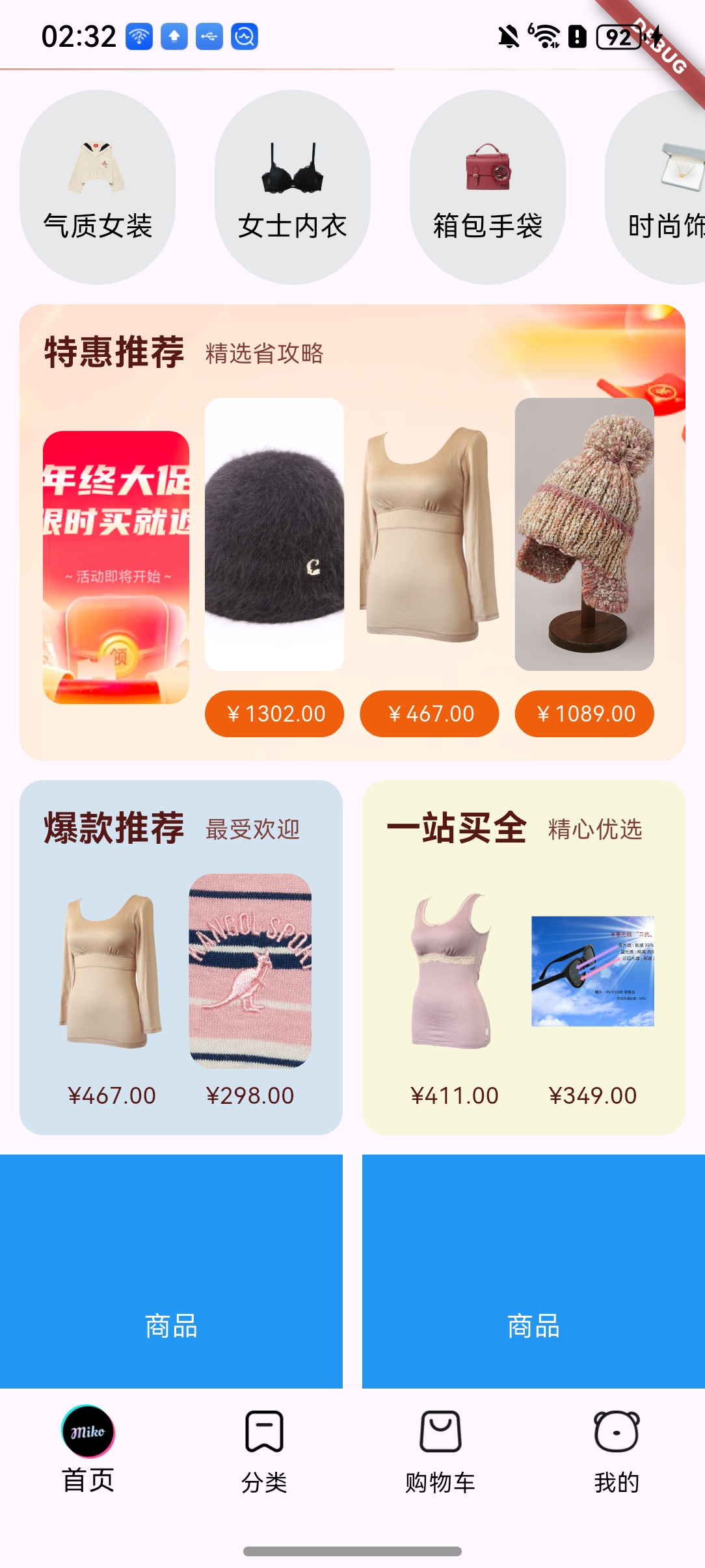
两个模块在首页并排显示,左侧为"爆款推荐"(蓝色背景),右侧为"一站买全"(米黄色背景),各展示两张商品图片及价格,视觉效果清晰统一。
运行效果如下:
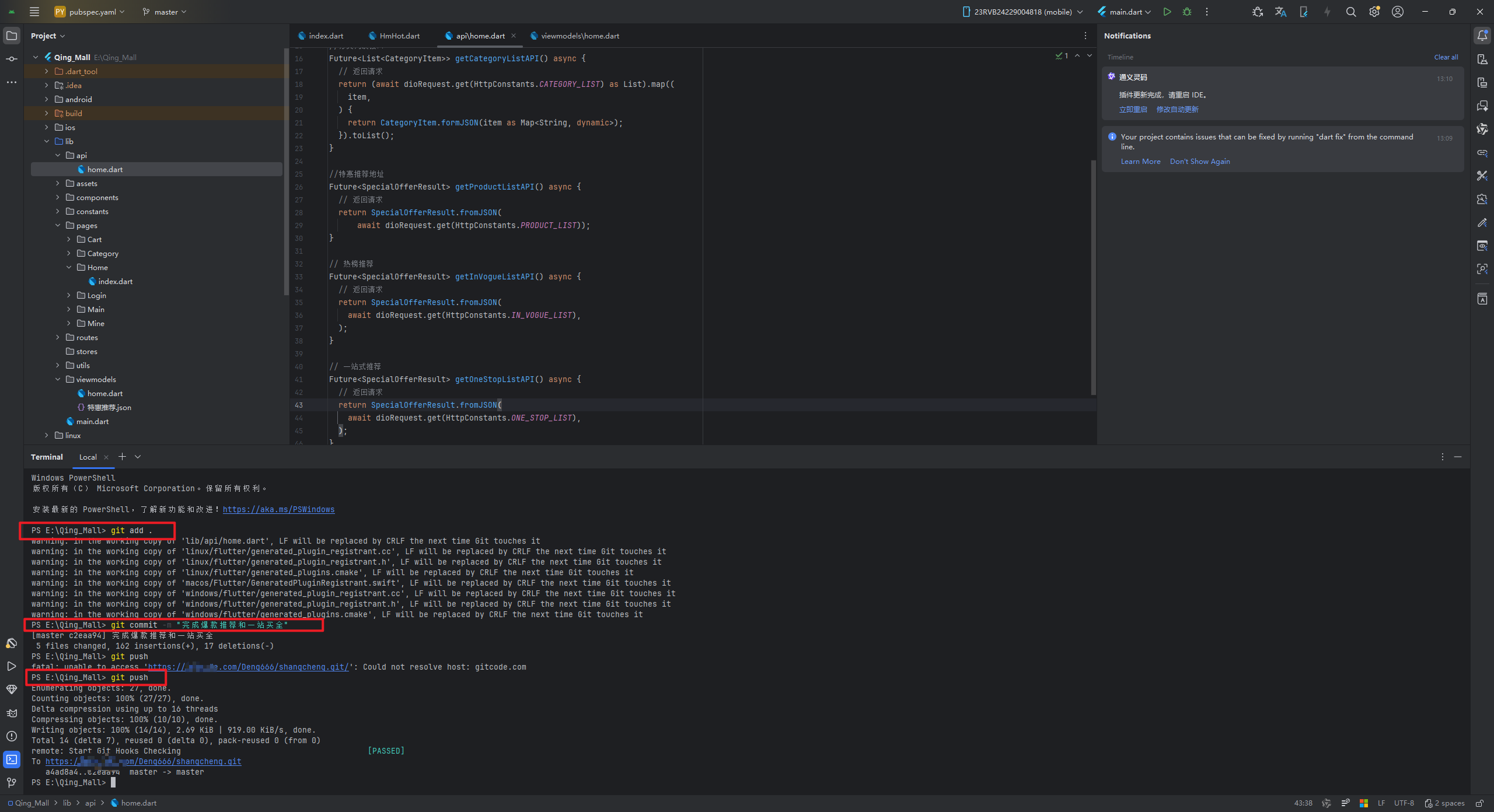
功能开发完成后,别忘记上传AtomGit代码托管平台
git add .
git commit -m "完成爆款推荐和一站买全功能开发"
git push

讨论HarmonyOS开发技术,专注于API与组件、DevEco Studio、测试、元服务和应用上架分发等。
更多推荐
 13
13 0
0- 0


 已为社区贡献23条内容

所有评论(0)