Flutter 框架跨平台鸿蒙开发 - 读书交流俱乐部
读书交流俱乐部应用
欢迎加入开源鸿蒙跨平台社区:
https://openharmonycrossplatform.csdn.net
一、项目概述
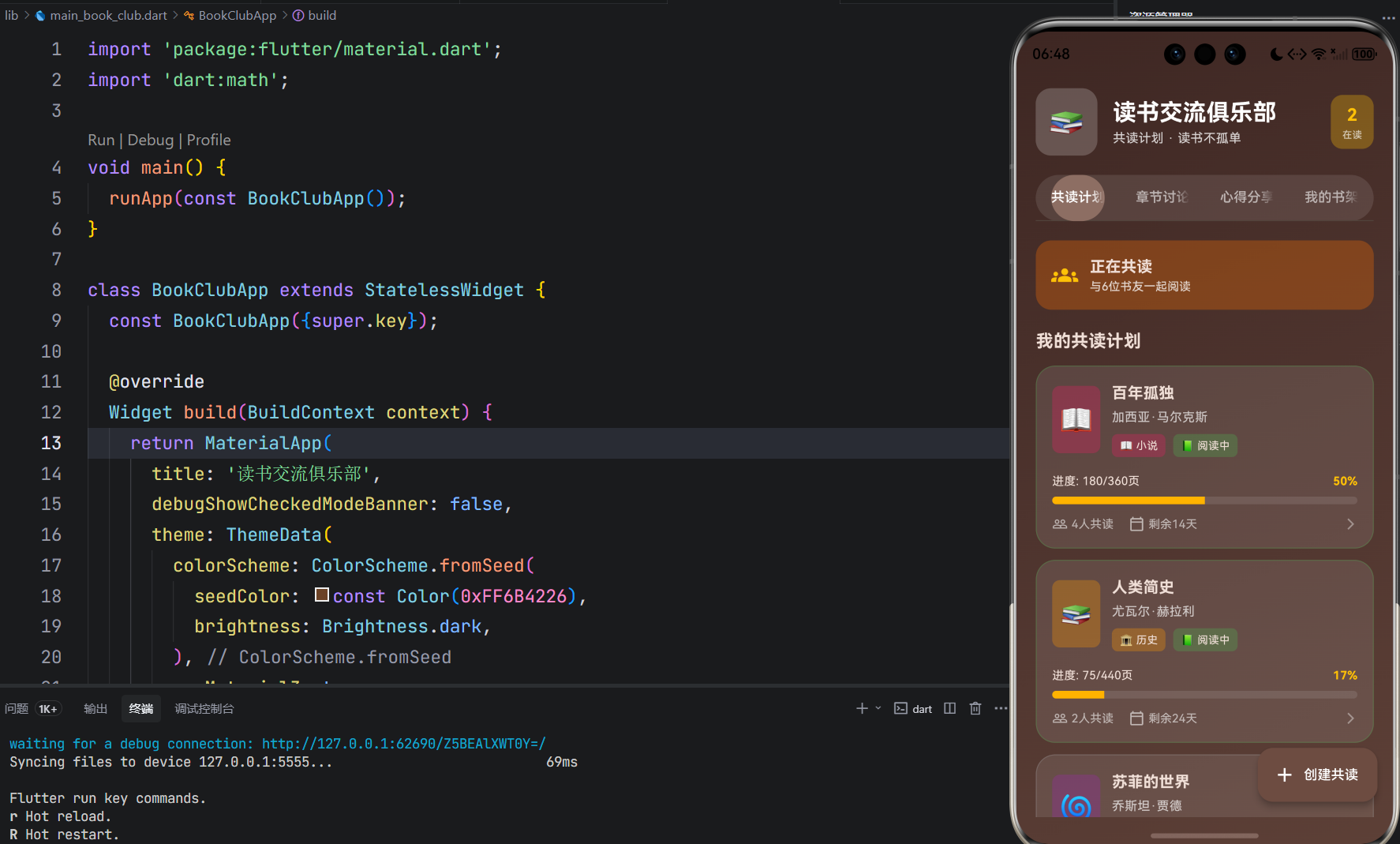
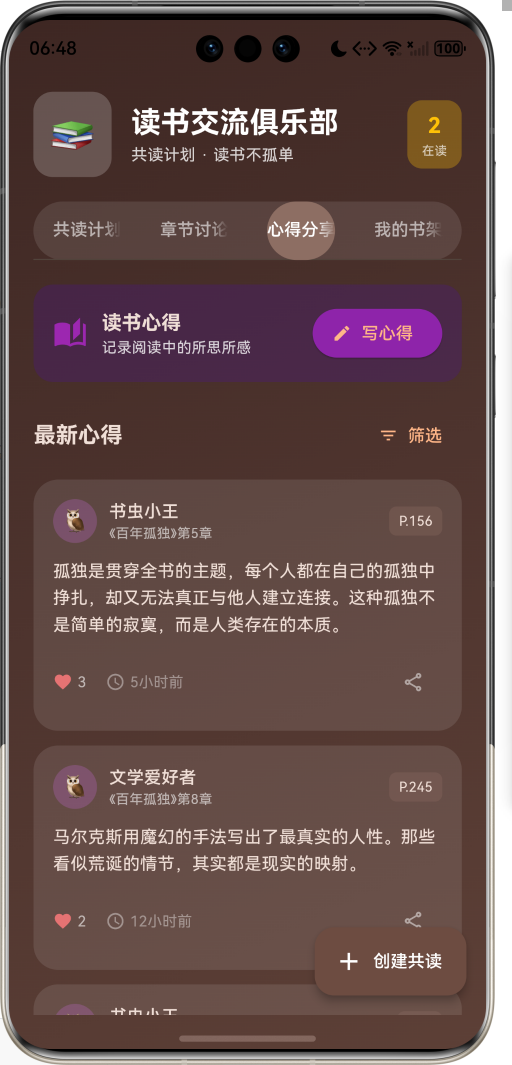
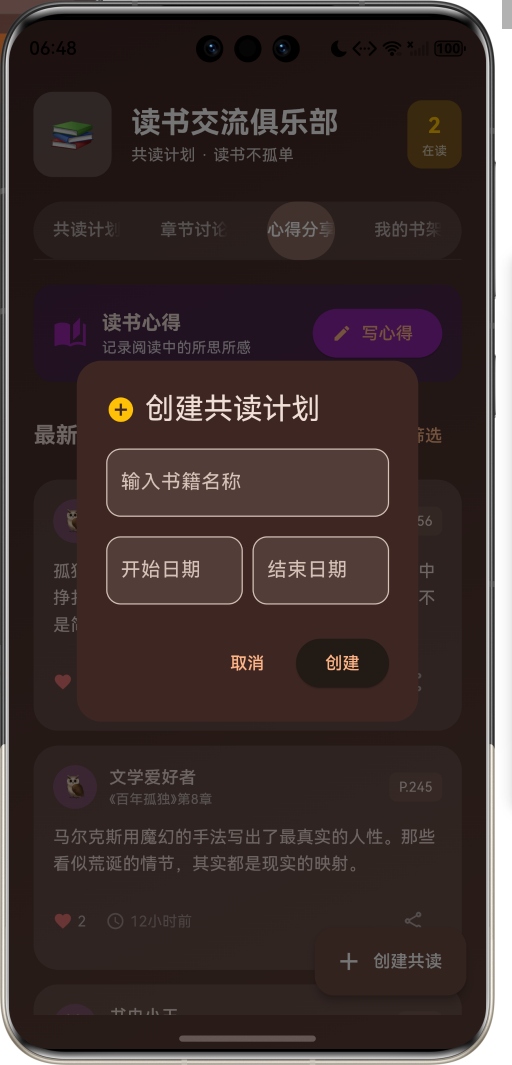
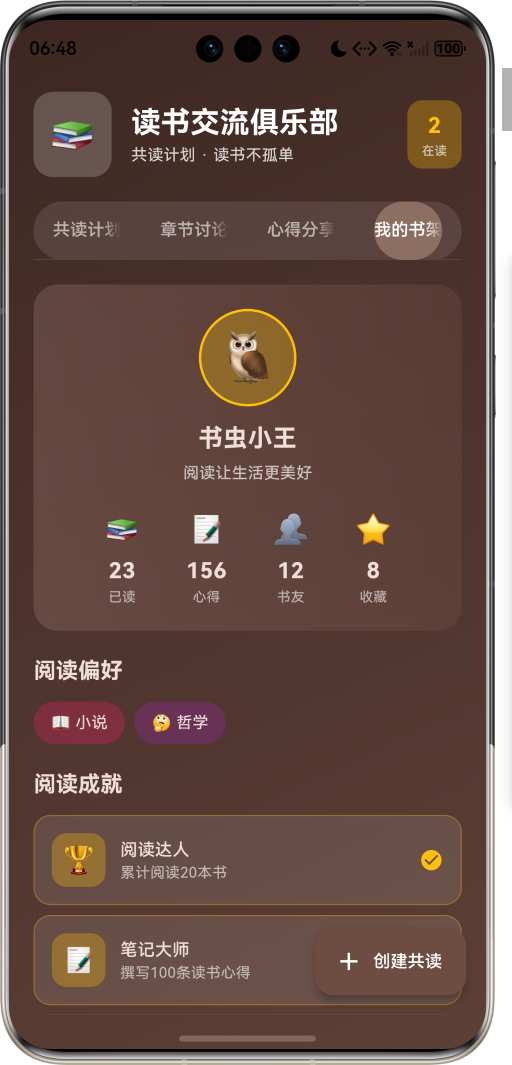
运行效果图
1.1 应用简介
读书交流俱乐部是一款社交创新类应用,致力于让阅读不再孤单。通过共读计划、章节讨论、心得分享三大核心功能,将独自阅读转变为社交体验。书友们可以一起制定阅读计划,在章节中展开讨论,分享阅读心得,让每一本书都成为连接心灵的桥梁。
应用核心理念:书友共读,读书不孤单。
在快节奏的现代生活中,阅读往往成为一项孤独的活动。读书交流俱乐部打破了这种孤独感,让阅读变成一种社交体验,让每一本书都能找到志同道合的读者。
1.2 核心功能
| 功能模块 | 功能描述 | 实现方式 |
|---|---|---|
| 共读计划 | 创建和管理阅读计划 | 计划卡片 + 进度追踪 |
| 章节讨论 | 对章节内容展开讨论 | 讨论帖 + 回复系统 |
| 心得分享 | 分享阅读感悟和笔记 | 笔记卡片 + 点赞互动 |
| 个人书架 | 管理阅读历史和偏好 | 用户档案 + 成就系统 |
1.3 书籍分类
| 序号 | 分类 | Emoji | 颜色代码 | 描述 |
|---|---|---|---|---|
| 1 | 小说 | 📖 | #E91E63 | 文学作品 |
| 2 | 非虚构 | 📚 | #2196F3 | 纪实作品 |
| 3 | 科学 | 🔬 | #4CAF50 | 科普读物 |
| 4 | 历史 | 🏛️ | #FF9800 | 历史著作 |
| 5 | 哲学 | 🤔 | #9C27B0 | 哲学思考 |
| 6 | 传记 | 👤 | #00BCD4 | 人物传记 |
| 7 | 自我提升 | 💪 | #FF5722 | 成长励志 |
| 8 | 艺术 | 🎨 | #E040FB | 艺术鉴赏 |
| 9 | 诗歌 | 🌸 | #F06292 | 诗词歌赋 |
| 10 | 其他 | 🌟 | #78909C | 其他类型 |
1.4 阅读状态
| 状态 | Emoji | 颜色 | 描述 |
|---|---|---|---|
| 未开始 | 📕 | 灰色 | 计划中 |
| 阅读中 | 📗 | 绿色 | 正在阅读 |
| 暂停中 | 📙 | 橙色 | 暂时搁置 |
| 已完成 | 📘 | 蓝色 | 阅读完毕 |
1.5 讨论类型
| 类型 | Emoji | 适用场景 |
|---|---|---|
| 章节讨论 | 📝 | 针对具体章节内容 |
| 人物分析 | 👥 | 分析书中人物形象 |
| 主题探讨 | 💡 | 深入讨论作品主题 |
| 金句分享 | ✨ | 分享精彩语句 |
| 疑问求解 | ❓ | 提出阅读疑问 |
1.6 技术栈
| 技术领域 | 技术选型 | 版本要求 |
|---|---|---|
| 开发框架 | Flutter | >= 3.0.0 |
| 编程语言 | Dart | >= 2.17.0 |
| 设计规范 | Material Design 3 | - |
| 状态管理 | setState | - |
| 导航控制 | TabController | - |
| 目标平台 | 鸿蒙OS / Web | API 21+ |
二、项目结构
lib/
├── main_book_club.dart         # 应用主入口(~950行)
│   ├── BookClubApp             # 根应用组件
│   ├── BookGenre               # 书籍分类枚举
│   ├── ReadingStatus           # 阅读状态枚举
│   ├── DiscussionType          # 讨论类型枚举
│   ├── Book                    # 书籍模型
│   ├── ReadingPlan             # 共读计划模型
│   ├── ChapterDiscussion       # 章节讨论模型
│   ├── DiscussionPost          # 讨论帖子模型
│   ├── ReadingNote             # 阅读笔记模型
│   ├── UserProfile             # 用户档案模型
│   └── BookClubHomePage        # 主页面
三、数据模型
3.1 书籍分类枚举 (BookGenre)
enum BookGenre {
  fiction('小说', '📖', Color(0xFFE91E63)),
  nonfiction('非虚构', '📚', Color(0xFF2196F3)),
  science('科学', '🔬', Color(0xFF4CAF50)),
  history('历史', '🏛️', Color(0xFFFF9800)),
  philosophy('哲学', '🤔', Color(0xFF9C27B0)),
  biography('传记', '👤', Color(0xFF00BCD4)),
  selfhelp('自我提升', '💪', Color(0xFFFF5722)),
  art('艺术', '🎨', Color(0xFFE040FB)),
  poetry('诗歌', '🌸', Color(0xFFF06292)),
  other('其他', '🌟', Color(0xFF78909C));

  final String label;
  final String icon;
  final Color color;
}
3.2 阅读状态枚举 (ReadingStatus)
enum ReadingStatus {
  notStarted('未开始', '📕', Color(0xFF9E9E9E)),
  reading('阅读中', '📗', Color(0xFF4CAF50)),
  paused('暂停中', '📙', Color(0xFFFF9800)),
  completed('已完成', '📘', Color(0xFF2196F3));

  final String label;
  final String icon;
  final Color color;
}
状态转换流程:
3.3 书籍数据模型 (Book)
class Book {
  final String id;
  final String title;
  final String author;
  final String cover;
  final BookGenre genre;
  final int totalPages;
  final double rating;
  final String description;
  final List<String> tags;
}
3.4 共读计划模型 (ReadingPlan)
class ReadingPlan {
  final String id;
  final Book book;
  final DateTime startDate;
  final DateTime targetEndDate;
  final int dailyPages;
  final ReadingStatus status;
  final int currentPage;
  final List<String> participants;
  final String creatorId;

  double get progress => currentPage / book.totalPages;
  int get daysRemaining => targetEndDate.difference(DateTime.now()).inDays;
}
阅读进度计算公式:
Progress=CurrentPageTotalPages×100% Progress = \frac{CurrentPage}{TotalPages} \times 100\% Progress=TotalPagesCurrentPage×100%
每日阅读量建议计算:
DailyPages=⌈TotalPagesDaysplanned⌉ DailyPages = \left\lceil \frac{TotalPages}{Days_{planned}} \right\rceil DailyPages=⌈DaysplannedTotalPages⌉
3.5 章节讨论模型 (ChapterDiscussion)
class ChapterDiscussion {
  final String id;
  final String planId;
  final int chapterNumber;
  final String chapterTitle;
  final DiscussionType type;
  final List<DiscussionPost> posts;
  final DateTime createdAt;
}
3.6 阅读笔记模型 (ReadingNote)
class ReadingNote {
  final String id;
  final String planId;
  final String userId;
  final String userName;
  final String content;
  final int chapter;
  final int? page;
  final List<String> likes;
  final DateTime createdAt;
}
四、功能架构
4.1 功能模块图
4.2 数据流程图
4.3 用户交互流程
五、界面设计
5.1 整体布局
应用采用 四标签页 架构,通过 TabController 实现页面切换:
| 标签页 | 功能定位 | 主要组件 |
|---|---|---|
| 共读计划 | 计划管理中心 | ListView + 进度卡片 |
| 章节讨论 | 交流互动中心 | 讨论卡片 + 回复列表 |
| 心得分享 | 笔记记录中心 | 笔记卡片 + 编辑器 |
| 我的书架 | 个人数据中心 | 用户档案 + 成就列表 |
5.2 视觉设计规范
5.2.1 配色方案
应用采用 棕色系 作为主色调,营造温暖、书香的视觉感受:
LinearGradient(
  colors: [
    Color(0xFF3E2723),  // 深棕
    Color(0xFF4E342E),  // 主棕
    Color(0xFF5D4037),  // 浅棕
  ],
)
色彩心理学分析:
| 颜色 | RGB值 | 心理暗示 | 应用场景 |
|---|---|---|---|
| 深棕 | #3E2723 | 沉稳、经典 | 背景渐变 |
| 主棕 | #4E342E | 温暖、书香 | 主题色 |
| 浅棕 | #5D4037 | 舒适、宁静 | 辅助色 |
| 琥珀 | #FFC107 | 活力、成就 | 强调元素 |
5.2.2 组件圆角规范
Rcomponent={25px标签栏容器20px卡片组件16px按钮组件12px信息标签8px小型元素 R_{component} = \begin{cases} 25px & \text{标签栏容器} \\ 20px & \text{卡片组件} \\ 16px & \text{按钮组件} \\ 12px & \text{信息标签} \\ 8px & \text{小型元素} \end{cases} Rcomponent=⎩⎨⎧25px20px16px12px8px标签栏容器卡片组件按钮组件信息标签小型元素
5.3 页面详解
5.3.1 共读计划页
页面结构:
┌─────────────────────────────────┐
│  正在共读提醒卡片                 │
├─────────────────────────────────┤
│  我的共读计划                    │
│  ┌─────────────────────────────┐│
│  │ 书籍封面  书名/作者          ││
│  │          分类标签/状态标签   ││
│  │ 进度条: XXX页/XXX页 (XX%)   ││
│  │ 参与人数 | 剩余天数          ││
│  └─────────────────────────────┘│
│  ┌─────────────────────────────┐│
│  │ ...更多计划卡片              ││
│  └─────────────────────────────┘│
└─────────────────────────────────┘
5.3.2 章节讨论页
讨论卡片结构:
┌─────────────────────────────────┐
│ 讨论类型标签    书名             │
│ 第X章: 章节标题                  │
│ ┌─────────────────────────────┐ │
│ │ 头像 用户名                  │ │
│ │ 讨论内容...                  │ │
│ └─────────────────────────────┘ │
│ 评论数 | 点赞数 | 参与讨论按钮   │
└─────────────────────────────────┘
5.3.3 心得分享页
笔记卡片结构:
┌─────────────────────────────────┐
│ 头像 用户名    《书名》第X章 P.XX│
│ 心得内容...                      │
│ ❤️ 点赞数 | 时间 | 分享按钮      │
└─────────────────────────────────┘
5.3.4 个人书架页
用户档案结构:
┌─────────────────────────────────┐
│         头像                     │
│         用户名                   │
│         个性签名                 │
│ ┌─────┬─────┬─────┬─────┐      │
│ │已读 │心得 │书友 │收藏 │      │
│ │ XX  │ XX  │ XX  │ XX  │      │
│ └─────┴─────┴─────┴─────┘      │
├─────────────────────────────────┤
│ 阅读偏好标签                     │
│ 阅读成就列表                     │
│ 设置选项                         │
└─────────────────────────────────┘
六、核心功能实现
6.1 共读计划管理
6.1.1 计划创建流程
void _createNewPlan() {
  showDialog(
    context: context,
    builder: (context) => AlertDialog(
      title: const Row(
        children: [
          Icon(Icons.add_circle, color: Colors.amber),
          SizedBox(width: 8),
          Text('创建共读计划'),
        ],
      ),
      content: Column(
        mainAxisSize: MainAxisSize.min,
        children: [
          TextField(decoration: InputDecoration(hintText: '输入书籍名称')),
          Row(
            children: [
              Expanded(child: TextField(decoration: InputDecoration(hintText: '开始日期'))),
              Expanded(child: TextField(decoration: InputDecoration(hintText: '结束日期'))),
            ],
          ),
        ],
      ),
    ),
  );
}
6.1.2 进度计算逻辑
阅读进度计算:
Progresspercentage=CurrentPageTotalPages×100% Progress_{percentage} = \frac{CurrentPage}{TotalPages} \times 100\% Progresspercentage=TotalPagesCurrentPage×100%
剩余天数计算:
Daysremaining=TargetDate−CurrentDate Days_{remaining} = TargetDate - CurrentDate Daysremaining=TargetDate−CurrentDate
阅读速度评估:
Speedstatus={超前if ActualProgress>ExpectedProgress正常if ActualProgress=ExpectedProgress落后if ActualProgress<ExpectedProgress Speed_{status} = \begin{cases} \text{超前} & \text{if } ActualProgress > ExpectedProgress \\ \text{正常} & \text{if } ActualProgress = ExpectedProgress \\ \text{落后} & \text{if } ActualProgress < ExpectedProgress \end{cases} Speedstatus=⎩⎨⎧超前正常落后if ActualProgress>ExpectedProgressif ActualProgress=ExpectedProgressif ActualProgress<ExpectedProgress
6.2 章节讨论系统
6.2.1 讨论类型分类
6.2.2 讨论热度计算
Heatscore=α⋅Posts+β⋅Likes+γ⋅Replies+δ⋅TimeDecay Heat_{score} = \alpha \cdot Posts + \beta \cdot Likes + \gamma \cdot Replies + \delta \cdot TimeDecay Heatscore=α⋅Posts+β⋅Likes+γ⋅Replies+δ⋅TimeDecay
其中:
- PostsPostsPosts 为帖子数量
- LikesLikesLikes 为点赞总数
- RepliesRepliesReplies 为回复数量
- TimeDecayTimeDecayTimeDecay 为时间衰减因子
- α,β,γ,δ\alpha, \beta, \gamma, \deltaα,β,γ,δ 为权重系数
6.3 心得分享系统
6.3.1 心得撰写流程
void _showNoteDialog() {
  showDialog(
    context: context,
    builder: (context) => AlertDialog(
      title: const Row(
        children: [
          Icon(Icons.edit_note, color: Colors.amber),
          SizedBox(width: 8),
          Text('记录心得'),
        ],
      ),
      content: Column(
        mainAxisSize: MainAxisSize.min,
        children: [
          TextField(maxLines: 4, decoration: InputDecoration(hintText: '写下你的读书心得...')),
          Row(
            children: [
              Expanded(child: TextField(decoration: InputDecoration(hintText: '章节'))),
              Expanded(child: TextField(decoration: InputDecoration(hintText: '页码'))),
            ],
          ),
        ],
      ),
    ),
  );
}
6.3.2 心得质量评分
Qualityscore=w1⋅Length+w2⋅Depth+w3⋅Originality+w4⋅Engagement Quality_{score} = w_1 \cdot Length + w_2 \cdot Depth + w_3 \cdot Originality + w_4 \cdot Engagement Qualityscore=w1⋅Length+w2⋅Depth+w3⋅Originality+w4⋅Engagement
评分维度说明:
| 维度 | 权重 | 评估标准 |
|---|---|---|
| 长度 | 15% | 内容充实程度 |
| 深度 | 35% | 思考深度 |
| 原创性 | 30% | 个人见解 |
| 互动性 | 20% | 引发讨论能力 |
6.4 成就系统
6.4.1 成就类型
| 成就名称 | 条件 | 奖励 |
|---|---|---|
| 阅读达人 | 累计阅读20本书 | 🏆 徽章 |
| 笔记大师 | 撰写100条读书心得 | 📝 徽章 |
| 讨论先锋 | 参与50次章节讨论 | 💬 徽章 |
| 社交书虫 | 结识10位书友 | 🤝 徽章 |
6.4.2 成就解锁逻辑
Widget _buildAchievementItem(String icon, String title, String description, bool achieved) {
  return Container(
    decoration: BoxDecoration(
      color: Colors.white.withValues(alpha: achieved ? 0.1 : 0.05),
      border: Border.all(
        color: achieved ? Colors.amber.withValues(alpha: 0.3) : Colors.white.withValues(alpha: 0.1),
      ),
    ),
    child: Row(
      children: [
        Container(
          decoration: BoxDecoration(
            color: achieved ? Colors.amber.withValues(alpha: 0.3) : Colors.grey.withValues(alpha: 0.2),
          ),
          child: Text(icon),
        ),
        Expanded(child: Column(
          children: [
            Text(title),
            Text(description),
          ],
        )),
        achieved ? Icon(Icons.check_circle) : Icon(Icons.lock_outline),
      ],
    ),
  );
}
七、数据管理
7.1 数据流向
7.2 状态管理策略
当前采用 setState 进行状态管理,适用于单页面场景。未来可扩展为:
class BookClubProvider extends ChangeNotifier {
  List<ReadingPlan> _readingPlans = [];
  List<ChapterDiscussion> _discussions = [];
  List<ReadingNote> _notes = [];
  UserProfile? _currentUser;

  List<ReadingPlan> get readingPlans => _readingPlans;
  List<ChapterDiscussion> get discussions => _discussions;
  List<ReadingNote> get notes => _notes;
  UserProfile? get currentUser => _currentUser;

  void addReadingPlan(ReadingPlan plan) {
    _readingPlans.add(plan);
    notifyListeners();
  }

  void updateProgress(String planId, int currentPage) {
    final index = _readingPlans.indexWhere((p) => p.id == planId);
    if (index != -1) {
      // 更新逻辑
      notifyListeners();
    }
  }
}
7.3 数据持久化方案
| 存储类型 | 适用场景 | 推荐方案 |
|---|---|---|
| 用户偏好 | 阅读设置 | SharedPreferences |
| 阅读计划 | 计划数据 | SQLite / Hive |
| 讨论记录 | 离线缓存 | SQLite |
| 用户档案 | 个人数据 | 云端同步 |
八、扩展功能规划
8.1 功能路线图
8.2 智能推荐算法
8.2.1 书友匹配算法
Matchscore=∑i=1nwi⋅Simi(UserA,UserB) Match_{score} = \sum_{i=1}^{n} w_i \cdot Sim_i(User_A, User_B) Matchscore=i=1∑nwi⋅Simi(UserA,UserB)
相似度计算维度:
| 维度 | 权重 | 计算方式 |
|---|---|---|
| 阅读偏好 | 30% | 类型重合度 |
| 阅读速度 | 20% | 速度匹配度 |
| 活跃时间 | 20% | 时间重合度 |
| 讨论风格 | 15% | 风格相似度 |
| 阅读深度 | 15% | 深度匹配度 |
8.2.2 书籍推荐算法
Recommendscore=α⋅GenreMatch+β⋅SocialProof+γ⋅Popularity+δ⋅Freshness Recommend_{score} = \alpha \cdot GenreMatch + \beta \cdot SocialProof + \gamma \cdot Popularity + \delta \cdot Freshness Recommendscore=α⋅GenreMatch+β⋅SocialProof+γ⋅Popularity+δ⋅Freshness
九、性能优化
9.1 渲染性能
9.1.1 列表优化
ListView.builder(
  itemCount: readingPlans.length,
  itemBuilder: (context, index) {
    return ReadingPlanCard(plan: readingPlans[index]);
  },
)
9.1.2 图片缓存
书籍封面图片采用缓存策略:
Cachehit_rate=HitsHits+Misses×100% Cache_{hit\_rate} = \frac{Hits}{Hits + Misses} \times 100\% Cachehit_rate=Hits+MissesHits×100%
目标缓存命中率:≥90%\geq 90\%≥90%
9.2 内存管理
| 优化项 | 实施方式 | 预期效果 |
|---|---|---|
| 大对象释放 | 及时置空引用 | 减少内存峰值 |
| 分页加载 | 讨论列表分页 | 降低内存占用 |
| 懒加载 | 心得列表懒加载 | 按需渲染 |
十、安全与隐私
10.1 数据安全
10.2 隐私保护措施
| 保护措施 | 实施细节 |
|---|---|
| 数据最小化 | 仅收集必要信息 |
| 本地优先 | 优先本地处理 |
| 权限控制 | 按需申请权限 |
| 透明告知 | 明确告知数据用途 |
十一、测试策略
11.1 测试覆盖
void main() {
  group('ReadingPlan Tests', () {
    test('Progress calculation', () {
      final plan = ReadingPlan(
        currentPage: 180,
        book: Book(totalPages: 360),
      );
      expect(plan.progress, equals(0.5));
    });

    test('Days remaining calculation', () {
      final plan = ReadingPlan(
        targetEndDate: DateTime.now().add(Duration(days: 10)),
      );
      expect(plan.daysRemaining, closeTo(10, 1));
    });
  });
}
11.2 测试矩阵
| 测试类型 | 覆盖范围 | 工具 |
|---|---|---|
| 单元测试 | 数据模型、业务逻辑 | flutter_test |
| Widget测试 | UI组件 | flutter_test |
| 集成测试 | 完整流程 | integration_test |
| 性能测试 | 渲染性能 | Flutter DevTools |
十二、部署与发布
12.1 构建配置
# Android构建
flutter build apk --release

# iOS构建
flutter build ios --release

# Web构建
flutter build web --release
12.2 版本管理
采用语义化版本规范:
Version=Major.Minor.Patch Version = Major.Minor.Patch Version=Major.Minor.Patch
- Major: 不兼容的API变更
- Minor: 向后兼容的功能新增
- Patch: 向后兼容的问题修复
十三、总结与展望
13.1 项目成果
读书交流俱乐部通过共读计划、章节讨论、心得分享三大核心功能,有效解决了独自阅读的孤独感问题。应用采用现代化的Flutter框架开发,具备良好的跨平台能力和扩展潜力。棕色系主题营造了温暖的书香氛围,让阅读成为一种享受。
13.2 未来展望
| 发展方向 | 具体规划 |
|---|---|
| AI赋能 | 智能摘要、阅读建议、内容推荐 |
| 社区建设 | 读书会活动、作者互动、线下聚会 |
| 内容生态 | 书评专栏、阅读榜单、知识图谱 |
| 数据洞察 | 阅读习惯分析、成长轨迹、知识积累 |

讨论HarmonyOS开发技术,专注于API与组件、DevEco Studio、测试、元服务和应用上架分发等。
更多推荐


 5
5 0
0- 0


 已为社区贡献15条内容

所有评论(0)