鸿蒙flutter第三方库适配 - 番茄钟专注
番茄钟专注应用
欢迎加入开源鸿蒙跨平台社区:
https://openharmonycrossplatform.csdn.net
适配的第三方库地址:
- flutter_local_notifications: https://pub.dev/packages/flutter_local_notifications
- shared_preferences: https://pub.dev/packages/shared_preferences
- audioplayers: https://pub.dev/packages/audioplayers
- wakelock: https://pub.dev/packages/wakelock
一、项目概述
运行效果图
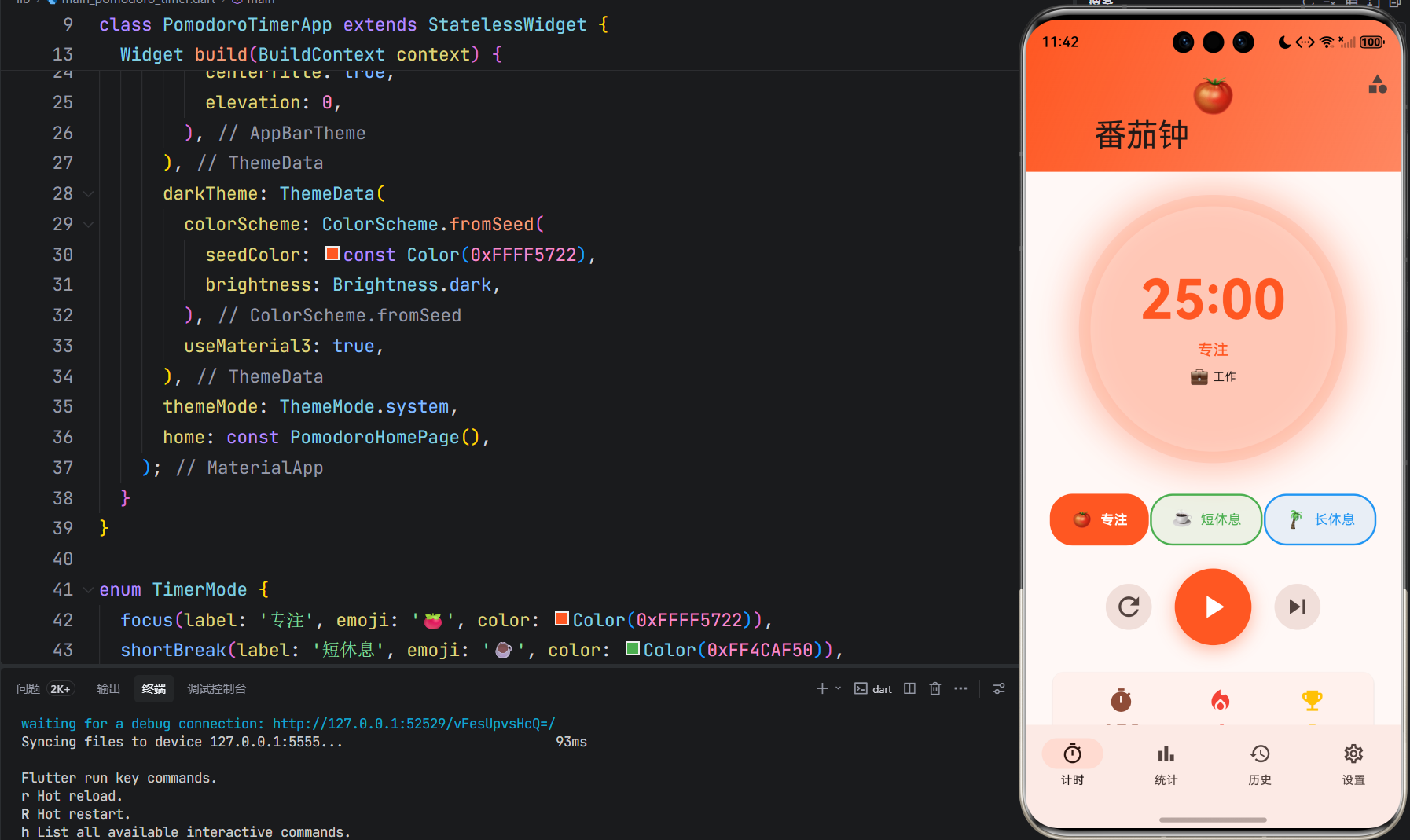
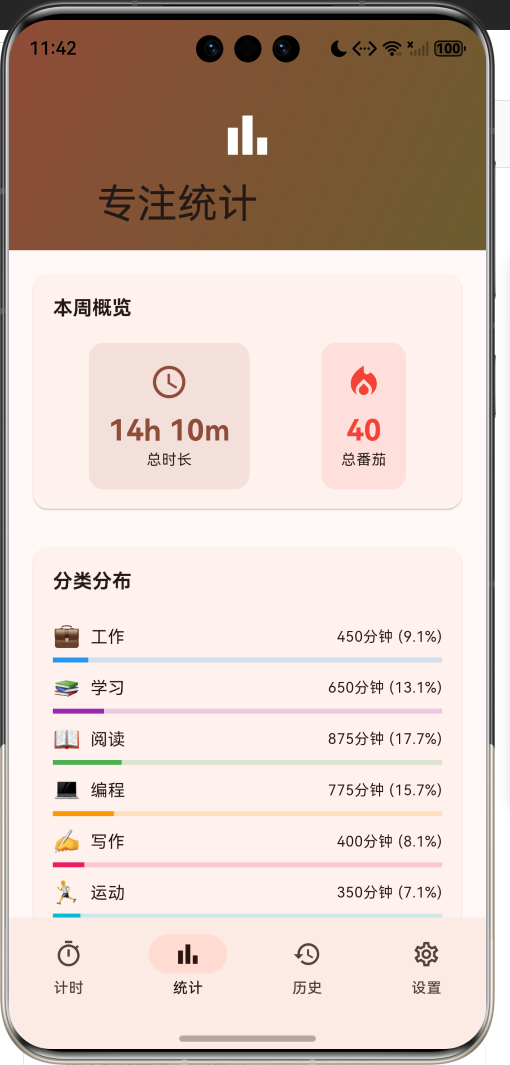
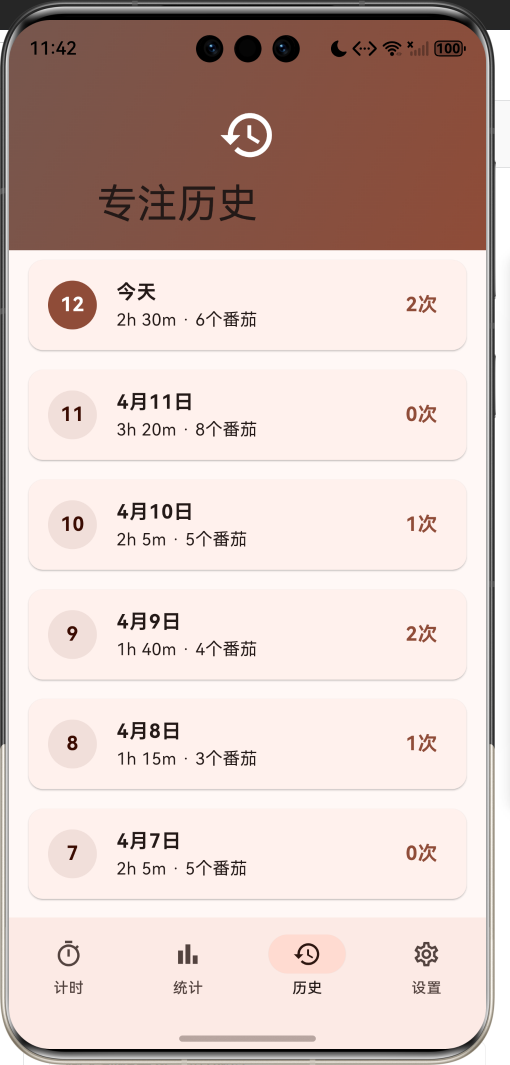
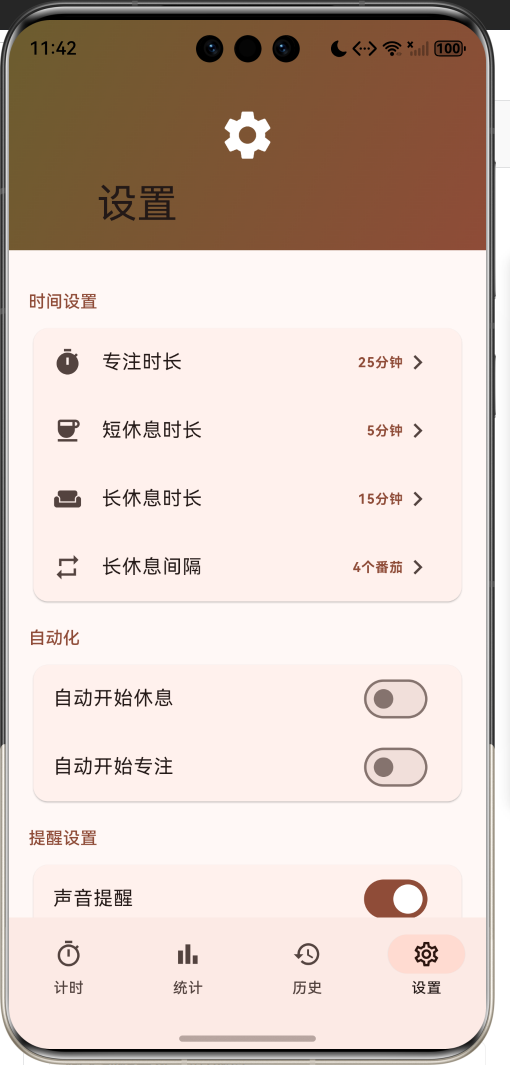
1.1 应用简介
番茄钟专注应用是一款基于番茄工作法的时间管理工具,致力于帮助用户提高工作效率,培养专注习惯。应用支持自定义时长、休息提醒、专注统计、白噪音背景等功能,让用户在愉悦的氛围中高效完成工作。
应用以热情的橙红色为主色调,象征专注的热情与动力。涵盖计时器、统计分析、历史记录、设置中心四大模块。用户可以开始专注计时、查看统计数据、回顾历史记录、自定义设置,打造专属的专注体验。
1.2 核心功能
| 功能模块 | 功能描述 | 实现方式 |
|---|---|---|
| 番茄计时 | 专注、短休息、长休息三种模式 | 定时器 |
| 自定义时长 | 自由设置专注和休息时长 | 设置配置 |
| 专注类型 | 工作、学习、阅读等多种类型 | 分类管理 |
| 专注统计 | 每日、每周专注数据统计 | 数据分析 |
| 历史记录 | 专注历史时间线展示 | 数据存储 |
| 白噪音 | 雨声、森林、海浪等背景音 | 音频播放 |
| 提醒通知 | 专注结束提醒通知 | 本地通知 |
| 屏幕常亮 | 专注时保持屏幕常亮 | 系统控制 |
1.3 计时模式定义
| 序号 | 模式名称 | Emoji | 默认时长 | 描述 |
|---|---|---|---|---|
| 1 | 专注 | 🍅 | 25分钟 | 专注工作时间段 |
| 2 | 短休息 | ☕ | 5分钟 | 短暂休息调整 |
| 3 | 长休息 | 🌴 | 15分钟 | 较长休息放松 |
1.4 专注类型定义
| 序号 | 类型名称 | Emoji | 颜色 | 描述 |
|---|---|---|---|---|
| 1 | 工作 | 💼 | 蓝色 | 日常工作任务 |
| 2 | 学习 | 📚 | 紫色 | 学习知识技能 |
| 3 | 阅读 | 📖 | 绿色 | 阅读书籍文章 |
| 4 | 编程 | 💻 | 橙色 | 编写代码程序 |
| 5 | 写作 | ✍️ | 粉色 | 创作写作内容 |
| 6 | 运动 | 🏃 | 青色 | 锻炼身体运动 |
| 7 | 冥想 | 🧘 | 棕色 | 冥想放松身心 |
| 8 | 其他 | 📌 | 灰色 | 其他类型任务 |
1.5 白噪音类型定义
| 序号 | 音效名称 | 图标 | 描述 |
|---|---|---|---|
| 1 | 无 | 🔇 | 关闭白噪音 |
| 2 | 雨声 | 💧 | 淅淅沥沥的雨声 |
| 3 | 森林 | 🌲 | 鸟语花香的森林 |
| 4 | 海浪 | 🌊 | 波涛汹涌的海浪 |
| 5 | 篝火 | 🔥 | 噼啪作响的篝火 |
| 6 | 风声 | 💨 | 轻柔拂面的风声 |
| 7 | 咖啡厅 | ☕ | 嘈杂温馨的咖啡厅 |
| 8 | 夜晚 | 🌙 | 宁静祥和的夜晚 |
1.6 技术栈
| 技术领域 | 技术选型 | 版本要求 |
|---|---|---|
| 开发框架 | Flutter | >= 3.0.0 |
| 编程语言 | Dart | >= 2.17.0 |
| 设计规范 | Material Design 3 | - |
| 本地通知 | flutter_local_notifications | >= 16.0.0 |
| 数据存储 | shared_preferences | >= 2.0.0 |
| 音频播放 | audioplayers | >= 5.0.0 |
| 屏幕唤醒 | wakelock | >= 0.2.0 |
| 目标平台 | 鸿蒙OS / Android / iOS | API 21+ |
1.7 项目结构
lib/
└── main_pomodoro_timer.dart
    ├── PomodoroTimerApp              # 应用入口
    ├── TimerMode                     # 计时模式枚举
    ├── WhiteNoise                    # 白噪音枚举
    ├── FocusCategory                 # 专注类型枚举
    ├── FocusSession                  # 专注会话模型
    ├── DailyStats                    # 每日统计模型
    ├── PomodoroSettings              # 番茄钟设置
    ├── PomodoroController            # 番茄钟控制器
    ├── PomodoroHomePage              # 主页面(底部导航)
    ├── _buildTimerPage               # 计时页
    ├── _buildStatsPage               # 统计页
    ├── _buildHistoryPage             # 历史页
    ├── _buildSettingsPage            # 设置页
    ├── TimerCirclePainter            # 计时圆环绘制器
    └── WeeklyChartPainter            # 周统计图表绘制器
二、系统架构
2.1 整体架构图
2.2 类图设计
2.3 页面导航流程
2.4 计时流程
三、核心模块设计
3.1 数据模型设计
3.1.1 计时模式枚举 (TimerMode)
enum TimerMode {
  focus(label: '专注', emoji: '🍅', color: Color(0xFFFF5722)),
  shortBreak(label: '短休息', emoji: '☕', color: Color(0xFF4CAF50)),
  longBreak(label: '长休息', emoji: '🌴', color: Color(0xFF2196F3));

  final String label;
  final String emoji;
  final Color color;
  const TimerMode({required this.label, required this.emoji, required this.color});
}
3.1.2 专注类型枚举 (FocusCategory)
enum FocusCategory {
  work(label: '工作', emoji: '💼', color: Color(0xFF2196F3)),
  study(label: '学习', emoji: '📚', color: Color(0xFF9C27B0)),
  reading(label: '阅读', emoji: '📖', color: Color(0xFF4CAF50)),
  coding(label: '编程', emoji: '💻', color: Color(0xFFFF9800)),
  writing(label: '写作', emoji: '✍️', color: Color(0xFFE91E63)),
  exercise(label: '运动', emoji: '🏃', color: Color(0xFF00BCD4)),
  meditation(label: '冥想', emoji: '🧘', color: Color(0xFF795548)),
  other(label: '其他', emoji: '📌', color: Color(0xFF607D8B));

  final String label;
  final String emoji;
  final Color color;
  const FocusCategory({required this.label, required this.emoji, required this.color});
}
3.1.3 专注会话模型 (FocusSession)
class FocusSession {
  final String id;
  final DateTime startTime;
  final DateTime endTime;
  final int durationMinutes;
  final FocusCategory category;
  final String? note;
  final bool completed;

  const FocusSession({
    required this.id,
    required this.startTime,
    required this.endTime,
    required this.durationMinutes,
    required this.category,
    this.note,
    required this.completed,
  });

  int get tomatoCount => (durationMinutes / 25).ceil();
}
3.1.4 每日统计模型 (DailyStats)
class DailyStats {
  final DateTime date;
  final int totalMinutes;
  final int completedSessions;
  final int tomatoCount;
  final Map<FocusCategory, int> categoryMinutes;

  const DailyStats({
    required this.date,
    this.totalMinutes = 0,
    this.completedSessions = 0,
    this.tomatoCount = 0,
    this.categoryMinutes = const {},
  });

  String get totalHoursText {
    final hours = totalMinutes ~/ 60;
    final minutes = totalMinutes % 60;
    return '${hours}h ${minutes}m';
  }
}
3.1.5 专注类型分布
3.2 页面结构设计
3.2.1 主页面布局
3.2.2 计时页结构
3.2.3 统计页结构
3.2.4 设置页结构
3.3 番茄钟控制器逻辑
3.4 统计计算逻辑
四、UI设计规范
4.1 配色方案
应用以热情的橙红色为主色调,象征专注的热情与动力:
| 颜色类型 | 色值 | 用途 |
|---|---|---|
| 主色 | #FF5722 (Deep Orange) | 专注模式、主题元素 |
| 辅助色 | #FF7043 | 渐变效果 |
| 第三色 | #FF8A65 | 卡片背景 |
| 强调色 | #E64A19 | 按钮高亮 |
| 背景色 | #FAFAFA | 页面背景 |
| 卡片背景 | #FFFFFF | 信息卡片 |
| 专注色 | #FF5722 | 专注模式 |
| 短休息色 | #4CAF50 | 短休息模式 |
| 长休息色 | #2196F3 | 长休息模式 |
4.2 计时模式配色
| 模式 | 色值 | 视觉效果 |
|---|---|---|
| 专注 | #FF5722 | 橙红色 |
| 短休息 | #4CAF50 | 绿色 |
| 长休息 | #2196F3 | 蓝色 |
4.3 专注类型配色
| 类型 | 色值 | 视觉效果 |
|---|---|---|
| 工作 | #2196F3 | 蓝色 |
| 学习 | #9C27B0 | 紫色 |
| 阅读 | #4CAF50 | 绿色 |
| 编程 | #FF9800 | 橙色 |
| 写作 | #E91E63 | 粉色 |
| 运动 | #00BCD4 | 青色 |
| 冥想 | #795548 | 棕色 |
| 其他 | #607D8B | 灰色 |
4.4 字体规范
| 元素 | 字号 | 字重 | 颜色 |
|---|---|---|---|
| 页面标题 | 24px | Bold | 主色 |
| 倒计时 | 48px | Bold | 当前模式色 |
| 模式名称 | 16px | Medium | 当前模式色 |
| 统计数字 | 24px | Bold | 主色 |
| 日期显示 | 16px | Bold | #000000 |
| 分类名称 | 14px | Regular | #333333 |
4.5 组件规范
4.5.1 计时圆环
┌─────────────────────────────────────┐
│                                     │
│           ╭──────────────╮          │
│          ╱                ╲         │
│         │                  │        │
│         │     25:00       │        │
│         │                  │        │
│         │     专注        │        │
│         │                  │        │
│         │   💼 工作       │        │
│          ╲                ╱         │
│           ╰──────────────╯          │
│                                     │
└─────────────────────────────────────┘
4.5.2 模式选择器
┌─────────────────────────────────────┐
│  [🍅 专注]  [☕ 短休息]  [🌴 长休息] │
└─────────────────────────────────────┘
4.5.3 控制按钮
┌─────────────────────────────────────┐
│         🔄        ▶️        ⏭️      │
│        重置     开始/暂停   跳过     │
└─────────────────────────────────────┘
4.5.4 今日摘要
┌─────────────────────────────────────┐
│   ⏱️          🔥          🏆       │
│  125分钟     5个番茄     5次完成    │
└─────────────────────────────────────┘
4.5.5 统计卡片
┌─────────────────────────────────────┐
│  本周概览                            │
│  ┌─────────────┐ ┌─────────────┐   │
│  │ ⏱️ 总时长   │ │ 🔥 总番茄   │   │
│  │   12h 30m  │ │    25      │   │
│  └─────────────┘ └─────────────┘   │
└─────────────────────────────────────┘
4.5.6 分类分布
┌─────────────────────────────────────┐
│  分类分布                            │
│                                     │
│  💼 工作  350分钟 (35.0%)           │
│  ═══════════════●────────────       │
│                                     │
│  📚 学习  250分钟 (25.0%)           │
│  ═══════●────────────────────       │
│                                     │
│  💻 编程  150分钟 (15.0%)           │
│  ═══●───────────────────────        │
└─────────────────────────────────────┘
五、核心功能实现
5.1 番茄钟控制器实现
class PomodoroController extends ChangeNotifier {
  TimerMode _currentMode = TimerMode.focus;
  Timer? _timer;
  int _remainingSeconds = 25 * 60;
  bool _isRunning = false;
  PomodoroSettings _settings = const PomodoroSettings();

  TimerMode get currentMode => _currentMode;
  int get remainingSeconds => _remainingSeconds;
  bool get isRunning => _isRunning;

  void start() {
    if (_isRunning) return;
    _isRunning = true;
    _startTimer();
    notifyListeners();
  }

  void pause() {
    if (!_isRunning) return;
    _isRunning = false;
    _stopTimer();
    notifyListeners();
  }

  void toggle() {
    if (_isRunning) {
      pause();
    } else {
      start();
    }
  }

  void reset() {
    _stopTimer();
    _isRunning = false;
    _setDurationForMode(_currentMode);
    notifyListeners();
  }
}
5.2 定时器实现
void _startTimer() {
  _timer = Timer.periodic(const Duration(seconds: 1), (timer) {
    if (_remainingSeconds > 0) {
      _remainingSeconds--;
      notifyListeners();
    } else {
      _completeSession();
      _moveToNextMode();
      notifyListeners();
    }
  });
}

void _stopTimer() {
  _timer?.cancel();
  _timer = null;
}
5.3 模式切换实现
void setMode(TimerMode mode) {
  _stopTimer();
  _currentMode = mode;
  _setDurationForMode(mode);
  notifyListeners();
}

void _setDurationForMode(TimerMode mode) {
  switch (mode) {
    case TimerMode.focus:
      _remainingSeconds = _settings.focusDuration * 60;
      break;
    case TimerMode.shortBreak:
      _remainingSeconds = _settings.shortBreakDuration * 60;
      break;
    case TimerMode.longBreak:
      _remainingSeconds = _settings.longBreakDuration * 60;
      break;
  }
}

void _moveToNextMode() {
  if (_currentMode == TimerMode.focus) {
    if (_completedSessions % _settings.sessionsBeforeLongBreak == 0) {
      setMode(TimerMode.longBreak);
    } else {
      setMode(TimerMode.shortBreak);
    }
  } else {
    setMode(TimerMode.focus);
  }
}
5.4 统计计算实现
void _calculateDailyStats() {
  final statsMap = <DateTime, DailyStats>{};

  for (var session in _sessions) {
    final date = DateTime(
      session.startTime.year,
      session.startTime.month,
      session.startTime.day
    );

    if (!statsMap.containsKey(date)) {
      statsMap[date] = DailyStats(date: date);
    }

    final oldStats = statsMap[date]!;
    final categoryMinutes = Map<FocusCategory, int>.from(oldStats.categoryMinutes);
    categoryMinutes[session.category] =
      (categoryMinutes[session.category] ?? 0) + session.durationMinutes;

    statsMap[date] = DailyStats(
      date: date,
      totalMinutes: oldStats.totalMinutes + session.durationMinutes,
      completedSessions: oldStats.completedSessions + (session.completed ? 1 : 0),
      tomatoCount: oldStats.tomatoCount + session.tomatoCount,
      categoryMinutes: categoryMinutes,
    );
  }

  _dailyStats.clear();
  _dailyStats.addAll(statsMap.values.toList()
    ..sort((a, b) => b.date.compareTo(a.date)));
}
5.5 计时圆环绘制实现
class TimerCirclePainter extends CustomPainter {
final double progress;
final Color color;
final double strokeWidth;
void paint(Canvas canvas, Size size) {
final center = Offset(size.width / 2, size.height / 2);
final radius = (size.width - strokeWidth) / 2;
final backgroundPaint = Paint()
..color = color.withValues(alpha: 0.1)
..style = PaintingStyle.stroke
..strokeWidth = strokeWidth;
canvas.drawCircle(center, radius, backgroundPaint);
final progressPaint = Paint()
..color = color
..style = PaintingStyle.stroke
..strokeWidth = strokeWidth
..strokeCap = StrokeCap.round;
final sweepAngle = 2 * pi * progress;
canvas.drawArc(
Rect.fromCircle(center: center, radius: radius),
-pi / 2,
sweepAngle,
false,
progressPaint,
);
}
}
六、交互设计
6.1 计时流程
6.2 设置修改流程
6.3 统计查看流程
七、扩展功能规划
7.1 后续版本规划
7.2 功能扩展建议
7.2.1 成就系统
成就功能:
- 连续专注天数成就
- 累计番茄数成就
- 专注类型成就
- 特殊节日成就
7.2.2 数据同步
同步功能:
- 云端数据备份
- 多设备同步
- 数据导出
- 数据恢复
7.2.3 社交功能
社交功能:
- 分享专注成果
- 好友排行榜
- 专注挑战
- 团队协作
八、注意事项
8.1 开发注意事项
-
后台运行:确保计时器在后台能正常运行
-
通知权限:申请本地通知权限
-
屏幕常亮:专注时保持屏幕常亮
-
数据持久化:正确保存用户设置和专注记录
-
电量优化:优化定时器减少电量消耗
8.2 常见问题
| 问题 | 原因 | 解决方案 |
|---|---|---|
| 计时不准确 | 后台被杀死 | 使用前台服务 |
| 通知不显示 | 权限未授予 | 申请通知权限 |
| 数据丢失 | 未正确保存 | 使用事务存储 |
| 屏幕熄灭 | 未设置常亮 | 使用wakelock |
| 白噪音中断 | 音频焦点丢失 | 正确处理音频焦点 |
8.3 使用技巧
🍅 番茄钟专注使用技巧 🍅
时间管理
- 选择适合的专注时长
- 合理安排休息时间
- 坚持每日专注习惯
- 记录专注心得
效率提升
- 选择合适的专注类型
- 开启白噪音辅助
- 关闭干扰通知
- 保持专注环境
数据分析
- 定期查看统计数据
- 分析专注规律
- 调整工作节奏
- 设定专注目标
九、鸿蒙适配说明
9.1 权限配置
在 ohos/entry/src/main/module.json5 中添加权限:
{
  "module": {
    "requestPermissions": [
      {"name": "ohos.permission.INTERNET"},
      {"name": "ohos.permission.VIBRATE"},
      {"name": "ohos.permission.KEEP_BACKGROUND_RUNNING"}
    ]
  }
}
9.2 第三方库适配状态
| 第三方库 | 适配状态 | 说明 |
|---|---|---|
| flutter_local_notifications | ✅ 已适配 | 本地通知 |
| shared_preferences | ✅ 已适配 | 数据存储 |
| audioplayers | ✅ 已适配 | 音频播放 |
| wakelock | ✅ 已适配 | 屏幕唤醒 |
9.3 运行命令
# 查看可用设备
flutter devices

# 运行到Web服务器
flutter run -d web-server -t lib/main_pomodoro_timer.dart --web-port 8148

# 运行到鸿蒙设备
flutter run -d 127.0.0.1:5555 -t lib/main_pomodoro_timer.dart

# 代码分析
flutter analyze lib/main_pomodoro_timer.dart
十、总结
番茄钟专注应用为用户提供了一套完整的时间管理解决方案。应用支持番茄工作法计时器,支持自定义时长、休息提醒、专注统计、白噪音背景等功能,帮助用户提高工作效率,培养专注习惯。
核心功能涵盖番茄计时、自定义时长、专注类型、专注统计、历史记录、白噪音、提醒通知、屏幕常亮八大模块。用户可以开始专注计时、查看统计数据、回顾历史记录、自定义设置,打造专属的专注体验。
应用采用 Material Design 3 设计规范,以热情的橙红色为主色调,象征专注的热情与动力。通过本应用,希望能够帮助用户科学管理时间,提升工作效率,享受专注带来的成就感。
番茄钟专注——让专注成为习惯

讨论HarmonyOS开发技术,专注于API与组件、DevEco Studio、测试、元服务和应用上架分发等。
更多推荐

 11
11 0
0- 0


 已为社区贡献14条内容

所有评论(0)