鸿蒙flutter第三方库适配 - 二维码扫描器
二维码扫描器应用
欢迎加入开源鸿蒙跨平台社区:
https://openharmonycrossplatform.csdn.net
适配的第三方库地址:
- mobile_scanner: https://pub.dev/packages/mobile_scanner
- url_launcher: https://pub.dev/packages/url_launcher
- shared_preferences: https://pub.dev/packages/shared_preferences
- share_plus: https://pub.dev/packages/share_plus
一、项目概述
运行效果图
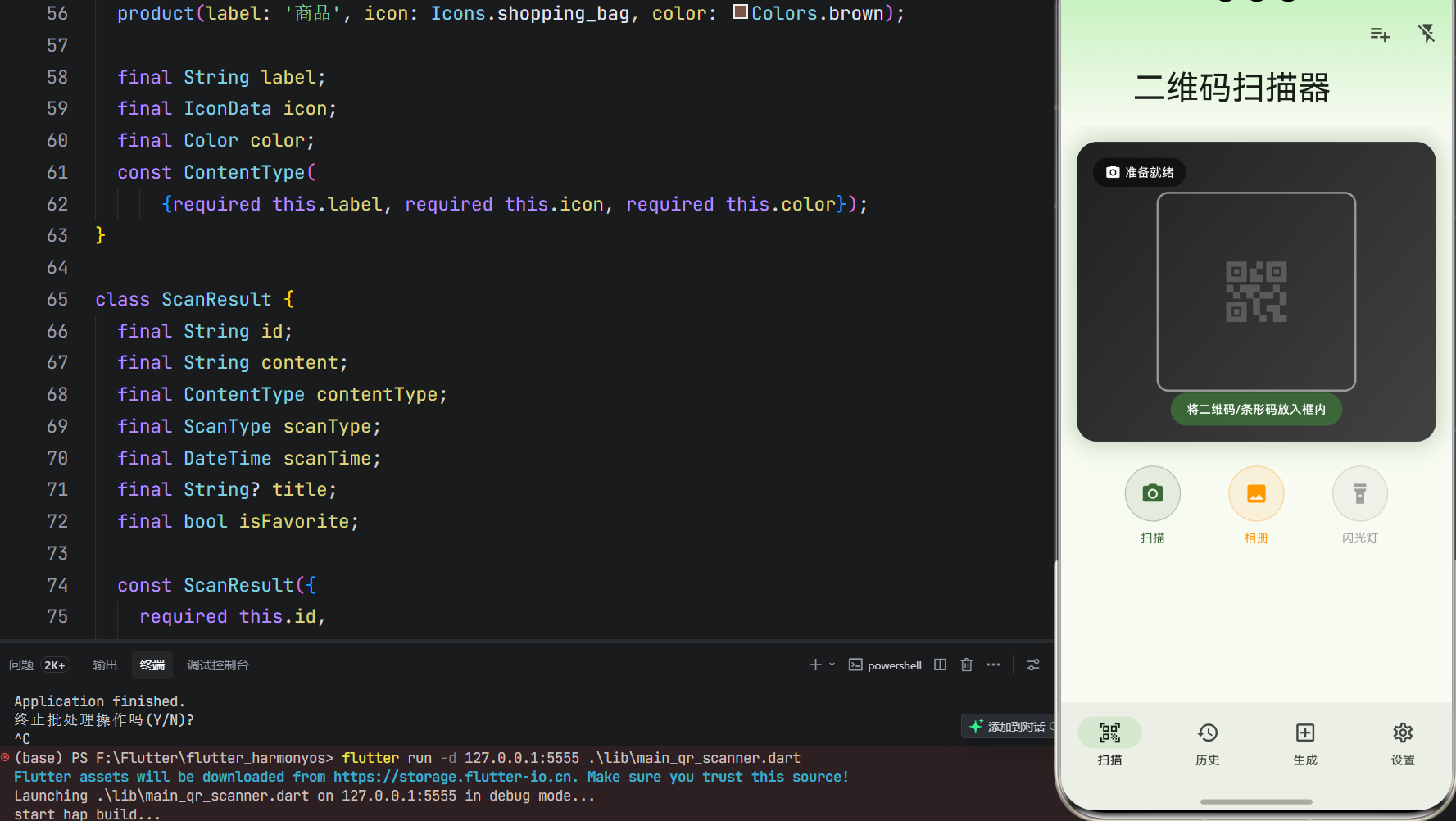
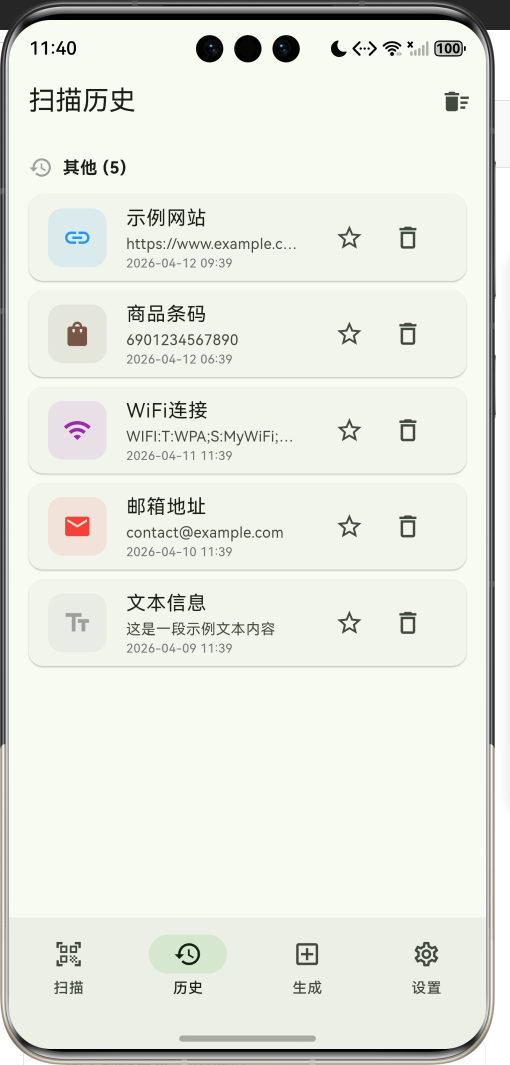
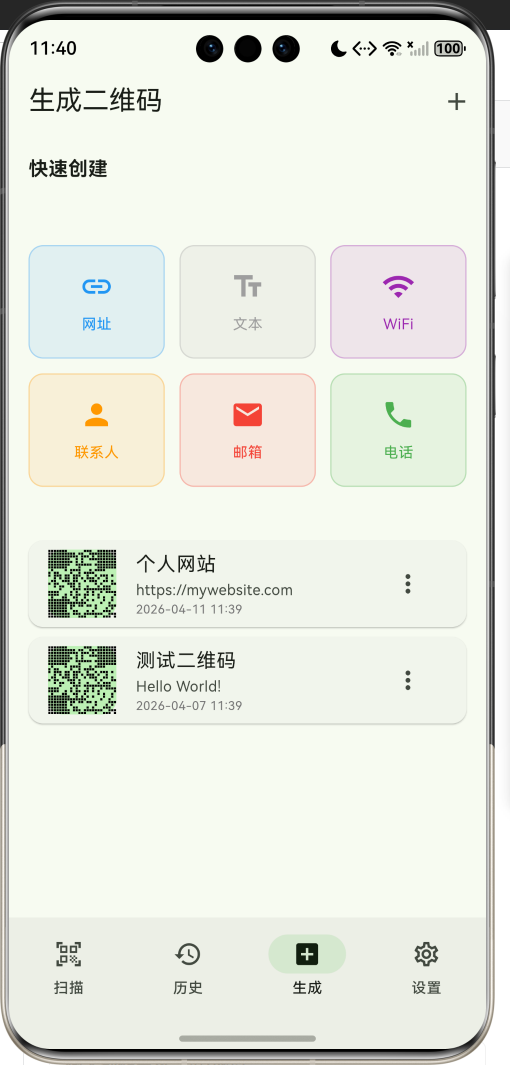
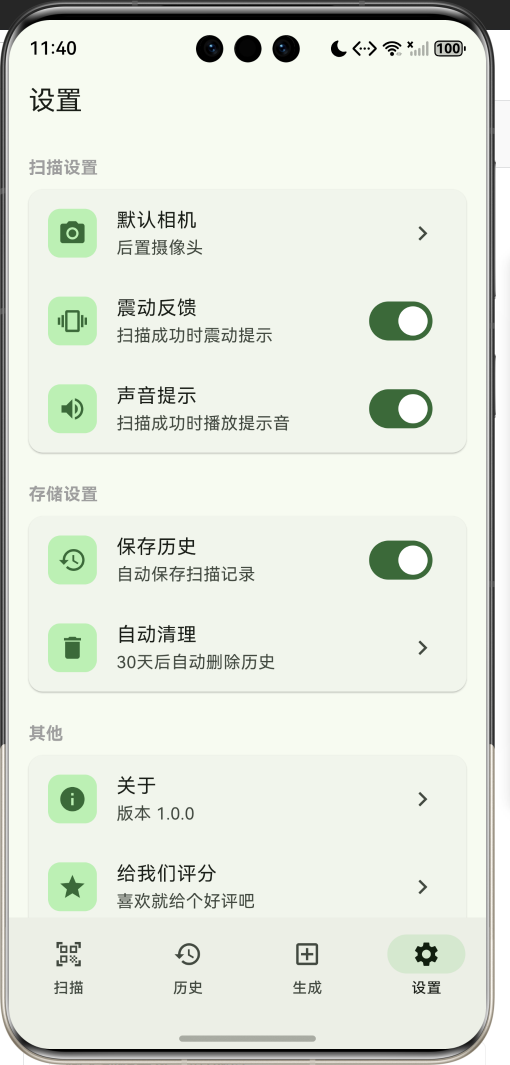
1.1 应用简介
二维码扫描器是一款功能强大的扫码工具应用,支持快速扫描二维码和条形码,记录扫描历史,生成自定义二维码,批量扫描等实用功能。应用以清新的绿色为主色调,象征高效与便捷。涵盖扫描、历史、生成、设置四大模块,让用户轻松处理各类码制信息。
应用采用智能识别技术,自动识别扫描内容的类型(网址、文本、邮箱、电话、WiFi等),并提供相应的快捷操作。无论是日常扫码支付、添加好友,还是批量录入商品信息,都能高效完成。
1.2 核心功能
| 功能模块 | 功能描述 | 实现方式 |
|---|---|---|
| 快速扫描 | 实时扫描二维码和条形码 | 相机预览 |
| 批量扫描 | 连续扫描多个码,统一保存 | 批量模式 |
| 历史记录 | 保存扫描历史,支持收藏和搜索 | 本地存储 |
| 生成二维码 | 自定义内容生成二维码图片 | QR编码 |
| 智能识别 | 自动识别内容类型,提供快捷操作 | 内容解析 |
| 快捷操作 | 复制、打开链接、分享、保存等 | 系统接口 |
| 闪光灯控制 | 开关闪光灯,适应不同光线环境 | 相机控制 |
| 相册扫码 | 从相册选择图片进行扫码 | 图片解析 |
1.3 扫码类型定义
| 序号 | 类型名称 | 图标 | 支持格式 | 典型应用 |
|---|---|---|---|---|
| 1 | 二维码 | 🔲 | QR Code | 网址、名片、支付 |
| 2 | 条形码 | 📊 | EAN/UPC | 商品识别、库存 |
| 3 | DataMatrix | 🔲 | DataMatrix | 工业标识、物流 |
| 4 | PDF417 | 📄 | PDF417 | 证件、票据 |
1.4 内容类型定义
| 序号 | 类型名称 | 图标 | 颜色 | 识别规则 |
|---|---|---|---|---|
| 1 | 网址 | 🔗 | 蓝色 | 以http/https开头 |
| 2 | 文本 | 📝 | 灰色 | 普通文本内容 |
| 3 | 邮箱 | ✉️ | 红色 | 包含@符号 |
| 4 | 电话 | 📞 | 绿色 | 纯数字或tel:开头 |
| 5 | WiFi | 📶 | 紫色 | WIFI:开头 |
| 6 | 联系人 | 👤 | 橙色 | vCard格式 |
| 7 | 短信 | 💬 | 青色 | SMS:开头 |
| 8 | 商品 | 🛍️ | 棕色 | 条形码数字 |
1.5 技术栈
| 技术领域 | 技术选型 | 版本要求 |
|---|---|---|
| 开发框架 | Flutter | >= 3.0.0 |
| 编程语言 | Dart | >= 2.17.0 |
| 设计规范 | Material Design 3 | - |
| 扫码库 | mobile_scanner | >= 4.0.0 |
| 链接跳转 | url_launcher | >= 6.2.0 |
| 数据存储 | shared_preferences | >= 2.2.0 |
| 分享功能 | share_plus | >= 7.2.0 |
| 目标平台 | 鸿蒙OS / Android / iOS | API 21+ |
1.6 项目结构
lib/
└── main_qr_scanner.dart
    ├── QRScannerApp               # 应用入口
    ├── ScanType                   # 扫码类型枚举
    ├── ContentType                # 内容类型枚举
    ├── ScanResult                 # 扫描结果模型
    ├── GeneratedQR                # 生成二维码模型
    ├── QRScannerHomePage          # 主页面(底部导航)
    ├── _buildScannerPage          # 扫描页
    ├── _buildHistoryPage          # 历史页
    ├── _buildGeneratePage         # 生成页
    ├── _buildSettingsPage         # 设置页
    └── QRCodePainter              # 二维码绘制器
二、系统架构
2.1 整体架构图
2.2 类图设计
2.3 页面导航流程
2.4 扫描处理流程
三、核心模块设计
3.1 数据模型设计
3.1.1 扫码类型枚举 (ScanType)
enum ScanType {
  qrCode(label: '二维码', icon: Icons.qr_code_2),
  barcode(label: '条形码', icon: Icons.barcode_reader),
  dataMatrix(label: 'DataMatrix', icon: Icons.grid_on),
  pdf417(label: 'PDF417', icon: Icons.picture_as_pdf);

  final String label;
  final IconData icon;
  const ScanType({required this.label, required this.icon});
}
3.1.2 内容类型枚举 (ContentType)
enum ContentType {
  url(label: '网址', icon: Icons.link, color: Colors.blue),
  text(label: '文本', icon: Icons.text_fields, color: Colors.grey),
  email(label: '邮箱', icon: Icons.email, color: Colors.red),
  phone(label: '电话', icon: Icons.phone, color: Colors.green),
  wifi(label: 'WiFi', icon: Icons.wifi, color: Colors.purple),
  contact(label: '联系人', icon: Icons.person, color: Colors.orange),
  sms(label: '短信', icon: Icons.sms, color: Colors.teal),
  product(label: '商品', icon: Icons.shopping_bag, color: Colors.brown);

  final String label;
  final IconData icon;
  final Color color;
  const ContentType({required this.label, required this.icon, required this.color});
}
3.1.3 扫描结果模型 (ScanResult)
class ScanResult {
  final String id;
  final String content;
  final ContentType contentType;
  final ScanType scanType;
  final DateTime scanTime;
  final String? title;
  final bool isFavorite;

  const ScanResult({
    required this.id,
    required this.content,
    required this.contentType,
    required this.scanType,
    required this.scanTime,
    this.title,
    this.isFavorite = false,
  });

  ScanResult copyWith({
    String? id,
    String? content,
    ContentType? contentType,
    ScanType? scanType,
    DateTime? scanTime,
    String? title,
    bool? isFavorite,
  }) {
    return ScanResult(
      id: id ?? this.id,
      content: content ?? this.content,
      contentType: contentType ?? this.contentType,
      scanType: scanType ?? this.scanType,
      scanTime: scanTime ?? this.scanTime,
      title: title ?? this.title,
      isFavorite: isFavorite ?? this.isFavorite,
    );
  }
}
3.1.4 生成二维码模型 (GeneratedQR)
class GeneratedQR {
  final String id;
  final String content;
  final String name;
  final DateTime createdAt;
  final int size;

  const GeneratedQR({
    required this.id,
    required this.content,
    required this.name,
    required this.createdAt,
    this.size = 200,
  });
}
3.1.5 内容类型分布
3.2 页面结构设计
3.2.1 主页面布局
3.2.2 扫描页结构
3.2.3 历史页结构
3.2.4 生成页结构
3.3 内容识别逻辑
3.4 批量扫描逻辑
四、UI设计规范
4.1 配色方案
应用以清新的绿色为主色调,象征高效与便捷:
| 颜色类型 | 色值 | 用途 |
|---|---|---|
| 主色 | #4CAF50 (Green) | 导航、主题元素、按钮 |
| 主色容器 | #E8F5E9 | 卡片背景、扫描框 |
| 辅助色 | #388E3C | 强调元素 |
| 第三色 | #81C784 | 次要元素 |
| 背景色 | #FAFAFA | 页面背景 |
| 卡片背景 | #FFFFFF | 信息卡片 |
| 成功色 | #4CAF50 | 扫描成功 |
| 警告色 | #FF9800 | 处理中 |
| 错误色 | #F44336 | 扫描失败 |
4.2 内容类型配色
| 内容类型 | 色值 | 视觉效果 |
|---|---|---|
| 网址 | #2196F3 | 蓝色 |
| 文本 | #9E9E9E | 灰色 |
| 邮箱 | #F44336 | 红色 |
| 电话 | #4CAF50 | 绿色 |
| WiFi | #9C27B0 | 紫色 |
| 联系人 | #FF9800 | 橙色 |
| 短信 | #009688 | 青色 |
| 商品 | #795548 | 棕色 |
4.3 字体规范
| 元素 | 字号 | 字重 | 颜色 |
|---|---|---|---|
| 页面标题 | 20px | Bold | 主色 |
| 扫描框提示 | 12px | Medium | #FFFFFF |
| 内容标题 | 16px | Medium | #000000 |
| 内容预览 | 12px | Regular | #666666 |
| 时间标签 | 10px | Regular | #999999 |
| 按钮文字 | 14px | Medium | 主色 |
4.4 组件规范
4.4.1 扫描视图布局
┌─────────────────────────────────────┐
│  [← 返回]    二维码扫描器    [批量] [💡] │
├─────────────────────────────────────┤
│                                     │
│     ┌─────────────────────────┐    │
│     │                         │    │
│     │    ┌───────────────┐   │    │
│     │    │               │   │    │
│     │    │   ─────────   │   │    │
│     │    │               │   │    │
│     │    │     🔲        │   │    │
│     │    │               │   │    │
│     │    └───────────────┘   │    │
│     │                         │    │
│     │   将二维码/条形码放入框内  │    │
│     └─────────────────────────┘    │
│                                     │
│      [📷 扫描]  [🖼️ 相册]  [💡 闪光灯] │
└─────────────────────────────────────┘
4.4.2 扫描结果弹窗
┌─────────────────────────────────────┐
│  🔗 网址                             │
│                                     │
│  扫描结果:                          │
│  ┌─────────────────────────────┐   │
│  │ https://www.example.com     │   │
│  └─────────────────────────────┘   │
│                                     │
│  扫描时间:2024-01-15 14:30         │
│                                     │
│  [📋 复制]  [🌐 打开]  [📤 分享]     │
└─────────────────────────────────────┘
4.4.3 历史记录卡片
┌─────────────────────────────────────┐
│  ┌────┐                            │
│  │ 🔗 │  https://www.example.com   │
│  │    │  2024-01-15 14:30     ⭐ 🗑️ │
│  └────┘                            │
└─────────────────────────────────────┘
4.4.4 生成类型选择
┌─────────────────────────────────────┐
│  快速创建                            │
│                                     │
│  ┌─────────┐ ┌─────────┐ ┌─────────┐
│  │   🔗    │ │   📝    │ │   📶    │
│  │  网址   │ │  文本   │ │  WiFi  │
│  └─────────┘ └─────────┘ └─────────┘
│                                     │
│  ┌─────────┐ ┌─────────┐ ┌─────────┐
│  │   👤    │ │   ✉️    │ │   📞    │
│  │ 联系人  │ │  邮箱   │ │  电话   │
│  └─────────┘ └─────────┘ └─────────┘
└─────────────────────────────────────┘
4.4.5 批量扫描指示器
┌─────────────────────────────────────┐
│  ☑️ 批量扫描模式        已扫描 5 个   │
│                          [完成]     │
└─────────────────────────────────────┘
五、核心功能实现
5.1 扫描功能实现
void _startScanning() {
  setState(() {
    _isScanning = true;
  });
  _scanAnimationController.repeat();

  Future.delayed(const Duration(seconds: 2), () {
    if (_isScanning) {
      _simulateScan();
    }
  });
}

void _stopScanning() {
  setState(() {
    _isScanning = false;
  });
  _scanAnimationController.stop();
}
5.2 内容识别实现
ContentType _identifyContentType(String content) {
  if (content.startsWith('http://') || content.startsWith('https://')) {
    return ContentType.url;
  } else if (content.startsWith('WIFI:')) {
    return ContentType.wifi;
  } else if (content.contains('@')) {
    return ContentType.email;
  } else if (content.startsWith('tel:') || RegExp(r'^\d+$').hasMatch(content)) {
    return ContentType.phone;
  } else if (content.startsWith('SMS:')) {
    return ContentType.sms;
  } else if (content.startsWith('BEGIN:VCARD')) {
    return ContentType.contact;
  } else {
    return ContentType.text;
  }
}
5.3 批量扫描实现
void _toggleBatchMode() {
  setState(() {
    _batchMode = !_batchMode;
    if (!_batchMode && _batchResults.isNotEmpty) {
      _scanHistory.insertAll(0, _batchResults);
      _showBatchResultsSummary();
      _batchResults = [];
    }
  });
}

void _simulateScan() {
  final result = ScanResult(
    id: 'scan_${DateTime.now().millisecondsSinceEpoch}',
    content: scannedContent,
    contentType: _identifyContentType(scannedContent),
    scanType: ScanType.qrCode,
    scanTime: DateTime.now(),
  );

  setState(() {
    if (_batchMode) {
      _batchResults.add(result);
      // 继续扫描
      if (_isScanning) {
        Future.delayed(const Duration(seconds: 1), () {
          if (_isScanning) _simulateScan();
        });
      }
    } else {
      _scanHistory.insert(0, result);
      _isScanning = false;
      _scanAnimationController.stop();
    }
  });
}
5.4 二维码生成实现
void _generateQR() {
  if (_generateController.text.isEmpty) return;

  final qr = GeneratedQR(
    id: 'gen_${DateTime.now().millisecondsSinceEpoch}',
    content: _generateController.text,
    name: _nameController.text.isEmpty ? '未命名' : _nameController.text,
    createdAt: DateTime.now(),
  );

  setState(() {
    _generatedQRs.insert(0, qr);
  });
}
5.5 收藏功能实现
void _toggleFavorite(ScanResult result) {
  setState(() {
    final index = _scanHistory.indexOf(result);
    _scanHistory[index] = result.copyWith(isFavorite: !result.isFavorite);
  });
}
六、交互设计
6.1 扫描流程
6.2 批量扫描流程
6.3 生成二维码流程
七、扩展功能规划
7.1 后续版本规划
7.2 功能扩展建议
7.2.1 高级识别功能
识别功能:
- 身份证信息识别
- 银行卡号识别
- 车牌号码识别
- 文档OCR识别
7.2.2 数据管理功能
管理功能:
- 云端数据同步
- 多设备数据共享
- 数据导出备份
- 分类标签管理
7.2.3 安全隐私功能
安全功能:
- 敏感内容加密存储
- 隐私模式保护
- 访问密码设置
- 自动清理机制
八、注意事项
8.1 开发注意事项
-
相机权限:确保正确申请和处理相机权限
-
隐私保护:敏感扫描内容需加密存储
-
性能优化:相机预览需注意内存和电量消耗
-
兼容性:不同设备相机性能差异需做适配
-
用户体验:扫描过程需提供清晰的视觉反馈
8.2 常见问题
| 问题 | 原因 | 解决方案 |
|---|---|---|
| 无法打开相机 | 权限未授予 | 引导用户开启权限 |
| 扫描识别慢 | 光线不足/对焦问题 | 提示调整光线和距离 |
| 识别错误 | 码制不支持 | 扩展支持的码制 |
| 历史丢失 | 数据未持久化 | 集成本地存储 |
| 闪光灯无效 | 设备不支持 | 检测设备能力 |
8.3 使用技巧
📱 二维码扫描器使用技巧 📱
扫描技巧
- 保持手机稳定,避免晃动
- 确保二维码清晰完整
- 适当调整光线和距离
- 使用闪光灯辅助暗光环境
批量扫描
- 开启批量模式连续扫描
- 扫描完成后统一保存
- 适合商品录入场景
生成二维码
- 选择合适的内容类型
- 内容不宜过长
- 可自定义名称便于管理
九、运行说明
9.1 环境要求
| 环境 | 版本要求 |
|---|---|
| Flutter SDK | >= 3.0.0 |
| Dart SDK | >= 2.17.0 |
| 鸿蒙OS | API 21+ |
| Android | API 21+ |
| iOS | 12.0+ |
| 相机权限 | 必需 |
9.2 运行命令
# 查看可用设备
flutter devices

# 运行到Web服务器
flutter run -d web-server -t lib/main_qr_scanner.dart --web-port 8147

# 运行到鸿蒙设备
flutter run -d 127.0.0.1:5555 lib/main_qr_scanner.dart

# 运行到Android设备
flutter run -d android lib/main_qr_scanner.dart

# 代码分析
flutter analyze lib/main_qr_scanner.dart
9.3 依赖配置
在 pubspec.yaml 中添加以下依赖(完整版需要):
dependencies:
  flutter:
    sdk: flutter
  mobile_scanner: ^4.0.1
  url_launcher: ^6.2.2
  shared_preferences: ^2.2.2
  share_plus: ^7.2.1
  permission_handler: ^11.3.1
  image_picker: ^1.0.4
十、总结
二维码扫描器应用通过智能识别技术、便捷的操作方式、完善的历史管理,让用户轻松处理各类码制信息。应用支持4种扫码类型、8种内容类型识别,满足日常扫码的各种需求。
核心功能涵盖快速扫描、批量扫描、历史记录、生成二维码、智能识别、快捷操作六大模块。用户可以快速扫描各类码制,自动识别内容类型,一键执行复制、打开、分享等操作,大幅提升工作效率。
应用采用 Material Design 3 设计规范,以清新的绿色为主色调,象征高效与便捷。通过本应用,希望能够为用户提供便捷高效的扫码体验,让信息获取更加简单。
二维码扫描器——扫一扫,世界尽在掌握

讨论HarmonyOS开发技术,专注于API与组件、DevEco Studio、测试、元服务和应用上架分发等。
更多推荐
 10
10 0
0- 0


 已为社区贡献14条内容

所有评论(0)