【flutter for open harmony】第三方库Flutter 鸿蒙版 打卡日历 实战指南(适配 1.0.0)✨
·
【flutter for open harmony】第三方库Flutter 鸿蒙版 打卡日历 实战指南(适配 1.0.0)✨
Flutter 三方库 cached_network_image 的鸿蒙化适配与实战指南
欢迎加入开源鸿蒙跨平台社区: https://openharmonycrossplatform.csdn.net
本文详细介绍如何在Flutter鸿蒙应用中实现打卡日历功能,展示签到打卡日历视图。
一、前言
打卡日历是习惯养成应用的常见功能,通过日历视图展示打卡记录。本文将带领大家使用Flutter开发一个打卡日历应用。
二、效果展示
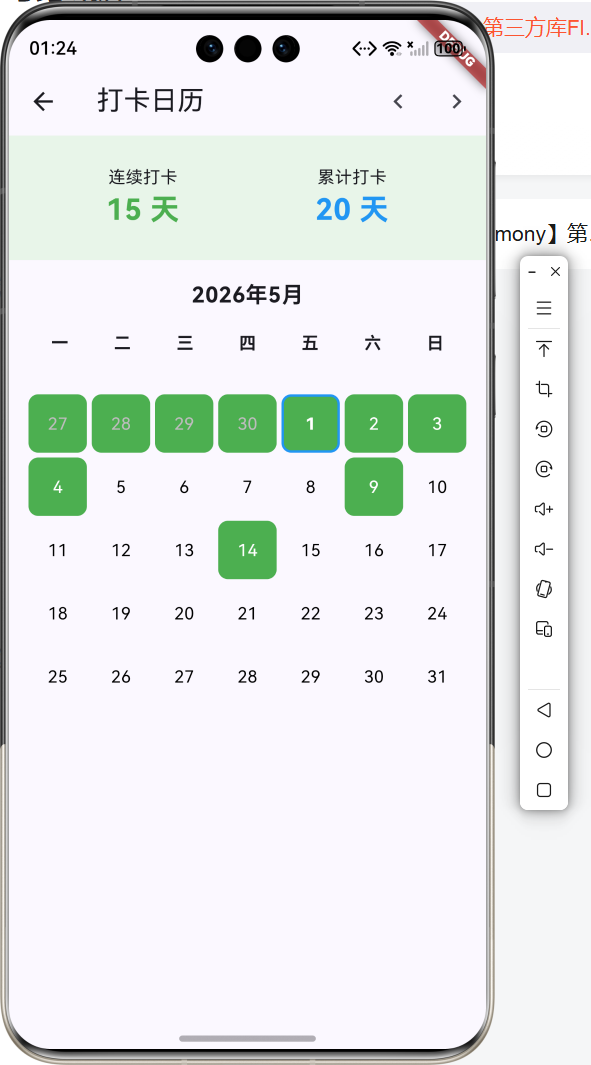
2.1 功能特性
| 功能 | 描述 |
|---|---|
| 日历视图 | 月历展示 |
| 打卡标记 | 已打卡日期标记 |
| 统计数据 | 连续打卡天数 |
三、项目背景与目标
3.1 项目背景
打卡日历直观展示打卡记录,激励用户坚持习惯。
3.2 项目目标
- 实现日历视图
- 支持打卡标记
- 显示统计数据
四、技术架构设计
4.1 核心技术
- GridView: 日历网格
- Set: 打卡日期存储
- DateTime: 日期处理
4.2 实现原理
使用GridView绘制日历网格,通过Set存储打卡日期。
五、详细实现
5.1 Flutter端实现
Set<String> _checkedDays = {};
DateTime _currentMonth = DateTime.now();

List<DateTime> _getDaysInMonth() {
  DateTime firstDay = DateTime(_currentMonth.year, _currentMonth.month, 1);
  DateTime lastDay = DateTime(_currentMonth.year, _currentMonth.month + 1, 0);
  List<DateTime> days = [];

  int weekday = firstDay.weekday;
  for (int i = 1; i < weekday; i++) {
    days.add(DateTime(_currentMonth.year, _currentMonth.month, 1 - weekday + i));
  }

  for (int i = 1; i <= lastDay.day; i++) {
    days.add(DateTime(_currentMonth.year, _currentMonth.month, i));
  }

  return days;
}
六、实际应用场景
- 习惯养成:打卡习惯追踪
- 考勤管理:员工考勤打卡
- 活动签到:活动签到记录
七、优化建议
- 多习惯支持:支持多个习惯打卡
- 打卡提醒:定时打卡提醒
- 数据导出:导出打卡记录
八、常见问题与解决方案
8.1 日历计算
问题: 月份天数计算错误
解决方案: 使用DateTime计算
8.2 连续天数
问题: 连续打卡计算错误
解决方案: 从今天往前遍历计算
九、总结
本文详细介绍了Flutter鸿蒙打卡日历的实现,包括日历视图、打卡标记、统计数据等核心技术。
十、参考资料

讨论HarmonyOS开发技术,专注于API与组件、DevEco Studio、测试、元服务和应用上架分发等。
更多推荐

 0
0 0
0- 0


 已为社区贡献42条内容

所有评论(0)