【flutter for open harmony】第三方库Flutter 鸿蒙版 记忆卡片游戏 实战指南(适配 1.0.0)✨
·
【flutter for open harmony】第三方库Flutter 鸿蒙版 记忆卡片游戏 实战指南(适配 1.0.0)✨
Flutter实战:记忆卡片游戏
Flutter 三方库 cached_network_image 的鸿蒙化适配与实战指南
欢迎加入开源鸿蒙跨平台社区: https://openharmonycrossplatform.csdn.net
本文详细介绍如何在Flutter鸿蒙应用中实现记忆卡片游戏功能,锻炼记忆力。
一、前言
记忆卡片游戏是一款经典的益智游戏,玩家需要翻开卡片找到配对的图案。本文将带领大家使用Flutter开发一个记忆卡片游戏应用。
二、效果展示
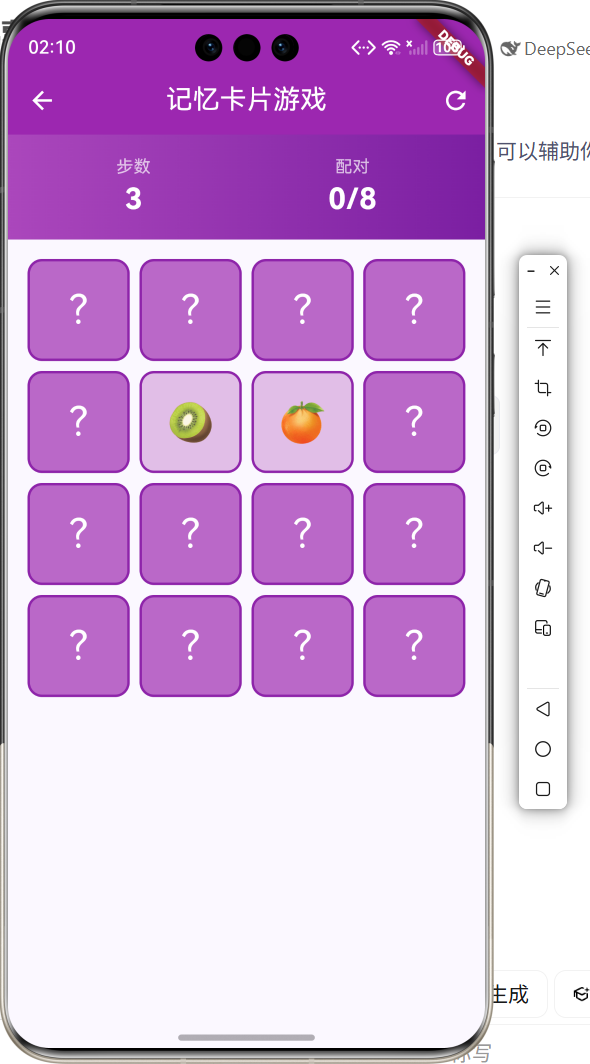
2.1 功能特性
| 功能 | 描述 |
|---|---|
| 卡片翻转 | 点击卡片翻转显示图案 |
| 配对检测 | 自动检测两张卡片是否配对 |
| 步数统计 | 记录玩家使用的步数 |
| 游戏胜利 | 全部配对完成后显示结果 |
三、项目背景与目标
3.1 项目背景
记忆卡片游戏是锻炼记忆力的经典游戏,适合各年龄段玩家。
3.2 项目目标
- 实现16张卡片的配对游戏
- 支持步数统计
- 提供流畅的翻转动画
四、技术架构设计
4.1 核心技术
- StatefulWidget: 状态管理
- AnimatedContainer: 翻转动画
- Timer: 延迟操作
4.2 实现原理
使用列表存储卡片数据,通过状态管理控制卡片翻转和配对检测。
五、详细实现
5.1 Flutter端实现
import 'dart:math';
import 'package:flutter/material.dart';
class MemoryCardGamePage extends StatefulWidget {
const MemoryCardGamePage({super.key});
State<MemoryCardGamePage> createState() => _MemoryCardGamePageState();
}
class _MemoryCardGamePageState extends State<MemoryCardGamePage> {
final List<String> _emojis = ['🍎', '🍊', '🍋', '🍇', '🍓', '🍒', '🥝', '🍑'];
List<String> _cards = [];
List<bool> _flipped = [];
List<int> _matchedPairs = [];
int? _firstFlippedIndex;
int _moves = 0;
int _matches = 0;
bool _isLocked = false;
bool _gameWon = false;
void initState() {
super.initState();
_initGame();
}
void _initGame() {
_cards = [..._emojis, ..._emojis];
_cards.shuffle(Random());
_flipped = List.filled(16, false);
_matchedPairs = [];
_firstFlippedIndex = null;
_moves = 0;
_matches = 0;
_isLocked = false;
_gameWon = false;
}
void _flipCard(int index) {
if (_isLocked || _flipped[index] || _matchedPairs.contains(index)) return;
setState(() {
_flipped[index] = true;
});
if (_firstFlippedIndex == null) {
_firstFlippedIndex = index;
} else {
_moves++;
if (_cards[_firstFlippedIndex!] == _cards[index]) {
_matchedPairs.add(_firstFlippedIndex!);
_matchedPairs.add(index);
_matches++;
_firstFlippedIndex = null;
if (_matches == 8) {
setState(() {
_gameWon = true;
});
}
} else {
_isLocked = true;
Future.delayed(const Duration(milliseconds: 800), () {
setState(() {
_flipped[_firstFlippedIndex!] = false;
_flipped[index] = false;
_firstFlippedIndex = null;
_isLocked = false;
});
});
}
}
}
Widget build(BuildContext context) {
return Scaffold(
appBar: AppBar(
title: const Text('记忆卡片游戏'),
centerTitle: true,
backgroundColor: Colors.purple,
foregroundColor: Colors.white,
actions: [
IconButton(icon: const Icon(Icons.refresh), onPressed: _initGame),
],
),
body: Column(
children: [
Container(
padding: const EdgeInsets.all(16),
child: Row(
mainAxisAlignment: MainAxisAlignment.spaceAround,
children: [
Text('步数: $_moves', style: const TextStyle(fontSize: 18)),
Text('配对: $_matches/8', style: const TextStyle(fontSize: 18)),
],
),
),
Expanded(
child: GridView.builder(
padding: const EdgeInsets.all(16),
gridDelegate: const SliverGridDelegateWithFixedCrossAxisCount(
crossAxisCount: 4,
crossAxisSpacing: 8,
mainAxisSpacing: 8,
),
itemCount: 16,
itemBuilder: (context, index) {
final isFlipped = _flipped[index];
final isMatched = _matchedPairs.contains(index);
return GestureDetector(
onTap: () => _flipCard(index),
child: AnimatedContainer(
duration: const Duration(milliseconds: 300),
decoration: BoxDecoration(
color: isMatched ? Colors.green.shade100 : (isFlipped ? Colors.purple.shade100 : Colors.purple.shade300),
borderRadius: BorderRadius.circular(12),
),
child: Center(
child: Text(
isFlipped || isMatched ? _cards[index] : '?',
style: const TextStyle(fontSize: 32),
),
),
),
);
},
),
),
],
),
);
}
}
六、核心功能解析
6.1 卡片翻转
使用AnimatedContainer实现翻转动画:
AnimatedContainer(
  duration: const Duration(milliseconds: 300),
  decoration: BoxDecoration(
    color: isFlipped ? Colors.purple.shade100 : Colors.purple.shade300,
  ),
)
6.2 配对检测
比较两张翻开的卡片:
if (_cards[_firstFlippedIndex!] == _cards[index]) {
  _matchedPairs.add(_firstFlippedIndex!);
  _matchedPairs.add(index);
}
七、实际应用场景
- 益智游戏:锻炼记忆力
- 儿童教育:认知训练
- 休闲娱乐:消遣娱乐
八、优化建议
- 难度选择:支持不同数量的卡片
- 计时功能:添加游戏计时
- 排行榜:记录最佳成绩
九、常见问题与解决方案
9.1 卡片闪烁
问题:卡片翻转时出现闪烁
解决方案:使用AnimatedContainer平滑过渡
9.2 快速点击
问题:快速点击导致状态混乱
解决方案:使用_isLocked锁定状态
十、总结
本文详细介绍了Flutter鸿蒙记忆卡片游戏的实现,包括卡片翻转、配对检测等核心技术。通过本实例,掌握了状态管理和动画效果的使用方法。
十一、参考资料

讨论HarmonyOS开发技术,专注于API与组件、DevEco Studio、测试、元服务和应用上架分发等。
更多推荐



 6
6 0
0- 0


 已为社区贡献28条内容

所有评论(0)