Flutter 鸿蒙音量控制实现:音量调节与静音控制
·
Flutter 鸿蒙音量控制实现:音量调节与静音控制
欢迎加入开源鸿蒙跨平台社区! https://openharmonycrossplatform.csdn.net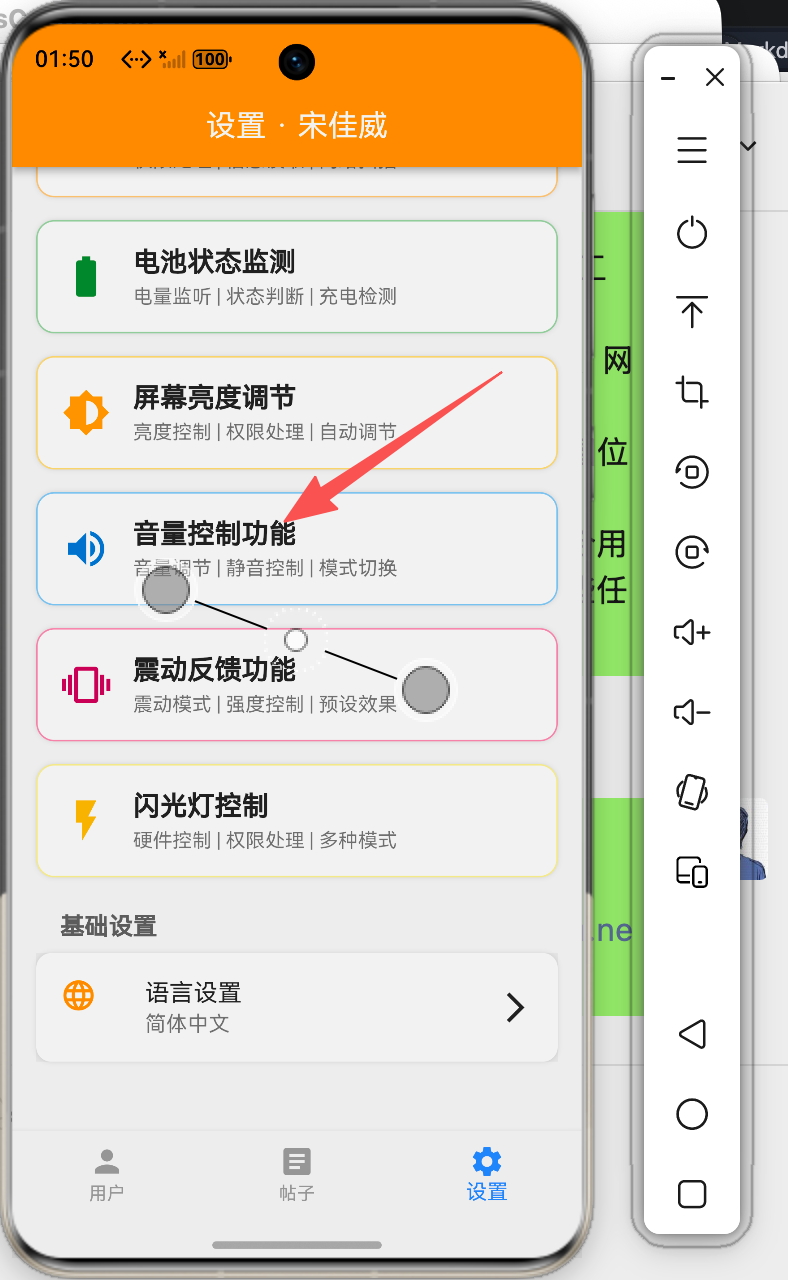
一、引言
音量控制是移动应用中常见的系统功能,适用于音乐播放器、视频应用等场景。本文将详细介绍如何在Flutter鸿蒙应用中实现音量控制功能,包括多种音量流控制、静音模式和预设模式。
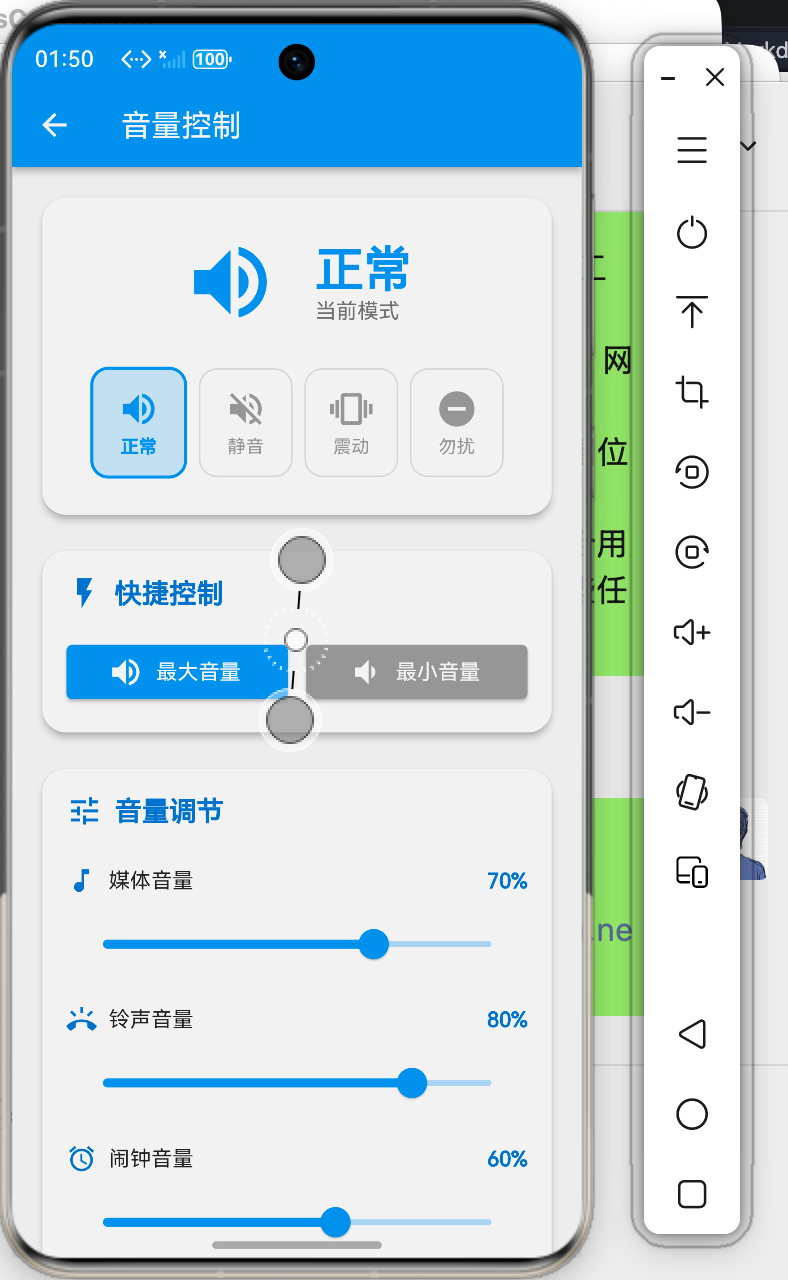
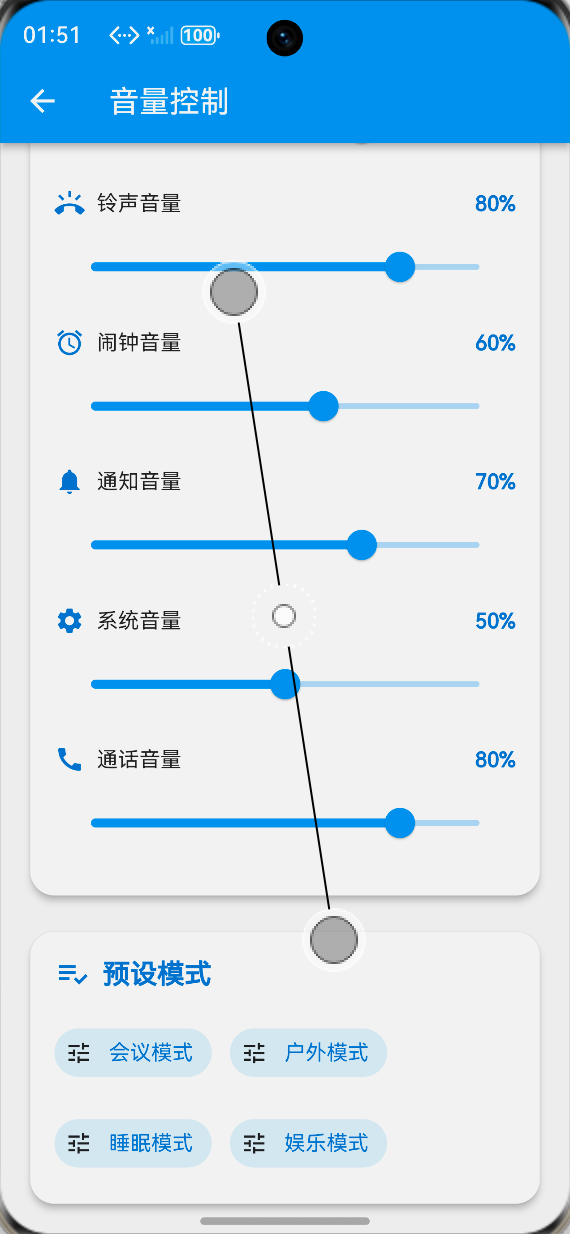
二、效果展示
2.1 功能特性
✅ 6种音量流独立控制
✅ 4种模式快速切换
✅ 预设模式一键设置
✅ 批量音量调节
✅ 实时状态反馈
2.2 界面预览
该功能为Flutter for OpenHarmony应用提供了完善的音量控制能力,适用于音乐播放、视频观看等需要音量调节的场景。
三、技术要点
3.1 音量控制核心概念
- 音量流类型:媒体、铃声、闹钟、通知、系统、通话
- 音量模式:正常、静音、震动、勿扰
- 音量调节:精确控制各音量流
- 预设模式:会议、户外、睡眠、娱乐
3.2 实现原理
class VolumeControlDemoPage extends StatefulWidget {
const VolumeControlDemoPage({super.key});
State<VolumeControlDemoPage> createState() => _VolumeControlDemoPageState();
}
class _VolumeControlDemoPageState extends State<VolumeControlDemoPage> {
double _mediaVolume = 0.7;
double _ringVolume = 0.8;
double _alarmVolume = 0.6;
double _notificationVolume = 0.7;
double _systemVolume = 0.5;
double _callVolume = 0.8;
bool _isMuted = false;
bool _vibrateMode = false;
bool _silentMode = false;
String _currentMode = 'normal';
final Map<String, String> _streamNames = {
'media': '媒体音量',
'ring': '铃声音量',
'alarm': '闹钟音量',
'notification': '通知音量',
'system': '系统音量',
'call': '通话音量',
};
}
四、核心功能实现
4.1 音量设置
void _setVolume(String stream, double value) {
  setState(() {
    switch (stream) {
      case 'media':
        _mediaVolume = value;
        break;
      case 'ring':
        _ringVolume = value;
        break;
      case 'alarm':
        _alarmVolume = value;
        break;
      case 'notification':
        _notificationVolume = value;
        break;
      case 'system':
        _systemVolume = value;
        break;
      case 'call':
        _callVolume = value;
        break;
    }
  });
  _addLog('设置${_streamNames[stream]}: ${(value * 100).toStringAsFixed(0)}%');
}

double _getVolume(String stream) {
  switch (stream) {
    case 'media':
      return _mediaVolume;
    case 'ring':
      return _ringVolume;
    case 'alarm':
      return _alarmVolume;
    case 'notification':
      return _notificationVolume;
    case 'system':
      return _systemVolume;
    case 'call':
      return _callVolume;
    default:
      return 0;
  }
}
4.2 模式切换
void _toggleMute() {
  setState(() {
    _isMuted = !_isMuted;
    if (_isMuted) {
      _silentMode = false;
      _vibrateMode = false;
      _currentMode = 'muted';
    } else {
      _currentMode = 'normal';
    }
  });
  _addLog('静音: ${_isMuted ? "开启" : "关闭"}');
}

void _toggleVibrate() {
  setState(() {
    _vibrateMode = !_vibrateMode;
    if (_vibrateMode) {
      _isMuted = false;
      _silentMode = false;
      _currentMode = 'vibrate';
    } else {
      _currentMode = 'normal';
    }
  });
  _addLog('震动模式: ${_vibrateMode ? "开启" : "关闭"}');
}

void _toggleSilent() {
  setState(() {
    _silentMode = !_silentMode;
    if (_silentMode) {
      _isMuted = false;
      _vibrateMode = false;
      _currentMode = 'silent';
    } else {
      _currentMode = 'normal';
    }
  });
  _addLog('静音模式: ${_silentMode ? "开启" : "关闭"}');
}
4.3 批量音量设置
void _setAllVolumes(double value) {
  setState(() {
    _mediaVolume = value;
    _ringVolume = value;
    _alarmVolume = value;
    _notificationVolume = value;
    _systemVolume = value;
    _callVolume = value;
  });
  _addLog('设置所有音量: ${(value * 100).toStringAsFixed(0)}%');
}

void _setMaxVolume() {
  _setAllVolumes(1.0);
}

void _setMinVolume() {
  _setAllVolumes(0.1);
}
五、UI界面实现
5.1 模式选择卡片
Widget _buildModeCard() {
  return Card(
    elevation: 4,
    shape: RoundedRectangleBorder(borderRadius: BorderRadius.circular(16)),
    child: Padding(
      padding: const EdgeInsets.all(24),
      child: Column(
        children: [
          Row(
            mainAxisAlignment: MainAxisAlignment.center,
            children: [
              Icon(_getModeIcon(), size: 64, color: _getModeColor()),
              const SizedBox(width: 24),
              Column(
                crossAxisAlignment: CrossAxisAlignment.start,
                children: [
                  Text(
                    _getModeText(),
                    style: TextStyle(
                      fontSize: 32,
                      fontWeight: FontWeight.bold,
                      color: _getModeColor(),
                    ),
                  ),
                  Text('当前模式', style: TextStyle(color: Colors.grey.shade600)),
                ],
              ),
            ],
          ),
          const SizedBox(height: 24),
          Row(
            mainAxisAlignment: MainAxisAlignment.spaceEvenly,
            children: [
              _buildModeButton('正常', Icons.volume_up, 'normal', Colors.blue),
              _buildModeButton('静音', Icons.volume_off, 'muted', Colors.red),
              _buildModeButton('震动', Icons.vibration, 'vibrate', Colors.orange),
              _buildModeButton('勿扰', Icons.do_not_disturb_on, 'silent', Colors.grey),
            ],
          ),
        ],
      ),
    ),
  );
}
5.2 音量滑块卡片
Widget _buildVolumeSlidersCard() {
  return Card(
    child: Padding(
      padding: const EdgeInsets.all(16),
      child: Column(
        children: [
          ..._streamNames.entries.map((entry) {
            return _buildVolumeSlider(
              entry.key,
              entry.value,
              _getVolume(entry.key),
              _getIconForStream(entry.key),
            );
          }),
        ],
      ),
    ),
  );
}
5.3 预设模式卡片
Widget _buildPresetsCard() {
  return Card(
    child: Padding(
      padding: const EdgeInsets.all(16),
      child: Column(
        children: [
          Wrap(
            spacing: 12,
            runSpacing: 12,
            children: [
              _buildPresetChip('会议模式', () {
                _setAllVolumes(0.2);
                _toggleSilent();
              }),
              _buildPresetChip('户外模式', () {
                _setAllVolumes(1.0);
                setState(() => _currentMode = 'normal');
              }),
              _buildPresetChip('睡眠模式', () {
                _setAllVolumes(0.1);
                _toggleSilent();
              }),
              _buildPresetChip('娱乐模式', () {
                _mediaVolume = 1.0;
                _notificationVolume = 0.3;
                setState(() => _currentMode = 'normal');
              }),
            ],
          ),
        ],
      ),
    ),
  );
}
六、最佳实践
6.1 性能优化
- 使用状态管理避免不必要的重建
- 合理设置音量范围
- 避免频繁调用系统API
6.2 用户体验
- 提供直观的模式切换
- 支持预设模式快速切换
- 实时反馈音量变化
七、总结
本文详细介绍了Flutter鸿蒙应用中音量控制的实现方法,包括多种音量流控制、静音模式和预设模式。通过合理的UI设计和状态管理,可以为用户提供便捷的音量控制体验。
欢迎加入开源鸿蒙跨平台社区! https://openharmonycrossplatform.csdn.net

讨论HarmonyOS开发技术,专注于API与组件、DevEco Studio、测试、元服务和应用上架分发等。
更多推荐

 3
3 0
0- 0


 已为社区贡献20条内容

所有评论(0)