【flutter for open harmony】第三方库Flutter 鸿蒙版 日程安排 实战指南(适配 1.0.0)✨
·
【flutter for open harmony】第三方库Flutter 鸿蒙版 日程安排 实战指南(适配 1.0.0)✨
Flutter实战:日程安排
Flutter 三方库 cached_network_image 的鸿蒙化适配与实战指南
欢迎加入开源鸿蒙跨平台社区: https://openharmonycrossplatform.csdn.net
本文详细介绍如何在Flutter鸿蒙应用中实现日程安排功能,管理日常事务。
一、前言
日程安排是时间管理的重要工具,本文将带领大家使用Flutter开发一个日程安排应用。
二、效果展示
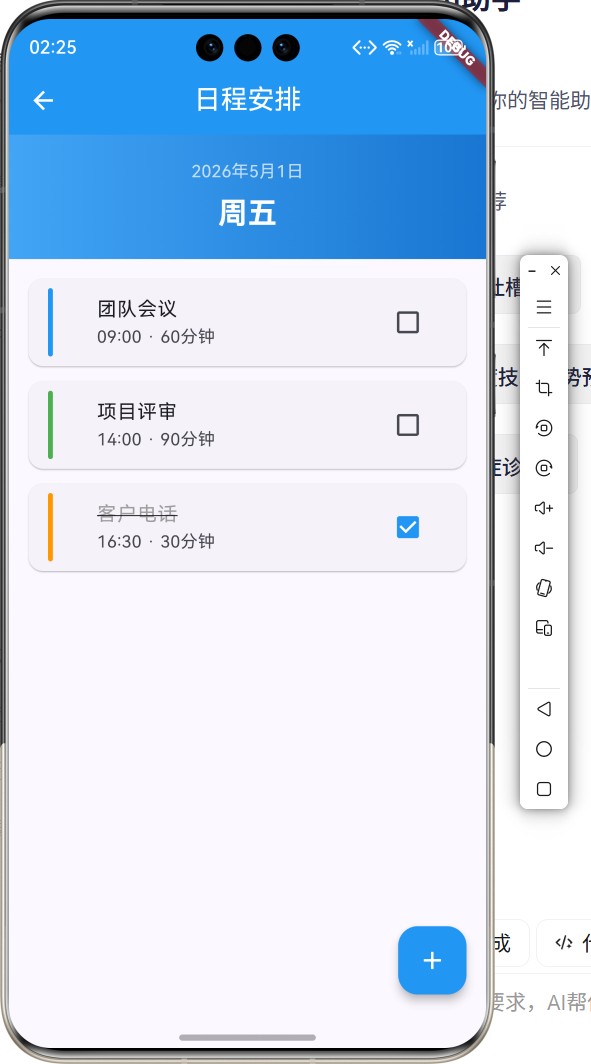
2.1 功能特性
| 功能 | 描述 |
|---|---|
| 添加日程 | 创建新的日程 |
| 时间选择 | 选择日程时间 |
| 完成标记 | 标记日程完成 |
| 列表展示 | 展示所有日程 |
三、项目背景与目标
3.1 项目背景
日程管理帮助用户合理安排时间,提高工作效率。
3.2 项目目标
- 实现日程添加功能
- 支持时间选择
- 提供完成标记
四、技术架构设计
4.1 核心技术
- TimePicker: 时间选择
- StatefulWidget: 状态管理
- Checkbox: 完成标记
4.2 实现原理
使用列表存储日程数据,通过时间选择器设置时间。
五、详细实现
5.1 Flutter端实现
import 'package:flutter/material.dart';
class SchedulePlannerPage extends StatefulWidget {
const SchedulePlannerPage({super.key});
State<SchedulePlannerPage> createState() => _SchedulePlannerPageState();
}
class _SchedulePlannerPageState extends State<SchedulePlannerPage> {
final List<Map<String, dynamic>> _schedules = [];
void _addSchedule(String title, TimeOfDay time) {
  setState(() {
    _schedules.add({
      'title': title,
      'time': time.format(context),
      'completed': false,
    });
  });
}
Widget build(BuildContext context) {
return Scaffold(
appBar: AppBar(
title: const Text('日程安排'),
centerTitle: true,
backgroundColor: Colors.blue,
foregroundColor: Colors.white,
),
body: ListView.builder(
itemCount: _schedules.length,
itemBuilder: (context, index) {
final schedule = _schedules[index];
return ListTile(
title: Text(schedule['title']),
subtitle: Text(schedule['time']),
trailing: Checkbox(
value: schedule['completed'],
onChanged: (v) {
setState(() {
_schedules[index]['completed'] = v;
});
},
),
);
},
),
floatingActionButton: FloatingActionButton(
onPressed: () {},
child: Icon(Icons.add),
),
);
}
}
六、核心功能解析
6.1 添加日程
添加新日程:
void _addSchedule(String title, TimeOfDay time) {
setState(() {
_schedules.add({
'title': title,
'time': time.format(context),
'completed': false,
});
});
}
6.2 时间选择
使用showTimePicker选择时间:
final time = await showTimePicker(
  context: context,
  initialTime: TimeOfDay.now(),
);
七、实际应用场景
- 工作安排:管理工作日程
- 学习计划:安排学习时间
- 生活提醒:提醒重要事项
八、优化建议
- 提醒功能:添加日程提醒
- 日历视图:添加日历展示
- 重复日程:支持重复日程
九、常见问题与解决方案
9.1 数据持久化
问题:日程数据需要保存
解决方案:使用数据库存储
9.2 提醒实现
问题:如何实现日程提醒
解决方案:使用本地通知
十、总结
本文详细介绍了Flutter鸿蒙日程安排的实现,包括日程添加、时间选择等核心技术。通过本实例,掌握了时间选择器和列表管理的使用方法。
十一、参考资料

讨论HarmonyOS开发技术,专注于API与组件、DevEco Studio、测试、元服务和应用上架分发等。
更多推荐



 0
0 0
0- 0


 已为社区贡献28条内容

所有评论(0)