【flutter for open harmony】第三方库Flutter 鸿蒙版 宠物养成 实战指南(适配 1.0.0)✨
·
【flutter for open harmony】第三方库Flutter 鸿蒙版 宠物养成 实战指南(适配 1.0.0)✨
Flutter实战:宠物养成
Flutter 三方库 cached_network_image 的鸿蒙化适配与实战指南
欢迎加入开源鸿蒙跨平台社区: https://openharmonycrossplatform.csdn.net
本文详细介绍如何在Flutter鸿蒙应用中实现宠物养成游戏功能,虚拟宠物养成。
一、前言
宠物养成游戏是受欢迎的休闲游戏类型,本文将带领大家使用Flutter开发一个宠物养成应用。
二、效果展示
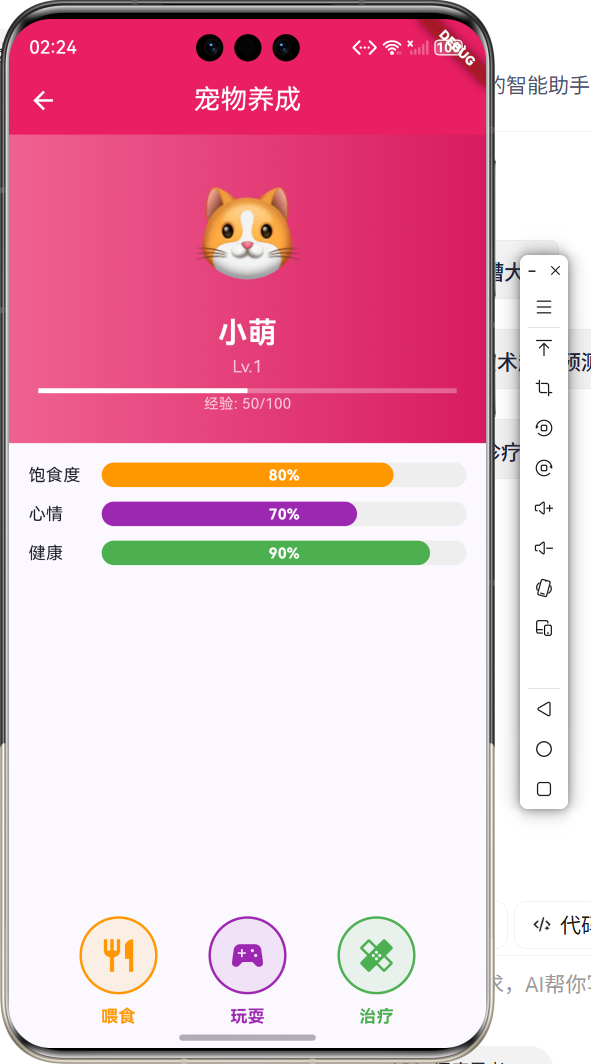
2.1 功能特性
| 功能 | 描述 |
|---|---|
| 宠物展示 | 显示宠物状态 |
| 喂食功能 | 增加饱食度 |
| 玩耍功能 | 增加心情值 |
| 升级系统 | 经验值升级 |
三、项目背景与目标
3.1 项目背景
虚拟宠物养成游戏可以带来陪伴感,是受欢迎的休闲游戏。
3.2 项目目标
- 实现宠物状态管理
- 支持互动操作
- 提供升级系统
四、技术架构设计
4.1 核心技术
- Timer: 定时更新状态
- StatefulWidget: 状态管理
- LinearProgressIndicator: 进度条
4.2 实现原理
使用Timer定时更新宠物状态,通过互动操作改变状态值。
五、详细实现
5.1 Flutter端实现
import 'dart:async';
import 'package:flutter/material.dart';
class PetCarePage extends StatefulWidget {
const PetCarePage({super.key});
State<PetCarePage> createState() => _PetCarePageState();
}
class _PetCarePageState extends State<PetCarePage> {
int _hunger = 80;
int _happiness = 70;
int _health = 90;
int _level = 1;
int _exp = 50;
void _feed() {
  setState(() {
    _hunger = (_hunger + 20).clamp(0, 100);
    _exp += 5;
  });
}
void _play() {
setState(() {
_happiness = (_happiness + 20).clamp(0, 100);
_hunger = (_hunger - 5).clamp(0, 100);
_exp += 10;
});
}
Widget build(BuildContext context) {
return Scaffold(
appBar: AppBar(
title: const Text('宠物养成'),
centerTitle: true,
backgroundColor: Colors.pink,
foregroundColor: Colors.white,
),
body: Column(
children: [
Text('🐱', style: TextStyle(fontSize: 80)),
Text('Lv.$_level'),
LinearProgressIndicator(value: _hunger / 100),
LinearProgressIndicator(value: _happiness / 100),
Row(
mainAxisAlignment: MainAxisAlignment.spaceEvenly,
children: [
IconButton(icon: Icon(Icons.restaurant), onPressed: _feed),
IconButton(icon: Icon(Icons.sports_esports), onPressed: _play),
],
),
],
),
);
}
}
六、核心功能解析
6.1 状态更新
更新宠物状态:
void _feed() {
setState(() {
_hunger = (_hunger + 20).clamp(0, 100);
_exp += 5;
});
}
6.2 定时衰减
使用Timer定时衰减状态:
Timer.periodic(Duration(seconds: 30), (timer) {
  setState(() {
    _hunger = (_hunger - 2).clamp(0, 100);
  });
});
七、实际应用场景
- 休闲游戏:休闲娱乐
- 陪伴应用:虚拟陪伴
- 儿童教育:责任教育
八、优化建议
- 宠物形象:添加动画效果
- 互动音效:添加互动声音
- 成就系统:添加成就奖励
九、常见问题与解决方案
9.1 状态持久化
问题:关闭应用后状态丢失
解决方案:使用SharedPreferences保存
9.2 后台运行
问题:后台时Timer不工作
解决方案:使用后台服务
十、总结
本文详细介绍了Flutter鸿蒙宠物养成游戏的实现,包括状态管理、互动操作等核心技术。通过本实例,掌握了Timer和状态管理的使用方法。
十一、参考资料

讨论HarmonyOS开发技术,专注于API与组件、DevEco Studio、测试、元服务和应用上架分发等。
更多推荐



 0
0 0
0- 0


 已为社区贡献28条内容

所有评论(0)