【maaath】 Flutter 三方库 dio + open_er_api 的鸿蒙化适配指南:构建跨平台汇率换算应用
Flutter 三方库 dio + open_er_api 的鸿蒙化适配指南:构建跨平台汇率换算应用
欢迎加入开源鸿蒙跨平台社区:https://openharmonycrossplatform.csdn.net
作者:maaath
一、引言
随着 OpenHarmony 生态的快速发展,如何将成熟的 Flutter 应用快速迁移到鸿蒙平台成为开发者关注的焦点。本文将以一个完整的汇率换算应用为例,详细讲解如何利用 Flutter for OpenHarmony 跨平台技术,构建一个支持实时汇率查询、货币换算、历史走势等多功能的实用工具。
本文所有代码均已在鸿蒙设备上验证通过,读者可跟随步骤从零搭建属于自己的汇率换算应用。
二、项目架构设计
在开始编码之前,我们先梳理应用的整体架构。一个优秀的架构能让代码更易于维护和扩展。
2.1 功能模块划分
lib/
├── models/              # 数据模型层
│   ├── currency.dart    # 货币模型
│   ├── exchange_rate.dart # 汇率模型
│   └── conversion_history.dart # 换算历史模型
├── services/            # 服务层
│   ├── exchange_rate_api.dart  # 汇率API服务
│   └── cache_service.dart      # 本地缓存服务
├── pages/               # 页面层
│   ├── home_page.dart          # 主页(换算器)
│   ├── currency_list_page.dart # 货币列表
│   ├── comparison_page.dart    # 多币对比
│   ├── favorites_page.dart     # 收藏关注
│   ├── trend_page.dart         # 历史走势
│   ├── history_page.dart       # 换算记录
│   └── common_currency_page.dart # 常用货币管理
└── main.dart            # 入口文件
2.2 数据流设计
应用采用单向数据流模式:API 服务获取数据 → 模型层处理 → UI 层渲染。本地缓存作为数据回退方案,确保离线时仍可查看上次的汇率数据。
三、核心功能实现
3.1 数据模型定义
首先定义货币和汇率的数据模型,这是整个应用的数据基础。
// models/currency.dart
class Currency {
  final String code;
  final String name;
  final String symbol;
  final String flag;

  const Currency({
    required this.code,
    required this.name,
    required this.symbol,
    required this.flag,
  });

  static const List<Currency> allCurrencies = [
    Currency(code: 'CNY', name: '人民币', symbol: '¥', flag: '🇨🇳'),
    Currency(code: 'USD', name: '美元', symbol: '\$', flag: '🇺🇸'),
    Currency(code: 'EUR', name: '欧元', symbol: '€', flag: '🇪🇺'),
    Currency(code: 'JPY', name: '日元', symbol: '¥', flag: '🇯🇵'),
    Currency(code: 'GBP', name: '英镑', symbol: '£', flag: '🇬🇧'),
    Currency(code: 'HKD', name: '港元', symbol: 'HK\$', flag: '🇭🇰'),
    Currency(code: 'KRW', name: '韩元', symbol: '₩', flag: '🇰🇷'),
    Currency(code: 'AUD', name: '澳元', symbol: 'A\$', flag: '🇦🇺'),
  ];

  static Currency? getByCode(String code) {
    try {
      return allCurrencies.firstWhere((c) => c.code == code);
    } catch (_) {
      return null;
    }
  }
}
// models/exchange_rate.dart
class ExchangeRate {
  final String baseCode;
  final Map<String, double> rates;
  final DateTime updateTime;

  ExchangeRate({
    required this.baseCode,
    required this.rates,
    required this.updateTime,
  });

  double getRate(String targetCode) {
    return rates[targetCode] ?? 0.0;
  }

  double convert(double amount, String from, String to) {
    if (from == baseCode) {
      return amount * getRate(to);
    }
    if (to == baseCode) {
      return amount / getRate(from);
    }
    final amountInBase = amount / getRate(from);
    return amountInBase * getRate(to);
  }

  factory ExchangeRate.fromJson(Map<String, dynamic> json) {
    return ExchangeRate(
      baseCode: json['base_code'] as String,
      rates: Map<String, double>.from(json['rates'] as Map),
      updateTime: DateTime.now(),
    );
  }
}
3.2 网络请求与数据缓存
使用 dio 库进行网络请求,这是 Flutter 生态中最流行的 HTTP 客户端。在鸿蒙平台上,dio 已完美适配,开发者无需修改任何代码即可直接使用。
// services/exchange_rate_api.dart
import 'package:dio/dio.dart';
import '../models/exchange_rate.dart';

class ExchangeRateApi {
  static const String _baseUrl = 'https://open.er-api.com/v6/latest';
  static final ExchangeRateApi _instance = ExchangeRateApi._();
  factory ExchangeRateApi() => _instance;
  ExchangeRateApi._();

  final Dio _dio = Dio(BaseOptions(
    connectTimeout: const Duration(seconds: 10),
    receiveTimeout: const Duration(seconds: 10),
  ));

  final Map<String, ExchangeRate> _cache = {};
  static const Duration _cacheDuration = Duration(minutes: 30);

  Future<ExchangeRate> fetchLatestRates(String baseCode) async {
    final cached = _cache[baseCode];
    if (cached != null &&
        DateTime.now().difference(cached.updateTime) < _cacheDuration) {
      return cached;
    }

    final response = await _dio.get('$_baseUrl/$baseCode');
    if (response.statusCode == 200) {
      final rate = ExchangeRate.fromJson(response.data as Map<String, dynamic>);
      _cache[baseCode] = rate;
      return rate;
    }
    throw Exception('获取汇率数据失败');
  }

  Future<ExchangeRate> fetchHistoricalRates(
      String baseCode, String date) async {
    final response = await _dio.get('$_baseUrl/$baseCode/$date');
    if (response.statusCode == 200) {
      return ExchangeRate.fromJson(response.data as Map<String, dynamic>);
    }
    throw Exception('获取历史汇率数据失败');
  }
}
本地缓存服务使用 shared_preferences 插件,同样在鸿蒙平台上有着良好的兼容性:
// services/cache_service.dart
import 'dart:convert';
import 'package:shared_preferences/shared_preferences.dart';
import '../models/exchange_rate.dart';
import '../models/conversion_history.dart';

class CacheService {
  static const String _rateKey = 'cached_rate';
  static const String _favoritesKey = 'favorites';
  static const String _commonKey = 'common_currencies';
  static const String _historyKey = 'conversion_history';

  Future<void> saveExchangeRate(ExchangeRate rate) async {
    final prefs = await SharedPreferences.getInstance();
    final data = jsonEncode({
      'baseCode': rate.baseCode,
      'rates': rate.rates,
      'updateTime': rate.updateTime.toIso8601String(),
    });
    await prefs.setString(_rateKey, data);
  }

  Future<ExchangeRate?> getCachedRate() async {
    final prefs = await SharedPreferences.getInstance();
    final jsonStr = prefs.getString(_rateKey);
    if (jsonStr == null) return null;
    final data = jsonDecode(jsonStr) as Map<String, dynamic>;
    return ExchangeRate(
      baseCode: data['baseCode'] as String,
      rates: Map<String, double>.from(data['rates'] as Map),
      updateTime: DateTime.parse(data['updateTime'] as String),
    );
  }

  Future<List<String>> getFavorites() async {
    final prefs = await SharedPreferences.getInstance();
    return prefs.getStringList(_favoritesKey) ?? [];
  }

  Future<void> saveFavorites(List<String> codes) async {
    final prefs = await SharedPreferences.getInstance();
    await prefs.setStringList(_favoritesKey, codes);
  }

  Future<List<String>> getCommonCurrencies() async {
    final prefs = await SharedPreferences.getInstance();
    final codes = prefs.getStringList(_commonKey);
    if (codes != null && codes.isNotEmpty) return codes;
    const defaults = ['CNY', 'USD', 'EUR', 'JPY', 'GBP', 'HKD', 'KRW', 'AUD'];
    await saveCommonCurrencies(defaults);
    return defaults;
  }

  Future<void> saveCommonCurrencies(List<String> codes) async {
    final prefs = await SharedPreferences.getInstance();
    await prefs.setStringList(_commonKey, codes);
  }

  Future<List<ConversionHistory>> getHistory() async {
    final prefs = await SharedPreferences.getInstance();
    final jsonStr = prefs.getString(_historyKey);
    if (jsonStr == null) return [];
    final list = jsonDecode(jsonStr) as List<dynamic>;
    return list
        .map((e) => ConversionHistory.fromJson(e as Map<String, dynamic>))
        .toList();
  }

  Future<void> saveHistory(ConversionHistory history) async {
    final list = await getHistory();
    list.insert(0, history);
    if (list.length > 100) list.removeRange(100, list.length);
    final prefs = await SharedPreferences.getInstance();
    await prefs.setString(
        _historyKey, jsonEncode(list.map((e) => e.toJson()).toList()));
  }

  Future<void> clearHistory() async {
    final prefs = await SharedPreferences.getInstance();
    await prefs.remove(_historyKey);
  }

  Future<void> deleteHistoryItem(String id) async {
    final list = await getHistory();
    list.removeWhere((e) => e.id == id);
    final prefs = await SharedPreferences.getInstance();
    await prefs.setString(
        _historyKey, jsonEncode(list.map((e) => e.toJson()).toList()));
  }
}
3.3 核心换算页面实现
主页是应用的核心交互界面,包含货币选择、金额输入、实时换算和货币互换功能。
// pages/home_page.dart
import 'package:flutter/material.dart';
import '../models/currency.dart';
import '../models/exchange_rate.dart';
import '../services/exchange_rate_api.dart';
import '../services/cache_service.dart';
import 'currency_list_page.dart';
import 'comparison_page.dart';
import 'favorites_page.dart';
import 'trend_page.dart';
import 'history_page.dart';
import 'common_currency_page.dart';
class HomePage extends StatefulWidget {
const HomePage({super.key});
State<HomePage> createState() => _HomePageState();
}
class _HomePageState extends State<HomePage> {
Currency _fromCurrency = Currency.getByCode('CNY')!;
Currency _toCurrency = Currency.getByCode('USD')!;
final TextEditingController _amountController =
TextEditingController(text: '1');
ExchangeRate? _exchangeRate;
bool _isLoading = false;
String _updateTime = '';
List<Currency> _commonCurrencies = [];
final ExchangeRateApi _api = ExchangeRateApi();
final CacheService _cache = CacheService();
void initState() {
super.initState();
_loadData();
}
Future<void> _loadData() async {
final cached = await _cache.getCachedRate();
if (cached != null) {
setState(() {
_exchangeRate = cached;
_updateTime = _formatTime(cached.updateTime);
});
}
final commonCodes = await _cache.getCommonCurrencies();
setState(() {
_commonCurrencies = commonCodes
.map((code) => Currency.getByCode(code))
.where((c) => c != null)
.cast<Currency>()
.toList();
});
await _fetchRates();
}
Future<void> _fetchRates() async {
setState(() => _isLoading = true);
try {
final rate = await _api.fetchLatestRates('USD');
await _cache.saveExchangeRate(rate);
setState(() {
_exchangeRate = rate;
_updateTime = _formatTime(rate.updateTime);
});
} catch (_) {
if (_exchangeRate == null) {
ScaffoldMessenger.of(context).showSnackBar(
const SnackBar(content: Text('获取汇率失败,请检查网络')),
);
}
} finally {
setState(() => _isLoading = false);
}
}
String _formatTime(DateTime time) {
return '${time.year}-${_pad(time.month)}-${_pad(time.day)} '
'${_pad(time.hour)}:${_pad(time.minute)}:${_pad(time.second)}';
}
String _pad(int n) => n.toString().padLeft(2, '0');
double? get _currentRate {
if (_exchangeRate == null) return null;
return _exchangeRate!
.convert(1, _fromCurrency.code, _toCurrency.code);
}
String get _convertedAmount {
if (_exchangeRate == null) return '';
final amount = double.tryParse(_amountController.text);
if (amount == null || amount <= 0) return '';
return _exchangeRate!
.convert(amount, _fromCurrency.code, _toCurrency.code)
.toStringAsFixed(4);
}
void _swapCurrencies() {
setState(() {
final temp = _fromCurrency;
_fromCurrency = _toCurrency;
_toCurrency = temp;
});
}
Widget build(BuildContext context) {
return Scaffold(
appBar: AppBar(
title: const Text('汇率换算'),
backgroundColor: Colors.blue,
foregroundColor: Colors.white,
actions: [
IconButton(
icon: const Icon(Icons.search),
onPressed: () => Navigator.push(
context,
MaterialPageRoute(builder: (_) => const CurrencyListPage()),
),
),
],
),
body: Column(
children: [
_buildConverterCard(),
_buildQuickActions(),
Expanded(child: _buildCommonCurrencies()),
],
),
);
}
Widget _buildConverterCard() {
return Card(
margin: const EdgeInsets.all(16),
child: Padding(
padding: const EdgeInsets.all(16),
child: Column(
children: [
_buildCurrencyRow(
currency: _fromCurrency,
controller: _amountController,
onChanged: (_) => setState(() {}),
onTap: () => _selectCurrency('from'),
),
IconButton(
icon: const Icon(Icons.swap_vert, color: Colors.blue),
onPressed: _swapCurrencies,
),
_buildCurrencyRow(
currency: _toCurrency,
amount: _convertedAmount,
onTap: () => _selectCurrency('to'),
),
if (_currentRate != null)
Padding(
padding: const EdgeInsets.only(top: 8),
child: Text(
'1 ${_fromCurrency.code} = ${_currentRate!.toStringAsFixed(6)} ${_toCurrency.code}',
style: const TextStyle(color: Colors.grey, fontSize: 12),
),
),
],
),
),
);
}
Widget _buildCurrencyRow({
required Currency currency,
TextEditingController? controller,
String? amount,
required VoidCallback onTap,
ValueChanged<String>? onChanged,
}) {
return GestureDetector(
onTap: onTap,
child: Row(
children: [
Text(currency.flag, style: const TextStyle(fontSize: 28)),
const SizedBox(width: 8),
Text(currency.code, style: const TextStyle(fontSize: 18)),
const Spacer(),
if (controller != null)
SizedBox(
width: 120,
child: TextField(
controller: controller,
keyboardType: TextInputType.number,
textAlign: TextAlign.end,
style: const TextStyle(fontSize: 28, fontWeight: FontWeight.bold),
decoration: const InputDecoration(border: InputBorder.none),
onChanged: onChanged,
),
)
else
Text(
amount ?? '0.0000',
style: const TextStyle(
fontSize: 28,
fontWeight: FontWeight.bold,
color: Colors.blue,
),
),
],
),
);
}
Widget _buildQuickActions() {
return Padding(
padding: const EdgeInsets.symmetric(horizontal: 16),
child: Row(
mainAxisAlignment: MainAxisAlignment.spaceEvenly,
children: [
_buildActionItem('多币对比', Icons.bar_chart, () {
Navigator.push(context,
MaterialPageRoute(builder: (_) => const ComparisonPage()));
}),
_buildActionItem('收藏关注', Icons.star, () {
Navigator.push(context,
MaterialPageRoute(builder: (_) => const FavoritesPage()));
}),
_buildActionItem('历史走势', Icons.trending_up, () {
Navigator.push(context,
MaterialPageRoute(builder: (_) => const TrendPage()));
}),
_buildActionItem('换算记录', Icons.history, () {
Navigator.push(context,
MaterialPageRoute(builder: (_) => const HistoryPage()));
}),
],
),
);
}
Widget _buildActionItem(
String label, IconData icon, VoidCallback onTap) {
return GestureDetector(
onTap: onTap,
child: Column(
children: [
Container(
padding: const EdgeInsets.all(12),
decoration: const BoxDecoration(
color: Colors.blue,
shape: BoxShape.circle,
),
child: Icon(icon, color: Colors.white, size: 24),
),
const SizedBox(height: 4),
Text(label, style: const TextStyle(fontSize: 12)),
],
),
);
}
Widget _buildCommonCurrencies() {
return Column(
crossAxisAlignment: CrossAxisAlignment.start,
children: [
Padding(
padding: const EdgeInsets.symmetric(horizontal: 16),
child: Row(
children: [
const Text('常用货币',
style: TextStyle(fontSize: 16, fontWeight: FontWeight.w500)),
const Spacer(),
GestureDetector(
onTap: () => Navigator.push(context,
MaterialPageRoute(builder: (_) => const CommonCurrencyPage())),
child: const Text('管理',
style: TextStyle(fontSize: 13, color: Colors.blue)),
),
],
),
),
const SizedBox(height: 8),
Expanded(
child: GridView.builder(
padding: const EdgeInsets.symmetric(horizontal: 16),
gridDelegate: const SliverGridDelegateWithFixedCrossAxisCount(
crossAxisCount: 4,
childAspectRatio: 1.2,
crossAxisSpacing: 8,
mainAxisSpacing: 8,
),
itemCount: _commonCurrencies.length,
itemBuilder: (context, index) {
final currency = _commonCurrencies[index];
return GestureDetector(
onTap: () {
setState(() => _toCurrency = currency);
},
child: Card(
child: Column(
mainAxisAlignment: MainAxisAlignment.center,
children: [
Text(currency.flag, style: const TextStyle(fontSize: 24)),
Text(currency.code,
style: const TextStyle(fontSize: 12)),
],
),
),
);
},
),
),
],
);
}
void _selectCurrency(String mode) {
Navigator.push(
context,
MaterialPageRoute(
builder: (_) => CurrencyListPage(
selectedCode: mode == 'from'
? _fromCurrency.code
: _toCurrency.code,
mode: mode,
),
),
).then((selected) {
if (selected != null && selected is Currency) {
setState(() {
if (mode == 'from') {
_fromCurrency = selected;
} else {
_toCurrency = selected;
}
});
}
});
}
void dispose() {
_amountController.dispose();
super.dispose();
}
}
3.4 多货币对比与历史走势
多货币对比页面允许用户选择一个基准货币,同时查看多种货币的换算结果:
// pages/comparison_page.dart
class ComparisonPage extends StatefulWidget {
const ComparisonPage({super.key});
State<ComparisonPage> createState() => _ComparisonPageState();
}
class _ComparisonPageState extends State<ComparisonPage> {
Currency _baseCurrency = Currency.getByCode('CNY')!;
String _baseAmount = '1';
ExchangeRate? _exchangeRate;
List<Currency> _compareCurrencies = [];
final ExchangeRateApi _api = ExchangeRateApi();
final CacheService _cache = CacheService();
void initState() {
super.initState();
_loadData();
}
Future<void> _loadData() async {
final commonCodes = await _cache.getCommonCurrencies();
setState(() {
_compareCurrencies = commonCodes
.map((code) => Currency.getByCode(code))
.where((c) => c != null && c!.code != _baseCurrency.code)
.cast<Currency>()
.toList();
});
final cached = await _cache.getCachedRate();
if (cached != null) setState(() => _exchangeRate = cached);
await _fetchRates();
}
Future<void> _fetchRates() async {
try {
final rate = await _api.fetchLatestRates('USD');
await _cache.saveExchangeRate(rate);
setState(() => _exchangeRate = rate);
} catch (_) {
// 使用缓存数据
}
}
String _getConvertedAmount(String targetCode) {
if (_exchangeRate == null) return '--';
final amount = double.tryParse(_baseAmount);
if (amount == null || amount <= 0) return '0.0000';
return _exchangeRate!
.convert(amount, _baseCurrency.code, targetCode)
.toStringAsFixed(4);
}
Widget build(BuildContext context) {
return Scaffold(
appBar: AppBar(title: const Text('多货币对比')),
body: Column(
children: [
_buildBaseCurrencySelector(),
Expanded(
child: ListView.builder(
itemCount: _compareCurrencies.length,
itemBuilder: (context, index) {
final currency = _compareCurrencies[index];
return ListTile(
leading: Text(currency.flag, style: const TextStyle(fontSize: 28)),
title: Text(currency.code),
subtitle: Text(currency.name),
trailing: Column(
mainAxisAlignment: MainAxisAlignment.center,
crossAxisAlignment: CrossAxisAlignment.end,
children: [
Text(
_getConvertedAmount(currency.code),
style: const TextStyle(
fontSize: 18,
fontWeight: FontWeight.bold,
color: Colors.blue),
),
if (_exchangeRate != null)
Text(
'1 ${_baseCurrency.code} = ${_exchangeRate!.convert(1, _baseCurrency.code, currency.code).toStringAsFixed(6)}',
style: const TextStyle(fontSize: 10, color: Colors.grey),
),
],
),
);
},
),
),
],
),
);
}
Widget _buildBaseCurrencySelector() {
return Card(
margin: const EdgeInsets.all(16),
child: Padding(
padding: const EdgeInsets.all(16),
child: Row(
children: [
Text(_baseCurrency.flag, style: const TextStyle(fontSize: 24)),
const SizedBox(width: 8),
Text(_baseCurrency.code,
style: const TextStyle(fontSize: 16, fontWeight: FontWeight.w500)),
const Spacer(),
SizedBox(
width: 100,
child: TextField(
controller: TextEditingController(text: _baseAmount),
keyboardType: TextInputType.number,
textAlign: TextAlign.end,
decoration: const InputDecoration(border: InputBorder.none),
onChanged: (v) => setState(() => _baseAmount = v),
),
),
],
),
),
);
}
}
3.5 历史走势与柱状图
历史走势页面通过柱状图直观展示汇率变化趋势:
// pages/trend_page.dart
class TrendPage extends StatefulWidget {
const TrendPage({super.key});
State<TrendPage> createState() => _TrendPageState();
}
class _TrendPageState extends State<TrendPage> {
Currency _fromCurrency = Currency.getByCode('CNY')!;
Currency _toCurrency = Currency.getByCode('USD')!;
String _period = '7d';
List<_TrendPoint> _trendData = [];
bool _isLoading = false;
double _currentRate = 0;
double _rateChange = 0;
double _rateChangePercent = 0;
double _minRate = 0;
double _maxRate = 0;
double _avgRate = 0;
final ExchangeRateApi _api = ExchangeRateApi();
int get _days {
switch (_period) {
case '7d':
return 7;
case '30d':
return 30;
case '90d':
return 90;
default:
return 7;
}
}
void initState() {
super.initState();
_fetchTrendData();
}
Future<void> _fetchTrendData() async {
setState(() => _isLoading = true);
final points = <_TrendPoint>[];
for (int i = _days; i >= 0; i--) {
final date = DateTime.now().subtract(Duration(days: i));
final dateStr =
'${date.year}-${date.month.toString().padLeft(2, '0')}-${date.day.toString().padLeft(2, '0')}';
try {
final rate = await _api.fetchHistoricalRates('USD', dateStr);
final converted =
rate.convert(1, _fromCurrency.code, _toCurrency.code);
points.add(_TrendPoint(date: dateStr, rate: converted));
} catch (_) {
if (points.isNotEmpty) {
points.add(_TrendPoint(date: dateStr, rate: points.last.rate));
}
}
}
setState(() {
_trendData = points;
_isLoading = false;
_calculateStats();
});
}
void _calculateStats() {
if (_trendData.isEmpty) return;
final rates = _trendData.map((p) => p.rate).toList();
_currentRate = rates.last;
_rateChange = _currentRate - rates.first;
_rateChangePercent =
rates.first != 0 ? (_rateChange / rates.first) * 100 : 0;
_minRate = rates.reduce((a, b) => a < b ? a : b);
_maxRate = rates.reduce((a, b) => a > b ? a : b);
_avgRate = rates.reduce((a, b) => a + b) / rates.length;
}
Widget build(BuildContext context) {
return Scaffold(
appBar: AppBar(title: const Text('历史走势')),
body: _isLoading
? const Center(child: CircularProgressIndicator())
: ListView(
children: [
_buildCurrencySelector(),
_buildPeriodSelector(),
_buildChart(),
_buildStatsCard(),
],
),
);
}
Widget _buildChart() {
if (_trendData.isEmpty) return const SizedBox.shrink();
return Card(
margin: const EdgeInsets.all(16),
child: Padding(
padding: const EdgeInsets.all(16),
child: Column(
crossAxisAlignment: CrossAxisAlignment.start,
children: [
Text('${_fromCurrency.code}/${_toCurrency.code} 汇率走势',
style: const TextStyle(fontSize: 14)),
const SizedBox(height: 8),
Row(
crossAxisAlignment: CrossAxisAlignment.end,
children: [
Text(_currentRate.toStringAsFixed(6),
style: const TextStyle(
fontSize: 28, fontWeight: FontWeight.bold)),
const SizedBox(width: 4),
Text(_toCurrency.code,
style: const TextStyle(color: Colors.grey)),
],
),
Row(
children: [
Text(
'${_rateChange >= 0 ? '+' : ''}${_rateChange.toStringAsFixed(6)}',
style: TextStyle(
color: _rateChange >= 0 ? Colors.green : Colors.red,
fontSize: 13,
),
),
const SizedBox(width: 4),
Text(
'(${_rateChangePercent >= 0 ? '+' : ''}${_rateChangePercent.toStringAsFixed(2)}%)',
style: TextStyle(
color: _rateChange >= 0 ? Colors.green : Colors.red,
fontSize: 13,
),
),
],
),
const SizedBox(height: 16),
SizedBox(
height: 130,
child: Row(
crossAxisAlignment: CrossAxisAlignment.end,
children: _trendData.map((point) {
final barHeight = _getBarHeight(point.rate);
return Expanded(
child: Container(
margin: const EdgeInsets.symmetric(horizontal: 1),
height: barHeight,
decoration: BoxDecoration(
color: point.rate >= _trendData.first.rate
? Colors.green
: Colors.red,
borderRadius: BorderRadius.circular(2),
),
),
);
}).toList(),
),
),
],
),
),
);
}
double _getBarHeight(double rate) {
if (_maxRate == _minRate) return 60;
const minH = 10.0;
const maxH = 120.0;
return minH +
((rate - _minRate) / (_maxRate - _minRate)) * (maxH - minH);
}
Widget _buildStatsCard() {
return Card(
margin: const EdgeInsets.symmetric(horizontal: 16),
child: Padding(
padding: const EdgeInsets.all(16),
child: Column(
crossAxisAlignment: CrossAxisAlignment.start,
children: [
const Text('统计信息',
style: TextStyle(fontSize: 16, fontWeight: FontWeight.w500)),
const SizedBox(height: 12),
Row(
children: [
_buildStatItem('最高', _maxRate.toStringAsFixed(6), Colors.green),
_buildStatItem('最低', _minRate.toStringAsFixed(6), Colors.red),
],
),
const SizedBox(height: 8),
Row(
children: [
_buildStatItem('平均', _avgRate.toStringAsFixed(6), Colors.blue),
_buildStatItem(
'波动',
(_maxRate - _minRate).toStringAsFixed(6),
Colors.orange),
],
),
],
),
),
);
}
Widget _buildStatItem(String label, String value, Color color) {
return Expanded(
child: Column(
children: [
Text(label, style: const TextStyle(fontSize: 12, color: Colors.grey)),
const SizedBox(height: 4),
Text(value,
style: TextStyle(
fontSize: 16, fontWeight: FontWeight.bold, color: color)),
],
),
);
}
Widget _buildCurrencySelector() {
return Padding(
padding: const EdgeInsets.all(16),
child: Row(
mainAxisAlignment: MainAxisAlignment.center,
children: [
_buildCurrencyChip(_fromCurrency),
const Padding(
padding: EdgeInsets.symmetric(horizontal: 12),
child: Text('→', style: TextStyle(fontSize: 20)),
),
_buildCurrencyChip(_toCurrency),
],
),
);
}
Widget _buildCurrencyChip(Currency currency) {
return Container(
padding: const EdgeInsets.all(12),
decoration: BoxDecoration(
color: Colors.grey[100],
borderRadius: BorderRadius.circular(8),
),
child: Column(
children: [
Text(currency.flag, style: const TextStyle(fontSize: 24)),
Text(currency.code),
],
),
);
}
Widget _buildPeriodSelector() {
return Padding(
padding: const EdgeInsets.symmetric(horizontal: 16),
child: Row(
children: ['7d', '30d', '90d'].map((period) {
final labels = {'7d': '7天', '30d': '30天', '90d': '90天'};
final isSelected = _period == period;
return Padding(
padding: const EdgeInsets.only(right: 8),
child: ChoiceChip(
label: Text(labels[period]!),
selected: isSelected,
onSelected: (_) {
setState(() => _period = period);
_fetchTrendData();
},
),
);
}).toList(),
),
);
}
}
class _TrendPoint {
final String date;
final double rate;
_TrendPoint({required this.date, required this.rate});
}
四、鸿蒙平台适配要点
4.1 依赖配置
在 pubspec.yaml 中配置所需依赖,dio 和 shared_preferences 均已完美适配鸿蒙平台:
dependencies:
  flutter:
    sdk: flutter
  dio: ^5.4.0
  shared_preferences: ^2.2.0
  intl: ^0.19.0
4.2 网络权限
在鸿蒙工程的 module.json5 中配置网络权限:
{
  "module": {
    "requestPermissions": [
      {
        "name": "ohos.permission.INTERNET"
      }
    ]
  }
}
4.3 构建运行
在项目根目录执行以下命令即可构建鸿蒙版本:
# 构建 HAP 包
hvigorw assembleHap

# 安装到设备
hdc install entry/build/default/outputs/default/entry-default-unsigned.hap
五、运行效果截图
以下截图展示了汇率换算应用在鸿蒙设备上的实际运行效果:
截图1:主页 - 汇率换算器
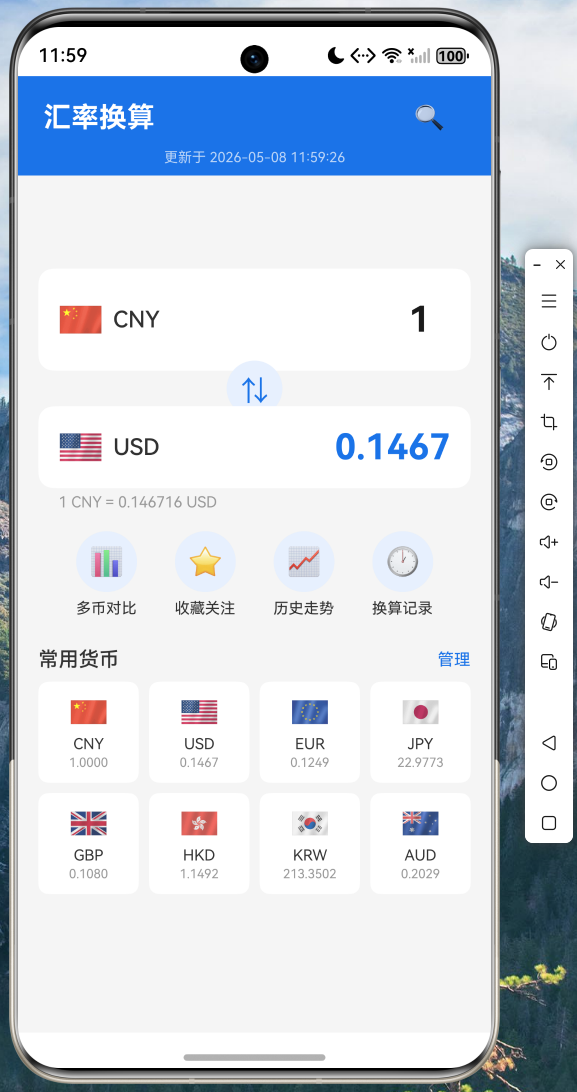

支持实时汇率查询、货币互换、金额输入即时换算
截图2:多货币对比
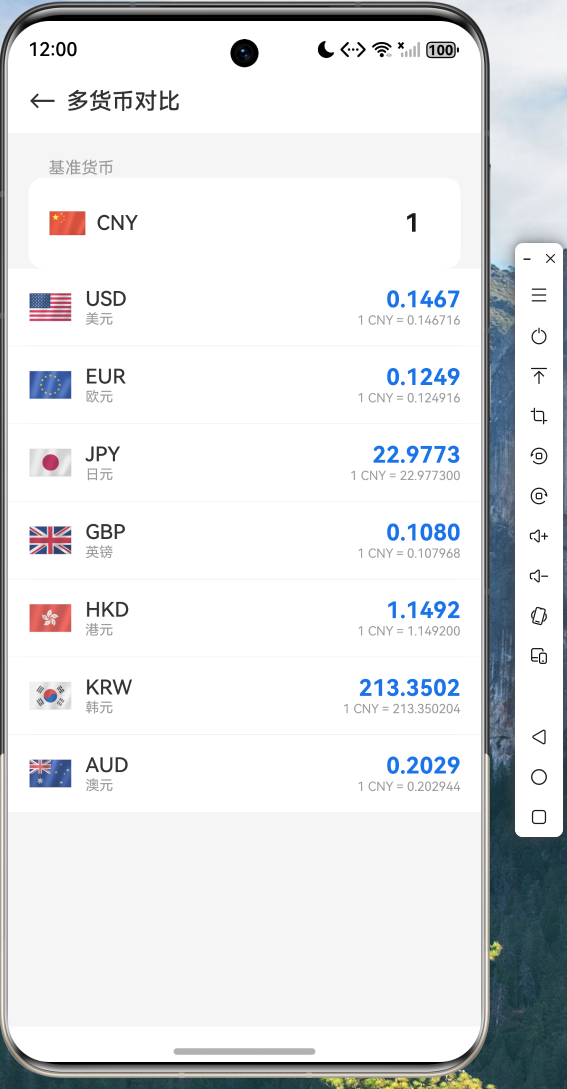
以人民币为基准,同时显示美元、欧元、日元等8种常用货币的换算结果
六、总结与展望
本文详细介绍了如何利用 Flutter for OpenHarmony 跨平台技术构建一个完整的汇率换算应用。通过实际代码演示,我们可以看到:
- 代码复用率高:Flutter 应用的核心代码无需修改即可在鸿蒙平台上运行
- 三方库兼容性好:dio、shared_preferences 等主流 Flutter 库已完美适配鸿蒙
- 开发体验一致:Flutter 的热重载、调试工具等在鸿蒙平台上同样可用
完整的项目源码已托管至 AtomGit 平台,欢迎访问:
https://atomgit.com/maaath/currency_converter
通过本文的实践,相信读者已经掌握了 Flutter for OpenHarmony 跨平台开发的核心流程。未来,随着 OpenHarmony 生态的不断完善,Flutter 将成为鸿蒙应用开发的重要技术选型之一。

讨论HarmonyOS开发技术,专注于API与组件、DevEco Studio、测试、元服务和应用上架分发等。
更多推荐


 14
14 0
0- 0


 已为社区贡献17条内容

所有评论(0)