【HarmonyOS】图像超分开发实践
·
HarmonyOS API 26 在 CoreVisionKit 中提供了图像超分能力。图像超分适合低清图片增强、老照片修复和小尺寸图片放大等场景。开发者不需要自行加载模型,只需要把图片转换为 PixelMap,再交给系统提供的分析器处理。
该接口仅支持 Stage 模型,系统能力为 SystemCapability.AI.Vision.VisionBase。
效果对比
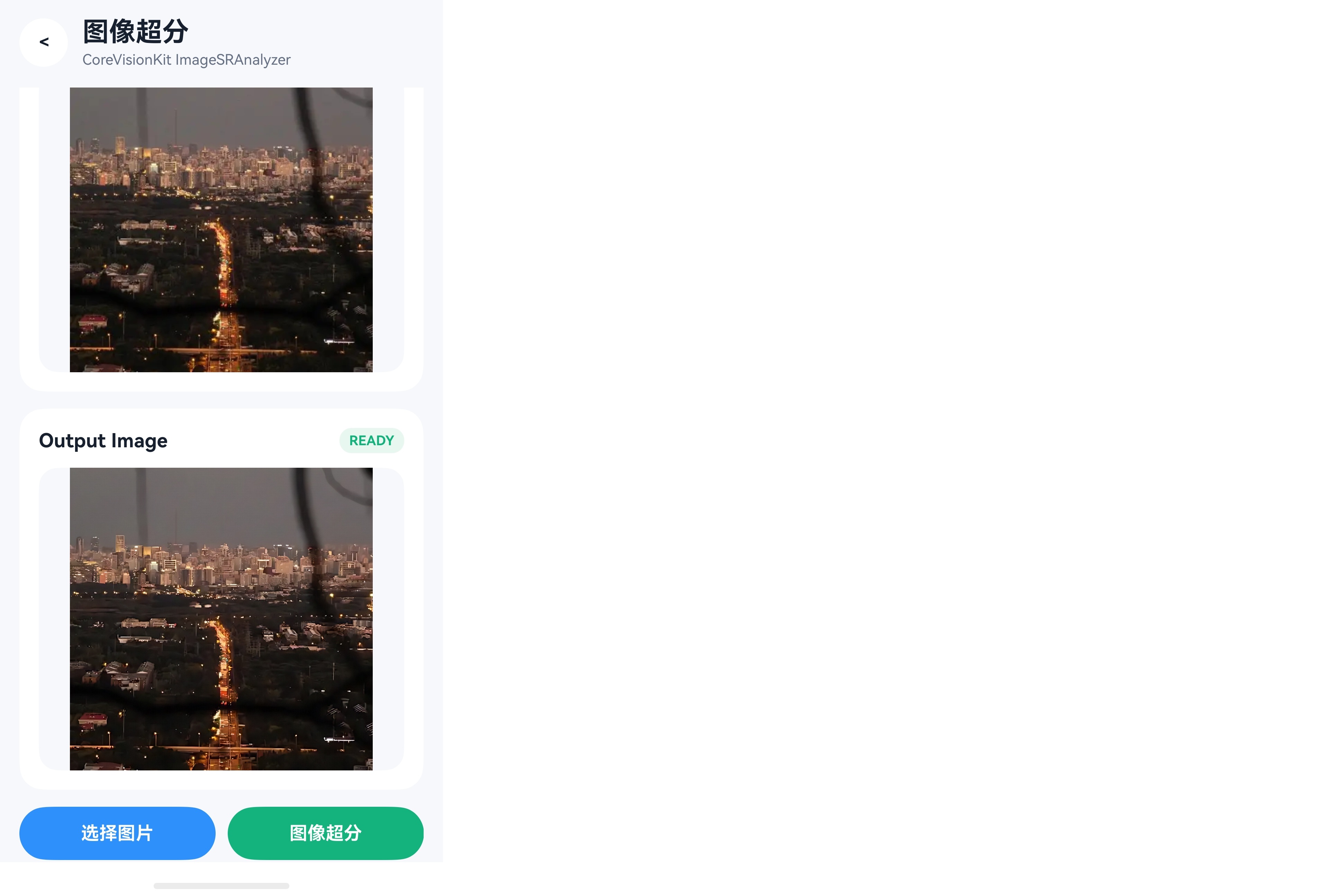
核心接口
图像超分主要使用以下接口:
| 接口 | 作用 |
|---|---|
ImageSRAnalyzer.create() | 创建图像超分分析器,返回 ImageSRAnalyzer 实例 |
ImageSRAnalyzer.process(request) | 执行一次图像超分,返回 ISPResponse |
ISPResponse.pixelMap | 获取超分处理后的图片 |
ImageSRAnalyzer.destroy() | 释放图像超分分析器 |
ImageSRAnalyzer 可以在页面内复用,不需要每处理一张图片就重新创建。通常在页面出现时调用 create(),页面退出或不再使用超分能力时调用 destroy()。
输入数据
process() 接收一个 visionBase.Request。图片需要先封装为 visionBase.ImageData,再放入 Request.inputData:
const imageData: visionBase.ImageData = {
  pixelMap: inputPixelMap
};
const request: visionBase.Request = {
  inputData: imageData
};
其中 pixelMap 才是实际参与超分处理的图片数据。本文通过系统 PhotoViewPicker 获取图片 URI,再使用 fileIo 和 ImageSource 将图片解码为 RGBA_8888 PixelMap。
输出数据
process() 是异步接口,处理完成后返回 imageSuperResolution.ISPResponse。其 pixelMap 字段就是超分结果,可以直接交给 ArkUI Image 组件显示:
const response = await analyzer.process(request);
const outputPixelMap = response.pixelMap;
接口没有提供放大倍数或质量等级参数,因此业务应以返回 PixelMap 的实际尺寸和画面效果为准。
实现流程
- 页面出现时调用
ImageSRAnalyzer.create()初始化分析器。 - 使用
PhotoViewPicker选择图片,并解码为RGBA_8888 PixelMap。 - 创建新的
ImageData和Request,调用process()获取结果。 - 替换图片时释放旧
PixelMap,页面退出时销毁分析器并释放图片资源。
完整示例
下面是一个简易页面,包含选择图片、图像超分和结果展示。
import { imageSuperResolution, visionBase } from '@kit.CoreVisionKit';
import { BusinessError } from '@kit.BasicServicesKit';
import { fileIo } from '@kit.CoreFileKit';
import { image } from '@kit.ImageKit';
import { photoAccessHelper } from '@kit.MediaLibraryKit';

@Entry
@Component
struct ImageSuperResolutionDemo {
  @State private inputImage: image.PixelMap | undefined = undefined;
  @State private outputImage: image.PixelMap | undefined = undefined;
  @State private status: string = '请选择图片';
  @State private processing: boolean = false;

  private analyzer: imageSuperResolution.ImageSRAnalyzer | null = null;

  aboutToAppear(): void {
    void this.initAnalyzer();
  }

  aboutToDisappear(): void {
    void this.destroyAnalyzer();
    this.releaseInputImage();
    this.releaseOutputImage();
  }

  build() {
    Column({ space: 12 }) {
      Text('图像超分')
        .fontSize(24)
        .fontWeight(FontWeight.Bold)

      Row({ space: 12 }) {
        Button('选择图片')
          .enabled(!this.processing)
          .onClick(() => {
            void this.selectImage();
          })

        Button(this.processing ? '处理中...' : '图像超分')
          .enabled(!this.processing)
          .onClick(() => {
            void this.processImage();
          })
      }

      Text(this.status)

      if (this.inputImage !== undefined) {
        Text('原图')
        Image(this.inputImage)
          .width('100%')
          .height(220)
          .objectFit(ImageFit.Contain)
      }

      if (this.outputImage !== undefined) {
        Text('超分结果')
        Image(this.outputImage)
          .width('100%')
          .height(220)
          .objectFit(ImageFit.Contain)
      }
    }
    .width('100%')
    .padding(16)
  }

  private async initAnalyzer(): Promise<void> {
    try {
      this.analyzer =
        await imageSuperResolution.ImageSRAnalyzer.create();
      this.status = '超分能力已就绪';
    } catch (error) {
      const err = error as BusinessError;
      this.status = `初始化失败:${err.message}`;
    }
  }

  private async selectImage(): Promise<void> {
    let file: fileIo.File | undefined = undefined;
    let source: image.ImageSource | undefined = undefined;

    try {
      const picker = new photoAccessHelper.PhotoViewPicker();
      const options = new photoAccessHelper.PhotoSelectOptions();
      options.MIMEType =
        photoAccessHelper.PhotoViewMIMETypes.IMAGE_TYPE;
      options.maxSelectNumber = 1;

      const result = await picker.select(options);
      if (result.photoUris.length === 0) {
        return;
      }

      file = await fileIo.open(
        result.photoUris[0],
        fileIo.OpenMode.READ_ONLY
      );
      source = image.createImageSource(file.fd);
      const pixelMap = await source.createPixelMap({
        desiredPixelFormat: image.PixelMapFormat.RGBA_8888
      });

      this.releaseInputImage();
      this.releaseOutputImage();
      this.inputImage = pixelMap;
      this.status = '图片已加载';
    } catch (error) {
      const err = error as BusinessError;
      this.status = `图片加载失败:${err.message}`;
    } finally {
      source?.release();
      if (file !== undefined) {
        await fileIo.close(file);
      }
    }
  }

  private async processImage(): Promise<void> {
    if (this.inputImage === undefined || this.analyzer === null) {
      this.status = '请先选择图片并等待初始化完成';
      return;
    }
    if (this.processing) {
      return;
    }

    this.processing = true;
    try {
      const imageData: visionBase.ImageData = {
        pixelMap: this.inputImage
      };
      const request: visionBase.Request = {
        inputData: imageData
      };
      const response: imageSuperResolution.ISPResponse =
        await this.analyzer.process(request);

      this.releaseOutputImage();
      this.outputImage = response.pixelMap;
      this.status = '图像超分完成';
    } catch (error) {
      const err = error as BusinessError;
      this.status = `图像超分失败:${err.message}`;
    } finally {
      this.processing = false;
    }
  }

  private async destroyAnalyzer(): Promise<void> {
    if (this.analyzer !== null) {
      await this.analyzer.destroy();
      this.analyzer = null;
    }
  }

  private releaseInputImage(): void {
    this.inputImage?.release();
    this.inputImage = undefined;
  }

  private releaseOutputImage(): void {
    this.outputImage?.release();
    this.outputImage = undefined;
  }
}
注意事项
- 图片建议解码为
RGBA_8888格式后再处理。 - 处理期间禁用按钮,避免重复请求或替换输入图片。
- 每次处理都创建新的
visionBase.Request。 - 替换图片和离开页面时释放
PixelMap,不用分析器时调用destroy()。 - 接口没有放大倍数参数,以返回
PixelMap的实际尺寸为准。

讨论HarmonyOS开发技术,专注于API与组件、DevEco Studio、测试、元服务和应用上架分发等。
更多推荐



 7
7 0
0- 0


 已为社区贡献48条内容

所有评论(0)