HarmonyOS7 跨进程通信:卡片与应用的“对话“机制
跨进程通信:卡片与应用的"对话"机制
在 HarmonyOS 中,互动卡片(Live Form)与主应用分属不同进程,这意味着它们无法像单进程应用那样直接共享内存数据。这一设计为系统带来了更高的安全性和稳定性,但同时也给开发者带来了跨进程数据交换的挑战。本文将以 LiveCard 项目为例,深入剖析互动卡片与主应用之间的通信机制,揭示其背后的设计哲学和实现细节。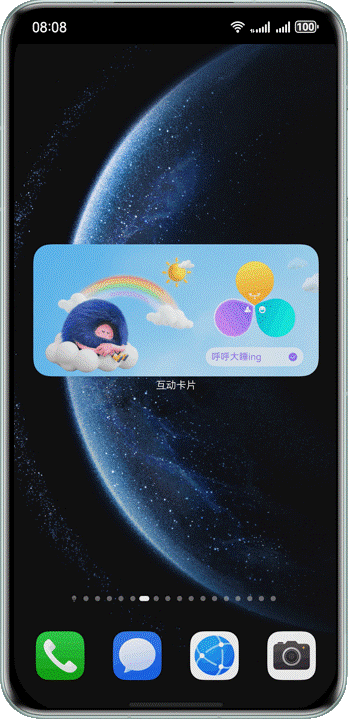
进程隔离背景
HarmonyOS 的卡片系统基于 FormExtensionAbility 和 LiveFormExtensionAbility 运行,这些 Extension Ability 默认运行在独立的沙箱进程中。这种进程隔离设计主要基于以下考量:
- 安全性:卡片 UI 渲染进程与主应用进程相互隔离,即使卡片发生异常崩溃也不会影响主应用的正常运行。
- 稳定性:每个卡片进程拥有独立的资源管理,系统可以独立回收或重启卡片进程。
- 资源管控:卡片作为桌面级 UI 组件,系统需要对其内存占用、CPU 使用进行精细化管控。
在我们的 LiveCard 项目中,四种互动卡片(睡眠、快递、运动、音乐)各自对应一个 LiveFormExtensionAbility 子类,例如 MusicLiveCardAbility 和 ExerciseLiveCardAbility。这些 Ability 与 EntryAbility(主应用入口)运行在不同的进程中。
LocalStorage 的跨进程限制
LocalStorage 是 ArkTS 中用于页面级状态管理的机制,它基于内存存储。在同一个进程内,通过 @Entry({ useSharedStorage: true }) 可以启用共享存储,让 @LocalStorageProp 和 @LocalStorageLink 装饰器在不同的页面间共享数据。
但是,LocalStorage 无法跨越进程边界。不同进程拥有各自独立的内存地址空间,因此主应用中创建的 LocalStorage 实例在卡片进程中完全不可见。
这意味着,当用户在音乐卡片上点击"下一首"按钮时,卡片进程无法直接访问主应用进程中的音乐播放器状态;同样,当主应用切换歌曲时,也无法直接将新的歌曲数据推送到卡片进程的内存中。解决这一问题的核心思路就是——数据持久化。
数据持久化桥梁
既然不能直接共享内存,那就通过文件系统作为"桥梁"。LiveCard 项目设计了一套基于文件存储的跨进程数据交换方案,核心是一个抽象基类 FileStore。
FileStore 抽象基类
FileStore 是所有数据存储类的基类,它封装了文件读写的基本操作:
// [entry/src/main/ets/database/FileStore.ets]
export abstract class FileStore {
  abstract getFileName(): string;

  writeJsonSync(context: Context, data: object): void {
    // 使用 fileIo 同步写入 JSON 文件
    let filePath = context.filesDir + '/' + this.getFileName();
    let content = JSON.stringify(data);
    let file = fileIo.openSync(filePath,
      fileIo.OpenMode.READ_WRITE | fileIo.OpenMode.CREATE | fileIo.OpenMode.TRUNC);
    fileIo.writeSync(file.fd, content);
    fileIo.closeSync(file);
  }

  readJsonSync(context: Context): object | undefined {
    // 使用 fileIo 同步读取 JSON 文件
    let filePath = context.filesDir + '/' + this.getFileName();
    let file = fileIo.openSync(filePath, fileIo.OpenMode.READ_ONLY);
    let stat = fileIo.statSync(filePath);
    let content = new ArrayBuffer(stat.size);
    fileIo.readSync(file.fd, content);
    fileIo.closeSync(file);
    let str = new util.TextDecoder('utf-8').decodeToString(new Uint8Array(content));
    return str ? JSON.parse(str) : undefined;
  }
}
设计要点:
getFileName()由子类实现:每个子类决定自己的文件名,从而避免文件冲突。- 所有操作都是同步的:这是关键设计决策。卡片生命周期的某些阶段(尤其是
loadContent)要求同步执行,不能依赖异步回调。 - 使用
context.filesDir:每个进程都有自己的filesDir,但同一应用的多个进程共享同一个应用沙箱目录,因此进程 A 写入的文件可以被进程 B 读取——这正是跨进程通信的基础。
MusicFileStore 实现
音乐卡片的 FileStore 实现最为典型,它管理了两个独立的数据文件:
// [entry/src/main/ets/database/MusicFileStore.ets]

// 存储触发动作(如 PLAY、PREVIOUS、NEXT)
class TriggerActionStore extends FileStore {
  getFileName(): string {
    return 'trigger_action.json';
  }
  // write、read、clear 方法封装...
}

// 存储当前播放歌曲信息
class CurrentSongStore extends FileStore {
  getFileName(): string {
    return 'current_song.json';
  }
  // write、read 方法封装...
}

class MusicFileStore {
  private triggerActionStore = new TriggerActionStore();
  private currentSongStore = new CurrentSongStore();
  // 对外暴露 storeTriggerAction、getTriggerAction、writeCurrentSong 等方法
}
export default new MusicFileStore();
MusicFileStore 采用单例模式导出,确保全局只有一个实例。两个内部类 TriggerActionStore 和 CurrentSongStore 分别管理不同的数据文件,职责清晰。
ExerciseFileStore 实现
运动卡片的数据存储相对简单,只需保存运动状态(未开始、进行中、已完成):
// [entry/src/main/ets/database/ExerciseFileStore.ets]
class ExerciseStateStore extends FileStore {
  getFileName(): string {
    return 'exercise_state.json';
  }
  write(context: Context, state: number): void {
    let data = { state: state };
    this.writeJsonSync(context, data);
  }
  read(context: Context): number | undefined {
    let obj = this.readJsonSync(context);
    return obj ? (obj as Record<string, number>).state : undefined;
  }
}
类似的模式还可以推广到睡眠卡片和快递卡片,这种"抽象基类 + 具体子类"的设计使得新增一种卡片的数据存储变得非常简单。
读写时序控制
跨进程文件通信有一个至关重要的细节:时序控制。如果读写时机不对,卡片可能读到空数据或旧数据。
loadContent 的同步约束
LiveFormExtensionAbility 的 onLiveFormCreate 生命周期方法中,session.loadContent() 必须被同步调用——它需要在方法体中被直接调用,不能放在异步回调中。这是 HarmonyOS 的框架约束。
正确的做法是先调用 loadContent,再读取文件数据填充 LocalStorage:
// [entry/src/main/ets/livecardability/MusicLiveCardAbility.ets]
export class MusicLiveCardAbility extends LiveFormExtensionAbility {
  async onLiveFormCreate(liveFormInfo: LiveFormInfo, session: UIExtensionContentSession): Promise<void> {
    let storage: LocalStorage = new LocalStorage();
    // 1. 设置基础参数
    storage.setOrCreate('formId', liveFormInfo.formId);
    storage.setOrCreate('borderRadius', liveFormInfo.borderRadius);
    storage.setOrCreate('formRect', liveFormInfo.rect);

    // 2. 同步调用 loadContent(必须!!!)
    session.loadContent('livecardability/pages/MusicLiveCard', storage);

    // 3. loadContent 之后,再从文件读取触发动作
    storage.setOrCreate('triggerAction', '');
    let actionData = MusicFileStore.getTriggerAction(this.context);
    if (actionData) {
      storage.setOrCreate('triggerAction', actionData.triggerAction);
      MusicFileStore.clearTriggerAction(this.context); // 读取后清除,避免重复消费
    }

    // 4. 读取当前歌曲并写入 storage
    let currentSong = MusicFileStore.readCurrentSong(this.context);
    if (!currentSong) {
      currentSong = initSongs[0];
      MusicFileStore.writeCurrentSong(this.context, currentSong);
    }
    storage.setOrCreate('currentSong', currentSong);
  }
}
这里的关键流程是:loadContent 将 UI 页面加载到卡片进程中,此时 UI 组件中通过 @LocalStorageProp 声明的属性还没有数据——它们会使用默认值。随后,Ability 从文件中读取持久化数据,通过 storage.setOrCreate() 更新 LocalStorage,触发 UI 组件的重新渲染。
为什么不能反过来?
如果先读取文件数据再调用 loadContent,看起来逻辑上更清晰,但实际上违背了 loadContent 必须在同步路径上被调用的约束。loadContent 的调用位置决定了卡片能否正常显示——如果它被放在异步操作之后,框架可能会认为卡片加载失败。
@LocalStorageProp 与 @LocalStorageLink
当 LocalStorage 中的数据更新时,卡片 UI 组件如何感知变化?答案是 @LocalStorageProp 和 @LocalStorageLink 装饰器。
这两个装饰器的作用是将组件中的属性与 LocalStorage 中的键值绑定。区别在于:
@LocalStorageProp:单向绑定。组件内部修改不会同步回LocalStorage。@LocalStorageLink:双向绑定。组件内部修改会同步回LocalStorage。
在 MusicLiveCard 中:
// [entry/src/main/ets/livecardability/pages/MusicLiveCard.ets]
@Entry({ useSharedStorage: true })
@Component
struct MusicLiveCard {
  @LocalStorageProp('formId') formId: string = '';
  @LocalStorageProp('currentSong') currentSong: SongItem = new SongItem();
  @LocalStorageProp('previousSong') previousSong?: SongItem = undefined;
  @LocalStorageProp('formRect') formRect?: formInfo.Rect = undefined;
  @LocalStorageProp('borderRadius') formRadius: number = 0;
  @LocalStorageLink('triggerAction') @Watch('onTriggerActionChange') triggerAction: string = '';
  // ...
}
formId、currentSong等使用@LocalStorageProp,卡片只需显示这些数据,无需回写。triggerAction使用@LocalStorageLink,因为卡片内部的动画逻辑需要根据动作类型启动或切换动画帧,但实际不需要写回——这里用@LocalStorageLink主要是为了配合@Watch实现数据变化的监听。
@Entry({ useSharedStorage: true }) 装饰器启用共享存储模式,使得同一卡片 Ability 内的多个页面可以共享同一个 LocalStorage 实例。
@Watch 装饰器应用
@Watch 是 ArkTS 中用于监听状态变量变化的装饰器。当被装饰的属性发生变化时,被 @Watch 修饰的回调函数会自动被调用。
在 MusicLiveCard 中,triggerAction 的监听是最典型的使用场景:
@LocalStorageLink('triggerAction') @Watch('onTriggerActionChange') triggerAction: string = '';

onTriggerActionChange(): void {
  Logger.info(`triggerAction changed to: ${this.triggerAction}`);
  this.initAnimationByAction();  // 根据动作初始化动画
  this.startCoverSync();         // 启动帧同步
}

initAnimationByAction(): void {
  if (this.triggerAction === 'PLAY') {
    this.currentImages = this.danceFrameImages;
    this.totalFrames = this.danceFrameImages.length;
    this.startRotate();          // 播放时专辑封面旋转
  } else if (this.triggerAction === 'PREVIOUS' || this.triggerAction === 'NEXT') {
    this.currentImages = this.switchFrameImages;
    this.totalFrames = this.switchFrameImages.length;
  }
}
当 triggerAction 从空字符串变为 "PLAY" 时,onTriggerActionChange 回调被触发,卡片会显示跳舞动画帧并让专辑封面旋转。当变为 "PREVIOUS" 或 "NEXT" 时,则会播放切歌动画。
类似地,ExerciseLiveCard 中也使用了 @Watch 来监听运动状态变化:
// [entry/src/main/ets/livecardability/pages/ExerciseLiveCard.ets]
@LocalStorageProp('exerciseState') @Watch('stateChange') currentState: number = ExerciseState.NOT_STARTED;

stateChange(): void {
  this.initImages();     // 根据状态切换不同的动画图片集
  this.updateScale();    // 更新动画缩放比例
}
使用 @Watch 的最佳实践:
- 避免在回调中执行耗时操作:
@Watch回调运行在 UI 线程中,应尽量减少计算量。 - 考虑初始值:
@Watch只在值变化时触发,初始赋值不会触发回调。因此一般在aboutToAppear中也执行一次初始化逻辑。 - 防止循环触发:如果在
@Watch回调中修改了被监视的属性,可能会导致无限循环。应在回调中使用条件判断来控制逻辑流。
实战案例:音乐卡片数据流全景
下面以"用户在应用中点击播放按钮"为起点,完整追踪数据如何流经各个模块,最终驱动卡片 UI 变化。
第 1 步:主应用播放音乐
用户在音乐页面点击播放按钮,MediaService 开始播放并更新状态:
// MediaService 内部
MediaService.getInstance().initAndPlayByAction(PlayActionType.PLAY);
第 2 步:写入文件存储
播放状态变化后,FormUtils.updateMusicControlCards 被调用:
// [entry/src/main/ets/utils/FormUtils.ets]
public async updateMusicControlCards(context: Context, songItem: SongItem, isPlay: boolean): Promise<void> {
  // 1. 将当前歌曲持久化到文件(供卡片进程读取)
  MusicFileStore.writeCurrentSong(context, songItem);

  // 2. 通过 formProvider.updateForm 通知所有音乐卡片
  let formData = new FormControlData();
  formData.isPlay = isPlay;
  formData.songId = songItem.id;
  formData.musicCover = songItem.label;
  // ...
  formData.title = songItem.title;

  let formList = await FormRdbHelper.getInstance(context).queryFormByName('MusicCard');
  formList.forEach((formInfo) => {
    this.updateForm(formInfo.formId, formData);
  });
}
这里实际上进行了两种跨进程数据传递:
- 被动读取:通过
MusicFileStore.writeCurrentSong将歌曲数据写入文件。 - 主动推送:通过
formProvider.updateForm将FormControlData推送给卡片进程。
第 3 步:卡片触发溢出动画
音乐卡片收到更新后,播放按钮的点击回调触发 requestOverflowWithAction:
// [entry/src/main/ets/widget/pages/MusicCard.ets] - 普通卡片侧
SymbolGlyph($r('sys.symbol.play_fill')).onClick(() => {
  // 通过 postCardAction 调用 EntryAbility 的 callee 方法
  ActionUtils.playByAction(this, PlayActionType.PLAY, this.formId);
  // 通过 postCardAction MESSAGE 触发溢出动画
  ActionUtils.requestOverFlowWithAction(this, LiveCardScale.MUSIC_WIDTH,
    LiveCardScale.MUSIC_HEIGHT, LIVE_CARD_DURATION, 'PLAY', this.songId);
});
requestOverFlowWithAction 通过 postCardAction 发送消息到 EntryFormAbility:
// [entry/src/main/ets/utils/ActionUtils.ets]
public requestOverFlowWithAction(component, widthRatio, heightRatio, duration, triggerAction, songId) {
  postCardAction(component, {
    action: FormCarAction.MESSAGE,
    abilityName: ENTRY_FORM_ABILITY,
    params: {
      message: 'requestOverflow',
      widthRatio, heightRatio, duration,
      triggerAction: triggerAction,
      songId: songId || ''
    },
  });
}
第 4 步:EntryFormAbility 存储触发动作
EntryFormAbility.onFormEvent 接收到消息后,将 triggerAction 存储到文件:
// [entry/src/main/ets/entryformability/EntryFormAbility.ets]
async onFormEvent(formId: string, message: string): Promise<void> {
  let shortMessage = params.message as string;
  if (shortMessage === 'requestOverflow') {
    let triggerAction = params.triggerAction as string || '';
    let songId = params.songId as string || '';

    if (triggerAction) {
      MusicFileStore.storeTriggerAction(this.context, triggerAction, songId);
    }
    this.requestOverflow(formId, widthRatio, heightRatio, duration);
  }
}
注意:EntryFormAbility 与 LiveFormExtensionAbility 运行在同一个进程吗? 不一定。它们都是 Extension Ability,但 EntryFormAbility 是普通的 FormExtensionAbility,而音乐卡片用的是 LiveFormExtensionAbility。关键点在于所有 Extension 的 filesDir 都指向同一个应用沙箱目录,因此文件分享是可行的。
第 5 步:LiveFormExtensionAbility 读取数据
当互动卡片被激活(溢出动画触发)时,MusicLiveCardAbility.onLiveFormCreate 被调用:
// 先加载 UI
session.loadContent('livecardability/pages/MusicLiveCard', storage);
// 再读取文件中的 triggerAction
let actionData = MusicFileStore.getTriggerAction(this.context);
if (actionData) {
  storage.setOrCreate('triggerAction', actionData.triggerAction);
  MusicFileStore.clearTriggerAction(this.context);
}
// 读取当前歌曲
let currentSong = MusicFileStore.readCurrentSong(this.context);
storage.setOrCreate('currentSong', currentSong);
第 6 步:UI 响应数据变化
LocalStorage 中的数据变化通过 @LocalStorageProp/@LocalStorageLink 传导到 UI 组件:
currentSong变化 → 歌曲名称、专辑封面同步更新triggerAction变为"PLAY"→@Watch('onTriggerActionChange')触发 →initAnimationByAction()启动跳舞动画和封面旋转triggerAction变为"PREVIOUS"或"NEXT"→ 切歌动画和专辑封面的位移动画启动
数据流全景图
主应用进程                          卡片进程
═══════════════                    ═══════════════

用户点击播放
     │
     ▼
MediaService 播放        ──postCardAction──►  EntryFormAbility
     │                                          │
     ▼                                          ▼
FormUtils.updateForm()  ──updateForm──►  普通卡片 Widget 更新
     │
     ▼
MusicFileStore          ──文件写入─────►  MusicLiveCardAbility
.writeCurrentSong()         (filesDir)      .onLiveFormCreate()
                                               │
                                               ▼
                                          读取文件 → LocalStorage
                                               │
                                               ▼
                                          @LocalStorageProp/@LocalStorageLink
                                               │
                                               ▼
                                          @Watch → 动画切换
总结
互动卡片的跨进程通信本质上是"文件持久化 + 框架推送"的双轨制:
- 文件持久化(FileStore 体系)负责承载"重"数据——完整的歌曲信息、运动状态等,通过同步文件读写保证数据完整性。
postCardAction+formProvider.updateForm负责传递"轻"消息——触发动作、状态变更通知等,通过 HarmonyOS 框架的跨进程通信机制实时推送。@LocalStorageProp/@LocalStorageLink+@Watch负责在卡片内部将数据变化转化为 UI 更新和动画触发。
理解这套机制的关键在于认识到:跨进程不是通过"直接调用",而是通过"共享存储 + 事件通知"来协作的。主应用写入数据并发送通知,卡片接收通知后读取数据并更新 UI——这种松耦合的设计既保证了进程隔离带来的安全性和稳定性,又实现了流畅的用户体验。

讨论HarmonyOS开发技术,专注于API与组件、DevEco Studio、测试、元服务和应用上架分发等。
更多推荐
 8
8 0
0- 0



 已为社区贡献107条内容

所有评论(0)