HarmonyOS ArkTS 实战:实现一个校园教材征订与发放应用
·
HarmonyOS ArkTS 实战:实现一个校园教材征订与发放应用
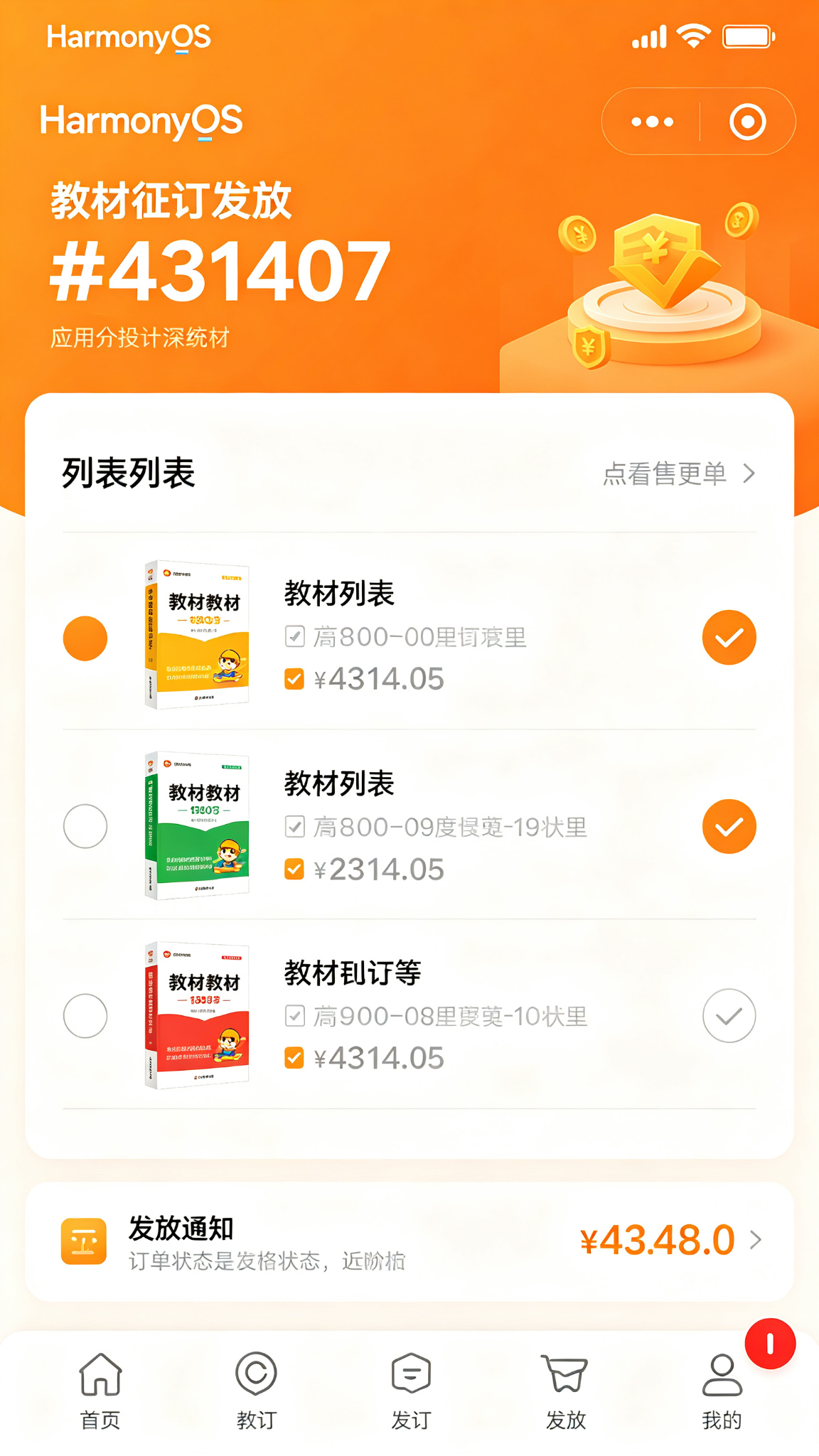
项目效果
本文使用 HarmonyOS 和 ArkTS 实现一个校园教材征订与发放应用。
应用可以查看教材目录,在线选订教材,查看发放通知,扫码领书,并提供教材评价、二手教材、退订申请、费用统计等完整功能。
项目使用 DevEco Studio 开发,适配 API 23 及以上版本。
运行效果
功能介绍
- 教材目录浏览
- 按课程筛选
- 在线选订教材
- 购物车管理
- 教材费用统计
- 发放通知查看
- 扫码领书
- 领书记录
- 教材评价
- 二手教材推荐
- 退订申请
- 教材信息查询
定义数据结构
interface Textbook {
  id: number;
  name: string;
  course: string;
  author: string;
  publisher: string;
  isbn: string;
  price: number;
  required: boolean;
  cover: string;
}

interface TextbookOrder {
  id: number;
  items: { textbookId: number; name: string; price: number }[];
  totalPrice: number;
  semester: string;
  status: string; // 待确认/已确认/已发放/已领取
  orderTime: string;
  receiveTime: string;
}
初始化页面状态
@State private tabIndex: number = 0;
@State private currentCourse: string = '全部课程';
@State private totalPrice: number = 0;

@State private courses: string[] = ['全部课程', '高等数学', '大学英语', '计算机基础', '程序设计', '大学物理'];

@State private textbooks: Textbook[] = [
  { id: 1, name: '高等数学(第七版)上册', course: '高等数学', author: '同济大学数学系', publisher: '高等教育出版社', isbn: '9787040396639', price: 45.6, required: true, cover: '' },
  { id: 2, name: '新视野大学英语读写教程1', course: '大学英语', author: '郑树棠', publisher: '外语教学与研究出版社', isbn: '9787513556819', price: 42.9, required: true, cover: '' },
  { id: 3, name: '大学计算机基础', course: '计算机基础', author: '杨振山', publisher: '高等教育出版社', isbn: '9787040396640', price: 38.5, required: true, cover: '' },
  { id: 4, name: 'C程序设计(第五版)', course: '程序设计', author: '谭浩强', publisher: '清华大学出版社', isbn: '9787302481447', price: 39.0, required: true, cover: '' },
];

@State private cart: number[] = [];
@State private orders: TextbookOrder[] = [
  { id: 1, items: [{ textbookId: 1, name: '高等数学(第七版)上册', price: 45.6 }], totalPrice: 45.6, semester: '2025-2026-2', status: '已领取', orderTime: '2026-02-15', receiveTime: '2026-02-28' },
];

@State private nextId: number = 10;
加入购物车
private addToCart(textbookId: number): void {
  if (!this.cart.includes(textbookId)) {
    this.cart = [...this.cart, textbookId];
    this.calculateTotal();
  }
}
移除购物车
private removeFromCart(textbookId: number): void {
  this.cart = this.cart.filter(id => id !== textbookId);
  this.calculateTotal();
}
计算总价
private calculateTotal(): void {
  this.totalPrice = this.cart.reduce((sum, id) => {
    const book = this.textbooks.find(t => t.id === id);
    return sum + (book ? book.price : 0);
  }, 0);
}
提交订单
private submitOrder(): void {
  if (this.cart.length === 0) return;

  const items = this.cart.map(id => {
    const book = this.textbooks.find(t => t.id === id)!;
    return { textbookId: id, name: book.name, price: book.price };
  });

  const order: TextbookOrder = {
    id: this.nextId, items, totalPrice: this.totalPrice,
    semester: '2026-2027-1', status: '待确认',
    orderTime: new Date().toLocaleDateString(), receiveTime: ''
  };
  this.orders = [order, ...this.orders];
  this.cart = [];
  this.totalPrice = 0;
  this.nextId += 1;
}
领书
private receiveBooks(orderId: number): void {
  this.orders = this.orders.map(o => o.id === orderId ? { ...o, status: '已领取', receiveTime: new Date().toLocaleDateString() } : o);
}
教材卡片组件
@Builder
TextbookCard(book: Textbook) {
  Row({ space: 12 }) {
    Column()
      .width(70)
      .height(90)
      .backgroundColor('#FFF7ED')
      .borderRadius(8)

    Column({ space: 4 }) {
      Row() {
        Text(book.name)
          .fontSize(14)
          .fontWeight(FontWeight.Medium)
          .fontColor('#431407')
          .layoutWeight(1)
        if (book.required) {
          Text('必修')
            .fontSize(10)
            .fontColor(Color.White)
            .padding({ left: 6, right: 6, top: 2, bottom: 2 })
            .backgroundColor('#EA580C')
            .borderRadius(8)
        }
      }
      .width('100%')

      Text(`${book.author} | ${book.publisher}`)
        .fontSize(11)
        .fontColor('#9A3412')
        .maxLines(1)

      Text(book.course)
        .fontSize(11)
        .fontColor('#C2410C')

      Row() {
        Text(`¥${book.price.toFixed(1)}`)
          .fontSize(16)
          .fontWeight(FontWeight.Bold)
          .fontColor('#EA580C')
        Blank()
        if (this.cart.includes(book.id)) {
          Button('已选')
            .fontSize(12)
            .height(32)
            .backgroundColor('#FDBA74')
            .enabled(false)
        } else {
          Button('选订')
            .fontSize(12)
            .height(32)
            .backgroundColor('#431407')
            .onClick(() => this.addToCart(book.id))
        }
      }
      .width('100%')
      .margin({ top: 4 })
    }
    .layoutWeight(1)
    .alignItems(HorizontalAlign.Start)
  }
  .width('100%')
  .padding(12)
  .backgroundColor('#FFEDD5')
  .borderRadius(12)
}
页面布局
build() {
  Column() {
    Text('教材征订')
      .fontSize(24)
      .fontWeight(FontWeight.Bold)
      .fontColor('#431407')
      .width('100%')
      .padding(20)

    // 课程筛选
    Scroll(Axis.Horizontal) {
      Row({ space: 8 }) {
        ForEach(this.courses, (c: string) => {
          Text(c)
            .fontSize(13)
            .fontColor(this.currentCourse === c ? Color.White : '#431407')
            .padding({ left: 12, right: 12, top: 6, bottom: 6 })
            .backgroundColor(this.currentCourse === c ? '#431407' : '#FED7AA')
            .borderRadius(16)
            .onClick(() => this.currentCourse = c)
        })
      }
    }
    .scrollBar(BarState.Off)
    .width('100%')
    .padding({ left: 20, right: 20 })

    // Tab
    Row({ space: 20 }) {
      Text('选订教材')
        .fontSize(16)
        .fontWeight(this.tabIndex === 0 ? FontWeight.Bold : FontWeight.Normal)
        .fontColor(this.tabIndex === 0 ? '#431407' : '#94A3B8')
        .onClick(() => this.tabIndex = 0)
      Text('我的订单')
        .fontSize(16)
        .fontWeight(this.tabIndex === 1 ? FontWeight.Bold : FontWeight.Normal)
        .fontColor(this.tabIndex === 1 ? '#431407' : '#94A3B8')
        .onClick(() => this.tabIndex = 1)
    }
    .width('100%')
    .padding({ left: 20, right: 20, top: 16 })

    if (this.tabIndex === 0) {
      List({ space: 10 }) {
        ForEach(this.textbooks.filter(t => this.currentCourse === '全部课程' || t.course === this.currentCourse), (b: Textbook) => {
          ListItem() { this.TextbookCard(b) }
        })
      }
      .width('100%')
      .padding(20)
      .layoutWeight(1)

      if (this.cart.length > 0) {
        Row() {
          Text(`已选${this.cart.length}本,合计¥${this.totalPrice.toFixed(1)}`)
            .fontSize(14)
            .fontColor(Color.White)
          Blank()
          Button('提交订单')
            .height(40)
            .backgroundColor('#EA580C')
            .onClick(() => this.submitOrder())
        }
        .width('100%')
        .padding(20)
        .backgroundColor('#431407')
      }
    } else {
      List({ space: 12 }) {
        ForEach(this.orders, (o: TextbookOrder) => {
          ListItem() {
            Column({ space: 8 }) {
              Row() {
                Text(`订单#${o.id} | ${o.semester}`)
                  .fontSize(14)
                  .fontWeight(FontWeight.Medium)
                Blank()
                Text(o.status)
                  .fontSize(12)
                  .fontColor(o.status === '已领取' ? '#059669' : '#F59E0B')
              }
              Text(`${o.items.length}本教材,合计¥${o.totalPrice.toFixed(1)}`)
                .fontSize(12)
                .fontColor('#9A3412')
              if (o.status === '已发放') {
                Button('扫码领书')
                  .width('100%')
                  .height(36)
                  .fontSize(14)
                  .backgroundColor('#431407')
                  .onClick(() => this.receiveBooks(o.id))
              }
            }
            .width('100%')
            .padding(16)
            .backgroundColor('#FFEDD5')
            .borderRadius(12)
          }
        })
      }
      .width('100%')
      .padding(20)
      .layoutWeight(1)
    }
  }
  .width('100%')
  .height('100%')
  .backgroundColor(Color.White)
}
页面设计说明
主题色采用orange-950#431407,深橙色体现教材的温暖、知识感。橙色系卡片,必修标签红色突出,底部结算栏固定。
SDK配置
API 24,compatibleSdkVersion: “6.1.1(24)”
运行项目
将代码复制到 entry/src/main/ets/pages/Index.ets 即可运行。
项目总结
实现了教材浏览、选订、购物车、订单、领书等功能。掌握了横向筛选、购物车逻辑、价格计算、订单状态等。后续可加入教材评价、二手书交易、PDF样章、教材推荐、退订申请、发放通知推送等功能。

讨论HarmonyOS开发技术,专注于API与组件、DevEco Studio、测试、元服务和应用上架分发等。
更多推荐

 2
2 0
0- 0


 已为社区贡献38条内容

所有评论(0)