HarmonyOS7 ArkUI 招聘职位浏览 - 职位列表、筛选、职位详情、投递实战
前言
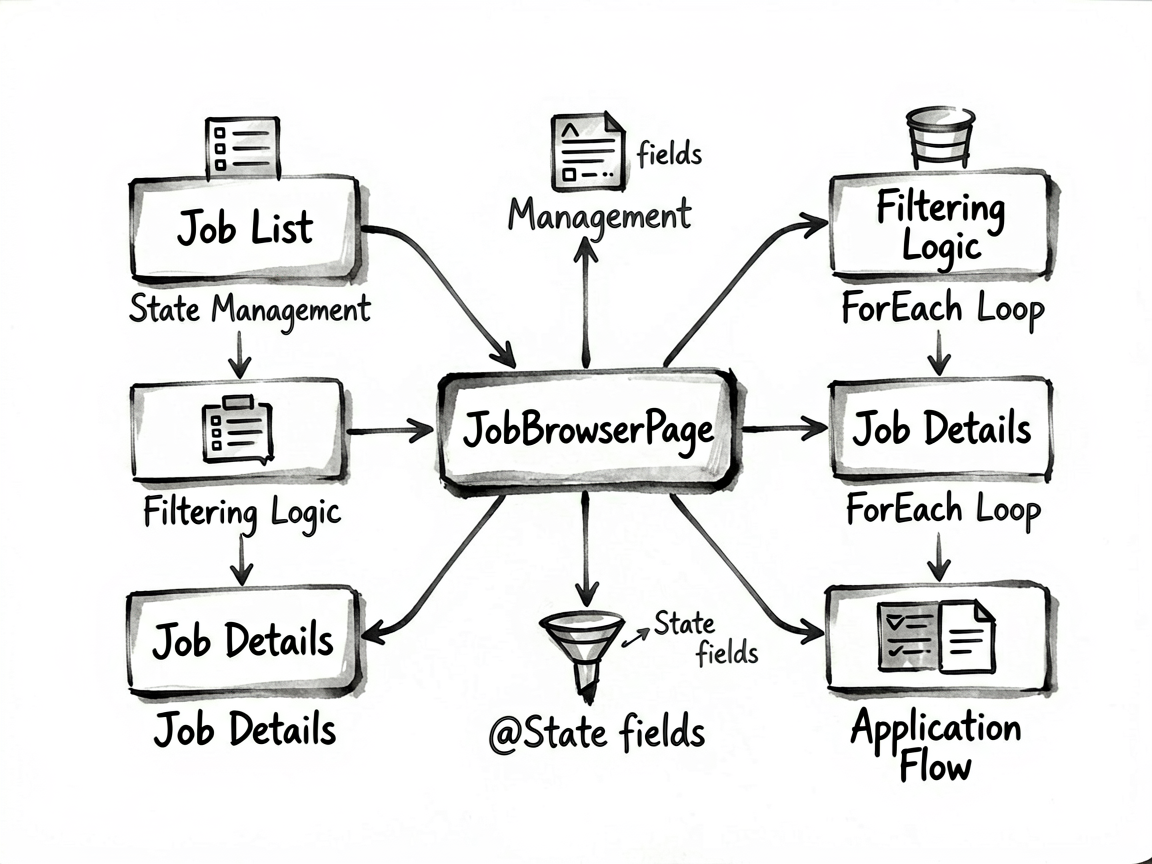
如果你想练 HarmonyOS7 页面开发,我反而建议先从这种中等复杂度的页面下手,信息量够,但不至于把人劝退。
这个案例的主线是 招聘职位浏览,后面的 职位列表、筛选、职位详情、投递 则把页面做得更像真实业务页。读代码时,建议把交互、状态和列表这三条线一起看。
它解决了什么事
JobBrowserPage 对应的是 招聘职位浏览 - 职位列表、筛选、职位详情、投递 这个业务场景。别把它只当成一个 UI 练习页,它真正有价值的地方在于:同一个页面里同时出现了状态切换、列表渲染、条件展示和用户反馈。
| 观察点 | 在这个案例里的表现 |
|---|---|
| 页面主题 | 招聘职位浏览 |
| 主要文案 | HarmonyOS开发工程师, 华为技术有限公司, 深圳·南山, 3-5年, 本科及以上, 鸿蒙原生 |
| 常用组件 | Button, Column, ForEach, Row, Scroll, Text, TextInput |
| 适合练习 | 状态驱动 UI、局部刷新、事件回调、页面结构拆分 |
使用方法
把完整代码放进 ArkTS 页面文件后,就可以直接在预览器里运行。实际使用时,建议先手动点一遍页面里的主要交互,看状态有没有跟着变化;然后再去对照代码,理解每个 @State 字段到底控制了哪一块区域。
如果你想把这个案例改成自己的版本,我建议先做三件事:换掉模拟数据、调整筛选规则、再把重复结构抽成 Builder 或子组件。顺序别反,先改结构往往最容易把自己绕进去。
交互入口怎么拆
ArkUI 页面写顺手之后,你会发现很多问题其实都不是样式问题,而是状态没放对位置。这个案例里能直接看到哪些数据是输入、哪些是选择、哪些是列表源,读起来会比较顺。
| 状态字段 | 类型 | 说明 |
|---|---|---|
jobs |
JobItem[] |
记录当前展示状态或页面选择 |
selectedJobId |
number |
当前选中项,决定内容切换、高亮或过滤结果 |
searchText |
string |
用户输入值,会直接参与计算、筛选或提交 |
filterSalary |
string |
记录当前展示状态或页面选择 |
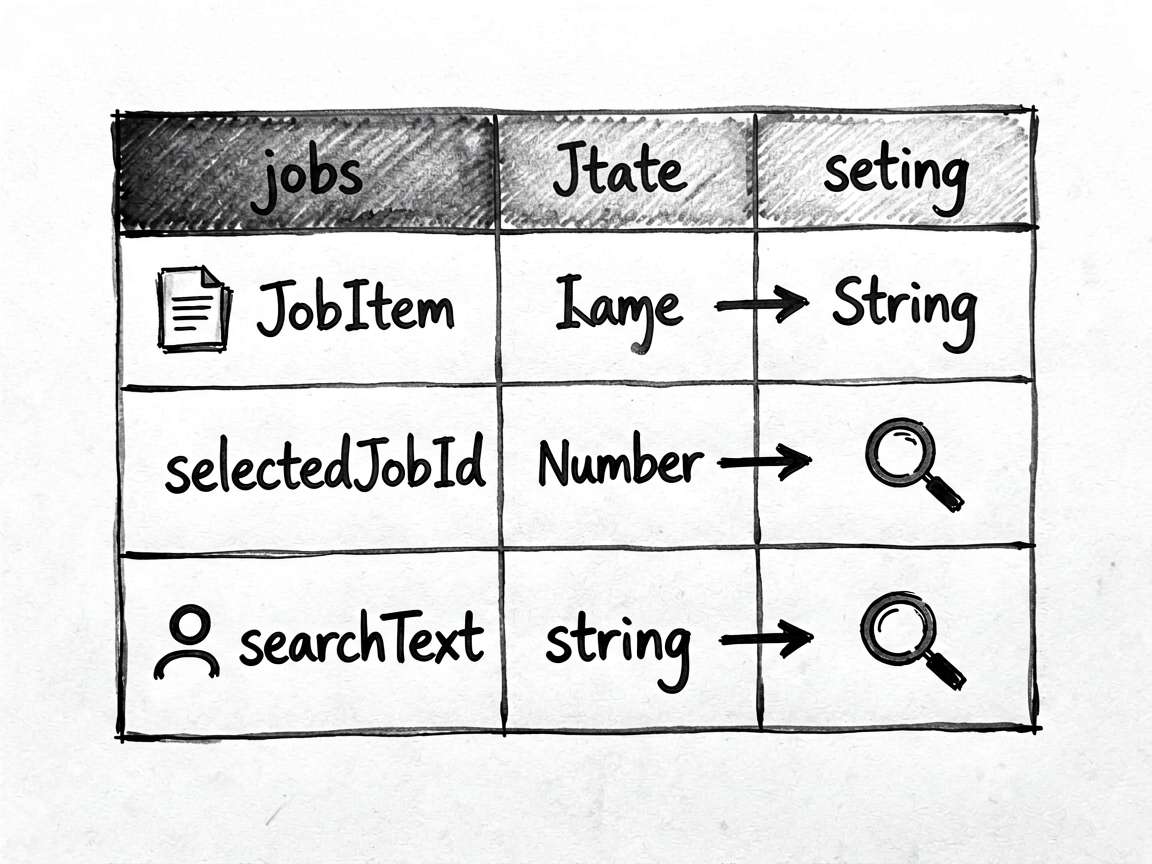
| filterExp | string | 记录当前展示状态或页面选择 |
我自己看这类示例时,会先把
@State和事件函数圈出来,再去看布局。这样不会被大段Column、Row搞乱节奏。
关键代码说明
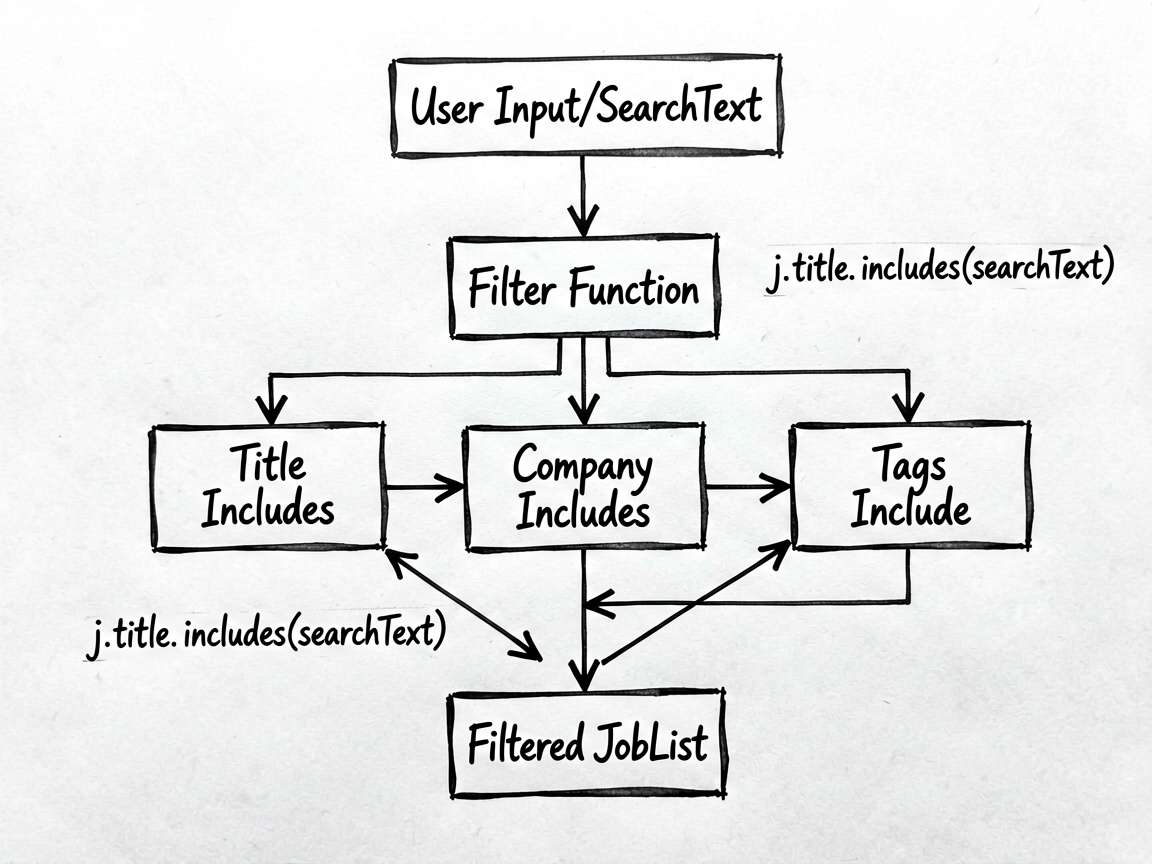
片段 1: getFiltered
这段代码我建议单独看。它通常负责派生数据、交互动作或者局部渲染逻辑,把这部分抽出去之后,页面主结构会干净很多,后续要改规则也更省事。
  getFiltered(): JobItem[] {
    return this.jobs.filter((j: JobItem) => {
      return j.title.includes(this.searchText) || j.company.includes(this.searchText) || j.tags.some((t: string) => t.includes(this.searchText))
    })
  }
片段 2: getSelectedJob
这段代码我建议单独看。它通常负责派生数据、交互动作或者局部渲染逻辑,把这部分抽出去之后,页面主结构会干净很多,后续要改规则也更省事。
  getSelectedJob(): JobItem | undefined {
    return this.jobs.find((j: JobItem) => j.id === this.selectedJobId)
  }
必读小结
适合拿来练手的能力:页面拆分、状态联动、条件渲染、交互反馈。
推荐阅读顺序:先看前言 -> 再跑页面 -> 再看状态表 -> 最后啃完整代码
如果只想快速上手,优先改模拟数据和交互函数,收益最高
- 点击或输入之后,界面有没有立即更新
- 列表渲染是否依赖了稳定的数据结构
- 筛选、统计、派生数据是不是单独放进函数里
- 是否还有重复布局可以继续抽出去
- 文案、颜色、间距是不是同一套风格
完整代码
// JobBrowserPage - 招聘职位浏览:职位列表、筛选、职位详情、投递

interface JobItem {
  id: number
  title: string
  company: string
  location: string
  salary: string
  experience: string
  education: string
  tags: string[]
  description: string
  requirements: string[]
  benefits: string[]
  companyLogo: string
  companySize: string
  industry: string
  postTime: string
  isApplied: boolean
  isFavorite: boolean
}

@Entry
@Component
struct JobBrowserPage {
  @State jobs: JobItem[] = [
    {
      id: 1, title: 'HarmonyOS开发工程师', company: '华为技术有限公司', location: '深圳·南山',
      salary: '25-45K', experience: '3-5年', education: '本科及以上',
      tags: ['ArkTS', 'ArkUI', '鸿蒙原生'],
      description: '负责华为鸿蒙系统应用层开发,参与核心业务功能的设计与实现。',
      requirements: ['熟悉HarmonyOS应用开发', '3年以上移动端开发经验', '良好的编码习惯'],
      benefits: ['六险二金', '弹性工作', '年终奖丰厚', '班车接送'],
      companyLogo: '🔷', companySize: '100000+人', industry: '互联网/通信',
      postTime: '2天前', isApplied: false, isFavorite: true
    },
    {
      id: 2, title: 'Android/iOS高级开发', company: '字节跳动', location: '北京·朝阳',
      salary: '30-60K', experience: '5年以上', education: '本科及以上',
      tags: ['Android', 'Kotlin', '性能优化'],
      description: '负责抖音App的Android端核心功能开发,攻克性能瓶颈。',
      requirements: ['精通Android原生开发', '有抖音/短视频类产品经验优先', '深入理解JVM'],
      benefits: ['顶级薪酬', '股票期权', '弹性工时', '团建活动'],
      companyLogo: '🎵', companySize: '60000+人', industry: '互联网/科技',
      postTime: '1天前', isApplied: true, isFavorite: false
    },
    {
      id: 3, title: 'React Native 开发', company: '美团外卖', location: '北京·朝阳',
      salary: '20-35K', experience: '1-3年', education: '本科及以上',
      tags: ['React Native', 'TypeScript', 'Redux'],
      description: '参与美团APP的React Native跨平台模块开发。',
      requirements: ['熟悉React Native开发', '了解原生iOS/Android', '有大型项目经验'],
      benefits: ['免费三餐', '健身补贴', '带薪年假', '定期体检'],
      companyLogo: '🦅', companySize: '20000+人', industry: '本地生活',
      postTime: '3天前', isApplied: false, isFavorite: false
    },
    {
      id: 4, title: '前端开发工程师', company: '腾讯云计算', location: '深圳·南山',
      salary: '18-30K', experience: '1-3年', education: '本科及以上',
      tags: ['Vue3', 'TypeScript', 'Node.js'],
      description: '负责腾讯云管理控制台的前端开发,构建大规模企业级应用。',
      requirements: ['熟练掌握Vue3/React', '有云产品或B端开发经验', '良好的性能意识'],
      benefits: ['大小周', '餐补交补', '购房优惠', '子女入学'],
      companyLogo: '🐧', companySize: '80000+人', industry: '互联网/云计算',
      postTime: '5天前', isApplied: false, isFavorite: true
    }
  ]
  @State selectedJobId: number = -1
  @State searchText: string = ''
  @State filterSalary: string = '不限'
  @State filterExp: string = '不限'

  getFiltered(): JobItem[] {
    return this.jobs.filter((j: JobItem) => {
      return j.title.includes(this.searchText) || j.company.includes(this.searchText) || j.tags.some((t: string) => t.includes(this.searchText))
    })
  }

  getSelectedJob(): JobItem | undefined {
    return this.jobs.find((j: JobItem) => j.id === this.selectedJobId)
  }

  toggleFavorite(id: number) {
    this.jobs = this.jobs.map((j) => { if (j.id === id) { j.isFavorite = !j.isFavorite } return j })
  }

  applyJob(id: number) {
    this.jobs = this.jobs.map((j) => { if (j.id === id) { j.isApplied = true } return j })
  }

  build() {
    Column() {
      if (this.selectedJobId === -1) {
        // 职位列表
        Column() {
          Row() {
            Text('招聘职位').fontSize(22).fontWeight(FontWeight.Bold).fontColor('#1A1A1A').layoutWeight(1)
            Text(`${this.getFiltered().length} 个职位`).fontSize(13).fontColor('#8C8C8C')
          }.padding({ left: 16, right: 16, top: 16, bottom: 10 })

          Row() {
            Text('🔍').fontSize(15).margin({ left: 12, right: 8 })
            TextInput({ placeholder: '搜索职位、公司、技能...', text: this.searchText })
              .layoutWeight(1).fontSize(13).backgroundColor('transparent')
              .onChange((val: string) => { this.searchText = val })
          }
          .backgroundColor(Color.White).borderRadius(10)
          .margin({ left: 16, right: 16, bottom: 10 })
          .padding({ top: 8, bottom: 8 })
          .shadow({ radius: 3, color: '#0D000000', offsetX: 0, offsetY: 1 })

          Scroll() {
            Column({ space: 10 }) {
              ForEach(this.getFiltered(), (job: JobItem) => {
                Column() {
                  Row() {
                    Text(job.companyLogo).fontSize(32).width(48)
                    Column() {
                      Row() {
                        Text(job.title).fontSize(15).fontWeight(FontWeight.Bold).fontColor('#1A1A1A').layoutWeight(1)
                        Text(job.isFavorite ? '⭐' : '☆').fontSize(20)
                          .onClick(() => this.toggleFavorite(job.id))
                      }
                      Text(job.company).fontSize(13).fontColor('#8C8C8C').margin({ top: 3 })
                      Row({ space: 10 }) {
                        Text(`📍${job.location}`).fontSize(12).fontColor('#595959')
                        Text(`💼${job.experience}`).fontSize(12).fontColor('#595959')
                        Text(`🎓${job.education}`).fontSize(12).fontColor('#595959')
                      }.margin({ top: 4 })
                    }.alignItems(HorizontalAlign.Start).layoutWeight(1)
                  }.margin({ bottom: 10 })

                  Row() {
                    Text(job.salary).fontSize(16).fontWeight(FontWeight.Bold).fontColor('#FF4D4F').layoutWeight(1)
                    Row({ space: 6 }) {
                      ForEach(job.tags.slice(0, 2), (tag: string) => {
                        Text(tag).fontSize(11).fontColor('#1890FF')
                          .padding({ left: 8, right: 8, top: 3, bottom: 3 })
                          .backgroundColor('#E6F7FF').borderRadius(10)
                      })
                    }
                  }

                  Row() {
                    Text(job.postTime).fontSize(11).fontColor('#BFBFBF')
                    Blank()
                    if (job.isApplied) {
                      Text('已投递').fontSize(12).fontColor('#52C41A')
                        .padding({ left: 10, right: 10, top: 5, bottom: 5 })
                        .border({ width: 1, color: '#B7EB8F' }).borderRadius(14)
                    } else {
                      Text('查看详情').fontSize(12).fontColor('#1890FF')
                        .padding({ left: 10, right: 10, top: 5, bottom: 5 })
                        .border({ width: 1, color: '#91D5FF' }).borderRadius(14)
                    }
                  }.margin({ top: 8 })
                }
                .width('100%').padding(14).backgroundColor(Color.White).borderRadius(12)
                .shadow({ radius: 4, color: '#0D000000', offsetX: 0, offsetY: 2 })
                .onClick(() => { this.selectedJobId = job.id })
              })
            }.padding({ left: 16, right: 16, bottom: 24 })
          }.layoutWeight(1)
        }.width('100%').height('100%')
      } else {
        // 职位详情
        if (this.getSelectedJob() !== undefined) {
          Column() {
            Row() {
              Text('← 返回').fontSize(15).fontColor('#1890FF').padding({ left: 16 })
                .onClick(() => { this.selectedJobId = -1 })
              Blank()
              Text(this.getSelectedJob()!.isFavorite ? '⭐ 已收藏' : '☆ 收藏').fontSize(14).fontColor(this.getSelectedJob()!.isFavorite ? '#FAAD14' : '#8C8C8C').padding({ right: 16 })
                .onClick(() => this.toggleFavorite(this.getSelectedJob()!.id))
            }.padding({ top: 12, bottom: 12 })

            Scroll() {
              Column({ space: 12 }) {
                // 职位概要
                Column() {
                  Row() {
                    Text(this.getSelectedJob()!.companyLogo).fontSize(44).width(56)
                    Column() {
                      Text(this.getSelectedJob()!.title).fontSize(18).fontWeight(FontWeight.Bold).fontColor('#1A1A1A')
                      Text(this.getSelectedJob()!.company).fontSize(14).fontColor('#595959').margin({ top: 4 })
                      Text(this.getSelectedJob()!.salary).fontSize(18).fontWeight(FontWeight.Bold).fontColor('#FF4D4F').margin({ top: 6 })
                    }.alignItems(HorizontalAlign.Start).layoutWeight(1)
                  }.margin({ bottom: 14 })

                  Row({ space: 8 }) {
                    ForEach([
                      `📍 ${this.getSelectedJob()!.location}`, `💼 ${this.getSelectedJob()!.experience}`, `🎓 ${this.getSelectedJob()!.education}`
                    ], (info: string) => {
                      Text(info).fontSize(12).fontColor('#595959')
                        .padding({ left: 10, right: 10, top: 5, bottom: 5 })
                        .backgroundColor('#F5F5F5').borderRadius(12)
                    })
                  }

                  Row({ space: 6 }) {
                    ForEach(this.getSelectedJob()!.tags, (tag: string) => {
                      Text(tag).fontSize(11).fontColor('#1890FF')
                        .padding({ left: 8, right: 8, top: 3, bottom: 3 })
                        .backgroundColor('#E6F7FF').borderRadius(10)
                    })
                  }.margin({ top: 10 })
                }.width('100%').padding(16).backgroundColor(Color.White).borderRadius(12)

                // 职位描述
                Column() {
                  Text('职位描述').fontSize(15).fontWeight(FontWeight.Bold).fontColor('#1A1A1A').margin({ bottom: 10 })
                  Text(this.getSelectedJob()!.description).fontSize(13).fontColor('#595959').lineHeight(22)
                }.width('100%').padding(16).backgroundColor(Color.White).borderRadius(12).alignItems(HorizontalAlign.Start)

                // 任职要求
                Column() {
                  Text('任职要求').fontSize(15).fontWeight(FontWeight.Bold).fontColor('#1A1A1A').margin({ bottom: 10 })
                  ForEach(this.getSelectedJob()!.requirements, (req: string) => {
                    Row() {
                      Text('•').fontSize(16).fontColor('#1890FF').margin({ right: 8 })
                      Text(req).fontSize(13).fontColor('#595959').layoutWeight(1)
                    }.margin({ bottom: 6 })
                  })
                }.width('100%').padding(16).backgroundColor(Color.White).borderRadius(12).alignItems(HorizontalAlign.Start)

                // 福利待遇
                Column() {
                  Text('福利待遇').fontSize(15).fontWeight(FontWeight.Bold).fontColor('#1A1A1A').margin({ bottom: 10 })
                  Row({ space: 8 }) {
                    ForEach(this.getSelectedJob()!.benefits, (benefit: string) => {
                      Text(benefit).fontSize(12).fontColor('#52C41A')
                        .padding({ left: 10, right: 10, top: 5, bottom: 5 })
                        .backgroundColor('#F6FFED')
                        .border({ width: 1, color: '#B7EB8F' }).borderRadius(14)
                    })
                  }
                }.width('100%').padding(16).backgroundColor(Color.White).borderRadius(12).alignItems(HorizontalAlign.Start)
              }.padding({ left: 16, right: 16, bottom: 80 })
            }.layoutWeight(1)

            // 底部投递按钮
            Row() {
              Button(this.getSelectedJob()!.isApplied ? '已投递简历' : '立即投递', { type: ButtonType.Capsule })
                .width('90%').height(48)
                .backgroundColor(this.getSelectedJob()!.isApplied ? '#D9D9D9' : '#1890FF')
                .fontSize(16).fontColor(Color.White)
                .enabled(!this.getSelectedJob()!.isApplied)
                .onClick(() => this.applyJob(this.getSelectedJob()!.id))
            }.width('100%').justifyContent(FlexAlign.Center)
            .padding({ top: 10, bottom: 20 }).backgroundColor(Color.White)
            .shadow({ radius: 8, color: '#15000000', offsetX: 0, offsetY: -2 })
          }.width('100%').height('100%')
        }
      }
    }
    .width('100%').height('100%').backgroundColor('#F5F5F5')
  }
}
落地建议
这类案例最值得学的,其实不是某一个控件怎么写,而是页面组织方式。把状态放对、把交互函数收好、把布局压简单,后面你接正式项目时会轻松很多。

讨论HarmonyOS开发技术,专注于API与组件、DevEco Studio、测试、元服务和应用上架分发等。
更多推荐

 1
1 0
0- 0


 已为社区贡献39条内容

所有评论(0)