HarmonyOS ArkTS 实战:实现一个校园文印中心在线下单配送应用
·
HarmonyOS ArkTS 实战:实现一个校园文印中心在线下单配送应用
项目效果
本文使用 HarmonyOS 和 ArkTS 实现一个校园文印中心在线下单配送应用。
应用可以上传文件,选择打印参数,在线下单,配送到寝,并提供打印历史、价格计算、进度查询、取货提醒等完整功能。
项目使用 DevEco Studio 开发,适配 API 23 及以上版本。
运行效果
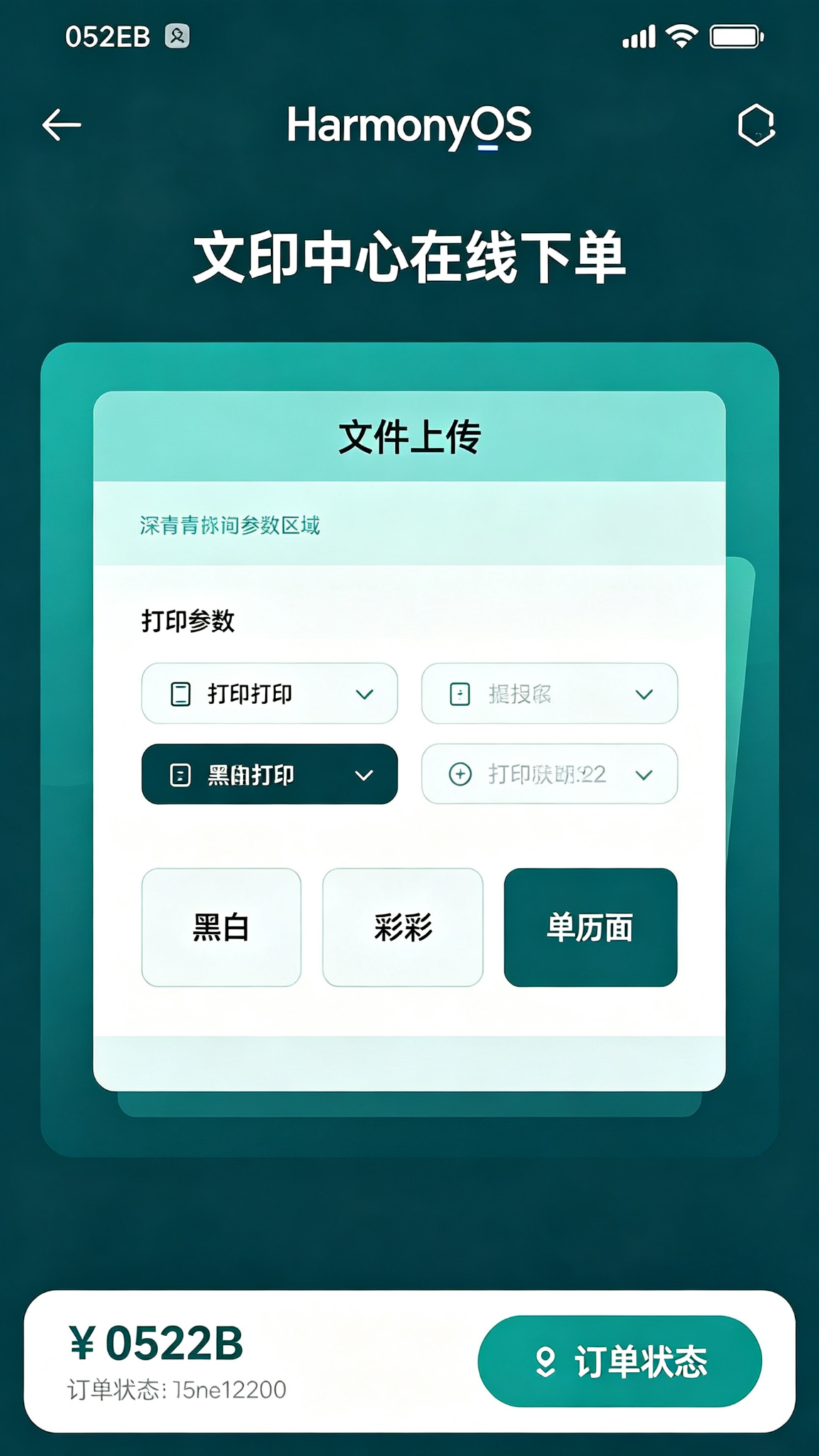
功能介绍
- 文件上传
- 打印参数设置
- 黑白/彩色选择
- 单双面选择
- 份数设置
- 装订方式
- 价格自动计算
- 在线下单
- 配送到寝
- 打印进度查询
- 历史订单
- 取货提醒
定义数据结构
interface PrintOrder {
  id: number;
  fileName: string;
  copies: number;
  colorMode: string; // 黑白/彩色
  duplex: string; // 单面/双面
  binding: string; // 无装订/订书钉/胶装/骑马钉
  pages: number;
  price: number;
  address: string;
  delivery: boolean;
  status: string; // 待接单/打印中/已完成/配送中/已送达
  createTime: string;
  finishTime: string;
}

interface PriceConfig {
  blackWhite: number;
  color: number;
  duplexDiscount: number;
  bindingPrice: { [key: string]: number };
  deliveryFee: number;
}
初始化页面状态
@State private tabIndex: number = 0;
@State private fileName: string = '';
@State private copies: number = 1;
@State private colorMode: string = '黑白';
@State private duplex: string = '双面';
@State private binding: string = '无装订';
@State private pages: number = 10;
@State private needDelivery: boolean = true;
@State private address: string = '1号楼302';

@State private priceConfig: PriceConfig = {
  blackWhite: 0.1,
  color: 1.0,
  duplexDiscount: 0.85,
  bindingPrice: { '无装订': 0, '订书钉': 1, '胶装': 5, '骑马钉': 2 },
  deliveryFee: 2
};

@State private orders: PrintOrder[] = [
  { id: 1, fileName: '复习资料.pdf', copies: 2, colorMode: '黑白', duplex: '双面', binding: '订书钉', pages: 45, price: 9.65, address: '1号楼302', delivery: true, status: '已送达', createTime: '2026-07-21 10:30', finishTime: '2026-07-21 11:15' },
];

@State private nextId: number = 10;
计算价格
private calculatePrice(): number {
  let pagePrice = this.colorMode === '黑白' ? this.priceConfig.blackWhite : this.priceConfig.color;
  let pageCount = this.pages * this.copies;
  if (this.duplex === '双面') {
    pageCount = Math.ceil(pageCount / 2) * 2;
    pagePrice *= this.priceConfig.duplexDiscount;
  }
  let total = pageCount * pagePrice + this.priceConfig.bindingPrice[this.binding];
  if (this.needDelivery) total += this.priceConfig.deliveryFee;
  return Math.round(total * 100) / 100;
}
提交订单
private submitOrder(): void {
  if (!this.fileName) return;

  const order: PrintOrder = {
    id: this.nextId, fileName: this.fileName, copies: this.copies,
    colorMode: this.colorMode, duplex: this.duplex, binding: this.binding,
    pages: this.pages, price: this.calculatePrice(), address: this.address,
    delivery: this.needDelivery, status: '待接单',
    createTime: new Date().toLocaleString(), finishTime: ''
  };
  this.orders = [order, ...this.orders];
  this.fileName = '';
  this.copies = 1;
  this.nextId += 1;
}
取消订单
private cancelOrder(orderId: number): void {
  this.orders = this.orders.map(o => o.id === orderId ? { ...o, status: '已取消' } : o);
}
参数选择组件
@Builder
OptionGroup(title: string, options: string[], selected: string, onChange: (v: string) => void) {
  Column({ space: 8 }) {
    Text(title)
      .fontSize(14)
      .fontWeight(FontWeight.Medium)
      .fontColor('#052E2B')
      .width('100%')
    Flex({ wrap: FlexWrap.Wrap }) {
      ForEach(options, (opt: string) => {
        Text(opt)
          .fontSize(13)
          .fontColor(selected === opt ? Color.White : '#052E2B')
          .padding({ left: 16, right: 16, top: 8, bottom: 8 })
          .backgroundColor(selected === opt ? '#052E2B' : '#CCFBF1')
          .borderRadius(20)
          .margin({ right: 8, bottom: 8 })
          .onClick(() => onChange(opt))
      })
    }
  }
  .width('100%')
  .alignItems(HorizontalAlign.Start)
}
页面布局
build() {
  Column() {
    Text('文印中心')
      .fontSize(24)
      .fontWeight(FontWeight.Bold)
      .fontColor('#052E2B')
      .width('100%')
      .padding(20)

    // Tab
    Row({ space: 20 }) {
      Text('在线下单')
        .fontSize(16)
        .fontWeight(this.tabIndex === 0 ? FontWeight.Bold : FontWeight.Normal)
        .fontColor(this.tabIndex === 0 ? '#052E2B' : '#94A3B8')
        .onClick(() => this.tabIndex = 0)
      Text('我的订单')
        .fontSize(16)
        .fontWeight(this.tabIndex === 1 ? FontWeight.Bold : FontWeight.Normal)
        .fontColor(this.tabIndex === 1 ? '#052E2B' : '#94A3B8')
        .onClick(() => this.tabIndex = 1)
    }
    .width('100%')
    .padding({ left: 20, right: 20 })

    if (this.tabIndex === 0) {
      Scroll() {
        Column({ space: 16 }) {
          // 上传文件
          Button('📄 选择文件上传')
            .width('100%')
            .height(80)
            .fontSize(15)
            .backgroundColor('#CCFBF1')
            .fontColor('#052E2B')
            .onClick(() => this.fileName = '复习资料_' + Date.now() + '.pdf')

          if (this.fileName) {
            Text(`已选择:${this.fileName}`)
              .fontSize(12)
              .fontColor('#0F766E')
          }

          // 份数
          Row() {
            Text('打印份数')
              .fontSize(14)
              .fontWeight(FontWeight.Medium)
            Blank()
            Button('-')
              .width(32)
              .height(32)
              .backgroundColor('#CCFBF1')
              .fontColor('#052E2B')
              .onClick(() => this.copies = Math.max(1, this.copies - 1))
            Text(`${this.copies}`)
              .fontSize(16)
              .width(40)
              .textAlign(TextAlign.Center)
            Button('+')
              .width(32)
              .height(32)
              .backgroundColor('#052E2B')
              .onClick(() => this.copies += 1)
          }
          .width('100%')

          this.OptionGroup('颜色模式', ['黑白', '彩色'], this.colorMode, (v: string) => this.colorMode = v)
          this.OptionGroup('打印方式', ['单面', '双面'], this.duplex, (v: string) => this.duplex = v)
          this.OptionGroup('装订方式', ['无装订', '订书钉', '胶装', '骑马钉'], this.binding, (v: string) => this.binding = v)

          // 配送
          Row() {
            Text('配送到寝')
              .fontSize(14)
              .fontWeight(FontWeight.Medium)
            Blank()
            Toggle({ type: ToggleType.Switch, isOn: this.needDelivery })
              .onChange((v: boolean) => this.needDelivery = v)
          }
          .width('100%')

          if (this.needDelivery) {
            TextInput({ text: this.address, placeholder: '输入配送地址' })
              .width('100%')
              .height(40)
              .backgroundColor('#F0FDFA')
              .onChange((v: string) => this.address = v)
          }
        }
        .width('100%')
        .padding(20)
      }
      .layoutWeight(1)

      // 结算
      Row() {
        Column() {
          Text('预估价格')
            .fontSize(12)
            .fontColor('#94A3B8')
          Text(`¥${this.calculatePrice().toFixed(2)}`)
            .fontSize(22)
            .fontWeight(FontWeight.Bold)
            .fontColor('#052E2B')
        }
        .alignItems(HorizontalAlign.Start)
        Blank()
        Button('提交订单')
          .height(44)
          .padding({ left: 24, right: 24 })
          .backgroundColor('#052E2B')
          .enabled(!!this.fileName)
          .onClick(() => this.submitOrder())
      }
      .width('100%')
      .padding(20)
      .backgroundColor(Color.White)
    } else {
      List({ space: 12 }) {
        ForEach(this.orders, (o: PrintOrder) => {
          ListItem() {
            Column({ space: 8 }) {
              Row() {
                Text(o.fileName)
                  .fontSize(14)
                  .fontWeight(FontWeight.Medium)
                Blank()
                Text(o.status)
                  .fontSize(12)
                  .fontColor(o.status === '已送达' ? '#059669' : '#0F766E')
              }
              Text(`${o.colorMode} | ${o.duplex} | ${o.binding} | ${o.copies}份`)
                .fontSize(12)
                .fontColor('#0F766E')
              Row() {
                Text(`¥${o.price.toFixed(2)}`)
                  .fontSize(16)
                  .fontWeight(FontWeight.Bold)
                  .fontColor('#052E2B')
                Blank()
                if (o.status === '待接单') {
                  Button('取消')
                    .fontSize(12)
                    .height(30)
                    .backgroundColor('#DC2626')
                    .onClick(() => this.cancelOrder(o.id))
                }
              }
            }
            .width('100%')
            .padding(16)
            .backgroundColor('#F0FDFA')
            .borderRadius(12)
          }
        })
      }
      .width('100%')
      .padding(20)
      .layoutWeight(1)
    }
  }
  .width('100%')
  .height('100%')
  .backgroundColor(Color.White)
}
页面设计说明
主题色采用teal-950#052E2B,深青色体现文印的专业、高效。青色系选项按钮清晰,价格实时计算,下单流程简洁明了。
SDK配置
API 24,compatibleSdkVersion: “6.1.1(24)”
运行项目
将代码复制到 entry/src/main/ets/pages/Index.ets 即可运行。
项目总结
实现了文件上传、参数设置、价格计算、下单、订单跟踪等功能。掌握了Toggle开关、动态价格计算、@Builder复用组件、选项组封装等。后续可加入文件预览、多文件上传、优惠券、打印进度实时推送、配送员位置、评价打星等功能。

讨论HarmonyOS开发技术,专注于API与组件、DevEco Studio、测试、元服务和应用上架分发等。
更多推荐

 4
4 0
0- 0


 已为社区贡献8条内容

所有评论(0)