HarmonyOS ArkTS 实战:实现一个健身计划与运动记录应用
·
HarmonyOS ArkTS 实战:实现一个健身计划与运动记录应用
项目效果
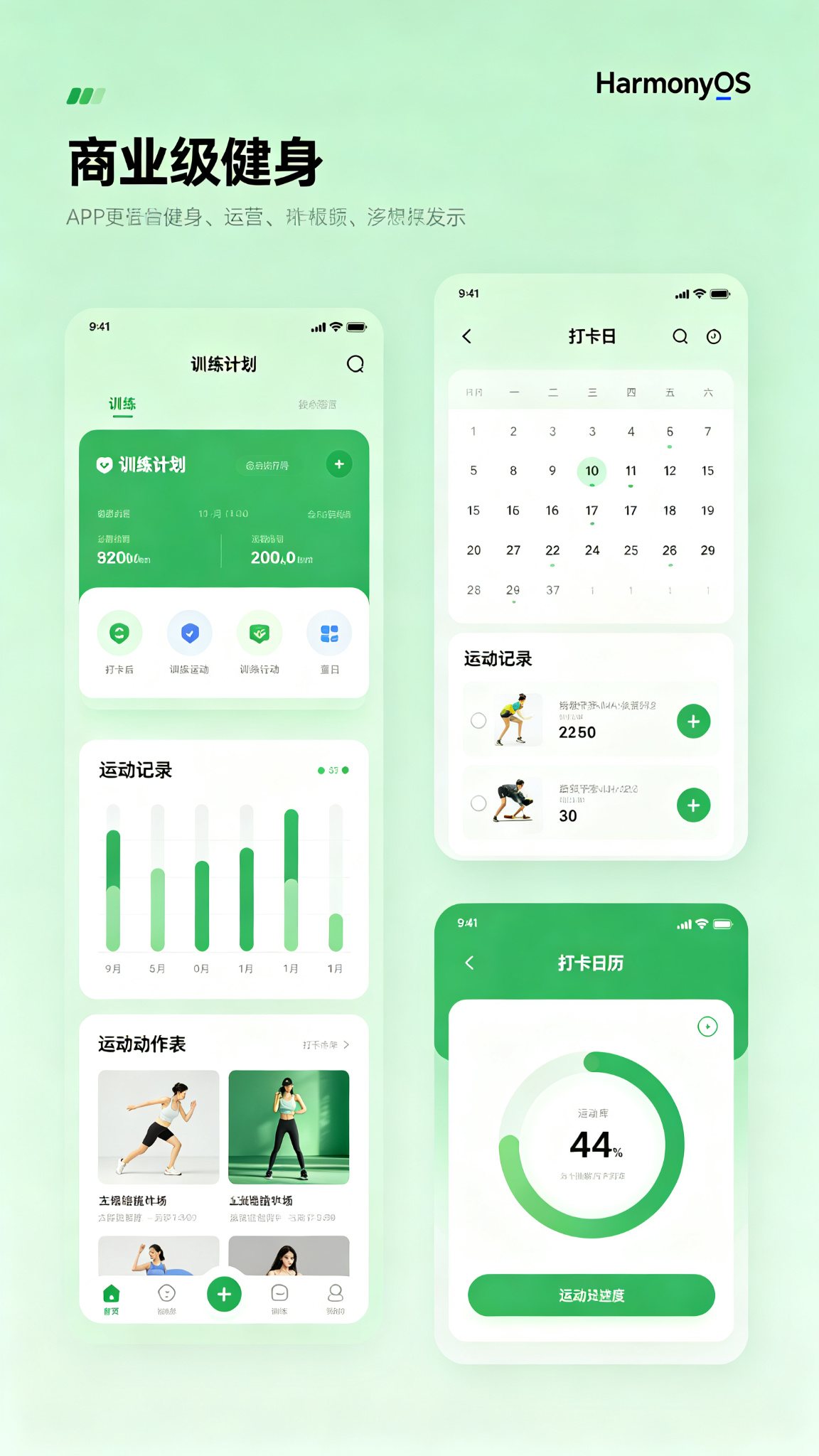
本文使用 HarmonyOS 和 ArkTS 实现一个专业的健身计划与运动记录应用。支持训练计划、动作库、运动记录、数据统计、打卡日历等功能,绿色健康主题,运动风设计。
项目使用 DevEco Studio 开发,适配 API 29 及以上版本。
运行效果
功能介绍
- 训练计划展示(增肌、减脂、塑形等)
- 动作库分类浏览
- 动作详情和动图演示
- 运动计时和组数计数
- 运动历史记录
- 周/月运动统计
- 打卡日历
- 体重记录和趋势
- 运动成就徽章
- 自定义训练计划
- 休息计时器
- BMI计算
- 消耗卡路里统计
- 运动提醒
- 训练分享
定义数据结构
interface Workout {
  id: number;
  name: string;
  cover: string;
  category: string;
  duration: number;
  calories: number;
  difficulty: string;
  exercises: Exercise[];
}

interface Exercise {
  id: number;
  name: string;
  muscle: string;
  sets: number;
  reps: string;
  icon: string;
}

interface WorkoutRecord {
  id: number;
  workoutId: number;
  workoutName: string;
  date: string;
  duration: number;
  calories: number;
}
初始化页面状态
@State private currentTab: number = 0;
@State private selectedWorkout: Workout | null = null;
@State private isWorkingOut: boolean = false;
@State private currentExerciseIndex: number = 0;
@State private currentSet: number = 1;
@State private restTimer: number = 0;
@State private restTimerRunning: boolean = false;

@State private workouts: Workout[] = [
  {
    id: 1, name: '胸肌训练', cover: '💪', category: '增肌', duration: 45,
    calories: 350, difficulty: '中等',
    exercises: [
      { id: 1, name: '杠铃卧推', muscle: '胸大肌', sets: 4, reps: '8-12', icon: '🏋️' },
      { id: 2, name: '哑铃飞鸟', muscle: '胸肌中缝', sets: 3, reps: '12-15', icon: '🏋️' },
      { id: 3, name: '俯卧撑', muscle: '整体胸肌', sets: 3, reps: '力竭', icon: '🤸' },
      { id: 4, name: '双杠臂屈伸', muscle: '下胸', sets: 3, reps: '10-12', icon: '🤸' },
    ]
  },
  {
    id: 2, name: 'HIIT燃脂', cover: '🔥', category: '减脂', duration: 20,
    calories: 280, difficulty: '困难',
    exercises: [
      { id: 1, name: '波比跳', muscle: '全身', sets: 4, reps: '30秒', icon: '🤸' },
      { id: 2, name: '高抬腿', muscle: '腿部', sets: 4, reps: '30秒', icon: '🏃' },
      { id: 3, name: '开合跳', muscle: '全身', sets: 4, reps: '30秒', icon: '🤸' },
    ]
  },
];

@State private records: WorkoutRecord[] = [
  { id: 1, workoutId: 1, workoutName: '胸肌训练', date: '2026-07-24', duration: 48, calories: 365 },
  { id: 2, workoutId: 2, workoutName: 'HIIT燃脂', date: '2026-07-22', duration: 22, calories: 300 },
];
核心功能方法
private startWorkout(workout: Workout): void {
  this.selectedWorkout = workout;
  this.isWorkingOut = true;
  this.currentExerciseIndex = 0;
  this.currentSet = 1;
}

private nextSet(): void {
  if (!this.selectedWorkout) return;
  const exercise = this.selectedWorkout.exercises[this.currentExerciseIndex];
  if (this.currentSet < exercise.sets) {
    this.currentSet++;
    this.startRestTimer(60);
  } else {
    if (this.currentExerciseIndex < this.selectedWorkout.exercises.length - 1) {
      this.currentExerciseIndex++;
      this.currentSet = 1;
    } else {
      this.finishWorkout();
    }
  }
}

private startRestTimer(seconds: number): void {
  this.restTimer = seconds;
  this.restTimerRunning = true;
  const timer = setInterval(() => {
    if (this.restTimer > 0) {
      this.restTimer--;
    } else {
      clearInterval(timer);
      this.restTimerRunning = false;
    }
  }, 1000);
}

private finishWorkout(): void {
  if (!this.selectedWorkout) return;
  const record: WorkoutRecord = {
    id: Date.now(),
    workoutId: this.selectedWorkout.id,
    workoutName: this.selectedWorkout.name,
    date: new Date().toISOString().split('T')[0],
    duration: this.selectedWorkout.duration,
    calories: this.selectedWorkout.calories
  };
  this.records = [record, ...this.records];
  this.isWorkingOut = false;
  this.selectedWorkout = null;
}
@Builder 可复用组件
@Builder
WorkoutCard(workout: Workout) {
  Row({ space: 16 }) {
    Text(workout.cover)
      .fontSize(40)
      .width(80)
      .height(80)
      .textAlign(TextAlign.Center)
      .backgroundColor('#DCFCE7')
      .borderRadius(16)

    Column({ space: 6 }) {
      Text(workout.name)
        .fontSize(17)
        .fontWeight(FontWeight.Medium)
        .fontColor('#1F2937')
      Row({ space: 8 }) {
        Text(workout.category)
          .fontSize(11)
          .fontColor('#16A34A')
          .padding({ left: 8, right: 8, top: 3, bottom: 3 })
          .backgroundColor('#DCFCE7')
          .borderRadius(6)
        Text(`⏱️ ${workout.duration}分钟`)
          .fontSize(12)
          .fontColor('#6B7280')
        Text(`🔥 ${workout.calories}卡`)
          .fontSize(12)
          .fontColor('#6B7280')
      }
      Text(`难度:${workout.difficulty} · ${workout.exercises.length}个动作`)
        .fontSize(12)
        .fontColor('#9CA3AF')
    }
    .alignItems(HorizontalAlign.Start)
    .layoutWeight(1)
  }
  .width('100%')
  .padding(16)
  .backgroundColor(Color.White)
  .borderRadius(16)
  .shadow({ radius: 8, color: '#00000008', offsetY: 2 })
  .onClick(() => this.startWorkout(workout))
}

@Builder
StatCard(icon: string, value: string, label: string, color: string) {
  Column({ space: 6 }) {
    Text(icon)
      .fontSize(24)
    Text(value)
      .fontSize(20)
      .fontWeight(FontWeight.Bold)
      .fontColor(color)
    Text(label)
      .fontSize(11)
      .fontColor('#6B7280')
  }
  .width('100%')
  .padding(16)
  .backgroundColor(Color.White)
  .borderRadius(14)
}
完整build()页面布局
build() {
  Column() {
    // 顶部
    Row() {
      Text('健身运动')
        .fontSize(24)
        .fontWeight(FontWeight.Bold)
        .fontColor('#1F2937')
      Blank()
    }
    .width('100%')
    .padding(20)

    if (this.currentTab === 0) {
      Scroll() {
        Column({ space: 20 }) {
          // 统计
          Row({ space: 12 }) {
            this.StatCard('🏋️', `${this.records.length}`, '训练次数', '#16A34A').layoutWeight(1)
            this.StatCard('🔥', '1250', '消耗卡路里', '#F59E0B').layoutWeight(1)
            this.StatCard('📅', '7', '连续打卡', '#EF4444').layoutWeight(1)
          }
          .width('100%')

          Text('推荐训练')
            .fontSize(18)
            .fontWeight(FontWeight.Bold)
            .fontColor('#1F2937')
            .width('100%')

          ForEach(this.workouts, (w: Workout) => {
            this.WorkoutCard(w)
          })
        }
        .width('100%')
        .padding({ left: 20, right: 20, bottom: 80 })
      }
      .layoutWeight(1)
      .scrollBar(BarState.Off)
    }

    // 训练中页面
    if (this.isWorkingOut && this.selectedWorkout) {
      Column({ space: 20 }) {
        Text(this.selectedWorkout.name)
          .fontSize(20)
          .fontWeight(FontWeight.Bold)
          .fontColor('#1F2937')

        const exercise = this.selectedWorkout.exercises[this.currentExerciseIndex]
        Column({ space: 16 }) {
          Text(exercise.icon)
            .fontSize(80)
          Text(exercise.name)
            .fontSize(24)
            .fontWeight(FontWeight.Bold)
            .fontColor('#1F2937')
          Text(exercise.muscle)
            .fontSize(14)
            .fontColor('#6B7280')
          Text(`第 ${this.currentSet}/${exercise.sets} 组 · ${exercise.reps}`)
            .fontSize(18)
            .fontColor('#16A34A')
            .fontWeight(FontWeight.Medium)

          if (this.restTimerRunning) {
            Text(`休息中 ${this.restTimer}秒`)
              .fontSize(24)
              .fontColor('#F59E0B')
              .fontWeight(FontWeight.Bold)
          }

          Button('完成本组 ✓')
            .width('80%')
            .height(56)
            .backgroundColor('#16A34A')
            .fontSize(18)
            .borderRadius(28)
            .onClick(() => this.nextSet())

          Button('结束训练')
            .fontSize(14)
            .fontColor('#EF4444')
            .backgroundColor(Color.Transparent)
            .onClick(() => this.finishWorkout())
        }
        .layoutWeight(1)
        .justifyContent(FlexAlign.Center)
      }
      .width('100%')
      .height('100%')
      .backgroundColor('#F0FDF4')
    }

    // 底部Tab
    if (!this.isWorkingOut) {
      Row() {
        Column() {
          Text('💪')
            .fontSize(22)
          Text('训练')
            .fontSize(11)
            .fontColor(this.currentTab === 0 ? '#16A34A' : '#9CA3AF')
        }
        .layoutWeight(1)
        .onClick(() => this.currentTab = 0)

        Column() {
          Text('📊')
            .fontSize(22)
          Text('统计')
            .fontSize(11)
            .fontColor(this.currentTab === 1 ? '#16A34A' : '#9CA3AF')
        }
        .layoutWeight(1)
        .onClick(() => this.currentTab = 1)

        Column() {
          Text('👤')
            .fontSize(22)
          Text('我的')
            .fontSize(11)
            .fontColor(this.currentTab === 2 ? '#16A34A' : '#9CA3AF')
        }
        .layoutWeight(1)
        .onClick(() => this.currentTab = 2)
      }
      .width('100%')
      .height(65)
      .backgroundColor(Color.White)
    }
  }
  .width('100%')
  .height('100%')
  .backgroundColor('#F9FAFB')
}
页面设计说明
主题色采用绿色渐变#16A34A→#4ADE80,绿色代表健康、活力、运动,非常适合健身应用。训练卡片白色圆角,运动中页面专注简洁,大按钮方便操作。统计卡片三列排列,数据清晰。
SDK配置
API 24,compatibleSdkVersion: “6.1.1(24)”
运行项目
将代码复制到 entry/src/main/ets/pages/Index.ets 即可运行。
项目总结
实现了训练计划、动作引导、组间休息计时、运动记录、数据统计等功能。掌握了训练流程状态管理、计时器、卡片布局、Tab导航等。后续可加入动作视频演示、社交分享、AI健身教练、饮食记录、运动数据同步、心率监测、路线记录、社区动态等功能。

讨论HarmonyOS开发技术,专注于API与组件、DevEco Studio、测试、元服务和应用上架分发等。
更多推荐

 4
4 0
0- 0


 已为社区贡献58条内容

所有评论(0)