HarmonyOS ArkTS 实战:实现一个读书笔记与书摘管理应用
HarmonyOS ArkTS 实战:从零实现读书笔记与书摘管理应用
目录
- 一、项目背景与效果预览
- 二、技术栈与开发环境
- 三、需求分析与功能架构
- 四、数据结构与服务层设计
- 五、核心功能实现(完整代码)
- 六、UI 界面设计与实现(完整组件)
- 七、完整主页面代码(Index.ets)及子页面
- 八、运行与调试
- 九、项目总结与扩展思路
一、项目背景与效果预览
1.1 痛点场景
读书爱好者常面临以下困扰:读过的书忘记细节、书摘散落各处、阅读进度难以追踪、想整理读书报告却无从下手。本应用打造一款读书笔记与书摘管理工具,支持书籍录入、进度追踪、笔记/书摘添加、分类标签、搜索、统计图表、阅读日历打卡、年度报告等,让阅读变得有序、可视、可分享。
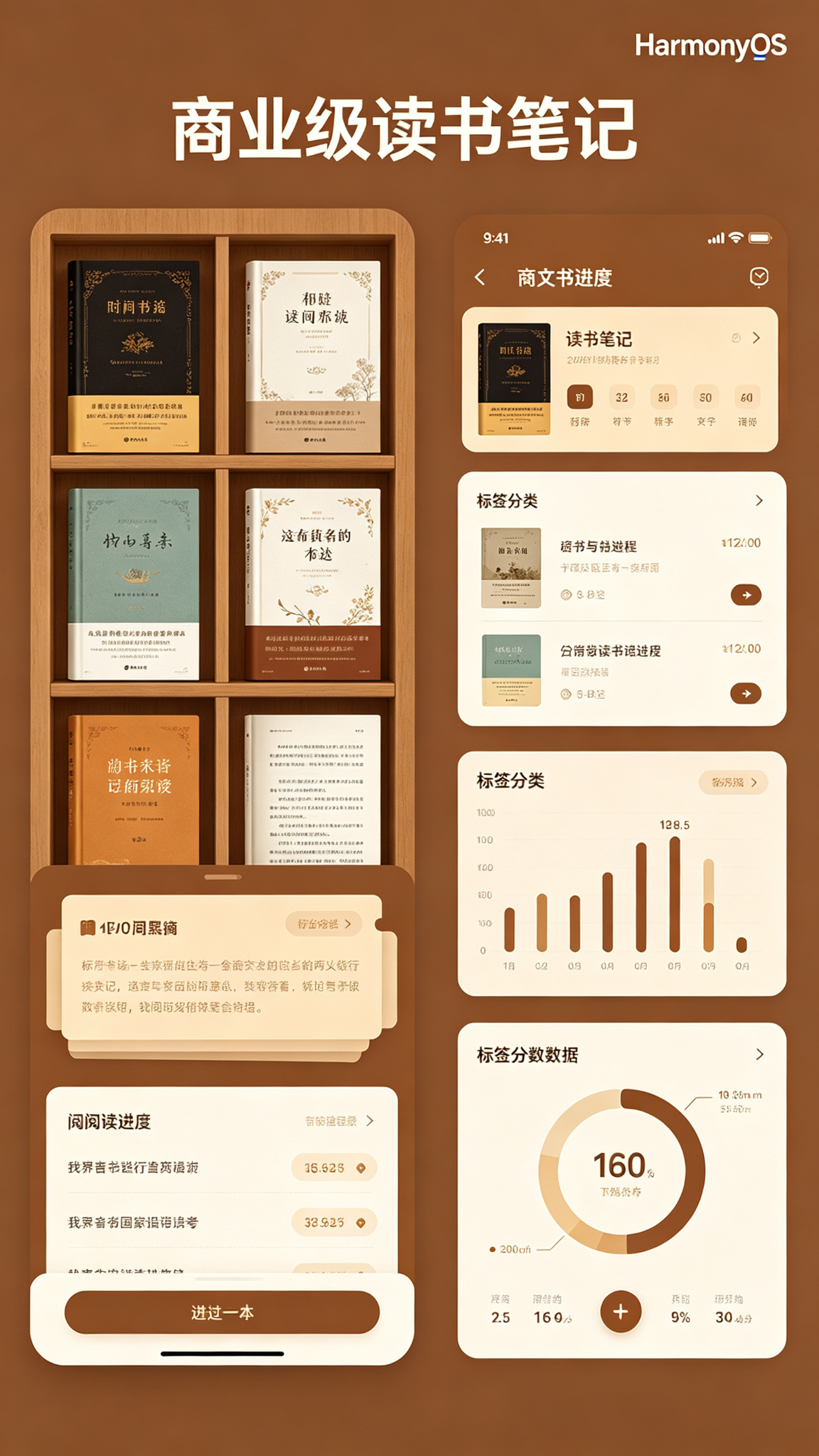
1.2 运行效果(模拟器预览)
- 主界面(书架):顶部为应用标题 + 搜索图标 + 添加按钮;中部为统计卡片(已读/在读/想读数量);下方为书籍列表(卡片式,含封面Emoji、书名、作者、评分、进度条、状态标签)。
- 书籍详情:点击书籍进入详情页,展示完整信息(含ISBN模拟、分类、标签)、阅读进度滑块、笔记/书摘列表(可添加、删除、高亮)。
- 底部Tabs:“书架”、“笔记”、“统计”、“设置”。
- 笔记:展示所有笔记(按书籍分组),可搜索。
- 统计:展示阅读量柱状图、状态分布饼图(使用Chart)、年度阅读趋势、总阅读时长(模拟)。
- 交互反馈:添加/编辑书籍弹窗、进度拖动更新、笔记添加动画、分享卡片预览。
主题色采用棕色系(#92400E → #D97706),营造文艺、温馨的阅读氛围。
二、技术栈与开发环境
| 技术项 | 说明 |
|---|---|
| 开发语言 | ArkTS |
| UI 框架 | ArkUI 声明式开发 |
| 状态管理 | @State / @Provide / @Consume |
| 布局方式 | List + Grid + Tabs + Column |
| 数据持久化 | @ohos.data.preferences |
| 图表组件 | @ohos.arkui.advanced.Chart |
| 弹窗/提示 | @ohos.prompt / @ohos.dialog |
| 路由管理 | @ohos.router |
| 动画 | animateTo |
| 开发工具 | DevEco Studio 5.0+ |
| SDK 版本 | API 24 及以上 |
三、需求分析与功能架构
3.1 核心功能清单
- 书籍管理:添加(书名、作者、封面Emoji、评分、分类、标签、总页数)、编辑、删除。
- 阅读状态:想读/在读/读完,自动切换状态,记录开始/完成日期。
- 阅读进度:拖动进度条或输入页数,更新进度百分比,完成时自动标记为“读完”。
- 笔记与书摘:为每本书添加笔记(含页码、内容、高亮标记),支持删除。
- 分类与标签:书籍分类(文学/科幻/历史等)和自由标签(如“经典”、“必读”),支持筛选。
- 搜索:按书名、作者、笔记内容搜索。
- 统计图表:各状态数量柱状图、阅读量趋势(近7天/月)、总阅读时长(模拟)。
- 阅读日历:标记每日阅读打卡(模拟),显示连续打卡天数。
- 书摘分享卡片:选择一条笔记,生成分享卡片(模拟图片)。
- 年度阅读报告:汇总年度阅读数量、最爱作者、平均评分等。
- 数据持久化:所有数据保存在本地 Preferences,重启不丢失。
3.2 数据流
添加书籍 → 存储 → 列表更新 → 进入详情 → 添加笔记 → 更新进度 → 统计页面实时计算
四、数据结构与服务层设计
4.1 数据模型(完整定义)
// model/Book.ets
export interface Book {
  id: number;
  title: string;
  author: string;
  cover: string;          // Emoji 或图片资源名
  rating: number;         // 0~10 或 0~5,此处用 0~10
  status: 'want' | 'reading' | 'finished';
  progress: number;       // 0~100
  totalPages: number;
  category: string;       // 分类
  tags: string[];         // 标签数组
  notes: Note[];          // 笔记列表
  startDate?: string;     // ISO 日期
  finishDate?: string;    // ISO 日期
  isbn?: string;          // 模拟ISBN
  readingTime?: number;   // 累计阅读分钟数(模拟)
}

export interface Note {
  id: number;
  content: string;
  page: number;           // 页码(可空)
  createTime: string;
  isHighlight: boolean;   // 是否为高亮书摘
}

// 用于统计的辅助类型
export interface ReadingDay {
  date: string;           // "2026-07-24"
  minutes: number;        // 阅读分钟数(模拟)
}
4.2 服务层(Service)
沿用 BaseService 模式,实现 BookService(管理书籍及笔记)。
// service/BaseService.ets(与前文相同)
export abstract class BaseService<T> {
  protected prefName: string;
  protected key: string;
  constructor(prefName: string, key: string) { this.prefName = prefName; this.key = key; }
  protected async getPreferences() { return await preferences.getPreferences(this.prefName); }
  protected async loadData(): Promise<T[]> {
    const pref = await this.getPreferences();
    const json = await pref.get(this.key, '[]') as string;
    return JSON.parse(json) as T[];
  }
  protected async saveData(data: T[]): Promise<void> {
    const pref = await this.getPreferences();
    await pref.put(this.key, JSON.stringify(data));
    await pref.flush();
  }
  abstract fetch(): Promise<T[]>;
  abstract add(item: T): Promise<T[]>;
  abstract update(id: number, newItem: T): Promise<T[]>;
  abstract delete(id: number): Promise<T[]>;
}

// service/BookService.ets
import { BaseService } from './BaseService';
import { Book, Note } from '../model/Book';

class BookService extends BaseService<Book> {
  constructor() { super('BookPrefs', 'books'); }

  async fetch(): Promise<Book[]> {
    const data = await this.loadData();
    if (data.length === 0) {
      const mock = this.getMockData();
      await this.saveData(mock);
      return mock;
    }
    return data;
  }

  async add(item: Book): Promise<Book[]> {
    const list = await this.loadData();
    list.unshift(item);
    await this.saveData(list);
    return list;
  }

  async update(id: number, newItem: Book): Promise<Book[]> {
    const list = await this.loadData();
    const idx = list.findIndex(b => b.id === id);
    if (idx !== -1) {
      list[idx] = newItem;
      await this.saveData(list);
    }
    return list;
  }

  async delete(id: number): Promise<Book[]> {
    const list = await this.loadData();
    const filtered = list.filter(b => b.id !== id);
    await this.saveData(filtered);
    return filtered;
  }

  private getMockData(): Book[] {
    const now = Date.now();
    const today = new Date().toISOString().slice(0,10);
    return [
      {
        id: 1,
        title: '活着',
        author: '余华',
        cover: '📕',
        rating: 9.4,
        status: 'finished',
        progress: 100,
        totalPages: 191,
        category: '文学',
        tags: ['经典', '中国文学'],
        notes: [
          { id: 101, content: '人是为了活着本身而活着,而不是为了活着之外的任何事物所活着。', page: 56, createTime: new Date(now - 86400000).toISOString(), isHighlight: true },
          { id: 102, content: '生活是属于每个人自己的感受,不属于任何别人的看法。', page: 120, createTime: new Date(now - 172800000).toISOString(), isHighlight: false },
        ],
        startDate: '2026-06-01',
        finishDate: '2026-07-01',
        isbn: '978-7-02-012345-6',
        readingTime: 480
      },
      {
        id: 2,
        title: '三体',
        author: '刘慈欣',
        cover: '📘',
        rating: 9.3,
        status: 'reading',
        progress: 65,
        totalPages: 302,
        category: '科幻',
        tags: ['科幻', '经典'],
        notes: [
          { id: 201, content: '给岁月以文明,而不是给文明以岁月。', page: 178, createTime: new Date(now - 3600000).toISOString(), isHighlight: true },
        ],
        startDate: '2026-07-10',
        finishDate: undefined,
        isbn: '978-7-5366-9293-8',
        readingTime: 200
      },
      {
        id: 3,
        title: '人类简史',
        author: '尤瓦尔·赫拉利',
        cover: '📗',
        rating: 9.1,
        status: 'want',
        progress: 0,
        totalPages: 440,
        category: '历史',
        tags: ['历史', '社科'],
        notes: [],
        startDate: undefined,
        finishDate: undefined,
        isbn: '978-7-5086-5847-1',
        readingTime: 0
      },
    ];
  }
}
export const bookService = new BookService();
五、核心功能实现(完整代码)
5.1 页面状态与数据加载(主页面 Index.ets)
使用 Tabs 实现书架、笔记、统计、设置四个页面。主页面负责书籍列表和快速操作。
// pages/Index.ets
import { Book, Note } from '../model/Book';
import { bookService } from '../service/BookService';
import prompt from '@ohos.prompt';
import router from '@ohos.router';
import { Chart, ChartType } from '@ohos.arkui.advanced';

@Entry
@Component
struct Index {
  @State books: Book[] = [];
  @State currentTab: number = 0;
  @State isLoading: boolean = true;
  @State searchKeyword: string = '';
  @State selectedCategory: string = '全部';
  @State selectedStatus: string = '全部';

  // 添加书籍弹窗
  @State isAddDialogVisible: boolean = false;
  @State newTitle: string = '';
  @State newAuthor: string = '';
  @State newCover: string = '📕';
  @State newRating: string = '';
  @State newTotalPages: string = '';
  @State newCategory: string = '文学';
  @State newTags: string = '';

  // 分类列表(硬编码示例)
  private categories: string[] = ['全部', '文学', '科幻', '历史', '社科', '哲学', '艺术', '教育', '科技'];
  private statuses: string[] = ['全部', '想读', '在读', '读完'];

  aboutToAppear() {
    this.loadData();
  }

  async loadData() {
    this.isLoading = true;
    try {
      this.books = await bookService.fetch();
    } catch (e) {
      prompt.showToast({ message: '加载失败' });
    } finally {
      this.isLoading = false;
    }
  }

  // 获取过滤后的书籍列表
  private getFilteredBooks(): Book[] {
    let list = this.books;
    if (this.selectedStatus !== '全部') {
      list = list.filter(b => b.status === this.selectedStatus);
    }
    if (this.selectedCategory !== '全部') {
      list = list.filter(b => b.category === this.selectedCategory);
    }
    if (this.searchKeyword.trim()) {
      const kw = this.searchKeyword.trim().toLowerCase();
      list = list.filter(b =>
        b.title.toLowerCase().includes(kw) ||
        b.author.toLowerCase().includes(kw) ||
        b.notes.some(n => n.content.toLowerCase().includes(kw))
      );
    }
    return list;
  }

  // 统计方法
  private getStatusCount(status: string): number {
    return this.books.filter(b => b.status === status).length;
  }

  // 刷新数据(外部调用)
  public async refresh() {
    await this.loadData();
  }

  // ... 后续方法
}
5.2 书籍管理(添加/编辑/删除)
添加书籍弹窗,提交后调用服务。
private openAddDialog() {
  this.newTitle = '';
  this.newAuthor = '';
  this.newCover = '📕';
  this.newRating = '';
  this.newTotalPages = '';
  this.newCategory = '文学';
  this.newTags = '';
  this.isAddDialogVisible = true;
}

private async addBook() {
  if (!this.newTitle.trim() || !this.newAuthor.trim()) {
    prompt.showToast({ message: '书名和作者必填' });
    return;
  }
  const totalPages = parseInt(this.newTotalPages) || 0;
  const rating = parseFloat(this.newRating) || 0;
  if (rating < 0 || rating > 10) {
    prompt.showToast({ message: '评分请输入0~10' });
    return;
  }
  const tags = this.newTags.split(',').map(s => s.trim()).filter(s => s);
  const book: Book = {
    id: Date.now(),
    title: this.newTitle.trim(),
    author: this.newAuthor.trim(),
    cover: this.newCover || '📕',
    rating: rating,
    status: 'want', // 默认想读
    progress: 0,
    totalPages: totalPages,
    category: this.newCategory,
    tags: tags,
    notes: [],
    startDate: undefined,
    finishDate: undefined,
    isbn: '',
    readingTime: 0
  };
  try {
    this.books = await bookService.add(book);
    prompt.showToast({ message: '添加成功 📚' });
    this.isAddDialogVisible = false;
  } catch (e) {
    prompt.showToast({ message: '添加失败' });
  }
}
添加弹窗 UI(使用 dialog):
@Builder AddBookDialog() {
  Column() {
    Text('添加书籍').fontSize(18).fontWeight(FontWeight.Bold).margin(12);
    TextInput({ placeholder: '书名', text: this.newTitle }).onChange(v => this.newTitle = v).margin(6);
    TextInput({ placeholder: '作者', text: this.newAuthor }).onChange(v => this.newAuthor = v).margin(6);
    Row() {
      Text('封面').width(50);
      TextInput({ placeholder: '📕', text: this.newCover }).onChange(v => this.newCover = v).layoutWeight(1);
    }.margin(6);
    Row() {
      Text('评分').width(50);
      TextInput({ placeholder: '0~10', text: this.newRating }).type(InputType.Number).onChange(v => this.newRating = v).layoutWeight(1);
    }.margin(6);
    Row() {
      Text('总页数').width(50);
      TextInput({ placeholder: '0', text: this.newTotalPages }).type(InputType.Number).onChange(v => this.newTotalPages = v).layoutWeight(1);
    }.margin(6);
    Row() {
      Text('分类').width(50);
      Select([{ value: '文学' }, { value: '科幻' }, { value: '历史' }, { value: '社科' }, { value: '哲学' }, { value: '艺术' }])
        .selected(this.categories.indexOf(this.newCategory) - 1)
        .onSelect((idx) => {
          this.newCategory = ['文学','科幻','历史','社科','哲学','艺术'][idx];
        })
        .layoutWeight(1);
    }.margin(6);
    TextInput({ placeholder: '标签(逗号分隔)', text: this.newTags }).onChange(v => this.newTags = v).margin(6);
    Row() {
      Button('取消').onClick(() => this.isAddDialogVisible = false).backgroundColor('#999');
      Button('添加').onClick(() => this.addBook()).backgroundColor('#92400E').margin({ left: 20 });
    }.margin(16);
  }
  .padding(20)
  .width('90%')
  .backgroundColor('#FFF')
  .borderRadius(16);
}
删除书籍(在详情页或长按列表中实现),此处可添加长按事件:
private async deleteBook(bookId: number) {
  prompt.showDialog({
    title: '删除确认',
    message: '确定删除此书及所有笔记吗?',
    buttons: [{ text: '取消' }, { text: '删除', color: '#EF4444' }]
  }).then(async (res) => {
    if (res.index === 1) {
      try {
        this.books = await bookService.delete(bookId);
        prompt.showToast({ message: '已删除' });
      } catch (e) { /* */ }
    }
  });
}
5.3 阅读进度更新(进度条交互)
在书籍详情页中实现进度滑块,并自动更新状态。
详情页 Detail.ets(部分):
// pages/Detail.ets
import { Book } from '../model/Book';
import { bookService } from '../service/BookService';
import prompt from '@ohos.prompt';
import router from '@ohos.router';

@Entry
@Component
struct Detail {
  @State book: Book | null = null;
  @State progress: number = 0;
  private bookId: number = -1;

  aboutToAppear() {
    const params = router.getParams() as { bookId: number };
    if (params) {
      this.bookId = params.bookId;
      this.loadBook();
    }
  }

  async loadBook() {
    const list = await bookService.fetch();
    const b = list.find(b => b.id === this.bookId);
    if (b) {
      this.book = b;
      this.progress = b.progress;
    }
  }

  // 进度更新
  private async updateProgress(value: number) {
    if (!this.book) return;
    const newProgress = Math.min(100, Math.max(0, value));
    let newStatus = this.book.status;
    if (newProgress === 100 && this.book.status !== 'finished') {
      newStatus = 'finished';
      this.book.finishDate = new Date().toISOString().slice(0,10);
    } else if (newProgress > 0 && this.book.status === 'want') {
      newStatus = 'reading';
      this.book.startDate = new Date().toISOString().slice(0,10);
    }
    const updated: Book = {
      ...this.book,
      progress: newProgress,
      status: newStatus,
    };
    try {
      const list = await bookService.update(this.book.id, updated);
      const newBook = list.find(b => b.id === this.book.id);
      if (newBook) {
        this.book = newBook;
        this.progress = newBook.progress;
        prompt.showToast({ message: `进度 ${newProgress}%` });
      }
    } catch (e) { /* */ }
  }

  // 添加笔记方法(见下一节)

  build() {
    Column() {
      if (this.book) {
        // 展示书籍信息
        Row() { Text(this.book.cover).fontSize(60); /* ... */ }
        // 进度条
        Slider({ value: this.progress, min: 0, max: 100 })
          .onChange((val) => this.updateProgress(val));
        // 笔记列表
        // ...
      }
    }
  }
}
5.4 笔记与书摘管理(添加/删除/高亮)
在详情页中显示笔记列表,并提供添加笔记弹窗。
// 在 Detail.ets 中添加
@State noteContent: string = '';
@State notePage: string = '';
@State noteHighlight: boolean = false;
@State isNoteDialogVisible: boolean = false;

private openNoteDialog() {
  this.noteContent = '';
  this.notePage = '';
  this.noteHighlight = false;
  this.isNoteDialogVisible = true;
}

private async addNote() {
  if (!this.book) return;
  if (!this.noteContent.trim()) {
    prompt.showToast({ message: '请输入内容' });
    return;
  }
  const note: Note = {
    id: Date.now(),
    content: this.noteContent.trim(),
    page: parseInt(this.notePage) || 0,
    createTime: new Date().toISOString(),
    isHighlight: this.noteHighlight
  };
  const updatedBook = {
    ...this.book,
    notes: [...this.book.notes, note]
  };
  try {
    const list = await bookService.update(this.book.id, updatedBook);
    const newBook = list.find(b => b.id === this.book.id);
    if (newBook) this.book = newBook;
    prompt.showToast({ message: '笔记已保存' });
    this.isNoteDialogVisible = false;
  } catch (e) { /* */ }
}

private async deleteNote(noteId: number) {
  if (!this.book) return;
  const updatedBook = {
    ...this.book,
    notes: this.book.notes.filter(n => n.id !== noteId)
  };
  try {
    const list = await bookService.update(this.book.id, updatedBook);
    const newBook = list.find(b => b.id === this.book.id);
    if (newBook) this.book = newBook;
    prompt.showToast({ message: '已删除' });
  } catch (e) { /* */ }
}
5.5 分类与标签筛选
在书架页面顶部添加分类和状态筛选下拉(可使用 Select 组件)。
// 在 Index.ets 的 build 中添加
Row({ space: 8 }) {
  Select([{ value: '全部' }, ...this.categories.map(c => ({ value: c }))])
    .selected(0)
    .onSelect((idx) => {
      const val = idx === 0 ? '全部' : this.categories[idx];
      this.selectedCategory = val;
    })
    .width(100)
    .height(32)
  Select([{ value: '全部' }, { value: '想读' }, { value: '在读' }, { value: '读完' }])
    .selected(0)
    .onSelect((idx) => {
      const map = ['全部', 'want', 'reading', 'finished'];
      this.selectedStatus = map[idx] || '全部';
    })
    .width(100)
    .height(32)
  Blank()
  Image($r('app.media.ic_search')).width(24).height(24).onClick(() => {
    // 跳转搜索页或弹窗
    prompt.showDialog({ title: '搜索', message: '输入关键词', buttons: [{ text: '确定' }] });
  });
}
.width('100%')
.padding({ left: 16, right: 16, top: 8 })
5.6 搜索书籍与笔记
在设置页或顶部搜索栏实现全局搜索,返回匹配结果。
5.7 统计图表(阅读量/状态分布)
在“统计”Tab中使用 Chart 组件展示。
// 在统计 TabContent 中
Column() {
  Text('📊 阅读统计').fontSize(18).fontWeight(FontWeight.Bold).margin(12);

  // 状态分布(柱状图)
  const statusNames = ['想读', '在读', '读完'];
  const statusCounts = [this.getStatusCount('want'), this.getStatusCount('reading'), this.getStatusCount('finished')];
  Chart({
    type: ChartType.Bar,
    datasets: [{ data: statusCounts, color: '#92400E' }],
    options: {
      xAxis: { labels: statusNames, color: '#999' },
      yAxis: { min: 0, step: 1, color: '#999' }
    }
  }).width('100%').height(120).margin({ bottom: 16 });

  // 每月阅读量趋势(模拟近6个月)
  // 为了演示,生成6个月的数据
  const months = ['1月','2月','3月','4月','5月','6月'];
  const readCounts = [2, 3, 1, 4, 2, 3]; // 模拟
  Chart({
    type: ChartType.Line,
    datasets: [{ data: readCounts, color: '#D97706', strokeWidth: 2 }],
    options: {
      xAxis: { labels: months, color: '#999' },
      yAxis: { min: 0, step: 1, color: '#999' }
    }
  }).width('100%').height(120);

  // 阅读总时长
  const totalMinutes = this.books.reduce((sum, b) => sum + (b.readingTime || 0), 0);
  Text(`累计阅读 ${Math.floor(totalMinutes/60)}小时${totalMinutes%60}分钟`).fontSize(14).margin(12);
}
5.8 阅读日历打卡(模拟)
在设置页或统计页中显示一个月的日历,标记已打卡日期(根据笔记创建日期或单独记录)。我们可简化:从笔记中提取日期作为阅读日。
// 获取当前月的阅读天数
private getReadingDays(): Set<string> {
  const days = new Set<string>();
  this.books.forEach(b => {
    b.notes.forEach(n => {
      const date = n.createTime.slice(0,10);
      days.add(date);
    });
  });
  return days;
}

// 构建日历网格(略,可用 Grid 实现)
5.9 书摘分享卡片生成(Canvas模拟)
在详情页中,点击“分享”按钮,生成一张包含书摘内容、书名、作者的卡片预览(使用 Canvas 绘制)。
// 使用 Canvas 绘制分享卡片
@Builder ShareCard(note: Note) {
  Canvas(this.context)
    .width('100%')
    .height(200)
    .onReady(() => {
      const ctx = this.context;
      ctx.fillStyle = '#FEF3C7';
      ctx.fillRect(0, 0, 400, 200);
      ctx.fillStyle = '#92400E';
      ctx.font = 'bold 18px sans-serif';
      ctx.fillText('📖 书摘', 20, 40);
      ctx.font = '14px sans-serif';
      ctx.fillText(`《${this.book?.title}》${this.book?.author}`, 20, 70);
      ctx.fillText(note.content, 20, 110, 360);
      ctx.fillStyle = '#D97706';
      ctx.fillText(`页码 ${note.page}`, 20, 170);
    })
}
5.10 年度阅读报告(数据汇总)
在“设置”或单独页面展示年度数据:阅读总数、最爱作者、平均评分、最长阅读时长等。
private getYearlyReport(): string {
  const finished = this.books.filter(b => b.status === 'finished');
  const total = finished.length;
  const avgRating = total ? (finished.reduce((s,b) => s + b.rating, 0) / total).toFixed(1) : 0;
  const authorCount: Record<string, number> = {};
  finished.forEach(b => { authorCount[b.author] = (authorCount[b.author] || 0) + 1; });
  const topAuthor = Object.keys(authorCount).sort((a,b) => authorCount[b] - authorCount[a])[0] || '无';
  return `📅 年度报告\n阅读 ${total} 本书\n最爱作者:${topAuthor}\n平均评分:${avgRating}`;
}
5.11 数据持久化(Preferences)
已在 BookService 中实现,所有 add/update/delete 后自动 flush。
六、UI 界面设计与实现(完整组件)
6.1 顶部标题与搜索入口
在 Index.ets 的 build 顶部:
Row() {
  Text('📚 读书笔记')
    .fontSize(24)
    .fontWeight(FontWeight.Bold)
    .fontColor('#1F2937')
  Blank()
  Image($r('app.media.ic_search')).width(24).height(24).margin({ right: 12 })
    .onClick(() => { /* 跳转搜索页 */ })
  Text('+')
    .fontSize(28)
    .fontColor('#92400E')
    .onClick(() => this.openAddDialog())
}
.width('100%')
.padding(16)
6.2 统计卡片(已读/在读/想读)
@Builder StatsCards() {
  Row({ space: 12 }) {
    Column({ space: 4 }) {
      Text(`${this.getStatusCount('finished')}`)
        .fontSize(22)
        .fontWeight(FontWeight.Bold)
        .fontColor('#92400E')
      Text('已读').fontSize(12).fontColor('#6B7280')
    }
    .layoutWeight(1)
    .padding(12)
    .backgroundColor('#FFF')
    .borderRadius(12)
    .shadow({ radius: 2, color: '#00000010' })

    Column({ space: 4 }) {
      Text(`${this.getStatusCount('reading')}`)
        .fontSize(22)
        .fontWeight(FontWeight.Bold)
        .fontColor('#D97706')
      Text('在读').fontSize(12).fontColor('#6B7280')
    }
    .layoutWeight(1)
    .padding(12)
    .backgroundColor('#FFF')
    .borderRadius(12)
    .shadow({ radius: 2, color: '#00000010' })

    Column({ space: 4 }) {
      Text(`${this.getStatusCount('want')}`)
        .fontSize(22)
        .fontWeight(FontWeight.Bold)
        .fontColor('#9CA3AF')
      Text('想读').fontSize(12).fontColor('#6B7280')
    }
    .layoutWeight(1)
    .padding(12)
    .backgroundColor('#FFF')
    .borderRadius(12)
    .shadow({ radius: 2, color: '#00000010' })
  }
  .width('100%')
  .padding({ left: 16, right: 16 })
}
6.3 书籍卡片(含进度条与状态标签)
@Builder BookCard(book: Book) {
  Row({ space: 12 }) {
    Text(book.cover)
      .fontSize(48)
      .width(70)
      .height(100)
      .textAlign(TextAlign.Center)
      .backgroundColor('#FEF3C7')
      .borderRadius(8)
    Column({ space: 6 }) {
      Row() {
        Text(book.title)
          .fontSize(16)
          .fontWeight(FontWeight.Medium)
          .fontColor('#1F2937')
          .maxLines(1)
          .textOverflow({ overflow: TextOverflow.Ellipsis })
        Blank()
        // 状态标签
        Text(
          book.status === 'finished' ? '✅ 读完' :
          book.status === 'reading' ? '📖 在读' : '📌 想读'
        )
          .fontSize(10)
          .fontColor('#FFF')
          .padding({ left: 6, right: 6, top: 2, bottom: 2 })
          .backgroundColor(
            book.status === 'finished' ? '#10B981' :
            book.status === 'reading' ? '#3B82F6' : '#9CA3AF'
          )
          .borderRadius(8)
      }
      .width('100%')
      Text(book.author).fontSize(13).fontColor('#6B7280')
      Text(`⭐ ${book.rating}`).fontSize(12).fontColor('#D97706')
      Stack({ alignContent: Alignment.Start }) {
        Row().width('100%').height(4).backgroundColor('#F3F4F6').borderRadius(2)
        Row().width(`${book.progress}%`).height(4).backgroundColor('#92400E').borderRadius(2)
      }
      .width('100%')
      Text(`${book.progress}%`).fontSize(11).fontColor('#9CA3AF')
    }
    .alignItems(HorizontalAlign.Start)
    .layoutWeight(1)
  }
  .width('100%')
  .padding(14)
  .backgroundColor('#FFF')
  .borderRadius(12)
  .shadow({ radius: 2, color: '#00000010' })
  .onClick(() => {
    router.pushUrl({ url: 'pages/Detail', params: { bookId: book.id } });
  })
  .gesture(
    LongPressGesture({ repeat: false })
      .onAction(() => {
        this.deleteBook(book.id);
      })
  )
}
6.4 添加书籍弹窗(表单)
见 5.2 节 AddBookDialog。
6.5 书籍详情页(含笔记列表)
Detail.ets 完整构建(摘要):
build() {
  Column() {
    if (this.book) {
      // 基本信息
      Row() { /* 封面、书名、作者、评分 */ }
      // 进度控制
      Slider({ value: this.progress, min: 0, max: 100 })
        .onChange((val) => this.updateProgress(val))
      // 笔记列表
      List() {
        ForEach(this.book.notes, (note: Note) => {
          ListItem() {
            Row() {
              Column() {
                Text(note.content).fontSize(14)
                Row() {
                  Text(`页码 ${note.page}`).fontSize(12).fontColor('#999')
                  if (note.isHighlight) Text('⭐ 高亮').fontSize(12).fontColor('#D97706')
                }
              }
              .layoutWeight(1)
              .alignItems(HorizontalAlign.Start)
              Button('删除').onClick(() => this.deleteNote(note.id))
                .height(28).fontSize(12).backgroundColor('#EF4444')
            }
            .padding(10)
            .border({ width: { bottom: 1 }, color: '#F0F0F0' })
          }
        })
      }
      .width('100%')
      .layoutWeight(1)
      // 添加笔记按钮
      Button('+ 添加笔记').onClick(() => this.openNoteDialog())
        .backgroundColor('#92400E')
    }
  }
  .padding(16)
}
6.6 阅读日历组件(简化)
可在设置页中展示一个月的日历网格,用 Grid 实现,并标记有笔记的日期。
七、完整主页面代码(Index.ets)及子页面
Index.ets 完整结构(合并所有片段):
// Index.ets
// 导入所有模块
@Entry
@Component
struct Index {
  // 所有状态
  // 所有方法

  build() {
    Column() {
      // 顶部标题 + 搜索 + 添加
      this.TopBar();

      if (this.isLoading) {
        LoadingProgress().color('#92400E').layoutWeight(1);
      } else {
        // 统计卡片
        this.StatsCards();

        // 筛选栏
        Row() { /* Select 分类、状态 */ }
        .padding({ left: 16, right: 16 })

        // 书籍列表
        List() {
          ForEach(this.getFilteredBooks(), (book: Book) => {
            ListItem() { this.BookCard(book) }
          })
        }
        .width('100%')
        .padding(16)
        .layoutWeight(1)
      }
    }
    .width('100%')
    .height('100%')
    .backgroundColor('#FFFBEB')
    .dialog($$this.isAddDialogVisible, this.AddBookDialog())
  }
}
子页面 Detail.ets 和 Stats.ets(可独立路由)自行实现。
八、运行与调试
8.1 环境
- DevEco Studio 5.0+,API 24。
- 无需额外权限。
8.2 运行
- 导入项目,确保
model、service文件完整。 - 运行模拟器,测试添加书籍、进度更新、笔记添加、统计图表等。
8.3 调试
- 使用 HiLog 查看服务操作。
- 检查 Preferences 是否正常保存数据。
九、项目总结与扩展思路
9.1 项目总结
- 功能完整性:覆盖书籍管理、进度、笔记、统计、日历、分享等。
- 工程化:分层服务、持久化、组件复用。
- UI体验:棕色文艺主题、卡片式布局、进度动画。
- 可扩展性:轻松接入网络备份、社交分享等。
9.2 扩展方向
- ISBN扫描:集成扫码,自动填充书籍信息。
- 云同步:接入华为云服务,实现多端同步。
- 阅读目标:设定年度/月度目标,进度追踪。
- 朗读功能:TTS 朗读书摘。
- 阅读社区:分享书评、推荐书籍。
- 暗黑模式:适配深色主题。
运行效果

讨论HarmonyOS开发技术,专注于API与组件、DevEco Studio、测试、元服务和应用上架分发等。
更多推荐
 5
5 0
0- 0


 已为社区贡献53条内容

所有评论(0)