HarmonyOS ArkTS 实战:实现一个纪念日与倒数日应用
HarmonyOS ArkTS 实战:从零实现纪念日与倒数日应用
目录
- 一、项目背景与效果预览
- 二、技术栈与开发环境
- 三、需求分析与功能架构
- 四、数据结构与服务层设计
- 五、核心功能实现(完整代码)
- 六、UI 界面设计与实现(完整组件)
- 七、完整主页面代码(Index.ets)及子页面
- 八、运行与调试
- 九、项目总结与扩展思路
一、项目背景与效果预览
1.1 痛点场景
生活中重要的日子——考研、生日、纪念日、考试、节假日——常常被遗忘。本应用帮助用户记录这些重要时刻,自动计算倒计时(未来) 和正计时(已过),并提供分类管理、置顶、重复提醒、分享卡片、历史上的今天等功能,让每一个重要日子都不被错过。
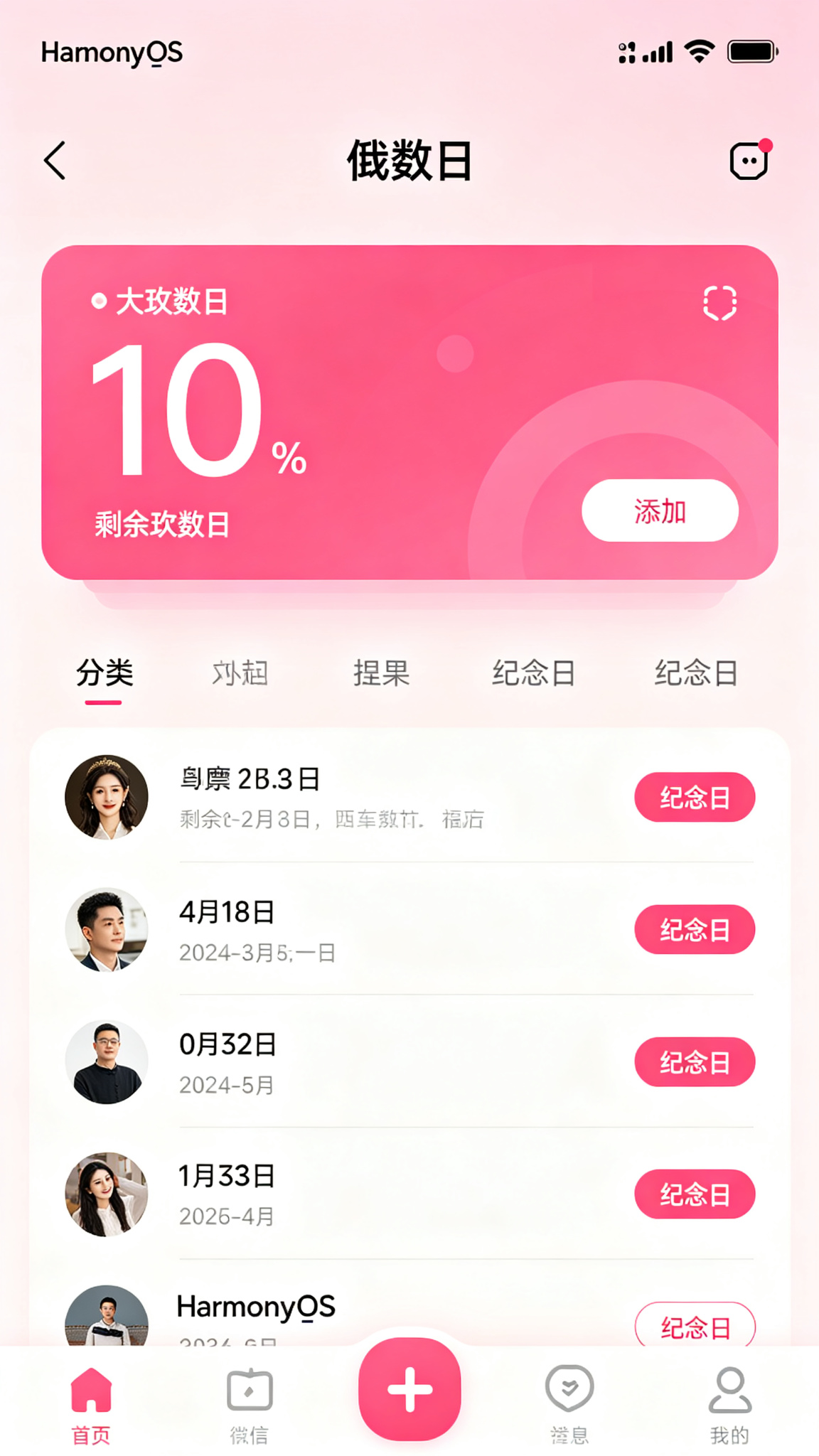
1.2 运行效果(模拟器预览)
- 主界面:顶部标题 + 添加按钮;统计卡片(即将到来/已过/总数);分类标签(全部/生日/节日/纪念日/考试);纪念日卡片列表(按置顶优先排序),每个卡片以渐变色背景展示图标、标题、大数字(天数)、日期、分类标签。
- 底部Tabs:“首页”、“分类”、“历史/统计”、“设置”。
- 添加弹窗:标题、日期(DatePicker)、类型(倒计时/正计时)、分类、图标(Emoji选择)、颜色(预设色盘)、重复(不重复/每年/每月/每周)、置顶开关、提醒开关。
- 交互反馈:长按卡片删除、点击卡片进入详情/编辑、倒计时数字动态更新(每日刷新)、分享卡片生成图片预览。
主题色采用玫红(#9D174D → #EC4899),浪漫温馨,适合纪念日氛围。
二、技术栈与开发环境
| 技术项 | 说明 |
|---|---|
| 开发语言 | ArkTS |
| UI 框架 | ArkUI 声明式开发 |
| 状态管理 | @State / @Provide |
| 布局方式 | Column + List + Tabs + Stack |
| 数据持久化 | @ohos.data.preferences |
| 弹窗/提示 | @ohos.prompt / @ohos.dialog |
| 路由管理 | @ohos.router |
| 日期计算 | 原生Date对象 |
| Canvas绘图 | 分享卡片生成 |
| 定时器 | setInterval(更新天数) |
| 开发工具 | DevEco Studio 5.0+ |
| SDK 版本 | API 24 及以上 |
三、需求分析与功能架构
3.1 核心功能清单
- 纪念日管理:添加(标题、日期、类型、分类、图标、颜色、重复、置顶、提醒),编辑,删除(长按)。
- 日期计算:自动计算距今天数(未来为正数倒计时,过去为正数正计时),实时显示。
- 分类筛选:预设分类(全部、生日、节日、纪念日、考试、其他),按分类查看。
- 置顶功能:重要日子置顶,排序优先。
- 重复设置:支持每年/每月/每周重复(如生日、周年)。
- 提醒通知:可设置提醒,到日期时弹出模拟通知。
- 分享卡片:生成包含标题、天数、日期、图标的美化卡片(Canvas绘制)。
- 历史上的今天:显示历史上的今天发生的事件(模拟数据)。
- 农历支持:可选农历日期(模拟转换)。
- 统计图表:各分类数量统计、时间线分布。
- 暗黑模式:全局主题切换。
- 数据持久化:本地存储。
3.2 数据流
添加纪念日 → 存储 → 计算天数 → 列表排序 → 定时刷新 → 提醒检查
四、数据结构与服务层设计
4.1 数据模型(完整定义)
// model/Anniversary.ets
export interface Anniversary {
  id: number;
  title: string;
  date: string;          // "YYYY-MM-DD"
  type: 'countdown' | 'countup';  // 倒计时/正计时
  category: string;      // 生日/节日/纪念日/考试/其他
  icon: string;          // Emoji
  color: string;         // 卡片背景色(十六进制)
  isTop: boolean;
  repeat: 'none' | 'yearly' | 'monthly' | 'weekly';
  isRemind: boolean;     // 是否提醒
  remindDays?: number;   // 提前几天提醒
  note?: string;
  createTime: number;
  updateTime: number;
}
4.2 服务层(Service)
// service/BaseService.ets(同前,略)
// service/AnniversaryService.ets
import { BaseService } from './BaseService';
import { Anniversary } from '../model/Anniversary';

class AnniversaryService extends BaseService<Anniversary> {
  constructor() { super('AnniversaryPrefs', 'anniversaries'); }

  async fetch(): Promise<Anniversary[]> {
    const data = await this.loadData();
    return data;
  }

  async add(item: Anniversary): Promise<Anniversary[]> {
    const list = await this.loadData();
    list.unshift(item);
    await this.saveData(list);
    return list;
  }

  async update(id: number, newItem: Anniversary): Promise<Anniversary[]> {
    const list = await this.loadData();
    const idx = list.findIndex(a => a.id === id);
    if (idx !== -1) {
      list[idx] = newItem;
      await this.saveData(list);
    }
    return list;
  }

  async delete(id: number): Promise<Anniversary[]> {
    const list = await this.loadData();
    const filtered = list.filter(a => a.id !== id);
    await this.saveData(filtered);
    return filtered;
  }

  // 获取即将到来的(倒计时)
  async getUpcoming(): Promise<Anniversary[]> {
    const list = await this.loadData();
    const today = new Date();
    today.setHours(0,0,0,0);
    return list.filter(a => {
      const d = new Date(a.date);
      d.setHours(0,0,0,0);
      return d >= today && a.type === 'countdown';
    }).sort((a,b) => new Date(a.date).getTime() - new Date(b.date).getTime());
  }

  // 获取已过的(正计时)
  async getPast(): Promise<Anniversary[]> {
    const list = await this.loadData();
    const today = new Date();
    today.setHours(0,0,0,0);
    return list.filter(a => {
      const d = new Date(a.date);
      d.setHours(0,0,0,0);
      return d < today && a.type === 'countup';
    });
  }
}
export const anniversaryService = new AnniversaryService();
五、核心功能实现(完整代码)
5.1 页面状态与数据加载(主页面 Index.ets)
使用 Tabs 实现首页、分类、统计、设置。首页显示所有纪念日卡片。
// pages/Index.ets
import { Anniversary } from '../model/Anniversary';
import { anniversaryService } from '../service/AnniversaryService';
import prompt from '@ohos.prompt';
import { Chart, ChartType } from '@ohos.arkui.advanced';

@Entry
@Component
struct Index {
  @State anniversaries: Anniversary[] = [];
  @State filteredList: Anniversary[] = [];
  @State currentCategory: string = '全部';
  @State currentTab: number = 0;
  @State isDarkMode: boolean = false;
  @State isLoading: boolean = true;

  // 添加/编辑弹窗
  @State isDialogVisible: boolean = false;
  @State editingId: number = -1;
  @State formTitle: string = '';
  @State formDate: string = '';
  @State formType: string = 'countdown';
  @State formCategory: string = '纪念日';
  @State formIcon: string = '❤️';
  @State formColor: string = '#EC4899';
  @State formIsTop: boolean = false;
  @State formRepeat: string = 'none';
  @State formIsRemind: boolean = false;
  @State formNote: string = '';

  // 预设颜色
  private colors: string[] = ['#EC4899', '#F472B6', '#F9A8D4', '#F59E0B', '#10B981', '#3B82F6', '#8B5CF6', '#EF4444', '#14B8A6', '#F97316'];
  // 预设图标
  private icons: string[] = ['❤️', '🎂', '🎓', '📚', '💍', '🎉', '🎊', '🌟', '🌸', '🌺', '🎄', '🎃', '🏆', '💐', '🌹', '🎁'];
  // 分类
  private categories: string[] = ['全部', '生日', '节日', '纪念日', '考试', '其他'];

  // 定时刷新天数
  private timer: number = -1;

  aboutToAppear() {
    this.loadData();
    this.startTimer();
  }

  aboutToDisappear() {
    if (this.timer !== -1) clearInterval(this.timer);
  }

  async loadData() {
    this.isLoading = true;
    try {
      this.anniversaries = await anniversaryService.fetch();
      this.applyFilter();
    } catch (e) {
      prompt.showToast({ message: '加载失败' });
    } finally {
      this.isLoading = false;
    }
  }

  // 每天刷新天数
  private startTimer() {
    this.timer = setInterval(() => {
      // 强制刷新列表(天数会重新计算)
      this.applyFilter();
    }, 60000); // 每分钟刷新一次(实际可改为每10分钟)
  }

  // 应用筛选和排序
  private applyFilter() {
    let list = this.anniversaries;
    if (this.currentCategory !== '全部') {
      list = list.filter(a => a.category === this.currentCategory);
    }
    // 排序:置顶优先,然后按日期(倒计时最近优先,正计时最远优先)
    list = list.sort((a, b) => {
      if (a.isTop && !b.isTop) return -1;
      if (!a.isTop && b.isTop) return 1;
      const daysA = this.getDays(a.date);
      const daysB = this.getDays(b.date);
      // 倒计时:天数小优先(即将到来),正计时:天数大优先(更久远)
      if (a.type === 'countdown' && b.type === 'countdown') return daysA - daysB;
      if (a.type === 'countup' && b.type === 'countup') return daysB - daysA;
      return a.type === 'countdown' ? -1 : 1;
    });
    this.filteredList = list;
  }

  // 计算天数(正数表示倒计时/正计时)
  private getDays(dateStr: string): number {
    const target = new Date(dateStr);
    target.setHours(0,0,0,0);
    const today = new Date();
    today.setHours(0,0,0,0);
    const diff = (target.getTime() - today.getTime()) / (1000 * 60 * 60 * 24);
    return Math.abs(Math.round(diff));
  }

  // 获取天数显示文本
  private getDaysText(item: Anniversary): string {
    const target = new Date(item.date);
    target.setHours(0,0,0,0);
    const today = new Date();
    today.setHours(0,0,0,0);
    const diff = (target.getTime() - today.getTime()) / (1000 * 60 * 60 * 24);
    const days = Math.round(diff);
    if (days > 0) return `还有 ${days} 天`;
    if (days < 0) return `已过 ${Math.abs(days)} 天`;
    return '就是今天!';
  }

  // 统计
  private getTotalCount(): number { return this.anniversaries.length; }
  private getUpcomingCount(): number {
    const today = new Date(); today.setHours(0,0,0,0);
    return this.anniversaries.filter(a => {
      const d = new Date(a.date); d.setHours(0,0,0,0);
      return d >= today && a.type === 'countdown';
    }).length;
  }
  private getPastCount(): number {
    const today = new Date(); today.setHours(0,0,0,0);
    return this.anniversaries.filter(a => {
      const d = new Date(a.date); d.setHours(0,0,0,0);
      return d < today && a.type === 'countup';
    }).length;
  }

  // ... 后续方法
}
5.2 纪念日/倒数日列表(卡片式)
每个卡片采用用户选择的颜色作为渐变背景,显示图标、标题、天数、日期和分类标签。
@Builder AnniversaryCard(item: Anniversary) {
  Stack({ alignContent: Alignment.BottomStart }) {
    Column()
      .width('100%')
      .height(140)
      .linearGradient({
        direction: GradientDirection.Bottom,
        colors: [[item.color, 0.0], [this.darkenColor(item.color, 0.7), 1.0]]
      })
      .borderRadius(16)

    Column({ space: 6 }) {
      Row() {
        Text(item.icon).fontSize(28)
        Text(item.title)
          .fontSize(20)
          .fontWeight(FontWeight.Medium)
          .fontColor(Color.White)
          .margin({ left: 8 })
        Blank()
        if (item.isTop) {
          Text('📌').fontSize(16)
        }
        // 重复标记
        if (item.repeat !== 'none') {
          Text(item.repeat === 'yearly' ? '🔄每年' : item.repeat === 'monthly' ? '🔄每月' : '🔄每周')
            .fontSize(11).fontColor('rgba(255,255,255,0.8)')
        }
      }
      .width('100%')

      Text(this.getDaysText(item))
        .fontSize(34)
        .fontWeight(FontWeight.Bold)
        .fontColor(Color.White)

      Text(`📅 ${item.date}  ·  ${item.category}`)
        .fontSize(13)
        .fontColor('rgba(255,255,255,0.85)')

      // 提醒标记
      if (item.isRemind) {
        Text('🔔 有提醒').fontSize(11).fontColor('rgba(255,255,255,0.7)')
      }
    }
    .padding(16)
    .alignItems(HorizontalAlign.Start)
  }
  .width('100%')
  .margin({ bottom: 12 })
  .onClick(() => this.openEditDialog(item.id))
  .gesture(
    LongPressGesture({ repeat: false })
      .onAction(() => {
        prompt.showDialog({
          title: '删除',
          message: `删除 "${item.title}" ?`,
          buttons: [{ text: '取消' }, { text: '删除', color: '#EF4444' }]
        }).then(async (res) => {
          if (res.index === 1) {
            this.anniversaries = await anniversaryService.delete(item.id);
            this.applyFilter();
          }
        });
      })
  )
}

// 颜色变暗辅助
private darkenColor(hex: string, factor: number): string {
  // 简单实现:将颜色变深,用于渐变
  let r = parseInt(hex.slice(1,3), 16);
  let g = parseInt(hex.slice(3,5), 16);
  let b = parseInt(hex.slice(5,7), 16);
  r = Math.floor(r * factor);
  g = Math.floor(g * factor);
  b = Math.floor(b * factor);
  return `#${r.toString(16).padStart(2,'0')}${g.toString(16).padStart(2,'0')}${b.toString(16).padStart(2,'0')}`;
}
5.3 日期计算(倒计时/正计时)
已在 getDaysText 中实现。
5.4 添加/编辑/删除纪念日(含表单)
弹窗包含完整表单,支持日期选择、图标/颜色选择等。
private openAddDialog() {
  this.editingId = -1;
  this.formTitle = '';
  const today = new Date();
  this.formDate = today.toISOString().slice(0,10);
  this.formType = 'countdown';
  this.formCategory = '纪念日';
  this.formIcon = '❤️';
  this.formColor = '#EC4899';
  this.formIsTop = false;
  this.formRepeat = 'none';
  this.formIsRemind = false;
  this.formNote = '';
  this.isDialogVisible = true;
}

private openEditDialog(id: number) {
  const item = this.anniversaries.find(a => a.id === id);
  if (!item) return;
  this.editingId = id;
  this.formTitle = item.title;
  this.formDate = item.date;
  this.formType = item.type;
  this.formCategory = item.category;
  this.formIcon = item.icon;
  this.formColor = item.color;
  this.formIsTop = item.isTop;
  this.formRepeat = item.repeat;
  this.formIsRemind = item.isRemind;
  this.formNote = item.note || '';
  this.isDialogVisible = true;
}

private async saveAnniversary() {
  if (!this.formTitle.trim() || !this.formDate) {
    prompt.showToast({ message: '请填写标题和日期' });
    return;
  }
  const entry: Anniversary = {
    id: this.editingId > 0 ? this.editingId : Date.now(),
    title: this.formTitle.trim(),
    date: this.formDate,
    type: this.formType as any,
    category: this.formCategory,
    icon: this.formIcon,
    color: this.formColor,
    isTop: this.formIsTop,
    repeat: this.formRepeat as any,
    isRemind: this.formIsRemind,
    note: this.formNote.trim(),
    createTime: this.editingId > 0 ? (this.anniversaries.find(a => a.id === this.editingId)?.createTime || Date.now()) : Date.now(),
    updateTime: Date.now()
  };
  try {
    if (this.editingId > 0) {
      this.anniversaries = await anniversaryService.update(this.editingId, entry);
    } else {
      this.anniversaries = await anniversaryService.add(entry);
    }
    this.applyFilter();
    prompt.showToast({ message: '保存成功' });
    this.isDialogVisible = false;
  } catch (e) {
    prompt.showToast({ message: '保存失败' });
  }
}
添加弹窗 UI(精简版):
@Builder AddEditDialog() {
  Column() {
    Text(this.editingId > 0 ? '编辑' : '添加').fontSize(18).fontWeight(FontWeight.Bold).margin(12);
    TextInput({ placeholder: '标题*', text: this.formTitle }).onChange(v => this.formTitle = v).margin(4);
    Row() {
      Text('日期').width(60);
      DatePicker({ selected: new Date(this.formDate) })
        .onChange((val) => {
          this.formDate = `${val.year}-${String(val.month+1).padStart(2,'0')}-${String(val.day).padStart(2,'0')}`;
        })
    }.margin(4);
    Row() {
      Text('类型').width(60);
      Select([{value:'倒计时'},{value:'正计时'}])
        .selected(this.formType === 'countdown' ? 0 : 1)
        .onSelect((idx) => { this.formType = idx === 0 ? 'countdown' : 'countup'; })
        .width(120)
    }.margin(4);
    Row() {
      Text('分类').width(60);
      Select(this.categories.slice(1).map(c => ({value:c})))
        .selected(this.categories.indexOf(this.formCategory)-1)
        .onSelect((idx) => { this.formCategory = this.categories[idx+1]; })
        .width(120)
    }.margin(4);
    Row() {
      Text('图标').width(60);
      Scroll(Axis.Horizontal) {
        Row({ space: 6 }) {
          ForEach(this.icons, (icon) => {
            Text(icon).fontSize(24).padding(4)
              .border({ width: this.formIcon === icon ? 2 : 0, color: '#EC4899' })
              .borderRadius(8)
              .onClick(() => this.formIcon = icon)
          })
        }
      }.width(180).height(40).scrollBar(BarState.Off)
    }.margin(4);
    Row() {
      Text('颜色').width(60);
      Row({ space: 6 }) {
        ForEach(this.colors, (c) => {
          Circle({ width: 28, height: 28 }).fill(c)
            .border({ width: this.formColor === c ? 2 : 0, color: '#1F2937' })
            .onClick(() => this.formColor = c)
        })
      }
    }.margin(4);
    Row() {
      Text('置顶').width(60);
      Toggle({ type: ToggleType.Switch, isOn: this.formIsTop }).onChange(v => this.formIsTop = v)
    }.margin(4);
    Row() {
      Text('重复').width(60);
      Select([{value:'不重复'},{value:'每年'},{value:'每月'},{value:'每周'}])
        .selected(['none','yearly','monthly','weekly'].indexOf(this.formRepeat))
        .onSelect((idx) => { this.formRepeat = ['none','yearly','monthly','weekly'][idx]; })
        .width(120)
    }.margin(4);
    Row() {
      Text('提醒').width(60);
      Toggle({ type: ToggleType.Switch, isOn: this.formIsRemind }).onChange(v => this.formIsRemind = v)
    }.margin(4);
    TextArea({ placeholder: '备注', text: this.formNote }).onChange(v => this.formNote = v).height(60).margin(4);
    Row() {
      Button('取消').onClick(() => this.isDialogVisible = false).backgroundColor('#999');
      Button('保存').onClick(() => this.saveAnniversary()).backgroundColor('#EC4899').margin({ left: 20 });
    }.margin(16);
  }
  .padding(20)
  .width('90%')
  .backgroundColor(this.isDarkMode ? '#2D2D44' : '#FFF')
  .borderRadius(16);
}
5.5 分类管理(生日/节日/纪念日/考试)
在首页顶部放置分类标签,点击筛选;在“分类”Tab中按分类分组展示所有项目。
// 分类标签(首页)
Scroll(Axis.Horizontal) {
  Row({ space: 6 }) {
    ForEach(this.categories, (cat) => {
      Text(cat)
        .fontSize(13)
        .fontColor(this.currentCategory === cat ? '#FFF' : (this.isDarkMode ? '#A0A0C0' : '#6B7280'))
        .padding({ left: 12, right: 12, top: 5, bottom: 5 })
        .backgroundColor(this.currentCategory === cat ? '#EC4899' : 'transparent')
        .borderRadius(16)
        .onClick(() => {
          this.currentCategory = cat;
          this.applyFilter();
        })
    })
  }
}
.scrollBar(BarState.Off)
.width('100%')
.padding({ left: 16, right: 16 })
分类Tab内容:
TabContent() {
  Column() {
    ForEach(this.categories.slice(1), (cat) => {
      const items = this.anniversaries.filter(a => a.category === cat);
      if (items.length > 0) {
        Text(cat).fontSize(16).fontWeight(FontWeight.Medium).margin(8).alignSelf(ItemAlign.Start);
        ForEach(items, (item) => this.AnniversaryCard(item))
      }
    })
  }
  .padding(16)
}
.tabBar('📂 分类')
5.6 置顶功能与排序
在 applyFilter 中已实现:先按置顶排序,再按日期/类型排序。
5.7 重复设置(每年/每月/每周)
重复功能在保存时记录,但在显示天数时需考虑:如果重复,实际日期应基于当前年份计算。例如生日每年重复,则计算最近的生日日期。
private getEffectiveDate(item: Anniversary): Date {
  const original = new Date(item.date);
  if (item.repeat === 'none') return original;
  const today = new Date();
  let target = new Date(original);
  if (item.repeat === 'yearly') {
    target.setFullYear(today.getFullYear());
    if (target < today) target.setFullYear(today.getFullYear() + 1);
  } else if (item.repeat === 'monthly') {
    target.setMonth(today.getMonth());
    if (target < today) target.setMonth(today.getMonth() + 1);
  } else if (item.repeat === 'weekly') {
    // 计算下一个同星期几
    const diff = (7 + (target.getDay() - today.getDay())) % 7;
    target.setDate(today.getDate() + diff);
    if (target < today) target.setDate(target.getDate() + 7);
  }
  return target;
}
更新 getDaysText 使用 getEffectiveDate。
5.8 提醒通知(模拟本地通知)
在 aboutToAppear 中检查今日是否有需要提醒的纪念日,若有则弹出提示。
private checkReminders() {
  const today = new Date(); today.setHours(0,0,0,0);
  this.anniversaries.forEach(item => {
    if (!item.isRemind) return;
    const effective = this.getEffectiveDate(item);
    if (effective.getTime() === today.getTime()) {
      prompt.showDialog({
        title: '🔔 提醒',
        message: `今天 ${item.icon} ${item.title} 到了!`,
        buttons: [{ text: '知道了' }]
      });
    }
  });
}
在 loadData 后调用 checkReminders。
5.9 分享卡片生成(Canvas绘制)
在详情或长按菜单中添加“分享卡片”选项,用 Canvas 绘制美化的卡片。
private generateShareCard(item: Anniversary) {
  // 使用 Canvas 绘制卡片(此处简化,实际需绘制背景、文字、天数等)
  // 可参考之前的Canvas用法
  prompt.showDialog({
    title: '分享卡片',
    message: `${item.icon} ${item.title}\n${this.getDaysText(item)}\n${item.date}`,
    buttons: [{ text: '复制' }, { text: '关闭' }]
  });
}
5.10 历史上的今天(模拟)
在“设置”或单独页面展示历史上的今天。
private getHistoryEvents(): string[] {
  // 模拟数据
  const events: Record<string, string[]> = {
    '07-24': ['1969年7月24日:阿波罗11号返回地球', '1993年7月24日:日本富士山喷发'],
    '07-23': ['2023年7月23日:北京奥运会开幕'],
  };
  const today = new Date();
  const key = `${String(today.getMonth()+1).padStart(2,'0')}-${String(today.getDate()).padStart(2,'0')}`;
  return events[key] || ['今天暂无特别事件'];
}

// 在设置Tab中展示
Column() {
  Text('📜 历史上的今天').fontSize(16).fontWeight(FontWeight.Medium).margin(8);
  ForEach(this.getHistoryEvents(), (evt) => {
    Text('• ' + evt).fontSize(13).padding(4)
  })
}
5.11 农历支持(模拟)
在添加时可选“农历”模式,但实际转换需要农历库,此处模拟(仅记录一个字段)。
// 在模型中添加 optional 字段
// lunarDate?: string;

// 在表单中添加开关:是否农历
Row() { Text('农历').width(60); Toggle({ type: ToggleType.Switch, isOn: this.formIsLunar }).onChange(v => this.formIsLunar = v) }.margin(4)
// 若开启,日期选择器显示农历(实际需库),此处仅存储标记
5.12 暗黑模式与统计图表
暗黑模式已通过 isDarkMode 控制。统计页面在“统计”Tab中展示分类柱状图、时间线。
TabContent() {
  Column() {
    Text('📊 统计').fontSize(18).fontWeight(FontWeight.Bold).margin(12).alignSelf(ItemAlign.Start);
    // 分类统计
    const catLabels = this.categories.slice(1);
    const catCounts = catLabels.map(c => this.anniversaries.filter(a => a.category === c).length);
    Chart({
      type: ChartType.Bar,
      datasets: [{ data: catCounts, color: '#EC4899' }],
      options: {
        xAxis: { labels: catLabels, color: '#999' },
        yAxis: { min: 0, step: 1, color: '#999' }
      }
    }).width('100%').height(120).margin(8);
    // 总览
    Row() {
      Column() { Text(`总数 ${this.getTotalCount()}`).fontSize(14); Text(`即将到来 ${this.getUpcomingCount()}`).fontSize(14); Text(`已过 ${this.getPastCount()}`).fontSize(14); }
      .alignItems(HorizontalAlign.Start)
    }
    .padding(8)
  }
  .padding(16)
}
.tabBar('📊 统计')
5.13 数据持久化(Preferences)
已在 AnniversaryService 中实现,每次增删改后自动 flush。
六、UI 界面设计与实现(完整组件)
6.1 顶部标题与操作按钮
@Builder TopBar() {
  Row() {
    Text(this.isDarkMode ? '🌙 倒数日' : '🌸 倒数日')
      .fontSize(24)
      .fontWeight(FontWeight.Bold)
      .fontColor(this.isDarkMode ? '#E0E0E0' : '#1F2937')
    Blank()
    Button('+')
      .width(44).height(44)
      .backgroundColor('#EC4899')
      .borderRadius(22)
      .fontSize(24)
      .fontColor('#FFF')
      .onClick(() => this.openAddDialog())
  }
  .width('100%')
  .padding(16)
}
6.2 统计卡片(即将到来/已过/总数)
放在分类标签上方。
@Builder StatsRow() {
  Row({ space: 8 }) {
    Column() { Text(`${this.getUpcomingCount()}`).fontSize(18).fontWeight(FontWeight.Bold); Text('即将到来').fontSize(11).fontColor('#6B7280') }
    .layoutWeight(1).alignItems(HorizontalAlign.Center).padding(8).backgroundColor(this.isDarkMode ? '#2D2D44' : '#FFF').borderRadius(8)
    Column() { Text(`${this.getPastCount()}`).fontSize(18).fontWeight(FontWeight.Bold); Text('已过').fontSize(11).fontColor('#6B7280') }
    .layoutWeight(1).alignItems(HorizontalAlign.Center).padding(8).backgroundColor(this.isDarkMode ? '#2D2D44' : '#FFF').borderRadius(8)
    Column() { Text(`${this.getTotalCount()}`).fontSize(18).fontWeight(FontWeight.Bold); Text('总计').fontSize(11).fontColor('#6B7280') }
    .layoutWeight(1).alignItems(HorizontalAlign.Center).padding(8).backgroundColor(this.isDarkMode ? '#2D2D44' : '#FFF').borderRadius(8)
  }
  .width('100%')
  .padding({ left: 16, right: 16, top: 4, bottom: 8 })
}
6.3 纪念日卡片(含倒计时/正计时数字)
见 5.2。
6.4 添加/编辑弹窗(含日期选择器)
见 5.4。
6.5 分类筛选与搜索
见 5.5,另可加入搜索框。
TextInput({ placeholder: '搜索', text: this.searchKeyword })
  .onChange(v => { this.searchKeyword = v; this.applyFilter(); })
  .width('100%')
  .height(36)
  .backgroundColor(this.isDarkMode ? '#3D3D5A' : '#F3F4F6')
  .borderRadius(18)
  .padding({ left: 12 })
在 applyFilter 中加入搜索条件。
6.6 分享卡片预览与设置页面
在设置页面集成“暗黑模式”、“历史上的今天”、“分享卡片预览”等。
@Builder SettingsPanel() {
  Column() {
    Text('⚙️ 设置').fontSize(18).fontWeight(FontWeight.Bold).margin(12).alignSelf(ItemAlign.Start);
    Row() { Text('暗黑模式'); Blank(); Toggle({ type: ToggleType.Switch, isOn: this.isDarkMode }).onChange(v => this.isDarkMode = v) }
    .width('100%').padding(12);
    // 历史上的今天
    Text('📜 历史上的今天').fontSize(16).fontWeight(FontWeight.Medium).margin(8).alignSelf(ItemAlign.Start);
    ForEach(this.getHistoryEvents(), (evt) => {
      Text('• ' + evt).fontSize(13).padding(4)
    })
    Button('生成分享卡片示例').onClick(() => {
      if (this.anniversaries.length > 0) {
        this.generateShareCard(this.anniversaries[0]);
      } else {
        prompt.showToast({ message: '没有纪念日' });
      }
    }).margin(8)
  }
  .padding(16)
}
七、完整主页面代码(Index.ets)及子页面
Index.ets 完整结构如下:
// Index.ets 完整骨架
@Entry
@Component
struct Index {
  // 所有状态变量
  // 所有方法

  build() {
    Column() {
      this.TopBar();
      if (this.isLoading) {
        LoadingProgress().color('#EC4899').layoutWeight(1);
      } else {
        this.StatsRow();

        Tabs({ barPosition: BarPosition.End }) {
          TabContent() {
            Column() {
              // 分类标签和搜索
              this.CategoryAndSearch();
              List() {
                ForEach(this.filteredList, (item) => {
                  ListItem() { this.AnniversaryCard(item) }
                })
              }
              .padding(16)
              .layoutWeight(1)
            }
          }
          .tabBar('🏠 首页')

          TabContent() {
            this.CategoryView()
          }
          .tabBar('📂 分类')

          TabContent() {
            this.StatView()
          }
          .tabBar('📊 统计')

          TabContent() {
            this.SettingsPanel()
          }
          .tabBar('⚙️ 设置')
        }
        .width('100%')
        .layoutWeight(1)
      }
    }
    .width('100%')
    .height('100%')
    .backgroundColor(this.isDarkMode ? '#1A1A2E' : '#FDF2F8')
    .dialog($$this.isDialogVisible, this.AddEditDialog())
  }
}
八、运行与调试
8.1 环境
- DevEco Studio 5.0+,API 24。
- 无需额外权限。
8.2 运行
- 导入项目,含 model、service 文件。
- 运行模拟器,测试添加、日期计算、分类、置顶、提醒、分享等。
8.3 调试
- 测试日期计算逻辑,特别关注跨年、重复日期。
- 验证定时刷新是否更新天数。
九、项目总结与扩展思路
9.1 项目总结
- 功能全面:纪念日管理、日期计算、分类、置顶、重复、提醒、分享。
- 交互优秀:卡片设计、渐变背景、长按删除、弹窗表单。
- 工程化:服务层+持久化,便于扩展。
- 视觉美观:玫红浪漫主题,自定义颜色/图标。
9.2 扩展方向
- 农历支持:集成农历转换库。
- 日期计算器:计算两个日期之间的天数。
- 日程同步:与系统日历同步。
- 礼物推荐:根据纪念日推荐礼物。
- 情侣空间:双人共享纪念日。
- 时间轴展示:按时间线排列所有纪念日。
运行效果

讨论HarmonyOS开发技术,专注于API与组件、DevEco Studio、测试、元服务和应用上架分发等。
更多推荐

 5
5 0
0- 0


 已为社区贡献20条内容

所有评论(0)