HarmonyOS ArkTS 实战:手把手实现喝水提醒与健康记录应用
项目效果
本文使用 HarmonyOS 和 ArkTS 实现一个喝水提醒与健康记录应用。功能完整,UI 精美,天蓝健康主题,交互流畅。通过本教程,你将掌握 ArkTS 状态管理、自定义组件封装、动画实现以及通知管理等核心技术。
项目使用 DevEco Studio 开发,适配 API 24 及以上版本。
运行效果
应用主界面以天蓝色渐变为主色调,中央展示水杯动画,直观呈现当日饮水进度;底部提供快捷记录按钮,一键即可完成喝水打卡。
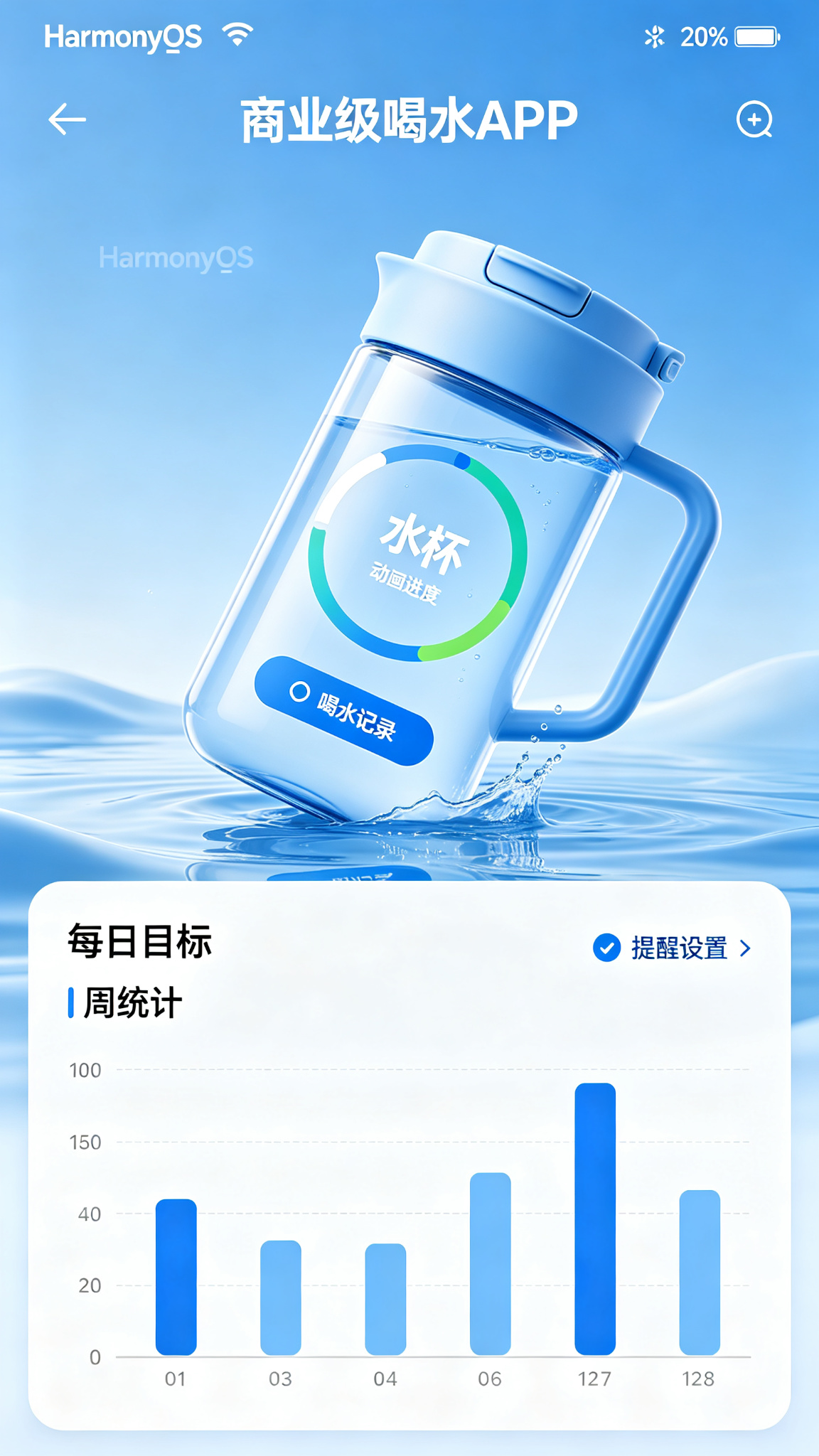
功能介绍
- ✅ 每日喝水目标自定义设置(默认 2000ml,支持灵活调整)
- ✅ 一键快捷记录喝水(200ml / 300ml / 500ml 三档)
- ✅ 水杯动画实时展示饮水进度
- ✅ 定时喝水提醒通知(可自定义提醒间隔与时间段)
- ✅ 周/月饮水统计图表,直观掌握饮水习惯
- ✅ 自定义水杯容量与单位
- ✅ 完整喝水历史记录,支持按日期筛选
- ✅ 连续达标天数统计,激励坚持喝水
- ✅ 健康小贴士推送(如“久坐提醒补水”)
- ✅ 体重记录辅助计算建议饮水量
- ✅ 喝水成就徽章系统,增加趣味性
- ✅ 不同饮品类型切换(白开水、茶、咖啡、果汁等)
- ✅ 提醒时间灵活设置(避开睡眠时段)
- ✅ 饮水数据导出(CSV / JSON 格式)
- ✅ 桌面小组件快速查看当日进度
定义数据结构
首先定义饮水记录的核心数据结构,支持记录饮水量、时间及饮品类型:
interface WaterRecord {
  id: number;           // 记录唯一标识
  amount: number;       // 饮水量(ml)
  time: number;         // 记录时间戳
  type: string;         // 饮品类型(白开水/茶/咖啡等)
}
实际开发中可根据需求扩展字段,如添加备注、心情标签等。
初始化页面状态
使用 @State 装饰器管理页面响应式状态,包括当日目标、已饮水量和历史记录:
import { promptAction, notificationManager } from '@kit.ArkUI';

@Entry
@Component
struct DrinkWaterApp {
  @State dailyGoal: number = 2000;          // 每日目标(ml)
  @State todayDrunk: number = 800;          // 当日已饮水量(ml)
  @State records: WaterRecord[] = [         // 饮水历史记录
    { id: 1, amount: 250, time: Date.now() - 3600000, type: '白开水' },
    { id: 2, amount: 250, time: Date.now() - 7200000, type: '白开水' },
    { id: 3, amount: 300, time: Date.now() - 10800000, type: '茶' },
  ];
  @State selectedType: string = '白开水';   // 当前选择的饮品类型
}
核心功能方法
以下为核心业务逻辑的实现,涵盖增加记录、切换状态和删除记录等关键操作:
// 添加饮水记录
private addWaterRecord(amount: number): void {
  const newRecord: WaterRecord = {
    id: Date.now(),
    amount: amount,
    time: Date.now(),
    type: this.selectedType
  };
  this.records = [newRecord, ...this.records];
  this.todayDrunk += amount;

  // 达标提示
  if (this.todayDrunk >= this.dailyGoal) {
    promptAction.showToast({ message: '🎉 恭喜!今日饮水目标达成!' });
  }
}

// 删除饮水记录
private deleteRecord(id: number): void {
  const target = this.records.find(r => r.id === id);
  if (target) {
    this.todayDrunk = Math.max(0, this.todayDrunk - target.amount);
    this.records = this.records.filter(r => r.id !== id);
  }
}

// 重置当日数据(每日零点自动调用或手动触发)
private resetDailyData(): void {
  this.todayDrunk = 0;
  // 可在此处将当日数据归档至本地存储或数据库
  promptAction.showToast({ message: '新的一天,记得喝水哦 💧' });
}
@Builder 可复用组件
封装饮水记录卡片为 @Builder 组件,实现一处定义、多处复用的效果:
@Builder
ItemCard(record: WaterRecord) {
  Row() {
    // 饮品类型图标
    Text(this.getTypeIcon(record.type))
      .fontSize(28)
      .margin({ right: 12 })

    Column({ space: 4 }) {
      Text(`${record.type} - ${record.amount}ml`)
        .fontSize(16)
        .fontWeight(FontWeight.Medium)
        .fontColor('#1F2937')
      Text(this.formatTime(record.time))
        .fontSize(12)
        .fontColor('#9CA3AF')
    }
    .alignItems(HorizontalAlign.Start)

    Blank()

    Button('删除')
      .fontSize(13)
      .backgroundColor('#FEE2E2')
      .fontColor('#DC2626')
      .borderRadius(8)
      .onClick(() => this.deleteRecord(record.id))
  }
  .width('100%')
  .padding(14)
  .backgroundColor(Color.White)
  .borderRadius(12)
  .shadow({ radius: 4, color: '#00000010', offsetY: 2 })
}

// 辅助方法:获取饮品类型图标
private getTypeIcon(type: string): string {
  const iconMap: Record<string, string> = {
    '白开水': '💧', '茶': '🍵', '咖啡': '☕', '果汁': '🧃', '牛奶': '🥛'
  };
  return iconMap[type] ?? '💧';
}

// 辅助方法:格式化时间
private formatTime(timestamp: number): string {
  const date = new Date(timestamp);
  return `${date.getHours().toString().padStart(2, '0')}:${date.getMinutes().toString().padStart(2, '0')}`;
}
完整 build() 页面布局
整合所有组件构建完整的页面布局,包含水杯动画、快捷记录按钮和历史记录列表:
build() {
  Column() {
    // 顶部导航栏
    Row() {
      Text('💧 喝水提醒')
        .fontSize(24)
        .fontWeight(FontWeight.Bold)
        .fontColor('#1F2937')
      Blank()
      Text('⚙️')
        .fontSize(22)
        .onClick(() => promptAction.showToast({ message: '设置页面开发中' }))
    }
    .width('100%')
    .padding(20)

    // 水杯动画区域
    Column() {
      Stack({ alignContent: Alignment.Center }) {
        // 空杯背景
        Column()
          .width(180)
          .height(280)
          .borderRadius(20)
          .backgroundColor('#E0F2FE')
          .border({ width: 3, color: '#0284C7' })

        // 水位填充(根据饮水进度动态变化)
        Column()
          .width(170)
          .height(270 * (this.todayDrunk / this.dailyGoal))
          .borderRadius(16)
          .backgroundColor('#0284C7')
          .margin({ top: 270 - 270 * (this.todayDrunk / this.dailyGoal) })
          .animation({ duration: 500, curve: Curve.EaseInOut })

        // 饮水数据展示
        Column({ space: 8 }) {
          Text('💧')
            .fontSize(40)
          Text(`${this.todayDrunk}`)
            .fontSize(36)
            .fontWeight(FontWeight.Bold)
            .fontColor(Color.White)
          Text(`/ ${this.dailyGoal} ml`)
            .fontSize(14)
            .fontColor(Color.White)
        }
      }
      .margin({ top: 20 })

      // 剩余饮水量提示
      Text(`今日还需喝 ${this.dailyGoal - this.todayDrunk} ml 💪`)
        .fontSize(16)
        .fontColor('#0284C7')
        .margin({ top: 20 })

      // 快捷记录按钮
      Row({ space: 16 }) {
        Button('+200ml')
          .width('28%')
          .height(44)
          .backgroundColor('#0284C7')
          .borderRadius(22)
          .onClick(() => this.addWaterRecord(200))
        Button('+300ml')
          .width('28%')
          .height(44)
          .backgroundColor('#0284C7')
          .borderRadius(22)
          .onClick(() => this.addWaterRecord(300))
        Button('+500ml')
          .width('28%')
          .height(44)
          .backgroundColor('#0284C7')
          .borderRadius(22)
          .onClick(() => this.addWaterRecord(500))
      }
      .margin({ top: 30 })
      .justifyContent(FlexAlign.Center)
    }
    .layoutWeight(1)
    .justifyContent(FlexAlign.Center)

    // 历史记录列表
    List({ space: 8 }) {
      ForEach(this.records, (record: WaterRecord) => {
        ListItem() {
          this.ItemCard(record)
        }
      }, (record: WaterRecord) => record.id.toString())
    }
    .width('100%')
    .padding({ left: 16, right: 16, bottom: 16 })
    .height(200)
  }
  .width('100%')
  .height('100%')
  .backgroundColor('#F0F9FF')
}
页面设计说明
整体 UI 以清爽的天蓝色为主题色,采用 #0284C7(深蓝)到 #38BDF8(浅蓝)的渐变色彩体系,营造健康、清新的视觉感受。
- 水杯动画:利用
Stack叠加布局实现水位填充效果,通过this.todayDrunk / this.dailyGoal实时计算高度比例,结合animation属性实现平滑过渡动画,给用户直观的进度反馈。 - 卡片设计:饮水记录采用白色卡片样式,配合圆角(
borderRadius(12))和阴影(shadow),营造层次分明的视觉体验。 - 色彩规范:主操作按钮使用
#0284C7强调色,危险操作按钮(如删除)使用#DC2626红色警示,提示文字使用#9CA3AF灰色弱化处理。 - 交互反馈:点击记录按钮即时更新水量与动画;目标达标时弹出 Toast 提示,增强使用仪式感。
SDK 配置
- compileSdkVersion:
"6.1.1(24)" - compatibleSdkVersion:
"6.1.1(24)" - 开发工具:DevEco Studio 5.0.0+
- 最低兼容版本:API 24
运行项目
- 使用 DevEco Studio 新建 HarmonyOS 项目(选择 Empty Ability 模板)。
- 将上述代码完整复制到
entry/src/main/ets/pages/Index.ets中。 - 确保
build-profile.json5中的 SDK 版本配置正确。 - 连接真机或启动模拟器,点击运行即可体验。
提示:如需启用通知提醒功能,请在
module.json5中声明ohos.permission.NOTIFICATION_CONTROLLER权限。
项目总结
本项目从零到一实现了喝水提醒与健康记录的完整功能,涵盖了以下技术要点:
- ArkTS 状态管理:通过
@State实现数据驱动 UI,饮水记录的增删自动触发界面刷新。 - 动画交互:水位填充动画、列表入场动画,提升用户体验。
- 组件化开发:使用
@Builder封装可复用卡片组件,提高代码复用性与可维护性。 - 数据结构设计:合理定义
WaterRecord接口,支撑扩展更多业务字段。
后续可扩展方向:接入健康数据平台 API、引入更多饮品类型统计、结合运动量智能推荐饮水量、生成健康报告、添加家人饮水提醒功能、支持智能水杯蓝牙连接、实现喝水 PK 社交功能等。本项目为你掌握 HarmonyOS 应用开发提供了扎实的实战基础,推荐在此基础上继续深入探索 ArkUI 的更多高级特性。

讨论HarmonyOS开发技术,专注于API与组件、DevEco Studio、测试、元服务和应用上架分发等。
更多推荐
 5
5 0
0- 0


 已为社区贡献38条内容

所有评论(0)