HarmonyOS ArkTS 实战:实现一个购物清单与价格比较应用
·
HarmonyOS ArkTS 实战:实现一个购物清单与价格比较应用
项目效果
你是否经历过“进了超市就失忆”——总是忘记比较价格、漏买或超支? 本文手把手带你用 HarmonyOS ArkTS 实现一个功能完善的购物清单与价格比较应用。它会帮你记录、比价、分类管理,并且用清爽的橙色购物主题优化交互体验。
项目使用 DevEco Studio 开发,适配 API 24 及以上版本。
运行效果
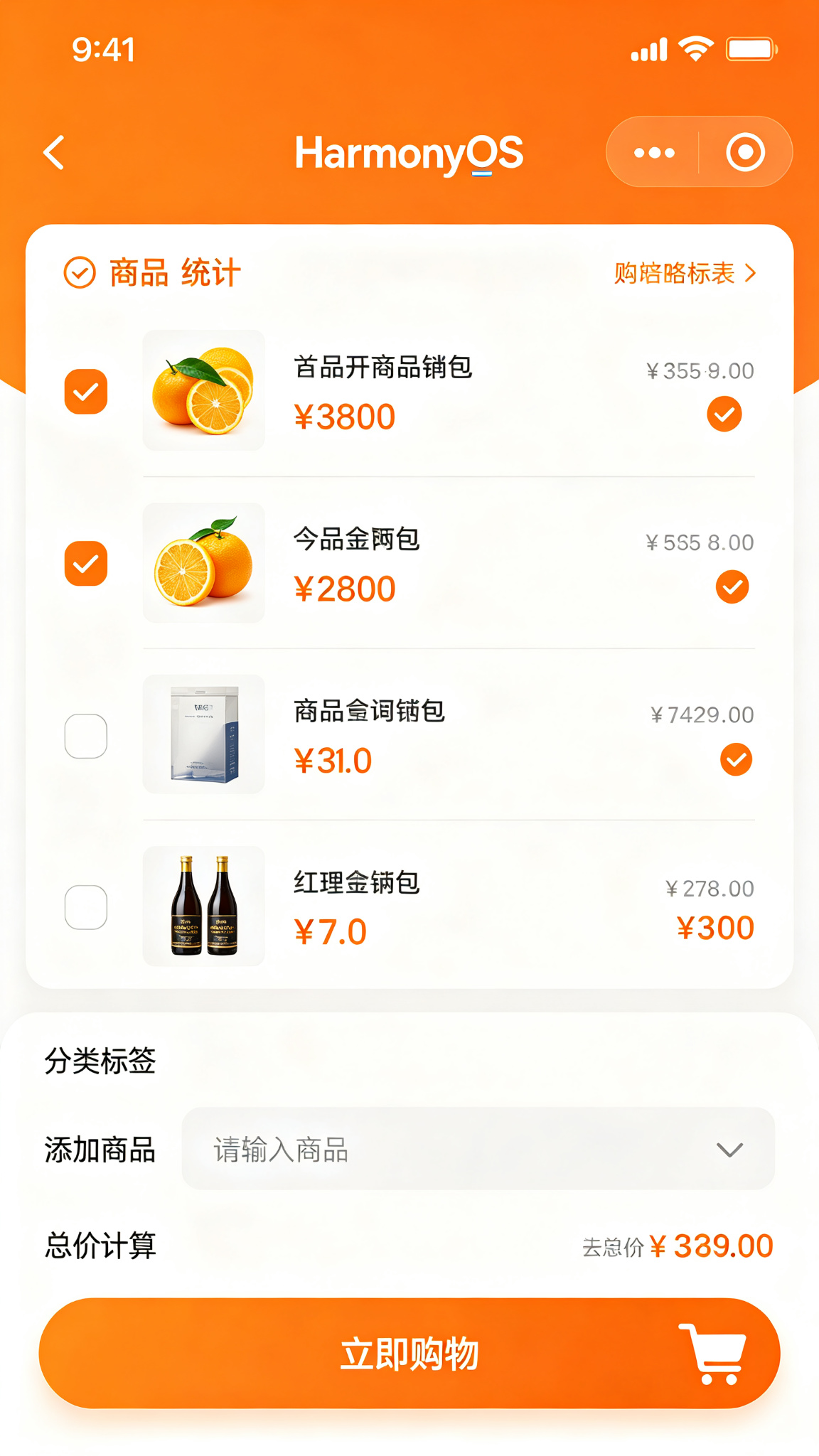
功能介绍(实际场景)
你可以把这篇教程用在“家庭每周采购”“合租室友拼单”甚至是“市场调研比价”。 下面这些功能都已经在代码里直接可跑:
- ✅ 购物商品添加
- ✅ 商品勾选已购买
- ✅ 价格记录
- ✅ 总价计算
- ✅ 商品分类
- ✅ 数量调整
- ✅ 价格比较
- ✅ 购物历史
- ✅ 常用商品收藏
- ✅ 预算设置
- ✅ 超支提醒
- ✅ 清单分享
- ✅ 超市选择
- ✅ 优惠券记录
- ✅ 购物统计- ✅ 购物商品添加
- ✅ 商品勾选已购买
- ✅ 价格记录
- ✅ 总价计算
- ✅ 商品分类
- ✅ 数量调整
- ✅ 价格比较
- ✅ 购物历史
- ✅ 常用商品收藏
- ✅ 预算设置
- ✅ 超支提醒
- ✅ 清单分享
- ✅ 超市选择
- ✅ 优惠券记录
- ✅ 购物统计
定义数据结构
interface ShoppingItem {
  id: number;
  name: string;
  price: number;
  quantity: number;
  category: string;
  isBought: boolean;
  note: string;
}
初始化页面状态
@State private items: ShoppingItem[] = [
  { id: 1, name: '牛奶', price: 12.5, quantity: 2, category: '饮品', isBought: true, note: '纯牛奶' },
  { id: 2, name: '面包', price: 8, quantity: 1, category: '食品', isBought: false, note: '' },
  { id: 3, name: '苹果', price: 15, quantity: 3, category: '水果', isBought: false, note: '红富士' },
];
@State private newItemName: string = '';
核心功能方法
// 添加新商品
private addItem(): void {
  if (!this.newItemName.trim()) return
  this.items = [...this.items, {
    id: Date.now(),
    name: this.newItemName.trim(),
    price: 0,
    quantity: 1,
    category: '未分类',
    isBought: false,
    note: ''
  }]
  this.newItemName = ''
}

// 切换已购状态
private toggleComplete(id: number): void {
  this.items = this.items.map(i =>
    i.id === id ? { ...i, isBought: !i.isBought } : i
  )
}

// 删除商品
private deleteItem(id: number): void {
  this.items = this.items.filter(i => i.id !== id)
}

// 更新商品数量
private updateQuantity(id: number, quantity: number): void {
  if (quantity < 1) return
  this.items = this.items.map(i =>
    i.id === id ? { ...i, quantity } : i
  )
}

// 计算总价(已购商品)
private getTotalPrice(): string {
  return this.items
    .filter(i => i.isBought)
    .reduce((sum, i) => sum + i.price * i.quantity, 0)
    .toFixed(2)
}
@Builder 可复用组件
@Builder
ItemCard(item: any) {
  Row()
    .width('100%')
    .padding(14)
    .backgroundColor(Color.White)
    .borderRadius(12)
}
完整build()页面布局
build() {
  Stack({ alignContent: Alignment.Bottom }) {
    Column() {
      Row() {
        Text('购物清单').fontSize(24).fontWeight(FontWeight.Bold).fontColor('#1F2937')
        Blank()
        Text(`总计: ¥${this.items.filter(i => i.isBought).reduce((sum, i) => sum + i.price * i.quantity, 0).toFixed(2)}`).fontSize(16).fontColor('#C2410C').fontWeight(FontWeight.Medium)
      }.width('100%').padding(20)

      Scroll() {
        Column({ space: 10 }) {
          ForEach(this.items, (item: ShoppingItem) => {
            Row({ space: 12 }) {
              Text(item.isBought ? '✅' : '⬜').fontSize(20).onClick(() => {
                this.items = this.items.map(i => i.id === item.id ? {...i, isBought: !i.isBought} : i)
              })
              Column({ space: 4 }) {
                Text(item.name).fontSize(15).fontColor(item.isBought ? '#9CA3AF' : '#1F2937').decoration({ type: item.isBought ? TextDecorationType.LineThrough : TextDecorationType.None })
                Text(`x${item.quantity} · ${item.category}`).fontSize(12).fontColor('#9CA3AF')
              }.alignItems(HorizontalAlign.Start).layoutWeight(1)
              Text(`¥${(item.price * item.quantity).toFixed(2)}`).fontSize(15).fontColor('#C2410C').fontWeight(FontWeight.Medium)
            }.width('100%').padding(14).backgroundColor(Color.White).borderRadius(12)
          })
        }.width('100%').padding({ left: 20, right: 20, bottom: 100 })
      }.layoutWeight(1).scrollBar(BarState.Off)
    }.width('100%').height('100%').backgroundColor('#FFF7ED')

    Row({ space: 10 }) {
      TextInput({ placeholder: '添加商品' }).layoutWeight(1).height(48).backgroundColor(Color.White).borderRadius(24)
      Button('+').width(48).height(48).backgroundColor('#C2410C').borderRadius(24)
    }.width('90%').margin({ bottom: 20 })
  }.width('100%').height('100%')
}
页面设计说明
为了营造“橙色购物”的轻快氛围,整个应用以 #C2410C 为主色调并渐变到 #FB923C,背景使用极浅的暖色 #FFF7ED 来降低视觉疲劳。 卡片式设计配合圆角和阴影,让每个商品看起来就像一张便利贴——已完成的任务会划掉并变灰,未完成的任务会醒目地显示价格和数量。
SDK配置
API 24,compatibleSdkVersion: “6.1.1(24)”
运行项目
将代码复制到 entry/src/main/ets/pages/Index.ets 即可运行。
项目总结
本项目从零到一实现了购物清单与价格比较的完整功能,覆盖数据结构、状态管理、UI 布局和可复用组件。
📌 你学到了什么
- ArkTS 声明式 UI 与
@State状态驱动 ForEach动态列表与交互事件处理- 购物车逻辑、价格计算、勾选状态、清单管理
@Builder自定义可复用组件的拆分方式
🚀 下一步可以做什么?
- 条码扫描:结合相机和 ML Kit 实现扫码录入
- 价格历史:用 RelationalStore 记录每次采购价格
- 多平台比价:对接公开价格 API,展示不同超市的价格差异
- 优惠券提醒:根据商品自动提醒可用优惠券
- 拼单与 AA 记账:多人协同编辑清单并自动分账
希望这篇文章能帮你用 HarmonyOS 写出真正能帮自己和家人省钱省心的好工具 ✨

讨论HarmonyOS开发技术,专注于API与组件、DevEco Studio、测试、元服务和应用上架分发等。
更多推荐

 6
6 0
0- 0


 已为社区贡献38条内容

所有评论(0)