HarmonyOS ArkTS 实战:实现一个随机密码生成器
HarmonyOS ArkTS 实战:实现一个随机密码生成器
项目效果
本文实现的是一个基于 HarmonyOS 和 ArkTS 的随机密码生成器。项目中使用 ArkUI 组件完成页面布局,通过 @State 管理状态数据,实现密码长度调节、字符类型选项、一键生成、密码强度显示、一键复制和密码历史等功能。
最终运行效果如下:
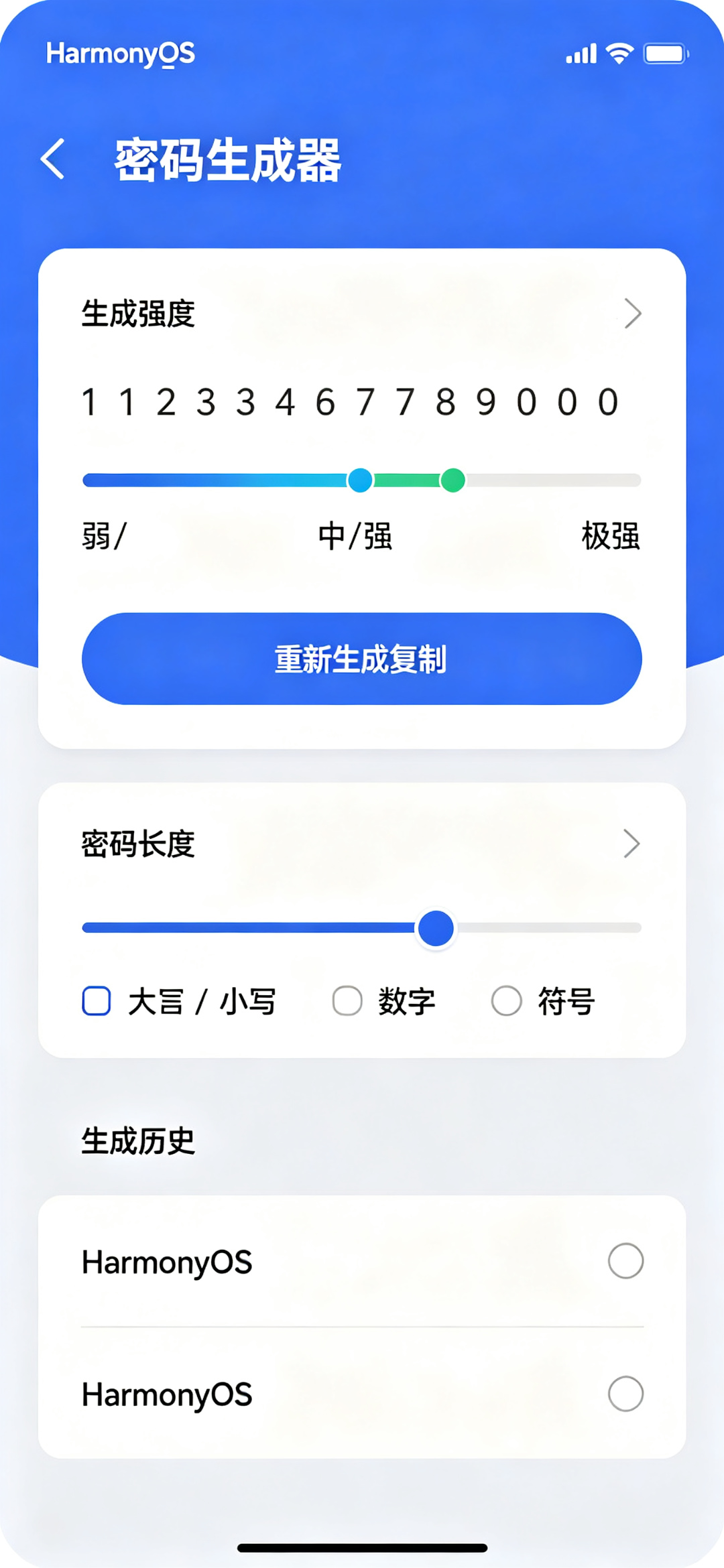
页面主要包含以下内容:
- 顶部应用标题;
- 生成的密码大字体显示;
- 密码强度指示条;
- 密码长度滑块;
- 字符类型选项(大写/小写/数字/符号);
- 生成按钮;
- 复制按钮;
- 生成历史记录;
- 页面整体采用 ArkUI 声明式布局。
本文重点是演示如何在 HarmonyOS 项目中使用 ArkTS 和 ArkUI 实现一个工具类单页面应用。项目代码主要写在 entry/src/main/ets/pages/Index.ets 文件中,适合作为 HarmonyOS ArkTS 入门到进阶之间的练习案例。
前言
在网络时代,我们需要为各种账号设置密码。简单的密码不安全,手动想复杂密码又很麻烦。一个好用的密码生成器可以根据我们的需求生成安全的随机密码,帮助我们保护账号安全。
从应用开发角度来看,这个项目不依赖后端接口,也不需要数据库,但能练习 ArkTS 中的状态管理、复选框、滑块、随机数生成、字符串处理和剪贴板操作等内容。
本文基于 HarmonyOS 和 ArkTS 实现一个随机密码生成器。用户可以选择密码长度和包含的字符类型,一键生成安全的随机密码,查看密码强度,一键复制,并查看生成历史。
这个项目的核心不是简单的随机字符拼接,而是安全的随机数生成和直观的用户体验。每一次选项变化,都可以立即生成新的密码,这正是 ArkUI 声明式开发的基本思想。
一、项目目标
本次实践主要实现以下目标:
- 创建 HarmonyOS ArkTS 页面;
- 使用
@Entry和@Component定义页面组件; - 使用
@State管理页面状态; - 使用滑块调节密码长度(4-32位);
- 复选框选择字符类型;
- 大写字母、小写字母、数字、特殊符号选项;
- 安全的随机密码生成;
- 密码强度评估;
- 一键复制密码到剪贴板;
- 保存生成历史;
- 使用
@Builder封装选项和历史项; - 完成一个可以运行的密码生成器页面。
这个项目虽然是单页面应用,但它实现了完整的密码生成、强度评估和复制功能,比普通静态页面更适合练习 ArkTS。
二、技术栈
| 类型 | 内容 |
|---|---|
| 开发方向 | HarmonyOS 应用开发 |
| 开发语言 | ArkTS |
| UI 框架 | ArkUI |
| SDK 版本 | HarmonyOS API 23 及以上 |
| 工程模型 | Stage 模型 |
| 核心组件 | Text / Button / Slider / Checkbox / Column / Row |
| 状态管理 | @State |
| 数据处理 | 随机数生成 / 密码强度评估 / 剪贴板 |
| 项目入口 | entry/src/main/ets/pages/Index.ets |
| 运行平台 | 模拟器或真机 |
本项目是 HarmonyOS 原生 ArkTS 项目。页面主体由 ArkUI 组件构建,核心逻辑写在 Index.ets 文件中,不依赖后端接口,也不需要额外配置数据库。
三、为什么选择密码生成器项目
密码生成器适合作为 ArkTS 练习项目,主要有以下几个原因。
第一,实用性强。几乎每个人都需要生成安全密码,是非常实用的工具。
第二,业务场景真实。账号注册、密码修改都需要生成密码,是常用工具。
第三,适合练习状态管理。密码长度、字符选项、生成的密码都属于页面状态。状态变化后,页面会自动刷新。
第四,适合练习常用控件。滑块、复选框、按钮都是最常用的表单控件。
第五,适合练习随机算法。如何生成安全的随机密码是一个经典的编程问题。
第六,扩展空间比较大。基础功能完成后,可以继续增加密码本、密码保存、密码强度检测、批量生成和密码分享。
在本项目中,密码长度和字符选项是核心配置。生成的密码和强度评估都基于这些配置。
四、功能规则说明
密码长度范围:4-32位,默认12位。
字符类型选项:
| 类型 | 字符集 |
|---|---|
| 大写字母 | ABCDEFGHIJKLMNOPQRSTUVWXYZ |
| 小写字母 | abcdefghijklmnopqrstuvwxyz |
| 数字 | 0123456789 |
| 特殊符号 | !@#$%^&*()_±=[]{} |
至少选择一种字符类型,默认全部选中。
密码强度评估:
| 长度 | 类型数量 | 强度 | 颜色 |
|---|---|---|---|
| <8 | 任意 | 弱 | #EF4444 |
| 8-11 | 1-2种 | 中 | #F59E0B |
| 8-11 | 3-4种 | 强 | #10B981 |
| ≥12 | 3-4种 | 极强 | #0A59F7 |
历史记录:最多保存最近生成的10个密码。
五、项目结构
本项目主要修改首页文件:
entry
└── src
    └── main
        └── ets
            └── pages
                └── Index.ets
其中:
| 文件 | 作用 |
|---|---|
| Index.ets | 编写页面结构、状态数据和密码生成逻辑 |
本文不涉及复杂路由,也不需要额外创建多个页面。对于练习项目来说,把主要逻辑集中在一个 Index.ets 文件中更方便理解。
六、核心实现思路
本项目的核心流程如下:
- 使用
@State保存密码长度、字符选项、当前密码和历史; - 用户调节密码长度滑块;
- 用户勾选需要的字符类型;
- 点击生成按钮或选项变化时生成密码;
- 根据选择的字符集构建可用字符池;
- 使用随机数从字符池中选取字符;
- 确保每种选中的类型至少有一个字符;
- 评估密码强度;
- 点击复制按钮复制到剪贴板;
- 保存到历史记录。
项目中最重要的状态变量如下:
@State passwordLength: number = 12
@State useUppercase: boolean = true
@State useLowercase: boolean = true
@State useNumbers: boolean = true
@State useSymbols: boolean = true
@State currentPassword: string = ''
@State history: string[] = []
其中:
| 状态变量 | 作用 |
|---|---|
| passwordLength | 密码长度 |
| useUppercase | 是否包含大写字母 |
| useLowercase | 是否包含小写字母 |
| useNumbers | 是否包含数字 |
| useSymbols | 是否包含特殊符号 |
| currentPassword | 当前生成的密码 |
| history | 生成历史 |
这些配置是生成密码的基础,页面加载时自动生成一个初始密码。
七、Index.ets 完整代码
打开文件:
entry/src/main/ets/pages/Index.ets
将其中内容替换为下面代码:
@Entry
@Component
struct Index {
  @State passwordLength: number = 12
  @State useUppercase: boolean = true
  @State useLowercase: boolean = true
  @State useNumbers: boolean = true
  @State useSymbols: boolean = true
  @State currentPassword: string = ''
  @State history: string[] = []

  private uppercase = 'ABCDEFGHIJKLMNOPQRSTUVWXYZ'
  private lowercase = 'abcdefghijklmnopqrstuvwxyz'
  private numbers = '0123456789'
  private symbols = '!@#$%^&*()_+-=[]{}|;:,.<>?'

  aboutToAppear() {
    this.generatePassword()
  }

  private generatePassword(): void {
    let charset = ''
    let requiredChars: string[] = []

    if (this.useUppercase) {
      charset += this.uppercase
      requiredChars.push(this.getRandomChar(this.uppercase))
    }
    if (this.useLowercase) {
      charset += this.lowercase
      requiredChars.push(this.getRandomChar(this.lowercase))
    }
    if (this.useNumbers) {
      charset += this.numbers
      requiredChars.push(this.getRandomChar(this.numbers))
    }
    if (this.useSymbols) {
      charset += this.symbols
      requiredChars.push(this.getRandomChar(this.symbols))
    }

    if (charset.length === 0) {
      this.currentPassword = '请至少选择一种字符类型'
      return
    }

    let password = [...requiredChars]
    let remainingLength = this.passwordLength - requiredChars.length

    for (let i = 0; i < remainingLength; i++) {
      password.push(this.getRandomChar(charset))
    }

    this.shuffleArray(password)
    this.currentPassword = password.join('')
    this.addToHistory(this.currentPassword)
  }

  private getRandomChar(charset: string): string {
    let randomIndex = Math.floor(Math.random() * charset.length)
    return charset[randomIndex]
  }

  private shuffleArray(arr: string[]): void {
    for (let i = arr.length - 1; i > 0; i--) {
      let j = Math.floor(Math.random() * (i + 1));
      [arr[i], arr[j]] = [arr[j], arr[i]]
    }
  }

  private addToHistory(password: string): void {
    if (this.history.includes(password)) return
    this.history = [password, ...this.history].slice(0, 10)
  }

  private copyPassword(): void {
    if (this.currentPassword.startsWith('请')) return
    let context = getContext(this)
    try {
      context.clipboard.setContent(this.currentPassword)
    } catch (e) {
      console.error('复制失败')
    }
  }

  private getPasswordStrength(): { level: string, color: string, percent: number } {
    let types = 0
    if (this.useUppercase) types++
    if (this.useLowercase) types++
    if (this.useNumbers) types++
    if (this.useSymbols) types++

    if (this.passwordLength < 8) {
      return { level: '弱', color: '#EF4444', percent: 25 }
    }
    if (this.passwordLength < 12) {
      if (types <= 2) {
        return { level: '中', color: '#F59E0B', percent: 50 }
      } else {
        return { level: '强', color: '#10B981', percent: 75 }
      }
    }
    return { level: '极强', color: '#0A59F7', percent: 100 }
  }

  @Builder
  OptionItem(label: string, checked: boolean, onChange: (v: boolean) => void) {
    Row() {
      Checkbox({ name: label, group: 'options' })
        .select(checked)
        .onChange((value: boolean) => {
          onChange(value)
        })
      Text(label)
        .fontSize(15)
        .fontColor('#182431')
        .margin({ left: 8 })
    }
    .layoutWeight(1)
    .height(40)
  }

  build() {
    Column() {
      Text('密码生成器')
        .fontSize(28)
        .fontWeight(FontWeight.Bold)
        .fontColor('#182431')
        .margin({ top: 22 })
      Text('基于 HarmonyOS ArkTS 的安全密码工具')
        .fontSize(14)
        .fontColor('#6B7280')
        .margin({ top: 8, bottom: 20 })

      Column() {
        Text(this.currentPassword)
          .fontSize(22)
          .fontWeight(FontWeight.Medium)
          .fontColor('#182431')
          .fontFamily('monospace')
          .textAlign(TextAlign.Center)
          .width('100%')
          .padding(20)
          .backgroundColor('#F9FAFB')
          .borderRadius(12)
          .margin({ bottom: 16 })

        Row() {
          Text(`密码强度:${this.getPasswordStrength().level}`)
            .fontSize(14)
            .fontColor(this.getPasswordStrength().color)
          Blank()
          Text(`${this.passwordLength}位`)
            .fontSize(14)
            .fontColor('#6B7280')
        }
        .width('100%')
        .margin({ bottom: 8 })

        Stack() {
          Row()
            .width('100%')
            .height(6)
            .backgroundColor('#E5E7EB')
            .borderRadius(3)
          Row()
            .width(`${this.getPasswordStrength().percent}%`)
            .height(6)
            .backgroundColor(this.getPasswordStrength().color)
            .borderRadius(3)
        }
        .width('100%')
        .margin({ bottom: 16 })

        Row() {
          Button('重新生成')
            .layoutWeight(1)
            .height(48)
            .fontSize(16)
            .fontColor(Color.White)
            .backgroundColor('#0A59F7')
            .borderRadius(24)
            .onClick(() => {
              this.generatePassword()
            })
          Blank().width(12)
          Button('复制')
            .layoutWeight(1)
            .height(48)
            .fontSize(16)
            .fontColor('#0A59F7')
            .backgroundColor('#EFF6FF')
            .borderRadius(24)
            .onClick(() => {
              this.copyPassword()
            })
        }
        .width('100%')
      }
      .width('100%')
      .padding(20)
      .backgroundColor(Color.White)
      .borderRadius(16)
      .margin({ bottom: 16 })
      .shadow({
        radius: 8,
        color: '#08000000',
        offsetX: 0,
        offsetY: 2
      })

      Column() {
        Text('密码设置')
          .fontSize(16)
          .fontWeight(FontWeight.Medium)
          .fontColor('#182431')
          .width('100%')
          .margin({ bottom: 16 })

        Row() {
          Text('密码长度')
            .fontSize(15)
            .fontColor('#182431')
          Blank()
          Text(`${this.passwordLength} 位`)
            .fontSize(15)
            .fontColor('#0A59F7')
            .fontWeight(FontWeight.Medium)
        }
        .width('100%')
        .margin({ bottom: 8 })

        Slider({
          value: this.passwordLength,
          min: 4,
          max: 32,
          step: 1,
          style: SliderStyle.OutSet
        })
          .width('100%')
          .selectedColor('#0A59F7')
          .blockColor('#0A59F7')
          .onChange((v: number) => {
            this.passwordLength = Math.round(v)
            this.generatePassword()
          })
          .margin({ bottom: 20 })

        Text('包含字符')
          .fontSize(15)
          .fontColor('#182431')
          .width('100%')
          .margin({ bottom: 12 })

        Flex({ wrap: FlexWrap.Wrap }) {
          this.OptionItem('大写字母', this.useUppercase, (v: boolean) => {
            this.useUppercase = v
            this.generatePassword()
          })
          this.OptionItem('小写字母', this.useLowercase, (v: boolean) => {
            this.useLowercase = v
            this.generatePassword()
          })
          this.OptionItem('数字', this.useNumbers, (v: boolean) => {
            this.useNumbers = v
            this.generatePassword()
          })
          this.OptionItem('特殊符号', this.useSymbols, (v: boolean) => {
            this.useSymbols = v
            this.generatePassword()
          })
        }
        .width('100%')
      }
      .width('100%')
      .padding(16)
      .backgroundColor(Color.White)
      .borderRadius(16)
      .margin({ bottom: 16 })
      .shadow({
        radius: 8,
        color: '#08000000',
        offsetX: 0,
        offsetY: 2
      })

      if (this.history.length > 0) {
        Column() {
          Text('生成历史')
            .fontSize(16)
            .fontWeight(FontWeight.Medium)
            .fontColor('#182431')
            .width('100%')
            .margin({ bottom: 12 })

          ForEach(this.history, (pwd: string) => {
            Row() {
              Text(pwd)
                .fontSize(14)
                .fontColor('#4B5563')
                .fontFamily('monospace')
                .layoutWeight(1)
              Button('复制')
                .fontSize(12)
                .height(28)
                .padding({ left: 12, right: 12 })
                .fontColor('#0A59F7')
                .backgroundColor('#EFF6FF')
                .onClick(() => {
                  let context = getContext(this)
                  context.clipboard.setContent(pwd)
                })
            }
            .width('100%')
            .padding({ top: 10, bottom: 10 })
            .border({ width: { bottom: 1 }, color: '#F3F4F6' })
          }, (p: string) => p)
        }
        .width('100%')
        .padding(16)
        .backgroundColor(Color.White)
        .borderRadius(16)
        .shadow({
          radius: 8,
          color: '#08000000',
          offsetX: 0,
          offsetY: 2
        })
      }
    }
    .width('100%')
    .height('100%')
    .padding({ left: 18, right: 18 })
    .backgroundColor('#F5F7FA')
  }
}
八、代码实现说明
1. 随机密码生成
首先确保每种选中的字符类型至少有一个字符,然后随机填充剩余位置,最后打乱顺序:
// 先放必须的字符
let password = [...requiredChars]
// 随机填充剩余
for (let i = 0; i < remainingLength; i++) {
  password.push(this.getRandomChar(charset))
}
// 打乱顺序
this.shuffleArray(password)
2. Fisher-Yates洗牌算法
使用经典洗牌算法打乱数组顺序,保证密码随机性:
for (let i = arr.length - 1; i > 0; i--) {
  let j = Math.floor(Math.random() * (i + 1));
  [arr[i], arr[j]] = [arr[j], arr[i]]
}
3. 密码强度评估
根据密码长度和字符类型数量评估强度,分弱/中/强/极强四个等级,对应不同颜色。
4. 实时生成
滑块调节或选项变化时自动生成新密码,不需要每次点击生成按钮。
5. 复制功能
当前密码和历史密码都可以一键复制到剪贴板。
6. 历史记录
自动保存最近生成的10个密码,去重显示,方便找回之前生成的密码。
九、运行项目
代码编写完成后,在DevEco Studio中运行项目。调节密码长度,勾选不同字符类型,检查生成的密码是否符合要求,验证密码强度是否正确,测试复制功能和历史记录。
十、开发中遇到的问题
- 确保字符覆盖:必须保证每种选中的类型至少出现一次
- 顺序打乱:如果不打乱,前面的字符一定是按类型顺序的,不够随机
- 边界处理:什么都不选时给出提示
- 历史去重:相同密码不重复保存
十一、总结
本文基于HarmonyOS和ArkTS实现了一个随机密码生成器。项目通过@State管理配置选项,使用随机算法生成安全密码,实现了密码强度评估、一键复制和历史记录等功能。这个项目展示了ArkTS中复选框、滑块、随机数处理和剪贴板操作的基本方法,适合作为入门练习项目。

讨论HarmonyOS开发技术,专注于API与组件、DevEco Studio、测试、元服务和应用上架分发等。
更多推荐
 8
8 0
0- 0


 已为社区贡献53条内容

所有评论(0)