HarmonyOS 实战教程(七):网络请求封装与 AI 智能咨询 —— 以「柚兔自测量表」为例
·
一、网络请求架构
MeCharts 的网络层采用三层架构:请求基类 → 请求子类 → 业务管理器。
HttpRequest (基类:执行请求、解析响应)
    ├── GetRequest (GET 请求)
    ├── PostRequest (POST 表单请求)
    ├── PostBodyRequest (POST JSON 请求)
    └── PostMultipartRequest (文件上传)
HttpManager (业务管理器:单例、统一错误处理)
ChatModel (业务模型:AI 会话逻辑)
二、请求基类与子类
2.1 HttpRequest 基类
export abstract class HttpRequest<T> extends BaseRequestOption {
  protected parseDataToBaseModel(response: HttpResponse): T | undefined {
    let data: T | undefined
    const responseData = response.result;
    if (responseData === '{}') {
      if (response.httpSuccess) {
        data = JSON.parse('{"code":200, "data":"success"}') as T
      }
    } else if (typeof responseData === 'string') {
      data = JSON.parse(responseData) as T
    } else if (typeof responseData === 'object') {
      data = responseData as T
    }
    return data
  }

  public async execute(): Promise<T> {
    const response = await this.request()
    const result = this.parseDataToBaseModel(response)
    return result as T;
  }
}
基类职责:
- 发起 HTTP 请求(
this.request()继承自BaseRequestOption) - 解析响应数据(
parseDataToBaseModel)——处理 string/object/空响应等不同格式 - 返回泛型结果
T
2.2 GET 请求子类
export class GetRequest<T> extends HttpRequest<CommonResponseModel<T>> {
  public method: http.RequestMethod = http.RequestMethod.GET;
  public domain: string = UrlConstants.SERVER;
  public path: string = '';
  public header: Record<string, string> = {
    'Content-Type': 'application/json',
    'Authorization': `Bearer ${UrlConstants.COZE_SECRET_TOKEN}`,
  }

  constructor(path: string, requestParams: Record<string, string>) {
    super();
    this.getQuery = requestParams;
    this.path = path;
  }

  protected onRequestChain(request: BaseRequestOption): void {
    console.log(`parrotAIHttpGet >>> url : ${this.requestUrl()}`)
  }

  protected onResponseChain(response: HttpResponse): void {
    console.log(`parrotAIHttpGet >>> response : ${JSON.stringify(response)}`)
  }

  protected onErrorChain(error: Error): void {
    console.log(`parrotAIHttpGet >>> error : ${JSON.stringify(error)}`)
  }
}
2.3 POST JSON 请求子类
export class PostBodyRequest<T> extends HttpRequest<CommonResponseModel<T>> {
  public method: http.RequestMethod = http.RequestMethod.POST;
  public header: Record<string, string> = {
    'Content-Type': 'application/json',
    'Authorization': `Bearer ${UrlConstants.COZE_SECRET_TOKEN}`,
  }
  public domain: string = UrlConstants.SERVER;
  public path: string = '';

  constructor(requestParams: object, path: string, header?: Record<string, string>) {
    super();
    this.postBody = requestParams;
    this.path = path;
    if (header) {
      this.header = header!!;
    }
  }
}
2.4 统一响应模型
export class CommonResponseModel<T> {
  code: number = -1;
  msg: string = '';
  data: T | undefined;
  desc: string = '';
}
所有接口遵循统一的响应格式:{ code, msg, data, desc },其中 code === 0 表示成功。
三、HttpManager 请求管理器
3.1 单例模式
export class HttpManager {
  private static mInstance: HttpManager;
  private BASE_URL: string = UrlConstants.SERVER

  private constructor() {}

  static getInstance(): HttpManager {
    if (!HttpManager.mInstance) {
      HttpManager.mInstance = new HttpManager();
    }
    return HttpManager.mInstance;
  }
}
3.2 请求方法封装
async requestPost<T>(option: RequestOptions): Promise<T> {
  if (option.queryParams == null) {
    option.queryParams = {}
  }
  let request = new PostRequest<T>(option.queryParams!!, option.url);
  request.domain = option.domain ? option.domain : this.BASE_URL
  return new Promise<T>((resolve, reject) => {
    request.execute().then((data: CommonResponseModel<T>) => {
      if (data.code === UrlConstants.CODE_SUCCESS) {
        resolve(data.data);
      } else {
        reject(data.desc);
      }
    }).catch((err: Error) => {
      reject('请求失败');
      ToastUtil.showToast('请求失败')
    });
  })
}

requestPostBody<T>(option: RequestOptions): Promise<T> {
  let request = new PostBodyRequest<T>(option.postBody!!, option.url);
  request.domain = this.BASE_URL
  return new Promise<T>((resolve, reject) => {
    request.execute().then((data: CommonResponseModel<T>) => {
      if (data.code === UrlConstants.CODE_SUCCESS) {
        resolve(data.data);
      } else {
        reject(data.desc);
      }
    }).catch((err: Error) => {
      reject('请求失败');
      ToastUtil.showToast(err.message)
    });
  })
}
3.3 RequestOptions 接口
export interface RequestOptions {
  domain?: string;
  url: string;
  queryParams?: Record<string, string>;
  postBody?: object;
  header?: Record<string, string>;
  multiFormDataList?: Array<http.MultiFormData>;
}
通过 RequestOptions 统一所有请求的入参格式,调用方只需关注 URL 和参数。
四、AI 咨询功能实现
4.1 技术方案
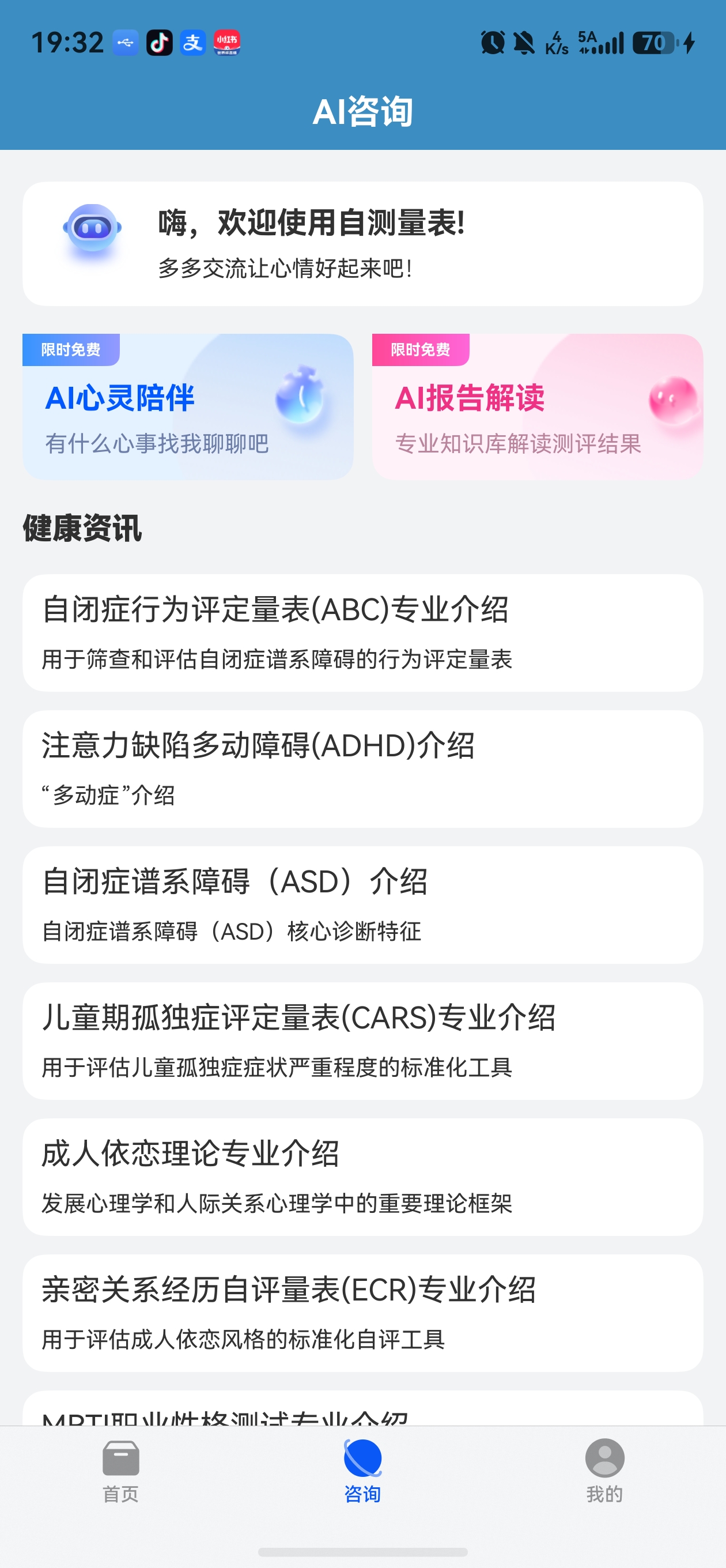
MeCharts 接入了扣子(Coze)AI 平台,实现了智能咨询功能:
- 创建会话 → 获取智能体配置 → 发起对话 → 轮询结果
- 非流式模式:客户端定期轮询会话状态,直到 AI 回复完成
4.2 ChatModel 业务模型
export class ChatModel {
  loadingStatus: LoadingStatus = LoadingStatus.OFF;
  agentInfo: AgentInfoData = new AgentInfoData()
  conversation: ConversationData = new ConversationData()
  response: ChatResponseData = new ChatResponseData()
  retrieveData: RetrieveData = new RetrieveData()
  msgList: MsgData[] = []

  private static instance: ChatModel;

  public static getInstance(): ChatModel {
    if (!ChatModel.instance) {
      ChatModel.instance = new ChatModel();
    }
    return ChatModel.instance;
  }
}
4.3 创建会话
async conversationCreate(uuid: string, role: string, content?: string): Promise<string> {
  let idInfo: MetaData = { uuid: uuid }
  let msgList: Msg[] = []
  let param: CreatParam = {
    meta_data: idInfo,
    messages: msgList
  }

  this.loadingStatus = LoadingStatus.LOADING
  return HttpManager.getInstance()
    .requestPostBody<ConversationData>({
      url: UrlConstants.CONVERSATION_CREATE_URL,
      postBody: param
    })
    .then((result) => {
      this.conversation = result
      this.loadingStatus = LoadingStatus.SUCCESS
      return this.loadingStatus
    })
    .catch((err: BusinessError) => {
      this.loadingStatus = LoadingStatus.FAILED
      return this.loadingStatus
    });
}
4.4 获取智能体配置
async getOnlineInfo(bot_id: string): Promise<void> {
  this.loadingStatus = LoadingStatus.LOADING
  return new Promise((resolve, reject) => {
    HttpManager.getInstance()
      .requestGet<AgentInfoData>({
        url: UrlConstants.GET_ONLINE_INFO_URL,
        queryParams: { 'bot_id': bot_id }
      })
      .then((result) => {
        this.loadingStatus = LoadingStatus.SUCCESS
        this.agentInfo = result
        resolve()
      })
      .catch((err: BusinessError) => {
        this.loadingStatus = LoadingStatus.FAILED
        reject(err)
      });
  });
}
4.5 发起对话
async chat(conversationId: string, uuid: string, role: string, content: string,
  agentId: string, bot_name: string): Promise<string> {

  let msgList: Msg[] = []
  let msg: Msg = {
    role: role,
    content: content,
    content_type: 'text'
  }
  msgList.push(msg)

  let param: ChatParam = {
    bot_id: agentId,
    user_id: uuid,
    stream: false,
    auto_save_history: true,
    additional_messages: msgList
  }

  this.loadingStatus = LoadingStatus.LOADING
  return HttpManager.getInstance()
    .requestPostBody<ChatResponseData>({
      url: UrlConstants.SERVER + UrlConstants.CHAT_URL + `?conversation_id=${conversationId}`,
      postBody: param
    })
    .then((result) => {
      this.response = result
      this.loadingStatus = LoadingStatus.SUCCESS
      return this.loadingStatus
    })
    .catch((err: BusinessError) => {
      this.loadingStatus = LoadingStatus.FAILED
      return this.loadingStatus
    });
}
4.6 轮询获取结果
由于使用非流式模式,需要轮询查询对话状态:
private retrieve(chatData: ChatData) {
  this.chatModel.retrieve(this.chatModel.response.conversation_id!!, this.chatModel.response.id!!)
    .then(() => {
      if (this.chatModel.retrieveData.status === 'in_progress') {
        // 仍在处理中,继续轮询
      } else if (this.chatModel.retrieveData.status === 'failed') {
        ToastUtil.showToast('服务器繁忙,请重试')
        clearInterval(this.internalId)
      } else if (this.chatModel.retrieveData.status === 'completed') {
        clearInterval(this.internalId)
        // 获取消息详情
        this.chatModel.messageList(this.chatModel.response.conversation_id!!, this.chatModel.response.id!!)
          .then(() => {
            if (this.chatModel.msgStatus === LoadingStatus.SUCCESS) {
              this.chatModel.msgList.forEach(async (item) => {
                if (item.type! === 'answer') {
                  this.chatList[this.chatList.length - 1].status = 'success'
                  this.chatList[this.chatList.length - 1].content = item.content!!
                }
              })
            }
          })
      }
    });
}
4.7 轮询定时器
发送消息后,启动定时器每 1.1 秒轮询一次:
private sendMsgToAgent(content: string, name: string) {
  this.chatModel.chat(this.chatModel.conversation.id!!, this.userId, Role.USER, content,
    UrlConstants.COZE_AGENT_ID, name).then((status) => {
    if (status === LoadingStatus.SUCCESS) {
      let chatData = new ChatData('', '', Role.ASSISTANT, 'text', 'loading')
      this.chatList.push(chatData)
      this.internalId = setInterval(() => {
        this.retrieve(chatData);
      }, 1100)
    }
  })
}
五、聊天页面 UI
5.1 ConsultPage 聊天界面
@Component
export struct ConsultPage {
  @State chatModel: ChatModel = ChatModel.getInstance()
  @State chatList: ChatData[] = []
  @State inputText: string = ''

  build() {
    NavDestination() {
      Column() {
        Column() {
          this.buildTopBar();
          this.buildChatList()
        }.layoutWeight(1)
        this.BottomLayout()
      }
    }
    .onReady((ctx: NavDestinationContext) => {
      const params = ctx.pathInfo.param as ResultParams;
      this.title = params.title as string
      this.type = params.type as number

      this.chatModel.conversationCreate(this.userId, Role.ASSISTANT).then((status) => {
        if (status === LoadingStatus.SUCCESS) {
          this.chatModel.getOnlineInfo(UrlConstants.COZE_AGENT_ID).then(() => {
            if (this.type == 0) {
              this.sendMsgToAgent('简单介绍你自己', '')
            } else {
              this.chatList.push(new ChatData(
                '请把自测量表名称和分数告诉我,我可以帮你解读并给你一些建议!',
                '', Role.ASSISTANT, 'text', 'success'))
            }
          })
        }
      })
    })
  }
}
5.2 聊天列表
@Builder
buildChatList() {
  Text('内容由AI生成,注意鉴别')
    .fontSize(10)
    .fontColor($r('app.color.text_grey_color'))

  List({ space: 10, scroller: this.listScroller }) {
    ForEach(this.chatList, (item: ChatData, index: number) => {
      ListItem() {
        if (item.role === Role.ASSISTANT) {
          LeftWidget({ item: item, scroller: this.listScroller, onSuggestClick: (suggest: string) => {
            this.chatList.push(new ChatData(suggest, '', Role.USER, 'text'));
            this.listScroller.scrollEdge(Edge.Bottom);
          }});
        } else {
          RightWidget({ item: item });
        }
      };
    })
  }
  .scrollBar(BarState.Off)
  .edgeEffect(EdgeEffect.Spring)
  .layoutWeight(1)
}
5.3 输入区域
@Builder
BottomLayout() {
  Column() {
    Divider().vertical(false).strokeWidth(1).color($r('app.color.color_line'))
    Row() {
      TextInput({ text: this.inputText, placeholder: '请输入...', controller: this.inputController })
        .placeholderColor(Color.Grey)
        .backgroundColor($r('app.color.color_card'))
        .layoutWeight(1)
        .height(50)
        .borderRadius(8)
        .fontSize(14)
        .enterKeyType(EnterKeyType.Send)
        .onChange((value: string) => {
          this.inputText = value;
        })
        .onSubmit((enterKey: EnterKeyType, event: SubmitEvent) => {
          if (!this.inputText) {
            ToastUtil.showToast('不能为空')
            return
          }
          let chat = new ChatData(this.inputText, '', Role.USER, 'text')
          let content = this.inputText
          this.chatList.push(chat);
          this.inputText = ''
          if (this.type === 1) {
            content = `我的自测项目和得分是${content}, 请帮我分析一下并给出建议`
          }
          this.sendMsgToAgent(content, '');
        })

      Image($r('app.media.ic_send'))
        .onClick(() => {
          if (!this.inputText) return
          let chat = new ChatData(this.inputText, '', Role.USER, 'text')
          this.chatList.push(chat);
          this.inputText = ''
          this.sendMsgToAgent(this.inputText, '');
        });
    }
    .padding(15)
  }
}
关键点:
enterKeyType(EnterKeyType.Send)将键盘回车键显示为"发送"onSubmit处理回车发送- AI 报告解读模式下(type === 1),自动拼接提示语
scrollEdge(Edge.Bottom)发送后自动滚动到底部
六、聊天组件
6.1 LeftWidget(AI 消息)
@Component
export struct LeftWidget {
  @ObjectLink item: ChatData
  scroller: Scroller = new Scroller()
  onSuggestClick: (content: string) => void = () => {};

  build() {
    Row() {
      Image($r('app.media.ic_agent_icon')).width(40)

      if (this.item.status === 'loading') {
        Column() {
          LoadingProgress().width(20)
        }
        .backgroundColor($r('app.color.color_card'))
        .borderRadius(12)
      } else {
        Column() {
          Text(this.item.content).padding(15).textAlign(TextAlign.Start).width('100%')
        }
        .backgroundColor($r('app.color.color_card'))
        .borderRadius(12)
      }
    }.alignItems(VerticalAlign.Top).width('85%')
  }
}
6.2 RightWidget(用户消息)
@Component
export struct RightWidget {
  @ObjectLink item: ChatData

  build() {
    Flex({ direction: FlexDirection.RowReverse }) {
      Row() {
        Column() {
          Text(this.item.content).padding(15).textAlign(TextAlign.Start).width('100%')
        }
        .backgroundColor($r('app.color.app_primary_color_light'))
        .borderRadius(15)

        Image($r('app.media.ic_head')).width(30).margin({ left: 7 })
      }
      .width('80%')
      .alignItems(VerticalAlign.Top)
    }
  }
}
七、ToastUtil 提示工具
export class ToastUtil {
  private static defaultConfig: ToastConfig = new ToastConfig();

  static showToast(message: string | Resource, options?: ToastOptions) {
    if ((typeof message === 'string' && message.length > 0) || message) {
      promptAction.showToast({
        message: message,
        duration: options?.duration ?? ToastUtil.defaultConfig.duration,
        showMode: options?.showMode ?? ToastUtil.defaultConfig.showMode,
        alignment: options?.alignment ?? ToastUtil.defaultConfig.alignment,
        offset: options?.offset ?? ToastUtil.defaultConfig.offset
      })
    }
  }
}
八、小结
本篇讲解了 MeCharts 的网络请求三层封装架构和 AI 智能咨询功能的完整实现。通过基类+子类的请求封装,代码结构清晰、可扩展;通过轮询机制实现了非流式 AI 对话。下一篇将讲解个人中心与华为云备份集成。

讨论HarmonyOS开发技术,专注于API与组件、DevEco Studio、测试、元服务和应用上架分发等。
更多推荐


 4
4 0
0- 0


 已为社区贡献100条内容

所有评论(0)