HarmonyOS 6.0 自定义下拉刷新与上拉加载
列表没有下拉刷新就像网页没有F5——用户刷新不了数据,总觉得看到的是旧内容。HarmonyOS的Refresh组件能做基础刷新,但真要做出"下拉→弹性动画→加载中→收起"的完整体验,默认配置远远不够。上拉加载更是没有内置支持,得自己从头撸。
Refresh组件基础
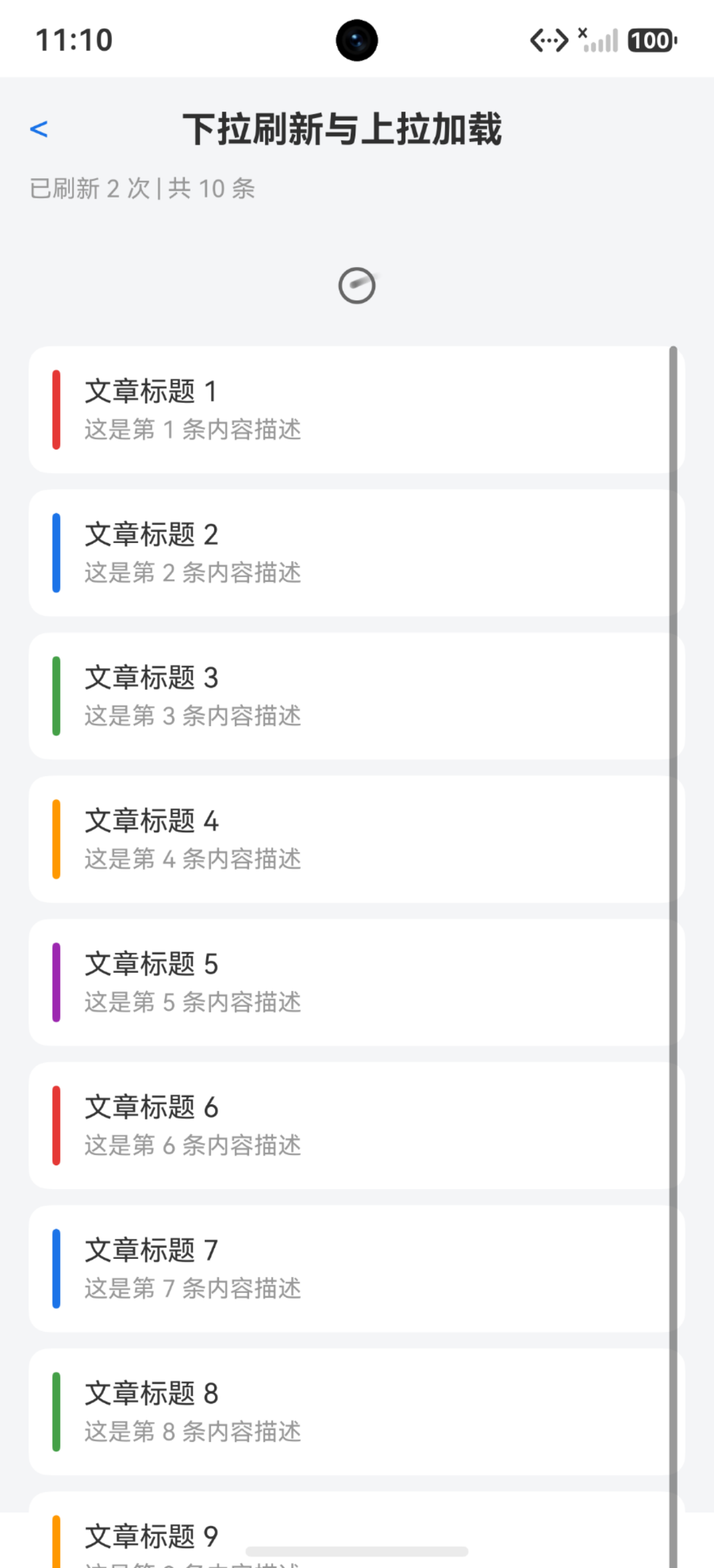
最简单的下拉刷新:
@State isRefreshing: boolean = false

Refresh({ refreshing: $$this.isRefreshing }) {
  List() {
    ForEach(this.items, (item: DataItem) => {
      ListItem() {
        Text(item.title)
      }
    }, (item: DataItem) => item.id)
  }
}
.onRefreshing(() => {
  this.loadData();
})
$$this.isRefreshing是双向绑定——Refresh组件会自动设为true触发刷新,数据加载完后设为false收起。onRefreshing是刷新触发回调。
问题:Refresh的默认动画太简陋——就一个圈在转,没有弹性下拉效果,没有文字提示,没有成功/失败反馈。
自定义刷新布局
用Refresh的builder参数自定义刷新区域:
@State isRefreshing: boolean = false
@State refreshState: string = 'idle'

@Builder
refreshBuilder() {
  Row() {
    if (this.refreshState === 'idle') {
      Text('下拉刷新')
        .fontSize(14)
        .fontColor('#999999')
    } else if (this.refreshState === 'pulling') {
      Text('释放立即刷新')
        .fontSize(14)
        .fontColor('#666666')
    } else if (this.refreshState === 'refreshing') {
      LoadingProgress()
        .width(20)
        .height(20)
        .margin({ right: 8 })
      Text('正在刷新...')
        .fontSize(14)
        .fontColor('#1a73e8')
    } else if (this.refreshState === 'success') {
      Text('刷新成功')
        .fontSize(14)
        .fontColor('#43a047')
    } else if (this.refreshState === 'failed') {
      Text('刷新失败,请重试')
        .fontSize(14)
        .fontColor('#e53935')
    }
  }
  .width('100%')
  .height(60)
  .justifyContent(FlexAlign.Center)
  .alignItems(VerticalAlign.Center)
}

Refresh({ refreshing: $$this.isRefreshing, builder: this.refreshBuilder() }) {
  List() {
    // 列表内容
  }
}
.onRefreshing(async () => {
  this.refreshState = 'refreshing';
  try {
    await this.loadData();
    this.refreshState = 'success';
  } catch (e) {
    this.refreshState = 'failed';
  }
  setTimeout(() => {
    this.isRefreshing = false;
    this.refreshState = 'idle';
  }, 500);
})
五个状态:idle→pulling→refreshing→success/failed→idle。成功和失败显示500ms后收起。
下拉距离监听
Refresh组件的onPullingDown回调提供下拉距离:
Refresh({ refreshing: $$this.isRefreshing }) {
  List() {
    // 内容
  }
}
.onPullingDown((progress: number) => {
  if (progress < 0.6 && this.refreshState !== 'refreshing') {
    this.refreshState = 'idle';
  } else if (progress >= 0.6 && this.refreshState !== 'refreshing') {
    this.refreshState = 'pulling';
  }
})
progress是0~1的进度值,0表示未下拉,1表示到达触发阈值。0.6是个经验值——下拉超过60%时提示"释放刷新"。
自定义旋转箭头
下拉时箭头随进度旋转:
@State pullProgress: number = 0

@Builder
refreshBuilder() {
  Row() {
    Image($r('sys.media.ohos_ic_public_arrow_down'))
      .width(20)
      .height(20)
      .rotate({ angle: this.pullProgress * 180 })
      .animation({ duration: 100 })
      .margin({ right: 8 })

    if (this.refreshState === 'refreshing') {
      LoadingProgress()
        .width(20)
        .height(20)
        .margin({ right: 8 })
      Text('加载中...')
    } else if (this.pullProgress >= 0.6) {
      Text('释放刷新')
    } else {
      Text('下拉刷新')
    }
  }
  .fontSize(14)
  .fontColor('#666666')
  .width('100%')
  .height(60)
  .justifyContent(FlexAlign.Center)
}

.onPullingDown((progress: number) => {
  this.pullProgress = progress;
  // 状态判断
})
pullProgress从0到1,箭头旋转0°到180°。超过阈值时箭头朝上,提示"释放刷新"。
上拉加载更多
HarmonyOS没有内置上拉加载,需要自己实现。最简单的方式是在List底部加一个加载触发器:
@State isLoadingMore: boolean = false
@State hasMore: boolean = true
private currentPage: number = 1

List() {
  ForEach(this.items, (item: DataItem) => {
    ListItem() {
      // 列表项内容
    }
  }, (item: DataItem) => item.id)

  // 底部加载指示器
  if (this.hasMore) {
    ListItem() {
      Row() {
        LoadingProgress()
          .width(20)
          .height(20)
          .margin({ right: 8 })
        Text('加载更多...')
          .fontSize(14)
          .fontColor('#999999')
      }
      .width('100%')
      .height(50)
      .justifyContent(FlexAlign.Center)
    }
  } else {
    ListItem() {
      Text('没有更多了')
        .fontSize(14)
        .fontColor('#cccccc')
        .width('100%')
        .textAlign(TextAlign.Center)
        .padding(16)
    }
  }
}
.onReachEnd(() => {
  if (!this.isLoadingMore && this.hasMore) {
    this.loadMore();
  }
})
onReachEnd在列表滚动到底部时触发。isLoadingMore防止重复触发,hasMore判断是否还有更多数据。
loadMore的实现:
private async loadMore(): Promise<void> {
  this.isLoadingMore = true;
  this.currentPage++;
  try {
    let newItems = await this.fetchData(this.currentPage);
    if (newItems.length === 0) {
      this.hasMore = false;
    } else {
      this.items = this.items.concat(newItems);
    }
  } catch (e) {
    this.currentPage--;
  }
  this.isLoadingMore = false;
}
concat合并新旧数据。新数据为空说明到底了,设hasMore=false。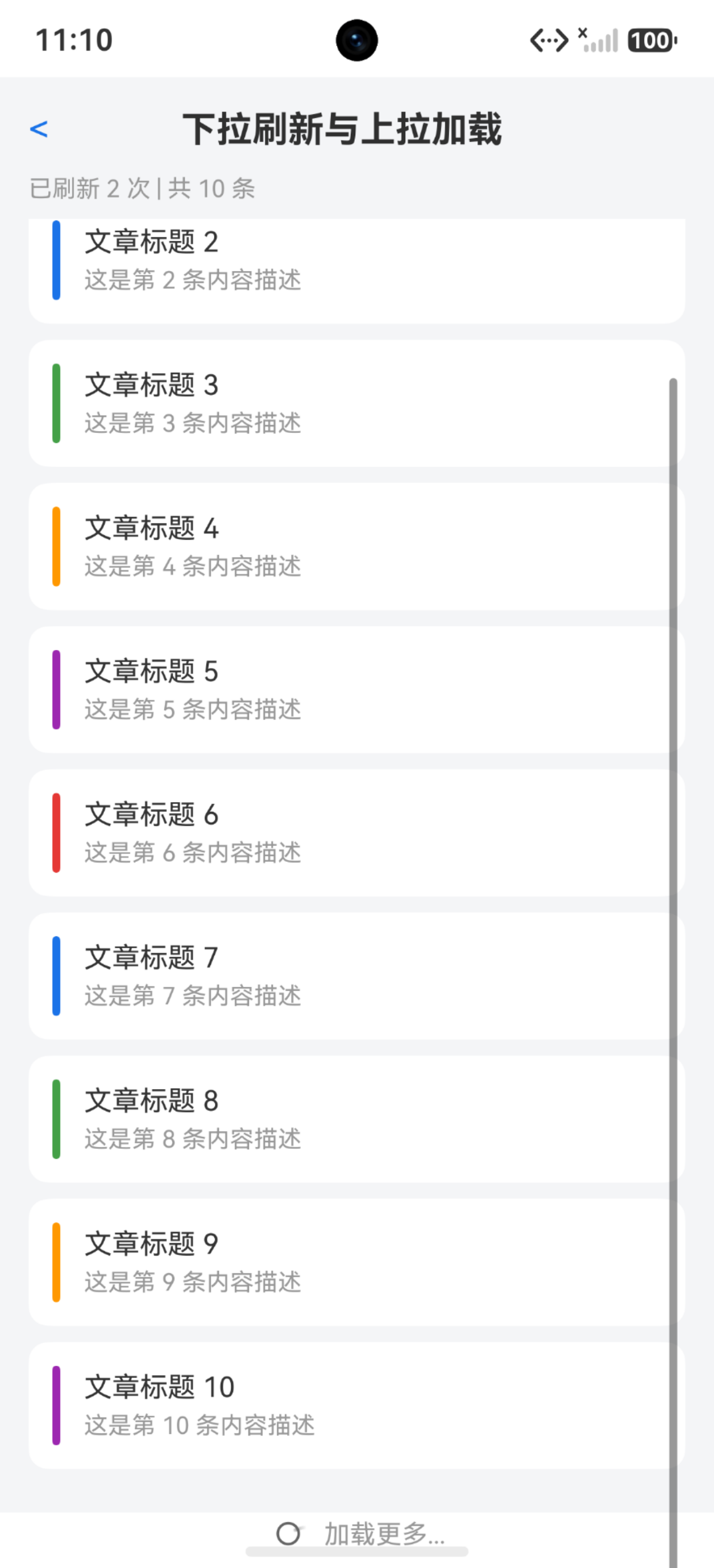
手动触发加载更多
onReachEnd在快速滚动时可能不触发。可以用onScrollIndex作为补充:
.onScrollIndex((start: number, end: number) => {
  if (end >= this.items.length - 3 && !this.isLoadingMore && this.hasMore) {
    this.loadMore();
  }
})
距离底部3条数据时提前加载,实现"预加载"效果。用户看到最后几条时新数据已经准备好了。
空状态处理
首次加载和刷新后都可能有空结果:
if (this.items.length === 0) {
  Column() {
    if (this.isFirstLoad) {
      LoadingProgress()
        .width(40)
        .height(40)
        .margin({ bottom: 16 })
      Text('加载中...')
        .fontSize(14)
        .fontColor('#999999')
    } else {
      Image($r('app.media.empty_state'))
        .width(120)
        .height(120)
        .margin({ bottom: 16 })
      Text('暂无数据')
        .fontSize(16)
        .fontColor('#999999')
        .margin({ bottom: 8 })
      Text('点击重试')
        .fontSize(14)
        .fontColor('#1a73e8')
        .onClick(() => {
          this.isRefreshing = true;
          this.loadData();
        })
    }
  }
  .width('100%')
  .height('100%')
  .justifyContent(FlexAlign.Center)
} else {
  Refresh({ refreshing: $$this.isRefreshing }) {
    List() {
      // 列表内容
    }
  }
  .onRefreshing(() => {
    this.loadData();
  })
}
首次加载显示loading,加载完成无数据显示空状态+重试按钮。有数据时才显示列表。
刷新与加载的协调
下拉刷新应该重置分页状态:
private async loadData(): Promise<void> {
  this.currentPage = 1;
  this.hasMore = true;
  try {
    this.items = await this.fetchData(1);
    this.refreshState = 'success';
  } catch (e) {
    this.refreshState = 'failed';
  }
  setTimeout(() => {
    this.isRefreshing = false;
    this.refreshState = 'idle';
  }, 500);
}
刷新时currentPage重置为1,hasMore恢复true,items用新数据替换(不是concat)。加载更多时才concat追加。
关键:刷新和加载更多不能同时进行。 在isRefreshing为true时禁止触发loadMore,在isLoadingMore为true时不响应onRefreshing。
列表滚动位置记忆
刷新后列表会跳回顶部。要保持位置:
private scroller: Scroller = new Scroller();
private scrollOffset: number = 0;

List() {
  // 内容
}
.scroller(this.scroller)
.onScroll(() => {
  this.scrollOffset = this.scroller.currentOffset().yOffset;
})

// 刷新完成后恢复位置
async loadData(): Promise<void> {
  let savedOffset = this.scrollOffset;
  this.currentPage = 1;
  this.items = await this.fetchData(1);
  this.isRefreshing = false;
  // 恢复滚动位置
  setTimeout(() => {
    this.scroller.scrollTo({ xOffset: 0, yOffset: savedOffset });
  }, 100);
}
刷新前记录currentOffset,刷新后scrollTo恢复。setTimeout 100ms等UI更新完成再滚动。
但大多数应用刷新后跳回顶部是预期行为——用户下拉刷新就是想看最新内容。只有"静默刷新"(后台刷新不跳位置)才需要记忆位置。
踩坑清单
| 问题 | 原因 | 解决 |
|---|---|---|
| 刷新动画收不起来 | isRefreshing没设回false | loadData完成后设false |
| 下拉没有弹性 | 没用Refresh组件 | 用Refresh包裹List |
| 加载更多重复触发 | 没用isLoadingMore防重 | 加布尔锁 |
| 没有更多数据还触发 | hasMore没判断 | 加hasMore标记 |
| 刷新时触发加载更多 | 两个状态没互斥 | isRefreshing时禁止loadMore |
| onReachEnd不触发 | LazyForEach缓存不够 | 用onScrollIndex提前触发 |
| 空状态没显示 | 只判断items空没判断加载状态 | 区分首次加载和加载完成 |
| 刷新后列表跳顶 | 这是默认行为 | 如需保持用scroller记忆位置 |
| 自定义builder不显示 | builder参数写法错 | builder: this.xxxBuilder() |
| 下拉进度不准确 | onPullingDown的progress是0~1 | progress>=0.6为可触发 |
下拉刷新用Refresh+自定义builder,上拉加载用onReachEnd+分页控制。两者共享数据源但状态独立——刷新重置分页,加载追加数据。记住这个原则,任何列表的刷新加载都能搞定。

讨论HarmonyOS开发技术,专注于API与组件、DevEco Studio、测试、元服务和应用上架分发等。
更多推荐


 4
4 0
0- 0


 已为社区贡献61条内容

所有评论(0)