HarmonyOS ArkTS API 24智慧健身管理平台深度实战:
健身管理类应用与之前分析的外卖、招聘等应用有本质差异——它的核心数据不是"交易"或"任务",而是"时间序列的身体状态数据":每次训练有时长、卡路里、组数、重量;每次饮食有热量、蛋白质、碳水、脂肪;每周有运动时长趋势图。这些数据的共同特征是"随时间积累,用户需要横向对比和趋势分析"。这导致健身App的数据层设计必须从第一天就考虑"历史数据查询"和"多维度聚合"的需求,而非仅关注当前单条记录的增删改查。
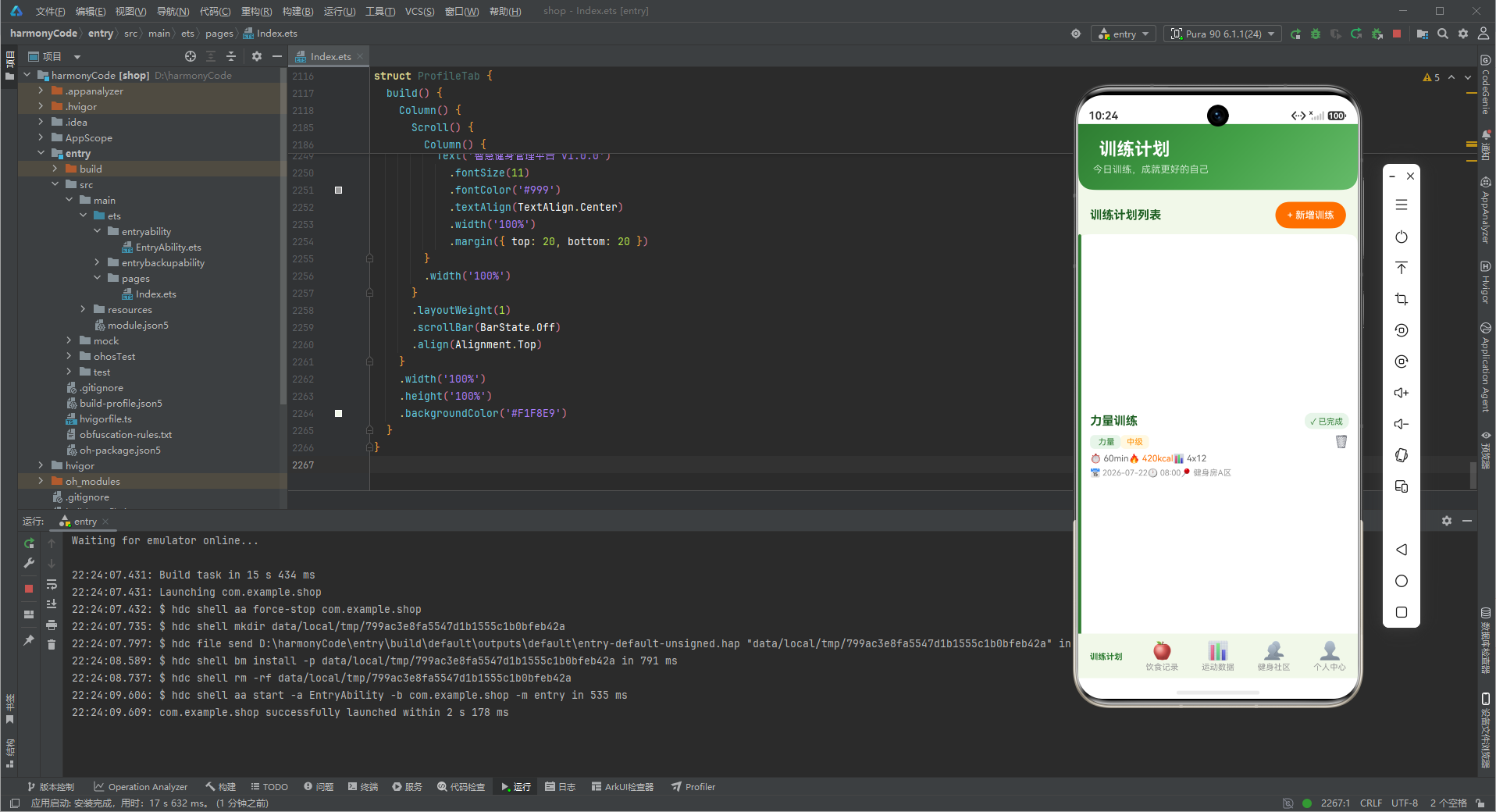
健身应用的用户行为模式也有独特之处:用户使用健身App的目标是"坚持",而不是"一次性完成任务"。这意味着激励机制的密度远比其他应用高——每完成一组动作需要视觉反馈(进度环填充),每天完成训练需要打卡记录(社区Tab的点赞社交),每周达成目标需要成就徽章(ProfileTab的统计数据)。激励回路的设计直接决定了用户的留存率,这是健身App最核心的产品指标,也是代码架构需要服务于的核心目标。
一、FitnessTab枚举与类型安全的Tab索引管理
FitnessTab枚举定义了五个Tab的数值索引(Workout = 0, Diet = 1, Data = 2, Community = 3, Profile = 4),将裸数字提升为语义化的类型成员。相比直接使用@State activeTab: number = 0,枚举方案在onChange回调处理时具有巨大优势:当开发者写if (this.activeTab === FitnessTab.Workout)时,IDE会根据枚举定义自动提示所有可能的Tab值,防止遗漏;如果后续新增一个Tab(如Achievements = 5),TypeScript编译器会在所有switch/if语句中标记"未处理FitnessTab的新成员",强迫开发者逐个补充处理逻辑。
枚举成员的值也可灵活设计。当业务需要"跳过某些Tab"(如会员专属Tab需要权限验证)时,可将枚举值设计为不连续的:Workout = 0, Diet = 1, Community = 3, Profile = 4(会员Tab = 5)。这种设计允许在TabBar渲染时根据用户权限动态过滤可见Tab,而不影响枚举本身的语义化价值。FitnessApp中的FitnessTab枚举顺序与TAB_LIST数组的顺序完全一致——TAB_LIST[0]对应训练计划,TAB_LIST[4]对应个人中心,两者的索引对齐确保了Tab切换时UI渲染与枚举判断的一致性。
enum FitnessTab {
  Workout = 0,   // 训练计划Tab,对应TAB_LIST[0]
  Diet = 1,      // 饮食记录Tab,对应TAB_LIST[1]
  Data = 2,      // 运动数据Tab,对应TAB_LIST[2]
  Community = 3, // 健身社区Tab,对应TAB_LIST[3]
  Profile = 4    // 个人中心Tab,对应TAB_LIST[4]
}
// 热量格式化:超过1000时显示为"Xk"形式
function formatCalories(cal: number): string {
  if (cal >= 1000) {
    return (cal / 1000).toFixed(1) + 'k'
  }
  return cal.toString()
}

// 难度颜色映射
function getDifficultyColor(difficulty: string): string {
  if (DIFFICULTY_CONFIG[difficulty]) {
    return DIFFICULTY_CONFIG[difficulty].color
  }
  return '#43A047'
}
二、@Observed数据模型与健身领域建模
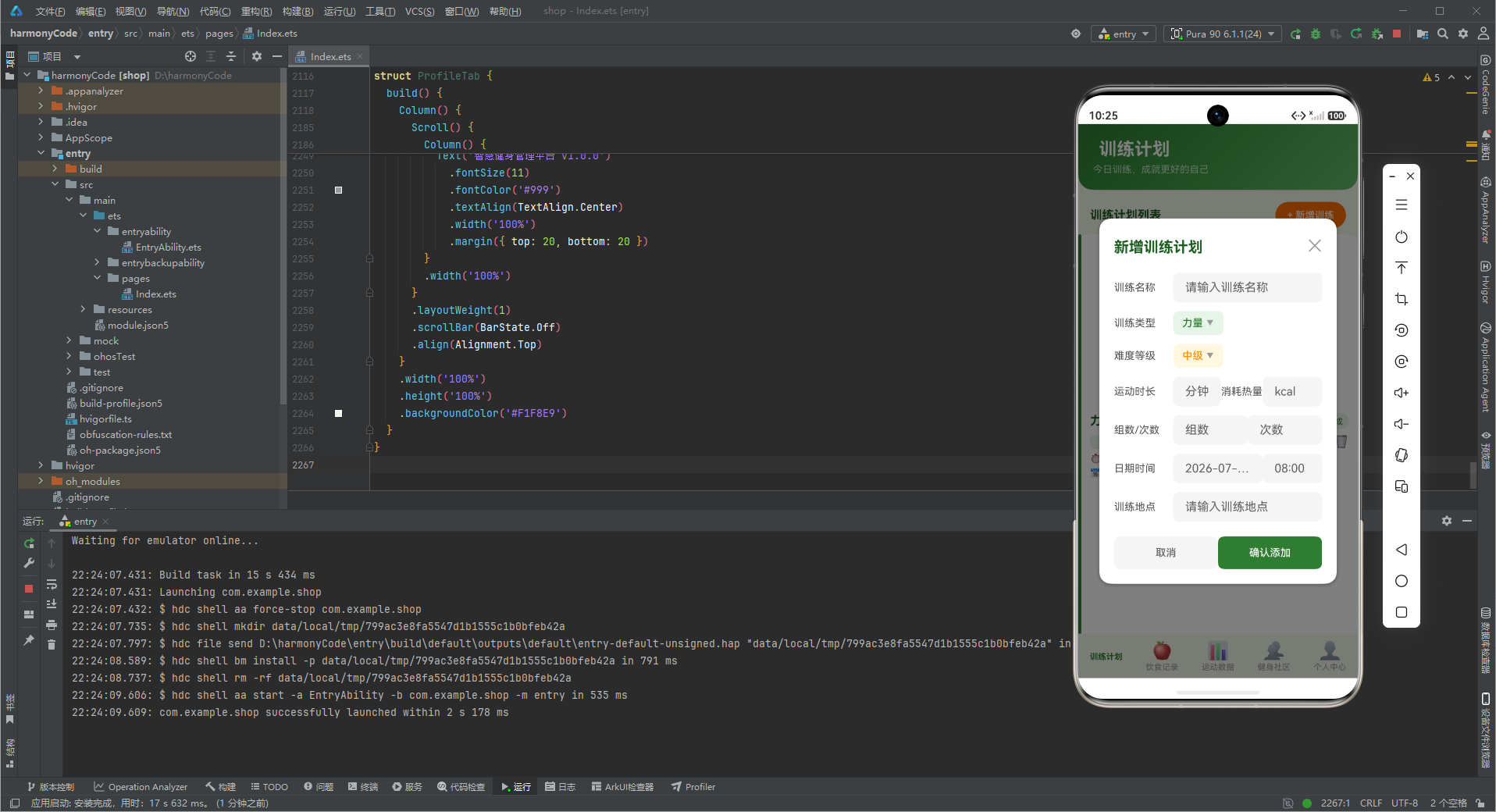
健身应用需要管理的三类核心数据——训练记录(WorkoutModel)、饮食记录(MealModel)、社区动态(PostModel)——各自有完全不同的业务含义和数据结构。WorkoutModel描述一次训练事件,包含训练类型(力量/有氧/HIIT等)、时长(分钟)、消耗卡路里、组数、次数、难度、日期时间、地点等字段;MealModel描述一餐饮食,包含食物名称、餐次类型(早餐/午餐/晚餐/加餐)、热量、蛋白质、碳水、脂肪等营养素字段;PostModel描述社区中的一条动态,包含作者信息、内容文本、帖子类型(打卡/分享/提问)、点赞数、评论数、是否已点赞等社交字段。
健身领域的数据建模需要深刻理解"训练周期"的概念——用户不是一次性完成健身目标,而是需要持续运动、规律追踪、逐步提高。WorkoutModel中的duration字段(分钟)和calories字段(消耗卡路里)共同描述了一次训练的质量:同样30分钟的训练,HIIT消耗450卡路里,而瑜伽只消耗180卡路里。calories/duration的比值(运动强度)是健身App计算"每日总消耗"的核心依据,结合饮食App的"每日总摄入",用户能精确计算热量赤字或盈余,决定减脂还是增肌。
三类模型的共性设计体现在"所有字段都是基础类型(string/number/boolean)"这一点上。ArkTS的@Observed响应式系统基于属性访问的拦截实现——当修改post.liked = true时,框架检测到属性变化并触发UI重新渲染。如果字段本身是复杂对象(嵌套数组或嵌套对象),需要递归应用@Observed/@ObjectLink装饰器,复杂度急剧上升。使用基础类型字段避免了这一问题:likes是一个number,修改post.likes++后框架直接触发重新渲染,无需额外的深度响应式配置。
WorkoutModel中isCompleted字段(boolean)是一个"状态标记"——训练记录创建时为false(未完成),用户点击"完成训练"按钮后变为true。这个字段驱动了训练列表中每条记录前的勾选图标样式:已完成的训练用绿色勾选显示,已完成的项目在统计中计入"完成次数"(STAT_CARDS中label为"完成次数"的卡片)。isCompleted的切换还触发训练记录的视觉高亮效果——已完成项目用不同背景色或划线样式呈现,帮助用户快速区分已完成和未完成的训练计划。
三、Record配置系统驱动的元数据查询
WORKOUT_TYPE_CONFIG、MEAL_TYPE_CONFIG、DIFFICULTY_CONFIG、POST_TYPE_CONFIG四套Record配置对象共同构成了健身App的"元数据中心"。Record<string, T>的键是字符串(对应数据模型中的type字段值),值是对应的元数据结构体(包含name、color、icon、bgColor等展示属性)。这种"数据层存键,展示层读配置"的设计将UI展示逻辑完全抽离出来:当需要修改"力量训练"的图标从改为时,只需要修改WORKOUT_TYPE_CONFIG[‘力量’].icon一行配置,无需搜索所有用到的代码位置。
getWorkoutTypeColor、getWorkoutTypeIcon、getWorkoutTypeBgColor等全局函数封装了对Record的查询操作,每个函数接收一个type字符串参数,返回对应的元数据字段。函数内部的if判断处理了"配置中不存在的type值"的边界情况——当用户新增了一个不在WORKOUT_TYPE_CONFIG中的训练类型时,函数返回默认值(color为#2E7D32绿色,icon为),确保UI不会因为缺少配置而崩溃。这种"防御性默认值"模式在所有getter函数中统一应用,是ArkTS应用健壮性的重要保障。
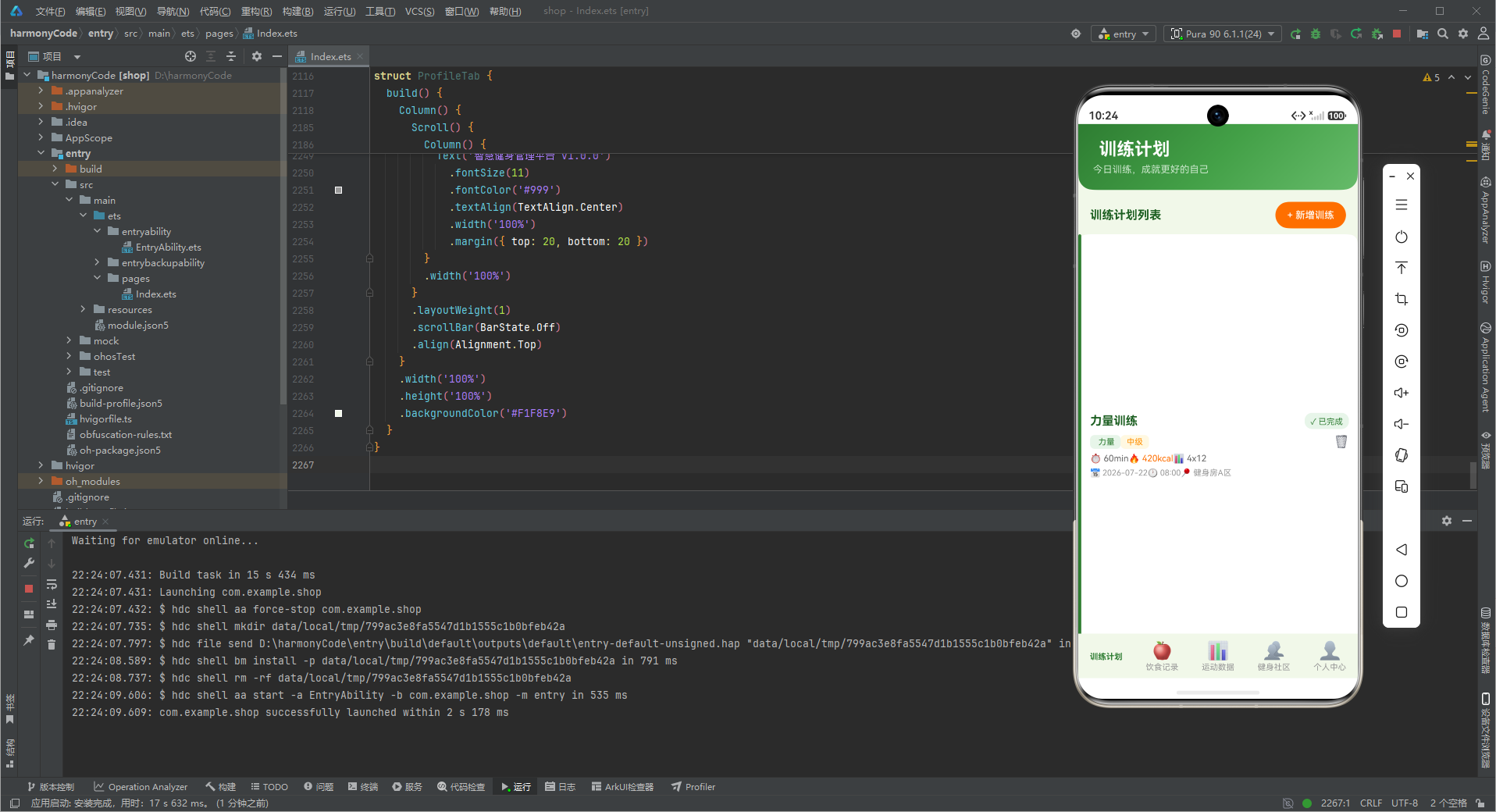
DIFFICULTY_CONFIG的设计专门服务于训练卡片的难度可视化:初级用绿色(#43A047)、中级用橙色(#FF8F00)、高级用红色(#C62828)。颜色编码在健身场景中有强烈的心理暗示——绿色传递"安全、可控"的感觉,橙色暗示"需要努力",红色则传递"挑战、极限"。用户在浏览训练列表时,无需阅读文字即可通过颜色感知训练难度,做出初步筛选。
四、热量与营养素的数据结构设计
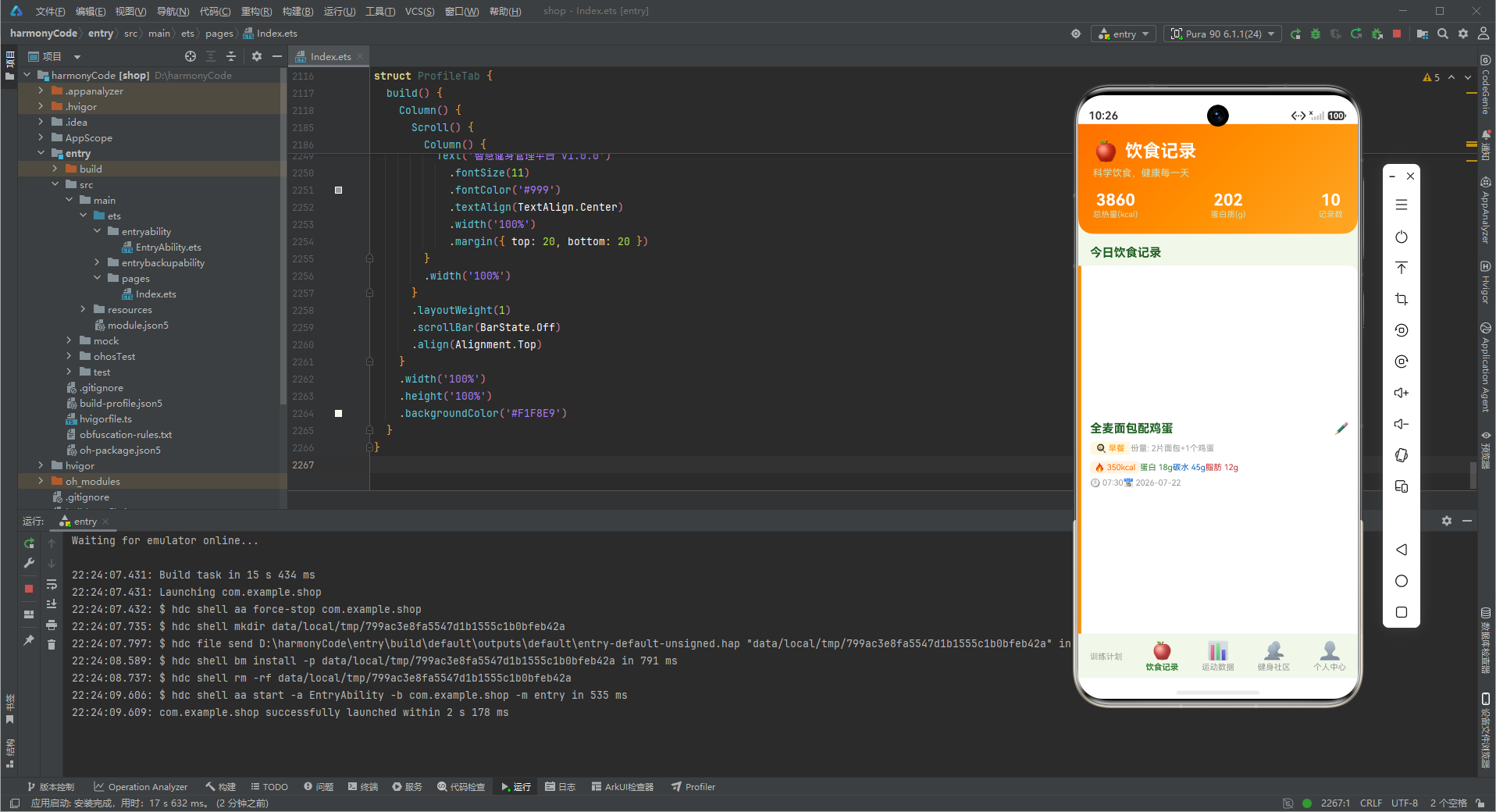
MealModel中calories、protein、carbs、fat四个数值字段构成了营养追踪的"四维核心"——这四个维度是健身人群中最为关注的基础营养指标。热量(calories)是体重管理的核心变量:摄入热量小于消耗热量则减脂,反之则增肌。蛋白质(protein)是肌肉修复和合成的原料,高强度力量训练后需要大量补充蛋白质。碳水化合物(carbs)是运动的主要能量来源,训练前后补充碳水有助于提升运动表现。脂肪(fat)参与激素合成,适量摄入有助于维持内分泌平衡。
一整天的热量管理需要将多个MealModel的calories字段相加——这个聚合操作通常在DataTab的aboutToAppear()中执行,计算当日总热量摄入,与用户设定的"每日目标热量"对比,渲染环形进度图(已摄入/目标摄入)。ArkTS没有内置的聚合查询语法(类似SQL的SUM),需要开发者手动遍历数组执行加法运算。当数据量较大(如一年365天的饮食记录)时,频繁的全量遍历会产生性能问题——此时需要在数据层维护一个每日热量的累加缓存(Map<string, number>),每日三餐后更新缓存中的今日合计值,查询时O(1)读取。
MealModel中每餐食物记录的portion字段(份量描述,如"2片面包+1个鸡蛋")是一个非结构化的文本字段。与结构化的calories/protein/carbs/fat不同,portion用于给用户一个直观的"吃了什么"的描述——在饮食详情页显示给用户,而非用于数据计算。结构化数据(营养素克数)用于数据统计和趋势分析,非结构化数据(份量描述)用于内容展示,这种"同一数据对象承载两种信息形态"的设计在ArkTS应用的数据层中很常见。
formatCalories函数处理了热量的"千位缩写"显示逻辑:当calories >= 1000时,返回"4.4k"而非"4380"。这一显示优化基于用户阅读习惯——"4.4k kcal"比"4380 kcal"更易快速扫视,卡片空间利用率更高。健身App的统计页需要展示大量数字(训练时长、消耗卡路里、连续天数等),数字的显示格式直接影响信息传达效率。"k后缀缩写"是健身App的行业惯例,用户对此非常熟悉。
五、Tabs组件原生导航与BarPosition.End布局
FitnessApp的build()方法使用了HarmonyOS原生的Tabs组件(与外卖App相同的架构),通过Tabs({ barPosition: BarPosition.End, index: this.activeTab })将TabBar固定在屏幕底部。barPosition(BarPosition.End)是一个在移动端健身App中经过验证的设计选择——用户在单手操作手机时,拇指的自然落点恰好在屏幕底部中央附近,底部TabBar的点击操作最为省力。相比之下,顶部TabBar需要用户调整握持姿势或使用双手,影响操作流畅度。
barMode(BarMode.Fixed)(隐含默认值)确保5个Tab平分底部TabBar的宽度——每个Tab占据20%的宽度,文字和图标居中显示。当Tab数量固定(5个)且屏幕空间足够时,Fixed模式提供了最稳定的视觉布局:用户记住每个Tab的大概位置后,可凭借肌肉记忆快速切换,无需视觉确认。相比之下,BarMode.Scrollable适用于Tab数量不固定或可能超出屏幕宽度的场景(如新闻App的分类Tab)。
onChange回调将用户切换Tab时触发的index(数字)同步到activeTab状态(FitnessTab枚举值)。这里的类型转换(index as FitnessTab)将number类型断言为FitnessTab枚举类型——因为Tabs组件的onChange回调参数是number,而非FitnessTab枚举。类型断言是ArkTS中处理"系统API返回基础类型但业务代码需要枚举类型"场景的标准解决方案。
六、训练Tab的WorkoutCard组件设计
WorkoutCard是训练Tab的核心卡片组件,承载了一次训练记录的完整展示信息。卡片的视觉结构从上到下依次是:训练类型标签(WorkoutTypeConfig[type].icon + type文字)、训练名称(name)、难度标签(DIFFICULTY_CONFIG[difficulty].bgColor背景色)、时长和卡路里(duration + calories)、完成状态图标(isCompleted的布尔驱动)。这种"先分类再详情"的信息层级符合用户阅读习惯:先通过左上角的训练类型标签快速判断卡片类型,再通过名称和数字获取具体信息。
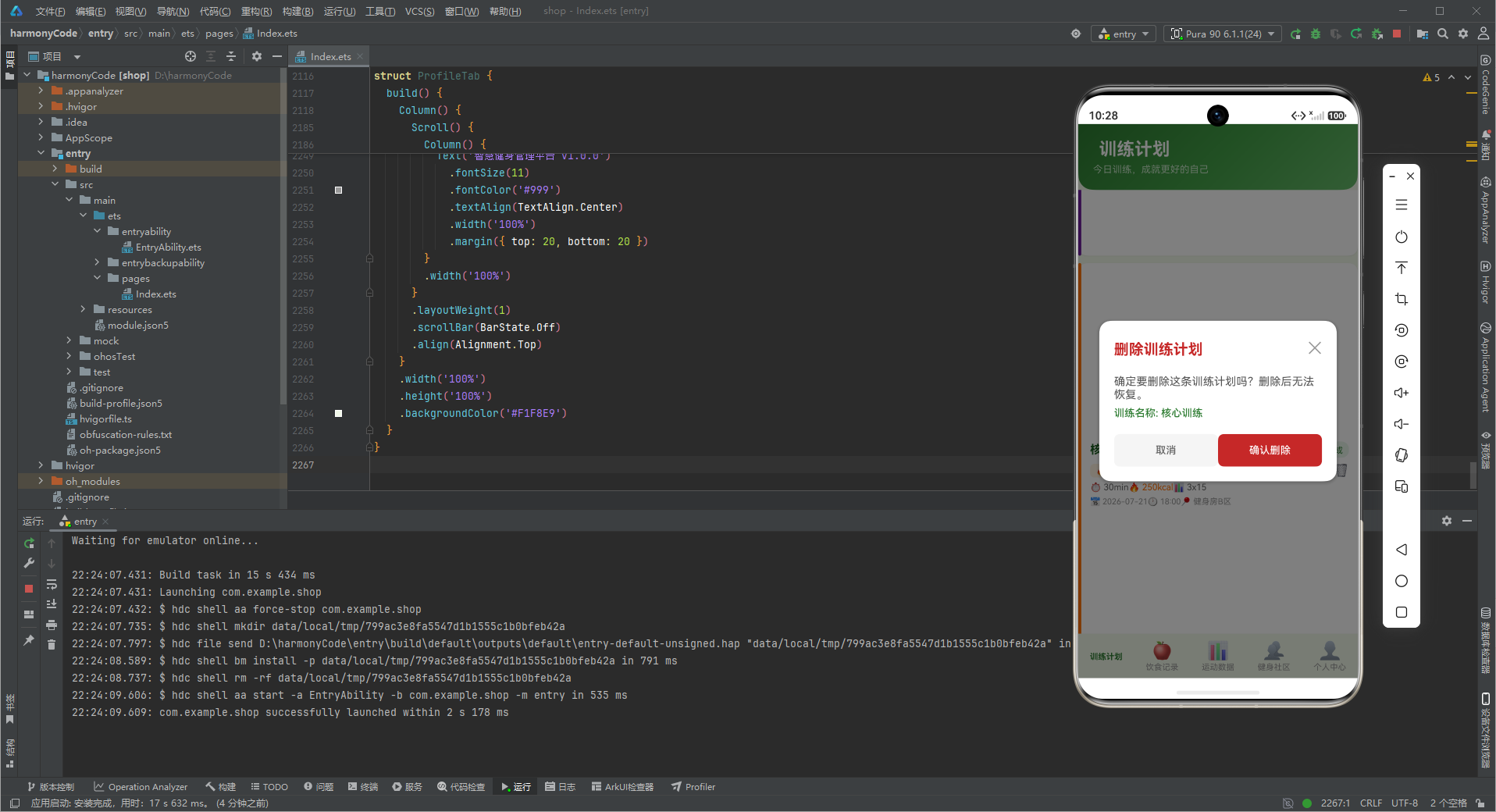
WorkoutCard接收的props结构(workout: WorkoutModel, onComplete: Callback, onDelete: Callback)采用了"数据+回调"组合模式。workout提供卡片渲染所需的完整数据,onComplete和onDelete两个回调函数处理用户交互事件。这种Props设计将"渲染职责"和"业务逻辑处理职责"分离:WorkoutCard只负责将数据渲染为UI,点击"完成"按钮时调用onComplete(workout)将控制权交回父组件(WorkoutTab),由WorkoutTab决定如何修改@State数组中的isCompleted字段。这种"子组件通知、父组件修改"的单向数据流模式是ArkTS响应式UI的核心设计范式。
isCompleted字段的变更触发两类UI更新:在WorkoutCard中,完成按钮的图标从空心圆圈变为绿色勾选,卡片背景色也会调整;在WorkoutTab的统计区,"完成次数"卡片(STAT_CARDS中label为"完成次数"的项)会实时更新数字。当用户点击完成按钮时,WorkoutTab遍历训练列表,找到对应id的记录,将isCompleted从false改为true,然后FitnessApp的@State数组更新触发相关组件的重新渲染。
七、饮食Tab的营养素可视化
饮食记录(DietTab)的核心挑战是将"营养素数据"以直观的方式呈现给用户。MEAL_LIST中的每条记录包含calories、protein、carbs、fat四个数值,用户需要快速判断"这顿饭吃了多少"以及"今天各餐营养素摄入是否均衡"。DietTab通常用"三大营养素比例环形图"或"横向进度条"来可视化每餐的营养素——环形图用三种颜色的弧段表示蛋白质、碳水、脂肪的相对比例,用户一眼就能判断"碳水占比过高"还是"蛋白质不足"。
营养素比例的"均衡"是一个相对概念——对于增肌期用户,高蛋白(30%)+ 中碳水(50%)+ 低脂肪(20%)是目标;对于减脂期用户,中蛋白(30%)+ 低碳水(30%)+ 中脂肪(40%)是目标。MEAL_TYPE_CONFIG中定义的四种餐次颜色在营养统计页能衍生出"热量来源分布"功能:早餐(橙色)+ 午餐(绿色)+ 晚餐(紫色)+ 加餐(红色)构成一个完整的"一日热量拼图",每块的大小反映该餐次在全天热量中的占比。这种可视化帮助用户直观判断"我的热量分布是否合理",而非仅知道"今天总共吃了多少卡路里"。
MEAL_TYPE_CONFIG定义了四种餐次(早餐、午餐、晚餐、加餐)的图标和颜色,每种餐次有独特的视觉区分度:早餐用橙色(🍳+#FF8F00),午餐用绿色(🍱+#2E7D32),晚餐用紫色(🍽️+#6A1B9A),加餐用红色(🍎+#C62828)。颜色编码不仅用于Tab内的分类筛选,也用于饮食统计页的"各餐热量对比柱状图"——不同颜色的柱子分别代表早餐、午餐、晚餐、加餐的热量,用户通过颜色和高度即可判断"今天哪顿吃得最多"。
八、运动数据Tab的周柱状图设计
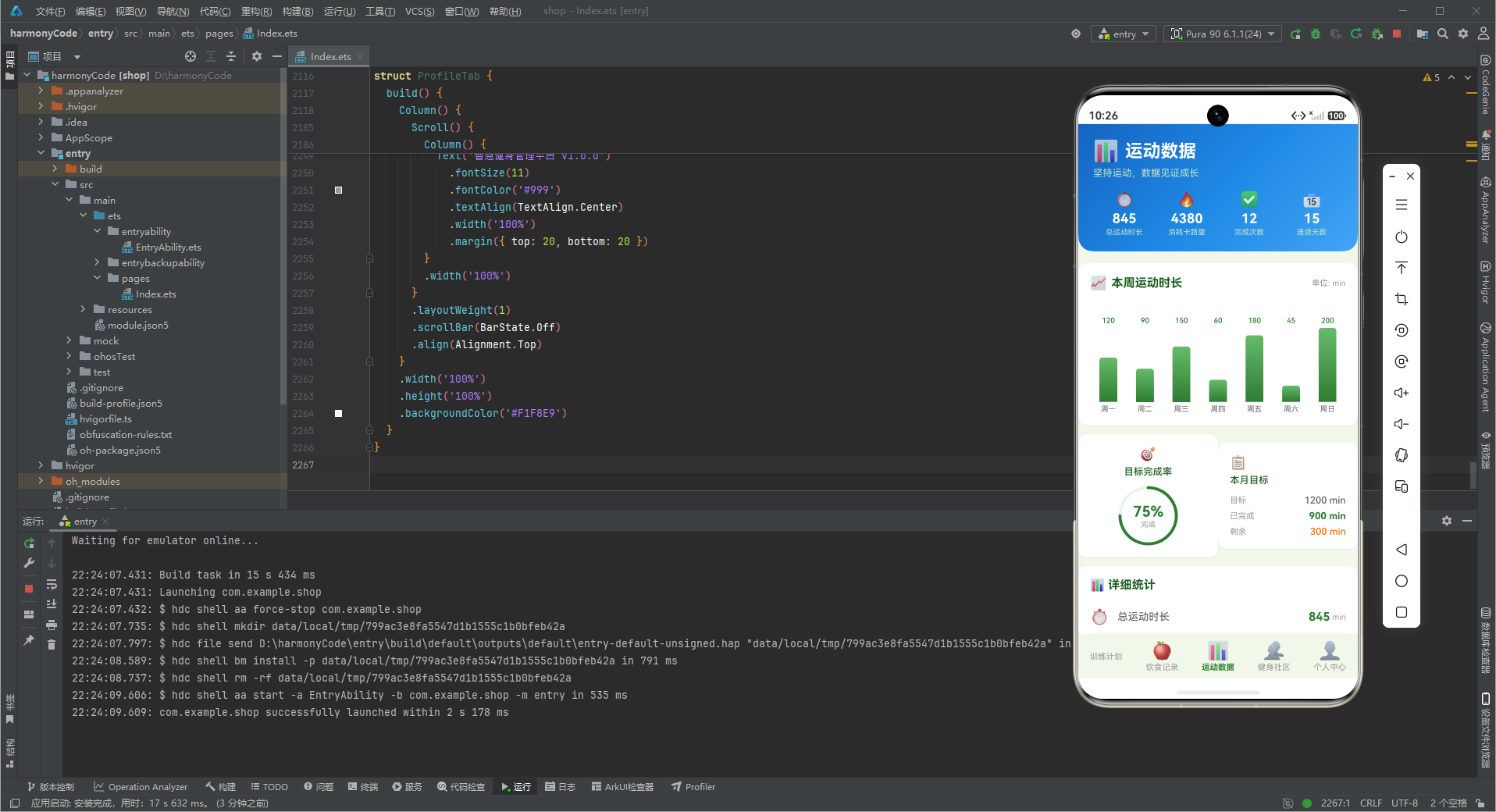
WEEKLY_CHART_DATA(周一到周日的运动时长数据)通过DataTab中的自定义柱状图组件渲染。每根柱子的height属性(WEEKLY_CHART_DATA中定义)已经是"相对于最大值的像素高度"(如周三150分钟对应height: 75,周日200分钟对应height: 100),而非原始数据值。这种预处理设计将"计算柱高"的任务从UI渲染阶段转移到数据准备阶段——build()方法只需要读取预计算的height属性,循环渲染固定宽度的Column()柱子,逻辑极简。
柱状图下方通常需要日期标签(周一、周二…)和刻度参考线。DataTab中的周柱状图通过Row({justifyContent: FlexAlign.SpaceEvenly})均匀分配7个日期标签,每个标签下方对应一根柱子。SpaceEvenly模式确保柱子之间的间距相等,即使柱子高度不同也不会破坏整体对齐感。这是ArkTS中"等间距列表"的惯用布局模式。
STAT_CARDS中的四张统计卡(总运动时长、消耗卡路里、完成次数、连续天数)使用横向Grid(2×2)布局,每张卡包含icon、label、value、unit四个信息元素。Grid布局的优势是自动处理"在有限空间内排列多个等大卡片"的对齐问题——无论屏幕宽度如何变化,Grid(2)始终将卡片分为两列,左右各半,无需手动计算每张卡的宽度百分比。
九、健身社区PostModel的社交交互
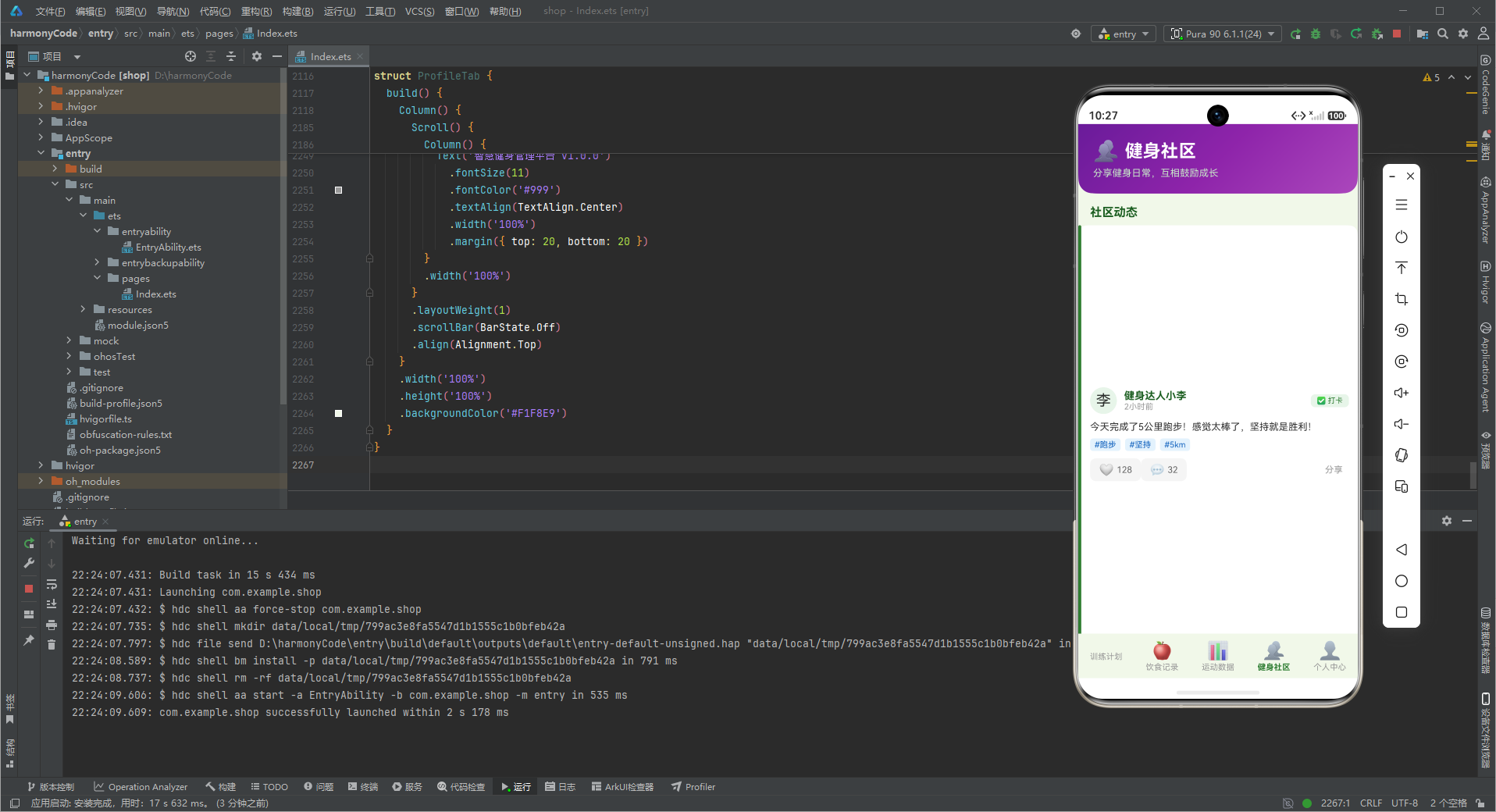
PostModel中的likes、comments、liked三个字段构成了完整的"互动数据模型"。likes记录总点赞数(数字),liked记录当前用户是否已点赞(布尔),comments记录评论数(数字)。这种"计数值+关系标记"的双字段设计是社交应用中的标准模式:likes表示内容的热度(高点赞→高质量内容→排序提升),liked表示用户与内容的关系状态(已点赞→显示实心图标、已点赞→不可重复点赞)。
toggleLike的交互逻辑在PostCard组件中实现:用户点击点赞按钮时,post.liked从false变为true或从true变为false,同步修改post.likes(加1或减1)。由于PostModel被@Observed装饰,属性变化自动触发PostCard的重新渲染,UI在下一帧反映出新的点赞状态和图标样式。整个交互的响应延迟约为16毫秒(60fps的一帧时长),用户几乎感知不到状态更新的延迟。
PostModel的tags数组(string[],如[‘跑步’, ‘坚持’, ‘5km’])与POST_TYPE_CONFIG配合,在帖子卡片中渲染多个标签徽章。每个标签的显示样式根据标签文本从配置中读取颜色——自定义标签(如’5km’)使用默认样式(灰色背景),系统预设标签(如’跑步’、‘打卡’)使用对应颜色。标签的作用是"内容归类"和"发现入口":用户点击’跑步’标签可筛选所有包含该标签的帖子,实现社区内的内容发现。
// 周柱状图数据结构示例
const WEEKLY_CHART_DATA: WeekChartItemMeta[] = [
  { day: '周一', minutes: 120, height: 60 },
  { day: '周二', minutes: 90, height: 45 },
  { day: '周三', minutes: 150, height: 75 },
  { day: '周四', minutes: 60, height: 30 },
  { day: '周五', minutes: 180, height: 90 },
  { day: '周六', minutes: 45, height: 22 },
  { day: '周日', minutes: 200, height: 100 }
]

// 统计卡片数据
const STAT_CARDS: StatMeta[] = [
  { label: '总运动时长', value: '845', unit: 'min', icon: '⏱️', color: '#2E7D32' },
  { label: '消耗卡路里', value: '4380', unit: 'kcal', icon: '🔥', color: '#FF6F00' },
  { label: '完成次数', value: '12', unit: '次', icon: '✅', color: '#1565C0' },
  { label: '连续天数', value: '15', unit: '天', icon: '📅', color: '#6A1B9A' }
]
十一、连续打卡机制与用户留存激励
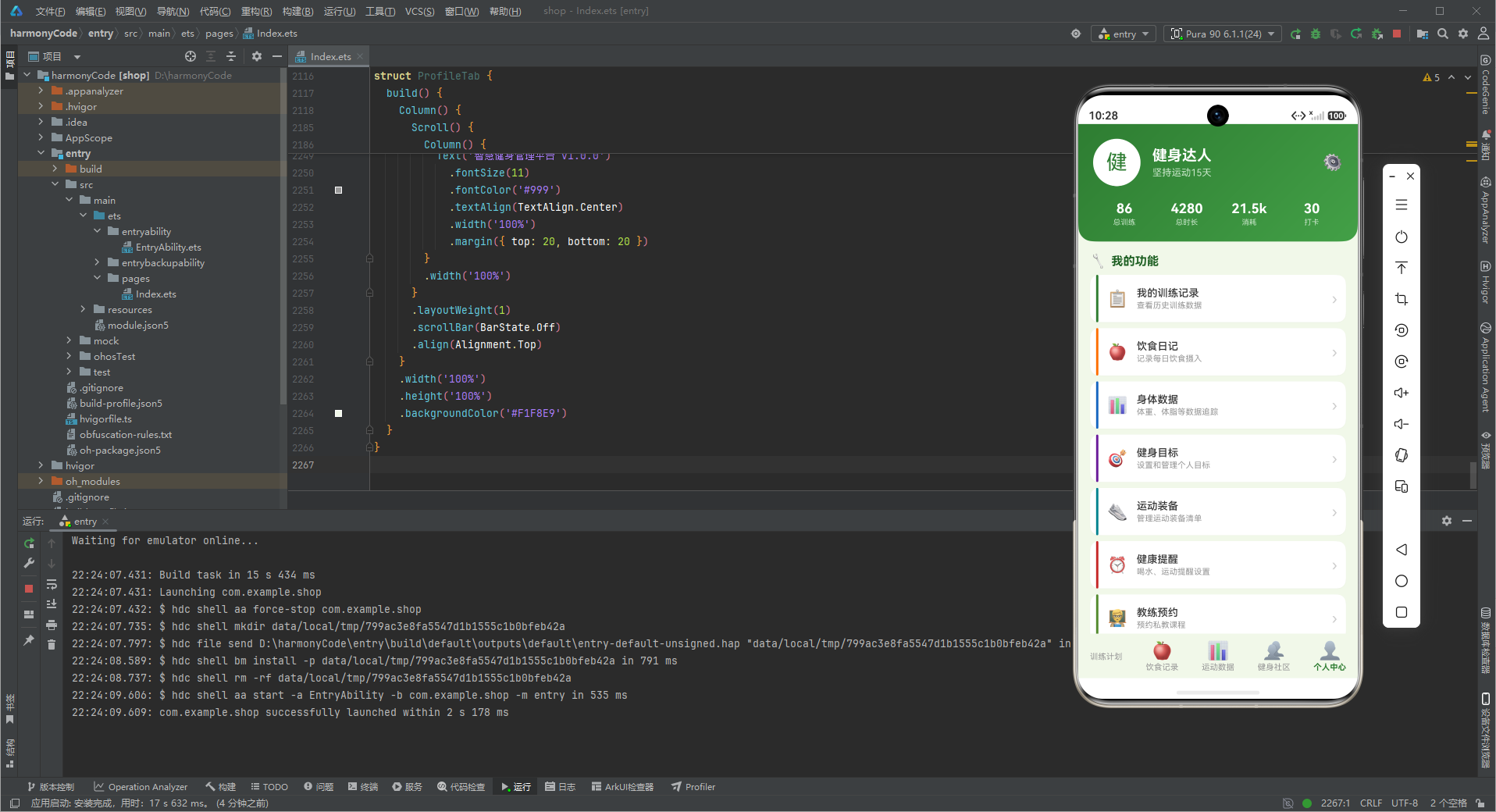
PROFILE_STATS中label为"连续天数"的统计项是健身App中最强的留存杠杆。连续打卡天数的计算逻辑是:从今天往前倒推,统计连续有多少天的WORKOUT_LIST中有isCompleted为true的训练记录。中断一天则连续天数归零,重新从第一天计算。这种"全有或全无"的机制在产品设计上借鉴了"游戏连续登录奖励"的设计——中断的惩罚足够重(清零),用户会主动安排每天的训练计划以避免"断签"。
连续天数不仅是统计数字,还会触发视觉激励:15天连续打卡时弹出"成就解锁"徽章(ProfileTab中展示),分享到社区(PostModel的PostTypeConfig[‘打卡’])时带上"第X天打卡"的动态文案。社交分享是连续打卡机制的外延——用户在朋友圈晒"坚持健身第30天"的内容,本质上是用"社会承诺"强化自身的坚持动力。这一心理机制在健身App的用户行为研究中反复被验证:公开承诺的目标比私密目标的完成率高2-3倍。
十二、训练记录的历史查询与统计分析
WORKOUT_LIST中12条训练记录跨越了多天(从2026-07-17到2026-07-22),这些历史数据构成了DataTab统计分析的基础。DataTab需要计算的关键指标包括:周运动时长(本周七天duration之和)、月运动次数(本月isCompleted为true的记录数)、平均每次训练消耗(总calories / 完成次数)。这些聚合指标的展示形式通常是"与上周/上月对比"的百分比变化(如"本周运动时长比上周多了20%"),用箭头图标和颜色(绿色代表进步、红色代表退步)强化正/负向变化。
MENU_LIST中的"我的训练记录"菜单项(id=1, title=‘我的训练记录’)对应ProfileTab内的一个子页面,承载历史训练记录的筛选查询功能。用户可按训练类型(从WORKOUT_TYPE_CONFIG中选择)、时间范围(近7天/近30天/全部)、难度级别(从DIFFICULTY_CONFIG中选择)进行多维筛选。筛选结果按日期倒序排列(最新训练记录在前),每条记录展示训练类型、名称、时长、卡路里、完成状态等核心信息。历史数据的查询性能在数据量较大时(超过1000条记录)需要关注——此时应考虑在数据层维护索引结构(如按日期建TreeMap,按训练类型建哈希表),而非每次筛选时全量遍历WORKOUT_LIST。
十三、教练预约与个性化训练计划
MENU_LIST中id=7的菜单项(title=‘教练预约’)揭示了健身App从"数据记录工具"向"服务撮合平台"延伸的商业路径。教练预约功能的核心数据模型包括:教练信息(教练名、头像、专长、评分)、可预约时段(某天某时是否已被预约)、预约记录(用户ID、教练ID、时段、状态)。预约时段的展示需要处理"冲突检测"——同一时段不能被两个用户同时预约,这需要后端数据库的行锁或乐观锁机制。ArkTS前端在用户点击"预约"按钮后,应在网络请求返回成功结果前禁用按钮(防止重复点击),并在预约失败时向用户展示具体的失败原因(如"该时段已被其他用户预约")。
个性化训练计划(MENU_LIST中id=4, title=‘健身目标’)是"目标设定→执行追踪→达成庆祝"闭环系统的入口。用户设定目标时需要填写:目标类型(减脂/增肌/维持)、目标体重/体脂、达成时限。系统根据目标类型生成推荐的"每周训练计划"(每周几次、每次什么类型)和"每日饮食热量范围"(减脂目标下每日摄入 = 基础代谢率 × 活动系数 - 热量赤字,通常为500卡路里)。训练过程中,App根据实际完成情况动态调整推荐——如果连续两周的训练完成率低于50%,系统自动降低训练频次推荐,避免用户因目标过高而放弃。
安装DevEco Studio程序

选择目标安装目录:

设置环境变量,但是需要重启一下:

新建一个空白模板:

设置API为24的模板项目:
初始化项目,自动下载相关依赖:

完整代码:
// ============================================================
// 智慧健身管理平台 - 鸿蒙ArkTS
// 配色:翠绿运动风
// 主色 #2E7D32 | 辅色 #FF6F00 | 背景 #F1F8E9 | 卡片白色
// ============================================================
// ======================== 接口定义 ========================
interface WorkoutTypeMeta {
name: string
color: string
icon: string
bgColor: string
}
interface MealTypeMeta {
name: string
color: string
icon: string
bgColor: string
}
interface DifficultyMeta {
name: string
color: string
bgColor: string
}
interface StatusMeta {
name: string
color: string
icon: string
bgColor: string
}
interface PostTypeMeta {
name: string
color: string
icon: string
bgColor: string
}
interface TabMeta {
label: string
icon: string
activeColor: string
}
interface WeekChartItemMeta {
day: string
minutes: number
height: number
}
interface StatMeta {
label: string
value: string
unit: string
icon: string
color: string
}
interface AppMenuItem {
id: number
title: string
icon: string
subtitle: string
color: string
}
// ======================== 数据模型 ========================
@Observed
class WorkoutModel {
id: string
name: string
type: string
duration: number
calories: number
sets: number
reps: number
difficulty: string
date: string
time: string
isCompleted: boolean
location: string
constructor(
id: string,
name: string,
type: string,
duration: number,
calories: number,
sets: number,
reps: number,
difficulty: string,
date: string,
time: string,
isCompleted: boolean,
location: string
) {
this.id = id
this.name = name
this.type = type
this.duration = duration
this.calories = calories
this.sets = sets
this.reps = reps
this.difficulty = difficulty
this.date = date
this.time = time
this.isCompleted = isCompleted
this.location = location
}
}
@Observed
class MealModel {
id: string
food: string
meal: string
calories: number
protein: number
carbs: number
fat: number
time: string
date: string
portion: string
constructor(
id: string,
food: string,
meal: string,
calories: number,
protein: number,
carbs: number,
fat: number,
time: string,
date: string,
portion: string
) {
this.id = id
this.food = food
this.meal = meal
this.calories = calories
this.protein = protein
this.carbs = carbs
this.fat = fat
this.time = time
this.date = date
this.portion = portion
}
}
@Observed
class PostModel {
id: string
author: string
avatar: string
content: string
type: string
likes: number
comments: number
liked: boolean
time: string
tags: string[]
constructor(
id: string,
author: string,
avatar: string,
content: string,
type: string,
likes: number,
comments: number,
liked: boolean,
time: string,
tags: string[]
) {
this.id = id
this.author = author
this.avatar = avatar
this.content = content
this.type = type
this.likes = likes
this.comments = comments
this.liked = liked
this.time = time
this.tags = tags
}
}
// ======================== 配置记录 ========================
const WORKOUT_TYPE_CONFIG: Record<string, WorkoutTypeMeta> = {
'力量': { name: '力量', color: '#2E7D32', icon: '', bgColor: '#E8F5E9' },
'有氧': { name: '有氧', color: '#1565C0', icon: '🏃', bgColor: '#E3F2FD' },
'柔韧': { name: '柔韧', color: '#6A1B9A', icon: '🧘', bgColor: '#F3E5F5' },
'核心': { name: '核心', color: '#FF6F00', icon: '🔥', bgColor: '#FFF3E0' },
'HIIT': { name: 'HIIT', color: '#C62828', icon: '⚡', bgColor: '#FFEBEE' },
'游泳': { name: '游泳', color: '#00838F', icon: '🏊', bgColor: '#E0F7FA' },
'拳击': { name: '拳击', color: '#4E342E', icon: '🥊', bgColor: '#EFEBE9' },
'普拉提': { name: '普拉提', color: '#AD1457', icon: '🤸', bgColor: '#FCE4EC' },
'晨跑': { name: '晨跑', color: '#558B2F', icon: '🌅', bgColor: '#F1F8E9' }
}
const MEAL_TYPE_CONFIG: Record<string, MealTypeMeta> = {
'早餐': { name: '早餐', color: '#FF8F00', icon: '🍳', bgColor: '#FFF8E1' },
'午餐': { name: '午餐', color: '#2E7D32', icon: '🍱', bgColor: '#E8F5E9' },
'晚餐': { name: '晚餐', color: '#6A1B9A', icon: '🍽️', bgColor: '#F3E5F5' },
'加餐': { name: '加餐', color: '#C62828', icon: '🍎', bgColor: '#FFEBEE' }
}
const DIFFICULTY_CONFIG: Record<string, DifficultyMeta> = {
'初级': { name: '初级', color: '#43A047', bgColor: '#E8F5E9' },
'中级': { name: '中级', color: '#FF8F00', bgColor: '#FFF8E1' },
'高级': { name: '高级', color: '#C62828', bgColor: '#FFEBEE' }
}
const POST_TYPE_CONFIG: Record<string, PostTypeMeta> = {
'打卡': { name: '打卡', color: '#2E7D32', icon: '✅', bgColor: '#E8F5E9' },
'分享': { name: '分享', color: '#1565C0', icon: '📢', bgColor: '#E3F2FD' },
'提问': { name: '提问', color: '#FF6F00', icon: '❓', bgColor: '#FFF3E0' }
}
// ======================== 全局函数 ========================
function getWorkoutTypeColor(type: string): string {
if (WORKOUT_TYPE_CONFIG[type]) {
return WORKOUT_TYPE_CONFIG[type].color
}
return '#2E7D32'
}
function getWorkoutTypeIcon(type: string): string {
if (WORKOUT_TYPE_CONFIG[type]) {
return WORKOUT_TYPE_CONFIG[type].icon
}
return ''
}
function getWorkoutTypeBgColor(type: string): string {
if (WORKOUT_TYPE_CONFIG[type]) {
return WORKOUT_TYPE_CONFIG[type].bgColor
}
return '#E8F5E9'
}
function getMealTypeColor(meal: string): string {
if (MEAL_TYPE_CONFIG[meal]) {
return MEAL_TYPE_CONFIG[meal].color
}
return '#FF8F00'
}
function getMealTypeIcon(meal: string): string {
if (MEAL_TYPE_CONFIG[meal]) {
return MEAL_TYPE_CONFIG[meal].icon
}
return '🍽️'
}
function getMealTypeBgColor(meal: string): string {
if (MEAL_TYPE_CONFIG[meal]) {
return MEAL_TYPE_CONFIG[meal].bgColor
}
return '#FFF8E1'
}
function getDifficultyColor(difficulty: string): string {
if (DIFFICULTY_CONFIG[difficulty]) {
return DIFFICULTY_CONFIG[difficulty].color
}
return '#43A047'
}
function getDifficultyBgColor(difficulty: string): string {
if (DIFFICULTY_CONFIG[difficulty]) {
return DIFFICULTY_CONFIG[difficulty].bgColor
}
return '#E8F5E9'
}
function getPostTypeColor(type: string): string {
if (POST_TYPE_CONFIG[type]) {
return POST_TYPE_CONFIG[type].color
}
return '#2E7D32'
}
function getPostTypeIcon(type: string): string {
if (POST_TYPE_CONFIG[type]) {
return POST_TYPE_CONFIG[type].icon
}
return '✅'
}
function getPostTypeBgColor(type: string): string {
if (POST_TYPE_CONFIG[type]) {
return POST_TYPE_CONFIG[type].bgColor
}
return '#E8F5E9'
}
function getStatUnit(label: string): string {
if (label === '总运动时长') {
return 'min'
} else if (label === '消耗卡路里') {
return 'kcal'
} else if (label === '完成次数') {
return '次'
} else if (label === '连续天数') {
return '天'
}
return ''
}
function formatCalories(cal: number): string {
if (cal >= 1000) {
return (cal / 1000).toFixed(1) + 'k'
}
return cal.toString()
}
// ======================== 枚举 ========================
enum FitnessTab {
Workout = 0,
Diet = 1,
Data = 2,
Community = 3,
Profile = 4
}
// ======================== 静态数据 ========================
const WORKOUT_LIST: WorkoutModel[] = [
new WorkoutModel('w1', '力量训练', '力量', 60, 420, 4, 12, '中级', '2026-07-22', '08:00', true, '健身房A区'),
new WorkoutModel('w2', '有氧跑步', '有氧', 45, 380, 1, 0, '初级', '2026-07-22', '06:30', true, '操场跑道'),
new WorkoutModel('w3', '瑜伽拉伸', '柔韧', 40, 180, 1, 0, '初级', '2026-07-21', '19:00', true, '瑜伽教室'),
new WorkoutModel('w4', '核心训练', '核心', 30, 250, 3, 15, '中级', '2026-07-21', '18:00', true, '健身房B区'),
new WorkoutModel('w5', 'HIIT间歇', 'HIIT', 25, 350, 5, 8, '高级', '2026-07-20', '17:30', true, '功能区'),
new WorkoutModel('w6', '腿部力量', '力量', 55, 400, 4, 10, '高级', '2026-07-20', '09:00', true, '健身房A区'),
new WorkoutModel('w7', '游泳训练', '游泳', 50, 450, 1, 0, '中级', '2026-07-19', '16:00', false, '游泳馆'),
new WorkoutModel('w8', '拳击训练', '拳击', 45, 500, 5, 6, '高级', '2026-07-19', '10:00', false, '拳击馆'),
new WorkoutModel('w9', '普拉提', '普拉提', 40, 200, 1, 0, '初级', '2026-07-18', '20:00', true, '瑜伽教室'),
new WorkoutModel('w10', '背部训练', '力量', 50, 350, 4, 12, '中级', '2026-07-18', '08:30', true, '健身房A区'),
new WorkoutModel('w11', '臂力训练', '力量', 45, 320, 3, 15, '中级', '2026-07-17', '18:30', true, '健身房A区'),
new WorkoutModel('w12', '晨跑', '晨跑', 35, 280, 1, 0, '初级', '2026-07-17', '06:00', true, '公园步道')
]
const MEAL_LIST: MealModel[] = [
new MealModel('m1', '全麦面包配鸡蛋', '早餐', 350, 18, 45, 12, '07:30', '2026-07-22', '2片面包+1个鸡蛋'),
new MealModel('m2', '燕麦牛奶杯', '早餐', 280, 12, 52, 6, '07:00', '2026-07-22', '1杯'),
new MealModel('m3', '豆浆油条', '早餐', 420, 10, 65, 15, '07:15', '2026-07-21', '1碗+2根'),
new MealModel('m4', '水果酸奶碗', '早餐', 260, 15, 38, 5, '08:00', '2026-07-21', '1碗'),
new MealModel('m5', '鸡胸肉沙拉', '午餐', 450, 35, 25, 18, '12:00', '2026-07-22', '1份'),
new MealModel('m6', '牛肉藜麦饭', '午餐', 580, 32, 68, 15, '12:30', '2026-07-21', '1份'),
new MealModel('m7', '三文鱼便当', '午餐', 520, 28, 48, 20, '12:15', '2026-07-20', '1盒'),
new MealModel('m8', '蔬菜汤面', '晚餐', 380, 14, 55, 8, '18:30', '2026-07-22', '1碗'),
new MealModel('m9', '清蒸鱼套餐', '晚餐', 420, 30, 35, 12, '19:00', '2026-07-21', '1份'),
new MealModel('m10', '坚果能量棒', '加餐', 200, 8, 22, 10, '15:00', '2026-07-22', '1根')
]
const POST_LIST: PostModel[] = [
new PostModel('p1', '健身达人小李', '李', '今天完成了5公里跑步!感觉太棒了,坚持就是胜利!', '打卡', 128, 32, false, '2小时前', ['跑步', '坚持', '5km']),
new PostModel('p2', '瑜伽教练王', '王', '分享一套居家瑜伽序列,适合初学者每天练习,改善体态很有效。', '分享', 256, 48, true, '3小时前', ['瑜伽', '居家', '初学者']),
new PostModel('p3', '力量训练者', '张', '请教各位大佬,硬拉时腰部发力感觉不对,有什么技巧吗?', '提问', 89, 56, false, '5小时前', ['硬拉', '技巧', '求助']),
new PostModel('p4', '减脂小能手', '陈', '坚持低碳饮食三个月,体脂从28%降到20%,太开心了!', '打卡', 312, 78, false, '6小时前', ['减脂', '饮食', '体脂']),
new PostModel('p5', '马拉松跑者', '刘', '分享一份半马训练计划,16周循序渐进,适合有一定基础的跑者。', '分享', 425, 92, false, '8小时前', ['马拉松', '训练计划', '半马']),
new PostModel('p6', '健身新手', '赵', '刚办了健身卡,不知道从何练起,求推荐适合新手的训练计划!', '提问', 156, 65, false, '10小时前', ['新手', '求助', '训练计划']),
new PostModel('p7', '核心训练狂', '孙', '平板支撑突破5分钟!核心力量越来越强了,继续加油!', '打卡', 198, 35, false, '12小时前', ['平板支撑', '核心', '突破']),
new PostModel('p8', '营养师小周', '周', '分享增肌期饮食搭配,高蛋白低脂肪,每天六餐的科学吃法。', '分享', 367, 85, true, '1天前', ['增肌', '饮食', '高蛋白']),
new PostModel('p9', '游泳爱好者', '吴', '请问自由泳换气总是呛水怎么办?有没有什么好的练习方法?', '提问', 112, 43, false, '1天前', ['游泳', '自由泳', '换气']),
new PostModel('p10', '健身教练大刘', '刘', '完成100天健身打卡挑战!从140斤到120斤,感谢坚持的自己!', '打卡', 523, 128, false, '2天前', ['100天', '打卡', '减重'])
]
const WEEKLY_CHART_DATA: WeekChartItemMeta[] = [
{ day: '周一', minutes: 120, height: 60 },
{ day: '周二', minutes: 90, height: 45 },
{ day: '周三', minutes: 150, height: 75 },
{ day: '周四', minutes: 60, height: 30 },
{ day: '周五', minutes: 180, height: 90 },
{ day: '周六', minutes: 45, height: 22 },
{ day: '周日', minutes: 200, height: 100 }
]
const STAT_CARDS: StatMeta[] = [
{ label: '总运动时长', value: '845', unit: 'min', icon: '⏱️', color: '#2E7D32' },
{ label: '消耗卡路里', value: '4380', unit: 'kcal', icon: '🔥', color: '#FF6F00' },
{ label: '完成次数', value: '12', unit: '次', icon: '✅', color: '#1565C0' },
{ label: '连续天数', value: '15', unit: '天', icon: '📅', color: '#6A1B9A' }
]
const PROFILE_STATS: StatMeta[] = [
{ label: '总训练', value: '86', unit: '次', icon: '', color: '#2E7D32' },
{ label: '总时长', value: '4280', unit: 'min', icon: '⏱️', color: '#FF6F00' },
{ label: '消耗', value: '21.5k', unit: 'kcal', icon: '🔥', color: '#C62828' },
{ label: '打卡', value: '30', unit: '天', icon: '📅', color: '#1565C0' }
]
const MENU_LIST: AppMenuItem[] = [
{ id: 1, title: '我的训练记录', icon: '📋', subtitle: '查看历史训练数据', color: '#2E7D32' },
{ id: 2, title: '饮食日记', icon: '🍎', subtitle: '记录每日饮食摄入', color: '#FF6F00' },
{ id: 3, title: '身体数据', icon: '📊', subtitle: '体重、体脂等数据追踪', color: '#1565C0' },
{ id: 4, title: '健身目标', icon: '🎯', subtitle: '设置和管理个人目标', color: '#6A1B9A' },
{ id: 5, title: '运动装备', icon: '👟', subtitle: '管理运动装备清单', color: '#00838F' },
{ id: 6, title: '健康提醒', icon: '⏰', subtitle: '喝水、运动提醒设置', color: '#C62828' },
{ id: 7, title: '教练预约', icon: '👨🏫', subtitle: '预约私教课程', color: '#558B2F' },
{ id: 8, title: '设置', icon: '⚙️', subtitle: '应用偏好设置', color: '#616161' }
]
const TAB_LIST: TabMeta[] = [
{ label: '训练计划', icon: '', activeColor: '#2E7D32' },
{ label: '饮食记录', icon: '🍎', activeColor: '#2E7D32' },
{ label: '运动数据', icon: '📊', activeColor: '#2E7D32' },
{ label: '健身社区', icon: '👥', activeColor: '#2E7D32' },
{ label: '个人中心', icon: '👤', activeColor: '#2E7D32' }
]
// ======================== 主组件 ========================
@Entry
@Component
struct FitnessApp {
@State activeTab: number = 0
@State showAddWorkout: boolean = false
@State showDeleteWorkout: boolean = false
@State showEditMeal: boolean = false
@State showAddDialog: boolean = false
@State showDeleteDialog: boolean = false
@State showEditDialog: boolean = false
@State selectedWorkoutId: string = ''
@State selectedMealId: string = ''
@State formName: string = ''
@State formType: string = '力量'
@State formDifficulty: string = '中级'
@State formDuration: string = ''
@State formCalories: string = ''
@State formSets: string = ''
@State formReps: string = ''
@State formDate: string = ''
@State formTime: string = ''
@State formLocation: string = ''
@State formFood: string = ''
@State formMeal: string = '早餐'
@State formCal: string = ''
@State formProtein: string = ''
@State formCarbs: string = ''
@State formFat: string = ''
@State formPortion: string = ''
@State likedIds: string[] = []
@State workoutData: WorkoutModel[] = WORKOUT_LIST
@State mealData: MealModel[] = MEAL_LIST
@State postData: PostModel[] = POST_LIST
@Builder
addWorkoutOverlay() {
Column() {
}
.width('100%')
.height('100%')
.backgroundColor('rgba(0,0,0,0.5)')
.position({ x: 0, y: 0 })
.justifyContent(FlexAlign.Center)
.alignItems(HorizontalAlign.Center)
}
@Builder
addWorkoutDialog() {
Column() {
// 弹框标题
Row() {
Text('新增训练计划')
.fontSize(20)
.fontWeight(FontWeight.Bold)
.fontColor('#1B5E20')
Blank()
Text('✕')
.fontSize(22)
.fontColor('#999')
.onClick(() => {
this.showAddWorkout = false
})
}
.width('100%')
.padding({ bottom: 16 })
// 训练名称
Row() {
Text('训练名称')
.fontSize(14)
.fontColor('#555')
.width(80)
TextInput({ placeholder: '请输入训练名称', text: this.formName })
.fontSize(14)
.backgroundColor('#F5F5F5')
.borderRadius(8)
.height(40)
.layoutWeight(1)
.onChange((value: string) => {
this.formName = value
})
}
.width('100%')
.margin({ bottom: 12 })
// 训练类型选择
Row() {
Text('训练类型')
.fontSize(14)
.fontColor('#555')
.width(80)
Row() {
Text(this.formType)
.fontSize(14)
.fontColor('#2E7D32')
.fontWeight(FontWeight.Medium)
Text(' ▼')
.fontSize(12)
.fontColor('#999')
}
.padding({ left: 12, right: 12, top: 8, bottom: 8 })
.backgroundColor('#E8F5E9')
.borderRadius(8)
.onClick(() => {
if (this.formType === '力量') {
this.formType = '有氧'
} else if (this.formType === '有氧') {
this.formType = '柔韧'
} else if (this.formType === '柔韧') {
this.formType = '核心'
} else if (this.formType === '核心') {
this.formType = '力量'
}
})
Blank()
}
.width('100%')
.margin({ bottom: 12 })
// 难度选择
Row() {
Text('难度等级')
.fontSize(14)
.fontColor('#555')
.width(80)
Row() {
Text(this.formDifficulty)
.fontSize(14)
.fontColor(getDifficultyColor(this.formDifficulty))
.fontWeight(FontWeight.Medium)
Text(' ▼')
.fontSize(12)
.fontColor('#999')
}
.padding({ left: 12, right: 12, top: 8, bottom: 8 })
.backgroundColor(getDifficultyBgColor(this.formDifficulty))
.borderRadius(8)
.onClick(() => {
if (this.formDifficulty === '初级') {
this.formDifficulty = '中级'
} else if (this.formDifficulty === '中级') {
this.formDifficulty = '高级'
} else if (this.formDifficulty === '高级') {
this.formDifficulty = '初级'
}
})
Blank()
}
.width('100%')
.margin({ bottom: 12 })
// 时长 & 热量
Row() {
Text('运动时长')
.fontSize(14)
.fontColor('#555')
.width(80)
TextInput({ placeholder: '分钟', text: this.formDuration })
.fontSize(14)
.backgroundColor('#F5F5F5')
.borderRadius(8)
.height(40)
.layoutWeight(1)
.type(InputType.Number)
.onChange((value: string) => {
this.formDuration = value
})
Text('消耗热量')
.fontSize(14)
.fontColor('#555')
TextInput({ placeholder: 'kcal', text: this.formCalories })
.fontSize(14)
.backgroundColor('#F5F5F5')
.borderRadius(8)
.height(40)
.width(80)
.type(InputType.Number)
.onChange((value: string) => {
this.formCalories = value
})
}
.width('100%')
.margin({ bottom: 12 })
// 组数 & 次数
Row() {
Text('组数/次数')
.fontSize(14)
.fontColor('#555')
.width(80)
TextInput({ placeholder: '组数', text: this.formSets })
.fontSize(14)
.backgroundColor('#F5F5F5')
.borderRadius(8)
.height(40)
.layoutWeight(1)
.type(InputType.Number)
.onChange((value: string) => {
this.formSets = value
})
TextInput({ placeholder: '次数', text: this.formReps })
.fontSize(14)
.backgroundColor('#F5F5F5')
.borderRadius(8)
.height(40)
.layoutWeight(1)
.type(InputType.Number)
.onChange((value: string) => {
this.formReps = value
})
}
.width('100%')
.margin({ bottom: 12 })
// 日期 & 时间
Row() {
Text('日期时间')
.fontSize(14)
.fontColor('#555')
.width(80)
TextInput({ placeholder: '2026-07-22', text: this.formDate })
.fontSize(14)
.backgroundColor('#F5F5F5')
.borderRadius(8)
.height(40)
.layoutWeight(1)
.onChange((value: string) => {
this.formDate = value
})
TextInput({ placeholder: '08:00', text: this.formTime })
.fontSize(14)
.backgroundColor('#F5F5F5')
.borderRadius(8)
.height(40)
.width(80)
.onChange((value: string) => {
this.formTime = value
})
}
.width('100%')
.margin({ bottom: 12 })
// 地点
Row() {
Text('训练地点')
.fontSize(14)
.fontColor('#555')
.width(80)
TextInput({ placeholder: '请输入训练地点', text: this.formLocation })
.fontSize(14)
.backgroundColor('#F5F5F5')
.borderRadius(8)
.height(40)
.layoutWeight(1)
.onChange((value: string) => {
this.formLocation = value
})
}
.width('100%')
.margin({ bottom: 20 })
// 确认 & 取消按钮
Row() {
Button('取消')
.fontSize(14)
.fontColor('#666')
.backgroundColor('#F5F5F5')
.borderRadius(8)
.height(44)
.layoutWeight(1)
.onClick(() => {
this.showAddWorkout = false
})
Button('确认添加')
.fontSize(14)
.fontColor('#FFFFFF')
.backgroundColor('#2E7D32')
.borderRadius(8)
.height(44)
.layoutWeight(1)
.onClick(() => {
if (this.formName.length > 0) {
this.workoutData.push(new WorkoutModel(
'w' + (this.workoutData.length + 1),
this.formName,
this.formType,
parseInt(this.formDuration) || 30,
parseInt(this.formCalories) || 200,
parseInt(this.formSets) || 3,
parseInt(this.formReps) || 10,
this.formDifficulty,
this.formDate || '2026-07-22',
this.formTime || '08:00',
false,
this.formLocation || '健身房'
))
this.showAddWorkout = false
this.formName = ''
this.formDuration = ''
this.formCalories = ''
this.formSets = ''
this.formReps = ''
this.formDate = ''
this.formTime = ''
this.formLocation = ''
}
})
}
.width('100%')
}
.width('85%')
.padding(20)
.backgroundColor('#FFFFFF')
.borderRadius(16)
.shadow({ radius: 20, color: 'rgba(0,0,0,0.3)', offsetX: 0, offsetY: 4 })
}
@Builder
deleteWorkoutDialog() {
Column() {
Row() {
Text('删除训练计划')
.fontSize(20)
.fontWeight(FontWeight.Bold)
.fontColor('#C62828')
Blank()
Text('✕')
.fontSize(22)
.fontColor('#999')
.onClick(() => {
this.showDeleteWorkout = false
})
}
.width('100%')
.padding({ bottom: 16 })
Text('确定要删除这条训练计划吗?删除后无法恢复。')
.fontSize(15)
.fontColor('#555')
.width('100%')
.margin({ bottom: 8 })
Text('训练名称: ' + this.getWorkoutNameById(this.selectedWorkoutId))
.fontSize(14)
.fontColor('#2E7D32')
.fontWeight(FontWeight.Medium)
.width('100%')
.margin({ bottom: 20 })
Row() {
Button('取消')
.fontSize(14)
.fontColor('#666')
.backgroundColor('#F5F5F5')
.borderRadius(8)
.height(44)
.layoutWeight(1)
.onClick(() => {
this.showDeleteWorkout = false
})
Button('确认删除')
.fontSize(14)
.fontColor('#FFFFFF')
.backgroundColor('#C62828')
.borderRadius(8)
.height(44)
.layoutWeight(1)
.onClick(() => {
this.deleteWorkout(this.selectedWorkoutId)
this.showDeleteWorkout = false
})
}
.width('100%')
}
.width('85%')
.padding(20)
.backgroundColor('#FFFFFF')
.borderRadius(16)
.shadow({ radius: 20, color: 'rgba(0,0,0,0.3)', offsetX: 0, offsetY: 4 })
}
@Builder
editMealDialog() {
Column() {
Row() {
Text('编辑饮食记录')
.fontSize(20)
.fontWeight(FontWeight.Bold)
.fontColor('#1B5E20')
Blank()
Text('✕')
.fontSize(22)
.fontColor('#999')
.onClick(() => {
this.showEditMeal = false
})
}
.width('100%')
.padding({ bottom: 16 })
Row() {
Text('食物名称')
.fontSize(14)
.fontColor('#555')
.width(80)
TextInput({ placeholder: '请输入食物名称', text: this.formFood })
.fontSize(14)
.backgroundColor('#F5F5F5')
.borderRadius(8)
.height(40)
.layoutWeight(1)
.onChange((value: string) => {
this.formFood = value
})
}
.width('100%')
.margin({ bottom: 12 })
Row() {
Text('餐次')
.fontSize(14)
.fontColor('#555')
.width(80)
Row() {
Text(this.formMeal)
.fontSize(14)
.fontColor(getMealTypeColor(this.formMeal))
.fontWeight(FontWeight.Medium)
Text(' ▼')
.fontSize(12)
.fontColor('#999')
}
.padding({ left: 12, right: 12, top: 8, bottom: 8 })
.backgroundColor(getMealTypeBgColor(this.formMeal))
.borderRadius(8)
.onClick(() => {
if (this.formMeal === '早餐') {
this.formMeal = '午餐'
} else if (this.formMeal === '午餐') {
this.formMeal = '晚餐'
} else if (this.formMeal === '晚餐') {
this.formMeal = '加餐'
} else if (this.formMeal === '加餐') {
this.formMeal = '早餐'
}
})
Blank()
}
.width('100%')
.margin({ bottom: 12 })
Row() {
Text('热量')
.fontSize(14)
.fontColor('#555')
.width(80)
TextInput({ placeholder: 'kcal', text: this.formCal })
.fontSize(14)
.backgroundColor('#F5F5F5')
.borderRadius(8)
.height(40)
.layoutWeight(1)
.type(InputType.Number)
.onChange((value: string) => {
this.formCal = value
})
Text('份量')
.fontSize(14)
.fontColor('#555')
TextInput({ placeholder: '1份', text: this.formPortion })
.fontSize(14)
.backgroundColor('#F5F5F5')
.borderRadius(8)
.height(40)
.width(80)
.onChange((value: string) => {
this.formPortion = value
})
}
.width('100%')
.margin({ bottom: 12 })
Row() {
Text('蛋白质')
.fontSize(14)
.fontColor('#555')
.width(80)
TextInput({ placeholder: 'g', text: this.formProtein })
.fontSize(14)
.backgroundColor('#F5F5F5')
.borderRadius(8)
.height(40)
.layoutWeight(1)
.type(InputType.Number)
.onChange((value: string) => {
this.formProtein = value
})
Text('碳水')
.fontSize(14)
.fontColor('#555')
TextInput({ placeholder: 'g', text: this.formCarbs })
.fontSize(14)
.backgroundColor('#F5F5F5')
.borderRadius(8)
.height(40)
.width(80)
.type(InputType.Number)
.onChange((value: string) => {
this.formCarbs = value
})
}
.width('100%')
.margin({ bottom: 12 })
Row() {
Text('脂肪')
.fontSize(14)
.fontColor('#555')
.width(80)
TextInput({ placeholder: 'g', text: this.formFat })
.fontSize(14)
.backgroundColor('#F5F5F5')
.borderRadius(8)
.height(40)
.layoutWeight(1)
.type(InputType.Number)
.onChange((value: string) => {
this.formFat = value
})
Text('g')
.fontSize(14)
.fontColor('#999')
}
.width('100%')
.margin({ bottom: 20 })
Row() {
Button('取消')
.fontSize(14)
.fontColor('#666')
.backgroundColor('#F5F5F5')
.borderRadius(8)
.height(44)
.layoutWeight(1)
.onClick(() => {
this.showEditMeal = false
})
Button('保存修改')
.fontSize(14)
.fontColor('#FFFFFF')
.backgroundColor('#2E7D32')
.borderRadius(8)
.height(44)
.layoutWeight(1)
.onClick(() => {
this.saveMealEdit()
this.showEditMeal = false
})
}
.width('100%')
}
.width('85%')
.padding(20)
.backgroundColor('#FFFFFF')
.borderRadius(16)
.shadow({ radius: 20, color: 'rgba(0,0,0,0.3)', offsetX: 0, offsetY: 4 })
}
@Builder
tabBarItem(label: string, icon: string, index: number) {
Column() {
Text(icon)
.fontSize(24)
.margin({ bottom: 2 })
Text(label)
.fontSize(11)
.fontColor(this.activeTab === index ? '#2E7D32' : '#999')
.fontWeight(this.activeTab === index ? FontWeight.Bold : FontWeight.Normal)
}
.width('100%')
.height('100%')
.justifyContent(FlexAlign.Center)
.alignItems(HorizontalAlign.Center)
}
getWorkoutNameById(id: string): string {
let result: string = ''
for (let i = 0; i < this.workoutData.length; i++) {
if (this.workoutData[i].id === id) {
result = this.workoutData[i].name
}
}
return result
}
deleteWorkout(id: string): void {
let newList: WorkoutModel[] = []
for (let i = 0; i < this.workoutData.length; i++) {
if (this.workoutData[i].id !== id) {
newList.push(this.workoutData[i])
}
}
this.workoutData = newList
}
saveMealEdit(): void {
let newList: MealModel[] = []
for (let i = 0; i < this.mealData.length; i++) {
if (this.mealData[i].id === this.selectedMealId) {
newList.push(new MealModel(
this.mealData[i].id,
this.formFood || this.mealData[i].food,
this.formMeal,
parseInt(this.formCal) || this.mealData[i].calories,
parseInt(this.formProtein) || this.mealData[i].protein,
parseInt(this.formCarbs) || this.mealData[i].carbs,
parseInt(this.formFat) || this.mealData[i].fat,
this.mealData[i].time,
this.mealData[i].date,
this.formPortion || this.mealData[i].portion
))
} else {
newList.push(this.mealData[i])
}
}
this.mealData = newList
}
toggleLike(postId: string): void {
let newList: PostModel[] = []
let newLikedIds: string[] = this.likedIds
for (let i = 0; i < this.postData.length; i++) {
if (this.postData[i].id === postId) {
let newLikes: number = this.postData[i].likes
let isLiked: boolean = this.postData[i].liked
if (isLiked) {
newLikes = newLikes - 1
isLiked = false
} else {
newLikes = newLikes + 1
isLiked = true
}
newList.push(new PostModel(
this.postData[i].id,
this.postData[i].author,
this.postData[i].avatar,
this.postData[i].content,
this.postData[i].type,
newLikes,
this.postData[i].comments,
isLiked,
this.postData[i].time,
this.postData[i].tags
))
} else {
newList.push(this.postData[i])
}
}
this.postData = newList
}
build() {
Stack({ alignContent: Alignment.Center }) {
Column() {
Tabs({ barPosition: BarPosition.End, index: this.activeTab }) {
TabContent() {
WorkoutTab({
workoutData: this.workoutData,
onAddClick: () => {
this.showAddWorkout = true
},
onDeleteClick: (id: string) => {
this.selectedWorkoutId = id
this.showDeleteWorkout = true
}
})
}
.tabBar(this.tabBarItem('训练计划', '', 0))
TabContent() {
DietTab({
mealData: this.mealData,
onEditClick: (id: string) => {
this.selectedMealId = id
this.loadMealData(id)
this.showEditMeal = true
}
})
}
.tabBar(this.tabBarItem('饮食记录', '🍎', 1))
TabContent() {
DataTab()
}
.tabBar(this.tabBarItem('运动数据', '📊', 2))
TabContent() {
CommunityTab({
postData: this.postData,
onLikeClick: (id: string) => {
this.toggleLike(id)
}
})
}
.tabBar(this.tabBarItem('健身社区', '👥', 3))
TabContent() {
ProfileTab()
}
.tabBar(this.tabBarItem('个人中心', '👤', 4))
}
.barHeight(60)
.barMode(BarMode.Fixed)
.onChange((index: number) => {
this.activeTab = index
})
.width('100%')
.layoutWeight(1)
}
.width('100%')
.height('100%')
if (this.showAddWorkout) {
this.addWorkoutOverlay()
this.addWorkoutDialog()
}
if (this.showDeleteWorkout) {
this.addWorkoutOverlay()
this.deleteWorkoutDialog()
}
if (this.showEditMeal) {
this.addWorkoutOverlay()
this.editMealDialog()
}
}
.width('100%')
.height('100%')
.backgroundColor('#F1F8E9')
}
loadMealData(id: string): void {
for (let i = 0; i < this.mealData.length; i++) {
if (this.mealData[i].id === id) {
this.formFood = this.mealData[i].food
this.formMeal = this.mealData[i].meal
this.formCal = this.mealData[i].calories.toString()
this.formProtein = this.mealData[i].protein.toString()
this.formCarbs = this.mealData[i].carbs.toString()
this.formFat = this.mealData[i].fat.toString()
this.formPortion = this.mealData[i].portion
}
}
}
}
// ======================== 训练计划Tab ========================
@Component
struct WorkoutTab {
@Link workoutData: WorkoutModel[]
onAddClick: () => void = () => {}
onDeleteClick: (id: string) => void = (id: string) => {}
build() {
Column() {
// 渐变头部
Stack({ alignContent: Alignment.Start }) {
Column() {
Row() {
Text('')
.fontSize(28)
.margin({ right: 8 })
Text('训练计划')
.fontSize(24)
.fontWeight(FontWeight.Bold)
.fontColor('#FFFFFF')
}
.width('100%')
Text('今日训练,成就更好的自己')
.fontSize(13)
.fontColor('#C8E6C9')
.margin({ top: 6 })
}
.width('100%')
.padding({ left: 20, right: 20, top: 20, bottom: 20 })
.alignItems(HorizontalAlign.Start)
}
.width('100%')
.linearGradient({
angle: 135,
colors: [['#2E7D32', 0.0], ['#43A047', 0.5], ['#66BB6A', 1.0]]
})
.borderRadius({ bottomLeft: 20, bottomRight: 20 })
// 训练列表
Scroll() {
Column() {
// 新增按钮
Row() {
Text('训练计划列表')
.fontSize(16)
.fontWeight(FontWeight.Bold)
.fontColor('#1B5E20')
Blank()
Button('+ 新增训练')
.fontSize(13)
.fontColor('#FFFFFF')
.backgroundColor('#FF6F00')
.borderRadius(20)
.height(36)
.padding({ left: 16, right: 16 })
.onClick(() => {
this.onAddClick()
})
}
.width('100%')
.padding({ left: 16, right: 16, top: 16, bottom: 8 })
ForEach(this.workoutData, (item: WorkoutModel) => {
WorkoutCard({
workout: item,
onDelete: (id: string) => {
this.onDeleteClick(id)
}
})
}, (item: WorkoutModel) => item.id)
}
.width('100%')
.padding({ bottom: 20 })
}
.layoutWeight(1)
.scrollBar(BarState.Off)
.align(Alignment.Top)
}
.width('100%')
.height('100%')
.backgroundColor('#F1F8E9')
}
}
// ======================== 训练卡片 ========================
@Component
struct WorkoutCard {
@Prop workout: WorkoutModel
onDelete: (id: string) => void = (id: string) => {}
build() {
Row() {
// 左侧彩色竖条
Column() {
Text('')
.width(4)
.height('100%')
.backgroundColor(getWorkoutTypeColor(this.workout.type))
.borderRadius(2)
}
.height('100%')
// 中间内容
Column() {
// 第一行:名称 + 完成状态
Row() {
Text(this.workout.name)
.fontSize(16)
.fontWeight(FontWeight.Bold)
.fontColor('#1B5E20')
.layoutWeight(1)
.maxLines(1)
.textOverflow({ overflow: TextOverflow.Ellipsis })
if (this.workout.isCompleted) {
Text('✓ 已完成')
.fontSize(11)
.fontColor('#2E7D32')
.backgroundColor('#E8F5E9')
.borderRadius(10)
.padding({ left: 8, right: 8, top: 3, bottom: 3 })
} else {
Text('○ 待完成')
.fontSize(11)
.fontColor('#FF6F00')
.backgroundColor('#FFF3E0')
.borderRadius(10)
.padding({ left: 8, right: 8, top: 3, bottom: 3 })
}
}
.width('100%')
// 第二行:类型标签 + 难度标签
Row() {
Row() {
Text(getWorkoutTypeIcon(this.workout.type) + ' ' + this.workout.type)
.fontSize(11)
.fontColor(getWorkoutTypeColor(this.workout.type))
}
.backgroundColor(getWorkoutTypeBgColor(this.workout.type))
.borderRadius(6)
.padding({ left: 8, right: 8, top: 3, bottom: 3 })
Row() {
Text(this.workout.difficulty)
.fontSize(11)
.fontColor(getDifficultyColor(this.workout.difficulty))
}
.backgroundColor(getDifficultyBgColor(this.workout.difficulty))
.borderRadius(6)
.padding({ left: 8, right: 8, top: 3, bottom: 3 })
Blank()
// 删除按钮
Text('🗑️')
.fontSize(16)
.onClick(() => {
this.onDelete(this.workout.id)
})
}
.width('100%')
.margin({ top: 8 })
// 第三行:时长 + 热量 + 组数次数
Row() {
Text('⏱ ' + this.workout.duration + 'min')
.fontSize(12)
.fontColor('#666')
Text('🔥 ' + this.workout.calories + 'kcal')
.fontSize(12)
.fontColor('#FF6F00')
if (this.workout.sets > 0) {
Text('📊 ' + this.workout.sets + 'x' + this.workout.reps)
.fontSize(12)
.fontColor('#666')
}
}
.width('100%')
.margin({ top: 6 })
// 第四行:日期 + 时间 + 地点
Row() {
Text('📅 ' + this.workout.date)
.fontSize(11)
.fontColor('#999')
Text('🕐 ' + this.workout.time)
.fontSize(11)
.fontColor('#999')
Text('📍 ' + this.workout.location)
.fontSize(11)
.fontColor('#999')
.layoutWeight(1)
.maxLines(1)
.textOverflow({ overflow: TextOverflow.Ellipsis })
}
.width('100%')
.margin({ top: 6 })
}
.layoutWeight(1)
.padding({ left: 12, right: 12, top: 12, bottom: 12 })
.alignItems(HorizontalAlign.Start)
}
.width('100%')
.backgroundColor('#FFFFFF')
.borderRadius(12)
.margin({ left: 16, right: 16, bottom: 10 })
.shadow({ radius: 4, color: 'rgba(0,0,0,0.06)', offsetX: 0, offsetY: 2 })
.alignItems(VerticalAlign.Center)
}
}
// ======================== 饮食记录Tab ========================
@Component
struct DietTab {
@Link mealData: MealModel[]
onEditClick: (id: string) => void = (id: string) => {}
getTotalCalories(): number {
let total: number = 0
for (let i = 0; i < this.mealData.length; i++) {
total = total + this.mealData[i].calories
}
return total
}
getProteinTotal(): number {
let total: number = 0
for (let i = 0; i < this.mealData.length; i++) {
total = total + this.mealData[i].protein
}
return total
}
build() {
Column() {
// 渐变头部
Stack({ alignContent: Alignment.Start }) {
Column() {
Row() {
Text('🍎')
.fontSize(28)
.margin({ right: 8 })
Text('饮食记录')
.fontSize(24)
.fontWeight(FontWeight.Bold)
.fontColor('#FFFFFF')
}
.width('100%')
Text('科学饮食,健康每一天')
.fontSize(13)
.fontColor('#C8E6C9')
.margin({ top: 6 })
// 今日摄入概览
Row() {
Column() {
Text(this.getTotalCalories().toString())
.fontSize(22)
.fontWeight(FontWeight.Bold)
.fontColor('#FFFFFF')
Text('总热量(kcal)')
.fontSize(11)
.fontColor('#C8E6C9')
}
.alignItems(HorizontalAlign.Center)
Blank()
Column() {
Text(this.getProteinTotal().toString())
.fontSize(22)
.fontWeight(FontWeight.Bold)
.fontColor('#FFFFFF')
Text('蛋白质(g)')
.fontSize(11)
.fontColor('#C8E6C9')
}
.alignItems(HorizontalAlign.Center)
Blank()
Column() {
Text(this.mealData.length.toString())
.fontSize(22)
.fontWeight(FontWeight.Bold)
.fontColor('#FFFFFF')
Text('记录数')
.fontSize(11)
.fontColor('#C8E6C9')
}
.alignItems(HorizontalAlign.Center)
}
.width('100%')
.margin({ top: 16 })
}
.width('100%')
.padding({ left: 20, right: 20, top: 20, bottom: 20 })
.alignItems(HorizontalAlign.Start)
}
.width('100%')
.linearGradient({
angle: 135,
colors: [['#FF6F00', 0.0], ['#FF8F00', 0.5], ['#FFA726', 1.0]]
})
.borderRadius({ bottomLeft: 20, bottomRight: 20 })
// 饮食列表
Scroll() {
Column() {
Text('今日饮食记录')
.fontSize(16)
.fontWeight(FontWeight.Bold)
.fontColor('#1B5E20')
.width('100%')
.padding({ left: 16, top: 16, bottom: 8 })
ForEach(this.mealData, (item: MealModel) => {
MealCard({
meal: item,
onEdit: (id: string) => {
this.onEditClick(id)
}
})
}, (item: MealModel) => item.id)
}
.width('100%')
.padding({ bottom: 20 })
}
.layoutWeight(1)
.scrollBar(BarState.Off)
.align(Alignment.Top)
}
.width('100%')
.height('100%')
.backgroundColor('#F1F8E9')
}
}
// ======================== 饮食卡片 ========================
@Component
struct MealCard {
@Prop meal: MealModel
onEdit: (id: string) => void = (id: string) => {}
build() {
Row() {
// 左侧彩色竖条
Column() {
Text('')
.width(4)
.height('100%')
.backgroundColor(getMealTypeColor(this.meal.meal))
.borderRadius(2)
}
.height('100%')
// 中间内容
Column() {
// 第一行:食物名称 + 编辑按钮
Row() {
Text(this.meal.food)
.fontSize(16)
.fontWeight(FontWeight.Bold)
.fontColor('#1B5E20')
.layoutWeight(1)
.maxLines(1)
.textOverflow({ overflow: TextOverflow.Ellipsis })
Text('✏️')
.fontSize(16)
.onClick(() => {
this.onEdit(this.meal.id)
})
}
.width('100%')
// 第二行:餐次标签 + 份量
Row() {
Row() {
Text(getMealTypeIcon(this.meal.meal) + ' ' + this.meal.meal)
.fontSize(11)
.fontColor(getMealTypeColor(this.meal.meal))
}
.backgroundColor(getMealTypeBgColor(this.meal.meal))
.borderRadius(6)
.padding({ left: 8, right: 8, top: 3, bottom: 3 })
Text('份量: ' + this.meal.portion)
.fontSize(11)
.fontColor('#999')
}
.width('100%')
.margin({ top: 8 })
// 第三行:热量 + 蛋白质 + 碳水 + 脂肪
Row() {
Row() {
Text('🔥 ' + this.meal.calories + 'kcal')
.fontSize(11)
.fontColor('#FF6F00')
}
.backgroundColor('#FFF3E0')
.borderRadius(6)
.padding({ left: 6, right: 6, top: 2, bottom: 2 })
Text('蛋白 ' + this.meal.protein + 'g')
.fontSize(11)
.fontColor('#2E7D32')
Text('碳水 ' + this.meal.carbs + 'g')
.fontSize(11)
.fontColor('#1565C0')
Text('脂肪 ' + this.meal.fat + 'g')
.fontSize(11)
.fontColor('#C62828')
}
.width('100%')
.margin({ top: 8 })
// 第四行:时间 + 日期
Row() {
Text('🕐 ' + this.meal.time)
.fontSize(11)
.fontColor('#999')
Text('📅 ' + this.meal.date)
.fontSize(11)
.fontColor('#999')
}
.width('100%')
.margin({ top: 6 })
}
.layoutWeight(1)
.padding({ left: 12, right: 12, top: 12, bottom: 12 })
.alignItems(HorizontalAlign.Start)
}
.width('100%')
.backgroundColor('#FFFFFF')
.borderRadius(12)
.margin({ left: 16, right: 16, bottom: 10 })
.shadow({ radius: 4, color: 'rgba(0,0,0,0.06)', offsetX: 0, offsetY: 2 })
.alignItems(VerticalAlign.Center)
}
}
// ======================== 运动数据Tab ========================
@Component
struct DataTab {
build() {
Column() {
// 渐变头部统计卡片
Stack({ alignContent: Alignment.Start }) {
Column() {
Row() {
Text('📊')
.fontSize(28)
.margin({ right: 8 })
Text('运动数据')
.fontSize(24)
.fontWeight(FontWeight.Bold)
.fontColor('#FFFFFF')
}
.width('100%')
Text('坚持运动,数据见证成长')
.fontSize(13)
.fontColor('#C8E6C9')
.margin({ top: 6 })
// 统计卡片网格
Row() {
ForEach(STAT_CARDS, (stat: StatMeta) => {
Column() {
Text(stat.icon)
.fontSize(20)
.margin({ bottom: 4 })
Text(stat.value)
.fontSize(18)
.fontWeight(FontWeight.Bold)
.fontColor('#FFFFFF')
Text(stat.label)
.fontSize(10)
.fontColor('#C8E6C9')
.margin({ top: 2 })
}
.layoutWeight(1)
.alignItems(HorizontalAlign.Center)
}, (stat: StatMeta) => stat.label)
}
.width('100%')
.margin({ top: 16 })
}
.width('100%')
.padding({ left: 20, right: 20, top: 20, bottom: 20 })
.alignItems(HorizontalAlign.Start)
}
.width('100%')
.linearGradient({
angle: 135,
colors: [['#1565C0', 0.0], ['#1E88E5', 0.5], ['#42A5F5', 1.0]]
})
.borderRadius({ bottomLeft: 20, bottomRight: 20 })
// 数据内容
Scroll() {
Column() {
// 柱状图卡片
Column() {
Row() {
Text('📈')
.fontSize(18)
.margin({ right: 6 })
Text('本周运动时长')
.fontSize(16)
.fontWeight(FontWeight.Bold)
.fontColor('#1B5E20')
Blank()
Text('单位: min')
.fontSize(11)
.fontColor('#999')
}
.width('100%')
// 柱状图
Row() {
ForEach(WEEKLY_CHART_DATA, (data: WeekChartItemMeta) => {
Column() {
Text(data.minutes.toString())
.fontSize(10)
.fontColor('#2E7D32')
.fontWeight(FontWeight.Medium)
.margin({ bottom: 4 })
Column() {
Text('')
.width('100%')
.height(data.height)
.linearGradient({
angle: 180,
colors: [['#66BB6A', 0.0], ['#2E7D32', 1.0]]
})
.borderRadius({ topLeft: 4, topRight: 4 })
}
.width(24)
.height(100)
.justifyContent(FlexAlign.End)
Text(data.day)
.fontSize(10)
.fontColor('#666')
.margin({ top: 4 })
}
.layoutWeight(1)
.alignItems(HorizontalAlign.Center)
}, (data: WeekChartItemMeta) => data.day)
}
.width('100%')
.height(150)
.margin({ top: 16 })
.alignItems(VerticalAlign.Bottom)
}
.width('100%')
.backgroundColor('#FFFFFF')
.borderRadius(12)
.padding(16)
.margin({ left: 16, right: 16, top: 16 })
.shadow({ radius: 4, color: 'rgba(0,0,0,0.06)', offsetX: 0, offsetY: 2 })
// 环形进度图 + 目标卡片
Row() {
// 环形进度图
Column() {
Text('🎯')
.fontSize(18)
.margin({ bottom: 6 })
Text('目标完成率')
.fontSize(13)
.fontColor('#1B5E20')
.fontWeight(FontWeight.Medium)
.margin({ bottom: 12 })
Stack({ alignContent: Alignment.Center }) {
Progress({ value: 75, type: ProgressType.Ring })
.width(80)
.height(80)
.color('#2E7D32')
.backgroundColor('#E8F5E9')
Column() {
Text('75%')
.fontSize(20)
.fontWeight(FontWeight.Bold)
.fontColor('#2E7D32')
Text('完成')
.fontSize(10)
.fontColor('#999')
}
.justifyContent(FlexAlign.Center)
.alignItems(HorizontalAlign.Center)
}
.width(80)
.height(80)
}
.layoutWeight(1)
.backgroundColor('#FFFFFF')
.borderRadius(12)
.padding(16)
.alignItems(HorizontalAlign.Center)
.shadow({ radius: 4, color: 'rgba(0,0,0,0.06)', offsetX: 0, offsetY: 2 })
// 目标详情卡片
Column() {
Text('📋')
.fontSize(18)
.margin({ bottom: 6 })
Text('本月目标')
.fontSize(13)
.fontColor('#1B5E20')
.fontWeight(FontWeight.Medium)
.margin({ bottom: 12 })
Row() {
Text('目标')
.fontSize(11)
.fontColor('#999')
Blank()
Text('1200 min')
.fontSize(13)
.fontColor('#666')
.fontWeight(FontWeight.Medium)
}
.width('100%')
.margin({ bottom: 6 })
Row() {
Text('已完成')
.fontSize(11)
.fontColor('#999')
Blank()
Text('900 min')
.fontSize(13)
.fontColor('#2E7D32')
.fontWeight(FontWeight.Bold)
}
.width('100%')
.margin({ bottom: 6 })
Row() {
Text('剩余')
.fontSize(11)
.fontColor('#999')
Blank()
Text('300 min')
.fontSize(13)
.fontColor('#FF6F00')
.fontWeight(FontWeight.Medium)
}
.width('100%')
}
.layoutWeight(1)
.backgroundColor('#FFFFFF')
.borderRadius(12)
.padding(16)
.alignItems(HorizontalAlign.Start)
.shadow({ radius: 4, color: 'rgba(0,0,0,0.06)', offsetX: 0, offsetY: 2 })
}
.width('100%')
.margin({ left: 16, right: 16, top: 12 })
// 统计卡片列表
Column() {
Text('📊 详细统计')
.fontSize(16)
.fontWeight(FontWeight.Bold)
.fontColor('#1B5E20')
.width('100%')
.margin({ bottom: 12 })
ForEach(STAT_CARDS, (stat: StatMeta) => {
Row() {
Text(stat.icon)
.fontSize(20)
.margin({ right: 12 })
Text(stat.label)
.fontSize(14)
.fontColor('#555')
.layoutWeight(1)
Text(stat.value)
.fontSize(16)
.fontWeight(FontWeight.Bold)
.fontColor(stat.color)
Text(' ' + stat.unit)
.fontSize(11)
.fontColor('#999')
}
.width('100%')
.padding({ top: 10, bottom: 10 })
.border({ width: { bottom: 0.5 }, color: '#F0F0F0' })
}, (stat: StatMeta) => stat.label)
}
.width('100%')
.backgroundColor('#FFFFFF')
.borderRadius(12)
.padding(16)
.margin({ left: 16, right: 16, top: 12, bottom: 20 })
.shadow({ radius: 4, color: 'rgba(0,0,0,0.06)', offsetX: 0, offsetY: 2 })
}
.width('100%')
}
.layoutWeight(1)
.scrollBar(BarState.Off)
.align(Alignment.Top)
}
.width('100%')
.height('100%')
.backgroundColor('#F1F8E9')
}
}
// ======================== 健身社区Tab ========================
@Component
struct CommunityTab {
@Link postData: PostModel[]
onLikeClick: (id: string) => void = (id: string) => {}
build() {
Column() {
// 渐变头部
Stack({ alignContent: Alignment.Start }) {
Column() {
Row() {
Text('👥')
.fontSize(28)
.margin({ right: 8 })
Text('健身社区')
.fontSize(24)
.fontWeight(FontWeight.Bold)
.fontColor('#FFFFFF')
}
.width('100%')
Text('分享健身日常,互相鼓励成长')
.fontSize(13)
.fontColor('#C8E6C9')
.margin({ top: 6 })
}
.width('100%')
.padding({ left: 20, right: 20, top: 20, bottom: 20 })
.alignItems(HorizontalAlign.Start)
}
.width('100%')
.linearGradient({
angle: 135,
colors: [['#6A1B9A', 0.0], ['#8E24AA', 0.5], ['#AB47BC', 1.0]]
})
.borderRadius({ bottomLeft: 20, bottomRight: 20 })
// 社区动态列表
Scroll() {
Column() {
Text('社区动态')
.fontSize(16)
.fontWeight(FontWeight.Bold)
.fontColor('#1B5E20')
.width('100%')
.padding({ left: 16, top: 16, bottom: 8 })
ForEach(this.postData, (item: PostModel) => {
PostCard({
post: item,
onLike: (id: string) => {
this.onLikeClick(id)
}
})
}, (item: PostModel) => item.id)
}
.width('100%')
.padding({ bottom: 20 })
}
.layoutWeight(1)
.scrollBar(BarState.Off)
.align(Alignment.Top)
}
.width('100%')
.height('100%')
.backgroundColor('#F1F8E9')
}
}
// ======================== 社区动态卡片 ========================
@Component
struct PostCard {
@Prop post: PostModel
onLike: (id: string) => void = (id: string) => {}
build() {
Row() {
// 左侧彩色竖条
Column() {
Text('')
.width(4)
.height('100%')
.backgroundColor(getPostTypeColor(this.post.type))
.borderRadius(2)
}
.height('100%')
// 中间内容
Column() {
// 第一行:头像 + 作者 + 类型标签
Row() {
// 头像
Text(this.post.avatar)
.fontSize(20)
.width(36)
.height(36)
.textAlign(TextAlign.Center)
.backgroundColor(getPostTypeBgColor(this.post.type))
.borderRadius(18)
.margin({ right: 10 })
Column() {
Text(this.post.author)
.fontSize(14)
.fontWeight(FontWeight.Bold)
.fontColor('#1B5E20')
Text(this.post.time)
.fontSize(11)
.fontColor('#999')
}
.alignItems(HorizontalAlign.Start)
.layoutWeight(1)
// 类型标签
Row() {
Text(getPostTypeIcon(this.post.type) + ' ' + this.post.type)
.fontSize(10)
.fontColor(getPostTypeColor(this.post.type))
}
.backgroundColor(getPostTypeBgColor(this.post.type))
.borderRadius(6)
.padding({ left: 8, right: 8, top: 3, bottom: 3 })
}
.width('100%')
// 第二行:内容
Text(this.post.content)
.fontSize(13)
.fontColor('#333')
.width('100%')
.margin({ top: 10 })
.maxLines(3)
.textOverflow({ overflow: TextOverflow.Ellipsis })
// 第三行:标签
Row() {
ForEach(this.post.tags, (tag: string) => {
Text('#' + tag)
.fontSize(11)
.fontColor('#1565C0')
.backgroundColor('#E3F2FD')
.borderRadius(4)
.padding({ left: 6, right: 6, top: 2, bottom: 2 })
.margin({ right: 6 })
}, (tag: string, index: number) => tag + index.toString())
}
.width('100%')
.margin({ top: 8 })
// 第四行:点赞 + 评论
Row() {
// 点赞按钮
Row() {
Text(this.post.liked ? '❤️' : '🤍')
.fontSize(16)
.margin({ right: 4 })
Text(this.post.likes.toString())
.fontSize(12)
.fontColor(this.post.liked ? '#C62828' : '#666')
.fontWeight(this.post.liked ? FontWeight.Bold : FontWeight.Normal)
}
.padding({ left: 12, right: 12, top: 6, bottom: 6 })
.borderRadius(8)
.backgroundColor(this.post.liked ? '#FFEBEE' : '#F5F5F5')
.onClick(() => {
this.onLike(this.post.id)
})
// 评论
Row() {
Text('💬')
.fontSize(16)
.margin({ right: 4 })
Text(this.post.comments.toString())
.fontSize(12)
.fontColor('#666')
}
.padding({ left: 12, right: 12, top: 6, bottom: 6 })
.borderRadius(8)
.backgroundColor('#F5F5F5')
Blank()
// 分享
Text('分享')
.fontSize(12)
.fontColor('#999')
.padding({ left: 8, right: 8, top: 6, bottom: 6 })
}
.width('100%')
.margin({ top: 10 })
}
.layoutWeight(1)
.padding({ left: 12, right: 12, top: 12, bottom: 12 })
.alignItems(HorizontalAlign.Start)
}
.width('100%')
.backgroundColor('#FFFFFF')
.borderRadius(12)
.margin({ left: 16, right: 16, bottom: 10 })
.shadow({ radius: 4, color: 'rgba(0,0,0,0.06)', offsetX: 0, offsetY: 2 })
.alignItems(VerticalAlign.Center)
}
}
// ======================== 个人中心Tab ========================
@Component
struct ProfileTab {
build() {
Column() {
// 渐变头部 - 个人信息卡片
Stack({ alignContent: Alignment.Start }) {
Column() {
// 头像 + 基本信息
Row() {
Text('健')
.fontSize(28)
.width(64)
.height(64)
.textAlign(TextAlign.Center)
.backgroundColor('#FFFFFF')
.fontColor('#2E7D32')
.borderRadius(32)
.margin({ right: 16 })
Column() {
Text('健身达人')
.fontSize(20)
.fontWeight(FontWeight.Bold)
.fontColor('#FFFFFF')
Text('坚持运动15天 ')
.fontSize(13)
.fontColor('#C8E6C9')
.margin({ top: 4 })
}
.alignItems(HorizontalAlign.Start)
.layoutWeight(1)
Text('⚙️')
.fontSize(22)
.fontColor('#FFFFFF')
}
.width('100%')
// 数据统计
Row() {
ForEach(PROFILE_STATS, (stat: StatMeta) => {
Column() {
Text(stat.value)
.fontSize(18)
.fontWeight(FontWeight.Bold)
.fontColor('#FFFFFF')
Text(stat.label)
.fontSize(10)
.fontColor('#C8E6C9')
.margin({ top: 2 })
}
.layoutWeight(1)
.alignItems(HorizontalAlign.Center)
}, (stat: StatMeta) => stat.label)
}
.width('100%')
.margin({ top: 20 })
}
.width('100%')
.padding({ left: 20, right: 20, top: 20, bottom: 20 })
.alignItems(HorizontalAlign.Start)
}
.width('100%')
.linearGradient({
angle: 135,
colors: [['#2E7D32', 0.0], ['#388E3C', 0.5], ['#43A047', 1.0]]
})
.borderRadius({ bottomLeft: 20, bottomRight: 20 })
// 菜单列表
Scroll() {
Column() {
// 快捷功能标题
Row() {
Text('🔧')
.fontSize(18)
.margin({ right: 6 })
Text('我的功能')
.fontSize(16)
.fontWeight(FontWeight.Bold)
.fontColor('#1B5E20')
}
.width('100%')
.padding({ left: 16, top: 16, bottom: 8 })
// 菜单卡片
Column() {
ForEach(MENU_LIST, (item: AppMenuItem) => {
Row() {
// 左侧彩色竖条
Column() {
Text('')
.width(3)
.height('100%')
.backgroundColor(item.color)
.borderRadius(2)
}
.height('100%')
Text(item.icon)
.fontSize(22)
.margin({ left: 12, right: 12 })
Column() {
Text(item.title)
.fontSize(14)
.fontWeight(FontWeight.Medium)
.fontColor('#333')
Text(item.subtitle)
.fontSize(11)
.fontColor('#999')
.margin({ top: 2 })
}
.alignItems(HorizontalAlign.Start)
.layoutWeight(1)
Text('›')
.fontSize(20)
.fontColor('#CCC')
}
.width('100%')
.height(64)
.backgroundColor('#FFFFFF')
.borderRadius(12)
.margin({ bottom: 8 })
.padding({ left: 8, right: 12 })
.alignItems(VerticalAlign.Center)
.shadow({ radius: 2, color: 'rgba(0,0,0,0.04)', offsetX: 0, offsetY: 1 })
}, (item: AppMenuItem) => item.id.toString())
}
.width('100%')
.padding({ left: 16, right: 16 })
// 版本信息
Text('智慧健身管理平台 v1.0.0')
.fontSize(11)
.fontColor('#999')
.textAlign(TextAlign.Center)
.width('100%')
.margin({ top: 20, bottom: 20 })
}
.width('100%')
}
.layoutWeight(1)
.scrollBar(BarState.Off)
.align(Alignment.Top)
}
.width('100%')
.height('100%')
.backgroundColor('#F1F8E9')
}
}
十、翠绿运动视觉风格的设计语言
的主色调#2E7D32(森林绿)搭配辅色#FF6F00(活力橙)和背景色#F1F8E9(浅绿白)构成了一套完整的"运动健康"色彩体系。绿色在色彩心理学中与"健康、自然、活力"强关联——这正是健身App希望传递给用户的品牌感受。相比橙色(外卖App的"食欲刺激")或蓝色(社区App的"可信赖"),绿色更适合健身场景,因为它不刺激即时行动,而是传达"长期健康投资"的价值观。
STAT_CARDS中每张卡有独立的强调色(总运动时长用#2E7D32绿色、消耗卡路里用#FF6F00橙色、完成次数用#1565C0蓝色、连续天数用#6A1B9A紫色)。这种"数据类别=独特颜色"的编码策略帮助用户在统计页面快速定位自己想看的数据——连续天数是紫色,用户扫视统计页时紫色的那张卡就是"我的坚持记录"。颜色即索引,是数据可视化中的高效信息编码手段。

讨论HarmonyOS开发技术,专注于API与组件、DevEco Studio、测试、元服务和应用上架分发等。
更多推荐

 1
1 0
0- 0


 已为社区贡献80条内容

所有评论(0)