HarmonyOS应用开发实战:猫猫大作战-秒级计时器周期、gameTime 递增与格式化、暂停不计时间、计时器与主循环的分工
前言
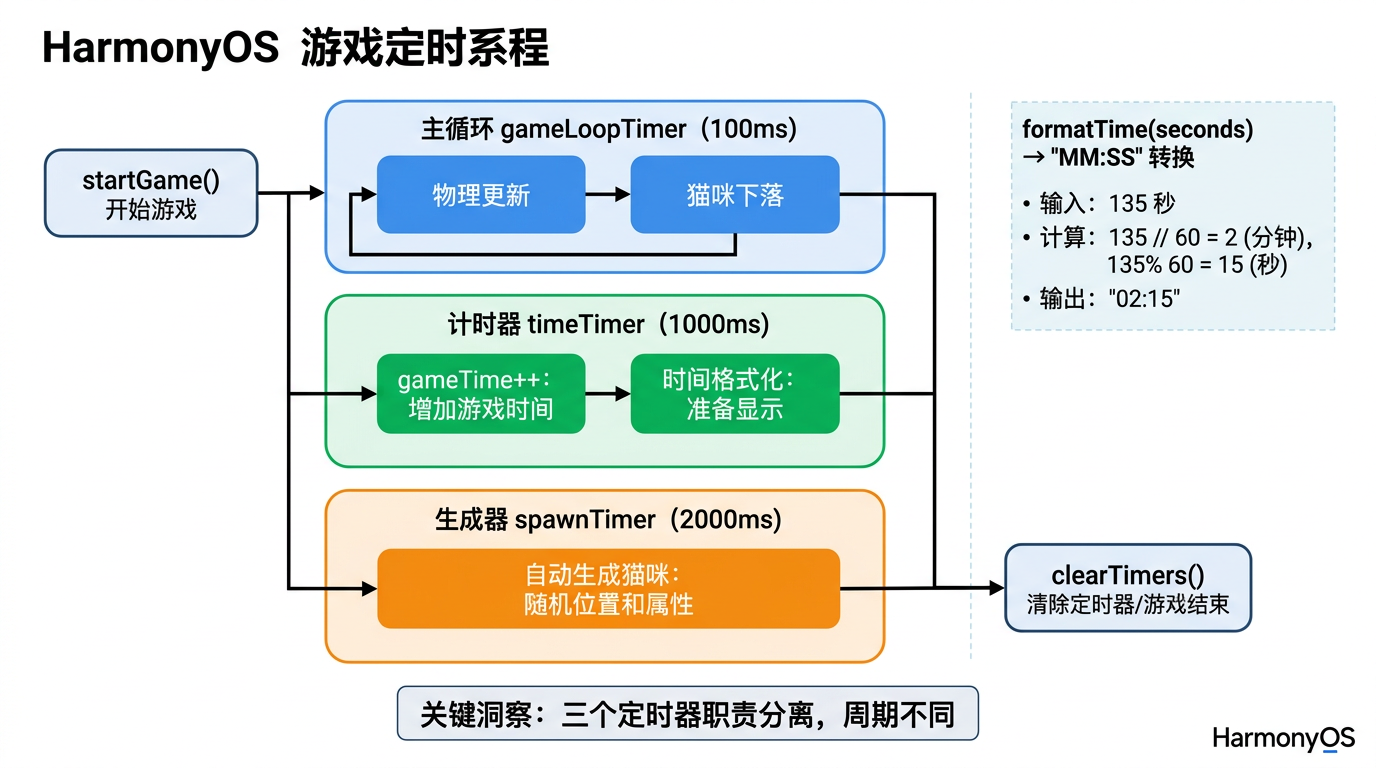
上一篇我们搭好了 100ms 物理主循环——猫咪下落、合并、得分都靠它驱动。但游戏里还有个独立时钟:从开局到结束的累计时间(gameTime)。这个时钟和主循环分离——主循环 100ms 更新物理,计时器 1000ms 递增秒数,两者职责不同。
本篇以「猫猫大作战」timeTimer 为锚点,把秒级计时器周期、gameTime 递增与格式化、暂停不计时间、计时器与主循环的分工四大要点讲透。
提示:本系列不讲 ArkTS 基础语法与环境搭建,假设你已跟完第 1–33 篇。本篇是阶段二第四篇。
一、场景拆解:游戏计时
回顾「猫猫大作战」计时器(第 33 篇):
// 来源:entry/src/main/ets/pages/Index.ets  startGame()
this.timeTimer = setInterval(() => {
  if (this.gameState === GameState.PLAYING) {
    this.gameTime++;              // ← 仅 PLAYING 时递增
  }
}, 1000);                         // ← 1000ms = 1s 周期
HUD 显示时间(第 11 篇):
// 来源:entry/src/main/ets/pages/Index.ets  GameHUD()
Text(this.formatTime(this.gameTime))
  .fontSize(18)
  .fontWeight(FontWeight.Medium)
  .fontColor('#2C3E50')
格式化函数:
// 来源:entry/src/main/ets/pages/Index.ets
formatTime(seconds: number): string {
  const min = Math.floor(seconds / 60);
  const sec = seconds % 60;
  return `${min.toString().padStart(2, '0')}:${sec.toString().padStart(2, '0')}`;
}
核心问题:
- 为什么计时器是 1000ms 而不是 100ms?
gameTime++只在PLAYING时执行,怎么实现「暂停不计时间」?formatTime怎么把秒数转成mm:ss?
二、秒级计时器周期
2.1 为什么是 1000ms
| 周期 | gameTime 精度 | HUD 刷新频率 | 适合 |
|---|---|---|---|
| 100ms | 0.1 秒 | 10 次/秒 | 精密计时(赛车) |
| 1000ms | 1 秒 | 1 次/秒 | 回合游戏(本项目) |
| 2000ms | 2 秒 | 0.5 次/秒 | 慢节奏策略 |
本项目选 1000ms 的原因:
- 显示精度只需秒——HUD 显示
mm:ss,小数位无意义。 - 减少 @State 改动——每秒改一次
gameTime,比每 100ms 改一次省 10 倍重渲染。 - 节省 CPU——1000ms 触发一次回调,开销极低。
关键经验:计时器精度匹配显示精度——HUD 只显示秒,计时器就用 1000ms,别为了「精度」用 100ms。
2.2 计时器与主循环的分工
// 主循环:100ms 更新物理(猫下落、合并、得分)
this.gameLoopTimer = setInterval(() => {
  if (this.gameState !== GameState.PLAYING) return;
  this.cats = this.gameEngine.updateCats();
  this.score = this.gameEngine.getScore();
  this.combo = this.gameEngine.getCombo();
  if (this.gameEngine.isGameOver()) { this.endGame(); }
}, 100);

// 计时器:1000ms 递增秒数(独立时钟)
this.timeTimer = setInterval(() => {
  if (this.gameState === GameState.PLAYING) {
    this.gameTime++;
  }
}, 1000);
职责对比:
| 定时器 | 周期 | 职责 | 改的 @State |
|---|---|---|---|
gameLoopTimer |
100ms | 物理更新 | cats、score、combo、nextCatLevel |
timeTimer |
1000ms | 时间累计 | gameTime |
spawnTimer |
2000ms | 自动生成猫 | cats、nextCatLevel(第 35 篇) |
关键经验:每个定时器单一职责——别把计时和物理混在一个 setInterval 里,否则周期冲突(100ms 物理还是 1000ms 物理?)。
三、gameTime 递增与暂停
3.1 暂停时不递增
this.timeTimer = setInterval(() => {
  if (this.gameState === GameState.PLAYING) {   // ← 仅 PLAYING 时
    this.gameTime++;
  }
}, 1000);
执行流程:
gameState = PLAYING→ 每 1000msgameTime++,HUD 时间正常走。pauseGame()→gameState = PAUSED→ 下次回调if不通过,gameTime不变。resumeGame()→gameState = PLAYING→ 下次回调if通过,续期计时。
实战经验:「暂停不计时间」用 if 守卫,比 clearInterval 重建更简洁——和主循环的暂停策略保持一致(第 33 篇)。
3.2 结束时停止计时
endGame() {
  this.gameState = GameState.GAME_OVER;
  this.maxCombo = this.gameEngine.getMaxCombo();
  this.mergeCount = this.gameEngine.getMergeCount();
  this.highestLevel = this.gameEngine.getHighestLevel();
  if (this.score > this.highScore) {
    this.highScore = this.score;
  }
  this.clearTimers();      // ← clearInterval 三个定时器
}
结束流程:
endGame()把gameState = GAME_OVER。clearTimers()调用clearInterval(this.timeTimer),彻底停止计时器。gameTime保留最终值,在 GameOverOverlay 显示「总用时」。
关键经验:结束用 clearInterval,暂停用 if 守卫——结束要彻底清理(不再恢复),暂停要能续期。
3.3 重新开始重置 gameTime
startGame() {
  this.clearTimers();
  this.gameEngine.reset();
  this.gameState = GameState.PLAYING;
  this.score = 0;
  this.cats = [];
  this.gameTime = 0;                          // ← 重置时间
  this.combo = { count: 0, multiplier: 1, lastMergeTime: 0 };
  this.nextCatLevel = this.gameEngine.getNextCatLevel();
  /* ... 三个定时器 */
}
重新开始流程:
clearTimers()清旧定时器。this.gameTime = 0重置时间。- 重建三个定时器,从 0 开始计时。
四、formatTime 格式化
4.1 秒数转 mm:ss
// 来源:entry/src/main/ets/pages/Index.ets
formatTime(seconds: number): string {
  const min = Math.floor(seconds / 60);       // 分钟数
  const sec = seconds % 60;                   // 剩余秒数
  return `${min.toString().padStart(2, '0')}:${sec.toString().padStart(2, '0')}`;
}
拆解:
| 片段 | 含义 | 示例(seconds = 125) |
|---|---|---|
Math.floor(seconds / 60) |
分钟数 | Math.floor(125 / 60) = 2 |
seconds % 60 |
剩余秒数 | 125 % 60 = 5 |
toString().padStart(2, '0') |
补零到 2 位 | '2'.padStart(2, '0') = '02' |
| 拼接 | mm:ss |
'02:05' |
4.2 padStart 补零
'5'.padStart(2, '0')      // → '05'
'12'.padStart(2, '0')     // → '12'(已够 2 位,不补)
''.padStart(2, '0')       // → '00'
API 说明:String.prototype.padStart(targetLength, padString)——把字符串填充到 targetLength 长度,不足部分用 padString 补。
关键经验:时间显示必补零——5:3 看起来像 5 分 3 秒,05:03 才标准。
4.3 不同格式化方案
// 方案 1:mm:ss(本项目,< 1 小时)
formatTime(seconds: number): string {
  const min = Math.floor(seconds / 60);
  const sec = seconds % 60;
  return `${min.toString().padStart(2, '0')}:${sec.toString().padStart(2, '0')}`;
}

// 方案 2:hh:mm:ss(≥ 1 小时)
formatTimeLong(seconds: number): string {
  const hr = Math.floor(seconds / 3600);
  const min = Math.floor((seconds % 3600) / 60);
  const sec = seconds % 60;
  return `${hr.toString().padStart(2, '0')}:${min.toString().padStart(2, '0')}:${sec.toString().padStart(2, '0')}`;
}

// 方案 3:纯秒数(短局游戏)
formatTimeSimple(seconds: number): string {
  return `${seconds}s`;
}
| 方案 | 显示 | 适合 |
|---|---|---|
| mm:ss | 02:05 |
本项目(< 1 小时) |
| hh:mm:ss | 01:02:05 |
长时间挂机 |
| 纯秒数 | 125s |
短局(< 60 秒) |
实战经验:消除类游戏一局通常 2-10 分钟,用 mm:ss 最合适。
五、计时器与 UI 的协同
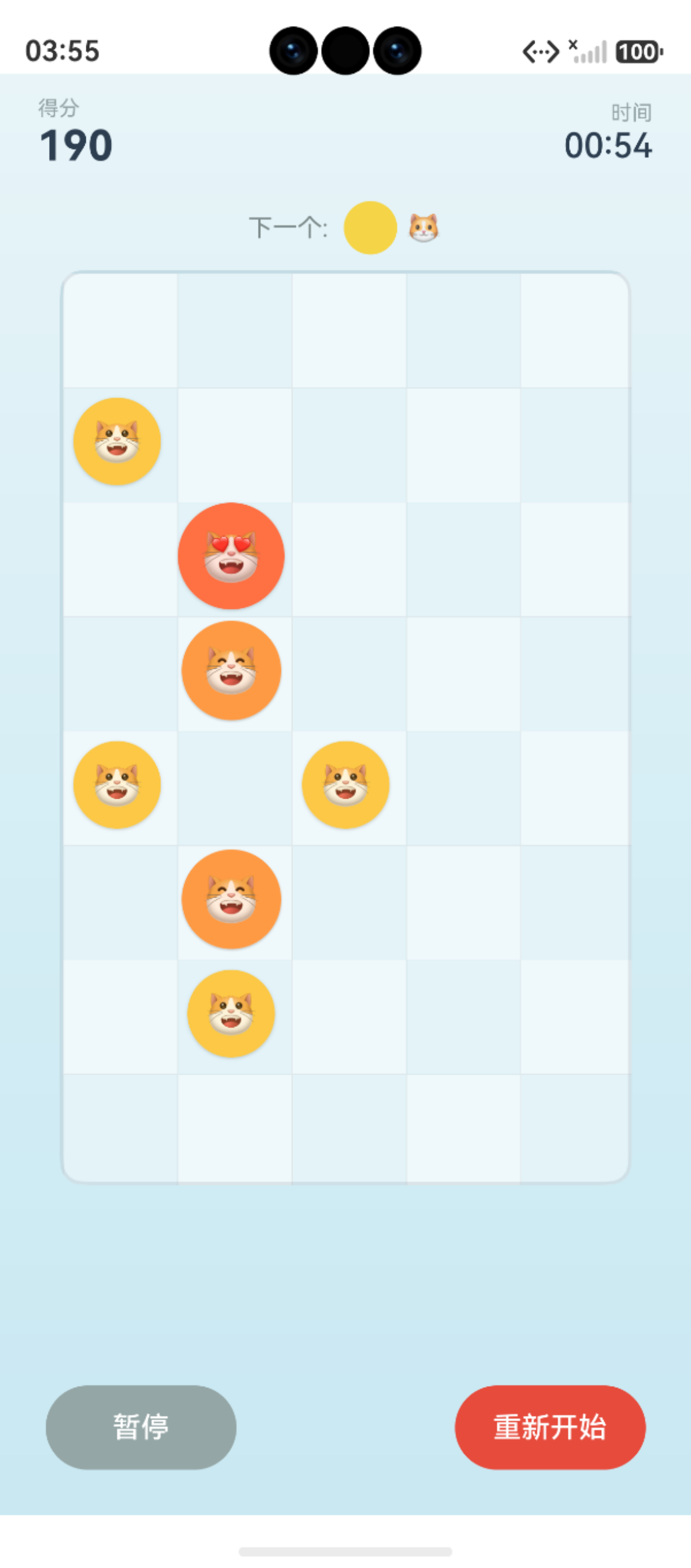
5.1 HUD 显示时间
@Builder
GameHUD() {
  Row() {
    Column() {
      Text('得分').fontSize(11).fontColor('#95A5A6')
      Text(this.score.toString())
        .fontSize(22).fontWeight(FontWeight.Bold).fontColor('#2C3E50')
    }.alignItems(HorizontalAlign.Start)

    Spacer()

    if (this.combo.count > 1) {
      Row() {
        Text(`🔥 x${this.combo.multiplier}`)
          .fontSize(18).fontWeight(FontWeight.Bold).fontColor('#E74C3C')
      }
      .padding({ left: 12, right: 12, top: 4, bottom: 4 })
      .backgroundColor('rgba(231, 76, 60, 0.1)')
      .borderRadius(16)
    }

    Spacer()

    // 时间栏(本篇重点)
    Column() {
      Text('时间').fontSize(11).fontColor('#95A5A6')
      Text(this.formatTime(this.gameTime))          // ← 读 @State gameTime
        .fontSize(18).fontWeight(FontWeight.Medium).fontColor('#2C3E50')
    }.alignItems(HorizontalAlign.End)
  }
  .width('100%').padding({ left: 20, right: 20, top: 12, bottom: 8 })
}
依赖关系:时间栏 Text 依赖 @State gameTime,每秒 gameTime++ 触发重渲染。
5.2 GameOverOverlay 显示总用时
@Builder
GameOverOverlay() {
  Column() {
    /* ... 标题、得分 ... */

    // 统计数据(含时间)
    Row() {
      this.StatItem('时间', this.formatTime(this.gameTime))     // ← 显示总用时
      this.StatItem('合并', `${this.mergeCount}次`)
      this.StatItem('最高连击', `x${this.maxCombo}`)
    }
    .width('100%')
    .justifyContent(FlexAlign.SpaceEvenly)
    .margin({ bottom: 8 })
    /* ... */
  }
}
关键经验:gameTime 在结束时保留最终值,GameOverOverlay 复用 formatTime 显示总用时——一份格式化函数两处用。
六、踩坑提示
6.1 计时器周期写成 100ms
// ❌ 错误:100ms 周期,gameTime 飞涨
this.timeTimer = setInterval(() => {
  this.gameTime++;
}, 100);              // 每 100ms +1,1 秒 +10,显示飞涨

// ✅ 正确:1000ms 周期
this.timeTimer = setInterval(() => {
  if (this.gameState === GameState.PLAYING) {
    this.gameTime++;
  }
}, 1000);
6.2 忘记 if 守卫,暂停时还在计时
// ❌ 错误:没 if 守卫,暂停时 gameTime 还在涨
this.timeTimer = setInterval(() => {
  this.gameTime++;              // 即使 PAUSED 也 +1
}, 1000);

// ✅ 正确:if 守卫,仅 PLAYING 时递增
this.timeTimer = setInterval(() => {
  if (this.gameState === GameState.PLAYING) {
    this.gameTime++;
  }
}, 1000);
6.3 忘记 startGame 重置 gameTime
// ❌ 错误:重开没重置,时间延续上一局
startGame() {
  this.clearTimers();
  this.gameState = GameState.PLAYING;
  this.score = 0;
  // 忘了 this.gameTime = 0
  this.timeTimer = setInterval(() => { this.gameTime++; }, 1000);
}
// 第二局从第一局的结束时间继续计

// ✅ 正确:重置 gameTime
startGame() {
  this.clearTimers();
  this.gameState = GameState.PLAYING;
  this.score = 0;
  this.gameTime = 0;            // 重置
  this.timeTimer = setInterval(() => { /* ... */ }, 1000);
}
6.4 padStart 浏览器兼容
// ArkTS/iOS/Android 都支持 padStart,但老版本可能不支持
'5'.padStart(2, '0')      // 现代环境 OK

// 兼容写法(手动补零)
const pad = (n: number): string => n < 10 ? `0${n}` : `${n}`;
return `${pad(min)}:${pad(sec)}`;
七、调试技巧
console.info打 gameTime:计时器回调里 log,追每秒递增。- 暂停计时间排查:暂停后看 log 是否停,没停说明忘加 if 守卫。
- 时间不重置排查:重开后看 gameTime 是否从 0 开始,没归零说明忘加
this.gameTime = 0。 - 格式化错误排查:临时加
console.info(this.formatTime(this.gameTime)),看输出是否正确。
八、性能与最佳实践
- 计时器精度匹配显示精度——HUD 显示秒,就用 1000ms 周期。
- 计时与物理分离——别混在一个 setInterval,周期冲突。
- 暂停用 if 守卫,结束用 clearInterval——暂停要续期,结束要清理。
- startGame 重置 gameTime——避免延续上局时间。
- formatTime 用 padStart 补零——
5:3改05:03才标准。 - formatTime 复用——HUD 和 GameOverOverlay 共用一份。
总结
本篇我们从计时器切入,掌握了秒级 1000ms 周期的选择依据、暂停用 if 守卫不递增、formatTime 秒数转 mm:ss、计时器与主循环的分工四大要点,并给出了完整计时器代码。核心要点:精度匹配显示;暂停用 if 守卫;结束用 clearInterval;重开重置 gameTime。
下一篇我们将拆解 spawnTimer——猫咪自动生成调度。
如果这篇文章对你有帮助,欢迎点赞👍、收藏⭐、关注🔔,你的支持是我持续创作的动力!
相关资源:
- 「猫猫大作战」项目源码:本仓库
entry/src/main/ets/pages/Index.ets - setInterval/clearInterval 官方文档
- Math.floor/Math.round 数学 API 参考
- String.padStart 字符串 API 参考
- 开源鸿蒙跨平台社区
- HarmonyOS 开发者官方文档首页
- 系列索引:本仓库
articles/INDEX.md

讨论HarmonyOS开发技术,专注于API与组件、DevEco Studio、测试、元服务和应用上架分发等。
更多推荐



 5
5 0
0- 0


 已为社区贡献96条内容

所有评论(0)