HarmonyOS应用开发实战:猫猫大作战-被动批量(同帧)、主动批量(batchUpdate)、跨帧批量的陷阱、批量与深观察的协同
前言
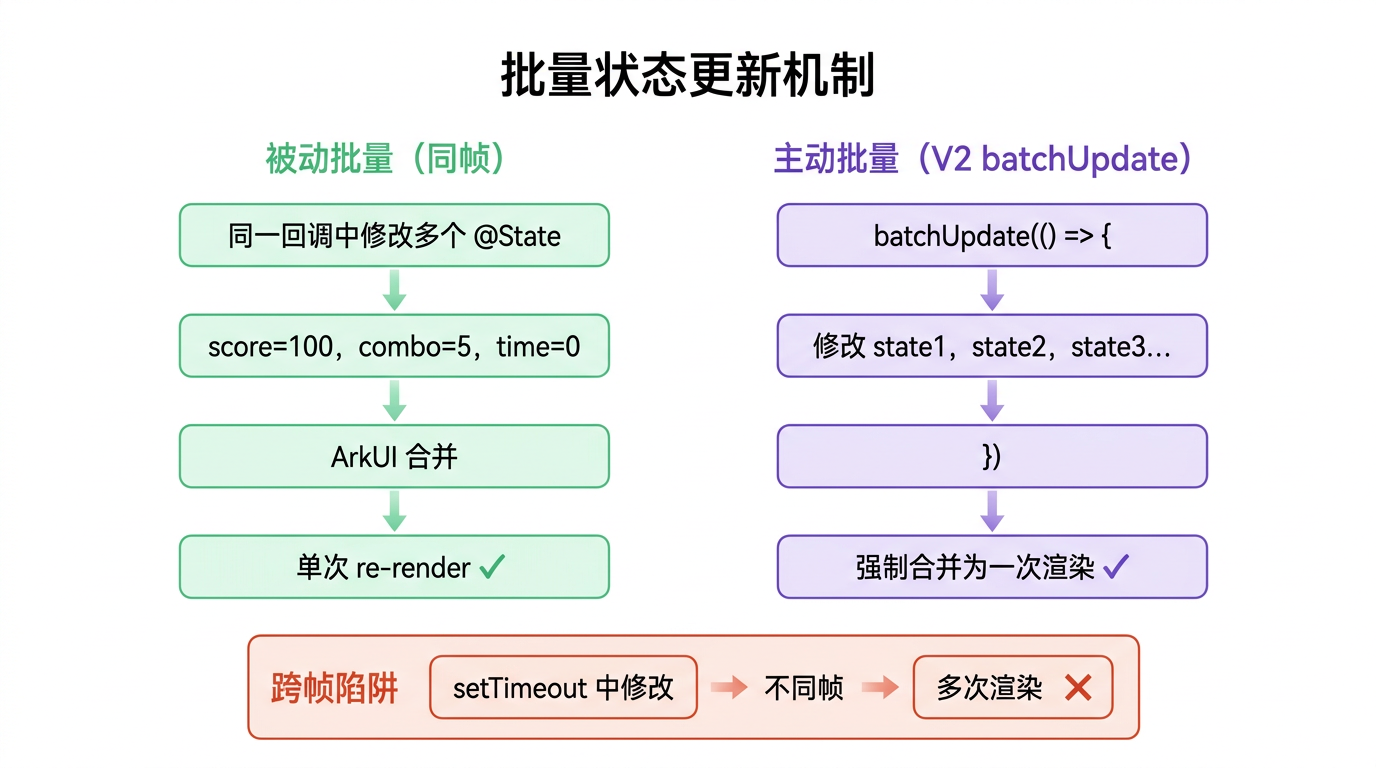
第 32 篇我们讲过「同帧批量更新」——一个回调里改多个 @State,ArkUI 合并成一次重渲染。但那是「被动批量」——靠回调天然同帧。实战中还有「主动批量」场景:连续多次逻辑操作改 state,要强制合并成一次重渲染,避免中途触发浪费。HarmonyOS 提供了 batchUpdate 机制(V2)和「手动批」套路(V1)。
本篇以「猫猫大作战」结束游戏时连续改 5 个 state 为锚点,把 被动批量(同帧)、主动批量(batchUpdate)、跨帧批量的陷阱、批量与深观察的协同四大要点讲透。
提示:本系列不讲 ArkTS 基础语法与环境搭建,假设你已跟完第 1–44 篇。本篇是阶段二第十五篇。
一、场景拆解:endGame 连续改 5 个 state
回顾「猫猫大作战」endGame(第 33、36 篇):
// 来源:entry/src/main/ets/pages/Index.ets
endGame() {
  this.gameState = GameState.GAME_OVER;        // 改 1
  this.maxCombo = this.gameEngine.getMaxCombo();   // 改 2
  this.mergeCount = this.gameEngine.getMergeCount(); // 改 3
  this.highestLevel = this.gameEngine.getHighestLevel(); // 改 4
  if (this.score > this.highScore) {
    this.highScore = this.score;               // 改 5
  }
  this.clearTimers();
}
核心问题:5 个 @State 连续改,ArkUI 重渲染几次?
答案:1 次——因为都在 endGame 同一个调用栈(同帧),ArkUI 收集所有变更,下一 VSync 只 build() 一次。这是第 32 篇讲的「被动批量」。
但有种进阶坑:
endGame() {
  this.gameState = GameState.GAME_OVER;        // 改 1
  this.clearTimers();                          // 调方法,可能内部又改 state
  this.maxCombo = this.gameEngine.getMaxCombo();   // 改 2
}
clearTimers() 内部如果改了 @State(比如清空 cats),仍然同帧批量——只要都在 endGame 调用栈内,不论调多少层方法,都合并。
二、被动批量:同帧合并
2.1 同帧收集机制
endGame() {
  this.gameState = GameState.GAME_OVER;        // 标记 1
  this.maxCombo = 5;                           // 标记 2
  this.mergeCount = 10;                        // 标记 3
  this.highestLevel = CatLevel.BIG;            // 标记 4
  this.highScore = 1500;                       // 标记 5
}
// 调用栈结束 → 下一 VSync → 一次 build() 所有脏组件
机制:
- ArkUI 在每次
@State赋值时标记依赖组件为脏,不立即重渲染。 - 当前 JS 调用栈结束(endGame return)。
- 下一个 VSync 帧,一次性 build() 所有脏组件。
关键经验:「同调用栈」=「同帧」=「批量」——不论改多少 state、调多少层方法,只要在一个调用栈内都合并。
2.2 跨帧多次重渲染的浪费
// ❌ 错误:用 setTimeout 分次改,跨帧多次重渲染
endGame() {
  this.gameState = GameState.GAME_OVER;
  setTimeout(() => { this.maxCombo = 5; }, 0);           // 下一帧
  setTimeout(() => { this.mergeCount = 10; }, 0);        // 再下一帧
  setTimeout(() => { this.highScore = 1500; }, 0);       // 再下一帧
}
// 4 次重渲染(gameState + maxCombo + mergeCount + highScore 各一次)
对比:
| 方式 | 重渲染次数 | 性能 |
|---|---|---|
| 同帧批量(endGame 内连续改) | 1 次 | ✅ 最优 |
| setTimeout(0) 分次 | 4 次 | ❌ 浪费 4 倍 |
2.3 被动批量的覆盖范围
endGame() {
  this.gameState = GameState.GAME_OVER;
  this.clearTimers();      // 内部改 state,仍同帧
  this.helperA();          // 内部改 state,仍同帧
  this.helperB();          // 内部改 state,仍同帧
  this.highScore = 1500;
}
// 全部在 endGame 调用栈内,1 次重渲染

helperA() { this.maxCombo = 5; }
helperB() { this.mergeCount = 10; }
clearTimers() { /* 可能改 cats 等 */ }
关键经验:被动批量覆盖整个调用栈——不论嵌套多少层方法,只要起点是同一个用户/定时器回调,都合并。
三、主动批量:batchUpdate
3.1 什么时候需要主动批量
被动批量已经覆盖大部分场景,但有种情况要主动批量——异步操作中途改 state:
async endGame() {
  this.gameState = GameState.GAME_OVER;        // 改 1(本次帧)
  const stats = await this.fetchStats();      // 异步等待
  this.maxCombo = stats.maxCombo;             // 改 2(下一帧)
  this.mergeCount = stats.mergeCount;         // 改 3(再下一帧)
}
// gameState 单独一次重渲染,maxCombo+mergeCount 同帧一次,共 2 次
痛点:await 让调用栈断开,后续改 state 跨帧,无法被动批量。
3.2 batchUpdate 主动合并
HarmonyOS V2 提供 batchUpdate 主动批量:
import { batchUpdate } from '@kit.ArkUI';

async endGame() {
  this.gameState = GameState.GAME_OVER;        // 改 1(本次帧)
  const stats = await this.fetchStats();      // 异步等待

  // 主动批量:后续改合并成一次
  batchUpdate(() => {
    this.maxCombo = stats.maxCombo;           // 改 2
    this.mergeCount = stats.mergeCount;       // 改 3
    this.highestLevel = stats.highestLevel;   // 改 4
    if (stats.score > this.highScore) {
      this.highScore = stats.score;           // 改 5
    }
  });
}
// gameState 一次重渲染,batchUpdate 内 4 个改合并一次,共 2 次
拆解:
| 片段 | 含义 |
|---|---|
batchUpdate(() => { ... }) | 主动批量装饰器,回调内所有 state 改动合并 |
回调内 this.xxx = ... | 改的 state 都标记,但延迟到 batchUpdate 结束才刷新 |
关键经验:batchUpdate 用于「异步后连续改 state」场景——把跨帧的改动强制合并成一次重渲染。
3.3 batchUpdate vs 被动批量
| 维度 | 被动批量 | batchUpdate |
|---|---|---|
| 触发 | 同调用栈自动 | 手动包回调 |
| 覆盖 | 同步连续改 | 异步后连续改 |
| V1/V2 | V1 V2 都支持 | V2 专属 |
| 推荐 | 同步场景 | 异步场景 |
实战经验:同步连续改用被动批量(不包 batchUpdate),异步后连续改用 batchUpdate。
四、跨帧批量的陷阱
4.1 await 后的改动天然跨帧
async loadData() {
  this.loading = true;                    // 改 1(本次帧)
  const data = await fetch('/api');      // 异步等待
  this.loading = false;                  // 改 2(下一帧)
  this.data = data;                      // 改 3(同改 2 帧)
}
// loading=true 单独一次重渲染,loading=false + data 同帧一次,共 2 次
机制:await 让函数返回,调用栈断开。await 后的代码在新微任务帧执行,与 await 前不同帧。
4.2 多个 await 的多次跨帧
async loadData() {
  this.loading = true;                    // 改 1(帧 A)
  const user = await fetch('/user');     // 异步
  this.user = user;                      // 改 2(帧 B)
  const posts = await fetch('/posts');   // 异步
  this.posts = posts;                    // 改 3(帧 C)
}
// 3 次重渲染(loading、user、posts 各一次)
优化:用 batchUpdate 合并后两个:
async loadData() {
  this.loading = true;
  const user = await fetch('/user');
  const posts = await fetch('/posts');
  batchUpdate(() => {
    this.user = user;                    // 改 2
    this.posts = posts;                  // 改 3
    this.loading = false;                // 改 4
  });
}
// 2 次重渲染(loading=true、batchUpdate 内合并一次)
4.3 Promise.all 并发再批量
async loadData() {
  this.loading = true;
  const [user, posts] = await Promise.all([
    fetch('/user'),
    fetch('/posts')
  ]);                                    // 并发,只一次 await
  batchUpdate(() => {
    this.user = user;
    this.posts = posts;
    this.loading = false;
  });
}
// 2 次重渲染(最优)
关键经验:Promise.all 并发 + batchUpdate 批量 = 异步最少重渲染——并发减少 await 次数,批量减少重渲染次数。
五、批量与深观察的协同
5.1 @Observed 实例改属性也批量
// Cat 是 @Observed class(第 43 篇)
endGame() {
  this.gameState = GameState.GAME_OVER;        // 改 @State
  // 改 @Observed 实例属性
  this.cats.forEach((cat) => {
    cat.falling = false;                      // 改每个猫的 falling
  });
  this.score = this.gameEngine.getScore();    // 改 @State
}
// gameState + 所有 cat.falling + score 都同帧批量,1 次重渲染
机制:@Observed 实例改属性也走「标记脏 + 延迟刷新」机制,与 @State 共用批量队列。
5.2 深观察与被动批量混用
// 同帧改 @State 和 @Observed 属性,全部合并
endGame() {
  this.gameState = GameState.GAME_OVER;        // @State
  this.cats[0].y = 7;                         // @Observed 属性
  this.cats[0].falling = false;               // @Observed 属性
  this.score = 99;                            // @State
}
// 1 次重渲染,所有脏组件(GameOverOverlay、CatItem、HUD)一起刷
关键经验:@State 浅观察和 @Observed 深观察共用批量队列——同帧内都合并,不论观察层级。
六、完整代码:endGame 批量更新
// 来源:entry/src/main/ets/pages/Index.ets(V1 被动批量版)
@Entry
@Component
struct Index {
  @State @Watch('onGameStateChange') gameState: GameState = GameState.IDLE;
  @State score: number = 0;
  @State cats: Cat[] = [];
  @State combo: ComboInfo = { count: 0, multiplier: 1, lastMergeTime: 0 };
  @State nextCatLevel: CatLevel = CatLevel.SMALL;
  @State highScore: number = 0;
  @State gameTime: number = 0;
  @State maxCombo: number = 0;
  @State mergeCount: number = 0;
  @State highestLevel: CatLevel = CatLevel.SMALL;

  private gameEngine: GameEngine = new GameEngine();
  private gameLoopTimer: number = -1;
  private spawnTimer: number = -1;
  private timeTimer: number = -1;

  // 结束游戏:被动批量,5 个 state 连续改,1 次重渲染(本篇重点)
  endGame() {
    this.gameState = GameState.GAME_OVER;        // 改 1
    this.maxCombo = this.gameEngine.getMaxCombo();   // 改 2
    this.mergeCount = this.gameEngine.getMergeCount(); // 改 3
    this.highestLevel = this.gameEngine.getHighestLevel(); // 改 4
    if (this.score > this.highScore) {
      this.highScore = this.score;               // 改 5(条件)
    }
    this.clearTimers();                          // 不改 state,不影响批量

    // 所有改动在 endGame 调用栈内,ArkUI 下一 VSync 一次 build()
    // GameOverOverlay + HUD + 棋盘(如果有残留)一起重渲染
  }

  // gameState 变化副作用(第 39 篇)
  onGameStateChange(newVal: GameState): void {
    switch (newVal) {
      case GameState.GAME_OVER:
        this.playSfx('over');
        this.vibrate();
        break;
    }
  }

  startGame() {
    this.clearTimers();
    this.gameEngine.reset();
    this.gameState = GameState.PLAYING;          // 改 1
    this.score = 0;                              // 改 2
    this.cats = [];                              // 改 3
    this.gameTime = 0;                           // 改 4
    this.combo = { count: 0, multiplier: 1, lastMergeTime: 0 };  // 改 5
    this.nextCatLevel = this.gameEngine.getNextCatLevel();       // 改 6
    // 6 个 state 连续改,1 次重渲染

    this.gameLoopTimer = setInterval(() => {
      if (this.gameState !== GameState.PLAYING) return;
      this.cats = this.gameEngine.updateCats();    // 改 1
      this.score = this.gameEngine.getScore();     // 改 2
      this.combo = this.gameEngine.getCombo();     // 改 3
      if (this.gameEngine.isGameOver()) { this.endGame(); }
    }, 100);
    // 主循环每 100ms 改 3-4 个 state,每帧 1 次重渲染

    /* spawnTimer、timeTimer 筥略 */
  }

  handleColumnClick(column: number) {
    if (this.gameState !== GameState.PLAYING) return;
    if (this.gameEngine.dropCat(column)) {
      this.cats = this.gameEngine.getAllCats();     // 改 1
      this.nextCatLevel = this.gameEngine.getNextCatLevel();  // 改 2
    }
    // 2 个 state 同帧,1 次重渲染
  }

  /* pauseGame / resumeGame / clearTimers / formatTime / aboutToDisappear 筥略 */

  build() {
    Stack() {
      if (this.gameState === GameState.IDLE) {
        this.MainMenuView()
      } else {
        this.GameView()
      }
      if (this.gameState === GameState.PAUSED) {
        PauseOverlay({ gameState: this.$gameState, score: this.score })
      }
      if (this.gameState === GameState.GAME_OVER) {
        this.GameOverOverlay()
      }
    }
    .width('100%').height('100%')
  }

  /* GameView / MainMenuView / GameOverOverlay / StatItem 等略 */
}
七、踩坑提示
7.1 setTimeout 分次改破坏批量
// ❌ 错误:setTimeout 分次,跨帧多次重渲染
endGame() {
  this.gameState = GameState.GAME_OVER;
  setTimeout(() => { this.maxCombo = 5; }, 0);
  setTimeout(() => { this.mergeCount = 10; }, 0);
}

// ✅ 正确:同调用栈连续改
endGame() {
  this.gameState = GameState.GAME_OVER;
  this.maxCombo = 5;
  this.mergeCount = 10;
}
7.2 await 后忘 batchUpdate
// ❌ 错误:await 后连续改,跨帧多次重渲染
async endGame() {
  this.gameState = GameState.GAME_OVER;
  const stats = await this.fetchStats();
  this.maxCombo = stats.maxCombo;      // 跨帧
  this.mergeCount = stats.mergeCount;  // 跨帧
}

// ✅ 正确:await 后用 batchUpdate
async endGame() {
  this.gameState = GameState.GAME_OVER;
  const stats = await this.fetchStats();
  batchUpdate(() => {
    this.maxCombo = stats.maxCombo;
    this.mergeCount = stats.mergeCount;
  });
}
7.3 以为 batchUpdate 是 V1
// ❌ 错误:V1 没有 batchUpdate,编译报错
import { batchUpdate } from '@kit.ArkUI';   // V1 项目可能无此导出

// ✅ 正确:V1 用被动批量(同调用栈),V2 才有 batchUpdate
// V1:把异步后的改动用 Promise.all 合并,减少 await 次数
async endGame() {
  this.gameState = GameState.GAME_OVER;
  const stats = await this.fetchStats();   // 只一次 await
  // stats 拿到后连续改,被动批量
  this.maxCombo = stats.maxCombo;
  this.mergeCount = stats.mergeCount;
}
7.4 @Watch 触发时机误判
endGame() {
  this.gameState = GameState.GAME_OVER;   // 触发 onGameStateChange
  this.maxCombo = 5;                      // 改 state
}
// onGameStateChange 在 endGame 调用栈内同步触发(@Watch 在赋值后立即)
// 但 onGameStateChange 里改其他 state 也并入本次批量
关键经验:@Watch 回调在「赋值后同步触发」,仍在同一调用栈——回调里改 state 也并入批量。
八、调试技巧
console.info打重渲染次数:在 build() 首行 log,统计调用次数,对比批量效果。- DevEco Profiler 看 Render:统计帧的 build() 调用数,被动批量应只 1 次。
- 跨帧排查:检查是否有 setTimeout/await 断调用栈;检查异步后是否 batchUpdate。
- @Watch 触发排查:在 onGameStateChange 首行 log,追是否同帧触发。
九、性能与最佳实践
- 同步连续改用被动批量——同调用栈自动合并,不用包 batchUpdate。
- 异步后连续改用 batchUpdate(V2)——强制合并跨帧改动。
- 避免 setTimeout(0) 分次改——跨帧多次重渲染,浪费。
- Promise.all 并发减少 await——一次 await 拿所有数据,后续被动批量。
- @State 浅观察和 @Observed 深观察共用批量队列——同帧都合并。
- @Watch 回调同帧触发——回调里改 state 也并入本次批量。
十、阶段二进度小结(31-45)
本篇是阶段二「状态管理 + 交互 + 动画」第 15 篇,进度小结:
| 篇 | 主题 | 核心要点 |
|---|---|---|
| 31 | @State | 响应式状态,改变触发重渲染 |
| 32 | 多 @State | 同帧批量更新,一次重渲染 |
| 33 | setInterval 主循环 | 100ms 物理周期,暂停短路 |
| 34 | 计时器 | 1000ms 秒级,formatTime 格式化 |
| 35 | spawnTimer | 2000ms 自动生成,随机列选择 |
| 36 | clearTimers | -1 哨兵,三时机清理,aboutToDisappear 兜底 |
| 37 | onClick 列投放 | 闭包捕获 col,handleColumnClick 三步 |
| 38 | 箭头函数 this | 回调统一箭头保留 this,普通函数打断链 |
| 39 | @Watch | 状态变化副作用集中,防递归守卫 |
| 40 | @Prop | 父子单向只读,浅拷贝,显示型子组件 |
| 41 | @Link | 父子双向,$val 传引用,编辑型子组件 |
| 42 | @Provide/@Consume | 跨层隐式共享,避免 prop drilling |
| 43 | @Observed+@ObjectLink | 类实例深观察,改内部属性触发 |
| 44 | 数组项替换 | ForEach 密钥 diff + 深观察协同 |
| 45(本篇) | 批量更新 | 被动批量(同帧)+ batchUpdate(异步后) |
接下来第 46-50 篇会进入 V1 收尾与 V2 迁移:嵌套陷阱、@Reusable 列表复用、LazyForEach 大列表、V1 局限总结,然后 V2 迁移:@Local、@Param、@Event、@ObservedV2+@Trace、@Monitor。
总结
本篇我们从批量状态更新切入,掌握了被动批量(同调用栈自动合并)、主动批量(batchUpdate 异步后强制合并)、跨帧陷阱(setTimeout/await 断调用栈)、批量与深观察协同四大要点,并给出了 endGame 5 个 state 同帧批量的完整代码。核心要点:同步连续改被动批量;异步后用 batchUpdate;避免 setTimeout 分次;Promise.all 减少 await。
下一篇我们将拆解嵌套陷阱——@State 嵌套对象/数组的更新坑。
如果这篇文章对你有帮助,欢迎点赞👍、收藏⭐、关注🔔,你的支持是我持续创作的动力!
相关资源:
- 「猫猫大作战」项目源码:本仓库
entry/src/main/ets/pages/Index.ets - ArkUI 状态管理批量更新官方指南
- ArkUI 状态管理概述
- ArkUI 渲染管线与性能最佳实践
- 开源鸿蒙跨平台社区
- HarmonyOS 开发者官方文档首页
- 系列索引:本仓库
articles/INDEX.md

讨论HarmonyOS开发技术,专注于API与组件、DevEco Studio、测试、元服务和应用上架分发等。
更多推荐
 7
7 0
0- 0


 已为社区贡献98条内容

所有评论(0)