HarmonyOS应用开发实战:猫猫大作战-`router.getParams` 的参数类型约束、接收时机、类型收窄技巧、与生命周期配合的最佳实践,以及向
·
前言
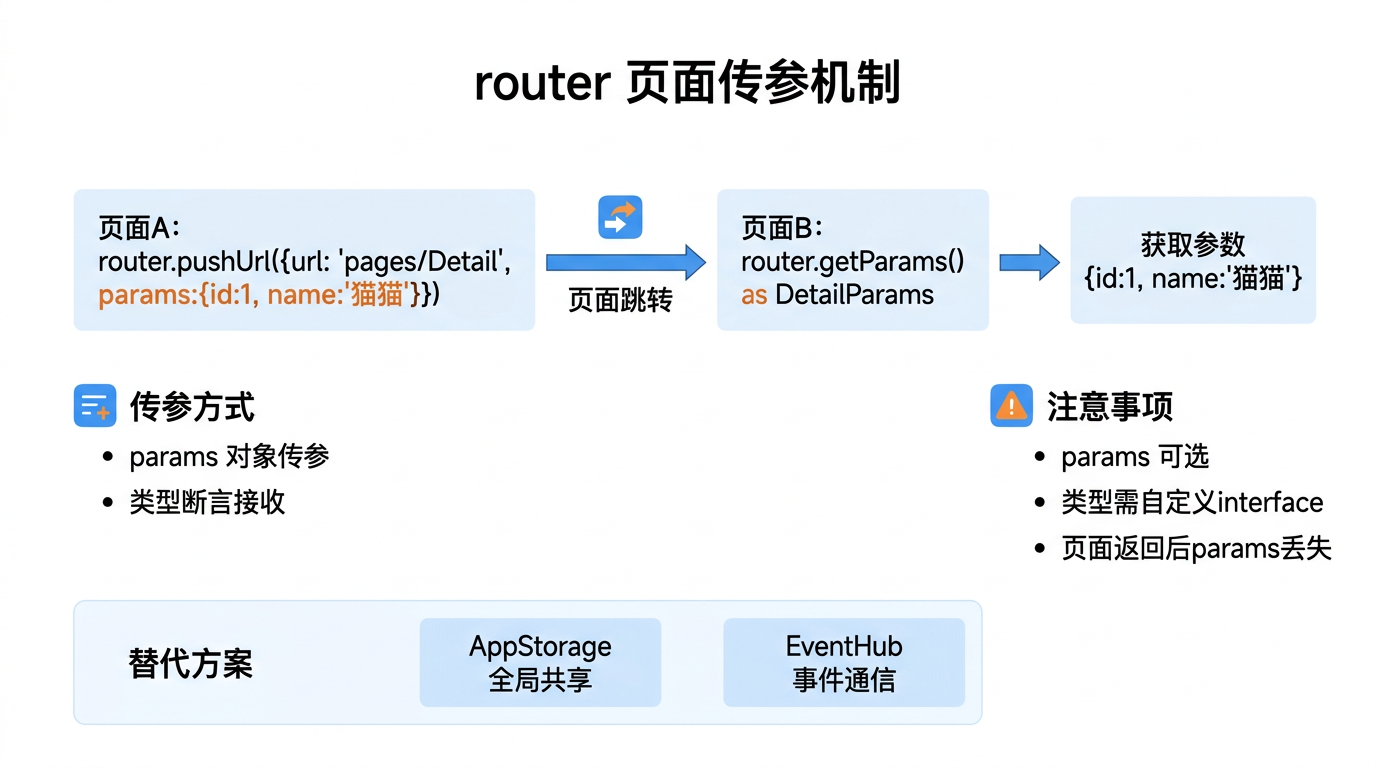
在 HarmonyOS 多页面应用中,页面间传参是最常见的需求之一。从列表页跳转到详情页时携带 ID、从游戏页跳转到排行榜时携带分数——这些数据通过 router.pushUrl/replaceUrl 的 params 参数传递,目标页通过 router.getParams() 接收。
本文以「猫猫大作战」的排行榜详情页为锚点,全面讲解 router.getParams 的参数类型约束、接收时机、类型收窄技巧、与生命周期配合的最佳实践,以及向 Navigation 参数的迁移方案。
提示:本系列不讲 ArkTS 基础语法与环境搭建,假设你已跟完第 1–80 篇。本篇是阶段三第 81 篇。
一、getParams 基本用法
1.1 接口定义
import { router } from '@kit.ArkUI';

router.getParams(): Object;
1.2 发送与接收
// 发送方 — Index.ets
router.pushUrl({
  url: 'pages/Leaderboard',
  params: {
    playerId: 1001,
    playerName: '猫猫侠',
    highScore: 88888,
    isNewRecord: true
  }
});

// 接收方 — Leaderboard.ets
@Entry
@Component
struct Leaderboard {
  aboutToAppear() {
    const params = router.getParams() as Record<string, Object>;
    const id = params['playerId'] as number;
    const name = params['playerName'] as string;
    const score = params['highScore'] as number;
    const isNew = params['isNewRecord'] as boolean;
  }
}
二、参数类型收窄
2.1 类型断言的问题
// 🚫 问题:直接断言可能导致运行时崩溃
const score = (params as Record<string, number>)['highScore'];
// 如果 params 中没有 'highScore',score 为 undefined
2.2 安全的参数提取
// ✅ 安全方式:默认值 + 类型收窄
interface LeaderboardParams {
  playerId: number;
  playerName: string;
  highScore: number;
  isNewRecord: boolean;
}

function parseLeaderboardParams(): LeaderboardParams {
  const params = router.getParams() as Record<string, Object>;

  return {
    playerId: typeof params['playerId'] === 'number' ? params['playerId'] : 0,
    playerName: typeof params['playerName'] === 'string' ? params['playerName'] : '未知玩家',
    highScore: typeof params['highScore'] === 'number' ? params['highScore'] : 0,
    isNewRecord: typeof params['isNewRecord'] === 'boolean' ? params['isNewRecord'] : false
  };
}
2.3 推荐:使用泛型封装
// 通用参数解析工具
function getRouterParam<T>(key: string, defaultValue: T): T {
  const params = router.getParams() as Record<string, Object>;
  const value = params?.[key];
  return (value !== undefined && value !== null) ? (value as T) : defaultValue;
}

// 使用
const playerId = getRouterParam<number>('playerId', 0);
const playerName = getRouterParam<string>('playerName', '匿名');
const highScore = getRouterParam<number>('highScore', 0);
三、参数接收时机
3.1 在 aboutToAppear 中接收
@Entry
@Component
struct Leaderboard {
  @State playerId: number = 0;
  @State playerName: string = '';

  aboutToAppear() {
    // ✅ 组件创建时接收参数 — 最推荐
    const params = router.getParams() as Record<string, Object>;
    this.playerId = (params?.['playerId'] as number) ?? 0;

    // 使用参数加载数据
    this.loadPlayerData(this.playerId);
  }

  loadPlayerData(id: number) {
    // http 请求或本地查询
  }
}
3.2 在 build 中接收
// ⚠️ 不推荐在 build 中直接调用 getParams
build() {
  // build 可能被多次调用,getParams 每次返回相同值
  const params = router.getParams(); // 没问题但不推荐
}
建议:统一在 aboutToAppear 中接收并存储到 @State 变量中。
四、参数类型对照表
4.1 支持的参数类型
| TypeScript 类型 | 传递示例 | 接收后类型 |
|---|---|---|
string | 'cat' | string |
number | 100 | number |
boolean | true | boolean |
| Object | { a: 1 } | Object |
| Array | [1,2,3] | Array |
| Date | new Date() | string(被序列化) |
| Map/Set | — | ❌ 不传递 |
| Function | — | ❌ 被丢弃 |
Date对象会被自动序列化为 ISO 字符串,接收方需用new Date(value)还原。
4.2 复杂对象传递
// 发送方 — 序列化复杂对象
const gameState = {
  score: 88888,
  cats: [
    { id: 1, level: 3, x: 1, y: 2 },
    { id: 2, level: 5, x: 3, y: 4 }
  ],
  combo: { count: 3, multiplier: 2 }
};

router.pushUrl({
  url: 'pages/GameOver',
  params: { gameState: JSON.stringify(gameState) }
});

// 接收方 — 反序列化
aboutToAppear() {
  const params = router.getParams() as Record<string, string>;
  if (params?.['gameState']) {
    const state = JSON.parse(params['gameState']);
    this.score = state.score;
    this.cats = state.cats;
  }
}
五、参数 vs AppStorage
5.1 选型对比
| 对比维度 | router.getParams | AppStorage |
|---|---|---|
| 作用域 | 单次页面跳转 | 全局 |
| 生命周期 | 页面销毁后清除 | 应用进程存活期间 |
| 适合场景 | 页面间瞬时数据 | 全局设置、用户信息 |
| 类型安全 | 需手动断言 | 自动类型推断 |
| 传递时机 | 跳转时 | 任意时刻写入/读取 |
5.2 组合使用
// 跳转到详情页 — 轻量参数用 params,重量数据用 AppStorage
goToDetail(record: GameRecord) {
  // 将完整数据放入 AppStorage(避免序列化大对象)
  AppStorage.setOrCreate('currentRecord', record);

  // params 只传引用 ID
  router.pushUrl({
    url: 'pages/Detail',
    params: { recordId: record.id }
  });
}

// 详情页接收
aboutToAppear() {
  const params = router.getParams() as Record<string, Object>;
  const id = params['recordId'] as number;

  // 从 AppStorage 读取完整数据
  const record = AppStorage.get<GameRecord>('currentRecord');
  if (record && record.id === id) {
    this.displayRecord(record);
  }
}
六、从 getParams 迁移到 Navigation
在 Navigation 路由方案中,参数传递方式类似但更类型安全:
// Navigation 方式
interface DetailParam {
  recordId: number;
  fromPage: string;
}

this.stack.pushPath<DetailParam>('pages/Detail', {
  recordId: 1001,
  fromPage: 'Leaderboard'
});

// NavDestination 中接收
@Builder
NavDestination() {
  DetailPage()
}

@Component
struct DetailPage {
  @State recordId: number = 0;

  aboutToAppear() {
    // 通过 NavPathStack 获取参数(需要保存 stack 引用)
  }
}
七、常见踩坑
7.1 坑一:参数不存在时未提供默认值
// 🚫 错误:没有默认值
aboutToAppear() {
  const name = (router.getParams() as Record<string, string>)['playerName'];
  this.name = name; // ❌ 如果没有传 playerName,this.name = undefined
}

// ✅ 正确:提供默认值
aboutToAppear() {
  const params = router.getParams() as Record<string, string>;
  this.name = params?.['playerName'] ?? '匿名玩家';
}
7.2 坑二:参数名拼写不一致
// 发送方
{ params: { playerId: 1001 } }

// 接收方写成大写 P
const id = params['PlayerId']; // ❌ undefined!
八、总结
router.getParams() 是 HarmonyOS router 路由方案中页面接收参数的标准 API,在 aboutToAppear 中调用并用类型收窄 + 默认值安全地提取数据。
核心要点:
- 在
aboutToAppear中调用getParams()接收 - 参数类型:string/number/boolean/Object/Array,Function 和 Date 需特殊处理
- 使用类型收窄 + 默认值确保参数安全
- 大对象推荐存入 AppStorage,params 只传 ID
- Navigation 方案中通过
NavPathStack.pushPath传参
下一篇预告:第 82 篇将深入 Navigation 容器——官方推荐的新一代路由架构。
如果这篇文章对你有帮助,欢迎点赞👍、收藏⭐、关注🔔,你的支持是我持续创作的动力!
相关资源:

讨论HarmonyOS开发技术,专注于API与组件、DevEco Studio、测试、元服务和应用上架分发等。
更多推荐


 8
8 0
0- 0


 已为社区贡献72条内容

所有评论(0)