HarmonyOS应用开发实战:猫猫大作战-NavPathStack 不仅支持 push/pop 操作,还提供了丰富的页面栈查询 API——获取当前页面名
·
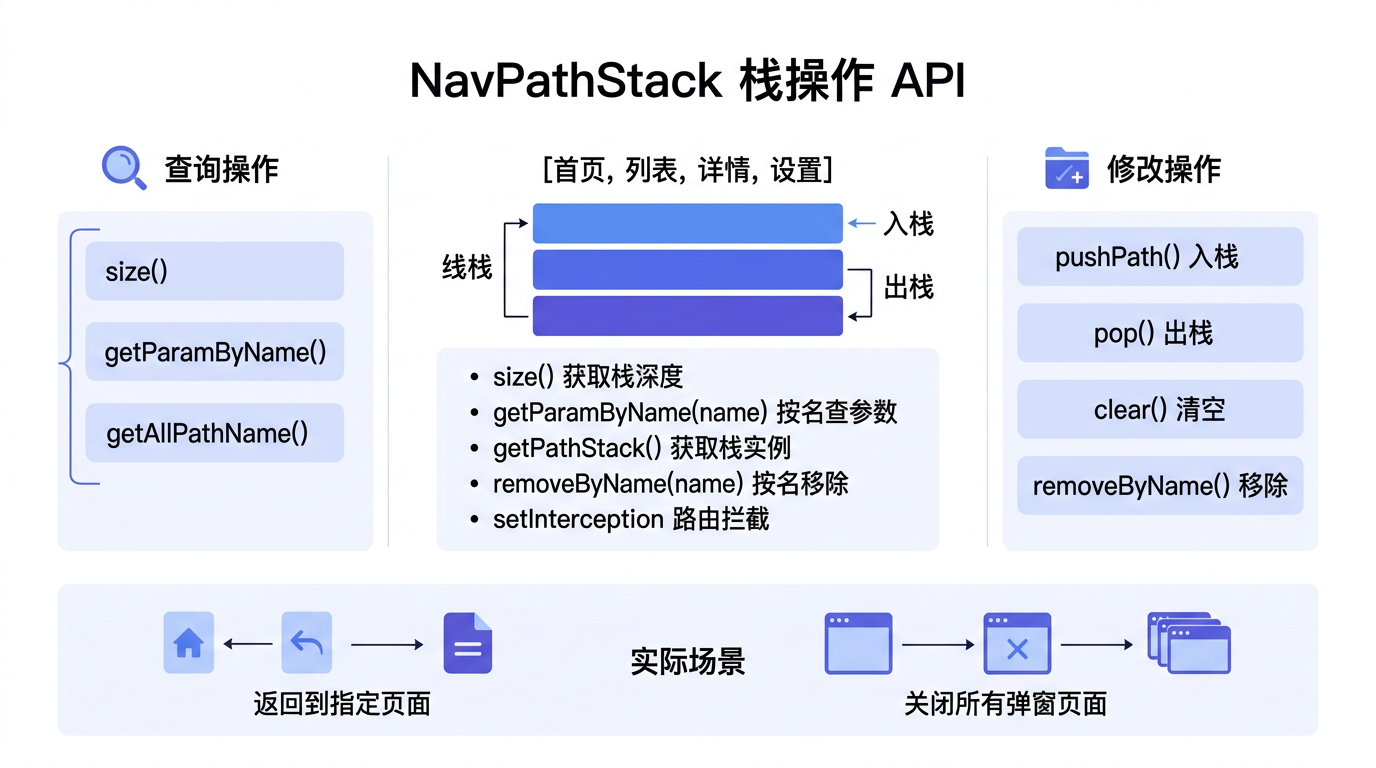

前言
NavPathStack 不仅支持 push/pop 操作,还提供了丰富的页面栈查询 API——获取当前页面名、查询所有页面、获取参数、获取页面索引等。这些查询能力在构建复杂的导航逻辑(如 Tab 切换、返回优化、状态恢复)时非常有用。
本文以「猫猫大作战」的多页面导航为锚点,详解 NavPathStack 的查询方法、实战场景和页面栈状态管理。
提示:本系列不讲 ArkTS 基础语法与环境搭建,假设你已跟完第 1–85 篇。本篇是阶段三第 86 篇。
一、查询 API 速查
1.1 方法一览
| 方法 | 返回值 | 说明 |
|---|---|---|
getAllPathName() | string[] | 获取栈中所有页面名称 |
getIndexByName(name) | number | 获取指定页面的索引(-1 表示不存在) |
getParamByName(name) | Object | 获取指定页面的参数 |
getCurrentName() | string | 获取当前页面名称 |
size() | number | 获取页面栈深度 |
1.2 基础用法
// 假设当前栈:[Index, Leaderboard, Detail]
const allNames = this.navStack.getAllPathName();
// ['pages/Index', 'pages/Leaderboard', 'pages/Detail']

const current = this.navStack.getCurrentName();
// 'pages/Detail'

const depth = this.navStack.size();
// 3

const idx = this.navStack.getIndexByName('pages/Index');
// 0

const param = this.navStack.getParamByName('pages/Leaderboard');
// { highScore: 88888 }
二、实战:返回按钮的智能控制
2.1 根据栈深度控制 UI
@Component
struct GameBoard {
  private stack: NavPathStack;

  get isRootPage(): boolean {
    return this.stack.size() <= 1;
  }

  build() {
    NavDestination() {
      Column() {
        if (this.isRootPage) {
          // 首页时不显示"返回"按钮
          Text('游戏主页面')
        } else {
          // 子页面显示"返回"按钮
          Button('返回').onClick(() => this.stack.pop())
        }
      }
    }
    .title('游戏')
    .hideBackButton(this.isRootPage)  // 首页隐藏返回
  }
}
2.2 跳转到指定页面并清空以上页面
// 从详情页返回列表页
goBackToList() {
  const listIdx = this.stack.getIndexByName('pages/Leaderboard');
  if (listIdx >= 0) {
    this.stack.popToIndex(listIdx);
  }
}
三、实战:页面参数读取
3.1 读取其他页面的参数
@Component
struct SettingsPage {
  private stack: NavPathStack;

  aboutToAppear() {
    // 读取前一个页面的参数
    const prevParams = this.stack.getParamByName('pages/Leaderboard');
    const highScore = prevParams?.['highScore'] ?? 0;
  }
}
3.2 读取当前页面参数
@Component
struct DetailPage {
  @State param: Object = {};

  aboutToAppear() {
    // 方式一:通过 @Prop param 直接接收
    // 方式二:通过 stack 查询
    const currentName = this.navStack.getCurrentName();
    const currentParam = this.navStack.getParamByName(currentName);
    this.param = currentParam ?? {};
  }
}
四、实战:Tab 页面切换
@Component
struct TabNavigation {
  private stack: NavPathStack;

  switchToLeaderboard() {
    const idx = this.stack.getIndexByName('pages/Leaderboard');
    if (idx >= 0) {
      this.stack.popToIndex(idx);  // 已存在则返回
    } else {
      this.stack.pushPath({ name: 'pages/Leaderboard' });  // 不存在则新建
    }
  }
}
五、页面栈状态恢复
// 保存页面栈状态
function saveStackState(stack: NavPathStack): string[] {
  const names = stack.getAllPathName();
  AppStorage.setOrCreate('savedStack', names);
  return names;
}

// 恢复页面栈状态
function restoreStackState(stack: NavPathStack): void {
  const saved = AppStorage.get<string[]>('savedStack');
  if (saved && saved.length > 0) {
    saved.forEach(name => {
      stack.pushPath({ name });
    });
  }
}
六、总结
NavPathStack 的查询 API 提供了获取页面栈全貌的能力,让开发者可以灵活地控制导航行为。
核心要点:
getAllPathName()/getCurrentName():查询页面栈getIndexByName()/getParamByName():按名称查询size():获取栈深度- 结合查询 API 实现智能返回、Tab 切换、状态恢复
下一篇预告:第 87 篇将深入路由拦截 setInterception——在页面跳转前执行校验逻辑。
如果这篇文章对你有帮助,欢迎点赞👍、收藏⭐、关注🔔,你的支持是我持续创作的动力!
相关资源:

讨论HarmonyOS开发技术,专注于API与组件、DevEco Studio、测试、元服务和应用上架分发等。
更多推荐


 9
9 0
0- 0


 已为社区贡献72条内容

所有评论(0)