HarmonyOS应用开发实战:猫猫大作战-@Reusable 声明与复用池、复用触发条件、Reusable vs ForEach 取舍、与 Lazy
前言
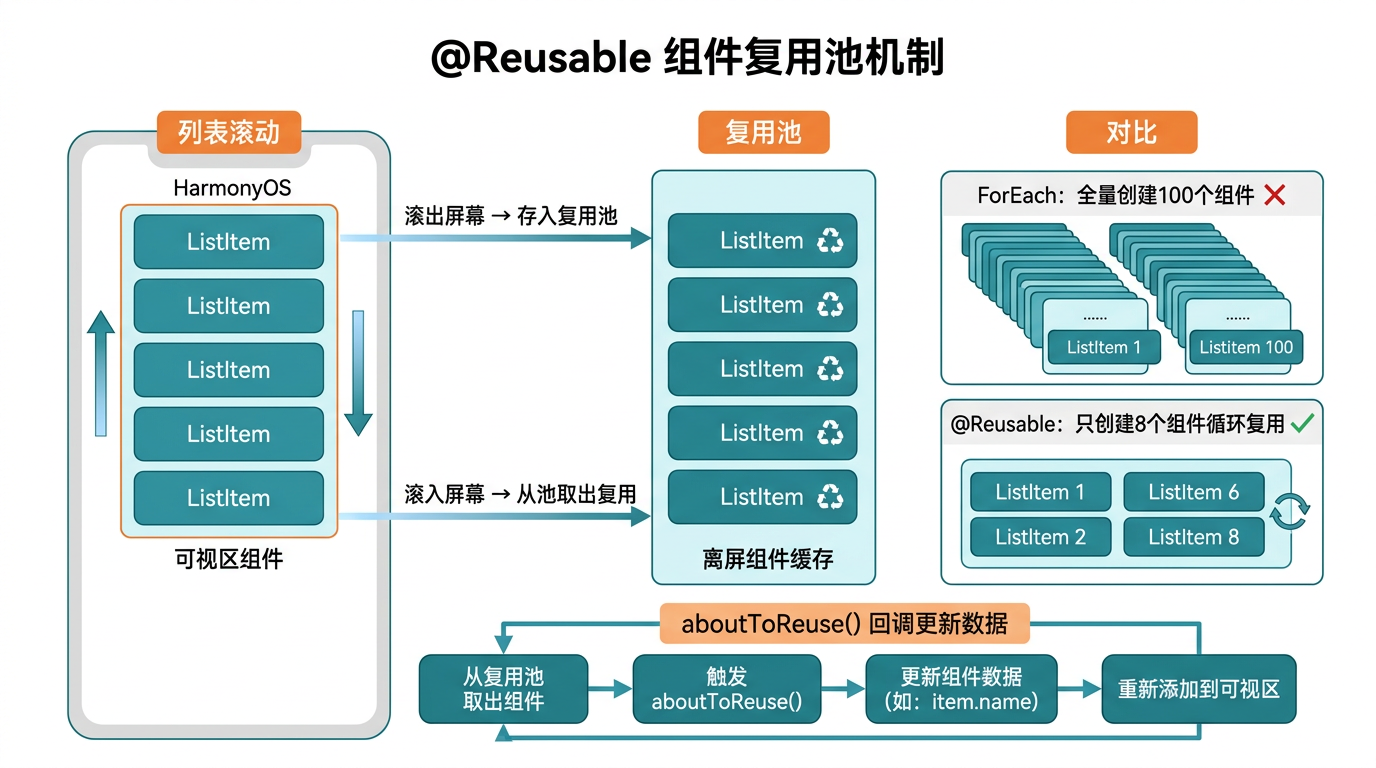
前面我们用 ForEach 渲染猫咪数组——每只猫一个 CatItem 子组件。但当列表项数多到几十甚至上百(战绩历史、背包道具、关卡列表),ForEach 会全量渲染所有项,哪怕屏幕只显示 5 个——性能浪费。HarmonyOS 提供了 @Reusable 可复用组件装饰器——给子组件打上后,列表滚动时离屏的项不销毁,存入复用池,新进入的项从池里取复用,省去重建开销。
本篇以「猫猫大作战」未来扩展的战绩历史列表为锚点,把 @Reusable 声明与复用池、复用触发条件、Reusable vs ForEach 取舍、与 LazyForEach 搭配四大要点讲透。
提示:本系列不讲 ArkTS 基础语法与环境搭建,假设你已跟完第 1–46 篇。本篇是阶段二第十七篇。
一、场景拆解:战绩历史长列表
假设「猫猫大作战」要加战绩历史页——显示最近 100 局的得分/时间/最高连击:
@State history: GameRecord[] = [];     // 100 条记录

List({ scroller: this.scroller }) {
  ForEach(this.history, (record: GameRecord) => {
    ListItem() {
      RecordItem({ record: record })
    }
  }, (record: GameRecord) => record.id)
}
.cachedCount(5)       // 预渲染 5 个
痛点:ForEach 全量渲染 100 个 RecordItem——屏幕只显示 8 个,其余 92 个仍建组件树、占内存、耗 CPU。滚动时离屏项销毁、新项新建,卡顿。
@Reusable 的解法:
@Reusable
@Component
export struct RecordItem {
  @Prop record: GameRecord;
  build() { /* ... */ }
}

// List 检测到子组件是 @Reusable,自动启用复用池
List() {
  ForEach(this.history, (record: GameRecord) => {
    ListItem() {
      RecordItem({ record: record })
    }
  }, (record: GameRecord) => record.id)
}
.cachedCount(5)
``

**关键经验**:**@Reusable 让 ListItem 离屏不销毁、入复用池,新项从池取复用**——省重建开销,滚动流畅。

## 二、@Reusable 声明与复用池

### 2.1 给子组件打 @Reusable

```ts
@Reusable
@Component
export struct RecordItem {
  @Prop record: GameRecord;

  build() {
    Row() {
      Text(this.record.score.toString())
        .fontSize(16).fontWeight(FontWeight.Bold).fontColor('#2ECC71')
      Text(this.record.formatTime)
        .fontSize(14).fontColor('#7F8C8D')
      Text(`x${this.record.maxCombo}`)
        .fontSize(14).fontColor('#E74C3C')
    }
    .width('100%').height(56)
    .padding({ left: 16, right: 16 })
    .border({ width: { bottom: 1 }, color: '#ECF0F1' })
  }
}
拆解:
| 片段 | 含义 |
|---|---|
@Reusable | 装饰器,标记「本组件可复用,离屏入池」 |
@Component | 普通组件装饰器(必须先有) |
@Prop record | 从父接收数据(复用时重新传值) |
关键约束:@Reusable 必须搭配 @Component——单独 @Reusable 无意义,它是组件的复用标记。
2.2 复用池机制
List 滚动:
  ├─ 离屏项(滚出可视区)→ 不销毁,存入复用池
  └─ 新进入项(滚入可视区)→ 从池取复用,重新传 @Prop 值
池的容量:由 cachedCount 控制——预渲染 N 个离屏项 + 可视区项,池容量约等于 cachedCount + 可视区项数。
2.3 复用项的重新传值
@Reusable
@Component
export struct RecordItem {
  @Prop record: GameRecord;       // 复用时重新传新 record

  build() { /* ... */ }
}

// 滚动时:
// 1. 离屏的 RecordItem(record=历史第 3 局)入池
// 2. 新进入的 RecordItem 从池取,传 record=历史第 13 局
// 3. 子组件 build() 重渲染,显示第 13 局数据
关键经验:复用是「壳复用、数据重传」——组件实例不销毁,但 @Prop 重新赋值,触发 build() 显示新数据。
三、复用触发条件
3.1 必须在 List/Grid 内
// ✅ List 内:触发复用
List() {
  ForEach(this.history, (record) => {
    ListItem() { RecordItem({ record: record }) }
  }, (record) => record.id)
}
.cachedCount(5)

// ❌ 普通 Column 内:不触发复用(全量渲染)
Column() {
  ForEach(this.history, (record) => {
    RecordItem({ record: record })
  }, (record) => record.id)
}
机制:只有 List/Grid 这类滚动容器有复用池逻辑——Column/Row 是静态布局,全量渲染。
3.2 必须配合 ForEach 密钥
List() {
  ForEach(this.history, (record: GameRecord) => {
    ListItem() { RecordItem({ record: record }) }
  }, (record: GameRecord) => record.id)     // ← 密钥
}
机制:ForEach 用密钥做 diff,配合 List 的复用池——密钥变触发 diff,List 决定复用还是新建。
3.3 cachedCount 预渲染
List() { /* ... */ }.cachedCount(5)
含义:可视区外上下各预渲染 5 个——滚动时新项已就绪,不闪白。
| cachedCount | 预渲染 | 内存 | 滚动流畅度 |
|---|---|---|---|
| 0 | 0 个 | 极低 | ❌ 滚动闪白 |
| 5(推荐) | 上下各 5 | 中 | ✅ 流畅 |
| 10 | 上下各 10 | 高 | ✅ 极流畅 |
实战经验:cachedCount(5) 是通用平衡——内存适中,滚动流畅。低端设备可降到 3。
四、@Reusable vs ForEach 取舍
4.1 ForEach 全量渲染
// 无 @Reusable:ForEach 全量渲染所有项
ForEach(this.history, (record) => {
  ListItem() { RecordItem({ record: record }) }
}, (record) => record.id)
// 100 条记录 → 100 个 RecordItem 实例,全占内存
4.2 @Reusable 池化渲染
// 有 @Reusable:只渲染可视区 + cachedCount
@Reusable
@Component
export struct RecordItem { /* ... */ }

List() {
  ForEach(this.history, (record) => {
    ListItem() { RecordItem({ record: record }) }
  }, (record) => record.id)
}.cachedCount(5)
// 100 条记录 → 只渲染可视区 8 个 + cached 10 个 = 18 个实例
4.3 对比表
| 维度 | ForEach(无 Reusable) | @Reusable |
|---|---|---|
| 实例数 | N(全量) | 可视区 + cachedCount |
| 内存 | 高(N 个实例) | 低(18 个) |
| 滚动 | 销毁新建卡顿 | 复用池流畅 |
| 适合 | N < 20(少量) | N ≥ 20(长列表) |
| 必须在 | 任意容器 | List/Grid |
关键经验:N < 20 用 ForEach,N ≥ 20 用 @Reusable + List——少量列表全量渲染更简单,长列表复用省内存。
4.4 策策树
列表项数 N?
  ├─ N < 20 → ForEach(任意容器,简单)
  └─ N ≥ 20
      ├─ 静态不滚动 → ForEach(全量也 OK)
      └─ 滚动列表 → @Reusable + List + cachedCount
五、实战:战绩历史列表用 @Reusable
5.1 定义 GameRecord 类型
假设新建 entry/src/main/ets/components/GameTypes.ets 补充:
export interface GameRecord {
  id: string;            // 唇一密钥
  score: number;         // 得分
  formatTime: string;    // 用时(已格式化)
  maxCombo: number;      // 最高连击
  mergeCount: number;    // 合并次数
  highestLevel: CatLevel; // 最高等级
  date: string;          // 日期
}
5.2 创建 RecordItem 子组件
新建 entry/src/main/ets/components/RecordItem.ets:
import { GameRecord } from './GameTypes';

@Reusable           // ← 本篇重点:标记可复用
@Component
export struct RecordItem {
  @Prop record: GameRecord;

  build() {
    Row() {
      // 得分
      Column() {
        Text('得分').fontSize(10).fontColor('#95A5A6')
        Text(this.record.score.toString())
          .fontSize(18).fontWeight(FontWeight.Bold).fontColor('#2ECC71')
      }
      .alignItems(HorizontalAlign.Start)
      .layoutWeight(2)

      // 用时
      Column() {
        Text('用时').fontSize(10).fontColor('#95A5A6')
        Text(this.record.formatTime)
          .fontSize(16).fontWeight(FontWeight.Medium).fontColor('#2C3E50')
      }
      .alignItems(HorizontalAlign.Center)
      .layoutWeight(2)

      // 最高连击
      Column() {
        Text('连击').fontSize(10).fontColor('#95A5A6')
        Text(`x${this.record.maxCombo}`)
          .fontSize(16).fontWeight(FontWeight.Bold).fontColor('#E74C3C')
      }
      .alignItems(HorizontalAlign.End)
      .layoutWeight(2)
    }
    .width('100%').height(64)
    .padding({ left: 16, right: 16, top: 8, bottom: 8 })
    .border({ width: { bottom: 1 }, color: '#ECF0F1' })
    .onClick(() => {
      // 点击查看详情(第 71 篇会专讲导航)
      console.info('click record', this.record.id);
    })
  }
}
5.3 创建战绩历史页
新建 entry/src/main/ets/pages/HistoryPage.ets:
import { GameRecord } from '../components/GameTypes';
import { RecordItem } from '../components/RecordItem';

@Component
export struct HistoryPage {
  @State history: GameRecord[] = [];
  private scroller: Scroller = new Scroller();

  aboutToAppear() {
    // 加载历史记录(第 145 篇会专讲持久化)
    this.history = this.loadHistory();
  }

  loadHistory(): GameRecord[] {
    // 简化:模拟 100 条记录
    const records: GameRecord[] = [];
    for (let i = 0; i < 100; i++) {
      records.push({
        id: `record_${i}`,
        score: 500 + Math.floor(Math.random() * 2000),
        formatTime: `${Math.floor(Math.random() * 10)}:${Math.floor(Math.random() * 60).toString().padStart(2, '0')}`,
        maxCombo: Math.floor(Math.random() * 10) + 1,
        mergeCount: Math.floor(Math.random() * 50) + 10,
        highestLevel: CatLevel.SMALL,
        date: `2026-07-${(20 - Math.floor(i / 10)).toString().padStart(2, '0')}`
      });
    }
    return records;
  }

  build() {
    Column() {
      // 标题栏
      Row() {
        Text('战绩历史').fontSize(20).fontWeight(FontWeight.Bold).fontColor('#2C3E50')
      }
      .width('100%').height(56)
      .padding({ left: 16, right: 16 })
      .justifyContent(FlexAlign.Start).alignItems(VerticalAlign.Center)

      // 战绩列表(@Reusable + List,本篇重点)
      List({ scroller: this.scroller }) {
        ForEach(this.history, (record: GameRecord) => {
          ListItem() {
            RecordItem({ record: record })     // ← @Reusable 子组件
          }
        }, (record: GameRecord) => record.id)
      }
      .width('100%')
      .layoutWeight(1)
      .cachedCount(5)                          // ← 预渲染 5 个
      .divider({ strokeWidth: 1, color: '#ECF0F1', startMargin: 16, endMargin: 16 })
    }
    .width('100%').height('100%')
    .backgroundColor('#FFFFFF')
  }
}
5.4 改造对比
| 维度 | ForEach 全量版 | @Reusable 版 |
|---|---|---|
| 100 条实例数 | 100 个 | 18 个(可视 8 + cached 10) |
| 内存 | ~100 × RecordItem | ~18 × RecordItem |
| 滚动流畅 | 卡顿(销毁新建) | 流畅(复用池) |
| 代码量 | 少(无装饰器) | 略多(@Reusable) |
| 适合 | N < 20 | N ≥ 20 |
六、@Reusable 与 LazyForEach 搭配
6.1 LazyForEach 按需渲染
@Reusable 解决「复用组件实例」,LazyForEach 解决「按需调用数据源」——两者搭配是长列表最优解:
import { LazyForEach, IDataSource } from '@kit.ArkUI';

// 数据源实现 IDataSource
class HistoryDataSource implements IDataSource {
  private records: GameRecord[] = [];

  totalCount(): number { return this.records.length; }
  getData(index: number): GameRecord { return this.records[index]; }

  registerDataChangeListener(listener: DataChangeListener): void { /* ... */ }
  unregisterDataChangeListener(listener: DataChangeListener): void { /* ... */ }

  reloadData(records: GameRecord[]): void {
    this.records = records;
    // 通知监听器数据变
  }
}

// 使用
private dataSource: HistoryDataSource = new HistoryDataSource();

List({ scroller: this.scroller }) {
  LazyForEach(this.dataSource, (record: GameRecord) => {
    ListItem() {
      RecordItem({ record: record })     // @Reusable 子组件
    }
  }, (record: GameRecord) => record.id)
}
.cachedCount(5)
机制:
- LazyForEach:只对可视区 + cachedCount 范围的索引调
getData,不全量遍历 100 条。 - @Reusable:可视区外的 ListItem 入复用池,新进入的复用壳。
关键经验:LazyForEach + @Reusable 是长列表最优解——前者省数据遍历,后者省组件实例。本系列第 48 篇会专讲 LazyForEach。
6.2 三种列表方案对比
| 方案 | 数据遍历 | 组件实例 | 适合 |
|---|---|---|---|
| ForEach | 全量 N 次 | 全量 N 个 | N < 20 |
| @Reusable + ForEach | 全量 N 次 | 可视区 + cached | N 20-100,数据简单 |
| LazyForEach + @Reusable | 按需 18 次 | 可视区 + cached | N ≥ 100,数据复杂 |
七、踩坑提示
7.1 @Reusable 用在非 List/Grid
// ❌ 错误:Column 内用 @Reusable,无复用池逻辑,退化为全量
@Reusable
@Component
export struct RecordItem { /* ... */ }

Column() {
  ForEach(this.history, (record) => {
    RecordItem({ record: record })
  }, (record) => record.id)
}
// 还是全量渲染 100 个

// ✅ 正确:List 内用
List() {
  ForEach(this.history, (record) => {
    ListItem() { RecordItem({ record: record }) }
  }, (record) => record.id)
}.cachedCount(5)
7.2 忘 cachedCount
// ❌ 错误:没 cachedCount,滚动时新项未预渲染,闪白
List() { /* @Reusable */ }

// ✅ 正确:设 cachedCount
List() { /* @Reusable */ }.cachedCount(5)
7.3 @Reusable 子组件用 @Link
// ⚠️ 复用时 @Link 会重新绑定,可能引起父 state 错乱
@Reusable
@Component
export struct RecordItem {
  @Link record: GameRecord;     // ❌ 不推荐 @Link
  build() { /* ... */ }
}

// ✅ 推荐:@Reusable 子组件用 @Prop(只读,复用时重传新值)
@Reusable
@Component
export struct RecordItem {
  @Prop record: GameRecord;      // 只读,复用安全
  build() { /* ... */ }
}
关键经验:@Reusable 子组件用 @Prop 不用 @Link——复用时只读数据重传,避免双向绑定错乱。
7.4 ForEach 密钥不唯一
// ❌ 错误:密钥不唯一,复用池错乱
ForEach(this.history, (record) => {
  ListItem() { RecordItem({ record: record }) }
}, (record) => record.score.toString())     // 多条同得分密钥冲突

// ✅ 正确:密钥唯一
ForEach(this.history, (record) => {
  ListItem() { RecordItem({ record: record }) }
}, (record) => record.id)                   // id 唯一
八、调试技巧
- DevEco Profiler 看组件实例数:滚动时实例数应稳定在可视区+cached,不应随 N 增长。
console.info在子组件 aboutToReuse:追复用时机(如果有生命周期)。- 滚动卡顿排查:检查是否在 List 内;检查 cachedCount 是否设;检查是否用了 LazyForEach。
- 内存对比:DevEco Memory Profiler 看 RecordItem 实例数,@Reusable 应远少于 N。
九、性能与最佳实践
- N ≥ 20 的滚动列表用 @Reusable——省组件实例,滚动流畅。
- @Reusable 必须在 List/Grid 内——普通容器无复用池逻辑。
- cachedCount(5) 平衡内存与流畅——低端设备可降到 3。
- @Reusable 子组件用 @Prop 不用 @Link——复用时只读数据重传,避免双向错乱。
- 密钥必须唯一——ForEach diff 和复用池都靠密钥,冲突错乱。
- N ≥ 100 用 LazyForEach + @Reusable——前者省数据遍历,后者省组件实例。
总结
本篇我们从 @Reusable 列表复用切入,掌握了**@Reusable 声明与复用池机制**、复用触发条件(List/Grid + ForEach 密钥 + cachedCount)、@Reusable vs ForEach 取舍(N < 20 ForEach,N ≥ 20 Reusable)、与 LazyForEach 搭配四大要点,并给出了战绩历史列表用 @Reusable 的完整代码。核心要点:@Reusable 在 List 内离屏入池复用;cachedCount(5) 平衡;子用 @Prop 不用 @Link;N ≥ 100 搭 LazyForEach。
下一篇我们将专讲 LazyForEach——大列表按需渲染。
如果这篇文章对你有帮助,欢迎点赞👍、收藏⭐、关注🔔,你的支持是我持续创作的动力!
相关资源:
- 「猫猫大作战」项目源码:本仓库
entry/src/main/ets/components/、entry/src/main/ets/pages/ - ArkUI @Reusable 可复用组件官方指南
- List 列表组件官方指南
- ForEach 循环渲染官方指南
- ArkUI 长列表性能最佳实践
- 开源鸿蒙跨平台社区
- HarmonyOS 开发者官方文档首页
- 系列索引:本仓库
articles/INDEX.md

讨论HarmonyOS开发技术,专注于API与组件、DevEco Studio、测试、元服务和应用上架分发等。
更多推荐
 10
10 0
0- 0


 已为社区贡献72条内容

所有评论(0)