HarmonyOS应用开发实战:猫猫大作战-Tabs 的声明式用法、自定义 TabBar 样式、事件监听和性能优化
·
前言
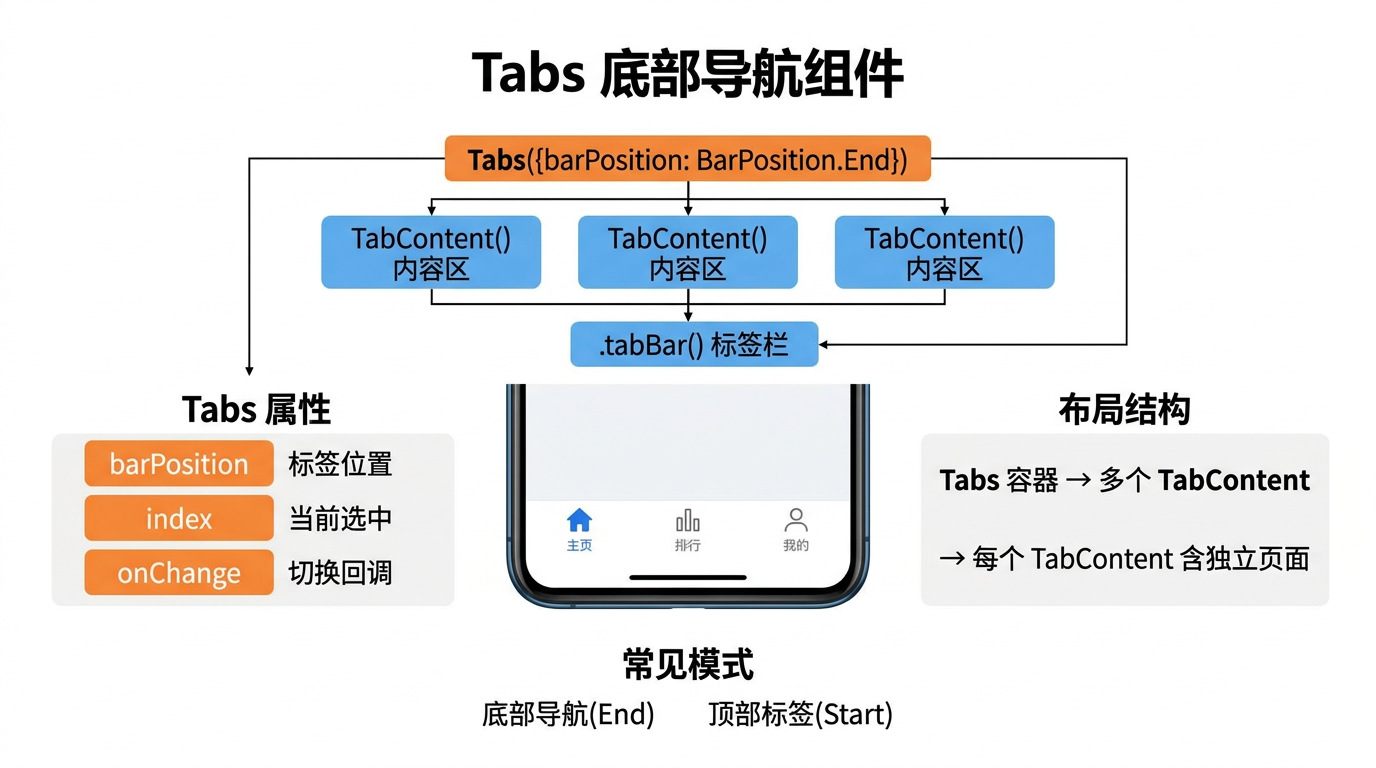
在多页面应用中,底部导航栏是最常见的导航模式之一——微信、淘宝等主流应用都采用 Tab 切换不同功能模块。HarmonyOS 的 Tabs 组件提供了原生的底部/顶部导航能力,配合 TabContent 容器实现标签页切换。
本文以「猫猫大作战」中"主页/排行榜/我的"三个 Tab 页面为锚点,讲解 Tabs 的声明式用法、自定义 TabBar 样式、事件监听和性能优化。
提示:本系列不讲 ArkTS 基础语法与环境搭建,假设你已跟完第 1–88 篇。本篇是阶段三第 89 篇。
一、Tabs 基本结构
1.1 标准结构
Tabs() {
  TabContent() {
    // Tab 1: 主菜单
    MainMenuPage()
  }
  .tabBar('主页')

  TabContent() {
    // Tab 2: 排行榜
    LeaderboardPage()
  }
  .tabBar('排行榜')

  TabContent() {
    // Tab 3: 个人中心
    ProfilePage()
  }
  .tabBar('我的')
}
.barPosition(BarPosition.End)     // TabBar 在底部
1.2 组件层次
Tabs(导航容器)
├── TabContent(主页) → .tabBar('主页')
├── TabContent(排行榜) → .tabBar('排行榜')
└── TabContent(我的) → .tabBar('我的')
二、自定义 TabBar 样式
2.1 使用 @Builder
@Entry
@Component
struct GameTabs {
  @State currentIndex: number = 0;

  @Builder
  TabBarItem(index: number, icon: string, label: string, activeIcon: string) {
    Column() {
      Image(this.currentIndex === index ? activeIcon : icon)
        .width(24).height(24)
      Text(label)
        .fontSize(12)
        .fontColor(this.currentIndex === index ? '#2ECC71' : '#999')
    }
  }

  build() {
    Tabs({ index: this.currentIndex }) {
      TabContent() { MainMenuPage() }
        .tabBar(this.TabBarItem(0, 'icon_home', '主页', 'icon_home_active'))

      TabContent() { LeaderboardPage() }
        .tabBar(this.TabBarItem(1, 'icon_rank', '排行', 'icon_rank_active'))

      TabContent() { ProfilePage() }
        .tabBar(this.TabBarItem(2, 'icon_me', '我的', 'icon_me_active'))
    }
    .onChange((index) => { this.currentIndex = index })
    .barPosition(BarPosition.End)
  }
}
三、事件监听
Tabs({ index: this.currentIndex }) {
  // TabContent 列表
}
.onChange((index: number) => {
  console.info(`切换到 Tab ${index}`);
  this.currentIndex = index;
})
.onAnimationStart((index, targetIndex) => {
  console.info(`动画开始: ${index} → ${targetIndex}`);
})
.onAnimationEnd((index, targetIndex) => {
  console.info(`动画结束: ${index} → ${targetIndex}`);
})
四、总结
Tabs 组件提供了声明式的多 Tab 容器和自定义 TabBar 支持,通过 tabBar 绑定每个标签页内容。
核心要点:
- Tabs + TabContent 构成声明式 Tab 导航
.tabBar()支持字符串和@Builder自定义.barPosition()控制 TabBar 在顶部或底部.onChange()监听切换事件
下一篇预告:第 90 篇将深入 TabContent 内容区的懒加载和生命周期管理。
如果这篇文章对你有帮助,欢迎点赞👍、收藏⭐、关注🔔,你的支持是我持续创作的动力!
相关资源:

讨论HarmonyOS开发技术,专注于API与组件、DevEco Studio、测试、元服务和应用上架分发等。
更多推荐

 7
7 0
0- 0


 已为社区贡献72条内容

所有评论(0)