HarmonyOS应用开发实战:猫猫大作战-Hero 共享元素概念、bindElements 双页面绑定、AnimationParams 转场参数、与
前言
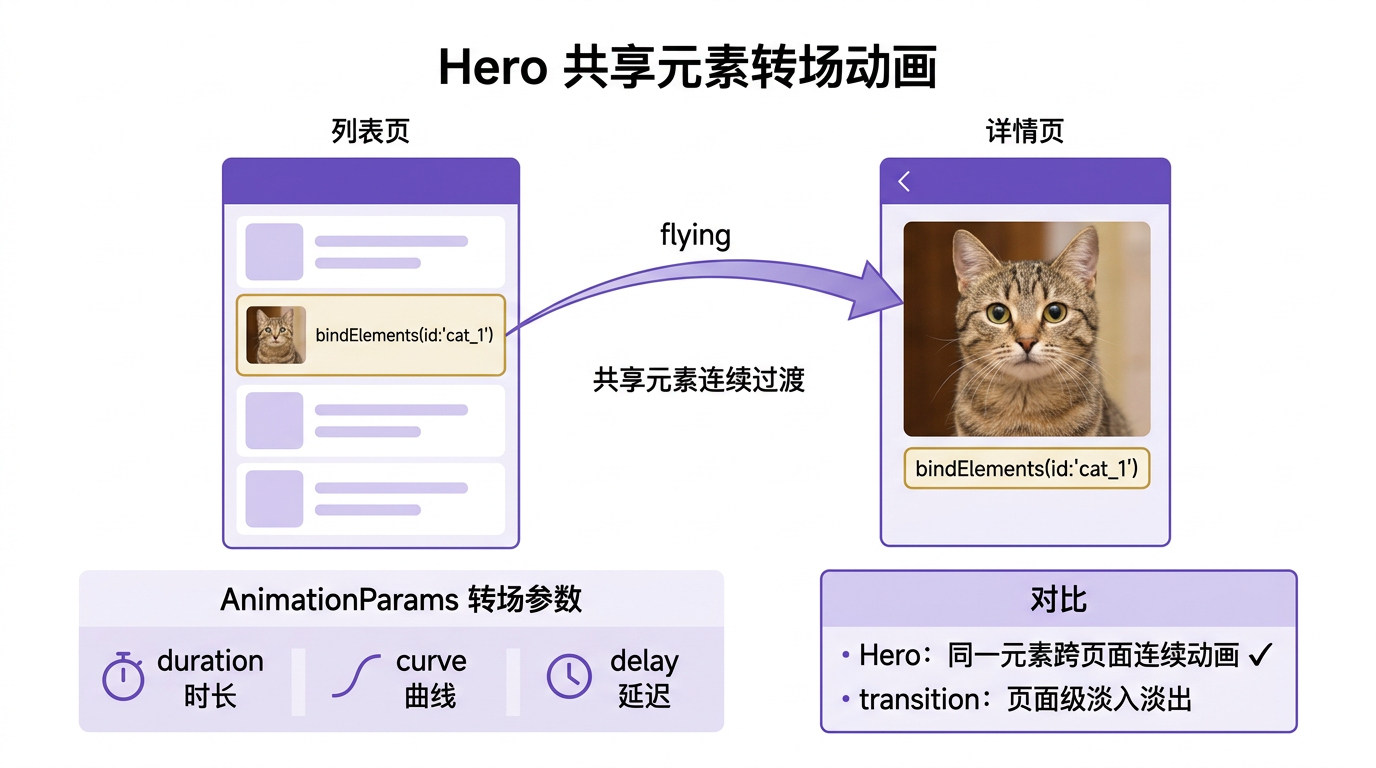
前面我们用 animation/animateTo 做了组件内动画——位置补间、缩放弹跳。但有种「跨页面」动画做不了:点击列表里的猫咪小图,跳到详情页大图,小图「飞」到大图位置平滑放大——这种「同一元素在两个页面间连续过渡」就是 Hero 共享元素动画。HarmonyOS 提供 bindElements + AnimationParams 机制实现。
本篇以「猫猫大作战」点击棋盘上的猫跳到详情页为预演场景,把 Hero 共享元素概念、bindElements 双页面绑定、AnimationParams 转场参数、与 transition 转场的差异四大要点讲透。
提示:本系列不讲 ArkTS 础语法与环境搭建,假设你已跟完第 1–56 篇。本篇是阶段三第七篇。
一、场景拆解:点击猫咪跳详情页
「猫猫大作战」当前猫咪只在棋盘内渲染(第 16、43 篇)。玩家想点击某只猫,跳到详情页显示该猫的等级/得分/位置——并且小图飞到大图位置平滑放大,视觉连贯。
跳转不用 Hero 是这样:
点击棋盘小猫(60×60)
  ↓ 瞬间切页面
详情页大猫(200×200)出现在屏幕中央
痛点:瞬间切页面,小图和大图视觉断裂,玩家感觉「弹窗」而非「飞过去」。
用 Hero 的效果:
点击棋盘小猫(60×60,位置 x=120,y=240)
  ↓ Hero 共享元素动画
小猫图从 (120,240,60×60) 平滑过渡到 (中央,200×200)
  ↓ 过渡完成
详情页大猫图(200×200)在中央
关键经验:Hero 共享元素 = 同一元素在两页面间连续过渡——小图「飞」到大图位置,视觉连贯不断裂。
二、Hero 共享元素概念
2.1 什么是共享元素
「共享元素」是 Material Design 提出的概念:两个页面看起来「共享」了同一个 UI 元素——A 页面有个小图,B 页面有个大图,跳转时小图平滑过渡成大图,玩家感觉这个「图」是同一个,只是换了位置和大小。
2.2 HarmonyOS 的 Hero 实现
HarmonyOS 的 Hero 机制核心三步:
- A 页面源元素绑
bindElements,标记「我是 Hero 源」。 - B 页面目标元素绑同名
bindElements,标记「我是 Hero 目标」。 - 路由跳转时,ArkUI 检测到同名绑定,自动从源位置/大小补间到目标位置/大小。
2.3 与 transition 转场的区别
| 维度 | Hero 共享元素 | transition 转场 |
|---|---|---|
| 范围 | 单个元素跨页面 | 整个页面进/出 |
| 效果 | 小图飞到大图 | 页面淡入/滑动 |
| 绑定 | bindElements 双页面同名 | transition 装在页面 |
| 适合 | 列表→详情图跳转 | 页面路由切换 |
关键经验:Hero 管「单个元素跨页面」,transition 管「整页面进/出」——本系列第 58 篇会专讲 transition。两者常配合用:Hero 做关键元素过渡,transition 做页面整体淡入。
三、bindElements 双页面绑定
3.1 源页面绑定(棋盘小猫)
// 来源:entry/src/main/ets/pages/Index.ets  GameView() 棋盘
ForEach(this.cats, (cat: Cat) => {
  Column() {
    Text(CatConfig[cat.level].emoji).fontSize(CatConfig[cat.level].size * 0.5)
  }
  .width(CatConfig[cat.level].size).height(CatConfig[cat.level].size)
  .borderRadius(CatConfig[cat.level].size / 2)
  .backgroundColor(CatConfig[cat.level].color)
  .position({ x: cat.x * 60, y: cat.y * 60 })
  // ← Hero 源绑定:cat.id 唯一标识
  .bindElements(`cat_${cat.id}`, this.heroAnimation)
  .onClick(() => {
    // 跳详情页,传 cat.id
    this.navigateToDetail(cat.id);
  })
}, (cat: Cat) => cat.id)
3.2 目标页面绑定(详情页大猫)
// 来源:entry/src/main/ets/pages/CatDetailPage.ets
@Component
export struct CatDetailPage {
  @Prop catId: string;
  @State cat: Cat | null = null;

  aboutToAppear() {
    this.cat = this.loadCat(this.catId);
  }

  build() {
    Column() {
      // 大猫图:Hero 目标绑定,同名 cat_${catId}
      Column() {
        Text(CatConfig[this.cat.level].emoji).fontSize(100)
      }
      .width(200).height(200)
      .borderRadius(100)
      .backgroundColor(CatConfig[this.cat.level].color)
      .bindElements(`cat_${this.catId}`, this.heroAnimation)   // ← 同名绑定
      /* ... 详情信息 ... */
    }
  }
}
3.3 bindElements 参数
.bindElements(key: string, animation: AnimationParams)
| 参数 | 含义 |
|---|---|
key |
共享元素唯一键,源和目标必须同名 |
animation |
AnimationParams 转场动画参数 |
关键经验:bindElements 的 key 源和目标必须同名——ArkUI 靠同名匹配,拼错就断裂为瞬切。
四、AnimationParams 转场参数
4.1 定义动画参数
import { AnimationParams, Curve } from '@kit.ArkUI';

private heroAnimation: AnimationParams = {
  duration: 400,
  curve: Curve.EaseInOut,
  onFinish: () => { console.info('Hero 过渡完成'); }
};
4.2 参数字段
| 字段 | 含义 | 推荐值 |
|---|---|---|
duration |
过渡时长 | 300–500ms |
curve |
缓动曲线 | EaseInOut |
delay |
延迟开始 | 0 |
onFinish |
完成回调 | 可选 |
实战经验:Hero duration 300–500ms 最佳——太短像瞬切,太长拖沓。
4.3 共用 AnimationParams
// 多个共享元素用同一套动画参数
private heroAnimation: AnimationParams = { duration: 400, curve: Curve.EaseInOut };

// 源页面
.bindElements(`cat_${cat.id}`, this.heroAnimation)
.bindElements(`score_${cat.id}`, this.heroAnimation)   // 多个共享元素

// 目标页面
.bindElements(`cat_${this.catId}`, this.heroAnimation)
.bindElements(`score_${this.catId}`, this.heroAnimation)
五、实战:点击猫咪跳详情页
5.1 路由配置
新建 entry/src/main/resources/base/profile/router.json(或用现有的):
{
  "router": {
    "catDetail": {
      "path": "catDetail",
      "component": "CatDetailPage"
    }
  }
}
5.2 Index 源页面绑定
// 来源:entry/src/main/ets/pages/Index.ets(Hero 改造后)
import { AnimationParams, Curve } from '@kit.ArkUI';
import { router } from '@kit.ArkUI';

@Entry
@Component
struct Index {
  @State gameState: GameState = GameState.IDLE;
  @State cats: Cat[] = [];
  /* ... 其他 state */

  // Hero 动画参数(本篇重点)
  private heroAnimation: AnimationParams = {
    duration: 400,
    curve: Curve.EaseInOut,
    onFinish: () => { console.info('Hero 过渡完成'); }
  };

  private gameEngine: GameEngine = new GameEngine();
  private readonly cols: number[] = [0, 1, 2, 3, 4];

  /* startGame / pauseGame / resumeGame / endGame / handleColumnClick / clearTimers / formatTime / aboutToDisappear 筑略 */

  // 跳详情页
  navigateToDetail(catId: string) {
    router.pushUrl({
      url: 'catDetail',
      params: { catId: catId }
    });
  }

  @Builder
  GameView() {
    Column() {
      this.GameHUD()
      Column() {
        Row() { /* 预告区 */ }
        Stack() {
          /* 棋盘背景 */
          ForEach(this.cats, (cat: Cat) => {
            Column() {
              Text(CatConfig[cat.level].emoji).fontSize(CatConfig[cat.level].size * 0.5)
            }
            .width(CatConfig[cat.level].size).height(CatConfig[cat.level].size)
            .borderRadius(CatConfig[cat.level].size / 2)
            .backgroundColor(CatConfig[cat.level].color)
            .justifyContent(FlexAlign.Center)
            .position({
              x: cat.x * 60 + (60 - CatConfig[cat.level].size) / 2,
              y: cat.y * 60 + (60 - CatConfig[cat.level].size) / 2
            })
            .animation({ duration: 100, curve: Curve.Linear })
            // ← Hero 源绑定(本篇重点)
            .bindElements(`cat_${cat.id}`, this.heroAnimation)
            .onClick(() => {
              this.navigateToDetail(cat.id);    // 跳详情页
            })
          }, (cat: Cat) => cat.id)

          /* 列点击层 */
        }
        .width(GameConfig.BOARD_WIDTH * GameConfig.CELL_SIZE)
        .height(GameConfig.BOARD_HEIGHT * GameConfig.CELL_SIZE)
        .borderRadius(12).clip(true).backgroundColor('#D6EEF5')
      }.alignItems(HorizontalAlign.Center)

      Spacer()
      Row() { /* 底部控制栏 */ }
        .width('100%').padding({ left: 24, right: 24, bottom: 24, top: 12 })
    }
    .width('100%').height('100%')
    .linearGradient({
      direction: GradientDirection.Bottom,
      colors: [['#E8F4F8', 0.0], ['#D6EEF5', 0.5], ['#C9E8F2', 1.0]]
    })
    .alignItems(HorizontalAlign.Center)
  }

  /* GameHUD / MainMenuView / PauseOverlay / GameOverOverlay / StatItem 筑略 */
}
5.3 CatDetailPage 目标页面
新建 entry/src/main/ets/pages/CatDetailPage.ets:
import { AnimationParams, Curve } from '@kit.ArkUI';
import { router } from '@kit.ArkUI';
import { Cat, CatConfig, CatLevel } from '../components/GameTypes';

@Component
export struct CatDetailPage {
  @Prop catId: string;
  @State cat: Cat | null = null;

  // Hero 动画参数(与源页面一致)
  private heroAnimation: AnimationParams = {
    duration: 400,
    curve: Curve.EaseInOut,
    onFinish: () => { console.info('Hero 过渡完成'); }
  };

  aboutToAppear() {
    // 加载猫咪数据(简化:从参数恢复)
    const params = router.getParams() as Record<string, string>;
    this.catId = params.catId;
    this.cat = this.loadCat(this.catId);
  }

  loadCat(catId: string): Cat {
    // 简化:模拟加载
    return {
      id: catId,
      level: 2,
      x: 1,
      y: 3,
      falling: false
    } as Cat;
  }

  build() {
    Column() {
      // 返回按钮
      Row() {
        Text('← 返回')
          .fontSize(16).fontColor('#3498DB')
          .onClick(() => { router.back(); })
      }
      .width('100%').height(56).padding({ left: 16 })

      // 大猫图:Hero 目标绑定(本篇重点)
      Column() {
        Text(CatConfig[this.cat.level].emoji).fontSize(100)
      }
      .width(200).height(200)
      .borderRadius(100)
      .backgroundColor(CatConfig[this.cat.level].color)
      .justifyContent(FlexAlign.Center)
      .shadow({ radius: 20, color: 'rgba(0,0,0,0.3)', offsetY: 10 })
      .bindElements(`cat_${this.catId}`, this.heroAnimation)   // ← 同名绑定
      .margin({ top: 40, bottom: 40 })

      // 详情信息
      Column() {
        Text(`ID: ${this.cat.id}`).fontSize(16).fontColor('#2C3E50').margin({ bottom: 8 })
        Text(`等级: ${CatLevel[this.cat.level]}`).fontSize(16).fontColor('#2C3E50').margin({ bottom: 8 })
        Text(`位置: 第 ${this.cat.x + 1} 列, 第 ${this.cat.y + 1} 行`)
          .fontSize(16).fontColor('#2C3E50').margin({ bottom: 8 })
        Text(`下落状态: ${this.cat.falling ? '下落中' : '已停'}`)
          .fontSize(16).fontColor('#7F8C8D')
      }
      .alignItems(HorizontalAlign.Start)
      .padding({ left: 32, right: 32 })

      Spacer()

      // 操作按钮
      Row() {
        Button('关闭').onClick(() => { router.back(); })
          .width(120).height(44)
          .fontSize(16).fontColor('#FFFFFF').backgroundColor('#95A5A6')
          .borderRadius(22)
      }
      .padding({ bottom: 32 })
    }
    .width('100%').height('100%')
    .backgroundColor('#FFFFFF')
  }
}
5.4 触发流程
- 玩家点击棋盘上的小猫(60×60,位置 x=120,y=240)。
navigateToDetail(cat.id)调router.pushUrl跳详情页。- ArkUI 检测到源页面
bindElements('cat_cat_0', ...)和目标页面bindElements('cat_cat_0', ...)同名。 - Hero 动画触发:小猫图从 (120,240,60×60) 用 400ms EaseInOut 补间到 (中央,200×200)。
- 过渡完成,详情页大猫图在中央稳定显示。
- 玩家点「返回」,
router.back反向 Hero 动画(大图飞回小图位置)。
六、多个共享元素
6.1 同时绑定多个
// 源页面:猫咪小图 + 等级标签都做共享元素
ForEach(this.cats, (cat: Cat) => {
  Column() { /* 猫咪图 */ }
    .bindElements(`cat_${cat.id}`, this.heroAnimation)       // 共享 1:图

  Text(`Lv.${cat.level}`)
    .bindElements(`level_${cat.id}`, this.heroAnimation)     // 共享 2:标签
}, (cat: Cat) => cat.id)

// 目标页面:大猫图 + 大等级标签
Column() { /* 大猫图 */ }
  .bindElements(`cat_${this.catId}`, this.heroAnimation)     // 同名

Text(`Lv.${this.cat.level}`).fontSize(40)
  .bindElements(`level_${this.catId}`, this.heroAnimation)   // 同名
关键经验:多个共享元素用不同 key 同前缀——cat_xxx 和 level_xxx,跳转时各自独立补间。
6.2 多元素协调动画
多个共享元素用同一 AnimationParams,同时过渡时长一致,视觉协调。
七、踩坑提示
7.1 源和目标 key 不一致
// ❌ 错误:源 key 是 cat_0,目标 key 是 cat_1,不匹配,瞬切无 Hero
.bindElements(`cat_${cat.id}`, ...)     // 源:cat_0
.bindElements(`cat_${this.catId + 1}`, ...)   // 目标:cat_1(错)

// ✅ 正确:key 完全一致
.bindElements(`cat_${cat.id}`, ...)
.bindElements(`cat_${this.catId}`, ...)       // 同名
7.2 忘在目标页面绑 bindElements
// ❌ 错误:源绑了,目标没绑,跳转瞬切无 Hero
// 源
.bindElements(`cat_${cat.id}`, ...)
// 目标忘绑

// ✅ 正确:源和目标都绑同名
.bindElements(`cat_${cat.id}`, ...)     // 源
.bindElements(`cat_${this.catId}`, ...) // 目标
7.3 AnimationParams 源目标不一致
// ⚠️ 源和目标 AnimationParams duration 不同,可能导致过渡不同步
// 源:duration 400
// 目标:duration 300
// 建议保持一致

// ✅ 正确:共用同一套参数
private heroAnimation: AnimationParams = { duration: 400, curve: Curve.EaseInOut };
// 源和目标都用 this.heroAnimation
7.4 bindElements 绑在不可过渡的属性
// ❌ 错误:绑在文本内容变化上,Hero 不补间文本
Text(this.cat.id)
  .bindElements(`cat_${this.cat.id}`, ...)
// 文本内容不可补间

// ✅ 正确:绑在可视元素上(图、背景、尺寸)
Column() { Text(emoji) }
  .bindElements(`cat_${this.cat.id}`, ...)
7.5 忘路由跳转
// ❌ 错误:绑了 bindElements 但没调 router.pushUrl,Hero 不触发
.bindElements(`cat_${cat.id}`, ...)
.onClick(() => { /* 忘了 router.pushUrl */ })

// ✅ 正确:跳转时 Hero 自动触发
.onClick(() => { this.navigateToDetail(cat.id); })
八、调试技巧
console.info在 onFinish:追 Hero 过渡完成时机。- 瞬切无 Hero 排查:检查源和目标 key 是否同名;检查是否都绑了 bindElements;检查是否调了路由跳转。
- 过渡不流畅排查:检查 AnimationParams duration/curve;检查源和目标参数是否一致。
- DevEco Animation Inspector:查看 Hero 过渡过程。
九、性能与最佳实践
- 源和目标 bindElements key 必须同名——ArkUI 靠同名匹配,拼错瞬切。
- 源和目标 AnimationParams 保持一致——duration/curve 不同会不同步。
- duration 300–500ms 最佳——太短像瞬切,太长拖沓。
- 多个共享元素用不同 key——cat_xxx、level_xxx,各自独立补间。
- Hero 管「单个元素跨页面」,transition 管「整页面进/出」——常配合用。
- 绑在可视元素上——图、背景、尺寸可补间,文本内容不可。
十、阶段三进度(51–57)
本篇是阶段三「交互与动画」第 7 篇:
| 篇 | 主题 | 核心要点 |
|---|---|---|
| 51 | onTouch | 手势三阶段 |
| 52 | onHover | 悬停反馈 |
| 53 | onKeyEvent | 键盘/遥控按键 |
| 54 | bindContextMenu | 上下文菜单 |
| 55 | animateTo | 显式动画触发 |
| 56 | animation | 隐式补间 |
| 57(本篇) | Hero | 共享元素跨页面连续动画 |
接下来第 58–60 篇会覆盖:transition 转场、Spring 弹性物理、Hero Style Player。
总结
本篇我们从 Hero 共享元素切入,掌握了共享元素概念(同一元素跨页面连续过渡)、bindElements 双页面同名绑定、AnimationParams 转场参数(duration/curve)、**与 transition 转场的差异(单元素 vs 整页面)**四大要点,并给出了点击猫咪跳详情页的完整 Hero 改造代码。核心要点:bindElements 源目标同名;AnimationParams 保持一致;duration 300–500ms;Hero 管单元素 transition 管整页面。
下一篇我们将拆解 transition——转场路由进入/退出动画。
如果这篇文章对你有帮助,欢迎点赞👍、收藏⭐、关注🔔,你的支持是我持续创作的动力!
相关资源:
- 「猫猫大作战」项目源码:本仓库
entry/src/main/ets/pages/Index.ets、entry/src/main/ets/pages/CatDetailPage.ets - ArkUI Hero 共享元素官方指南
- bindElements API 官方文档
- AnimationParams 转场参数官方文档
- HarmonyOS 路由与页面动画最佳实践
- 开源鸿蒙跨平台社区
- HarmonyOS 开发者官方文档首页
- 系列索引:本仓库
articles/INDEX.md

讨论HarmonyOS开发技术,专注于API与组件、DevEco Studio、测试、元服务和应用上架分发等。
更多推荐


 2
2 0
0- 0


 已为社区贡献77条内容

所有评论(0)