HarmonyOS应用开发实战:猫猫大作战-REST 资源化设计、GraphQL 查询化设计、两者取舍决策、HarmonyOS 端实现差异
前言
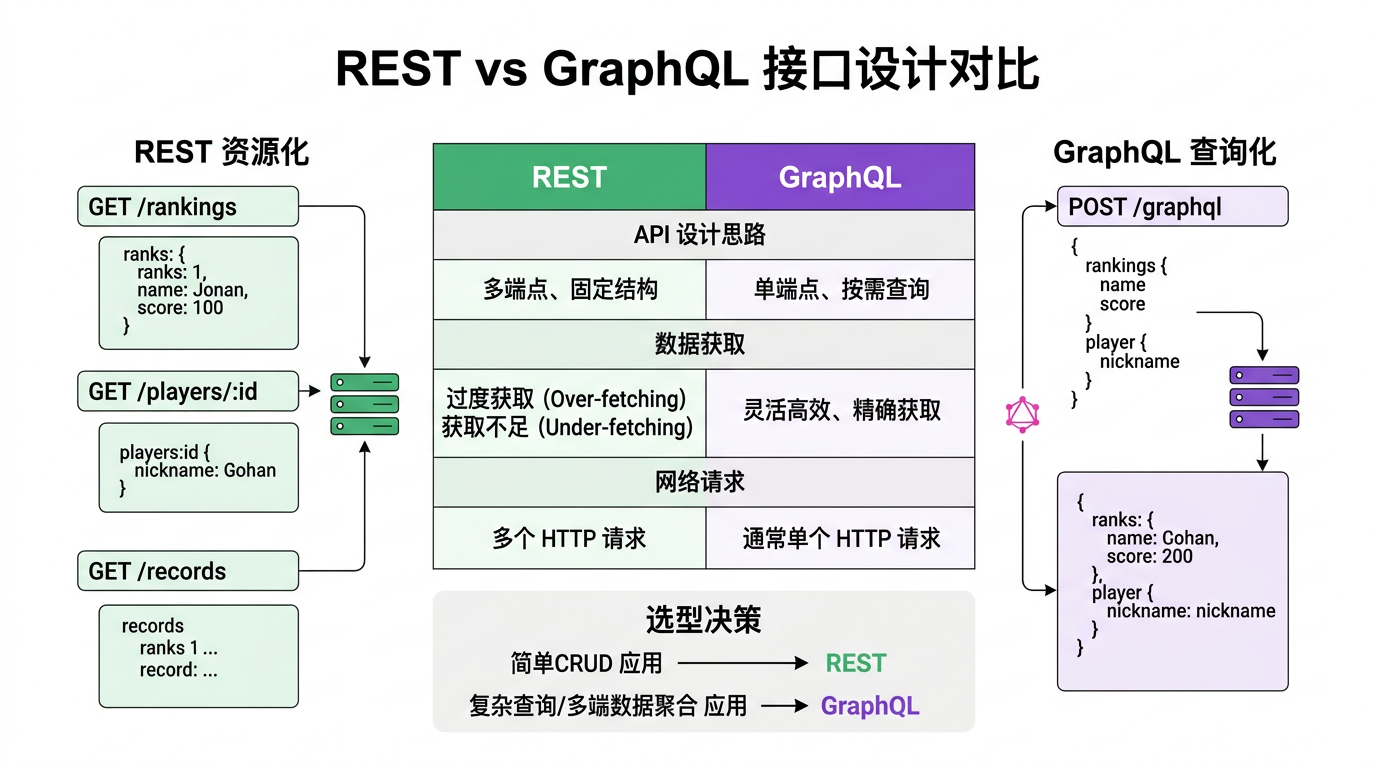
上一篇我们用 @ohos.net.http 拉排行榜、上报得分——但接口结构是「猫猫大作战」服务器定的。实战中开发者要设计接口结构,主流两大流派:REST(资源化,多个端点)和 GraphQL(查询化,单端点)。本篇对比两者差异,帮你按场景选型。
本篇以「猫猫大作战」拉排行榜+玩家信息+战绩三需求的接口设计为锚点,把 REST 资源化设计、GraphQL 查询化设计、两者取舍决策、HarmonyOS 端实现差异四大要点讲透。
提示:本系列不讲 ArkTS 基础语法与环境搭建,假设你已跟完第 1–61 篇。本篇是阶段四第二篇。
一、场景拆解:三需求的接口设计
「猫猫大作战」有三大网络需求:
- 拉排行榜:Top 10 排行 + 玩家名 + 头像 URL。
- 拉玩家信息:当前用户昵称、总分、历史最高、皮肤列表。
- 拉战绩列表:最近 50 局得分/时间/连击。
REST 和 GraphQL 两派设计差别明显。
二、REST 资源化设计
2.1 REST 核心思想
REST(Representational State Transfer)把后端数据抽象为资源,每个资源有独立 URL,用 HTTP 方法(GET/POST/PUT/DELETE)操作。
2.2 三需求的 REST 接口
// 需求 1:拉排行榜
GET /api/leaderboard?limit=10
→ [
  { "rank": 1, "playerName": "Alice", "score": 5000, "avatar": "url1" },
  { "rank": 2, "playerName": "Bob", "score": 4800, "avatar": "url2" }
]

// 需求 2:拉玩家信息
GET /api/player/{playerId}
→ { "id": "p1", "name": "Fiona", "totalScore": 12000, "highScore": 1500, "skins": ["default", "neon"] }

// 需求 3:拉战绩列表
GET /api/history/{playerId}?limit=50
→ [
  { "id": "h1", "score": 1500, "duration": 300, "maxCombo": 5, "date": "2026-07-20" },
  { "id": "h2", "score": 1200, "duration": 280, "maxCombo": 3, "date": "2026-07-19" }
]
REST 设计要点:
- 每个需求一个端点(3 个端点)。
- 资源用名词(
/leaderboard、/player、/history)。 - 参数拼 URL(
?limit=10、/{playerId})。 - GET 拉、POST 发、PUT 改、DELETE 删。
2.3 REST 的优点
| 优点 | 说明 |
|---|---|
| 简单直观 | URL 即资源,HTTP 方法即操作 |
| 缓存友好 | GET 可缓存,CDN/浏览器天然支持 |
| 无状态 | 每个请求自包含,服务器不记会话 |
| 工具成熟 | Postman、Swagger、各语言 SDK 都支持 |
2.4 REST 的痛点
| 痛点 | 说明 | 举例 |
|---|---|---|
| 过拉取 | 端点返回固定字段,客户端只要部分也得全拉 | 拉玩家信息只要昵称,却返回总分/皮肤/历史 |
| 多次请求 | 相关数据分散多端点,要多次请求 | 排行榜+玩家信息要 2 次请求 |
| 版本耦合 | 后端改字段名,客户端解析崩 | playerName → name,客户端错乱 |
| N+1 问题 | 列表里每项要拉关联,N 次请求 | 排行榜 10 人每人拉头像详情 = 10 次 |
三、GraphQL 查询化设计
3.1 GraphQL 核心思想
GraphQL 用单一端点(/graphql),客户端用查询语言指定要什么字段,服务器只返回要求的。
3.2 三需求的 GraphQL 接口
// 单一端点:POST /api/graphql
// 客户端发查询语句,服务器返回要求字段

// 需求 1:拉排行榜(只要 rank、playerName、score,不要 avatar)
const query1 = `
  query {
    leaderboard(limit: 10) {
      rank
      playerName
      score
    }
  }
`;
// → { "data": { "leaderboard": [{ "rank": 1, "playerName": "Alice", "score": 5000 }, ...] } }

// 需求 2:拉玩家信息(只要 name 和 highScore,不要 skins)
const query2 = `
  query($id: ID!) {
    player(id: $id) {
      name
      highScore
    }
  }
`;
// → { "data": { "player": { "name": "Fiona", "highScore": 1500 } } }

// 需求 3:拉战绩 + 玩家信息(一次请求拉相关数据,避免多次)
const query3 = `
  query($id: ID!) {
    player(id: $id) {
      name
      highScore
      history(limit: 50) {
        id
        score
        duration
        maxCombo
        date
      }
    }
  }
`;
// → { "data": { "player": { "name": "Fiona", "highScore": 1500, "history": [...] } } }
GraphQL 设计要点:
- 单一端点
/graphql,全部 POST。 - 客户端写查询语句(query/mutation)指定字段。
- 服务器按查询返回,不要的不拉。
- 嵌套关联数据一次拉(
player.history)。
3.3 GraphQL 的优点
| 优点 | 说明 |
|---|---|
| 按需拉取 | 客户端指定字段,不过拉取 |
| 一次请求 | 嵌套关联一次拉,避免多次 |
| 类型安全 | Schema 强类型,编译时校验 |
| 版本平滑 | 加字段不破坏老客户端,删字段渐进弃用 |
3.4 GraphQL 的痛点
| 痛点 | 说明 |
|---|---|
| 复杂 | 服务器要实现 Schema + Resolver,比 REST 重 |
| 缓存难 | POST 单端点,CDN/浏览器难缓存 |
| 学习曲线 | 客户端要学查询语言,非纯 HTTP |
| 性能监控难 | 单端点看不出「哪个资源慢」 |
四、两者取舍决策
4.1 取舍决策树
应用规模?
  ├ 简单 CRUD、资源明确 → REST(简单成熟)
  └ 复杂关联、按需字段 → GraphQL(灵活高效)

客户端类型?
  ├ Web/Mobile 多客户端、字段需求差异大 → GraphQL
  └ 字段需求统一 → REST

团队熟悉度?
  ├ 熟悉 HTTP/REST → REST
  └ 愿学 GraphQL、有 Schema 工具 → GraphQL

缓存需求?
  ├ 强(CDN/浏览器缓存) → REST GET
  └ 弱 → GraphQL 可
4.2 「猫猫大作战」推荐
| 需求 | 推荐 | 原因 |
|---|---|---|
| 排行榜(固定字段) | REST | 字段统一,GET 可缓存 |
| 玩家信息(字段需求差异) | GraphQL | 按需字段省流量 |
| 战绩+玩家(关联拉) | GraphQL | 一次请求省 RTT |
实战经验:「猫猫大作战」混合用——排行榜用 REST(缓存友好),玩家+战绩用 GraphQL(按需高效)。实际多应用混合用,按需求选。
4.3 对照表
| 维度 | REST | GraphQL |
|---|---|---|
| 端点 | 多(每资源一) | 单(/graphql) |
| 方法 | GET/POST/PUT/DELETE | 全 POST |
| 客户端控制 | 服务器定返回 | 客户端定要什么 |
| 过拉取 | ❌ 常见 | ✅ 避免 |
| 多请求 | ❌ 相关要多次 | ✅ 一次嵌套 |
| 缓存 | ✅ GET 友好 | ❌ POST 难 |
| 类型安全 | ❌ 靠文档 | ✅ Schema 强类型 |
| 复杂度 | 低 | 高 |
| 学习 | 易 | 中 |
关键经验:简单资源用 REST,复杂关联用 GraphQL——混合用最常见。
五、HarmonyOS 端实现差异
5.1 REST 实现(第 61 篇已讲)
import { http } from '@kit.NetworkKit';

// REST:多端点,每需求一请求
async fetchLeaderboard(): Promise<LeaderRecord[]> {
  const res = await this.httpRequest.request(`${this.baseUrl}/leaderboard?limit=10`, {
    method: http.RequestMethod.GET,
    header: { 'Content-Type': 'application/json' }
  });
  return JSON.parse(res.result) as LeaderRecord[];
}

async fetchPlayer(playerId: string): Promise<Player> {
  const res = await this.httpRequest.request(`${this.baseUrl}/player/${playerId}`, {
    method: http.RequestMethod.GET,
    header: { 'Content-Type': 'application/json' }
  });
  return JSON.parse(res.result) as Player;
}

async fetchHistory(playerId: string): Promise<GameRecord[]> {
  const res = await this.httpRequest.request(`${this.baseUrl}/history/${playerId}?limit=50`, {
    method: http.RequestMethod.GET,
    header: { 'Content-Type': 'application/json' }
  });
  return JSON.parse(res.result) as GameRecord[];
}

// 三需求三次请求
const leaderboard = await this.fetchLeaderboard();
const player = await this.fetchPlayer('p1');
const history = await this.fetchHistory('p1');
5.2 GraphQL 实现
import { http } from '@kit.NetworkKit';

// GraphQL:单端点,每需求发不同 query
async graphql<T>(query: string, variables: Record<string, Object>): Promise<T> {
  const res = await this.httpRequest.request(`${this.baseUrl}/graphql`, {
    method: http.RequestMethod.POST,        // GraphQL 全 POST
    header: { 'Content-Type': 'application/json' },
    extraData: JSON.stringify({ query, variables }),
    connectTimeout: 10000,
    readTimeout: 10000
  });
  if (res.responseCode === 200) {
    const body = JSON.parse(res.result) as { data: T, errors?: any[] };
    if (body.errors) {
      throw new Error(`GraphQL 错误: ${JSON.stringify(body.errors)}`);
    }
    return body.data;
  }
  throw new Error(`HTTP ${res.responseCode}`);
}

// 三需求一次请求(嵌套关联)
async fetchPlayerWithHistory(playerId: string): Promise<PlayerWithHistory> {
  const query = `
    query($id: ID!) {
      player(id: $id) {
        id
        name
        highScore
        history(limit: 50) {
          id
          score
          duration
          maxCombo
          date
        }
      }
    }
  `;
  const data = await this.graphql<{ player: PlayerWithHistory }>(query, { id: playerId });
  return data.player;
}
5.3 GraphQL 客户端封装
新建 entry/src/main/ets/services/GraphqlService.ets:
import { http } from '@kit.NetworkKit';

export class GraphqlService {
  private httpRequest: http.HttpRequest = http.createHttp();
  private readonly endpoint: string;
  private headers: Record<string, string> = {};

  constructor(endpoint: string) {
    this.endpoint = endpoint;
  }

  setHeader(key: string, value: string) {
    this.headers[key] = value;
  }

  setAuthToken(token: string) {
    this.headers['Authorization'] = 'Bearer ' + token;
  }

  async query<T>(query: string, variables?: Record<string, Object>): Promise<T> {
    const res = await this.httpRequest.request(this.endpoint, {
      method: http.RequestMethod.POST,
      header: {
        'Content-Type': 'application/json',
        ...this.headers
      },
      extraData: JSON.stringify({ query, variables }),
      connectTimeout: 10000,
      readTimeout: 10000
    });

    if (res.responseCode === 200) {
      const body = JSON.parse(res.result) as { data: T, errors?: GraphqlError[] };
      if (body.errors && body.errors.length > 0) {
        throw new Error(`GraphQL 错误: ${body.errors.map(e => e.message).join('; ')}`);
      }
      return body.data;
    } else if (res.responseCode === 401) {
      throw new Error('未授权,请登录');
    } else {
      throw new Error(`HTTP ${res.responseCode}`);
    }
  }

  // mutation 写操作
  async mutate<T>(mutation: string, variables?: Record<string, Object>): Promise<T> {
    return this.query<T>(mutation, variables);   // 同端点,只是语句是 mutation
  }

  destroy() {
    this.httpRequest.destroy();
  }
}

interface GraphqlError {
  message: string;
  locations?: any[];
  path?: string[];
}
5.4 使用 GraphqlService
import { GraphqlService } from './GraphqlService';

export class ApiService {
  private graphql: GraphqlService = new GraphqlService('https://api.catgame.com/graphql');

  aboutToAppear() {
    this.graphql.setAuthToken('my_token');
  }

  // 拉 玩家+战绩(一次请求)
  async fetchPlayerWithHistory(playerId: string) {
    const query = `
      query($id: ID!) {
        player(id: $id) {
          id
          name
          highScore
          totalScore
          skins
          history(limit: 50) {
            id
            score
            duration
            maxCombo
            mergeCount
            highestLevel
            date
          }
        }
      }
    `;
    const data = await this.graphql.query<{ player: PlayerWithHistory }>(query, { id: playerId });
    return data.player;
  }

  // 上报得分(mutation)
  async submitScore(scoreData: ScoreSubmit): Promise<boolean> {
    const mutation = `
      mutation($data: ScoreInput!) {
        submitScore(data: $data) {
          success
          newRank
        }
      }
    `;
    const data = await this.graphql.mutate<{ submitScore: { success: boolean, newRank: number } }>(
      mutation,
      { data: scoreData }
    );
    return data.submitScore.success;
  }

  // 拉排行榜(要 rank/name/score,不要 avatar)
  async fetchLeaderboard(limit: number = 10) {
    const query = `
      query($limit: Int!) {
        leaderboard(limit: $limit) {
          rank
          playerName
          score
        }
      }
    `;
    const data = await this.graphql.query<{ leaderboard: LeaderRecord[] }>(query, { limit });
    return data.leaderboard;
  }

  destroy() {
    this.graphql.destroy();
  }
}

interface PlayerWithHistory {
  id: string;
  name: string;
  highScore: number;
  totalScore: number;
  skins: string[];
  history: GameRecord[];
}
六、踩坑提示
6.1 REST 过拉取浪费流量
// ❌ REST 固定返回,只要昵称也拉全字段
GET /api/player/p1 → { id, name, totalScore, highScore, skins, history, ... }
// 手机流量浪费

// ✅ GraphQL 按需拉
query { player(id: "p1") { name } }
// 只返回 { player: { name: "Fiona" } }
6.2 GraphQL 用 GET 发请求
// ❌ 错误:GraphQL 用 GET,query 语句拼 URL 超长且难编码
GET /api/graphql?query=query{player(id:"p1"){name}}

// ✅ 正确:GraphQL 全 POST,query 放 body
POST /api/graphql
body: { "query": "query($id: ID!){ player(id: $id){ name } }", "variables": { "id": "p1" } }
6.3 GraphQL 忘判 errors
// ❌ 错误:只看 responseCode 200,没判 body.errors,静默错误
const body = JSON.parse(res.result);
return body.data;     // 可能 data 为 null,errors 有错

// ✅ 正确:判 errors
const body = JSON.parse(res.result) as { data: T, errors?: GraphqlError[] };
if (body.errors && body.errors.length > 0) {
  throw new Error(`GraphQL 错误: ${body.errors.map(e => e.message).join('; ')}`);
}
return body.data;
6.4 GraphQL variables 忘传
// ❌ 错误:query 声明 $id 但没传 variables
query($id: ID!) { player(id: $id) { name } }
// 忘了传 { id: "p1" }
// 服务器报「变量 $id 未提供」

// ✅ 正确:声明和传参对应
const query = `query($id: ID!) { player(id: $id) { name } }`;
const variables = { id: "p1" };
await this.graphql.query(query, variables);
6.5 REST 用名词动词混
// ❌ 错误:URL 用动词,违背 REST 资源化
POST /api/getPlayer
POST /api/submitScore
DELETE /api/removeHistory

// ✅ 正确:URL 用名词,动词用 HTTP 方法
GET /api/player/p1
POST /api/score
DELETE /api/history/h1
6.6 忘销毁实例
// ❌ 错误:没 destroy,泄漏
aboutToDisappear() {
  /* 忘了 this.graphql.destroy(); */
}

// ✅ 正确:销毁
aboutToDisappear() {
  this.graphql.destroy();
}
七、调试技巧
- REST 用 Postman 模拟:先在 Postman 调通端点,再移到 HarmonyOS 代码。
- GraphQL 用 GraphiQL/iExplorer:先在 GraphQL IDE 调通 query,再移代码。
console.info打 res.result:追服务器返回,验证字段。- DevEco Network Inspector:查看请求/响应,类似浏览器 Network 面板。
八、性能与最佳实践
- 简单资源用 REST,复杂关联用 GraphQL——混合用最常见。
- REST URL 用名词,动词用 HTTP 方法——
GET /player不用POST /getPlayer。 - GraphQL 全 POST,query 放 body——不用 GET 拼 URL。
- GraphQL 必判 errors——200 不代表无错,body.errors 才是。
- GraphQL variables 声明和传参对应——漏传服务器报错。
- REST 缓存友好用 GET 拉排行榜——CDN/浏览器可缓存。
- GraphQL 按需字段省流量——只拉需要的,不过拉取。
- aboutToDisappear 销毁实例——避泄漏。
九、阶段四进度(61–65)
本篇是阶段四「网络与数据」第 2 篇:
| 篇 | 主题 | 核心要点 |
|---|---|---|
| 61 | HTTP 请求 | http 模块、GET/POST、错误处理 |
| 62(本篇) | REST/GraphQL | 接口设计取舍 |
| 63 | 数据序列化 | JSON/proto 创建解析 |
| 64 | SQLite 持久化 | 关系型数据存储 |
| 65 | Preference 键值 | 轻量配置存储 |
总结
本篇我们从 REST/GraphQL 接口设计切入,掌握了REST 资源化(多端点、HTTP 方法、缓存友好)、GraphQL 查询化(单端点、按需字段、嵌套关联)、取舍决策(简单 REST,复杂 GraphQL,混合用)、HarmonyOS 端实现差异四大要点,并给出了 GraphqlService 完整封装代码。核心要点:简单资源 REST,复杂关联 GraphQL;REST 名词+HTTP 方法;GraphQL 全 POST 判 errors;混合用最常见。
下一篇我们将拆解数据序列化——JSON/proto 创建解析。
如果这篇文章对你有帮助,欢迎点赞👍、收藏⭐、关注🔔,你的支持是我持续创作的动力!
相关资源:
- 「猫猫大作战」项目源码:本仓库
entry/src/main/ets/services/HttpService.ets、entry/src/main/ets/services/GraphqlService.ets - @ohos.net.http HTTP 模块官方指南
- GraphQL 官方文档
- REST API 设计最佳实践
- HarmonyOS 网络编程最佳实践
- 开源鸿蒙跨平台社区
- HarmonyOS 开发者官方文档首页
- 系列索引:本仓库
articles/INDEX.md

讨论HarmonyOS开发技术,专注于API与组件、DevEco Studio、测试、元服务和应用上架分发等。
更多推荐

 4
4 0
0- 0


 已为社区贡献73条内容

所有评论(0)