HarmonyOS应用开发实战:猫猫大作战-clearInterval 清理机制、-1 哨兵值约定、三处清理时机、aboutToDisappear 生
前言
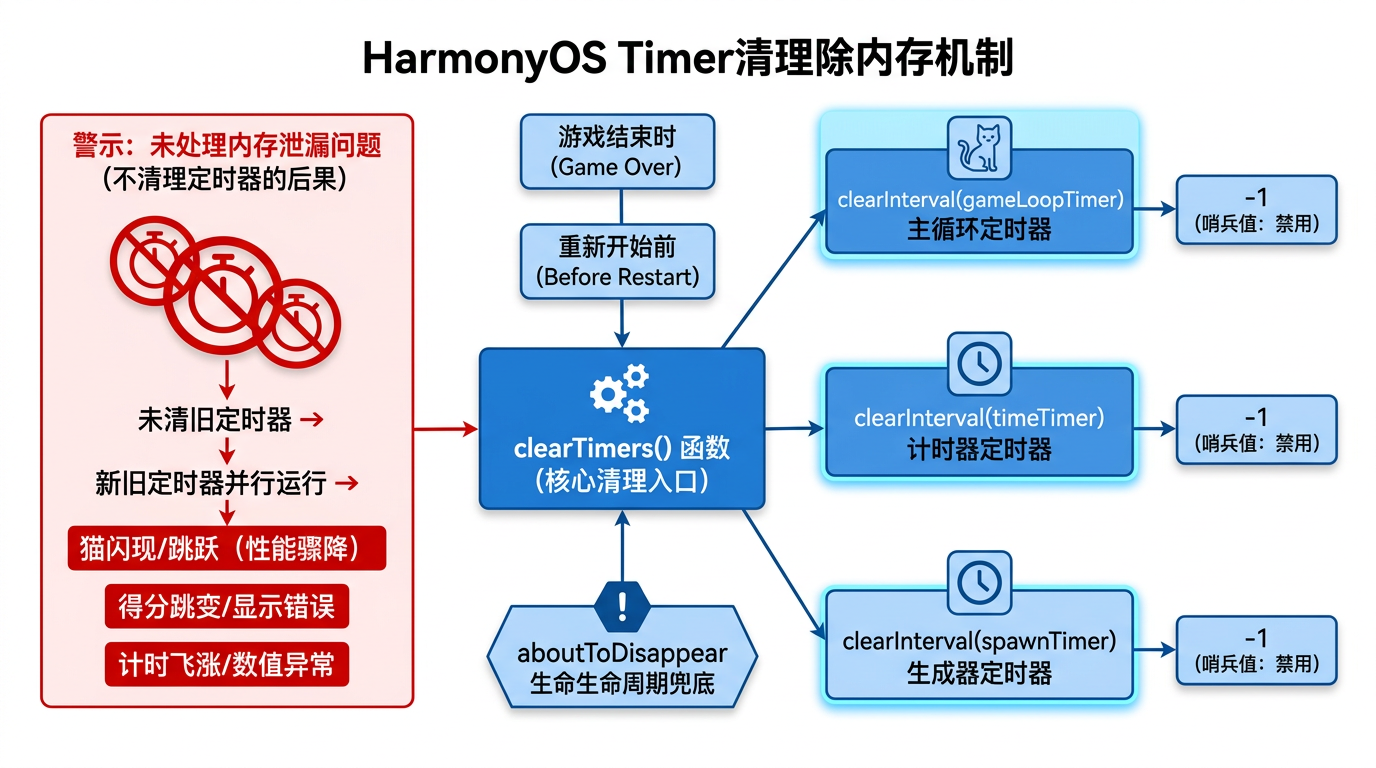
前几篇我们搭好了三个定时器——100ms 物理主循环、1000ms 秒级计时、2000ms 自动生成。但有个隐藏的坑:重新开始或游戏结束时,如果忘清旧定时器,它们会继续在后台跑,新旧定时器并行导致状态错乱(猫闪现、得分跳变、计时飞涨)。这就是定时器泄漏。
本篇以「猫猫大作战」clearTimers() 函数为锚点,把 clearInterval 清理机制、-1 哨兵值约定、三处清理时机、aboutToDisappear 生命周期兜底四大要点讲透。
提示:本系列不讲 ArkTS 基础语法与环境搭建,假设你已跟完第 1–35 篇。本篇是阶段二第六篇。
一、场景拆解:定时器泄漏
回顾「猫猫大作战」clearTimers(第 33 篇):
// 来源:entry/src/main/ets/pages/Index.ets
clearTimers() {
  if (this.gameLoopTimer !== -1) {
    clearInterval(this.gameLoopTimer);
    this.gameLoopTimer = -1;
  }
  if (this.spawnTimer !== -1) {
    clearInterval(this.spawnTimer);
    this.spawnTimer = -1;
  }
  if (this.timeTimer !== -1) {
    clearInterval(this.timeTimer);
    this.timeTimer = -1;
  }
}
核心问题:
- 为什么用
-1哨兵值,而不是0或undefined? - 哪些时机必须调
clearTimers? - 忘清定时器有什么具体后果?
二、clearInterval 清理机制
2.1 clearInterval 的本质
const timerId: number = setInterval(() => { /* ... */ }, 100);
clearInterval(timerId);     // 把 timerId 从定时器队列移除,回调不再触发
API 说明:
| API | 作用 |
|---|---|
setInterval(cb, delay) | 创建周期定时器,返回 timer id(正整数) |
clearInterval(timerId) | 停止定时器,回调不再触发 |
关键经验:clearInterval 只能停「自己创建的」定时器——传一个不存在的 id 或已清的 id,静默无操作,不报错。
2.2 忘清定时器的后果
// 场景:重新开始没清旧定时器
startGame() {
  // 忘了 this.clearTimers();
  this.gameState = GameState.PLAYING;
  this.score = 0;
  this.gameLoopTimer = setInterval(() => { /* 新循环 */ }, 100);
}
泄漏后果:
| 定时器 | 旧实例还在跑 | 新实例也在跑 | 并行后果 |
|---|---|---|---|
gameLoopTimer | 每 100ms 改 cats/score/combo | 每 100ms 也改 | 猫闪现、得分跳变 |
spawnTimer | 每 2000ms 生成猫 | 每 2000ms 也生成 | 猫数倍增,瞬间爆盘 |
timeTimer | 每 1000ms gameTime++ | 每 1000ms 也++ | 计时飞涨,1 秒变 2 秒 |
关键经验:定时器泄漏 = 新旧并行 = 状态错乱——这是定时器驱动游戏最隐蔽的 bug 源。
2.3 定时器泄漏的隐蔽性
定时器泄漏不像崩溃那样显式报错——它表现为「游戏行为诡异」:
- 猫突然瞬移到另一格(两套主循环都改
cat.y,时序冲突)。 - 得分随机 +20 而非 +10(两套主循环都加得分)。
- 计时器 1 秒跳 2 秒(两套 timeTimer 都
gameTime++)。
实战经验:游戏行为诡异先查定时器数量——DevEco Profiler 看 timer 数量,正常游戏 3 个,泄漏时 6、9、12 个递增。
三、-1 哨兵值约定
3.1 为什么用 -1
private gameLoopTimer: number = -1; // 初始 -1 表示无定时器
选择 -1 的原因:
| 候选值 | 问题 |
|---|---|
0 | setInterval 某些环境可能返回 0,冲突 |
undefined | ArkTS 严格模式要显式类型,且 !== undefined 冗长 |
null | 同 undefined,类型检查繁琐 |
-1 | setInterval 永不返回负数,安全哨兵 |
关键经验:哨兵值要选「业务值不可能取到的值」——setInterval 返回正整数 id,-1 是安全哨兵。
3.2 守卫清理逻辑
clearTimers() {
  if (this.gameLoopTimer !== -1) {        // 守卫:只有非 -1 才清
    clearInterval(this.gameLoopTimer);
    this.gameLoopTimer = -1;              // 清后置 -1,表示已清
  }
  /* ... 其他两个定时器 */
}
守卫的作用:
// 场景:连续调 clearTimers 两次
this.clearTimers();   // 第 1 次:timerId=5 → clearInterval(5) → 置 -1
this.clearTimers();   // 第 2 次:timerId=-1 → if 不通过 → 不调 clearInterval
没有守卫的后果:
clearTimers() {
  clearInterval(this.gameLoopTimer);   // 没守卫
  this.gameLoopTimer = -1;
}
// 第 2 次调:clearInterval(-1),某些环境会报错或行为未定义
关键经验:if (timer !== -1) 守卫让 clearTimers 可重入——连续调多次也安全。
3.3 startGame 里的哨兵检查
startGame() {
  this.clearTimers();    // 首行清旧,确保只有一套定时器在跑
  this.gameEngine.reset();
  this.gameState = GameState.PLAYING;
  /* ... */
  this.gameLoopTimer = setInterval(() => { /* ... */ }, 100);
}
流程:
clearTimers()把三个 timer 都置 -1。setInterval创建新定时器,赋正整数 id 给 timer 变量。- 下次
startGame时,clearTimers检测到非 -1,清掉这套定时器,再建新的。
四、三处清理时机
4.1 时机一:重新开始
// 来源:entry/src/main/ets/pages/Index.ets  底部栏
Button('重新开始')
  .onClick(() => {
    this.clearTimers();      // ← 清旧定时器
    this.startGame();        // 启动新游戏(内部会再建定时器)
  })
为什么先清再 start:startGame 首行也调 clearTimers,但底部栏的 onClick 先清一次是双保险——万一未来 startGame 重构忘了清,底部栏的清还能兜底。
4.2 时机二:游戏结束
// 来源:entry/src/main/ets/pages/Index.ets
endGame() {
  this.gameState = GameState.GAME_OVER;
  this.maxCombo = this.gameEngine.getMaxCombo();
  this.mergeCount = this.gameEngine.getMergeCount();
  this.highestLevel = this.gameEngine.getHighestLevel();
  if (this.score > this.highScore) {
    this.highScore = this.score;
  }
  this.clearTimers();        // ← 清所有定时器,停止物理/生成/计时
}
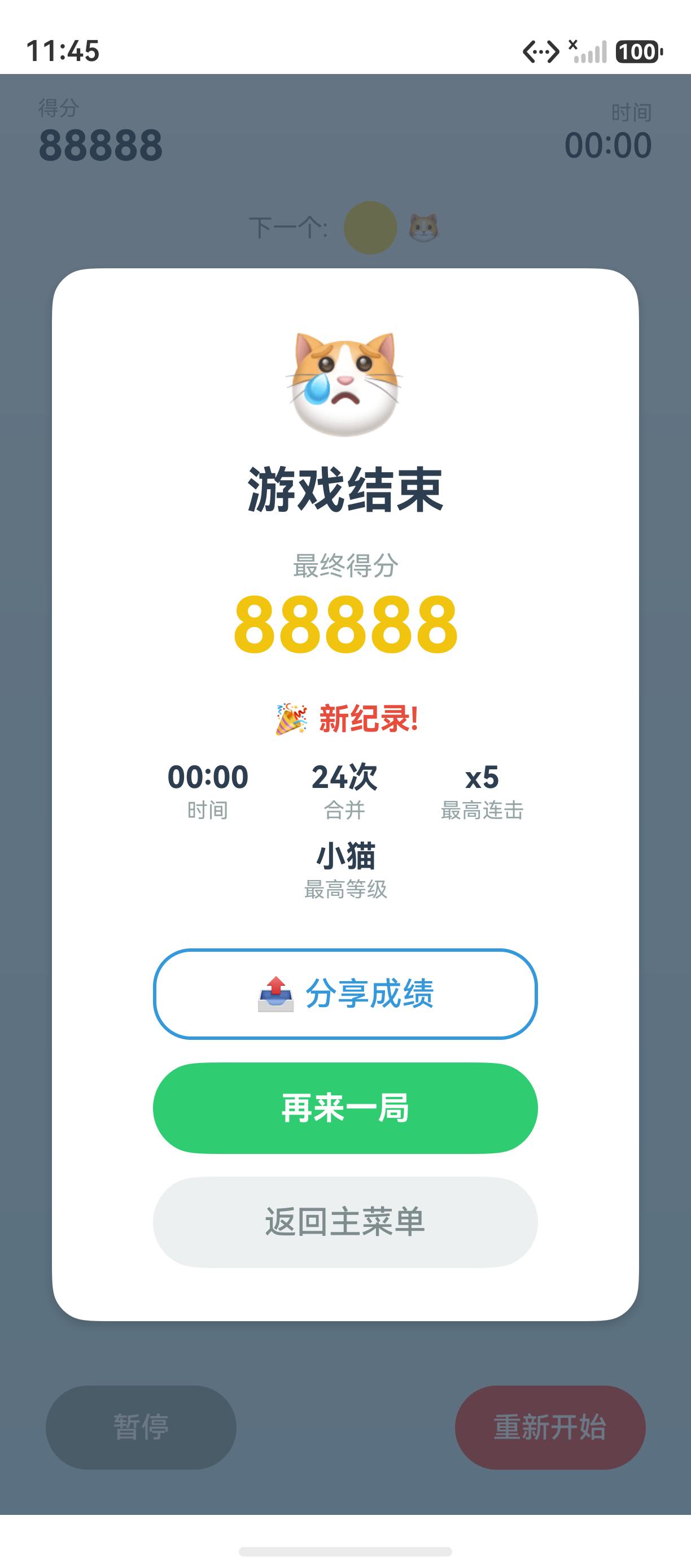
为什么结束要清:GameOverOverlay 显示后,主循环若不清,猫还会下落、得分还会加,玩家看到「结束后分数还在涨」。
4.3 时机三:返回主菜单
// 来源:entry/src/main/ets/pages/Index.ets  GameOverOverlay / PauseOverlay
Button('返回主菜单')
  .onClick(() => {
    this.clearTimers();      // ← 清定时器
    this.gameState = GameState.IDLE;   // 切回主菜单
  })
为什么返回主菜单要清:主菜单态(IDLE)下,物理循环若不清,主菜单背景会有猫下落(cats 数组还在改,虽然 IDLE 态不渲染 GameView,但引擎还在跑)。
4.4 三时机对照
| 时机 | 触发 | 目的 |
|---|---|---|
| 重新开始 | 底部栏「重新开始」按钮 | 避免新旧循环并行 |
| 游戏结束 | endGame() 内 | 停止物理/生成/计时,固定结束态 |
| 返回主菜单 | PauseOverlay/GameOverOverlay 的按钮 | 切 IDLE 态,停止所有后台逻辑 |
关键经验:「不再需要定时器」的每个出口都要 clearTimers——漏一处就泄漏。
五、aboutToDisappear 生命周期兜底
5.1 组件销毁时清理
// 来源:entry/src/main/ets/pages/Index.ets
aboutToDisappear() {
  this.clearTimers();    // ← 组件销毁时兜底清理
}
aboutToDisappear 是 ArkUI 的生命周期钩子,在组件从 DOM 移除前触发。在这里调 clearTimers,确保组件销毁时定时器也跟着清。
5.2 为什么需要 aboutToDisappear
即使三处时机都调了 clearTimers,仍有可能遗漏:
| 场景 | 三时机是否覆盖 | aboutToDisappear 兜底 |
|---|---|---|
| 重新开始 | ✅ 覆盖 | 不必要 |
| 游戏结束 | ✅ 覆盖 | 不必要 |
| 返回主菜单 | ✅ 覆盖 | 不必要 |
| 系统杀进程 | ❌ 不覆盖 | ❌(进程死了) |
| 路由切走本页 | ❌ 不覆盖 | ✅ 兜底 |
| Ability 切后台被回收 | ❌ 不覆盖 | ✅ 兜底 |
关键经验:aboutToDisappear 是「组件级」兜底——路由切走或 Ability 回收时,三时机都触发不到,靠生命周期兜底。
5.3 生命周期顺序
组件创建 → aboutToAppear(首渲染前)
        ↓
        build()(首渲染)
        ↓
        多次 build()(状态变化触发重渲染)
        ↓
        aboutToDisappear(从 DOM 移除前)← clearTimers 兜底
        ↓
        组件销毁
本系列第 64、65 篇会专讲 aboutToAppear(数据加载)和 aboutToDisappear(资源释放)。
六、完整 clearTimers 代码
// 来源:entry/src/main/ets/pages/Index.ets
@Entry
@Component
struct Index {
  @State gameState: GameState = GameState.IDLE;
  @State score: number = 0;
  @State cats: Cat[] = [];
  /* ... 其他 state */

  private gameEngine: GameEngine = new GameEngine();
  private gameLoopTimer: number = -1;       // -1 哨兵:无定时器
  private spawnTimer: number = -1;
  private timeTimer: number = -1;

  startGame() {
    this.clearTimers();                      // 时机零:启动前清旧(双保险)
    this.gameEngine.reset();
    this.gameState = GameState.PLAYING;
    this.score = 0;
    this.cats = [];
    this.gameTime = 0;
    this.combo = { count: 0, multiplier: 1, lastMergeTime: 0 };
    this.nextCatLevel = this.gameEngine.getNextCatLevel();

    this.gameLoopTimer = setInterval(() => {
      if (this.gameState !== GameState.PLAYING) return;
      this.cats = this.gameEngine.updateCats();
      this.score = this.gameEngine.getScore();
      this.combo = this.gameEngine.getCombo();
      if (this.gameEngine.isGameOver()) { this.endGame(); }
    }, 100);

    this.spawnTimer = setInterval(() => {
      if (this.gameState !== GameState.PLAYING) return;
      if (this.gameEngine.getCatCount() < GameConfig.MAX_CATS) {
        this.gameEngine.autoSpawnCat();
        this.cats = this.gameEngine.getAllCats();
        this.nextCatLevel = this.gameEngine.getNextCatLevel();
      }
    }, GameConfig.SPAWN_RATE);

    this.timeTimer = setInterval(() => {
      if (this.gameState === GameState.PLAYING) {
        this.gameTime++;
      }
    }, 1000);
  }

  endGame() {
    this.gameState = GameState.GAME_OVER;
    this.maxCombo = this.gameEngine.getMaxCombo();
    this.mergeCount = this.gameEngine.getMergeCount();
    this.highestLevel = this.gameEngine.getHighestLevel();
    if (this.score > this.highScore) {
      this.highScore = this.score;
    }
    this.clearTimers();                      // 时机二:结束清
  }

  clearTimers() {                            // 本篇重点
    if (this.gameLoopTimer !== -1) {
      clearInterval(this.gameLoopTimer);
      this.gameLoopTimer = -1;               // 清后置 -1
    }
    if (this.spawnTimer !== -1) {
      clearInterval(this.spawnTimer);
      this.spawnTimer = -1;
    }
    if (this.timeTimer !== -1) {
      clearInterval(this.timeTimer);
      this.timeTimer = -1;
    }
  }

  aboutToDisappear() {
    this.clearTimers();                      // 时机四:组件销毁兜底
  }

  build() {
    Stack() {
      if (this.gameState === GameState.IDLE) {
        this.MainMenuView()
      } else {
        this.GameView()
      }
      if (this.gameState === GameState.PAUSED) {
        this.PauseOverlay()
      }
      if (this.gameState === GameState.GAME_OVER) {
        this.GameOverOverlay()
      }
    }
    .width('100%').height('100%')
  }
}
七、踩坑提示
7.1 忘清一个定时器
// ❌ 错误:只清两个,漏 spawnTimer
clearTimers() {
  if (this.gameLoopTimer !== -1) { clearInterval(this.gameLoopTimer); this.gameLoopTimer = -1; }
  if (this.timeTimer !== -1) { clearInterval(this.timeTimer); this.timeTimer = -1; }
  // 忘了 spawnTimer!
}

// ✅ 正确:三个都清
clearTimers() {
  if (this.gameLoopTimer !== -1) { clearInterval(this.gameLoopTimer); this.gameLoopTimer = -1; }
  if (this.spawnTimer !== -1) { clearInterval(this.spawnTimer); this.spawnTimer = -1; }
  if (this.timeTimer !== -1) { clearInterval(this.timeTimer); this.timeTimer = -1; }
}
后果:漏清 spawnTimer,游戏结束后猫还在生成,GameOverOverlay 背后猫数变化。
7.2 清后忘置 -1
// ❌ 错误:清了没置 -1,下次 clearTimers 还会调 clearInterval
clearTimers() {
  clearInterval(this.gameLoopTimer);     // 没置 -1
}

// ✅ 正确:清后置 -1
clearTimers() {
  clearInterval(this.gameLoopTimer);
  this.gameLoopTimer = -1;              // 清后置 -1
}
7.3 startGame 没首行 clearTimers
// ❌ 错误:startGame 不清旧,直接建新
startGame() {
  this.gameEngine.reset();
  this.gameState = GameState.PLAYING;
  this.gameLoopTimer = setInterval(() => { /* ... */ }, 100);
  // 旧的 gameLoopTimer 还在跑!

// ✅ 正确:首行 clearTimers
startGame() {
  this.clearTimers();                   // 首行清旧
  this.gameEngine.reset();
  this.gameState = GameState.PLAYING;
  this.gameLoopTimer = setInterval(() => { /* ... */ }, 100);
}
7.4 忘 aboutToDisappear 兜底
// ❌ 错误:没 aboutToDisappear,路由切走后定时器泄漏
@Entry
@Component
struct Index {
  /* 没约ToDisappear */
}

// ✅ 正确:aboutToDisappear 兜底
aboutToDisappear() {
  this.clearTimers();
}
八、调试技巧
- DevEco Profiler 看 timer 数量:正常游戏 3 个,重新开始后还是 3 个(不是 6 个)。
console.info打 timer id:console.info('timers', this.gameLoopTimer, this.spawnTimer, this.timeTimer),追创建/清理。- 猫闪现排查:DevEco Profiler 看 timer 数量,闪现说明有重复定时器(6 个而非 3 个)。
- 结束后分数还在涨:检查
endGame是否调了clearTimers。
九、性能与最佳实践
- -1 哨兵值约定——setInterval 永不返回负数,-1 是安全哨兵。
- if 守卫让 clearTimers 可重入——连续调多次也安全。
- 三时机都清——重新开始、游戏结束、返回主菜单,漏一处就泄漏。
- startGame 首行 clearTimers——双保险,避免新旧并行。
- aboutToDisappear 兜底——路由切走或 Ability 回收时兜底清理。
- 清后置 -1——避免下次 clearInterval 重复调用。
总结
本篇我们从 clearTimers 防泄漏切入,掌握了clearInterval 清理机制与泄漏后果、-1 哨兵值约定与可重入守卫、三处清理时机(重新开始/结束/返回主菜单)、aboutToDisappear 生命周期兜底四大要点,并给出了完整 clearTimers 代码。核心要点:-1 哨兵+if 守卫可重入;三时机都清;aboutToDisappear 兜底;漏清导致新旧并行状态错乱。
下一篇我们将拆解 onClick 列投放——点击事件处理的实战。
如果这篇文章对你有帮助,欢迎点赞👍、收藏⭐、关注🔔,你的支持是我持续创作的动力!
相关资源:
- 「猫猫大作战」项目源码:本仓库
entry/src/main/ets/pages/Index.ets - setInterval/clearInterval 官方文档
- ArkUI 生命周期 aboutToDisappear 官方指南
- HarmonyOS 内存与资源管理最佳实践
- 开源鸿蒙跨平台社区
- HarmonyOS 开发者官方文档首页
- 系列索引:本仓库
articles/INDEX.md

讨论HarmonyOS开发技术,专注于API与组件、DevEco Studio、测试、元服务和应用上架分发等。
更多推荐

 8
8 0
0- 0


 已为社区贡献100条内容

所有评论(0)