ArkTS 房屋租赁管理应用基于HarmonyOS API 24实现Model 与 Interface 的双轨并行,用于需要实例化、携带行为、且属性可变的运行时对象
本文以一款功能完整的 HarmonyOS ArkTS 房屋租赁管理应用 为蓝本,从接口定义、数据模型、状态管理、组件化架构到UI构建,逐段拆解每一段代码背后的设计思路与实现细节。无论你是刚接触 ArkTS 的初学者,还是希望深入理解组件通信与状态驱动UI的开发者,都能从中获得有价值的参考。
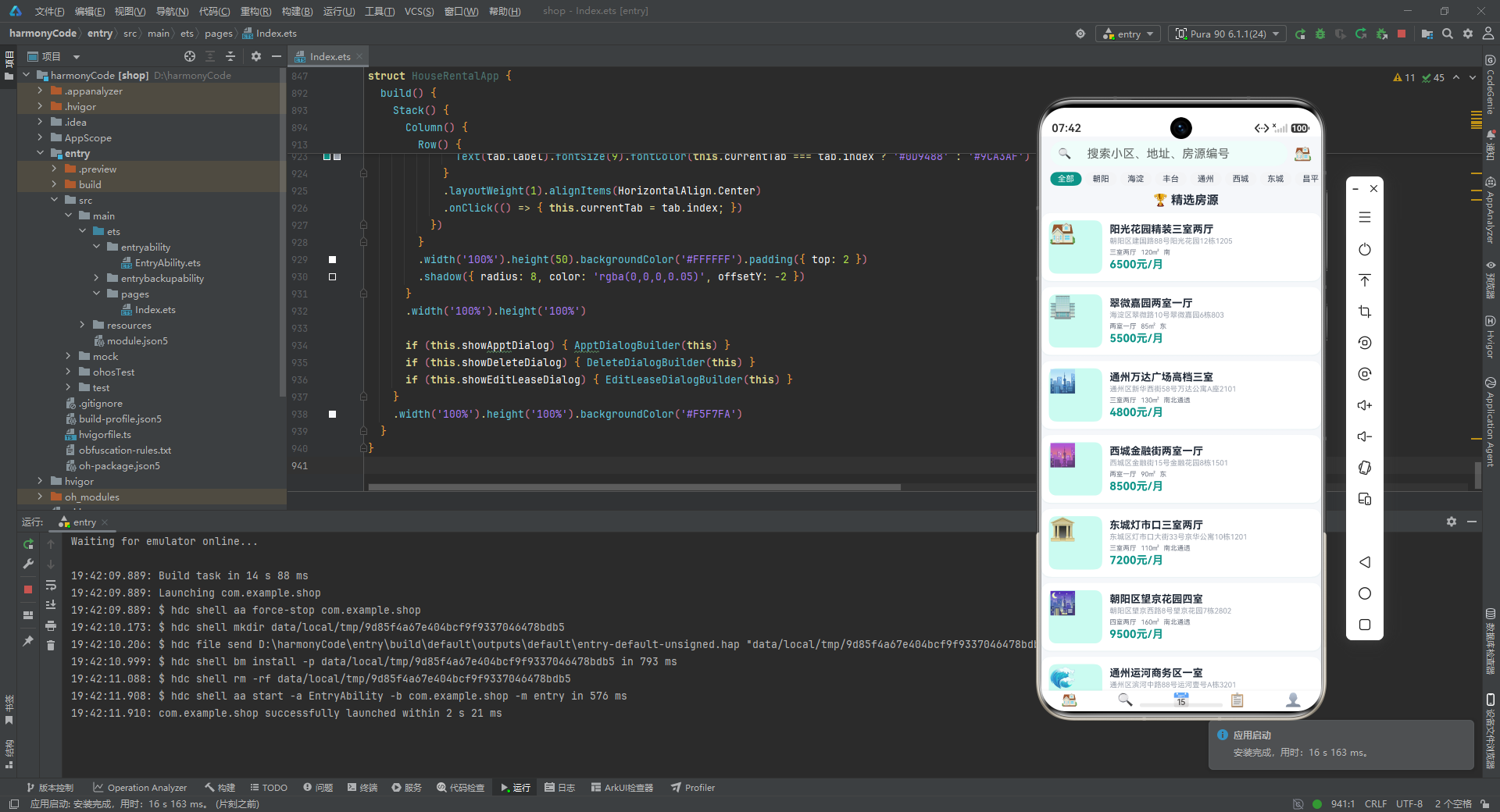
一、接口定义层 – 类型安全的基石
interface HouseItem {
  id: string; title: string; address: string; region: string; area: number; price: number;
  unitPrice: number; layout: string; orientation: string; floor: string; totalFloors: number;
  decoration: string; tags: string[]; imageEmoji: string; isFavorite: boolean; isFeatured: boolean;
  status: string; publishDate: string; landlordName: string;
}

interface AppointmentItem {
  id: string; houseId: string; houseTitle: string; houseAddress: string;
  houseArea: number; housePrice: number; houseEmoji: string;
  appointmentDate: string; appointmentTime: string; status: string; remarks: string;
  contactName: string; contactPhone: string; createTime: string;
}

interface FavoriteItem {
  id: string; houseId: string; title: string; address: string;
  price: number; area: number; layout: string; imageEmoji: string; addedTime: string;
}

interface LeaseItem {
  id: string; houseId: string; houseTitle: string; houseAddress: string;
  startDate: string; endDate: string; monthlyRent: number; deposit: number;
  paymentMethod: string; status: string; landlordName: string; landlordPhone: string;
  houseEmoji: string;
}

interface AreaPriceItem {
  area: string; avgPrice: number; maxPrice: number; minPrice: number; houseCount: number;
}

interface PaymentItem {
  id: string; leaseId: string; amount: number; type: string;
  dueDate: string; paidDate: string; status: string;
}

interface LayoutCountItem {
  layout: string; count: number; color: string;
}

interface SettingsConfigItem {
  icon: string; title: string; subtitle: string;
}

interface TabConfigItem {
  index: number; icon: string; label: string;
}

interface RentTrendItem {
  month: string; avgRent: number;
}
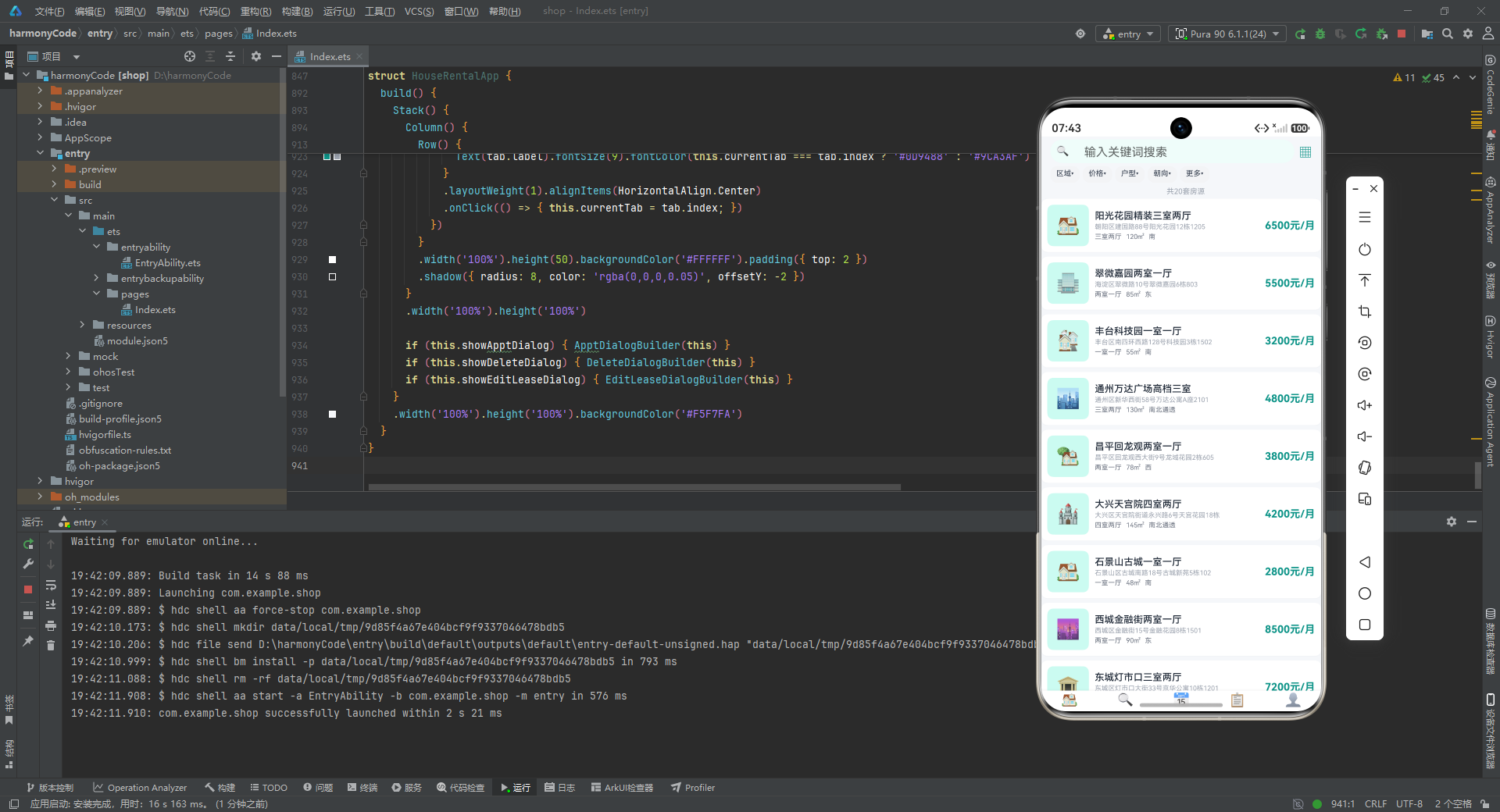
深度解析
这段代码定义了整个应用所需的 10 个接口(interface),构成了应用的类型系统基石。在 ArkTS 开发中,TypeScript 的类型系统被完整保留,接口的作用远不止于"代码提示",它直接关系到运行时的数据校验和组件通信的安全性。
1. 数据模型的分层设计思想:
整个接口体系可以清晰地划分为三个层次:
-
核心业务实体层:
HouseItem(房源信息)、LeaseItem(租约信息)、AppointmentItem(预约信息)是应用的三大核心业务对象,它们承载了完整的业务语义。其中HouseItem作为最复杂的实体,包含了 18 个字段,涵盖了房源的全部维度:基础信息(id/title/address/region)、物理属性(area/layout/orientation/floor/totalFloors/decoration)、经济指标(price/unitPrice)、标签系统(tags: string[])、状态管理(isFavorite/isFeatured/status/publishDate)以及房东信息(landlordName)。这种"全量字段"的设计使得一个接口就能覆盖列表展示、详情页、筛选、收藏等多种业务场景,避免了为不同场景定义多个接口的冗余。 -
辅助数据结构层:
FavoriteItem(收藏项,是 HouseItem 的轻量投影)、PaymentItem(缴费记录)、AreaPriceItem(区域价格统计)、LayoutCountItem(户型分布统计)、RentTrendItem(租金趋势)构成了围绕核心业务的数据视图。注意FavoriteItem的设计非常有意思 – 它并没有直接引用HouseItem,而是只复制了展示所需的 8 个字段(id/houseId/title/address/price/area/layout/imageEmoji/addedTime)。这是一种典型的 “视图模型(View Model)” 思想:不同的UI页面只需要关心自己需要的数据子集,而非完整实体。这种做法既减少了内存开销,也让组件间的数据传递更加聚焦。 -
UI配置层:
SettingsConfigItem和TabConfigItem是纯 UI 驱动的配置接口,它们不直接关联业务逻辑,而是服务于界面渲染。TabConfigItem只有三个字段(index/icon/label),专门为底部导航栏的ForEach循环提供数据源;SettingsConfigItem则用于"我的"页面的设置列表渲染。这种将UI配置数据化的做法,使得界面元素可以通过数据驱动来生成,而非硬编码,极大地提升了代码的可维护性和扩展性。
2. 字段类型的选择策略:
观察所有接口的字段类型可以发现一些规律:日期、电话号码、状态码等均使用 string 类型而非专门的类型。这是 ArkTS/TypeScript 在快速开发场景下的常见选择 – 对于模拟数据阶段,使用字符串可以避免引入额外的日期解析和类型转换开销。tags: string[] 使用数组类型来表示标签列表,使得 ForEach 可以直接遍历渲染;boolean 类型的 isFavorite 和 isFeatured 作为标识字段,用于条件渲染和过滤逻辑。number 类型的价格和面积字段,则在展示前通过工具函数进行格式化。
3. 接口间的关联关系:
虽然这些接口在代码中没有显式使用 TypeScript 的交叉类型或泛型来建立关联,但通过命名约定隐含了业务关联:AppointmentItem.houseId 和 LeaseItem.houseId 都指向 HouseItem.id;FavoriteItem.houseId 同样关联到房源;PaymentItem.leaseId 关联到 LeaseItem.id。这种"约定优于配置"的关联方式在小型应用中非常实用,让开发者通过字段名就能理解数据关系,而不需要维护复杂的外键约束系统。
二、@Observed 数据模型类 – 可观察对象的声明式响应
@Observed
class HouseModel {
  id: string; title: string; price: number; area: number; isFavorite: boolean;
  constructor(id: string, title: string, price: number, area: number) {
    this.id = id; this.title = title; this.price = price; this.area = area; this.isFavorite = false;
  }
}

@Observed
class AppointmentModel {
  id: string; status: string; appointmentDate: string; appointmentTime: string;
  constructor(id: string, status: string, date: string, time: string) {
    this.id = id; this.status = status; this.appointmentDate = date; this.appointmentTime = time;
  }
}
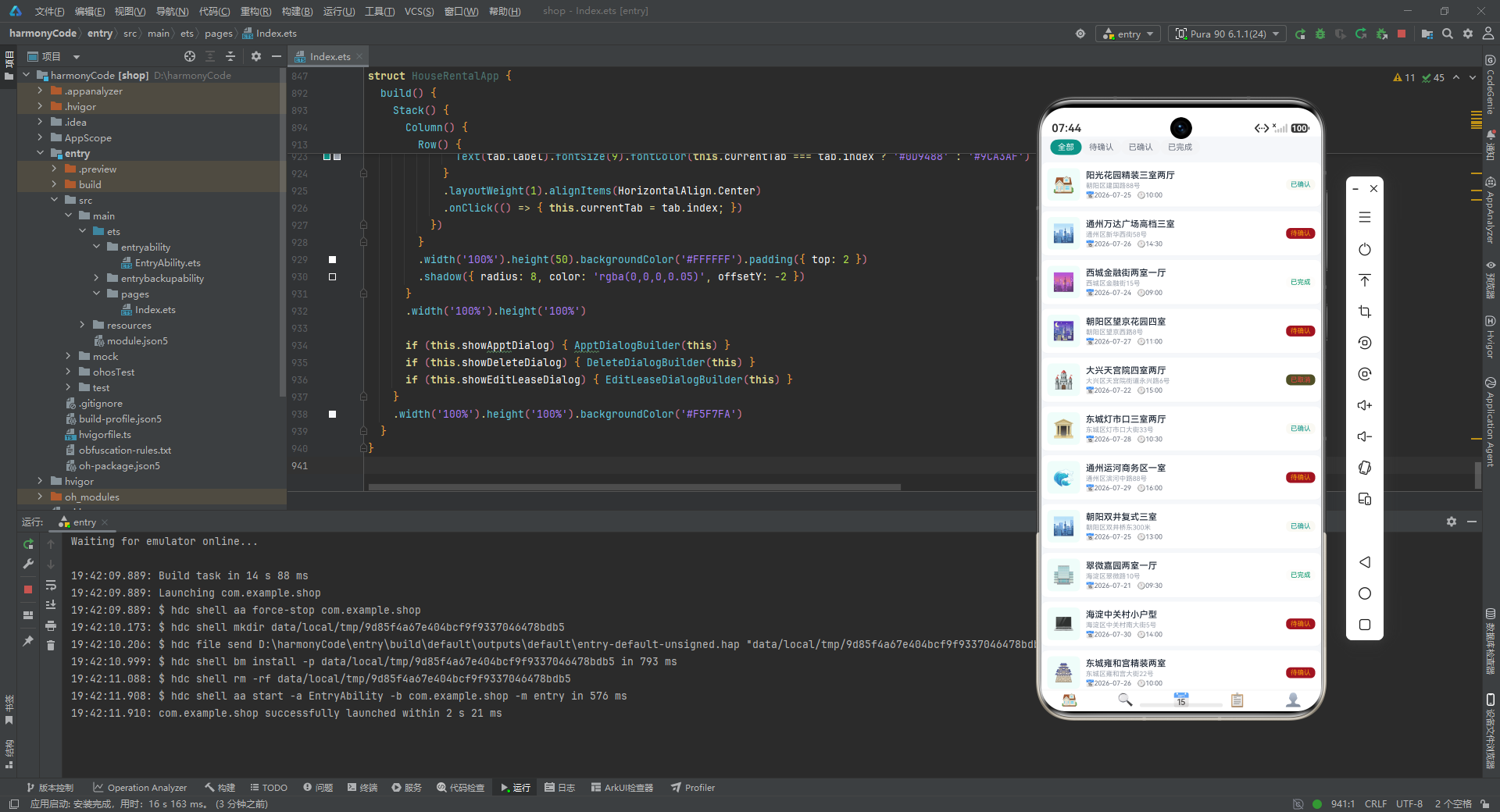
深度解析
这段代码展示了 ArkTS 中 响应式状态管理 的核心机制 – @Observed 类装饰器。这是 ArkUI 声明式UI框架区别于传统命令式UI的关键特性之一。
1. @Observed 装饰器的本质:
在 HarmonyOS ArkUI 框架中,@Observed 是类级别的装饰器,它将一个普通的 TypeScript 类标记为"可观察对象"。被标记后,该类实例的属性变化能够被框架自动追踪,并在属性值发生变更时触发关联UI组件的重新渲染。这本质上是一种 细粒度的依赖收集与变更检测机制,类似于前端领域中 Vue 的 reactive() 或 MobX 的 observable()。
但需要特别指出的是,@Observed 通常需要配合 @ObjectLink 装饰器在子组件中使用才能发挥完整的响应式能力。在本应用的主体代码中,子组件(如 HomeContent、FindContent 等)使用的是 @Prop 而非 @ObjectLink,这意味着当父组件传入的数据引用不变时,子组件不会因为 @Observed 对象内部属性的变化而自动更新。这两个 @Observed 类更像是为将来可能引入 @ObjectLink 做的类型预留,体现了开发者对架构扩展性的前瞻性考虑。
2. Model 与 Interface 的双轨并行:
注意到应用同时定义了 HouseItem 接口和 HouseModel 类,AppointmentItem 接口和 AppointmentModel 类。这不是代码冗余,而是两种不同使用场景的合理分工:
-
Interface(HouseItem/AppointmentItem 等):用于静态数据定义和类型标注。它们作为常量数组(
HOUSE_LIST、APPOINTMENT_LIST)的元素类型,在@State装饰器中被引用。Interface 天然适合描述"数据传输对象(DTO)"的形状。 -
Class(HouseModel/AppointmentModel):用于需要实例化、携带行为、且属性可变的运行时对象。
constructor方法提供了默认值的设置能力(如isFavorite: false),未来可以在类中添加业务方法(如toggleFavorite()、updateStatus()等)。
3. 构造函数的设计:
HouseModel 的构造函数只接收 4 个参数(id/title/price/area),而 isFavorite 字段在构造体内硬编码为 false。这是一种常见的默认值策略 – 对于布尔类型的标识字段,由类本身提供初始值,而非依赖外部传入,减少了调用方的负担。AppointmentModel 类似地将 status/date/time 作为构造参数,将内部状态管理的职责封装在类内部。如果将来需要扩展这些模型类,可以直接在 constructor 中添加更多字段或默认值。
三、配置对象 – 枚举映射与常量管理
const REGION_CONFIG: Record<string, string> = {
  'all': '全部', 'chaoyang': '朝阳区', 'haidian': '海淀区', 'fengtai': '丰台区',
  'tongzhou': '通州区', 'changping': '昌平区', 'daxing': '大兴区',
  'shijingshan': '石景山区', 'xicheng': '西城区', 'dongcheng': '东城区', 'fangshan': '房山区'
};

const LAYOUT_CONFIG: Record<string, string> = {
  'all': '全部户型', 'yishi': '一室一厅', 'liangshi': '两室一厅',
  'sanshi': '三室两厅', 'sishi': '四室两厅', 'wushi': '五室以上'
};

const ORIENTATION_CONFIG: Record<string, string> = {
  'all': '全部朝向', 'south': '朝南', 'north': '朝北',
  'east': '朝东', 'west': '朝西', 'southnorth': '南北通透'
};

const PRICE_RANGE_CONFIG: Record<string, string> = {
  'all': '全部价格', '2000-4000': '2000-4000元', '4000-6000': '4000-6000元',
  '6000-8000': '6000-8000元', '8000-10000': '8000-10000元', '10000+': '10000元以上'
};

const STATUS_CONFIG: Record<string, string> = {
  'available': '在租', 'rented': '已租', 'pending': '待审核', 'offline': '已下架'
};

const APPOINTMENT_STATUS_CONFIG: Record<string, string> = {
  'pending': '待确认', 'confirmed': '已确认', 'completed': '已完成', 'cancelled': '已取消'
};
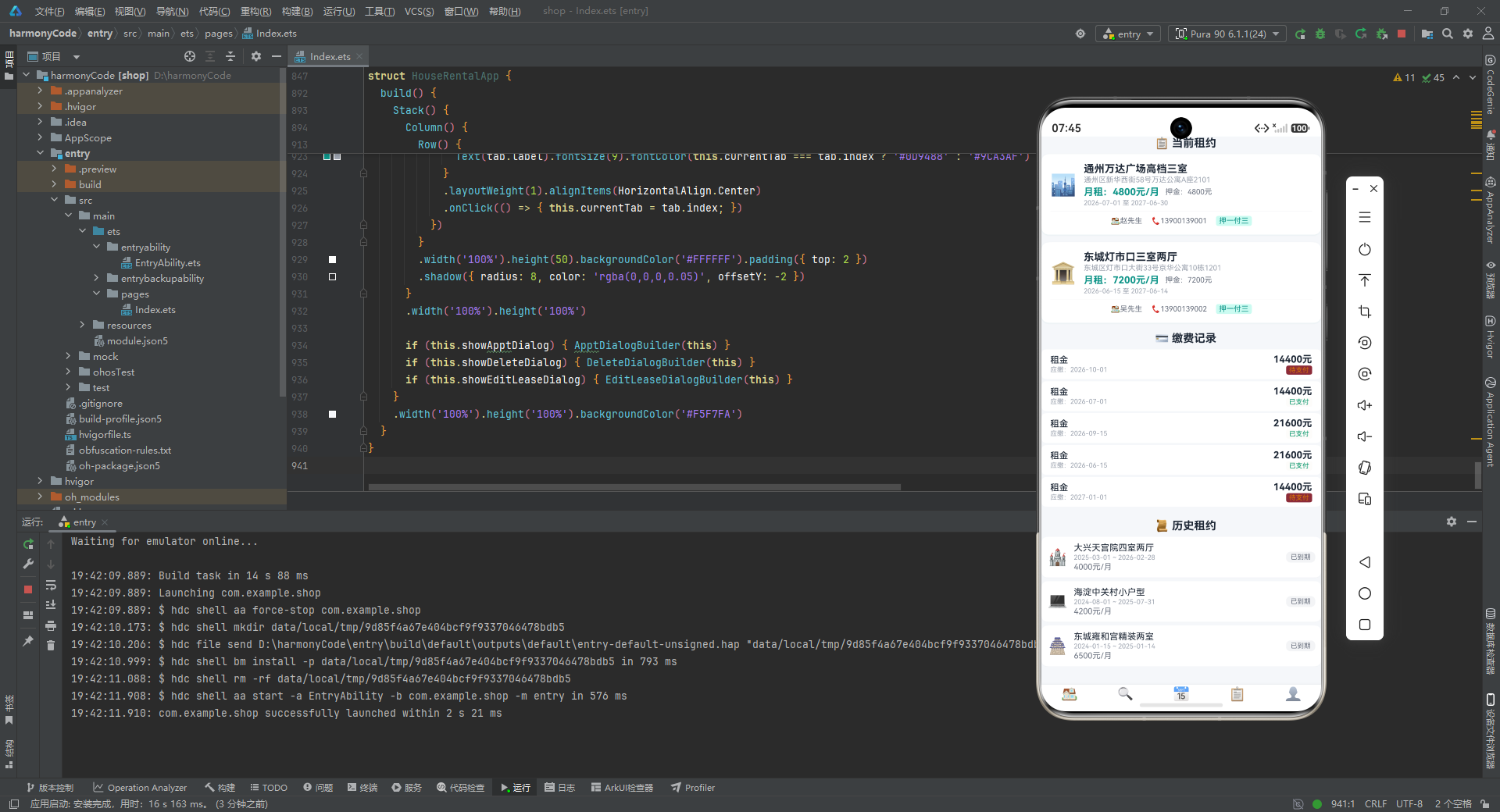
深度解析
这段代码展示了应用中 配置驱动的数据映射层,用 6 个 const 常量对象集中管理了所有业务状态的显示文案。这种做法在UI开发中极其常见且重要。
1. Record<string, string> 类型签名的选择:
所有配置对象都使用了 TypeScript 的工具类型 Record<string, string> 作为类型注解。这个类型的含义是"一个键和值均为字符串的对象"。选择 Record 而非普通对象字面量类型(如 { 'all': string; 'chaoyang': string; ... })是一个权衡 – Record 更加灵活,允许运行时动态添加新的键值对而不产生类型错误,同时代码也更加简洁,不会随着配置项的增加而导致类型定义过长。
2. 键值对设计的"内部编码 vs 显示文案"分离原则:
观察键的设计规律可以发现,所有的键都使用了 简短的内部编码(如 'chaoyang'、'yishi'、'south'、'pending'),而值则使用 面向用户的中文明细文案(如 '朝阳区'、'一室一厅'、'朝南'、'待确认')。这种分离是软件工程中 “编码-解码” 设计模式在UI层的体现。
其核心优势在于:(a) 内部编码是稳定的技术标识,不会因为产品文案的调整而变化;(b) 显示文案可以轻松替换为其他语言,实现国际化(i18n);© 在进行条件判断时,使用简短的编码比使用中文字符串更高效且不易出错(比如比较 'pending' 比 '待确认' 更安全,后者可能存在全角半角空格等隐形问题)。值得注意的是 'all' 这个特殊键在每个配置中都存在,作为"全部/不限"的默认选项,它是筛选逻辑中的通配符。
3. 配置对象对状态管理解耦的贡献:
在后续的 UI 组件中,当需要根据状态显示对应的中文文案时,只需通过 APPOINTMENT_STATUS_CONFIG[status] 这样的索引方式即可获取,而无需在组件内部硬编码 if-else 或 switch 判断。这使得状态到文案的映射关系集中在一处维护,当产品需要修改某个状态的显示文案时,只需改配置对象,而不需要修改任何组件代码。这种 “配置即代码” 的理念大大降低了维护成本。
4. 业务语义的覆盖广度:
6 个配置对象分别覆盖了应用的所有业务维度:地理维度(区域)、物理维度(户型/朝向)、经济维度(价格区间)、生命周期维度(房源状态/预约状态)。这种全面的配置管理体现了开发者对业务领域的深入理解。其中 PRICE_RANGE_CONFIG 的键使用了区间表达(如 '2000-4000')和后缀表达(如 '10000+'),暗示了在筛选逻辑中需要解析这些键来实现范围匹配,而非简单的等值比较。
四、模拟数据层 – 丰富的业务数据集
const HOUSE_LIST: HouseItem[] = [
  { id: 'h001', title: '阳光花园精装三室两厅', address: '朝阳区建国路88号阳光花园12栋1205', region: '朝阳', area: 120, price: 6500, unitPrice: 54, layout: '三室两厅', orientation: '南', floor: '12/26', totalFloors: 26, decoration: '精装修', tags: ['近地铁', '拎包入住', '南北通透'], imageEmoji: '🏠', isFavorite: false, isFeatured: true, status: '在租', publishDate: '2026-07-20', landlordName: '张先生' },
  // ... 共 20 条房源数据
];

const APPOINTMENT_LIST: AppointmentItem[] = [
  { id: 'a001', houseId: 'h001', houseTitle: '阳光花园精装三室两厅', houseAddress: '朝阳区建国路88号', houseArea: 120, housePrice: 6500, houseEmoji: '🏠', appointmentDate: '2026-07-25', appointmentTime: '10:00', status: 'confirmed', remarks: '客户想看看采光情况', contactName: '王小明', contactPhone: '13800138001', createTime: '2026-07-22' },
  // ... 共 15 条预约数据
];

const FAVORITE_LIST: FavoriteItem[] = [
  { id: 'f001', houseId: 'h004', title: '通州万达广场高档三室', address: '通州区新华西街58号', price: 4800, area: 130, layout: '三室两厅', imageEmoji: '🏙️', addedTime: '2026-07-20' },
  // ... 共 10 条收藏数据
];

const LEASE_LIST: LeaseItem[] = [
  { id: 'l001', houseId: 'h004', houseTitle: '通州万达广场高档三室', houseAddress: '通州区新华西街58号万达公寓A座2101', startDate: '2026-07-01', endDate: '2027-06-30', monthlyRent: 4800, deposit: 4800, paymentMethod: '押一付三', status: '进行中', landlordName: '赵先生', landlordPhone: '13900139001', houseEmoji: '🏙️' },
  // ... 共 5 条租约数据
];

const AREA_PRICE_LIST: AreaPriceItem[] = [
  { area: '西城区', avgPrice: 8150, maxPrice: 15000, minPrice: 4500, houseCount: 128 },
  // ... 共 8 条区域价格数据
];

const LAYOUT_DIST_DATA: LayoutCountItem[] = [
  { layout: '一室一厅', count: 45, color: '#0D9488' },
  // ... 共 5 条户型分布数据
];

const RENT_TREND_DATA: RentTrendItem[] = [
  { month: '1月', avgRent: 5200 }, { month: '2月', avgRent: 5100 }, { month: '3月', avgRent: 5350 },
  { month: '4月', avgRent: 5480 }, { month: '5月', avgRent: 5620 }, { month: '6月', avgRent: 5710 },
  { month: '7月', avgRent: 5800 },
];

const PAYMENT_RECORDS: PaymentItem[] = [
  { id: 'p001', leaseId: 'l001', amount: 14400, type: '租金', dueDate: '2026-10-01', paidDate: '2026-09-28', status: '待支付' },
  // ... 共 5 条缴费记录
];
深度解析
这段代码定义了 8 个常量数组,构成了应用的完整数据层。虽然标注为"模拟数据",但其设计质量远超普通的 Mock 数据,值得深入分析。
1. 数据集的业务完备性设计:
8 个数据集覆盖了应用的所有业务场景,形成了一个完整的数据生态系统:
| 数据集 | 条目数 | 业务角色 |
|---|---|---|
| HOUSE_LIST | 20条 | 核心资产,列表展示与搜索的主体 |
| APPOINTMENT_LIST | 15条 | 业务流程,连接用户与房源的桥梁 |
| FAVORITE_LIST | 10条 | 用户行为,个性化收藏的数据载体 |
| LEASE_LIST | 5条 | 合约管理,租约全生命周期的记录 |
| AREA_PRICE_LIST | 8条 | 数据分析,区域维度的价格统计 |
| LAYOUT_DIST_DATA | 5条 | 数据分析,户型维度的分布统计 |
| RENT_TREND_DATA | 7条 | 数据分析,时间维度的趋势展示 |
| PAYMENT_RECORDS | 5条 | 财务管理,缴费行为的流水记录 |
2. 房源数据(HOUSE_LIST)的设计精妙之处:
20 条房源数据并非随机生成,而是经过精心构造的,体现了真实北京租房市场的特征:
- 区域覆盖全面:涵盖朝阳、海淀、丰台、通州、昌平、大兴、石景山、西城、东城、房山共 10 个区域,每个区域至少 2 套房源,与
REGION_CONFIG的 10 个选项完全对应。 - 价格梯度合理:从最便宜的 2600 元/月(房山长阳)到最贵的 9500 元/月(望京花园),形成了从远郊到核心区的合理价格梯度,单价也从 29 元/平米(大兴天宫院)到 107 元/平米(中关村),体现了地段的租金差异。
- 户型分布均匀:包含一室一厅、两室一厅、三室两厅、四室两厅等多种户型,与
LAYOUT_DIST_DATA的统计数据相呼应。 - 标签系统丰富:每套房源有 2-3 个标签,覆盖交通(近地铁)、装修(拎包入住)、位置(学区房)、物业(品牌物业)等真实租客关心的维度。
- 精选标记(isFeatured):部分房源标记为
true,专门用于首页"精选房源"区域的展示,其他则在"找房"页面的全量列表中出现,实现了不同页面的数据差异化展示。 - Emoji 替代图片:使用
imageEmoji字段存储 Emoji 字符(如 ‘🏠’、‘🏙️’、‘🏢’),巧妙地避免了加载网络图片或引入本地资源文件的需求,使得整个应用可以零外部依赖运行。这在原型开发和教学场景中是非常实用的技巧。
3. 预约数据(APPOINTMENT_LIST)的状态覆盖:
15 条预约记录覆盖了四种状态:pending(待确认,5条)、confirmed(已确认,3条)、completed(已完成,3条)、cancelled(已取消,2条),完美覆盖了 APPOINTMENT_STATUS_CONFIG 的所有映射项,确保每个状态在UI中都有对应的展示数据。预约日期分布在 2026-07-20 至 2026-07-31 之间,形成了一个两周的预约时间窗口。
4. 数据间的隐式关联:
虽然各数据集是独立的常量数组,但通过字段命名建立了隐式关联。例如 APPOINTMENT_LIST 中的 houseId: 'h001' 对应 HOUSE_LIST 中的 id: 'h001';FAVORITE_LIST 的 houseId 也指向房源数据;LEASE_LIST 同样通过 houseId 关联房源;PAYMENT_RECORDS 的 leaseId 指向 LEASE_LIST。这种"无外键约束的关联"在模拟数据阶段是合理的选择,它避免了引入关系型数据模型的复杂性,同时通过命名约定保持了数据的逻辑一致性。
5. 图表数据的结构化设计:
AREA_PRICE_LIST 为每个区域提供了四维度数据(均价/最高价/最低价/房源数),使得图表组件可以根据需要选择展示均价柱状图或价格区间范围图。LAYOUT_DIST_DATA 的每条记录都包含 color 字段,预定义了每种户型的颜色标识(从青绿色 #0D9488 到靛蓝色 #6366F1),使得图表组件可以直接使用而无需额外的颜色映射逻辑。RENT_TREND_DATA 用 7 个月的数据展示了租金从 5100 元到 5800 元的上涨趋势,数据点的设计使得柱状图可以直观地呈现上升趋势。
五、工具函数层 – 格式化与计算的集中封装
function formatPrice(price: number): string {
  if (price >= 10000) {
    return (price / 10000).toFixed(1) + '万';
  }
  return price.toString() + '元/月';
}

function formatPriceSimple(price: number): string {
  return price.toString() + '元/月';
}

function formatArea(area: number): string {
  return area.toString() + '㎡';
}

function getApptStatusText(status: string): string {
  return APPOINTMENT_STATUS_CONFIG[status] || '未知';
}

function getApptStatusColor(status: string): string {
  if (status === 'confirmed') return '#0D9488';
  if (status === 'pending') return '#F59E0B';
  if (status === 'completed') return '#059669';
  if (status === 'cancelled') return '#EF4444';
  return '#999';
}

function getLeaseStatusBg(status: string): string {
  return status === '进行中' ? '#D1FAE5' : '#F3F4F6';
}

function getLeaseStatusTextColor(status: string): string {
  return status === '进行中' ? '#065F46' : '#6B7280';
}

function getPayStatusColor(status: string): string {
  return status === '已支付' ? '#059669' : '#D97706';
}

function calcMaxPrice(data: AreaPriceItem[]): number {
  let maxVal: number = 0;
  for (let i: number = 0; i < data.length; i++) {
    if (data[i].avgPrice > maxVal) maxVal = data[i].avgPrice;
  }
  return maxVal;
}

function calcLayoutTotal(data: LayoutCountItem[]): number {
  let total: number = 0;
  for (let i: number = 0; i < data.length; i++) {
    total += data[i].count;
  }
  return total;
}

function calcPercent(count: number, total: number): number {
  return total === 0 ? 0 : Math.round(count / total * 100);
}
深度解析
这段代码将所有 UI 展示相关的格式化逻辑和计算逻辑抽取为独立的纯函数,形成了一个轻量级的"工具层"。虽然函数数量不多(共 11 个),但每一个都承担着明确的职责。
1. 双价格格式化函数的设计意图:
应用定义了两个价格格式化函数:formatPrice() 和 formatPriceSimple()。它们的区别在于对大额价格的处理方式 – formatPrice() 会将 10000 元以上的价格转换为"万"的表示(如 15000 变为 “1.5万”),而 formatPriceSimple() 则始终保持 “元/月” 的格式。这种区分反映了两类不同的UI展示场景:列表卡片中空间有限,需要简洁的格式(使用 formatPriceSimple);而在某些大数字场景(如总租金、区域均价统计)中,万为单位的展示更加直观(使用 formatPrice)。两个函数共存而非一个函数通过参数控制,遵循了 “一个函数只做一件事” 的单一职责原则。
2. 状态相关函数的"三件套"模式:
对于每种业务状态,代码都提供了一组格式化函数来处理其展示需求:
- 文本映射(
getApptStatusText):将内部编码转换为用户可见文案,直接索引配置对象,附带|| '未知'的兜底逻辑防止 undefined。 - 颜色映射(
getApptStatusColor):为不同状态分配语义化的颜色 – 青色(#0D9488)表示"已确认",黄色(#F59E0B)表示"待确认",绿色(#059669)表示"已完成",红色(#EF4444)表示"已取消"。这些颜色遵循了通用的UI色彩语义规范:暖色系警示/待处理,冷色系完成/确认,红色标识异常。 - 背景+文字色组合(
getLeaseStatusBg+getLeaseStatusTextColor):租约状态需要同时提供背景色和文字色,形成类似"标签/徽章"的视觉效果。'进行中'使用浅绿底色 + 深绿文字,非进行中使用灰色底 + 灰色文字,形成鲜明的视觉对比。
3. 计算函数的防御性编程:
calcPercent() 函数包含了一个关键的分母零值保护逻辑:total === 0 ? 0 : Math.round(count / total * 100)。当分母为 0 时直接返回 0 而非产生 NaN 或 Infinity,这是数值计算中必须考虑的边界情况。Math.round() 的使用确保了百分比是整数,避免了浮点数精度问题导致的UI显示异常(如显示 “33.3333333%”)。
4. 循环风格的选择 – for 循环而非数组方法:
值得注意的是 calcMaxPrice() 和 calcLayoutTotal() 使用了传统的 for 循环而非 Array.reduce() 或 Array.forEach() 等函数式写法。这在 ArkTS 中是有意为之的 – ArkTS 作为鸿蒙生态的开发语言,对 JavaScript/TypeScript 的部分高级特性做了限制以优化运行性能。传统的 for 循环在 ArkTS 中的性能表现更加稳定可预测,且代码的可读性对不熟悉函数式编程的开发者更加友好。
六、枚举定义 – Tab索引的类型化约束
enum TabIndex {
  HOME = 0, FIND = 1, APPOINTMENT = 2, LEASE = 3, MINE = 4
}
深度解析
这行代码定义了一个 TypeScript 枚举类型 TabIndex,为应用的五个 Tab 页面提供了语义化的数字常量。
1. 枚举的设计意义:
虽然在应用主体代码中,Tab 切换是通过 @State currentTab: number = 0 配合 if (this.currentTab === 0) 这样的数字比较来实现的(并未直接引用 TabIndex 枚举),但枚举的定义本身代表了开发者对代码质量的追求 – 它为将来的重构留下了清晰的语义映射:TabIndex.HOME = 0 表示首页、TabIndex.FIND = 1 表示找房、TabIndex.APPOINTMENT = 2 表示预约、TabIndex.LEASE = 3 表示租约、TabIndex.MINE = 4 表示我的。这种设计使得如果将来需要在 Tab 切换逻辑中引用,可以用 this.currentTab === TabIndex.HOME 代替 this.currentTab === 0,代码可读性将大幅提升。
2. 数字递增的枚举值策略:
枚举值从 0 开始递增(0/1/2/3/4),与底部 Tab 栏的顺序一一对应,也与应用中 TabConfigItem 数组的 index 字段一致。这种自然对齐的数字编码使得 if-else 分支的顺序与视觉布局保持一致,降低了理解代码时的认知负担。
七、图表组件 – 纯 ArkUI 声明式数据可视化
7.1 区域均价柱状图组件
@Component
struct AreaPriceChart {
  @Prop areaData: AreaPriceItem[];

  build() {
    Column() {
      Text('区域均价对比').fontSize(14).fontWeight(FontWeight.Bold).fontColor('#1F2937').margin({ bottom: 10 })
      Row() {
        ForEach(this.areaData, (item: AreaPriceItem) => {
          Column() {
            Text(item.avgPrice.toString()).fontSize(8).fontColor('#0D9488').margin({ bottom: 2 })
            Column()
              .width(18).height(item.avgPrice / 100)
              .backgroundColor('#14B8A6').borderRadius(4)
              .shadow({ radius: 3, color: 'rgba(20,184,166,0.35)', offsetY: 2 })
            Text(item.area.substring(0, 2)).fontColor('#6B7280').margin({ top: 4 })
          }.alignItems(HorizontalAlign.Center).margin({ left: 2, right: 2 })
        })
      }.alignItems(VerticalAlign.Bottom).justifyContent(FlexAlign.SpaceEvenly).width('100%')
    }.width('100%').padding(10).backgroundColor('#F0FDFA').borderRadius(10)
  }
}
深度解析
这个组件实现了一个 纯 ArkUI 声明式柱状图,没有使用任何第三方图表库,完全通过基础 UI 组件(Column、Row、Text)组合实现。
1. 数据驱动的柱状图渲染原理:
柱状图的核心在于 ForEach 循环中 Column 的 height 属性 – .height(item.avgPrice / 100)。这行代码将每个区域的平均价格除以 100 作为柱体高度(单位为 vp)。例如西城区均价 8150 对应高度约 81.5vp,大兴区均价 3180 对应高度约 31.8vp。通过 Row 的 .alignItems(VerticalAlign.Bottom),所有柱体从底部对齐,自然形成了柱状图的视觉效果。justifyContent(FlexAlign.SpaceEvenly) 确保柱体间均匀分布。
2. @Prop 装饰器在图表组件中的作用:
@Prop areaData: AreaPriceItem[] 表示这是一个"单向传入的属性",父组件传入的数据变化会触发子组件的重新渲染,但子组件不能反向修改父组件的数据。对于图表这种纯展示型组件,@Prop 是最合适的选择 – 它只需要接收数据并渲染,不需要对数据做任何修改。
3. 区域名称的截断处理:
.Text(item.area.substring(0, 2)) 将区域名称截取前两个字作为 X 轴标签(如"西城区"显示为"西城"),这是因为柱状图的宽度有限,完整的区域名称会导致文字溢出。substring(0, 2) 是一种简单有效的截断策略,对于北京各区名称来说,前两个字已经足够标识。
4. 阴影效果营造立体感:
.shadow({ radius: 3, color: 'rgba(20,184,166,0.35)', offsetY: 2 }) 为柱体添加了柔和的阴影,其中 offsetY: 2 使阴影向下偏移 2vp,模拟了从上方照射的光源效果。颜色使用了与柱体相同的青绿色(#14B8A6)但降低了不透明度到 35%,营造出同色系的柔和投影。
7.2 户型分布水平条形图组件
@Component
struct LayoutDistChart {
  @Prop layoutData: LayoutCountItem[];

  build() {
    Column() {
      Text('户型分布').fontSize(14).fontWeight(FontWeight.Bold).fontColor('#1F2937').margin({ bottom: 10 })
      ForEach(this.layoutData, (item: LayoutCountItem) => {
        Row() {
          Text(item.layout).fontSize(11).fontColor('#374151').width(55)
          Row() {
            Row()
              .width(calcPercent(item.count, calcLayoutTotal(this.layoutData)).toString() + '%')
              .height(18).backgroundColor(item.color).borderRadius(9)
              .shadow({ radius: 2, color: item.color + '50', offsetY: 1 })
          }.layoutWeight(1).height(18).backgroundColor('#E5E7EB').borderRadius(9)
          Text(item.count.toString() + '套').fontSize(10).fontColor('#6B7280').width(32).textAlign(TextAlign.End)
        }.width('100%').alignItems(VerticalAlign.Center).margin({ bottom: 6 })
      })
    }.width('100%').padding(10).backgroundColor('#F8FAFC').borderRadius(10)
  }
}
深度解析
这是一个 水平进度条式图表,与区域均价柱状图不同,它采用横向布局来展示分类数据的占比。
1. 嵌套 Row 实现进度条的核心技巧:
图表的核心结构是 两层 Row 的嵌套:
- 外层 Row(灰色背景
#E5E7EB)使用.layoutWeight(1)占据除标签外的所有剩余空间,代表 100% 的总量。它的高度固定为 18vp,borderRadius(9)使其呈胶囊形。 - 内层 Row(彩色)的宽度通过
.width(calcPercent(item.count, calcLayoutTotal(this.layoutData)).toString() + '%')动态计算百分比。由于内层 Row 被包含在外层 Row 中,它会从左侧开始填充,形成一个"进度条"效果。同样使用borderRadius(9)确保当填充比例较小时也保持圆角。
2. 动态百分比的链式计算:
calcPercent(item.count, calcLayoutTotal(this.layoutData)) 展示了工具函数的嵌套调用 – 先用 calcLayoutTotal 计算所有户型的总数,再用 calcPercent 计算当前户型的占比。虽然对于当前 5 条数据来说可以直接用 45 + 68 + 52 + 28 + 12 = 205,但通过函数计算保证了数据的动态性 – 如果将来 layoutData 发生变化,图表会自动适配。
3. 三栏布局的比例控制:
每一行数据采用 Text(55vp) + Row(layoutWeight=1) + Text(32vp) 的三栏结构。前两栏固定宽度(55vp 和 32vp),中间的进度条栏通过 layoutWeight(1) 自适应填充剩余空间。这是 ArkUI 中经典的 固定-弹性-固定 布局模式。
4. 颜色动态绑定的实现:
每个户型条的颜色来自 item.color 字段(在 LAYOUT_DIST_DATA 中预定义),而非硬编码在组件中。阴影颜色通过 item.color + '50' 巧妙地在十六进制色值后追加透明度后缀 '50'(约 31% 不透明度),形成同色系的柔和阴影效果。
7.3 租金走势柱状图组件
@Component
struct RentTrendChart {
  @Prop trendData: RentTrendItem[];

  build() {
    Column() {
      Text('租金走势').fontSize(14).fontWeight(FontWeight.Bold).fontColor('#1F2937').margin({ bottom: 10 })
      Row() {
        ForEach(this.trendData, (item: RentTrendItem) => {
          Column() {
            Text(item.avgRent.toString()).fontSize(8).fontColor('#3B82F6').margin({ bottom: 2 })
            Column()
              .width(20).height((item.avgRent - 5000) / 20)
              .backgroundColor('#3B82F6').borderRadius({ topLeft: 4, topRight: 4 })
              .shadow({ radius: 3, color: 'rgba(59,130,246,0.3)', offsetY: 1 })
            Text(item.month).fontSize(9).fontColor('#6B7280').margin({ top: 4 })
          }.alignItems(HorizontalAlign.Center).margin({ left: 4, right: 4 })
        })
      }.alignItems(VerticalAlign.Bottom).justifyContent(FlexAlign.SpaceEvenly).width('100%')
    }.width('100%').padding(10).backgroundColor('#EFF6FF').borderRadius(10)
  }
}
深度解析
这是第三个图表组件,与前两个相比,它在数据处理上引入了一个关键的 基线偏移 技术。
1. 基线偏移的高度计算:
.height((item.avgRent - 5000) / 20) 中的 item.avgRent - 5000 是一个基线偏移操作。数据中租金范围在 5100-5800 之间,如果直接使用原始值作为高度,差异将非常微小(5100vp vs 5800vp),图表几乎看不出变化。通过减去 5000 这个基准值,有效值范围变为 100-800,再除以 20 缩放系数,高度变为 5-40vp,差异更加明显。这是一种 “零基偏移 + 缩放” 的经典数据可视化技巧。
2. 不对称圆角的视觉效果:
.borderRadius({ topLeft: 4, topRight: 4 }) 只对柱体的顶部两角设置圆角,底部保持直角。当所有柱体从底部对齐排列时,顶部圆角使柱体呈现"向上生长"的视觉效果,类似于常见的柱状图风格。这与 AreaPriceChart 中使用全圆角 .borderRadius(4) 形成对比 – 全圆角适合独立柱体,顶部圆角适合连续排列的柱体。
3. 蓝色主题的视觉区分:
租金走势图采用了蓝色系(#3B82F6)而非前两个图表的青绿色系,背景色也改为浅蓝色(#EFF6FF)。这种颜色主题的差异有助于用户在快速浏览时区分不同图表的含义 – 青绿色代表静态分布,蓝色代表动态趋势。
八、弹框构建器 – @Builder 模式实现全局弹窗
8.1 预约看房弹框
@Builder
function ApptDialogBuilder(host: HouseRentalApp) {
  Column() {
    Column().width('100%').height('100%').backgroundColor('rgba(0,0,0,0.5)')
      .onClick(() => { host.showApptDialog = false; })

    Column() {
      Text('新增预约看房').fontSize(17).fontWeight(FontWeight.Bold).fontColor('#1F2937').margin({ bottom: 14 })

      Text('选择房源').fontSize(12).fontColor('#6B7280').alignSelf(ItemAlign.Start).margin({ bottom: 4 })
      Scroll() {
        Column() {
          ForEach(HOUSE_LIST.slice(0, 10), (item: HouseItem) => {
            Row() {
              Text(item.imageEmoji).fontSize(18).margin({ right: 8 })
              Column() {
                Text(item.title).fontSize(12).fontColor('#1F2937').maxLines(1).textOverflow({ overflow: TextOverflow.Ellipsis })
                Text(item.address).fontSize(9).fontColor('#9CA3AF').maxLines(1).textOverflow({ overflow: TextOverflow.Ellipsis })
              }.alignItems(HorizontalAlign.Start).layoutWeight(1)
            }
            .width('100%').padding(6).margin({ bottom: 3 })
            .backgroundColor(host.selectedHouseId === item.id ? '#CCFBF1' : '#F9FAFB').borderRadius(6)
            .onClick(() => { host.selectedHouseId = item.id; host.apptHouseTitle = item.title; })
          })
        }
      }.constraintSize({ maxHeight: '35%' }).backgroundColor('#F3F4F6').borderRadius(8).margin({ bottom: 10 })

      Text('预约日期').fontSize(12).fontColor('#6B7280').alignSelf(ItemAlign.Start).margin({ bottom: 4 })
      Row() {
        ForEach(['07-25', '07-26', '07-27', '07-28'], (date: string) => {
          Text(date).fontSize(11)
            .fontColor(host.apptDate.substring(5) === date ? '#FFFFFF' : '#374151')
            .backgroundColor(host.apptDate.substring(5) === date ? '#0D9488' : '#F3F4F6')
            .borderRadius(12).padding({ left: 8, right: 8, top: 3, bottom: 3 }).margin({ right: 5 })
            .onClick(() => { host.apptDate = '2026-' + date; })
        })
      }.margin({ bottom: 10 })

      Text('预约时间').fontSize(12).fontColor('#6B7280').alignSelf(ItemAlign.Start).margin({ bottom: 4 })
      Row() {
        ForEach(['09:00', '10:00', '11:00', '14:00', '15:00'], (time: string) => {
          Text(time).fontSize(11)
            .fontColor(host.apptTime === time ? '#FFFFFF' : '#374151')
            .backgroundColor(host.apptTime === time ? '#0D9488' : '#F3F4F6')
            .borderRadius(12).padding({ left: 8, right: 8, top: 3, bottom: 3 }).margin({ right: 5 })
            .onClick(() => { host.apptTime = time; })
        })
      }.margin({ bottom: 12 })

      Row() {
        Button('取消').fontSize(13).backgroundColor('#F3F4F6').fontColor('#6B7280')
          .height(36).layoutWeight(1).borderRadius(18)
          .onClick(() => { host.showApptDialog = false; })
        Button('确认预约').fontSize(13).backgroundColor('#0D9488').fontColor(Color.White)
          .height(36).layoutWeight(1).borderRadius(18).margin({ left: 8 })
          .onClick(() => { host.submitAppointment(); })
      }
    }
    .width('88%').backgroundColor(Color.White).borderRadius(14).padding(18)
  }
  .width('100%').height('100%').justifyContent(FlexAlign.Center).alignItems(HorizontalAlign.Center)
}
深度解析
这是应用中功能最复杂、代码量最大的弹框构建器,实现了一个完整的"新增预约看房"表单。
1. @Builder 装饰器与全局函数的作用:
@Builder function ApptDialogBuilder(host: HouseRentalApp) 是一个全局级别的 Builder 函数(非组件方法),接收 HouseRentalApp 实例作为参数。在 ArkTS 中,@Builder 用于定义可复用的 UI 构建函数,可以将一段 UI 描述抽象为独立的构建单元。全局 Builder 函数的优势在于可以在任何地方通过 ApptDialogBuilder(this) 调用,而不需要绑定到特定组件实例。
2. 弹框的遮罩层 + 内容层结构:
弹框由两层 Column 叠加构成:
- 遮罩层(最外层 Column 内的第一个子 Column):全屏尺寸,半透明黑色背景
rgba(0,0,0,0.5),点击时关闭弹框。这是一种标准的弹框遮罩实现方式。 - 内容层(第二个 Column):宽度 88%,白色背景,圆角 14vp,padding 18vp。两个 Column 在外层 Column 中通过默认的堆叠排列(Column 默认纵向排列,此处利用了空间特性实现居中覆盖效果)进行组合。
3. 房源选择列表的实现:
房源列表使用了 HOUSE_LIST.slice(0, 10) 截取前 10 条数据展示,.constraintSize({ maxHeight: '35%' }) 限制列表最大高度为屏幕的 35%。选中状态通过 backgroundColor 的条件判断实现:选中的房源高亮为青绿色 #CCFBF1,未选中为浅灰 #F9FAFB。点击时同时更新 host.selectedHouseId 和 host.apptHouseTitle,确保弹框关闭后能获取到完整的选中信息。
4. 日期和时间的"标签选择器"模式:
日期和时间选择都采用了相同的 UI 模式 – 用 ForEach 生成一组水平排列的 Text 标签,通过 fontColor 和 backgroundColor 的条件判断来表示选中/未选中状态。这是一种轻量级的离散选择器实现,适用于选项数量有限的场景(4个日期选项、5个时间选项)。选中时文字变白、背景变为主题色,未选中时文字深灰、背景浅灰,形成清晰的视觉反馈。注意日期的匹配逻辑 host.apptDate.substring(5) === date,由于 apptDate 的格式是 2026-07-25,substring(5) 截取到 07-25,与选项中的日期字符串进行比较。
5. 双按钮的布局实现:
底部取消/确认按钮采用 Row + layoutWeight(1) 实现等宽排列,确认按钮通过 margin({ left: 8 }) 与取消按钮保持间距。两个按钮都使用了 .borderRadius(18) 使其呈胶囊形(高度 36vp,圆角 18vp 正好是高度的一半),这在移动端 UI 中是非常流行的按钮样式。取消按钮使用灰色底色表示次要操作,确认按钮使用主题色(#0D9488)表示主要操作,遵循了 UI 设计中 “主次分明” 的交互原则。
8.2 删除确认弹框
@Builder
function DeleteDialogBuilder(host: HouseRentalApp) {
  Column() {
    Column().width('100%').height('100%').backgroundColor('rgba(0,0,0,0.5)')
      .onClick(() => { host.showDeleteDialog = false; })

    Column() {
      Text('⚠️').fontSize(36).margin({ bottom: 10 })
      Text('确认删除收藏').fontSize(16).fontWeight(FontWeight.Bold).fontColor('#1F2937').margin({ bottom: 4 })
      Text('删除后无法恢复').fontSize(12).fontColor('#6B7280').margin({ bottom: 16 })

      Row() {
        Button('取消').fontSize(13).backgroundColor('#F3F4F6').fontColor('#6B7280')
          .height(36).layoutWeight(1).borderRadius(18)
          .onClick(() => { host.showDeleteDialog = false; })
        Button('确认删除').fontSize(13).backgroundColor('#EF4444').fontColor(Color.White)
          .height(36).layoutWeight(1).borderRadius(18).margin({ left: 8 })
          .onClick(() => { host.removeFavorite(); })
      }
    }
    .width('78%').backgroundColor(Color.White).borderRadius(14).padding(20)
  }
  .width('100%').height('100%').justifyContent(FlexAlign.Center).alignItems(HorizontalAlign.Center)
}
深度解析
这是一个简洁的确认删除弹框,展示了几个重要的设计细节。
1. 危险操作的颜色警示:
确认删除按钮使用了红色 #EF4444 作为背景色,这与预约弹框中确认按钮使用的青绿色形成鲜明对比。红色在 UI 设计中是"危险操作"的通用标识色,用户看到红色按钮时会本能地意识到这个操作可能不可逆。配合文案"删除后无法恢复",形成了双重警示。
2. 宽度差异的设计意图:
删除弹框的内容层宽度为 78%,小于预约弹框的 88% 和编辑弹框的 88%。这是因为删除弹框的内容较少(只有一个图标、两句文字、两个按钮),不需要过宽的空间。窄一些的弹框在视觉上更加聚焦,与"快速确认"的操作语义更加匹配。
3. 三段式信息架构:
弹框内容遵循了标准的"警告-说明-操作"三段式结构:顶部大号 Emoji 图标(警告符号 ⚠️)作为视觉锚点,中间标题 + 说明文字传达具体信息,底部操作按钮提供选择。这种信息架构层次清晰,用户可以在极短时间内理解弹框的意图并做出决策。
8.3 编辑租约弹框
@Builder
function EditLeaseDialogBuilder(host: HouseRentalApp) {
  Column() {
    Column().width('100%').height('100%').backgroundColor('rgba(0,0,0,0.5)')
      .onClick(() => { host.showEditLeaseDialog = false; })

    Column() {
      Text('编辑租约信息').fontSize(16).fontWeight(FontWeight.Bold).fontColor('#1F2937').margin({ bottom: 12 })

      Text('月租金(元)').fontSize(11).fontColor('#6B7280').alignSelf(ItemAlign.Start).margin({ bottom: 3 })
      TextInput({ text: host.editLeaseRent }).fontSize(13).height(36)
        .backgroundColor('#F9FAFB').borderRadius(6).padding({ left: 8, right: 8 })
        .onChange((value: string) => { host.editLeaseRent = value; }).margin({ bottom: 8 })

      Text('押金(元)').fontSize(11).fontColor('#6B7280').alignSelf(ItemAlign.Start).margin({ bottom: 3 })
      TextInput({ text: host.editLeaseDeposit }).fontSize(13).height(36)
        .backgroundColor('#F9FAFB').borderRadius(6).padding({ left: 8, right: 8 })
        .onChange((value: string) => { host.editLeaseDeposit = value; }).margin({ bottom: 8 })

      Text('开始日期').fontSize(11).fontColor('#6B7280').alignSelf(ItemAlign.Start).margin({ bottom: 3 })
      TextInput({ text: host.editLeaseStart }).fontSize(13).height(36)
        .backgroundColor('#F9FAFB').borderRadius(6).padding({ left: 8, right: 8 })
        .onChange((value: string) => { host.editLeaseStart = value; }).margin({ bottom: 8 })

      Text('结束日期').fontSize(11).fontColor('#6B7280').alignSelf(ItemAlign.Start).margin({ bottom: 3 })
      TextInput({ text: host.editLeaseEnd }).fontSize(13).height(36)
        .backgroundColor('#F9FAFB').borderRadius(6).padding({ left: 8, right: 8 })
        .onChange((value: string) => { host.editLeaseEnd = value; }).margin({ bottom: 14 })

      Row() {
        Button('取消').fontSize(13).backgroundColor('#F3F4F6').fontColor('#6B7280')
          .height(36).layoutWeight(1).borderRadius(18)
          .onClick(() => { host.showEditLeaseDialog = false; })
        Button('保存').fontSize(13).backgroundColor('#0D9488').fontColor(Color.White)
          .height(36).layoutWeight(1).borderRadius(18).margin({ left: 8 })
          .onClick(() => { host.saveLeaseEdit(); })
      }
    }
    .width('88%').backgroundColor(Color.White).borderRadius(14).padding(18)
  }
  .width('100%').height('100%').justifyContent(FlexAlign.Center).alignItems(HorizontalAlign.Center)
}
深度解析
编辑租约弹框展示了 ArkTS 中 表单数据双向绑定 的实现方式。
1. TextInput 的受控组件模式:
每个 TextInput 都通过 { text: host.editLeaseRent } 绑定了初始值,并通过 .onChange((value: string) => { host.editLeaseRent = value; }) 将用户输入同步回宿主组件的状态变量。这种"值绑定 + 回调更新"的模式实现了数据的双向流动,是 ArkTS 中最标准的表单处理方式。虽然看起来比某些框架的 v-model 稍显冗长,但它让数据流向更加明确可控。
2. 表单字段的一致性设计:
四个表单字段(月租金/押金/开始日期/结束日期)采用了完全一致的样式结构:标签 Text(fontSize:11,灰色)+ TextInput(fontSize:13,高度36,浅灰背景 #F9FAFB,圆角6)。这种高度一致的视觉风格使表单具有统一的视觉节奏,用户可以快速识别所有可输入区域。
九、Tab 内容组件 – 五大功能页面的独立封装
9.1 首页内容组件(HomeContent)
@Component
struct HomeContent {
  @Prop houseList: HouseItem[];
  @Prop areaData: AreaPriceItem[];
  @Prop layoutData: LayoutCountItem[];

  build() {
    Scroll() {
      Column() {
        // 搜索栏
        Row() {
          Row() {
            Text('🔍').fontSize(15).margin({ right: 5 })
            TextInput({ placeholder: '搜索小区、地址、房源编号' })
              .layoutWeight(1).height(34).backgroundColor(Color.Transparent).fontSize(12)
          }
          .backgroundColor('#F0FDFA').borderRadius(18).padding({ left: 10, right: 10 }).layoutWeight(1)
          Text('🏠').fontSize(20).margin({ left: 8 })
        }.width('100%').padding({ left: 12, right: 12, top: 6 }).margin({ bottom: 8 })

        // 区域快捷筛选栏
        Scroll() {
          Row() {
            ForEach(['全部', '朝阳', '海淀', '丰台', '通州', '西城', '东城', '昌平', '大兴'], (region: string) => {
              Text(region).fontSize(11)
                .fontColor(region === '全部' ? '#FFFFFF' : '#374151')
                .backgroundColor(region === '全部' ? '#0D9488' : '#F3F4F6')
                .borderRadius(12).padding({ left: 10, right: 10, top: 3, bottom: 3 }).margin({ right: 5 })
            })
          }.padding({ left: 12, right: 12 })
        }.scrollable(ScrollDirection.Horizontal).scrollBar(BarState.Off).width('100%').margin({ bottom: 10 })

        // 精选房源卡片列表
        Text('🏆 精选房源').fontSize(16).fontWeight(FontWeight.Bold).fontColor('#1F2937')
          .margin({ bottom: 8 }).padding({ left: 12 })

        ForEach(this.houseList.filter((h: HouseItem) => h.isFeatured), (item: HouseItem) => {
          // ... 卡片渲染
        })

        Divider().margin({ top: 4, bottom: 10 }).color('#F3F4F6')

        // 数据看板
        Text('📊 数据看板').fontSize(15).fontWeight(FontWeight.Bold).fontColor('#1F2937')
          .margin({ bottom: 8 }).padding({ left: 12 })

        AreaPriceChart({ areaData: this.areaData }).margin({ left: 12, right: 12, bottom: 10 })
        LayoutDistChart({ layoutData: this.layoutData }).margin({ left: 12, right: 12, bottom: 10 })
        RentTrendChart({ trendData: RENT_TREND_DATA }).margin({ left: 12, right: 12, bottom: 20 })
      }.width('100%')
    }.width('100%').scrollBar(BarState.Off)
  }
}
深度解析
首页组件是应用中内容最丰富的页面,集成了搜索、筛选、房源展示和数据分析四大功能模块。
1. 组件的多属性传递模式:
HomeContent 接收三个 @Prop 属性:houseList、areaData、layoutData。这说明该组件既需要房源数据用于列表渲染,又需要统计数据用于图表展示。多属性传递在 ArkTS 中是一种常见的组件通信方式 – 父组件(HouseRentalApp)通过属性将数据分发到各个子组件,子组件各自处理自己关心的数据。
2. 嵌套 Scroll 的滚动区域隔离:
整个首页被一个外层 Scroll 包裹,区域筛选栏则被另一个内层 Scroll 包裹,并且设置了 .scrollable(ScrollDirection.Horizontal) 和 .scrollBar(BarState.Off)。这种嵌套 Scroll 的设计实现了 滚动方向的隔离 – 外层纵向滚动浏览整个页面内容,内层横向滚动浏览区域标签。当手指在内层横向 Scroll 上滑动时,不会触发外层的纵向滚动;反之亦然。scrollBar(BarState.Off) 隐藏了滚动条,使界面更加简洁。
3. 精选房源的过滤逻辑:
.filter((h: HouseItem) => h.isFeatured) 在渲染前对房源列表进行过滤,只展示标记为精选的房源。这种在 ForEach 内部进行 filter 的做法虽然每次重新渲染都会重新计算,但对于 20 条数据量来说性能完全不是问题。如果数据量增大到数千条,可以考虑在父组件中预过滤后通过属性传入。
4. 卡片式房源展示的视觉层次:
每张房源卡片采用左侧 Emoji 图标 + 右侧信息区的双栏布局。信息区内部又分为标题(粗体/单行截断)、地址(灰色/小字号/单行截断)、属性行(户型/面积/朝向)、价格(主题色/粗体/较大字号)四个层次,信息密度从上到下递减,视觉重要性递增(价格最突出)。卡片整体有白色背景、圆角 12vp、柔和阴影,呈现经典的"卡片式设计"风格。
5. 数据看板的组装式布局:
三个图表组件通过顺序排列形成"数据看板"区域,每个图表之间有 margin({ bottom: 10 }) 的间距。它们使用不同的背景色(#F0FDFA / #F8FAFC / #EFF6FF)形成视觉区分。通过 Divider 组件将房源展示区域和数据看板区域进行视觉分隔。RentTrendChart 直接引用了全局常量 RENT_TREND_DATA 而非通过属性传入,这是因为该数据是静态固定的,不需要动态变化。
9.2 找房内容组件(FindContent)
@Component
struct FindContent {
  @Prop houseList: HouseItem[];
  @State viewMode: string = 'list';

  build() {
    Column() {
      Row() {
        Row() {
          Text('🔍').fontSize(14).margin({ right: 4 })
          TextInput({ placeholder: '输入关键词搜索' }).layoutWeight(1).height(32)
            .backgroundColor(Color.Transparent).fontSize(12)
        }.backgroundColor('#F0FDFA').borderRadius(16).padding({ left: 8, right: 8 }).layoutWeight(1)
        Text(this.viewMode === 'list' ? '▦' : '☰').fontSize(18).fontColor('#0D9488').margin({ left: 6 })
          .onClick(() => { this.viewMode = this.viewMode === 'list' ? 'grid' : 'list'; })
      }.width('100%').padding({ left: 12, right: 12, top: 4, bottom: 4 })

      Row() {
        ForEach(['区域▾', '价格▾', '户型▾', '朝向▾', '更多▾'], (label: string) => {
          Text(label).fontSize(10).fontColor('#374151').backgroundColor('#F3F4F6')
            .borderRadius(10).padding({ left: 8, right: 8, top: 3, bottom: 3 }).margin({ right: 4 })
        })
      }.width('100%').padding({ left: 12 }).margin({ bottom: 6 })

      Text('共' + this.houseList.length.toString() + '套房源')
        .fontSize(10).fontColor('#9CA3AF').padding({ left: 12 }).margin({ bottom: 4 })

      Scroll() {
        Column() {
          if (this.viewMode === 'list') {
            // 列表视图渲染
          } else {
            // 网格视图渲染
          }
        }.width('100%')
      }.width('100%').scrollBar(BarState.Off).layoutWeight(1)
    }.width('100%').height('100%')
  }
}
深度解析
找房组件展示了 ArkTS 中 条件渲染 和 视图模式切换 的实现。
1. @State viewMode 的本地状态管理:
@State viewMode: string = 'list' 是 FindContent 组件的内部状态,用于控制列表/网格两种视图模式的切换。与 @Prop(从父组件传入)不同,@State 是组件自己管理的状态,变化时会触发组件自身的重新渲染。这种设计使得视图模式成为组件的内部行为,不需要父组件参与控制,降低了组件间的耦合度。
2. 视图切换的条件渲染:
通过 if (this.viewMode === 'list') { ... } else { ... } 实现两种视图的互斥渲染。列表视图使用纵向排列的 Row 卡片,网格视图使用横向排列的 Row 包裹多个等宽的 Column 卡片(宽度 45%,通过百分比和 margin 实现两列布局)。两种视图共享同一数据源 this.houseList,只是布局方式不同。
3. 切换按钮的图标映射:
.Text(this.viewMode === 'list' ? '▦' : '☰') 使用三元表达式在两种 Unicode 字符间切换 – ▦(四边形网格)代表当前是列表模式、点击后切换为网格;☰(三横线)代表当前是网格模式、点击后切换为列表。这种图标语义虽然不是最直观的,但在无图标资源的情况下是一种巧妙的替代方案。
4. 筛选栏的交互预留:
筛选栏(区域/价格/户型/朝向/更多)目前是静态展示的 Text 标签,每个标签末尾的 ▾ 下三角符号暗示了这些是可点击的筛选器。虽然在当前代码中没有实现点击后的展开逻辑,但这种 UI 预留设计为后续迭代提供了明确的入口。
9.3 预约管理组件(AppointmentContent)
@Component
struct AppointmentContent {
  @Prop appointmentList: AppointmentItem[];
  @State statusFilter: string = 'all';

  build() {
    Column() {
      Row() {
        ForEach(['全部', '待确认', '已确认', '已完成'], (label: string) => {
          Text(label).fontSize(11)
            .fontColor(
              (label === '全部' && this.statusFilter === 'all') ||
                (label === '待确认' && this.statusFilter === 'pending') ||
                (label === '已确认' && this.statusFilter === 'confirmed') ||
                (label === '已完成' && this.statusFilter === 'completed')
                ? '#FFFFFF' : '#6B7280'
            )
            .backgroundColor(
              (label === '全部' && this.statusFilter === 'all') ||
                (label === '待确认' && this.statusFilter === 'pending') ||
                (label === '已确认' && this.statusFilter === 'confirmed') ||
                (label === '已完成' && this.statusFilter === 'completed')
                ? '#0D9488' : '#F3F4F6'
            )
            .borderRadius(12)
            .padding({ left: 10, right: 10, top: 4, bottom: 4 })
            .onClick(() => {
              const val = label === '全部' ? 'all'
                : label === '待确认' ? 'pending'
                  : label === '已确认' ? 'confirmed' : 'completed';
              this.statusFilter = val;
            })
        })
      }.width('100%').padding({ left: 12, top: 4, bottom: 4 }).margin({ bottom: 6 })

      Scroll() {
        Column() {
          ForEach(this.appointmentList.filter((a: AppointmentItem) =>
          this.statusFilter === 'all' || a.status === this.statusFilter
          ), (item: AppointmentItem) => {
            // ... 预约卡片渲染
          })
        }.width('100%')
      }.width('100%').scrollBar(BarState.Off).layoutWeight(1)
    }.width('100%').height('100%')
  }
}
深度解析
预约管理组件实现了一个完整的 状态筛选 + 列表联动 交互模式。
1. 标签筛选器的高亮逻辑:
筛选标签的选中判断采用了四个条件的 || 组合:(label === '全部' && this.statusFilter === 'all') || (label === '待确认' && this.statusFilter === 'pending') || ...。这种"中文标签到英文编码"的双向映射在 fontColor 和 backgroundColor 中各写了一遍,使得代码有一定重复。虽然在 ArkTS 中没有直接引入配置对象来简化这一逻辑(可能是因为筛选标签数量固定只有 4 个),但这种写法清晰地展示了"标签文案"和"内部状态值"之间的映射关系。onClick 回调中的嵌套三元表达式 label === '全部' ? 'all' : label === '待确认' ? 'pending' : ... 实现了反向映射(中文 -> 英文编码)。
2. 筛选与渲染的联动机制:
核心的筛选逻辑在 ForEach 的 .filter() 中实现:this.statusFilter === 'all' || a.status === this.statusFilter。当选择"全部"时(statusFilter === 'all'),条件永远为 true,展示所有预约;当选择特定状态时,只展示匹配该状态的预约。这种筛选发生在渲染层面而非数据层面 – 数据数组本身没有变化,只是渲染时动态过滤。配合 @State statusFilter 的响应式特性,每次切换筛选条件都会自动触发列表的重新渲染。
3. 状态标签的半透明背景色:
预约卡片中状态标签的背景色通过 getApptStatusColor(item.status) + '18' 生成,例如青绿色 #0D9488 加上 18 后变为 #0D948818。这里的 '18' 是十六进制的透明度值(约 9.4% 不透明度),使得标签文字虽然使用了饱和的主题色,但背景色非常淡,形成类似"文字高亮"的效果,视觉上非常精致。
9.4 租约管理组件(LeaseContent)
@Component
struct LeaseContent {
  @Prop leaseList: LeaseItem[];
  @Prop paymentRecords: PaymentItem[];

  build() {
    Scroll() {
      Column() {
        Text('📋 当前租约').fontSize(15).fontWeight(FontWeight.Bold).fontColor('#1F2937')
          .margin({ bottom: 6 }).padding({ left: 12 })

        ForEach(this.leaseList.filter((l: LeaseItem) => l.status === '进行中'), (item: LeaseItem) => {
          Column() {
            Row() {
              Text(item.houseEmoji).fontSize(28).margin({ right: 10 })
              Column() {
                Text(item.houseTitle).fontSize(14).fontWeight(FontWeight.Bold).fontColor('#1F2937').margin({ bottom: 1 })
                Text(item.houseAddress).fontSize(10).fontColor('#9CA3AF').margin({ bottom: 3 })
                Row() {
                  Text('月租:' + formatPriceSimple(item.monthlyRent)).fontSize(13)
                    .fontWeight(FontWeight.Bold).fontColor('#0D9488').margin({ right: 8 })
                  Text('押金:' + item.deposit.toString() + '元').fontSize(10).fontColor('#6B7280')
                }.margin({ bottom: 2 })
                Text(item.startDate + ' 至 ' + item.endDate).fontSize(9).fontColor('#9CA3AF')
              }.alignItems(HorizontalAlign.Start).layoutWeight(1)
            }
            Divider().margin({ top: 6, bottom: 6 }).color('#F3F4F6')
            Row() {
              Text('🏠' + item.landlordName).fontSize(10).fontColor('#6B7280').margin({ right: 12 })
              Text('📞' + item.landlordPhone).fontSize(10).fontColor('#6B7280').margin({ right: 12 })
              Text(item.paymentMethod).fontSize(10).fontColor('#0D9488')
                .padding({ left: 4, right: 4, top: 1, bottom: 1 }).backgroundColor('#CCFBF1').borderRadius(3)
            }
          }
          .width('100%').backgroundColor('white').borderRadius(10).padding(12)
          .margin({ left: 12, right: 12, bottom: 10 })
          .shadow({ radius: 6, color: 'rgba(13,148,136,0.08)', offsetY: 2 })
        })

        // 缴费记录和历史租约部分...
      }.width('100%')
    }.width('100%').scrollBar(BarState.Off)
  }
}
深度解析
租约管理组件是信息密度最高的页面,分为"当前租约"、“缴费记录”、"历史租约"三个区段。
1. 租约卡片的信息分层展示:
当前租约的每张卡片分为上下两个区域,通过 Divider 组件分隔:
- 上区域:房源基本信息,采用 Emoji + 文字的双栏布局,包含标题、地址、租金/押金、日期范围。
- 下区域:房东联系信息和支付方式,使用 Emoji 前缀的标签式展示。支付方式(如"押一付三")使用了主题色背景的小标签样式。
2. 多属性接收的数据聚合:
LeaseContent 接收两个 @Prop:leaseList(租约列表)和 paymentRecords(缴费记录)。缴费记录和租约是独立的数据集,通过 leaseId 字段建立关联关系。这种将不同数据源传递到同一组件的做法,使得组件可以独立完成"租约+缴费"的完整展示,而不需要跨组件请求数据。
3. 数据的分区渲染策略:
整个页面通过三个独立的标题(“当前租约”/“缴费记录”/“历史租约”)将内容分为三个区域,每个区域使用不同的 filter 条件:
- 当前租约:
l.status === '进行中' - 历史租约:
l.status === '已到期' - 缴费记录:无过滤,展示全部
这种分区策略使得不同状态的租约在视觉上有明确的分组,用户可以快速定位自己关心的区域。
9.5 个人中心组件(MineContent)
@Component
struct MineContent {
  @Prop favoriteList: FavoriteItem[];

  build() {
    Scroll() {
      Column() {
        // 用户头像区域
        Row() {
          Column().width(50).height(50).backgroundColor('#CCFBF1').borderRadius(25).margin({ right: 10 })
          Column() {
            Text('租赁管家用户').fontSize(16).fontWeight(FontWeight.Bold).fontColor('#FFFFFF').margin({ bottom: 2 })
            Text('高级会员').fontSize(10).fontColor('#D1FAE5')
              .padding({ left: 6, right: 6, top: 1, bottom: 1 })
              .backgroundColor('rgba(255,255,255,0.2)').borderRadius(6)
          }.alignItems(HorizontalAlign.Start).layoutWeight(1)
        }
        .width('100%').padding({ left: 14, right: 14, top: 14, bottom: 14 })
        .backgroundColor('linear-gradient(135deg, #0D9488, #14B8A6)')
        .borderRadius({ bottomLeft: 18, bottomRight: 18 }).margin({ bottom: 14 })

        // 收藏列表
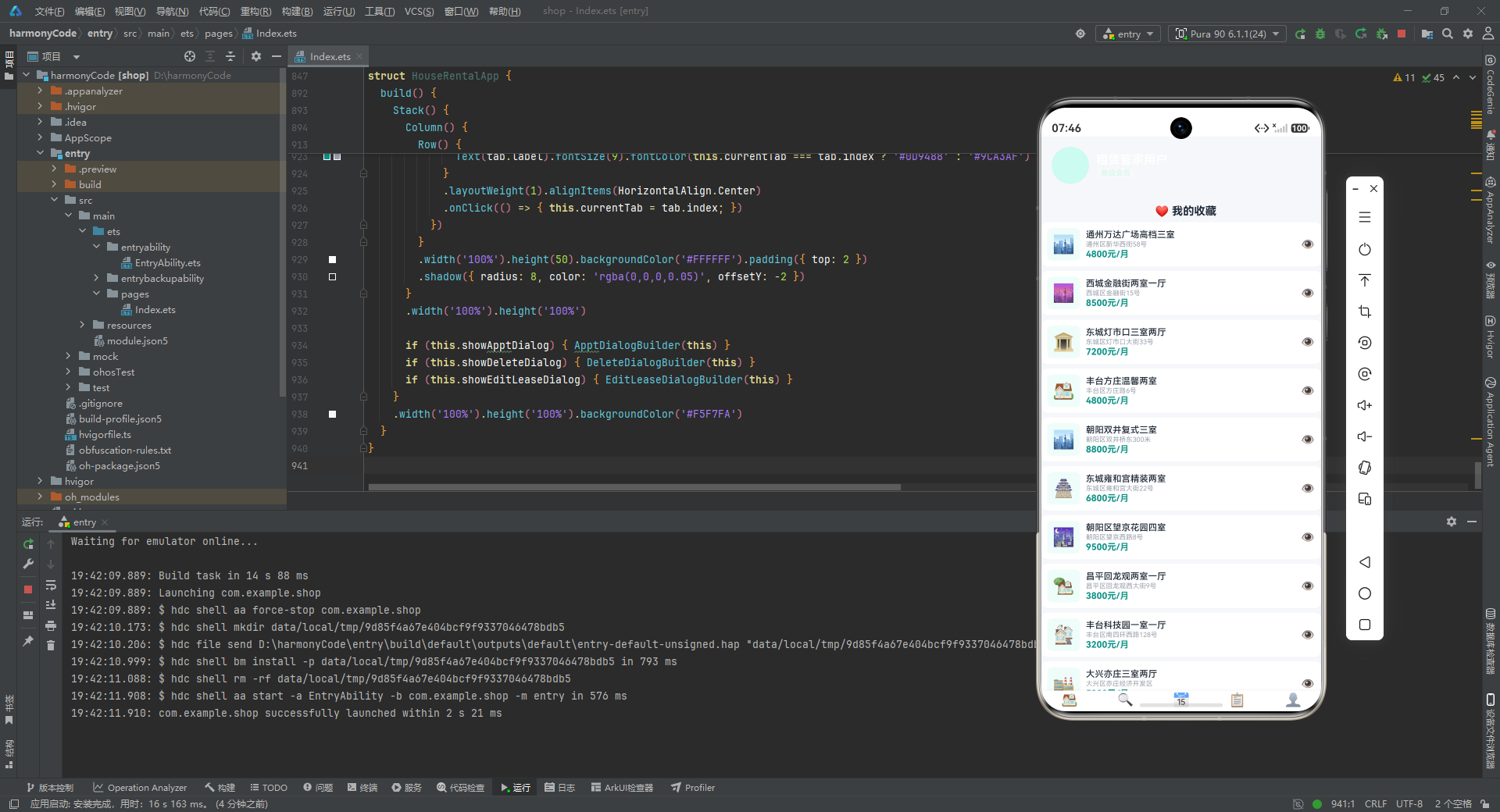
        Text('❤️ 我的收藏').fontSize(15).fontWeight(FontWeight.Bold).fontColor('#1F2937')
          .margin({ bottom: 6 }).padding({ left: 12 })

        ForEach(this.favoriteList, (item: FavoriteItem) => {
          // ... 收藏卡片
        })

        // 设置列表
        Text('⚙️ 设置').fontSize(15).fontWeight(FontWeight.Bold).fontColor('#1F2937')
          .margin({ bottom: 6, top: 8 }).padding({ left: 12 })

        ForEach([
          { icon: '👤', title: '个人信息', subtitle: '查看和编辑个人资料' } as SettingsConfigItem,
          { icon: '🔔', title: '消息通知', subtitle: '查看和编辑个人资料' } as SettingsConfigItem,
          // ... 共 6 项设置
        ], (setting: SettingsConfigItem, index: number) => {
          Row() {
            Text(setting.icon).fontSize(18).margin({ right: 10 })
            Column() {
              Text(setting.title).fontSize(13).fontColor('#1F2937').margin({ bottom: 1 })
              Text(setting.subtitle).fontSize(9).fontColor('#9CA3AF')
            }.alignItems(HorizontalAlign.Start).layoutWeight(1)
            Text('›').fontSize(16).fontColor('#D1D5DB')
          }
          .width('100%').padding({ left: 12, right: 12, top: 8, bottom: 8 })
          .backgroundColor(Color.White).margin({ left: 12, right: 12, bottom: 1 })
        })

        Column().height(20)
      }.width('100%')
    }.width('100%').scrollBar(BarState.Off)
  }
}
深度解析
个人中心组件展示了 渐变背景头像区域、收藏列表 和 设置菜单 三大模块。
1. 渐变背景的用户信息卡片:
用户信息区域使用了 .backgroundColor('linear-gradient(135deg, #0D9488, #14B8A6)') 实现了 135 度角的线性渐变,从深青绿到浅青绿。这是整个应用中唯一使用渐变色的区域,在视觉上形成了鲜明的"品牌标识区"效果。.borderRadius({ bottomLeft: 18, bottomRight: 18 }) 只对底部两个角设置圆角,顶部保持直角与页面边缘齐平,形成"底部圆角卡片"的视觉效果。头像占位使用了 50x50 的圆形(borderRadius(25))青绿色色块,因为使用了 Emoji 而非真实头像图片。
2. 设置列表的 ForEach 内联数据:
设置项的数据直接在 ForEach 中以字面量数组形式定义,而非引用外部常量。每条数据使用 as SettingsConfigItem 进行类型断言,确保类型安全。这种内联定义适合数据量小且不变化的场景 – 设置项通常是固定的,不需要动态管理。右侧的 › 符号是通用的"进入/展开"指示符,暗示这些设置项可以点击进入二级页面。
十、主入口组件 – @Entry 装饰器与全局状态调度中心
@Entry
@Component
struct HouseRentalApp {
  @State currentTab: number = 0;
  @State houseList: HouseItem[] = HOUSE_LIST;
  @State apptList: AppointmentItem[] = APPOINTMENT_LIST;
  @State favList: FavoriteItem[] = FAVORITE_LIST;
  @State leaseData: LeaseItem[] = LEASE_LIST;
  @State areaPriceData: AreaPriceItem[] = AREA_PRICE_LIST;
  @State layoutData: LayoutCountItem[] = LAYOUT_DIST_DATA;
  @State payRecords: PaymentItem[] = PAYMENT_RECORDS;

  @State showApptDialog: boolean = false;
  @State showDeleteDialog: boolean = false;
  @State showEditLeaseDialog: boolean = false;

  @State selectedHouseId: string = '';
  @State apptHouseTitle: string = '';
  @State apptDate: string = '2026-07-25';
  @State apptTime: string = '10:00';

  @State deleteFavId: string = '';
  @State editLeaseRent: string = '';
  @State editLeaseDeposit: string = '';
  @State editLeaseStart: string = '';
  @State editLeaseEnd: string = '';

  submitAppointment(): void {
    const newItem: AppointmentItem = {
      id: 'a' + Date.now().toString(), houseId: this.selectedHouseId,
      houseTitle: this.apptHouseTitle, houseAddress: '', houseArea: 0, housePrice: 0,
      houseEmoji: '🏠', appointmentDate: this.apptDate, appointmentTime: this.apptTime,
      status: 'pending', remarks: '', contactName: '新用户', contactPhone: '', createTime: '2026-07-24',
    };
    this.apptList = [newItem, ...this.apptList];
    this.showApptDialog = false;
  }

  removeFavorite(): void {
    this.favList = this.favList.filter((f: FavoriteItem) => f.id !== this.deleteFavId);
    this.showDeleteDialog = false;
  }

  saveLeaseEdit(): void {
    this.showEditLeaseDialog = false;
  }

  build() {
    Stack() {
      Column() {
        if (this.currentTab === 0) {
          HomeContent({ houseList: this.houseList, areaData: this.areaPriceData, layoutData: this.layoutData })
        }
        if (this.currentTab === 1) {
          FindContent({ houseList: this.houseList })
        }
        if (this.currentTab === 2) {
          AppointmentContent({ appointmentList: this.apptList })
        }
        if (this.currentTab === 3) {
          LeaseContent({ leaseList: this.leaseData, paymentRecords: this.payRecords })
        }
        if (this.currentTab === 4) {
          MineContent({ favoriteList: this.favList })
        }

        Row() {
          ForEach([
            { index: 0, icon: '🏠', label: '首页' } as TabConfigItem,
            { index: 1, icon: '🔍', label: '找房' } as TabConfigItem,
            { index: 2, icon: '📅', label: '预约' } as TabConfigItem,
            { index: 3, icon: '📋', label: '租约' } as TabConfigItem,
            { index: 4, icon: '👤', label: '我的' } as TabConfigItem,
          ], (tab: TabConfigItem) => {
            Column() {
              Text(tab.icon).fontSize(18).margin({ bottom: 30 })
              Text(tab.label).fontSize(9).fontColor(this.currentTab === tab.index ? '#0D9488' : '#9CA3AF')
            }
            .layoutWeight(1).alignItems(HorizontalAlign.Center)
            .onClick(() => { this.currentTab = tab.index; })
          })
        }
        .width('100%').height(50).backgroundColor('#FFFFFF').padding({ top: 2 })
        .shadow({ radius: 8, color: 'rgba(0,0,0,0.05)', offsetY: -2 })
      }
      .width('100%').height('100%')

      if (this.showApptDialog) { ApptDialogBuilder(this) }
      if (this.showDeleteDialog) { DeleteDialogBuilder(this) }
      if (this.showEditLeaseDialog) { EditLeaseDialogBuilder(this) }
    }
    .width('100%').height('100%').backgroundColor('#F5F7FA')
  }
}
深度解析
这是整个应用的核心组件,承担了全局状态管理、组件调度、Tab 导航和弹窗管理四大职责。
1. @Entry + @Component 双装饰器的含义:
@Entry 装饰器将 HouseRentalApp 标记为应用的入口组件,相当于 Android 的 Activity.onCreate() 或 Web 的 ReactDOM.render() 入口点。HarmonyOS 运行时会识别 @Entry 装饰的组件作为页面的根节点进行渲染。@Component 则声明这是一个可复用的自定义组件。两者组合使用表明这是应用的顶层页面。
2. 集中式状态管理的架构模式:
主组件中定义了 20 个 @State 状态变量,可以分为三类:
| 类别 | 状态变量 | 作用 |
|---|---|---|
| 业务数据状态 | houseList/apptList/favList/leaseData/areaPriceData/layoutData/payRecords | 存储各业务模块的数据列表 |
| 弹窗控制状态 | showApptDialog/showDeleteDialog/showEditLeaseDialog | 控制三个弹窗的显示/隐藏 |
| 表单临时状态 | selectedHouseId/apptHouseTitle/apptDate/apptTime/deleteFavId/editLeaseRent等 | 存储弹窗表单中的临时数据 |
这种 “单根组件管理全部状态” 的架构模式在中小型应用中非常实用。所有业务数据都集中在根组件,通过 @Prop 单向传递给子组件。子组件只负责展示,不持有业务数据的状态。这种单向数据流架构清晰、可预测性强,避免了跨组件状态同步的复杂性。
3. 条件渲染驱动的页面切换机制:
Tab 切换通过 if (this.currentTab === N) 条件渲染实现,而非使用 Tabs 组件。每次只有一个条件为 true,只渲染一个 Tab 内容组件。当 currentTab 的值改变时(通过底部栏的 onClick 触发),旧的组件被卸载,新的组件被创建。这种方式的优点是简单直接,不需要引入 TabsController 等额外 API;缺点是切换时组件会重新创建(非缓存),对于数据量大的页面可能有性能开销。
4. Stack 布局的弹窗叠加层:
整个 build() 方法的最外层使用 Stack 布局,这是弹窗叠加显示的关键。Stack 使其子组件按照声明顺序从前到后堆叠,后声明的组件覆盖在先声明的组件之上。第一层是 Column(包含 Tab 内容和底部导航栏),弹窗通过 if 条件判断叠加在其上方。当 showApptDialog 为 true 时,ApptDialogBuilder(this) 生成的弹框会覆盖在所有内容之上,形成模态弹窗效果。
5. 底部导航栏的实现细节:
底部导航栏使用 Row + ForEach 构建 5 个 Tab 项,每个 Tab 项是一个纵向排列的 Column(图标 + 文字)。.layoutWeight(1) 使 5 个 Tab 等宽分布。当前选中的 Tab 文字颜色为主题色 #0D9488,未选中为灰色 #9CA3AF。图标的 margin({ bottom: 30 }) 是一个有意思的设置 – 它将图标向上推 30vp,使图标与文字之间形成更大的间距,在有限的 50vp 高度内让文字紧贴底部,图标居中偏上,形成更加平衡的视觉效果。导航栏的 .shadow({ radius: 8, color: 'rgba(0,0,0,0.05)', offsetY: -2 }) 使阴影向上偏移 2vp(offsetY: -2),营造了导航栏"浮"在内容上方的层次感。
6. 业务方法的实现:
submitAppointment():创建新的预约项并插入到列表头部[newItem, ...this.apptList]。使用展开运算符...创建新数组是 ArkTS/TypeScript 中不可变数据更新的标准做法 – 不直接修改原数组,而是创建一个包含新元素的新数组赋值给状态变量,确保触发 UI 刷新。id使用'a' + Date.now().toString()生成基于时间戳的唯一标识。removeFavorite():通过.filter()过滤掉指定 ID 的收藏项,同样采用了不可变数据更新模式。saveLeaseEdit():当前实现仅关闭弹窗,编辑逻辑尚未完整实现,这为后续迭代预留了扩展点。
十一、架构总结与技术对比表
整体架构概览
本应用采用 “单根组件 + 属性下发 + Builder 弹窗” 的经典 ArkTS 架构模式。根组件 HouseRentalApp 作为唯一的 @Entry 入口和全局状态管理中心,通过 @State 集中持有所有业务数据和 UI 状态,通过 @Prop 将数据单向传递给五个 Tab 内容子组件。弹窗则通过 @Builder 全局构建器函数实现,在 Stack 布局中叠加显示。
各模块关键技术点横向对比
| 维度 | 首页(Home) | 找房(Find) | 预约(Appointment) | 租约(Lease) | 我的(Mine) |
|---|---|---|---|---|---|
| 组件名称 | HomeContent | FindContent | AppointmentContent | LeaseContent | MineContent |
| 核心功能 | 精选房源展示 + 区域均价/户型分布/租金走势数据看板 | 全量房源搜索 + 列表/网格视图切换 + 多维筛选 | 按状态筛选预约列表(待确认/已确认/已完成/已取消) | 当前租约详情 + 缴费记录 + 历史租约 | 用户信息展示 + 收藏列表 + 设置菜单 |
| 接收属性(@Prop) | houseList, areaData, layoutData(3个) | houseList(1个) | appointmentList(1个) | leaseList, paymentRecords(2个) | favoriteList(1个) |
| 本地状态(@State) | 无 | viewMode(视图模式) | statusFilter(状态筛选) | 无 | 无 |
| 数据过滤方式 | .filter(h => h.isFeatured) 精选过滤 | 无过滤,展示全量 | .filter(a => status匹配) 动态筛选 | .filter(l => l.status === '进行中'/'已到期') 分区过滤 | 无过滤 |
| 滚动容器 | 外层纵向Scroll + 内层横向Scroll(嵌套) | 单层纵向Scroll | 单层纵向Scroll | 单层纵向Scroll | 单层纵向Scroll |
| 交互元素 | 搜索框、区域标签栏 | 搜索框、视图切换按钮、筛选栏 | 状态筛选标签组 | 无直接交互(仅展示) | 收藏查看、设置菜单项 |
| 关键UI技术 | 嵌套Scroll方向隔离、Divider分隔、多图表组件组合 | if-else条件渲染视图模式、百分比宽度两列网格 | 动态高亮筛选标签、状态颜色映射 + 半透明背景 | Divider卡片分区、标签徽章样式 | linear-gradient渐变背景、不对称圆角、ForEach内联数据 |
| 子组件引用 | AreaPriceChart, LayoutDistChart, RentTrendChart | 无 | 无 | 无 | 无 |
| 关联弹窗 | 无(弹窗由主组件统一管理) | 无 | 新增预约弹窗(ApptDialogBuilder) | 编辑租约弹窗(EditLeaseDialogBuilder) | 删除收藏弹窗(DeleteDialogBuilder) |
| 数据量级 | 精选约7-8套 + 统计数据8+5+7条 | 全部20套房源 | 15条预约记录 | 5条租约 + 5条缴费 | 10条收藏 + 6项设置 |
设计模式总结
| 设计模式 | 应用位置 | 说明 |
|---|---|---|
| 单向数据流 | 根组件 -> 子组件 | @State -> @Prop 的父传子单向数据流,数据变更自顶向下传递 |
| 属性下发(Props Drilling) | HouseRentalApp -> 五个Tab组件 | 所有业务数据通过组件属性逐层传递,子组件只负责展示 |
| 条件渲染 | Tab切换、视图模式切换 | 通过 if/else 控制组件的挂载/卸载,实现页面和视图的无缝切换 |
| Builder 构建器 | 三个弹框 | @Builder 全局函数实现可复用的弹窗UI构建逻辑,配合 Stack 实现模态叠加 |
| 不可变数据更新 | submitAppointment、removeFavorite | 使用展开运算符或 filter 创建新数组赋值给状态变量,触发UI响应式更新 |
| 配置驱动 | CONFIG 对象、内联数据 | 状态文案、设置项等通过配置对象或内联数组驱动渲染,避免硬编码 |
| 视图模型投影 | FavoriteItem 接口 | 从完整实体中提取子集作为视图专用数据结构,减少不必要的数据传递 |
状态管理架构图
HouseRentalApp (@Entry)
├── @State 业务数据: houseList / apptList / favList / leaseData / areaPriceData / layoutData / payRecords
├── @State UI控制: currentTab / showApptDialog / showDeleteDialog / showEditLeaseDialog
├── @State 表单临时: selectedHouseId / apptDate / apptTime / deleteFavId / editLeaseRent...
│
├── [条件渲染 Tab 内容]
│   ├── currentTab=0 → HomeContent (@Prop: houseList, areaData, layoutData)
│   │   └── 子组件: AreaPriceChart / LayoutDistChart / RentTrendChart
│   ├── currentTab=1 → FindContent (@Prop: houseList, @State: viewMode)
│   ├── currentTab=2 → AppointmentContent (@Prop: appointmentList, @State: statusFilter)
│   ├── currentTab=3 → LeaseContent (@Prop: leaseList, paymentRecords)
│   └── currentTab=4 → MineContent (@Prop: favoriteList)
│
├── [底部导航栏] ForEach TabConfigItem → onClick → currentTab = index
│
└── [Stack 弹窗叠加层]
    ├── showApptDialog → ApptDialogBuilder(this)
    ├── showDeleteDialog → DeleteDialogBuilder(this)
    └── showEditLeaseDialog → EditLeaseDialogBuilder(this)
安装DevEco Studio程序

选择目标安装目录:

设置环境变量,但是需要重启一下:

新建一个空白模板:

设置API为24的模板项目:

初始化项目,自动下载相关依赖:

完整代码:
// ========== 接口定义 ==========
interface HouseItem {
id: string; title: string; address: string; region: string; area: number; price: number;
unitPrice: number; layout: string; orientation: string; floor: string; totalFloors: number;
decoration: string; tags: string[]; imageEmoji: string; isFavorite: boolean; isFeatured: boolean;
status: string; publishDate: string; landlordName: string;
}
interface AppointmentItem {
id: string; houseId: string; houseTitle: string; houseAddress: string;
houseArea: number; housePrice: number; houseEmoji: string;
appointmentDate: string; appointmentTime: string; status: string; remarks: string;
contactName: string; contactPhone: string; createTime: string;
}
interface FavoriteItem {
id: string; houseId: string; title: string; address: string;
price: number; area: number; layout: string; imageEmoji: string; addedTime: string;
}
interface LeaseItem {
id: string; houseId: string; houseTitle: string; houseAddress: string;
startDate: string; endDate: string; monthlyRent: number; deposit: number;
paymentMethod: string; status: string; landlordName: string; landlordPhone: string;
houseEmoji: string;
}
interface AreaPriceItem {
area: string; avgPrice: number; maxPrice: number; minPrice: number; houseCount: number;
}
interface PaymentItem {
id: string; leaseId: string; amount: number; type: string;
dueDate: string; paidDate: string; status: string;
}
interface LayoutCountItem {
layout: string; count: number; color: string;
}
interface SettingsConfigItem {
icon: string; title: string; subtitle: string;
}
interface TabConfigItem {
index: number; icon: string; label: string;
}
interface RentTrendItem {
month: string; avgRent: number;
}
// ========== @Observed 数据模型类 ==========
@Observed
class HouseModel {
id: string; title: string; price: number; area: number; isFavorite: boolean;
constructor(id: string, title: string, price: number, area: number) {
this.id = id; this.title = title; this.price = price; this.area = area; this.isFavorite = false;
}
}
@Observed
class AppointmentModel {
id: string; status: string; appointmentDate: string; appointmentTime: string;
constructor(id: string, status: string, date: string, time: string) {
this.id = id; this.status = status; this.appointmentDate = date; this.appointmentTime = time;
}
}
// ========== 配置对象 ==========
const REGION_CONFIG: Record<string, string> = {
'all': '全部', 'chaoyang': '朝阳区', 'haidian': '海淀区', 'fengtai': '丰台区',
'tongzhou': '通州区', 'changping': '昌平区', 'daxing': '大兴区',
'shijingshan': '石景山区', 'xicheng': '西城区', 'dongcheng': '东城区', 'fangshan': '房山区'
};
const LAYOUT_CONFIG: Record<string, string> = {
'all': '全部户型', 'yishi': '一室一厅', 'liangshi': '两室一厅',
'sanshi': '三室两厅', 'sishi': '四室两厅', 'wushi': '五室以上'
};
const ORIENTATION_CONFIG: Record<string, string> = {
'all': '全部朝向', 'south': '朝南', 'north': '朝北',
'east': '朝东', 'west': '朝西', 'southnorth': '南北通透'
};
const PRICE_RANGE_CONFIG: Record<string, string> = {
'all': '全部价格', '2000-4000': '2000-4000元', '4000-6000': '4000-6000元',
'6000-8000': '6000-8000元', '8000-10000': '8000-10000元', '10000+': '10000元以上'
};
const STATUS_CONFIG: Record<string, string> = {
'available': '在租', 'rented': '已租', 'pending': '待审核', 'offline': '已下架'
};
const APPOINTMENT_STATUS_CONFIG: Record<string, string> = {
'pending': '待确认', 'confirmed': '已确认', 'completed': '已完成', 'cancelled': '已取消'
};
// ========== 模拟数据 ==========
const HOUSE_LIST: HouseItem[] = [
{ id: 'h001', title: '阳光花园精装三室两厅', address: '朝阳区建国路88号阳光花园12栋1205', region: '朝阳', area: 120, price: 6500, unitPrice: 54, layout: '三室两厅', orientation: '南', floor: '12/26', totalFloors: 26, decoration: '精装修', tags: ['近地铁', '拎包入住', '南北通透'], imageEmoji: '🏠', isFavorite: false, isFeatured: true, status: '在租', publishDate: '2026-07-20', landlordName: '张先生' },
{ id: 'h002', title: '翠微嘉园两室一厅', address: '海淀区翠微路10号翠微嘉园6栋803', region: '海淀', area: 85, price: 5500, unitPrice: 65, layout: '两室一厅', orientation: '东', floor: '8/18', totalFloors: 18, decoration: '精装修', tags: ['学区房', '采光好'], imageEmoji: '🏢', isFavorite: false, isFeatured: true, status: '在租', publishDate: '2026-07-19', landlordName: '李女士' },
{ id: 'h003', title: '丰台科技园一室一厅', address: '丰台区南四环西路128号科技园3栋1502', region: '丰台', area: 55, price: 3200, unitPrice: 58, layout: '一室一厅', orientation: '南', floor: '15/22', totalFloors: 22, decoration: '简装修', tags: ['近科技园', '配套齐全'], imageEmoji: '🏘️', isFavorite: false, isFeatured: false, status: '在租', publishDate: '2026-07-18', landlordName: '王先生' },
{ id: 'h004', title: '通州万达广场高档三室', address: '通州区新华西街58号万达公寓A座2101', region: '通州', area: 130, price: 4800, unitPrice: 37, layout: '三室两厅', orientation: '南北通透', floor: '21/32', totalFloors: 32, decoration: '豪华装修', tags: ['近商圈', '地铁房', '品牌物业'], imageEmoji: '🏙️', isFavorite: true, isFeatured: true, status: '在租', publishDate: '2026-07-17', landlordName: '赵先生' },
{ id: 'h005', title: '昌平回龙观两室一厅', address: '昌平区回龙观西大街9号龙域花园2栋605', region: '昌平', area: 78, price: 3800, unitPrice: 49, layout: '两室一厅', orientation: '西', floor: '6/11', totalFloors: 11, decoration: '精装修', tags: ['交通便利', '低楼层'], imageEmoji: '🏡', isFavorite: false, isFeatured: false, status: '在租', publishDate: '2026-07-16', landlordName: '刘女士' },
{ id: 'h006', title: '大兴天宫院四室两厅', address: '大兴区天宫院街道永兴路6号天宫花园18栋', region: '大兴', area: 145, price: 4200, unitPrice: 29, layout: '四室两厅', orientation: '南北通透', floor: '3/6', totalFloors: 6, decoration: '毛坯房', tags: ['大户型', '低密度'], imageEmoji: '🏰', isFavorite: false, isFeatured: false, status: '在租', publishDate: '2026-07-15', landlordName: '陈先生' },
{ id: 'h007', title: '石景山古城一室一厅', address: '石景山区古城南路18号古城新苑5栋102', region: '石景山', area: 48, price: 2800, unitPrice: 58, layout: '一室一厅', orientation: '南', floor: '1/6', totalFloors: 6, decoration: '简装修', tags: ['首层', '独立花园'], imageEmoji: '🏠', isFavorite: false, isFeatured: false, status: '在租', publishDate: '2026-07-14', landlordName: '孙女士' },
{ id: 'h008', title: '西城金融街两室一厅', address: '西城区金融街15号金融花园8栋1501', region: '西城', area: 90, price: 8500, unitPrice: 94, layout: '两室一厅', orientation: '东', floor: '15/28', totalFloors: 28, decoration: '豪华装修', tags: ['金融街', '高端住宅', '管家服务'], imageEmoji: '🌆', isFavorite: true, isFeatured: true, status: '在租', publishDate: '2026-07-13', landlordName: '周先生' },
{ id: 'h009', title: '东城灯市口三室两厅', address: '东城区灯市口大街33号京华公寓10栋1201', region: '东城', area: 110, price: 7200, unitPrice: 65, layout: '三室两厅', orientation: '南北通透', floor: '12/24', totalFloors: 24, decoration: '精装修', tags: ['市中心', '历史文化区', '配套完善'], imageEmoji: '🏛️', isFavorite: true, isFeatured: true, status: '在租', publishDate: '2026-07-12', landlordName: '吴先生' },
{ id: 'h010', title: '房山长阳两室一厅', address: '房山区长阳镇长韩路6号加州水岸22栋', region: '房山', area: 75, price: 2600, unitPrice: 35, layout: '两室一厅', orientation: '南', floor: '5/9', totalFloors: 9, decoration: '精装修', tags: ['新小区', '环境优美'], imageEmoji: '🏝️', isFavorite: false, isFeatured: false, status: '在租', publishDate: '2026-07-11', landlordName: '郑先生' },
{ id: 'h011', title: '朝阳区望京花园四室', address: '朝阳区望京西路8号望京花园7栋2802', region: '朝阳', area: 160, price: 9500, unitPrice: 59, layout: '四室两厅', orientation: '南北通透', floor: '28/32', totalFloors: 32, decoration: '豪华装修', tags: ['望京商圈', '高层景观', '大户型'], imageEmoji: '🌃', isFavorite: false, isFeatured: true, status: '在租', publishDate: '2026-07-10', landlordName: '马先生' },
{ id: 'h012', title: '海淀中关村小户型', address: '海淀区中关村南大街5号科贸公寓3栋702', region: '海淀', area: 42, price: 4500, unitPrice: 107, layout: '一室一厅', orientation: '东', floor: '7/20', totalFloors: 20, decoration: '精装修', tags: ['中关村', '科技园区', '拎包入住'], imageEmoji: '💻', isFavorite: false, isFeatured: false, status: '在租', publishDate: '2026-07-09', landlordName: '杨先生' },
{ id: 'h013', title: '丰台方庄温馨两室', address: '丰台区方庄路6号芳城园15栋1103', region: '丰台', area: 82, price: 4800, unitPrice: 59, layout: '两室一厅', orientation: '南', floor: '11/18', totalFloors: 18, decoration: '精装修', tags: ['方庄商圈', '生活便利'], imageEmoji: '🏠', isFavorite: true, isFeatured: false, status: '在租', publishDate: '2026-07-08', landlordName: '黄女士' },
{ id: 'h014', title: '通州运河商务区一室', address: '通州区滨河中路88号运河壹号A栋3201', region: '通州', area: 50, price: 3500, unitPrice: 70, layout: '一室一厅', orientation: '东', floor: '32/36', totalFloors: 36, decoration: '豪华装修', tags: ['运河景观', '高端物业', '近CBD'], imageEmoji: '🌊', isFavorite: false, isFeatured: true, status: '在租', publishDate: '2026-07-07', landlordName: '许先生' },
{ id: 'h015', title: '昌平天通苑大两居', address: '昌平区天通苑北一区18栋805', region: '昌平', area: 95, price: 3600, unitPrice: 38, layout: '两室一厅', orientation: '南北通透', floor: '8/16', totalFloors: 16, decoration: '简装修', tags: ['价格实惠', '交通便利'], imageEmoji: '🏢', isFavorite: false, isFeatured: false, status: '在租', publishDate: '2026-07-06', landlordName: '冯先生' },
{ id: 'h016', title: '朝阳双井复式三室', address: '朝阳区双井桥东300米富力城3栋1501', region: '朝阳', area: 140, price: 8800, unitPrice: 63, layout: '三室两厅', orientation: '南', floor: '15/22', totalFloors: 22, decoration: '豪华装修', tags: ['双井商圈', '复式结构', '精装全配'], imageEmoji: '🏙️', isFavorite: true, isFeatured: true, status: '在租', publishDate: '2026-07-05', landlordName: '钱先生' },
{ id: 'h017', title: '西城月坛公园旁两居', address: '西城区月坛北街12号月坛花园6栋903', region: '西城', area: 88, price: 7800, unitPrice: 89, layout: '两室一厅', orientation: '南北通透', floor: '9/16', totalFloors: 16, decoration: '精装修', tags: ['月坛公园', '机关大院', '安静宜居'], imageEmoji: '🌳', isFavorite: false, isFeatured: false, status: '在租', publishDate: '2026-07-04', landlordName: '秦女士' },
{ id: 'h018', title: '大兴亦庄三室两厅', address: '大兴区亦庄经济开发区荣华南路10号', region: '大兴', area: 118, price: 5200, unitPrice: 44, layout: '三室两厅', orientation: '南', floor: '10/18', totalFloors: 18, decoration: '精装修', tags: ['亦庄开发区', '企业园区', '配套齐全'], imageEmoji: '🏭', isFavorite: false, isFeatured: false, status: '在租', publishDate: '2026-07-03', landlordName: '曹先生' },
{ id: 'h019', title: '东城雍和宫精装两室', address: '东城区雍和宫大街22号雍和家园2栋702', region: '东城', area: 95, price: 6800, unitPrice: 72, layout: '两室一厅', orientation: '东', floor: '7/12', totalFloors: 12, decoration: '精装修', tags: ['雍和宫商圈', '文化氛围', '低密度社区'], imageEmoji: '🏯', isFavorite: true, isFeatured: false, status: '在租', publishDate: '2026-07-02', landlordName: '蒋先生' },
{ id: 'h020', title: '石景山万达一室一厅', address: '石景山区石景山路20号万达广场C栋1802', region: '石景山', area: 52, price: 3200, unitPrice: 62, layout: '一室一厅', orientation: '西', floor: '18/30', totalFloors: 30, decoration: '精装修', tags: ['万达商圈', '地铁上盖', '配套齐全'], imageEmoji: '🛍️', isFavorite: false, isFeatured: false, status: '在租', publishDate: '2026-07-01', landlordName: '沈先生' },
];
const APPOINTMENT_LIST: AppointmentItem[] = [
{ id: 'a001', houseId: 'h001', houseTitle: '阳光花园精装三室两厅', houseAddress: '朝阳区建国路88号', houseArea: 120, housePrice: 6500, houseEmoji: '🏠', appointmentDate: '2026-07-25', appointmentTime: '10:00', status: 'confirmed', remarks: '客户想看看采光情况', contactName: '王小明', contactPhone: '13800138001', createTime: '2026-07-22' },
{ id: 'a002', houseId: 'h004', houseTitle: '通州万达广场高档三室', houseAddress: '通州区新华西街58号', houseArea: 130, housePrice: 4800, houseEmoji: '🏙️', appointmentDate: '2026-07-26', appointmentTime: '14:30', status: 'pending', remarks: '', contactName: '李娟', contactPhone: '13800138002', createTime: '2026-07-23' },
{ id: 'a003', houseId: 'h008', houseTitle: '西城金融街两室一厅', houseAddress: '西城区金融街15号', houseArea: 90, housePrice: 8500, houseEmoji: '🌆', appointmentDate: '2026-07-24', appointmentTime: '09:00', status: 'completed', remarks: '已完成看房,客户很满意', contactName: '张伟', contactPhone: '13800138003', createTime: '2026-07-21' },
{ id: 'a004', houseId: 'h011', houseTitle: '朝阳区望京花园四室', houseAddress: '朝阳区望京西路8号', houseArea: 160, housePrice: 9500, houseEmoji: '🌃', appointmentDate: '2026-07-27', appointmentTime: '11:00', status: 'pending', remarks: '一家四口看房', contactName: '刘强', contactPhone: '13800138004', createTime: '2026-07-23' },
{ id: 'a005', houseId: 'h006', houseTitle: '大兴天宫院四室两厅', houseAddress: '大兴区天宫院街道永兴路6号', houseArea: 145, housePrice: 4200, houseEmoji: '🏰', appointmentDate: '2026-07-22', appointmentTime: '15:00', status: 'cancelled', remarks: '客户临时有事取消', contactName: '陈芳', contactPhone: '13800138005', createTime: '2026-07-20' },
{ id: 'a006', houseId: 'h009', houseTitle: '东城灯市口三室两厅', houseAddress: '东城区灯市口大街33号', houseArea: 110, housePrice: 7200, houseEmoji: '🏛️', appointmentDate: '2026-07-28', appointmentTime: '10:30', status: 'confirmed', remarks: '重点关注周边配套', contactName: '赵丽', contactPhone: '13800138006', createTime: '2026-07-23' },
{ id: 'a007', houseId: 'h014', houseTitle: '通州运河商务区一室', houseAddress: '通州区滨河中路88号', houseArea: 50, housePrice: 3500, houseEmoji: '🌊', appointmentDate: '2026-07-29', appointmentTime: '16:00', status: 'pending', remarks: '', contactName: '孙明', contactPhone: '13800138007', createTime: '2026-07-24' },
{ id: 'a008', houseId: 'h016', houseTitle: '朝阳双井复式三室', houseAddress: '朝阳区双井桥东300米', houseArea: 140, housePrice: 8800, houseEmoji: '🏙️', appointmentDate: '2026-07-25', appointmentTime: '13:00', status: 'confirmed', remarks: '对复式结构很感兴趣', contactName: '周杰', contactPhone: '13800138008', createTime: '2026-07-22' },
{ id: 'a009', houseId: 'h002', houseTitle: '翠微嘉园两室一厅', houseAddress: '海淀区翠微路10号', houseArea: 85, housePrice: 5500, houseEmoji: '🏢', appointmentDate: '2026-07-21', appointmentTime: '09:30', status: 'completed', remarks: '已看房,考虑学区需要', contactName: '吴丽', contactPhone: '13800138009', createTime: '2026-07-19' },
{ id: 'a010', houseId: 'h012', houseTitle: '海淀中关村小户型', houseAddress: '海淀区中关村南大街5号', houseArea: 42, housePrice: 4500, houseEmoji: '💻', appointmentDate: '2026-07-30', appointmentTime: '14:00', status: 'pending', remarks: 'IT从业者,看重通勤', contactName: '郑浩', contactPhone: '13800138010', createTime: '2026-07-24' },
{ id: 'a011', houseId: 'h019', houseTitle: '东城雍和宫精装两室', houseAddress: '东城区雍和宫大街22号', houseArea: 95, housePrice: 6800, houseEmoji: '🏯', appointmentDate: '2026-07-26', appointmentTime: '10:00', status: 'pending', remarks: '喜欢胡同文化', contactName: '马丽', contactPhone: '13800138011', createTime: '2026-07-23' },
{ id: 'a012', houseId: 'h013', houseTitle: '丰台方庄温馨两室', houseAddress: '丰台区方庄路6号', houseArea: 82, housePrice: 4800, houseEmoji: '🏠', appointmentDate: '2026-07-20', appointmentTime: '11:30', status: 'completed', remarks: '已签约,房东人很好', contactName: '杨帆', contactPhone: '13800138012', createTime: '2026-07-18' },
{ id: 'a013', houseId: 'h007', houseTitle: '石景山古城一室一厅', houseAddress: '石景山区古城南路18号', houseArea: 48, housePrice: 2800, houseEmoji: '🏠', appointmentDate: '2026-07-23', appointmentTime: '08:30', status: 'cancelled', remarks: '客户找到更合适的房源', contactName: '黄强', contactPhone: '13800138013', createTime: '2026-07-20' },
{ id: 'a014', houseId: 'h017', houseTitle: '西城月坛公园旁两居', houseAddress: '西城区月坛北街12号', houseArea: 88, housePrice: 7800, houseEmoji: '🌳', appointmentDate: '2026-07-31', appointmentTime: '15:30', status: 'pending', remarks: '', contactName: '许丽', contactPhone: '13800138014', createTime: '2026-07-24' },
{ id: 'a015', houseId: 'h015', houseTitle: '昌平天通苑大两居', houseAddress: '昌平区天通苑北一区18栋', houseArea: 95, housePrice: 3600, houseEmoji: '🏢', appointmentDate: '2026-07-28', appointmentTime: '16:30', status: 'pending', remarks: '预算有限,重点看性价比', contactName: '冯明', contactPhone: '13800138015', createTime: '2026-07-24' },
];
const FAVORITE_LIST: FavoriteItem[] = [
{ id: 'f001', houseId: 'h004', title: '通州万达广场高档三室', address: '通州区新华西街58号', price: 4800, area: 130, layout: '三室两厅', imageEmoji: '🏙️', addedTime: '2026-07-20' },
{ id: 'f002', houseId: 'h008', title: '西城金融街两室一厅', address: '西城区金融街15号', price: 8500, area: 90, layout: '两室一厅', imageEmoji: '🌆', addedTime: '2026-07-18' },
{ id: 'f003', houseId: 'h009', title: '东城灯市口三室两厅', address: '东城区灯市口大街33号', price: 7200, area: 110, layout: '三室两厅', imageEmoji: '🏛️', addedTime: '2026-07-16' },
{ id: 'f004', houseId: 'h013', title: '丰台方庄温馨两室', address: '丰台区方庄路6号', price: 4800, area: 82, layout: '两室一厅', imageEmoji: '🏠', addedTime: '2026-07-15' },
{ id: 'f005', houseId: 'h016', title: '朝阳双井复式三室', address: '朝阳区双井桥东300米', price: 8800, area: 140, layout: '三室两厅', imageEmoji: '🏙️', addedTime: '2026-07-14' },
{ id: 'f006', houseId: 'h019', title: '东城雍和宫精装两室', address: '东城区雍和宫大街22号', price: 6800, area: 95, layout: '两室一厅', imageEmoji: '🏯', addedTime: '2026-07-13' },
{ id: 'f007', houseId: 'h011', title: '朝阳区望京花园四室', address: '朝阳区望京西路8号', price: 9500, area: 160, layout: '四室两厅', imageEmoji: '🌃', addedTime: '2026-07-12' },
{ id: 'f008', houseId: 'h005', title: '昌平回龙观两室一厅', address: '昌平区回龙观西大街9号', price: 3800, area: 78, layout: '两室一厅', imageEmoji: '🏡', addedTime: '2026-07-10' },
{ id: 'f009', houseId: 'h003', title: '丰台科技园一室一厅', address: '丰台区南四环西路128号', price: 3200, area: 55, layout: '一室一厅', imageEmoji: '🏘️', addedTime: '2026-07-08' },
{ id: 'f010', houseId: 'h018', title: '大兴亦庄三室两厅', address: '大兴区亦庄经济开发区', price: 5200, area: 118, layout: '三室两厅', imageEmoji: '🏭', addedTime: '2026-07-07' },
];
const LEASE_LIST: LeaseItem[] = [
{ id: 'l001', houseId: 'h004', houseTitle: '通州万达广场高档三室', houseAddress: '通州区新华西街58号万达公寓A座2101', startDate: '2026-07-01', endDate: '2027-06-30', monthlyRent: 4800, deposit: 4800, paymentMethod: '押一付三', status: '进行中', landlordName: '赵先生', landlordPhone: '13900139001', houseEmoji: '🏙️' },
{ id: 'l002', houseId: 'h009', houseTitle: '东城灯市口三室两厅', houseAddress: '东城区灯市口大街33号京华公寓10栋1201', startDate: '2026-06-15', endDate: '2027-06-14', monthlyRent: 7200, deposit: 7200, paymentMethod: '押一付三', status: '进行中', landlordName: '吴先生', landlordPhone: '13900139002', houseEmoji: '🏛️' },
{ id: 'l003', houseId: 'h006', houseTitle: '大兴天宫院四室两厅', houseAddress: '大兴区天宫院街道永兴路6号天宫花园18栋', startDate: '2025-03-01', endDate: '2026-02-28', monthlyRent: 4000, deposit: 4000, paymentMethod: '押一付一', status: '已到期', landlordName: '陈先生', landlordPhone: '13900139003', houseEmoji: '🏰' },
{ id: 'l004', houseId: 'h012', houseTitle: '海淀中关村小户型', houseAddress: '海淀区中关村南大街5号科贸公寓3栋702', startDate: '2024-08-01', endDate: '2025-07-31', monthlyRent: 4200, deposit: 4200, paymentMethod: '押一付三', status: '已到期', landlordName: '杨先生', landlordPhone: '13900139004', houseEmoji: '💻' },
{ id: 'l005', houseId: 'h019', houseTitle: '东城雍和宫精装两室', houseAddress: '东城区雍和宫大街22号雍和家园2栋702', startDate: '2024-01-15', endDate: '2025-01-14', monthlyRent: 6500, deposit: 6500, paymentMethod: '押一付三', status: '已到期', landlordName: '蒋先生', landlordPhone: '13900139005', houseEmoji: '🏯' },
];
const AREA_PRICE_LIST: AreaPriceItem[] = [
{ area: '西城区', avgPrice: 8150, maxPrice: 15000, minPrice: 4500, houseCount: 128 },
{ area: '东城区', avgPrice: 7000, maxPrice: 13000, minPrice: 3800, houseCount: 156 },
{ area: '朝阳区', avgPrice: 6980, maxPrice: 12000, minPrice: 3200, houseCount: 233 },
{ area: '海淀区', avgPrice: 6230, maxPrice: 11000, minPrice: 2800, houseCount: 198 },
{ area: '丰台区', avgPrice: 4850, maxPrice: 8000, minPrice: 2200, houseCount: 167 },
{ area: '通州区', avgPrice: 3980, maxPrice: 6500, minPrice: 1800, houseCount: 189 },
{ area: '昌平区', avgPrice: 3520, maxPrice: 5500, minPrice: 1500, houseCount: 203 },
{ area: '大兴区', avgPrice: 3180, maxPrice: 5000, minPrice: 1400, houseCount: 176 },
];
const LAYOUT_DIST_DATA: LayoutCountItem[] = [
{ layout: '一室一厅', count: 45, color: '#0D9488' },
{ layout: '两室一厅', count: 68, color: '#14B8A6' },
{ layout: '三室两厅', count: 52, color: '#06B6D4' },
{ layout: '四室两厅', count: 28, color: '#3B82F6' },
{ layout: '五室以上', count: 12, color: '#6366F1' },
];
const RENT_TREND_DATA: RentTrendItem[] = [
{ month: '1月', avgRent: 5200 }, { month: '2月', avgRent: 5100 }, { month: '3月', avgRent: 5350 },
{ month: '4月', avgRent: 5480 }, { month: '5月', avgRent: 5620 }, { month: '6月', avgRent: 5710 },
{ month: '7月', avgRent: 5800 },
];
const PAYMENT_RECORDS: PaymentItem[] = [
{ id: 'p001', leaseId: 'l001', amount: 14400, type: '租金', dueDate: '2026-10-01', paidDate: '2026-09-28', status: '待支付' },
{ id: 'p002', leaseId: 'l001', amount: 14400, type: '租金', dueDate: '2026-07-01', paidDate: '2026-06-28', status: '已支付' },
{ id: 'p003', leaseId: 'l002', amount: 21600, type: '租金', dueDate: '2026-09-15', paidDate: '2026-09-12', status: '已支付' },
{ id: 'p004', leaseId: 'l002', amount: 21600, type: '租金', dueDate: '2026-06-15', paidDate: '2026-06-10', status: '已支付' },
{ id: 'p005', leaseId: 'l001', amount: 14400, type: '租金', dueDate: '2027-01-01', paidDate: '', status: '待支付' },
];
// ========== 工具函数 ==========
function formatPrice(price: number): string {
if (price >= 10000) {
return (price / 10000).toFixed(1) + '万';
}
return price.toString() + '元/月';
}
function formatPriceSimple(price: number): string {
return price.toString() + '元/月';
}
function formatArea(area: number): string {
return area.toString() + '㎡';
}
function getApptStatusText(status: string): string {
return APPOINTMENT_STATUS_CONFIG[status] || '未知';
}
function getApptStatusColor(status: string): string {
if (status === 'confirmed') return '#0D9488';
if (status === 'pending') return '#F59E0B';
if (status === 'completed') return '#059669';
if (status === 'cancelled') return '#EF4444';
return '#999';
}
function getLeaseStatusBg(status: string): string {
return status === '进行中' ? '#D1FAE5' : '#F3F4F6';
}
function getLeaseStatusTextColor(status: string): string {
return status === '进行中' ? '#065F46' : '#6B7280';
}
function getPayStatusColor(status: string): string {
return status === '已支付' ? '#059669' : '#D97706';
}
function calcMaxPrice(data: AreaPriceItem[]): number {
let maxVal: number = 0;
for (let i: number = 0; i < data.length; i++) {
if (data[i].avgPrice > maxVal) maxVal = data[i].avgPrice;
}
return maxVal;
}
function calcLayoutTotal(data: LayoutCountItem[]): number {
let total: number = 0;
for (let i: number = 0; i < data.length; i++) {
total += data[i].count;
}
return total;
}
function calcPercent(count: number, total: number): number {
return total === 0 ? 0 : Math.round(count / total * 100);
}
// ========== 枚举 ==========
enum TabIndex {
HOME = 0, FIND = 1, APPOINTMENT = 2, LEASE = 3, MINE = 4
}
// ========== 图表组件 ==========
@Component
struct AreaPriceChart {
@Prop areaData: AreaPriceItem[];
build() {
Column() {
Text('区域均价对比').fontSize(14).fontWeight(FontWeight.Bold).fontColor('#1F2937').margin({ bottom: 10 })
Row() {
ForEach(this.areaData, (item: AreaPriceItem) => {
Column() {
Text(item.avgPrice.toString()).fontSize(8).fontColor('#0D9488').margin({ bottom: 2 })
Column()
.width(18).height(item.avgPrice / 100)
.backgroundColor('#14B8A6').borderRadius(4)
.shadow({ radius: 3, color: 'rgba(20,184,166,0.35)', offsetY: 2 })
Text(item.area.substring(0, 2)).fontSize(8).fontColor('#6B7280').margin({ top: 4 })
}.alignItems(HorizontalAlign.Center).margin({ left: 2, right: 2 })
})
}.alignItems(VerticalAlign.Bottom).justifyContent(FlexAlign.SpaceEvenly).width('100%')
}.width('100%').padding(10).backgroundColor('#F0FDFA').borderRadius(10)
}
}
@Component
struct LayoutDistChart {
@Prop layoutData: LayoutCountItem[];
build() {
Column() {
Text('户型分布').fontSize(14).fontWeight(FontWeight.Bold).fontColor('#1F2937').margin({ bottom: 10 })
ForEach(this.layoutData, (item: LayoutCountItem) => {
Row() {
Text(item.layout).fontSize(11).fontColor('#374151').width(55)
Row() {
Row()
.width(calcPercent(item.count, calcLayoutTotal(this.layoutData)).toString() + '%')
.height(18).backgroundColor(item.color).borderRadius(9)
.shadow({ radius: 2, color: item.color + '50', offsetY: 1 })
}.layoutWeight(1).height(18).backgroundColor('#E5E7EB').borderRadius(9)
Text(item.count.toString() + '套').fontSize(10).fontColor('#6B7280').width(32).textAlign(TextAlign.End)
}.width('100%').alignItems(VerticalAlign.Center).margin({ bottom: 6 })
})
}.width('100%').padding(10).backgroundColor('#F8FAFC').borderRadius(10)
}
}
@Component
struct RentTrendChart {
@Prop trendData: RentTrendItem[];
build() {
Column() {
Text('租金走势').fontSize(14).fontWeight(FontWeight.Bold).fontColor('#1F2937').margin({ bottom: 10 })
Row() {
ForEach(this.trendData, (item: RentTrendItem) => {
Column() {
Text(item.avgRent.toString()).fontSize(8).fontColor('#3B82F6').margin({ bottom: 2 })
Column()
.width(20).height((item.avgRent - 5000) / 20)
.backgroundColor('#3B82F6').borderRadius({ topLeft: 4, topRight: 4 })
.shadow({ radius: 3, color: 'rgba(59,130,246,0.3)', offsetY: 1 })
Text(item.month).fontSize(9).fontColor('#6B7280').margin({ top: 4 })
}.alignItems(HorizontalAlign.Center).margin({ left: 4, right: 4 })
})
}.alignItems(VerticalAlign.Bottom).justifyContent(FlexAlign.SpaceEvenly).width('100%')
}.width('100%').padding(10).backgroundColor('#EFF6FF').borderRadius(10)
}
}
// ========== 弹框构建器 ==========
@Builder
function ApptDialogBuilder(host: HouseRentalApp) {
Column() {
Column().width('100%').height('100%').backgroundColor('rgba(0,0,0,0.5)')
.onClick(() => { host.showApptDialog = false; })
Column() {
Text('新增预约看房').fontSize(17).fontWeight(FontWeight.Bold).fontColor('#1F2937').margin({ bottom: 14 })
Text('选择房源').fontSize(12).fontColor('#6B7280').alignSelf(ItemAlign.Start).margin({ bottom: 4 })
Scroll() {
Column() {
ForEach(HOUSE_LIST.slice(0, 10), (item: HouseItem) => {
Row() {
Text(item.imageEmoji).fontSize(18).margin({ right: 8 })
Column() {
Text(item.title).fontSize(12).fontColor('#1F2937').maxLines(1).textOverflow({ overflow: TextOverflow.Ellipsis })
Text(item.address).fontSize(9).fontColor('#9CA3AF').maxLines(1).textOverflow({ overflow: TextOverflow.Ellipsis })
}.alignItems(HorizontalAlign.Start).layoutWeight(1)
}
.width('100%').padding(6).margin({ bottom: 3 })
.backgroundColor(host.selectedHouseId === item.id ? '#CCFBF1' : '#F9FAFB').borderRadius(6)
.onClick(() => { host.selectedHouseId = item.id; host.apptHouseTitle = item.title; })
})
}
}.constraintSize({ maxHeight: '35%' }).backgroundColor('#F3F4F6').borderRadius(8).margin({ bottom: 10 })
Text('预约日期').fontSize(12).fontColor('#6B7280').alignSelf(ItemAlign.Start).margin({ bottom: 4 })
Row() {
ForEach(['07-25', '07-26', '07-27', '07-28'], (date: string) => {
Text(date).fontSize(11)
.fontColor(host.apptDate.substring(5) === date ? '#FFFFFF' : '#374151')
.backgroundColor(host.apptDate.substring(5) === date ? '#0D9488' : '#F3F4F6')
.borderRadius(12).padding({ left: 8, right: 8, top: 3, bottom: 3 }).margin({ right: 5 })
.onClick(() => { host.apptDate = '2026-' + date; })
})
}.margin({ bottom: 10 })
Text('预约时间').fontSize(12).fontColor('#6B7280').alignSelf(ItemAlign.Start).margin({ bottom: 4 })
Row() {
ForEach(['09:00', '10:00', '11:00', '14:00', '15:00'], (time: string) => {
Text(time).fontSize(11)
.fontColor(host.apptTime === time ? '#FFFFFF' : '#374151')
.backgroundColor(host.apptTime === time ? '#0D9488' : '#F3F4F6')
.borderRadius(12).padding({ left: 8, right: 8, top: 3, bottom: 3 }).margin({ right: 5 })
.onClick(() => { host.apptTime = time; })
})
}.margin({ bottom: 12 })
Row() {
Button('取消').fontSize(13).backgroundColor('#F3F4F6').fontColor('#6B7280')
.height(36).layoutWeight(1).borderRadius(18)
.onClick(() => { host.showApptDialog = false; })
Button('确认预约').fontSize(13).backgroundColor('#0D9488').fontColor(Color.White)
.height(36).layoutWeight(1).borderRadius(18).margin({ left: 8 })
.onClick(() => { host.submitAppointment(); })
}
}
.width('88%').backgroundColor(Color.White).borderRadius(14).padding(18)
}
.width('100%').height('100%').justifyContent(FlexAlign.Center).alignItems(HorizontalAlign.Center)
}
@Builder
function DeleteDialogBuilder(host: HouseRentalApp) {
Column() {
Column().width('100%').height('100%').backgroundColor('rgba(0,0,0,0.5)')
.onClick(() => { host.showDeleteDialog = false; })
Column() {
Text('⚠️').fontSize(36).margin({ bottom: 10 })
Text('确认删除收藏').fontSize(16).fontWeight(FontWeight.Bold).fontColor('#1F2937').margin({ bottom: 4 })
Text('删除后无法恢复').fontSize(12).fontColor('#6B7280').margin({ bottom: 16 })
Row() {
Button('取消').fontSize(13).backgroundColor('#F3F4F6').fontColor('#6B7280')
.height(36).layoutWeight(1).borderRadius(18)
.onClick(() => { host.showDeleteDialog = false; })
Button('确认删除').fontSize(13).backgroundColor('#EF4444').fontColor(Color.White)
.height(36).layoutWeight(1).borderRadius(18).margin({ left: 8 })
.onClick(() => { host.removeFavorite(); })
}
}
.width('78%').backgroundColor(Color.White).borderRadius(14).padding(20)
}
.width('100%').height('100%').justifyContent(FlexAlign.Center).alignItems(HorizontalAlign.Center)
}
@Builder
function EditLeaseDialogBuilder(host: HouseRentalApp) {
Column() {
Column().width('100%').height('100%').backgroundColor('rgba(0,0,0,0.5)')
.onClick(() => { host.showEditLeaseDialog = false; })
Column() {
Text('编辑租约信息').fontSize(16).fontWeight(FontWeight.Bold).fontColor('#1F2937').margin({ bottom: 12 })
Text('月租金(元)').fontSize(11).fontColor('#6B7280').alignSelf(ItemAlign.Start).margin({ bottom: 3 })
TextInput({ text: host.editLeaseRent }).fontSize(13).height(36)
.backgroundColor('#F9FAFB').borderRadius(6).padding({ left: 8, right: 8 })
.onChange((value: string) => { host.editLeaseRent = value; }).margin({ bottom: 8 })
Text('押金(元)').fontSize(11).fontColor('#6B7280').alignSelf(ItemAlign.Start).margin({ bottom: 3 })
TextInput({ text: host.editLeaseDeposit }).fontSize(13).height(36)
.backgroundColor('#F9FAFB').borderRadius(6).padding({ left: 8, right: 8 })
.onChange((value: string) => { host.editLeaseDeposit = value; }).margin({ bottom: 8 })
Text('开始日期').fontSize(11).fontColor('#6B7280').alignSelf(ItemAlign.Start).margin({ bottom: 3 })
TextInput({ text: host.editLeaseStart }).fontSize(13).height(36)
.backgroundColor('#F9FAFB').borderRadius(6).padding({ left: 8, right: 8 })
.onChange((value: string) => { host.editLeaseStart = value; }).margin({ bottom: 8 })
Text('结束日期').fontSize(11).fontColor('#6B7280').alignSelf(ItemAlign.Start).margin({ bottom: 3 })
TextInput({ text: host.editLeaseEnd }).fontSize(13).height(36)
.backgroundColor('#F9FAFB').borderRadius(6).padding({ left: 8, right: 8 })
.onChange((value: string) => { host.editLeaseEnd = value; }).margin({ bottom: 14 })
Row() {
Button('取消').fontSize(13).backgroundColor('#F3F4F6').fontColor('#6B7280')
.height(36).layoutWeight(1).borderRadius(18)
.onClick(() => { host.showEditLeaseDialog = false; })
Button('保存').fontSize(13).backgroundColor('#0D9488').fontColor(Color.White)
.height(36).layoutWeight(1).borderRadius(18).margin({ left: 8 })
.onClick(() => { host.saveLeaseEdit(); })
}
}
.width('88%').backgroundColor(Color.White).borderRadius(14).padding(18)
}
.width('100%').height('100%').justifyContent(FlexAlign.Center).alignItems(HorizontalAlign.Center)
}
// ========== Tab 内容组件 ==========
@Component
struct HomeContent {
@Prop houseList: HouseItem[];
@Prop areaData: AreaPriceItem[];
@Prop layoutData: LayoutCountItem[];
build() {
Scroll() {
Column() {
Row() {
Row() {
Text('🔍').fontSize(15).margin({ right: 5 })
TextInput({ placeholder: '搜索小区、地址、房源编号' })
.layoutWeight(1).height(34).backgroundColor(Color.Transparent).fontSize(12)
}
.backgroundColor('#F0FDFA').borderRadius(18).padding({ left: 10, right: 10 }).layoutWeight(1)
Text('🏠').fontSize(20).margin({ left: 8 })
}.width('100%').padding({ left: 12, right: 12, top: 6 }).margin({ bottom: 8 })
Scroll() {
Row() {
ForEach(['全部', '朝阳', '海淀', '丰台', '通州', '西城', '东城', '昌平', '大兴'], (region: string) => {
Text(region).fontSize(11)
.fontColor(region === '全部' ? '#FFFFFF' : '#374151')
.backgroundColor(region === '全部' ? '#0D9488' : '#F3F4F6')
.borderRadius(12).padding({ left: 10, right: 10, top: 3, bottom: 3 }).margin({ right: 5 })
})
}.padding({ left: 12, right: 12 })
}.scrollable(ScrollDirection.Horizontal).scrollBar(BarState.Off).width('100%').margin({ bottom: 10 })
Text('🏆 精选房源').fontSize(16).fontWeight(FontWeight.Bold).fontColor('#1F2937')
.margin({ bottom: 8 }).padding({ left: 12 })
ForEach(this.houseList.filter((h: HouseItem) => h.isFeatured), (item: HouseItem) => {
Row() {
Column()
.width(72).height(72).backgroundColor('#CCFBF1').borderRadius(10)
.justifyContent(FlexAlign.Center).alignItems(HorizontalAlign.Center)
Text(item.imageEmoji).fontSize(30).position({ x: 0, y: 0 })
Column() {
Text(item.title).fontSize(14).fontWeight(FontWeight.Bold).fontColor('#1F2937')
.maxLines(1).textOverflow({ overflow: TextOverflow.Ellipsis }).margin({ bottom: 2 })
Text(item.address).fontSize(10).fontColor('#9CA3AF')
.maxLines(1).textOverflow({ overflow: TextOverflow.Ellipsis }).margin({ bottom: 4 })
Row() {
Text(item.layout).fontSize(9).fontColor('#6B7280').margin({ right: 6 })
Text(formatArea(item.area)).fontSize(9).fontColor('#6B7280').margin({ right: 6 })
Text(item.orientation).fontSize(9).fontColor('#6B7280')
}.margin({ bottom: 2 })
Text(formatPriceSimple(item.price)).fontSize(15).fontWeight(FontWeight.Bold).fontColor('#0D9488')
}.alignItems(HorizontalAlign.Start).layoutWeight(1).margin({ left: 10 })
}
.width('100%').backgroundColor(Color.White).borderRadius(12).padding(10)
.margin({ left: 12, right: 12, bottom: 8 })
.shadow({ radius: 6, color: 'rgba(13,148,136,0.08)', offsetY: 2 })
})
Divider().margin({ top: 4, bottom: 10 }).color('#F3F4F6')
Text('📊 数据看板').fontSize(15).fontWeight(FontWeight.Bold).fontColor('#1F2937')
.margin({ bottom: 8 }).padding({ left: 12 })
AreaPriceChart({ areaData: this.areaData }).margin({ left: 12, right: 12, bottom: 10 })
LayoutDistChart({ layoutData: this.layoutData }).margin({ left: 12, right: 12, bottom: 10 })
RentTrendChart({ trendData: RENT_TREND_DATA }).margin({ left: 12, right: 12, bottom: 20 })
}.width('100%')
}.width('100%').scrollBar(BarState.Off)
}
}
@Component
struct FindContent {
@Prop houseList: HouseItem[];
@State viewMode: string = 'list';
build() {
Column() {
Row() {
Row() {
Text('🔍').fontSize(14).margin({ right: 4 })
TextInput({ placeholder: '输入关键词搜索' }).layoutWeight(1).height(32)
.backgroundColor(Color.Transparent).fontSize(12)
}.backgroundColor('#F0FDFA').borderRadius(16).padding({ left: 8, right: 8 }).layoutWeight(1)
Text(this.viewMode === 'list' ? '▦' : '☰').fontSize(18).fontColor('#0D9488').margin({ left: 6 })
.onClick(() => { this.viewMode = this.viewMode === 'list' ? 'grid' : 'list'; })
}.width('100%').padding({ left: 12, right: 12, top: 4, bottom: 4 })
Row() {
ForEach(['区域▾', '价格▾', '户型▾', '朝向▾', '更多▾'], (label: string) => {
Text(label).fontSize(10).fontColor('#374151').backgroundColor('#F3F4F6')
.borderRadius(10).padding({ left: 8, right: 8, top: 3, bottom: 3 }).margin({ right: 4 })
})
}.width('100%').padding({ left: 12 }).margin({ bottom: 6 })
Text('共' + this.houseList.length.toString() + '套房源')
.fontSize(10).fontColor('#9CA3AF').padding({ left: 12 }).margin({ bottom: 4 })
Scroll() {
Column() {
if (this.viewMode === 'list') {
ForEach(this.houseList, (item: HouseItem) => {
Row() {
Text(item.imageEmoji).fontSize(26).width(56).height(56)
.backgroundColor('#CCFBF1').borderRadius(8).textAlign(TextAlign.Center)
Column() {
Text(item.title).fontSize(13).fontWeight(FontWeight.Medium).fontColor('#1F2937')
.maxLines(1).textOverflow({ overflow: TextOverflow.Ellipsis }).margin({ bottom: 2 })
Text(item.address).fontSize(9).fontColor('#9CA3AF')
.maxLines(1).textOverflow({ overflow: TextOverflow.Ellipsis }).margin({ bottom: 3 })
Row() {
Text(item.layout).fontSize(9).fontColor('#6B7280').margin({ right: 6 })
Text(formatArea(item.area)).fontSize(9).fontColor('#6B7280').margin({ right: 6 })
Text(item.orientation).fontSize(9).fontColor('#6B7280')
}
}.alignItems(HorizontalAlign.Start).layoutWeight(1).margin({ left: 8 })
Text(formatPriceSimple(item.price)).fontSize(14).fontWeight(FontWeight.Bold).fontColor('#0D9488')
}
.width('100%').padding(8).backgroundColor(Color.White).borderRadius(8)
.margin({ left: 12, right: 12, bottom: 6 })
.shadow({ radius: 3, color: 'rgba(0,0,0,0.03)', offsetY: 1 })
})
} else {
Row() {
ForEach(this.houseList, (item: HouseItem) => {
Column() {
Text(item.imageEmoji).fontSize(28).width('100%').height(60)
.backgroundColor('#CCFBF1').borderRadius(6).textAlign(TextAlign.Center)
Text(item.title).fontSize(10).fontWeight(FontWeight.Medium).fontColor('#1F2937')
.maxLines(1).textOverflow({ overflow: TextOverflow.Ellipsis }).margin({ top: 3, bottom: 1 })
Text(formatPriceSimple(item.price)).fontSize(12).fontWeight(FontWeight.Bold).fontColor('#0D9488')
Text(formatArea(item.area)).fontSize(9).fontColor('#9CA3AF')
}
.width('45%').backgroundColor(Color.White).borderRadius(8).padding(6)
.margin({ left: '2%', right: '2%', bottom: 6 })
.shadow({ radius: 3, color: 'rgba(0,0,0,0.03)', offsetY: 1 })
})
}.justifyContent(FlexAlign.SpaceBetween).padding({ left: 8, right: 8 })
}
}.width('100%')
}.width('100%').scrollBar(BarState.Off).layoutWeight(1)
}.width('100%').height('100%')
}
}
@Component
struct AppointmentContent {
@Prop appointmentList: AppointmentItem[];
@State statusFilter: string = 'all';
build() {
Column() {
Row() {
ForEach(['全部', '待确认', '已确认', '已完成'], (label: string) => {
Text(label)
.fontSize(11)
.fontColor(
(label === '全部' && this.statusFilter === 'all') ||
(label === '待确认' && this.statusFilter === 'pending') ||
(label === '已确认' && this.statusFilter === 'confirmed') ||
(label === '已完成' && this.statusFilter === 'completed')
? '#FFFFFF' : '#6B7280'
)
.backgroundColor(
(label === '全部' && this.statusFilter === 'all') ||
(label === '待确认' && this.statusFilter === 'pending') ||
(label === '已确认' && this.statusFilter === 'confirmed') ||
(label === '已完成' && this.statusFilter === 'completed')
? '#0D9488' : '#F3F4F6'
)
.borderRadius(12)
.padding({ left: 10, right: 10, top: 4, bottom: 4 })
.onClick(() => {
const val = label === '全部' ? 'all'
: label === '待确认' ? 'pending'
: label === '已确认' ? 'confirmed' : 'completed';
this.statusFilter = val;
})
})
}.width('100%').padding({ left: 12, top: 4, bottom: 4 }).margin({ bottom: 6 })
Scroll() {
Column() {
ForEach(this.appointmentList.filter((a: AppointmentItem) =>
this.statusFilter === 'all' || a.status === this.statusFilter
), (item: AppointmentItem) => {
Row() {
Text(item.houseEmoji).fontSize(24).width(44).height(44)
.backgroundColor('#F0FDFA').borderRadius(6).textAlign(TextAlign.Center)
Column() {
Text(item.houseTitle).fontSize(12).fontWeight(FontWeight.Medium).fontColor('#1F2937')
.maxLines(1).textOverflow({ overflow: TextOverflow.Ellipsis }).margin({ bottom: 2 })
Text(item.houseAddress).fontSize(9).fontColor('#9CA3AF')
.maxLines(1).textOverflow({ overflow: TextOverflow.Ellipsis }).margin({ bottom: 2 })
Row() {
Text('📅' + item.appointmentDate).fontSize(9).fontColor('#6B7280').margin({ right: 8 })
Text('🕐' + item.appointmentTime).fontSize(9).fontColor('#6B7280')
}
}.alignItems(HorizontalAlign.Start).layoutWeight(1).margin({ left: 8 })
Text(getApptStatusText(item.status)).fontSize(9)
.fontColor(getApptStatusColor(item.status))
.backgroundColor(getApptStatusColor(item.status) + '18')
.borderRadius(6).padding({ left: 6, right: 6, top: 2, bottom: 2 })
}
.width('100%').padding(8).backgroundColor(Color.White).borderRadius(8)
.margin({ left: 12, right: 12, bottom: 6 })
.shadow({ radius: 3, color: 'rgba(0,0,0,0.03)', offsetY: 1 })
})
}.width('100%')
}.width('100%').scrollBar(BarState.Off).layoutWeight(1)
}.width('100%').height('100%')
}
}
@Component
struct LeaseContent {
@Prop leaseList: LeaseItem[];
@Prop paymentRecords: PaymentItem[];
build() {
Scroll() {
Column() {
Text('📋 当前租约').fontSize(15).fontWeight(FontWeight.Bold).fontColor('#1F2937')
.margin({ bottom: 6 }).padding({ left: 12 })
ForEach(this.leaseList.filter((l: LeaseItem) => l.status === '进行中'), (item: LeaseItem) => {
Column() {
Row() {
Text(item.houseEmoji).fontSize(28).margin({ right: 10 })
Column() {
Text(item.houseTitle).fontSize(14).fontWeight(FontWeight.Bold).fontColor('#1F2937').margin({ bottom: 1 })
Text(item.houseAddress).fontSize(10).fontColor('#9CA3AF').margin({ bottom: 3 })
Row() {
Text('月租:' + formatPriceSimple(item.monthlyRent)).fontSize(13)
.fontWeight(FontWeight.Bold).fontColor('#0D9488').margin({ right: 8 })
Text('押金:' + item.deposit.toString() + '元').fontSize(10).fontColor('#6B7280')
}.margin({ bottom: 2 })
Text(item.startDate + ' 至 ' + item.endDate).fontSize(9).fontColor('#9CA3AF')
}.alignItems(HorizontalAlign.Start).layoutWeight(1)
}
Divider().margin({ top: 6, bottom: 6 }).color('#F3F4F6')
Row() {
Text('🏠' + item.landlordName).fontSize(10).fontColor('#6B7280').margin({ right: 12 })
Text('📞' + item.landlordPhone).fontSize(10).fontColor('#6B7280').margin({ right: 12 })
Text(item.paymentMethod).fontSize(10).fontColor('#0D9488')
.padding({ left: 4, right: 4, top: 1, bottom: 1 }).backgroundColor('#CCFBF1').borderRadius(3)
}
}
.width('100%').backgroundColor('white').borderRadius(10).padding(12)
.margin({ left: 12, right: 12, bottom: 10 })
.shadow({ radius: 6, color: 'rgba(13,148,136,0.08)', offsetY: 2 })
})
Text('💳 缴费记录').fontSize(15).fontWeight(FontWeight.Bold).fontColor('#1F2937')
.margin({ bottom: 6, top: 2 }).padding({ left: 12 })
ForEach(this.paymentRecords, (pay: PaymentItem) => {
Row() {
Column() {
Text(pay.type).fontSize(12).fontWeight(FontWeight.Medium).fontColor('#1F2937').margin({ bottom: 1 })
Text('应缴:' + pay.dueDate).fontSize(9).fontColor('#9CA3AF')
}.alignItems(HorizontalAlign.Start).layoutWeight(1)
Column() {
Text(pay.amount.toString() + '元').fontSize(13).fontWeight(FontWeight.Bold).fontColor('#1F2937').margin({ bottom: 1 })
Text(pay.status).fontSize(9).fontColor(getPayStatusColor(pay.status))
.padding({ left: 4, right: 4, top: 1, bottom: 1 })
.backgroundColor(getPayStatusColor(pay.status) + '15').borderRadius(3)
}.alignItems(HorizontalAlign.End)
}
.width('100%').padding({ left: 12, right: 12, top: 6, bottom: 6 })
.backgroundColor(Color.White).margin({ left: 12, right: 12, bottom: 3 }).borderRadius(6)
})
Text('📜 历史租约').fontSize(15).fontWeight(FontWeight.Bold).fontColor('#1F2937')
.margin({ bottom: 6, top: 14 }).padding({ left: 12 })
ForEach(this.leaseList.filter((l: LeaseItem) => l.status === '已到期'), (item: LeaseItem) => {
Row() {
Text(item.houseEmoji).fontSize(22).margin({ right: 8 })
Column() {
Text(item.houseTitle).fontSize(12).fontColor('#1F2937').margin({ bottom: 1 })
Text(item.startDate + ' ~ ' + item.endDate).fontSize(9).fontColor('#9CA3AF').margin({ bottom: 1 })
Text(formatPriceSimple(item.monthlyRent)).fontSize(11).fontColor('#6B7280')
}.alignItems(HorizontalAlign.Start).layoutWeight(1)
Text(item.status).fontSize(9)
.fontColor(getLeaseStatusTextColor(item.status))
.backgroundColor(getLeaseStatusBg(item.status))
.borderRadius(6).padding({ left: 6, right: 6, top: 2, bottom: 2 })
}
.width('100%').padding(8).backgroundColor(Color.White)
.margin({ left: 12, right: 12, bottom: 5 }).borderRadius(8)
.shadow({ radius: 2, color: 'rgba(0,0,0,0.02)', offsetY: 1 })
})
Column().height(20)
}.width('100%')
}.width('100%').scrollBar(BarState.Off)
}
}
@Component
struct MineContent {
@Prop favoriteList: FavoriteItem[];
build() {
Scroll() {
Column() {
Row() {
Column().width(50).height(50).backgroundColor('#CCFBF1').borderRadius(25).margin({ right: 10 })
Column() {
Text('租赁管家用户').fontSize(16).fontWeight(FontWeight.Bold).fontColor('#FFFFFF').margin({ bottom: 2 })
Text('高级会员').fontSize(10).fontColor('#D1FAE5')
.padding({ left: 6, right: 6, top: 1, bottom: 1 })
.backgroundColor('rgba(255,255,255,0.2)').borderRadius(6)
}.alignItems(HorizontalAlign.Start).layoutWeight(1)
}
.width('100%').padding({ left: 14, right: 14, top: 14, bottom: 14 })
.backgroundColor('linear-gradient(135deg, #0D9488, #14B8A6)')
.borderRadius({ bottomLeft: 18, bottomRight: 18 }).margin({ bottom: 14 })
Text('❤️ 我的收藏').fontSize(15).fontWeight(FontWeight.Bold).fontColor('#1F2937')
.margin({ bottom: 6 }).padding({ left: 12 })
ForEach(this.favoriteList, (item: FavoriteItem) => {
Row() {
Text(item.imageEmoji).fontSize(24).width(44).height(44)
.backgroundColor('#F0FDFA').borderRadius(6).textAlign(TextAlign.Center)
Column() {
Text(item.title).fontSize(12).fontWeight(FontWeight.Medium).fontColor('#1F2937')
.maxLines(1).textOverflow({ overflow: TextOverflow.Ellipsis }).margin({ bottom: 1 })
Text(item.address).fontSize(9).fontColor('#9CA3AF')
.maxLines(1).textOverflow({ overflow: TextOverflow.Ellipsis }).margin({ bottom: 1 })
Text(formatPriceSimple(item.price)).fontSize(12).fontWeight(FontWeight.Bold).fontColor('#0D9488')
}.alignItems(HorizontalAlign.Start).layoutWeight(1).margin({ left: 8 })
Text('👁️').fontSize(16)
}
.width('100%').padding(8).backgroundColor(Color.White).borderRadius(8)
.margin({ left: 12, right: 12, bottom: 6 })
.shadow({ radius: 3, color: 'rgba(0,0,0,0.03)', offsetY: 1 })
})
Text('⚙️ 设置').fontSize(15).fontWeight(FontWeight.Bold).fontColor('#1F2937')
.margin({ bottom: 6, top: 8 }).padding({ left: 12 })
ForEach([
{ icon: '👤', title: '个人信息', subtitle: '查看和编辑个人资料' } as SettingsConfigItem,
{ icon: '🔔', title: '消息通知', subtitle: '管理推送通知设置' } as SettingsConfigItem,
{ icon: '📋', title: '我的合同', subtitle: '查看已签署的租赁合同' } as SettingsConfigItem,
{ icon: '💳', title: '支付管理', subtitle: '管理支付方式和账单' } as SettingsConfigItem,
{ icon: '⭐', title: '服务评价', subtitle: '评价我们的服务' } as SettingsConfigItem,
{ icon: 'ℹ️', title: '关于我们', subtitle: '版本 1.2.3' } as SettingsConfigItem,
], (setting: SettingsConfigItem, index: number) => {
Row() {
Text(setting.icon).fontSize(18).margin({ right: 10 })
Column() {
Text(setting.title).fontSize(13).fontColor('#1F2937').margin({ bottom: 1 })
Text(setting.subtitle).fontSize(9).fontColor('#9CA3AF')
}.alignItems(HorizontalAlign.Start).layoutWeight(1)
Text('›').fontSize(16).fontColor('#D1D5DB')
}
.width('100%').padding({ left: 12, right: 12, top: 8, bottom: 8 })
.backgroundColor(Color.White).margin({ left: 12, right: 12, bottom: 1 })
})
Column().height(20)
}.width('100%')
}.width('100%').scrollBar(BarState.Off)
}
}
// ========== 主入口组件 ==========
@Entry
@Component
struct HouseRentalApp {
@State currentTab: number = 0;
@State houseList: HouseItem[] = HOUSE_LIST;
@State apptList: AppointmentItem[] = APPOINTMENT_LIST;
@State favList: FavoriteItem[] = FAVORITE_LIST;
@State leaseData: LeaseItem[] = LEASE_LIST;
@State areaPriceData: AreaPriceItem[] = AREA_PRICE_LIST;
@State layoutData: LayoutCountItem[] = LAYOUT_DIST_DATA;
@State payRecords: PaymentItem[] = PAYMENT_RECORDS;
@State showApptDialog: boolean = false;
@State showDeleteDialog: boolean = false;
@State showEditLeaseDialog: boolean = false;
@State selectedHouseId: string = '';
@State apptHouseTitle: string = '';
@State apptDate: string = '2026-07-25';
@State apptTime: string = '10:00';
@State deleteFavId: string = '';
@State editLeaseRent: string = '';
@State editLeaseDeposit: string = '';
@State editLeaseStart: string = '';
@State editLeaseEnd: string = '';
submitAppointment(): void {
const newItem: AppointmentItem = {
id: 'a' + Date.now().toString(), houseId: this.selectedHouseId,
houseTitle: this.apptHouseTitle, houseAddress: '', houseArea: 0, housePrice: 0,
houseEmoji: '🏠', appointmentDate: this.apptDate, appointmentTime: this.apptTime,
status: 'pending', remarks: '', contactName: '新用户', contactPhone: '', createTime: '2026-07-24',
};
this.apptList = [newItem, ...this.apptList];
this.showApptDialog = false;
}
removeFavorite(): void {
this.favList = this.favList.filter((f: FavoriteItem) => f.id !== this.deleteFavId);
this.showDeleteDialog = false;
}
saveLeaseEdit(): void {
this.showEditLeaseDialog = false;
}
build() {
Stack() {
Column() {
if (this.currentTab === 0) {
HomeContent({
houseList: this.houseList, areaData: this.areaPriceData, layoutData: this.layoutData
})
}
if (this.currentTab === 1) {
FindContent({ houseList: this.houseList })
}
if (this.currentTab === 2) {
AppointmentContent({ appointmentList: this.apptList })
}
if (this.currentTab === 3) {
LeaseContent({ leaseList: this.leaseData, paymentRecords: this.payRecords })
}
if (this.currentTab === 4) {
MineContent({ favoriteList: this.favList })
}
Row() {
ForEach([
{ index: 0, icon: '🏠', label: '首页' } as TabConfigItem,
{ index: 1, icon: '🔍', label: '找房' } as TabConfigItem,
{ index: 2, icon: '📅', label: '预约' } as TabConfigItem,
{ index: 3, icon: '📋', label: '租约' } as TabConfigItem,
{ index: 4, icon: '👤', label: '我的' } as TabConfigItem,
], (tab: TabConfigItem) => {
Column() {
Text(tab.icon).fontSize(18).margin({ bottom: 30 })
Text(tab.label).fontSize(9).fontColor(this.currentTab === tab.index ? '#0D9488' : '#9CA3AF')
}
.layoutWeight(1).alignItems(HorizontalAlign.Center)
.onClick(() => { this.currentTab = tab.index; })
})
}
.width('100%').height(50).backgroundColor('#FFFFFF').padding({ top: 2 })
.shadow({ radius: 8, color: 'rgba(0,0,0,0.05)', offsetY: -2 })
}
.width('100%').height('100%')
if (this.showApptDialog) { ApptDialogBuilder(this) }
if (this.showDeleteDialog) { DeleteDialogBuilder(this) }
if (this.showEditLeaseDialog) { EditLeaseDialogBuilder(this) }
}
.width('100%').height('100%').backgroundColor('#F5F7FA')
}
}
总结:
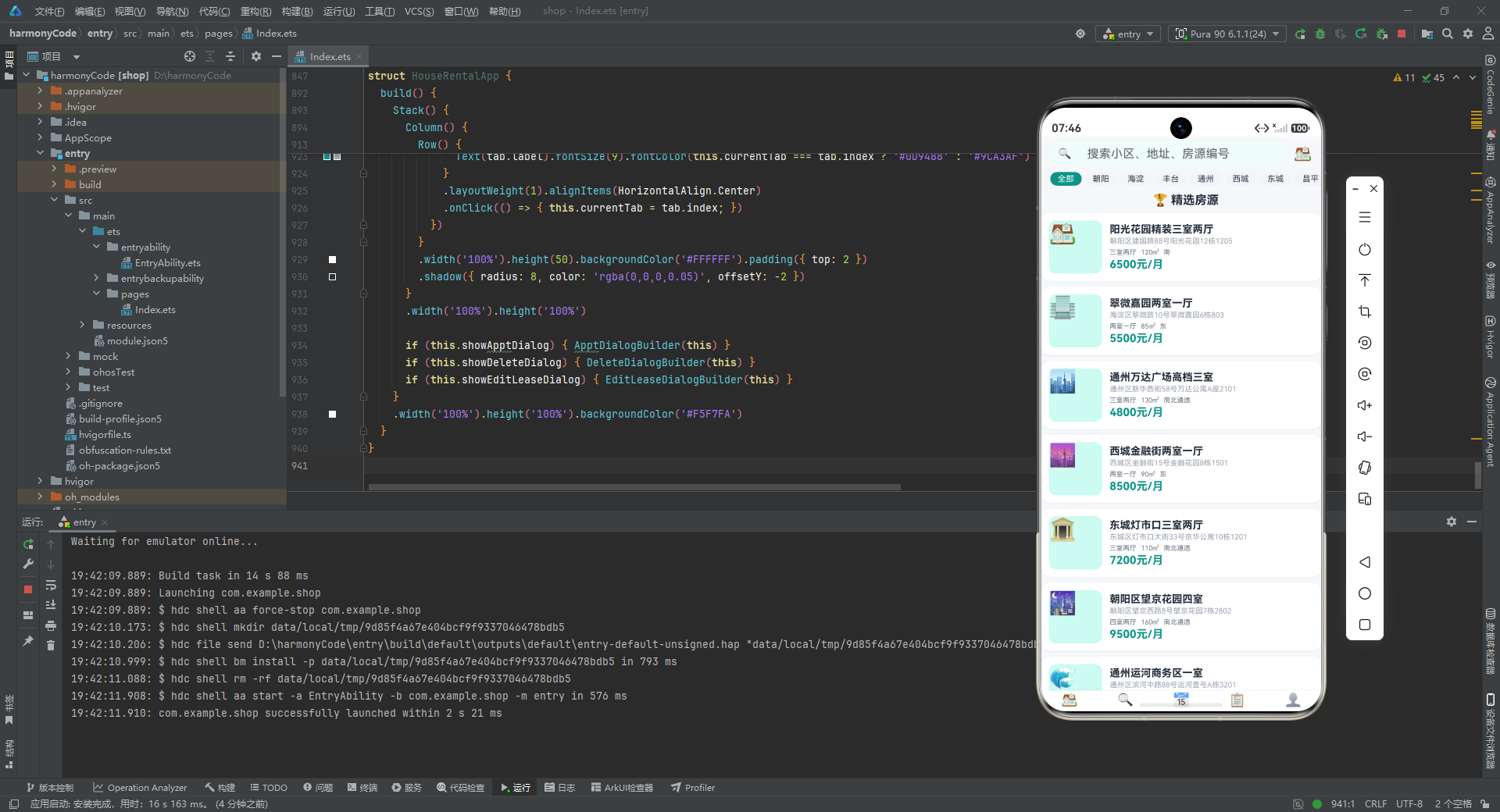
本应用代码实现了一个功能完整的房屋租赁管理系统,涵盖了列表展示、数据可视化、状态筛选、视图切换、表单弹窗、收藏管理、租约跟踪等常见移动端业务场景。其架构设计的核心亮点在于:集中式状态管理确保了数据一致性;纯 ArkUI 实现的图表组件展示了声明式 UI 的强大表达力;@Builder 弹窗构建器实现了弹窗逻辑的优雅封装;单向数据流架构使得组件职责清晰、易于维护。对于 HarmonyOS ArkTS 开发者来说,这是一个非常值得深入学习的实战范例。

讨论HarmonyOS开发技术,专注于API与组件、DevEco Studio、测试、元服务和应用上架分发等。
更多推荐



 8
8 0
0- 0


 已为社区贡献129条内容

所有评论(0)