uniapp开发的APP实现AI流式输出——鸿蒙HarmonyOS Next
·
鸿蒙HarmonyOS Next和安卓、IOS实现方式不一样
鸿蒙需要使用鸿蒙内置的@ohos.net.http(数据请求去实现),但在vue的js中引入@ohos.net.http会报错,没有这个模块,所以鸿蒙需要通过 UTS 插件的形式,在 uni-app 框架内调用
@ohos.net.http文档:文档中心
实现步骤:
1、创建UTS插件
目录uni_modules/harmony-stream(插件名称自定义)/utssdk/app-harmony(特定结构不要修改)
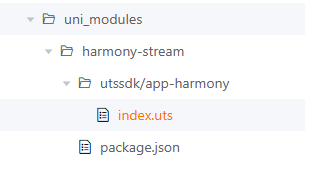
插件主要代码:在uni_modules/harmony-stream/utssdk/app-harmony/index.uts
代码中就是通过使用鸿蒙特定的模块@ohos.net.http和@ohos.util去实现数据流式输出
import http from '@ohos.net.http';
import util from '@ohos.util';

type StreamRequestOptions = {
  url: string;
  method?: 'GET' | 'POST' | 'PUT' | 'DELETE';
  body?: any;
  headers?: Record<string, string>;
  onChunk: (chunk: string) => void;
  onDone: () => void;
  onError: (err: string) => void;
};

export function startStreamRequest(options: StreamRequestOptions) {
  let httpRequest = http.createHttp();

  httpRequest.on('dataReceive', (data: ArrayBuffer) => {
    try {
      let decoder = util.TextDecoder.create('utf-8');
      let chunk = decoder.decodeToString(new Uint8Array(data));
      options.onChunk(chunk);
    } catch (e) {
      options.onError('解码失败');
    }
  });

  httpRequest.on('dataEnd', () => {
    options.onDone();
    httpRequest.off('dataReceive');
    httpRequest.off('dataEnd');
    httpRequest.destroy();
  });

  let extraData: string;
  if (typeof options.body === 'string') {
    extraData = options.body;
  } else {
    extraData = JSON.stringify(options.body || {});
  }

  let headers: Record<string, string> = {
    'Content-Type': 'application/json'
  };
  if (options.headers) {
    headers = { ...headers, ...options.headers };
  }

  let methodMap: Record<string, http.RequestMethod> = {
    'GET': http.RequestMethod.GET,
    'POST': http.RequestMethod.POST,
    'PUT': http.RequestMethod.PUT,
    'DELETE': http.RequestMethod.DELETE
  };
  let method = methodMap[options.method || 'POST'] || http.RequestMethod.POST;

  // ========== 打印调试信息 ==========
  console.log('========== 请求信息 ==========');
  console.log('URL:', options.url);
  console.log('Method:', options.method || 'POST');
  console.log('Headers:', JSON.stringify(headers));
  console.log('Body:', extraData);
  console.log('================================');

  interface RequestConfig {
    method: http.RequestMethod;
    header: Record<string, string>;
    extraData: string;
  }

  let config: RequestConfig = {
    method: method,
    header: headers,
    extraData: extraData
  };

  httpRequest.requestInStream(
    options.url,
    config,
    (err: Error | null) => {
      if (err) {
        console.log('请求错误:', err);
        options.onError('请求失败: ' + err.message);
        httpRequest.off('dataReceive');
        httpRequest.off('dataEnd');
        httpRequest.destroy();
      }
    }
  );
}
插件信息:在uni_modules/harmony-stream下增加package.json和utssdk同级
{
  "name": "harmony-stream",
  "version": "1.0.0",
  "description": "鸿蒙流式请求 UTS 插件",
  "main": "index.uts",
  "uni_modules": {
    "platforms": {
      "app-harmony": {
        "plugins": [
          {
            "name": "harmony-stream",
            "class": "index"
          }
        ]
      }
    }
  }
}
2、Vue中使用(部分参数说明代码中有注释)
<script setup lang="ts">
    import { startStreamRequest } from '@/uni_modules/harmony-stream';
    // 发送消息
    const sendMsg = async () => {
        // 同样根据接口获取ai需要token
        await AiApi.getAiToken({
          mini_user_id,
        }).then(res => {
          // ========== 简化版数据处理 ==========
          // 完整内容
          let fullContent = ''
          // 是否已完成
          let isCompleted = false

          // 更新AI消息内容
          const updateAIContent = (content: string, done: boolean = false) => {
            if (done) {
              // 最终完成时,直接用完整内容
              // fullContent就是AI返回结束后返回的整体内容
            } else if (content) {
              // 增量更新,每次返回叠加后的内容
              // content就是AI返回的内容
            }
          }

          // 处理SSE数据块
          const processChunk = (chunk: string) => {
            // 如果已经完成,忽略后续数据
            if (isCompleted) return

            try {
              // 按行分割
              const lines = chunk.split('\n')
              let currentEvent = ''
              let currentData = ''

              for (let i = 0; i < lines.length; i++) {
                const line = lines[i].trim()

                if (line.startsWith('event:')) {
                  currentEvent = line.replace('event:', '').trim()
                } else if (line.startsWith('data:')) {
                  currentData = line.replace('data:', '').trim()

                  // 有 event 和 data 配对,处理数据
                  if (currentEvent && currentData) {
                    handleSSEMessage(currentEvent, currentData)
                    // 重置,准备接收下一组
                    currentEvent = ''
                    currentData = ''
                  }
                }
            }

            // 如果最后有残留的 data 但没有 event(可能是 ping 或其他)
            if (!currentEvent && currentData) {
                // 尝试直接解析
                try {
                  const parsed = JSON.parse(currentData)
                  if (parsed.content) {
                    const contentText = String(parsed.content)
                    const decoded = contentText.replace(/\\n/g, '\n')
                    fullContent += decoded
                    updateAIContent(fullContent)
                  }
                } catch (e) {
                  // 忽略
                }
              }

            } catch (e) {
              console.log('处理数据块出错:', e)
            }
          }

          // 处理单个 SSE 消息
          const handleSSEMessage = (event: string, data: string) => {
            try {
              // 跳过 ping 心跳
              if (event === 'ping') return

              // 解析 JSON
              const parsed = JSON.parse(data)

              // 处理增量消息
              if (event === 'conversation.message.delta') {
                if (parsed.content) {
                  const contentText = String(parsed.content)
                  // 处理换行符
                  const decoded = contentText.replace(/\\n/g, '\n')
                  fullContent += decoded
                  updateAIContent(fullContent)
                }
              }

              // 处理完成消息(包含完整内容和 time_cost)
              if (event === 'conversation.message.completed') {
                if (parsed.content) {
                  // 直接用完整内容替换
                  const finalContent = String(parsed.content).replace(/\\n/g, '\n')
                  fullContent = finalContent
                  isCompleted = true
                  updateAIContent(fullContent, true)
                }
              }

              // 处理对话完成
              if (event === 'conversation.chat.completed') {
                // 如果还没完成,用之前累积的内容
                if (!isCompleted && fullContent) {
                  isCompleted = true
                  updateAIContent(fullContent, true)
                }
              }

              // 处理 [DONE]
              if (event === 'done') {
                if (!isCompleted && fullContent) {
                  isCompleted = true
                  updateAIContent(fullContent, true)
                }
              }

            } catch (e) {
              console.log('解析SSE消息失败:', e)
            }
          }

          // 发起流式请求
          startStreamRequest({
            url: 'https://xxx/getAnswerStream/sse',
            method: 'POST',
            headers: {
              'Token': res.data.token,
              'Content-Type': 'application/json'
            },
            body: JSON.stringify({
              query: inputValue.value,
              userId: mini_user_id,
            }),
            onChunk: (chunk: any) => {
              console.log('收到原始数据:', chunk)
              processChunk(chunk)
            },
            onDone: () => {
              console.log('流式请求完成!')
              // 如果还没完成,强制完成
              if (!isCompleted && fullContent) {
                isCompleted = true
                updateAIContent(fullContent, true)
              } else if (!fullContent) {
                // 如果没收到任何内容,显示提示
              }
            },
            onError: (errMsg: any) => {
              console.error('流式请求出错:', errMsg)
            }
          })
        })
      }
</script>
讨论HarmonyOS开发技术,专注于API与组件、DevEco Studio、测试、元服务和应用上架分发等。
更多推荐



 9
9 0
0- 0


 已为社区贡献1条内容

所有评论(0)