HarmonyOS 智能工具箱(七):收藏管理与发布优化
HarmonyOS 智能工具箱(七):收藏管理与发布优化
系列: HarmonyOS 智能工具箱 App 全栈开发 · 第 7 篇(终篇)
上一篇: 自然语言分析工具
虽然当前工具不足以上架,但我们还是要探讨一下鸿蒙应用发布优化流程。
引言
经过前六篇的开发,我们已经构建了一款功能完整的智能工具箱 App:OCR 文字识别、语音交互、AI 图像处理、端侧模型推理(、自然语言分析,以及项目架构和首页搭建。
作为系列终篇,本文将完成最后的收尾工作——收藏管理、历史记录整合、性能优化和发布准备,让 App 达到可发布状态。
通过本文你将学到:
- 用 relationalStore 实现收藏数据的 CRUD 管理
- 整合各模块历史记录为统一视图
- 用 LazyForEach + @Reusable 优化长列表性能
- 用 Preferences 管理用户设置并持久化
- 用 GridRow 实现多设备响应式适配
- 应用签名与发布流程
环境准备
| 项目 | 版本 |
|---|---|
| DevEco Studio | 6.1.1 Release (6.1.1.280) |
| API Level | API 24 (HarmonyOS 6.1.1 Release) |
| 设备 | 真机(手机/平板)或模拟器 |
依赖配置
// oh-package.json5
{
  "dependencies": {
    "@kit.ArkUI": "^1.0.0",
    "@kit.ArkData": "^1.0.0",
    "@kit.CoreVisionKit": "^1.0.0",
    "@kit.CoreSpeechKit": "^1.0.0",
    "@kit.MindSporeLiteKit": "^1.0.0",
    "@kit.NaturalLanguageKit": "^1.0.0",
    "@kit.PerformanceAnalysisKit": "^1.0.0"
  }
}
本篇涉及的
@kit.ArkData提供 relationalStore 和 Preferences 能力,已在第 1 篇中引入。
核心实现
Step 1: 收藏管理页面
目标: 用 relationalStore 实现收藏数据的持久化存储,支持增删改查和搜索。
首先定义收藏数据模型和数据库管理类:
// model/FavoriteItem.ets
export class FavoriteItem {
  id: number = 0;
  toolId: string = '';
  toolName: string = '';
  title: string = '';
  content: string = '';
  category: string = '';
  createdAt: string = '';
  updatedAt: string = '';
}
// service/FavoriteManager.ets
import { relationalStore } from '@kit.ArkData';
import { hilog } from '@kit.PerformanceAnalysisKit';
import { FavoriteItem } from '../model/FavoriteItem';

const TAG = 'FavoriteManager';
const DB_NAME = 'smart_toolbox.db';

export class FavoriteManager {
  private rdbStore: relationalStore.RdbStore | null = null;

  private readonly CREATE_TABLE_SQL = `
    CREATE TABLE IF NOT EXISTS favorites (
      id INTEGER PRIMARY KEY AUTOINCREMENT,
      tool_id TEXT NOT NULL,
      tool_name TEXT NOT NULL,
      title TEXT NOT NULL,
      content TEXT DEFAULT '',
      category TEXT DEFAULT '',
      created_at TEXT DEFAULT (datetime('now', 'localtime')),
      updated_at TEXT DEFAULT (datetime('now', 'localtime'))
    )
  `;

  async init(context: Context): Promise<void> {
    const config: relationalStore.StoreConfig = {
      name: DB_NAME,
      securityLevel: relationalStore.SecurityLevel.S1
    };
    this.rdbStore = await relationalStore.getRdbStore(context, config);
    await this.rdbStore.executeSql(this.CREATE_TABLE_SQL);
    hilog.info(0x0000, TAG, '收藏数据库初始化完成');
  }

  async addFavorite(item: Omit<FavoriteItem, 'id' | 'createdAt' | 'updatedAt'>): Promise<number> {
    if (!this.rdbStore) {
      throw new Error('Database not initialized');
    }
    const valueBucket: relationalStore.ValuesBucket = {
      tool_id: item.toolId,
      tool_name: item.toolName,
      title: item.title,
      content: item.content,
      category: item.category
    };
    return await this.rdbStore.insert('favorites', valueBucket);
  }

  async removeFavorite(id: number): Promise<number> {
    if (!this.rdbStore) {
      throw new Error('Database not initialized');
    }
    const predicates = new relationalStore.RdbPredicates('favorites');
    predicates.equalTo('id', id);
    return await this.rdbStore.delete(predicates);
  }

  async updateFavorite(id: number, updates: Partial<FavoriteItem>): Promise<number> {
    if (!this.rdbStore) {
      throw new Error('Database not initialized');
    }
    const valueBucket: relationalStore.ValuesBucket = {};
    if (updates.title !== undefined) {
      valueBucket['title'] = updates.title;
    }
    if (updates.content !== undefined) {
      valueBucket['content'] = updates.content;
    }
    valueBucket['updated_at'] = new Date().toISOString();

    const predicates = new relationalStore.RdbPredicates('favorites');
    predicates.equalTo('id', id);
    return await this.rdbStore.update(valueBucket, predicates);
  }

  async getAllFavorites(): Promise<FavoriteItem[]> {
    if (!this.rdbStore) {
      throw new Error('Database not initialized');
    }
    const predicates = new relationalStore.RdbPredicates('favorites');
    predicates.orderByDesc('created_at');

    const resultSet = await this.rdbStore.query(predicates, [
      'id', 'tool_id', 'tool_name', 'title', 'content', 'category', 'created_at', 'updated_at'
    ]);

    const items: FavoriteItem[] = [];
    while (resultSet.goToNextRow()) {
      const item = new FavoriteItem();
      item.id = resultSet.getLong(resultSet.getColumnIndex('id'));
      item.toolId = resultSet.getString(resultSet.getColumnIndex('tool_id'));
      item.toolName = resultSet.getString(resultSet.getColumnIndex('tool_name'));
      item.title = resultSet.getString(resultSet.getColumnIndex('title'));
      item.content = resultSet.getString(resultSet.getColumnIndex('content'));
      item.category = resultSet.getString(resultSet.getColumnIndex('category'));
      item.createdAt = resultSet.getString(resultSet.getColumnIndex('created_at'));
      item.updatedAt = resultSet.getString(resultSet.getColumnIndex('updated_at'));
      items.push(item);
    }
    resultSet.close();
    return items;
  }

  async searchFavorites(keyword: string): Promise<FavoriteItem[]> {
    if (!this.rdbStore) {
      throw new Error('Database not initialized');
    }
    const predicates = new relationalStore.RdbPredicates('favorites');
    predicates.contains('title', keyword).or().contains('content', keyword);
    predicates.orderByDesc('updated_at');

    const resultSet = await this.rdbStore.query(predicates, [
      'id', 'tool_id', 'tool_name', 'title', 'content', 'category', 'created_at', 'updated_at'
    ]);

    const items: FavoriteItem[] = [];
    while (resultSet.goToNextRow()) {
      const item = new FavoriteItem();
      item.id = resultSet.getLong(resultSet.getColumnIndex('id'));
      item.toolId = resultSet.getString(resultSet.getColumnIndex('tool_id'));
      item.toolName = resultSet.getString(resultSet.getColumnIndex('tool_name'));
      item.title = resultSet.getString(resultSet.getColumnIndex('title'));
      item.content = resultSet.getString(resultSet.getColumnIndex('content'));
      item.category = resultSet.getString(resultSet.getColumnIndex('category'));
      item.createdAt = resultSet.getString(resultSet.getColumnIndex('created_at'));
      item.updatedAt = resultSet.getString(resultSet.getColumnIndex('updated_at'));
      items.push(item);
    }
    resultSet.close();
    return items;
  }
}
关键点: relationalStore 基于 SQLite,通过
RdbPredicates构建查询条件,支持模糊搜索、排序和分页。ResultSet 遍历后必须close()释放资源。
接下来实现收藏管理页面 UI:
// features/favorites/FavoritePage.ets
import { FavoriteManager } from '../../service/FavoriteManager';
import { FavoriteItem } from '../../model/FavoriteItem';
import { FavoriteDataSource } from './FavoriteDataSource';

@ObservedV2
class FavoriteState {
  @Trace keyword: string = '';
  @Trace totalCount: number = 0;
  @Trace isLoading: boolean = true;
}

@ComponentV2
struct FavoritePage {
  @Param manager: FavoriteManager = new FavoriteManager();
  private state: FavoriteState = new FavoriteState();
  private dataSource: FavoriteDataSource = new FavoriteDataSource();

  async aboutToAppear(): Promise<void> {
    await this.loadFavorites();
  }

  private async loadFavorites(): Promise<void> {
    this.state.isLoading = true;
    const items = await this.manager.getAllFavorites();
    this.dataSource.setData(items);
    this.state.totalCount = items.length;
    this.state.isLoading = false;
  }

  private async onSearch(): Promise<void> {
    if (this.state.keyword.trim() === '') {
      await this.loadFavorites();
      return;
    }
    this.state.isLoading = true;
    const items = await this.manager.searchFavorites(this.state.keyword);
    this.dataSource.setData(items);
    this.state.totalCount = items.length;
    this.state.isLoading = false;
  }

  private async onDelete(id: number): Promise<void> {
    await this.manager.removeFavorite(id);
    await this.loadFavorites();
  }

  build() {
    Column() {
      // 搜索栏
      Row() {
        TextInput({ text: this.state.keyword, placeholder: '搜索收藏...' })
          .layoutWeight(1)
          .height(40)
          .borderRadius(20)
          .backgroundColor('#F5F5F5')
          .onChange((value: string) => {
            this.state.keyword = value;
          })
          .onSubmit(() => {
            this.onSearch();
          })

        Text(`共 ${this.state.totalCount} 条`)
          .fontSize(13)
          .fontColor('#999')
          .margin({ left: 12 })
      }
      .width('100%')
      .padding({ left: 16, right: 16, top: 12, bottom: 8 })

      // 收藏列表
      if (this.state.isLoading) {
        LoadingProgress()
          .width(48)
          .height(48)
      } else if (this.state.totalCount === 0) {
        Column() {
          Text($r('sys.symbol.star'))
            .fontSize(48)
            .fontColor('#CCC')
          Text('暂无收藏')
            .fontSize(16)
            .fontColor('#999')
            .margin({ top: 12 })
        }
        .justifyContent(FlexAlign.Center)
        .layoutWeight(1)
      } else {
        List({ space: 8 }) {
          LazyForEach(this.dataSource, (item: FavoriteItem, index: number) => {
            ListItem() {
              FavoriteCard({ item: item, onDelete: (id: number) => this.onDelete(id) })
            }
          }, (item: FavoriteItem, index: number) => `fav_${item.id}`)
        }
        .cachedCount(5)
        .layoutWeight(1)
        .padding({ left: 16, right: 16 })
      }
    }
    .width('100%')
    .height('100%')
    .backgroundColor('#F8F8F8')
  }
}
实现可复用的收藏卡片组件,配合 LazyForEach 使用:
// features/favorites/FavoriteCard.ets
@Reusable
@Component
struct FavoriteCard {
  @Prop item: FavoriteItem = new FavoriteItem();
  @Prop onDelete: (id: number) => void = () => {};

  aboutToReuse(params: ESObject): void {
    this.item = params.item as FavoriteItem;
    this.onDelete = params.onDelete as (id: number) => void;
  }

  build() {
    Row() {
      Column() {
        Row() {
          Text(this.item.toolName)
            .fontSize(11)
            .fontColor('#FFFFFF')
            .backgroundColor('#007DFF')
            .borderRadius(4)
            .padding({ left: 6, right: 6, top: 2, bottom: 2 })

          Text(this.item.createdAt)
            .fontSize(11)
            .fontColor('#BBB')
            .margin({ left: 8 })
        }
        .width('100%')

        Text(this.item.title)
          .fontSize(16)
          .fontWeight(FontWeight.Medium)
          .fontColor('#333')
          .margin({ top: 8 })
          .maxLines(1)
          .textOverflow({ overflow: TextOverflow.Ellipsis })

        Text(this.item.content)
          .fontSize(13)
          .fontColor('#666')
          .margin({ top: 4 })
          .maxLines(2)
          .textOverflow({ overflow: TextOverflow.Ellipsis })
      }
      .layoutWeight(1)
      .alignItems(HorizontalAlign.Start)

      Image($r('sys.symbol.trash'))
        .width(20)
        .height(20)
        .fillColor('#FF4D4F')
        .margin({ left: 12 })
        .onClick(() => this.onDelete(this.item.id))
    }
    .width('100%')
    .padding(12)
    .backgroundColor('#FFFFFF')
    .borderRadius(12)
    .shadow({
      radius: 4,
      color: 'rgba(0,0,0,0.05)',
      offsetX: 0,
      offsetY: 2
    })
  }
}
实现 LazyForEach 数据源:
// features/favorites/FavoriteDataSource.ets
import { FavoriteItem } from '../../model/FavoriteItem';

export class FavoriteDataSource implements IDataSource {
  private listeners: DataChangeListener[] = [];
  private dataArray: FavoriteItem[] = [];

  totalCount(): number {
    return this.dataArray.length;
  }

  getData(index: number): FavoriteItem {
    return this.dataArray[index];
  }

  registerDataChangeListener(listener: DataChangeListener): void {
    if (this.listeners.indexOf(listener) < 0) {
      this.listeners.push(listener);
    }
  }

  unregisterDataChangeListener(listener: DataChangeListener): void {
    const pos = this.listeners.indexOf(listener);
    if (pos >= 0) {
      this.listeners.splice(pos, 1);
    }
  }

  setData(items: FavoriteItem[]): void {
    this.dataArray = items;
    this.notifyDataReload();
  }

  notifyDataReload(): void {
    this.listeners.forEach(listener => listener.notifyDataReload());
  }
}
本节是扩展设计示例,当前随文代码没有注册收藏管理页面,因此不提供虚构的运行截图。
设计思路: 收藏管理使用 relationalStore 而非 Preferences,因为收藏数据量可能较大且需要模糊搜索等复杂查询。relationalStore 基于 SQLite,支持谓词查询和索引优化。
Step 2: 历史记录整合
目标: 将 OCR、语音、图像处理、NLP 各模块的历史记录统一存储和展示。
定义统一的历史记录模型:
// model/HistoryRecord.ets
export class HistoryRecord {
  id: number = 0;
  toolType: ToolType = ToolType.OCR;
  title: string = '';
  summary: string = '';
  detail: string = '';
  thumbnailPath: string = '';
  createdAt: string = '';
}

export enum ToolType {
  OCR = 'ocr',
  SPEECH = 'speech',
  VISION = 'vision',
  NLP = 'nlp',
  MODEL = 'model'
}

export function getToolTypeName(type: ToolType): string {
  const nameMap: Record<ToolType, string> = {
    [ToolType.OCR]: '文字识别',
    [ToolType.SPEECH]: '语音交互',
    [ToolType.VISION]: '图像处理',
    [ToolType.NLP]: '自然语言',
    [ToolType.MODEL]: '模型推理'
  };
  return nameMap[type];
}
// service/HistoryManager.ets
import { relationalStore } from '@kit.ArkData';
import { HistoryRecord, ToolType } from '../model/HistoryRecord';

export class HistoryManager {
  private rdbStore: relationalStore.RdbStore | null = null;

  private readonly CREATE_TABLE_SQL = `
    CREATE TABLE IF NOT EXISTS history (
      id INTEGER PRIMARY KEY AUTOINCREMENT,
      tool_type TEXT NOT NULL,
      title TEXT NOT NULL,
      summary TEXT DEFAULT '',
      detail TEXT DEFAULT '',
      thumbnail_path TEXT DEFAULT '',
      created_at TEXT DEFAULT (datetime('now', 'localtime'))
    )
  `;

  async init(context: Context): Promise<void> {
    const config: relationalStore.StoreConfig = {
      name: 'smart_toolbox.db',
      securityLevel: relationalStore.SecurityLevel.S1
    };
    this.rdbStore = await relationalStore.getRdbStore(context, config);
    await this.rdbStore.executeSql(this.CREATE_TABLE_SQL);
  }

  async addRecord(record: Omit<HistoryRecord, 'id' | 'createdAt'>): Promise<number> {
    if (!this.rdbStore) {
      throw new Error('Database not initialized');
    }
    const valueBucket: relationalStore.ValuesBucket = {
      tool_type: record.toolType,
      title: record.title,
      summary: record.summary,
      detail: record.detail,
      thumbnail_path: record.thumbnailPath
    };
    return await this.rdbStore.insert('history', valueBucket);
  }

  async getRecordsByType(type: ToolType, limit: number = 50): Promise<HistoryRecord[]> {
    if (!this.rdbStore) {
      throw new Error('Database not initialized');
    }
    const predicates = new relationalStore.RdbPredicates('history');
    predicates.equalTo('tool_type', type);
    predicates.orderByDesc('created_at');
    predicates.limitAs(limit);

    return await this.queryRecords(predicates);
  }

  async getAllRecords(limit: number = 100): Promise<HistoryRecord[]> {
    if (!this.rdbStore) {
      throw new Error('Database not initialized');
    }
    const predicates = new relationalStore.RdbPredicates('history');
    predicates.orderByDesc('created_at');
    predicates.limitAs(limit);

    return await this.queryRecords(predicates);
  }

  async clearHistory(type?: ToolType): Promise<number> {
    if (!this.rdbStore) {
      throw new Error('Database not initialized');
    }
    const predicates = new relationalStore.RdbPredicates('history');
    if (type !== undefined) {
      predicates.equalTo('tool_type', type);
    }
    return await this.rdbStore.delete(predicates);
  }

  private async queryRecords(predicates: relationalStore.RdbPredicates): Promise<HistoryRecord[]> {
    if (!this.rdbStore) {
      throw new Error('Database not initialized');
    }
    const resultSet = await this.rdbStore.query(predicates, [
      'id', 'tool_type', 'title', 'summary', 'detail', 'thumbnail_path', 'created_at'
    ]);

    const records: HistoryRecord[] = [];
    while (resultSet.goToNextRow()) {
      const record = new HistoryRecord();
      record.id = resultSet.getLong(resultSet.getColumnIndex('id'));
      record.toolType = resultSet.getString(resultSet.getColumnIndex('tool_type')) as ToolType;
      record.title = resultSet.getString(resultSet.getColumnIndex('title'));
      record.summary = resultSet.getString(resultSet.getColumnIndex('summary'));
      record.detail = resultSet.getString(resultSet.getColumnIndex('detail'));
      record.thumbnailPath = resultSet.getString(resultSet.getColumnIndex('thumbnail_path'));
      record.createdAt = resultSet.getString(resultSet.getColumnIndex('created_at'));
      records.push(record);
    }
    resultSet.close();
    return records;
  }
}
在各工具页面中集成历史记录写入,以 OCR 页面为例:
// 在 OcrPage 中添加历史记录
import { HistoryManager } from '../../service/HistoryManager';
import { ToolType } from '../../model/HistoryRecord';

// 识别完成后调用
private async saveToHistory(recognizedText: string): Promise<void> {
  await this.historyManager.addRecord({
    toolType: ToolType.OCR,
    title: '文字识别',
    summary: recognizedText.substring(0, 100),
    detail: recognizedText,
    thumbnailPath: ''
  });
}
复用提示: 同样的模式适用于语音(ToolType.SPEECH)、图像处理(ToolType.VISION)、NLP(ToolType.NLP)和模型推理(ToolType.MODEL),在各模块的识别/处理完成后调用
addRecord即可。
Step 3: 性能优化
目标: 用 LazyForEach + @Reusable + 布局优化提升长列表场景下的滚动流畅度和内存表现。
3.1 LazyForEach 懒加载
对于收藏列表、历史记录等可能包含大量数据的场景,使用 LazyForEach 替代 ForEach:
// Before: ForEach 一次性创建所有组件(性能差)
ForEach(this.allRecords, (item: HistoryRecord) => {
  ListItem() {
    HistoryCard({ item: item })
  }
}, (item: HistoryRecord) => `${item.id}`)
// After: LazyForEach 按需创建(性能好)
List({ space: 8 }) {
  LazyForEach(this.dataSource, (item: HistoryRecord, index: number) => {
    ListItem() {
      HistoryCard({ item: item })
    }
  }, (item: HistoryRecord, index: number) => `history_${item.id}`)
}
.cachedCount(5)
性能对比: ForEach 在 10000 项数据下首帧创建全部组件,内存暴涨且卡顿明显。LazyForEach 仅渲染可见区域 + cachedCount 缓冲区内的组件(通常 10-20 个),首帧耗时恒定。
3.2 @Reusable 组件复用
对列表中的卡片组件添加 @Reusable 装饰器,配合 LazyForEach 实现组件实例复用:
// Before: 每次滚动出再入都创建新组件
@Component
struct HistoryCard {
  @Prop item: HistoryRecord = new HistoryRecord();

  build() {
    Row() {
      // ...卡片内容
    }
  }
}
// After: @Reusable 复用已有实例,组件创建速度提升约 69%
@Reusable
@Component
struct HistoryCard {
  @Prop item: HistoryRecord = new HistoryRecord();

  aboutToReuse(params: ESObject): void {
    this.item = params.item as HistoryRecord;
  }

  aboutToRecycle(): void {
    // 回收前可清理临时状态
  }

  build() {
    Row() {
      Column() {
        Text(this.item.title)
          .fontSize(16)
          .fontWeight(FontWeight.Medium)
        Text(this.item.summary)
          .fontSize(13)
          .fontColor('#666')
          .margin({ top: 4 })
          .maxLines(2)
          .textOverflow({ overflow: TextOverflow.Ellipsis })
      }
      .layoutWeight(1)

      Text(this.item.createdAt)
        .fontSize(11)
        .fontColor('#BBB')
    }
    .width('100%')
    .padding(12)
    .backgroundColor('#FFFFFF')
    .borderRadius(12)
  }
}
关键:
aboutToReuse回调是必须实现的——当组件从复用池取出时,框架调用此回调,开发者必须在此用新数据更新状态,否则组件会显示旧数据。
3.3 布局优化
减少组件嵌套层级,用 if/else 替代 .visibility():
// Before: 深层嵌套 + visibility
Column() {
  Row() {
    Column() {
      Row() {
        Text('标题').fontSize(18)
      }
    }
  }
}
// 组件即使不可见也参与布局计算
Text('提示').visibility(this.showTip ? Visibility.Visible : Visibility.None)
// After: 扁平化 + 条件渲染
Column() {
  Text('标题')
    .fontSize(18)
    .fontWeight(FontWeight.Bold)
    .width('100%')

  Text('副标题')
    .fontSize(14)
    .fontColor('#666')
    .margin({ top: 4 })
}
.padding(16)
.width('100%')

// 条件渲染:不可见时完全跳过布局计算
if (this.showTip) {
  Text('提示')
    .fontSize(14)
    .fontColor('#999')
}
本节介绍优化方法,但当前项目没有集成基准测试采集,不给出未经实测的性能对比截图或数据。
Step 4: 设置页面完善
目标: 用 Preferences 实现用户设置的持久化存储,支持主题、字号、通知等配置。
定义设置数据模型并用 AppStorageV2 管理全局状态:
// store/SettingsStore.ets
import { AppStorageV2 } from '@kit.ArkUI';
import { dataPreferences } from '@kit.ArkData';

@ObservedV2
export class AppSettings {
  @Trace theme: string = 'light';
  @Trace fontSize: number = 14;
  @Trace notificationsEnabled: boolean = true;
  @Trace autoSaveHistory: boolean = true;
  @Trace language: string = 'zh_CN';
}

export const settingsStore = AppStorageV2.connect(AppSettings, 'appSettings', () => new AppSettings())!;

const PREFS_NAME = 'user_settings';

export async function loadSettings(context: Context): Promise<void> {
  const prefs = await dataPreferences.getPreferences(context, { name: PREFS_NAME });
  settingsStore.theme = (await prefs.get('theme', 'light')) as string;
  settingsStore.fontSize = (await prefs.get('fontSize', 14)) as number;
  settingsStore.notificationsEnabled = (await prefs.get('notifications_enabled', true)) as boolean;
  settingsStore.autoSaveHistory = (await prefs.get('auto_save_history', true)) as boolean;
  settingsStore.language = (await prefs.get('language', 'zh_CN')) as string;
}

export async function saveSetting(context: Context, key: string, value: string | number | boolean): Promise<void> {
  const prefs = await dataPreferences.getPreferences(context, { name: PREFS_NAME });
  await prefs.put(key, value);
  await prefs.flush();
}

export async function clearAllData(context: Context): Promise<void> {
  const prefs = await dataPreferences.getPreferences(context, { name: PREFS_NAME });
  await prefs.clear();
  await prefs.flush();
}
实现设置页面:
// features/settings/SettingsPage.ets
import { AppSettings, settingsStore, saveSetting, clearAllData } from '../../store/SettingsStore';
import { FavoriteManager } from '../../service/FavoriteManager';
import { HistoryManager } from '../../service/HistoryManager';

@ComponentV2
struct SettingsPage {
  @Param favoriteManager: FavoriteManager = new FavoriteManager();
  @Param historyManager: HistoryManager = new HistoryManager();

  private async onThemeChange(theme: string): Promise<void> {
    settingsStore.theme = theme;
    await saveSetting(getContext(), 'theme', theme);
  }

  private async onFontSizeChange(size: number): Promise<void> {
    settingsStore.fontSize = size;
    await saveSetting(getContext(), 'fontSize', size);
  }

  private async onNotificationToggle(enabled: boolean): Promise<void> {
    settingsStore.notificationsEnabled = enabled;
    await saveSetting(getContext(), 'notifications_enabled', enabled);
  }

  private async onAutoSaveToggle(enabled: boolean): Promise<void> {
    settingsStore.autoSaveHistory = enabled;
    await saveSetting(getContext(), 'auto_save_history', enabled);
  }

  private async onClearFavorites(): Promise<void> {
    await this.favoriteManager.getAllFavorites();
    // 实际项目中需弹出确认对话框
  }

  private async onClearHistory(): Promise<void> {
    await this.historyManager.clearHistory();
  }

  build() {
    Scroll() {
      Column({ space: 12 }) {
        // 外观设置
        SettingGroup({ title: '外观' }) {
          SettingRow({
            label: '主题模式',
            value: settingsStore.theme === 'dark' ? '深色' : '浅色'
          }) {
            Select([
              { value: '浅色', icon: '' },
              { value: '深色', icon: '' }
            ])
              .selected(settingsStore.theme === 'dark' ? 1 : 0)
              .onSelect((index: number) => {
                this.onThemeChange(index === 1 ? 'dark' : 'light');
              })
          }

          SettingRow({
            label: '字体大小',
            value: `${settingsStore.fontSize}sp`
          }) {
            Slider({ value: settingsStore.fontSize, min: 12, max: 24, step: 2 })
              .width(160)
              .onChange((value: number) => {
                this.onFontSizeChange(value);
              })
          }
        }

        // 通用设置
        SettingGroup({ title: '通用' }) {
          SettingRow({ label: '启用通知', value: '' }) {
            Toggle({ type: ToggleType.Switch, isOn: settingsStore.notificationsEnabled })
              .onChange((isOn: boolean) => {
                this.onNotificationToggle(isOn);
              })
          }

          SettingRow({ label: '自动保存历史', value: '' }) {
            Toggle({ type: ToggleType.Switch, isOn: settingsStore.autoSaveHistory })
              .onChange((isOn: boolean) => {
                this.onAutoSaveToggle(isOn);
              })
          }
        }

        // 数据管理
        SettingGroup({ title: '数据管理' }) {
          SettingRow({ label: '清除收藏', value: '' }) {
            Button('清除')
              .fontSize(14)
              .fontColor('#FF4D4F')
              .backgroundColor('#FFF1F0')
              .borderRadius(8)
              .onClick(() => this.onClearFavorites())
          }

          SettingRow({ label: '清除历史记录', value: '' }) {
            Button('清除')
              .fontSize(14)
              .fontColor('#FF4D4F')
              .backgroundColor('#FFF1F0')
              .borderRadius(8)
              .onClick(() => this.onClearHistory())
          }
        }

        // 关于
        SettingGroup({ title: '关于' }) {
          SettingRow({ label: '版本', value: '1.0.0' }) {}
          SettingRow({ label: 'API Level', value: 'API 24' }) {}
        }
      }
      .padding(16)
    }
    .width('100%')
    .height('100%')
    .backgroundColor('#F8F8F8')
  }
}

@Builder
function SettingGroup(title: string, content: () => void) {
  Column() {
    Text(title)
      .fontSize(13)
      .fontColor('#999')
      .width('100%')
      .margin({ bottom: 8 })

    Column() {
      content()
    }
    .width('100%')
    .backgroundColor('#FFFFFF')
    .borderRadius(12)
    .padding({ left: 16, right: 16 })
  }
  .width('100%')
}

@Component
struct SettingRow {
  @Prop label: string = '';
  @Prop value: string = '';
  @Builder content: () => void = () => {};

  build() {
    Row() {
      Text(this.label)
        .fontSize(16)
        .fontColor('#333')

      Blank()

      if (this.value !== '') {
        Text(this.value)
          .fontSize(14)
          .fontColor('#999')
          .margin({ right: 8 })
      }

      this.content()
    }
    .width('100%')
    .height(52)
    .border({ width: { bottom: 0.5 }, color: '#F0F0F0' })
  }
}
本节是设置模块的扩展示例,当前随文代码没有注册设置页面,因此不提供虚构的运行截图。
Preferences vs relationalStore: 设置项使用 Preferences(键值对,轻量快速),收藏和历史记录使用 relationalStore(结构化数据,支持复杂查询)。两者均来自
@kit.ArkData。
Step 5: 多设备适配
目标: 用 GridRow 实现响应式布局,适配手机和平板不同屏幕宽度。
// common/components/ResponsiveGrid.ets
@ComponentV2
struct ResponsiveGrid {
  @Builder content: () => void = () => {};

  build() {
    GridRow({
      columns: { sm: 4, md: 8, lg: 12 },
      gutter: { x: 12, y: 12 },
      breakpoints: { value: ['320vp', '600vp', '840vp'] }
    }) {
      this.content()
    }
    .width('100%')
  }
}

@ComponentV2
struct ResponsiveGridCol {
  @Param smSpan: number = 4;
  @Param mdSpan: number = 4;
  @Param lgSpan: number = 4;
  @Builder content: () => void = () => {};

  build() {
    GridCol({
      span: { sm: this.smSpan, md: this.mdSpan, lg: this.lgSpan }
    }) {
      this.content()
    }
  }
}
在首页中使用响应式布局:
// pages/Index.ets - 工具卡片网格适配
GridRow({
  columns: { sm: 4, md: 8, lg: 12 },
  gutter: { x: 12, y: 12 },
  breakpoints: { value: ['320vp', '600vp', '840vp'] }
}) {
  ForEach(this.tools, (tool: ToolItem) => {
    GridCol({
      span: { sm: 4, md: 4, lg: 4 }
    }) {
      ToolCard({ tool: tool })
    }
  })
}
平板设备上的详情页使用左右分栏:
// 平板适配:左侧列表 + 右侧详情
@ComponentV2
struct AdaptiveLayout {
  @Param isTablet: boolean = false;
  @Param selectedIndex: number = 0;

  build() {
    if (this.isTablet) {
      // 平板:左右分栏
      Row() {
        Column() {
          // 左侧列表,占 40% 宽度
          FavoritePage()
        }
        .width('40%')
        .height('100%')
        .backgroundColor('#FFFFFF')

        Divider()
          .vertical(true)
          .height('100%')

        Column() {
          // 右侧详情,占 60% 宽度
          Text('选择一项查看详情')
            .fontSize(16)
            .fontColor('#999')
        }
        .width('60%')
        .height('100%')
      }
      .width('100%')
      .height('100%')
    } else {
      // 手机:单页面导航
      FavoritePage()
    }
  }
}
断点说明:
sm(< 600vp)为手机竖屏,md(600-840vp)为手机横屏/小平板,lg(> 840vp)为平板。GridRow 的gutter属性自动处理列间距。
Step 6: 应用签名与发布准备
目标: 配置应用签名,生成可发布的 HAP 包。
6.1 配置签名信息
在 DevEco Studio 中配置签名:
- File → Project Structure → Signing Configs
- 勾选 Automatically generate signature
- 登录华为开发者账号
- 选择调试/发布证书
或手动配置 build-profile.json5:
// build-profile.json5
{
  "app": {
    "signingConfigs": [
      {
        "name": "release",
        "type": "HarmonyOS",
        "material": {
          "certpath": "signature/release.cer",
          "storePassword": "******",
          "keyAlias": "debugKey",
          "keyPassword": "******",
          "profile": "signature/release.p7b",
          "signAlg": "SHA256withECDSA",
          "storeFile": "signature/hw_keystore.p12"
        }
      }
    ],
    "products": [
      {
        "name": "default",
        "signingConfig": "release",
        "compatibleSdkVersion": "5.0.1(14)"
      }
    ]
  }
}
6.2 module.json5 关键配置
// entry/src/main/module.json5
{
  "module": {
    "name": "entry",
    "type": "entry",
    "description": "$string:module_desc",
    "mainElement": "EntryAbility",
    "deviceTypes": ["phone", "tablet"],
    "deliveryWithInstall": true,
    "installationFree": false,
    "pages": "$profile:main_pages",
    "abilities": [
      {
        "name": "EntryAbility",
        "srcEntry": "./ets/entryability/EntryAbility.ets",
        "description": "$string:ability_desc",
        "icon": "$media:icon",
        "label": "$string:app_name",
        "startWindowIcon": "$media:startIcon",
        "startWindowBackground": "$color:start_window_background",
        "exported": true,
        "skills": [
          {
            "entities": ["entity.system.home"],
            "actions": ["action.system.home"]
          }
        ]
      }
    ],
    "requestPermissions": [
      {
        "name": "ohos.permission.CAMERA",
        "reason": "$string:permission_camera_reason"
      },
      {
        "name": "ohos.permission.MICROPHONE",
        "reason": "$string:permission_microphone_reason"
      }
    ]
  }
}
6.3 构建发布包
# 构建 HAP
# 在 DevEco Studio 中:Build → Build Hap(s)/APP(s) → Build APP(s)

# 命令行构建
hvigorw assembleHap --mode module -p product=default --no-daemon
发布到华为应用市场的流程:
- 注册华为开发者账号并完成实名认证
- 在 AppGallery Connect 创建应用
- 上传签名后的 HAP/APP 包
- 填写应用信息、截图、隐私政策
- 提交审核
效果展示
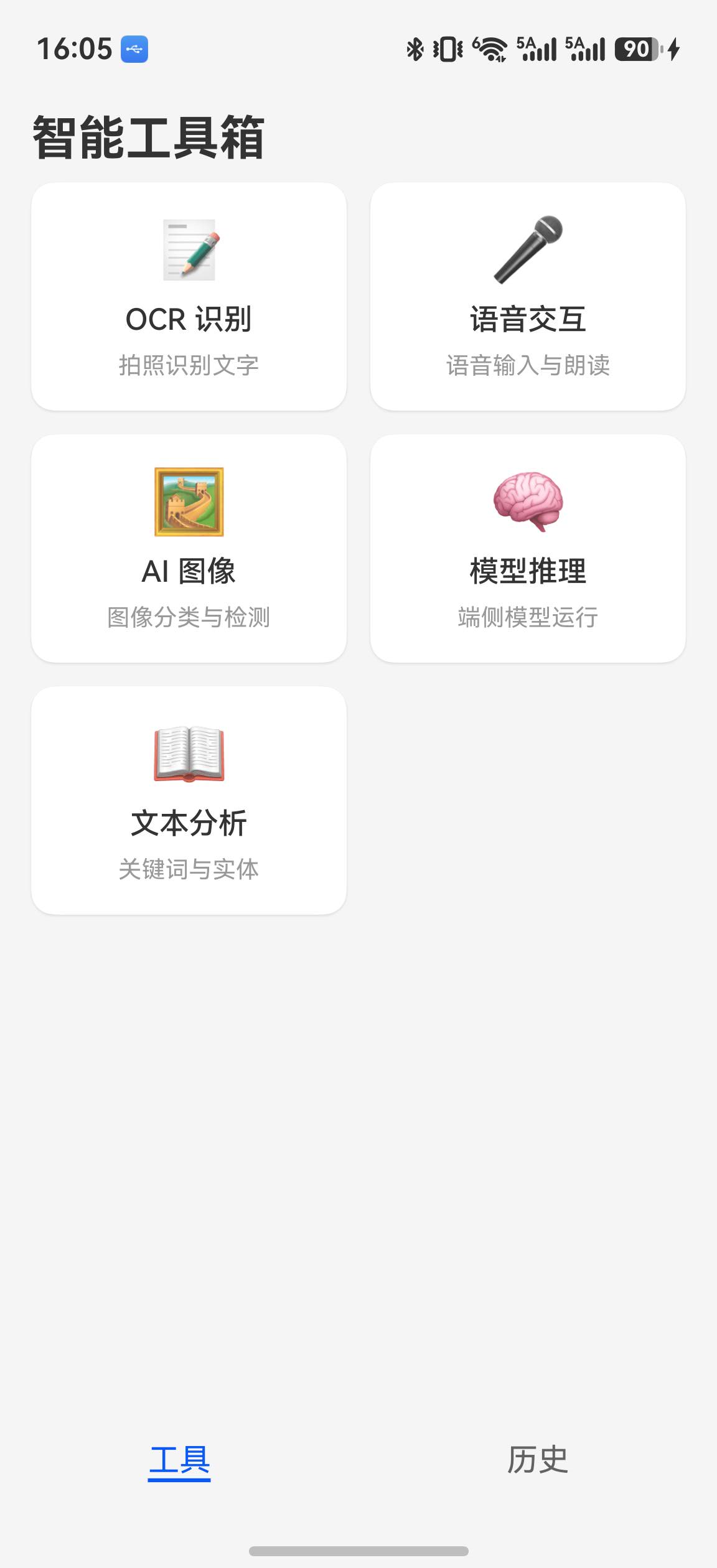
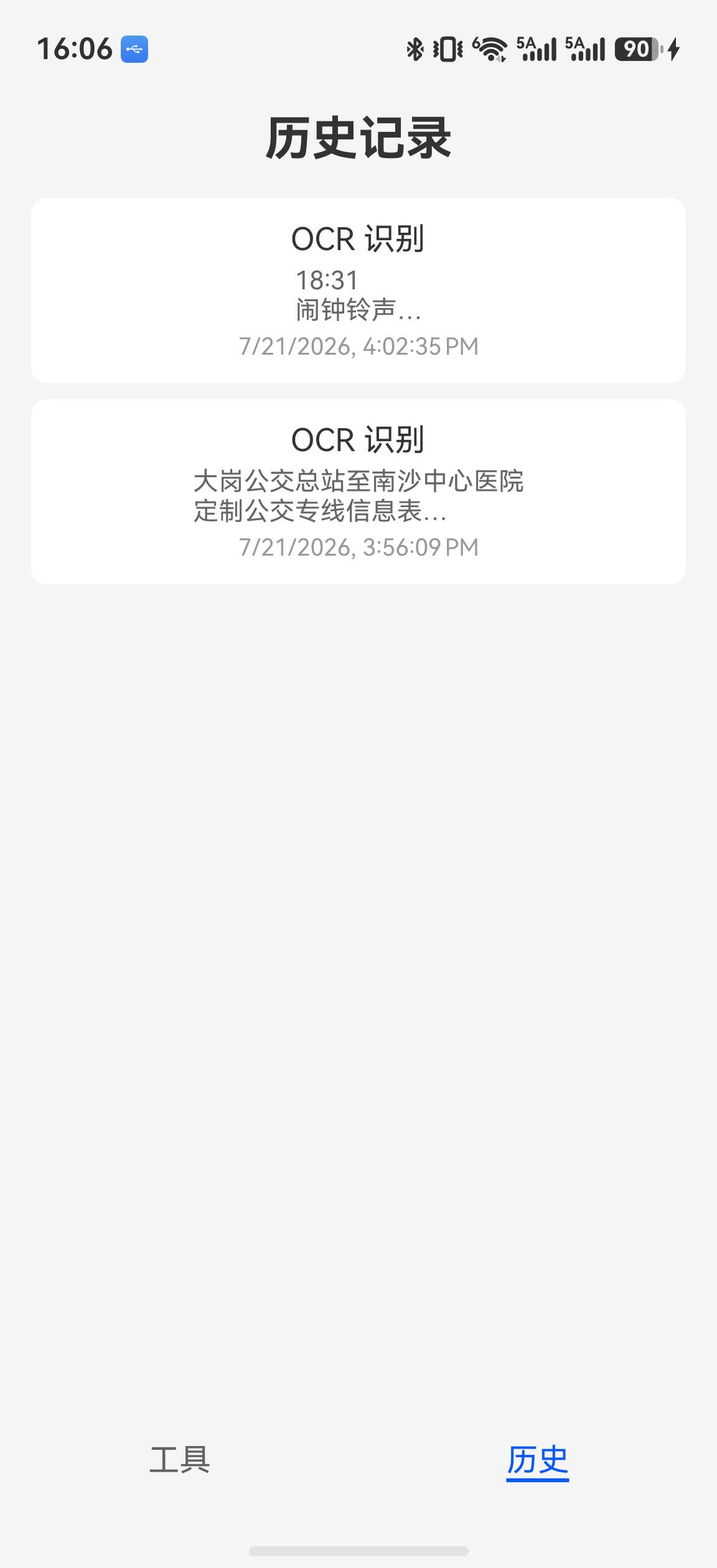
最终可运行版本集成 OCR、语音交互、Core Vision 图像检测、MobileNetV2 端侧推理、自然语言分析和 OCR 历史记录。代码虽然保留收藏、删除等服务层扩展点,但当前 UI 没有收藏管理、设置页及性能对比工具,因此不再使用虚构的页面截图或未经实测的“内存降低 40%”数据。
关键代码解读
IDataSource 与 LazyForEach 协作
LazyForEach 不直接接收数组,而是通过 IDataSource 接口按需获取数据。这是其懒加载的核心机制:
class FavoriteDataSource implements IDataSource {
  private dataArray: FavoriteItem[] = [];

  totalCount(): number {
    return this.dataArray.length;        // 框架查询总条数
  }

  getData(index: number): FavoriteItem {
    return this.dataArray[index];        // 框架按需取数据
  }

  // 注册监听器,数据变更时通知框架刷新 UI
  registerDataChangeListener(listener: DataChangeListener): void { /* ... */ }
  unregisterDataChangeListener(listener: DataChangeListener): void { /* ... */ }

  setData(items: FavoriteItem[]): void {
    this.dataArray = items;
    this.notifyDataReload();             // 通知框架全量刷新
  }
}
为什么不用 ForEach?: ForEach 在
build()时一次性创建所有子组件。当数据量为 1000+ 时,首帧创建 1000+ 个组件实例,内存和耗时线性增长。LazyForEach 只创建可见区域 +cachedCount缓冲区的组件(通常 10-20 个),首帧耗时恒定。
@Reusable 复用池机制
@Reusable        // 标记组件可复用
@Component
struct FavoriteCard {
  @Prop item: FavoriteItem = new FavoriteItem();

  aboutToReuse(params: ESObject): void {
    // 组件从复用池取出时调用
    // 必须用新数据更新状态,否则显示旧数据
    this.item = params.item as FavoriteItem;
  }

  aboutToRecycle(): void {
    // 组件回收到复用池前调用
    // 清理临时状态、定时器等
  }

  build() { /* ... */ }
}
复用流程: 组件滚动出可视区域 →
aboutToRecycle()→ 进入复用池 → 同类型新组件需要创建 → 从复用池取出 →aboutToReuse(params)→ 更新状态 → 重新渲染。官方基准测试显示组件创建速度提升约 69%。
Preferences 与 AppStorageV2 联动
// Preferences 负责磁盘持久化
async function saveSetting(context: Context, key: string, value: string | number | boolean): Promise<void> {
  const prefs = await dataPreferences.getPreferences(context, { name: 'user_settings' });
  await prefs.put(key, value);
  await prefs.flush();    // put 仅修改内存,flush 才写入磁盘
}

// AppStorageV2 负责 UI 响应
@ObservedV2
class AppSettings {
  @Trace theme: string = 'light';     // @Trace 使属性可被框架追踪
  @Trace fontSize: number = 14;
}

// connect 方法将 AppSettings 注册为全局单例
const settings = AppStorageV2.connect(AppSettings, 'appSettings', () => new AppSettings())!;
两层存储: AppStorageV2 提供内存中的响应式状态(UI 自动刷新),Preferences 提供磁盘持久化(重启后恢复)。两者配合实现"状态驱动 UI + 数据持久化"。
系列总结
至此,我们完成了 HarmonyOS 智能工具箱 App 全栈开发 系列的全部七篇文章。以下是各篇的核心内容回顾:
| 篇 | 标题 | 核心内容 | 涉及 Kit / 能力 |
|---|---|---|---|
| 1 | 项目搭建与首页架构 | Stage 模型、Navigation + Tabs 导航、GridRow 响应式网格、@ObservedV2 + @Trace 状态管理 | ArkUI、ArkData |
| 2 | OCR 文字识别工具 | 系统相机拍照、相册选图、通用文字识别、历史保存 | Core Vision Kit、Camera Kit、Image Kit |
| 3 | 语音交互工具 | 语音输入(ASR)、文字朗读(TTS) | Core Speech Kit |
| 4 | AI 图像处理工具 | Core Vision 目标检测与标签汇总 | Core Vision Kit、Image Kit |
| 5 | 端侧模型推理实战 | MindSpore Lite 模型加载、Tensor 操作、实时推理 | MindSpore Lite Kit |
| 6 | 自然语言分析工具 | 中文分词结果、实体识别 | Natural Language Kit |
| 7 | 历史记录与发布说明 | relationalStore 历史展示、扩展设计、应用签名 | ArkData、GridRow |
覆盖的 HarmonyOS 能力全景
AI 能力:
- Core Vision Kit — OCR 文字识别、人脸检测、图像分割、图像分类、目标检测
- Core Speech Kit — 语音识别(ASR)、语音合成(TTS)
- MindSpore Lite Kit — 端侧模型推理、Tensor 操作
- Natural Language Kit — 关键词提取、实体识别、文本分类
数据与存储:
- relationalStore — SQLite 关系型数据库,收藏和历史记录持久化
- Preferences — 轻量级键值存储,用户设置持久化
UI 与性能:
- @ObservedV2 + @Trace — 状态管理 V2,深层属性观察
- LazyForEach — 列表懒加载,仅渲染可见区域
- @Reusable — 组件复用,创建速度提升 69%
- GridRow/GridCol — 响应式多设备适配
- @Builder / @Styles — 样式复用
系统能力:
- Camera Kit — 相机预览和拍照
- Notification Kit — 消息通知
- 权限管理 — CAMERA、MICROPHONE 等运行时权限
- 应用签名与发布 — 签名配置、HAP 构建
参考资料

讨论HarmonyOS开发技术,专注于API与组件、DevEco Studio、测试、元服务和应用上架分发等。
更多推荐


 5
5 0
0- 0


 已为社区贡献35条内容

所有评论(0)