基于HarmonyOS API 24个人健康档案应用数据层(Model)- 配置层(Config)- 视图层(View)- 交互层(Action)分层设计思想
一、项目概述与架构总览
本文将深入剖析一个基于 HarmonyOS ArkTS 开发的**个人健康档案(Personal Health Record)**应用的完整源码实现。该应用采用了经典的移动端五页 Tab 导航架构,涵盖了健康档案管理、用药追踪、就诊预约、数据趋势可视化以及个人中心五大核心模块。通过逐段解读这份源码,我们可以系统学习 ArkTS 在复杂业务场景下的状态管理、组件化设计、数据驱动 UI 以及视觉层构建等关键技术实践。
整体架构上,该应用严格遵循**数据层(Model)- 配置层(Config)- 视图层(View)- 交互层(Action)**的分层设计思想。数据层通过接口(interface)定义数据结构,并通过 @Observed 装饰器标记为可观察对象;配置层集中管理各类元数据映射和辅助函数;视图层大量运用 @Builder 实现组件复用;交互层则通过 @State 管理弹窗显隐和选中状态。这种分层方式使得代码逻辑清晰、维护性强,是 ArkTS 应用开发的典范模式。
二、数据层设计:接口定义与可观察模型
2.1 核心数据接口定义
interface HealthRecordData {
  id: string
  type: string
  value: number
  unit: string
  date: string
  time: string
  status: string
  notes: string
  isAlarm: boolean
  systolic: number
  diastolic: number
}

interface MedicationItem {
  id: string
  name: string
  dosage: string
  frequency: string
  time: string
  startDate: string
  endDate: string
  status: string
  notes: string
  color: string
}

interface AppointmentItem {
  id: string
  doctorName: string
  department: string
  date: string
  time: string
  status: string
  hospital: string
  notes: string
}
技术解析: 源码开篇即定义了三个核心业务接口:HealthRecordData(健康记录)、MedicationItem(用药项目)和 AppointmentItem(预约项目)。这种接口先行(Interface-First)的设计模式是 TypeScript 开发的最佳实践,它强制规定了后续所有相关数据的形状(Shape),在编译期即可捕获类型错误。值得特别关注的是 HealthRecordData 接口的设计——它不仅包含了通用的 id、type、value、unit 等字段,还专门针对血压这一特殊指标预留了 systolic(收缩压)和 diastolic(舒张压)两个字段。这种设计体现了数据模型的包容性策略:用一个统一的接口兼容多种健康指标类型,对于非血压类记录,这两个字段可置为 0,从而避免了为每种指标单独定义接口带来的代码冗余。
MedicationItem 接口的设计同样体现了业务深度。dosage(剂量)、frequency(频率)、time(服用时间)、startDate/endDate(起止日期)以及 color(颜色标记)等字段,完整覆盖了用药管理场景下的全部信息维度。color 字段的存在说明设计者在数据层就考虑了 UI 视觉一致性,将颜色编码下沉到数据模型中,确保同一药品在不同界面展示时色调统一。
interface HealthTypeMetaConfig {
  label: string
  icon: string
  color: string
  bg: string
  unit: string
  normalRange: string
}

interface MedStatusConfig {
  label: string
  color: string
  icon: string
}

interface AllergyData {
  id: string
  name: string
  severity: string
  icon: string
  color: string
}

interface EmergencyContactData {
  id: string
  name: string
  relation: string
  phone: string
  icon: string
}

interface MedicalHistoryData {
  id: string
  condition: string
  date: string
  notes: string
  icon: string
}

interface InsuranceData {
  provider: string
  policyNumber: string
  validUntil: string
  group: string
}

interface PatientProfileData {
  name: string
  age: number
  gender: string
  bloodType: string
  avatarColor: string
  phone: string
  address: string
  idNumber: string
}
技术解析: 紧接着定义的是辅助类数据接口。HealthTypeMetaConfig 是元数据配置接口,用于描述每种健康指标类型的展示属性,包括图标、主题色、背景色、单位和正常范围。这种将展示元数据与业务数据分离的设计非常精妙——当需要为"血压"增加一个新图标时,只需修改配置对象,而无需触碰任何业务数据或 UI 组件代码。
AllergyData、EmergencyContactData、MedicalHistoryData 分别对应过敏信息、紧急联系人和既往病史三个子模块。它们都遵循统一的设计范式:包含 id 主键、name/condition 名称字段、以及 icon 可视化标记。InsuranceData 和 PatientProfileData 则采用扁平化结构,直接描述医保信息和个人档案的字段。特别注意到 PatientProfileData 中的 avatarColor 字段,它将头像颜色编码进数据模型,使得个人资料卡片可以动态渲染与用户相关的主题色,增强界面的个性化体验。
interface BloodPressurePoint {
  label: string
  systolic: number
  diastolic: number
}

interface WeightPoint {
  week: string
  weight: number
}

interface SleepPoint {
  day: string
  hours: number
  quality: string
}

interface HeartRatePoint {
  label: string
  rate: number
  status: string
}

interface HealthScoreHistory {
  date: string
  overall: number
  heart: number
  metabolic: number
}
技术解析: 这组接口专门服务于趋势可视化模块。每个接口都对应一种图表的数据点结构。BloodPressurePoint 包含收缩压和舒张压两个数值,支持双柱状图展示;WeightPoint 以周为粒度记录体重;SleepPoint 同时记录睡眠时长和质量等级;HeartRatePoint 记录不同活动强度下的心率;HealthScoreHistory 则是一个多维时间序列,包含综合评分、心脏评分和代谢评分三个维度。这些接口的设计遵循了最小必要原则——每个数据点只包含绘制图表所需的最少字段,没有冗余信息,使得数据到视图的映射关系非常直接。
2.2 可观察数据模型类
@Observed
class HealthRecordModel {
  id: string
  type: string
  value: number
  unit: string
  date: string
  time: string
  status: string
  notes: string
  isAlarm: boolean
  systolic: number
  diastolic: number

  constructor(id: string, type: string, value: number, unit: string, date: string, time: string, status: string, notes: string, isAlarm: boolean, systolic: number, diastolic: number) {
    this.id = id
    this.type = type
    this.value = value
    this.unit = unit
    this.date = date
    this.time = time
    this.status = status
    this.notes = notes
    this.isAlarm = isAlarm
    this.systolic = systolic
    this.diastolic = diastolic
  }
}

@Observed
class MedicationModel {
  id: string
  name: string
  dosage: string
  frequency: string
  time: string
  startDate: string
  endDate: string
  status: string
  notes: string
  color: string

  constructor(id: string, name: string, dosage: string, frequency: string, time: string, startDate: string, endDate: string, status: string, notes: string, color: string) {
    this.id = id
    this.name = name
    this.dosage = dosage
    this.frequency = frequency
    this.time = time
    this.startDate = startDate
    this.endDate = endDate
    this.status = status
    this.notes = notes
    this.color = color
  }
}

@Observed
class AppointmentModel {
  id: string
  doctorName: string
  department: string
  date: string
  time: string
  status: string
  hospital: string
  notes: string

  constructor(id: string, doctorName: string, department: string, date: string, time: string, status: string, hospital: string, notes: string) {
    this.id = id
    this.doctorName = doctorName
    this.department = department
    this.date = date
    this.time = time
    this.status = status
    this.hospital = hospital
    this.notes = notes
  }
}
技术解析: 在接口定义之后,源码定义了三个对应的模型类,并为每个类添加了 @Observed 装饰器。这是 ArkTS 状态管理中的关键机制。@Observed 装饰器标记的类表示其属性变化可以被方舟开发框架(ArkUI)观察到,当这些对象的属性在运行时发生修改时,绑定到这些属性的 UI 组件会自动刷新。
这里采用了接口 + 模型类的双重定义模式,而非直接使用接口。原因有三:首先,@Observed 装饰器只能应用于类,不能应用于接口;其次,类可以包含构造函数,便于在创建对象时进行属性初始化;第三,类的实例在 JavaScript 引擎中有明确的身份标识(Identity),这对于列表渲染中的差异比较(Diffing)非常重要。每个模型类的构造函数都采用了全参数初始化模式,虽然参数较多,但保证了对象创建时即处于完整有效状态,避免了后续逐步赋值可能导致的中间状态问题。
三、配置层与模拟数据
3.1 元数据配置映射
const healthTypeConfigs: Record<string, HealthTypeMetaConfig> = {
  '血压': { label: '血压', icon: '💓', color: '#E91E63', bg: '#FCE4EC', unit: 'mmHg', normalRange: '90-140/60-90' },
  '血糖': { label: '血糖', icon: '🩸', color: '#FF6F00', bg: '#FFF3E0', unit: 'mmol/L', normalRange: '3.9-6.1' },
  '心率': { label: '心率', icon: '💗', color: '#00897B', bg: '#E0F2F1', unit: 'bpm', normalRange: '60-100' },
  '体重': { label: '体重', icon: '⚖️', color: '#5C6BC0', bg: '#E8EAF6', unit: 'kg', normalRange: '50-80' },
  '体温': { label: '体温', icon: '🌡️', color: '#EF5350', bg: '#FFEBEE', unit: '°C', normalRange: '36.0-37.3' },
  '血氧': { label: '血氧', icon: '🫁', color: '#26C6DA', bg: '#E0F7FA', unit: '%', normalRange: '95-100' },
  'BMI': { label: 'BMI', icon: '📊', color: '#7E57C2', bg: '#EDE7F6', unit: '', normalRange: '18.5-24.0' },
  '睡眠': { label: '睡眠', icon: '😴', color: '#3949AB', bg: '#E8EAF6', unit: '小时', normalRange: '7-9' }
}

const medStatusConfigs: Record<string, MedStatusConfig> = {
  '服用中': { label: '服用中', color: '#4CAF50', icon: '✅' },
  '已停用': { label: '已停用', color: '#9E9E9E', icon: '⏸' },
  '即将到期': { label: '即将到期', color: '#FF9800', icon: '⚠️' },
  '已过期': { label: '已过期', color: '#F44336', icon: '❌' }
}
技术解析: 这里使用了 TypeScript 的 Record<string, T> 类型来定义配置映射表(Lookup Table)。healthTypeConfigs 以健康指标的中文名称作为键,将每种指标的全部展示元数据封装为一个对象值。这种设计的最大优势是将散落在 UI 代码中的硬编码样式集中管理。例如,当血压卡片需要显示图标时,只需通过 healthTypeConfigs['血压'].icon 即可获取,而不需要在组件中写死表情符号。
从配色方案可以看出设计者对色彩心理学的考量:血压使用粉红(#E91E63)暗示心血管相关;血糖使用橙色(#FF6F00)与食物/能量关联;心率使用蓝绿色(#00897B)传达平静与生命节奏;体温使用红色(#EF5350)直观表达热度。每种颜色都配有低饱和度的同色系背景色(如 #FCE4EC 是 #E91E63 的 10% 不透明度近似色),确保图标背景与主色调协调统一。
medStatusConfigs 同样采用映射表模式,为四种用药状态分配了语义化的颜色和图标:服用中使用绿色表示安全,已停用使用灰色表示暂停,即将到期使用橙色发出警告,已过期使用红色表示危险。这种状态-视觉映射是医疗类应用的关键设计,能够让用户在一瞥之间快速识别风险等级。
3.2 模拟数据集
const healthRecords: HealthRecordModel[] = [
  new HealthRecordModel('r1', '血压', 128, 'mmHg', '2025-07-25', '08:30', '正常', '晨起测量', false, 128, 82),
  new HealthRecordModel('r2', '血压', 135, 'mmHg', '2025-07-24', '08:15', '偏高', '早餐后', true, 135, 90),
  ...
]

const medications: MedicationModel[] = [
  new MedicationModel('m1', '氨氯地平', '5mg', '每日1次', '08:00', '2025-06-01', '2025-12-31', '服用中', '降压药,晨起空腹服用', '#E91E63'),
  ...
]

const appointments: AppointmentModel[] = [
  new AppointmentModel('a1', '张明华', '心内科', '2025-08-15', '09:30', '即将就诊', '市第一人民医院', '常规复查,需带近3个月血压记录'),
  ...
]
技术解析: 源码中定义了完整的模拟数据集,包括 22 条健康记录、12 条用药记录、8 条预约记录,以及过敏信息、紧急联系人、既往病史等辅助数据。这些数据覆盖了正常、偏高、异常、已过期、即将到期等多种业务状态,能够全面验证 UI 在不同数据条件下的渲染表现。
从数据内容可以看出业务逻辑的细致程度:用药记录中包含了氨氯地平、二甲双胍、阿托伐他汀等真实药品名称,以及详细的服用说明(如"晨起空腹服用"“随餐服用,勿空腹”“睡前服用”)。预约记录区分了"即将就诊"“已预约”"已完成"三种状态,并包含不同科室和医院信息。这种真实感数据不仅使演示效果更可信,也为后续对接真实后端 API 时提供了明确的字段预期。
const bloodPressureTrend: BloodPressurePoint[] = [
  { label: '周一', systolic: 128, diastolic: 82 },
  { label: '周二', systolic: 135, diastolic: 90 },
  { label: '周三', systolic: 118, diastolic: 76 },
  { label: '周四', systolic: 125, diastolic: 80 },
  { label: '周五', systolic: 132, diastolic: 85 },
  { label: '周六', systolic: 120, diastolic: 78 },
  { label: '周日', systolic: 126, diastolic: 81 },
]

const weightTrend: WeightPoint[] = [
  { week: 'W1-6月', weight: 71.0 },
  { week: 'W2-6月', weight: 70.5 },
  ...
]

const sleepQualityData: SleepPoint[] = [
  { day: '周一', hours: 7.5, quality: '良好' },
  { day: '周二', hours: 6.0, quality: '一般' },
  ...
]

const heartRateData: HeartRatePoint[] = [
  { label: '静息', rate: 68, status: '优秀' },
  { label: '轻度活动', rate: 85, status: '良好' },
  ...
]

const healthScoreHistory: HealthScoreHistory[] = [
  { date: '7月-20', overall: 85, heart: 80, metabolic: 88 },
  ...
]
技术解析: 趋势图表的数据集采用了时间序列结构。血压数据按周一到周日的顺序排列,形成一个完整周期;体重数据按周粒度跨越两个月,展示中长期变化;睡眠数据同样按周周期,同时关联质量等级;心率数据则按活动强度从低到高排列。这种多维度的数据组织方式,为后续构建复杂的可视化图表提供了坚实基础。
3.3 工具函数层
function formatDate(dateStr: string): string {
  return dateStr
}

function formatTime(timeStr: string): string {
  return timeStr
}
技术解析: 目前 formatDate 和 formatTime 是透传函数(Identity Function),即输入什么就返回什么。这种设计是一种预留扩展点(Extension Point)——当后续需要对接国际化(i18n)或自定义日期格式时,只需在这两个函数中增加转换逻辑,而不需要修改任何调用方代码。这是一种非常务实的工程决策,在原型开发阶段避免了过度设计,同时又保持了扩展的灵活性。
function getStatusColor(status: string): string {
  if (status === '正常') {
    return '#4CAF50'
  } else if (status === '偏高' || status === '偏低') {
    return '#FF9800'
  } else {
    return '#F44336'
  }
}

function getHealthTypeIcon(type: string): string {
  const cfg = healthTypeConfigs[type]
  if (cfg !== undefined) {
    return cfg.icon
  }
  return '📋'
}

function getHealthTypeBg(type: string): string {
  const cfg = healthTypeConfigs[type]
  if (cfg !== undefined) {
    return cfg.bg
  }
  return '#F5F5F5'
}

function getHealthTypeColor(type: string): string {
  const cfg = healthTypeConfigs[type]
  if (cfg !== undefined) {
    return cfg.color
  }
  return '#999999'
}
技术解析: getStatusColor 函数实现了健康状态的三色预警机制:正常状态使用绿色(#4CAF50),偏高或偏低等临界状态使用橙色(#FF9800)提醒注意,异常状态使用红色(#F44336)警示危险。这种颜色编码贯穿整个应用,构成了统一的视觉语义系统。
getHealthTypeIcon、getHealthTypeBg、getHealthTypeColor 三个函数是配置映射表的访问器函数(Accessor Functions)。它们通过健名从 healthTypeConfigs 中查询对应的属性值,并在配置不存在时提供安全的兜底值(如 📋 默认图标和 #999999 默认颜色)。这种防御性编程(Defensive Programming)模式避免了因数据缺失导致的 UI 崩溃或空白。所有访问器都遵循相同的模式:查找配置 → 判断是否定义 → 返回配置值或默认值。这种一致性使得代码非常易于阅读和维护。
function getAppointmentStatusColor(status: string): string {
  if (status === '即将就诊') {
    return '#E91E63'
  } else if (status === '已预约') {
    return '#2196F3'
  } else {
    return '#9E9E9E'
  }
}

function getMedStatusIcon(status: string): string {
  const cfg = medStatusConfigs[status]
  if (cfg !== undefined) {
    return cfg.icon
  }
  return '📋'
}

function getMedStatusColor(status: string): string {
  const cfg = medStatusConfigs[status]
  if (cfg !== undefined) {
    return cfg.color
  }
  return '#999999'
}

function getSeverityColor(severity: string): string {
  if (severity === '严重') {
    return '#F44336'
  } else if (severity === '中等') {
    return '#FF9800'
  } else {
    return '#FFEB3B'
  }
}

function getSleepQualityColor(quality: string): string {
  if (quality === '优秀') {
    return '#4CAF50'
  } else if (quality === '良好') {
    return '#2196F3'
  } else if (quality === '一般') {
    return '#FF9800'
  } else {
    return '#F44336'
  }
}
技术解析: 这组函数延续了状态到颜色的映射逻辑。getAppointmentStatusColor 为就诊预约定义了专属配色:即将就诊使用主题粉色(#E91E63)突出 urgency,已预约使用蓝色(#2196F3)表示确定性,已完成使用灰色(#9E9E9E)表示归档。getSeverityColor 为过敏严重程度建立了三级颜色体系:严重(红)、中等(橙)、轻度(黄)。getSleepQualityColor 则建立了四级评估色标:优秀(绿)、良好(蓝)、一般(橙)、较差(红)。这些颜色函数的粒度非常细,每种业务状态都有独立的映射规则,确保了 UI 表达的精确性。
function getMaxSystolic(data: BloodPressurePoint[]): number {
  let maxVal: number = 0
  for (let i = 0; i < data.length; i++) {
    if (data[i].systolic > maxVal) {
      maxVal = data[i].systolic
    }
  }
  return maxVal + 20
}

function getMaxWeight(data: WeightPoint[]): number {
  let maxVal: number = 0
  for (let i = 0; i < data.length; i++) {
    if (data[i].weight > maxVal) {
      maxVal = data[i].weight
    }
  }
  return maxVal + 2
}

function getMaxSleep(data: SleepPoint[]): number {
  let maxVal: number = 0
  for (let i = 0; i < data.length; i++) {
    if (data[i].hours > maxVal) {
      maxVal = data[i].hours
    }
  }
  return maxVal + 2
}
技术解析: 这三个函数是图表刻度计算函数。由于 ArkTS 目前没有内置的图表库,开发者需要手动计算柱状图的最大高度。每个函数都遍历数据数组找出最大值,然后加上一个缓冲值(血压加 20,体重和睡眠加 2)。这个缓冲值的作用是确保最高的柱子不会顶到容器边缘,留出适当的顶部留白,使图表看起来更舒适。这种手动实现图表的方式虽然代码量较大,但完全不依赖第三方库,保证了应用的轻量性和稳定性。
四、枚举定义与 Tab 导航配置
enum HealthTab {
  RECORDS = 0,
  MEDICATIONS = 1,
  APPOINTMENTS = 2,
  TRENDS = 3,
  PROFILE = 4
}

function getTabIcon(tab: HealthTab): string {
  if (tab === HealthTab.RECORDS) {
    return '📋'
  } else if (tab === HealthTab.MEDICATIONS) {
    return '💊'
  } else if (tab === HealthTab.APPOINTMENTS) {
    return '📅'
  } else if (tab === HealthTab.TRENDS) {
    return '📊'
  } else {
    return '👤'
  }
}

function getTabLabel(tab: HealthTab): string {
  if (tab === HealthTab.RECORDS) {
    return '档案'
  } else if (tab === HealthTab.MEDICATIONS) {
    return '用药'
  } else if (tab === HealthTab.APPOINTMENTS) {
    return '预约'
  } else if (tab === HealthTab.TRENDS) {
    return '趋势'
  } else {
    return '我的'
  }
}
技术解析: HealthTab 枚举是整应用的导航中枢。它使用显式数字赋值(0 到 4),使得每个 Tab 不仅有语义名称,还有可比较的顺序值。采用枚举而非字符串字面量的好处在于:编译器可以在编译期检查 Tab 值的有效性,IDE 可以提供自动补全,重构时可以使用 IDE 的安全重构功能批量替换。
getTabIcon 和 getTabLabel 两个函数是枚举的视图映射函数,将每个枚举值转换为对应的表情符号图标和中文标签。这种设计实现了数据与展示的解耦——如果后续需要将图标改为自定义图片资源,只需修改这两个函数,而不用改动任何使用 Tab 的地方。图标的选择也很有讲究:档案使用剪贴板表示记录,用药使用药丸,预约使用日历,趋势使用图表,个人中心使用人像,都与其功能高度契合。
五、组件状态管理与主框架
@Entry
@Component
struct HealthApp {
  @State activeTab: HealthTab = HealthTab.RECORDS
  @State showAddMedModal: boolean = false
  @State showEditMedModal: boolean = false
  @State showDeleteConfirm: boolean = false
  @State showAddRecordModal: boolean = false
  @State selectedMed: MedicationModel | null = null
  @State selectedRecord: HealthRecordModel | null = null
技术解析: HealthApp 是应用的根组件,使用了 @Entry 装饰器标记为页面入口,使用 @Component 标记为自定义组件。组件内部定义了七个 @State 状态变量,这是 ArkTS 中组件级别的状态管理机制。
activeTab 是当前激活的 Tab 页索引,默认值为 HealthTab.RECORDS,即应用启动时首先展示档案页。其余六个状态变量控制各种弹窗的显隐和选中对象:showAddMedModal 控制添加用药弹窗,showEditMedModal 控制编辑用药弹窗,showDeleteConfirm 控制删除确认弹窗,showAddRecordModal 控制添加记录弹窗(虽然源码中定义了此状态但未在 build 中使用,属于预留扩展)。selectedMed 和 selectedRecord 分别保存当前选中的用药对象和记录对象,用于在编辑弹窗中回显数据。
@State 的核心特性是双向数据绑定和自动 UI 刷新。当 activeTab 的值通过点击事件改变时,依赖该状态的内容区域会自动重新渲染,切换到对应的 Tab 页面;当 showAddMedModal 变为 true 时,条件渲染的弹窗组件会立即显示。这种响应式编程模型极大地简化了状态与视图同步的复杂度。
六、档案页(Records Tab)组件详解
6.1 健康评分卡片
  @Builder healthScoreCard() {
    Column() {
      Column() {
        Text('健康评分')
          .fontSize(16)
          .fontColor('#FFFFFF')
          .fontWeight(FontWeight.Bold)
        Text('90')
          .fontSize(48)
          .fontColor('#FFFFFF')
          .fontWeight(FontWeight.Bold)
          .margin({ top: 4 })
        Text('综合评分 · 良好')
          .fontSize(12)
          .fontColor('#FFFFFF')
          .opacity(0.8)
          .margin({ top: 2 })
        Row() {
          Column() {
            Stack() {
              Column()
                .width(52).height(52)
                .borderRadius(26)
                .backgroundColor('#FFFFFF')
                .opacity(0.2)
              Column()
                .width(42).height(42)
                .borderRadius(21)
                .backgroundColor('#FFFFFF')
                .opacity(0.15)
              Column()
                .width(32).height(32)
                .borderRadius(16)
                .backgroundColor('#FFFFFF')
                .opacity(0.3)
              Text('86')
                .fontSize(11)
                .fontColor('#FFFFFF')
                .fontWeight(FontWeight.Bold)
            }
            .width(52).height(52)
            Text('心脏')
              .fontSize(9)
              .fontColor('#FFFFFF')
              .opacity(0.8)
              .margin({ top: 3 })
          }
          .alignItems(HorizontalAlign.Center)

          Column().width(24)

          Column() {
            Stack() {
              Column()
                .width(52).height(52)
                .borderRadius(26)
                .backgroundColor('#FFFFFF')
                .opacity(0.2)
              Column()
                .width(42).height(42)
                .borderRadius(21)
                .backgroundColor('#FFFFFF')
                .opacity(0.15)
              Column()
                .width(32).height(32)
                .borderRadius(16)
                .backgroundColor('#FFFFFF')
                .opacity(0.3)
              Text('91')
                .fontSize(11)
                .fontColor('#FFFFFF')
                .fontWeight(FontWeight.Bold)
            }
            .width(52).height(52)
            Text('代谢')
              .fontSize(9)
              .fontColor('#FFFFFF')
              .opacity(0.8)
              .margin({ top: 3 })
          }
          .alignItems(HorizontalAlign.Center)

          Column().width(24)

          Column() {
            Stack() {
              Column()
                .width(52).height(52)
                .borderRadius(26)
                .backgroundColor('#FFFFFF')
                .opacity(0.2)
              Column()
                .width(42).height(42)
                .borderRadius(21)
                .backgroundColor('#FFFFFF')
                .opacity(0.15)
              Column()
                .width(32).height(32)
                .borderRadius(16)
                .backgroundColor('#FFFFFF')
                .opacity(0.3)
              Text('90')
                .fontSize(11)
                .fontColor('#FFFFFF')
                .fontWeight(FontWeight.Bold)
            }
            .width(52).height(52)
            Text('综合')
              .fontSize(9)
              .fontColor('#FFFFFF')
              .opacity(0.8)
              .margin({ top: 3 })
          }
          .alignItems(HorizontalAlign.Center)
        }
        .margin({ top: 12 })
        .justifyContent(FlexAlign.Center)
      }
      .width('100%')
      .padding({ top: 20, bottom: 20 })
      .borderRadius(16)
      .linearGradient({
        angle: 135,
        colors: [['#E91E63', 0.0], ['#F06292', 0.5], ['#F48FB1', 1.0]]
      })
    }
    .width('100%')
    .padding({ left: 16, right: 16, top: 12 })
    .shadow({ radius: 8, color: '#1A000000', offsetY: 2 })
  }
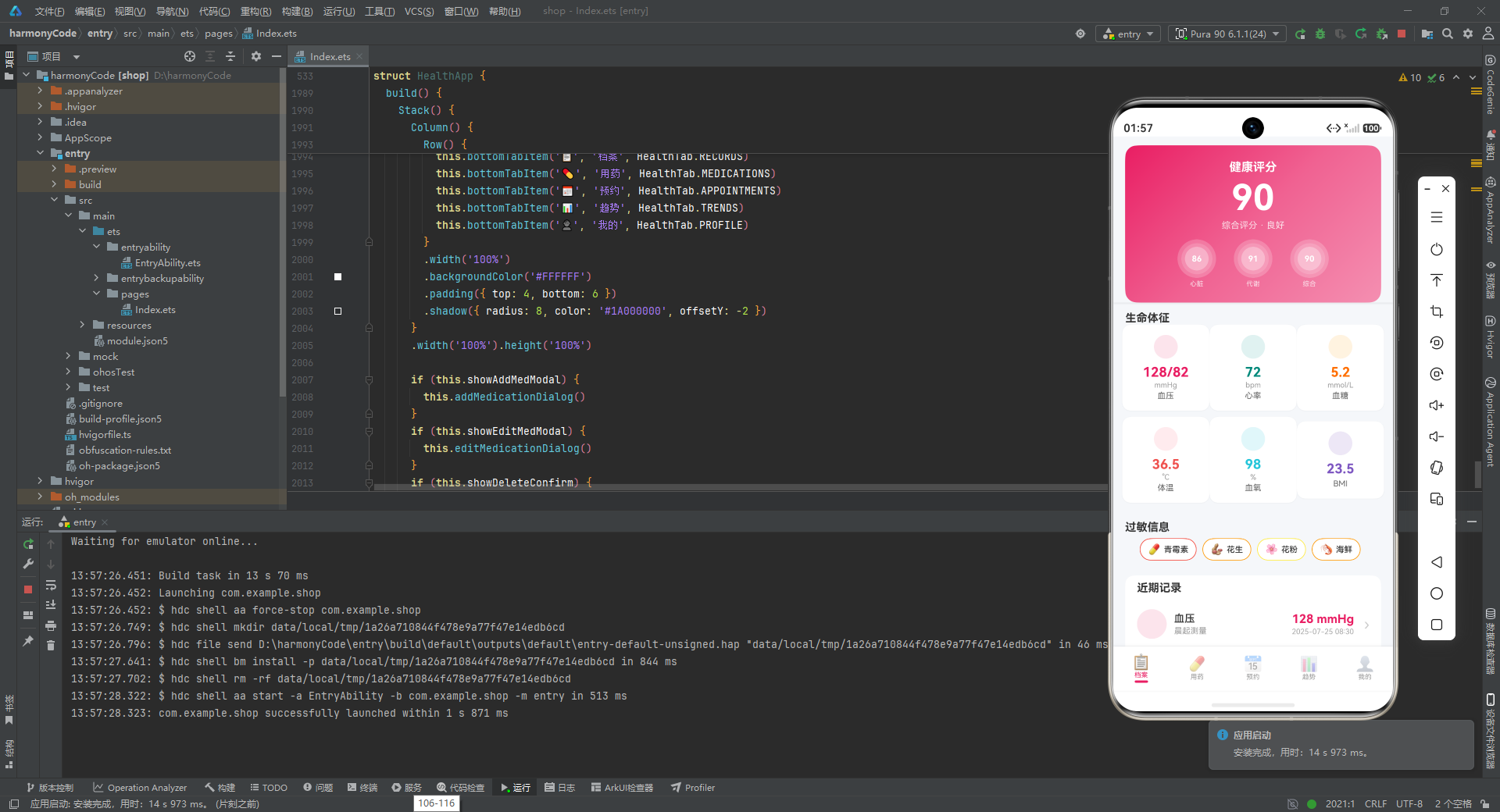
技术解析: healthScoreCard 是档案页的视觉焦点组件,使用了大量高级视觉效果。外层 Column 设置了 shadow 属性,创造出卡片悬浮于背景之上的层次感,阴影半径为 8,垂直偏移 2,颜色为黑色 10% 不透明度。
内层卡片背景使用了 linearGradient 线性渐变,角度为 135 度(从左上到右下),包含三个色标点:起始色 #E91E63(深粉)、中间色 #F06292(中粉)、结束色 #F48FB1(浅粉)。这种粉色系渐变贯穿整个应用,形成了强烈的品牌视觉识别。
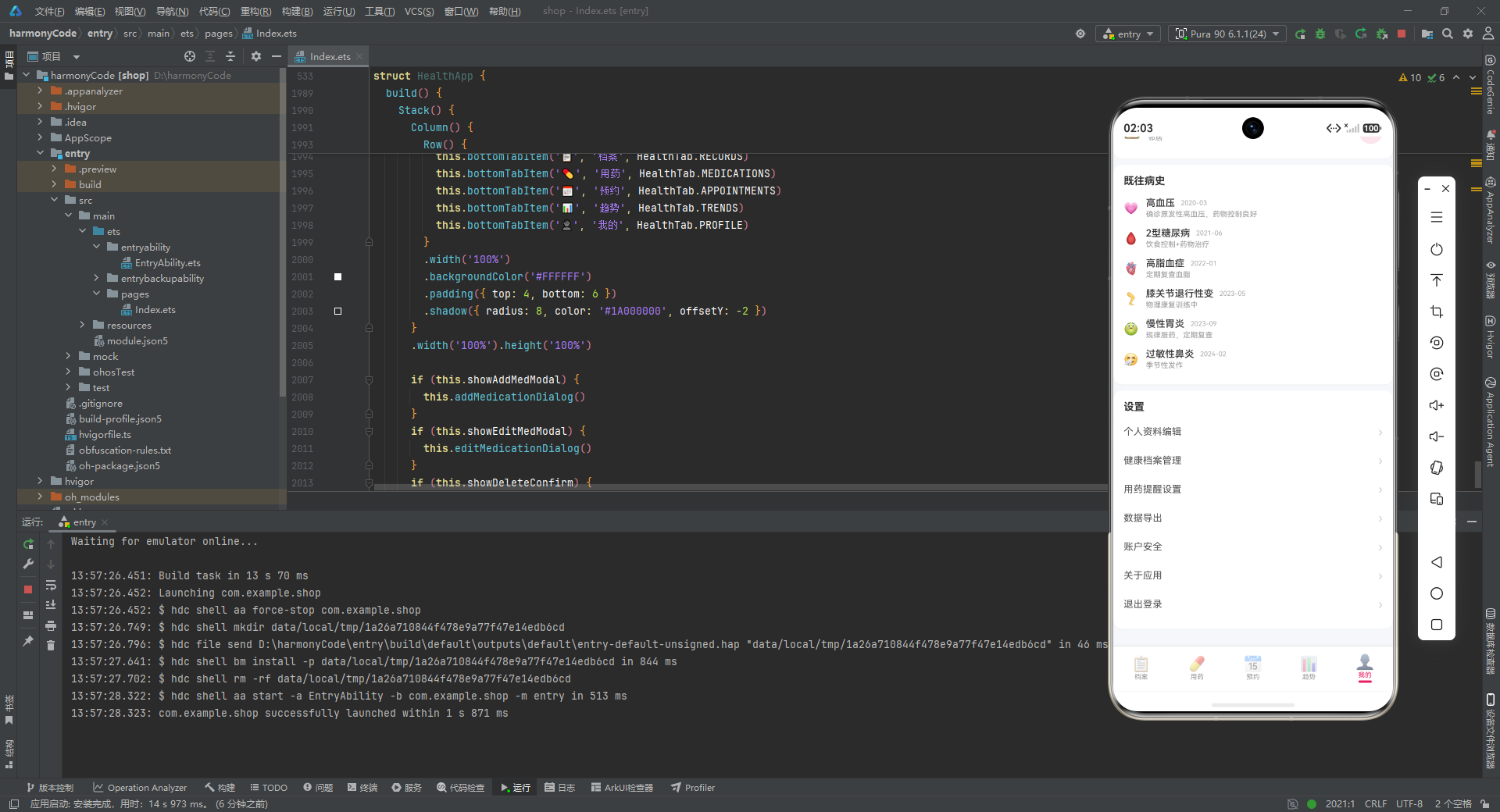
三个子评分项(心脏 86、代谢 91、综合 90)的布局极具设计感。每个子项都使用了 Stack 层叠布局,内部放置了三个同心圆 Column 作为装饰背景。这三个圆的尺寸分别为 52x52、42x42、32x32,对应圆角半径 26、21、16,不透明度分别为 0.2、0.15、0.3。这种多层半透明圆环的效果模拟了光晕或波纹的视觉意象,使得简单的数字评分变得富有科技感和层次感。评分数字居中显示在圆环之上,下方跟随 9px 的标签文字,整体布局精致紧凑。
6.2 生命体征网格
  @Builder vitalSignGrid() {
    Column() {
      Text('生命体征')
        .fontSize(15)
        .fontColor('#333333')
        .fontWeight(FontWeight.Bold)
        .width('100%')
        .padding({ left: 16, right: 16, top: 12 })

      Row() {
        Column() {
          this.vitalSignCard('血压', '128/82', 'mmHg', '#E91E63', '#FCE4EC', '💓')
        }
        .layoutWeight(1)
        Column() {
          this.vitalSignCard('心率', '72', 'bpm', '#00897B', '#E0F2F1', '💗')
        }
        .layoutWeight(1)
        Column() {
          this.vitalSignCard('血糖', '5.2', 'mmol/L', '#FF6F00', '#FFF3E0', '🩸')
        }
        .layoutWeight(1)
      }
      .padding({ left: 12, right: 12 })

      Row() {
        Column() {
          this.vitalSignCard('体温', '36.5', '°C', '#EF5350', '#FFEBEE', '🌡️')
        }
        .layoutWeight(1)
        Column() {
          this.vitalSignCard('血氧', '98', '%', '#26C6DA', '#E0F7FA', '🫁')
        }
        .layoutWeight(1)
        Column() {
          this.vitalSignCard('BMI', '23.5', '', '#7E57C2', '#EDE7F6', '📊')
        }
        .layoutWeight(1)
      }
      .padding({ left: 12, right: 12, bottom: 8 })
    }
  }

  @Builder vitalSignCard(label: string, value: string, unit: string, color: string, bg: string, icon: string) {
    Column() {
      Row() {
        Column()
          .width(32).height(32)
          .backgroundColor(bg)
          .borderRadius(16)
          .justifyContent(FlexAlign.Center)
          .alignItems(HorizontalAlign.Center)
      }
      .margin({ bottom: 8 })

      Text(value)
        .fontSize(18)
        .fontColor(color)
        .fontWeight(FontWeight.Bold)
      Text(unit)
        .fontSize(10)
        .fontColor('#999999')
        .margin({ top: 1 })
      Text(label)
        .fontSize(11)
        .fontColor('#666666')
        .margin({ top: 2 })
    }
    .width('100%')
    .padding({ top: 14, bottom: 14 })
    .backgroundColor('#FFFFFF')
    .borderRadius(12)
    .margin({ left: 4, right: 4, bottom: 8 })
    .alignItems(HorizontalAlign.Center)
    .shadow({ radius: 4, color: '#0D000000', offsetY: 1 })
  }
技术解析: vitalSignGrid 构建了一个 2 行 x 3 列的生命体征网格,使用了 Row + Column 的嵌套布局。每个 Column 子项都设置了 layoutWeight(1),这意味着六个卡片会在所在行内平均分配宽度,无论屏幕尺寸如何变化都能保持均匀分布。这种弹性布局是响应式设计的基础。
vitalSignCard 是一个高度可复用的 @Builder 组件,接收六个参数:标签、数值、单位、主题色、背景色和图标。通过参数化设计,六个不同指标可以共用同一套布局逻辑,只需传入不同的颜色和数值即可。每个卡片的内部结构从上到下依次是:图标占位区(32x32 的圆角矩形背景)、数值(18px 粗体,使用主题色)、单位(10px 灰色)、标签(11px 深灰)。卡片自身有白色背景、12px 圆角和轻微的阴影,营造出独立的卡片感。
值得注意的是,源码中图标占位区实际上只绘制了背景色块(Column() 没有子元素),没有真正渲染传入的 icon 参数。这可能是开发过程中的一个遗漏,但也可能是为了后续替换为自定义图片资源而预留的结构。
6.3 过敏信息与记录列表
  @Builder allergySection() {
    Column() {
      Text('过敏信息')
        .fontSize(15)
        .fontColor('#333333')
        .fontWeight(FontWeight.Bold)
        .width('100%')
        .padding({ left: 16, right: 16, top: 8, bottom: 6 })

      Row() {
        ForEach(allergies, (item: AllergyData, index: number) => {
          Row() {
            Text(item.icon)
              .fontSize(14)
              .margin({ right: 4 })
            Text(item.name)
              .fontSize(11)
              .fontColor('#333333')
              .fontWeight(FontWeight.Medium)
          }
          .padding({ left: 10, right: 10, top: 6, bottom: 6 })
          .backgroundColor('#FFFFFF')
          .borderRadius(16)
          .border({ width: 1, color: getSeverityColor(item.severity) })
          .margin({ right: 8 })
        })
      }
      .padding({ left: 16, right: 16, bottom: 12 })
    }
  }
技术解析: allergySection 使用 ForEach 循环渲染过敏标签。ForEach 是 ArkTS 中渲染列表的核心语法,接收数据源和迭代回调函数。每个过敏项渲染为一个横向的 Row 标签,包含图标和名称。标签的边框颜色通过 getSeverityColor 动态获取,使得"严重"过敏显示红色边框,"中等"显示橙色,"轻度"显示黄色。这种边框着色比填充背景更 subtle,既能传达风险等级,又不会过于刺眼。
  @Builder recordItem(item: HealthRecordModel) {
    Row() {
      Column()
        .width(40).height(40)
        .backgroundColor(getHealthTypeBg(item.type))
        .borderRadius(20)
        .justifyContent(FlexAlign.Center)
        .alignItems(HorizontalAlign.Center)

      Column() {
        Row() {
          Text(item.type)
            .fontSize(14)
            .fontColor('#333333')
            .fontWeight(FontWeight.Medium)
          Column().width(8)
          if (item.isAlarm) {
            Text('异常')
              .fontSize(9)
              .fontColor('#FFFFFF')
              .padding({ left: 5, right: 5, top: 1, bottom: 1 })
              .backgroundColor('#F44336')
              .borderRadius(4)
          }
        }
        Text(item.notes)
          .fontSize(11)
          .fontColor('#999999')
          .margin({ top: 2 })
          .maxLines(1)
          .textOverflow({ overflow: TextOverflow.Ellipsis })
      }
      .alignItems(HorizontalAlign.Start)
      .layoutWeight(1)
      .margin({ left: 10 })

      Column() {
        Text(item.value + ' ' + item.unit)
          .fontSize(16)
          .fontColor(getHealthTypeColor(item.type))
          .fontWeight(FontWeight.Bold)
        Row() {
          Text(item.date)
            .fontSize(10)
            .fontColor('#AAAAAA')
          Text(' ' + item.time)
            .fontSize(10)
            .fontColor('#AAAAAA')
        }
        .margin({ top: 2 })
      }
      .alignItems(HorizontalAlign.End)

      Column().width(14)
      Text('›')
        .fontSize(20)
        .fontColor('#CCCCCC')
    }
    .width('100%')
    .padding({ top: 12, bottom: 12, left: 16, right: 16 })
  }
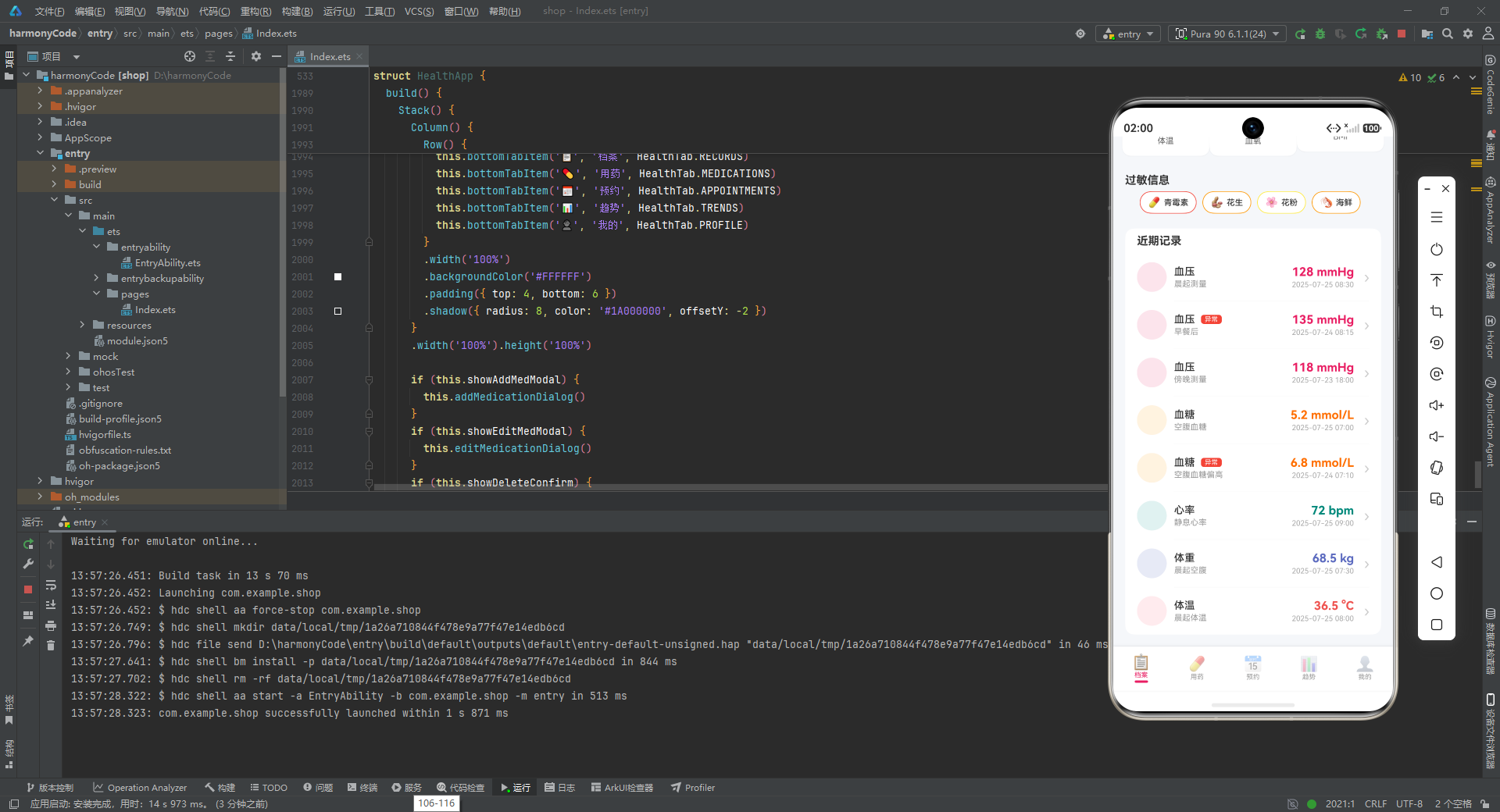
技术解析: recordItem 是健康记录列表的列表项组件,采用典型的左-中-右三栏布局。左侧是一个 40x40 的圆形色块,背景色根据记录类型动态获取;中间区域包含类型名称、异常标签(仅在 isAlarm 为 true 时显示)和备注文字;右侧区域展示数值(使用类型主题色加粗显示)和测量时间。最右侧的 › 符号暗示该项可点击进入详情。
中间区域的 layoutWeight(1) 是关键——它使得中间列占据左侧圆形和右侧数值之间的所有剩余空间,确保在不同屏幕宽度下布局都能自适应。备注文字设置了 maxLines(1) 和 textOverflow({ overflow: TextOverflow.Ellipsis }),当备注过长时会显示省略号,防止文本溢出破坏布局。
  @Builder recordsTab() {
    Scroll() {
      Column() {
        this.healthScoreCard()
        this.vitalSignGrid()
        this.allergySection()
        Column() {
          Text('近期记录')
            .fontSize(15)
            .fontColor('#333333')
            .fontWeight(FontWeight.Bold)
            .width('100%')
            .padding({ left: 16, right: 16, top: 8, bottom: 8 })
          this.recordItem(healthRecords[0])
          Divider().color('#F5F5F5').height(0.5).margin({ left: 66, right: 16 })
          this.recordItem(healthRecords[1])
          Divider().color('#F5F5F5').height(0.5).margin({ left: 66, right: 16 })
          ...
        }
        .backgroundColor('#FFFFFF')
        .borderRadius(12)
        .margin({ left: 16, right: 16, top: 8 })
        .width('100%')
        .constraintSize({ maxWidth: '100%' })
        Column().height(16)
      }
      .width('100%')
    }
    .layoutWeight(1)
    .scrollBar(BarState.Off)
  }
技术解析: recordsTab 是档案页的根组件,使用 Scroll 包裹整个内容区域,确保内容超出屏幕时可以垂直滚动。layoutWeight(1) 使得 Scroll 占据底部导航栏之外的所有可用空间。scrollBar(BarState.Off) 隐藏了滚动条,使界面更加简洁。
近期记录区域使用白色背景和 12px 圆角,与外层灰色背景形成对比。每条记录之间使用 Divider 分隔线,分隔线颜色为 #F5F5F5(极浅灰),高度仅 0.5,非常细腻。注意分隔线的左外边距为 66px,这恰好是左侧圆形(40px)加上圆形右边距(10px)再加上一定的视觉补偿,使得分隔线与右侧的数值区域对齐,而不是从屏幕最左侧开始,这种视觉对齐细节体现了精心的设计考量。
七、用药页(Medications Tab)组件详解
7.1 用药统计面板
  @Builder medicationStats() {
    Row() {
      Column() {
        Text('12')
          .fontSize(22)
          .fontColor('#E91E63')
          .fontWeight(FontWeight.Bold)
        Text('总药品')
          .fontSize(10)
          .fontColor('#999999')
          .margin({ top: 2 })
      }
      .layoutWeight(1)
      Column() {
        Text('8')
          .fontSize(22)
          .fontColor('#4CAF50')
          .fontWeight(FontWeight.Bold)
        Text('服用中')
          .fontSize(10)
          .fontColor('#999999')
          .margin({ top: 2 })
      }
      .layoutWeight(1)
      Column() {
        Text('1')
          .fontSize(22)
          .fontColor('#FF9800')
          .fontWeight(FontWeight.Bold)
        Text('即将到期')
          .fontSize(10)
          .fontColor('#999999')
          .margin({ top: 2 })
      }
      .layoutWeight(1)
      Column() {
        Text('85%')
          .fontSize(22)
          .fontColor('#2196F3')
          .fontWeight(FontWeight.Bold)
        Text('依从率')
          .fontSize(10)
          .fontColor('#999999')
          .margin({ top: 2 })
      }
      .layoutWeight(1)
    }
    .width('100%')
    .padding({ top: 14, bottom: 14 })
    .backgroundColor('#FFFFFF')
    .borderRadius(12)
    .margin({ left: 16, right: 16, bottom: 8 })
    .shadow({ radius: 4, color: '#0D000000', offsetY: 1 })
  }
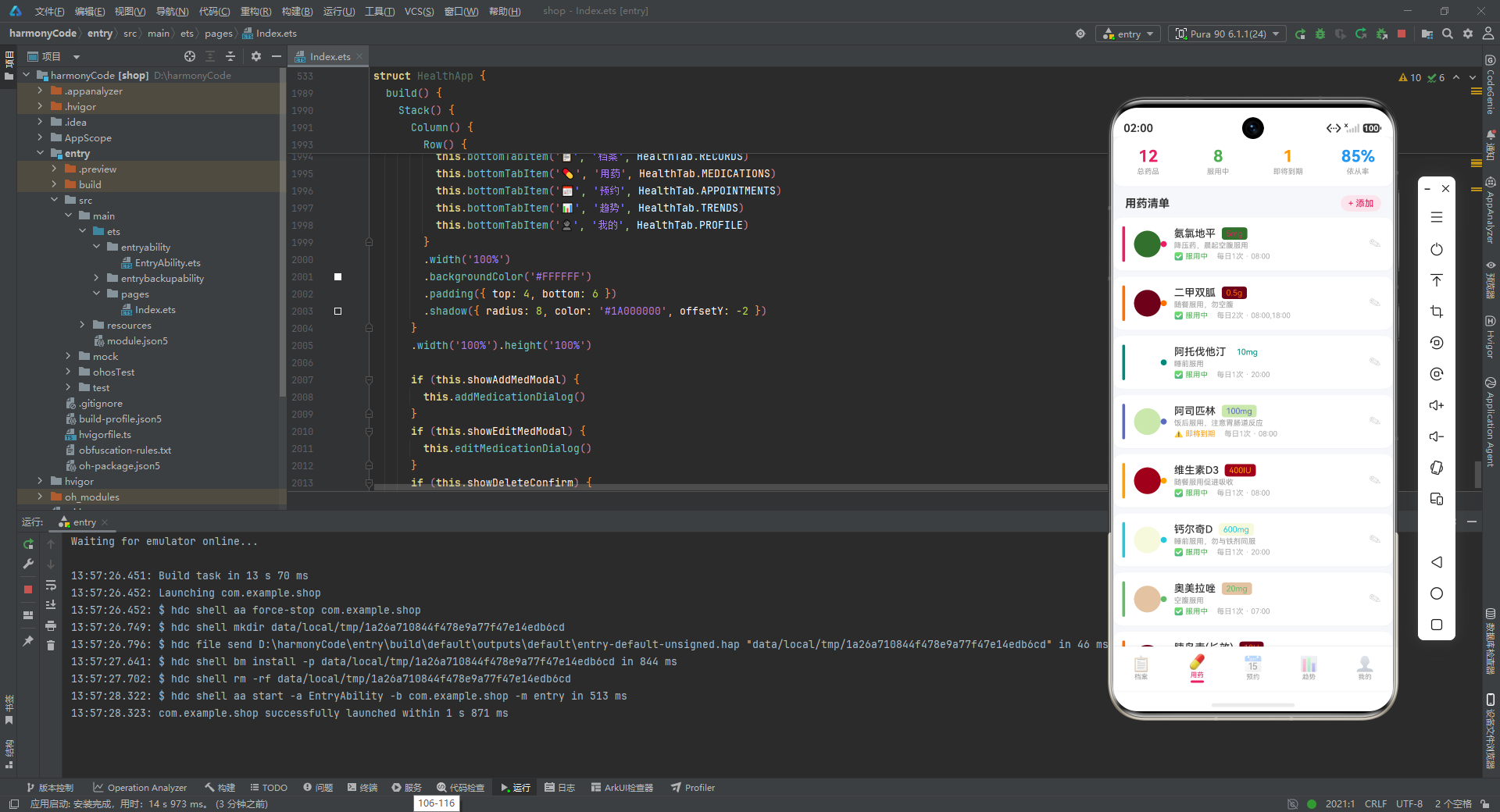
技术解析: medicationStats 是用药页顶部的数据概览面板,采用四列等宽布局。每个统计项包含一个大号数值(22px 粗体)和一个标签(10px 灰色)。四个数值分别使用了不同的主题色:总药品使用粉色(#E91E63),服用中使用绿色(#4CAF50),即将到期使用橙色(#FF9800),依从率使用蓝色(#2196F3)。这种多色统计面板的设计让关键指标一目了然,每种颜色都与其语义匹配。
7.2 用药列表项
  @Builder medicationItem(item: MedicationModel) {
    Row() {
      Column()
        .width(4)
        .height(48)
        .backgroundColor(item.color)
        .borderRadius(2)

      Column()
        .width(36).height(36)
        .backgroundColor(item.color + '1A')
        .borderRadius(18)
        .justifyContent(FlexAlign.Center)
        .alignItems(HorizontalAlign.Center)
        .margin({ left: 12 })
      Column()
        .width(8).height(8)
        .backgroundColor(item.color)
        .borderRadius(4)

      Column() {
        Row() {
          Text(item.name)
            .fontSize(14)
            .fontColor('#333333')
            .fontWeight(FontWeight.Medium)
          Column().width(8)
          Text(item.dosage)
            .fontSize(11)
            .fontColor(item.color)
            .padding({ left: 6, right: 6, top: 2, bottom: 2 })
            .backgroundColor(item.color + '1A')
            .borderRadius(4)
        }
        Text(item.notes)
          .fontSize(10)
          .fontColor('#999999')
          .margin({ top: 2 })
          .maxLines(1)
          .textOverflow({ overflow: TextOverflow.Ellipsis })
        Row() {
          Text(getMedStatusIcon(item.status) + ' ')
            .fontSize(10)
          Text(item.status)
            .fontSize(10)
            .fontColor(getMedStatusColor(item.status))
          Column().width(12)
          Text(item.frequency + ' · ' + item.time)
            .fontSize(10)
            .fontColor('#AAAAAA')
        }
        .margin({ top: 3 })
      }
      .alignItems(HorizontalAlign.Start)
      .layoutWeight(1)
      .margin({ left: 10 })

      Column() {
        Text('✎')
          .fontSize(16)
          .fontColor('#CCCCCC')
      }
      .padding({ right: 8 })
      .onClick(() => {
        this.selectedMed = item
        this.showEditMedModal = true
      })
    }
    .width('100%')
    .padding({ top: 12, bottom: 12, left: 12, right: 8 })
    .backgroundColor('#FFFFFF')
    .borderRadius(12)
    .margin({ left: 16, right: 16, bottom: 8 })
    .shadow({ radius: 3, color: '#0D000000', offsetY: 1 })
  }
技术解析: medicationItem 是用药页的核心列表项组件,其视觉设计非常丰富。左侧有一条 4px 宽的竖线,使用药品的专属颜色,作为颜色编码标识条。紧接着是一个 36x36 的圆形,使用药品颜色的 10% 不透明度版本(通过 '1A' 后缀实现,1A 是十六进制的 10% 不透明度),内部再叠加一个 8x8 的实心小圆点。这种多层圆形标记与首页健康评分卡片中的圆环设计形成了视觉语言上的呼应。
中间区域包含药品名称、剂量标签、服用说明和服用频率。剂量标签使用了药品主题色作为文字颜色和背景色,背景同样添加了 '1A' 后缀实现低不透明度填充,这是本应用中反复出现的半透明主题色背景 + 实色文字的设计模式。
右侧的编辑按钮(✎)绑定了 onClick 事件:点击时先将当前药品对象赋值给 selectedMed 状态,再打开编辑弹窗。这种先选对象再打开弹窗的两步操作确保了弹窗能够正确回显当前药品的数据。
  @Builder medicationsTab() {
    Scroll() {
      Column() {
        this.medicationStats()
        Row() {
          Text('用药清单')
            .fontSize(15)
            .fontColor('#333333')
            .fontWeight(FontWeight.Bold)
          Column().layoutWeight(1)
          Row() {
            Text('+ 添加')
              .fontSize(12)
              .fontColor('#E91E63')
              .fontWeight(FontWeight.Medium)
          }
          .padding({ left: 10, right: 10, top: 4, bottom: 4 })
          .backgroundColor('#FCE4EC')
          .borderRadius(12)
          .onClick(() => { this.showAddMedModal = true })
        }
        .width('100%')
        .padding({ left: 16, right: 16, top: 4, bottom: 8 })
        this.medicationItem(medications[0])
        this.medicationItem(medications[1])
        ...
        Column().height(16)
      }
      .width('100%')
    }
    .layoutWeight(1)
    .scrollBar(BarState.Off)
  }
技术解析: medicationsTab 的顶部有一个添加按钮,使用了粉色主题色的半透明背景(#FCE4EC)和粉色文字,点击时设置 showAddMedModal 为 true 打开底部弹窗。用药清单区域直接逐个调用 medicationItem 渲染,没有使用 ForEach。这种方式虽然代码冗长,但在原型开发阶段可以更精细地控制每条记录的显示顺序和是否显示。
八、预约页(Appointments Tab)组件详解
  @Builder appointmentItem(item: AppointmentModel) {
    Row() {
      Column()
        .width(3)
        .height(40)
        .backgroundColor(getAppointmentStatusColor(item.status))
        .borderRadius(2)

      Column() {
        Text(item.date)
          .fontSize(12)
          .fontColor('#E91E63')
          .fontWeight(FontWeight.Bold)
        Text(item.time)
          .fontSize(20)
          .fontColor('#333333')
          .fontWeight(FontWeight.Bold)
          .margin({ top: 2 })
      }
      .alignItems(HorizontalAlign.Center)
      .width(60)

      Column() {
        Row() {
          Text(item.doctorName)
            .fontSize(14)
            .fontColor('#333333')
            .fontWeight(FontWeight.Medium)
          Column().width(8)
          Text(item.department)
            .fontSize(10)
            .fontColor('#FFFFFF')
            .padding({ left: 6, right: 6, top: 2, bottom: 2 })
            .backgroundColor('#E91E63')
            .borderRadius(4)
        }
        Text(item.hospital)
          .fontSize(11)
          .fontColor('#999999')
          .margin({ top: 4 })
        if (item.notes.length > 0) {
          Text(item.notes)
            .fontSize(10)
            .fontColor('#AAAAAA')
            .margin({ top: 2 })
            .maxLines(1)
            .textOverflow({ overflow: TextOverflow.Ellipsis })
        }
      }
      .alignItems(HorizontalAlign.Start)
      .layoutWeight(1)
      .margin({ left: 12 })

      Text(item.status)
        .fontSize(11)
        .fontColor(getAppointmentStatusColor(item.status))
        .fontWeight(FontWeight.Medium)
        .padding({ left: 8, right: 8, top: 4, bottom: 4 })
        .backgroundColor(getAppointmentStatusColor(item.status) + '1A')
        .borderRadius(8)
    }
    .width('100%')
    .padding({ top: 14, bottom: 14, left: 12, right: 12 })
    .backgroundColor('#FFFFFF')
    .borderRadius(12)
    .margin({ left: 16, right: 16, bottom: 8 })
    .shadow({ radius: 3, color: '#0D000000', offsetY: 1 })
  }
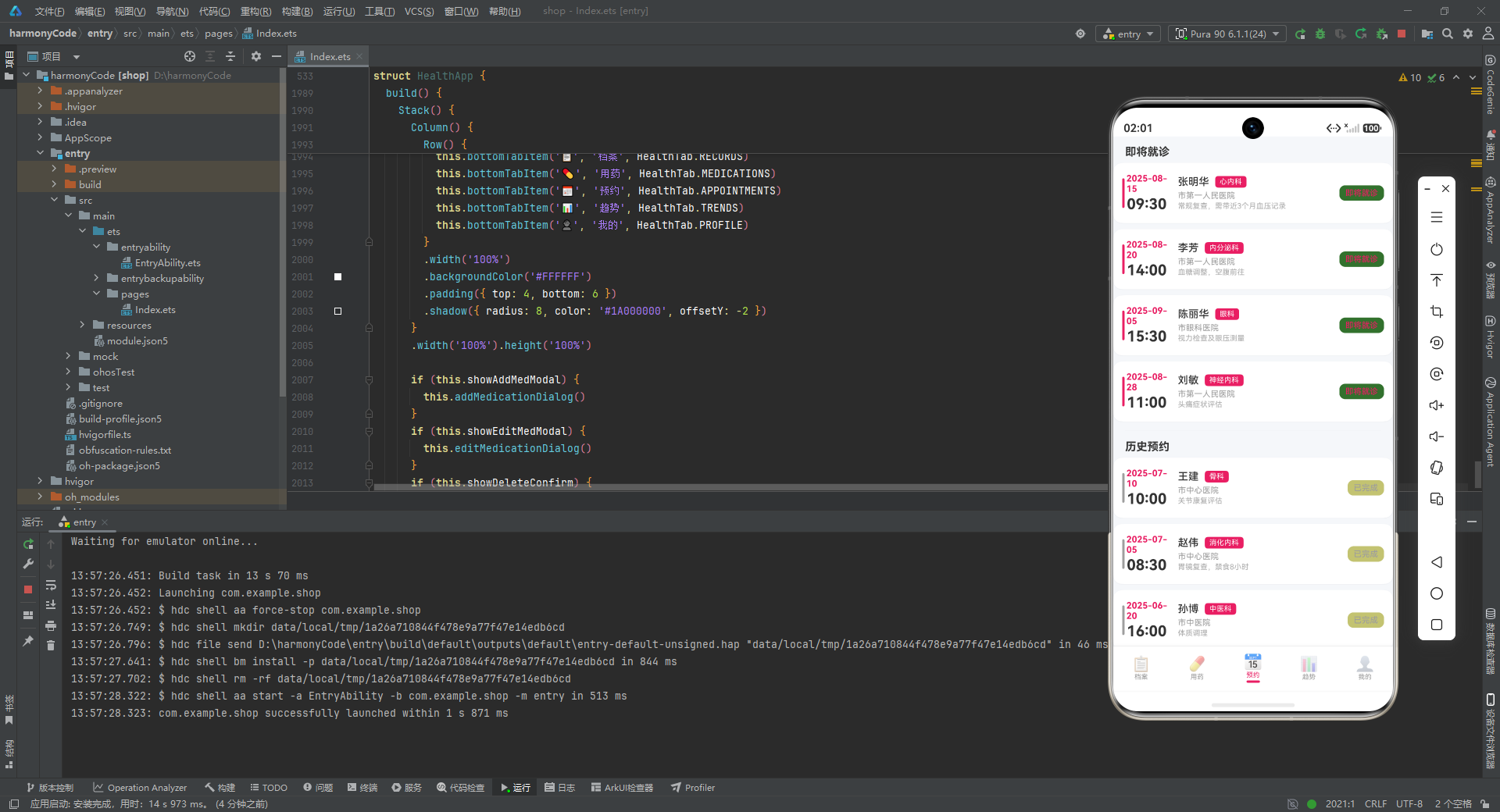
技术解析: appointmentItem 采用了与用药项类似但略有不同的布局结构。左侧是一条 3px 宽的状态色条,颜色根据预约状态动态获取。日期和时间被放置在左侧固定宽度的区域(60px),时间使用 20px 大字号突出显示,便于用户快速定位预约时刻。
中间区域包含医生姓名、科室标签(粉色背景白色文字的 pill 形状标签)、医院名称和备注。右侧是一个状态 pill 标签,文字颜色和背景色都根据状态动态获取,并且背景色同样使用了 '1A' 后缀实现半透明效果。当备注内容非空时才渲染备注行(if (item.notes.length > 0)),这种条件渲染避免了不必要的空白行,使列表更加紧凑。
  @Builder appointmentsTab() {
    Scroll() {
      Column() {
        Text('即将就诊')
          .fontSize(15)
          .fontColor('#333333')
          .fontWeight(FontWeight.Bold)
          .width('100%')
          .padding({ left: 16, right: 16, top: 12, bottom: 6 })
        this.appointmentItem(appointments[0])
        this.appointmentItem(appointments[1])
        this.appointmentItem(appointments[3])
        this.appointmentItem(appointments[5])

        Divider()
          .color('#F0F0F0')
          .height(1)
          .margin({ left: 16, right: 16, top: 4, bottom: 4 })

        Text('历史预约')
          .fontSize(15)
          .fontColor('#333333')
          .fontWeight(FontWeight.Bold)
          .width('100%')
          .padding({ left: 16, right: 16, top: 8, bottom: 6 })
        this.appointmentItem(appointments[2])
        this.appointmentItem(appointments[4])
        this.appointmentItem(appointments[6])
        this.appointmentItem(appointments[7])
        Column().height(16)
      }
      .width('100%')
    }
    .layoutWeight(1)
    .scrollBar(BarState.Off)
  }
技术解析: appointmentsTab 将预约列表分为"即将就诊"和"历史预约"两个分组,中间用 Divider 分隔。即将就诊包含索引 0、1、3、5 的记录,历史预约包含索引 2、4、6、7 的记录。这种硬编码分组在原型阶段很常见,后续可以改为根据状态字段自动分组。分组标题使用 15px 粗体,与记录卡片形成层次对比。
九、趋势页(Trends Tab)组件详解
9.1 血压趋势图
  @Builder bloodPressureChart() {
    Column() {
      Text('血压趋势 (近7天)')
        .fontSize(14)
        .fontColor('#333333')
        .fontWeight(FontWeight.Bold)
        .width('100%')
        .padding({ left: 0, bottom: 10 })
      Row() {
        Text('mmHg')
          .fontSize(9)
          .fontColor('#999999')
          .margin({ right: 4 })
        Column()
          .width(1)
          .backgroundColor('#EEEEEE')
          .layoutWeight(1)
        Text('收缩压')
          .fontSize(9)
          .fontColor('#E91E63')
          .margin({ left: 4 })
        Column().width(8)
        Text('舒张压')
          .fontSize(9)
          .fontColor('#2196F3')
          .margin({ left: 4 })
      }
      .width('100%')
      .margin({ bottom: 6 })

      Row() {
        ForEach(bloodPressureTrend, (item: BloodPressurePoint, index: number) => {
          Column() {
            Column()
              .width(32)
              .height((item.systolic / getMaxSystolic(bloodPressureTrend)) * 100)
              .backgroundColor('#E91E63')
              .borderRadius({ topLeft: 4, topRight: 4 })
            Column()
              .width(32)
              .height((item.diastolic / getMaxSystolic(bloodPressureTrend)) * 100)
              .backgroundColor('#2196F3')
              .borderRadius({ topLeft: 4, topRight: 4 })
              .margin({ top: 2 })
            Text(item.label)
              .fontSize(8)
              .fontColor('#999999')
              .margin({ top: 4 })
          }
          .alignItems(HorizontalAlign.Center)
          .width('14%')
        })
      }
      .alignItems(VerticalAlign.Bottom)
      .width('100%')
      .padding({ top: 8 })
    }
    .padding(14)
    .backgroundColor('#FFFFFF')
    .borderRadius(12)
    .margin({ left: 16, right: 16, bottom: 8 })
    .shadow({ radius: 3, color: '#0D000000', offsetY: 1 })
  }
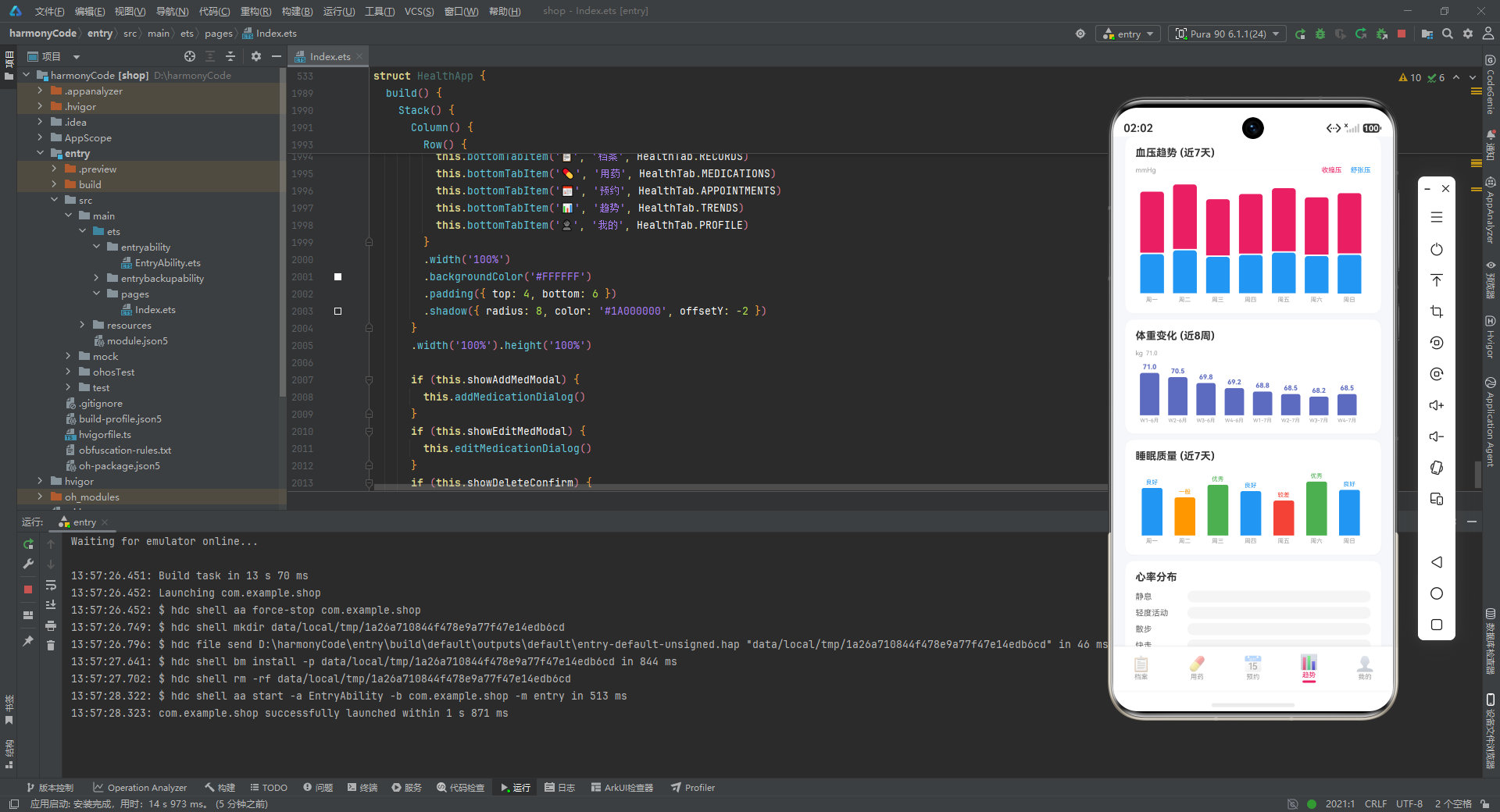
技术解析: bloodPressureChart 是一个纯手工实现的柱状图组件。它使用 Column 作为柱子,height 属性通过数学计算动态设置:(item.systolic / getMaxSystolic(bloodPressureTrend)) * 100。这个公式的含义是:将当前收缩压值除以最大值(加 20 缓冲),再乘以 100,得到柱子在容器中的相对高度百分比。每个数据列包含两根柱子——粉色代表收缩压,蓝色代表舒张压,顶部有 4px 的圆角。
alignItems(VerticalAlign.Bottom) 是关键属性,它使得所有柱子从容器的底部向上生长,而不是从顶部向下排列,这是柱状图的标准呈现方式。每个数据列分配 '14%' 的宽度,七个列总计约 98%,在容器内均匀分布。图例区域使用 layoutWeight(1) 的细线作为分隔,左右两侧分别标注单位(mmHg)和两根柱子的含义(收缩压/舒张压)。
9.2 体重、睡眠与心率图表
  @Builder weightChart() {
    Column() {
      Text('体重变化 (近8周)')
        ...
      Row() {
        ForEach(weightTrend, (item: WeightPoint, index: number) => {
          Column() {
            Text(item.weight.toFixed(1))
              .fontSize(9)
              .fontColor('#5C6BC0')
              .fontWeight(FontWeight.Bold)
              .margin({ bottom: 3 })
            Column()
              .width(26)
              .height(((item.weight - 66) / (getMaxWeight(weightTrend) - 66)) * 80)
              .backgroundColor('#5C6BC0')
              ...
            Text(item.week)
              .fontSize(7)
              .fontColor('#999999')
              .margin({ top: 3 })
          }
          .alignItems(HorizontalAlign.Center)
          .width('12%')
        })
      }
      .alignItems(VerticalAlign.Bottom)
      ...
    }
    ...
  }
技术解析: weightChart 与血压图类似,但高度计算公式有所不同:((item.weight - 66) / (getMaxWeight(weightTrend) - 66)) * 80。这里使用了一个非零基线(66kg 作为最低参考值),使得柱子高度的变化更能反映体重的实际波动。每个柱子上方直接显示具体数值(toFixed(1) 保留一位小数),下方显示周标签。
  @Builder sleepChart() {
    Column() {
      ...
      Row() {
        ForEach(sleepQualityData, (item: SleepPoint, index: number) => {
          Column() {
            Text(item.quality)
              .fontSize(8)
              .fontColor(getSleepQualityColor(item.quality))
              .margin({ bottom: 3 })
            Column()
              .width(28)
              .height((item.hours / getMaxSleep(sleepQualityData)) * 90)
              .backgroundColor(getSleepQualityColor(item.quality))
              ...
            Text(item.day)
              .fontSize(8)
              .fontColor('#999999')
              .margin({ top: 3 })
          }
          .alignItems(HorizontalAlign.Center)
          .width('14%')
        })
      }
      .alignItems(VerticalAlign.Bottom)
      ...
    }
    ...
  }
技术解析: sleepChart 的特色在于柱子颜色是动态获取的——根据睡眠质量等级(优秀/良好/一般/较差)调用 getSleepQualityColor 返回不同的颜色。柱子上方也显示质量等级文字,并使用相同的颜色,形成视觉一致性。这种数据驱动的颜色映射使得图表本身就能传达评估结论,用户无需对照图例即可理解数据含义。
  @Builder heartRateSection() {
    Column() {
      Text('心率分布')
        ...
      ForEach(heartRateData, (item: HeartRatePoint, index: number) => {
        Row() {
          Text(item.label)
            .fontSize(11)
            .fontColor('#666666')
            .width(70)
          Column()
            .layoutWeight(1)
            .height(16)
            .backgroundColor('#F5F5F5')
            .borderRadius(8)
        }
        .width('100%')
        .margin({ bottom: 6 })
      })
    }
    ...
  }
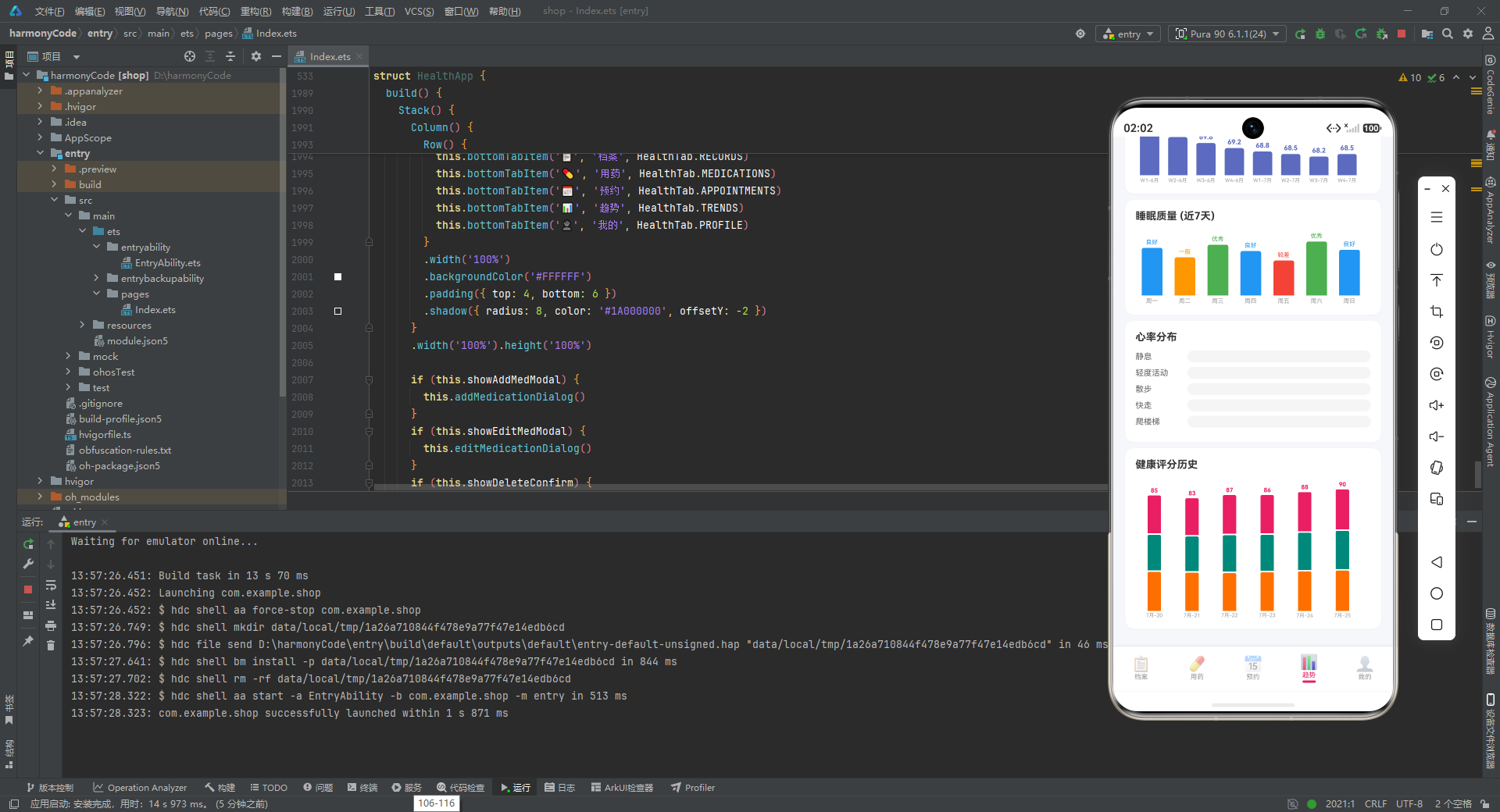
技术解析: heartRateSection 目前只渲染了心率分布的标签和占位条,没有根据实际心率值计算条形的宽度。这可能是一个未完成的功能点,预留了后续扩展为横向条形图的空间。
9.3 健康评分历史图
  @Builder healthScoreHistoryChart() {
    Column() {
      Text('健康评分历史')
        ...
      Row() {
        ForEach(healthScoreHistory, (item: HealthScoreHistory, index: number) => {
          Column() {
            Text(item.overall.toString())
              .fontSize(8)
              .fontColor('#E91E63')
              .fontWeight(FontWeight.Bold)
              .margin({ bottom: 2 })
            Column()
              .width(18)
              .height((item.overall / 100) * 60)
              .backgroundColor('#E91E63')
              .borderRadius({ topLeft: 2, topRight: 2 })
            Column().width(18).height(2)
            Column()
              .width(18)
              .height((item.heart / 100) * 60)
              .backgroundColor('#00897B')
              .borderRadius({ topLeft: 2, topRight: 2 })
            Column().width(18).height(2)
            Column()
              .width(18)
              .height((item.metabolic / 100) * 60)
              .backgroundColor('#FF6F00')
              .borderRadius({ topLeft: 2, topRight: 2 })
            Text(item.date)
              .fontSize(7)
              .fontColor('#999999')
              .margin({ top: 2 })
          }
          .alignItems(HorizontalAlign.Center)
          .width('16%')
        })
      }
      .alignItems(VerticalAlign.Bottom)
      ...
    }
    ...
  }
技术解析: healthScoreHistoryChart 是一个分组柱状图,每个时间列包含三根柱子,分别代表综合评分(粉色)、心脏评分(蓝绿)和代谢评分(橙色)。柱子之间用 2px 高的透明间隙分隔。评分数值显示在柱子顶部,日期显示在底部。每列分配 '16%' 宽度,六个时间点约 96%。
  @Builder trendsTab() {
    Scroll() {
      Column() {
        this.bloodPressureChart()
        this.weightChart()
        this.sleepChart()
        this.heartRateSection()
        this.healthScoreHistoryChart()
        Column().height(16)
      }
      .width('100%')
    }
    .layoutWeight(1)
    .scrollBar(BarState.Off)
  }
技术解析: trendsTab 将所有图表组件垂直堆叠,每个图表都是独立的卡片,有统一的白色背景、12px 圆角和阴影样式,形成一致的视觉节奏。
十、个人中心页(Profile Tab)组件详解
10.1 个人资料卡片
  @Builder profileCard() {
    Column() {
      Row() {
        Column()
          .width(56).height(56)
          .backgroundColor('#E91E63')
          .borderRadius(28)
          .justifyContent(FlexAlign.Center)
          .alignItems(HorizontalAlign.Center)
        Column() {
          Text(patientProfile.name)
            .fontSize(18)
            .fontColor('#FFFFFF')
            .fontWeight(FontWeight.Bold)
          Row() {
            Text(patientProfile.gender)
              .fontSize(11)
              .fontColor('#FFFFFF')
              .opacity(0.8)
            Text(' · ' + patientProfile.age + '岁')
              .fontSize(11)
              .fontColor('#FFFFFF')
              .opacity(0.8)
            Text(' · ' + patientProfile.bloodType)
              .fontSize(11)
              .fontColor('#FFFFFF')
              .opacity(0.8)
          }
          .margin({ top: 3 })
          Text('ID: ' + patientProfile.idNumber)
            .fontSize(10)
            .fontColor('#FFFFFF')
            .opacity(0.6)
            .margin({ top: 2 })
        }
        .alignItems(HorizontalAlign.Start)
        .margin({ left: 12 })
        .layoutWeight(1)
        Text('›')
          .fontSize(24)
          .fontColor('#FFFFFF')
          .opacity(0.5)
      }
      .width('100%')
    }
    .width('100%')
    .padding(16)
    .borderRadius(16)
    .linearGradient({
      angle: 135,
      colors: [['#E91E63', 0.0], ['#F06292', 0.5], ['#F48FB1', 1.0]]
    })
    .margin({ left: 16, right: 16, top: 12, bottom: 8 })
    .shadow({ radius: 8, color: '#1A000000', offsetY: 2 })
  }
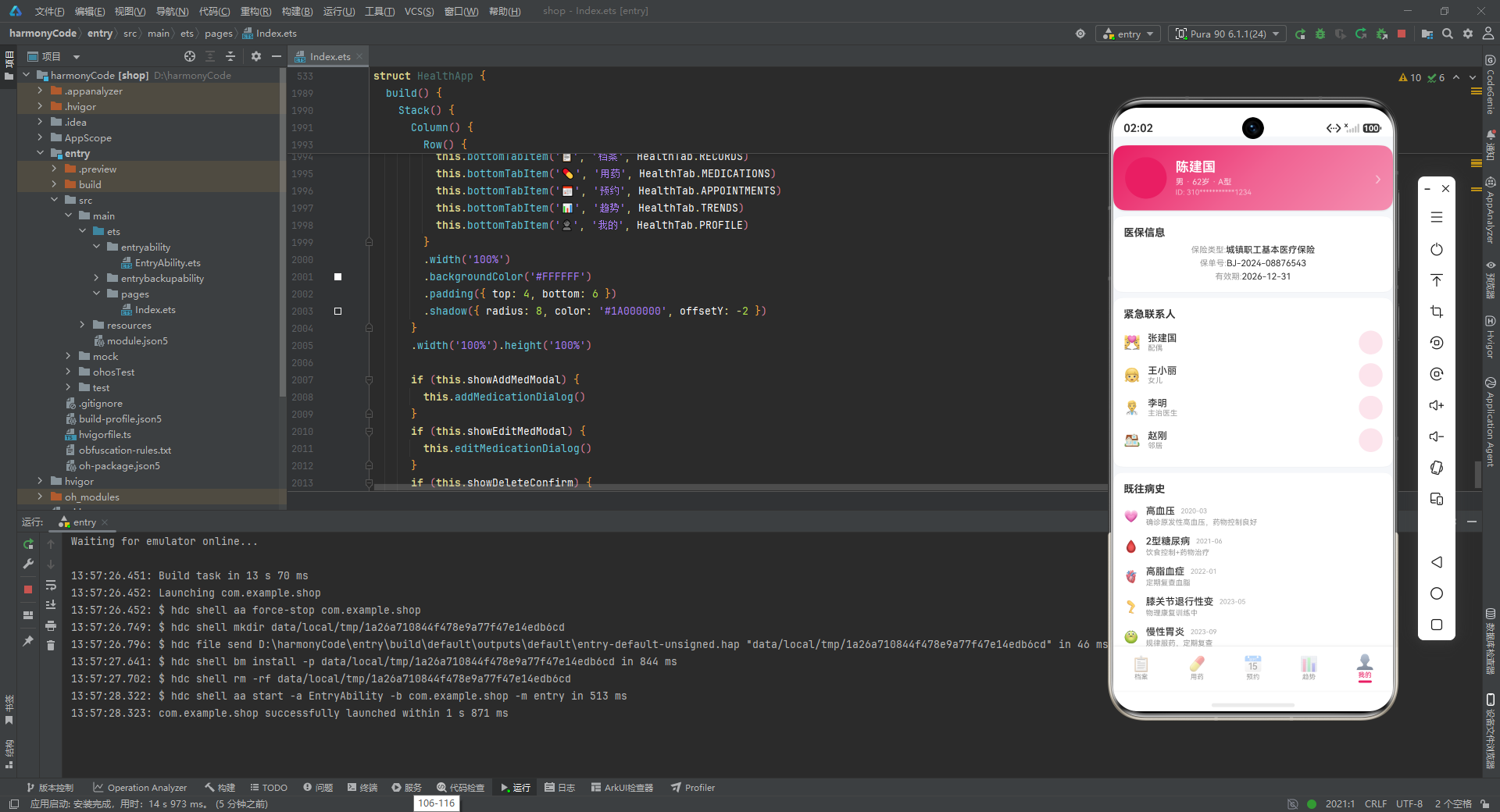
技术解析: profileCard 与个人中心的健康评分卡片共享相同的粉色渐变背景,形成了整应用的视觉锚点。左侧是一个 56x56 的圆形头像占位区(当前没有渲染实际头像内容,使用了纯色背景),右侧是姓名、性别年龄血型组合信息、以及脱敏处理的身份证号(310***********1234)。所有文字都使用白色,并通过不同的 opacity(0.8 和 0.6)建立信息层级,姓名最突出,次要信息稍淡,ID 号最弱。
10.2 医保、联系人与病史
  @Builder insuranceInfoCard() {
    Column() {
      Text('医保信息')
        .fontSize(14)
        .fontColor('#333333')
        .fontWeight(FontWeight.Bold)
        .width('100%')
      Row() {
        Text('保险类型:')
          .fontSize(11)
          .fontColor('#999999')
        Text(insuranceInfo.provider)
          .fontSize(12)
          .fontColor('#333333')
          .fontWeight(FontWeight.Medium)
      }
      .margin({ top: 8 })
      ...
    }
    ...
  }
技术解析: insuranceInfoCard 采用标签-值(Label-Value)的横向布局模式。左侧是灰色小字标签(如"保险类型:“),右侧是深色中字值(如"城镇职工基本医疗保险”)。标签和值之间没有使用固定间距,而是通过 Row 的自然流式布局排列,当标签长度不同时,值会自动左对齐。
  @Builder emergencyContactsSection() {
    Column() {
      Text('紧急联系人')
        ...
      ForEach(emergencyContacts, (item: EmergencyContactData, index: number) => {
        Row() {
          Text(item.icon)
            .fontSize(18)
          Column() {
            Text(item.name)
              .fontSize(13)
              .fontColor('#333333')
              .fontWeight(FontWeight.Medium)
            Text(item.relation)
              .fontSize(10)
              .fontColor('#999999')
          }
          .alignItems(HorizontalAlign.Start)
          .layoutWeight(1)
          .margin({ left: 10 })
          Column()
            .width(32).height(32)
            .backgroundColor('#FCE4EC')
            .borderRadius(16)
            .justifyContent(FlexAlign.Center)
            .alignItems(HorizontalAlign.Center)
        }
        .width('100%')
        .padding({ top: 6, bottom: 6 })
      })
    }
    ...
  }
技术解析: emergencyContactsSection 渲染紧急联系人列表,每个联系人包含图标、姓名、关系和右侧的电话拨打按钮占位区(32x32 的粉色半透明圆形)。layoutWeight(1) 使得姓名区域占据中间所有可用空间,将电话按钮推到最右侧。
  @Builder medicalHistorySection() {
    Column() {
      Text('既往病史')
        ...
      ForEach(medicalHistory, (item: MedicalHistoryData, index: number) => {
        Row() {
          Text(item.icon)
            .fontSize(16)
          Column() {
            Row() {
              Text(item.condition)
                .fontSize(13)
                .fontColor('#333333')
                .fontWeight(FontWeight.Medium)
              Column().width(8)
              Text(item.date)
                .fontSize(9)
                .fontColor('#AAAAAA')
            }
            Text(item.notes)
              .fontSize(10)
              .fontColor('#999999')
              .margin({ top: 2 })
              .maxLines(1)
              .textOverflow({ overflow: TextOverflow.Ellipsis })
          }
          .alignItems(HorizontalAlign.Start)
          .layoutWeight(1)
          .margin({ left: 10 })
        }
        .width('100%')
        .padding({ top: 6, bottom: 6 })
      })
    }
    ...
  }
技术解析: medicalHistorySection 渲染既往病史列表。每条病史包含疾病图标、疾病名称、确诊日期和备注说明。疾病名称和日期放在同一行,通过 layoutWeight 和固定间距实现左右分布。备注文字同样设置了单行省略,防止长文本破坏布局。
10.3 设置区域
  @Builder settingsSection() {
    Column() {
      Text('设置')
        .fontSize(14)
        .fontColor('#333333')
        .fontWeight(FontWeight.Bold)
        .width('100%')
        .padding({ left: 0, bottom: 6 })
      ForEach(settingItems, (item: string, index: number) => {
        Row() {
          Text(item)
            .fontSize(13)
            .fontColor('#555555')
            .layoutWeight(1)
          Text('›')
            .fontSize(16)
            .fontColor('#CCCCCC')
        }
        .width('100%')
        .padding({ top: 10, bottom: 10 })
      })
    }
    ...
  }
技术解析: settingsSection 渲染设置列表,数据源是字符串数组 settingItems。每项设置是一个横向 Row,左侧文字通过 layoutWeight(1) 占据全部剩余空间,右侧是灰色的 › 箭头,表示可点击进入下一级页面。整体风格遵循 iOS 风格的设置列表设计范式。
  @Builder profileTab() {
    Scroll() {
      Column() {
        this.profileCard()
        this.insuranceInfoCard()
        this.emergencyContactsSection()
        this.medicalHistorySection()
        this.settingsSection()
        Column().height(16)
      }
      .width('100%')
    }
    .layoutWeight(1)
    .scrollBar(BarState.Off)
  }
技术解析: profileTab 将个人中心的所有子组件垂直堆叠,形成完整的个人中心页面。每个子模块都是独立的卡片,视觉层次清晰。
十一、弹窗组件详解
11.1 添加用药弹窗
  @Builder addMedicationDialog() {
    Column() {
      Column()
        .layoutWeight(1)
        .width('100%')
        .onClick(() => { this.showAddMedModal = false })
      Column() {
        Row() {
          Text('添加用药')
            .fontSize(17)
            .fontColor('#333333')
            .fontWeight(FontWeight.Bold)
          Column().layoutWeight(1)
          Text('✕')
            .fontSize(18)
            .fontColor('#999999')
            .onClick(() => { this.showAddMedModal = false })
        }
        .width('100%')
        .padding({ bottom: 12 })
        ...
        Row() {
          Column() {
            Text('取消')
              .fontSize(14)
              .fontColor('#999999')
              .fontWeight(FontWeight.Medium)
          }
          .layoutWeight(1)
          .height(44)
          .justifyContent(FlexAlign.Center)
          .backgroundColor('#F5F5F5')
          .borderRadius(22)
          .onClick(() => { this.showAddMedModal = false })
          Column().width(12)
          Column() {
            Text('确认添加')
              .fontSize(14)
              .fontColor('#FFFFFF')
              .fontWeight(FontWeight.Medium)
          }
          .layoutWeight(1)
          .height(44)
          .justifyContent(FlexAlign.Center)
          .backgroundColor('#E91E63')
          .borderRadius(22)
          .onClick(() => { this.showAddMedModal = false })
        }
        .margin({ top: 12 })
      }
      .width('100%')
      .padding(20)
      .backgroundColor('#FFFFFF')
      .borderRadius({ topLeft: 20, topRight: 20 })
      .shadow({ radius: 16, color: '#1A000000', offsetY: -4 })
    }
    .width('100%').height('100%')
    .backgroundColor('#99000000')
  }
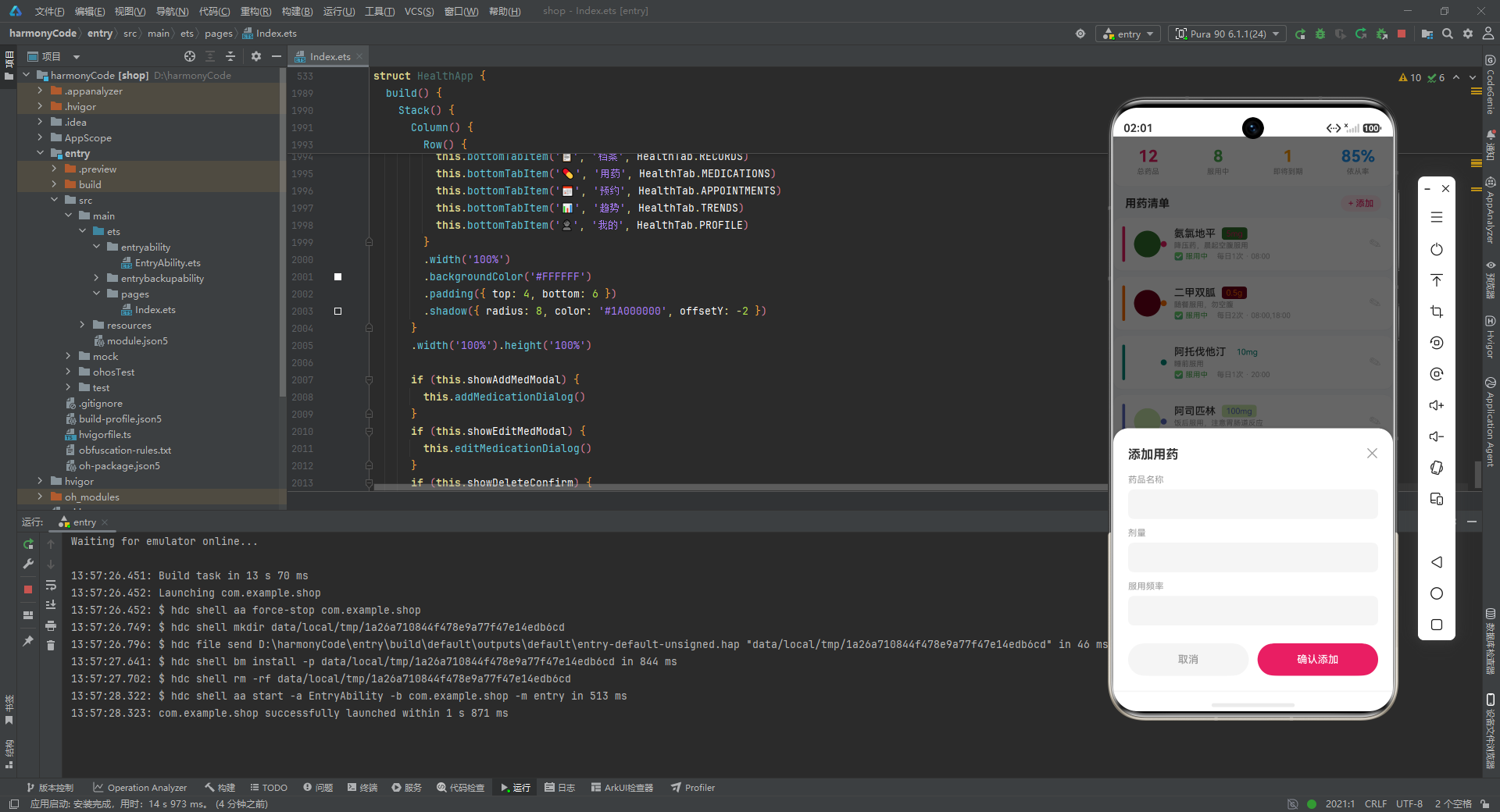
技术解析: addMedicationDialog 是一个**底部弹窗(Bottom Sheet)**组件。最外层 Column 充满整个屏幕,背景色为黑色 60% 不透明度(#99000000),形成遮罩层。遮罩层顶部放置了一个可点击的透明区域(layoutWeight(1)),点击此区域可以关闭弹窗——这是移动端底部弹窗的标准交互模式。
弹窗内容区从底部升起,顶部有 20px 的圆角,向上投射阴影(offsetY: -4)。内容区包含标题栏(“添加用药” + 关闭按钮)、三个表单占位区(药品名称、剂量、服用频率)以及底部的取消/确认按钮。每个表单占位区都是一个 40px 高的灰色圆角矩形(#F5F5F5),当前没有实现实际的输入控件,属于 UI 骨架。
底部按钮采用双按钮布局:左侧取消按钮灰色背景,右侧确认按钮粉色主题背景,两个按钮都使用 22px 的圆角(即半高圆角,形成 pill 形状),高度 44px,通过 layoutWeight(1) 等宽分布,中间有 12px 间隙。
11.2 编辑用药弹窗
  @Builder editMedicationDialog() {
    Column() {
      Column()
        .layoutWeight(1)
        .width('100%')
        .onClick(() => { this.showEditMedModal = false })
      Column() {
        Row() {
          Text('编辑用药')
            ...
        }
        Text('药品名称: ' + (this.selectedMed?.name ?? ''))
          .fontSize(14)
          .fontColor('#333333')
          .width('100%')
          .padding({ top: 8, bottom: 8 })
        ...
        Row() {
          Column() {
            Text('删除')
              .fontSize(14)
              .fontColor('#F44336')
              .fontWeight(FontWeight.Medium)
          }
          .layoutWeight(1)
          .height(44)
          .justifyContent(FlexAlign.Center)
          .backgroundColor('#FFEBEE')
          .borderRadius(22)
          .onClick(() => { this.showEditMedModal = false })
          Column().width(12)
          Column() {
            Text('保存')
              .fontSize(14)
              .fontColor('#FFFFFF')
              .fontWeight(FontWeight.Medium)
          }
          .layoutWeight(1)
          .height(44)
          .justifyContent(FlexAlign.Center)
          .backgroundColor('#E91E63')
          .borderRadius(22)
          .onClick(() => { this.showEditMedModal = false })
        }
        .margin({ top: 12 })
      }
      ...
    }
    ...
  }
技术解析: editMedicationDialog 与添加弹窗结构相似,但有三个关键差异:首先,标题为"编辑用药";其次,顶部回显了当前选中药品的名称(this.selectedMed?.name ?? ''),使用了可选链操作符(?.)和空值合并操作符(??),即使 selectedMed 为 null 也不会报错;第三,左侧按钮从"取消"变为"删除",文字和背景都使用了红色系(#F44336 文字 + #FFEBEE 背景),暗示这是一个危险操作。
11.3 删除确认弹窗
  @Builder deleteRecordDialog() {
    Column() {
      Column()
        .layoutWeight(1)
        .width('100%')
        .onClick(() => { this.showDeleteConfirm = false })
      Column() {
        Column()
          .width(48).height(48)
          .backgroundColor('#FFEBEE')
          .borderRadius(24)
          .justifyContent(FlexAlign.Center)
          .alignItems(HorizontalAlign.Center)
          .margin({ bottom: 12 })
        Text('确认删除')
          .fontSize(17)
          .fontColor('#333333')
          .fontWeight(FontWeight.Bold)
        Text('删除后数据无法恢复,确定删除该记录吗?')
          .fontSize(13)
          .fontColor('#999999')
          .textAlign(TextAlign.Center)
          .margin({ top: 8, bottom: 16 })
        Row() {
          Column() {
            Text('取消')
              ...
          }
          .onClick(() => { this.showDeleteConfirm = false })
          Column().width(12)
          Column() {
            Text('确认删除')
              .fontSize(14)
              .fontColor('#FFFFFF')
              .fontWeight(FontWeight.Medium)
          }
          .layoutWeight(1)
          .height(44)
          .justifyContent(FlexAlign.Center)
          .backgroundColor('#F44336')
          .borderRadius(22)
          .onClick(() => { this.showDeleteConfirm = false })
        }
      }
      .width('100%')
      .padding(24)
      .backgroundColor('#FFFFFF')
      .borderRadius(20)
      .margin({ left: 32, right: 32 })
      .shadow({ radius: 16, color: '#1A000000', offsetY: 4 })
      Column()
        .layoutWeight(1)
        .width('100%')
        .onClick(() => { this.showDeleteConfirm = false })
    }
    .width('100%').height('100%')
    .backgroundColor('#99000000')
    .justifyContent(FlexAlign.Center)
  }
技术解析: deleteRecordDialog 是一个居中的确认对话框(Alert Dialog),与底部弹窗不同,它居中显示在屏幕上。弹窗宽度为屏幕宽度减去 64px(左右各 32px 边距),圆角 20px。顶部有一个 48x48 的红色半透明圆形图标占位区,中间是标题"确认删除"和警告文案"删除后数据无法恢复",底部是取消和确认删除按钮。
整个对话框被上下两个 layoutWeight(1) 的透明区域夹在中间,justifyContent(FlexAlign.Center) 确保对话框垂直居中。点击遮罩层任意位置都可以关闭弹窗,提供了便捷的取消路径。
十二、内容区域与底部导航
  @Builder contentArea() {
    Column() {
      if (this.activeTab === HealthTab.RECORDS) {
        this.recordsTab()
      } else if (this.activeTab === HealthTab.MEDICATIONS) {
        this.medicationsTab()
      } else if (this.activeTab === HealthTab.APPOINTMENTS) {
        this.appointmentsTab()
      } else if (this.activeTab === HealthTab.TRENDS) {
        this.trendsTab()
      } else {
        this.profileTab()
      }
    }
    .layoutWeight(1)
  }
技术解析: contentArea 是应用的内容路由中枢。它使用 if-else if 条件渲染语句,根据 activeTab 的值决定渲染哪个 Tab 页面。这种条件渲染方式在 ArkTS 中非常高效,因为只有当前激活的 Tab 会被挂载到组件树中,其他 Tab 的组件不会被创建,节省了内存和渲染开销。layoutWeight(1) 确保内容区域占据底部导航栏之外的所有空间。
  @Builder bottomTabItem(icon: string, label: string, tab: HealthTab) {
    Column() {
      Text(icon)
        .fontSize(20)
        .opacity(this.activeTab === tab ? 1.0 : 0.45)
      Text(label)
        .fontSize(9)
        .fontColor(this.activeTab === tab ? '#E91E63' : '#999999')
        .margin({ top: 1 })
      if (this.activeTab === tab) {
        Column()
          .width(18)
          .height(3)
          .backgroundColor('#E91E63')
          .borderRadius(2)
          .margin({ top: 2 })
      }
    }
    .layoutWeight(1)
    .alignItems(HorizontalAlign.Center)
    .padding({ top: 5, bottom: 5 })
    .onClick(() => { this.activeTab = tab })
  }
技术解析: bottomTabItem 是底部导航栏的单个 Tab 项组件,接收图标、标签和 Tab 枚举值三个参数。每个 Tab 项使用 Column 垂直排列图标、文字和激活指示条。
激活状态的视觉反馈有三重机制:第一,图标不透明度从 0.45 提升到 1.0,使激活项更醒目;第二,文字颜色从灰色(#999999)变为粉色主题色(#E91E63);第三,激活项下方显示一条 18x3 的粉色圆角小横条,作为激活指示器。这种多维度状态反馈确保了用户能清晰识别当前所在页面。
每个 Tab 项的 onClick 事件直接将 activeTab 设置为对应的枚举值,触发 contentArea 的条件重新评估,从而实现页面切换。
  build() {
    Stack() {
      Column() {
        this.contentArea()
        Row() {
          this.bottomTabItem('📋', '档案', HealthTab.RECORDS)
          this.bottomTabItem('💊', '用药', HealthTab.MEDICATIONS)
          this.bottomTabItem('📅', '预约', HealthTab.APPOINTMENTS)
          this.bottomTabItem('📊', '趋势', HealthTab.TRENDS)
          this.bottomTabItem('👤', '我的', HealthTab.PROFILE)
        }
        .width('100%')
        .backgroundColor('#FFFFFF')
        .padding({ top: 4, bottom: 6 })
        .shadow({ radius: 8, color: '#1A000000', offsetY: -2 })
      }
      .width('100%').height('100%')

      if (this.showAddMedModal) {
        this.addMedicationDialog()
      }
      if (this.showEditMedModal) {
        this.editMedicationDialog()
      }
      if (this.showDeleteConfirm) {
        this.deleteRecordDialog()
      }
    }
    .width('100%').height('100%')
    .backgroundColor('#F5F7FA')
  }
技术解析: build 方法是整个组件的渲染入口,使用 Stack 作为根容器。Stack 的特性是子组件按顺序层叠,后渲染的组件覆盖在先渲染的组件之上。这种层叠结构非常适合实现弹窗:底层是主界面(内容区域 + 底部导航),上层是条件渲染的弹窗组件。
主界面由 Column 包裹,内部垂直排列 contentArea(占据大部分空间)和底部导航 Row。底部导航有白色背景和向上阴影(offsetY: -2),与内容区域形成分离感。整个屏幕背景使用 #F5F7FA(极浅灰蓝色),所有内容卡片使用白色背景,形成经典的灰底白卡设计范式。
弹窗层在 Stack 的最上层条件渲染。三个弹窗(添加用药、编辑用药、删除确认)各自独立判断,理论上可以同时满足多个条件,但实际业务逻辑中它们互斥。Stack 确保了弹窗出现时能够覆盖在全部内容之上,并捕获用户的所有触摸事件。
十三、各模块关键技术点对比总结
| 模块名称 | 核心功能 | 状态管理要点 | 关键组件 | 设计模式 | 数据可视化 | 交互复杂度 |
|---|---|---|---|---|---|---|
| 档案页 | 健康评分展示、生命体征概览、过敏信息、近期记录列表 | 无独立状态,纯数据驱动渲染 | healthScoreCard、vitalSignGrid、allergySection、recordItem | 数据映射 + 组件复用 | 多层圆环评分装饰、六宫格体征卡片 | 低,仅列表项点击提示 |
| 用药页 | 用药统计概览、用药清单管理、增删改操作入口 | showAddMedModal、showEditMedModal、selectedMed 管理弹窗与选中项 | medicationStats、medicationItem、addMedicationDialog、editMedicationDialog | 状态驱动弹窗 + 选中对象传递 | 四格统计面板、颜色编码竖条 | 高,含添加、编辑、删除三级交互 |
| 预约页 | 预约日程分组展示(即将就诊/历史预约) | 无独立状态,纯数据驱动渲染 | appointmentItem | 条件渲染 + 硬编码分组 | 左侧时间轴、状态色条、Pill 标签 | 低,纯信息展示 |
| 趋势页 | 血压/体重/睡眠/心率/健康评分多维趋势可视化 | 无独立状态,纯数据驱动渲染 | bloodPressureChart、weightChart、sleepChart、heartRateSection、healthScoreHistoryChart | 数学计算驱动图表 + 动态颜色映射 | 纯手工柱状图(双柱/单柱/分组柱)、横向分布条 | 低,纯数据可视化 |
| 我的页 | 个人资料、医保信息、紧急联系人、既往病史、应用设置 | 无独立状态,纯数据驱动渲染 | profileCard、insuranceInfoCard、emergencyContactsSection、medicalHistorySection、settingsSection | 卡片堆叠 + 列表迭代 | 渐变头像卡片、Label-Value 布局 | 低,纯信息展示 |
安装DevEco Studio程序

选择目标安装目录:

设置环境变量,但是需要重启一下:

新建一个空白模板:

设置API为24的模板项目:

初始化项目,自动下载相关依赖:

完整代码:
// 个人健康档案 - Personal Health Record
interface HealthRecordData {
id: string
type: string
value: number
unit: string
date: string
time: string
status: string
notes: string
isAlarm: boolean
systolic: number
diastolic: number
}
interface MedicationItem {
id: string
name: string
dosage: string
frequency: string
time: string
startDate: string
endDate: string
status: string
notes: string
color: string
}
interface AppointmentItem {
id: string
doctorName: string
department: string
date: string
time: string
status: string
hospital: string
notes: string
}
interface HealthTypeMetaConfig {
label: string
icon: string
color: string
bg: string
unit: string
normalRange: string
}
interface MedStatusConfig {
label: string
color: string
icon: string
}
interface AllergyData {
id: string
name: string
severity: string
icon: string
color: string
}
interface EmergencyContactData {
id: string
name: string
relation: string
phone: string
icon: string
}
interface MedicalHistoryData {
id: string
condition: string
date: string
notes: string
icon: string
}
interface InsuranceData {
provider: string
policyNumber: string
validUntil: string
group: string
}
interface PatientProfileData {
name: string
age: number
gender: string
bloodType: string
avatarColor: string
phone: string
address: string
idNumber: string
}
interface BloodPressurePoint {
label: string
systolic: number
diastolic: number
}
interface WeightPoint {
week: string
weight: number
}
interface SleepPoint {
day: string
hours: number
quality: string
}
interface HeartRatePoint {
label: string
rate: number
status: string
}
interface HealthScoreHistory {
date: string
overall: number
heart: number
metabolic: number
}
@Observed
class HealthRecordModel {
id: string
type: string
value: number
unit: string
date: string
time: string
status: string
notes: string
isAlarm: boolean
systolic: number
diastolic: number
constructor(id: string, type: string, value: number, unit: string, date: string, time: string, status: string, notes: string, isAlarm: boolean, systolic: number, diastolic: number) {
this.id = id
this.type = type
this.value = value
this.unit = unit
this.date = date
this.time = time
this.status = status
this.notes = notes
this.isAlarm = isAlarm
this.systolic = systolic
this.diastolic = diastolic
}
}
@Observed
class MedicationModel {
id: string
name: string
dosage: string
frequency: string
time: string
startDate: string
endDate: string
status: string
notes: string
color: string
constructor(id: string, name: string, dosage: string, frequency: string, time: string, startDate: string, endDate: string, status: string, notes: string, color: string) {
this.id = id
this.name = name
this.dosage = dosage
this.frequency = frequency
this.time = time
this.startDate = startDate
this.endDate = endDate
this.status = status
this.notes = notes
this.color = color
}
}
@Observed
class AppointmentModel {
id: string
doctorName: string
department: string
date: string
time: string
status: string
hospital: string
notes: string
constructor(id: string, doctorName: string, department: string, date: string, time: string, status: string, hospital: string, notes: string) {
this.id = id
this.doctorName = doctorName
this.department = department
this.date = date
this.time = time
this.status = status
this.hospital = hospital
this.notes = notes
}
}
const healthTypeConfigs: Record<string, HealthTypeMetaConfig> = {
'血压': { label: '血压', icon: '💓', color: '#E91E63', bg: '#FCE4EC', unit: 'mmHg', normalRange: '90-140/60-90' },
'血糖': { label: '血糖', icon: '🩸', color: '#FF6F00', bg: '#FFF3E0', unit: 'mmol/L', normalRange: '3.9-6.1' },
'心率': { label: '心率', icon: '💗', color: '#00897B', bg: '#E0F2F1', unit: 'bpm', normalRange: '60-100' },
'体重': { label: '体重', icon: '⚖️', color: '#5C6BC0', bg: '#E8EAF6', unit: 'kg', normalRange: '50-80' },
'体温': { label: '体温', icon: '🌡️', color: '#EF5350', bg: '#FFEBEE', unit: '°C', normalRange: '36.0-37.3' },
'血氧': { label: '血氧', icon: '🫁', color: '#26C6DA', bg: '#E0F7FA', unit: '%', normalRange: '95-100' },
'BMI': { label: 'BMI', icon: '📊', color: '#7E57C2', bg: '#EDE7F6', unit: '', normalRange: '18.5-24.0' },
'睡眠': { label: '睡眠', icon: '😴', color: '#3949AB', bg: '#E8EAF6', unit: '小时', normalRange: '7-9' }
}
const medStatusConfigs: Record<string, MedStatusConfig> = {
'服用中': { label: '服用中', color: '#4CAF50', icon: '✅' },
'已停用': { label: '已停用', color: '#9E9E9E', icon: '⏸' },
'即将到期': { label: '即将到期', color: '#FF9800', icon: '⚠️' },
'已过期': { label: '已过期', color: '#F44336', icon: '❌' }
}
const healthRecords: HealthRecordModel[] = [
new HealthRecordModel('r1', '血压', 128, 'mmHg', '2025-07-25', '08:30', '正常', '晨起测量', false, 128, 82),
new HealthRecordModel('r2', '血压', 135, 'mmHg', '2025-07-24', '08:15', '偏高', '早餐后', true, 135, 90),
new HealthRecordModel('r3', '血压', 118, 'mmHg', '2025-07-23', '18:00', '正常', '傍晚测量', false, 118, 76),
new HealthRecordModel('r4', '血糖', 5.2, 'mmol/L', '2025-07-25', '07:00', '正常', '空腹血糖', false, 0, 0),
new HealthRecordModel('r5', '血糖', 6.8, 'mmol/L', '2025-07-24', '07:10', '偏高', '空腹血糖偏高', true, 0, 0),
new HealthRecordModel('r6', '血糖', 5.5, 'mmol/L', '2025-07-23', '07:05', '正常', '空腹血糖', false, 0, 0),
new HealthRecordModel('r7', '心率', 72, 'bpm', '2025-07-25', '09:00', '正常', '静息心率', false, 0, 0),
new HealthRecordModel('r8', '心率', 88, 'bpm', '2025-07-24', '14:30', '正常', '运动后测量', false, 0, 0),
new HealthRecordModel('r9', '心率', 68, 'bpm', '2025-07-23', '08:00', '正常', '晨起静息', false, 0, 0),
new HealthRecordModel('r10', '体重', 68.5, 'kg', '2025-07-25', '07:30', '正常', '晨起空腹', false, 0, 0),
new HealthRecordModel('r11', '体重', 69.0, 'kg', '2025-07-18', '07:30', '正常', '周记录', false, 0, 0),
new HealthRecordModel('r12', '体重', 68.8, 'kg', '2025-07-11', '07:30', '正常', '周记录', false, 0, 0),
new HealthRecordModel('r13', '体温', 36.5, '°C', '2025-07-25', '08:00', '正常', '晨起体温', false, 0, 0),
new HealthRecordModel('r14', '体温', 37.1, '°C', '2025-07-24', '20:00', '正常', '晚间', false, 0, 0),
new HealthRecordModel('r15', '体温', 38.2, '°C', '2025-07-23', '14:00', '异常', '发热,已就医', true, 0, 0),
new HealthRecordModel('r16', '体温', 36.7, '°C', '2025-07-22', '07:30', '正常', '晨起', false, 0, 0),
new HealthRecordModel('r17', '睡眠', 7.5, '小时', '2025-07-25', '06:30', '正常', '深度睡眠2h', false, 0, 0),
new HealthRecordModel('r18', '睡眠', 6.0, '小时', '2025-07-24', '06:30', '偏低', '入睡较晚', false, 0, 0),
new HealthRecordModel('r19', '睡眠', 8.0, '小时', '2025-07-23', '06:30', '正常', '睡眠质量好', false, 0, 0),
new HealthRecordModel('r20', '血氧', 98, '%', '2025-07-25', '09:00', '正常', '指尖测量', false, 0, 0),
new HealthRecordModel('r21', 'BMI', 23.5, '', '2025-07-25', '07:30', '正常', '自动计算', false, 0, 0),
]
const medications: MedicationModel[] = [
new MedicationModel('m1', '氨氯地平', '5mg', '每日1次', '08:00', '2025-06-01', '2025-12-31', '服用中', '降压药,晨起空腹服用', '#E91E63'),
new MedicationModel('m2', '二甲双胍', '0.5g', '每日2次', '08:00,18:00', '2025-05-15', '2025-11-15', '服用中', '随餐服用,勿空腹', '#FF6F00'),
new MedicationModel('m3', '阿托伐他汀', '10mg', '每日1次', '20:00', '2025-04-01', '2025-10-01', '服用中', '睡前服用', '#00897B'),
new MedicationModel('m4', '阿司匹林', '100mg', '每日1次', '08:00', '2025-03-01', '2025-07-31', '即将到期', '饭后服用,注意胃肠道反应', '#5C6BC0'),
new MedicationModel('m5', '维生素D3', '400IU', '每日1次', '08:00', '2025-07-01', '2025-12-31', '服用中', '随餐服用促进吸收', '#FFA000'),
new MedicationModel('m6', '氯沙坦', '50mg', '每日1次', '08:00', '2025-01-01', '2025-06-30', '已停用', '已更换为氨氯地平', '#9E9E9E'),
new MedicationModel('m7', '布洛芬', '200mg', '按需', '按需', '2025-07-20', '2025-08-20', '服用中', '头痛时服用,每日不超过3次', '#EC407A'),
new MedicationModel('m8', '钙尔奇D', '600mg', '每日1次', '20:00', '2025-06-15', '2026-06-15', '服用中', '睡前服用,勿与铁剂同服', '#26C6DA'),
new MedicationModel('m9', '奥美拉唑', '20mg', '每日1次', '07:00', '2025-07-01', '2025-08-01', '服用中', '空腹服用', '#66BB6A'),
new MedicationModel('m10', '氯雷他定', '10mg', '每日1次', '08:00', '2025-03-01', '2025-06-30', '已过期', '季节性过敏用药', '#F44336'),
new MedicationModel('m11', '胰岛素(长效)', '10U', '每日1次', '08:00', '2025-07-01', '2025-10-01', '服用中', '腹部皮下注射', '#FF6F00'),
new MedicationModel('m12', '硝酸甘油', '0.5mg', '按需', '按需', '2025-06-01', '2026-06-01', '服用中', '舌下含服,心绞痛急救', '#F44336'),
]
const appointments: AppointmentModel[] = [
new AppointmentModel('a1', '张明华', '心内科', '2025-08-15', '09:30', '即将就诊', '市第一人民医院', '常规复查,需带近3个月血压记录'),
new AppointmentModel('a2', '李芳', '内分泌科', '2025-08-20', '14:00', '即将就诊', '市第一人民医院', '血糖调整,空腹前往'),
new AppointmentModel('a3', '王建', '骨科', '2025-07-10', '10:00', '已完成', '市中心医院', '关节康复评估'),
new AppointmentModel('a4', '陈丽华', '眼科', '2025-09-05', '15:30', '即将就诊', '市眼科医院', '视力检查及眼压测量'),
new AppointmentModel('a5', '赵伟', '消化内科', '2025-07-05', '08:30', '已完成', '市中心医院', '胃镜复查,禁食8小时'),
new AppointmentModel('a6', '刘敏', '神经内科', '2025-08-28', '11:00', '即将就诊', '市第一人民医院', '头痛症状评估'),
new AppointmentModel('a7', '孙博', '中医科', '2025-06-20', '16:00', '已完成', '市中医院', '体质调理'),
new AppointmentModel('a8', '周雅', '皮肤科', '2025-09-12', '10:30', '已预约', '市中心医院', '过敏源测试'),
]
const allergies: AllergyData[] = [
{ id: 'al1', name: '青霉素', severity: '严重', icon: '💊', color: '#F44336' },
{ id: 'al2', name: '花生', severity: '中等', icon: '🥜', color: '#FF9800' },
{ id: 'al3', name: '花粉', severity: '轻度', icon: '🌸', color: '#FFEB3B' },
{ id: 'al4', name: '海鲜', severity: '中等', icon: '🦐', color: '#FF9800' },
]
const emergencyContacts: EmergencyContactData[] = [
{ id: 'ec1', name: '张建国', relation: '配偶', phone: '138-0000-1111', icon: '💑' },
{ id: 'ec2', name: '王小丽', relation: '女儿', phone: '139-0000-2222', icon: '👧' },
{ id: 'ec3', name: '李明', relation: '主治医生', phone: '137-0000-3333', icon: '👨⚕️' },
{ id: 'ec4', name: '赵刚', relation: '邻居', phone: '136-0000-4444', icon: '🏠' },
]
const medicalHistory: MedicalHistoryData[] = [
{ id: 'mh1', condition: '高血压', date: '2020-03', notes: '确诊原发性高血压,药物控制良好', icon: '💗' },
{ id: 'mh2', condition: '2型糖尿病', date: '2021-06', notes: '饮食控制+药物治疗', icon: '🩸' },
{ id: 'mh3', condition: '高脂血症', date: '2022-01', notes: '定期复查血脂', icon: '🫀' },
{ id: 'mh4', condition: '膝关节退行性变', date: '2023-05', notes: '物理康复训练中', icon: '🦵' },
{ id: 'mh5', condition: '慢性胃炎', date: '2023-09', notes: '规律服药,定期复查', icon: '🤢' },
{ id: 'mh6', condition: '过敏性鼻炎', date: '2024-02', notes: '季节性发作', icon: '🤧' },
]
const patientProfile: PatientProfileData = {
name: '陈建国',
age: 62,
gender: '男',
bloodType: 'A型',
avatarColor: '#E91E63',
phone: '138-1234-5678',
address: '北京市朝阳区健康路100号',
idNumber: '310***********1234'
}
const insuranceInfo: InsuranceData = {
provider: '城镇职工基本医疗保险',
policyNumber: 'BJ-2024-08876543',
validUntil: '2026-12-31',
group: '普通门诊+住院'
}
const bloodPressureTrend: BloodPressurePoint[] = [
{ label: '周一', systolic: 128, diastolic: 82 },
{ label: '周二', systolic: 135, diastolic: 90 },
{ label: '周三', systolic: 118, diastolic: 76 },
{ label: '周四', systolic: 125, diastolic: 80 },
{ label: '周五', systolic: 132, diastolic: 85 },
{ label: '周六', systolic: 120, diastolic: 78 },
{ label: '周日', systolic: 126, diastolic: 81 },
]
const weightTrend: WeightPoint[] = [
{ week: 'W1-6月', weight: 71.0 },
{ week: 'W2-6月', weight: 70.5 },
{ week: 'W3-6月', weight: 69.8 },
{ week: 'W4-6月', weight: 69.2 },
{ week: 'W1-7月', weight: 68.8 },
{ week: 'W2-7月', weight: 68.5 },
{ week: 'W3-7月', weight: 68.2 },
{ week: 'W4-7月', weight: 68.5 },
]
const sleepQualityData: SleepPoint[] = [
{ day: '周一', hours: 7.5, quality: '良好' },
{ day: '周二', hours: 6.0, quality: '一般' },
{ day: '周三', hours: 8.0, quality: '优秀' },
{ day: '周四', hours: 7.0, quality: '良好' },
{ day: '周五', hours: 5.5, quality: '较差' },
{ day: '周六', hours: 8.5, quality: '优秀' },
{ day: '周日', hours: 7.2, quality: '良好' },
]
const heartRateData: HeartRatePoint[] = [
{ label: '静息', rate: 68, status: '优秀' },
{ label: '轻度活动', rate: 85, status: '良好' },
{ label: '散步', rate: 95, status: '正常' },
{ label: '快走', rate: 110, status: '正常' },
{ label: '爬楼梯', rate: 125, status: '偏高' },
]
const healthScoreHistory: HealthScoreHistory[] = [
{ date: '7月-20', overall: 85, heart: 80, metabolic: 88 },
{ date: '7月-21', overall: 83, heart: 78, metabolic: 86 },
{ date: '7月-22', overall: 87, heart: 82, metabolic: 85 },
{ date: '7月-23', overall: 86, heart: 81, metabolic: 87 },
{ date: '7月-24', overall: 88, heart: 84, metabolic: 89 },
{ date: '7月-25', overall: 90, heart: 86, metabolic: 91 },
]
const vitalSignConfigs: Record<string, HealthTypeMetaConfig> = {
'血压': { label: '血压', icon: '💓', color: '#E91E63', bg: '#FCE4EC', unit: 'mmHg', normalRange: '90-140' },
'心率': { label: '心率', icon: '💗', color: '#00897B', bg: '#E0F2F1', unit: 'bpm', normalRange: '60-100' },
'血糖': { label: '血糖', icon: '🩸', color: '#FF6F00', bg: '#FFF3E0', unit: 'mmol/L', normalRange: '3.9-6.1' },
'体温': { label: '体温', icon: '🌡️', color: '#EF5350', bg: '#FFEBEE', unit: '°C', normalRange: '36-37.3' },
'血氧': { label: '血氧', icon: '🫁', color: '#26C6DA', bg: '#E0F7FA', unit: '%', normalRange: '95-100' },
'BMI': { label: 'BMI', icon: '📊', color: '#7E57C2', bg: '#EDE7F6', unit: '', normalRange: '18.5-24' },
}
const settingItems: string[] = ['个人资料编辑', '健康档案管理', '用药提醒设置', '数据导出', '账户安全', '关于应用', '退出登录']
function formatDate(dateStr: string): string {
return dateStr
}
function formatTime(timeStr: string): string {
return timeStr
}
function getStatusColor(status: string): string {
if (status === '正常') {
return '#4CAF50'
} else if (status === '偏高' || status === '偏低') {
return '#FF9800'
} else {
return '#F44336'
}
}
function getHealthTypeIcon(type: string): string {
const cfg = healthTypeConfigs[type]
if (cfg !== undefined) {
return cfg.icon
}
return '📋'
}
function getHealthTypeBg(type: string): string {
const cfg = healthTypeConfigs[type]
if (cfg !== undefined) {
return cfg.bg
}
return '#F5F5F5'
}
function getHealthTypeColor(type: string): string {
const cfg = healthTypeConfigs[type]
if (cfg !== undefined) {
return cfg.color
}
return '#999999'
}
function getAppointmentStatusColor(status: string): string {
if (status === '即将就诊') {
return '#E91E63'
} else if (status === '已预约') {
return '#2196F3'
} else {
return '#9E9E9E'
}
}
function getMedStatusIcon(status: string): string {
const cfg = medStatusConfigs[status]
if (cfg !== undefined) {
return cfg.icon
}
return '📋'
}
function getMedStatusColor(status: string): string {
const cfg = medStatusConfigs[status]
if (cfg !== undefined) {
return cfg.color
}
return '#999999'
}
function getSeverityColor(severity: string): string {
if (severity === '严重') {
return '#F44336'
} else if (severity === '中等') {
return '#FF9800'
} else {
return '#FFEB3B'
}
}
function getSleepQualityColor(quality: string): string {
if (quality === '优秀') {
return '#4CAF50'
} else if (quality === '良好') {
return '#2196F3'
} else if (quality === '一般') {
return '#FF9800'
} else {
return '#F44336'
}
}
function getMaxSystolic(data: BloodPressurePoint[]): number {
let maxVal: number = 0
for (let i = 0; i < data.length; i++) {
if (data[i].systolic > maxVal) {
maxVal = data[i].systolic
}
}
return maxVal + 20
}
function getMaxWeight(data: WeightPoint[]): number {
let maxVal: number = 0
for (let i = 0; i < data.length; i++) {
if (data[i].weight > maxVal) {
maxVal = data[i].weight
}
}
return maxVal + 2
}
function getMaxSleep(data: SleepPoint[]): number {
let maxVal: number = 0
for (let i = 0; i < data.length; i++) {
if (data[i].hours > maxVal) {
maxVal = data[i].hours
}
}
return maxVal + 2
}
enum HealthTab {
RECORDS = 0,
MEDICATIONS = 1,
APPOINTMENTS = 2,
TRENDS = 3,
PROFILE = 4
}
function getTabIcon(tab: HealthTab): string {
if (tab === HealthTab.RECORDS) {
return '📋'
} else if (tab === HealthTab.MEDICATIONS) {
return '💊'
} else if (tab === HealthTab.APPOINTMENTS) {
return '📅'
} else if (tab === HealthTab.TRENDS) {
return '📊'
} else {
return '👤'
}
}
function getTabLabel(tab: HealthTab): string {
if (tab === HealthTab.RECORDS) {
return '档案'
} else if (tab === HealthTab.MEDICATIONS) {
return '用药'
} else if (tab === HealthTab.APPOINTMENTS) {
return '预约'
} else if (tab === HealthTab.TRENDS) {
return '趋势'
} else {
return '我的'
}
}
@Entry
@Component
struct HealthApp {
@State activeTab: HealthTab = HealthTab.RECORDS
@State showAddMedModal: boolean = false
@State showEditMedModal: boolean = false
@State showDeleteConfirm: boolean = false
@State showAddRecordModal: boolean = false
@State selectedMed: MedicationModel | null = null
@State selectedRecord: HealthRecordModel | null = null
@Builder healthScoreCard() {
Column() {
Column() {
Text('健康评分')
.fontSize(16)
.fontColor('#FFFFFF')
.fontWeight(FontWeight.Bold)
Text('90')
.fontSize(48)
.fontColor('#FFFFFF')
.fontWeight(FontWeight.Bold)
.margin({ top: 4 })
Text('综合评分 · 良好')
.fontSize(12)
.fontColor('#FFFFFF')
.opacity(0.8)
.margin({ top: 2 })
Row() {
Column() {
Stack() {
Column()
.width(52).height(52)
.borderRadius(26)
.backgroundColor('#FFFFFF')
.opacity(0.2)
Column()
.width(42).height(42)
.borderRadius(21)
.backgroundColor('#FFFFFF')
.opacity(0.15)
Column()
.width(32).height(32)
.borderRadius(16)
.backgroundColor('#FFFFFF')
.opacity(0.3)
Text('86')
.fontSize(11)
.fontColor('#FFFFFF')
.fontWeight(FontWeight.Bold)
}
.width(52).height(52)
Text('心脏')
.fontSize(9)
.fontColor('#FFFFFF')
.opacity(0.8)
.margin({ top: 3 })
}
.alignItems(HorizontalAlign.Center)
Column().width(24)
Column() {
Stack() {
Column()
.width(52).height(52)
.borderRadius(26)
.backgroundColor('#FFFFFF')
.opacity(0.2)
Column()
.width(42).height(42)
.borderRadius(21)
.backgroundColor('#FFFFFF')
.opacity(0.15)
Column()
.width(32).height(32)
.borderRadius(16)
.backgroundColor('#FFFFFF')
.opacity(0.3)
Text('91')
.fontSize(11)
.fontColor('#FFFFFF')
.fontWeight(FontWeight.Bold)
}
.width(52).height(52)
Text('代谢')
.fontSize(9)
.fontColor('#FFFFFF')
.opacity(0.8)
.margin({ top: 3 })
}
.alignItems(HorizontalAlign.Center)
Column().width(24)
Column() {
Stack() {
Column()
.width(52).height(52)
.borderRadius(26)
.backgroundColor('#FFFFFF')
.opacity(0.2)
Column()
.width(42).height(42)
.borderRadius(21)
.backgroundColor('#FFFFFF')
.opacity(0.15)
Column()
.width(32).height(32)
.borderRadius(16)
.backgroundColor('#FFFFFF')
.opacity(0.3)
Text('90')
.fontSize(11)
.fontColor('#FFFFFF')
.fontWeight(FontWeight.Bold)
}
.width(52).height(52)
Text('综合')
.fontSize(9)
.fontColor('#FFFFFF')
.opacity(0.8)
.margin({ top: 3 })
}
.alignItems(HorizontalAlign.Center)
}
.margin({ top: 12 })
.justifyContent(FlexAlign.Center)
}
.width('100%')
.padding({ top: 20, bottom: 20 })
.borderRadius(16)
.linearGradient({
angle: 135,
colors: [['#E91E63', 0.0], ['#F06292', 0.5], ['#F48FB1', 1.0]]
})
}
.width('100%')
.padding({ left: 16, right: 16, top: 12 })
.shadow({ radius: 8, color: '#1A000000', offsetY: 2 })
}
@Builder vitalSignGrid() {
Column() {
Text('生命体征')
.fontSize(15)
.fontColor('#333333')
.fontWeight(FontWeight.Bold)
.width('100%')
.padding({ left: 16, right: 16, top: 12 })
Row() {
Column() {
this.vitalSignCard('血压', '128/82', 'mmHg', '#E91E63', '#FCE4EC', '💓')
}
.layoutWeight(1)
Column() {
this.vitalSignCard('心率', '72', 'bpm', '#00897B', '#E0F2F1', '💗')
}
.layoutWeight(1)
Column() {
this.vitalSignCard('血糖', '5.2', 'mmol/L', '#FF6F00', '#FFF3E0', '🩸')
}
.layoutWeight(1)
}
.padding({ left: 12, right: 12 })
Row() {
Column() {
this.vitalSignCard('体温', '36.5', '°C', '#EF5350', '#FFEBEE', '🌡️')
}
.layoutWeight(1)
Column() {
this.vitalSignCard('血氧', '98', '%', '#26C6DA', '#E0F7FA', '🫁')
}
.layoutWeight(1)
Column() {
this.vitalSignCard('BMI', '23.5', '', '#7E57C2', '#EDE7F6', '📊')
}
.layoutWeight(1)
}
.padding({ left: 12, right: 12, bottom: 8 })
}
}
@Builder vitalSignCard(label: string, value: string, unit: string, color: string, bg: string, icon: string) {
Column() {
Row() {
Column()
.width(32).height(32)
.backgroundColor(bg)
.borderRadius(16)
.justifyContent(FlexAlign.Center)
.alignItems(HorizontalAlign.Center)
}
.margin({ bottom: 8 })
Text(value)
.fontSize(18)
.fontColor(color)
.fontWeight(FontWeight.Bold)
Text(unit)
.fontSize(10)
.fontColor('#999999')
.margin({ top: 1 })
Text(label)
.fontSize(11)
.fontColor('#666666')
.margin({ top: 2 })
}
.width('100%')
.padding({ top: 14, bottom: 14 })
.backgroundColor('#FFFFFF')
.borderRadius(12)
.margin({ left: 4, right: 4, bottom: 8 })
.alignItems(HorizontalAlign.Center)
.shadow({ radius: 4, color: '#0D000000', offsetY: 1 })
}
@Builder allergySection() {
Column() {
Text('过敏信息')
.fontSize(15)
.fontColor('#333333')
.fontWeight(FontWeight.Bold)
.width('100%')
.padding({ left: 16, right: 16, top: 8, bottom: 6 })
Row() {
ForEach(allergies, (item: AllergyData, index: number) => {
Row() {
Text(item.icon)
.fontSize(14)
.margin({ right: 4 })
Text(item.name)
.fontSize(11)
.fontColor('#333333')
.fontWeight(FontWeight.Medium)
}
.padding({ left: 10, right: 10, top: 6, bottom: 6 })
.backgroundColor('#FFFFFF')
.borderRadius(16)
.border({ width: 1, color: getSeverityColor(item.severity) })
.margin({ right: 8 })
})
}
.padding({ left: 16, right: 16, bottom: 12 })
}
}
@Builder recordItem(item: HealthRecordModel) {
Row() {
Column()
.width(40).height(40)
.backgroundColor(getHealthTypeBg(item.type))
.borderRadius(20)
.justifyContent(FlexAlign.Center)
.alignItems(HorizontalAlign.Center)
Column() {
Row() {
Text(item.type)
.fontSize(14)
.fontColor('#333333')
.fontWeight(FontWeight.Medium)
Column().width(8)
if (item.isAlarm) {
Text('异常')
.fontSize(9)
.fontColor('#FFFFFF')
.padding({ left: 5, right: 5, top: 1, bottom: 1 })
.backgroundColor('#F44336')
.borderRadius(4)
}
}
Text(item.notes)
.fontSize(11)
.fontColor('#999999')
.margin({ top: 2 })
.maxLines(1)
.textOverflow({ overflow: TextOverflow.Ellipsis })
}
.alignItems(HorizontalAlign.Start)
.layoutWeight(1)
.margin({ left: 10 })
Column() {
Text(item.value + ' ' + item.unit)
.fontSize(16)
.fontColor(getHealthTypeColor(item.type))
.fontWeight(FontWeight.Bold)
Row() {
Text(item.date)
.fontSize(10)
.fontColor('#AAAAAA')
Text(' ' + item.time)
.fontSize(10)
.fontColor('#AAAAAA')
}
.margin({ top: 2 })
}
.alignItems(HorizontalAlign.End)
Column().width(14)
Text('›')
.fontSize(20)
.fontColor('#CCCCCC')
}
.width('100%')
.padding({ top: 12, bottom: 12, left: 16, right: 16 })
}
@Builder recordsTab() {
Scroll() {
Column() {
this.healthScoreCard()
this.vitalSignGrid()
this.allergySection()
Column() {
Text('近期记录')
.fontSize(15)
.fontColor('#333333')
.fontWeight(FontWeight.Bold)
.width('100%')
.padding({ left: 16, right: 16, top: 8, bottom: 8 })
this.recordItem(healthRecords[0])
Divider().color('#F5F5F5').height(0.5).margin({ left: 66, right: 16 })
this.recordItem(healthRecords[1])
Divider().color('#F5F5F5').height(0.5).margin({ left: 66, right: 16 })
this.recordItem(healthRecords[2])
Divider().color('#F5F5F5').height(0.5).margin({ left: 66, right: 16 })
this.recordItem(healthRecords[3])
Divider().color('#F5F5F5').height(0.5).margin({ left: 66, right: 16 })
this.recordItem(healthRecords[4])
Divider().color('#F5F5F5').height(0.5).margin({ left: 66, right: 16 })
this.recordItem(healthRecords[6])
Divider().color('#F5F5F5').height(0.5).margin({ left: 66, right: 16 })
this.recordItem(healthRecords[9])
Divider().color('#F5F5F5').height(0.5).margin({ left: 66, right: 16 })
this.recordItem(healthRecords[12])
}
.backgroundColor('#FFFFFF')
.borderRadius(12)
.margin({ left: 16, right: 16, top: 8 })
.width('100%')
.constraintSize({ maxWidth: '100%' })
Column().height(16)
}
.width('100%')
}
.layoutWeight(1)
.scrollBar(BarState.Off)
}
@Builder medicationItem(item: MedicationModel) {
Row() {
Column()
.width(4)
.height(48)
.backgroundColor(item.color)
.borderRadius(2)
Column()
.width(36).height(36)
.backgroundColor(item.color + '1A')
.borderRadius(18)
.justifyContent(FlexAlign.Center)
.alignItems(HorizontalAlign.Center)
.margin({ left: 12 })
Column()
.width(8).height(8)
.backgroundColor(item.color)
.borderRadius(4)
Column() {
Row() {
Text(item.name)
.fontSize(14)
.fontColor('#333333')
.fontWeight(FontWeight.Medium)
Column().width(8)
Text(item.dosage)
.fontSize(11)
.fontColor(item.color)
.padding({ left: 6, right: 6, top: 2, bottom: 2 })
.backgroundColor(item.color + '1A')
.borderRadius(4)
}
Text(item.notes)
.fontSize(10)
.fontColor('#999999')
.margin({ top: 2 })
.maxLines(1)
.textOverflow({ overflow: TextOverflow.Ellipsis })
Row() {
Text(getMedStatusIcon(item.status) + ' ')
.fontSize(10)
Text(item.status)
.fontSize(10)
.fontColor(getMedStatusColor(item.status))
Column().width(12)
Text(item.frequency + ' · ' + item.time)
.fontSize(10)
.fontColor('#AAAAAA')
}
.margin({ top: 3 })
}
.alignItems(HorizontalAlign.Start)
.layoutWeight(1)
.margin({ left: 10 })
Column() {
Text('✎')
.fontSize(16)
.fontColor('#CCCCCC')
}
.padding({ right: 8 })
.onClick(() => {
this.selectedMed = item
this.showEditMedModal = true
})
}
.width('100%')
.padding({ top: 12, bottom: 12, left: 12, right: 8 })
.backgroundColor('#FFFFFF')
.borderRadius(12)
.margin({ left: 16, right: 16, bottom: 8 })
.shadow({ radius: 3, color: '#0D000000', offsetY: 1 })
}
@Builder medicationStats() {
Row() {
Column() {
Text('12')
.fontSize(22)
.fontColor('#E91E63')
.fontWeight(FontWeight.Bold)
Text('总药品')
.fontSize(10)
.fontColor('#999999')
.margin({ top: 2 })
}
.layoutWeight(1)
Column() {
Text('8')
.fontSize(22)
.fontColor('#4CAF50')
.fontWeight(FontWeight.Bold)
Text('服用中')
.fontSize(10)
.fontColor('#999999')
.margin({ top: 2 })
}
.layoutWeight(1)
Column() {
Text('1')
.fontSize(22)
.fontColor('#FF9800')
.fontWeight(FontWeight.Bold)
Text('即将到期')
.fontSize(10)
.fontColor('#999999')
.margin({ top: 2 })
}
.layoutWeight(1)
Column() {
Text('85%')
.fontSize(22)
.fontColor('#2196F3')
.fontWeight(FontWeight.Bold)
Text('依从率')
.fontSize(10)
.fontColor('#999999')
.margin({ top: 2 })
}
.layoutWeight(1)
}
.width('100%')
.padding({ top: 14, bottom: 14 })
.backgroundColor('#FFFFFF')
.borderRadius(12)
.margin({ left: 16, right: 16, bottom: 8 })
.shadow({ radius: 4, color: '#0D000000', offsetY: 1 })
}
@Builder medicationsTab() {
Scroll() {
Column() {
this.medicationStats()
Row() {
Text('用药清单')
.fontSize(15)
.fontColor('#333333')
.fontWeight(FontWeight.Bold)
Column().layoutWeight(1)
Row() {
Text('+ 添加')
.fontSize(12)
.fontColor('#E91E63')
.fontWeight(FontWeight.Medium)
}
.padding({ left: 10, right: 10, top: 4, bottom: 4 })
.backgroundColor('#FCE4EC')
.borderRadius(12)
.onClick(() => { this.showAddMedModal = true })
}
.width('100%')
.padding({ left: 16, right: 16, top: 4, bottom: 8 })
this.medicationItem(medications[0])
this.medicationItem(medications[1])
this.medicationItem(medications[2])
this.medicationItem(medications[3])
this.medicationItem(medications[4])
this.medicationItem(medications[7])
this.medicationItem(medications[8])
this.medicationItem(medications[10])
this.medicationItem(medications[11])
this.medicationItem(medications[5])
this.medicationItem(medications[9])
Column().height(16)
}
.width('100%')
}
.layoutWeight(1)
.scrollBar(BarState.Off)
}
@Builder appointmentItem(item: AppointmentModel) {
Row() {
Column()
.width(3)
.height(40)
.backgroundColor(getAppointmentStatusColor(item.status))
.borderRadius(2)
Column() {
Text(item.date)
.fontSize(12)
.fontColor('#E91E63')
.fontWeight(FontWeight.Bold)
Text(item.time)
.fontSize(20)
.fontColor('#333333')
.fontWeight(FontWeight.Bold)
.margin({ top: 2 })
}
.alignItems(HorizontalAlign.Center)
.width(60)
Column() {
Row() {
Text(item.doctorName)
.fontSize(14)
.fontColor('#333333')
.fontWeight(FontWeight.Medium)
Column().width(8)
Text(item.department)
.fontSize(10)
.fontColor('#FFFFFF')
.padding({ left: 6, right: 6, top: 2, bottom: 2 })
.backgroundColor('#E91E63')
.borderRadius(4)
}
Text(item.hospital)
.fontSize(11)
.fontColor('#999999')
.margin({ top: 4 })
if (item.notes.length > 0) {
Text(item.notes)
.fontSize(10)
.fontColor('#AAAAAA')
.margin({ top: 2 })
.maxLines(1)
.textOverflow({ overflow: TextOverflow.Ellipsis })
}
}
.alignItems(HorizontalAlign.Start)
.layoutWeight(1)
.margin({ left: 12 })
Text(item.status)
.fontSize(11)
.fontColor(getAppointmentStatusColor(item.status))
.fontWeight(FontWeight.Medium)
.padding({ left: 8, right: 8, top: 4, bottom: 4 })
.backgroundColor(getAppointmentStatusColor(item.status) + '1A')
.borderRadius(8)
}
.width('100%')
.padding({ top: 14, bottom: 14, left: 12, right: 12 })
.backgroundColor('#FFFFFF')
.borderRadius(12)
.margin({ left: 16, right: 16, bottom: 8 })
.shadow({ radius: 3, color: '#0D000000', offsetY: 1 })
}
@Builder appointmentsTab() {
Scroll() {
Column() {
Text('即将就诊')
.fontSize(15)
.fontColor('#333333')
.fontWeight(FontWeight.Bold)
.width('100%')
.padding({ left: 16, right: 16, top: 12, bottom: 6 })
this.appointmentItem(appointments[0])
this.appointmentItem(appointments[1])
this.appointmentItem(appointments[3])
this.appointmentItem(appointments[5])
Divider()
.color('#F0F0F0')
.height(1)
.margin({ left: 16, right: 16, top: 4, bottom: 4 })
Text('历史预约')
.fontSize(15)
.fontColor('#333333')
.fontWeight(FontWeight.Bold)
.width('100%')
.padding({ left: 16, right: 16, top: 8, bottom: 6 })
this.appointmentItem(appointments[2])
this.appointmentItem(appointments[4])
this.appointmentItem(appointments[6])
this.appointmentItem(appointments[7])
Column().height(16)
}
.width('100%')
}
.layoutWeight(1)
.scrollBar(BarState.Off)
}
@Builder bloodPressureChart() {
Column() {
Text('血压趋势 (近7天)')
.fontSize(14)
.fontColor('#333333')
.fontWeight(FontWeight.Bold)
.width('100%')
.padding({ left: 0, bottom: 10 })
Row() {
Text('mmHg')
.fontSize(9)
.fontColor('#999999')
.margin({ right: 4 })
Column()
.width(1)
.backgroundColor('#EEEEEE')
.layoutWeight(1)
Text('收缩压')
.fontSize(9)
.fontColor('#E91E63')
.margin({ left: 4 })
Column().width(8)
Text('舒张压')
.fontSize(9)
.fontColor('#2196F3')
.margin({ left: 4 })
}
.width('100%')
.margin({ bottom: 6 })
Row() {
ForEach(bloodPressureTrend, (item: BloodPressurePoint, index: number) => {
Column() {
Column()
.width(32)
.height((item.systolic / getMaxSystolic(bloodPressureTrend)) * 100)
.backgroundColor('#E91E63')
.borderRadius({ topLeft: 4, topRight: 4 })
Column()
.width(32)
.height((item.diastolic / getMaxSystolic(bloodPressureTrend)) * 100)
.backgroundColor('#2196F3')
.borderRadius({ topLeft: 4, topRight: 4 })
.margin({ top: 2 })
Text(item.label)
.fontSize(8)
.fontColor('#999999')
.margin({ top: 4 })
}
.alignItems(HorizontalAlign.Center)
.width('14%')
})
}
.alignItems(VerticalAlign.Bottom)
.width('100%')
.padding({ top: 8 })
}
.padding(14)
.backgroundColor('#FFFFFF')
.borderRadius(12)
.margin({ left: 16, right: 16, bottom: 8 })
.shadow({ radius: 3, color: '#0D000000', offsetY: 1 })
}
@Builder weightChart() {
Column() {
Text('体重变化 (近8周)')
.fontSize(14)
.fontColor('#333333')
.fontWeight(FontWeight.Bold)
.width('100%')
.padding({ left: 0, bottom: 10 })
Row() {
Text('kg')
.fontSize(9)
.fontColor('#999999')
.margin({ right: 4 })
Text('71.0')
.fontSize(8)
.fontColor('#999999')
.margin({ right: 40 })
}
.width('100%')
.margin({ bottom: 4 })
Row() {
ForEach(weightTrend, (item: WeightPoint, index: number) => {
Column() {
Text(item.weight.toFixed(1))
.fontSize(9)
.fontColor('#5C6BC0')
.fontWeight(FontWeight.Bold)
.margin({ bottom: 3 })
Column()
.width(26)
.height(((item.weight - 66) / (getMaxWeight(weightTrend) - 66)) * 80)
.backgroundColor('#5C6BC0')
.borderRadius({ topLeft: 3, topRight: 3 })
Text(item.week)
.fontSize(7)
.fontColor('#999999')
.margin({ top: 3 })
}
.alignItems(HorizontalAlign.Center)
.width('12%')
})
}
.alignItems(VerticalAlign.Bottom)
.width('100%')
.padding({ top: 4 })
}
.padding(14)
.backgroundColor('#FFFFFF')
.borderRadius(12)
.margin({ left: 16, right: 16, bottom: 8 })
.shadow({ radius: 3, color: '#0D000000', offsetY: 1 })
}
@Builder sleepChart() {
Column() {
Text('睡眠质量 (近7天)')
.fontSize(14)
.fontColor('#333333')
.fontWeight(FontWeight.Bold)
.width('100%')
.padding({ left: 0, bottom: 10 })
Row() {
ForEach(sleepQualityData, (item: SleepPoint, index: number) => {
Column() {
Text(item.quality)
.fontSize(8)
.fontColor(getSleepQualityColor(item.quality))
.margin({ bottom: 3 })
Column()
.width(28)
.height((item.hours / getMaxSleep(sleepQualityData)) * 90)
.backgroundColor(getSleepQualityColor(item.quality))
.borderRadius({ topLeft: 3, topRight: 3 })
Text(item.day)
.fontSize(8)
.fontColor('#999999')
.margin({ top: 3 })
}
.alignItems(HorizontalAlign.Center)
.width('14%')
})
}
.alignItems(VerticalAlign.Bottom)
.width('100%')
.padding({ top: 4 })
}
.padding(14)
.backgroundColor('#FFFFFF')
.borderRadius(12)
.margin({ left: 16, right: 16, bottom: 8 })
.shadow({ radius: 3, color: '#0D000000', offsetY: 1 })
}
@Builder heartRateSection() {
Column() {
Text('心率分布')
.fontSize(14)
.fontColor('#333333')
.fontWeight(FontWeight.Bold)
.width('100%')
.padding({ left: 0, bottom: 10 })
ForEach(heartRateData, (item: HeartRatePoint, index: number) => {
Row() {
Text(item.label)
.fontSize(11)
.fontColor('#666666')
.width(70)
Column()
.layoutWeight(1)
.height(16)
.backgroundColor('#F5F5F5')
.borderRadius(8)
}
.width('100%')
.margin({ bottom: 6 })
})
}
.padding(14)
.backgroundColor('#FFFFFF')
.borderRadius(12)
.margin({ left: 16, right: 16, bottom: 8 })
.shadow({ radius: 3, color: '#0D000000', offsetY: 1 })
}
@Builder healthScoreHistoryChart() {
Column() {
Text('健康评分历史')
.fontSize(14)
.fontColor('#333333')
.fontWeight(FontWeight.Bold)
.width('100%')
.padding({ left: 0, bottom: 10 })
Row() {
ForEach(healthScoreHistory, (item: HealthScoreHistory, index: number) => {
Column() {
Text(item.overall.toString())
.fontSize(8)
.fontColor('#E91E63')
.fontWeight(FontWeight.Bold)
.margin({ bottom: 2 })
Column()
.width(18)
.height((item.overall / 100) * 60)
.backgroundColor('#E91E63')
.borderRadius({ topLeft: 2, topRight: 2 })
Column().width(18).height(2)
Column()
.width(18)
.height((item.heart / 100) * 60)
.backgroundColor('#00897B')
.borderRadius({ topLeft: 2, topRight: 2 })
Column().width(18).height(2)
Column()
.width(18)
.height((item.metabolic / 100) * 60)
.backgroundColor('#FF6F00')
.borderRadius({ topLeft: 2, topRight: 2 })
Text(item.date)
.fontSize(7)
.fontColor('#999999')
.margin({ top: 2 })
}
.alignItems(HorizontalAlign.Center)
.width('16%')
})
}
.alignItems(VerticalAlign.Bottom)
.width('100%')
.padding({ top: 4 })
}
.padding(14)
.backgroundColor('#FFFFFF')
.borderRadius(12)
.margin({ left: 16, right: 16, bottom: 8 })
.shadow({ radius: 3, color: '#0D000000', offsetY: 1 })
}
@Builder trendsTab() {
Scroll() {
Column() {
this.bloodPressureChart()
this.weightChart()
this.sleepChart()
this.heartRateSection()
this.healthScoreHistoryChart()
Column().height(16)
}
.width('100%')
}
.layoutWeight(1)
.scrollBar(BarState.Off)
}
@Builder profileCard() {
Column() {
Row() {
Column()
.width(56).height(56)
.backgroundColor('#E91E63')
.borderRadius(28)
.justifyContent(FlexAlign.Center)
.alignItems(HorizontalAlign.Center)
Column() {
Text(patientProfile.name)
.fontSize(18)
.fontColor('#FFFFFF')
.fontWeight(FontWeight.Bold)
Row() {
Text(patientProfile.gender)
.fontSize(11)
.fontColor('#FFFFFF')
.opacity(0.8)
Text(' · ' + patientProfile.age + '岁')
.fontSize(11)
.fontColor('#FFFFFF')
.opacity(0.8)
Text(' · ' + patientProfile.bloodType)
.fontSize(11)
.fontColor('#FFFFFF')
.opacity(0.8)
}
.margin({ top: 3 })
Text('ID: ' + patientProfile.idNumber)
.fontSize(10)
.fontColor('#FFFFFF')
.opacity(0.6)
.margin({ top: 2 })
}
.alignItems(HorizontalAlign.Start)
.margin({ left: 12 })
.layoutWeight(1)
Text('›')
.fontSize(24)
.fontColor('#FFFFFF')
.opacity(0.5)
}
.width('100%')
}
.width('100%')
.padding(16)
.borderRadius(16)
.linearGradient({
angle: 135,
colors: [['#E91E63', 0.0], ['#F06292', 0.5], ['#F48FB1', 1.0]]
})
.margin({ left: 16, right: 16, top: 12, bottom: 8 })
.shadow({ radius: 8, color: '#1A000000', offsetY: 2 })
}
@Builder insuranceInfoCard() {
Column() {
Text('医保信息')
.fontSize(14)
.fontColor('#333333')
.fontWeight(FontWeight.Bold)
.width('100%')
Row() {
Text('保险类型:')
.fontSize(11)
.fontColor('#999999')
Text(insuranceInfo.provider)
.fontSize(12)
.fontColor('#333333')
.fontWeight(FontWeight.Medium)
}
.margin({ top: 8 })
Row() {
Text('保单号:')
.fontSize(11)
.fontColor('#999999')
Text(insuranceInfo.policyNumber)
.fontSize(12)
.fontColor('#333333')
}
.margin({ top: 4 })
Row() {
Text('有效期:')
.fontSize(11)
.fontColor('#999999')
Text(insuranceInfo.validUntil)
.fontSize(12)
.fontColor('#333333')
}
.margin({ top: 4 })
}
.width('100%')
.padding(14)
.backgroundColor('#FFFFFF')
.borderRadius(12)
.margin({ left: 16, right: 16, bottom: 8 })
.shadow({ radius: 3, color: '#0D000000', offsetY: 1 })
}
@Builder emergencyContactsSection() {
Column() {
Text('紧急联系人')
.fontSize(14)
.fontColor('#333333')
.fontWeight(FontWeight.Bold)
.width('100%')
.padding({ left: 0, bottom: 8 })
ForEach(emergencyContacts, (item: EmergencyContactData, index: number) => {
Row() {
Text(item.icon)
.fontSize(18)
Column() {
Text(item.name)
.fontSize(13)
.fontColor('#333333')
.fontWeight(FontWeight.Medium)
Text(item.relation)
.fontSize(10)
.fontColor('#999999')
}
.alignItems(HorizontalAlign.Start)
.layoutWeight(1)
.margin({ left: 10 })
Column()
.width(32).height(32)
.backgroundColor('#FCE4EC')
.borderRadius(16)
.justifyContent(FlexAlign.Center)
.alignItems(HorizontalAlign.Center)
}
.width('100%')
.padding({ top: 6, bottom: 6 })
})
}
.width('100%')
.padding(14)
.backgroundColor('#FFFFFF')
.borderRadius(12)
.margin({ left: 16, right: 16, bottom: 8 })
.shadow({ radius: 3, color: '#0D000000', offsetY: 1 })
}
@Builder medicalHistorySection() {
Column() {
Text('既往病史')
.fontSize(14)
.fontColor('#333333')
.fontWeight(FontWeight.Bold)
.width('100%')
.padding({ left: 0, bottom: 8 })
ForEach(medicalHistory, (item: MedicalHistoryData, index: number) => {
Row() {
Text(item.icon)
.fontSize(16)
Column() {
Row() {
Text(item.condition)
.fontSize(13)
.fontColor('#333333')
.fontWeight(FontWeight.Medium)
Column().width(8)
Text(item.date)
.fontSize(9)
.fontColor('#AAAAAA')
}
Text(item.notes)
.fontSize(10)
.fontColor('#999999')
.margin({ top: 2 })
.maxLines(1)
.textOverflow({ overflow: TextOverflow.Ellipsis })
}
.alignItems(HorizontalAlign.Start)
.layoutWeight(1)
.margin({ left: 10 })
}
.width('100%')
.padding({ top: 6, bottom: 6 })
})
}
.width('100%')
.padding(14)
.backgroundColor('#FFFFFF')
.borderRadius(12)
.margin({ left: 16, right: 16, bottom: 8 })
.shadow({ radius: 3, color: '#0D000000', offsetY: 1 })
}
@Builder settingsSection() {
Column() {
Text('设置')
.fontSize(14)
.fontColor('#333333')
.fontWeight(FontWeight.Bold)
.width('100%')
.padding({ left: 0, bottom: 6 })
ForEach(settingItems, (item: string, index: number) => {
Row() {
Text(item)
.fontSize(13)
.fontColor('#555555')
.layoutWeight(1)
Text('›')
.fontSize(16)
.fontColor('#CCCCCC')
}
.width('100%')
.padding({ top: 10, bottom: 10 })
})
}
.width('100%')
.padding(14)
.backgroundColor('#FFFFFF')
.borderRadius(12)
.margin({ left: 16, right: 16, bottom: 8 })
.shadow({ radius: 3, color: '#0D000000', offsetY: 1 })
}
@Builder profileTab() {
Scroll() {
Column() {
this.profileCard()
this.insuranceInfoCard()
this.emergencyContactsSection()
this.medicalHistorySection()
this.settingsSection()
Column().height(16)
}
.width('100%')
}
.layoutWeight(1)
.scrollBar(BarState.Off)
}
@Builder addMedicationDialog() {
Column() {
Column()
.layoutWeight(1)
.width('100%')
.onClick(() => { this.showAddMedModal = false })
Column() {
Row() {
Text('添加用药')
.fontSize(17)
.fontColor('#333333')
.fontWeight(FontWeight.Bold)
Column().layoutWeight(1)
Text('✕')
.fontSize(18)
.fontColor('#999999')
.onClick(() => { this.showAddMedModal = false })
}
.width('100%')
.padding({ bottom: 12 })
Column() {
Text('药品名称')
.fontSize(12)
.fontColor('#999999')
.width('100%')
Column()
.width('100%')
.height(40)
.backgroundColor('#F5F5F5')
.borderRadius(8)
.margin({ top: 6 })
}
.margin({ bottom: 12 })
Column() {
Text('剂量')
.fontSize(12)
.fontColor('#999999')
.width('100%')
Column()
.width('100%')
.height(40)
.backgroundColor('#F5F5F5')
.borderRadius(8)
.margin({ top: 6 })
}
.margin({ bottom: 12 })
Column() {
Text('服用频率')
.fontSize(12)
.fontColor('#999999')
.width('100%')
Column()
.width('100%')
.height(40)
.backgroundColor('#F5F5F5')
.borderRadius(8)
.margin({ top: 6 })
}
.margin({ bottom: 12 })
Row() {
Column() {
Text('取消')
.fontSize(14)
.fontColor('#999999')
.fontWeight(FontWeight.Medium)
}
.layoutWeight(1)
.height(44)
.justifyContent(FlexAlign.Center)
.backgroundColor('#F5F5F5')
.borderRadius(22)
.onClick(() => { this.showAddMedModal = false })
Column().width(12)
Column() {
Text('确认添加')
.fontSize(14)
.fontColor('#FFFFFF')
.fontWeight(FontWeight.Medium)
}
.layoutWeight(1)
.height(44)
.justifyContent(FlexAlign.Center)
.backgroundColor('#E91E63')
.borderRadius(22)
.onClick(() => { this.showAddMedModal = false })
}
.margin({ top: 12 })
}
.width('100%')
.padding(20)
.backgroundColor('#FFFFFF')
.borderRadius({ topLeft: 20, topRight: 20 })
.shadow({ radius: 16, color: '#1A000000', offsetY: -4 })
}
.width('100%').height('100%')
.backgroundColor('#99000000')
}
@Builder editMedicationDialog() {
Column() {
Column()
.layoutWeight(1)
.width('100%')
.onClick(() => { this.showEditMedModal = false })
Column() {
Row() {
Text('编辑用药')
.fontSize(17)
.fontColor('#333333')
.fontWeight(FontWeight.Bold)
Column().layoutWeight(1)
Text('✕')
.fontSize(18)
.fontColor('#999999')
.onClick(() => { this.showEditMedModal = false })
}
.width('100%')
.padding({ bottom: 12 })
Text('药品名称: ' + (this.selectedMed?.name ?? ''))
.fontSize(14)
.fontColor('#333333')
.width('100%')
.padding({ top: 8, bottom: 8 })
Column() {
Text('剂量')
.fontSize(12)
.fontColor('#999999')
.width('100%')
Column()
.width('100%')
.height(40)
.backgroundColor('#F5F5F5')
.borderRadius(8)
.margin({ top: 6 })
}
.margin({ bottom: 12 })
Row() {
Column() {
Text('删除')
.fontSize(14)
.fontColor('#F44336')
.fontWeight(FontWeight.Medium)
}
.layoutWeight(1)
.height(44)
.justifyContent(FlexAlign.Center)
.backgroundColor('#FFEBEE')
.borderRadius(22)
.onClick(() => { this.showEditMedModal = false })
Column().width(12)
Column() {
Text('保存')
.fontSize(14)
.fontColor('#FFFFFF')
.fontWeight(FontWeight.Medium)
}
.layoutWeight(1)
.height(44)
.justifyContent(FlexAlign.Center)
.backgroundColor('#E91E63')
.borderRadius(22)
.onClick(() => { this.showEditMedModal = false })
}
.margin({ top: 12 })
}
.width('100%')
.padding(20)
.backgroundColor('#FFFFFF')
.borderRadius({ topLeft: 20, topRight: 20 })
.shadow({ radius: 16, color: '#1A000000', offsetY: -4 })
}
.width('100%').height('100%')
.backgroundColor('#99000000')
}
@Builder deleteRecordDialog() {
Column() {
Column()
.layoutWeight(1)
.width('100%')
.onClick(() => { this.showDeleteConfirm = false })
Column() {
Column()
.width(48).height(48)
.backgroundColor('#FFEBEE')
.borderRadius(24)
.justifyContent(FlexAlign.Center)
.alignItems(HorizontalAlign.Center)
.margin({ bottom: 12 })
Text('确认删除')
.fontSize(17)
.fontColor('#333333')
.fontWeight(FontWeight.Bold)
Text('删除后数据无法恢复,确定删除该记录吗?')
.fontSize(13)
.fontColor('#999999')
.textAlign(TextAlign.Center)
.margin({ top: 8, bottom: 16 })
Row() {
Column() {
Text('取消')
.fontSize(14)
.fontColor('#999999')
.fontWeight(FontWeight.Medium)
}
.layoutWeight(1)
.height(44)
.justifyContent(FlexAlign.Center)
.backgroundColor('#F5F5F5')
.borderRadius(22)
.onClick(() => { this.showDeleteConfirm = false })
Column().width(12)
Column() {
Text('确认删除')
.fontSize(14)
.fontColor('#FFFFFF')
.fontWeight(FontWeight.Medium)
}
.layoutWeight(1)
.height(44)
.justifyContent(FlexAlign.Center)
.backgroundColor('#F44336')
.borderRadius(22)
.onClick(() => { this.showDeleteConfirm = false })
}
}
.width('100%')
.padding(24)
.backgroundColor('#FFFFFF')
.borderRadius(20)
.margin({ left: 32, right: 32 })
.shadow({ radius: 16, color: '#1A000000', offsetY: 4 })
Column()
.layoutWeight(1)
.width('100%')
.onClick(() => { this.showDeleteConfirm = false })
}
.width('100%').height('100%')
.backgroundColor('#99000000')
.justifyContent(FlexAlign.Center)
}
@Builder contentArea() {
Column() {
if (this.activeTab === HealthTab.RECORDS) {
this.recordsTab()
} else if (this.activeTab === HealthTab.MEDICATIONS) {
this.medicationsTab()
} else if (this.activeTab === HealthTab.APPOINTMENTS) {
this.appointmentsTab()
} else if (this.activeTab === HealthTab.TRENDS) {
this.trendsTab()
} else {
this.profileTab()
}
}
.layoutWeight(1)
}
@Builder bottomTabItem(icon: string, label: string, tab: HealthTab) {
Column() {
Text(icon)
.fontSize(20)
.opacity(this.activeTab === tab ? 1.0 : 0.45)
Text(label)
.fontSize(9)
.fontColor(this.activeTab === tab ? '#E91E63' : '#999999')
.margin({ top: 1 })
if (this.activeTab === tab) {
Column()
.width(18)
.height(3)
.backgroundColor('#E91E63')
.borderRadius(2)
.margin({ top: 2 })
}
}
.layoutWeight(1)
.alignItems(HorizontalAlign.Center)
.padding({ top: 5, bottom: 5 })
.onClick(() => { this.activeTab = tab })
}
build() {
Stack() {
Column() {
this.contentArea()
Row() {
this.bottomTabItem('📋', '档案', HealthTab.RECORDS)
this.bottomTabItem('💊', '用药', HealthTab.MEDICATIONS)
this.bottomTabItem('📅', '预约', HealthTab.APPOINTMENTS)
this.bottomTabItem('📊', '趋势', HealthTab.TRENDS)
this.bottomTabItem('👤', '我的', HealthTab.PROFILE)
}
.width('100%')
.backgroundColor('#FFFFFF')
.padding({ top: 4, bottom: 6 })
.shadow({ radius: 8, color: '#1A000000', offsetY: -2 })
}
.width('100%').height('100%')
if (this.showAddMedModal) {
this.addMedicationDialog()
}
if (this.showEditMedModal) {
this.editMedicationDialog()
}
if (this.showDeleteConfirm) {
this.deleteRecordDialog()
}
}
.width('100%').height('100%')
.backgroundColor('#F5F7FA')
}
}
补充说明
状态管理策略分析: 整个应用的状态管理非常精简,仅在根组件 HealthApp 中定义了七个 @State 变量,且全部集中在用药相关的弹窗控制上。档案页、预约页、趋势页和个人中心页都是纯数据驱动的展示型页面,没有任何内部状态。这种中心化状态管理模式适合中小型应用,所有交互状态都提升到根组件统一管理,避免了状态分散导致的调试困难。
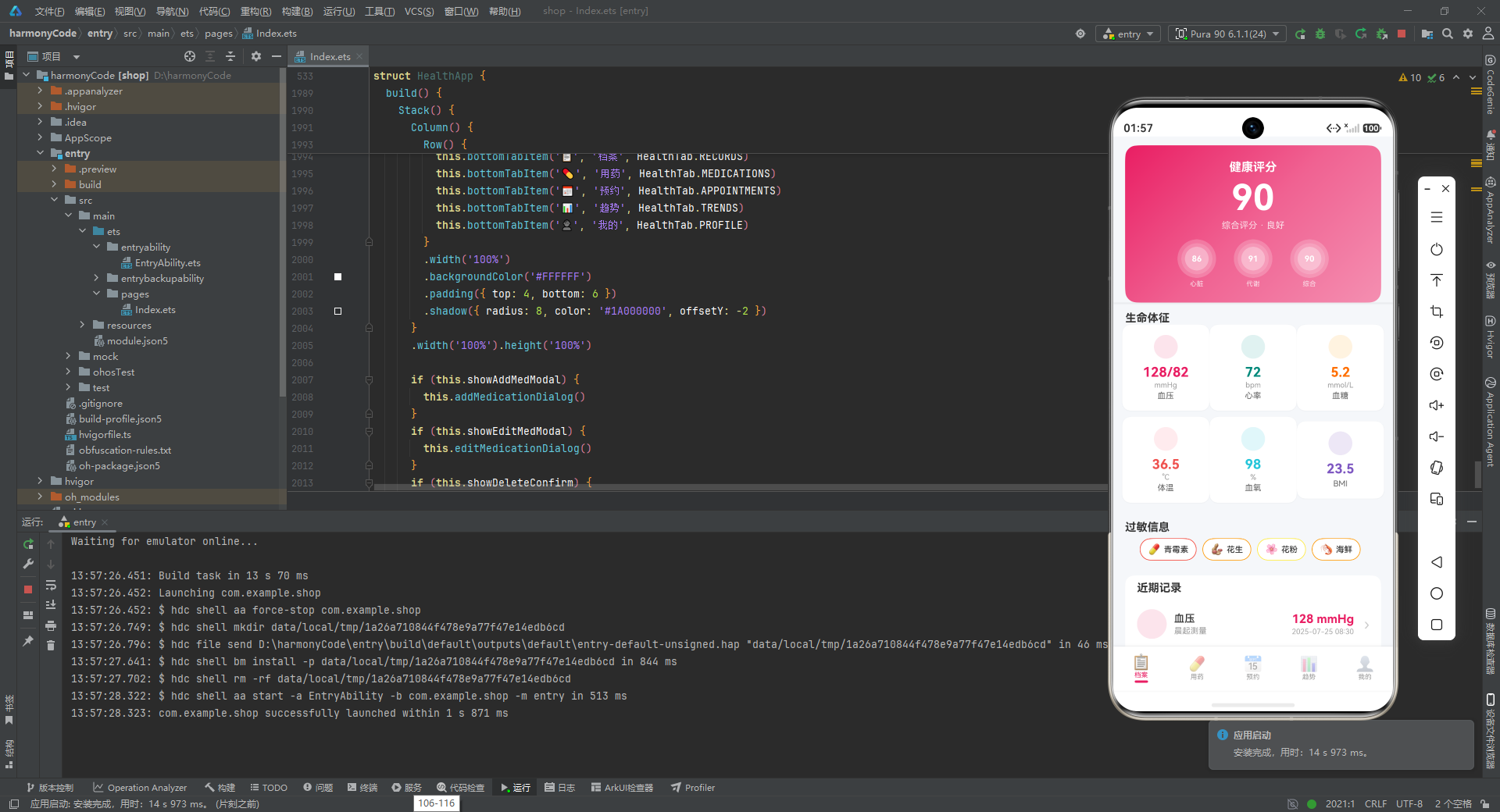
组件复用度分析: 源码大量使用了 @Builder 装饰器定义可复用组件,总计超过 20 个 @Builder 方法。这些组件的粒度设计合理:既有 healthScoreCard 这样的大型复合组件,也有 recordItem 这样的列表项原子组件,还有 vitalSignCard 这样的通用卡片组件。通过参数化设计,同一组件可以适配不同的数据类型和展示需求。
视觉设计体系: 应用建立了完整的视觉语言系统:粉色(#E91E63)作为主品牌色贯穿始终;绿色/橙色/红色作为状态语义色区分正常/警告/危险;#F5F5F5 浅灰作为页面背景;白色卡片 + 12px 圆角 + 轻微阴影作为内容容器标准样式;'1A' 后缀的半透明背景作为标签底色。这种一致性使得应用在视觉上非常协调。
图表实现方案: 趋势页的所有图表都是使用基础布局组件(Column、Row)纯手工构建的,没有引入任何图表库。通过 height 属性的百分比计算、ForEach 循环渲染数据点、alignItems(VerticalAlign.Bottom) 控制柱子从底部生长,实现了柱状图的核心视觉效果。这种方案的优点是零依赖、高度可定制;缺点是代码

讨论HarmonyOS开发技术,专注于API与组件、DevEco Studio、测试、元服务和应用上架分发等。
更多推荐



 8
8 0
0- 0


 已为社区贡献129条内容

所有评论(0)