基于HarmonyOS API 24内容创作与数据洞察addPostDialog实现了从底部弹出的半屏模态框(Bottom Sheet),实现顶部可点击的遮罩区、中间的表单内容区、以及隐含的底部安全区
9.1 发布表单预览
  @Builder createPostFormPreview() {
    Column() {
      Text('发布动态')
        .fontSize(16)
        .fontColor('#333333')
        .fontWeight(FontWeight.Bold)
        .width('100%')

      Row() {
        Column()
          .width(40).height(40)
          .backgroundColor('#7B1FA2')
          .borderRadius(20)

        Column() {
          Text(currentUserName())
            .fontSize(13)
            .fontColor('#333333')
            .fontWeight(FontWeight.Medium)
          Text('选择你的宠物')
            .fontSize(11)
            .fontColor('#999999')
        }
        .alignItems(HorizontalAlign.Start)
        .margin({ left: 10 })
        .layoutWeight(1)
      }
      .margin({ top: 12 })

      Column()
        .width('100%')
        .height(120)
        .backgroundColor('#F5F5F5')
        .borderRadius(10)
        .margin({ top: 10 })

      Row() {
        Column() {
          Text('📷')
            .fontSize(20)
          Text('图片')
            .fontSize(9)
            .fontColor('#999999')
            .margin({ top: 2 })
        }
        .alignItems(HorizontalAlign.Center)
        .margin({ right: 20 })

        Column() {
          Text('#️⃣ ')
            .fontSize(20)
          Text('话题')
            .fontSize(9)
            .fontColor('#999999')
            .margin({ top: 2 })
        }
        .alignItems(HorizontalAlign.Center)
        .margin({ right: 20 })

        Column() {
          Text('📍')
            .fontSize(20)
          Text('位置')
            .fontSize(9)
            .fontColor('#999999')
            .margin({ top: 2 })
        }
        .alignItems(HorizontalAlign.Center)

        Column().layoutWeight(1)

        Row() {
          Text('发布')
            .fontSize(13)
            .fontColor('#FFFFFF')
            .fontWeight(FontWeight.Medium)
        }
        .padding({ left: 20, right: 20, top: 8, bottom: 8 })
        .backgroundColor('#7B1FA2')
        .borderRadius(20)
      }
      .width('100%')
      .margin({ top: 10 })
    }
    .width('100%')
    .padding(16)
    .backgroundColor('#FFFFFF')
    .borderRadius(12)
    .margin({ left: 16, right: 16, top: 12, bottom: 8 })
    .shadow({ radius: 3, color: '#0D000000', offsetY: 1 })
  }
createPostFormPreview 是发布页顶部的动态创建表单,虽然当前为预览性质(无实际输入框),但完整模拟了发布流程的视觉布局。表单分为四个区域:标题"发布动态"、用户信息栏(头像 + 用户名 + 宠物选择提示)、内容占位区(120px 高的灰色圆角矩形,模拟图文编辑区域)、以及底部工具栏。用户信息栏中,用户名通过 currentUserName() 函数动态获取,而非写死,体现了数据驱动的思想。底部工具栏包含三个功能入口(图片、话题、位置),使用 Emoji 图标 + 小标签的垂直排列方式,右边距 20px 保证间距均匀。最右侧的"发布"按钮使用紫色实心填充、圆角 20px、白色文字,在视觉上作为首要操作(Primary Action)非常突出。三个功能入口与发布按钮之间通过 Column().layoutWeight(1) 的弹簧效果实现右对齐。整个卡片采用标准的白色背景、12px 圆角、轻微阴影和 16px 水平外边距,与其他卡片保持视觉统一。
9.2 草稿箱模块
  @Builder draftItem(item: PostModel) {
    Row() {
      Column()
        .width(48).height(48)
        .backgroundColor(item.imageColors[0] ?? '#F5F5F5')
        .borderRadius(8)

      Column() {
        Text(item.content)
          .fontSize(12)
          .fontColor('#555555')
          .maxLines(1)
          .textOverflow({ overflow: TextOverflow.Ellipsis })
        Row() {
          if (item.tags.length > 0) {
            ForEach(item.tags, (tag: string, idx: number) => {
              Text(tag)
                .fontSize(8)
                .fontColor(getTagColor(tag))
                .padding({ left: 6, right: 6, top: 1, bottom: 1 })
                .backgroundColor(getTagColor(tag) + '1A')
                .borderRadius(6)
                .margin({ right: 4 })
            })
          }
        }
        .margin({ top: 4 })
      }
      .alignItems(HorizontalAlign.Start)
      .layoutWeight(1)
      .margin({ left: 10 })

      Text('编辑')
        .fontSize(11)
        .fontColor('#7B1FA2')
        .fontWeight(FontWeight.Medium)
    }
    .width('100%')
    .padding({ top: 10, bottom: 10 })
  }
draftItem 渲染草稿箱中的单条草稿。布局为左中右三栏:左侧是 48x48 的缩略图,使用 item.imageColors[0] ?? '#F5F5F5' 获取首个色值,若不存在则回退到灰色,8px 圆角;中间区域显示内容摘要(单行省略)和标签列表,通过 layoutWeight(1) 占据剩余空间;右侧是"编辑"文本按钮,紫色中等粗细。标签渲染复用了 getTagColor 函数,但字号缩小到 8px、内边距和圆角也相应缩小,适应草稿项的紧凑空间。整个项的垂直内边距为 10px,形成了合适的点击热区。
  @Builder draftSection() {
    Column() {
      Text('草稿箱 (4)')
        .fontSize(14)
        .fontColor('#333333')
        .fontWeight(FontWeight.Bold)
        .width('100%')
        .padding({ left: 0, bottom: 8 })

      this.draftItem(draftPosts[0])
      Divider().color('#F5F5F5').height(0.5)
      this.draftItem(draftPosts[1])
      Divider().color('#F5F5F5').height(0.5)
      this.draftItem(draftPosts[2])
      Divider().color('#F5F5F5').height(0.5)
      this.draftItem(draftPosts[3])
    }
    .width('100%')
    .padding(14)
    .backgroundColor('#FFFFFF')
    .borderRadius(12)
    .margin({ left: 16, right: 16, bottom: 8 })
    .shadow({ radius: 3, color: '#0D000000', offsetY: 1 })
  }
draftSection 是草稿箱卡片容器,标题"草稿箱 (4)"硬编码了数量,实际项目中应动态计算 draftPosts.length。四条草稿项之间使用 0.5px 的浅灰色 Divider 分隔,形成清晰的分割线。整体视觉风格与其他卡片一致。
9.3 发布小贴士与互动统计
  @Builder postingTips() {
    Column() {
      Text('发布小贴士')
        .fontSize(14)
        .fontColor('#333333')
        .fontWeight(FontWeight.Bold)
        .width('100%')
        .padding({ left: 0, bottom: 8 })

      Column() {
        Row() {
          Text('💡')
            .fontSize(16)
            .margin({ right: 8 })
          Text('配上清晰可爱的照片更容易获得关注哦')
            .fontSize(11)
            .fontColor('#666666')
            .layoutWeight(1)
        }
      }
      .width('100%')
      .padding({ top: 6, bottom: 6 })
      // ... 共3条提示
    }
    .width('100%')
    .padding(14)
    .backgroundColor('#FFFFFF')
    .borderRadius(12)
    .margin({ left: 16, right: 16, bottom: 8 })
    .shadow({ radius: 3, color: '#0D000000', offsetY: 1 })
  }
postingTips 是发布页的帮助提示模块,包含三条发布建议。每条提示使用 Row 水平排列 Emoji 图标和文本,图标固定宽度,文本通过 layoutWeight(1) 占据剩余空间。提示内容被包裹在独立的 Column 中,并设置上下内边距 6px,形成合适的行高。这种设计将运营文案与代码解耦,便于后续修改为从配置或后端接口动态获取。
  @Builder postTab() {
    Scroll() {
      Column() {
        this.createPostFormPreview()
        this.draftSection()
        this.postingTips()

        Text('最近发布统计')
          .fontSize(14)
          .fontColor('#333333')
          .fontWeight(FontWeight.Bold)
          .width('100%')
          .padding({ left: 16, right: 16, top: 8, bottom: 6 })

        Row() {
          ForEach(engagementData, (item: EngagementStats, index: number) => {
            Column() {
              Text(item.icon)
                .fontSize(22)
              Text(item.value.toString())
                .fontSize(18)
                .fontColor(item.color)
                .fontWeight(FontWeight.Bold)
                .margin({ top: 4 })
              Text(item.type)
                .fontSize(10)
                .fontColor('#999999')
                .margin({ top: 2 })
            }
            .alignItems(HorizontalAlign.Center)
            .layoutWeight(1)
          })
        }
        .width('100%')
        .padding(14)
        .backgroundColor('#FFFFFF')
        .borderRadius(12)
        .margin({ left: 16, right: 16, bottom: 8 })
        .shadow({ radius: 3, color: '#0D000000', offsetY: 1 })

        Column().height(16)
      }
      .width('100%')
    }
    .layoutWeight(1)
    .scrollBar(BarState.Off)
  }
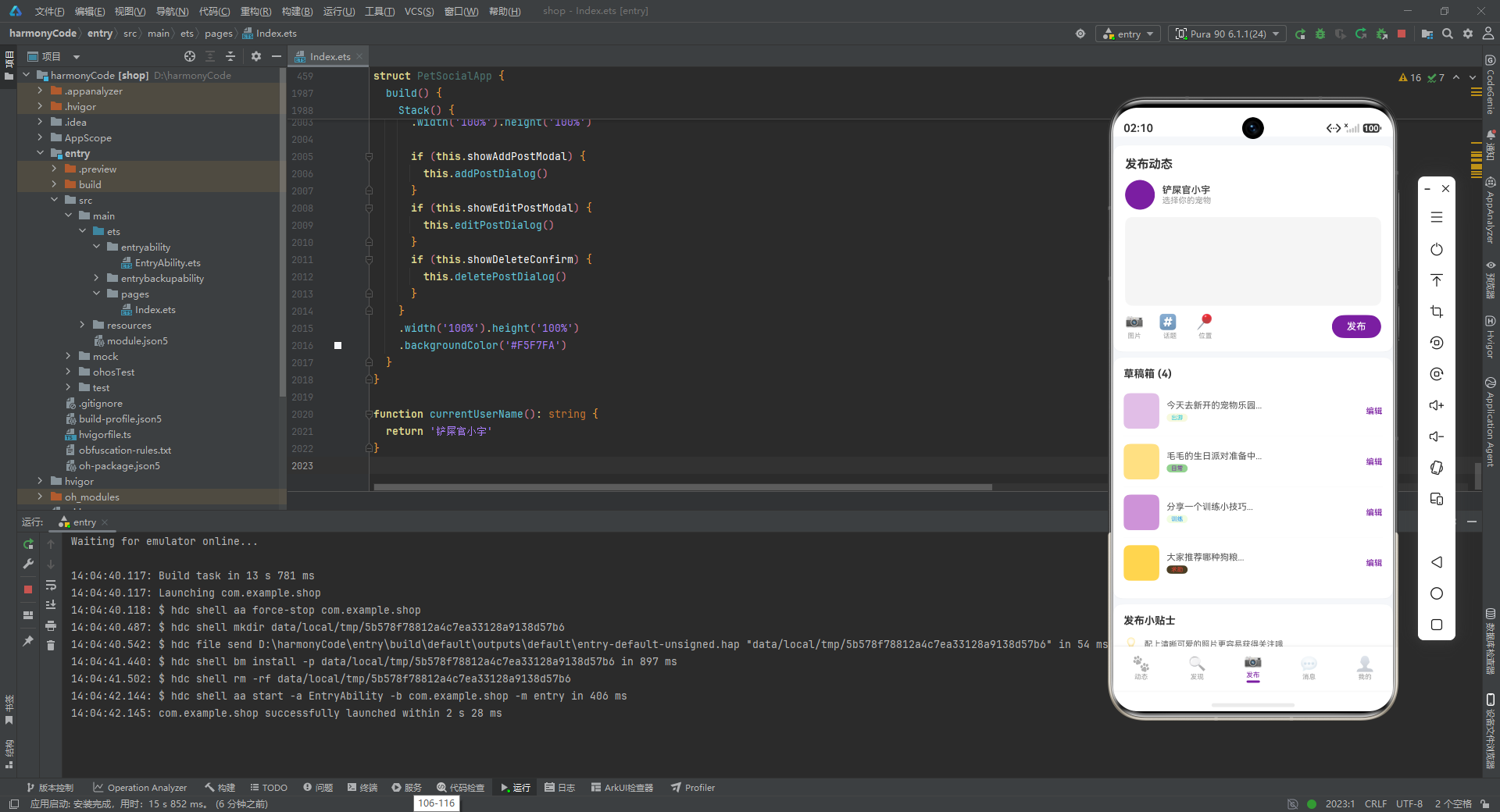
postTab 是发布页的完整组装体,包含:发布表单 → 草稿箱 → 发布小贴士 → "最近发布统计"标题 → 互动数据卡片 → 底部占位。互动统计卡片使用 ForEach 循环渲染 engagementData 数组,每项包含 Emoji 图标、数值和类型标签,三项(获赞、评论、分享)通过 layoutWeight(1) 均分整行宽度。数值使用动态颜色(item.color)和粗体大字号(18px)突出显示,类型标签使用灰色小字号。发布页的设计体现了"创作 + 管理 + 洞察"的三位一体:顶部表单鼓励创作,草稿箱管理未完成内容,底部统计数据给予用户正向反馈,形成完整的内容生产闭环。
十、消息页:社交互动的集中枢纽
10.1 聊天会话项
  @Builder chatItem(item: ChatModel) {
    Row() {
      Stack() {
        Column()
          .width(44).height(44)
          .backgroundColor(item.petAvatarColor)
          .borderRadius(22)
        if (item.isOnline) {
          Column()
            .width(10).height(10)
            .backgroundColor('#4CAF50')
            .borderRadius(5)
            .border({ width: 2, color: '#FFFFFF' })
            .margin({ left: 34, top: 34 })
        }
      }

      Column() {
        Row() {
          Text(item.petName)
            .fontSize(14)
            .fontColor('#333333')
            .fontWeight(FontWeight.Medium)
          Column().layoutWeight(1)
          Text(item.timestamp)
            .fontSize(10)
            .fontColor('#CCCCCC')
        }
        .width('100%')

        Row() {
          Text(item.lastMessage)
            .fontSize(12)
            .fontColor('#999999')
            .maxLines(1)
            .textOverflow({ overflow: TextOverflow.Ellipsis })
            .layoutWeight(1)
          if (item.unread > 0) {
            Column()
              .height(18)
              .backgroundColor('#F44336')
              .borderRadius(9)
              .justifyContent(FlexAlign.Center)
              .alignItems(HorizontalAlign.Center)
              .padding({ left: 5, right: 5 })
          }
        }
        .width('100%')
        .margin({ top: 3 })
      }
      .alignItems(HorizontalAlign.Start)
      .layoutWeight(1)
      .margin({ left: 10 })
    }
    .width('100%')
    .padding({ top: 12, bottom: 12 })
  }
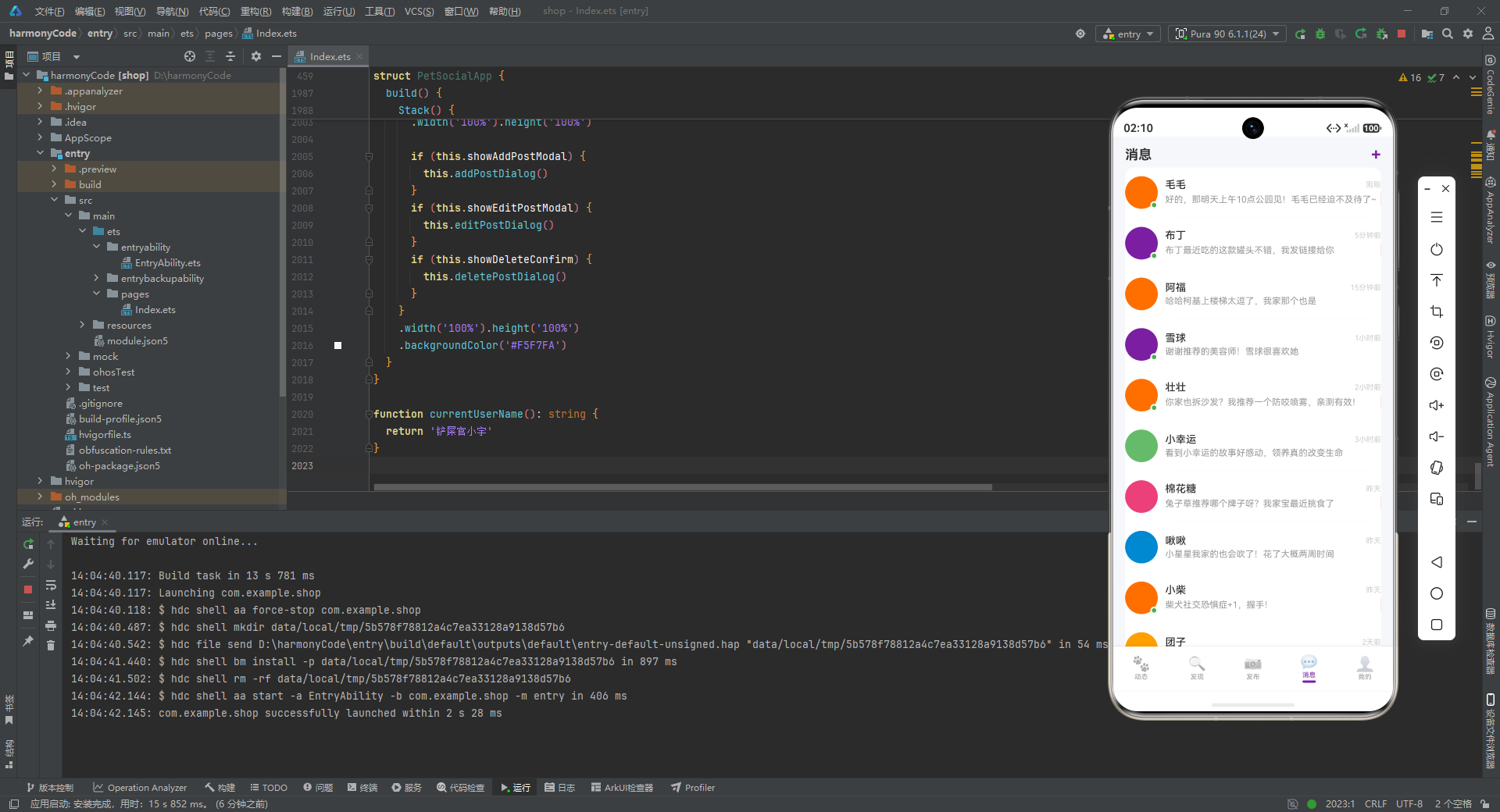
chatItem 是消息列表中的单个会话项,是消息页最核心的 UI 单元。它采用了经典的社交应用会话项布局:左侧头像区、中间信息区、右侧(内嵌于信息区)时间戳和未读角标。头像使用 Stack 堆叠布局实现双层效果:底层是 44x44 的圆形头像(borderRadius(22)),顶层是在线状态指示器——当 item.isOnline 为 true 时,渲染一个 10x10 的绿色小圆点(borderRadius(5)),并通过 margin({ left: 34, top: 34 }) 精确定位到头像右下角。小圆点的 2px 白色边框(border({ width: 2, color: '#FFFFFF' }))创造了与头像分离的切割感,这是在线指示器的标准设计模式。中间信息区分为上下两行:第一行是宠物名(14px 中等粗细)和时间戳(10px 浅灰),通过 layoutWeight(1) 将时间戳推到右侧;第二行是最后消息摘要(12px 灰色,单行省略)和未读角标。未读角标使用条件渲染,当 item.unread > 0 时显示一个高度 18px、圆角 9px(即正圆角胶囊)的红色背景块,内部可容纳具体数字(虽然当前代码中未添加数字文本,但结构已预留)。整个项的垂直内边距 12px,形成了舒适的点击热区。
10.2 通知模块
  @Builder notificationItem(icon: string, title: string, desc: string, time: string, color: string) {
    Row() {
      Column()
        .width(36).height(36)
        .backgroundColor(color + '1A')
        .borderRadius(18)
        .justifyContent(FlexAlign.Center)
        .alignItems(HorizontalAlign.Center)
      Column() {
        Text(title)
          .fontSize(12)
          .fontColor('#333333')
          .fontWeight(FontWeight.Medium)
        Text(desc)
          .fontSize(10)
          .fontColor('#999999')
          .margin({ top: 1 })
          .maxLines(1)
          .textOverflow({ overflow: TextOverflow.Ellipsis })
      }
      .alignItems(HorizontalAlign.Start)
      .layoutWeight(1)
      .margin({ left: 10 })

      Text(time)
        .fontSize(9)
        .fontColor('#CCCCCC')
    }
    .width('100%')
    .padding({ top: 6, bottom: 6 })
  }
notificationItem 是通知列表的单项,采用与聊天项相似但更加紧凑的布局。左侧是 36x36 的圆形图标背景,使用 color + '1A' 实现同色系透明效果;中间是通知标题(12px 中等粗细)和描述(10px 灰色,单行省略);右侧是时间文本(9px 浅灰)。通知项的垂直内边距仅 6px,比聊天项的 12px 更紧凑,因为通知通常数量更多,需要更高的信息密度。通过参数化设计(icon、title、desc、time、color),这个构建器可以复用于各类通知场景(点赞、评论、关注、系统推荐等)。
  @Builder notificationSection() {
    Column() {
      Text('通知')
        .fontSize(14)
        .fontColor('#333333')
        .fontWeight(FontWeight.Bold)
        .width('100%')
        .padding({ left: 0, bottom: 8 })

      this.notificationItem('❤️', '毛毛妈赞了你的动态', '今天带毛毛去公园玩飞盘...', '5分钟前', '#EC407A')
      this.notificationItem('💬', '喵星人小宇评论了你', '布丁也太可爱了叭!!', '15分钟前', '#7B1FA2')
      this.notificationItem('👤', '铲屎官Linda关注了你', '你们可能认识', '30分钟前', '#FF6F00')
      this.notificationItem('⭐', '你的动态被推荐了', '阿福的小短腿上楼梯...', '1小时前', '#FFD700')
    }
    .width('100%')
    .padding(14)
    .backgroundColor('#FFFFFF')
    .borderRadius(12)
    .margin({ left: 16, right: 16, bottom: 8 })
    .shadow({ radius: 3, color: '#0D000000', offsetY: 1 })
  }
notificationSection 将四条不同类型的通知组装为卡片容器。四种通知分别使用了不同的 Emoji 图标和主题色(粉色点赞、紫色评论、橙色关注、黄色推荐),通过视觉色彩区分通知类型,帮助用户快速识别信息优先级。
10.3 消息页整体布局
  @Builder messagesTab() {
    Scroll() {
      Column() {
        Row() {
          Text('消息')
            .fontSize(18)
            .fontColor('#333333')
            .fontWeight(FontWeight.Bold)
          Column().layoutWeight(1)
          Text('+')
            .fontSize(22)
            .fontColor('#7B1FA2')
            .fontWeight(FontWeight.Bold)
        }
        .width('100%')
        .padding({ left: 16, right: 16, top: 12, bottom: 4 })

        Column() {
          this.chatItem(chatList[0])
          Divider().color('#F5F5F5').height(0.5).margin({ left: 66, right: 16 })
          this.chatItem(chatList[1])
          // ... 依次渲染 chatList[2] 到 [9],每项之间用 Divider 分隔
        }
        .backgroundColor('#FFFFFF')
        .borderRadius(12)
        .margin({ left: 16, right: 16 })
        .width('100%')
        .constraintSize({ maxWidth: '100%' })

        this.notificationSection()

        Column().height(16)
      }
      .width('100%')
    }
    .layoutWeight(1)
    .scrollBar(BarState.Off)
  }
messagesTab 是消息页的完整组装体。顶部是标题栏"消息"和右侧的紫色加号按钮(发起新会话)。中间的聊天列表被包裹在一个白色圆角卡片中,10 条会话项之间使用 Divider 分隔,注意分隔线的左边距为 66px 而非 16px——这是为了与头像右侧对齐,创造视觉上的缩进效果,让分割线只出现在文字区域下方,而非贯穿整行,这是 iOS 风格列表的经典设计。.constraintSize({ maxWidth: '100%' }) 确保卡片宽度不会超出父容器。聊天列表卡片下方是通知区域,最后是底部占位。整个页面的垂直滚动由外层 Scroll 提供。
十一、个人中心页:用户身份与成就展示
11.1 用户资料头部
  @Builder userProfileHeader() {
    Column() {
      Row() {
        Column()
          .width(60).height(60)
          .backgroundColor('#7B1FA2')
          .borderRadius(30)

        Column() {
          Text('铲屎官小宇')
            .fontSize(18)
            .fontColor('#FFFFFF')
            .fontWeight(FontWeight.Bold)
          Text('ID: pet_lover_xiaoyu')
            .fontSize(10)
            .fontColor('#FFFFFF')
            .opacity(0.7)
            .margin({ top: 2 })
        }
        .alignItems(HorizontalAlign.Start)
        .margin({ left: 12 })
        .layoutWeight(1)

        Text('›')
          .fontSize(24)
          .fontColor('#FFFFFF')
          .opacity(0.5)
      }
      .width('100%')

      Row() {
        Column() {
          Text(petProfiles.length.toString())
            .fontSize(16)
            .fontColor('#FFFFFF')
            .fontWeight(FontWeight.Bold)
          Text('宠物')
            .fontSize(10)
            .fontColor('#FFFFFF')
            .opacity(0.7)
        }
        .alignItems(HorizontalAlign.Center)
        .layoutWeight(1)
        // ... 动态、粉丝、关注 同理
      }
      .margin({ top: 16 })
    }
    .width('100%')
    .padding(16)
    .borderRadius(16)
    .linearGradient({
      angle: 135,
      colors: [['#7B1FA2', 0.0], ['#9C27B0', 0.5], ['#AB47BC', 1.0]]
    })
    .margin({ left: 16, right: 16, top: 12, bottom: 8 })
    .shadow({ radius: 8, color: '#1A000000', offsetY: 2 })
  }
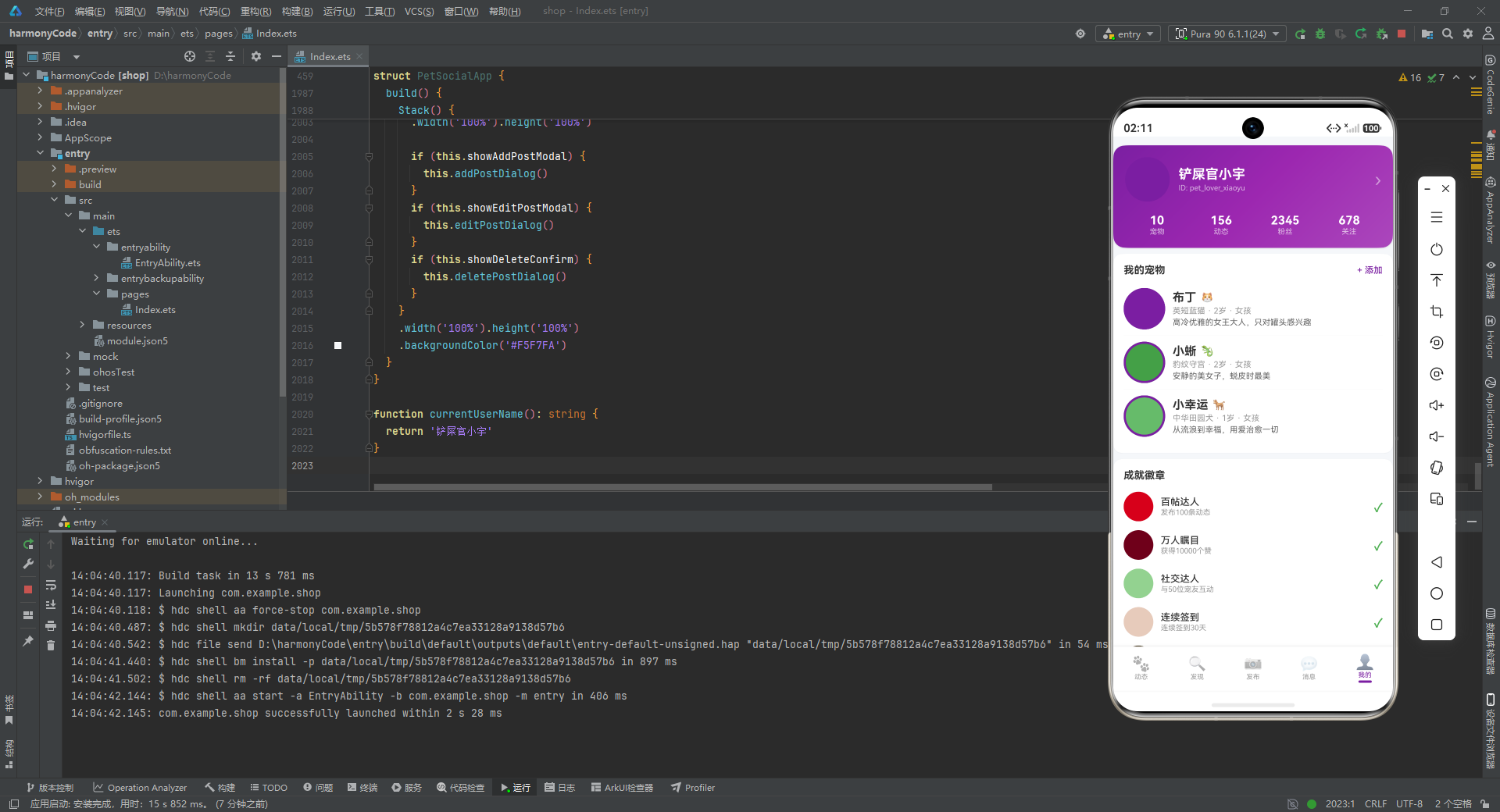
userProfileHeader 是个人中心页顶部的用户资料卡片,采用了与 Feed 页横幅相同的紫色渐变主题,形成品牌视觉的一致性。卡片分为上下两部分:上半部分是用户信息行,左侧 60x60 的圆形头像占位(紫色背景),中间是用户名(18px 白色粗体)和用户 ID(10px 半透明白色),右侧是灰色的右箭头(›)暗示可点击进入详情页。下半部分是数据统计行,四个统计项(宠物数量、动态数量、粉丝数、关注数)通过 layoutWeight(1) 均分整行宽度,每个项垂直居中排列数值(16px 白色粗体)和标签(10px 半透明白色)。宠物数量使用了动态数据 petProfiles.length.toString(),其余三项为硬编码,模拟了真实应用中部分数据来自计算、部分来自后端接口的混合场景。卡片的圆角为 16px(比其他卡片的 12px 更大),阴影也更明显(半径 8px,颜色更深),使其在视觉上更加突出,形成页面的视觉焦点。
11.2 我的宠物与成就徽章
  @Builder myPetProfileCard(profile: PetProfileModel) {
    Row() {
      Column()
        .width(56).height(56)
        .backgroundColor(profile.avatarColor)
        .borderRadius(28)
        .border({ width: 3, color: '#7B1FA2' })

      Column() {
        Row() {
          Text(profile.name)
            .fontSize(16)
            .fontColor('#333333')
            .fontWeight(FontWeight.Bold)
          Column().width(6)
          Text(getPetTypeIcon(profile.type))
            .fontSize(14)
        }
        Text(profile.breed + ' · ' + profile.age + ' · ' + profile.gender)
          .fontSize(11)
          .fontColor('#999999')
          .margin({ top: 2 })
        Text(profile.bio)
          .fontSize(11)
          .fontColor('#666666')
          .margin({ top: 3 })
          .maxLines(1)
          .textOverflow({ overflow: TextOverflow.Ellipsis })
      }
      .alignItems(HorizontalAlign.Start)
      .layoutWeight(1)
      .margin({ left: 10 })
    }
    .width('100%')
    .padding({ top: 8, bottom: 8 })
  }
myPetProfileCard 是"我的宠物"列表中的单项,与发现页的 nearbyPetItem 结构相似但信息更丰富。头像尺寸更大(56x56),同样有 3px 紫色边框。信息区包含三行:第一行是宠物名(16px 粗体)和类型 Emoji;第二行是品种、年龄和性别的组合文本,使用 “·” 作为分隔符;第三行是个性签名(11px 灰色,单行省略)。三行信息通过不同的字号和颜色形成清晰的视觉层级。
  @Builder achievementItem(item: AchievementData) {
    Row() {
      Column()
        .width(40).height(40)
        .backgroundColor(item.earned ? item.color + '1A' : '#F5F5F5')
        .borderRadius(20)
        .justifyContent(FlexAlign.Center)
        .alignItems(HorizontalAlign.Center)
        .opacity(item.earned ? 1.0 : 0.3)

      Column() {
        Text(item.title)
          .fontSize(13)
          .fontColor(item.earned ? '#333333' : '#CCCCCC')
          .fontWeight(FontWeight.Medium)
        Text(item.description)
          .fontSize(10)
          .fontColor(item.earned ? '#999999' : '#DDDDDD')
          .margin({ top: 1 })
      }
      .alignItems(HorizontalAlign.Start)
      .layoutWeight(1)
      .margin({ left: 10 })

      if (item.earned) {
        Text('✓')
          .fontSize(16)
          .fontColor('#4CAF50')
          .fontWeight(FontWeight.Bold)
      }
    }
    .width('100%')
    .padding({ top: 6, bottom: 6 })
  }
achievementItem 是成就徽章的单项,展示了条件渲染在视觉状态差异化上的强大能力。未解锁成就(earned: false)时:背景色为灰色、不透明度 0.3、标题为浅灰色、描述为更浅的灰色,整体呈现置灰效果;已解锁成就时:背景色为同色系透明色、不透明度 1.0、标题为深灰色、描述为灰色,右侧还会显示绿色的"✓"标记。这种通过同一套数据驱动两种截然不同的视觉表现的能力,正是声明式 UI 的核心优势——开发者只需描述不同状态下的样式规则,框架自动处理状态切换时的过渡。
11.3 设置菜单与个人中心组装
  @Builder profileSettings() {
    Column() {
      Text('设置')
        .fontSize(14)
        .fontColor('#333333')
        .fontWeight(FontWeight.Bold)
        .width('100%')
        .padding({ left: 0, bottom: 6 })

      Row() {
        Text('个人资料')
          .fontSize(12)
          .fontColor('#555555')
          .layoutWeight(1)
        Text('›')
          .fontSize(16)
          .fontColor('#CCCCCC')
      }
      .width('100%')
      .padding({ top: 8, bottom: 8 })
      // ... 隐私设置、通知管理、关于我们 同理
    }
    .width('100%')
    .padding(14)
    .backgroundColor('#FFFFFF')
    .borderRadius(12)
    .margin({ left: 16, right: 16, bottom: 8 })
    .shadow({ radius: 3, color: '#0D000000', offsetY: 1 })
  }
profileSettings 是设置菜单卡片,包含四个设置项:个人资料、隐私设置、通知管理、关于我们。每项使用 Row 布局,左侧文本通过 layoutWeight(1) 占据空间,右侧灰色右箭头暗示可点击进入下一级页面。设置项之间没有 Divider 分隔,而是通过上下内边距(8px)自然划分,这是一种更加现代的列表设计风格。
  @Builder profileTab() {
    Scroll() {
      Column() {
        this.userProfileHeader()
        this.myPetSection()
        this.achievementsSection()
        this.profileSettings()
        Column().height(16)
      }
      .width('100%')
    }
    .layoutWeight(1)
    .scrollBar(BarState.Off)
  }
profileTab 是个人中心页的完整组装体:用户资料头部 → 我的宠物 → 成就徽章 → 设置菜单 → 底部占位。四个模块自上而下排列,信息量丰富但层次分明。个人中心页作为用户身份的主阵地,整合了资料展示、宠物管理、成就激励和系统设置四大功能域,是应用中功能密度最高的页面。
十二、弹窗层:模态交互的优雅实现
12.1 发布动态弹窗
  @Builder addPostDialog() {
    Column() {
      Column()
        .layoutWeight(1)
        .width('100%')
        .onClick(() => { this.showAddPostModal = false })

      Column() {
        Row() {
          Text('发布动态')
            .fontSize(17)
            .fontColor('#333333')
            .fontWeight(FontWeight.Bold)
          Column().layoutWeight(1)
          Text('✕')
            .fontSize(18)
            .fontColor('#999999')
            .onClick(() => { this.showAddPostModal = false })
        }
        .width('100%')
        .padding({ bottom: 12 })

        Column()
          .width('100%')
          .height(120)
          .backgroundColor('#F5F5F5')
          .borderRadius(10)
          .margin({ bottom: 12 })

        Row() {
          Column() {
            Text('取消')
              .fontSize(14)
              .fontColor('#999999')
              .fontWeight(FontWeight.Medium)
          }
          .layoutWeight(1)
          .height(44)
          .justifyContent(FlexAlign.Center)
          .backgroundColor('#F5F5F5')
          .borderRadius(22)
          .onClick(() => { this.showAddPostModal = false })

          Column().width(12)

          Column() {
            Text('发布')
              .fontSize(14)
              .fontColor('#FFFFFF')
              .fontWeight(FontWeight.Medium)
          }
          .layoutWeight(1)
          .height(44)
          .justifyContent(FlexAlign.Center)
          .backgroundColor('#7B1FA2')
          .borderRadius(22)
          .onClick(() => { this.showAddPostModal = false })
        }
      }
      .width('100%')
      .padding(20)
      .backgroundColor('#FFFFFF')
      .borderRadius({ topLeft: 20, topRight: 20 })
      .shadow({ radius: 16, color: '#1A000000', offsetY: -4 })
    }
    .width('100%').height('100%')
    .backgroundColor('#99000000')
  }
addPostDialog 实现了从底部弹出的半屏模态框(Bottom Sheet)。整体结构是一个全屏的 Column,内部包含三个部分:顶部可点击的遮罩区、中间的表单内容区、以及(隐含的)底部安全区。顶部遮罩区通过 layoutWeight(1) 占据遮罩上方的所有空间,并绑定点击事件关闭弹窗。内容区固定在底部,宽度 100%,白色背景,顶部圆角 20px(borderRadius({ topLeft: 20, topRight: 20 })),顶部阴影(offsetY: -4)营造出浮层效果。内容区内有标题栏(“发布动态” + 关闭按钮)、120px 的内容编辑占位区、以及底部双按钮(取消 + 发布)。取消按钮使用灰色背景和文字,发布按钮使用紫色背景和白色文字,两个按钮通过 layoutWeight(1) 均分宽度,中间 12px 间距。整个弹窗的最外层背景色为 #99000000(黑色 60% 不透明度),实现了常见的蒙层效果。值得注意的是,所有关闭弹窗的操作(点击遮罩、点击 ✕、点击取消、点击发布)都统一修改 this.showAddPostModal = false,体现了单一状态源驱动的简洁性。
12.2 编辑与删除弹窗
  @Builder editPostDialog() {
    Column() {
      Column()
        .layoutWeight(1)
        .width('100%')
        .onClick(() => { this.showEditPostModal = false })

      Column() {
        Row() {
          Text('编辑动态')
            .fontSize(17)
            .fontColor('#333333')
            .fontWeight(FontWeight.Bold)
          Column().layoutWeight(1)
          Text('✕')
            .fontSize(18)
            .fontColor('#999999')
            .onClick(() => { this.showEditPostModal = false })
        }
        .width('100%')
        .padding({ bottom: 12 })

        Text('内容: ' + (this.selectedPost?.content ?? ''))
          .fontSize(13)
          .fontColor('#555555')
          .width('100%')
          .maxLines(2)
          .textOverflow({ overflow: TextOverflow.Ellipsis })
          .padding({ top: 8, bottom: 8 })

        Row() {
          Column() {
            Text('删除')
              .fontSize(14)
              .fontColor('#F44336')
              .fontWeight(FontWeight.Medium)
          }
          .layoutWeight(1)
          .height(44)
          .justifyContent(FlexAlign.Center)
          .backgroundColor('#FFEBEE')
          .borderRadius(22)
          .onClick(() => { this.showEditPostModal = false })

          Column().width(12)

          Column() {
            Text('保存')
              .fontSize(14)
              .fontColor('#FFFFFF')
              .fontWeight(FontWeight.Medium)
          }
          .layoutWeight(1)
          .height(44)
          .justifyContent(FlexAlign.Center)
          .backgroundColor('#7B1FA2')
          .borderRadius(22)
          .onClick(() => { this.showEditPostModal = false })
        }
        .margin({ top: 12 })
      }
      .width('100%')
      .padding(20)
      .backgroundColor('#FFFFFF')
      .borderRadius({ topLeft: 20, topRight: 20 })
      .shadow({ radius: 16, color: '#1A000000', offsetY: -4 })
    }
    .width('100%').height('100%')
    .backgroundColor('#99000000')
  }
editPostDialog 与发布弹窗结构几乎完全一致,但内容区略有不同:标题改为"编辑动态",内容区显示了当前选中帖子的内容摘要(this.selectedPost?.content ?? '' 使用了可选链和空值合并,防止 selectedPost 为 null 时崩溃),操作按钮改为"删除"(红色文字 + 浅红背景)和"保存"(紫色实心)。这种危险操作(删除)与正向操作(保存)的视觉区分,通过颜色心理学实现:红色暗示警告和不可逆,紫色暗示确认和推进。
  @Builder deletePostDialog() {
    Column() {
      Column()
        .layoutWeight(1)
        .width('100%')
        .onClick(() => { this.showDeleteConfirm = false })

      Column() {
        Column()
          .width(48).height(48)
          .backgroundColor('#FFEBEE')
          .borderRadius(24)
          .justifyContent(FlexAlign.Center)
          .alignItems(HorizontalAlign.Center)
          .margin({ bottom: 12 })

        Text('确认删除')
          .fontSize(17)
          .fontColor('#333333')
          .fontWeight(FontWeight.Bold)
        Text('删除后无法恢复,确定删除该动态吗?')
          .fontSize(13)
          .fontColor('#999999')
          .textAlign(TextAlign.Center)
          .margin({ top: 8, bottom: 16 })

        Row() {
          Column() {
            Text('取消')
              .fontSize(14)
              .fontColor('#999999')
              .fontWeight(FontWeight.Medium)
          }
          .layoutWeight(1)
          .height(44)
          .justifyContent(FlexAlign.Center)
          .backgroundColor('#F5F5F5')
          .borderRadius(22)
          .onClick(() => { this.showDeleteConfirm = false })

          Column().width(12)

          Column() {
            Text('确认删除')
              .fontSize(14)
              .fontColor('#FFFFFF')
              .fontWeight(FontWeight.Medium)
          }
          .layoutWeight(1)
          .height(44)
          .justifyContent(FlexAlign.Center)
          .backgroundColor('#F44336')
          .borderRadius(22)
          .onClick(() => { this.showDeleteConfirm = false })
        }
      }
      .width('100%')
      .padding(24)
      .backgroundColor('#FFFFFF')
      .borderRadius(20)
      .margin({ left: 32, right: 32 })
      .shadow({ radius: 16, color: '#1A000000', offsetY: 4 })

      Column()
        .layoutWeight(1)
        .width('100%')
        .onClick(() => { this.showDeleteConfirm = false })
    }
    .width('100%').height('100%')
    .backgroundColor('#99000000')
    .justifyContent(FlexAlign.Center)
  }
deletePostDialog 是居中显示的确认对话框(Alert Dialog),与底部的半屏弹窗不同。它使用了 justifyContent(FlexAlign.Center) 将内容区垂直居中,内容区宽度为 100% 但带有左右 32px 的外边距,形成两侧留白。内容区顶部有一个 48x48 的浅红色圆形警示图标区域,下方是标题、描述文本和双按钮。描述文本使用 textAlign(TextAlign.Center) 保证在换行时居中对齐。确认删除按钮使用红色实心背景(#F44336),这是危险操作的标准配色。上下两个 Column().layoutWeight(1) 分别占据了内容区上方和下方的空间,确保点击这些区域也能关闭弹窗,提升了用户体验——用户不必精确点击小按钮就能取消危险操作。
十三、内容路由与底部导航:应用的主干架构
13.1 内容区域路由
  @Builder contentArea() {
    Column() {
      if (this.activeTab === PetTab.FEED) {
        this.feedTab()
      } else if (this.activeTab === PetTab.DISCOVER) {
        this.discoverTab()
      } else if (this.activeTab === PetTab.POST) {
        this.postTab()
      } else if (this.activeTab === PetTab.MESSAGES) {
        this.messagesTab()
      } else {
        this.profileTab()
      }
    }
    .layoutWeight(1)
  }
contentArea 是应用的内容路由中心,通过 if-else if 链根据 activeTab 状态决定渲染哪个 Tab 页的内容。这种基于状态的条件渲染是单页应用(SPA)架构的核心模式:整个应用只有一个页面,通过切换状态来显示不同的"虚拟页面"。layoutWeight(1) 确保内容区占据除底部导航栏外的所有垂直空间。使用枚举值进行条件判断,代码语义清晰且具备类型安全。
13.2 底部导航栏
  @Builder bottomTabItem(icon: string, label: string, tab: PetTab) {
    Column() {
      Text(icon)
        .fontSize(20)
        .opacity(this.activeTab === tab ? 1.0 : 0.45)
      Text(label)
        .fontSize(9)
        .fontColor(this.activeTab === tab ? '#7B1FA2' : '#999999')
        .margin({ top: 1 })
      if (this.activeTab === tab) {
        Column()
          .width(18)
          .height(3)
          .backgroundColor('#7B1FA2')
          .borderRadius(2)
          .margin({ top: 2 })
      }
    }
    .layoutWeight(1)
    .alignItems(HorizontalAlign.Center)
    .padding({ top: 5, bottom: 5 })
    .onClick(() => { this.activeTab = tab })
  }
bottomTabItem 是底部导航栏的单个 Tab 按钮,接收 Emoji 图标、标签文本和对应的 PetTab 枚举值。当 activeTab 与当前 Tab 匹配时,图标不透明度为 1.0,文字颜色为紫色,并显示一个 18x3 的紫色底部指示条;未选中时,图标不透明度降至 0.45,文字为灰色,无指示条。这种多维度(图标亮度、文字颜色、指示条)的选中反馈,确保用户在任何光照条件下都能清晰识别当前位置。.onClick(() => { this.activeTab = tab }) 点击时更新状态,触发 contentArea 重新渲染,实现 Tab 切换。每个 Tab 项通过 layoutWeight(1) 均分导航栏宽度,内容垂直居中。
  build() {
    Stack() {
      Column() {
        this.contentArea()
        Row() {
          this.bottomTabItem('🐾', '动态', PetTab.FEED)
          this.bottomTabItem('🔍', '发现', PetTab.DISCOVER)
          this.bottomTabItem('📷', '发布', PetTab.POST)
          this.bottomTabItem('💬', '消息', PetTab.MESSAGES)
          this.bottomTabItem('👤', '我的', PetTab.PROFILE)
        }
        .width('100%')
        .backgroundColor('#FFFFFF')
        .padding({ top: 4, bottom: 6 })
        .shadow({ radius: 8, color: '#1A000000', offsetY: -2 })
      }
      .width('100%').height('100%')

      if (this.showAddPostModal) {
        this.addPostDialog()
      }
      if (this.showEditPostModal) {
        this.editPostDialog()
      }
      if (this.showDeleteConfirm) {
        this.deletePostDialog()
      }
    }
    .width('100%').height('100%')
    .backgroundColor('#F5F7FA')
  }
build() 是组件的入口渲染方法,整个应用被包裹在 Stack 堆叠容器中。Stack 允许子组件层叠放置,后渲染的组件覆盖在先渲染的组件之上,这是实现弹窗蒙层的关键——弹窗组件在 contentArea 和底部导航之后渲染,因此会覆盖在主内容之上。Stack 的第一层是主界面结构:垂直排列的内容区和底部导航栏。内容区通过 contentArea() 动态渲染,底部导航栏是固定的 Row,包含五个 Tab 按钮。导航栏使用白色背景、顶部阴影(offsetY: -2),与内容区形成分隔。Stack 的第二层是三个条件渲染的弹窗:showAddPostModal 控制发布弹窗,showEditPostModal 控制编辑弹窗,showDeleteConfirm 控制删除确认弹窗。三个弹窗独立管理,互不干扰,可以同时存在(虽然当前业务逻辑下不会同时触发)。整个 Stack 的背景色为 #F5F7FA,这是一种极浅的蓝灰色,作为所有页面的统一底色,让白色卡片内容更加突出。
十四、全模块技术对比总结
下表从模块名称、核心功能、状态管理要点、关键组件/构建器、设计模式与亮点五个维度,对本应用五大 Tab 页进行横向对比总结。
| 维度 | 动态 Feed 页 | 发现页 | 发布页 | 消息页 | 个人中心页 |
|---|---|---|---|---|---|
| 模块名称 | feedTab | discoverTab | postTab | messagesTab | profileTab |
| 核心功能 | 社交内容流的沉浸式浏览,包含品牌横幅、宠物故事轮播和帖子卡片列表 | 多维度内容发现,包含分类筛选、热门推荐、品种排行榜、品种网格和附近宠物 | 内容创作入口,包含发布表单预览、草稿箱管理和发布数据统计洞察 | 即时通讯会话列表与系统通知的聚合展示 | 用户身份主页,包含资料展示、宠物管理、成就徽章和系统设置 |
| 状态管理要点 | 无独立状态,纯数据驱动渲染;帖子卡片的点赞/收藏状态通过 PostModel 的 @Observed 属性预留响应式能力 | activeCategory 状态驱动分类筛选条的高亮切换;帖子列表为静态精选子集 | showAddPostModal / showEditPostModal / showDeleteConfirm / selectedPost 多弹窗独立管理;草稿数据为静态模拟 | 聊天数据依赖 ChatModel 的 unread 和 isOnline 属性;未读角标和在线指示器通过条件渲染响应状态变化 | 宠物数量 petProfiles.length 为动态计算数据;成就解锁状态 earned 驱动视觉差异化(置灰/高亮) |
| 关键组件/构建器 | headerBanner(渐变品牌横幅)、storiesRow(水平滚动故事轮播)、postCard(高度复用的帖子卡片,含图文、标签、互动栏) | categoryChipsRow(水平滚动分类胶囊)、breedRankingCard(比例条形图)、breedGridCard(等分网格布局)、nearbyPetsCard(附近宠物列表) | createPostFormPreview(发布表单预览)、draftItem / draftSection(草稿箱列表)、postingTips(运营提示) | chatItem(含在线指示器 Stack 和未读角标的会话项)、notificationItem(参数化通知项)、notificationSection | userProfileHeader(渐变资料头图 + 数据统计)、myPetProfileCard(宠物档案卡片)、achievementItem(解锁状态差异化渲染) |
| 设计模式与亮点 | ① 经典 Feed 流布局;② @Builder 高度复用的 postCard;③ 故事轮播条模拟 Instagram Story 交互 | ① 配置化驱动分类筛选(activeCategory 状态);② 排行榜使用比例计算实现水平条形图;③ 多内容形态聚合(帖子 + 数据 + 列表) | ① 创作-管理-洞察三位一体闭环;② 多弹窗独立状态管理避免条件分支复杂化;③ 草稿箱数据复用 PostModel 统一模型 | ① 会话项使用 Stack 实现头像 + 在线指示器层叠;② 通知项参数化设计支持多类型复用;③ 分割线缩进设计(margin: 66px) | ① 个人头部使用更大圆角和更强阴影形成视觉焦点;② 成就徽章通过 earned 布尔值实现全套视觉状态切换;③ 设置菜单使用右箭头暗示导航层级 |
安装DevEco Studio程序

选择目标安装目录:

设置环境变量,但是需要重启一下:

新建一个空白模板:

设置API为24的模板项目:

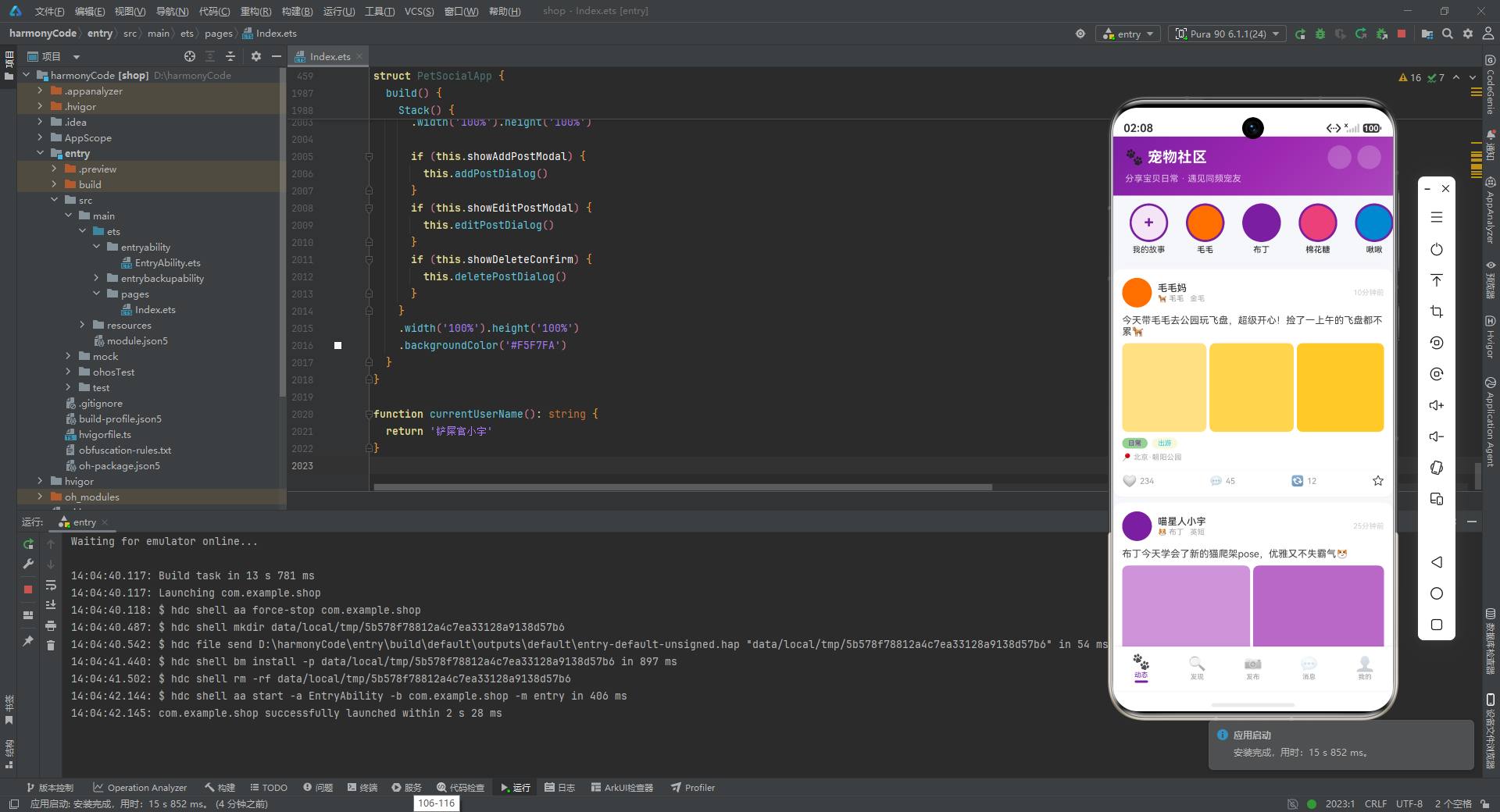
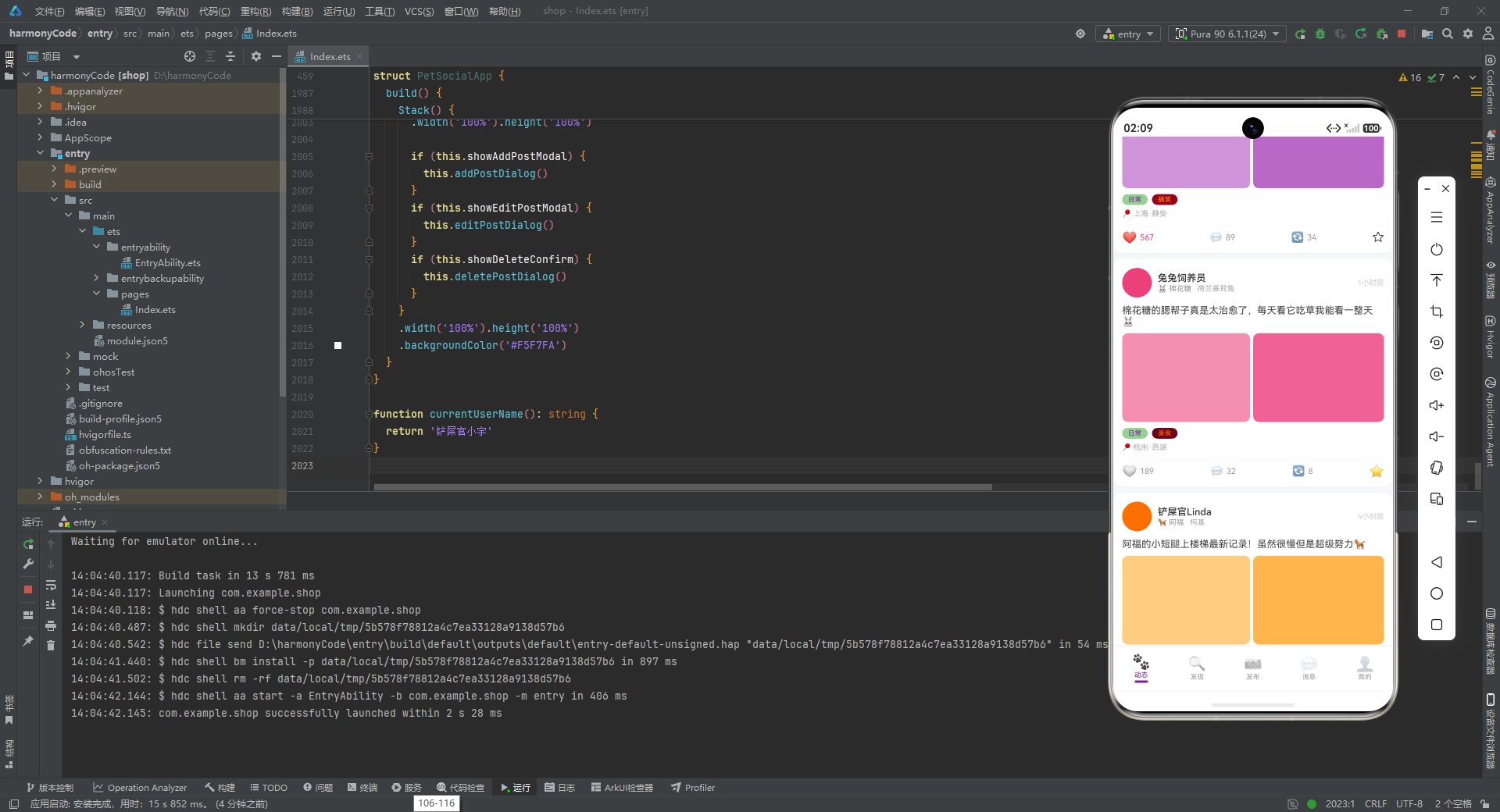
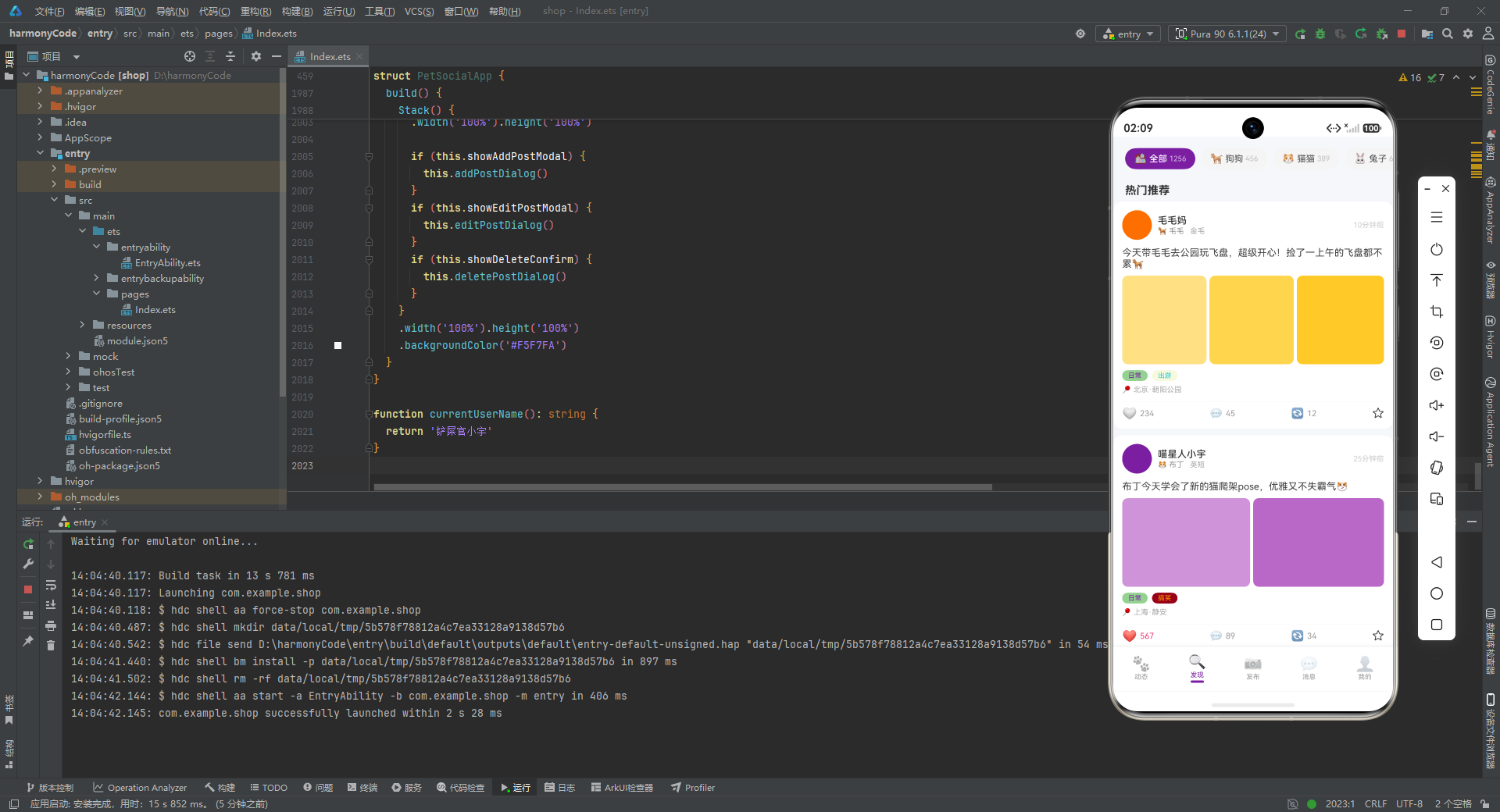
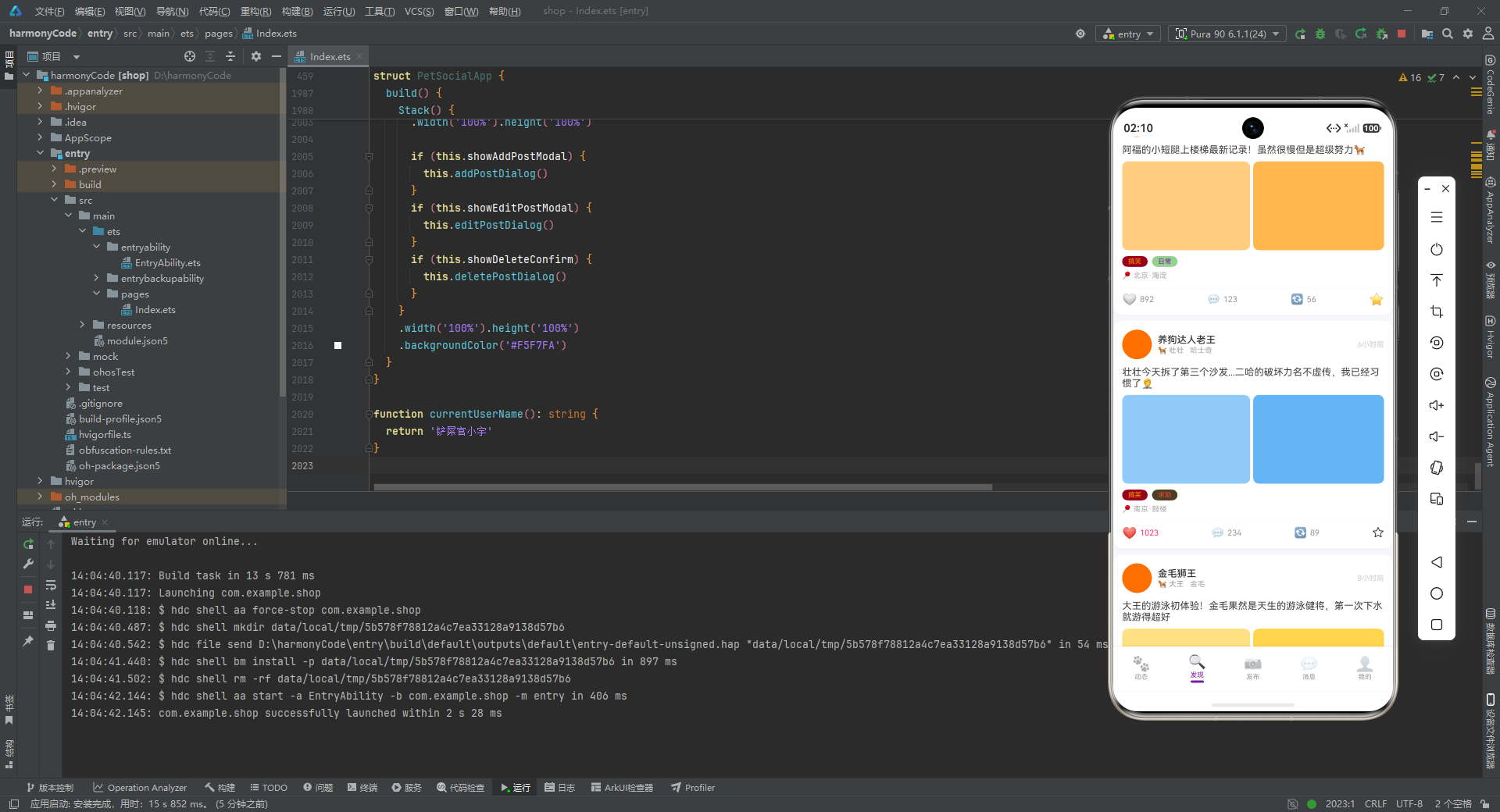
初始化项目,自动下载相关依赖:

完整代码:
// 宠物社交社区 - Pet Social Community
interface PostData {
id: string
authorName: string
authorAvatarColor: string
petName: string
petType: string
petBreed: string
content: string
imageColors: string[]
likes: number
comments: number
shares: number
timestamp: string
location: string
tags: string[]
isLiked: boolean
isFavorited: boolean
}
interface PetProfileData {
id: string
name: string
type: string
breed: string
age: string
gender: string
avatarColor: string
ownerName: string
location: string
bio: string
followers: number
posts: number
}
interface ChatConversation {
id: string
petName: string
petAvatarColor: string
lastMessage: string
timestamp: string
unread: number
isOnline: boolean
}
interface PetTypeMetaConfig {
label: string
icon: string
color: string
bg: string
}
interface PostTagMetaConfig {
label: string
color: string
}
interface BreedInfo {
name: string
type: string
count: number
color: string
}
interface CategoryChipData {
label: string
icon: string
color: string
count: number
}
interface WeeklyActivity {
day: string
posts: number
likes: number
}
interface BreedDistribution {
breed: string
count: number
color: string
}
interface EngagementStats {
type: string
value: number
color: string
icon: string
}
interface AchievementData {
title: string
description: string
icon: string
color: string
earned: boolean
}
@Observed
class PostModel {
id: string
authorName: string
authorAvatarColor: string
petName: string
petType: string
petBreed: string
content: string
imageColors: string[]
likes: number
comments: number
shares: number
timestamp: string
location: string
tags: string[]
isLiked: boolean
isFavorited: boolean
constructor(id: string, authorName: string, authorAvatarColor: string, petName: string, petType: string, petBreed: string, content: string, imageColors: string[], likes: number, comments: number, shares: number, timestamp: string, location: string, tags: string[], isLiked: boolean, isFavorited: boolean) {
this.id = id
this.authorName = authorName
this.authorAvatarColor = authorAvatarColor
this.petName = petName
this.petType = petType
this.petBreed = petBreed
this.content = content
this.imageColors = imageColors
this.likes = likes
this.comments = comments
this.shares = shares
this.timestamp = timestamp
this.location = location
this.tags = tags
this.isLiked = isLiked
this.isFavorited = isFavorited
}
}
@Observed
class PetProfileModel {
id: string
name: string
type: string
breed: string
age: string
gender: string
avatarColor: string
ownerName: string
location: string
bio: string
followers: number
posts: number
constructor(id: string, name: string, type: string, breed: string, age: string, gender: string, avatarColor: string, ownerName: string, location: string, bio: string, followers: number, posts: number) {
this.id = id
this.name = name
this.type = type
this.breed = breed
this.age = age
this.gender = gender
this.avatarColor = avatarColor
this.ownerName = ownerName
this.location = location
this.bio = bio
this.followers = followers
this.posts = posts
}
}
@Observed
class ChatModel {
id: string
petName: string
petAvatarColor: string
lastMessage: string
timestamp: string
unread: number
isOnline: boolean
constructor(id: string, petName: string, petAvatarColor: string, lastMessage: string, timestamp: string, unread: number, isOnline: boolean) {
this.id = id
this.petName = petName
this.petAvatarColor = petAvatarColor
this.lastMessage = lastMessage
this.timestamp = timestamp
this.unread = unread
this.isOnline = isOnline
}
}
const petTypeConfigs: Record<string, PetTypeMetaConfig> = {
'狗': { label: '狗狗', icon: '🐕', color: '#FF6F00', bg: '#FFF3E0' },
'猫': { label: '猫猫', icon: '🐱', color: '#7B1FA2', bg: '#F3E5F5' },
'兔': { label: '兔子', icon: '🐰', color: '#EC407A', bg: '#FCE4EC' },
'鸟': { label: '鸟类', icon: '🐦', color: '#0288D1', bg: '#E1F5FE' },
'仓鼠': { label: '仓鼠', icon: '🐹', color: '#FFA000', bg: '#FFF8E1' },
'爬宠': { label: '爬宠', icon: '🦎', color: '#43A047', bg: '#E8F5E9' },
}
const tagConfigs: Record<string, PostTagMetaConfig> = {
'日常': { label: '日常', color: '#7B1FA2' },
'美食': { label: '美食', color: '#FF6F00' },
'健康': { label: '健康', color: '#4CAF50' },
'搞笑': { label: '搞笑', color: '#FF9800' },
'穿搭': { label: '穿搭', color: '#EC407A' },
'训练': { label: '训练', color: '#2196F3' },
'出游': { label: '出游', color: '#26C6DA' },
'领养': { label: '领养', color: '#66BB6A' },
'求助': { label: '求助', color: '#F44336' },
}
const posts: PostModel[] = [
new PostModel('p1', '毛毛妈', '#FF6F00', '毛毛', '狗', '金毛', '今天带毛毛去公园玩飞盘,超级开心!捡了一上午的飞盘都不累🐕', ['#FFE082', '#FFD54F', '#FFCA28'], 234, 45, 12, '10分钟前', '北京·朝阳公园', ['日常', '出游'], false, false),
new PostModel('p2', '喵星人小宇', '#7B1FA2', '布丁', '猫', '英短', '布丁今天学会了新的猫爬架pose,优雅又不失霸气😼', ['#CE93D8', '#BA68C8'], 567, 89, 34, '25分钟前', '上海·静安', ['日常', '搞笑'], true, false),
new PostModel('p3', '兔兔饲养员', '#EC407A', '棉花糖', '兔', '荷兰垂耳兔', '棉花糖的腮帮子真是太治愈了,每天看它吃草我能看一整天🐰', ['#F48FB1', '#F06292'], 189, 32, 8, '1小时前', '杭州·西湖', ['日常', '美食'], false, true),
new PostModel('p4', '鸟语花香', '#0288D1', '啾啾', '鸟', '虎皮鹦鹉', '啾啾学会说"你好"了!虽然发音还不太标准但是太可爱了🦜', ['#81D4FA', '#4FC3F7'], 345, 67, 22, '2小时前', '广州·天河', ['日常', '训练'], false, false),
new PostModel('p5', '仓鼠小屋', '#FFA000', '团子', '仓鼠', '银狐', '团子的新窝到了,一个跑轮能玩一整天,囤粮技能也点满了🐹', ['#FFD54F', '#FFE082'], 123, 18, 5, '3小时前', '深圳·南山', ['日常'], false, false),
new PostModel('p6', '爬宠爱好者', '#43A047', '小蜥', '爬宠', '豹纹守宫', '蜕皮完成!新皮肤颜色超漂亮,爬宠的蜕变总是让人惊叹🦎', ['#81C784', '#66BB6A'], 267, 41, 15, '3小时前', '成都·武侯', ['日常', '健康'], true, false),
new PostModel('p7', '铲屎官Linda', '#FF6F00', '阿福', '狗', '柯基', '阿福的小短腿上楼梯最新记录!虽然很慢但是超级努力🐕', ['#FFCC80', '#FFB74D'], 892, 123, 56, '4小时前', '北京·海淀', ['搞笑', '日常'], false, true),
new PostModel('p8', '喵了个咪', '#7B1FA2', '雪球', '猫', '布偶猫', '雪球今天去洗澡了,美容师说它是店里最乖的小猫咪,真的假的?', ['#E1BEE7', '#CE93D8'], 456, 78, 23, '5小时前', '上海·浦东', ['日常', '穿搭'], false, false),
new PostModel('p9', '养狗达人老王', '#FF6F00', '壮壮', '狗', '哈士奇', '壮壮今天拆了第三个沙发...二哈的破坏力名不虚传,我已经习惯了🤦', ['#90CAF9', '#64B5F6'], 1023, 234, 89, '6小时前', '南京·鼓楼', ['搞笑', '求助'], true, false),
new PostModel('p10', '兔年大吉', '#EC407A', '雪糕', '兔', '安哥拉兔', '雪糕换毛季到了,每天梳下来的毛能织围巾了🐰', ['#FCE4EC', '#F8BBD0'], 156, 25, 7, '7小时前', '重庆·渝中', ['健康', '日常'], false, false),
new PostModel('p11', '金毛狮王', '#FF6F00', '大王', '狗', '金毛', '大王的游泳初体验!金毛果然是天生的游泳健将,第一次下水就游得超好', ['#FFE082', '#FFD54F'], 678, 98, 45, '8小时前', '青岛·崂山', ['日常', '出游', '训练'], false, false),
new PostModel('p12', '暹罗猫主人', '#7B1FA2', '咖啡', '猫', '暹罗猫', '咖啡今天在窗口看鸟看了两小时,专注力满分,就是抓不到😹', ['#C5CAE9', '#9FA8DA'], 334, 52, 14, '9小时前', '武汉·武昌', ['搞笑', '日常'], false, false),
new PostModel('p13', '铲屎官日记', '#FF6F00', '豆豆', '狗', '泰迪', '豆豆新发型!这次是韩系蓬蓬头,走在路上回头率超高🐩', ['#BCAAA4', '#A1887F'], 445, 67, 28, '10小时前', '苏州·姑苏', ['穿搭', '日常'], false, true),
new PostModel('p14', '喵酱的日常', '#7B1FA2', '拿破仑', '猫', '曼基康猫', '小短腿拿破仑跳不上沙发急得团团转,最后是被我抱上去的😸', ['#FFE082', '#FFF176'], 789, 145, 67, '11小时前', '长沙·岳麓', ['搞笑', '日常'], true, false),
new PostModel('p15', '鸟友之家', '#0288D1', '彩彩', '鸟', '玄凤鹦鹉', '彩彩学会吹口哨了!居然能吹出小星星的旋律,太聪明了🦜', ['#80DEEA', '#4DD0E1'], 278, 38, 12, '12小时前', '西安·雁塔', ['训练', '日常'], false, false),
new PostModel('p16', '爬行天下', '#43A047', '龙龙', '爬宠', '鬃狮蜥', '龙龙今天的伙食是超大号杜比亚,吃得开心到点头👑', ['#A5D6A7', '#81C784'], 198, 29, 8, '13小时前', '厦门·思明', ['美食', '日常'], false, false),
new PostModel('p17', '柴犬之家', '#FF6F00', '小柴', '狗', '柴犬', '今天去网红狗咖遇到了超多小伙伴,小柴社恐又犯了躲在我身后🐕', ['#FFCC80', '#FFB74D'], 567, 89, 34, '14小时前', '成都·锦江', ['日常', '搞笑'], false, false),
new PostModel('p18', '领养代替购买', '#66BB6A', '小幸运', '狗', '中华田园犬', '小幸运来家一个月了,从流浪到有家,每一天都是新的开始。领养不放弃!', ['#A5D6A7', '#81C784'], 1234, 267, 156, '15小时前', '杭州·余杭', ['领养', '日常'], true, true),
]
const petProfiles: PetProfileModel[] = [
new PetProfileModel('pp1', '毛毛', '狗', '金毛寻回犬', '3岁', '男孩', '#FF6F00', '毛毛妈', '北京·朝阳', '爱玩飞盘的阳光大男孩,每天都要出门撒欢!', 2345, 156),
new PetProfileModel('pp2', '布丁', '猫', '英短蓝猫', '2岁', '女孩', '#7B1FA2', '喵星人小宇', '上海·静安', '高冷优雅的女王大人,只对罐头感兴趣', 5678, 289),
new PetProfileModel('pp3', '棉花糖', '兔', '荷兰垂耳兔', '1岁', '女孩', '#EC407A', '兔兔饲养员', '杭州·西湖', '腮帮子永远鼓鼓的吃货小公主', 1234, 67),
new PetProfileModel('pp4', '啾啾', '鸟', '虎皮鹦鹉', '8个月', '男孩', '#0288D1', '鸟语花香', '广州·天河', '正在学说话的语言小天才', 890, 45),
new PetProfileModel('pp5', '团子', '仓鼠', '银狐仓鼠', '6个月', '男孩', '#FFA000', '仓鼠小屋', '深圳·南山', '囤粮专业户,跑轮十级爱好者', 678, 34),
new PetProfileModel('pp6', '小蜥', '爬宠', '豹纹守宫', '2岁', '女孩', '#43A047', '爬宠爱好者', '成都·武侯', '安静的美女子,蜕皮时最美', 456, 23),
new PetProfileModel('pp7', '阿福', '狗', '柯基', '2岁', '男孩', '#FF6F00', '铲屎官Linda', '北京·海淀', '短腿界的马拉松选手', 3456, 198),
new PetProfileModel('pp8', '雪球', '猫', '布偶猫', '1岁', '女孩', '#7B1FA2', '喵了个咪', '上海·浦东', '人见人爱的仙女猫,性格温柔', 4567, 167),
new PetProfileModel('pp9', '壮壮', '狗', '哈士奇', '3岁', '男孩', '#FF6F00', '养狗达人老王', '南京·鼓楼', '拆家专业户,但眼神永远无辜', 8901, 345),
new PetProfileModel('pp10', '小幸运', '狗', '中华田园犬', '1岁', '女孩', '#66BB6A', '领养人Lily', '杭州·余杭', '从流浪到幸福,用爱治愈一切', 5678, 89),
]
const chatList: ChatModel[] = [
new ChatModel('c1', '毛毛', '#FF6F00', '好的,那明天上午10点公园见!毛毛已经迫不及待了~', '刚刚', 3, true),
new ChatModel('c2', '布丁', '#7B1FA2', '布丁最近吃的这款罐头不错,我发链接给你', '5分钟前', 1, true),
new ChatModel('c3', '阿福', '#FF6F00', '哈哈柯基上楼梯太逗了,我家那个也是', '15分钟前', 0, false),
new ChatModel('c4', '雪球', '#7B1FA2', '谢谢推荐的美容师!雪球很喜欢她', '1小时前', 0, true),
new ChatModel('c5', '壮壮', '#FF6F00', '你家也拆沙发?我推荐一个防咬喷雾,亲测有效!', '2小时前', 5, true),
new ChatModel('c6', '小幸运', '#66BB6A', '看到小幸运的故事好感动,领养真的改变生命', '3小时前', 0, false),
new ChatModel('c7', '棉花糖', '#EC407A', '兔子草推荐哪个牌子呀?我家宝最近挑食了', '昨天', 2, false),
new ChatModel('c8', '啾啾', '#0288D1', '小星星我家的也会吹了!花了大概两周时间', '昨天', 0, false),
new ChatModel('c9', '小柴', '#FF6F00', '柴犬社交恐惧症+1,握手!', '昨天', 1, true),
new ChatModel('c10', '团子', '#FFA000', '新跑轮链接能再发一次吗?我找不到了', '2天前', 0, false),
]
const breedList: BreedInfo[] = [
{ name: '金毛', type: '狗', count: 234, color: '#FF6F00' },
{ name: '英短', type: '猫', count: 198, color: '#7B1FA2' },
{ name: '柯基', type: '狗', count: 167, color: '#FF6F00' },
{ name: '布偶猫', type: '猫', count: 145, color: '#7B1FA2' },
{ name: '哈士奇', type: '狗', count: 123, color: '#FF6F00' },
{ name: '柴犬', type: '狗', count: 98, color: '#FF6F00' },
]
const categoryChips: CategoryChipData[] = [
{ label: '全部', icon: '🏠', color: '#7B1FA2', count: 1256 },
{ label: '狗狗', icon: '🐕', color: '#FF6F00', count: 456 },
{ label: '猫猫', icon: '🐱', color: '#7B1FA2', count: 389 },
{ label: '兔子', icon: '🐰', color: '#EC407A', count: 67 },
{ label: '鸟类', icon: '🐦', color: '#0288D1', count: 45 },
{ label: '仓鼠', icon: '🐹', color: '#FFA000', count: 38 },
{ label: '爬宠', icon: '🦎', color: '#43A047', count: 23 },
]
const weeklyActivity: WeeklyActivity[] = [
{ day: '周一', posts: 45, likes: 1234 },
{ day: '周二', posts: 52, likes: 1456 },
{ day: '周三', posts: 48, likes: 1345 },
{ day: '周四', posts: 56, likes: 1567 },
{ day: '周五', posts: 67, likes: 1890 },
{ day: '周六', posts: 89, likes: 2345 },
{ day: '周日', posts: 78, likes: 2100 },
]
const breedDistribution: BreedDistribution[] = [
{ breed: '金毛', count: 234, color: '#FF6F00' },
{ breed: '英短', count: 198, color: '#7B1FA2' },
{ breed: '柯基', count: 167, color: '#FF6F00' },
{ breed: '布偶猫', count: 145, color: '#7B1FA2' },
{ breed: '哈士奇', count: 123, color: '#FF6F00' },
{ breed: '柴犬', count: 98, color: '#FF6F00' },
{ breed: '泰迪', count: 87, color: '#BCAAA4' },
{ breed: '暹罗猫', count: 76, color: '#7B1FA2' },
]
const engagementData: EngagementStats[] = [
{ type: '获赞', value: 12890, color: '#EC407A', icon: '❤️' },
{ type: '评论', value: 3456, color: '#7B1FA2', icon: '💬' },
{ type: '分享', value: 1890, color: '#4CAF50', icon: '🔄' },
]
const achievements: AchievementData[] = [
{ title: '百帖达人', description: '发布100条动态', icon: '🏆', color: '#FFD700', earned: true },
{ title: '万人瞩目', description: '获得10000个赞', icon: '⭐', color: '#FF6F00', earned: true },
{ title: '社交达人', description: '与50位宠友互动', icon: '🤝', color: '#7B1FA2', earned: true },
{ title: '连续签到', description: '连续签到30天', icon: '📅', color: '#4CAF50', earned: true },
{ title: '热门精选', description: '10次入选热门', icon: '🔥', color: '#F44336', earned: true },
{ title: '摄影大师', description: '发布100张美图', icon: '📸', color: '#2196F3', earned: false },
{ title: '领养先锋', description: '帮助5只宠物找到家', icon: '💕', color: '#EC407A', earned: false },
{ title: '百科专家', description: '回答100个求助', icon: '📚', color: '#26C6DA', earned: true },
]
const draftPosts: PostModel[] = [
new PostModel('d1', '当前用户', '#7B1FA2', '毛毛', '狗', '金毛', '今天去新开的宠物乐园...', ['#E1BEE7'], 0, 0, 0, '草稿', '', ['出游'], false, false),
new PostModel('d2', '当前用户', '#7B1FA2', '毛毛', '狗', '金毛', '毛毛的生日派对准备中...', ['#FFE082'], 0, 0, 0, '草稿', '', ['日常'], false, false),
new PostModel('d3', '当前用户', '#7B1FA2', '毛毛', '狗', '金毛', '分享一个训练小技巧...', ['#CE93D8'], 0, 0, 0, '草稿', '', ['训练'], false, false),
new PostModel('d4', '当前用户', '#7B1FA2', '毛毛', '狗', '金毛', '大家推荐哪种狗粮...', ['#FFD54F'], 0, 0, 0, '草稿', '', ['求助'], false, false),
]
function formatTimestamp(ts: string): string {
return ts
}
function getPetTypeIcon(type: string): string {
const cfg = petTypeConfigs[type]
if (cfg !== undefined) {
return cfg.icon
}
return '🐾'
}
function getPetTypeColor(type: string): string {
const cfg = petTypeConfigs[type]
if (cfg !== undefined) {
return cfg.color
}
return '#999999'
}
function getPetTypeBg(type: string): string {
const cfg = petTypeConfigs[type]
if (cfg !== undefined) {
return cfg.bg
}
return '#F5F5F5'
}
function getTagColor(tag: string): string {
const cfg = tagConfigs[tag]
if (cfg !== undefined) {
return cfg.color
}
return '#7B1FA2'
}
function getLikeIconColor(isLiked: boolean): string {
if (isLiked) {
return '#EC407A'
}
return '#999999'
}
function getMaxActivityValue(data: WeeklyActivity[]): number {
let maxVal: number = 0
for (let i = 0; i < data.length; i++) {
if (data[i].likes > maxVal) {
maxVal = data[i].likes
}
}
return maxVal + 200
}
function getMaxBreedCount(data: BreedDistribution[]): number {
let maxVal: number = 0
for (let i = 0; i < data.length; i++) {
if (data[i].count > maxVal) {
maxVal = data[i].count
}
}
return maxVal + 50
}
function getPostCountForPet(petId: string): number {
for (let i = 0; i < petProfiles.length; i++) {
if (petProfiles[i].id === petId) {
return petProfiles[i].posts
}
}
return 0
}
function getDogPosts(): PostModel[] {
const result: PostModel[] = posts
return result
}
function getOnlineColor(isOnline: boolean): string {
if (isOnline) {
return '#4CAF50'
}
return '#CCCCCC'
}
function getChatUnreadBadge(unread: number): string {
if (unread > 0) {
return unread.toString()
}
return ''
}
enum PetTab {
FEED = 0,
DISCOVER = 1,
POST = 2,
MESSAGES = 3,
PROFILE = 4
}
function getPetTabIcon(tab: PetTab): string {
if (tab === PetTab.FEED) {
return '🐾'
} else if (tab === PetTab.DISCOVER) {
return '🔍'
} else if (tab === PetTab.POST) {
return '📷'
} else if (tab === PetTab.MESSAGES) {
return '💬'
} else {
return '👤'
}
}
function getPetTabLabel(tab: PetTab): string {
if (tab === PetTab.FEED) {
return '动态'
} else if (tab === PetTab.DISCOVER) {
return '发现'
} else if (tab === PetTab.POST) {
return '发布'
} else if (tab === PetTab.MESSAGES) {
return '消息'
} else {
return '我的'
}
}
function getTimeDisplay(ts: string): string {
if (ts === '草稿') {
return '草稿'
}
return ts
}
@Entry
@Component
struct PetSocialApp {
@State activeTab: PetTab = PetTab.FEED
@State showAddPostModal: boolean = false
@State showEditPostModal: boolean = false
@State showDeleteConfirm: boolean = false
@State selectedPost: PostModel | null = null
@State activeCategory: string = '全部'
@Builder headerBanner() {
Column() {
Row() {
Text('🐾 宠物社区')
.fontSize(20)
.fontColor('#FFFFFF')
.fontWeight(FontWeight.Bold)
Column().layoutWeight(1)
Row() {
Column()
.width(32).height(32)
.backgroundColor('#FFFFFF')
.opacity(0.2)
.borderRadius(16)
.justifyContent(FlexAlign.Center)
.alignItems(HorizontalAlign.Center)
Column().width(8)
Column()
.width(32).height(32)
.backgroundColor('#FFFFFF')
.opacity(0.2)
.borderRadius(16)
.justifyContent(FlexAlign.Center)
.alignItems(HorizontalAlign.Center)
}
}
.width('100%')
Row() {
Text('分享宝贝日常 · 遇见同频宠友')
.fontSize(12)
.fontColor('#FFFFFF')
.opacity(0.7)
}
.width('100%')
.margin({ top: 6 })
}
.width('100%')
.padding({ top: 12, bottom: 16, left: 16, right: 16 })
.linearGradient({
angle: 135,
colors: [['#7B1FA2', 0.0], ['#9C27B0', 0.5], ['#AB47BC', 1.0]]
})
}
@Builder petStoryItem(profile: PetProfileModel) {
Column() {
Column()
.width(52).height(52)
.backgroundColor(profile.avatarColor)
.borderRadius(26)
.border({ width: 3, color: '#7B1FA2' })
Text(profile.name)
.fontSize(11)
.fontColor('#333333')
.fontWeight(FontWeight.Medium)
.margin({ top: 4 })
.maxLines(1)
.textOverflow({ overflow: TextOverflow.Ellipsis })
}
.alignItems(HorizontalAlign.Center)
.width(64)
.margin({ right: 12 })
}
@Builder storiesRow() {
Scroll() {
Row() {
Column() {
Stack() {
Column()
.width(52).height(52)
.backgroundColor('#F3E5F5')
.borderRadius(26)
.border({ width: 3, color: '#7B1FA2' })
Text('+')
.fontSize(22)
.fontColor('#7B1FA2')
.fontWeight(FontWeight.Bold)
}
Text('我的故事')
.fontSize(11)
.fontColor('#333333')
.margin({ top: 4 })
.maxLines(1)
.textOverflow({ overflow: TextOverflow.Ellipsis })
}
.alignItems(HorizontalAlign.Center)
.width(64)
.margin({ right: 12 })
this.petStoryItem(petProfiles[0])
this.petStoryItem(petProfiles[1])
this.petStoryItem(petProfiles[2])
this.petStoryItem(petProfiles[3])
this.petStoryItem(petProfiles[4])
this.petStoryItem(petProfiles[5])
this.petStoryItem(petProfiles[6])
this.petStoryItem(petProfiles[7])
}
.padding({ left: 16, right: 16 })
}
.scrollable(ScrollDirection.Horizontal)
.scrollBar(BarState.Off)
.height(90)
}
@Builder postCard(item: PostModel) {
Column() {
Row() {
Column()
.width(40).height(40)
.backgroundColor(item.authorAvatarColor)
.borderRadius(20)
Column() {
Text(item.authorName)
.fontSize(13)
.fontColor('#333333')
.fontWeight(FontWeight.Medium)
Row() {
Text(getPetTypeIcon(item.petType) + ' ' + item.petName)
.fontSize(10)
.fontColor('#999999')
Column().width(8)
Text(item.petBreed)
.fontSize(10)
.fontColor('#AAAAAA')
}
.margin({ top: 1 })
}
.alignItems(HorizontalAlign.Start)
.margin({ left: 8 })
.layoutWeight(1)
Text(item.timestamp)
.fontSize(10)
.fontColor('#CCCCCC')
}
.width('100%')
if (item.content.length > 0) {
Text(item.content)
.fontSize(13)
.fontColor('#444444')
.width('100%')
.margin({ top: 10 })
.maxLines(4)
.textOverflow({ overflow: TextOverflow.Ellipsis })
}
if (item.imageColors.length > 0) {
Row() {
ForEach(item.imageColors, (color: string, idx: number) => {
Column()
.layoutWeight(1)
.height(120)
.backgroundColor(color)
.borderRadius(8)
.margin({ right: idx < item.imageColors.length - 1 ? 4 : 0 })
})
}
.width('100%')
.margin({ top: 8 })
}
if (item.tags.length > 0) {
Row() {
ForEach(item.tags, (tag: string, idx: number) => {
Text(tag)
.fontSize(9)
.fontColor(getTagColor(tag))
.padding({ left: 8, right: 8, top: 2, bottom: 2 })
.backgroundColor(getTagColor(tag) + '1A')
.borderRadius(8)
.margin({ right: 6 })
})
}
.width('100%')
.margin({ top: 8 })
}
if (item.location.length > 0) {
Row() {
Text('📍 ' + item.location)
.fontSize(10)
.fontColor('#AAAAAA')
}
.width('100%')
.margin({ top: 6 })
}
Divider()
.color('#F5F5F5')
.height(0.5)
.margin({ top: 10, bottom: 6 })
Row() {
Row() {
Text(item.isLiked ? '❤️' : '🤍')
.fontSize(16)
Text(item.likes.toString())
.fontSize(11)
.fontColor(item.isLiked ? '#EC407A' : '#999999')
.margin({ left: 4 })
}
.onClick(() => {})
Column().layoutWeight(1)
Row() {
Text('💬')
.fontSize(14)
Text(item.comments.toString())
.fontSize(11)
.fontColor('#999999')
.margin({ left: 4 })
}
Column().layoutWeight(1)
Row() {
Text('🔄')
.fontSize(14)
Text(item.shares.toString())
.fontSize(11)
.fontColor('#999999')
.margin({ left: 4 })
}
Column().layoutWeight(1)
Text(item.isFavorited ? '⭐' : '☆')
.fontSize(16)
.onClick(() => {})
}
.width('100%')
}
.width('100%')
.padding(12)
.backgroundColor('#FFFFFF')
.borderRadius(12)
.margin({ left: 16, right: 16, bottom: 8 })
.shadow({ radius: 3, color: '#0D000000', offsetY: 1 })
}
@Builder feedTab() {
Scroll() {
Column() {
this.headerBanner()
this.storiesRow()
Divider()
.color('#F0F0F0')
.height(1)
.margin({ left: 16, right: 16, bottom: 8 })
this.postCard(posts[0])
this.postCard(posts[1])
this.postCard(posts[2])
this.postCard(posts[6])
this.postCard(posts[7])
this.postCard(posts[8])
this.postCard(posts[3])
this.postCard(posts[10])
this.postCard(posts[11])
this.postCard(posts[13])
this.postCard(posts[14])
this.postCard(posts[16])
this.postCard(posts[17])
Column().height(16)
}
.width('100%')
}
.layoutWeight(1)
.scrollBar(BarState.Off)
}
@Builder categoryChipsRow() {
Scroll() {
Row() {
ForEach(categoryChips, (item: CategoryChipData, index: number) => {
Row() {
Text(item.icon)
.fontSize(14)
.margin({ right: 3 })
Text(item.label)
.fontSize(12)
.fontColor(this.activeCategory === item.label ? '#FFFFFF' : '#666666')
.fontWeight(FontWeight.Medium)
Text(' ' + item.count.toString())
.fontSize(10)
.fontColor(this.activeCategory === item.label ? '#FFFFFF' : '#AAAAAA')
.opacity(0.7)
}
.padding({ left: 12, right: 12, top: 6, bottom: 6 })
.backgroundColor(this.activeCategory === item.label ? '#7B1FA2' : '#F5F5F5')
.borderRadius(16)
.margin({ right: 8 })
.onClick(() => { this.activeCategory = item.label })
})
}
.padding({ left: 16, right: 16 })
}
.scrollable(ScrollDirection.Horizontal)
.scrollBar(BarState.Off)
.height(44)
.margin({ top: 8, bottom: 8 })
}
@Builder breedRankingCard() {
Column() {
Text('品种排行榜')
.fontSize(14)
.fontColor('#333333')
.fontWeight(FontWeight.Bold)
.width('100%')
.padding({ left: 0, bottom: 10 })
ForEach(breedDistribution, (item: BreedDistribution, index: number) => {
Row() {
Text((index + 1).toString())
.fontSize(14)
.fontColor('#7B1FA2')
.fontWeight(FontWeight.Bold)
.width(24)
Text(item.breed)
.fontSize(12)
.fontColor('#555555')
.width(60)
Column() {
Column()
.width((item.count / getMaxBreedCount(breedDistribution)) * 180 + '%')
.height(16)
.backgroundColor(item.color)
.borderRadius(8)
}
.layoutWeight(1)
.height(16)
.backgroundColor('#F5F5F5')
.borderRadius(8)
Text(item.count.toString() + '只')
.fontSize(10)
.fontColor('#999999')
.margin({ left: 8 })
.width(36)
}
.width('100%')
.margin({ bottom: 6 })
})
}
.width('100%')
.padding(14)
.backgroundColor('#FFFFFF')
.borderRadius(12)
.margin({ left: 16, right: 16, bottom: 8 })
.shadow({ radius: 3, color: '#0D000000', offsetY: 1 })
}
@Builder breedGridCard() {
Column() {
Text('品种展示')
.fontSize(14)
.fontColor('#333333')
.fontWeight(FontWeight.Bold)
.width('100%')
.padding({ left: 0, bottom: 8 })
Row() {
Column() {
this.breedGridItem(breedList[0])
}
.layoutWeight(1)
Column() {
this.breedGridItem(breedList[1])
}
.layoutWeight(1)
Column() {
this.breedGridItem(breedList[2])
}
.layoutWeight(1)
}
Row() {
Column() {
this.breedGridItem(breedList[3])
}
.layoutWeight(1)
Column() {
this.breedGridItem(breedList[4])
}
.layoutWeight(1)
Column() {
this.breedGridItem(breedList[5])
}
.layoutWeight(1)
}
}
.width('100%')
.padding(14)
.backgroundColor('#FFFFFF')
.borderRadius(12)
.margin({ left: 16, right: 16, bottom: 8 })
.shadow({ radius: 3, color: '#0D000000', offsetY: 1 })
}
@Builder breedGridItem(item: BreedInfo) {
Column() {
Column()
.width(48).height(48)
.backgroundColor(item.color + '1A')
.borderRadius(24)
.justifyContent(FlexAlign.Center)
.alignItems(HorizontalAlign.Center)
Text(item.name)
.fontSize(11)
.fontColor('#555555')
.fontWeight(FontWeight.Medium)
.margin({ top: 4 })
Text(item.count.toString() + '只')
.fontSize(9)
.fontColor('#AAAAAA')
}
.alignItems(HorizontalAlign.Center)
.padding({ top: 6, bottom: 6 })
.margin({ left: 2, right: 2, bottom: 6 })
.backgroundColor('#FAFAFA')
.borderRadius(10)
}
@Builder nearbyPetItem(profile: PetProfileModel) {
Row() {
Column()
.width(44).height(44)
.backgroundColor(profile.avatarColor)
.borderRadius(22)
Column() {
Row() {
Text(profile.name)
.fontSize(13)
.fontColor('#333333')
.fontWeight(FontWeight.Medium)
Column().width(6)
Text(getPetTypeIcon(profile.type) + profile.breed)
.fontSize(10)
.fontColor('#AAAAAA')
}
Text(profile.location)
.fontSize(10)
.fontColor('#BBBBBB')
.margin({ top: 2 })
}
.alignItems(HorizontalAlign.Start)
.layoutWeight(1)
.margin({ left: 10 })
Row() {
Text('关注')
.fontSize(11)
.fontColor('#7B1FA2')
.fontWeight(FontWeight.Medium)
}
.padding({ left: 12, right: 12, top: 5, bottom: 5 })
.border({ width: 1, color: '#7B1FA2' })
.borderRadius(14)
}
.width('100%')
.padding({ top: 8, bottom: 8, left: 0, right: 8 })
}
@Builder nearbyPetsCard() {
Column() {
Text('附近的宠物')
.fontSize(14)
.fontColor('#333333')
.fontWeight(FontWeight.Bold)
.width('100%')
.padding({ left: 0, bottom: 8 })
this.nearbyPetItem(petProfiles[0])
this.nearbyPetItem(petProfiles[1])
this.nearbyPetItem(petProfiles[2])
this.nearbyPetItem(petProfiles[3])
this.nearbyPetItem(petProfiles[4])
this.nearbyPetItem(petProfiles[5])
this.nearbyPetItem(petProfiles[6])
this.nearbyPetItem(petProfiles[7])
}
.width('100%')
.padding(14)
.backgroundColor('#FFFFFF')
.borderRadius(12)
.margin({ left: 16, right: 16, bottom: 8 })
.shadow({ radius: 3, color: '#0D000000', offsetY: 1 })
}
@Builder discoverTab() {
Scroll() {
Column() {
this.categoryChipsRow()
Text('热门推荐')
.fontSize(15)
.fontColor('#333333')
.fontWeight(FontWeight.Bold)
.width('100%')
.padding({ left: 16, right: 16, top: 4, bottom: 6 })
this.postCard(posts[0])
this.postCard(posts[1])
this.postCard(posts[6])
this.postCard(posts[8])
this.postCard(posts[10])
this.postCard(posts[13])
this.postCard(posts[14])
this.postCard(posts[17])
this.breedRankingCard()
this.breedGridCard()
this.nearbyPetsCard()
Column().height(16)
}
.width('100%')
}
.layoutWeight(1)
.scrollBar(BarState.Off)
}
@Builder createPostFormPreview() {
Column() {
Text('发布动态')
.fontSize(16)
.fontColor('#333333')
.fontWeight(FontWeight.Bold)
.width('100%')
Row() {
Column()
.width(40).height(40)
.backgroundColor('#7B1FA2')
.borderRadius(20)
Column() {
Text(currentUserName())
.fontSize(13)
.fontColor('#333333')
.fontWeight(FontWeight.Medium)
Text('选择你的宠物')
.fontSize(11)
.fontColor('#999999')
}
.alignItems(HorizontalAlign.Start)
.margin({ left: 10 })
.layoutWeight(1)
}
.margin({ top: 12 })
Column()
.width('100%')
.height(120)
.backgroundColor('#F5F5F5')
.borderRadius(10)
.margin({ top: 10 })
Row() {
Column() {
Text('📷')
.fontSize(20)
Text('图片')
.fontSize(9)
.fontColor('#999999')
.margin({ top: 2 })
}
.alignItems(HorizontalAlign.Center)
.margin({ right: 20 })
Column() {
Text('#️⃣ ')
.fontSize(20)
Text('话题')
.fontSize(9)
.fontColor('#999999')
.margin({ top: 2 })
}
.alignItems(HorizontalAlign.Center)
.margin({ right: 20 })
Column() {
Text('📍')
.fontSize(20)
Text('位置')
.fontSize(9)
.fontColor('#999999')
.margin({ top: 2 })
}
.alignItems(HorizontalAlign.Center)
Column().layoutWeight(1)
Row() {
Text('发布')
.fontSize(13)
.fontColor('#FFFFFF')
.fontWeight(FontWeight.Medium)
}
.padding({ left: 20, right: 20, top: 8, bottom: 8 })
.backgroundColor('#7B1FA2')
.borderRadius(20)
}
.width('100%')
.margin({ top: 10 })
}
.width('100%')
.padding(16)
.backgroundColor('#FFFFFF')
.borderRadius(12)
.margin({ left: 16, right: 16, top: 12, bottom: 8 })
.shadow({ radius: 3, color: '#0D000000', offsetY: 1 })
}
@Builder draftItem(item: PostModel) {
Row() {
Column()
.width(48).height(48)
.backgroundColor(item.imageColors[0] ?? '#F5F5F5')
.borderRadius(8)
Column() {
Text(item.content)
.fontSize(12)
.fontColor('#555555')
.maxLines(1)
.textOverflow({ overflow: TextOverflow.Ellipsis })
Row() {
if (item.tags.length > 0) {
ForEach(item.tags, (tag: string, idx: number) => {
Text(tag)
.fontSize(8)
.fontColor(getTagColor(tag))
.padding({ left: 6, right: 6, top: 1, bottom: 1 })
.backgroundColor(getTagColor(tag) + '1A')
.borderRadius(6)
.margin({ right: 4 })
})
}
}
.margin({ top: 4 })
}
.alignItems(HorizontalAlign.Start)
.layoutWeight(1)
.margin({ left: 10 })
Text('编辑')
.fontSize(11)
.fontColor('#7B1FA2')
.fontWeight(FontWeight.Medium)
}
.width('100%')
.padding({ top: 10, bottom: 10 })
}
@Builder draftSection() {
Column() {
Text('草稿箱 (4)')
.fontSize(14)
.fontColor('#333333')
.fontWeight(FontWeight.Bold)
.width('100%')
.padding({ left: 0, bottom: 8 })
this.draftItem(draftPosts[0])
Divider().color('#F5F5F5').height(0.5)
this.draftItem(draftPosts[1])
Divider().color('#F5F5F5').height(0.5)
this.draftItem(draftPosts[2])
Divider().color('#F5F5F5').height(0.5)
this.draftItem(draftPosts[3])
}
.width('100%')
.padding(14)
.backgroundColor('#FFFFFF')
.borderRadius(12)
.margin({ left: 16, right: 16, bottom: 8 })
.shadow({ radius: 3, color: '#0D000000', offsetY: 1 })
}
@Builder postingTips() {
Column() {
Text('发布小贴士')
.fontSize(14)
.fontColor('#333333')
.fontWeight(FontWeight.Bold)
.width('100%')
.padding({ left: 0, bottom: 8 })
Column() {
Row() {
Text('💡')
.fontSize(16)
.margin({ right: 8 })
Text('配上清晰可爱的照片更容易获得关注哦')
.fontSize(11)
.fontColor('#666666')
.layoutWeight(1)
}
}
.width('100%')
.padding({ top: 6, bottom: 6 })
Column() {
Row() {
Text('🏷️')
.fontSize(16)
.margin({ right: 8 })
Text('添加相关标签可以让更多人看到你的动态')
.fontSize(11)
.fontColor('#666666')
.layoutWeight(1)
}
}
.width('100%')
.padding({ top: 6, bottom: 6 })
Column() {
Row() {
Text('❤️')
.fontSize(16)
.margin({ right: 8 })
Text('积极互动回复评论,打造你的宠友圈')
.fontSize(11)
.fontColor('#666666')
.layoutWeight(1)
}
}
.width('100%')
.padding({ top: 6, bottom: 6 })
}
.width('100%')
.padding(14)
.backgroundColor('#FFFFFF')
.borderRadius(12)
.margin({ left: 16, right: 16, bottom: 8 })
.shadow({ radius: 3, color: '#0D000000', offsetY: 1 })
}
@Builder postTab() {
Scroll() {
Column() {
this.createPostFormPreview()
this.draftSection()
this.postingTips()
Text('最近发布统计')
.fontSize(14)
.fontColor('#333333')
.fontWeight(FontWeight.Bold)
.width('100%')
.padding({ left: 16, right: 16, top: 8, bottom: 6 })
Row() {
ForEach(engagementData, (item: EngagementStats, index: number) => {
Column() {
Text(item.icon)
.fontSize(22)
Text(item.value.toString())
.fontSize(18)
.fontColor(item.color)
.fontWeight(FontWeight.Bold)
.margin({ top: 4 })
Text(item.type)
.fontSize(10)
.fontColor('#999999')
.margin({ top: 2 })
}
.alignItems(HorizontalAlign.Center)
.layoutWeight(1)
})
}
.width('100%')
.padding(14)
.backgroundColor('#FFFFFF')
.borderRadius(12)
.margin({ left: 16, right: 16, bottom: 8 })
.shadow({ radius: 3, color: '#0D000000', offsetY: 1 })
Column().height(16)
}
.width('100%')
}
.layoutWeight(1)
.scrollBar(BarState.Off)
}
@Builder chatItem(item: ChatModel) {
Row() {
Stack() {
Column()
.width(44).height(44)
.backgroundColor(item.petAvatarColor)
.borderRadius(22)
if (item.isOnline) {
Column()
.width(10).height(10)
.backgroundColor('#4CAF50')
.borderRadius(5)
.border({ width: 2, color: '#FFFFFF' })
.margin({ left: 34, top: 34 })
}
}
Column() {
Row() {
Text(item.petName)
.fontSize(14)
.fontColor('#333333')
.fontWeight(FontWeight.Medium)
Column().layoutWeight(1)
Text(item.timestamp)
.fontSize(10)
.fontColor('#CCCCCC')
}
.width('100%')
Row() {
Text(item.lastMessage)
.fontSize(12)
.fontColor('#999999')
.maxLines(1)
.textOverflow({ overflow: TextOverflow.Ellipsis })
.layoutWeight(1)
if (item.unread > 0) {
Column()
.height(18)
.backgroundColor('#F44336')
.borderRadius(9)
.justifyContent(FlexAlign.Center)
.alignItems(HorizontalAlign.Center)
.padding({ left: 5, right: 5 })
}
}
.width('100%')
.margin({ top: 3 })
}
.alignItems(HorizontalAlign.Start)
.layoutWeight(1)
.margin({ left: 10 })
}
.width('100%')
.padding({ top: 12, bottom: 12 })
}
@Builder notificationItem(icon: string, title: string, desc: string, time: string, color: string) {
Row() {
Column()
.width(36).height(36)
.backgroundColor(color + '1A')
.borderRadius(18)
.justifyContent(FlexAlign.Center)
.alignItems(HorizontalAlign.Center)
Column() {
Text(title)
.fontSize(12)
.fontColor('#333333')
.fontWeight(FontWeight.Medium)
Text(desc)
.fontSize(10)
.fontColor('#999999')
.margin({ top: 1 })
.maxLines(1)
.textOverflow({ overflow: TextOverflow.Ellipsis })
}
.alignItems(HorizontalAlign.Start)
.layoutWeight(1)
.margin({ left: 10 })
Text(time)
.fontSize(9)
.fontColor('#CCCCCC')
}
.width('100%')
.padding({ top: 6, bottom: 6 })
}
@Builder notificationSection() {
Column() {
Text('通知')
.fontSize(14)
.fontColor('#333333')
.fontWeight(FontWeight.Bold)
.width('100%')
.padding({ left: 0, bottom: 8 })
this.notificationItem('❤️', '毛毛妈赞了你的动态', '今天带毛毛去公园玩飞盘...', '5分钟前', '#EC407A')
this.notificationItem('💬', '喵星人小宇评论了你', '布丁也太可爱了叭!!', '15分钟前', '#7B1FA2')
this.notificationItem('👤', '铲屎官Linda关注了你', '你们可能认识', '30分钟前', '#FF6F00')
this.notificationItem('⭐', '你的动态被推荐了', '阿福的小短腿上楼梯...', '1小时前', '#FFD700')
}
.width('100%')
.padding(14)
.backgroundColor('#FFFFFF')
.borderRadius(12)
.margin({ left: 16, right: 16, bottom: 8 })
.shadow({ radius: 3, color: '#0D000000', offsetY: 1 })
}
@Builder messagesTab() {
Scroll() {
Column() {
Row() {
Text('消息')
.fontSize(18)
.fontColor('#333333')
.fontWeight(FontWeight.Bold)
Column().layoutWeight(1)
Text('+')
.fontSize(22)
.fontColor('#7B1FA2')
.fontWeight(FontWeight.Bold)
}
.width('100%')
.padding({ left: 16, right: 16, top: 12, bottom: 4 })
Column() {
this.chatItem(chatList[0])
Divider().color('#F5F5F5').height(0.5).margin({ left: 66, right: 16 })
this.chatItem(chatList[1])
Divider().color('#F5F5F5').height(0.5).margin({ left: 66, right: 16 })
this.chatItem(chatList[2])
Divider().color('#F5F5F5').height(0.5).margin({ left: 66, right: 16 })
this.chatItem(chatList[3])
Divider().color('#F5F5F5').height(0.5).margin({ left: 66, right: 16 })
this.chatItem(chatList[4])
Divider().color('#F5F5F5').height(0.5).margin({ left: 66, right: 16 })
this.chatItem(chatList[5])
Divider().color('#F5F5F5').height(0.5).margin({ left: 66, right: 16 })
this.chatItem(chatList[6])
Divider().color('#F5F5F5').height(0.5).margin({ left: 66, right: 16 })
this.chatItem(chatList[7])
Divider().color('#F5F5F5').height(0.5).margin({ left: 66, right: 16 })
this.chatItem(chatList[8])
Divider().color('#F5F5F5').height(0.5).margin({ left: 66, right: 16 })
this.chatItem(chatList[9])
}
.backgroundColor('#FFFFFF')
.borderRadius(12)
.margin({ left: 16, right: 16 })
.width('100%')
.constraintSize({ maxWidth: '100%' })
this.notificationSection()
Column().height(16)
}
.width('100%')
}
.layoutWeight(1)
.scrollBar(BarState.Off)
}
@Builder myPetProfileCard(profile: PetProfileModel) {
Row() {
Column()
.width(56).height(56)
.backgroundColor(profile.avatarColor)
.borderRadius(28)
.border({ width: 3, color: '#7B1FA2' })
Column() {
Row() {
Text(profile.name)
.fontSize(16)
.fontColor('#333333')
.fontWeight(FontWeight.Bold)
Column().width(6)
Text(getPetTypeIcon(profile.type))
.fontSize(14)
}
Text(profile.breed + ' · ' + profile.age + ' · ' + profile.gender)
.fontSize(11)
.fontColor('#999999')
.margin({ top: 2 })
Text(profile.bio)
.fontSize(11)
.fontColor('#666666')
.margin({ top: 3 })
.maxLines(1)
.textOverflow({ overflow: TextOverflow.Ellipsis })
}
.alignItems(HorizontalAlign.Start)
.layoutWeight(1)
.margin({ left: 10 })
}
.width('100%')
.padding({ top: 8, bottom: 8 })
}
@Builder myPetSection() {
Column() {
Row() {
Text('我的宠物')
.fontSize(14)
.fontColor('#333333')
.fontWeight(FontWeight.Bold)
Column().layoutWeight(1)
Text('+ 添加')
.fontSize(12)
.fontColor('#7B1FA2')
.fontWeight(FontWeight.Medium)
}
.width('100%')
.padding({ left: 0, bottom: 8 })
this.myPetProfileCard(petProfiles[1])
Divider().color('#F5F5F5').height(0.5)
this.myPetProfileCard(petProfiles[5])
Divider().color('#F5F5F5').height(0.5)
this.myPetProfileCard(petProfiles[9])
}
.width('100%')
.padding(14)
.backgroundColor('#FFFFFF')
.borderRadius(12)
.margin({ left: 16, right: 16, bottom: 8 })
.shadow({ radius: 3, color: '#0D000000', offsetY: 1 })
}
@Builder userProfileHeader() {
Column() {
Row() {
Column()
.width(60).height(60)
.backgroundColor('#7B1FA2')
.borderRadius(30)
Column() {
Text('铲屎官小宇')
.fontSize(18)
.fontColor('#FFFFFF')
.fontWeight(FontWeight.Bold)
Text('ID: pet_lover_xiaoyu')
.fontSize(10)
.fontColor('#FFFFFF')
.opacity(0.7)
.margin({ top: 2 })
}
.alignItems(HorizontalAlign.Start)
.margin({ left: 12 })
.layoutWeight(1)
Text('›')
.fontSize(24)
.fontColor('#FFFFFF')
.opacity(0.5)
}
.width('100%')
Row() {
Column() {
Text(petProfiles.length.toString())
.fontSize(16)
.fontColor('#FFFFFF')
.fontWeight(FontWeight.Bold)
Text('宠物')
.fontSize(10)
.fontColor('#FFFFFF')
.opacity(0.7)
}
.alignItems(HorizontalAlign.Center)
.layoutWeight(1)
Column() {
Text('156')
.fontSize(16)
.fontColor('#FFFFFF')
.fontWeight(FontWeight.Bold)
Text('动态')
.fontSize(10)
.fontColor('#FFFFFF')
.opacity(0.7)
}
.alignItems(HorizontalAlign.Center)
.layoutWeight(1)
Column() {
Text('2345')
.fontSize(16)
.fontColor('#FFFFFF')
.fontWeight(FontWeight.Bold)
Text('粉丝')
.fontSize(10)
.fontColor('#FFFFFF')
.opacity(0.7)
}
.alignItems(HorizontalAlign.Center)
.layoutWeight(1)
Column() {
Text('678')
.fontSize(16)
.fontColor('#FFFFFF')
.fontWeight(FontWeight.Bold)
Text('关注')
.fontSize(10)
.fontColor('#FFFFFF')
.opacity(0.7)
}
.alignItems(HorizontalAlign.Center)
.layoutWeight(1)
}
.margin({ top: 16 })
}
.width('100%')
.padding(16)
.borderRadius(16)
.linearGradient({
angle: 135,
colors: [['#7B1FA2', 0.0], ['#9C27B0', 0.5], ['#AB47BC', 1.0]]
})
.margin({ left: 16, right: 16, top: 12, bottom: 8 })
.shadow({ radius: 8, color: '#1A000000', offsetY: 2 })
}
@Builder achievementItem(item: AchievementData) {
Row() {
Column()
.width(40).height(40)
.backgroundColor(item.earned ? item.color + '1A' : '#F5F5F5')
.borderRadius(20)
.justifyContent(FlexAlign.Center)
.alignItems(HorizontalAlign.Center)
.opacity(item.earned ? 1.0 : 0.3)
Column() {
Text(item.title)
.fontSize(13)
.fontColor(item.earned ? '#333333' : '#CCCCCC')
.fontWeight(FontWeight.Medium)
Text(item.description)
.fontSize(10)
.fontColor(item.earned ? '#999999' : '#DDDDDD')
.margin({ top: 1 })
}
.alignItems(HorizontalAlign.Start)
.layoutWeight(1)
.margin({ left: 10 })
if (item.earned) {
Text('✓')
.fontSize(16)
.fontColor('#4CAF50')
.fontWeight(FontWeight.Bold)
}
}
.width('100%')
.padding({ top: 6, bottom: 6 })
}
@Builder achievementsSection() {
Column() {
Text('成就徽章')
.fontSize(14)
.fontColor('#333333')
.fontWeight(FontWeight.Bold)
.width('100%')
.padding({ left: 0, bottom: 8 })
ForEach(achievements, (item: AchievementData, index: number) => {
this.achievementItem(item)
})
}
.width('100%')
.padding(14)
.backgroundColor('#FFFFFF')
.borderRadius(12)
.margin({ left: 16, right: 16, bottom: 8 })
.shadow({ radius: 3, color: '#0D000000', offsetY: 1 })
}
@Builder profileSettings() {
Column() {
Text('设置')
.fontSize(14)
.fontColor('#333333')
.fontWeight(FontWeight.Bold)
.width('100%')
.padding({ left: 0, bottom: 6 })
Row() {
Text('个人资料')
.fontSize(12)
.fontColor('#555555')
.layoutWeight(1)
Text('›')
.fontSize(16)
.fontColor('#CCCCCC')
}
.width('100%')
.padding({ top: 8, bottom: 8 })
Row() {
Text('隐私设置')
.fontSize(12)
.fontColor('#555555')
.layoutWeight(1)
Text('›')
.fontSize(16)
.fontColor('#CCCCCC')
}
.width('100%')
.padding({ top: 8, bottom: 8 })
Row() {
Text('通知管理')
.fontSize(12)
.fontColor('#555555')
.layoutWeight(1)
Text('›')
.fontSize(16)
.fontColor('#CCCCCC')
}
.width('100%')
.padding({ top: 8, bottom: 8 })
Row() {
Text('关于我们')
.fontSize(12)
.fontColor('#555555')
.layoutWeight(1)
Text('›')
.fontSize(16)
.fontColor('#CCCCCC')
}
.width('100%')
.padding({ top: 8, bottom: 8 })
}
.width('100%')
.padding(14)
.backgroundColor('#FFFFFF')
.borderRadius(12)
.margin({ left: 16, right: 16, bottom: 8 })
.shadow({ radius: 3, color: '#0D000000', offsetY: 1 })
}
@Builder profileTab() {
Scroll() {
Column() {
this.userProfileHeader()
this.myPetSection()
this.achievementsSection()
this.profileSettings()
Column().height(16)
}
.width('100%')
}
.layoutWeight(1)
.scrollBar(BarState.Off)
}
@Builder addPostDialog() {
Column() {
Column()
.layoutWeight(1)
.width('100%')
.onClick(() => { this.showAddPostModal = false })
Column() {
Row() {
Text('发布动态')
.fontSize(17)
.fontColor('#333333')
.fontWeight(FontWeight.Bold)
Column().layoutWeight(1)
Text('✕')
.fontSize(18)
.fontColor('#999999')
.onClick(() => { this.showAddPostModal = false })
}
.width('100%')
.padding({ bottom: 12 })
Column()
.width('100%')
.height(120)
.backgroundColor('#F5F5F5')
.borderRadius(10)
.margin({ bottom: 12 })
Row() {
Column() {
Text('取消')
.fontSize(14)
.fontColor('#999999')
.fontWeight(FontWeight.Medium)
}
.layoutWeight(1)
.height(44)
.justifyContent(FlexAlign.Center)
.backgroundColor('#F5F5F5')
.borderRadius(22)
.onClick(() => { this.showAddPostModal = false })
Column().width(12)
Column() {
Text('发布')
.fontSize(14)
.fontColor('#FFFFFF')
.fontWeight(FontWeight.Medium)
}
.layoutWeight(1)
.height(44)
.justifyContent(FlexAlign.Center)
.backgroundColor('#7B1FA2')
.borderRadius(22)
.onClick(() => { this.showAddPostModal = false })
}
}
.width('100%')
.padding(20)
.backgroundColor('#FFFFFF')
.borderRadius({ topLeft: 20, topRight: 20 })
.shadow({ radius: 16, color: '#1A000000', offsetY: -4 })
}
.width('100%').height('100%')
.backgroundColor('#99000000')
}
@Builder editPostDialog() {
Column() {
Column()
.layoutWeight(1)
.width('100%')
.onClick(() => { this.showEditPostModal = false })
Column() {
Row() {
Text('编辑动态')
.fontSize(17)
.fontColor('#333333')
.fontWeight(FontWeight.Bold)
Column().layoutWeight(1)
Text('✕')
.fontSize(18)
.fontColor('#999999')
.onClick(() => { this.showEditPostModal = false })
}
.width('100%')
.padding({ bottom: 12 })
Text('内容: ' + (this.selectedPost?.content ?? ''))
.fontSize(13)
.fontColor('#555555')
.width('100%')
.maxLines(2)
.textOverflow({ overflow: TextOverflow.Ellipsis })
.padding({ top: 8, bottom: 8 })
Row() {
Column() {
Text('删除')
.fontSize(14)
.fontColor('#F44336')
.fontWeight(FontWeight.Medium)
}
.layoutWeight(1)
.height(44)
.justifyContent(FlexAlign.Center)
.backgroundColor('#FFEBEE')
.borderRadius(22)
.onClick(() => { this.showEditPostModal = false })
Column().width(12)
Column() {
Text('保存')
.fontSize(14)
.fontColor('#FFFFFF')
.fontWeight(FontWeight.Medium)
}
.layoutWeight(1)
.height(44)
.justifyContent(FlexAlign.Center)
.backgroundColor('#7B1FA2')
.borderRadius(22)
.onClick(() => { this.showEditPostModal = false })
}
.margin({ top: 12 })
}
.width('100%')
.padding(20)
.backgroundColor('#FFFFFF')
.borderRadius({ topLeft: 20, topRight: 20 })
.shadow({ radius: 16, color: '#1A000000', offsetY: -4 })
}
.width('100%').height('100%')
.backgroundColor('#99000000')
}
@Builder deletePostDialog() {
Column() {
Column()
.layoutWeight(1)
.width('100%')
.onClick(() => { this.showDeleteConfirm = false })
Column() {
Column()
.width(48).height(48)
.backgroundColor('#FFEBEE')
.borderRadius(24)
.justifyContent(FlexAlign.Center)
.alignItems(HorizontalAlign.Center)
.margin({ bottom: 12 })
Text('确认删除')
.fontSize(17)
.fontColor('#333333')
.fontWeight(FontWeight.Bold)
Text('删除后无法恢复,确定删除该动态吗?')
.fontSize(13)
.fontColor('#999999')
.textAlign(TextAlign.Center)
.margin({ top: 8, bottom: 16 })
Row() {
Column() {
Text('取消')
.fontSize(14)
.fontColor('#999999')
.fontWeight(FontWeight.Medium)
}
.layoutWeight(1)
.height(44)
.justifyContent(FlexAlign.Center)
.backgroundColor('#F5F5F5')
.borderRadius(22)
.onClick(() => { this.showDeleteConfirm = false })
Column().width(12)
Column() {
Text('确认删除')
.fontSize(14)
.fontColor('#FFFFFF')
.fontWeight(FontWeight.Medium)
}
.layoutWeight(1)
.height(44)
.justifyContent(FlexAlign.Center)
.backgroundColor('#F44336')
.borderRadius(22)
.onClick(() => { this.showDeleteConfirm = false })
}
}
.width('100%')
.padding(24)
.backgroundColor('#FFFFFF')
.borderRadius(20)
.margin({ left: 32, right: 32 })
.shadow({ radius: 16, color: '#1A000000', offsetY: 4 })
Column()
.layoutWeight(1)
.width('100%')
.onClick(() => { this.showDeleteConfirm = false })
}
.width('100%').height('100%')
.backgroundColor('#99000000')
.justifyContent(FlexAlign.Center)
}
@Builder contentArea() {
Column() {
if (this.activeTab === PetTab.FEED) {
this.feedTab()
} else if (this.activeTab === PetTab.DISCOVER) {
this.discoverTab()
} else if (this.activeTab === PetTab.POST) {
this.postTab()
} else if (this.activeTab === PetTab.MESSAGES) {
this.messagesTab()
} else {
this.profileTab()
}
}
.layoutWeight(1)
}
@Builder bottomTabItem(icon: string, label: string, tab: PetTab) {
Column() {
Text(icon)
.fontSize(20)
.opacity(this.activeTab === tab ? 1.0 : 0.45)
Text(label)
.fontSize(9)
.fontColor(this.activeTab === tab ? '#7B1FA2' : '#999999')
.margin({ top: 1 })
if (this.activeTab === tab) {
Column()
.width(18)
.height(3)
.backgroundColor('#7B1FA2')
.borderRadius(2)
.margin({ top: 2 })
}
}
.layoutWeight(1)
.alignItems(HorizontalAlign.Center)
.padding({ top: 5, bottom: 5 })
.onClick(() => { this.activeTab = tab })
}
build() {
Stack() {
Column() {
this.contentArea()
Row() {
this.bottomTabItem('🐾', '动态', PetTab.FEED)
this.bottomTabItem('🔍', '发现', PetTab.DISCOVER)
this.bottomTabItem('📷', '发布', PetTab.POST)
this.bottomTabItem('💬', '消息', PetTab.MESSAGES)
this.bottomTabItem('👤', '我的', PetTab.PROFILE)
}
.width('100%')
.backgroundColor('#FFFFFF')
.padding({ top: 4, bottom: 6 })
.shadow({ radius: 8, color: '#1A000000', offsetY: -2 })
}
.width('100%').height('100%')
if (this.showAddPostModal) {
this.addPostDialog()
}
if (this.showEditPostModal) {
this.editPostDialog()
}
if (this.showDeleteConfirm) {
this.deletePostDialog()
}
}
.width('100%').height('100%')
.backgroundColor('#F5F7FA')
}
}
function currentUserName(): string {
return '铲屎官小宇'
}
十五、结语
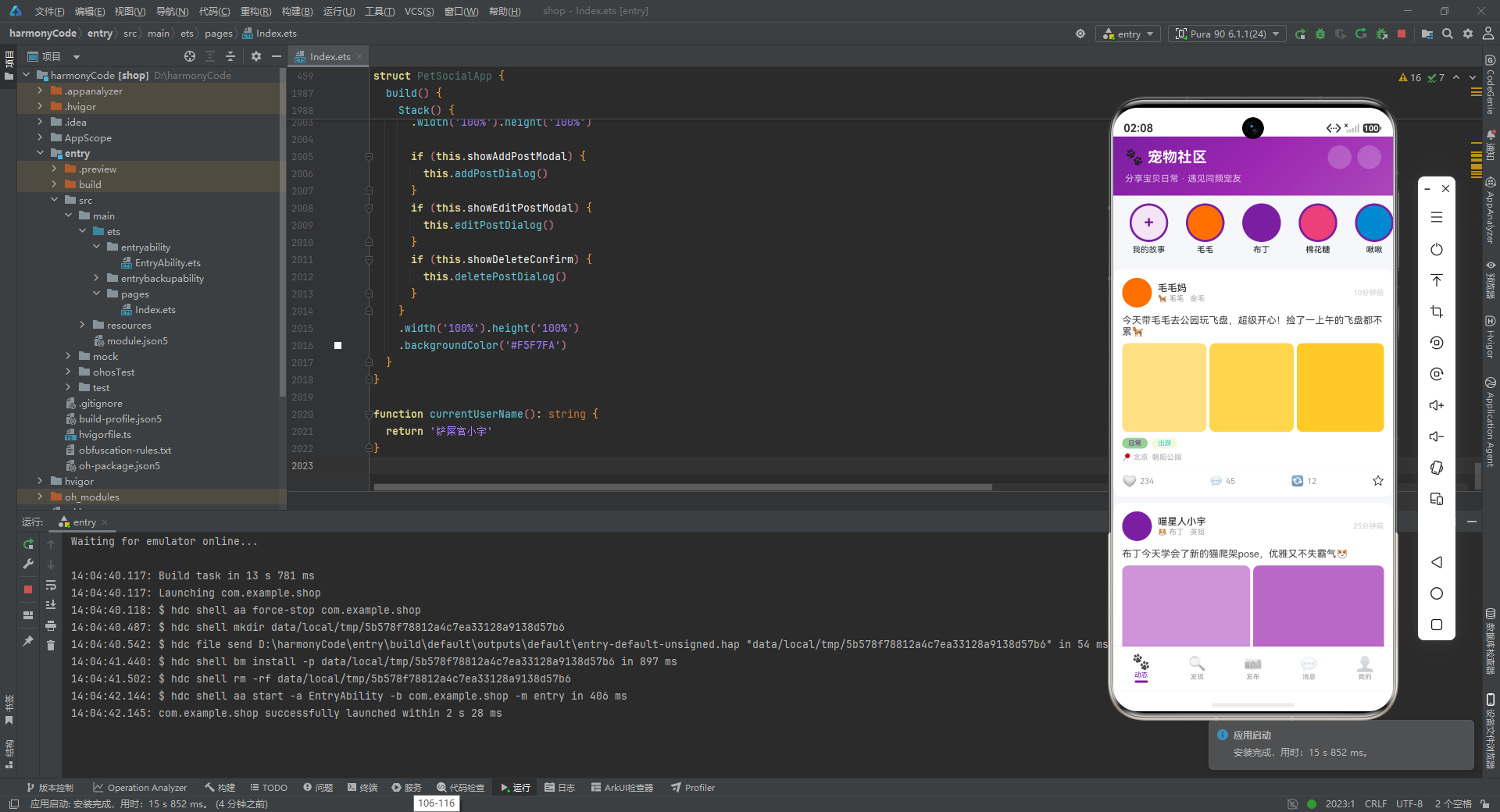
通过对这个宠物社交社区应用的逐段解析,我们可以清晰地看到 HarmonyOS ArkTS 在构建复杂移动端应用时的强大能力。从数据层的接口与 @Observed 响应式模型,到逻辑层的配置化驱动与工具函数封装,再到表现层的 @Builder 组件化与声明式渲染,每一层都体现了现代前端工程化的最佳实践。特别是 @State 状态管理与条件渲染的配合,使得弹窗切换、Tab 导航、分类筛选等交互场景的实现变得异常简洁。五个 Tab 页虽然功能各异,但都遵循了统一的视觉规范(卡片式布局、12px 圆角、阴影、16px 水平外边距)和代码风格(layoutWeight 弹性布局、ForEach 循环渲染、条件渲染控制显隐),这种一致性是大型项目可维护性的基石。希望本文的详细解析能够帮助读者深入理解 ArkTS 的设计哲学,并在实际项目中灵活运用这些技术要点。

讨论HarmonyOS开发技术,专注于API与组件、DevEco Studio、测试、元服务和应用上架分发等。
更多推荐



 4
4 0
0- 0


 已为社区贡献129条内容

所有评论(0)