基于HarmonyOS API 24赛事追踪应用`MatchesTab` 和 `ProfileTab` 接收了回调函数参数,这体现了“子组件通知父组件“的通信模式
一、应用概述与架构总览
本文将深入解析一款基于 HarmonyOS ArkTS 开发的赛事追踪应用。该应用采用经典的底部 Tab 导航架构,涵盖赛事浏览、赛程安排、联赛排行、数据分析和用户个人中心五大核心模块。整个项目体现了声明式 UI 编程的精髓,充分利用了 ArkTS 的状态管理、组件化封装、响应式数据绑定等核心特性。
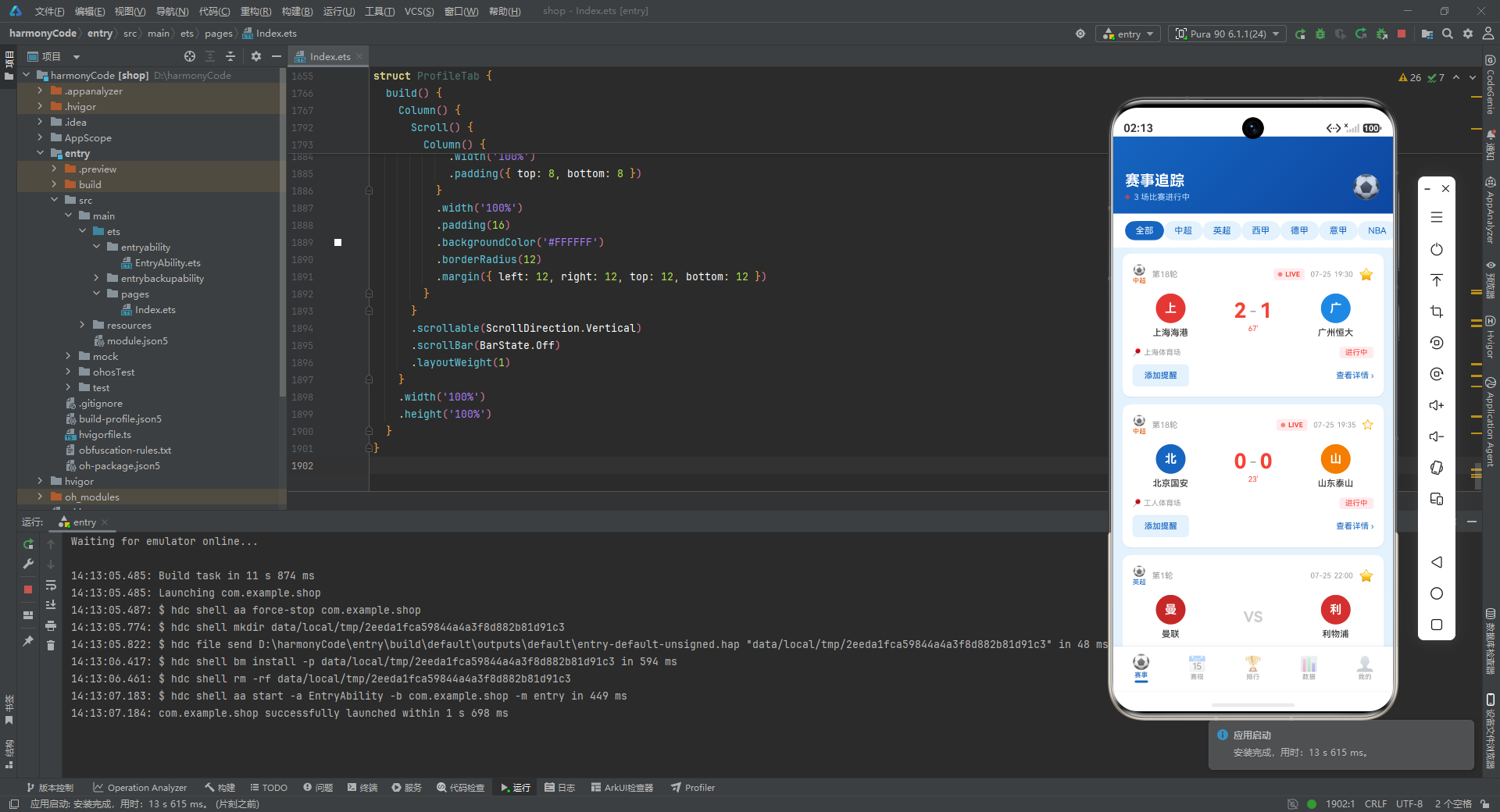
在整体架构上,应用遵循了分层设计思想:最底层是数据模型与类型定义层,其上是工具函数与配置层,再往上是 Mock 数据层,然后是核心的 UI 组件层,最顶层是应用入口与状态管理层。这种分层架构使得代码职责清晰、可维护性强,也为后续接入真实后端接口预留了良好的扩展点。
二、类型系统与接口定义
interface LeagueMetaType {
  label: string
  icon: string
  color: string
  bg: string
}

interface MatchStatusMetaType {
  label: string
  color: string
  icon: string
  bg: string
}

interface SportTypeMetaType {
  label: string
  icon: string
  color: string
}

interface FavoriteTeamType {
  name: string
  logoColor: string
  league: string
}

interface ReminderType {
  id: number
  matchId: number
  homeTeam: string
  awayTeam: string
  date: string
  time: string
  league: string
  reminderTime: string
}

interface TabMetaType {
  label: string
  icon: string
}

interface TeamGoalType {
  name: string
  goals: number
  color: string
}

interface WinDrawLossType {
  label: string
  value: number
  color: string
}

interface ScheduleGroupType {
  date: string
  weekday: string
  matches: MatchItem[]
}
设计思路与实现细节解析:
这一段代码定义了应用中所使用的全部 TypeScript 接口(Interface),是整个应用的类型基石。在 ArkTS 开发中,强类型约束是保证代码健壮性的第一道防线。开发者在这里展现了非常细致的类型设计能力。
LeagueMetaType 接口用于描述联赛元数据,包含 label(显示名称)、icon(图标字符,如足球、篮球 Emoji)、color(主色调)和 bg(背景色)四个属性。这种设计将视觉表现与数据实体解耦,使得不同联赛可以在 UI 上呈现不同的视觉风格,而无需修改组件逻辑。
MatchStatusMetaType 接口用于描述比赛状态的元数据,同样遵循了"数据驱动样式"的设计思想。通过将标签文字、颜色、图标和背景色封装在一起,当比赛状态为"进行中"、"已结束"或"未开始"时,UI 可以一致地渲染出对应的视觉风格。
ReminderType 是提醒功能的核心数据结构,设计得非常完整,包含 id 和 matchId 两个标识字段(前者是提醒自身的 ID,后者关联到具体比赛),以及比赛双方、日期时间、所属联赛和提醒时间等字段。这种双 ID 设计在实际应用中可以方便地实现提醒与比赛的关联查询。
ScheduleGroupType 是赛程分组的数据模型,它将日期、星期几和该日期的比赛列表聚合在一起,为后续的按日期分组展示提供了直接的数据支撑。
三、响应式数据模型 —— @Observed 类
@Observed
class MatchItem {
  id: number = 0
  homeTeam: string = ''
  awayTeam: string = ''
  homeScore: number = 0
  awayScore: number = 0
  date: string = ''
  time: string = ''
  league: string = ''
  status: string = ''
  venue: string = ''
  homeLogoColor: string = ''
  awayLogoColor: string = ''
  minute: number = 0
  round: string = ''
  isFavorited: boolean = false
  highlight: boolean = false

  constructor(
    id: number, homeTeam: string, awayTeam: string, homeScore: number, awayScore: number,
    date: string, time: string, league: string, status: string, venue: string,
    homeLogoColor: string, awayLogoColor: string, minute: number, round: string,
    isFavorited: boolean, highlight: boolean
  ) {
    this.id = id
    this.homeTeam = homeTeam
    this.awayTeam = awayTeam
    this.homeScore = homeScore
    this.awayScore = awayScore
    this.date = date
    this.time = time
    this.league = league
    this.status = status
    this.venue = venue
    this.homeLogoColor = homeLogoColor
    this.awayLogoColor = awayLogoColor
    this.minute = minute
    this.round = round
    this.isFavorited = isFavorited
    this.highlight = highlight
  }
}

@Observed
class StandingItem {
  rank: number = 0
  team: string = ''
  played: number = 0
  won: number = 0
  drawn: number = 0
  lost: number = 0
  goalsFor: number = 0
  goalsAgainst: number = 0
  points: number = 0
  teamColor: string = ''
  league: string = ''

  constructor(
    rank: number, team: string, played: number, won: number, drawn: number, lost: number,
    goalsFor: number, goalsAgainst: number, points: number, teamColor: string, league: string
  ) {
    this.rank = rank
    this.team = team
    this.played = played
    this.won = won
    this.drawn = drawn
    this.lost = lost
    this.goalsFor = goalsFor
    this.goalsAgainst = goalsAgainst
    this.points = points
    this.teamColor = teamColor
    this.league = league
  }
}

@Observed
class PlayerStatItem {
  rank: number = 0
  name: string = ''
  team: string = ''
  goals: number = 0
  assists: number = 0
  rating: number = 0
  playerColor: string = ''

  constructor(
    rank: number, name: string, team: string, goals: number, assists: number, rating: number, playerColor: string
  ) {
    this.rank = rank
    this.name = name
    this.team = team
    this.goals = goals
    this.assists = assists
    this.rating = rating
    this.playerColor = playerColor
  }
}
设计思路与实现细节解析:
这里定义了三个核心数据类,并且都使用了 @Observed 装饰器,这是 ArkTS 状态管理中非常关键的一个机制。@Observed 装饰器用于修饰类,使得该类的实例属性变更可以被框架观察到,从而触发依赖该数据的 UI 组件进行重新渲染。
MatchItem 类是应用中最重要的数据模型,它完整地描述了一场比赛的全部信息。从字段设计上看,开发者考虑得非常周到:不仅有基础的双方球队、比分、日期时间,还有 venue(场地)、minute(进行分钟数,用于直播中显示)、round(轮次)、isFavorited(是否被收藏)和 highlight(是否高亮)等扩展字段。特别值得注意的是 homeLogoColor 和 awayLogoColor 字段——这里没有使用图片资源,而是使用纯色来代表球队 Logo,这是一种在原型阶段或轻量级应用中非常实用的技巧,既避免了图片资源管理的复杂性,又能保持视觉上的区分度。
StandingItem 类描述联赛积分榜中的一条记录,包含了经典的足球积分数据:场次、胜、平、负、进球、失球、积分。teamColor 字段同样采用纯色方案。这个类的设计可以直接对接真实的联赛积分 API,数据结构非常标准。
PlayerStatItem 类描述球员统计数据,包含进球数、助攻数和评分。这三个维度是衡量攻击型球员表现的核心指标。
三个类都定义了完整的构造函数,采用了显式参数传递的方式。虽然参数较多时可以使用对象解构来简化,但显式参数在类型安全性上更有优势,调用时代码也更加直观。
四、配置函数层 —— 数据到视觉的映射
function getLeagueMeta(league: string): LeagueMetaType {
  if (league === '中超') return { label: '中超', icon: '⚽', color: '#E65100', bg: '#FFF3E0' }
  if (league === '英超') return { label: '英超', icon: '⚽', color: '#1565C0', bg: '#E3F2FD' }
  if (league === '西甲') return { label: '西甲', icon: '⚽', color: '#7B1FA2', bg: '#F3E5F5' }
  if (league === '德甲') return { label: '德甲', icon: '⚽', color: '#2E7D32', bg: '#E8F5E9' }
  if (league === '意甲') return { label: '意甲', icon: '⚽', color: '#37474F', bg: '#ECEFF1' }
  if (league === 'NBA') return { label: 'NBA', icon: '🏀', color: '#E65100', bg: '#FFF3E0' }
  if (league === 'CBA') return { label: 'CBA', icon: '🏀', color: '#C62828', bg: '#FFEBEE' }
  return { label: league, icon: '⚽', color: '#666666', bg: '#F5F5F5' }
}

function getMatchStatusMeta(status: string): MatchStatusMetaType {
  if (status === '进行中') return { label: '进行中', color: '#F44336', icon: '🔴', bg: '#FFEBEE' }
  if (status === '已结束') return { label: '已结束', color: '#4CAF50', icon: '✅', bg: '#E8F5E9' }
  return { label: '未开始', color: '#FF9800', icon: '⏰', bg: '#FFF3E0' }
}

function getRankColor(rank: number): string {
  if (rank === 1) return '#FFD700'
  if (rank === 2) return '#C0C0C0'
  if (rank === 3) return '#CD7F32'
  return '#999999'
}

function getSportTypeMeta(league: string): SportTypeMetaType {
  if (league === 'NBA' || league === 'CBA') return { label: '篮球', icon: '🏀', color: '#E65100' }
  return { label: '足球', icon: '⚽', color: '#1565C0' }
}
设计思路与实现细节解析:
这一段是纯函数配置层,体现了**“将视觉配置抽离为可维护的映射函数”**的设计思想。这种设计模式在 ArkTS 开发中非常推荐,它将硬编码的样式逻辑从 UI 组件中剥离出来,使得后续维护变得更加轻松。
getLeagueMeta 函数是一个典型的映射函数,输入联赛名称字符串,输出对应的视觉元数据对象。函数内部使用了一系列 if 条件判断来覆盖已知的联赛类型。这里有一个非常有趣的设计细节:足球联赛统一使用 ⚽ 图标,篮球联赛统一使用 🏀 图标,并且每个联赛都有独立的品牌色。例如英超使用深蓝色 #1565C0,德甲使用绿色 #2E7D32,西甲使用紫色 #7B1FA2。当遇到未知的联赛时,函数会返回一个默认的灰色配置,保证了应用的健壮性。
getMatchStatusMeta 函数将比赛状态映射为视觉元素。"进行中"使用红色系(#F44336)表达紧迫感,"已结束"使用绿色系(#4CAF50)表达完成状态,"未开始"使用橙色系(#FF9800)表达等待状态。这种色彩心理学的设计让用户一眼就能感知比赛的状态。
getRankColor 函数实现了经典的奖牌颜色映射:第1名返回金色 #FFD700,第2名返回银色 #C0C0C0,第3名返回铜色 #CD7F32,其他名次返回灰色。这在排行榜展示中是非常常见的交互设计。
五、Mock 数据层
const LEAGUE_LIST: string[] = ['全部', '中超', '英超', '西甲', '德甲', '意甲', 'NBA', 'CBA']

const MATCH_DATA: MatchItem[] = [
  new MatchItem(1, '上海海港', '广州恒大', 2, 1, '07-25', '19:30', '中超', '进行中', '上海体育场', '#E53935', '#1E88E5', 67, '第18轮', true, true),
  new MatchItem(2, '北京国安', '山东泰山', 0, 0, '07-25', '19:35', '中超', '进行中', '工人体育场', '#1565C0', '#F57C00', 23, '第18轮', false, false),
  // ... 更多比赛数据
]

const STANDING_DATA: StandingItem[] = [
  new StandingItem(1, '上海海港', 18, 14, 2, 2, 42, 15, 44, '#E53935', '中超'),
  // ... 更多积分榜数据
]

const PLAYER_STAT_DATA: PlayerStatItem[] = [
  new PlayerStatItem(1, '武磊', '上海海港', 18, 6, 8.5, '#E53935'),
  // ... 更多球员数据
]

const TEAM_GOALS_DATA: TeamGoalType[] = [
  { name: '海港', goals: 42, color: '#E53935' },
  // ... 更多球队进球数据
]

const WIN_DRAW_LOSS_DATA: WinDrawLossType[] = [
  { label: '胜', value: 14, color: '#4CAF50' },
  { label: '平', value: 2, color: '#FF9800' },
  { label: '负', value: 2, color: '#F44336' }
]

const FAVORITE_TEAMS: FavoriteTeamType[] = [
  { name: '上海海港', logoColor: '#E53935', league: '中超' },
  // ... 更多收藏球队
]

const REMINDER_DATA: ReminderType[] = [
  { id: 1, matchId: 3, homeTeam: '曼联', awayTeam: '利物浦', date: '07-25', time: '22:00', league: '英超', reminderTime: '赛前30分钟' },
  // ... 更多提醒数据
]

const SCHEDULE_GROUPS: ScheduleGroupType[] = [
  { date: '07-25', weekday: '今天', matches: MATCH_DATA.filter((m: MatchItem) => m.date === '07-25') },
  { date: '07-26', weekday: '明天', matches: MATCH_DATA.filter((m: MatchItem) => m.date === '07-26') },
  // ... 更多日期分组
]

const PREDICTION_RECORD: string[] = [
  '7月24日 皇马 vs 巴萨 预测3-1 ✅ 命中',
  // ... 更多预测记录
]

const MAX_GOALS: number = 45
设计思路与实现细节解析:
Mock 数据层是整个应用的"燃料",在开发阶段为 UI 提供了真实感十足的数据。这段代码展现了非常成熟的 Mock 数据设计思路。
LEAGUE_LIST 数组定义了应用中支持的全部联赛,第一个元素是"全部",这在后续的联赛筛选功能中作为"显示全部比赛"的选项。
MATCH_DATA 数组包含了 20 条比赛数据,覆盖了中超、英超、西甲、德甲、意甲、NBA、CBA 七大联赛。数据设计非常讲究:既有"进行中"的比赛(带有实时分钟数),也有"已结束"的比赛(带有最终比分),还有"未开始"的比赛。这使得 UI 能够展示所有三种状态对应的视觉效果。isFavorited 字段的分布也经过设计,部分比赛标记为已收藏,测试收藏功能的展示。
SCHEDULE_GROUPS 是这段代码中最值得关注的部分。它没有使用硬编码的数组,而是通过 Array.filter 方法从 MATCH_DATA 中动态筛选出对应日期的比赛。这意味着当 MATCH_DATA 发生变更时,SCHEDULE_GROUPS 会自动保持同步。weekday 字段使用了中文相对日期(“今天”、“明天”、“后天”、“昨天”、“前天”),这在用户体验上比单纯的日期数字更加友好。
MAX_GOALS 常量用于数据可视化模块中的柱状图高度计算,作为进球数的归一化基准值。
六、Tab 枚举与主入口组件
enum AppTab {
  MATCHES,
  SCHEDULE,
  STANDINGS,
  DATA,
  PROFILE
}

@Entry
@Component
struct MainApp {
  @State activeTab: AppTab = AppTab.MATCHES
  @State showAddDialog: boolean = false
  @State showEditDialog: boolean = false
  @State showDeleteDialog: boolean = false
  @State selectedReminder: ReminderType | null = null
  @State inputMatchName: string = ''
  @State inputReminderTime: string = '赛前30分钟'
  @State editMatchName: string = ''
  @State editReminderTime: string = ''
设计思路与实现细节解析:
AppTab 枚举定义了应用的五个主要页面,使用枚举而非字符串常量来标识 Tab 页,这在类型安全性上有着明显优势。枚举值默认从 0 开始递增,因此 MATCHES 为 0,SCHEDULE 为 1,依此类推。
MainApp 组件是应用的根组件,被 @Entry 装饰器标记,表示这是应用的入口页面。根组件内部维护了全部跨 Tab 共享的状态。
activeTab 状态使用 @State 装饰器修饰,表示这是组件的内部状态。当 activeTab 变化时,会触发 contentArea 中条件分支的重新渲染,从而切换到对应的 Tab 内容。初始值设为 AppTab.MATCHES,表示应用启动后默认展示赛事页面。
三个布尔型状态 showAddDialog、showEditDialog、showDeleteDialog 控制着三个对话框的显示与隐藏。这种多对话框独立管理的设计,使得每个对话框都有清晰的开启和关闭逻辑,互不干扰。
selectedReminder 状态用于在编辑或删除提醒时,暂存当前被选中的提醒对象。它的类型是 ReminderType | null,明确地表达了"可能为空"的语义。
四个输入状态 inputMatchName、inputReminderTime、editMatchName、editReminderTime 分别绑定到添加对话框和编辑对话框的输入框上,实现了双向数据绑定。
  @Builder
  contentArea() {
    Column() {
      if (this.activeTab === AppTab.MATCHES) {
        MatchesTab({
          onAddReminder: () => {
            this.inputMatchName = ''
            this.inputReminderTime = '赛前30分钟'
            this.showAddDialog = true
          }
        })
      } else if (this.activeTab === AppTab.SCHEDULE) {
        ScheduleTab()
      } else if (this.activeTab === AppTab.STANDINGS) {
        StandingsTab()
      } else if (this.activeTab === AppTab.DATA) {
        DataTab()
      } else {
        ProfileTab({
          onEditReminder: (item: ReminderType) => {
            this.selectedReminder = item
            this.editMatchName = `${item.homeTeam} vs ${item.awayTeam}`
            this.editReminderTime = item.reminderTime
            this.showEditDialog = true
          },
          onDeleteReminder: (item: ReminderType) => {
            this.selectedReminder = item
            this.showDeleteDialog = true
          }
        })
      }
    }
    .layoutWeight(1)
  }
设计思路与实现细节解析:
contentArea 使用 @Builder 装饰器定义,这是 ArkTS 中构建可复用 UI 片段的方式。整个内容区域是一个 Column 容器,内部通过 if-else if 条件分支来根据当前激活的 Tab 渲染对应的子组件。
这种条件渲染模式是声明式 UI 框架的核心特征之一。与命令式框架需要手动显示/隐藏视图不同,声明式框架只需描述"在什么状态下渲染什么内容",框架会自动处理组件的创建和销毁。
MatchesTab 和 ProfileTab 接收了回调函数参数,这体现了**“子组件通知父组件”**的通信模式。onAddReminder 回调在赛事页点击"添加提醒"按钮时触发,父组件负责打开添加对话框。onEditReminder 和 onDeleteReminder 回调在个人页点击编辑/删除时触发,父组件负责打开对应的对话框并将选中项暂存到状态中。
.layoutWeight(1) 的设置非常关键:它表示 contentArea 在垂直布局中将占据所有剩余空间,确保底部导航栏始终固定在屏幕底部。
  @Builder
  bottomTabItem(icon: string, label: string, tab: AppTab) {
    Column() {
      Text(icon)
        .fontSize(20)
        .opacity(this.activeTab === tab ? 1.0 : 0.45)
      Text(label)
        .fontSize(9)
        .fontColor(this.activeTab === tab ? '#1565C0' : '#999999')
        .margin({ top: 1 })
      if (this.activeTab === tab) {
        Column()
          .width(18)
          .height(3)
          .backgroundColor('#1565C0')
          .borderRadius(2)
          .margin({ top: 2 })
      }
    }
    .layoutWeight(1)
    .alignItems(HorizontalAlign.Center)
    .padding({ top: 5, bottom: 5 })
    .onClick(() => {
      this.activeTab = tab
    })
  }

  @Builder
  bottomBar() {
    Row() {
      this.bottomTabItem('⚽', '赛事', AppTab.MATCHES)
      this.bottomTabItem('📅', '赛程', AppTab.SCHEDULE)
      this.bottomTabItem('🏆', '排行', AppTab.STANDINGS)
      this.bottomTabItem('📊', '数据', AppTab.DATA)
      this.bottomTabItem('👤', '我的', AppTab.PROFILE)
    }
    .width('100%')
    .backgroundColor('#FFFFFF')
    .padding({ top: 4, bottom: 6 })
    .shadow({ radius: 8, color: '#1A000000', offsetY: -2 })
  }
设计思路与实现细节解析:
底部导航栏是移动应用的标志性组件。bottomTabItem 是一个高度可复用的 Builder 函数,接收三个参数:图标(Emoji 字符串)、标签文字和对应的 Tab 枚举值。
选中状态的视觉反馈设计得非常精致:当 Tab 被选中时(this.activeTab === tab),图标透明度为 1.0(完全不透明),文字颜色变为应用主色 #1565C0,并且会显示一个宽度为 18、高度为 3 的蓝色指示条。未选中时,图标透明度降为 0.45,文字颜色变为灰色 #999999。这种"高亮当前 + 弱化其他"的设计遵循了经典的底部导航交互规范。
.layoutWeight(1) 让每个 Tab 项在水平方向上平均分配可用空间,确保五个 Tab 等宽分布。shadow 装饰器为底部栏添加了向上的阴影(offsetY: -2),产生了悬浮于内容之上的层次感。
  @Builder
  addReminderDialog() {
    Stack() {
      Column()
        .width('100%')
        .height('100%')
        .backgroundColor('#80000000')
        .onClick(() => {
          this.showAddDialog = false
        })

      Column() {
        Text('添加提醒')
          .fontSize(18)
          .fontWeight(FontWeight.Bold)
          .fontColor('#1565C0')
          .margin({ bottom: 16 })
        // ... 输入表单
        Row({ space: 12 }) {
          Button('取消')
            .layoutWeight(1)
            .height(42)
            .backgroundColor('#F5F7FA')
            .fontColor('#666666')
            .borderRadius(8)
            .fontSize(15)
            .onClick(() => {
              this.showAddDialog = false
            })
          Button('确定')
            .layoutWeight(1)
            .height(42)
            .backgroundColor('#1565C0')
            .fontColor('#FFFFFF')
            .borderRadius(8)
            .fontSize(15)
            .onClick(() => {
              this.showAddDialog = false
            })
        }
        .width('100%')
      }
      .width('85%')
      .padding(24)
      .borderRadius(16)
      .backgroundColor('#FFFFFF')
      .constraintSize({ maxHeight: '80%' })
    }
    .width('100%')
    .height('100%')
    .alignContent(Alignment.Center)
  }
设计思路与实现细节解析:
对话框采用 Stack 布局实现,Stack 是一种层叠布局,子组件按照声明顺序从底层到顶层叠加。底层是一个全屏的半透明黑色遮罩(#80000000,50% 透明度黑色),它捕获点击事件来关闭对话框(点击遮罩关闭是非常经典的交互模式)。顶层是白色的对话框内容区域。
对话框内容宽度设为 '85%',使其在水平方向上留出适当的边距,视觉效果更加舒适。圆角半径 16 符合现代移动应用的卡片设计规范。
底部的操作按钮使用了 Row({ space: 12 }) 来设置按钮间距,两个按钮各占一半宽度(.layoutWeight(1)),形成了对称的双按钮布局。"取消"按钮使用灰色背景,"确定"按钮使用主色背景,通过颜色区分主次操作。
编辑对话框(editReminderDialog)和删除确认对话框(deleteConfirmDialog)遵循了相似的设计模式。删除对话框特别使用了红色主题(#F44336)来强调操作的破坏性,并在正文区域展示了被删除提醒的比赛名称和日期时间,帮助用户确认删除对象。
  build() {
    Stack() {
      Column() {
        this.contentArea()
        this.bottomBar()
      }
      .width('100%')
      .height('100%')

      if (this.showAddDialog) {
        this.addReminderDialog()
      }
      if (this.showEditDialog) {
        this.editReminderDialog()
      }
      if (this.showDeleteDialog) {
        this.deleteConfirmDialog()
      }
    }
    .width('100%')
    .height('100%')
    .backgroundColor('#E3F2FD')
  }
}
设计思路与实现细节解析:
build 方法是 ArkTS 组件的渲染入口。根布局再次使用 Stack,将主内容(contentArea + bottomBar)作为底层,三个对话框通过条件渲染叠加在上层。这种布局方式确保了对话框出现时,底层内容仍然可见但被遮罩覆盖。
主内容区域使用 Column 垂直排列内容区和底部导航栏,两者共同占据全屏。对话框层位于 Stack 的上层,当 showAddDialog 等状态为 true 时才会渲染,实现了模态对话框的效果。
整个应用的背景色设为 #E3F2FD(浅蓝色),这是由应用主色 #1565C0 生成的极浅色调,为所有页面提供了一致的视觉底色。
七、Tab 1 —— 赛事页面(MatchesTab)
@Component
struct MatchesTab {
  @State selectedLeague: string = '全部'
  @State pulseOpacity: number = 1.0
  @State matches: MatchItem[] = MATCH_DATA
  onAddReminder: (() => void) | null = null
  private timerId: number = -1

  aboutToAppear(): void {
    this.timerId = setInterval(() => {
      this.pulseOpacity = this.pulseOpacity === 1.0 ? 0.3 : 1.0
    }, 800)
  }

  aboutToDisappear(): void {
    if (this.timerId !== -1) {
      clearInterval(this.timerId)
    }
  }
设计思路与实现细节解析:
MatchesTab 是应用的首页,也是功能最丰富的 Tab 页。它维护了三个状态:selectedLeague 用于联赛筛选,pulseOpacity 用于 LIVE 指示灯的呼吸动画,matches 用于存储当前展示的比赛列表。
onAddReminder 是一个可选的回调函数(类型中的 | null 表示它可能为空),这是子组件向父组件发起通信的"通道"。当用户点击比赛卡片上的"添加提醒"按钮时,子组件通过调用这个回调来通知父组件弹出添加对话框。
aboutToAppear 和 aboutToDisappear 是 ArkTS 组件的生命周期回调。aboutToAppear 在组件即将显示时调用,这里创建了一个定时器,每 800 毫秒切换一次 pulseOpacity 的值(在 1.0 和 0.3 之间切换),从而产生呼吸灯效果。aboutToDisappear 在组件即将销毁时调用,负责清理定时器,避免内存泄漏。这是一个非常重要的最佳实践——在 ArkTS 中使用定时器时,务必在 aboutToDisappear 中清理。
  @Builder
  leagueChip(league: string) {
    Text(league)
      .fontSize(12)
      .fontColor(this.selectedLeague === league ? '#FFFFFF' : '#1565C0')
      .backgroundColor(this.selectedLeague === league ? '#1565C0' : '#E3F2FD')
      .padding({ left: 14, right: 14, top: 6, bottom: 6 })
      .borderRadius(16)
      .onClick(() => {
        this.selectedLeague = league
      })
  }
设计思路与实现细节解析:
leagueChip 是一个用于渲染联赛筛选标签的 Builder 函数。标签采用胶囊形状设计(通过 .borderRadius(16) 实现),这是现代移动应用中非常流行的 Chip 组件样式。
选中状态与非选中状态的视觉差异通过条件表达式实现:选中时文字为白色、背景为主色;未选中时文字为主色、背景为浅蓝色。这种"反转配色"的交互模式让用户清晰地感知当前选中的筛选项。
点击标签时,更新 selectedLeague 状态。由于 @State 的响应式特性,这一更新会自动触发两方面重新渲染:一是所有标签的样式更新(因为每个标签都依赖 selectedLeague),二是下方比赛列表的过滤更新。
  @Builder
  teamLogo(color: string, name: string) {
    Column() {
      Text(name.charAt(0))
        .fontSize(16)
        .fontWeight(FontWeight.Bold)
        .fontColor('#FFFFFF')
    }
    .width(40)
    .height(40)
    .borderRadius(20)
    .backgroundColor(color)
    .justifyContent(FlexAlign.Center)
    .alignItems(HorizontalAlign.Center)
  }
设计思路与实现细节解析:
teamLogo 是一个非常巧妙的轻量级 Logo 实现方案。它没有使用图片资源,而是使用一个圆形色块配合球队名称的首字来代表球队。直径为 40 逻辑像素,圆角半径为 20(正好是宽度的一半),因此呈现为一个正圆。文字使用球队名拼音或中文的首字符,白色粗体,在彩色背景上形成强烈的对比。
这种方案在原型开发、轻量级应用或需要减小包体积的场景下非常实用。当然,在生产环境中如果追求更高的视觉品质,也可以替换为真实的球队 Logo 图片。
  @Builder
  matchCard(item: MatchItem) {
    Column() {
      Row() {
        Column() {
          Text(getLeagueMeta(item.league).icon)
            .fontSize(14)
          Text(item.league)
            .fontSize(9)
            .fontColor(getLeagueMeta(item.league).color)
            .margin({ top: 1 })
        }
        .alignItems(HorizontalAlign.Center)

        Text(item.round)
          .fontSize(11)
          .fontColor('#999999')
          .margin({ left: 8 })

        Column().layoutWeight(1)

        if (item.status === '进行中') {
          Row() {
            Column()
              .width(6)
              .height(6)
              .borderRadius(3)
              .backgroundColor('#F44336')
              .opacity(this.pulseOpacity)
              .animation({ duration: 800, curve: Curve.EaseInOut })
            Text('LIVE')
              .fontSize(9)
              .fontColor('#F44336')
              .fontWeight(FontWeight.Bold)
              .margin({ left: 4 })
          }
          .padding({ left: 6, right: 6, top: 3, bottom: 3 })
          .borderRadius(4)
          .backgroundColor('#FFEBEE')
        }

        Text(item.date)
          .fontSize(10)
          .fontColor('#999999')
          .margin({ left: 8 })

        Text(item.time)
          .fontSize(10)
          .fontColor('#999999')
          .margin({ left: 4 })

        Text(item.isFavorited ? '⭐' : '☆')
          .fontSize(16)
          .fontColor('#FFB300')
          .margin({ left: 8 })
          .onClick(() => {
            item.isFavorited = !item.isFavorited
          })
      }
      .width('100%')
      .alignItems(VerticalAlign.Center)
设计思路与实现细节解析:
比赛卡片是赛事页面的核心 UI 元素,采用卡片式设计(白色背景 + 圆角 + 阴影)。卡片头部是一个水平排列的 Row,包含丰富的信息层次:
最左侧是联赛信息,通过 getLeagueMeta 函数动态获取该联赛的图标和主题色。Column().layoutWeight(1) 作为弹性占位,将剩余空间推向右侧,使得右侧元素右对齐。
当比赛状态为"进行中"时,会渲染一个 LIVE 指示器。指示器由红色小圆点(直径 6px)和 “LIVE” 文字组成。小圆点绑定了 pulseOpacity 状态,并添加了 .animation({ duration: 800, curve: Curve.EaseInOut }) 动画声明。这里有一个非常精妙的设计:pulseOpacity 由定时器控制每 800ms 切换一次值,而 .animation() 装饰器则让每一次值的变化都以动画形式过渡。两者配合,形成了流畅的呼吸灯效果。Curve.EaseInOut 缓动函数让动画在起点和终点都有自然的加速/减速,视觉感受更加柔和。
收藏按钮使用 ⭐(实心)和 ☆(空心)两个 Emoji 字符来表示已收藏和未收藏状态,点击时直接取反 item.isFavorited。由于 MatchItem 类被 @Observed 修饰,这个属性的变更会被框架自动观察到,触发对应 UI 的重新渲染。
      Row() {
        Column() {
          this.teamLogo(item.homeLogoColor, item.homeTeam)
          Text(item.homeTeam)
            .fontSize(12)
            .fontColor('#333333')
            .fontWeight(FontWeight.Medium)
            .margin({ top: 6 })
            .maxLines(1)
            .textOverflow({ overflow: TextOverflow.Ellipsis })
        }
        .alignItems(HorizontalAlign.Center)
        .layoutWeight(1)

        Column() {
          if (item.status === '未开始') {
            Text('VS')
              .fontSize(20)
              .fontWeight(FontWeight.Bold)
              .fontColor('#CCCCCC')
          } else {
            Row({ space: 4 }) {
              Text(`${item.homeScore}`)
                .fontSize(28)
                .fontWeight(FontWeight.Bold)
                .fontColor(item.status === '进行中' ? '#F44336' : '#1565C0')
              Text('-')
                .fontSize(20)
                .fontColor('#999999')
              Text(`${item.awayScore}`)
                .fontSize(28)
                .fontWeight(FontWeight.Bold)
                .fontColor(item.status === '进行中' ? '#F44336' : '#1565C0')
            }
            .alignItems(VerticalAlign.Center)
          }
          if (item.status === '进行中') {
            Text(`${item.minute}'`)
              .fontSize(10)
              .fontColor('#F44336')
              .margin({ top: 2 })
          }
          if (item.status === '已结束') {
            Text('终场')
              .fontSize(10)
              .fontColor('#4CAF50')
              .margin({ top: 2 })
          }
        }
        .alignItems(HorizontalAlign.Center)
        .width(120)

        Column() {
          this.teamLogo(item.awayLogoColor, item.awayTeam)
          Text(item.awayTeam)
            .fontSize(12)
            .fontColor('#333333')
            .fontWeight(FontWeight.Medium)
            .margin({ top: 6 })
            .maxLines(1)
            .textOverflow({ overflow: TextOverflow.Ellipsis })
        }
        .alignItems(HorizontalAlign.Center)
        .layoutWeight(1)
      }
      .width('100%')
      .padding({ top: 12, bottom: 12 })
      .alignItems(VerticalAlign.Center)
设计思路与实现细节解析:
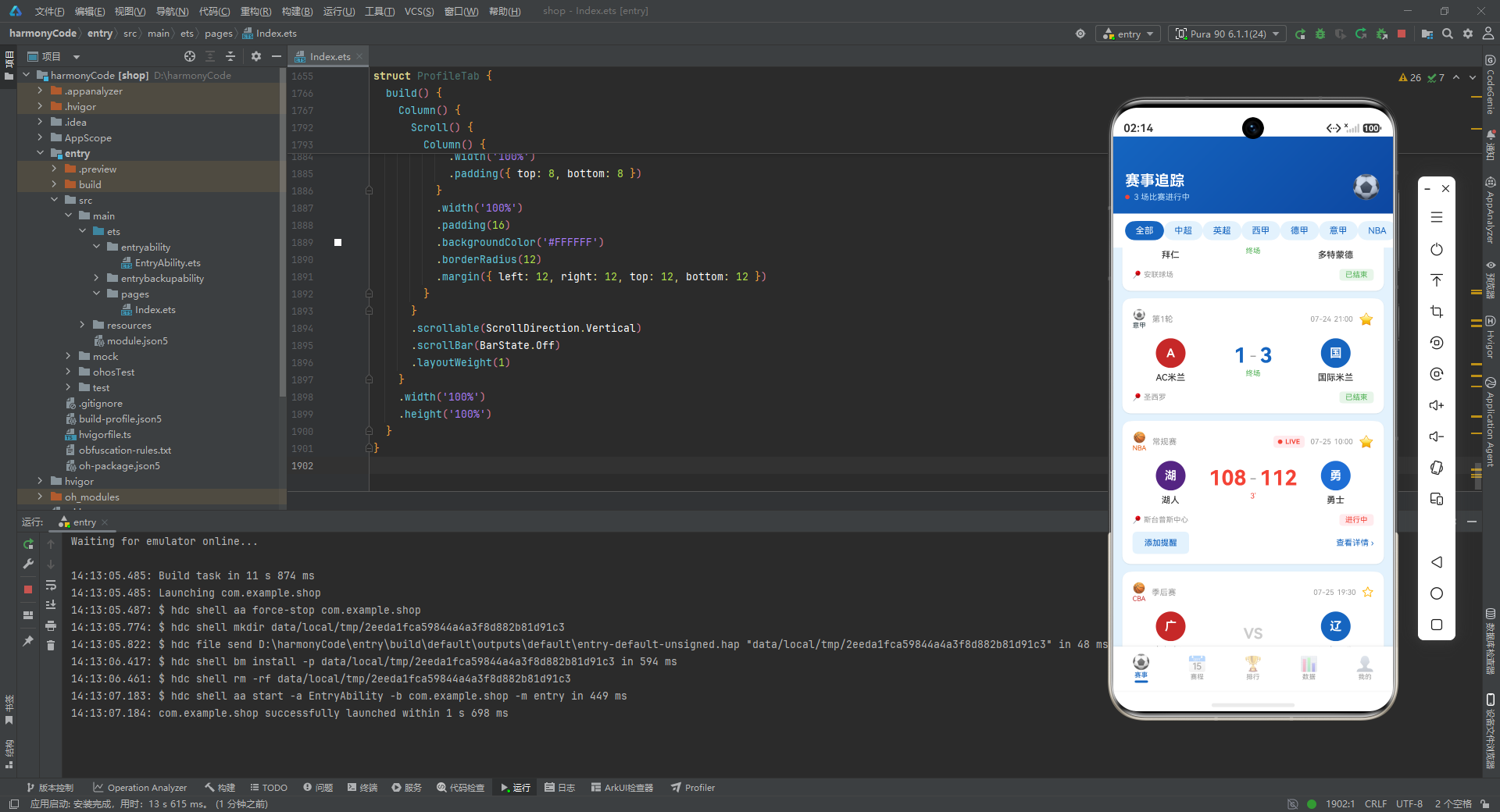
这是比赛卡片的主体区域,采用三栏布局:主队信息(左侧)、比分/状态(中间)、客队信息(右侧)。左右两侧使用 .layoutWeight(1) 等宽分布,中间固定宽度 120,形成了平衡的视觉结构。
比分区域的展示逻辑根据比赛状态分为三种情况:
- 未开始:显示灰色大号的 “VS” 字样,营造期待感;
- 进行中:显示实时比分,字号放大到 28,使用红色强调,下方显示当前分钟数(如 “67’”);
- 已结束:显示最终比分,使用深蓝色,下方显示"终场"标识。
这种根据状态动态调整展示内容的设计,让同一张卡片可以适应三种截然不同的场景,极大地提升了组件的复用性。球队名称设置了 .maxLines(1) 和 .textOverflow({ overflow: TextOverflow.Ellipsis }),当名称过长时会自动截断并显示省略号,避免破坏布局。
      if (item.status !== '已结束') {
        Row() {
          Button('添加提醒')
            .height(30)
            .fontSize(11)
            .backgroundColor('#E3F2FD')
            .fontColor('#1565C0')
            .borderRadius(6)
            .onClick(() => {
              if (this.onAddReminder) {
                this.onAddReminder()
              }
            })
          Column().layoutWeight(1)
          Text('查看详情 ›')
            .fontSize(11)
            .fontColor('#1565C0')
        }
        .width('100%')
        .alignItems(VerticalAlign.Center)
        .margin({ top: 8 })
      }
    }
    .width('100%')
    .padding(14)
    .borderRadius(12)
    .backgroundColor('#FFFFFF')
    .shadow({ radius: 4, color: '#1A000000', offsetY: 2 })
    .margin({ bottom: 10 })
  }
设计思路与实现细节解析:
卡片底部操作栏只在比赛未结束时显示(if (item.status !== '已结束')),已结束的比赛不需要添加提醒,因此隐藏该栏可以简化界面。
"添加提醒"按钮是一个小型按钮,高度仅 30,字号 11,使用浅蓝色背景而非实心主色,降低了视觉权重,使其作为次要操作更加合适。点击时通过可选链的前置判断(if (this.onAddReminder))确保回调存在后再调用,避免运行时错误。
整个卡片的容器使用了 shadow 装饰器添加轻微的下阴影(offsetY: 2),在白色底色页面中产生悬浮感。底部外边距 10 让卡片之间保持适当间距。
  build() {
    Column() {
      Column() {
        Row() {
          Column() {
            Text('赛事追踪')
              .fontSize(20)
              .fontWeight(FontWeight.Bold)
              .fontColor('#FFFFFF')
            Row() {
              Column()
                .width(6)
                .height(6)
                .borderRadius(3)
                .backgroundColor('#F44336')
                .opacity(this.pulseOpacity)
                .animation({ duration: 800, curve: Curve.EaseInOut })
              Text(`${MATCH_DATA.filter((m: MatchItem) => m.status === '进行中').length} 场比赛进行中`)
                .fontSize(11)
                .fontColor('#BBDEFB')
                .margin({ left: 6 })
            }
            .margin({ top: 4 })
          }
          .alignItems(HorizontalAlign.Start)

          Column().layoutWeight(1)

          Text('⚽')
            .fontSize(32)
        }
        .width('100%')
        .padding({ left: 16, right: 16, top: 48, bottom: 16 })
        .alignItems(VerticalAlign.Center)
      }
      .width('100%')
      .linearGradient({ angle: 135, colors: [['#1565C0', 0], ['#0D47A1', 1]] })
设计思路与实现细节解析:
赛事页面的 build 方法采用了典型的"头部 banner + 筛选栏 + 内容列表"三段式布局。
头部区域使用线性渐变背景(linearGradient),角度为 135 度,从 #1565C0 渐变到更深的 #0D47A1。这种深蓝渐变营造出专业、沉稳的体育应用氛围。标题 “赛事追踪” 使用白色粗体大字。副标题区域动态计算当前进行中的比赛数量(通过 MATCH_DATA.filter 筛选),并同样使用了呼吸灯红点动画,与卡片中的 LIVE 指示器形成视觉呼应。
顶部内边距设为 48,这是为系统状态栏预留的安全区域,确保内容不会被刘海屏或状态栏遮挡。
      Scroll() {
        Row() {
          ForEach(LEAGUE_LIST, (league: string, index: number) => {
            this.leagueChip(league)
          }, (league: string, index: number) => league)
        }
        .padding({ left: 16, right: 16, top: 10, bottom: 10 })
      }
      .scrollable(ScrollDirection.Horizontal)
      .scrollBar(BarState.Off)
      .backgroundColor('#FFFFFF')

      Scroll() {
        Column() {
          ForEach(this.matches, (item: MatchItem, index: number) => {
            if (this.selectedLeague === '全部' || item.league === this.selectedLeague) {
              this.matchCard(item)
            }
          }, (item: MatchItem, index: number) => item.id.toString())
        }
        .padding({ left: 12, right: 12, top: 8, bottom: 12 })
      }
      .scrollable(ScrollDirection.Vertical)
      .scrollBar(BarState.Off)
      .layoutWeight(1)
    }
    .width('100%')
    .height('100%')
  }
}
设计思路与实现细节解析:
联赛筛选栏使用水平滚动的 Scroll 容器包裹 Row 布局,当联赛标签较多超出屏幕宽度时可以左右滑动查看。.scrollBar(BarState.Off) 隐藏了滚动条,让界面更加简洁。
下方的比赛列表同样使用 Scroll 容器实现垂直滚动。ForEach 是 ArkTS 中用于循环渲染的声明式语法,它接收三个参数:数据源、渲染回调和键值生成函数。键值生成函数(第三个参数)非常重要,它返回每条数据的唯一标识(这里是 item.id.toString()),帮助框架高效地进行差异更新(Diff)。
列表内部使用了条件渲染来过滤比赛:当 selectedLeague 为"全部"时显示所有比赛,否则只显示属于选中联赛的比赛。这种筛选逻辑直接在渲染层实现,简洁高效。
八、Tab 2 —— 赛程页面(ScheduleTab)
@Component
struct ScheduleTab {
  @Builder
  scheduleMatchItem(item: MatchItem) {
    Row() {
      Column() {
        Text(item.time)
          .fontSize(14)
          .fontWeight(FontWeight.Bold)
          .fontColor('#1565C0')
        Text(getMatchStatusMeta(item.status).label)
          .fontSize(8)
          .fontColor(getMatchStatusMeta(item.status).color)
          .margin({ top: 2 })
      }
      .width(56)
      .alignItems(HorizontalAlign.Center)

      Column() {
        Row() {
          Text(item.homeTeam)
            .fontSize(13)
            .fontColor('#333333')
            .layoutWeight(1)
          if (item.status === '未开始') {
            Text('VS')
              .fontSize(11)
              .fontColor('#CCCCCC')
              .width(30)
              .textAlign(TextAlign.Center)
          } else {
            Text(`${item.homeScore}`)
              .fontSize(14)
              .fontWeight(FontWeight.Bold)
              .fontColor('#333333')
              .width(30)
              .textAlign(TextAlign.Center)
          }
        }
        .width('100%')
        .alignItems(VerticalAlign.Center)

        Row() {
          Text(item.awayTeam)
            .fontSize(13)
            .fontColor('#333333')
            .layoutWeight(1)
          if (item.status === '未开始') {
            Text('')
              .width(30)
          } else {
            Text(`${item.awayScore}`)
              .fontSize(14)
              .fontWeight(FontWeight.Bold)
              .fontColor('#333333')
              .width(30)
              .textAlign(TextAlign.Center)
          }
        }
        .width('100%')
        .alignItems(VerticalAlign.Center)
        .margin({ top: 4 })
      }
      .layoutWeight(1)
      .alignItems(HorizontalAlign.Start)

      Column() {
        Text(getLeagueMeta(item.league).icon)
          .fontSize(16)
        Text(item.league)
          .fontSize(8)
          .fontColor(getLeagueMeta(item.league).color)
          .margin({ top: 2 })
      }
      .width(40)
      .alignItems(HorizontalAlign.Center)
    }
    .width('100%')
    .padding({ left: 12, right: 12, top: 10, bottom: 10 })
    .backgroundColor('#FFFFFF')
    .borderRadius(8)
    .margin({ bottom: 6 })
  }
设计思路与实现细节解析:
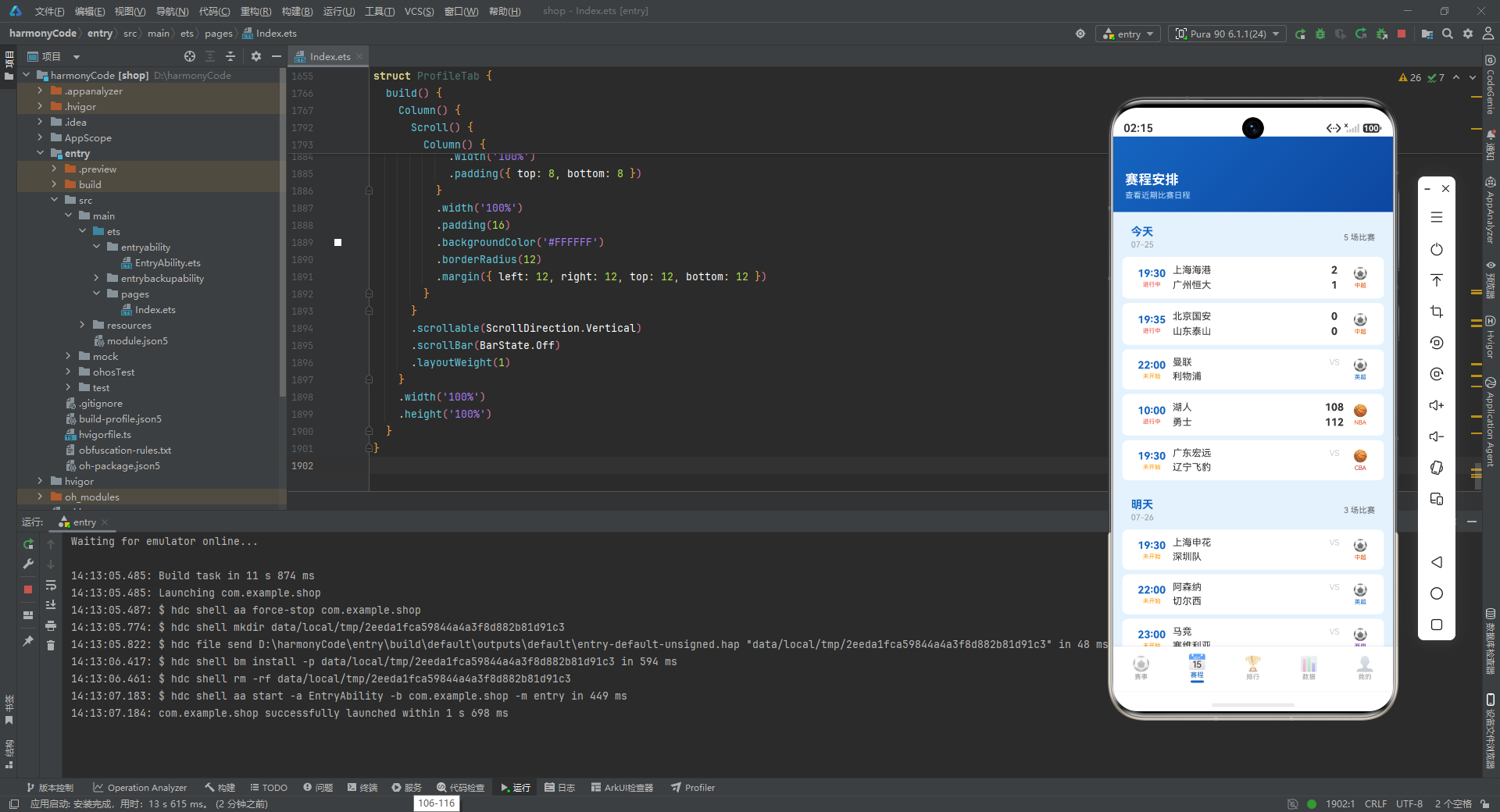
赛程页面的比赛项采用了紧凑列表设计,与赛事页面的卡片式设计形成鲜明对比。这种设计适合展示大量数据,让用户一眼扫过多场比赛。
每个比赛项是一个 Row,内部三栏布局:左侧时间/状态(固定宽度 56)、中间球队/比分(弹性宽度)、右侧联赛图标(固定宽度 40)。这种固定+弹性+固定的布局模式在列表设计中非常常见。
比分展示同样区分了"未开始"和"已进行/已结束"两种状态,未开始时主队侧显示"VS",客队侧留空;有比分时分别显示双方得分。右侧联赛信息使用 getLeagueMeta 获取图标和颜色,在有限空间内传递了联赛归属信息。
  @Builder
  dateGroup(group: ScheduleGroupType) {
    Column() {
      Row() {
        Column() {
          Text(group.weekday)
            .fontSize(15)
            .fontWeight(FontWeight.Bold)
            .fontColor('#1565C0')
          Text(group.date)
            .fontSize(11)
            .fontColor('#999999')
            .margin({ top: 2 })
        }
        .alignItems(HorizontalAlign.Start)

        Column().layoutWeight(1)

        Text(`${group.matches.length} 场比赛`)
          .fontSize(11)
          .fontColor('#666666')
      }
      .width('100%')
      .padding({ left: 12, right: 12, top: 10, bottom: 10 })
      .alignItems(VerticalAlign.Center)

      ForEach(group.matches, (item: MatchItem, index: number) => {
        this.scheduleMatchItem(item)
      }, (item: MatchItem, index: number) => item.id.toString())
    }
    .width('100%')
    .margin({ bottom: 8 })
  }
设计思路与实现细节解析:
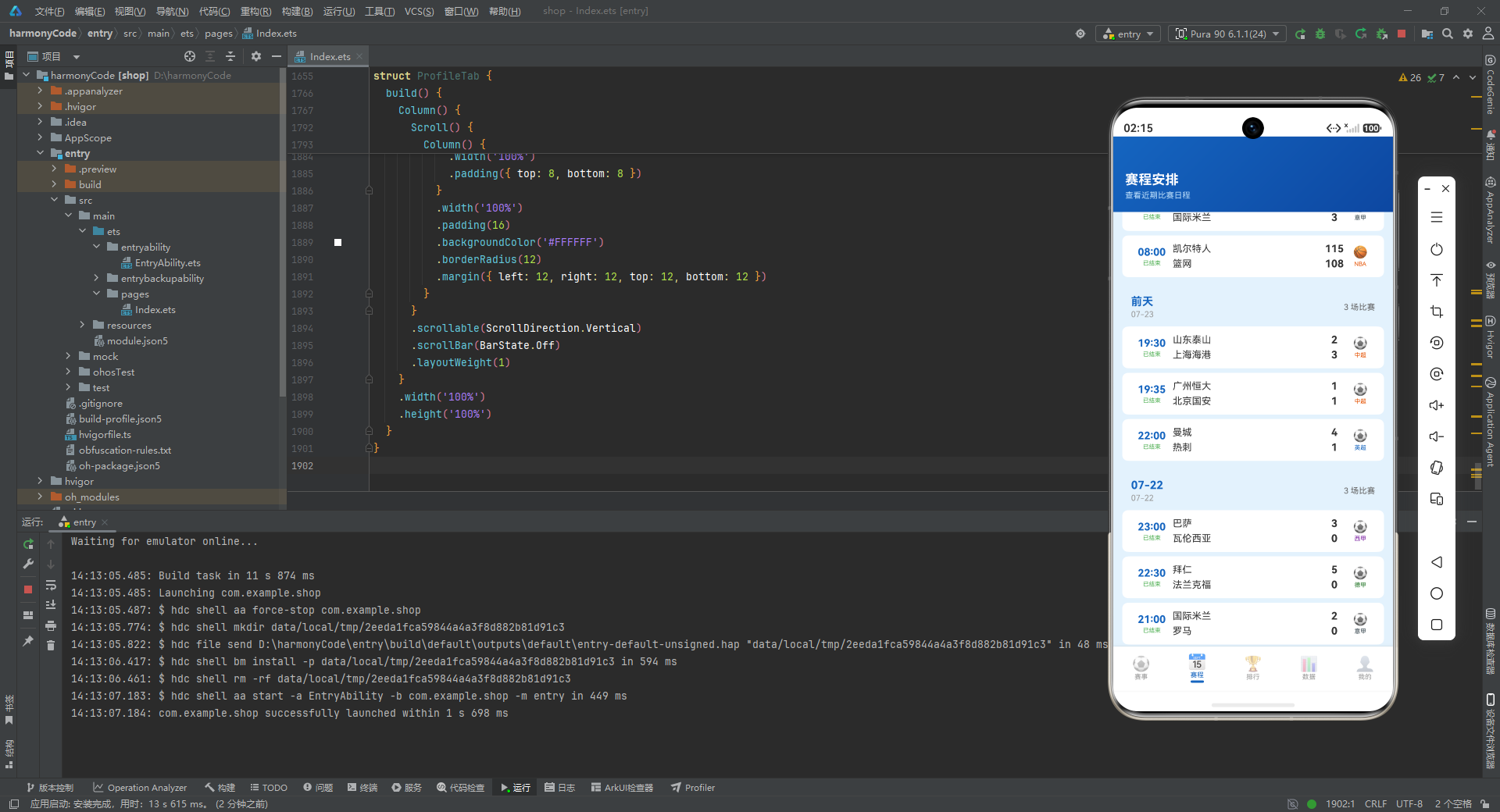
dateGroup 是赛程页面的分组单元,按日期聚合比赛。分组头部使用蓝色粗体显示相对星期(“今天”、"明天"等),下方用灰色小字显示具体日期,右侧显示该日期的比赛数量。Column().layoutWeight(1) 再次发挥了弹性占位的作用,将比赛数量推至右侧。
整个分组使用 Column 垂直排列分组头部和比赛列表,组与组之间通过 margin({ bottom: 8 }) 保持间距。这种分组展示方式符合用户对赛程表的心智模型——先看到日期,再看到该日期的所有比赛。
  build() {
    Column() {
      Column() {
        Text('赛程安排')
          .fontSize(18)
          .fontWeight(FontWeight.Bold)
          .fontColor('#FFFFFF')
        Text('查看近期比赛日程')
          .fontSize(11)
          .fontColor('#BBDEFB')
          .margin({ top: 4 })
      }
      .width('100%')
      .padding({ left: 16, top: 48, bottom: 16 })
      .alignItems(HorizontalAlign.Start)
      .linearGradient({ angle: 135, colors: [['#1565C0', 0], ['#0D47A1', 1]] })

      Scroll() {
        Column() {
          ForEach(SCHEDULE_GROUPS, (group: ScheduleGroupType, index: number) => {
            this.dateGroup(group)
          }, (group: ScheduleGroupType, index: number) => group.date)
        }
        .padding({ left: 12, right: 12, top: 8, bottom: 12 })
      }
      .scrollable(ScrollDirection.Vertical)
      .scrollBar(BarState.Off)
      .layoutWeight(1)
    }
    .width('100%')
    .height('100%')
  }
}
设计思路与实现细节解析:
赛程页面的整体布局结构与赛事页面保持一致:深蓝渐变头部 banner + 垂直滚动内容区。这种跨页面的一致性设计有助于建立用户的导航安全感。
内容区通过 ForEach 遍历 SCHEDULE_GROUPS 数据,依次渲染每个日期分组。由于 SCHEDULE_GROUPS 已经在数据层按日期顺序排列,列表自然呈现出从近到远的时间线结构。键值生成函数使用 group.date,确保每个分组都有稳定的唯一标识。
九、Tab 3 —— 排行页面(StandingsTab)
@Component
struct StandingsTab {
  @State selectedLeague: string = '中超'

  @Builder
  leagueSelector(league: string) {
    Text(league)
      .fontSize(12)
      .fontColor(this.selectedLeague === league ? '#FFFFFF' : '#1565C0')
      .backgroundColor(this.selectedLeague === league ? '#1565C0' : '#E3F2FD')
      .padding({ left: 14, right: 14, top: 6, bottom: 6 })
      .borderRadius(16)
      .onClick(() => {
        this.selectedLeague = league
      })
  }
设计思路与实现细节解析:
排行页面同样提供了联赛筛选功能,但这里的筛选器只包含五个足球联赛(中超、英超、西甲、德甲、意甲),不包含篮球联赛。这是因为当前的 STANDING_DATA 和 PLAYER_STAT_DATA 只包含中超数据,页面设计为以足球联赛为主。
leagueSelector 与赛事页面的 leagueChip 在视觉和交互上完全一致,保持了跨页面组件风格的一致性。默认选中"中超",符合应用主要面向国内用户的定位。
  @Builder
  standingRow(item: StandingItem) {
    Row() {
      Column() {
        Text(`${item.rank}`)
          .fontSize(14)
          .fontWeight(FontWeight.Bold)
          .fontColor('#FFFFFF')
      }
      .width(28)
      .height(28)
      .borderRadius(14)
      .backgroundColor(getRankColor(item.rank))
      .justifyContent(FlexAlign.Center)
      .alignItems(HorizontalAlign.Center)

      Row() {
        Column()
          .width(20)
          .height(20)
          .borderRadius(10)
          .backgroundColor(item.teamColor)
        Text(item.team)
          .fontSize(12)
          .fontColor('#333333')
          .fontWeight(FontWeight.Medium)
          .margin({ left: 6 })
          .maxLines(1)
          .textOverflow({ overflow: TextOverflow.Ellipsis })
      }
      .layoutWeight(1)
      .alignItems(VerticalAlign.Center)

      Text(`${item.played}`)
        .fontSize(11)
        .fontColor('#666666')
        .width(28)
        .textAlign(TextAlign.Center)
      Text(`${item.won}`)
        .fontSize(11)
        .fontColor('#4CAF50')
        .width(28)
        .textAlign(TextAlign.Center)
      Text(`${item.drawn}`)
        .fontSize(11)
        .fontColor('#FF9800')
        .width(28)
        .textAlign(TextAlign.Center)
      Text(`${item.lost}`)
        .fontSize(11)
        .fontColor('#F44336')
        .width(28)
        .textAlign(TextAlign.Center)
      Text(`${item.goalsFor - item.goalsAgainst}`)
        .fontSize(11)
        .fontColor('#666666')
        .width(32)
        .textAlign(TextAlign.Center)
      Text(`${item.points}`)
        .fontSize(13)
        .fontWeight(FontWeight.Bold)
        .fontColor('#1565C0')
        .width(36)
        .textAlign(TextAlign.Center)
    }
    .width('100%')
    .padding({ left: 8, right: 8, top: 8, bottom: 8 })
    .alignItems(VerticalAlign.Center)
  }
设计思路与实现细节解析:
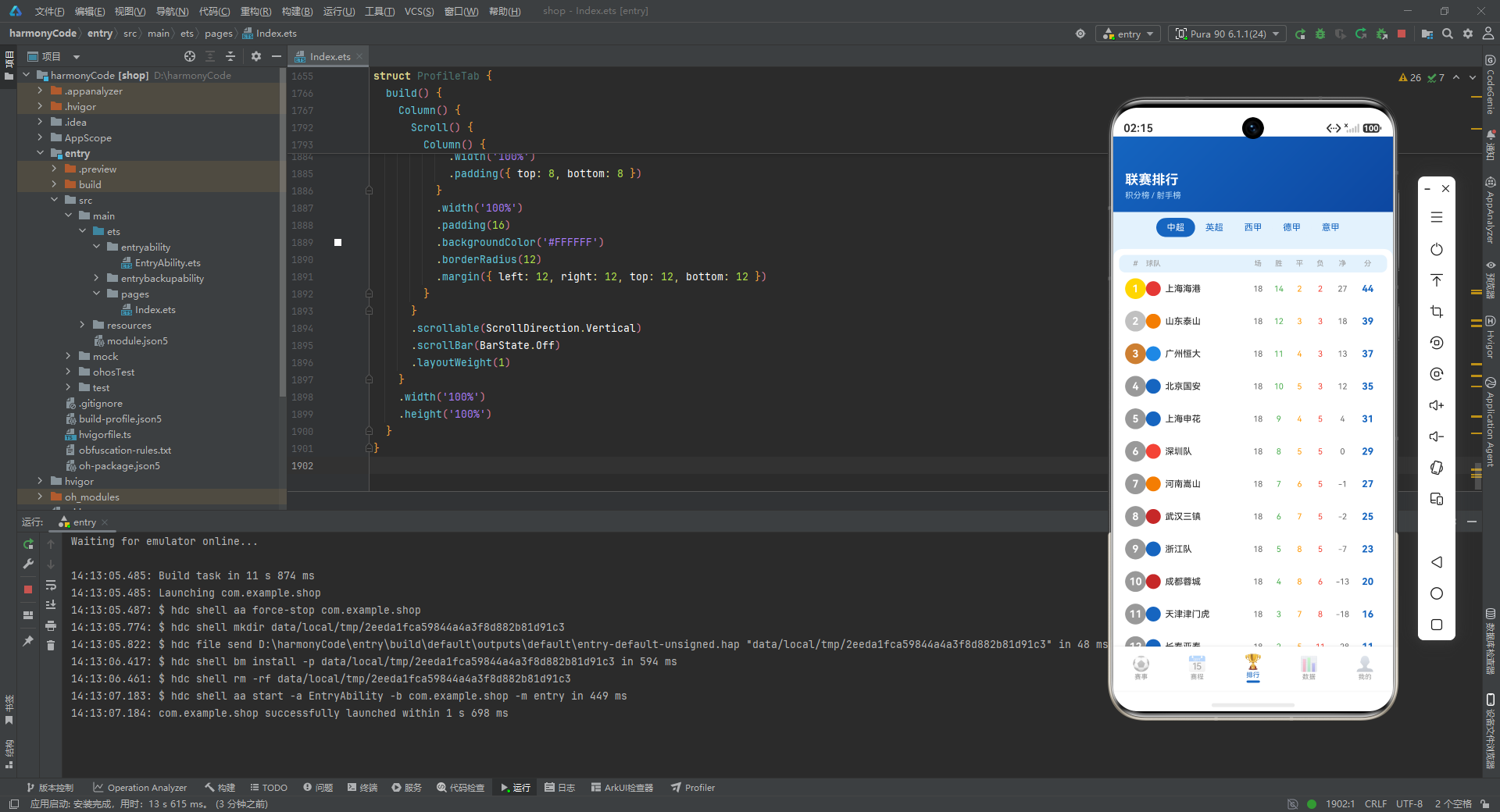
standingRow 实现了经典的足球积分榜表格行。表格列依次为:排名(圆形徽章)、球队(Logo + 名称)、场次、胜、平、负、净胜球、积分。
排名徽章使用 getRankColor 函数动态着色,前三名分别显示金银铜色,其他显示灰色。这是一个非常经典的设计,用户无需阅读数字就能通过颜色快速识别排名靠前的球队。
数据列使用了语义化颜色:胜场用绿色(#4CAF50)、平场用橙色(#FF9800)、负场用红色(#F44336)。这种颜色编码让数据更具可读性。积分列使用主色 #1565C0 并加粗显示,因为它是积分榜中最重要的指标,需要最强的视觉权重。净胜球通过 item.goalsFor - item.goalsAgainst 动态计算得出。
  @Builder
  scorerRow(item: PlayerStatItem) {
    Row() {
      Column() {
        Text(`${item.rank}`)
          .fontSize(13)
          .fontWeight(FontWeight.Bold)
          .fontColor('#FFFFFF')
      }
      .width(24)
      .height(24)
      .borderRadius(12)
      .backgroundColor(item.playerColor)
      .justifyContent(FlexAlign.Center)
      .alignItems(HorizontalAlign.Center)

      Column() {
        Text(item.name)
          .fontSize(13)
          .fontColor('#333333')
          .fontWeight(FontWeight.Medium)
        Text(item.team)
          .fontSize(10)
          .fontColor('#999999')
          .margin({ top: 2 })
      }
      .alignItems(HorizontalAlign.Start)
      .layoutWeight(1)
      .margin({ left: 8 })

      Text(`${item.goals}球`)
        .fontSize(13)
        .fontWeight(FontWeight.Bold)
        .fontColor('#1565C0')
        .width(40)
        .textAlign(TextAlign.Center)

      Text(`${item.assists}助`)
        .fontSize(11)
        .fontColor('#666666')
        .width(40)
        .textAlign(TextAlign.Center)

      Text(`${item.rating}`)
        .fontSize(11)
        .fontColor('#FF9800')
        .width(36)
        .textAlign(TextAlign.Center)
    }
    .width('100%')
    .padding({ left: 10, right: 10, top: 8, bottom: 8 })
    .alignItems(VerticalAlign.Center)
  }
设计思路与实现细节解析:
射手榜行与积分榜行采用了相似的设计语言,但针对球员数据的特点做了调整。左侧是排名圆形(使用球员所属球队的 playerColor),中间是球员姓名(较大字号)和所属球队(较小灰色字号),右侧是进球数(蓝色粗体)、助攻数和评分。
进球数后面附加了"球"字单位,助攻数附加了"助"字,这种中文化单位让数据更加直观。评分使用橙色显示,暗示这是一个需要关注的综合性指标。
  build() {
    Column() {
      // ... 头部渐变区域 ...

      Scroll() {
        Column() {
          Scroll() {
            Row() {
              ForEach(['中超', '英超', '西甲', '德甲', '意甲'], (league: string, index: number) => {
                this.leagueSelector(league)
              }, (league: string, index: number) => league)
            }
            .padding({ left: 12, right: 12, top: 8, bottom: 8 })
          }
          .scrollable(ScrollDirection.Horizontal)
          .scrollBar(BarState.Off)

          Column() {
            // ... 表头 ...
            ForEach(STANDING_DATA, (item: StandingItem, index: number) => {
              this.standingRow(item)
            }, (item: StandingItem, index: number) => item.rank.toString())
          }
          // ... 容器样式 ...

          Text('射手榜')
            .fontSize(15)
            .fontWeight(FontWeight.Bold)
            .fontColor('#1565C0')
            .alignSelf(ItemAlign.Start)
            .margin({ left: 16, top: 16, bottom: 8 })

          Column() {
            // ... 表头 ...
            ForEach(PLAYER_STAT_DATA, (item: PlayerStatItem, index: number) => {
              this.scorerRow(item)
            }, (item: PlayerStatItem, index: number) => item.rank.toString())
          }
          // ... 容器样式 ...
        }
      }
      .scrollable(ScrollDirection.Vertical)
      .scrollBar(BarState.Off)
      .layoutWeight(1)
    }
    .width('100%')
    .height('100%')
  }
}
设计思路与实现细节解析:
排行页面在一个垂直 Scroll 内嵌套了一个水平 Scroll(用于联赛筛选),形成了滚动嵌套的结构。这种布局在移动应用中很常见——外层垂直滚动控制整页内容,内层水平滚动控制筛选标签。
页面内容分为上下两大区块:积分榜和射手榜。两个区块各自有独立的表头和数据行,外部包裹白色圆角卡片容器,与浅蓝色页面背景形成层次对比。"射手榜"标题使用 alignSelf(ItemAlign.Start) 让自己在父容器中左对齐,不受子元素宽度的影响。
十、Tab 4 —— 数据页面(DataTab)
@Component
struct DataTab {
  @Builder
  goalBar(item: TeamGoalType) {
    Column() {
      Text(`${item.goals}`)
        .fontSize(10)
        .fontWeight(FontWeight.Bold)
        .fontColor(item.color)
        .margin({ bottom: 4 })
      Column()
        .width(20)
        .height(item.goals / MAX_GOALS * 110)
        .backgroundColor(item.color)
        .borderRadius({ topLeft: 4, topRight: 4 })
      Text(item.name)
        .fontSize(8)
        .fontColor('#666666')
        .margin({ top: 4 })
    }
    .layoutWeight(1)
    .alignItems(HorizontalAlign.Center)
    .justifyContent(FlexAlign.End)
  }
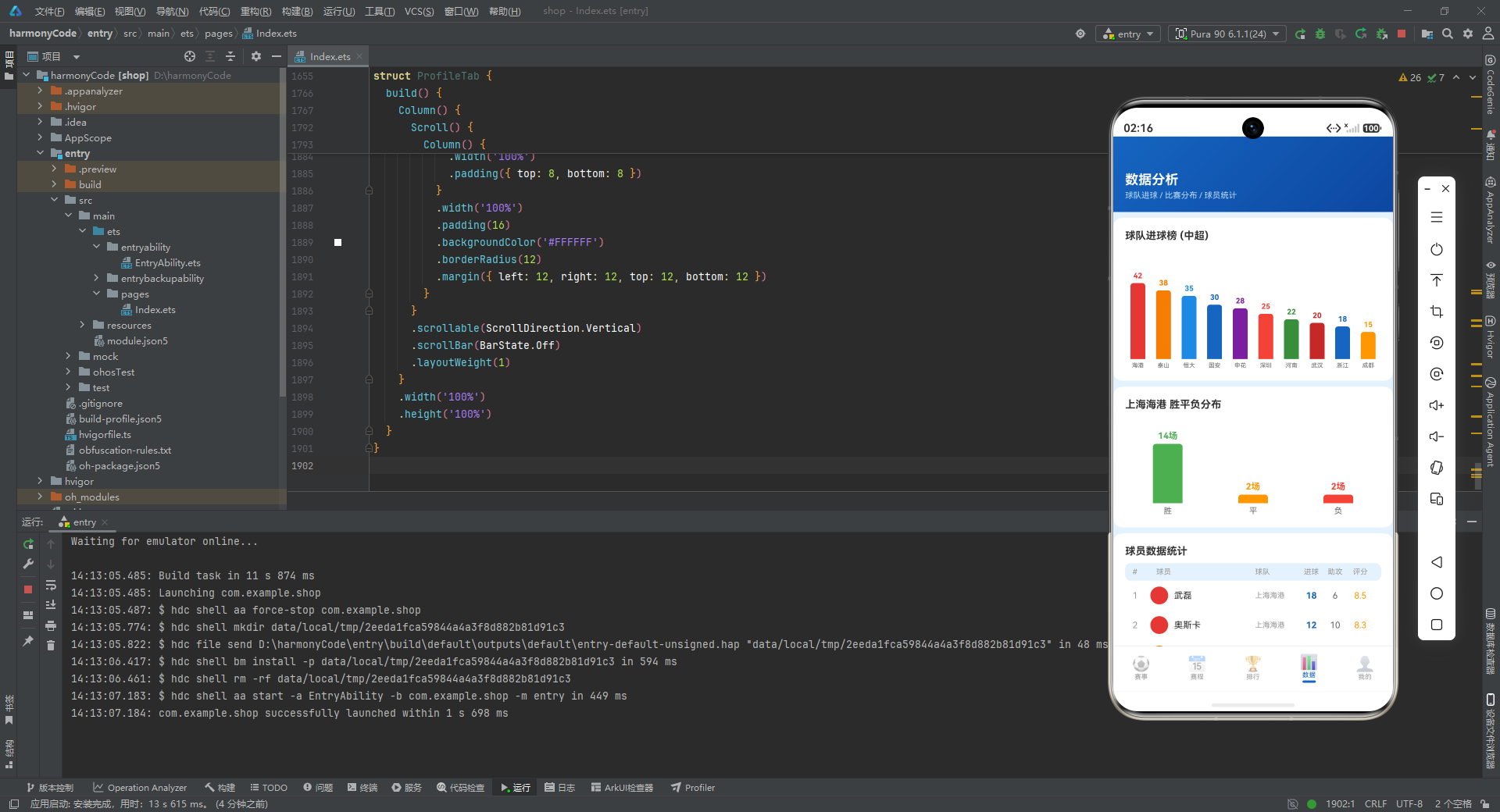
设计思路与实现细节解析:
DataTab 是应用的数据可视化模块,goalBar 实现了柱状图中的一个柱子。柱子高度通过公式 item.goals / MAX_GOALS * 110 计算得出,这是数据归一化的典型做法:将原始进球数映射到 0~110 像素的高度范围内,确保所有柱子都能在容器内完整显示,同时保持相对比例的准确性。MAX_GOALS 设为 45,略高于当前数据中的最大值 42,预留了一定的顶部空间。
柱子的容器使用 .justifyContent(FlexAlign.End),让所有子元素从容器的底部向上排列,这样柱子可以从下往上"生长",符合柱状图的视觉习惯。柱子顶部使用 borderRadius({ topLeft: 4, topRight: 4 }) 添加了顶部圆角,让视觉更加柔和。
  @Builder
  wdlBar(item: WinDrawLossType, maxVal: number) {
    Column() {
      Text(`${item.value}场`)
        .fontSize(12)
        .fontWeight(FontWeight.Bold)
        .fontColor(item.color)
        .margin({ bottom: 4 })
      Column()
        .width(40)
        .height(item.value / maxVal * 80)
        .backgroundColor(item.color)
        .borderRadius({ topLeft: 4, topRight: 4 })
      Text(item.label)
        .fontSize(11)
        .fontColor('#666666')
        .margin({ top: 4 })
    }
    .layoutWeight(1)
    .alignItems(HorizontalAlign.Center)
    .justifyContent(FlexAlign.End)
  }
设计思路与实现细节解析:
wdlBar 实现了胜平负分布的柱状图(Win-Draw-Loss)。与 goalBar 不同的是,它接收一个 maxVal 参数作为归一化基准,而不是使用全局常量。这使得该 Builder 更加通用,可以适应不同球队的胜平负数据。
柱子上方显示具体数值加"场"字单位,下方显示标签(“胜”、“平”、“负”)。三个柱子分别使用绿色、橙色、红色,与积分榜行的颜色编码保持一致,形成跨页面的视觉语言统一。
  build() {
    Column() {
      // ... 头部渐变区域 ...

      Scroll() {
        Column() {
          Column() {
            Text('球队进球榜 (中超)')
              .fontSize(14)
              .fontWeight(FontWeight.Bold)
              .fontColor('#333333')
              .alignSelf(ItemAlign.Start)
              .margin({ bottom: 12 })

            Row() {
              ForEach(TEAM_GOALS_DATA, (item: TeamGoalType, index: number) => {
                this.goalBar(item)
              }, (item: TeamGoalType, index: number) => item.name)
            }
            .width('100%')
            .height(160)
            .alignItems(VerticalAlign.Bottom)
          }
          // ... 容器样式 ...

          Column() {
            Text('上海海港 胜平负分布')
              // ...
            Row() {
              this.wdlBar(WIN_DRAW_LOSS_DATA[0], 14)
              this.wdlBar(WIN_DRAW_LOSS_DATA[1], 14)
              this.wdlBar(WIN_DRAW_LOSS_DATA[2], 14)
            }
            // ...
          }
          // ... 容器样式 ...

          Column() {
            Text('球员数据统计')
              // ...
            // ... 表头和 ForEach 渲染 playerStatRow ...
          }
          // ... 容器样式 ...
        }
      }
      .scrollable(ScrollDirection.Vertical)
      .scrollBar(BarState.Off)
      .layoutWeight(1)
    }
    .width('100%')
    .height('100%')
  }
}
设计思路与实现细节解析:
数据页面包含三个主要数据可视化区块,每个区块都包裹在独立的白色圆角卡片中。第一个区块是球队进球柱状图,第二个是上海海港的胜平负分布图,第三个是球员数据统计表。
柱状图容器设置高度为 160,并通过 .alignItems(VerticalAlign.Bottom) 让所有柱子从底部对齐。第三个区块复用了 PLAYER_STAT_DATA 数据和类似射手榜的表格布局,但调整了列宽和字号以适应数据页面的整体风格。
十一、Tab 5 —— 个人页面(ProfileTab)
@Component
struct ProfileTab {
  @State reminders: ReminderType[] = REMINDER_DATA
  onEditReminder: ((item: ReminderType) => void) | null = null
  onDeleteReminder: ((item: ReminderType) => void) | null = null

  @Builder
  favoriteTeamItem(team: FavoriteTeamType) {
    Column() {
      Column()
        .width(44)
        .height(44)
        .borderRadius(22)
        .backgroundColor(team.logoColor)
      Text(team.name)
        .fontSize(10)
        .fontColor('#333333')
        .margin({ top: 4 })
        .maxLines(1)
        .textOverflow({ overflow: TextOverflow.Ellipsis })
      Text(team.league)
        .fontSize(8)
        .fontColor('#999999')
        .margin({ top: 1 })
    }
    .width(72)
    .alignItems(HorizontalAlign.Center)
    .padding({ top: 10, bottom: 10 })
  }
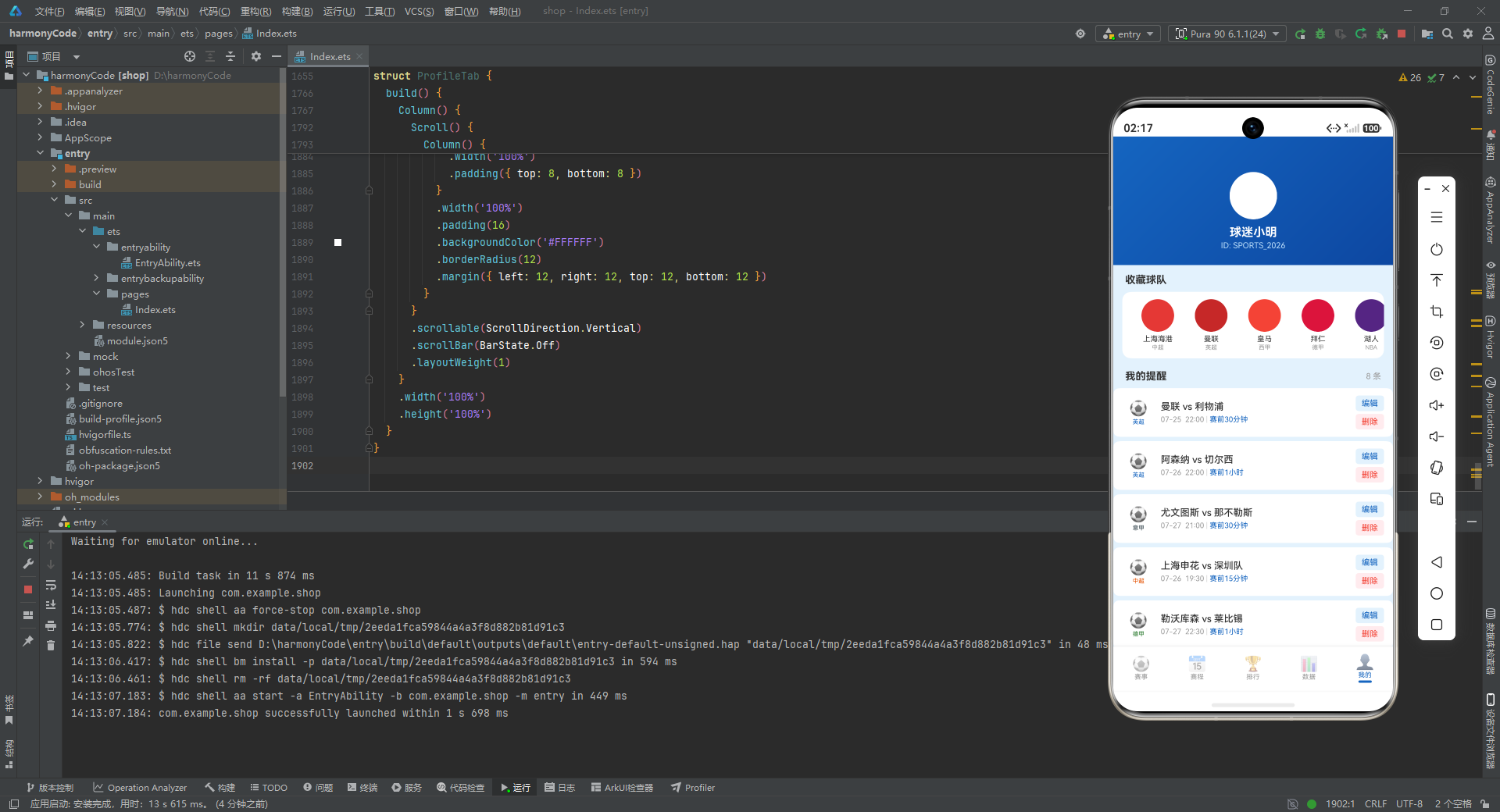
设计思路与实现细节解析:
ProfileTab 是个人中心页面,维护了 reminders 状态(从 REMINDER_DATA 初始化),并通过两个可选回调与父组件通信。
favoriteTeamItem 渲染用户收藏的球队。每个球队项使用垂直 Column 布局:上方是纯色圆形 Logo(44x44,圆角 22),中间是球队名称(10号字),下方是所属联赛(8号灰色字)。整个项固定宽度 72,在水平滚动容器中均匀排列。这种设计常见于体育应用的"我的关注"模块,让用户快速识别自己支持的球队。
  @Builder
  reminderItem(item: ReminderType) {
    Row() {
      Column() {
        Text(getLeagueMeta(item.league).icon)
          .fontSize(20)
        Text(item.league)
          .fontSize(8)
          .fontColor(getLeagueMeta(item.league).color)
          .margin({ top: 2 })
      }
      .width(44)
      .alignItems(HorizontalAlign.Center)

      Column() {
        Text(`${item.homeTeam} vs ${item.awayTeam}`)
          .fontSize(13)
          .fontColor('#333333')
          .fontWeight(FontWeight.Medium)
        Row() {
          Text(`${item.date}  ${item.time}`)
            .fontSize(10)
            .fontColor('#999999')
          Text(' | ')
            .fontSize(10)
            .fontColor('#CCCCCC')
          Text(item.reminderTime)
            .fontSize(10)
            .fontColor('#1565C0')
        }
        .margin({ top: 4 })
      }
      .layoutWeight(1)
      .alignItems(HorizontalAlign.Start)
      .margin({ left: 8 })

      Column() {
        Text('编辑')
          .fontSize(11)
          .fontColor('#1565C0')
          .padding({ left: 8, right: 8, top: 4, bottom: 4 })
          .backgroundColor('#E3F2FD')
          .borderRadius(4)
          .onClick(() => {
            if (this.onEditReminder) {
              this.onEditReminder(item)
            }
          })
        Text('删除')
          .fontSize(11)
          .fontColor('#F44336')
          .padding({ left: 8, right: 8, top: 4, bottom: 4 })
          .backgroundColor('#FFEBEE')
          .borderRadius(4)
          .margin({ top: 4 })
          .onClick(() => {
            if (this.onDeleteReminder) {
              this.onDeleteReminder(item)
            }
          })
      }
      .alignItems(HorizontalAlign.Center)
    }
    .width('100%')
    .padding({ left: 12, right: 12, top: 10, bottom: 10 })
    .backgroundColor('#FFFFFF')
    .borderRadius(8)
    .margin({ bottom: 6 })
  }
设计思路与实现细节解析:
提醒项采用三栏布局:左侧联赛图标(44px 宽)、中间比赛信息(弹性宽度)、右侧编辑/删除操作(右对齐)。中间区域展示了比赛对阵、日期时间和提醒时间,其中提醒时间使用主色 #1565C0 高亮显示,让用户一眼看到自己设置的提醒规则。
右侧的操作按钮使用了小型文字按钮而非图标按钮,编辑按钮使用蓝色系,删除按钮使用红色系,两者都带有圆角背景。点击时通过回调函数通知父组件,父组件负责弹出对应的对话框。这种"子组件触发事件、父组件处理逻辑"的模式在整个应用中得到了一致的贯彻。
  @Builder
  predictionItem(record: string) {
    Text(record)
      .fontSize(12)
      .fontColor('#333333')
      .padding({ left: 12, right: 12, top: 8, bottom: 8 })
      .backgroundColor('#FFFFFF')
      .borderRadius(8)
      .margin({ bottom: 4 })
      .width('100%')
  }
设计思路与实现细节解析:
predictionItem 是一个极简的列表项渲染器,直接将字符串记录渲染为一条白色卡片。预测记录文本中包含了 ✅ 和 ❌ Emoji 来直观标识预测是否命中,因此不需要额外的图标或颜色处理。这种设计非常简洁,但信息量足够。
  build() {
    Column() {
      Column() {
        Column() {
          Column()
            .width(64)
            .height(64)
            .borderRadius(32)
            .backgroundColor('#FFFFFF')
          Text('球迷小明')
            .fontSize(16)
            .fontWeight(FontWeight.Bold)
            .fontColor('#FFFFFF')
            .margin({ top: 8 })
          Text('ID: SPORTS_2026')
            .fontSize(11)
            .fontColor('#BBDEFB')
            .margin({ top: 2 })
        }
        .alignItems(HorizontalAlign.Center)
      }
      .width('100%')
      .padding({ top: 48, bottom: 20 })
      .alignItems(HorizontalAlign.Center)
      .linearGradient({ angle: 135, colors: [['#1565C0', 0], ['#0D47A1', 1]] })

      Scroll() {
        Column() {
          Text('收藏球队')
            // ...
          Scroll() {
            Row() {
              ForEach(FAVORITE_TEAMS, (team: FavoriteTeamType, index: number) => {
                this.favoriteTeamItem(team)
              }, (team: FavoriteTeamType, index: number) => team.name)
            }
            // ...
          }
          // ...

          Row() {
            Text('我的提醒')
              // ...
            Text(`${this.reminders.length} 条`)
              .fontSize(11)
              .fontColor('#999999')
          }
          // ...

          ForEach(this.reminders, (item: ReminderType, index: number) => {
            this.reminderItem(item)
          }, (item: ReminderType, index: number) => item.id.toString())

          Text('预测记录')
            // ...

          ForEach(PREDICTION_RECORD, (record: string, index: number) => {
            this.predictionItem(record)
          }, (record: string, index: number) => record)

          Column() {
            Text('通知设置')
              // ...
            // ... 三项开关设置 ...
          }
          // ... 容器样式 ...
        }
      }
      .scrollable(ScrollDirection.Vertical)
      .scrollBar(BarState.Off)
      .layoutWeight(1)
    }
    .width('100%')
    .height('100%')
  }
}
设计思路与实现细节解析:
个人页面的头部区域与其他页面略有不同——它去掉了左侧的标题文字,改为居中的用户头像区域。这里使用了一个白色圆形(64x64)作为头像占位,下方是昵称 “球迷小明” 和用户 ID。这种居中的个人资料布局是移动应用个人中心页面的经典范式。
内容区域分为四大模块:收藏球队(水平滚动)、我的提醒(垂直列表,带数量统计)、预测记录(垂直列表)、通知设置(静态设置项)。
"我的提醒"头部右侧动态显示 this.reminders.length 条,让用户清楚地知道提醒数量。通知设置区域使用了简单的 Row 布局,左侧是设置项名称,右侧是当前状态(“开启”/“关闭”),状态文字使用对应的颜色(绿色表示开启,灰色表示关闭)。虽然是静态展示,但结构已经为后续接入真实的设置开关预留了扩展空间。
十二、各模块关键技术点横向对比
| 模块名称 | 核心功能 | 状态管理要点 | 关键组件/Builder | 设计模式 | 特色交互 |
|---|---|---|---|---|---|
| 赛事页 | 浏览比赛列表、按联赛筛选、收藏比赛、添加提醒 | @State selectedLeague 控制筛选;@State pulseOpacity 驱动 LIVE 呼吸灯动画;@State matches 存储比赛数据 | leagueChip(筛选标签)、teamLogo(首字 Logo)、matchCard(比赛卡片) | 观察者模式(@Observed 数据驱动 UI)、回调委托(onAddReminder 通知父组件弹窗) | LIVE 呼吸灯动画(定时器 + .animation());收藏状态即时切换;卡片阴影悬浮效果 |
| 赛程页 | 按日期分组查看近期比赛日程 | 无本地状态,纯展示型组件,数据完全依赖父级传入的 Mock 数据 | scheduleMatchItem(紧凑比赛项)、dateGroup(日期分组容器) | 数据分组聚合(SCHEDULE_GROUPS 预分组)、列表渲染 | 相对日期展示(“今天”/“明天”);水平联赛标签滚动;紧凑列表高效扫视 |
| 排行页 | 查看联赛积分榜和射手榜 | @State selectedLeague 控制联赛切换;数据为只读展示 | leagueSelector(联赛选择器)、standingRow(积分表格行)、scorerRow(射手榜行) | 表格数据可视化、语义化颜色编码(胜绿/平橙/负红) | 排名金银铜色徽章;积分榜表头固定字段对齐;双区块(积分+射手)纵向排列 |
| 数据页 | 球队进球柱状图、胜平负分布、球员统计 | 无本地状态,纯展示型组件;使用全局常量 MAX_GOALS 进行数据归一化 | goalBar(进球柱状图)、wdlBar(胜平负柱状图)、playerStatRow(球员统计行) | 数据归一化与可视化、组件参数化(maxVal 传入) | 动态计算柱子高度(goals / MAX_GOALS * 110);柱状图顶部圆角;底部对齐生长动画效果 |
| 我的页 | 管理收藏球队、比赛提醒、查看预测记录、通知设置 | @State reminders 管理提醒列表;通过回调委托编辑/删除操作给父组件 | favoriteTeamItem(收藏球队项)、reminderItem(提醒卡片)、predictionItem(预测记录项) | 回调委托模式(onEditReminder、onDeleteReminder)、列表管理 | 水平滚动收藏球队;提醒项的编辑/删除操作按钮;预测命中/未命中 Emoji 标识 |
安装DevEco Studio程序

选择目标安装目录:

设置环境变量,但是需要重启一下:

新建一个空白模板:

设置API为24的模板项目:

初始化项目,自动下载相关依赖:

完整代码:
// 赛事追踪 - Sports Event Tracker
// Deep Blue (#1565C0) | Red (#F44336) Live | Green (#4CAF50) Finished | Bg (#E3F2FD)
// ============ Interfaces ============
interface LeagueMetaType {
label: string
icon: string
color: string
bg: string
}
interface MatchStatusMetaType {
label: string
color: string
icon: string
bg: string
}
interface SportTypeMetaType {
label: string
icon: string
color: string
}
interface FavoriteTeamType {
name: string
logoColor: string
league: string
}
interface ReminderType {
id: number
matchId: number
homeTeam: string
awayTeam: string
date: string
time: string
league: string
reminderTime: string
}
interface TabMetaType {
label: string
icon: string
}
interface TeamGoalType {
name: string
goals: number
color: string
}
interface WinDrawLossType {
label: string
value: number
color: string
}
interface ScheduleGroupType {
date: string
weekday: string
matches: MatchItem[]
}
// ============ @Observed Classes ============
@Observed
class MatchItem {
id: number = 0
homeTeam: string = ''
awayTeam: string = ''
homeScore: number = 0
awayScore: number = 0
date: string = ''
time: string = ''
league: string = ''
status: string = ''
venue: string = ''
homeLogoColor: string = ''
awayLogoColor: string = ''
minute: number = 0
round: string = ''
isFavorited: boolean = false
highlight: boolean = false
constructor(
id: number, homeTeam: string, awayTeam: string, homeScore: number, awayScore: number,
date: string, time: string, league: string, status: string, venue: string,
homeLogoColor: string, awayLogoColor: string, minute: number, round: string,
isFavorited: boolean, highlight: boolean
) {
this.id = id
this.homeTeam = homeTeam
this.awayTeam = awayTeam
this.homeScore = homeScore
this.awayScore = awayScore
this.date = date
this.time = time
this.league = league
this.status = status
this.venue = venue
this.homeLogoColor = homeLogoColor
this.awayLogoColor = awayLogoColor
this.minute = minute
this.round = round
this.isFavorited = isFavorited
this.highlight = highlight
}
}
@Observed
class StandingItem {
rank: number = 0
team: string = ''
played: number = 0
won: number = 0
drawn: number = 0
lost: number = 0
goalsFor: number = 0
goalsAgainst: number = 0
points: number = 0
teamColor: string = ''
league: string = ''
constructor(
rank: number, team: string, played: number, won: number, drawn: number, lost: number,
goalsFor: number, goalsAgainst: number, points: number, teamColor: string, league: string
) {
this.rank = rank
this.team = team
this.played = played
this.won = won
this.drawn = drawn
this.lost = lost
this.goalsFor = goalsFor
this.goalsAgainst = goalsAgainst
this.points = points
this.teamColor = teamColor
this.league = league
}
}
@Observed
class PlayerStatItem {
rank: number = 0
name: string = ''
team: string = ''
goals: number = 0
assists: number = 0
rating: number = 0
playerColor: string = ''
constructor(
rank: number, name: string, team: string, goals: number, assists: number, rating: number, playerColor: string
) {
this.rank = rank
this.name = name
this.team = team
this.goals = goals
this.assists = assists
this.rating = rating
this.playerColor = playerColor
}
}
// ============ Config Functions ============
function getLeagueMeta(league: string): LeagueMetaType {
if (league === '中超') return { label: '中超', icon: '⚽', color: '#E65100', bg: '#FFF3E0' }
if (league === '英超') return { label: '英超', icon: '⚽', color: '#1565C0', bg: '#E3F2FD' }
if (league === '西甲') return { label: '西甲', icon: '⚽', color: '#7B1FA2', bg: '#F3E5F5' }
if (league === '德甲') return { label: '德甲', icon: '⚽', color: '#2E7D32', bg: '#E8F5E9' }
if (league === '意甲') return { label: '意甲', icon: '⚽', color: '#37474F', bg: '#ECEFF1' }
if (league === 'NBA') return { label: 'NBA', icon: '🏀', color: '#E65100', bg: '#FFF3E0' }
if (league === 'CBA') return { label: 'CBA', icon: '🏀', color: '#C62828', bg: '#FFEBEE' }
return { label: league, icon: '⚽', color: '#666666', bg: '#F5F5F5' }
}
function getMatchStatusMeta(status: string): MatchStatusMetaType {
if (status === '进行中') return { label: '进行中', color: '#F44336', icon: '🔴', bg: '#FFEBEE' }
if (status === '已结束') return { label: '已结束', color: '#4CAF50', icon: '✅', bg: '#E8F5E9' }
return { label: '未开始', color: '#FF9800', icon: '⏰', bg: '#FFF3E0' }
}
function getRankColor(rank: number): string {
if (rank === 1) return '#FFD700'
if (rank === 2) return '#C0C0C0'
if (rank === 3) return '#CD7F32'
return '#999999'
}
function getSportTypeMeta(league: string): SportTypeMetaType {
if (league === 'NBA' || league === 'CBA') return { label: '篮球', icon: '🏀', color: '#E65100' }
return { label: '足球', icon: '⚽', color: '#1565C0' }
}
// ============ Mock Data ============
const LEAGUE_LIST: string[] = ['全部', '中超', '英超', '西甲', '德甲', '意甲', 'NBA', 'CBA']
const MATCH_DATA: MatchItem[] = [
new MatchItem(1, '上海海港', '广州恒大', 2, 1, '07-25', '19:30', '中超', '进行中', '上海体育场', '#E53935', '#1E88E5', 67, '第18轮', true, true),
new MatchItem(2, '北京国安', '山东泰山', 0, 0, '07-25', '19:35', '中超', '进行中', '工人体育场', '#1565C0', '#F57C00', 23, '第18轮', false, false),
new MatchItem(3, '曼联', '利物浦', 0, 0, '07-25', '22:00', '英超', '未开始', '老特拉福德', '#C62828', '#D32F2F', 0, '第1轮', true, true),
new MatchItem(4, '皇马', '巴萨', 3, 1, '07-24', '23:00', '西甲', '已结束', '伯纳乌球场', '#F44336', '#1565C0', 90, '第1轮', true, false),
new MatchItem(5, '拜仁', '多特蒙德', 2, 2, '07-24', '22:30', '德甲', '已结束', '安联球场', '#DC143C', '#F57C00', 90, '第1轮', false, false),
new MatchItem(6, 'AC米兰', '国际米兰', 1, 3, '07-24', '21:00', '意甲', '已结束', '圣西罗', '#C62828', '#1565C0', 90, '第1轮', true, true),
new MatchItem(7, '湖人', '勇士', 108, 112, '07-25', '10:00', 'NBA', '进行中', '斯台普斯中心', '#552583', '#1D6ED5', 3, '常规赛', true, true),
new MatchItem(8, '广东宏远', '辽宁飞豹', 0, 0, '07-25', '19:30', 'CBA', '未开始', '东莞篮球中心', '#C62828', '#1565C0', 0, '季后赛', false, false),
new MatchItem(9, '上海申花', '深圳队', 0, 0, '07-26', '19:30', '中超', '未开始', '虹口足球场', '#1565C0', '#F44336', 0, '第18轮', false, false),
new MatchItem(10, '阿森纳', '切尔西', 0, 0, '07-26', '22:00', '英超', '未开始', '酋长球场', '#C62828', '#1565C0', 0, '第1轮', true, false),
new MatchItem(11, '马竞', '塞维利亚', 0, 0, '07-26', '23:00', '西甲', '未开始', '万达大都会', '#C62828', '#F57C00', 0, '第1轮', false, false),
new MatchItem(12, '勒沃库森', '莱比锡', 0, 0, '07-27', '22:30', '德甲', '未开始', '拜耳竞技场', '#C62828', '#C62828', 0, '第1轮', false, false),
new MatchItem(13, '尤文图斯', '那不勒斯', 0, 0, '07-27', '21:00', '意甲', '未开始', '都灵安联', '#333333', '#1565C0', 0, '第1轮', true, false),
new MatchItem(14, '山东泰山', '上海海港', 2, 3, '07-23', '19:30', '中超', '已结束', '济南奥体中心', '#F57C00', '#E53935', 90, '第17轮', true, true),
new MatchItem(15, '广州恒大', '北京国安', 1, 1, '07-23', '19:35', '中超', '已结束', '天河体育中心', '#1E88E5', '#1565C0', 90, '第17轮', false, false),
new MatchItem(16, '曼城', '热刺', 4, 1, '07-23', '22:00', '英超', '已结束', '伊蒂哈德', '#1565C0', '#FFFFFF', 90, '第38轮', true, false),
new MatchItem(17, '巴萨', '瓦伦西亚', 3, 0, '07-22', '23:00', '西甲', '已结束', '诺坎普', '#1565C0', '#F57C00', 90, '第38轮', false, false),
new MatchItem(18, '拜仁', '法兰克福', 5, 0, '07-22', '22:30', '德甲', '已结束', '安联球场', '#DC143C', '#333333', 90, '第34轮', true, false),
new MatchItem(19, '国际米兰', '罗马', 2, 0, '07-22', '21:00', '意甲', '已结束', '梅阿查', '#1565C0', '#8B0000', 90, '第38轮', false, false),
new MatchItem(20, '凯尔特人', '篮网', 115, 108, '07-24', '08:00', 'NBA', '已结束', 'TD花园', '#1565C0', '#333333', 0, '常规赛', true, true)
]
const STANDING_DATA: StandingItem[] = [
new StandingItem(1, '上海海港', 18, 14, 2, 2, 42, 15, 44, '#E53935', '中超'),
new StandingItem(2, '山东泰山', 18, 12, 3, 3, 38, 20, 39, '#F57C00', '中超'),
new StandingItem(3, '广州恒大', 18, 11, 4, 3, 35, 22, 37, '#1E88E5', '中超'),
new StandingItem(4, '北京国安', 18, 10, 5, 3, 30, 18, 35, '#1565C0', '中超'),
new StandingItem(5, '上海申花', 18, 9, 4, 5, 28, 24, 31, '#1565C0', '中超'),
new StandingItem(6, '深圳队', 18, 8, 5, 5, 25, 25, 29, '#F44336', '中超'),
new StandingItem(7, '河南嵩山', 18, 7, 6, 5, 22, 23, 27, '#F57C00', '中超'),
new StandingItem(8, '武汉三镇', 18, 6, 7, 5, 20, 22, 25, '#C62828', '中超'),
new StandingItem(9, '浙江队', 18, 5, 8, 5, 18, 25, 23, '#1565C0', '中超'),
new StandingItem(10, '成都蓉城', 18, 4, 8, 6, 15, 28, 20, '#C62828', '中超'),
new StandingItem(11, '天津津门虎', 18, 3, 7, 8, 12, 30, 16, '#1565C0', '中超'),
new StandingItem(12, '长春亚泰', 18, 2, 5, 11, 10, 38, 11, '#1565C0', '中超')
]
const PLAYER_STAT_DATA: PlayerStatItem[] = [
new PlayerStatItem(1, '武磊', '上海海港', 18, 6, 8.5, '#E53935'),
new PlayerStatItem(2, '奥斯卡', '上海海港', 12, 10, 8.3, '#E53935'),
new PlayerStatItem(3, '克雷桑', '山东泰山', 15, 4, 8.1, '#F57C00'),
new PlayerStatItem(4, '艾克森', '广州恒大', 14, 3, 7.9, '#1E88E5'),
new PlayerStatItem(5, '张玉宁', '北京国安', 11, 5, 7.8, '#1565C0'),
new PlayerStatItem(6, '韦世豪', '上海申花', 9, 7, 7.7, '#1565C0'),
new PlayerStatItem(7, '林良铭', '深圳队', 8, 4, 7.5, '#F44336'),
new PlayerStatItem(8, '王燊超', '上海海港', 7, 8, 7.6, '#E53935'),
new PlayerStatItem(9, '吴曦', '上海申花', 6, 6, 7.4, '#1565C0'),
new PlayerStatItem(10, '蒿俊闵', '山东泰山', 5, 5, 7.3, '#F57C00')
]
const TEAM_GOALS_DATA: TeamGoalType[] = [
{ name: '海港', goals: 42, color: '#E53935' },
{ name: '泰山', goals: 38, color: '#F57C00' },
{ name: '恒大', goals: 35, color: '#1E88E5' },
{ name: '国安', goals: 30, color: '#1565C0' },
{ name: '申花', goals: 28, color: '#7B1FA2' },
{ name: '深圳', goals: 25, color: '#F44336' },
{ name: '河南', goals: 22, color: '#388E3C' },
{ name: '武汉', goals: 20, color: '#C62828' },
{ name: '浙江', goals: 18, color: '#1565C0' },
{ name: '成都', goals: 15, color: '#FF9800' }
]
const WIN_DRAW_LOSS_DATA: WinDrawLossType[] = [
{ label: '胜', value: 14, color: '#4CAF50' },
{ label: '平', value: 2, color: '#FF9800' },
{ label: '负', value: 2, color: '#F44336' }
]
const FAVORITE_TEAMS: FavoriteTeamType[] = [
{ name: '上海海港', logoColor: '#E53935', league: '中超' },
{ name: '曼联', logoColor: '#C62828', league: '英超' },
{ name: '皇马', logoColor: '#F44336', league: '西甲' },
{ name: '拜仁', logoColor: '#DC143C', league: '德甲' },
{ name: '湖人', logoColor: '#552583', league: 'NBA' },
{ name: 'AC米兰', logoColor: '#C62828', league: '意甲' }
]
const REMINDER_DATA: ReminderType[] = [
{ id: 1, matchId: 3, homeTeam: '曼联', awayTeam: '利物浦', date: '07-25', time: '22:00', league: '英超', reminderTime: '赛前30分钟' },
{ id: 2, matchId: 10, homeTeam: '阿森纳', awayTeam: '切尔西', date: '07-26', time: '22:00', league: '英超', reminderTime: '赛前1小时' },
{ id: 3, matchId: 13, homeTeam: '尤文图斯', awayTeam: '那不勒斯', date: '07-27', time: '21:00', league: '意甲', reminderTime: '赛前30分钟' },
{ id: 4, matchId: 9, homeTeam: '上海申花', awayTeam: '深圳队', date: '07-26', time: '19:30', league: '中超', reminderTime: '赛前15分钟' },
{ id: 5, matchId: 12, homeTeam: '勒沃库森', awayTeam: '莱比锡', date: '07-27', time: '22:30', league: '德甲', reminderTime: '赛前1小时' },
{ id: 6, matchId: 8, homeTeam: '广东宏远', awayTeam: '辽宁飞豹', date: '07-25', time: '19:30', league: 'CBA', reminderTime: '赛前30分钟' },
{ id: 7, matchId: 11, homeTeam: '马竞', awayTeam: '塞维利亚', date: '07-26', time: '23:00', league: '西甲', reminderTime: '赛前1小时' },
{ id: 8, matchId: 7, homeTeam: '湖人', awayTeam: '勇士', date: '07-25', time: '10:00', league: 'NBA', reminderTime: '赛前30分钟' }
]
const SCHEDULE_GROUPS: ScheduleGroupType[] = [
{ date: '07-25', weekday: '今天', matches: MATCH_DATA.filter((m: MatchItem) => m.date === '07-25') },
{ date: '07-26', weekday: '明天', matches: MATCH_DATA.filter((m: MatchItem) => m.date === '07-26') },
{ date: '07-27', weekday: '后天', matches: MATCH_DATA.filter((m: MatchItem) => m.date === '07-27') },
{ date: '07-24', weekday: '昨天', matches: MATCH_DATA.filter((m: MatchItem) => m.date === '07-24') },
{ date: '07-23', weekday: '前天', matches: MATCH_DATA.filter((m: MatchItem) => m.date === '07-23') },
{ date: '07-22', weekday: '07-22', matches: MATCH_DATA.filter((m: MatchItem) => m.date === '07-22') }
]
const PREDICTION_RECORD: string[] = [
'7月24日 皇马 vs 巴萨 预测3-1 ✅ 命中',
'7月23日 曼城 vs 热刺 预测2-1 ❌ 实际4-1',
'7月22日 拜仁 vs 法兰克福 预测4-0 ✅ 命中',
'7月20日 上海海港 vs 深圳队 预测2-0 ❌ 实际1-1',
'7月18日 英超 曼联 vs 阿森纳 预测1-1 ✅ 命中'
]
const MAX_GOALS: number = 45
// ============ Tab Enum ============
enum AppTab {
MATCHES,
SCHEDULE,
STANDINGS,
DATA,
PROFILE
}
// ============ Main Entry ============
@Entry
@Component
struct MainApp {
@State activeTab: AppTab = AppTab.MATCHES
@State showAddDialog: boolean = false
@State showEditDialog: boolean = false
@State showDeleteDialog: boolean = false
@State selectedReminder: ReminderType | null = null
@State inputMatchName: string = ''
@State inputReminderTime: string = '赛前30分钟'
@State editMatchName: string = ''
@State editReminderTime: string = ''
@Builder
contentArea() {
Column() {
if (this.activeTab === AppTab.MATCHES) {
MatchesTab({
onAddReminder: () => {
this.inputMatchName = ''
this.inputReminderTime = '赛前30分钟'
this.showAddDialog = true
}
})
} else if (this.activeTab === AppTab.SCHEDULE) {
ScheduleTab()
} else if (this.activeTab === AppTab.STANDINGS) {
StandingsTab()
} else if (this.activeTab === AppTab.DATA) {
DataTab()
} else {
ProfileTab({
onEditReminder: (item: ReminderType) => {
this.selectedReminder = item
this.editMatchName = `${item.homeTeam} vs ${item.awayTeam}`
this.editReminderTime = item.reminderTime
this.showEditDialog = true
},
onDeleteReminder: (item: ReminderType) => {
this.selectedReminder = item
this.showDeleteDialog = true
}
})
}
}
.layoutWeight(1)
}
@Builder
bottomTabItem(icon: string, label: string, tab: AppTab) {
Column() {
Text(icon)
.fontSize(20)
.opacity(this.activeTab === tab ? 1.0 : 0.45)
Text(label)
.fontSize(9)
.fontColor(this.activeTab === tab ? '#1565C0' : '#999999')
.margin({ top: 1 })
if (this.activeTab === tab) {
Column()
.width(18)
.height(3)
.backgroundColor('#1565C0')
.borderRadius(2)
.margin({ top: 2 })
}
}
.layoutWeight(1)
.alignItems(HorizontalAlign.Center)
.padding({ top: 5, bottom: 5 })
.onClick(() => {
this.activeTab = tab
})
}
@Builder
bottomBar() {
Row() {
this.bottomTabItem('⚽', '赛事', AppTab.MATCHES)
this.bottomTabItem('📅', '赛程', AppTab.SCHEDULE)
this.bottomTabItem('🏆', '排行', AppTab.STANDINGS)
this.bottomTabItem('📊', '数据', AppTab.DATA)
this.bottomTabItem('👤', '我的', AppTab.PROFILE)
}
.width('100%')
.backgroundColor('#FFFFFF')
.padding({ top: 4, bottom: 6 })
.shadow({ radius: 8, color: '#1A000000', offsetY: -2 })
}
@Builder
addReminderDialog() {
Stack() {
Column()
.width('100%')
.height('100%')
.backgroundColor('#80000000')
.onClick(() => {
this.showAddDialog = false
})
Column() {
Text('添加提醒')
.fontSize(18)
.fontWeight(FontWeight.Bold)
.fontColor('#1565C0')
.margin({ bottom: 16 })
Text('比赛名称')
.fontSize(13)
.fontColor('#666666')
.alignSelf(ItemAlign.Start)
.margin({ bottom: 6 })
TextInput({ text: this.inputMatchName, placeholder: '请输入比赛名称' })
.onChange((value: string) => {
this.inputMatchName = value
})
.width('100%')
.height(44)
.borderRadius(8)
.backgroundColor('#F5F7FA')
.padding({ left: 12, right: 12 })
.fontSize(14)
.fontColor('#333333')
.margin({ bottom: 12 })
Text('提醒时间')
.fontSize(13)
.fontColor('#666666')
.alignSelf(ItemAlign.Start)
.margin({ bottom: 6 })
TextInput({ text: this.inputReminderTime, placeholder: '如:赛前30分钟' })
.onChange((value: string) => {
this.inputReminderTime = value
})
.width('100%')
.height(44)
.borderRadius(8)
.backgroundColor('#F5F7FA')
.padding({ left: 12, right: 12 })
.fontSize(14)
.fontColor('#333333')
.margin({ bottom: 20 })
Row({ space: 12 }) {
Button('取消')
.layoutWeight(1)
.height(42)
.backgroundColor('#F5F7FA')
.fontColor('#666666')
.borderRadius(8)
.fontSize(15)
.onClick(() => {
this.showAddDialog = false
})
Button('确定')
.layoutWeight(1)
.height(42)
.backgroundColor('#1565C0')
.fontColor('#FFFFFF')
.borderRadius(8)
.fontSize(15)
.onClick(() => {
this.showAddDialog = false
})
}
.width('100%')
}
.width('85%')
.padding(24)
.borderRadius(16)
.backgroundColor('#FFFFFF')
.constraintSize({ maxHeight: '80%' })
}
.width('100%')
.height('100%')
.alignContent(Alignment.Center)
}
@Builder
editReminderDialog() {
Stack() {
Column()
.width('100%')
.height('100%')
.backgroundColor('#80000000')
.onClick(() => {
this.showEditDialog = false
})
Column() {
Text('编辑提醒')
.fontSize(18)
.fontWeight(FontWeight.Bold)
.fontColor('#1565C0')
.margin({ bottom: 16 })
Text('比赛名称')
.fontSize(13)
.fontColor('#666666')
.alignSelf(ItemAlign.Start)
.margin({ bottom: 6 })
TextInput({ text: this.editMatchName, placeholder: '请输入比赛名称' })
.onChange((value: string) => {
this.editMatchName = value
})
.width('100%')
.height(44)
.borderRadius(8)
.backgroundColor('#F5F7FA')
.padding({ left: 12, right: 12 })
.fontSize(14)
.fontColor('#333333')
.margin({ bottom: 12 })
Text('提醒时间')
.fontSize(13)
.fontColor('#666666')
.alignSelf(ItemAlign.Start)
.margin({ bottom: 6 })
TextInput({ text: this.editReminderTime, placeholder: '如:赛前30分钟' })
.onChange((value: string) => {
this.editReminderTime = value
})
.width('100%')
.height(44)
.borderRadius(8)
.backgroundColor('#F5F7FA')
.padding({ left: 12, right: 12 })
.fontSize(14)
.fontColor('#333333')
.margin({ bottom: 20 })
Row({ space: 12 }) {
Button('取消')
.layoutWeight(1)
.height(42)
.backgroundColor('#F5F7FA')
.fontColor('#666666')
.borderRadius(8)
.fontSize(15)
.onClick(() => {
this.showEditDialog = false
})
Button('保存')
.layoutWeight(1)
.height(42)
.backgroundColor('#1565C0')
.fontColor('#FFFFFF')
.borderRadius(8)
.fontSize(15)
.onClick(() => {
this.showEditDialog = false
})
}
.width('100%')
}
.width('85%')
.padding(24)
.borderRadius(16)
.backgroundColor('#FFFFFF')
.constraintSize({ maxHeight: '80%' })
}
.width('100%')
.height('100%')
.alignContent(Alignment.Center)
}
@Builder
deleteConfirmDialog() {
Stack() {
Column()
.width('100%')
.height('100%')
.backgroundColor('#80000000')
.onClick(() => {
this.showDeleteDialog = false
})
Column() {
Text('删除提醒')
.fontSize(18)
.fontWeight(FontWeight.Bold)
.fontColor('#F44336')
.margin({ bottom: 12 })
Text('确定要删除这条提醒吗?')
.fontSize(14)
.fontColor('#333333')
.margin({ bottom: 8 })
Text(`${this.selectedReminder?.homeTeam ?? ''} vs ${this.selectedReminder?.awayTeam ?? ''}`)
.fontSize(13)
.fontColor('#666666')
.margin({ bottom: 4 })
Text(`${this.selectedReminder?.date ?? ''} ${this.selectedReminder?.time ?? ''}`)
.fontSize(12)
.fontColor('#999999')
.margin({ bottom: 20 })
Row({ space: 12 }) {
Button('取消')
.layoutWeight(1)
.height(42)
.backgroundColor('#F5F7FA')
.fontColor('#666666')
.borderRadius(8)
.fontSize(15)
.onClick(() => {
this.showDeleteDialog = false
})
Button('删除')
.layoutWeight(1)
.height(42)
.backgroundColor('#F44336')
.fontColor('#FFFFFF')
.borderRadius(8)
.fontSize(15)
.onClick(() => {
this.showDeleteDialog = false
})
}
.width('100%')
}
.width('80%')
.padding(24)
.borderRadius(16)
.backgroundColor('#FFFFFF')
}
.width('100%')
.height('100%')
.alignContent(Alignment.Center)
}
build() {
Stack() {
Column() {
this.contentArea()
this.bottomBar()
}
.width('100%')
.height('100%')
if (this.showAddDialog) {
this.addReminderDialog()
}
if (this.showEditDialog) {
this.editReminderDialog()
}
if (this.showDeleteDialog) {
this.deleteConfirmDialog()
}
}
.width('100%')
.height('100%')
.backgroundColor('#E3F2FD')
}
}
// ============ Tab1: 赛事 ============
@Component
struct MatchesTab {
@State selectedLeague: string = '全部'
@State pulseOpacity: number = 1.0
@State matches: MatchItem[] = MATCH_DATA
onAddReminder: (() => void) | null = null
private timerId: number = -1
aboutToAppear(): void {
this.timerId = setInterval(() => {
this.pulseOpacity = this.pulseOpacity === 1.0 ? 0.3 : 1.0
}, 800)
}
aboutToDisappear(): void {
if (this.timerId !== -1) {
clearInterval(this.timerId)
}
}
@Builder
leagueChip(league: string) {
Text(league)
.fontSize(12)
.fontColor(this.selectedLeague === league ? '#FFFFFF' : '#1565C0')
.backgroundColor(this.selectedLeague === league ? '#1565C0' : '#E3F2FD')
.padding({ left: 14, right: 14, top: 6, bottom: 6 })
.borderRadius(16)
.onClick(() => {
this.selectedLeague = league
})
}
@Builder
teamLogo(color: string, name: string) {
Column() {
Text(name.charAt(0))
.fontSize(16)
.fontWeight(FontWeight.Bold)
.fontColor('#FFFFFF')
}
.width(40)
.height(40)
.borderRadius(20)
.backgroundColor(color)
.justifyContent(FlexAlign.Center)
.alignItems(HorizontalAlign.Center)
}
@Builder
matchCard(item: MatchItem) {
Column() {
Row() {
Column() {
Text(getLeagueMeta(item.league).icon)
.fontSize(14)
Text(item.league)
.fontSize(9)
.fontColor(getLeagueMeta(item.league).color)
.margin({ top: 1 })
}
.alignItems(HorizontalAlign.Center)
Text(item.round)
.fontSize(11)
.fontColor('#999999')
.margin({ left: 8 })
Column().layoutWeight(1)
if (item.status === '进行中') {
Row() {
Column()
.width(6)
.height(6)
.borderRadius(3)
.backgroundColor('#F44336')
.opacity(this.pulseOpacity)
.animation({ duration: 800, curve: Curve.EaseInOut })
Text('LIVE')
.fontSize(9)
.fontColor('#F44336')
.fontWeight(FontWeight.Bold)
.margin({ left: 4 })
}
.padding({ left: 6, right: 6, top: 3, bottom: 3 })
.borderRadius(4)
.backgroundColor('#FFEBEE')
}
Text(item.date)
.fontSize(10)
.fontColor('#999999')
.margin({ left: 8 })
Text(item.time)
.fontSize(10)
.fontColor('#999999')
.margin({ left: 4 })
Text(item.isFavorited ? '⭐' : '☆')
.fontSize(16)
.fontColor('#FFB300')
.margin({ left: 8 })
.onClick(() => {
item.isFavorited = !item.isFavorited
})
}
.width('100%')
.alignItems(VerticalAlign.Center)
Row() {
Column() {
this.teamLogo(item.homeLogoColor, item.homeTeam)
Text(item.homeTeam)
.fontSize(12)
.fontColor('#333333')
.fontWeight(FontWeight.Medium)
.margin({ top: 6 })
.maxLines(1)
.textOverflow({ overflow: TextOverflow.Ellipsis })
}
.alignItems(HorizontalAlign.Center)
.layoutWeight(1)
Column() {
if (item.status === '未开始') {
Text('VS')
.fontSize(20)
.fontWeight(FontWeight.Bold)
.fontColor('#CCCCCC')
} else {
Row({ space: 4 }) {
Text(`${item.homeScore}`)
.fontSize(28)
.fontWeight(FontWeight.Bold)
.fontColor(item.status === '进行中' ? '#F44336' : '#1565C0')
Text('-')
.fontSize(20)
.fontColor('#999999')
Text(`${item.awayScore}`)
.fontSize(28)
.fontWeight(FontWeight.Bold)
.fontColor(item.status === '进行中' ? '#F44336' : '#1565C0')
}
.alignItems(VerticalAlign.Center)
}
if (item.status === '进行中') {
Text(`${item.minute}'`)
.fontSize(10)
.fontColor('#F44336')
.margin({ top: 2 })
}
if (item.status === '已结束') {
Text('终场')
.fontSize(10)
.fontColor('#4CAF50')
.margin({ top: 2 })
}
}
.alignItems(HorizontalAlign.Center)
.width(120)
Column() {
this.teamLogo(item.awayLogoColor, item.awayTeam)
Text(item.awayTeam)
.fontSize(12)
.fontColor('#333333')
.fontWeight(FontWeight.Medium)
.margin({ top: 6 })
.maxLines(1)
.textOverflow({ overflow: TextOverflow.Ellipsis })
}
.alignItems(HorizontalAlign.Center)
.layoutWeight(1)
}
.width('100%')
.padding({ top: 12, bottom: 12 })
.alignItems(VerticalAlign.Center)
Row() {
Text(`📍 ${item.venue}`)
.fontSize(10)
.fontColor('#999999')
Column().layoutWeight(1)
Text(getMatchStatusMeta(item.status).label)
.fontSize(10)
.fontColor(getMatchStatusMeta(item.status).color)
.padding({ left: 8, right: 8, top: 2, bottom: 2 })
.borderRadius(4)
.backgroundColor(getMatchStatusMeta(item.status).bg)
}
.width('100%')
.alignItems(VerticalAlign.Center)
if (item.status !== '已结束') {
Row() {
Button('添加提醒')
.height(30)
.fontSize(11)
.backgroundColor('#E3F2FD')
.fontColor('#1565C0')
.borderRadius(6)
.onClick(() => {
if (this.onAddReminder) {
this.onAddReminder()
}
})
Column().layoutWeight(1)
Text('查看详情 ›')
.fontSize(11)
.fontColor('#1565C0')
}
.width('100%')
.alignItems(VerticalAlign.Center)
.margin({ top: 8 })
}
}
.width('100%')
.padding(14)
.borderRadius(12)
.backgroundColor('#FFFFFF')
.shadow({ radius: 4, color: '#1A000000', offsetY: 2 })
.margin({ bottom: 10 })
}
build() {
Column() {
Column() {
Row() {
Column() {
Text('赛事追踪')
.fontSize(20)
.fontWeight(FontWeight.Bold)
.fontColor('#FFFFFF')
Row() {
Column()
.width(6)
.height(6)
.borderRadius(3)
.backgroundColor('#F44336')
.opacity(this.pulseOpacity)
.animation({ duration: 800, curve: Curve.EaseInOut })
Text(`${MATCH_DATA.filter((m: MatchItem) => m.status === '进行中').length} 场比赛进行中`)
.fontSize(11)
.fontColor('#BBDEFB')
.margin({ left: 6 })
}
.margin({ top: 4 })
}
.alignItems(HorizontalAlign.Start)
Column().layoutWeight(1)
Text('⚽')
.fontSize(32)
}
.width('100%')
.padding({ left: 16, right: 16, top: 48, bottom: 16 })
.alignItems(VerticalAlign.Center)
}
.width('100%')
.linearGradient({ angle: 135, colors: [['#1565C0', 0], ['#0D47A1', 1]] })
Scroll() {
Row() {
ForEach(LEAGUE_LIST, (league: string, index: number) => {
this.leagueChip(league)
}, (league: string, index: number) => league)
}
.padding({ left: 16, right: 16, top: 10, bottom: 10 })
}
.scrollable(ScrollDirection.Horizontal)
.scrollBar(BarState.Off)
.backgroundColor('#FFFFFF')
Scroll() {
Column() {
ForEach(this.matches, (item: MatchItem, index: number) => {
if (this.selectedLeague === '全部' || item.league === this.selectedLeague) {
this.matchCard(item)
}
}, (item: MatchItem, index: number) => item.id.toString())
}
.padding({ left: 12, right: 12, top: 8, bottom: 12 })
}
.scrollable(ScrollDirection.Vertical)
.scrollBar(BarState.Off)
.layoutWeight(1)
}
.width('100%')
.height('100%')
}
}
// ============ Tab2: 赛程 ============
@Component
struct ScheduleTab {
@Builder
scheduleMatchItem(item: MatchItem) {
Row() {
Column() {
Text(item.time)
.fontSize(14)
.fontWeight(FontWeight.Bold)
.fontColor('#1565C0')
Text(getMatchStatusMeta(item.status).label)
.fontSize(8)
.fontColor(getMatchStatusMeta(item.status).color)
.margin({ top: 2 })
}
.width(56)
.alignItems(HorizontalAlign.Center)
Column() {
Row() {
Text(item.homeTeam)
.fontSize(13)
.fontColor('#333333')
.layoutWeight(1)
if (item.status === '未开始') {
Text('VS')
.fontSize(11)
.fontColor('#CCCCCC')
.width(30)
.textAlign(TextAlign.Center)
} else {
Text(`${item.homeScore}`)
.fontSize(14)
.fontWeight(FontWeight.Bold)
.fontColor('#333333')
.width(30)
.textAlign(TextAlign.Center)
}
}
.width('100%')
.alignItems(VerticalAlign.Center)
Row() {
Text(item.awayTeam)
.fontSize(13)
.fontColor('#333333')
.layoutWeight(1)
if (item.status === '未开始') {
Text('')
.width(30)
} else {
Text(`${item.awayScore}`)
.fontSize(14)
.fontWeight(FontWeight.Bold)
.fontColor('#333333')
.width(30)
.textAlign(TextAlign.Center)
}
}
.width('100%')
.alignItems(VerticalAlign.Center)
.margin({ top: 4 })
}
.layoutWeight(1)
.alignItems(HorizontalAlign.Start)
Column() {
Text(getLeagueMeta(item.league).icon)
.fontSize(16)
Text(item.league)
.fontSize(8)
.fontColor(getLeagueMeta(item.league).color)
.margin({ top: 2 })
}
.width(40)
.alignItems(HorizontalAlign.Center)
}
.width('100%')
.padding({ left: 12, right: 12, top: 10, bottom: 10 })
.backgroundColor('#FFFFFF')
.borderRadius(8)
.margin({ bottom: 6 })
}
@Builder
dateGroup(group: ScheduleGroupType) {
Column() {
Row() {
Column() {
Text(group.weekday)
.fontSize(15)
.fontWeight(FontWeight.Bold)
.fontColor('#1565C0')
Text(group.date)
.fontSize(11)
.fontColor('#999999')
.margin({ top: 2 })
}
.alignItems(HorizontalAlign.Start)
Column().layoutWeight(1)
Text(`${group.matches.length} 场比赛`)
.fontSize(11)
.fontColor('#666666')
}
.width('100%')
.padding({ left: 12, right: 12, top: 10, bottom: 10 })
.alignItems(VerticalAlign.Center)
ForEach(group.matches, (item: MatchItem, index: number) => {
this.scheduleMatchItem(item)
}, (item: MatchItem, index: number) => item.id.toString())
}
.width('100%')
.margin({ bottom: 8 })
}
build() {
Column() {
Column() {
Text('赛程安排')
.fontSize(18)
.fontWeight(FontWeight.Bold)
.fontColor('#FFFFFF')
Text('查看近期比赛日程')
.fontSize(11)
.fontColor('#BBDEFB')
.margin({ top: 4 })
}
.width('100%')
.padding({ left: 16, top: 48, bottom: 16 })
.alignItems(HorizontalAlign.Start)
.linearGradient({ angle: 135, colors: [['#1565C0', 0], ['#0D47A1', 1]] })
Scroll() {
Column() {
ForEach(SCHEDULE_GROUPS, (group: ScheduleGroupType, index: number) => {
this.dateGroup(group)
}, (group: ScheduleGroupType, index: number) => group.date)
}
.padding({ left: 12, right: 12, top: 8, bottom: 12 })
}
.scrollable(ScrollDirection.Vertical)
.scrollBar(BarState.Off)
.layoutWeight(1)
}
.width('100%')
.height('100%')
}
}
// ============ Tab3: 排行 ============
@Component
struct StandingsTab {
@State selectedLeague: string = '中超'
@Builder
leagueSelector(league: string) {
Text(league)
.fontSize(12)
.fontColor(this.selectedLeague === league ? '#FFFFFF' : '#1565C0')
.backgroundColor(this.selectedLeague === league ? '#1565C0' : '#E3F2FD')
.padding({ left: 14, right: 14, top: 6, bottom: 6 })
.borderRadius(16)
.onClick(() => {
this.selectedLeague = league
})
}
@Builder
standingRow(item: StandingItem) {
Row() {
Column() {
Text(`${item.rank}`)
.fontSize(14)
.fontWeight(FontWeight.Bold)
.fontColor('#FFFFFF')
}
.width(28)
.height(28)
.borderRadius(14)
.backgroundColor(getRankColor(item.rank))
.justifyContent(FlexAlign.Center)
.alignItems(HorizontalAlign.Center)
Row() {
Column()
.width(20)
.height(20)
.borderRadius(10)
.backgroundColor(item.teamColor)
Text(item.team)
.fontSize(12)
.fontColor('#333333')
.fontWeight(FontWeight.Medium)
.margin({ left: 6 })
.maxLines(1)
.textOverflow({ overflow: TextOverflow.Ellipsis })
}
.layoutWeight(1)
.alignItems(VerticalAlign.Center)
Text(`${item.played}`)
.fontSize(11)
.fontColor('#666666')
.width(28)
.textAlign(TextAlign.Center)
Text(`${item.won}`)
.fontSize(11)
.fontColor('#4CAF50')
.width(28)
.textAlign(TextAlign.Center)
Text(`${item.drawn}`)
.fontSize(11)
.fontColor('#FF9800')
.width(28)
.textAlign(TextAlign.Center)
Text(`${item.lost}`)
.fontSize(11)
.fontColor('#F44336')
.width(28)
.textAlign(TextAlign.Center)
Text(`${item.goalsFor - item.goalsAgainst}`)
.fontSize(11)
.fontColor('#666666')
.width(32)
.textAlign(TextAlign.Center)
Text(`${item.points}`)
.fontSize(13)
.fontWeight(FontWeight.Bold)
.fontColor('#1565C0')
.width(36)
.textAlign(TextAlign.Center)
}
.width('100%')
.padding({ left: 8, right: 8, top: 8, bottom: 8 })
.alignItems(VerticalAlign.Center)
}
@Builder
scorerRow(item: PlayerStatItem) {
Row() {
Column() {
Text(`${item.rank}`)
.fontSize(13)
.fontWeight(FontWeight.Bold)
.fontColor('#FFFFFF')
}
.width(24)
.height(24)
.borderRadius(12)
.backgroundColor(item.playerColor)
.justifyContent(FlexAlign.Center)
.alignItems(HorizontalAlign.Center)
Column() {
Text(item.name)
.fontSize(13)
.fontColor('#333333')
.fontWeight(FontWeight.Medium)
Text(item.team)
.fontSize(10)
.fontColor('#999999')
.margin({ top: 2 })
}
.alignItems(HorizontalAlign.Start)
.layoutWeight(1)
.margin({ left: 8 })
Text(`${item.goals}球`)
.fontSize(13)
.fontWeight(FontWeight.Bold)
.fontColor('#1565C0')
.width(40)
.textAlign(TextAlign.Center)
Text(`${item.assists}助`)
.fontSize(11)
.fontColor('#666666')
.width(40)
.textAlign(TextAlign.Center)
Text(`${item.rating}`)
.fontSize(11)
.fontColor('#FF9800')
.width(36)
.textAlign(TextAlign.Center)
}
.width('100%')
.padding({ left: 10, right: 10, top: 8, bottom: 8 })
.alignItems(VerticalAlign.Center)
}
build() {
Column() {
Column() {
Text('联赛排行')
.fontSize(18)
.fontWeight(FontWeight.Bold)
.fontColor('#FFFFFF')
Text('积分榜 / 射手榜')
.fontSize(11)
.fontColor('#BBDEFB')
.margin({ top: 4 })
}
.width('100%')
.padding({ left: 16, top: 48, bottom: 16 })
.alignItems(HorizontalAlign.Start)
.linearGradient({ angle: 135, colors: [['#1565C0', 0], ['#0D47A1', 1]] })
Scroll() {
Column() {
Scroll() {
Row() {
ForEach(['中超', '英超', '西甲', '德甲', '意甲'], (league: string, index: number) => {
this.leagueSelector(league)
}, (league: string, index: number) => league)
}
.padding({ left: 12, right: 12, top: 8, bottom: 8 })
}
.scrollable(ScrollDirection.Horizontal)
.scrollBar(BarState.Off)
Column() {
Row() {
Text('#')
.fontSize(10)
.fontColor('#999999')
.width(28)
.textAlign(TextAlign.Center)
Text('球队')
.fontSize(10)
.fontColor('#999999')
.layoutWeight(1)
Text('场')
.fontSize(10)
.fontColor('#999999')
.width(28)
.textAlign(TextAlign.Center)
Text('胜')
.fontSize(10)
.fontColor('#999999')
.width(28)
.textAlign(TextAlign.Center)
Text('平')
.fontSize(10)
.fontColor('#999999')
.width(28)
.textAlign(TextAlign.Center)
Text('负')
.fontSize(10)
.fontColor('#999999')
.width(28)
.textAlign(TextAlign.Center)
Text('净')
.fontSize(10)
.fontColor('#999999')
.width(32)
.textAlign(TextAlign.Center)
Text('分')
.fontSize(10)
.fontColor('#999999')
.width(36)
.textAlign(TextAlign.Center)
}
.width('100%')
.padding({ left: 8, right: 8, top: 6, bottom: 6 })
.backgroundColor('#E3F2FD')
.borderRadius(8)
ForEach(STANDING_DATA, (item: StandingItem, index: number) => {
this.standingRow(item)
}, (item: StandingItem, index: number) => item.rank.toString())
}
.width('100%')
.padding({ left: 8, right: 8, top: 8 })
.backgroundColor('#FFFFFF')
.borderRadius(12)
.margin({ left: 12, right: 12, top: 8 })
Text('射手榜')
.fontSize(15)
.fontWeight(FontWeight.Bold)
.fontColor('#1565C0')
.alignSelf(ItemAlign.Start)
.margin({ left: 16, top: 16, bottom: 8 })
Column() {
Row() {
Text('#')
.fontSize(10)
.fontColor('#999999')
.width(24)
.textAlign(TextAlign.Center)
Text('球员')
.fontSize(10)
.fontColor('#999999')
.layoutWeight(1)
.margin({ left: 8 })
Text('进球')
.fontSize(10)
.fontColor('#999999')
.width(40)
.textAlign(TextAlign.Center)
Text('助攻')
.fontSize(10)
.fontColor('#999999')
.width(40)
.textAlign(TextAlign.Center)
Text('评分')
.fontSize(10)
.fontColor('#999999')
.width(36)
.textAlign(TextAlign.Center)
}
.width('100%')
.padding({ left: 10, right: 10, top: 6, bottom: 6 })
.backgroundColor('#E3F2FD')
.borderRadius(8)
ForEach(PLAYER_STAT_DATA, (item: PlayerStatItem, index: number) => {
this.scorerRow(item)
}, (item: PlayerStatItem, index: number) => item.rank.toString())
}
.width('100%')
.padding({ left: 8, right: 8, top: 8, bottom: 8 })
.backgroundColor('#FFFFFF')
.borderRadius(12)
.margin({ left: 12, right: 12, bottom: 12 })
}
}
.scrollable(ScrollDirection.Vertical)
.scrollBar(BarState.Off)
.layoutWeight(1)
}
.width('100%')
.height('100%')
}
}
// ============ Tab4: 数据 ============
@Component
struct DataTab {
@Builder
goalBar(item: TeamGoalType) {
Column() {
Text(`${item.goals}`)
.fontSize(10)
.fontWeight(FontWeight.Bold)
.fontColor(item.color)
.margin({ bottom: 4 })
Column()
.width(20)
.height(item.goals / MAX_GOALS * 110)
.backgroundColor(item.color)
.borderRadius({ topLeft: 4, topRight: 4 })
Text(item.name)
.fontSize(8)
.fontColor('#666666')
.margin({ top: 4 })
}
.layoutWeight(1)
.alignItems(HorizontalAlign.Center)
.justifyContent(FlexAlign.End)
}
@Builder
wdlBar(item: WinDrawLossType, maxVal: number) {
Column() {
Text(`${item.value}场`)
.fontSize(12)
.fontWeight(FontWeight.Bold)
.fontColor(item.color)
.margin({ bottom: 4 })
Column()
.width(40)
.height(item.value / maxVal * 80)
.backgroundColor(item.color)
.borderRadius({ topLeft: 4, topRight: 4 })
Text(item.label)
.fontSize(11)
.fontColor('#666666')
.margin({ top: 4 })
}
.layoutWeight(1)
.alignItems(HorizontalAlign.Center)
.justifyContent(FlexAlign.End)
}
@Builder
playerStatRow(item: PlayerStatItem) {
Row() {
Text(`${item.rank}`)
.fontSize(12)
.fontColor('#999999')
.width(24)
Column()
.width(24)
.height(24)
.borderRadius(12)
.backgroundColor(item.playerColor)
Text(item.name)
.fontSize(12)
.fontColor('#333333')
.layoutWeight(1)
.margin({ left: 8 })
Text(item.team)
.fontSize(10)
.fontColor('#999999')
.width(60)
Text(`${item.goals}`)
.fontSize(12)
.fontWeight(FontWeight.Bold)
.fontColor('#1565C0')
.width(32)
.textAlign(TextAlign.Center)
Text(`${item.assists}`)
.fontSize(12)
.fontColor('#666666')
.width(32)
.textAlign(TextAlign.Center)
Text(`${item.rating}`)
.fontSize(12)
.fontColor('#FF9800')
.width(36)
.textAlign(TextAlign.Center)
}
.width('100%')
.padding({ left: 10, right: 10, top: 8, bottom: 8 })
.alignItems(VerticalAlign.Center)
}
build() {
Column() {
Column() {
Text('数据分析')
.fontSize(18)
.fontWeight(FontWeight.Bold)
.fontColor('#FFFFFF')
Text('球队进球 / 比赛分布 / 球员统计')
.fontSize(11)
.fontColor('#BBDEFB')
.margin({ top: 4 })
}
.width('100%')
.padding({ left: 16, top: 48, bottom: 16 })
.alignItems(HorizontalAlign.Start)
.linearGradient({ angle: 135, colors: [['#1565C0', 0], ['#0D47A1', 1]] })
Scroll() {
Column() {
Column() {
Text('球队进球榜 (中超)')
.fontSize(14)
.fontWeight(FontWeight.Bold)
.fontColor('#333333')
.alignSelf(ItemAlign.Start)
.margin({ bottom: 12 })
Row() {
ForEach(TEAM_GOALS_DATA, (item: TeamGoalType, index: number) => {
this.goalBar(item)
}, (item: TeamGoalType, index: number) => item.name)
}
.width('100%')
.height(160)
.alignItems(VerticalAlign.Bottom)
}
.width('100%')
.padding(16)
.backgroundColor('#FFFFFF')
.borderRadius(12)
.margin({ left: 12, right: 12, top: 8 })
Column() {
Text('上海海港 胜平负分布')
.fontSize(14)
.fontWeight(FontWeight.Bold)
.fontColor('#333333')
.alignSelf(ItemAlign.Start)
.margin({ bottom: 12 })
Row() {
this.wdlBar(WIN_DRAW_LOSS_DATA[0], 14)
this.wdlBar(WIN_DRAW_LOSS_DATA[1], 14)
this.wdlBar(WIN_DRAW_LOSS_DATA[2], 14)
}
.width('100%')
.height(130)
.alignItems(VerticalAlign.Bottom)
}
.width('100%')
.padding(16)
.backgroundColor('#FFFFFF')
.borderRadius(12)
.margin({ left: 12, right: 12, top: 8 })
Column() {
Text('球员数据统计')
.fontSize(14)
.fontWeight(FontWeight.Bold)
.fontColor('#333333')
.alignSelf(ItemAlign.Start)
.margin({ bottom: 8 })
Row() {
Text('#')
.fontSize(10)
.fontColor('#999999')
.width(24)
Text('球员')
.fontSize(10)
.fontColor('#999999')
.layoutWeight(1)
.margin({ left: 8 })
Text('球队')
.fontSize(10)
.fontColor('#999999')
.width(60)
Text('进球')
.fontSize(10)
.fontColor('#999999')
.width(32)
.textAlign(TextAlign.Center)
Text('助攻')
.fontSize(10)
.fontColor('#999999')
.width(32)
.textAlign(TextAlign.Center)
Text('评分')
.fontSize(10)
.fontColor('#999999')
.width(36)
.textAlign(TextAlign.Center)
}
.width('100%')
.padding({ left: 10, right: 10, top: 6, bottom: 6 })
.backgroundColor('#E3F2FD')
.borderRadius(8)
ForEach(PLAYER_STAT_DATA, (item: PlayerStatItem, index: number) => {
this.playerStatRow(item)
}, (item: PlayerStatItem, index: number) => item.rank.toString())
}
.width('100%')
.padding(16)
.backgroundColor('#FFFFFF')
.borderRadius(12)
.margin({ left: 12, right: 12, top: 8, bottom: 12 })
}
}
.scrollable(ScrollDirection.Vertical)
.scrollBar(BarState.Off)
.layoutWeight(1)
}
.width('100%')
.height('100%')
}
}
// ============ Tab5: 我的 ============
@Component
struct ProfileTab {
@State reminders: ReminderType[] = REMINDER_DATA
onEditReminder: ((item: ReminderType) => void) | null = null
onDeleteReminder: ((item: ReminderType) => void) | null = null
@Builder
favoriteTeamItem(team: FavoriteTeamType) {
Column() {
Column()
.width(44)
.height(44)
.borderRadius(22)
.backgroundColor(team.logoColor)
Text(team.name)
.fontSize(10)
.fontColor('#333333')
.margin({ top: 4 })
.maxLines(1)
.textOverflow({ overflow: TextOverflow.Ellipsis })
Text(team.league)
.fontSize(8)
.fontColor('#999999')
.margin({ top: 1 })
}
.width(72)
.alignItems(HorizontalAlign.Center)
.padding({ top: 10, bottom: 10 })
}
@Builder
reminderItem(item: ReminderType) {
Row() {
Column() {
Text(getLeagueMeta(item.league).icon)
.fontSize(20)
Text(item.league)
.fontSize(8)
.fontColor(getLeagueMeta(item.league).color)
.margin({ top: 2 })
}
.width(44)
.alignItems(HorizontalAlign.Center)
Column() {
Text(`${item.homeTeam} vs ${item.awayTeam}`)
.fontSize(13)
.fontColor('#333333')
.fontWeight(FontWeight.Medium)
Row() {
Text(`${item.date} ${item.time}`)
.fontSize(10)
.fontColor('#999999')
Text(' | ')
.fontSize(10)
.fontColor('#CCCCCC')
Text(item.reminderTime)
.fontSize(10)
.fontColor('#1565C0')
}
.margin({ top: 4 })
}
.layoutWeight(1)
.alignItems(HorizontalAlign.Start)
.margin({ left: 8 })
Column() {
Text('编辑')
.fontSize(11)
.fontColor('#1565C0')
.padding({ left: 8, right: 8, top: 4, bottom: 4 })
.backgroundColor('#E3F2FD')
.borderRadius(4)
.onClick(() => {
if (this.onEditReminder) {
this.onEditReminder(item)
}
})
Text('删除')
.fontSize(11)
.fontColor('#F44336')
.padding({ left: 8, right: 8, top: 4, bottom: 4 })
.backgroundColor('#FFEBEE')
.borderRadius(4)
.margin({ top: 4 })
.onClick(() => {
if (this.onDeleteReminder) {
this.onDeleteReminder(item)
}
})
}
.alignItems(HorizontalAlign.Center)
}
.width('100%')
.padding({ left: 12, right: 12, top: 10, bottom: 10 })
.backgroundColor('#FFFFFF')
.borderRadius(8)
.margin({ bottom: 6 })
}
@Builder
predictionItem(record: string) {
Text(record)
.fontSize(12)
.fontColor('#333333')
.padding({ left: 12, right: 12, top: 8, bottom: 8 })
.backgroundColor('#FFFFFF')
.borderRadius(8)
.margin({ bottom: 4 })
.width('100%')
}
build() {
Column() {
Column() {
Column() {
Column()
.width(64)
.height(64)
.borderRadius(32)
.backgroundColor('#FFFFFF')
Text('球迷小明')
.fontSize(16)
.fontWeight(FontWeight.Bold)
.fontColor('#FFFFFF')
.margin({ top: 8 })
Text('ID: SPORTS_2026')
.fontSize(11)
.fontColor('#BBDEFB')
.margin({ top: 2 })
}
.alignItems(HorizontalAlign.Center)
}
.width('100%')
.padding({ top: 48, bottom: 20 })
.alignItems(HorizontalAlign.Center)
.linearGradient({ angle: 135, colors: [['#1565C0', 0], ['#0D47A1', 1]] })
Scroll() {
Column() {
Text('收藏球队')
.fontSize(14)
.fontWeight(FontWeight.Bold)
.fontColor('#333333')
.alignSelf(ItemAlign.Start)
.margin({ left: 16, top: 12, bottom: 8 })
Scroll() {
Row() {
ForEach(FAVORITE_TEAMS, (team: FavoriteTeamType, index: number) => {
this.favoriteTeamItem(team)
}, (team: FavoriteTeamType, index: number) => team.name)
}
.padding({ left: 12, right: 12 })
}
.scrollable(ScrollDirection.Horizontal)
.scrollBar(BarState.Off)
.backgroundColor('#FFFFFF')
.borderRadius(12)
.margin({ left: 12, right: 12 })
Row() {
Text('我的提醒')
.fontSize(14)
.fontWeight(FontWeight.Bold)
.fontColor('#333333')
Column().layoutWeight(1)
Text(`${this.reminders.length} 条`)
.fontSize(11)
.fontColor('#999999')
}
.width('100%')
.padding({ left: 16, right: 16, top: 16, bottom: 8 })
ForEach(this.reminders, (item: ReminderType, index: number) => {
this.reminderItem(item)
}, (item: ReminderType, index: number) => item.id.toString())
Text('预测记录')
.fontSize(14)
.fontWeight(FontWeight.Bold)
.fontColor('#333333')
.alignSelf(ItemAlign.Start)
.margin({ left: 16, top: 12, bottom: 8 })
ForEach(PREDICTION_RECORD, (record: string, index: number) => {
this.predictionItem(record)
}, (record: string, index: number) => record)
Column() {
Text('通知设置')
.fontSize(14)
.fontWeight(FontWeight.Bold)
.fontColor('#333333')
.alignSelf(ItemAlign.Start)
.margin({ bottom: 8 })
Row() {
Text('比赛开始提醒')
.fontSize(13)
.fontColor('#333333')
.layoutWeight(1)
Text('开启')
.fontSize(12)
.fontColor('#4CAF50')
}
.width('100%')
.padding({ top: 8, bottom: 8 })
Row() {
Text('进球提醒')
.fontSize(13)
.fontColor('#333333')
.layoutWeight(1)
Text('开启')
.fontSize(12)
.fontColor('#4CAF50')
}
.width('100%')
.padding({ top: 8, bottom: 8 })
Row() {
Text('每日赛程推送')
.fontSize(13)
.fontColor('#333333')
.layoutWeight(1)
Text('关闭')
.fontSize(12)
.fontColor('#999999')
}
.width('100%')
.padding({ top: 8, bottom: 8 })
}
.width('100%')
.padding(16)
.backgroundColor('#FFFFFF')
.borderRadius(12)
.margin({ left: 12, right: 12, top: 12, bottom: 12 })
}
}
.scrollable(ScrollDirection.Vertical)
.scrollBar(BarState.Off)
.layoutWeight(1)
}
.width('100%')
.height('100%')
}
}
十三、总结
本应用全面展示了 HarmonyOS ArkTS 开发的核心能力:从强类型接口定义到 @Observed 响应式数据模型,从 @State 状态管理到 @Builder 组件化封装,从条件渲染到列表循环,从动画效果到对话框交互,从数据可视化到跨组件通信。五个 Tab 页面各司其职,又在视觉语言上保持高度一致(统一的深蓝渐变头部、白色圆角卡片容器、浅蓝色全局背景),形成了完整而专业的用户体验。
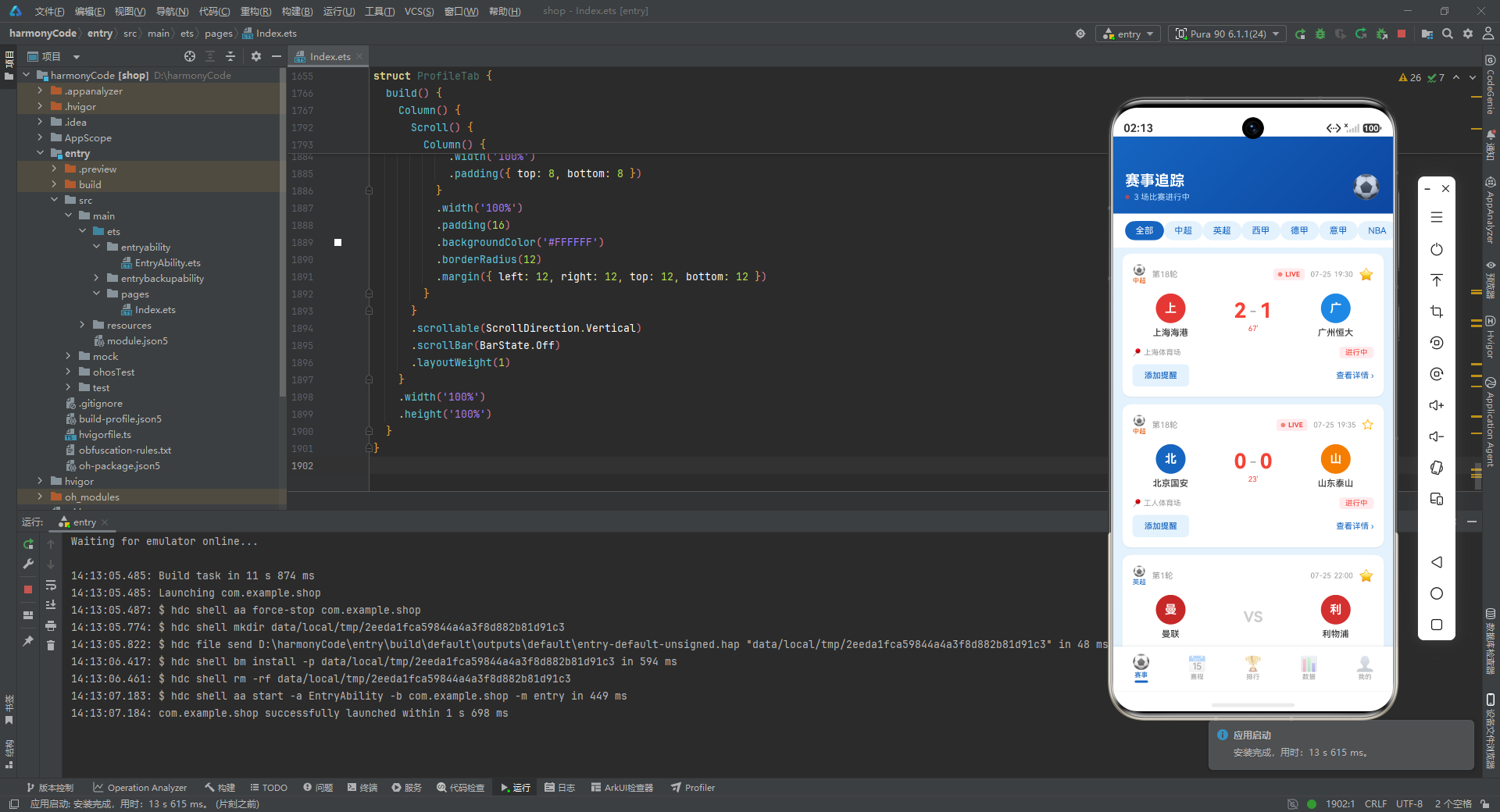
对于希望深入学习 ArkTS 声明式 UI 开发的开发者而言,本项目在组件封装、状态分层、数据驱动样式、父子通信等方面都提供了优秀的参考范例。特别是 getLeagueMeta 等配置函数的设计、呼吸灯动画的实现技巧、以及柱状图数据归一化的方案,都可以直接迁移到其他类似项目中使用。

讨论HarmonyOS开发技术,专注于API与组件、DevEco Studio、测试、元服务和应用上架分发等。
更多推荐



 3
3 0
0- 0


 已为社区贡献129条内容

所有评论(0)