基于HarmonyOS API 24租房管理应用实现状态到元数据映射器,函数提供了默认返回值,避免传入未知类型时程序崩溃,体现了防御式编程的思想
一、前言与整体架构概览
本文将深入剖析一款基于 HarmonyOS ArkTS 开发的租房管理应用的完整源码实现。该应用涵盖了房源管理、租客管理、财务统计、合同管理和个人中心五大核心模块,采用了 HarmonyOS 声明式 UI 开发范式和响应式状态管理机制,整体代码结构清晰、模块化程度高,非常适合作为 ArkTS 实战学习案例。
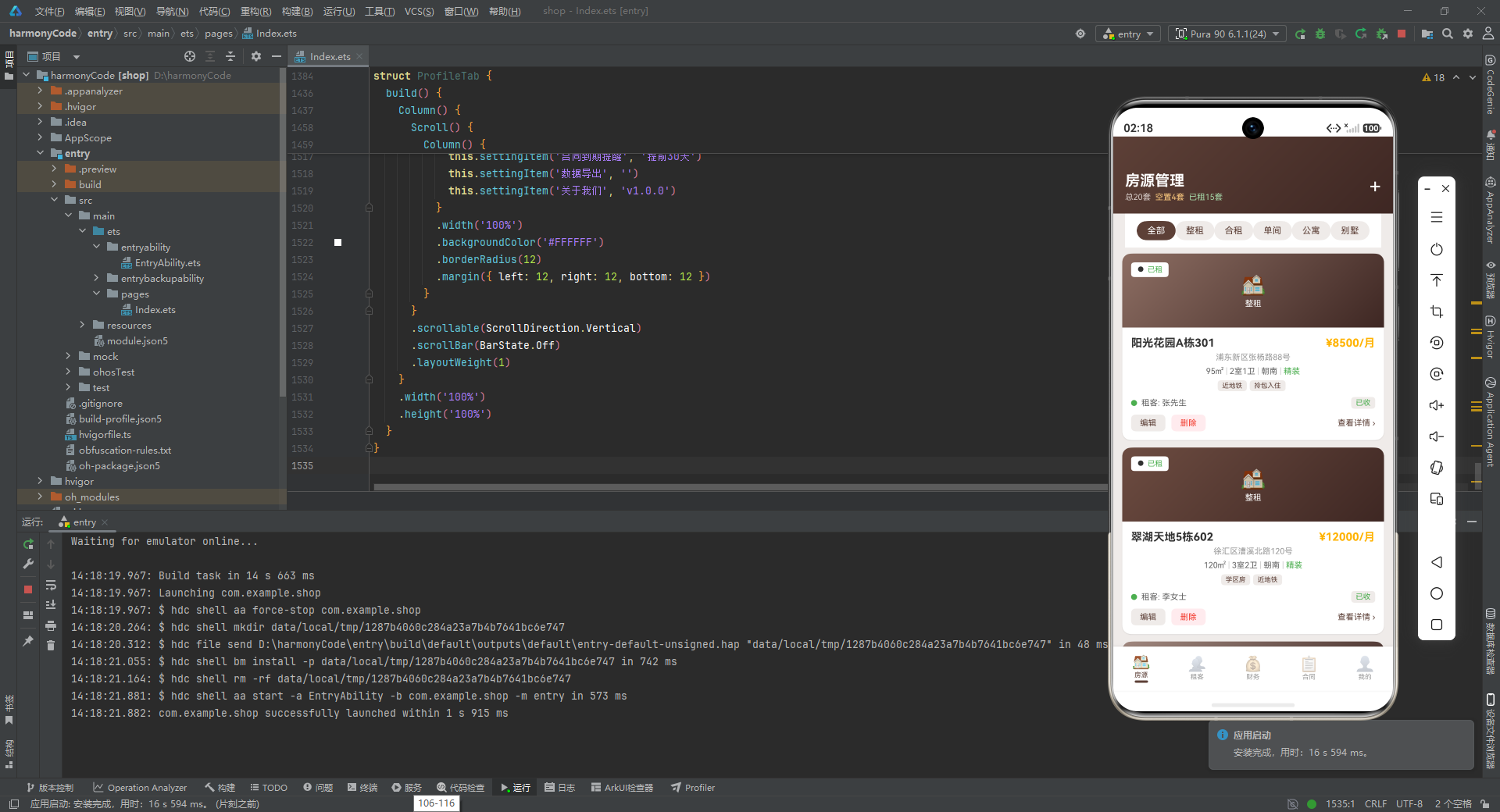
从架构层面来看,本应用采用了经典的分层设计思想。最底层是数据模型层,通过接口(Interface)和可观察类(@Observed Class)定义了所有业务实体的结构;其上是配置与工具层,提供状态映射、颜色计算等辅助函数;再往上是Mock 数据层,模拟了真实业务场景下的完整数据集;最顶层是UI 组件层,由主入口组件和五个独立的 Tab 子组件构成。这种分层架构使得各模块职责单一、耦合度低,便于后续的功能扩展和维护。
在视觉设计方面,应用整体采用了**棕色系(Brown)**作为主色调,搭配琥珀色(Amber)作为强调色,营造出稳重、专业的房屋租赁管理氛围。每个 Tab 页都保持了统一的头部渐变卡片风格,配合圆角、阴影和合理的留白,呈现出精致的 Material Design 视觉效果。
二、数据层设计 —— 接口定义
interface PropertyTypeMetaType {
  label: string
  icon: string
  color: string
  bg: string
}

interface PropertyStatusMetaType {
  label: string
  color: string
  icon: string
  bg: string
}

interface PaidStatusMetaType {
  label: string
  color: string
  icon: string
}

interface FurnishingMetaType {
  label: string
  color: string
}

interface MonthlyIncomeType {
  month: string
  income: number
  color: string
}

interface ExpenseType {
  label: string
  amount: number
  color: string
}

interface AgentContactType {
  name: string
  role: string
  phone: string
  avatarColor: string
}

interface LeaseStatusMetaType {
  label: string
  color: string
  bg: string
}
这段代码定义了八个核心接口,它们是整个应用数据结构的基石。从设计意图来看,开发者采用了元数据分离的策略:并不是将所有信息直接硬编码在业务模型中,而是为不同类型的枚举值(如房源类型、租赁状态、付款状态、装修等级等)单独定义了元数据接口。
以 PropertyTypeMetaType 为例,它包含了四个字段:label 用于显示文本,icon 用于展示对应的 emoji 图标,color 用于文本或图标的着色,bg 则用于背景色的设置。这种设计的精妙之处在于,当应用需要展示"整租"这一类型时,不需要在每个展示位置分别写死图标和颜色,而是通过统一的配置函数返回对应的元数据对象,保证了视觉表现的一致性。
PaidStatusMetaType 和 FurnishingMetaType 则根据实际需求进行了字段精简,例如付款状态不需要背景色,装修等级不需要图标。这种按需定义的接口设计体现了 TypeScript 类型系统的灵活性和严谨性——既避免了冗余字段带来的类型污染,又确保了每个接口都恰好包含其所需的全部信息。
MonthlyIncomeType、ExpenseType 和 AgentContactType 则属于纯粹的数据承载接口,分别用于财务柱状图、支出条形图和联系人列表的数据绑定。值得注意的是,所有接口都显式声明了字段类型,这在 ArkTS 中不仅是类型安全的保障,也能在编译期捕获潜在的类型错误。
三、状态管理核心 —— @Observed 可观察类
@Observed
class PropertyItem {
  id: number = 0
  name: string = ''
  address: string = ''
  type: string = ''
  rent: number = 0
  deposit: number = 0
  area: number = 0
  rooms: number = 0
  bathrooms: number = 0
  floor: string = ''
  status: string = ''
  tenantName: string = ''
  leaseStart: string = ''
  leaseEnd: string = ''
  monthlyRent: number = 0
  paidStatus: string = ''
  furnishing: string = ''
  orientation: string = ''
  tags: string[] = []
  imageColor: string = ''
  description: string = ''

  constructor(
    id: number, name: string, address: string, type: string, rent: number, deposit: number,
    area: number, rooms: number, bathrooms: number, floor: string, status: string,
    tenantName: string, leaseStart: string, leaseEnd: string, monthlyRent: number,
    paidStatus: string, furnishing: string, orientation: string, tags: string[],
    imageColor: string, description: string
  ) {
    this.id = id
    this.name = name
    this.address = address
    this.type = type
    this.rent = rent
    this.deposit = deposit
    this.area = area
    this.rooms = rooms
    this.bathrooms = bathrooms
    this.floor = floor
    this.status = status
    this.tenantName = tenantName
    this.leaseStart = leaseStart
    this.leaseEnd = leaseEnd
    this.monthlyRent = monthlyRent
    this.paidStatus = paidStatus
    this.furnishing = furnishing
    this.orientation = orientation
    this.tags = tags
    this.imageColor = imageColor
    this.description = description
  }
}
PropertyItem 是整个应用中字段最多的数据模型类,它被 @Observed 装饰器标记,这意味着该类的实例具有响应式特性——当实例的任意属性发生变化时,绑定到该实例的 UI 会自动刷新。在 HarmonyOS ArkTS 中,@Observed 是构建响应式 UI 的关键机制之一,特别适用于数组元素的嵌套观察场景。
从字段设计来看,PropertyItem 几乎涵盖了房源管理的所有维度信息:基础信息(名称、地址、类型)、财务信息(租金、押金、月租)、物理属性(面积、房间数、卫生间数、楼层、朝向)、租赁状态(状态、租客名、租期起止)、付款状态、装修等级、标签列表、图片主色和详细描述。这种扁平化设计虽然字段较多,但避免了多层嵌套带来的访问复杂度,使得模板中的数据绑定表达式更加简洁直观。
构造函数采用了显式的参数列表而非使用对象解构,这在 ArkTS 中是更为稳妥的做法——由于 ArkTS 对 TypeScript 的部分语法做了裁剪,显式参数能确保编译器正确生成绑定代码。所有参数都通过 this.xxx = xxx 的方式赋值,虽然代码量稍大,但语义清晰、不存在任何隐式行为。
@Observed
class TenantItem {
  id: number = 0
  name: string = ''
  phone: string = ''
  propertyId: number = 0
  propertyName: string = ''
  leaseStart: string = ''
  leaseEnd: string = ''
  monthlyRent: number = 0
  paidStatus: string = ''
  avatarColor: string = ''
  isVacant: boolean = false

  constructor(
    id: number, name: string, phone: string, propertyId: number, propertyName: string,
    leaseStart: string, leaseEnd: string, monthlyRent: number, paidStatus: string,
    avatarColor: string, isVacant: boolean
  ) {
    this.id = id
    this.name = name
    this.phone = phone
    this.propertyId = propertyId
    this.propertyName = propertyName
    this.leaseStart = leaseStart
    this.leaseEnd = leaseEnd
    this.monthlyRent = monthlyRent
    this.paidStatus = paidStatus
    this.avatarColor = avatarColor
    this.isVacant = boolean
  }
}
TenantItem 代表了租客信息模型。这里有一个非常聪明的设计——通过 isVacant 布尔字段将"租客"和"空置房源"统一到了同一个数据模型中。当 isVacant 为 true 时,name 显示为"空置",租期和租金信息留空,UI 层会根据该标志位渲染不同的视觉效果。这种数据模型的归一化处理避免了为"空置"单独创建数据结构的复杂性,同时让租客列表和空置房源能够在同一个列表中混排展示,大大简化了列表渲染逻辑。
avatarColor 字段用于为每个租客生成统一颜色的圆形头像,这是现代移动应用中常见的首字母头像模式的实现基础。通过为每个租客预分配一个颜色,确保了同一个租客在不同页面出现时的视觉一致性。
@Observed
class ContractItem {
  id: number = 0
  propertyName: string = ''
  tenantName: string = ''
  leaseStart: string = ''
  leaseEnd: string = ''
  status: string = ''
  remainingDays: number = 0
  monthlyRent: number = 0
  deposit: number = 0
  contractColor: string = ''

  constructor(
    id: number, propertyName: string, tenantName: string, leaseStart: string, leaseEnd: string,
    status: string, remainingDays: number, monthlyRent: number, deposit: number, contractColor: string
  ) {
    this.id = id
    this.id = id
    this.propertyName = propertyName
    this.tenantName = tenantName
    this.leaseStart = leaseStart
    this.leaseEnd = leaseEnd
    this.status = status
    this.remainingDays = remainingDays
    this.monthlyRent = monthlyRent
    this.deposit = deposit
    this.contractColor = contractColor
  }
}
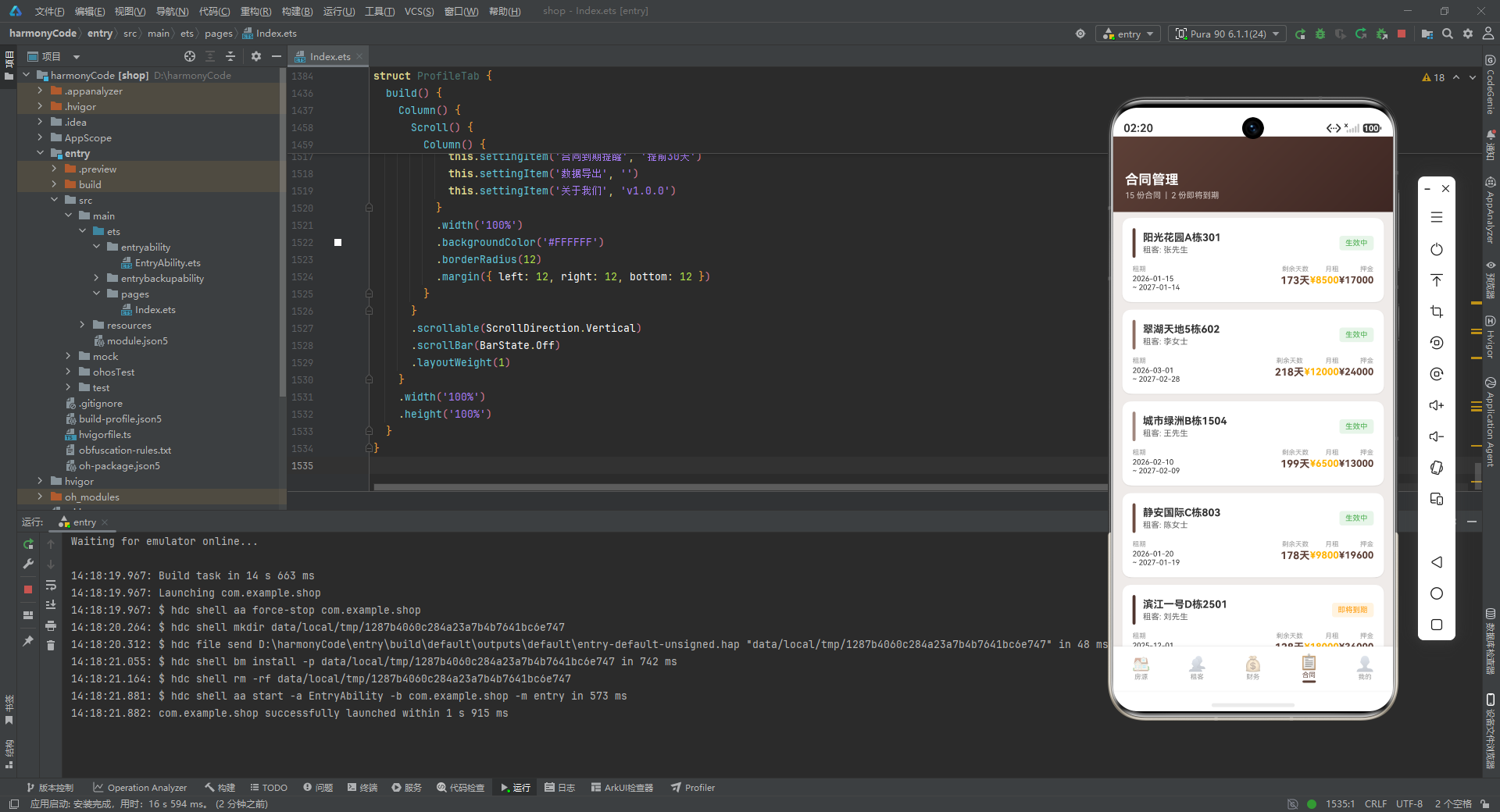
ContractItem 是合同管理模块的核心数据模型。它的字段设计高度聚焦,仅保留了合同展示所需的关键信息:房源名称、租客名称、租期、状态、剩余天数、月租、押金和合同主题色。特别值得注意的是 remainingDays 字段——这个字段在真实场景中通常需要动态计算,但在本示例中采用了预计算的 Mock 数据策略,简化了演示逻辑。
contractColor 字段与合同卡片左侧的竖条装饰直接关联,每个合同都有独特的颜色标识,便于用户在长列表中快速区分不同合同。
@Observed
class PaymentRecord {
  id: number = 0
  propertyName: string = ''
  tenantName: string = ''
  amount: number = 0
  date: string = ''
  status: string = ''
  type: string = ''

  constructor(
    id: number, propertyName: string, tenantName: string, amount: number,
    date: string, status: string, type: string
  ) {
    this.id = id
    this.propertyName = propertyName
    this.tenantName = tenantName
    this.amount = amount
    this.date = date
    this.status = status
    this.type = type
  }
}
PaymentRecord 是财务模块的流水记录模型。它的设计非常精简但完整,包含了收款的来源(房源、租客)、金额、日期、状态和类型(租金或维修费等)。在财务 Tab 的收款记录列表中,每一条记录都会渲染为一个独立的卡片,用户可以快速了解每笔款项的来龙去脉。
四、配置函数 —— 状态映射与视觉规范化
function getPropertyTypeMeta(type: string): PropertyTypeMetaType {
  if (type === '整租') return { label: '整租', icon: '🏠', color: '#5D4037', bg: '#EFEBE9' }
  if (type === '合租') return { label: '合租', icon: '🚪', color: '#8D6E63', bg: '#EFEBE9' }
  if (type === '单间') return { label: '单间', icon: '🛏️', color: '#A1887F', bg: '#EFEBE9' }
  if (type === '公寓') return { label: '公寓', icon: '🏢', color: '#6D4C41', bg: '#EFEBE9' }
  if (type === '别墅') return { label: '别墅', icon: '🏡', color: '#4E342E', bg: '#EFEBE9' }
  return { label: type, icon: '🏠', color: '#5D4037', bg: '#EFEBE9' }
}
这个函数是一个典型的状态到元数据映射器。它将业务中的房源类型字符串(如"整租"、“合租”)转换为一个结构化的 PropertyTypeMetaType 对象。这种模式在声明式 UI 开发中极为常见——UI 不直接依赖原始业务数据,而是通过一层映射函数将业务状态转化为可直接渲染的视觉属性。
这里有几个值得学习的细节:首先,每个类型都配备了独特的 emoji 图标,增强了视觉辨识度;其次,颜色的选择遵循了统一的棕色系阶梯——整租使用最深的 #5D4037,别墅使用 #4E342E,单间则使用最浅的 #A1887F,形成自然的视觉层次;最后,函数提供了默认返回值,避免传入未知类型时程序崩溃,体现了防御式编程的思想。
function getPropertyStatusMeta(status: string): PropertyStatusMetaType {
  if (status === '已租') return { label: '已租', color: '#4CAF50', icon: '●', bg: '#E8F5E9' }
  if (status === '空置') return { label: '空置', color: '#FF9800', icon: '○', bg: '#FFF3E0' }
  if (status === '维修中') return { label: '维修中', color: '#F44336', icon: '🔧', bg: '#FFEBEE' }
  return { label: status, color: '#999999', icon: '●', bg: '#F5F5F5' }
}

function getPaidStatusMeta(status: string): PaidStatusMetaType {
  if (status === '已收') return { label: '已收', color: '#4CAF50', icon: '✓' }
  if (status === '待收') return { label: '待收', color: '#FF9800', icon: '⏳' }
  if (status === '逾期') return { label: '逾期', color: '#F44336', icon: '⚠' }
  return { label: status, color: '#999999', icon: '●' }
}
getPropertyStatusMeta 和 getPaidStatusMeta 遵循了同样的设计模式,但采用了不同的语义化颜色系统。已租 和 已收 使用绿色(#4CAF50),表示正常、积极的状态;空置 和 待收 使用橙色(#FF9800),表示需要关注;维修中 和 逾期 使用红色(#F44336),表示紧急或异常状态。这种颜色语义的一致性在整个应用中贯穿始终,用户一旦建立了颜色与状态的关联认知,就能在后续使用中快速理解信息。
getPropertyStatusMeta 还提供了 bg 字段用于状态标签的背景色,与文字颜色形成低对比度的搭配,使标签既有辨识度又不喧宾夺主。
function getFurnishingMeta(furnishing: string): FurnishingMetaType {
  if (furnishing === '精装') return { label: '精装', color: '#4CAF50' }
  if (furnishing === '简装') return { label: '简装', color: '#FF9800' }
  return { label: '毛坯', color: '#999999' }
}

function getLeaseStatusMeta(status: string): LeaseStatusMetaType {
  if (status === '生效中') return { label: '生效中', color: '#4CAF50', bg: '#E8F5E9' }
  if (status === '即将到期') return { label: '即将到期', color: '#FF9800', bg: '#FFF3E0' }
  if (status === '已到期') return { label: '已到期', color: '#F44336', bg: '#FFEBEE' }
  return { label: '待续签', color: '#1565C0', bg: '#E3F2FD' }
}
getFurnishingMeta 处理装修等级的颜色映射,而 getLeaseStatusMeta 则专门用于合同状态。合同状态引入了第四种颜色——蓝色(#1565C0),用于表示"待续签"这一中性但有明确行动指向的状态。这再次体现了颜色语义的系统化设计:绿(正常)、橙(预警)、红(紧急)、蓝(待处理),几乎覆盖了所有业务场景。
五、Mock 数据层 —— 真实场景的完整模拟
const PROPERTY_TYPE_LIST: string[] = ['全部', '整租', '合租', '单间', '公寓', '别墅']
这是一个简单的常量数组,用于房源 Tab 的横向分类筛选条。将筛选类型抽取为独立常量,便于后续维护和扩展——当需要新增房源类型时,只需修改这一处定义,UI 会自动同步更新。
const PROPERTY_DATA: PropertyItem[] = [
  new PropertyItem(1, '阳光花园A栋301', '浦东新区张杨路88号', '整租', 8500, 17000, 95, 2, 1, '3/18', '已租', '张先生', '2026-01-15', '2027-01-14', 8500, '已收', '精装', '朝南', ['近地铁', '拎包入住'], '#8D6E63', '南北通透 精装修 拎包入住'),
  // ... 共20条数据
]
PROPERTY_DATA 包含了 20 条房源 Mock 数据,覆盖了各种类型(整租、合租、单间、公寓、别墅)和状态(已租、空置、维修中)。每条数据都完整地填充了 PropertyItem 的全部字段,包括标签数组和图片主色。特别值得注意的是,数据中有意包含了多种边界情况:有租客的房源、空置房源、维修中房源、不同付款状态的房源等,这使得演示效果更加真实可信。
const TENANT_DATA: TenantItem[] = [
  new TenantItem(1, '张先生', '138****1234', 1, '阳光花园A栋301', '2026-01-15', '2027-01-14', 8500, '已收', '#5D4037', false),
  // ... 共19条数据,其中4条为isVacant=true的空置记录
]
TENANT_DATA 包含 19 条记录,其中 15 条是真实租客,4 条是空置标记。这验证了前文提到的"租客与空置归一化"设计——同一个列表中既有带手机号的租客,也有显示"空置"的房源占位记录。
const CONTRACT_DATA: ContractItem[] = [
  new ContractItem(1, '阳光花园A栋301', '张先生', '2026-01-15', '2027-01-14', '生效中', 173, 8500, 17000, '#5D4037'),
  // ... 共15条合同数据
]
CONTRACT_DATA 包含 15 条合同记录,其中部分合同的 remainingDays 小于 120 天,用于触发"即将到期"的警告提示。
const PAYMENT_DATA: PaymentRecord[] = [
  new PaymentRecord(1, '阳光花园A栋301', '张先生', 8500, '07-01', '已收', '租金'),
  // ... 共15条收款记录
]

const INCOME_DATA: MonthlyIncomeType[] = [
  { month: '2月', income: 18500, color: '#8D6E63' },
  { month: '3月', income: 19200, color: '#8D6E63' },
  { month: '4月', income: 21000, color: '#8D6E63' },
  { month: '5月', income: 20500, color: '#8D6E63' },
  { month: '6月', income: 22800, color: '#8D6E63' },
  { month: '7月', income: 24500, color: '#FFB300' }
]

const EXPENSE_DATA: ExpenseType[] = [
  { label: '物业费', amount: 3200, color: '#5D4037' },
  { label: '维修费', amount: 2800, color: '#8D6E63' },
  { label: '水电费', amount: 1500, color: '#A1887F' },
  { label: '中介费', amount: 1200, color: '#BCAAA4' },
  { label: '其他', amount: 800, color: '#D7CCC8' }
]

const AGENT_CONTACTS: AgentContactType[] = [
  { name: '陈经理', role: '房屋中介', phone: '138****8888', avatarColor: '#5D4037' },
  // ... 共5位联系人
]

const MAX_INCOME: number = 26000
const MAX_EXPENSE: number = 4000
PAYMENT_DATA 是财务流水,INCOME_DATA 用于绘制近 6 个月的收入柱状图(其中 7 月使用琥珀色高亮表示当前月),EXPENSE_DATA 用于绘制支出条形图,AGENT_CONTACTS 是个人中心的联系人列表。MAX_INCOME 和 MAX_EXPENSE 是图表绘制的归一化基准值,确保柱状图和条形图的高度在合理范围内。
六、Tab 枚举与主入口架构
enum AppTab {
  PROPERTIES,
  TENANTS,
  FINANCE,
  CONTRACTS,
  PROFILE
}
使用枚举定义 Tab 标识是一种类型安全的最佳实践。相比于字符串或数字字面量,枚举提供了编译期检查,防止拼写错误导致的运行时问题。
@Entry
@Component
struct MainApp {
  @State activeTab: AppTab = AppTab.PROPERTIES
  @State showAddDialog: boolean = false
  @State showEditDialog: boolean = false
  @State showDeleteDialog: boolean = false
  @State selectedProperty: PropertyItem | null = null
  @State inputName: string = ''
  @State inputAddress: string = ''
  @State inputRent: string = ''
  @State inputArea: string = ''
  @State editName: string = ''
  @State editAddress: string = ''
  @State editRent: string = ''
  @State editArea: string = ''
MainApp 是整个应用的根组件,被 @Entry 标记为程序入口。它的状态设计非常清晰:activeTab 控制当前显示的 Tab 页;三个 showXxxDialog 布尔状态分别控制添加、编辑、删除三个模态对话框的显隐;selectedProperty 用于在编辑和删除时记住当前选中的房源;inputXxx 和 editXxx 系列状态则分别绑定到添加对话框和编辑对话框的输入框。
值得注意的是,所有输入框状态都使用了 string 类型而非 number,这是因为 ArkTS 的 TextInput 组件默认处理字符串输入。即使输入内容是数字(如租金、面积),也先以字符串形式接收,在提交时再进行类型转换。这种设计避免了输入过程中的类型转换异常。
  @Builder
  contentArea() {
    Column() {
      if (this.activeTab === AppTab.PROPERTIES) {
        PropertiesTab({
          onAddProperty: () => {
            this.inputName = ''
            this.inputAddress = ''
            this.inputRent = ''
            this.inputArea = ''
            this.showAddDialog = true
          },
          onEditProperty: (item: PropertyItem) => {
            this.selectedProperty = item
            this.editName = item.name
            this.editAddress = item.address
            this.editRent = `${item.rent}`
            this.editArea = `${item.area}`
            this.showEditDialog = true
          },
          onDeleteProperty: (item: PropertyItem) => {
            this.selectedProperty = item
            this.showDeleteDialog = true
          }
        })
      } else if (this.activeTab === AppTab.TENANTS) {
        TenantsTab()
      } else if (this.activeTab === AppTab.FINANCE) {
        FinanceTab()
      } else if (this.activeTab.CONTRACTS) {
        ContractsTab()
      } else {
        ProfileTab()
      }
    }
    .layoutWeight(1)
  }
contentArea 是主内容区的构建器函数。它根据 activeTab 的值渲染对应的 Tab 组件。这里有一个设计细节:PropertiesTab 接收了三个回调函数作为参数(onAddProperty、onEditProperty、onDeleteProperty),而其他 Tab 组件不需要回调参数。这是因为添加、编辑、删除的对话框是由 MainApp 统一管理的,子组件只需要通过回调通知父组件"用户触发了某操作",真正的弹窗逻辑由父组件处理。
这种父子组件通信模式在 ArkTS 中非常典型:当多个子组件共享同一套模态交互时,将模态提升到公共父组件中管理,可以避免状态分散和重复实现。PropertiesTab 通过回调将交互事件"冒泡"到 MainApp,MainApp 再根据事件类型显示对应的对话框。
  @Builder
  bottomTabItem(icon: string, label: string, tab: AppTab) {
    Column() {
      Text(icon)
        .fontSize(20)
        .opacity(this.activeTab === tab ? 1.0 : 0.45)
      Text(label)
        .fontSize(9)
        .fontColor(this.activeTab === tab ? '#5D4037' : '#999999')
        .margin({ top: 1 })
      if (this.activeTab === tab) {
        Column()
          .width(18)
          .height(3)
          .backgroundColor('#5D4037')
          .borderRadius(2)
          .margin({ top: 2 })
      }
    }
    .layoutWeight(1)
    .alignItems(HorizontalAlign.Center)
    .padding({ top: 5, bottom: 5 })
    .onClick(() => {
      this.activeTab = tab
    })
  }
bottomTabItem 是底部导航栏的单个 Tab 按钮构建器。它接收三个参数:emoji 图标、文字标签和对应的 Tab 枚举值。当 activeTab 与当前 Tab 匹配时,图标完全不透明(opacity: 1.0),文字变为棕色,且下方显示一条短横线作为激活指示器;未激活时,图标半透明(opacity: 0.45),文字为灰色。
这个设计精致而完整:不仅有颜色和透明度的变化,还有形状指示器(底部短横线),三重视觉线索共同帮助用户确认当前所在页面。layoutWeight(1) 确保五个 Tab 按钮在底部栏中等分宽度。
  @Builder
  bottomBar() {
    Row() {
      this.bottomTabItem('🏠', '房源', AppTab.PROPERTIES)
      this.bottomTabItem('👥', '租客', AppTab.TENANTS)
      this.bottomTabItem('💰', '财务', AppTab.FINANCE)
      this.bottomTabItem('📋', '合同', AppTab.CONTRACTS)
      this.bottomTabItem('👤', '我的', AppTab.PROFILE)
    }
    .width('100%')
    .backgroundColor('#FFFFFF')
    .padding({ top: 4, bottom: 6 })
    .shadow({ radius: 8, color: '#1A000000', offsetY: -2 })
  }
bottomBar 将五个 Tab 按钮横向排列。阴影效果通过 shadow 修饰器实现,offsetY: -2 使阴影向上投射,营造出底部栏浮于内容之上的层次感。底部栏的底部内边距为 6,为系统手势导航条留出了安全区域。
  @Builder
  addPropertyDialog() {
    Stack() {
      Column()
        .width('100%')
        .height('100%')
        .backgroundColor('#80000000')
        .onClick(() => { this.showAddDialog = false })

      Column() {
        Text('添加房源')
          .fontSize(18)
          .fontWeight(FontWeight.Bold)
          .fontColor('#5D4037')
          .margin({ bottom: 16 })

        Text('房源名称')
          .fontSize(13)
          .fontColor('#666666')
          .alignSelf(ItemAlign.Start)
          .margin({ bottom: 6 })

        TextInput({ text: this.inputName, placeholder: '请输入房源名称' })
          .onChange((value: string) => { this.inputName = value })
          .width('100%').height(44).borderRadius(8)
          .backgroundColor('#EFEBE9').padding({ left: 12, right: 12 })
          .fontSize(14).fontColor('#333333')
          .margin({ bottom: 12 })
        // ... 更多输入项
      }
      .width('85%')
      .padding(24)
      .borderRadius(16)
      .backgroundColor('#FFFFFF')
      .constraintSize({ maxHeight: '80%' })
    }
    .width('100%')
    .height('100%')
    .alignContent(Alignment.Center)
  }
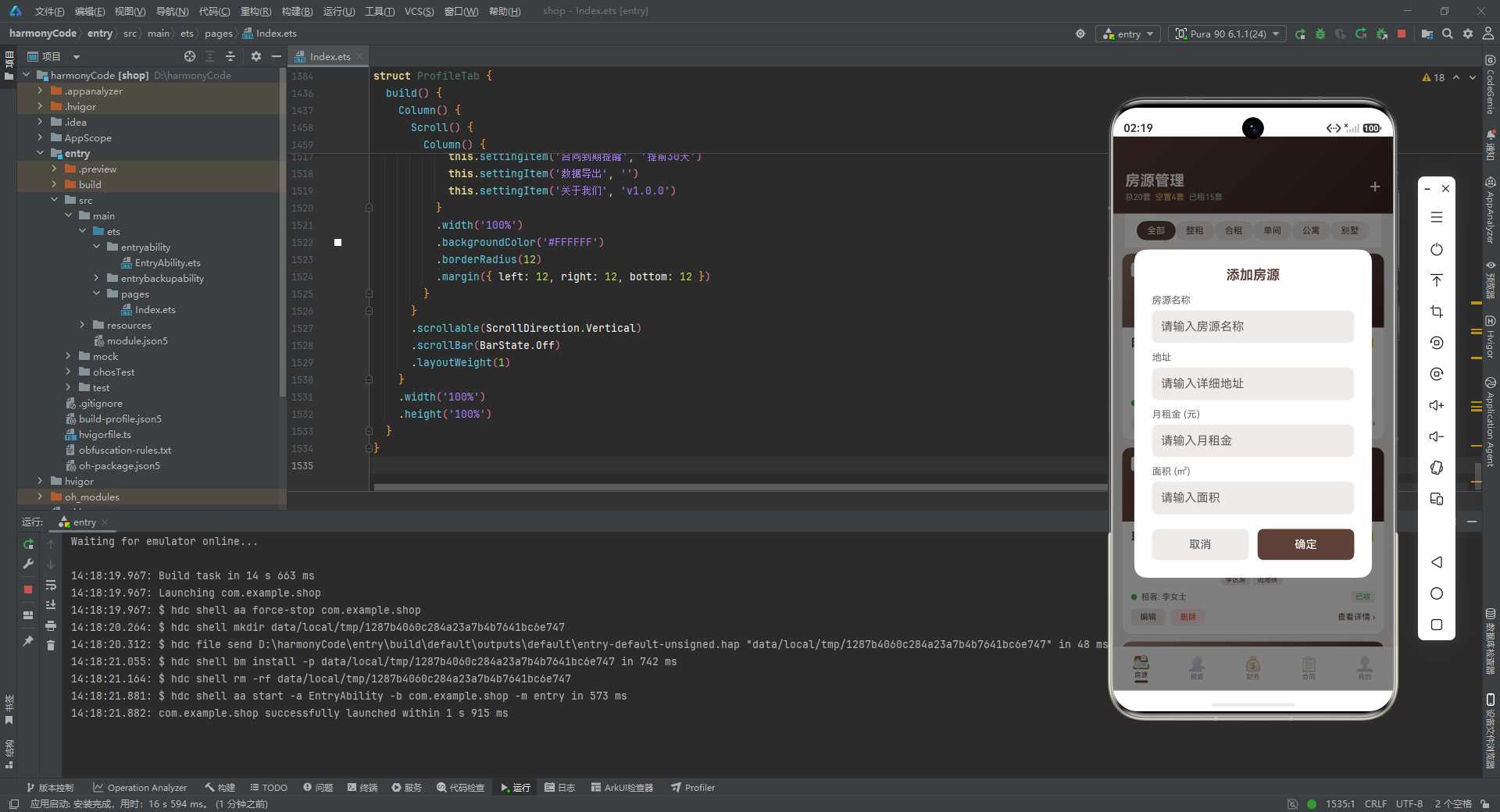
addPropertyDialog 是典型的模态对话框实现。Stack 容器将半透明遮罩层(#80000000,50% 透明度黑色)和白色内容卡片叠加在一起。点击遮罩层可以关闭对话框,这是移动应用中常见的交互模式。内容卡片宽度为屏幕的 85%,最大高度为屏幕的 80%,圆角为 16,padding 为 24,符合现代移动端对话框的设计规范。
每个输入项都由标签文本和 TextInput 组成,标签使用 alignSelf(ItemAlign.Start) 左对齐,输入框使用 #EFEBE9 背景色与页面背景形成微妙的区分。onChange 回调将用户输入同步到对应的状态变量。
  @Builder
  editPropertyDialog() {
    // 与 addPropertyDialog 结构类似,标题为"编辑房源"
    // 使用 editXxx 系列状态变量
  }

  @Builder
  deleteConfirmDialog() {
    Stack() {
      Column()
        .width('100%')
        .height('100%')
        .backgroundColor('#80000000')
        .onClick(() => { this.showDeleteDialog = false })

      Column() {
        Text('删除房源')
          .fontSize(18)
          .fontWeight(FontWeight.Bold)
          .fontColor('#F44336')
          .margin({ bottom: 12 })

        Text('确定要删除这个房源吗?')
          .fontSize(14)
          .fontColor('#333333')
          .margin({ bottom: 8 })

        Text(this.selectedProperty?.name ?? '')
          .fontSize(13)
          .fontColor('#666666')
          .margin({ bottom: 4 })

        Text(this.selectedProperty?.address ?? '')
          .fontSize(12)
          .fontColor('#999999')
          .margin({ bottom: 20 })

        Row({ space: 12 }) {
          Button('取消')
            .layoutWeight(1).height(42)
            .backgroundColor('#EFEBE9').fontColor('#666666')
            .borderRadius(8).fontSize(15)
            .onClick(() => { this.showDeleteDialog = false })
          Button('删除')
            .layoutWeight(1).height(42)
            .backgroundColor('#F44336').fontColor('#FFFFFF')
            .borderRadius(8).fontSize(15)
            .onClick(() => { this.showDeleteDialog = false })
        }
        .width('100%')
      }
      .width('80%')
      .padding(24)
      .borderRadius(16)
      .backgroundColor('#FFFFFF')
    }
    .width('100%')
    .height('100%')
    .alignContent(Alignment.Center)
  }
删除对话框相比添加/编辑对话框更为简洁,因为不需要用户输入任何内容,只需要确认操作。标题使用了红色(#F44336)以警示用户这是一个危险操作。对话框中展示了待删除房源的名称和地址,使用可选链操作符 ?. 和空值合并运算符 ?? 安全地访问 selectedProperty 的属性,即使选中对象为空也不会报错。两个按钮并列排列,各占一半宽度,space: 12 在它们之间留出 12vp 的间距。
  build() {
    Stack() {
      Column() {
        this.contentArea()
        this.bottomBar()
      }
      .width('100%')
      .height('100%')

      if (this.showAddDialog) {
        this.addPropertyDialog()
      }
      if (this.showEditDialog) {
        this.editPropertyDialog()
      }
      if (this.showDeleteDialog) {
        this.deleteConfirmDialog()
      }
    }
    .width('100%')
    .height('100%')
    .backgroundColor('#EFEBE9')
  }
}
build 方法是组件的渲染入口。最外层使用 Stack,这样对话框可以以绝对定位的方式覆盖在整个页面上方。内容区和底部栏放在 Column 中正常排列,三个对话框则通过条件渲染(if)在需要时叠加显示。页面背景色为 #EFEBE9,与应用整体的暖色调主题保持一致。
七、房源管理 Tab(PropertiesTab)
@Component
struct PropertiesTab {
  @State selectedType: string = '全部'
  @State properties: PropertyItem[] = PROPERTY_DATA
  onAddProperty: (() => void) | null = null
  onEditProperty: ((item: PropertyItem) => void) | null = null
  onDeleteProperty: ((item: PropertyItem) => void) | null = null
PropertiesTab 是应用中最复杂的子组件。它维护了两个本地状态:selectedType 用于记录当前选中的房源类型筛选条件,properties 则是房源数据列表。三个回调属性均为可空类型(| null),表示它们由父组件注入,子组件只负责在适当时机调用。
  @Builder
  typeChip(type: string) {
    Text(type)
      .fontSize(12)
      .fontColor(this.selectedType === type ? '#FFFFFF' : '#5D4037')
      .backgroundColor(this.selectedType === type ? '#5D4037' : '#EFEBE9')
      .padding({ left: 14, right: 14, top: 6, bottom: 6 })
      .borderRadius(16)
      .onClick(() => { this.selectedType = type })
  }
typeChip 是横向筛选条中的单个标签按钮。它的视觉状态完全由 selectedType 驱动:选中时白字棕底,未选中时棕字浅棕底。圆角半径为 16,配合上下 6、左右 14 的内边距,形成了完美的胶囊形状(Capsule)。这种 Chip 组件在 Material Design 中非常常见,用户可以通过横向滑动浏览所有筛选条件并点击切换。
  @Builder
  propertyCard(item: PropertyItem) {
    Column() {
      Stack() {
        Column()
          .width('100%')
          .height(100)
          .linearGradient({ angle: 135, colors: [[item.imageColor, 0], ['#3E2723', 1]] })

        Column() {
          Text(getPropertyTypeMeta(item.type).icon)
            .fontSize(28)
          Text(item.type)
            .fontSize(11)
            .fontColor('#FFFFFF')
            .margin({ top: 2 })
        }

        Row() {
          Text(getPropertyStatusMeta(item.status).icon)
            .fontSize(10)
          Text(getPropertyStatusMeta(item.status).label)
            .fontSize(10)
            .fontColor(getPropertyStatusMeta(item.status).color)
            .margin({ left: 4 })
        }
        .padding({ left: 8, right: 8, top: 4, bottom: 4 })
        .borderRadius(4)
        .backgroundColor('#FFFFFF')
        .position({ x: 12, y: 12 })
      }
      .width('100%')
      .height(100)
      .borderRadius({ topLeft: 12, topRight: 12 })
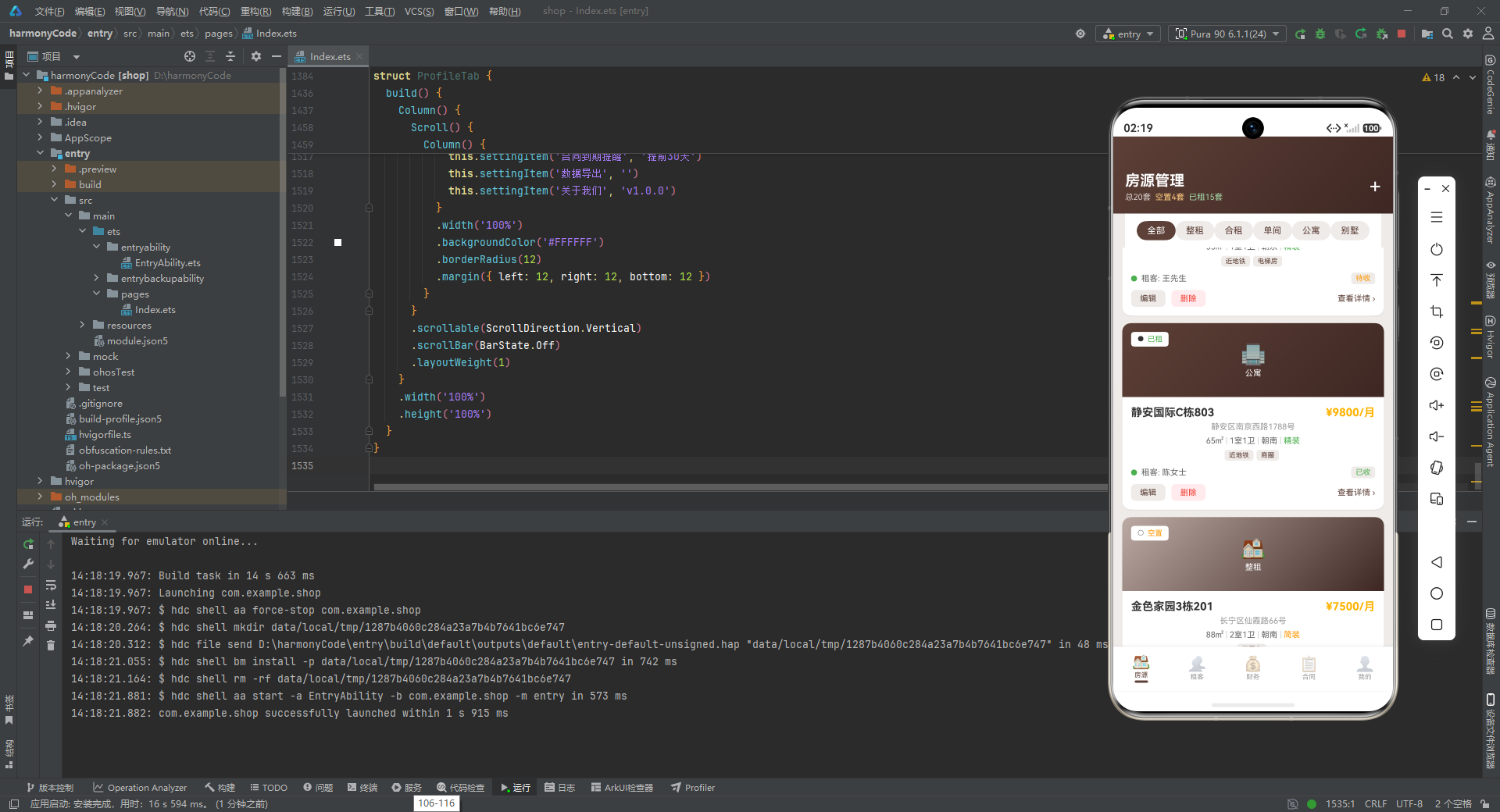
propertyCard 是房源列表中的核心展示单元。卡片顶部是一个高度 100vp 的 Stack 容器,内部有三层内容:最底层是线性渐变背景,从房源的 imageColor 渐变到深棕色 #3E2723,角度 135 度形成对角线渐变效果;中间层居中显示房源类型的 emoji 图标和文字;最上层(通过 position 绝对定位在左上角)是一个白色圆角小标签,显示房源的当前状态(已租、空置或维修中)。
这里的视觉层次设计非常精巧:渐变背景提供了卡片的主色调,emoji 图标直观地传达了房源类型,状态标签则以高对比度的白底彩色文字悬浮于左上角,三者互不干扰又信息完整。borderRadius 仅设置上左和上右的圆角,因为卡片下方还有内容区域。
      Column() {
        Row() {
          Text(item.name)
            .fontSize(15)
            .fontWeight(FontWeight.Bold)
            .fontColor('#333333')
            .layoutWeight(1)
          Text(`¥${item.rent}/月`)
            .fontSize(15)
            .fontWeight(FontWeight.Bold)
            .fontColor('#FFB300')
        }
        .width('100%')
        .alignItems(VerticalAlign.Center)

        Text(item.address)
          .fontSize(11)
          .fontColor('#999999')
          .margin({ top: 4 })

        Row() {
          Text(`${item.area}㎡`)
            .fontSize(11).fontColor('#666666')
          Text(' | ').fontSize(11).fontColor('#CCCCCC')
          Text(`${item.rooms}室${item.bathrooms}卫`)
            .fontSize(11).fontColor('#666666')
          Text(' | ').fontSize(11).fontColor('#CCCCCC')
          Text(item.orientation)
            .fontSize(11).fontColor('#666666')
          Text(' | ').fontSize(11).fontColor('#CCCCCC')
          Text(getFurnishingMeta(item.furnishing).label)
            .fontSize(11).fontColor(getFurnishingMeta(item.furnishing).color)
        }
        .margin({ top: 6 })
卡片下半部分展示了房源的详细信息。最上方是一行标题栏,左侧是房源名称(使用 layoutWeight(1) 占据剩余空间),右侧是月租金(琥珀色高亮)。地址信息以灰色小字显示,营造出信息的层级感。
接下来的 Row 将面积、户型、朝向、装修等级四项信息横向排列,中间用 | 分隔符连接。分隔符使用了更浅的 #CCCCCC 颜色,避免了视觉干扰。装修等级通过 getFurnishingMeta 映射为语义化颜色(精装绿、简装橙、毛坯灰),让用户一眼就能判断房源的装修档次。
        if (item.tags.length > 0) {
          Row() {
            ForEach(item.tags, (tag: string, index: number) => {
              Text(tag)
                .fontSize(9).fontColor('#5D4037')
                .backgroundColor('#EFEBE9')
                .padding({ left: 6, right: 6, top: 2, bottom: 2 })
                .borderRadius(4)
                .margin({ right: 4 })
            }, (tag: string, index: number) => tag)
          }
          .margin({ top: 6 })
        }

        if (item.status === '已租') {
          Row() {
            Column()
              .width(8).height(8).borderRadius(4)
              .backgroundColor('#4CAF50')
            Text(`租客: ${item.tenantName}`)
              .fontSize(11).fontColor('#666666')
              .margin({ left: 6 })
            Column().layoutWeight(1)
            Text(getPaidStatusMeta(item.paidStatus).label)
              .fontSize(10)
              .fontColor(getPaidStatusMeta(item.paidStatus).color)
              .padding({ left: 6, right: 6, top: 2, bottom: 2 })
              .borderRadius(4).backgroundColor('#EFEBE9')
          }
          .width('100%')
          .alignItems(VerticalAlign.Center)
          .margin({ top: 8 })
        }
标签区域使用条件渲染——只有当 tags 数组非空时才显示。ForEach 遍历标签数组,为每个标签生成一个小型文本标签,背景色与页面背景一致,边框圆润小巧。第二个参数是渲染函数,第三个参数是键值生成函数(tag => tag),帮助 ArkTS 的渲染引擎高效地追踪列表项变化。
如果房源状态为"已租",则额外显示一行租客信息:左侧是一个 8x8 的绿色圆点作为在线指示器,中间是租客姓名,右侧是付款状态标签。Column().layoutWeight(1) 作为弹性占位符,将租客姓名推到左侧、付款状态推到右侧。
        Row() {
          Text('编辑')
            .fontSize(11).fontColor('#5D4037')
            .padding({ left: 12, right: 12, top: 5, bottom: 5 })
            .backgroundColor('#EFEBE9').borderRadius(6)
            .onClick(() => {
              if (this.onEditProperty) { this.onEditProperty(item) }
            })
          Column().width(8)
          Text('删除')
            .fontSize(11).fontColor('#F44336')
            .padding({ left: 12, right: 12, top: 5, bottom: 5 })
            .backgroundColor('#FFEBEE').borderRadius(6)
            .onClick(() => {
              if (this.onDeleteProperty) { this.onDeleteProperty(item) }
            })
          Column().layoutWeight(1)
          Text('查看详情 ›')
            .fontSize(11).fontColor('#5D4037')
        }
        .width('100%')
        .alignItems(VerticalAlign.Center)
        .margin({ top: 8 })
      }
      .width('100%')
      .padding(12)
    }
    .width('100%')
    .borderRadius(12)
    .backgroundColor('#FFFFFF')
    .shadow({ radius: 4, color: '#1A000000', offsetY: 2 })
    .margin({ bottom: 10 })
    .clip(true)
  }
卡片底部是操作栏,包含"编辑"、"删除"和"查看详情"三个操作。编辑按钮使用棕字浅棕底,删除按钮使用红字浅红底,形成鲜明的操作语义区分。在调用回调之前都进行了空值检查,防止父组件未传入回调时发生运行时错误。Column().layoutWeight(1) 再次充当了弹性推杆,将"查看详情"推到最右侧。
整个卡片使用白色背景、12vp 圆角和轻微阴影(向下偏移 2vp),clip(true) 确保内容不会溢出圆角边界。底部 10vp 的外边距让卡片之间留有呼吸空间。
  build() {
    Column() {
      Column() {
        Row() {
          Column() {
            Text('房源管理')
              .fontSize(20)
              .fontWeight(FontWeight.Bold)
              .fontColor('#FFFFFF')
            Row() {
              Text(`总${PROPERTY_DATA.length}套`)
                .fontSize(11).fontColor('#D7CCC8')
              Text(`  空置${PROPERTY_DATA.filter((p: PropertyItem) => p.status === '空置').length}套`)
                .fontSize(11).fontColor('#FFCC80')
              Text(`  已租${PROPERTY_DATA.filter((p: PropertyItem) => p.status === '已租').length}套`)
                .fontSize(11).fontColor('#A5D6A7')
            }
            .margin({ top: 4 })
          }
          .alignItems(HorizontalAlign.Start)
          Column().layoutWeight(1)
          Text('+')
            .fontSize(28).fontColor('#FFFFFF')
            .onClick(() => {
              if (this.onAddProperty) { this.onAddProperty() }
            })
        }
        .width('100%')
        .padding({ left: 16, right: 16, top: 48, bottom: 16 })
        .alignItems(VerticalAlign.Center)
      }
      .width('100%')
      .linearGradient({ angle: 135, colors: [['#5D4037', 0], ['#3E2723', 1]] })
房源 Tab 的头部区域使用了与底部栏同源的棕色渐变背景,角度 135 度形成优雅的斜向过渡。左侧列展示标题"房源管理"和三色统计标签(总套数灰色、空置橙色、已租绿色),右侧是一个大大的白色"+"号按钮,点击后通过回调通知父组件显示添加对话框。顶部 48vp 的 padding 为系统状态栏留出了安全区域。
      Scroll() {
        Row() {
          ForEach(PROPERTY_TYPE_LIST, (type: string, index: number) => {
            this.typeChip(type)
          }, (type: string, index: number) => type)
        }
        .padding({ left: 16, right: 16, top: 10, bottom: 10 })
      }
      .scrollable(ScrollDirection.Horizontal)
      .scrollBar(BarState.Off)
      .backgroundColor('#FFFFFF')

      Scroll() {
        Column() {
          ForEach(this.properties, (item: PropertyItem, index: number) => {
            if (this.selectedType === '全部' || item.type === this.selectedType) {
              this.propertyCard(item)
            }
          }, (item: PropertyItem, index: number) => item.id.toString())
        }
        .padding({ left: 12, right: 12, top: 8, bottom: 12 })
      }
      .scrollable(ScrollDirection.Vertical)
      .scrollBar(BarState.Off)
      .layoutWeight(1)
    }
    .width('100%')
    .height('100%')
  }
}
筛选条是一个横向滚动的 Scroll 容器,内部用 Row 排列所有类型标签,scrollBar(BarState.Off) 隐藏滚动条以保持界面整洁,背景为白色,与上方的渐变头部和下方的列表形成三段式布局。
房源列表则是纵向滚动的 Scroll 容器,内部用 Column 排列卡片。ForEach 中嵌套了条件判断:当 selectedType 为"全部"或房源类型与选中类型匹配时,才渲染该卡片。这种前端筛选策略避免了数据层面的过滤操作,直接在渲染阶段控制可见性,简单高效。键值生成函数使用 item.id.toString(),确保列表项的唯一性和 Diff 效率。
八、租客管理 Tab(TenantsTab)
@Component
struct TenantsTab {
  @Builder
  tenantCard(item: TenantItem) {
    Row() {
      Column() {
        Text(item.isVacant ? '空' : item.name.charAt(0))
          .fontSize(18)
          .fontWeight(FontWeight.Bold)
          .fontColor('#FFFFFF')
      }
      .width(48).height(48).borderRadius(24)
      .backgroundColor(item.avatarColor)
      .justifyContent(FlexAlign.Center)
      .alignItems(HorizontalAlign.Center)
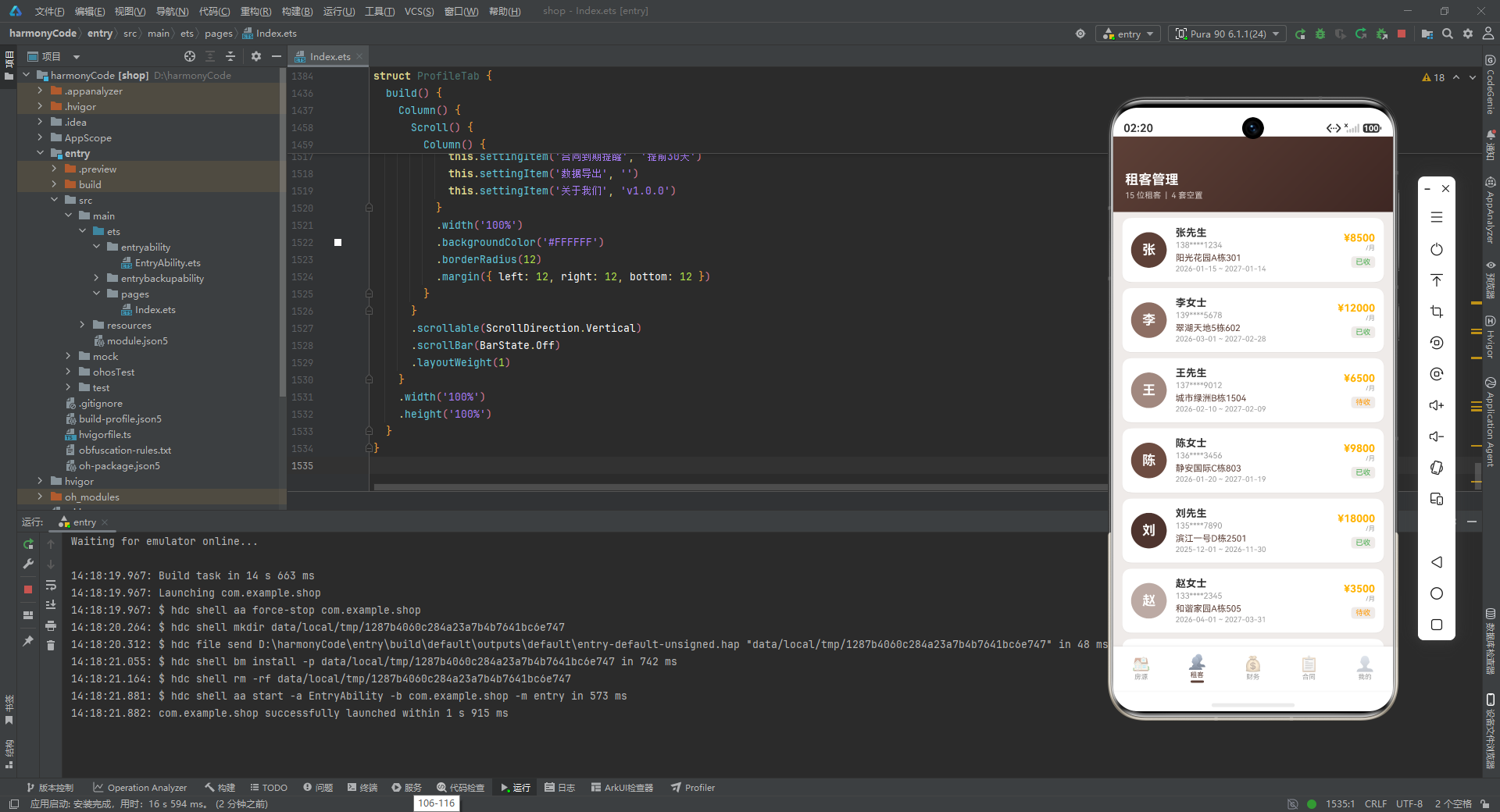
TenantsTab 的设计比房源 Tab 更为简洁,因为它只负责展示,不提供增删改操作。每个租客项使用 Row 横向布局,左侧是一个 48x48 的圆形头像。头像的显示逻辑非常精妙:如果 isVacant 为 true,显示一个"空"字;否则显示租客姓名的第一个字符。这种设计使得空置房源在列表中也有视觉占位,保持了列表的完整性。头像背景色使用预分配的 avatarColor,确保了视觉一致性。
      Column() {
        Text(item.name)
          .fontSize(14)
          .fontWeight(FontWeight.Bold)
          .fontColor('#333333')
        Text(item.phone)
          .fontSize(11).fontColor('#999999')
          .margin({ top: 2 })
        Text(item.propertyName)
          .fontSize(12).fontColor('#5D4037')
          .margin({ top: 4 })
        if (!item.isVacant) {
          Text(`${item.leaseStart} ~ ${item.leaseEnd}`)
            .fontSize(10).fontColor('#999999')
            .margin({ top: 2 })
        }
      }
      .layoutWeight(1)
      .margin({ left: 12 })
      .alignItems(HorizontalAlign.Start)

      if (!item.isVacant) {
        Column() {
          Text(`¥${item.monthlyRent}`)
            .fontSize(14).fontWeight(FontWeight.Bold)
            .fontColor('#FFB300')
          Text('/月')
            .fontSize(9).fontColor('#999999')
          Text(getPaidStatusMeta(item.paidStatus).label)
            .fontSize(10)
            .fontColor(getPaidStatusMeta(item.paidStatus).color)
            .padding({ left: 6, right: 6, top: 2, bottom: 2 })
            .borderRadius(4).backgroundColor('#EFEBE9')
            .margin({ top: 6 })
        }
        .alignItems(HorizontalAlign.End)
      }
    }
    .width('100%')
    .padding(12)
    .borderRadius(12)
    .backgroundColor('#FFFFFF')
    .shadow({ radius: 2, color: '#1A000000', offsetY: 1 })
    .margin({ bottom: 8 })
  }
中间列展示租客的核心信息:姓名(加粗黑色)、手机号(灰色)、房源名称(棕色高亮)。对于非空置记录,还额外显示租期范围。右侧列仅在非空置时显示,包含月租金(琥珀色加粗)、"/月"后缀(灰色小字)和付款状态标签。layoutWeight(1) 让中间列占据全部剩余空间,将右侧列推到最右端。
卡片的阴影比房源卡片更轻(radius: 2, offsetY: 1),因为租客列表的密度通常更高,过重的阴影会让界面显得拥挤。
  build() {
    Column() {
      Column() {
        Text('租客管理')
          .fontSize(18).fontWeight(FontWeight.Bold)
          .fontColor('#FFFFFF')
        Text(`${TENANT_DATA.filter((t: TenantItem) => !t.isVacant).length} 位租客  |  ${TENANT_DATA.filter((t: TenantItem) => t.isVacant).length} 套空置`)
          .fontSize(11).fontColor('#D7CCC8')
          .margin({ top: 4 })
      }
      .width('100%')
      .padding({ left: 16, top: 48, bottom: 16 })
      .alignItems(HorizontalAlign.Start)
      .linearGradient({ angle: 135, colors: [['#5D4037', 0], ['#3E2723', 1]] })

      Scroll() {
        Column() {
          ForEach(TENANT_DATA, (item: TenantItem, index: number) => {
            this.tenantCard(item)
          }, (item: TenantItem, index: number) => item.id.toString())
        }
        .padding({ left: 12, right: 12, top: 8, bottom: 12 })
      }
      .scrollable(ScrollDirection.Vertical)
      .scrollBar(BarState.Off)
      .layoutWeight(1)
    }
    .width('100%')
    .height('100%')
  }
}
租客 Tab 的头部统计信息使用了 filter 实时计算真实租客数和空置套数,展示了 ArkTS 中可以直接在模板表达式中调用数组方法的能力。整体布局结构与房源 Tab 类似:渐变头部 + 可滚动内容区,保持了应用内各页面的视觉一致性。
九、财务统计 Tab(FinanceTab)
@Component
struct FinanceTab {
  @Builder
  incomeBar(item: MonthlyIncomeType) {
    Column() {
      Text(`${item.income / 1000}k`)
        .fontSize(9).fontColor('#666666')
        .margin({ bottom: 4 })
      Column()
        .width(28)
        .height(item.income / MAX_INCOME * 100)
        .backgroundColor(item.color)
        .borderRadius({ topLeft: 4, topRight: 4 })
      Text(item.month)
        .fontSize(10).fontColor('#666666')
        .margin({ top: 4 })
    }
    .layoutWeight(1)
    .alignItems(HorizontalAlign.Center)
    .justifyContent(FlexAlign.End)
  }
incomeBar 是财务 Tab 中收入柱状图的基本单元。它由三部分纵向排列:顶部是收入金额(以 “k” 为单位,如 24.5k),中间是高度可变的柱子,底部是月份标签。柱子的高度通过 item.income / MAX_INCOME * 100 计算得出,这是一个归一化公式——将实际收入映射到 0-100vp 的高度范围内,确保最高收入(接近 26000)的柱子高度约为 100vp,其他收入按比例缩放。
柱子顶部设置了左右圆角,形成圆润的柱状图视觉效果。justifyContent(FlexAlign.End) 让所有柱子底部对齐,无论高度如何变化,柱子都从底部向上生长,符合用户对柱状图的直觉认知。
  @Builder
  expenseBar(item: ExpenseType) {
    Row() {
      Text(item.label)
        .fontSize(11).fontColor('#333333')
        .width(60)
      Column()
        .height(14).borderRadius(3)
        .backgroundColor(item.color)
        .layoutWeight(item.amount / MAX_EXPENSE)
      Text(`¥${item.amount}`)
        .fontSize(11).fontColor('#5D4037')
        .fontWeight(FontWeight.Bold)
        .width(56).textAlign(TextAlign.End)
    }
    .width('100%')
    .alignItems(VerticalAlign.Center)
    .margin({ bottom: 8 })
  }
expenseBar 实现了横向条形图。左侧是 60vp 宽度的标签文本,中间是高度 14vp 的条形,右侧是 56vp 宽度的金额文本(右对齐)。条形的宽度通过 layoutWeight 控制,值为 item.amount / MAX_EXPENSE,同样采用了归一化策略。由于 Row 中三个元素的宽度分别是固定值、弹性权重和固定值,条形会自动占据中间的剩余空间,且宽度与金额成正比。
  @Builder
  paymentRow(item: PaymentRecord) {
    Row() {
      Column() {
        Text(item.propertyName)
          .fontSize(12).fontColor('#333333')
          .fontWeight(FontWeight.Medium)
        Text(`${item.tenantName}  |  ${item.type}`)
          .fontSize(10).fontColor('#999999')
          .margin({ top: 2 })
      }
      .layoutWeight(1)
      .alignItems(HorizontalAlign.Start)

      Column() {
        Text(`¥${item.amount}`)
          .fontSize(13).fontWeight(FontWeight.Bold)
          .fontColor('#5D4037')
        Text(item.date)
          .fontSize(10).fontColor('#999999')
          .margin({ top: 2 })
      }
      .alignItems(HorizontalAlign.End)

      Text(getPaidStatusMeta(item.status).label)
        .fontSize(10)
        .fontColor(getPaidStatusMeta(item.status).color)
        .padding({ left: 6, right: 6, top: 2, bottom: 2 })
        .borderRadius(4).backgroundColor('#EFEBE9')
        .margin({ left: 8 })
    }
    .width('100%')
    .padding({ left: 12, right: 12, top: 10, bottom: 10 })
    .backgroundColor('#FFFFFF')
    .borderRadius(8)
    .margin({ bottom: 6 })
  }
paymentRow 是收款记录的列表项。左侧列展示房源名称(中等字重)和租客+类型副标题,中间列(通过 layoutWeight 推到右侧)展示金额和日期,最右侧是状态标签。每条记录都是一个独立的白色圆角卡片,底部有 6vp 间距,形成清晰的条目分隔。
  build() {
    Column() {
      // 头部渐变区域(与之前类似)

      Scroll() {
        Column() {
          Row() {
            Column() {
              Text('本月收入').fontSize(11).fontColor('#999999')
              Text('¥24,500').fontSize(20).fontWeight(FontWeight.Bold)
                .fontColor('#FFB300').margin({ top: 4 })
            }
            .layoutWeight(1).alignItems(HorizontalAlign.Start)

            Column() {
              Text('累计收入').fontSize(11).fontColor('#999999')
              Text('¥126,500').fontSize(20).fontWeight(FontWeight.Bold)
                .fontColor('#5D4037').margin({ top: 4 })
            }
            .layoutWeight(1).alignItems(HorizontalAlign.Start)
          }
          .width('100%').padding(16)
          .backgroundColor('#FFFFFF').borderRadius(12)
          .margin({ left: 12, right: 12, top: 8 })
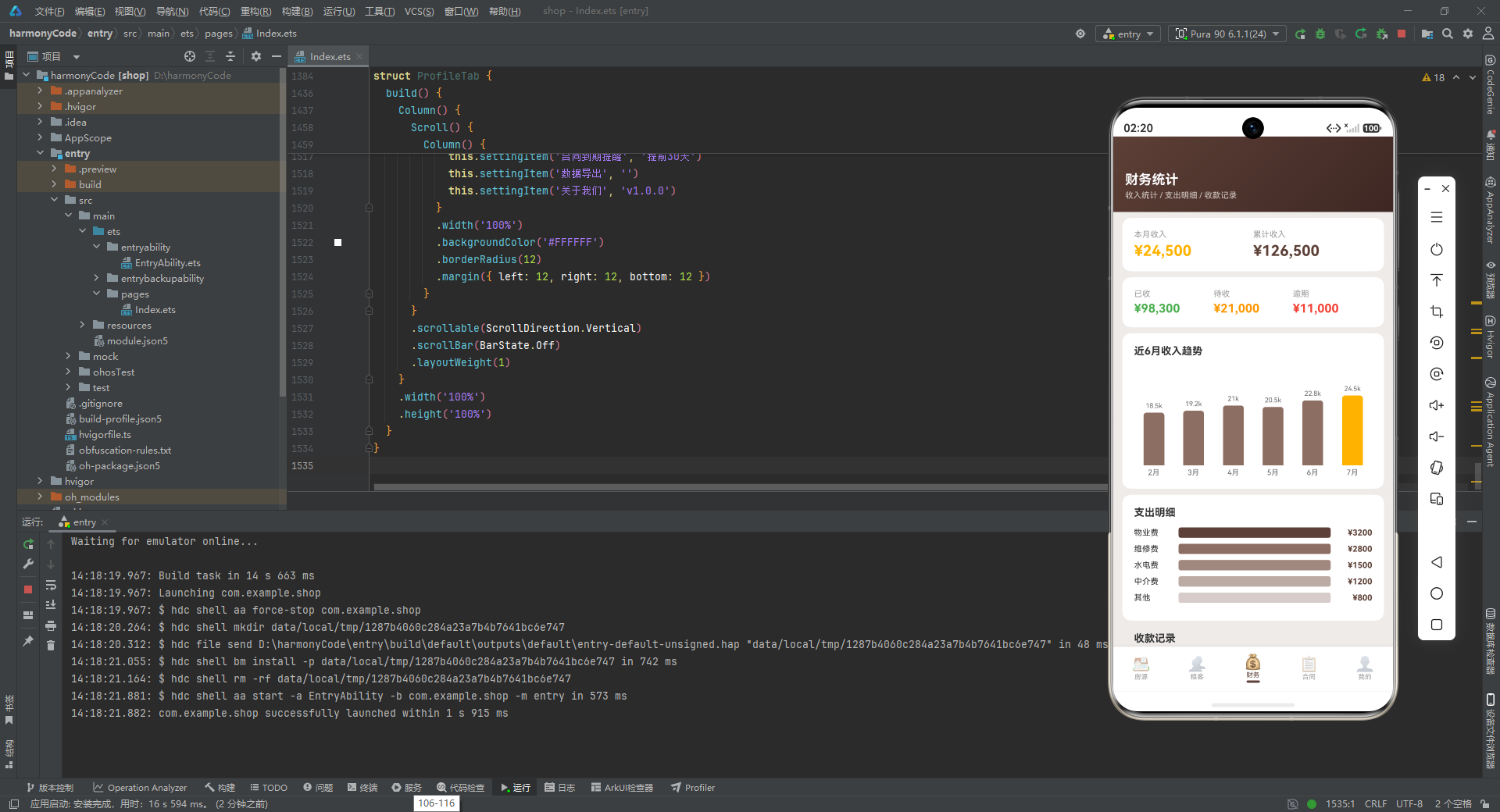
财务 Tab 的内容区采用纵向滚动布局。第一个卡片是收入概览,左右两列等分宽度,分别展示"本月收入"(琥珀色高亮)和"累计收入"(棕色)。每列内部采用左对齐,标签在上、金额在下,形成清晰的信息层级。
          Row() {
            Column() { Text('已收').fontSize(11).fontColor('#999999')
              Text('¥98,300').fontSize(16).fontWeight(FontWeight.Bold)
                .fontColor('#4CAF50').margin({ top: 4 }) }
            .layoutWeight(1).alignItems(HorizontalAlign.Start)
            Column() { Text('待收').fontSize(11).fontColor('#999999')
              Text('¥21,000').fontSize(16).fontWeight(FontWeight.Bold)
                .fontColor('#FF9800').margin({ top: 4 }) }
            .layoutWeight(1).alignItems(HorizontalAlign.Start)
            Column() { Text('逾期').fontSize(11).fontColor('#999999')
              Text('¥11,000').fontSize(16).fontWeight(FontWeight.Bold)
                .fontColor('#F44336').margin({ top: 4 }) }
            .layoutWeight(1).alignItems(HorizontalAlign.Start)
          }
          .width('100%').padding(16)
          .backgroundColor('#FFFFFF').borderRadius(12)
          .margin({ left: 12, right: 12, top: 8 })
第二张卡片将收入按状态分为三列:已收(绿色)、待收(橙色)、逾期(红色)。这种三色状态系统在应用中反复出现,已经成为用户认知的一部分。三列等分宽度,每列左对齐,便于快速扫视和对比。
          Column() {
            Text('近6月收入趋势')
              .fontSize(14).fontWeight(FontWeight.Bold)
              .fontColor('#333333')
              .alignSelf(ItemAlign.Start)
              .margin({ bottom: 12 })

            Row() {
              ForEach(INCOME_DATA, (item: MonthlyIncomeType, index: number) => {
                this.incomeBar(item)
              }, (item: MonthlyIncomeType, index: number) => item.month)
            }
            .width('100%').height(150)
            .alignItems(VerticalAlign.Bottom)
          }
          .width('100%').padding(16)
          .backgroundColor('#FFFFFF').borderRadius(12)
          .margin({ left: 12, right: 12, top: 8 })
收入趋势图区域使用 Column 包裹标题和柱状图。标题使用 alignSelf(ItemAlign.Start) 左对齐。柱状图 Row 设置了固定高度 150vp,并通过 alignItems(VerticalAlign.Bottom) 让所有柱子底部对齐。ForEach 遍历 6 个月的收入数据,每个月生成一个柱子,柱子之间通过 layoutWeight(1) 等分宽度。
          Column() {
            Text('支出明细')
              .fontSize(14).fontWeight(FontWeight.Bold)
              .fontColor('#333333')
              .alignSelf(ItemAlign.Start)
              .margin({ bottom: 12 })

            ForEach(EXPENSE_DATA, (item: ExpenseType, index: number) => {
              this.expenseBar(item)
            }, (item: ExpenseType, index: number) => item.label)
          }
          .width('100%').padding(16)
          .backgroundColor('#FFFFFF').borderRadius(12)
          .margin({ left: 12, right: 12, top: 8 })

          Text('收款记录')
            .fontSize(14).fontWeight(FontWeight.Bold)
            .fontColor('#333333')
            .alignSelf(ItemAlign.Start)
            .margin({ left: 16, top: 16, bottom: 8 })

          ForEach(PAYMENT_DATA, (item: PaymentRecord, index: number) => {
            this.paymentRow(item)
          }, (item: PaymentRecord, index: number) => item.id.toString())
        }
        .padding({ left: 12, right: 12, bottom: 12 })
      }
      .scrollable(ScrollDirection.Vertical)
      .scrollBar(BarState.Off)
      .layoutWeight(1)
    }
    .width('100%')
    .height('100%')
  }
}
支出明细区域与收入趋势图采用相同的卡片容器样式,内部使用 ForEach 渲染所有支出项。收款记录标题独立显示在卡片外部(左对齐、带外边距),记录列表本身则直接排列在滚动区域内,每条记录都是一个小型卡片。这种"标题外露、内容内嵌"的设计让不同区块之间的边界更加清晰。
十、合同管理 Tab(ContractsTab)
@Component
struct ContractsTab {
  @Builder
  contractCard(item: ContractItem) {
    Column() {
      Row() {
        Column()
          .width(4).height(40).borderRadius(2)
          .backgroundColor(item.contractColor)

        Column() {
          Text(item.propertyName)
            .fontSize(14).fontWeight(FontWeight.Bold)
            .fontColor('#333333')
          Text(`租客: ${item.tenantName}`)
            .fontSize(11).fontColor('#666666')
            .margin({ top: 2 })
        }
        .layoutWeight(1)
        .margin({ left: 10 })
        .alignItems(HorizontalAlign.Start)

        Text(getLeaseStatusMeta(item.status).label)
          .fontSize(10)
          .fontColor(getLeaseStatusMeta(item.status).color)
          .padding({ left: 8, right: 8, top: 4, bottom: 4 })
          .borderRadius(4)
          .backgroundColor(getLeaseStatusMeta(item.status).bg)
      }
      .width('100%')
      .alignItems(VerticalAlign.Center)
ContractsTab 的合同卡片采用了左侧彩色竖条的标志性设计。这个 4x40vp 的圆角小矩形(borderRadius: 2)使用 item.contractColor 着色,在白色卡片上形成了强烈的视觉锚点,用户即使快速滑动列表,也能通过颜色快速定位到特定合同。
中间列展示房源名称(加粗)和租客信息,右侧是合同状态标签。状态标签使用了从 getLeaseStatusMeta 获取的前景色和背景色组合,形成彩色文字 + 浅色背景的药丸状标签。
      Row() {
        Column() {
          Text('租期')
            .fontSize(9).fontColor('#999999')
          Text(`${item.leaseStart}`)
            .fontSize(10).fontColor('#333333')
            .margin({ top: 2 })
          Text(`~ ${item.leaseEnd}`)
            .fontSize(10).fontColor('#333333')
        }
        .alignItems(HorizontalAlign.Start)
        .layoutWeight(1)

        Column() {
          Text('剩余天数')
            .fontSize(9).fontColor('#999999')
          Text(`${item.remainingDays}天`)
            .fontSize(14).fontWeight(FontWeight.Bold)
            .fontColor(item.remainingDays < 120 ? '#FF9800' : '#5D4037')
            .margin({ top: 2 })
        }
        .alignItems(HorizontalAlign.Center)

        Column() {
          Text('月租')
            .fontSize(9).fontColor('#999999')
          Text(`¥${item.monthlyRent}`)
            .fontSize(13).fontWeight(FontWeight.Bold)
            .fontColor('#FFB300')
            .margin({ top: 2 })
        }
        .alignItems(HorizontalAlign.End)

        Column() {
          Text('押金')
            .fontSize(9).fontColor('#999999')
          Text(`¥${item.deposit}`)
            .fontSize(13).fontWeight(FontWeight.Bold)
            .fontColor('#5D4037')
            .margin({ top: 2 })
        }
        .alignItems(HorizontalAlign.End)
      }
      .width('100%')
      .margin({ top: 10 })
      .alignItems(VerticalAlign.Top)
卡片下半部分是一个四列信息栏,分别展示租期、剩余天数、月租和押金。四列的排列方式非常有讲究:第一列左对齐(alignItems(HorizontalAlign.Start)),第二列居中对齐,第三、四列右对齐。这种不对称的对齐方式形成了优美的视觉韵律,让信息在阅读时自然流动。
剩余天数使用了条件颜色——当剩余天数小于 120 天时变为橙色(#FF9800),否则为棕色。这是一种视觉预警机制,帮助房东快速识别即将到期的合同。月租使用琥珀色强调,押金使用棕色,与整体配色体系保持一致。
      if (item.remainingDays < 120) {
        Row() {
          Text('⚠ 即将到期,请及时续签')
            .fontSize(10).fontColor('#FF9800')
          Column().layoutWeight(1)
          Text('续签 ›')
            .fontSize(11).fontColor('#5D4037')
            .fontWeight(FontWeight.Bold)
        }
        .width('100%')
        .padding({ top: 8 })
        .alignItems(VerticalAlign.Center)
      }
    }
    .width('100%')
    .padding(14)
    .borderRadius(12)
    .backgroundColor('#FFFFFF')
    .shadow({ radius: 4, color: '#1A000000', offsetY: 2 })
    .margin({ bottom: 10 })
  }
当合同剩余天数不足 120 天时,卡片底部会额外显示一行警告提示。左侧是带警告符号的橙色提示文字,右侧是"续签 ›"操作链接(使用 layoutWeight(1) 推到右侧)。这行提示的出现条件与剩余天数颜色预警的条件一致,形成了双重提醒机制。
  build() {
    Column() {
      Column() {
        Text('合同管理')
          .fontSize(18).fontWeight(FontWeight.Bold)
          .fontColor('#FFFFFF')
        Text(`${CONTRACT_DATA.length} 份合同  |  ${CONTRACT_DATA.filter((c: ContractItem) => c.status === '即将到期').length} 份即将到期`)
          .fontSize(11).fontColor('#D7CCC8')
          .margin({ top: 4 })
      }
      .width('100%')
      .padding({ left: 16, top: 48, bottom: 16 })
      .alignItems(HorizontalAlign.Start)
      .linearGradient({ angle: 135, colors: [['#5D4037', 0], ['#3E2723', 1]] })

      Scroll() {
        Column() {
          ForEach(CONTRACT_DATA, (item: ContractItem, index: number) => {
            this.contractCard(item)
          }, (item: ContractItem, index: number) => item.id.toString())
        }
        .padding({ left: 12, right: 12, top: 8, bottom: 12 })
      }
      .scrollable(ScrollDirection.Vertical)
      .scrollBar(BarState.Off)
      .layoutWeight(1)
    }
    .width('100%')
    .height('100%')
  }
}
合同 Tab 的头部统计信息实时计算总合同数和即将到期的合同数,帮助房东掌握整体合同状况。内容区使用纵向滚动列表渲染所有合同卡片,布局模式与其他 Tab 保持一致。
十一、个人中心 Tab(ProfileTab)
@Component
struct ProfileTab {
  @Builder
  agentItem(agent: AgentContactType) {
    Row() {
      Column() {
        Text(agent.name.charAt(0))
          .fontSize(16).fontWeight(FontWeight.Bold)
          .fontColor('#FFFFFF')
      }
      .width(40).height(40).borderRadius(20)
      .backgroundColor(agent.avatarColor)
      .justifyContent(FlexAlign.Center)
      .alignItems(HorizontalAlign.Center)

      Column() {
        Text(agent.name)
          .fontSize(13).fontWeight(FontWeight.Bold)
          .fontColor('#333333')
        Text(agent.role)
          .fontSize(11).fontColor('#666666')
          .margin({ top: 2 })
      }
      .layoutWeight(1)
      .margin({ left: 10 })
      .alignItems(HorizontalAlign.Start)

      Text(agent.phone)
        .fontSize(12).fontColor('#5D4037')
    }
    .width('100%')
    .padding({ left: 12, right: 12, top: 10, bottom: 10 })
    .backgroundColor('#FFFFFF')
    .borderRadius(8)
    .margin({ bottom: 6 })
  }
agentItem 是个人中心联系人列表的条目组件。左侧是一个 40x40 的圆形头像,显示联系人姓名的首字母。中间列展示姓名(加粗)和角色(灰色),右侧是电话号码(棕色)。整个条目使用白色背景、8vp 圆角,底部有 6vp 间距。
  @Builder
  settingItem(label: string, value: string) {
    Row() {
      Text(label)
        .fontSize(13).fontColor('#333333')
        .layoutWeight(1)
      Text(value)
        .fontSize(12).fontColor('#999999')
      Text(' ›')
        .fontSize(14).fontColor('#CCCCCC')
    }
    .width('100%')
    .padding({ left: 14, right: 14, top: 12, bottom: 12 })
    .alignItems(VerticalAlign.Center)
  }
settingItem 是设置列表的通用条目构建器。它接收标签和值两个参数,左侧显示标签(黑色),中间显示当前值(灰色),右侧显示"›"箭头符号(浅灰色),暗示该项可点击进入详情。layoutWeight(1) 让标签占据剩余空间,将值和箭头推到右侧。这种"标签-值-箭头"的三段式布局是移动应用设置页的经典模式。
  build() {
    Column() {
      Column() {
        Column() {
          Column()
            .width(64).height(64).borderRadius(32)
            .backgroundColor('#FFFFFF')
          Text('房东王总')
            .fontSize(16).fontWeight(FontWeight.Bold)
            .fontColor('#FFFFFF')
            .margin({ top: 8 })
          Text('ID: LANDLORD_2026')
            .fontSize(11).fontColor('#D7CCC8')
            .margin({ top: 2 })
        }
        .alignItems(HorizontalAlign.Center)
      }
      .width('100%')
      .padding({ top: 48, bottom: 20 })
      .alignItems(HorizontalAlign.Center)
      .linearGradient({ angle: 135, colors: [['#5D4037', 0], ['#3E2723', 1]] })
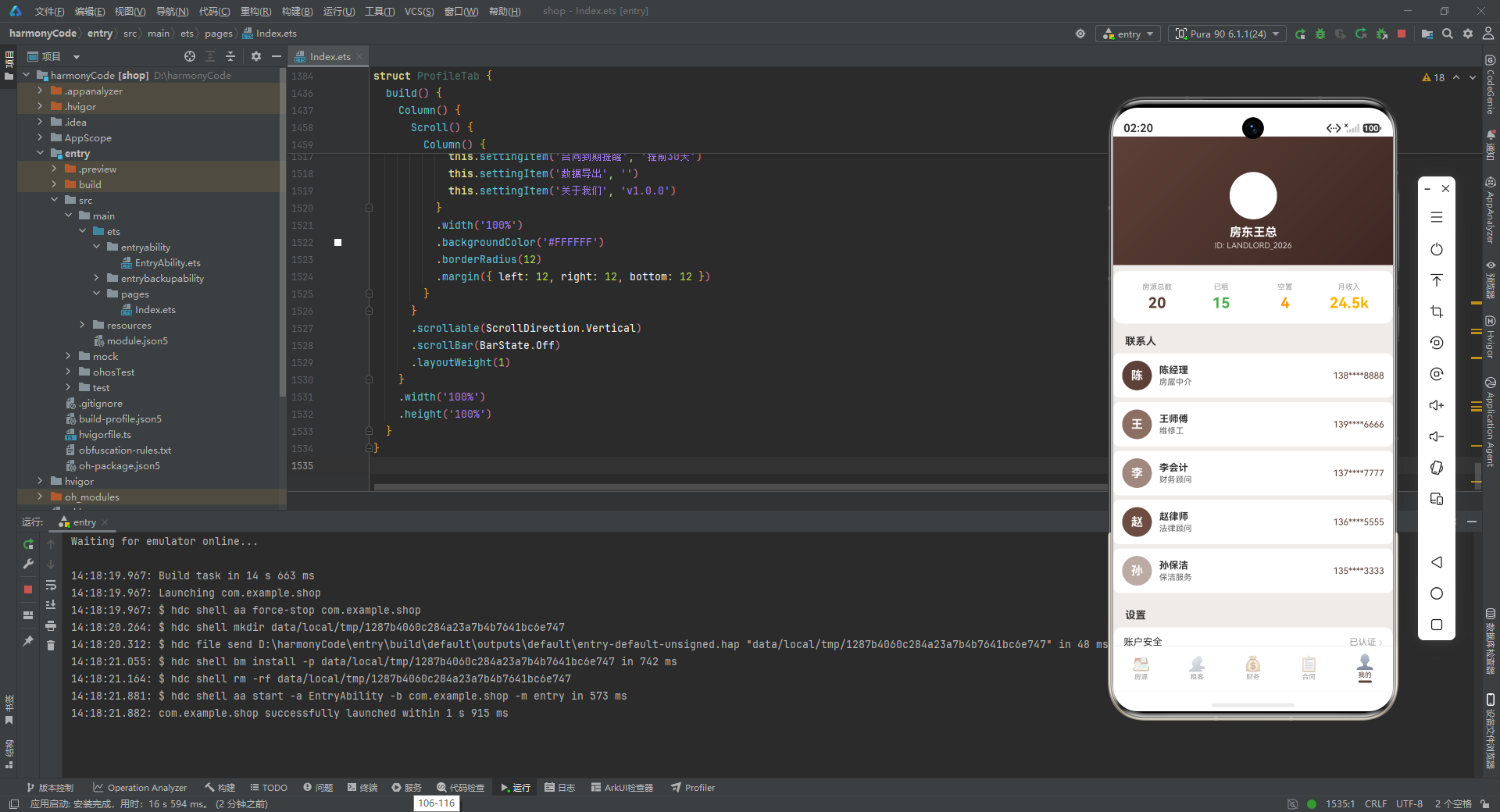
个人中心的头部区域采用了居中布局,与其他 Tab 的左对齐头部有所不同。最内层的 Column 包含一个 64x64 的白色圆形占位(可作为用户头像)和两行文字(用户名、用户 ID),全部居中对齐。外层 Column 设置了居中内边距和相同的棕色渐变背景,与整体视觉风格保持一致。
      Scroll() {
        Column() {
          Row() {
            Column() {
              Text('房源总数').fontSize(10).fontColor('#999999')
              Text(`${PROPERTY_DATA.length}`).fontSize(20).fontWeight(FontWeight.Bold)
                .fontColor('#5D4037').margin({ top: 4 })
            }
            .layoutWeight(1).alignItems(HorizontalAlign.Center)

            Column() {
              Text('已租').fontSize(10).fontColor('#999999')
              Text(`${PROPERTY_DATA.filter((p: PropertyItem) => p.status === '已租').length}`)
                .fontSize(20).fontWeight(FontWeight.Bold)
                .fontColor('#4CAF50').margin({ top: 4 })
            }
            .layoutWeight(1).alignItems(HorizontalAlign.Center)

            Column() {
              Text('空置').fontSize(10).fontColor('#999999')
              Text(`${PROPERTY_DATA.filter((p: PropertyItem) => p.status === '空置').length}`)
                .fontSize(20).fontWeight(FontWeight.Bold)
                .fontColor('#FF9800').margin({ top: 4 })
            }
            .layoutWeight(1).alignItems(HorizontalAlign.Center)

            Column() {
              Text('月收入').fontSize(10).fontColor('#999999')
              Text('24.5k').fontSize(20).fontWeight(FontWeight.Bold)
                .fontColor('#FFB300').margin({ top: 4 })
            }
            .layoutWeight(1).alignItems(HorizontalAlign.Center)
          }
          .width('100%')
          .padding(16)
          .backgroundColor('#FFFFFF')
          .borderRadius(12)
          .margin({ left: 12, right: 12, top: 8 })
统计概览卡片使用四列等分布局,每列居中对齐,分别展示房源总数(棕色)、已租(绿色)、空置(橙色)和月收入(琥珀色)。数字使用 20vp 的大字号加粗显示,标签使用 10vp 的小字号灰色文字,形成了强烈的视觉对比。这个卡片与个人中心头部区域在视觉上形成了"大标题 + 数据概览"的经典组合。
          Text('联系人')
            .fontSize(14).fontWeight(FontWeight.Bold)
            .fontColor('#333333')
            .alignSelf(ItemAlign.Start)
            .margin({ left: 16, top: 16, bottom: 8 })

          ForEach(AGENT_CONTACTS, (agent: AgentContactType, index: number) => {
            this.agentItem(agent)
          }, (agent: AgentContactType, index: number) => agent.name)

          Text('设置')
            .fontSize(14).fontWeight(FontWeight.Bold)
            .fontColor('#333333')
            .alignSelf(ItemAlign.Start)
            .margin({ left: 16, top: 16, bottom: 8 })

          Column() {
            this.settingItem('账户安全', '已认证')
            this.settingItem('通知设置', '已开启')
            this.settingItem('租金提醒', '每月1日')
            this.settingItem('合同到期提醒', '提前30天')
            this.settingItem('数据导出', '')
            this.settingItem('关于我们', 'v1.0.0')
          }
          .width('100%')
          .backgroundColor('#FFFFFF')
          .borderRadius(12)
          .margin({ left: 12, right: 12, bottom: 12 })
        }
      }
      .scrollable(ScrollDirection.Vertical)
      .scrollBar(BarState.Off)
      .layoutWeight(1)
    }
    .width('100%')
    .height('100%')
  }
}
个人中心的内容区包含联系人列表和设置列表两个区块。每个区块都有一个左对齐的标题,下方是内容列表。联系人使用独立的卡片式条目,设置项则包裹在一个大的白色圆角 Column 中。设置项中出现了值为空字符串的情况(如"数据导出"),此时右侧只显示箭头,没有值文本,这在移动应用设置页中很常见,表示该项需要进入下级页面查看或操作。
十二、全模块技术总结与横向对比
| 模块名称 | 核心功能 | 状态管理要点 | 关键组件/构建器 | 设计模式 | 数据源 | 交互复杂度 |
|---|---|---|---|---|---|---|
| MainApp(主入口) | Tab 路由控制、全局对话框管理 | @State activeTab 控制页面切换;showXxxDialog 控制模态框;selectedProperty 传递选中项;input/editXxx 绑定表单输入 | contentArea、bottomBar、addPropertyDialog、editPropertyDialog、deleteConfirmDialog | 中央状态管理、父子组件回调通信、条件渲染 | 子组件注入 | 高 |
| 房源管理(PropertiesTab) | 房源列表展示、类型筛选、增删改入口 | @State selectedType 筛选状态;@State properties 列表数据;通过回调将编辑/删除事件委托给父组件 | typeChip、propertyCard | 前端筛选策略、元数据映射驱动UI、卡片式布局 | PROPERTY_DATA(20条) | 高 |
| 租客管理(TenantsTab) | 租客与空置房源统一列表展示 | 无本地状态,纯展示组件;通过 isVacant 标志统一处理两种数据形态 | tenantCard | 数据归一化、首字母头像、列表展示 | TENANT_DATA(19条) | 低 |
| 财务统计(FinanceTab) | 收入/支出数据可视化、收款流水展示 | 无本地状态,纯展示组件;图表高度通过归一化公式计算 | incomeBar、expenseBar、paymentRow | 数据可视化(柱状图、条形图)、静态统计卡片 | INCOME_DATA、EXPENSE_DATA、PAYMENT_DATA | 低 |
| 合同管理(ContractsTab) | 合同列表展示、到期预警 | 无本地状态,纯展示组件;通过 remainingDays 触发条件渲染警告 | contractCard | 条件预警渲染、彩色标识条、四列信息布局 | CONTRACT_DATA(15条) | 中 |
| 个人中心(ProfileTab) | 个人信息展示、联系人列表、设置项 | 无本地状态,纯展示组件;使用通用构建器 settingItem 减少重复代码 | agentItem、settingItem | 通用构建器复用、统计概览卡片、分组列表 | AGENT_CONTACTS、静态字符串 | 低 |
安装DevEco Studio程序

选择目标安装目录:

设置环境变量,但是需要重启一下:

新建一个空白模板:

设置API为24的模板项目:

初始化项目,自动下载相关依赖:

完整代码:
// 租房管理 - Rental Management
// Brown (#5D4037) | Amber (#FFB300) | Bg (#EFEBE9) | Green (#4CAF50) Paid
// ============ Interfaces ============
interface PropertyTypeMetaType {
label: string
icon: string
color: string
bg: string
}
interface PropertyStatusMetaType {
label: string
color: string
icon: string
bg: string
}
interface PaidStatusMetaType {
label: string
color: string
icon: string
}
interface FurnishingMetaType {
label: string
color: string
}
interface MonthlyIncomeType {
month: string
income: number
color: string
}
interface ExpenseType {
label: string
amount: number
color: string
}
interface AgentContactType {
name: string
role: string
phone: string
avatarColor: string
}
interface LeaseStatusMetaType {
label: string
color: string
bg: string
}
// ============ @Observed Classes ============
@Observed
class PropertyItem {
id: number = 0
name: string = ''
address: string = ''
type: string = ''
rent: number = 0
deposit: number = 0
area: number = 0
rooms: number = 0
bathrooms: number = 0
floor: string = ''
status: string = ''
tenantName: string = ''
leaseStart: string = ''
leaseEnd: string = ''
monthlyRent: number = 0
paidStatus: string = ''
furnishing: string = ''
orientation: string = ''
tags: string[] = []
imageColor: string = ''
description: string = ''
constructor(
id: number, name: string, address: string, type: string, rent: number, deposit: number,
area: number, rooms: number, bathrooms: number, floor: string, status: string,
tenantName: string, leaseStart: string, leaseEnd: string, monthlyRent: number,
paidStatus: string, furnishing: string, orientation: string, tags: string[],
imageColor: string, description: string
) {
this.id = id
this.name = name
this.address = address
this.type = type
this.rent = rent
this.deposit = deposit
this.area = area
this.rooms = rooms
this.bathrooms = bathrooms
this.floor = floor
this.status = status
this.tenantName = tenantName
this.leaseStart = leaseStart
this.leaseEnd = leaseEnd
this.monthlyRent = monthlyRent
this.paidStatus = paidStatus
this.furnishing = furnishing
this.orientation = orientation
this.tags = tags
this.imageColor = imageColor
this.description = description
}
}
@Observed
class TenantItem {
id: number = 0
name: string = ''
phone: string = ''
propertyId: number = 0
propertyName: string = ''
leaseStart: string = ''
leaseEnd: string = ''
monthlyRent: number = 0
paidStatus: string = ''
avatarColor: string = ''
isVacant: boolean = false
constructor(
id: number, name: string, phone: string, propertyId: number, propertyName: string,
leaseStart: string, leaseEnd: string, monthlyRent: number, paidStatus: string,
avatarColor: string, isVacant: boolean
) {
this.id = id
this.name = name
this.phone = phone
this.propertyId = propertyId
this.propertyName = propertyName
this.leaseStart = leaseStart
this.leaseEnd = leaseEnd
this.monthlyRent = monthlyRent
this.paidStatus = paidStatus
this.avatarColor = avatarColor
this.isVacant = isVacant
}
}
@Observed
class ContractItem {
id: number = 0
propertyName: string = ''
tenantName: string = ''
leaseStart: string = ''
leaseEnd: string = ''
status: string = ''
remainingDays: number = 0
monthlyRent: number = 0
deposit: number = 0
contractColor: string = ''
constructor(
id: number, propertyName: string, tenantName: string, leaseStart: string, leaseEnd: string,
status: string, remainingDays: number, monthlyRent: number, deposit: number, contractColor: string
) {
this.id = id
this.propertyName = propertyName
this.tenantName = tenantName
this.leaseStart = leaseStart
this.leaseEnd = leaseEnd
this.status = status
this.remainingDays = remainingDays
this.monthlyRent = monthlyRent
this.deposit = deposit
this.contractColor = contractColor
}
}
@Observed
class PaymentRecord {
id: number = 0
propertyName: string = ''
tenantName: string = ''
amount: number = 0
date: string = ''
status: string = ''
type: string = ''
constructor(
id: number, propertyName: string, tenantName: string, amount: number,
date: string, status: string, type: string
) {
this.id = id
this.propertyName = propertyName
this.tenantName = tenantName
this.amount = amount
this.date = date
this.status = status
this.type = type
}
}
// ============ Config Functions ============
function getPropertyTypeMeta(type: string): PropertyTypeMetaType {
if (type === '整租') return { label: '整租', icon: '🏠', color: '#5D4037', bg: '#EFEBE9' }
if (type === '合租') return { label: '合租', icon: '🚪', color: '#8D6E63', bg: '#EFEBE9' }
if (type === '单间') return { label: '单间', icon: '🛏️', color: '#A1887F', bg: '#EFEBE9' }
if (type === '公寓') return { label: '公寓', icon: '🏢', color: '#6D4C41', bg: '#EFEBE9' }
if (type === '别墅') return { label: '别墅', icon: '🏡', color: '#4E342E', bg: '#EFEBE9' }
return { label: type, icon: '🏠', color: '#5D4037', bg: '#EFEBE9' }
}
function getPropertyStatusMeta(status: string): PropertyStatusMetaType {
if (status === '已租') return { label: '已租', color: '#4CAF50', icon: '●', bg: '#E8F5E9' }
if (status === '空置') return { label: '空置', color: '#FF9800', icon: '○', bg: '#FFF3E0' }
if (status === '维修中') return { label: '维修中', color: '#F44336', icon: '🔧', bg: '#FFEBEE' }
return { label: status, color: '#999999', icon: '●', bg: '#F5F5F5' }
}
function getPaidStatusMeta(status: string): PaidStatusMetaType {
if (status === '已收') return { label: '已收', color: '#4CAF50', icon: '✓' }
if (status === '待收') return { label: '待收', color: '#FF9800', icon: '⏳' }
if (status === '逾期') return { label: '逾期', color: '#F44336', icon: '⚠' }
return { label: status, color: '#999999', icon: '●' }
}
function getFurnishingMeta(furnishing: string): FurnishingMetaType {
if (furnishing === '精装') return { label: '精装', color: '#4CAF50' }
if (furnishing === '简装') return { label: '简装', color: '#FF9800' }
return { label: '毛坯', color: '#999999' }
}
function getLeaseStatusMeta(status: string): LeaseStatusMetaType {
if (status === '生效中') return { label: '生效中', color: '#4CAF50', bg: '#E8F5E9' }
if (status === '即将到期') return { label: '即将到期', color: '#FF9800', bg: '#FFF3E0' }
if (status === '已到期') return { label: '已到期', color: '#F44336', bg: '#FFEBEE' }
return { label: '待续签', color: '#1565C0', bg: '#E3F2FD' }
}
// ============ Mock Data ============
const PROPERTY_TYPE_LIST: string[] = ['全部', '整租', '合租', '单间', '公寓', '别墅']
const PROPERTY_DATA: PropertyItem[] = [
new PropertyItem(1, '阳光花园A栋301', '浦东新区张杨路88号', '整租', 8500, 17000, 95, 2, 1, '3/18', '已租', '张先生', '2026-01-15', '2027-01-14', 8500, '已收', '精装', '朝南', ['近地铁', '拎包入住'], '#8D6E63', '南北通透 精装修 拎包入住'),
new PropertyItem(2, '翠湖天地5栋602', '徐汇区漕溪北路120号', '整租', 12000, 24000, 120, 3, 2, '6/25', '已租', '李女士', '2026-03-01', '2027-02-28', 12000, '已收', '精装', '朝南', ['学区房', '近地铁'], '#6D4C41', '高端社区 配套齐全'),
new PropertyItem(3, '城市绿洲B栋1504', '闵行区莘庄地铁站旁', '公寓', 6500, 13000, 55, 1, 1, '15/30', '已租', '王先生', '2026-02-10', '2027-02-09', 6500, '待收', '精装', '朝东', ['近地铁', '电梯房'], '#A1887F', 'loft户型 独立卫浴'),
new PropertyItem(4, '静安国际C栋803', '静安区南京西路1788号', '公寓', 9800, 19600, 65, 1, 1, '8/32', '已租', '陈女士', '2026-01-20', '2027-01-19', 9800, '已收', '精装', '朝南', ['近地铁', '商圈'], '#5D4037', '核心地段 高层景观'),
new PropertyItem(5, '金色家园3栋201', '长宁区仙霞路66号', '整租', 7500, 15000, 88, 2, 1, '2/6', '空置', '', '', '', 0, '', '简装', '朝南', ['学区房'], '#BCAAA4', '多层住宅 低楼层方便'),
new PropertyItem(6, '滨江一号D栋2501', '浦东新区陆家嘴环路100号', '整租', 18000, 36000, 150, 3, 2, '25/40', '已租', '刘先生', '2025-12-01', '2026-11-30', 18000, '已收', '精装', '朝南', ['江景房', '电梯房', '商圈'], '#4E342E', '江景豪宅 高端配套'),
new PropertyItem(7, '和谐家园A栋505', '杨浦区控江路55号', '合租', 3500, 7000, 25, 1, 1, '5/12', '已租', '赵女士', '2026-04-01', '2027-03-31', 3500, '待收', '简装', '朝西', ['近地铁'], '#D7CCC8', '合租主卧 独立阳台'),
new PropertyItem(8, '新华公寓B栋1203', '黄浦区茂名南路33号', '公寓', 7200, 14400, 48, 1, 1, '12/20', '空置', '', '', '', 0, '', '精装', '朝南', ['近地铁', '商圈'], '#A1887F', '单身公寓 精装修'),
new PropertyItem(9, '绿城花园7栋301', '松江区九亭大街18号', '整租', 5500, 11000, 78, 2, 1, '3/8', '已租', '孙先生', '2026-05-01', '2027-04-30', 5500, '已收', '简装', '朝南', ['学区房', '近地铁'], '#8D6E63', '温馨两房 近学校'),
new PropertyItem(10, '帝景湾E栋1802', '虹口区四川北路200号', '整租', 8800, 17600, 92, 2, 2, '18/28', '维修中', '', '', '', 0, '', '精装', '朝南', ['电梯房', '商圈'], '#5D4037', '管道维修中 预计一周完工'),
new PropertyItem(11, '百合花园2栋401', '宝山区牡丹江路77号', '合租', 2800, 5600, 20, 1, 1, '4/6', '已租', '周女士', '2026-03-15', '2027-03-14', 2800, '逾期', '简装', '朝北', ['近地铁'], '#D7CCC8', '次卧合租 经济实惠'),
new PropertyItem(12, '万科城F栋901', '嘉定区白银路100号', '整租', 6800, 13600, 85, 2, 1, '9/18', '已租', '吴先生', '2026-02-20', '2027-02-19', 6800, '已收', '精装', '朝南', ['学区房', '电梯房', '近地铁'], '#6D4C41', '品牌社区 绿化率高'),
new PropertyItem(13, '外滩公馆A栋3001', '黄浦区中山东一路12号', '公寓', 15000, 30000, 70, 1, 1, '30/35', '已租', '郑女士', '2026-01-10', '2027-01-09', 15000, '已收', '精装', '朝南', ['江景房', '商圈', '电梯房'], '#4E342E', '外滩景观 高端公寓'),
new PropertyItem(14, '阳光城B栋703', '青浦区盈港东路55号', '整租', 4800, 9600, 70, 2, 1, '7/14', '空置', '', '', '', 0, '', '简装', '朝东', ['近地铁'], '#BCAAA4', '交通便利 两房户型'),
new PropertyItem(15, '汤臣豪园C栋1601', '浦东新区花木路88号', '别墅', 35000, 70000, 280, 4, 3, '独栋', '已租', '黄先生', '2025-11-01', '2026-10-31', 35000, '已收', '精装', '朝南', ['学区房', '电梯房', '花园'], '#3E2723', '独栋别墅 花园车位'),
new PropertyItem(16, '仁恒河滨D栋2202', '浦东新区浦东南路200号', '整租', 11000, 22000, 110, 3, 2, '22/30', '已租', '林女士', '2026-04-10', '2027-04-09', 11000, '待收', '精装', '朝南', ['江景房', '近地铁', '电梯房'], '#5D4037', '河景三房 品质社区'),
new PropertyItem(17, '保利叶之林E栋305', '闵行区浦江镇55号', '整租', 5200, 10400, 75, 2, 1, '3/10', '已租', '何先生', '2026-05-15', '2027-05-14', 5200, '已收', '简装', '朝南', ['学区房'], '#8D6E63', '近公园 环境优美'),
new PropertyItem(18, '金地格林A栋1004', '奉贤区南桥镇100号', '合租', 2500, 5000, 18, 1, 1, '10/16', '空置', '', '', '', 0, '', '毛坯', '朝西', [], '#EFEBE9', '经济合租 待装修'),
new PropertyItem(19, '中粮天悦壹号B栋2001', '普陀区长寿路300号', '公寓', 8200, 16400, 58, 1, 1, '20/26', '已租', '龚女士', '2026-03-20', '2027-03-19', 8200, '逾期', '精装', '朝南', ['近地铁', '商圈', '电梯房'], '#6D4C41', '核心地段 一房一厅'),
new PropertyItem(20, '华润置地C栋1502', '闵行区七莘路66号', '整租', 7800, 15600, 90, 2, 2, '15/22', '已租', '宋先生', '2026-01-05', '2027-01-04', 7800, '已收', '精装', '朝南', ['学区房', '近地铁', '电梯房'], '#4E342E', '品牌开发商 品质两房')
]
const TENANT_DATA: TenantItem[] = [
new TenantItem(1, '张先生', '138****1234', 1, '阳光花园A栋301', '2026-01-15', '2027-01-14', 8500, '已收', '#5D4037', false),
new TenantItem(2, '李女士', '139****5678', 2, '翠湖天地5栋602', '2026-03-01', '2027-02-28', 12000, '已收', '#8D6E63', false),
new TenantItem(3, '王先生', '137****9012', 3, '城市绿洲B栋1504', '2026-02-10', '2027-02-09', 6500, '待收', '#A1887F', false),
new TenantItem(4, '陈女士', '136****3456', 4, '静安国际C栋803', '2026-01-20', '2027-01-19', 9800, '已收', '#6D4C41', false),
new TenantItem(5, '刘先生', '135****7890', 6, '滨江一号D栋2501', '2025-12-01', '2026-11-30', 18000, '已收', '#4E342E', false),
new TenantItem(6, '赵女士', '133****2345', 7, '和谐家园A栋505', '2026-04-01', '2027-03-31', 3500, '待收', '#BCAAA4', false),
new TenantItem(7, '孙先生', '188****6789', 9, '绿城花园7栋301', '2026-05-01', '2027-04-30', 5500, '已收', '#8D6E63', false),
new TenantItem(8, '周女士', '187****0123', 11, '百合花园2栋401', '2026-03-15', '2027-03-14', 2800, '逾期', '#D7CCC8', false),
new TenantItem(9, '吴先生', '186****4567', 12, '万科城F栋901', '2026-02-20', '2027-02-19', 6800, '已收', '#6D4C41', false),
new TenantItem(10, '郑女士', '185****8901', 13, '外滩公馆A栋3001', '2026-01-10', '2027-01-09', 15000, '已收', '#4E342E', false),
new TenantItem(11, '黄先生', '184****2345', 15, '汤臣豪园C栋1601', '2025-11-01', '2026-10-31', 35000, '已收', '#3E2723', false),
new TenantItem(12, '林女士', '183****5678', 16, '仁恒河滨D栋2202', '2026-04-10', '2027-04-09', 11000, '待收', '#5D4037', false),
new TenantItem(13, '何先生', '182****9012', 17, '保利叶之林E栋305', '2026-05-15', '2027-05-14', 5200, '已收', '#8D6E63', false),
new TenantItem(14, '龚女士', '181****3456', 19, '中粮天悦壹号B栋2001', '2026-03-20', '2027-03-19', 8200, '逾期', '#6D4C41', false),
new TenantItem(15, '宋先生', '180****7890', 20, '华润置地C栋1502', '2026-01-05', '2027-01-04', 7800, '已收', '#4E342E', false),
new TenantItem(16, '空置', '', 5, '金色家园3栋201', '', '', 0, '', '#EFEBE9', true),
new TenantItem(17, '空置', '', 8, '新华公寓B栋1203', '', '', 0, '', '#EFEBE9', true),
new TenantItem(18, '空置', '', 14, '阳光城B栋703', '', '', 0, '', '#EFEBE9', true),
new TenantItem(19, '空置', '', 18, '金地格林A栋1004', '', '', 0, '', '#EFEBE9', true)
]
const CONTRACT_DATA: ContractItem[] = [
new ContractItem(1, '阳光花园A栋301', '张先生', '2026-01-15', '2027-01-14', '生效中', 173, 8500, 17000, '#5D4037'),
new ContractItem(2, '翠湖天地5栋602', '李女士', '2026-03-01', '2027-02-28', '生效中', 218, 12000, 24000, '#8D6E63'),
new ContractItem(3, '城市绿洲B栋1504', '王先生', '2026-02-10', '2027-02-09', '生效中', 199, 6500, 13000, '#A1887F'),
new ContractItem(4, '静安国际C栋803', '陈女士', '2026-01-20', '2027-01-19', '生效中', 178, 9800, 19600, '#6D4C41'),
new ContractItem(5, '滨江一号D栋2501', '刘先生', '2025-12-01', '2026-11-30', '即将到期', 128, 18000, 36000, '#4E342E'),
new ContractItem(6, '和谐家园A栋505', '赵女士', '2026-04-01', '2027-03-31', '生效中', 249, 3500, 7000, '#BCAAA4'),
new ContractItem(7, '绿城花园7栋301', '孙先生', '2026-05-01', '2027-04-30', '生效中', 279, 5500, 11000, '#8D6E63'),
new ContractItem(8, '百合花园2栋401', '周女士', '2026-03-15', '2027-03-14', '生效中', 232, 2800, 5600, '#D7CCC8'),
new ContractItem(9, '万科城F栋901', '吴先生', '2026-02-20', '2027-02-19', '生效中', 209, 6800, 13600, '#6D4C41'),
new ContractItem(10, '外滩公馆A栋3001', '郑女士', '2026-01-10', '2027-01-09', '生效中', 168, 15000, 30000, '#4E342E'),
new ContractItem(11, '汤臣豪园C栋1601', '黄先生', '2025-11-01', '2026-10-31', '即将到期', 98, 35000, 70000, '#3E2723'),
new ContractItem(12, '仁恒河滨D栋2202', '林女士', '2026-04-10', '2027-04-09', '生效中', 258, 11000, 22000, '#5D4037'),
new ContractItem(13, '保利叶之林E栋305', '何先生', '2026-05-15', '2027-05-14', '生效中', 293, 5200, 10400, '#8D6E63'),
new ContractItem(14, '中粮天悦壹号B栋2001', '龚女士', '2026-03-20', '2027-03-19', '生效中', 237, 8200, 16400, '#6D4C41'),
new ContractItem(15, '华润置地C栋1502', '宋先生', '2026-01-05', '2027-01-04', '生效中', 163, 7800, 15600, '#4E342E')
]
const PAYMENT_DATA: PaymentRecord[] = [
new PaymentRecord(1, '阳光花园A栋301', '张先生', 8500, '07-01', '已收', '租金'),
new PaymentRecord(2, '翠湖天地5栋602', '李女士', 12000, '07-01', '已收', '租金'),
new PaymentRecord(3, '城市绿洲B栋1504', '王先生', 6500, '07-05', '待收', '租金'),
new PaymentRecord(4, '静安国际C栋803', '陈女士', 9800, '07-01', '已收', '租金'),
new PaymentRecord(5, '滨江一号D栋2501', '刘先生', 18000, '07-01', '已收', '租金'),
new PaymentRecord(6, '和谐家园A栋505', '赵女士', 3500, '07-05', '待收', '租金'),
new PaymentRecord(7, '绿城花园7栋301', '孙先生', 5500, '07-01', '已收', '租金'),
new PaymentRecord(8, '百合花园2栋401', '周女士', 2800, '07-01', '逾期', '租金'),
new PaymentRecord(9, '万科城F栋901', '吴先生', 6800, '07-01', '已收', '租金'),
new PaymentRecord(10, '外滩公馆A栋3001', '郑女士', 15000, '07-01', '已收', '租金'),
new PaymentRecord(11, '汤臣豪园C栋1601', '黄先生', 35000, '07-01', '已收', '租金'),
new PaymentRecord(12, '中粮天悦壹号B栋2001', '龚女士', 8200, '07-01', '逾期', '租金'),
new PaymentRecord(13, '华润置地C栋1502', '宋先生', 7800, '07-01', '已收', '租金'),
new PaymentRecord(14, '仁恒河滨D栋2202', '林女士', 11000, '07-05', '待收', '租金'),
new PaymentRecord(15, '帝景湾E栋1802', '物业', 3200, '06-28', '已收', '维修费')
]
const INCOME_DATA: MonthlyIncomeType[] = [
{ month: '2月', income: 18500, color: '#8D6E63' },
{ month: '3月', income: 19200, color: '#8D6E63' },
{ month: '4月', income: 21000, color: '#8D6E63' },
{ month: '5月', income: 20500, color: '#8D6E63' },
{ month: '6月', income: 22800, color: '#8D6E63' },
{ month: '7月', income: 24500, color: '#FFB300' }
]
const EXPENSE_DATA: ExpenseType[] = [
{ label: '物业费', amount: 3200, color: '#5D4037' },
{ label: '维修费', amount: 2800, color: '#8D6E63' },
{ label: '水电费', amount: 1500, color: '#A1887F' },
{ label: '中介费', amount: 1200, color: '#BCAAA4' },
{ label: '其他', amount: 800, color: '#D7CCC8' }
]
const AGENT_CONTACTS: AgentContactType[] = [
{ name: '陈经理', role: '房屋中介', phone: '138****8888', avatarColor: '#5D4037' },
{ name: '王师傅', role: '维修工', phone: '139****6666', avatarColor: '#8D6E63' },
{ name: '李会计', role: '财务顾问', phone: '137****7777', avatarColor: '#A1887F' },
{ name: '赵律师', role: '法律顾问', phone: '136****5555', avatarColor: '#6D4C41' },
{ name: '孙保洁', role: '保洁服务', phone: '135****3333', avatarColor: '#BCAAA4' }
]
const MAX_INCOME: number = 26000
const MAX_EXPENSE: number = 4000
// ============ Tab Enum ============
enum AppTab {
PROPERTIES,
TENANTS,
FINANCE,
CONTRACTS,
PROFILE
}
// ============ Main Entry ============
@Entry
@Component
struct MainApp {
@State activeTab: AppTab = AppTab.PROPERTIES
@State showAddDialog: boolean = false
@State showEditDialog: boolean = false
@State showDeleteDialog: boolean = false
@State selectedProperty: PropertyItem | null = null
@State inputName: string = ''
@State inputAddress: string = ''
@State inputRent: string = ''
@State inputArea: string = ''
@State editName: string = ''
@State editAddress: string = ''
@State editRent: string = ''
@State editArea: string = ''
@Builder
contentArea() {
Column() {
if (this.activeTab === AppTab.PROPERTIES) {
PropertiesTab({
onAddProperty: () => {
this.inputName = ''
this.inputAddress = ''
this.inputRent = ''
this.inputArea = ''
this.showAddDialog = true
},
onEditProperty: (item: PropertyItem) => {
this.selectedProperty = item
this.editName = item.name
this.editAddress = item.address
this.editRent = `${item.rent}`
this.editArea = `${item.area}`
this.showEditDialog = true
},
onDeleteProperty: (item: PropertyItem) => {
this.selectedProperty = item
this.showDeleteDialog = true
}
})
} else if (this.activeTab === AppTab.TENANTS) {
TenantsTab()
} else if (this.activeTab === AppTab.FINANCE) {
FinanceTab()
} else if (this.activeTab === AppTab.CONTRACTS) {
ContractsTab()
} else {
ProfileTab()
}
}
.layoutWeight(1)
}
@Builder
bottomTabItem(icon: string, label: string, tab: AppTab) {
Column() {
Text(icon)
.fontSize(20)
.opacity(this.activeTab === tab ? 1.0 : 0.45)
Text(label)
.fontSize(9)
.fontColor(this.activeTab === tab ? '#5D4037' : '#999999')
.margin({ top: 1 })
if (this.activeTab === tab) {
Column()
.width(18)
.height(3)
.backgroundColor('#5D4037')
.borderRadius(2)
.margin({ top: 2 })
}
}
.layoutWeight(1)
.alignItems(HorizontalAlign.Center)
.padding({ top: 5, bottom: 5 })
.onClick(() => {
this.activeTab = tab
})
}
@Builder
bottomBar() {
Row() {
this.bottomTabItem('🏠', '房源', AppTab.PROPERTIES)
this.bottomTabItem('👥', '租客', AppTab.TENANTS)
this.bottomTabItem('💰', '财务', AppTab.FINANCE)
this.bottomTabItem('📋', '合同', AppTab.CONTRACTS)
this.bottomTabItem('👤', '我的', AppTab.PROFILE)
}
.width('100%')
.backgroundColor('#FFFFFF')
.padding({ top: 4, bottom: 6 })
.shadow({ radius: 8, color: '#1A000000', offsetY: -2 })
}
@Builder
addPropertyDialog() {
Stack() {
Column()
.width('100%')
.height('100%')
.backgroundColor('#80000000')
.onClick(() => { this.showAddDialog = false })
Column() {
Text('添加房源')
.fontSize(18)
.fontWeight(FontWeight.Bold)
.fontColor('#5D4037')
.margin({ bottom: 16 })
Text('房源名称')
.fontSize(13)
.fontColor('#666666')
.alignSelf(ItemAlign.Start)
.margin({ bottom: 6 })
TextInput({ text: this.inputName, placeholder: '请输入房源名称' })
.onChange((value: string) => { this.inputName = value })
.width('100%').height(44).borderRadius(8)
.backgroundColor('#EFEBE9').padding({ left: 12, right: 12 })
.fontSize(14).fontColor('#333333')
.margin({ bottom: 12 })
Text('地址')
.fontSize(13)
.fontColor('#666666')
.alignSelf(ItemAlign.Start)
.margin({ bottom: 6 })
TextInput({ text: this.inputAddress, placeholder: '请输入详细地址' })
.onChange((value: string) => { this.inputAddress = value })
.width('100%').height(44).borderRadius(8)
.backgroundColor('#EFEBE9').padding({ left: 12, right: 12 })
.fontSize(14).fontColor('#333333')
.margin({ bottom: 12 })
Text('月租金 (元)')
.fontSize(13)
.fontColor('#666666')
.alignSelf(ItemAlign.Start)
.margin({ bottom: 6 })
TextInput({ text: this.inputRent, placeholder: '请输入月租金' })
.onChange((value: string) => { this.inputRent = value })
.width('100%').height(44).borderRadius(8)
.backgroundColor('#EFEBE9').padding({ left: 12, right: 12 })
.fontSize(14).fontColor('#333333')
.margin({ bottom: 12 })
Text('面积 (㎡)')
.fontSize(13)
.fontColor('#666666')
.alignSelf(ItemAlign.Start)
.margin({ bottom: 6 })
TextInput({ text: this.inputArea, placeholder: '请输入面积' })
.onChange((value: string) => { this.inputArea = value })
.width('100%').height(44).borderRadius(8)
.backgroundColor('#EFEBE9').padding({ left: 12, right: 12 })
.fontSize(14).fontColor('#333333')
.margin({ bottom: 20 })
Row({ space: 12 }) {
Button('取消')
.layoutWeight(1).height(42)
.backgroundColor('#EFEBE9').fontColor('#666666')
.borderRadius(8).fontSize(15)
.onClick(() => { this.showAddDialog = false })
Button('确定')
.layoutWeight(1).height(42)
.backgroundColor('#5D4037').fontColor('#FFFFFF')
.borderRadius(8).fontSize(15)
.onClick(() => { this.showAddDialog = false })
}
.width('100%')
}
.width('85%')
.padding(24)
.borderRadius(16)
.backgroundColor('#FFFFFF')
.constraintSize({ maxHeight: '80%' })
}
.width('100%')
.height('100%')
.alignContent(Alignment.Center)
}
@Builder
editPropertyDialog() {
Stack() {
Column()
.width('100%')
.height('100%')
.backgroundColor('#80000000')
.onClick(() => { this.showEditDialog = false })
Column() {
Text('编辑房源')
.fontSize(18)
.fontWeight(FontWeight.Bold)
.fontColor('#5D4037')
.margin({ bottom: 16 })
Text('房源名称')
.fontSize(13)
.fontColor('#666666')
.alignSelf(ItemAlign.Start)
.margin({ bottom: 6 })
TextInput({ text: this.editName, placeholder: '请输入房源名称' })
.onChange((value: string) => { this.editName = value })
.width('100%').height(44).borderRadius(8)
.backgroundColor('#EFEBE9').padding({ left: 12, right: 12 })
.fontSize(14).fontColor('#333333')
.margin({ bottom: 12 })
Text('地址')
.fontSize(13)
.fontColor('#666666')
.alignSelf(ItemAlign.Start)
.margin({ bottom: 6 })
TextInput({ text: this.editAddress, placeholder: '请输入详细地址' })
.onChange((value: string) => { this.editAddress = value })
.width('100%').height(44).borderRadius(8)
.backgroundColor('#EFEBE9').padding({ left: 12, right: 12 })
.fontSize(14).fontColor('#333333')
.margin({ bottom: 12 })
Text('月租金 (元)')
.fontSize(13)
.fontColor('#666666')
.alignSelf(ItemAlign.Start)
.margin({ bottom: 6 })
TextInput({ text: this.editRent, placeholder: '请输入月租金' })
.onChange((value: string) => { this.editRent = value })
.width('100%').height(44).borderRadius(8)
.backgroundColor('#EFEBE9').padding({ left: 12, right: 12 })
.fontSize(14).fontColor('#333333')
.margin({ bottom: 12 })
Text('面积 (㎡)')
.fontSize(13)
.fontColor('#666666')
.alignSelf(ItemAlign.Start)
.margin({ bottom: 6 })
TextInput({ text: this.editArea, placeholder: '请输入面积' })
.onChange((value: string) => { this.editArea = value })
.width('100%').height(44).borderRadius(8)
.backgroundColor('#EFEBE9').padding({ left: 12, right: 12 })
.fontSize(14).fontColor('#333333')
.margin({ bottom: 20 })
Row({ space: 12 }) {
Button('取消')
.layoutWeight(1).height(42)
.backgroundColor('#EFEBE9').fontColor('#666666')
.borderRadius(8).fontSize(15)
.onClick(() => { this.showEditDialog = false })
Button('保存')
.layoutWeight(1).height(42)
.backgroundColor('#5D4037').fontColor('#FFFFFF')
.borderRadius(8).fontSize(15)
.onClick(() => { this.showEditDialog = false })
}
.width('100%')
}
.width('85%')
.padding(24)
.borderRadius(16)
.backgroundColor('#FFFFFF')
.constraintSize({ maxHeight: '80%' })
}
.width('100%')
.height('100%')
.alignContent(Alignment.Center)
}
@Builder
deleteConfirmDialog() {
Stack() {
Column()
.width('100%')
.height('100%')
.backgroundColor('#80000000')
.onClick(() => { this.showDeleteDialog = false })
Column() {
Text('删除房源')
.fontSize(18)
.fontWeight(FontWeight.Bold)
.fontColor('#F44336')
.margin({ bottom: 12 })
Text('确定要删除这个房源吗?')
.fontSize(14)
.fontColor('#333333')
.margin({ bottom: 8 })
Text(this.selectedProperty?.name ?? '')
.fontSize(13)
.fontColor('#666666')
.margin({ bottom: 4 })
Text(this.selectedProperty?.address ?? '')
.fontSize(12)
.fontColor('#999999')
.margin({ bottom: 20 })
Row({ space: 12 }) {
Button('取消')
.layoutWeight(1).height(42)
.backgroundColor('#EFEBE9').fontColor('#666666')
.borderRadius(8).fontSize(15)
.onClick(() => { this.showDeleteDialog = false })
Button('删除')
.layoutWeight(1).height(42)
.backgroundColor('#F44336').fontColor('#FFFFFF')
.borderRadius(8).fontSize(15)
.onClick(() => { this.showDeleteDialog = false })
}
.width('100%')
}
.width('80%')
.padding(24)
.borderRadius(16)
.backgroundColor('#FFFFFF')
}
.width('100%')
.height('100%')
.alignContent(Alignment.Center)
}
build() {
Stack() {
Column() {
this.contentArea()
this.bottomBar()
}
.width('100%')
.height('100%')
if (this.showAddDialog) {
this.addPropertyDialog()
}
if (this.showEditDialog) {
this.editPropertyDialog()
}
if (this.showDeleteDialog) {
this.deleteConfirmDialog()
}
}
.width('100%')
.height('100%')
.backgroundColor('#EFEBE9')
}
}
// ============ Tab1: 房源 ============
@Component
struct PropertiesTab {
@State selectedType: string = '全部'
@State properties: PropertyItem[] = PROPERTY_DATA
onAddProperty: (() => void) | null = null
onEditProperty: ((item: PropertyItem) => void) | null = null
onDeleteProperty: ((item: PropertyItem) => void) | null = null
@Builder
typeChip(type: string) {
Text(type)
.fontSize(12)
.fontColor(this.selectedType === type ? '#FFFFFF' : '#5D4037')
.backgroundColor(this.selectedType === type ? '#5D4037' : '#EFEBE9')
.padding({ left: 14, right: 14, top: 6, bottom: 6 })
.borderRadius(16)
.onClick(() => { this.selectedType = type })
}
@Builder
propertyCard(item: PropertyItem) {
Column() {
Stack() {
Column()
.width('100%')
.height(100)
.linearGradient({ angle: 135, colors: [[item.imageColor, 0], ['#3E2723', 1]] })
Column() {
Text(getPropertyTypeMeta(item.type).icon)
.fontSize(28)
Text(item.type)
.fontSize(11)
.fontColor('#FFFFFF')
.margin({ top: 2 })
}
Row() {
Text(getPropertyStatusMeta(item.status).icon)
.fontSize(10)
Text(getPropertyStatusMeta(item.status).label)
.fontSize(10)
.fontColor(getPropertyStatusMeta(item.status).color)
.margin({ left: 4 })
}
.padding({ left: 8, right: 8, top: 4, bottom: 4 })
.borderRadius(4)
.backgroundColor('#FFFFFF')
.position({ x: 12, y: 12 })
}
.width('100%')
.height(100)
.borderRadius({ topLeft: 12, topRight: 12 })
Column() {
Row() {
Text(item.name)
.fontSize(15)
.fontWeight(FontWeight.Bold)
.fontColor('#333333')
.layoutWeight(1)
Text(`¥${item.rent}/月`)
.fontSize(15)
.fontWeight(FontWeight.Bold)
.fontColor('#FFB300')
}
.width('100%')
.alignItems(VerticalAlign.Center)
Text(item.address)
.fontSize(11)
.fontColor('#999999')
.margin({ top: 4 })
Row() {
Text(`${item.area}㎡`)
.fontSize(11).fontColor('#666666')
Text(' | ').fontSize(11).fontColor('#CCCCCC')
Text(`${item.rooms}室${item.bathrooms}卫`)
.fontSize(11).fontColor('#666666')
Text(' | ').fontSize(11).fontColor('#CCCCCC')
Text(item.orientation)
.fontSize(11).fontColor('#666666')
Text(' | ').fontSize(11).fontColor('#CCCCCC')
Text(getFurnishingMeta(item.furnishing).label)
.fontSize(11).fontColor(getFurnishingMeta(item.furnishing).color)
}
.margin({ top: 6 })
if (item.tags.length > 0) {
Row() {
ForEach(item.tags, (tag: string, index: number) => {
Text(tag)
.fontSize(9).fontColor('#5D4037')
.backgroundColor('#EFEBE9')
.padding({ left: 6, right: 6, top: 2, bottom: 2 })
.borderRadius(4)
.margin({ right: 4 })
}, (tag: string, index: number) => tag)
}
.margin({ top: 6 })
}
if (item.status === '已租') {
Row() {
Column()
.width(8).height(8).borderRadius(4)
.backgroundColor('#4CAF50')
Text(`租客: ${item.tenantName}`)
.fontSize(11).fontColor('#666666')
.margin({ left: 6 })
Column().layoutWeight(1)
Text(getPaidStatusMeta(item.paidStatus).label)
.fontSize(10)
.fontColor(getPaidStatusMeta(item.paidStatus).color)
.padding({ left: 6, right: 6, top: 2, bottom: 2 })
.borderRadius(4).backgroundColor('#EFEBE9')
}
.width('100%')
.alignItems(VerticalAlign.Center)
.margin({ top: 8 })
}
Row() {
Text('编辑')
.fontSize(11).fontColor('#5D4037')
.padding({ left: 12, right: 12, top: 5, bottom: 5 })
.backgroundColor('#EFEBE9').borderRadius(6)
.onClick(() => {
if (this.onEditProperty) { this.onEditProperty(item) }
})
Column().width(8)
Text('删除')
.fontSize(11).fontColor('#F44336')
.padding({ left: 12, right: 12, top: 5, bottom: 5 })
.backgroundColor('#FFEBEE').borderRadius(6)
.onClick(() => {
if (this.onDeleteProperty) { this.onDeleteProperty(item) }
})
Column().layoutWeight(1)
Text('查看详情 ›')
.fontSize(11).fontColor('#5D4037')
}
.width('100%')
.alignItems(VerticalAlign.Center)
.margin({ top: 8 })
}
.width('100%')
.padding(12)
}
.width('100%')
.borderRadius(12)
.backgroundColor('#FFFFFF')
.shadow({ radius: 4, color: '#1A000000', offsetY: 2 })
.margin({ bottom: 10 })
.clip(true)
}
build() {
Column() {
Column() {
Row() {
Column() {
Text('房源管理')
.fontSize(20)
.fontWeight(FontWeight.Bold)
.fontColor('#FFFFFF')
Row() {
Text(`总${PROPERTY_DATA.length}套`)
.fontSize(11).fontColor('#D7CCC8')
Text(` 空置${PROPERTY_DATA.filter((p: PropertyItem) => p.status === '空置').length}套`)
.fontSize(11).fontColor('#FFCC80')
Text(` 已租${PROPERTY_DATA.filter((p: PropertyItem) => p.status === '已租').length}套`)
.fontSize(11).fontColor('#A5D6A7')
}
.margin({ top: 4 })
}
.alignItems(HorizontalAlign.Start)
Column().layoutWeight(1)
Text('+')
.fontSize(28).fontColor('#FFFFFF')
.onClick(() => {
if (this.onAddProperty) { this.onAddProperty() }
})
}
.width('100%')
.padding({ left: 16, right: 16, top: 48, bottom: 16 })
.alignItems(VerticalAlign.Center)
}
.width('100%')
.linearGradient({ angle: 135, colors: [['#5D4037', 0], ['#3E2723', 1]] })
Scroll() {
Row() {
ForEach(PROPERTY_TYPE_LIST, (type: string, index: number) => {
this.typeChip(type)
}, (type: string, index: number) => type)
}
.padding({ left: 16, right: 16, top: 10, bottom: 10 })
}
.scrollable(ScrollDirection.Horizontal)
.scrollBar(BarState.Off)
.backgroundColor('#FFFFFF')
Scroll() {
Column() {
ForEach(this.properties, (item: PropertyItem, index: number) => {
if (this.selectedType === '全部' || item.type === this.selectedType) {
this.propertyCard(item)
}
}, (item: PropertyItem, index: number) => item.id.toString())
}
.padding({ left: 12, right: 12, top: 8, bottom: 12 })
}
.scrollable(ScrollDirection.Vertical)
.scrollBar(BarState.Off)
.layoutWeight(1)
}
.width('100%')
.height('100%')
}
}
// ============ Tab2: 租客 ============
@Component
struct TenantsTab {
@Builder
tenantCard(item: TenantItem) {
Row() {
Column() {
Text(item.isVacant ? '空' : item.name.charAt(0))
.fontSize(18)
.fontWeight(FontWeight.Bold)
.fontColor('#FFFFFF')
}
.width(48).height(48).borderRadius(24)
.backgroundColor(item.avatarColor)
.justifyContent(FlexAlign.Center)
.alignItems(HorizontalAlign.Center)
Column() {
Text(item.name)
.fontSize(14)
.fontWeight(FontWeight.Bold)
.fontColor('#333333')
Text(item.phone)
.fontSize(11).fontColor('#999999')
.margin({ top: 2 })
Text(item.propertyName)
.fontSize(12).fontColor('#5D4037')
.margin({ top: 4 })
if (!item.isVacant) {
Text(`${item.leaseStart} ~ ${item.leaseEnd}`)
.fontSize(10).fontColor('#999999')
.margin({ top: 2 })
}
}
.layoutWeight(1)
.margin({ left: 12 })
.alignItems(HorizontalAlign.Start)
if (!item.isVacant) {
Column() {
Text(`¥${item.monthlyRent}`)
.fontSize(14).fontWeight(FontWeight.Bold)
.fontColor('#FFB300')
Text('/月')
.fontSize(9).fontColor('#999999')
Text(getPaidStatusMeta(item.paidStatus).label)
.fontSize(10)
.fontColor(getPaidStatusMeta(item.paidStatus).color)
.padding({ left: 6, right: 6, top: 2, bottom: 2 })
.borderRadius(4).backgroundColor('#EFEBE9')
.margin({ top: 6 })
}
.alignItems(HorizontalAlign.End)
}
}
.width('100%')
.padding(12)
.borderRadius(12)
.backgroundColor('#FFFFFF')
.shadow({ radius: 2, color: '#1A000000', offsetY: 1 })
.margin({ bottom: 8 })
}
build() {
Column() {
Column() {
Text('租客管理')
.fontSize(18).fontWeight(FontWeight.Bold)
.fontColor('#FFFFFF')
Text(`${TENANT_DATA.filter((t: TenantItem) => !t.isVacant).length} 位租客 | ${TENANT_DATA.filter((t: TenantItem) => t.isVacant).length} 套空置`)
.fontSize(11).fontColor('#D7CCC8')
.margin({ top: 4 })
}
.width('100%')
.padding({ left: 16, top: 48, bottom: 16 })
.alignItems(HorizontalAlign.Start)
.linearGradient({ angle: 135, colors: [['#5D4037', 0], ['#3E2723', 1]] })
Scroll() {
Column() {
ForEach(TENANT_DATA, (item: TenantItem, index: number) => {
this.tenantCard(item)
}, (item: TenantItem, index: number) => item.id.toString())
}
.padding({ left: 12, right: 12, top: 8, bottom: 12 })
}
.scrollable(ScrollDirection.Vertical)
.scrollBar(BarState.Off)
.layoutWeight(1)
}
.width('100%')
.height('100%')
}
}
// ============ Tab3: 财务 ============
@Component
struct FinanceTab {
@Builder
incomeBar(item: MonthlyIncomeType) {
Column() {
Text(`${item.income / 1000}k`)
.fontSize(9).fontColor('#666666')
.margin({ bottom: 4 })
Column()
.width(28)
.height(item.income / MAX_INCOME * 100)
.backgroundColor(item.color)
.borderRadius({ topLeft: 4, topRight: 4 })
Text(item.month)
.fontSize(10).fontColor('#666666')
.margin({ top: 4 })
}
.layoutWeight(1)
.alignItems(HorizontalAlign.Center)
.justifyContent(FlexAlign.End)
}
@Builder
expenseBar(item: ExpenseType) {
Row() {
Text(item.label)
.fontSize(11).fontColor('#333333')
.width(60)
Column()
.height(14).borderRadius(3)
.backgroundColor(item.color)
.layoutWeight(item.amount / MAX_EXPENSE)
Text(`¥${item.amount}`)
.fontSize(11).fontColor('#5D4037')
.fontWeight(FontWeight.Bold)
.width(56).textAlign(TextAlign.End)
}
.width('100%')
.alignItems(VerticalAlign.Center)
.margin({ bottom: 8 })
}
@Builder
paymentRow(item: PaymentRecord) {
Row() {
Column() {
Text(item.propertyName)
.fontSize(12).fontColor('#333333')
.fontWeight(FontWeight.Medium)
Text(`${item.tenantName} | ${item.type}`)
.fontSize(10).fontColor('#999999')
.margin({ top: 2 })
}
.layoutWeight(1)
.alignItems(HorizontalAlign.Start)
Column() {
Text(`¥${item.amount}`)
.fontSize(13).fontWeight(FontWeight.Bold)
.fontColor('#5D4037')
Text(item.date)
.fontSize(10).fontColor('#999999')
.margin({ top: 2 })
}
.alignItems(HorizontalAlign.End)
Text(getPaidStatusMeta(item.status).label)
.fontSize(10)
.fontColor(getPaidStatusMeta(item.status).color)
.padding({ left: 6, right: 6, top: 2, bottom: 2 })
.borderRadius(4).backgroundColor('#EFEBE9')
.margin({ left: 8 })
}
.width('100%')
.padding({ left: 12, right: 12, top: 10, bottom: 10 })
.backgroundColor('#FFFFFF')
.borderRadius(8)
.margin({ bottom: 6 })
}
build() {
Column() {
Column() {
Text('财务统计')
.fontSize(18).fontWeight(FontWeight.Bold)
.fontColor('#FFFFFF')
Text('收入统计 / 支出明细 / 收款记录')
.fontSize(11).fontColor('#D7CCC8')
.margin({ top: 4 })
}
.width('100%')
.padding({ left: 16, top: 48, bottom: 16 })
.alignItems(HorizontalAlign.Start)
.linearGradient({ angle: 135, colors: [['#5D4037', 0], ['#3E2723', 1]] })
Scroll() {
Column() {
Row() {
Column() {
Text('本月收入').fontSize(11).fontColor('#999999')
Text('¥24,500').fontSize(20).fontWeight(FontWeight.Bold)
.fontColor('#FFB300').margin({ top: 4 })
}
.layoutWeight(1).alignItems(HorizontalAlign.Start)
Column() {
Text('累计收入').fontSize(11).fontColor('#999999')
Text('¥126,500').fontSize(20).fontWeight(FontWeight.Bold)
.fontColor('#5D4037').margin({ top: 4 })
}
.layoutWeight(1).alignItems(HorizontalAlign.Start)
}
.width('100%').padding(16)
.backgroundColor('#FFFFFF').borderRadius(12)
.margin({ left: 12, right: 12, top: 8 })
Row() {
Column() {
Text('已收').fontSize(11).fontColor('#999999')
Text('¥98,300').fontSize(16).fontWeight(FontWeight.Bold)
.fontColor('#4CAF50').margin({ top: 4 })
}
.layoutWeight(1).alignItems(HorizontalAlign.Start)
Column() {
Text('待收').fontSize(11).fontColor('#999999')
Text('¥21,000').fontSize(16).fontWeight(FontWeight.Bold)
.fontColor('#FF9800').margin({ top: 4 })
}
.layoutWeight(1).alignItems(HorizontalAlign.Start)
Column() {
Text('逾期').fontSize(11).fontColor('#999999')
Text('¥11,000').fontSize(16).fontWeight(FontWeight.Bold)
.fontColor('#F44336').margin({ top: 4 })
}
.layoutWeight(1).alignItems(HorizontalAlign.Start)
}
.width('100%').padding(16)
.backgroundColor('#FFFFFF').borderRadius(12)
.margin({ left: 12, right: 12, top: 8 })
Column() {
Text('近6月收入趋势')
.fontSize(14).fontWeight(FontWeight.Bold)
.fontColor('#333333')
.alignSelf(ItemAlign.Start)
.margin({ bottom: 12 })
Row() {
ForEach(INCOME_DATA, (item: MonthlyIncomeType, index: number) => {
this.incomeBar(item)
}, (item: MonthlyIncomeType, index: number) => item.month)
}
.width('100%').height(150)
.alignItems(VerticalAlign.Bottom)
}
.width('100%').padding(16)
.backgroundColor('#FFFFFF').borderRadius(12)
.margin({ left: 12, right: 12, top: 8 })
Column() {
Text('支出明细')
.fontSize(14).fontWeight(FontWeight.Bold)
.fontColor('#333333')
.alignSelf(ItemAlign.Start)
.margin({ bottom: 12 })
ForEach(EXPENSE_DATA, (item: ExpenseType, index: number) => {
this.expenseBar(item)
}, (item: ExpenseType, index: number) => item.label)
}
.width('100%').padding(16)
.backgroundColor('#FFFFFF').borderRadius(12)
.margin({ left: 12, right: 12, top: 8 })
Text('收款记录')
.fontSize(14).fontWeight(FontWeight.Bold)
.fontColor('#333333')
.alignSelf(ItemAlign.Start)
.margin({ left: 16, top: 16, bottom: 8 })
ForEach(PAYMENT_DATA, (item: PaymentRecord, index: number) => {
this.paymentRow(item)
}, (item: PaymentRecord, index: number) => item.id.toString())
}
.padding({ left: 12, right: 12, bottom: 12 })
}
.scrollable(ScrollDirection.Vertical)
.scrollBar(BarState.Off)
.layoutWeight(1)
}
.width('100%')
.height('100%')
}
}
// ============ Tab4: 合同 ============
@Component
struct ContractsTab {
@Builder
contractCard(item: ContractItem) {
Column() {
Row() {
Column()
.width(4).height(40).borderRadius(2)
.backgroundColor(item.contractColor)
Column() {
Text(item.propertyName)
.fontSize(14).fontWeight(FontWeight.Bold)
.fontColor('#333333')
Text(`租客: ${item.tenantName}`)
.fontSize(11).fontColor('#666666')
.margin({ top: 2 })
}
.layoutWeight(1)
.margin({ left: 10 })
.alignItems(HorizontalAlign.Start)
Text(getLeaseStatusMeta(item.status).label)
.fontSize(10)
.fontColor(getLeaseStatusMeta(item.status).color)
.padding({ left: 8, right: 8, top: 4, bottom: 4 })
.borderRadius(4)
.backgroundColor(getLeaseStatusMeta(item.status).bg)
}
.width('100%')
.alignItems(VerticalAlign.Center)
Row() {
Column() {
Text('租期')
.fontSize(9).fontColor('#999999')
Text(`${item.leaseStart}`)
.fontSize(10).fontColor('#333333')
.margin({ top: 2 })
Text(`~ ${item.leaseEnd}`)
.fontSize(10).fontColor('#333333')
}
.alignItems(HorizontalAlign.Start)
.layoutWeight(1)
Column() {
Text('剩余天数')
.fontSize(9).fontColor('#999999')
Text(`${item.remainingDays}天`)
.fontSize(14).fontWeight(FontWeight.Bold)
.fontColor(item.remainingDays < 120 ? '#FF9800' : '#5D4037')
.margin({ top: 2 })
}
.alignItems(HorizontalAlign.Center)
Column() {
Text('月租')
.fontSize(9).fontColor('#999999')
Text(`¥${item.monthlyRent}`)
.fontSize(13).fontWeight(FontWeight.Bold)
.fontColor('#FFB300')
.margin({ top: 2 })
}
.alignItems(HorizontalAlign.End)
Column() {
Text('押金')
.fontSize(9).fontColor('#999999')
Text(`¥${item.deposit}`)
.fontSize(13).fontWeight(FontWeight.Bold)
.fontColor('#5D4037')
.margin({ top: 2 })
}
.alignItems(HorizontalAlign.End)
}
.width('100%')
.margin({ top: 10 })
.alignItems(VerticalAlign.Top)
if (item.remainingDays < 120) {
Row() {
Text('⚠ 即将到期,请及时续签')
.fontSize(10).fontColor('#FF9800')
Column().layoutWeight(1)
Text('续签 ›')
.fontSize(11).fontColor('#5D4037')
.fontWeight(FontWeight.Bold)
}
.width('100%')
.padding({ top: 8 })
.alignItems(VerticalAlign.Center)
}
}
.width('100%')
.padding(14)
.borderRadius(12)
.backgroundColor('#FFFFFF')
.shadow({ radius: 4, color: '#1A000000', offsetY: 2 })
.margin({ bottom: 10 })
}
build() {
Column() {
Column() {
Text('合同管理')
.fontSize(18).fontWeight(FontWeight.Bold)
.fontColor('#FFFFFF')
Text(`${CONTRACT_DATA.length} 份合同 | ${CONTRACT_DATA.filter((c: ContractItem) => c.status === '即将到期').length} 份即将到期`)
.fontSize(11).fontColor('#D7CCC8')
.margin({ top: 4 })
}
.width('100%')
.padding({ left: 16, top: 48, bottom: 16 })
.alignItems(HorizontalAlign.Start)
.linearGradient({ angle: 135, colors: [['#5D4037', 0], ['#3E2723', 1]] })
Scroll() {
Column() {
ForEach(CONTRACT_DATA, (item: ContractItem, index: number) => {
this.contractCard(item)
}, (item: ContractItem, index: number) => item.id.toString())
}
.padding({ left: 12, right: 12, top: 8, bottom: 12 })
}
.scrollable(ScrollDirection.Vertical)
.scrollBar(BarState.Off)
.layoutWeight(1)
}
.width('100%')
.height('100%')
}
}
// ============ Tab5: 我的 ============
@Component
struct ProfileTab {
@Builder
agentItem(agent: AgentContactType) {
Row() {
Column() {
Text(agent.name.charAt(0))
.fontSize(16).fontWeight(FontWeight.Bold)
.fontColor('#FFFFFF')
}
.width(40).height(40).borderRadius(20)
.backgroundColor(agent.avatarColor)
.justifyContent(FlexAlign.Center)
.alignItems(HorizontalAlign.Center)
Column() {
Text(agent.name)
.fontSize(13).fontWeight(FontWeight.Bold)
.fontColor('#333333')
Text(agent.role)
.fontSize(11).fontColor('#666666')
.margin({ top: 2 })
}
.layoutWeight(1)
.margin({ left: 10 })
.alignItems(HorizontalAlign.Start)
Text(agent.phone)
.fontSize(12).fontColor('#5D4037')
}
.width('100%')
.padding({ left: 12, right: 12, top: 10, bottom: 10 })
.backgroundColor('#FFFFFF')
.borderRadius(8)
.margin({ bottom: 6 })
}
@Builder
settingItem(label: string, value: string) {
Row() {
Text(label)
.fontSize(13).fontColor('#333333')
.layoutWeight(1)
Text(value)
.fontSize(12).fontColor('#999999')
Text(' ›')
.fontSize(14).fontColor('#CCCCCC')
}
.width('100%')
.padding({ left: 14, right: 14, top: 12, bottom: 12 })
.alignItems(VerticalAlign.Center)
}
build() {
Column() {
Column() {
Column() {
Column()
.width(64).height(64).borderRadius(32)
.backgroundColor('#FFFFFF')
Text('房东王总')
.fontSize(16).fontWeight(FontWeight.Bold)
.fontColor('#FFFFFF')
.margin({ top: 8 })
Text('ID: LANDLORD_2026')
.fontSize(11).fontColor('#D7CCC8')
.margin({ top: 2 })
}
.alignItems(HorizontalAlign.Center)
}
.width('100%')
.padding({ top: 48, bottom: 20 })
.alignItems(HorizontalAlign.Center)
.linearGradient({ angle: 135, colors: [['#5D4037', 0], ['#3E2723', 1]] })
Scroll() {
Column() {
Row() {
Column() {
Text('房源总数').fontSize(10).fontColor('#999999')
Text(`${PROPERTY_DATA.length}`).fontSize(20).fontWeight(FontWeight.Bold)
.fontColor('#5D4037').margin({ top: 4 })
}
.layoutWeight(1).alignItems(HorizontalAlign.Center)
Column() {
Text('已租').fontSize(10).fontColor('#999999')
Text(`${PROPERTY_DATA.filter((p: PropertyItem) => p.status === '已租').length}`)
.fontSize(20).fontWeight(FontWeight.Bold)
.fontColor('#4CAF50').margin({ top: 4 })
}
.layoutWeight(1).alignItems(HorizontalAlign.Center)
Column() {
Text('空置').fontSize(10).fontColor('#999999')
Text(`${PROPERTY_DATA.filter((p: PropertyItem) => p.status === '空置').length}`)
.fontSize(20).fontWeight(FontWeight.Bold)
.fontColor('#FF9800').margin({ top: 4 })
}
.layoutWeight(1).alignItems(HorizontalAlign.Center)
Column() {
Text('月收入').fontSize(10).fontColor('#999999')
Text('24.5k').fontSize(20).fontWeight(FontWeight.Bold)
.fontColor('#FFB300').margin({ top: 4 })
}
.layoutWeight(1).alignItems(HorizontalAlign.Center)
}
.width('100%')
.padding(16)
.backgroundColor('#FFFFFF')
.borderRadius(12)
.margin({ left: 12, right: 12, top: 8 })
Text('联系人')
.fontSize(14).fontWeight(FontWeight.Bold)
.fontColor('#333333')
.alignSelf(ItemAlign.Start)
.margin({ left: 16, top: 16, bottom: 8 })
ForEach(AGENT_CONTACTS, (agent: AgentContactType, index: number) => {
this.agentItem(agent)
}, (agent: AgentContactType, index: number) => agent.name)
Text('设置')
.fontSize(14).fontWeight(FontWeight.Bold)
.fontColor('#333333')
.alignSelf(ItemAlign.Start)
.margin({ left: 16, top: 16, bottom: 8 })
Column() {
this.settingItem('账户安全', '已认证')
this.settingItem('通知设置', '已开启')
this.settingItem('租金提醒', '每月1日')
this.settingItem('合同到期提醒', '提前30天')
this.settingItem('数据导出', '')
this.settingItem('关于我们', 'v1.0.0')
}
.width('100%')
.backgroundColor('#FFFFFF')
.borderRadius(12)
.margin({ left: 12, right: 12, bottom: 12 })
}
}
.scrollable(ScrollDirection.Vertical)
.scrollBar(BarState.Off)
.layoutWeight(1)
}
.width('100%')
.height('100%')
}
}
关键技术洞察
- 状态管理分层:应用清晰地划分了"中央状态"(
MainApp中的对话框状态)和"本地状态"(PropertiesTab中的筛选状态)。中央状态负责跨组件共享的交互状态,本地状态则处理组件内部的临时数据,这种分层避免了状态冗余和同步问题。
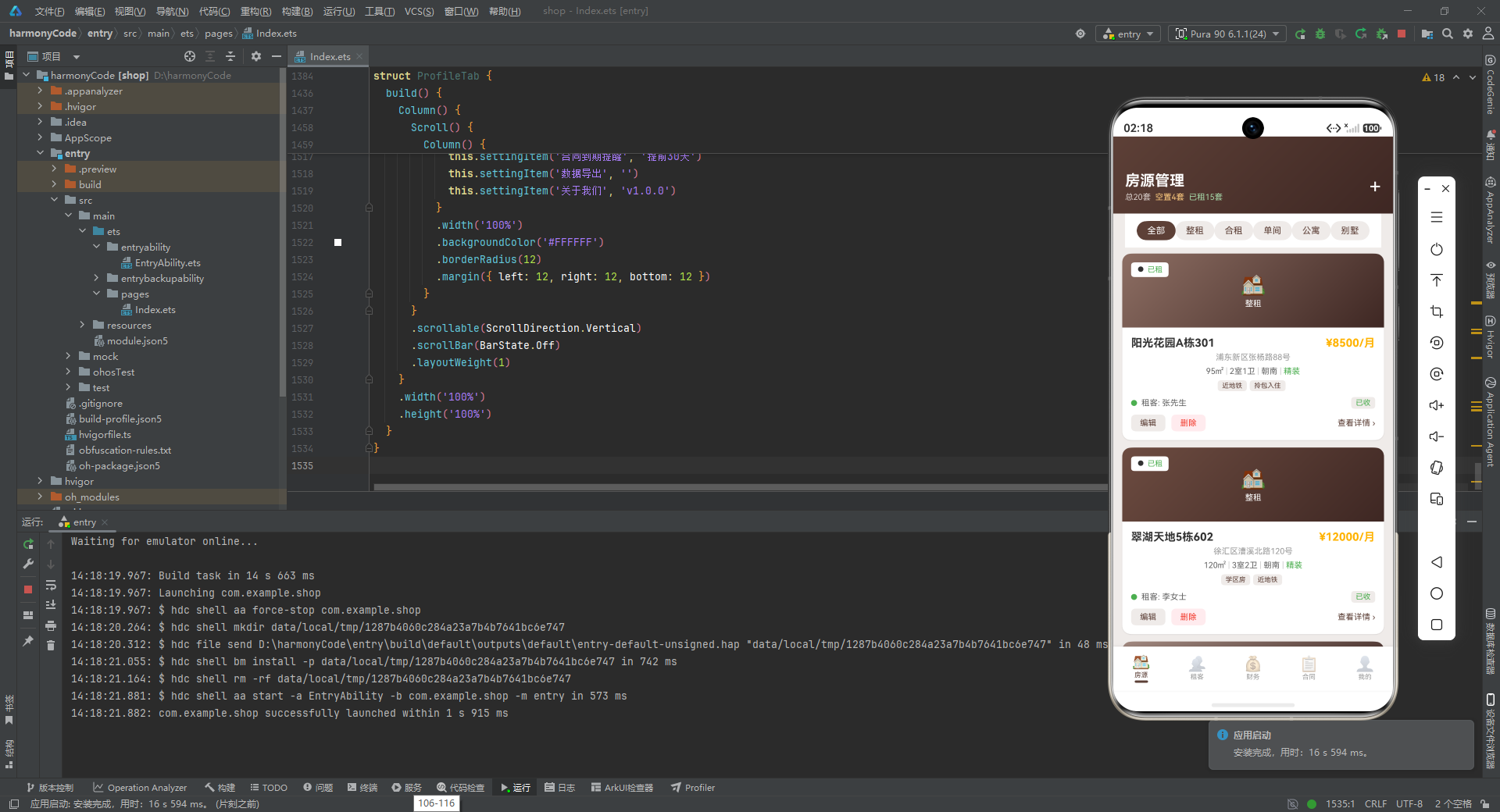
-
元数据驱动 UI:通过
getXxxMeta系列函数将业务状态(如"已租"、“精装”)映射为视觉属性(颜色、图标、背景),实现了业务逻辑与表现层的解耦。当需要调整视觉风格时,只需修改映射函数,无需改动组件模板。 -
归一化数据结构:
TenantItem通过isVacant标志将租客和空置房源统一到同一个模型中,避免了为两类数据分别维护列表和渲染逻辑的复杂性。 -
响应式数据流:
@Observed装饰器确保了数组元素级别的响应性,当业务数据变化时,UI 能够精准地更新受影响的部分,而非整个列表重绘。 -
声明式条件渲染:
if语句在build方法中直接控制 UI 分支(如到期警告、标签列表、租客信息行),使得代码的声明性与逻辑的完整性达到了良好的平衡。

讨论HarmonyOS开发技术,专注于API与组件、DevEco Studio、测试、元服务和应用上架分发等。
更多推荐
 4
4 0
0- 0


 已为社区贡献129条内容

所有评论(0)