# HarmonyOS ArkTS 实战解析:理发预约应用的架构设计与逐段源码剖析
引言
在移动互联网与本地生活服务深度融合的今天,线下美发沙龙的数字化转型已成为行业刚需。一家现代化的理发店不再仅仅依赖电话登记和纸质排班,而是需要一套能够在终端设备上高效运行的预约管理系统,让顾客、发型师和店铺管理者三方之间形成闭环的信息流转。本文将深入剖析一个基于 HarmonyOS ArkTS 声明式开发范式构建的理发预约应用——“剪艺沙龙”,从数据模型定义、配置常量管理、UI 组件构建、状态驱动渲染、模态弹窗交互到多 Tab 导航架构,逐段拆解每一行代码背后的设计逻辑与工程考量。
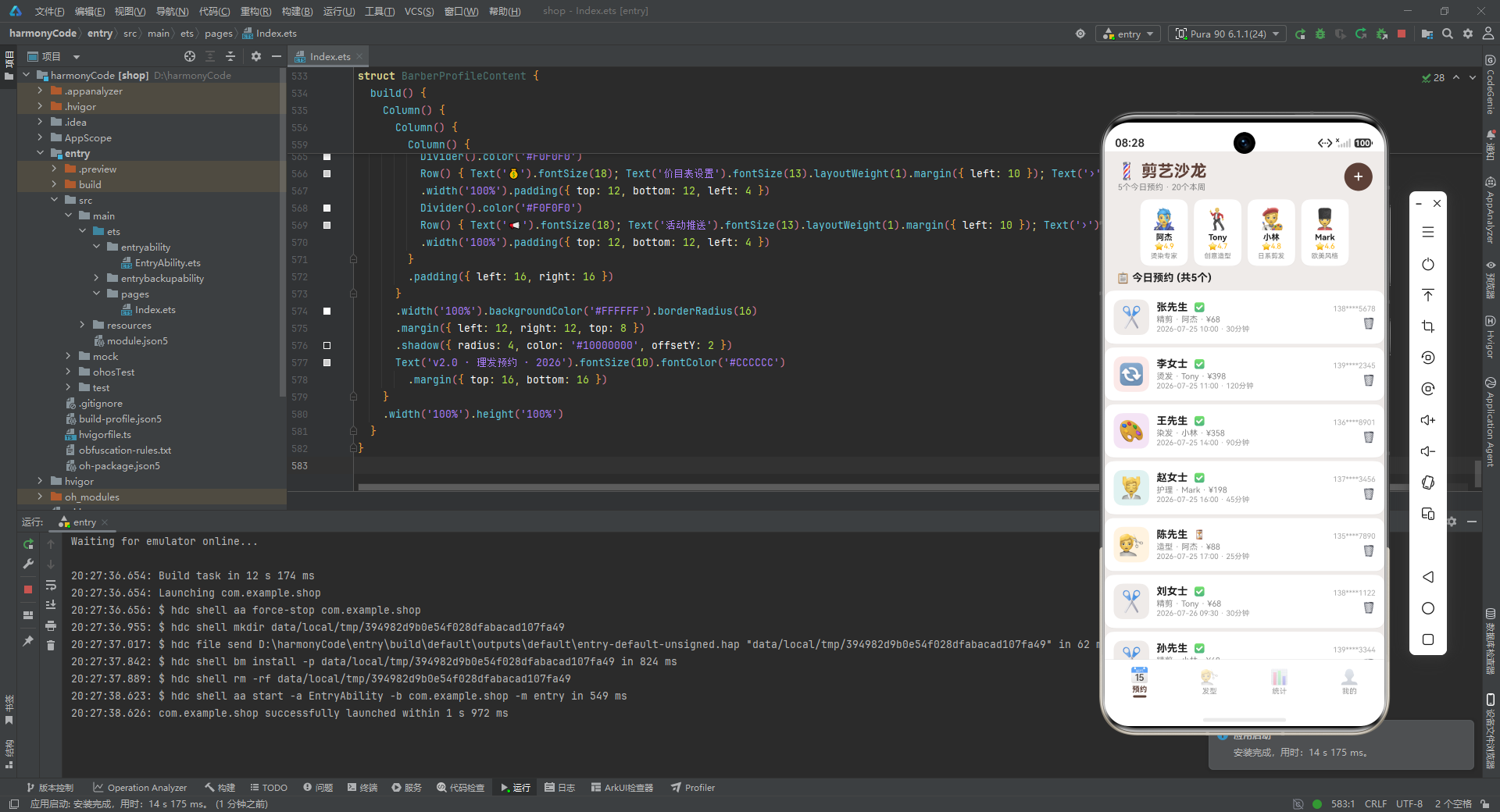
HarmonyOS(鸿蒙操作系统)是华为推出的面向全场景的分布式操作系统,而 ArkTS 是其应用开发的核心语言。ArkTS 在 TypeScript 的基础上进行了扩展,保留了 TS 的类型系统优势,同时深度集成了 ArkUI 声明式 UI 框架。开发者通过 @Entry、@Component、@State、@Builder 等装饰器,可以用接近前端 React/Vue 的心智模型来构建原生应用界面,但又享有鸿蒙系统底层的性能优化与跨设备能力。本应用采用纯 ArkTS 单文件架构,所有逻辑、数据、UI 全部内聚在一个文件中,非常适合作为学习 ArkTS 声明式范式的完整范例。
从技术栈维度看,本应用涉及以下核心知识点:其一,接口(Interface)驱动的类型安全数据建模,通过为服务、发型师、预约、发型等业务实体定义结构化接口,确保编译期类型检查;其二,Record 与数组常量的配置化管理,将业务可变参数抽离为常量字典,实现数据与视图的解耦;其三,@State 装饰器的响应式状态管理,通过状态变量的变化自动触发 UI 重新渲染;其四,@Builder 方法的 UI 复用,将复杂界面拆解为可复用的构建单元;其五,Stack + position 定位的模态弹窗实现,不依赖系统原生弹窗,而是自建全屏遮罩与浮层卡片,获得完全的视觉定制能力;其六,多 Tab 页底部导航的枚举驱动架构,用枚举值映射内容区域切换,实现清晰的页面路由。此外,应用还运用了 Flex 换行布局、横向滚动列表、自定义进度条、阴影投影等丰富的视觉表现手法,整体配色采用棕褐色(#5D4037)作为主色调,搭配琥珀色(#FFB300)、深橙色(#E64A19)和米色背景(#EFEBE9),营造出一种温暖、专业又不失活力的沙龙氛围。
接下来,让我们按照代码的自然结构,从上到下逐段展开深度解析。
一、类型定义层:接口设计与数据契约
代码段:四个核心业务接口
interface ServiceMeta {
  label: string
  icon: string
  duration: number
  basePrice: number
  color: string
  bg: string
}

interface BarberMeta {
  name: string
  emoji: string
  rating: number
  specialty: string
  experience: number
  color: string
}

interface Appointment {
  id: number
  customer: string
  barber: string
  service: string
  date: string
  time: string
  duration: number
  price: number
  status: string
  phone: string
  notes: string
}

interface HairstyleData {
  id: number
  name: string
  emoji: string
  description: string
  difficulty: string
  duration: number
  price: number
  rating: number
  category: string
}
深度解析
这一段是整个应用的数据基石。在 ArkTS 中,interface 关键字用于定义对象的结构类型,它不产生运行时实体,仅存在于编译期用于类型校验。本应用一口气定义了四个接口,分别对应四个核心业务实体,这体现了"领域驱动设计"(Domain-Driven Design)的思想——先建模领域对象,再围绕模型构建功能。
ServiceMeta(服务元数据接口) 描述了理发店提供的每一项服务的完整属性:label 是服务名称(如"精剪"“烫发”),icon 是用 emoji 表示的视觉图标,duration 是预计耗时(分钟),basePrice 是基础价格(元),color 是该服务在 UI 中使用的主色值,bg 是对应的浅色背景。将颜色信息直接绑定到服务元数据上是一种精妙的设计——这意味着每项服务都自带"主题色",在列表渲染、卡片展示、表单选择等场景中,只需读取 color 和 bg 字段即可获得视觉一致性,无需在视图中再写大量的 if-else 颜色判断逻辑。
BarberMeta(发型师元数据接口) 建模了理发师信息。其中 emoji 字段用 emoji 表情符号代替了传统头像图片,这是一种在原型开发和 Demo 演示中非常高效的策略——既避免了图片资源管理的外部依赖,又能在视觉上快速区分不同人物。rating(评分)、specialty(专长方向)、experience(从业年限)这三个字段共同构成了发型师的"能力画像",在统计页面和选择表单中都会被用到。同样地,每个发型师携带自己的 color 字段,用于在表单选中时高亮显示。
Appointment(预约单接口) 是整个应用最核心的业务对象,它承载了一次预约的全部信息:谁(customer 顾客)预约了谁(barber 发型师)做什么(service 服务项目),什么时候(date 日期 + time 时间),持续多久(duration),花了多少钱(price),当前状态如何(status,取值为"已确认"“待确认”“已完成”),以及联系电话(phone)和备注(notes)。id 作为唯一标识符,用于列表渲染的 key 和删除操作时的定位。值得注意的是,status 被定义为 string 类型而非联合类型或枚举,这在快速开发场景下更为灵活,但也牺牲了一部分类型安全性。
HairstyleData(发型数据接口) 建模了发型展示库中的每款发型。除了基本的 name、emoji、description、price、duration、rating 之外,特别引入了 difficulty(难度等级:简单/中等/困难)和 category(分类:男/女)两个字段。category 字段为后续可能的分类筛选功能预留了扩展空间,虽然当前版本并未实现筛选 UI,但数据层面已经做好了准备,这体现了"数据先行"的前瞻性设计理念。
总体来看,这四个接口之间存在隐含的关联关系:Appointment 中的 service 字段值对应 ServiceMeta 的 label,barber 字段值对应 BarberMeta 的 name;HairstyleData 与 ServiceMeta 有部分字段重叠(如 duration、price),但语义不同——前者是发型展示库,后者是服务价目表。这种通过字符串值关联而非外键引用的方式,在小型应用中简洁高效,但在大型系统中可能需要更规范的关系建模。
二、配置常量层:服务与发型师元数据
代码段:SERVICES 配置字典
const SERVICES: Record<string, ServiceMeta> = {
  '精剪': { label: '精剪', icon: '✂️', duration: 30, basePrice: 68, color: '#5D4037', bg: '#EFEBE9' },
  '烫发': { label: '烫发', icon: '🔄', duration: 120, basePrice: 398, color: '#E64A19', bg: '#FBE9E7' },
  '染发': { label: '染发', icon: '🎨', duration: 90, basePrice: 358, color: '#7B1FA2', bg: '#F3E5F5' },
  '护理': { label: '护理', icon: '💆', duration: 45, basePrice: 198, color: '#00838F', bg: '#E0F2F1' },
  '造型': { label: '造型', icon: '💇', duration: 25, basePrice: 88, color: '#FF8F00', bg: '#FFF3E0' }
}
深度解析
这段代码定义了一个 SERVICES 常量,其类型被显式标注为 Record<string, ServiceMeta>。Record<K, V> 是 TypeScript/ArkTS 的内置工具类型,表示"键类型为 K、值类型为 V 的字典/映射表"。这里用字符串作为键(服务名称),用 ServiceMeta 接口实例作为值,构建了一个以服务名为主键的查找表。
这种设计模式有几个显著优势。首先是查找效率:在代码的任何地方,只要知道服务名称字符串(比如从预约单的 service 字段),就可以通过 SERVICES['精剪'] 以 O(1) 的复杂度获取该服务的完整元数据,包括图标、价格、颜色等,无需遍历数组。其次是配置与逻辑分离:所有服务的价格、时长、颜色等可变参数集中在这一个常量中管理,如果要调整某项服务的价格或更换图标,只需修改这一处即可全局生效,符合"单一数据源"(Single Source of Truth)原则。再者是类型安全:由于值的类型被约束为 ServiceMeta,如果在添加新服务时遗漏了某个字段,编译器会立即报错。
从业务数据来看,该沙龙提供了五项核心服务:精剪(30分钟/68元)、烫发(120分钟/398元)、染发(90分钟/358元)、护理(45分钟/198元)、造型(25分钟/88元)。每项服务都被赋予了独特的主题色系——精剪用沉稳的棕褐色、烫发用热烈的深橙色、染发用神秘的紫色、护理用清新的青色、造型用明亮的琥珀色。这些颜色不仅用于服务标签自身,还会传递到预约卡片、表单选择按钮、统计进度条等多个 UI 场景中,形成视觉上的"色彩编码"体系,帮助用户快速识别不同服务类型。每个服务还配有一个浅色背景色 bg,用于未选中状态的按钮底色,与选中状态的深色 color 形成对比。
代码段:BARBERS 发型师数组
const BARBERS: BarberMeta[] = [
{ name: '阿杰', emoji: '👨🎤', rating: 4.9, specialty: '烫染专家', experience: 8, color: '#E64A19' },
{ name: 'Tony', emoji: '🕺', rating: 4.7, specialty: '创意造型', experience: 6, color: '#1565C0' },
{ name: '小林', emoji: '🧑🎨', rating: 4.8, specialty: '日系剪发', experience: 5, color: '#2E7D32' },
{ name: 'Mark', emoji: '💂', rating: 4.6, specialty: '欧美风格', experience: 7, color: '#5D4037' }
]
const SERVICE_LIST: string[] = ['精剪', '烫发', '染发', '护理', '造型']
深度解析
BARBERS 是一个 BarberMeta[] 类型的数组常量,存储了沙龙的四位发型师信息。与 SERVICES 使用字典不同,这里选择数组是因为发型师数据天然有序、需要保持展示顺序,且通常通过遍历而非按键查找来使用。四位发型师各有特色:阿杰是评分最高(4.9)的烫染专家,从业8年;Tony 擅长创意造型;小林主攻日系剪发;Mark 精通欧美风格。每位发型师同样携带 color 字段,用于在表单选中时的高亮反馈。
SERVICE_LIST 则是一个简单的字符串数组,列出了所有服务名称。它的存在看似与 SERVICES 字典的键重复,但实际上有独立用途——在某些只需要遍历服务名称、不需要访问完整元数据的场景(如表单中的服务选择标签列表),使用一个扁平的字符串数组更为轻量和直观。这也体现了在不同访问模式下,为同一数据提供不同形态的"视图"是一种务实的工程实践。
三、模拟数据层:业务数据的组织
代码段:mockAppointments 预约数据
const mockAppointments: Appointment[] = [
  { id: 1, customer: '张先生', barber: '阿杰', service: '精剪', date: '2026-07-25', time: '10:00', duration: 30, price: 68, status: '已确认', phone: '138****5678', notes: '两边推短,顶部修剪' },
  { id: 2, customer: '李女士', barber: 'Tony', service: '烫发', date: '2026-07-25', time: '11:00', duration: 120, price: 398, status: '已确认', phone: '139****2345', notes: '大波浪卷,不要太卷' },
  // ... 共 20 条预约记录
  { id: 20, customer: '林女士', barber: '阿杰', service: '护理', date: '2026-07-29', time: '14:00', duration: 45, price: 198, status: '已确认', phone: '135****8989', notes: '头皮护理' }
]
深度解析
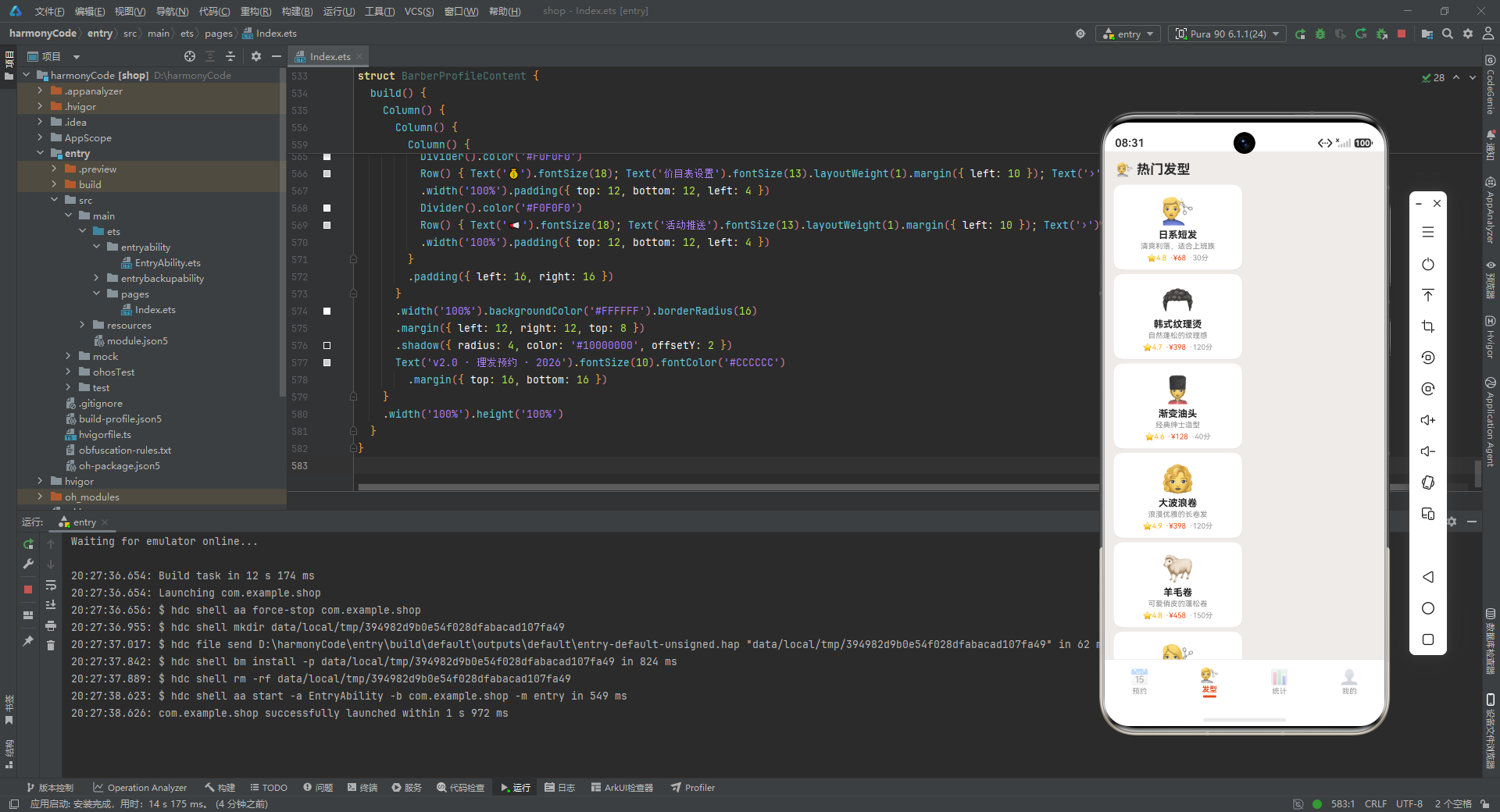
mockAppointments 是应用的核心数据源,包含了 20 条模拟的预约记录。这些数据覆盖了 2026-07-25 至 2026-07-29 共五天的预约情况,涉及全部四位发型师和全部五项服务。每条记录都完整填充了 Appointment 接口定义的所有字段,包括经过脱敏处理的手机号(中间四位用星号替代,这在涉及隐私数据的展示中是标准做法)和顾客的个性化需求备注。
从数据分布来看,这组模拟数据经过了精心设计以覆盖多种业务场景:状态上涵盖了"已确认"“待确认”"已完成"三种情况;服务上以精剪(占比最高)为主,辅以烫发、染发、护理、造型;发型师上阿杰接单最多(体现高评分发型师的客流优势);时间上从早9点到下午5点覆盖了完整的营业时段。这种"面面俱到"的模拟数据设计,使得开发者在没有后端 API 的情况下,也能充分测试 UI 在各种数据组合下的表现。
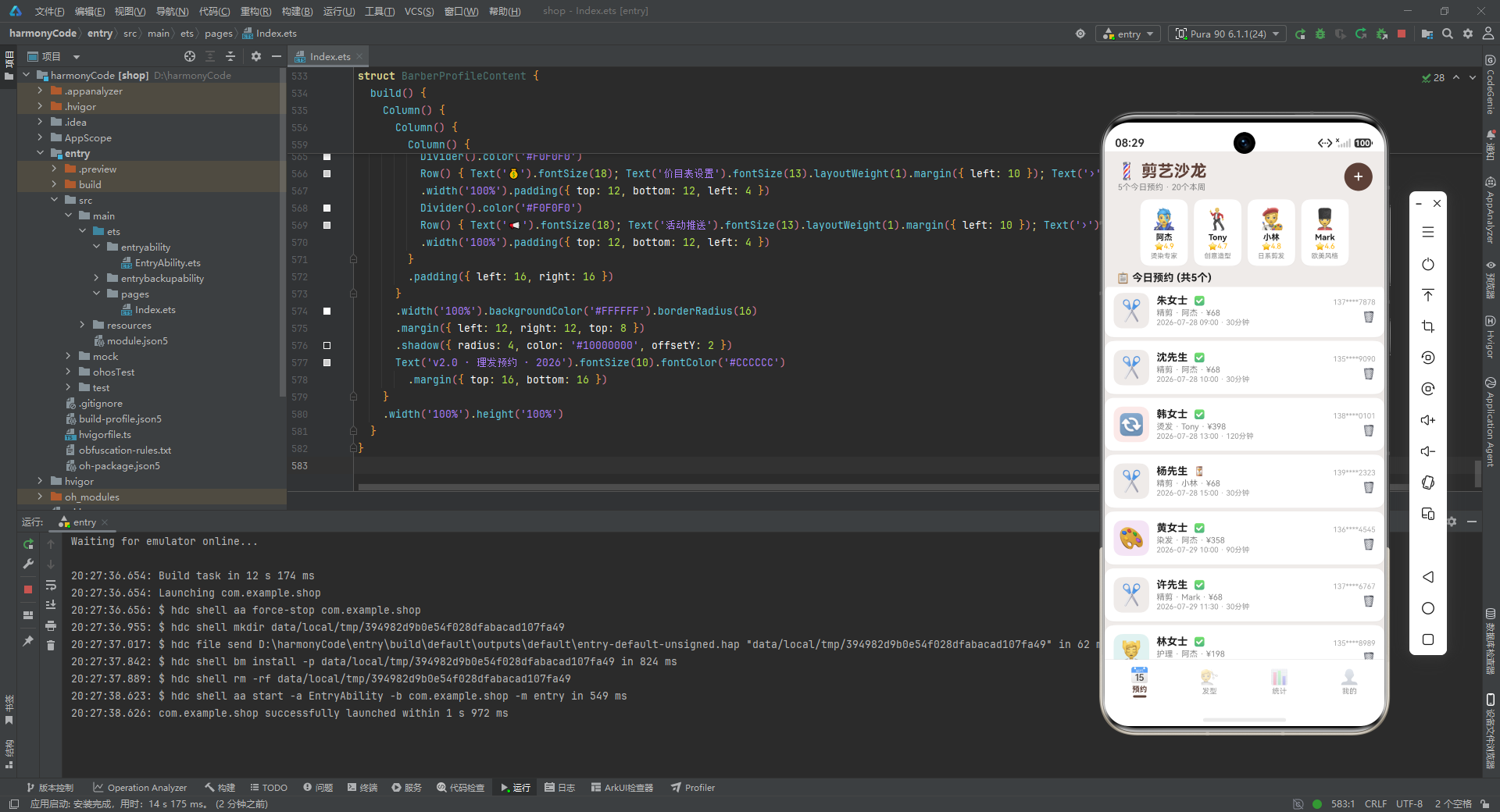
值得注意的是,这里的数据是静态常量而非动态状态。这意味着当前版本中,新增预约和取消预约的操作实际上只是关闭了弹窗,并未真正修改 mockAppointments 数组。要实现真正的增删功能,需要将 mockAppointments 提升为 @State 装饰的响应式变量。不过在当前架构中,这些数据作为"只读展示数据"使用是完全合理的。
代码段:mockHairstyles 发型数据
const mockHairstyles: HairstyleData[] = [
{ id: 1, name: '日系短发', emoji: '💇♂️', description: '清爽利落,适合上班族', difficulty: '中等', duration: 30, price: 68, rating: 4.8, category: '男' },
{ id: 2, name: '韩式纹理烫', emoji: '🦱', description: '自然蓬松的纹理感', difficulty: '困难', duration: 120, price: 398, rating: 4.7, category: '男' },
// ... 共 12 款发型
{ id: 12, name: '公主切', emoji: '👸', description: '日系经典公主切', difficulty: '中等', duration: 45, price: 128, rating: 4.6, category: '女' }
]
深度解析
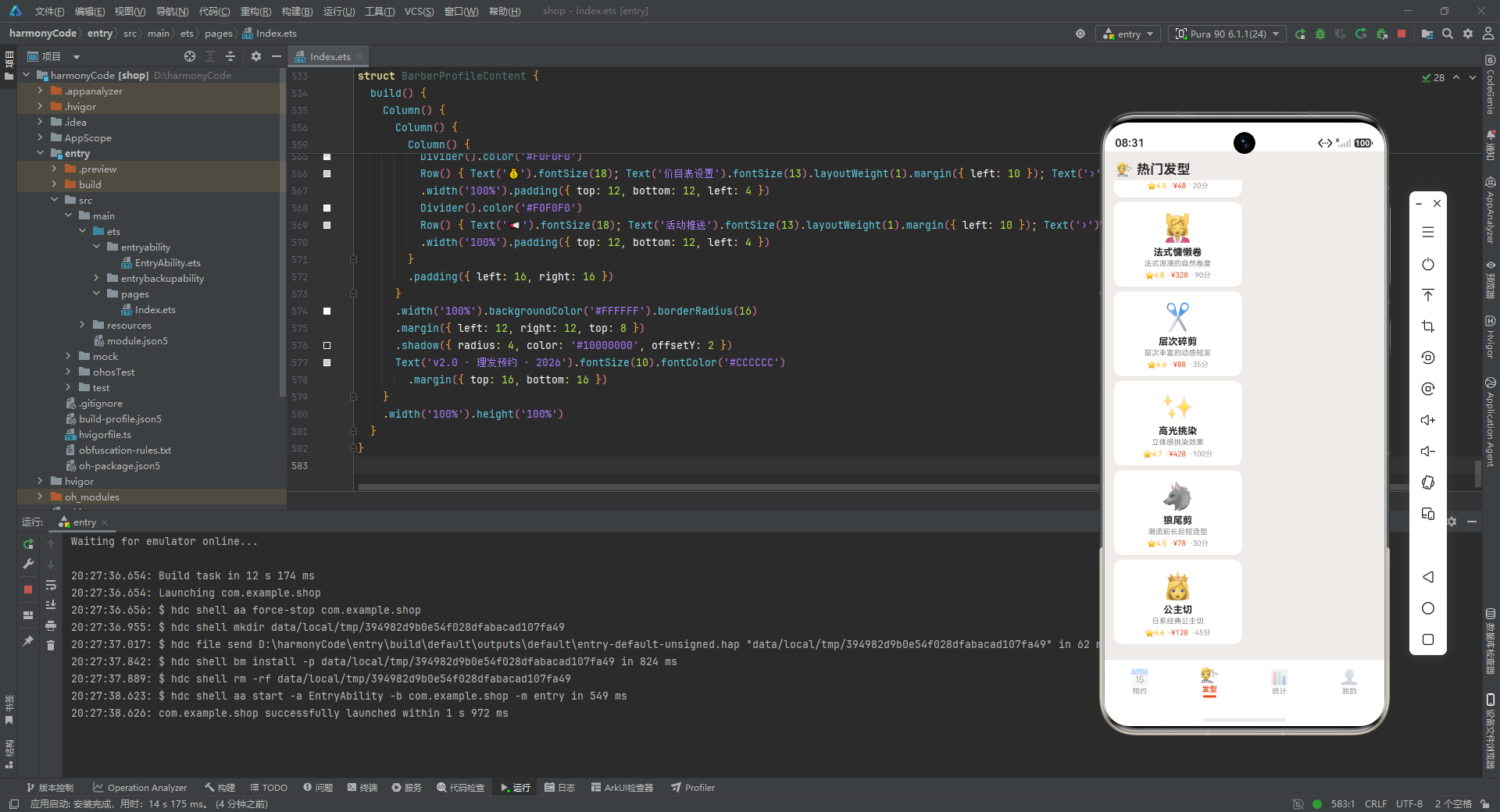
mockHairstyles 包含了 12 款发型展示数据,男女各半,每款都配有 emoji 图标、文字描述、难度评级、耗时、价格、评分和性别分类。这些发型从简单的"板寸"(20分钟/48元)到复杂的"羊毛卷"(150分钟/458元),价格和难度跨度很大,充分展示了发型库的多样性。
发型库的作用是作为"灵感图鉴"供顾客浏览参考,与预约系统形成互补——顾客可以先在发型库中找到心仪的发型,再到预约页面选择对应的服务和发型师。虽然当前版本中发型库与预约流程之间还没有直接的跳转联动,但数据结构上已经为这种联动预留了可能(比如点击某款发型后自动带入对应的服务类型到预约表单)。
代码段:统计辅助函数
function getTodayAppointments(): number { return 5 }
function getWeeklyTotal(): number { return 20 }
function getMonthlyRevenue(): number { return 12860 }
function getAvgRating(): number { return 4.7 }
深度解析
这四个函数是统计数据的"数据源桩"(Data Stub),它们目前只是硬编码返回固定数值,但在架构上扮演着重要角色。通过将这些统计数值封装在函数调用中而非直接写死在 UI 代码里,实现了数据获取与视图渲染的解耦。未来当后端 API 就绪时,只需将函数体替换为网络请求逻辑(如 return await http.get('/stats/today')),而所有调用这些函数的 UI 代码都不需要任何改动。
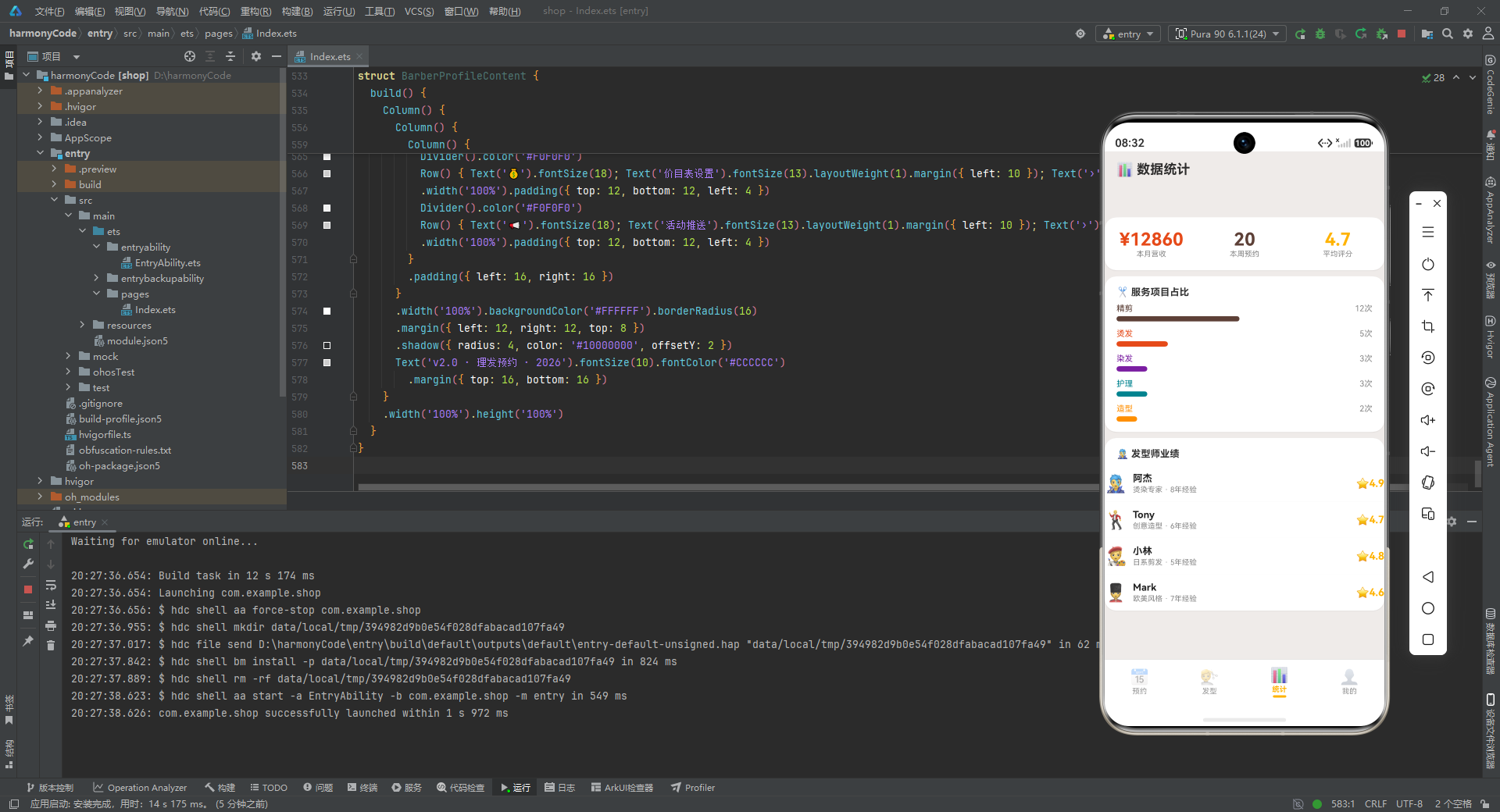
四个函数分别返回:今日预约数(5)、本周预约总数(20)、本月营收金额(12860元)、平均评分(4.7)。这些数值在应用的多个页面中被引用——首页顶部摘要、统计页面概览卡片、个人中心店铺信息等,体现了"一次定义、多处消费"的设计思路。
四、枚举与导航:Tab 导航设计
代码段:BarberTab 枚举
enum BarberTab {
  APPOINT = 0,
  STYLE = 1,
  STATS = 2,
  PROFILE = 3
}
深度解析
BarberTab 是一个数字枚举,定义了应用的四个底部 Tab 页:预约(APPOINT=0)、发型(STYLE=1)、统计(STATS=2)、我的(PROFILE=3)。使用枚举而非魔法数字(magic number)来管理 Tab 索引,是工程实践中的基本规范。
枚举的优势在于可读性与可维护性:代码中出现 this.activeTab === BarberTab.APPOINT 远比 this.activeTab === 0 清晰易读;而如果未来需要调整 Tab 顺序或新增 Tab 页,只需修改枚举定义,所有引用处自动更新。显式指定数字值(=0, =1, =2, =3)虽然对于默认递增的数字枚举来说并非必须,但明确定义值可以避免因枚举成员顺序调整导致的隐式值变化,是一种防御性编程习惯。
这个枚举将作为主组件 @State activeTab 的类型,驱动整个应用的内容区域切换。
五、应用入口:主框架与底部导航
代码段:BarberApp 入口组件声明
@Entry
@Component
struct BarberApp {
  @State activeTab: BarberTab = BarberTab.APPOINT
深度解析
这是整个应用的入口点。@Entry 装饰器标记该组件为页面入口,鸿蒙系统会以此为起点加载 UI 树。@Component 装饰器声明这是一个自定义组件,可以被其他组件引用(虽然作为入口组件它通常不被其他组件引用)。struct 关键字定义组件结构体——在 ArkTS 中,组件用 struct 而非 class 来声明,这是因为 struct 是值类型,更符合 UI 组件"不可变快照"的渲染模型。
@State activeTab: BarberTab = BarberTab.APPOINT 是整个应用导航的核心状态变量。@State 装饰器使得 activeTab 成为响应式状态——当它的值发生变化时,所有依赖它的 UI 片段会自动重新渲染。初始值为 BarberTab.APPOINT,意味着应用启动后默认展示"预约"页面。
这里的状态管理设计非常简洁:整个应用仅用一个 activeTab 变量就控制了四个页面的切换。没有引入复杂的路由栈、页面栈管理或 Navigation 组件,因为这是一个底部 Tab 导航的扁平结构,不需要页面回退和层级导航。这种"最小化状态"的设计哲学,在简单应用中非常高效。
代码段:contentArea 内容区域构建器
@Builder contentArea() {
  Column() {
    if (this.activeTab === BarberTab.APPOINT) {
      AppointmentContent()
    } else if (this.activeTab === BarberTab.STYLE) {
      HairstyleContent()
    } else if (this.activeTab === BarberTab.STATS) {
      BarberStatsContent()
    } else {
      BarberProfileContent()
    }
  }
  .layoutWeight(1)
}
深度解析
@Builder 是 ArkTS 中用于定义可复用 UI 片段的装饰器。与 @Builder 方法相比,普通方法返回的是数据,而 @Builder 方法返回的是 UI 结构。contentArea 方法封装了内容区域的条件渲染逻辑:根据 activeTab 的当前值,动态挂载不同的子组件。
这里使用了 if-else if-else 链式判断而非 switch 语句,在 ArkTS 中两者均可用于条件渲染,但 if-else 的写法更为灵活(可以组合复杂条件)。值得注意的是,每个分支都直接实例化一个独立的自定义组件(如 AppointmentContent()),而非在 build 方法内内联大段 UI 代码。这种"组件化拆分"策略使得每个 Tab 页的逻辑独立、代码隔离,后续维护时只需修改对应组件即可,不会互相干扰。
.layoutWeight(1) 是一个关键的布局属性。它让 Column 容器占据父容器中除底部导航栏之外的所有剩余空间。在 ArkTS 的线性布局中,layoutWeight 用于按权重分配剩余空间——设为 1 表示"拿走全部剩余空间",这确保了内容区域始终填满屏幕主体,而底部导航栏固定在底部。
代码段:tabItem 底部导航项构建器
@Builder tabItem(icon: string, label: string, tab: BarberTab, accent: string) {
  Column() {
    Text(icon).fontSize(20).opacity(this.activeTab === tab ? 1.0 : 0.4)
    Text(label).fontSize(10)
      .fontColor(this.activeTab === tab ? accent : '#999999')
      .fontWeight(this.activeTab === tab ? FontWeight.Bold : FontWeight.Normal)
      .margin({ top: 2 })
    if (this.activeTab === tab) {
      Column().width(18).height(3).backgroundColor(accent).borderRadius(2).margin({ top: 2 })
    }
  }
  .layoutWeight(1).alignItems(HorizontalAlign.Center)
  .padding({ top: 5, bottom: 5 })
  .onClick(() => { this.activeTab = tab })
}
深度解析
tabItem 是一个带参数的 @Builder 方法,用于生成底部导航栏的单个 Tab 项。它接收四个参数:icon(emoji 图标)、label(文字标签)、tab(该项对应的枚举值)、accent(该 Tab 激活时的主题色)。通过参数化设计,四个 Tab 项可以复用同一个构建器,只需传入不同的参数即可,这极大地减少了代码重复。
该方法内部的视觉逻辑体现了精细的选中/未选中状态切换设计:
- 图标透明度:选中时透明度为 1.0(完全显示),未选中时为 0.4(半透明灰色感),通过
opacity属性实现柔和的视觉淡化效果。 - 文字颜色:选中时使用该 Tab 专属的
accent主题色(如预约 Tab 用棕褐色、发型 Tab 用深橙色),未选中时统一为灰色#999999。每个 Tab 拥有独立的强调色,是本应用配色体系的一大亮点。 - 文字粗细:选中时
FontWeight.Bold(加粗),未选中时FontWeight.Normal(常规),通过字重变化增强选中状态的辨识度。 - 底部指示条:仅当该 Tab 被选中时,才渲染一个 18x3 像素的彩色小条(
Column().width(18).height(3)),作为视觉锚点。这种"动态条件渲染"的指示条是移动端 Tab 导航的经典设计语言。
.layoutWeight(1) 让每个 Tab 项在水平 Row 中均分宽度(四个 Tab 各占 25%)。.alignItems(HorizontalAlign.Center) 确保内容居中对齐。.onClick 回调中执行 this.activeTab = tab,这是整个导航交互的触发点——用户点击 Tab 项后,修改 activeTab 状态,进而触发 contentArea 的条件渲染切换和所有 tabItem 的选中态刷新,整个响应式链路自动完成。
代码段:build 主构建方法
build() {
  Column() {
    this.contentArea()
    Divider().color('#E0E0E0').strokeWidth(0.5)
    Row() {
      this.tabItem('📅', '预约', BarberTab.APPOINT, '#5D4037')
      this.tabItem('💇', '发型', BarberTab.STYLE, '#E64A19')
      this.tabItem('📊', '统计', BarberTab.STATS, '#FFB300')
      this.tabItem('👤', '我的', BarberTab.PROFILE, '#1565C0')
    }
    .width('100%').backgroundColor('#FFFFFF').padding({ top: 4, bottom: 6 })
  }
  .width('100%').height('100%').backgroundColor('#EFEBE9')
}
深度解析
build 方法是每个 @Component 必须实现的方法,它返回组件的 UI 结构树。这里的结构非常清晰:最外层是一个 Column(纵向布局),从上到下依次是内容区域、分割线、底部导航栏。
contentArea() 通过 this 调用前面定义的 @Builder 方法,渲染当前选中的 Tab 页内容。Divider 是一条 0.5 像素高的浅灰色分割线,在视觉上将内容区与导航区分隔开来,同时其极细的描边不会占用过多垂直空间。
底部 Row 容器中横向排列四个 tabItem,每个 Tab 的强调色(accent)各不相同:预约用棕褐色(与品牌主色一致)、发型用深橙色、统计用琥珀色、我的用蓝色。这种"一 Tab 一色"的设计策略,使得用户在快速切换时能通过颜色瞬间辨识当前所处页面,降低了认知负担。底部栏背景为纯白 #FFFFFF,与米色 #EFEBE9 的页面背景形成微妙的层次区分。最外层 Column 设置 width('100%').height('100%'),确保应用铺满整个屏幕。
六、预约管理模块:核心业务实现
代码段:AppointmentContent 组件声明与状态
@Component
struct AppointmentContent {
  @State showAddModal: boolean = false
  @State showDeleteConfirm: boolean = false
  @State selectedAppt: Appointment | null = null
  @State formBarber: string = '阿杰'
  @State formService: string = '精剪'
  @State formDate: string = '2026-07-25'
  @State formTime: string = '10:00'
  @State formNotes: string = ''
深度解析
AppointmentContent 是预约管理页面的核心组件,也是整个应用中状态最丰富、逻辑最复杂的组件。它声明了八个 @State 变量,可以分为三组:
弹窗控制组:showAddModal(是否显示新增预约弹窗)、showDeleteConfirm(是否显示删除确认弹窗)、selectedAppt(当前选中待删除的预约对象,可为 null)。这三个变量协同工作,控制两个模态弹窗的显示与数据传递。
表单数据组:formBarber(表单中选择的发型师)、formService(选择的服务项目)、formDate(预约日期)、formTime(预约时间)、formNotes(备注信息)。这五个变量构成了新增预约表单的完整数据模型,每个变量都绑定了表单中对应输入控件的值,通过 onChange 回调实时更新。
selectedAppt 的类型是 Appointment | null(联合类型,表示可以是 Appointment 对象或 null),这是处理"可选对象"的标准 TypeScript 模式。初始值为 null 表示没有选中任何预约,当用户点击删除按钮时才被赋值为对应的预约对象。
这里所有的表单变量都有初始默认值(如发型师默认"阿杰"、服务默认"精剪"、日期默认当天),这意味着用户打开新增预约弹窗时,表单已经预填了合理的默认值,减少了用户的输入成本,体现了"合理默认值"的 UX 设计原则。
代码段:modalBg 遮罩层构建器
@Builder modalBg(onClose: () => void) {
  Column().width('100%').height('100%')
    .backgroundColor('rgba(0,0,0,0.5)').onClick(onClose)
}
深度解析
modalBg 是一个可复用的模态遮罩层构建器,它接收一个 onClose 回调函数作为参数。遮罩层是一个占满全屏的 Column,背景色为半透明黑色 rgba(0,0,0,0.5),点击时触发 onClose 回调关闭弹窗。
这个构建器体现了几个重要的设计模式。首先是参数化回调:通过将关闭逻辑以回调函数的形式传入,使得同一个遮罩层构建器可以被新增弹窗和删除弹窗复用,只需传入不同的关闭处理函数。其次是点击外部关闭的交互模式:半透明遮罩不仅营造了"弹窗浮于上层"的视觉层次感,还提供了点击遮罩区域关闭弹窗的便捷操作,这是移动端弹窗交互的标配。rgba(0,0,0,0.5) 中的 0.5 透明度经过精心调校——既能产生足够的视觉遮挡效果突出弹窗内容,又不会完全遮蔽底层页面的上下文信息。
代码段:addAppointmentModal 新增预约弹窗
@Builder addAppointmentModal() {
  Column() {
    this.modalBg(() => { this.showAddModal = false })
    Column() {
      Row() {
        Text('📅 新增预约').fontSize(18).fontWeight(FontWeight.Bold).fontColor('#212121')
        Row().layoutWeight(1)
        Text('✕').fontSize(20).fontColor('#999999').onClick(() => { this.showAddModal = false })
      }
      .width('100%').padding({ left: 20, right: 20, top: 18, bottom: 10 })
      Divider().color('#F0F0F0')
      Scroll() {
        Column() {
          // 发型师选择、服务选择、日期/时间/备注输入...
        }
        .padding({ bottom: 16 })
      }
      .constraintSize({ maxHeight: '55%' })
      Row() {
        Text('取消')...
          .onClick(() => { this.showAddModal = false })
        Text('确认预约')...
          .onClick(() => { this.showAddModal = false })
      }
      .width('100%').justifyContent(FlexAlign.Center)
    }
    .width('90%').backgroundColor('#FFFFFF').borderRadius(18)
    .alignItems(HorizontalAlign.Center)
    .position({ x: '5%', y: '10%' })
    .shadow({ radius: 20, color: '#33000000', offsetY: 4 })
  }
  .width('100%').height('100%').position({ x: 0, y: 0 }).zIndex(999)
}
深度解析
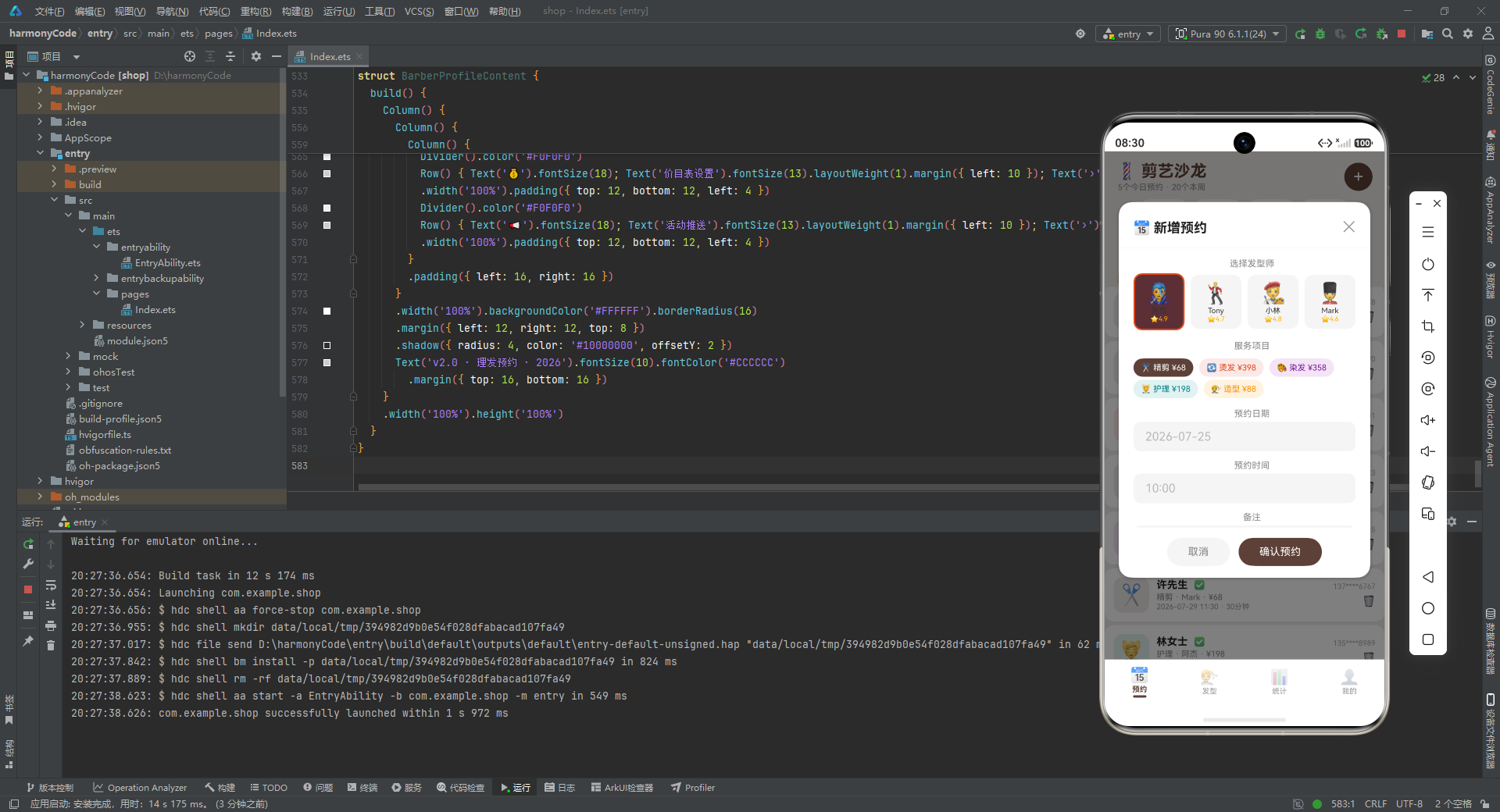
这是整个应用中 UI 结构最复杂的构建器,实现了完整的新增预约表单弹窗。整个弹窗的布局架构可以拆解为以下几个层次:
最外层 Column:占满全屏(width('100%').height('100%')),通过 position({ x: 0, y: 0 }) 定位到屏幕左上角,zIndex(999) 确保它浮在所有其他 UI 元素之上。这个外层容器首先渲染 modalBg 遮罩层,然后渲染弹窗主体卡片。
弹窗主体卡片:宽度为屏幕的 90%(width('90%')),通过 position({ x: '5%', y: '10%' }) 定位到水平居中、距顶部 10% 的位置。白色背景配 18 像素圆角,加上 shadow 投影(radius 20、偏移 Y 4、透明度 #33),营造出悬浮卡片的立体感。
卡片内部结构从上到下分为三段:
- 标题栏:左侧"📅 新增预约"标题(18号字加粗),中间用
Row().layoutWeight(1)占据剩余空间将关闭按钮推到右侧,右侧"✕"关闭按钮。这种"标题-弹簧-操作"的三段式头部布局是弹窗设计的经典范式。 - 可滚动表单区域:用
Scroll包裹,并通过constraintSize({ maxHeight: '55%' })限制最大高度为屏幕的 55%,防止内容过多时弹窗撑满屏幕。表单内部依次包含:发型师选择(横向排列的卡片组)、服务项目选择(Flex 换行布局的标签组)、日期输入框、时间输入框、备注文本域。 - 底部操作按钮:居中排列的"取消"和"确认预约"两个按钮,分别使用灰色和棕色背景。
发型师选择区域值得特别关注:
ForEach(BARBERS, (b: BarberMeta) => {
  Column() {
    Text(b.emoji).fontSize(28)
    Text(b.name).fontSize(10).fontColor('#333333').margin({ top: 2 })
    Text('⭐' + b.rating).fontSize(9).fontColor('#FFB300')
  }
  .backgroundColor(this.formBarber === b.name ? b.color + '20' : '#F5F5F5')
  .border({ width: this.formBarber === b.name ? 2 : 0, color: this.formBarber === b.name ? b.color : 'transparent' })
  .onClick(() => { this.formBarber = b.name })
})
这里使用 ForEach 遍历 BARBERS 数组,为每位发型师生成一个可点击的选择卡片。选中状态通过三重视觉反馈体现:背景色变为该发型师主题色加 20 透明度后缀(如 #E64A1920,即 12.5% 透明度的深橙色)、边框宽度从 0 变为 2 像素且颜色为主题色。color + '20' 是 ArkTS 中一种巧妙的透明色生成技巧——在 6 位十六进制颜色后追加 2 位透明度通道值(20 即 32/255 ≈ 12.5%),实现浅色背景效果。
服务项目选择区域使用了 Flex({ wrap: FlexWrap.Wrap }) 换行布局:
Flex({ wrap: FlexWrap.Wrap }) {
  ForEach(SERVICE_LIST, (s: string) => {
    Text(SERVICES[s]?.icon + ' ' + s + ' ¥' + (SERVICES[s]?.basePrice ?? 0))
      .fontColor(this.formService === s ? '#FFFFFF' : SERVICES[s]?.color ?? '#666666')
      .backgroundColor(this.formService === s ? SERVICES[s]?.color : SERVICES[s]?.bg)
      .onClick(() => { this.formService = s })
  })
}
这里通过 SERVICES[s] 字典查找获取每项服务的元数据,拼装出"图标 名称 ¥价格"的标签文本。选中时文字变白、背景变为主题色;未选中时文字为主题色、背景为浅色背景。?? 是空值合并运算符,确保当 SERVICES[s] 为 undefined 时提供默认值,增强代码鲁棒性。
日期和时间使用 TextInput 文本输入框(实际应用中应替换为日期/时间选择器组件),备注使用 TextArea 多行文本域。
代码段:deleteModal 删除确认弹窗
@Builder deleteModal() {
  Column() {
    this.modalBg(() => { this.showDeleteConfirm = false })
    Column() {
      Text('🗑️').fontSize(48).margin({ top: 24 })
      Text('取消此预约?').fontSize(18).fontWeight(FontWeight.Bold).fontColor('#212121')
      Row() {
        Text(SERVICES[this.selectedAppt?.service ?? '精剪']?.icon ?? '✂️').fontSize(24)
        Column() {
          Text(this.selectedAppt?.customer ?? '').fontSize(14).fontWeight(FontWeight.Bold)
          Text((this.selectedAppt?.date ?? '') + ' ' + (this.selectedAppt?.time ?? '')).fontSize(11)
        }.margin({ left: 10 })
        Text('¥' + (this.selectedAppt?.price ?? 0)).fontSize(14).fontWeight(FontWeight.Bold).fontColor('#E64A19')
      }
      .backgroundColor('#FFF5F5').borderRadius(12).padding(...)
      Row() {
        Text('保留')...onClick(() => { this.showDeleteConfirm = false })
        Text('取消预约')...backgroundColor('#F44336')...onClick(() => { this.showDeleteConfirm = false })
      }
    }
    .width('80%').backgroundColor('#FFFFFF').borderRadius(18)
    .position({ x: '10%', y: '38%' })
  }
}
深度解析
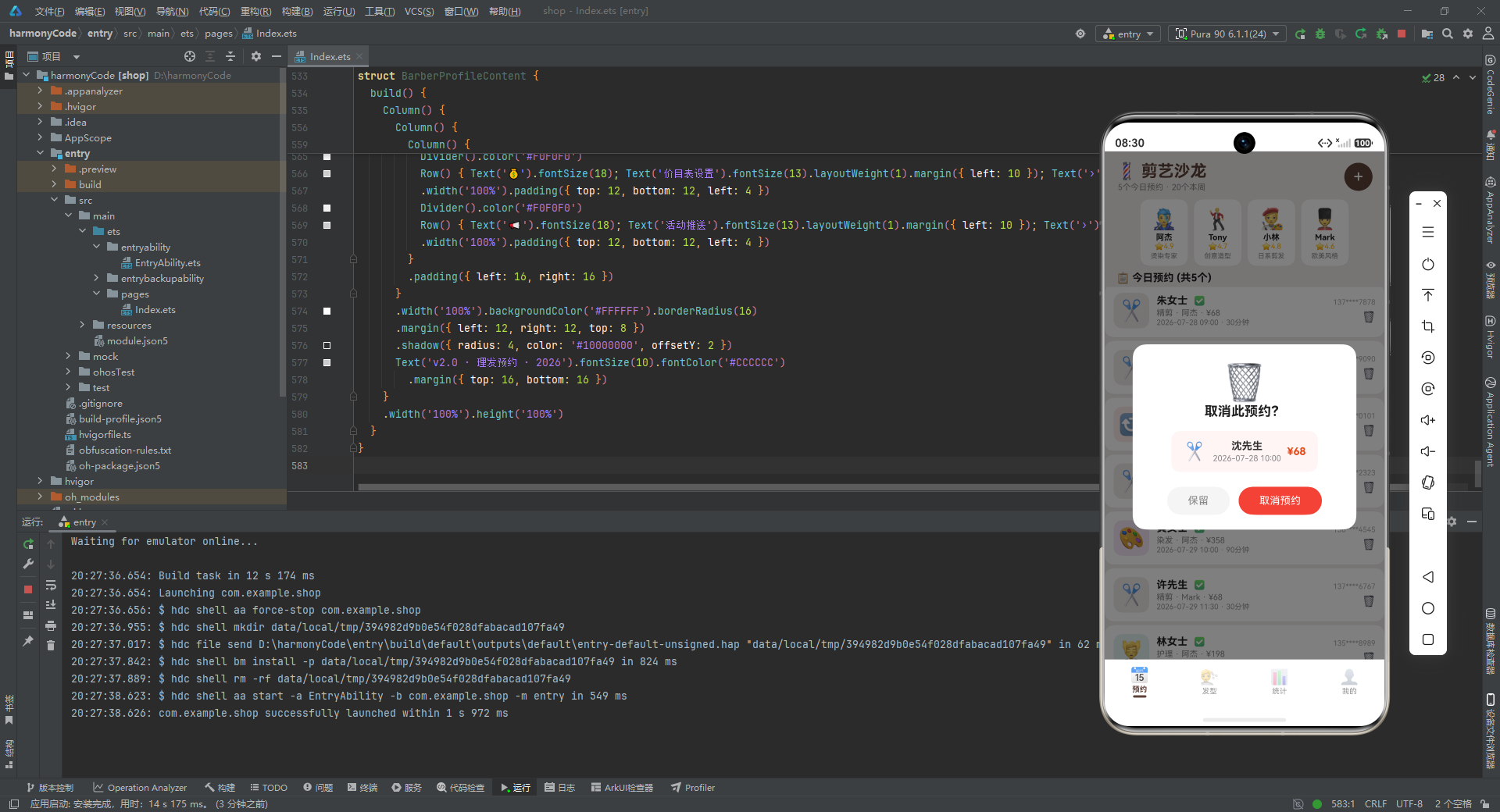
deleteModal 是删除确认弹窗,设计上比新增弹窗更简洁紧凑。它定位在屏幕 38% 高度处(position({ x: '10%', y: '38%' })),宽度 80%,呈现出"居中偏上"的对话框风格。
弹窗内部从上到下依次是:大号垃圾桶 emoji(48 号字,作为视觉警示)、确认标题"取消此预约?"、待删除预约的信息摘要卡片(浅红色背景 #FFF5F5 烘托警示氛围)、底部双按钮。
信息摘要卡片的设计很精巧——它从 selectedAppt(可能为 null)中安全地提取服务图标、顾客姓名、日期时间和价格,展示给用户确认。大量使用 ?? 空值合并运算符(如 this.selectedAppt?.service ?? '精剪')确保即使 selectedAppt 为 null,UI 也不会崩溃,而是显示默认值。这种防御性编程在处理可选状态时非常重要。
底部按钮的配色也经过考量:"保留"用中性灰色(安抚性操作),"取消预约"用红色 #F44336(破坏性操作的警示色)。这种"破坏性操作用红色"的设计规范,是移动端交互设计的通用准则。
代码段:apptCard 预约卡片构建器
@Builder apptCard(a: Appointment) {
  Row() {
    Column() {
      Text(SERVICES[a.service]?.icon ?? '✂️').fontSize(28)
    }
    .width(48).height(48)
    .backgroundColor(SERVICES[a.service]?.bg ?? '#F5F5F5')
    .borderRadius(12)
    .alignItems(HorizontalAlign.Center).justifyContent(FlexAlign.Center)

    Column() {
      Row() {
        Text(a.customer).fontSize(14).fontWeight(FontWeight.Bold).fontColor('#212121')
        Text(a.status === '已确认' ? '✅' : (a.status === '已完成' ? '✔️' : '⏳')).fontSize(12).margin({ left: 8 })
      }
      Text(a.service + ' · ' + a.barber + ' · ¥' + a.price).fontSize(11).fontColor('#888888').margin({ top: 2 })
      Text(a.date + ' ' + a.time + ' · ' + a.duration + '分钟').fontSize(10).fontColor('#999999').margin({ top: 1 })
    }
    .layoutWeight(1).alignItems(HorizontalAlign.Start).padding({ left: 10 })

    Column() {
      Text(a.phone).fontSize(10).fontColor('#AAAAAA')
      Text('🗑️').fontSize(14).fontColor('#F44336').margin({ top: 6 })
        .onClick(() => { this.selectedAppt = a; this.showDeleteConfirm = true })
    }
    .alignItems(HorizontalAlign.End)
  }
  .width('100%').padding(12).backgroundColor('#FFFFFF')
  .borderRadius(12).margin({ left: 12, right: 12, top: 5 })
  .shadow({ radius: 2, color: '#10000000', offsetY: 1 })
}
深度解析
apptCard 是预约列表中每条预约的卡片渲染器,接收一个 Appointment 对象作为参数。卡片采用经典的"左图标-中信息-右操作"三段式横向布局,这是列表项卡片设计的黄金范式。
左侧图标区:一个 48x48 像素的圆角方块,背景色取自 SERVICES[a.service]?.bg(该服务的浅色主题色),居中显示服务对应的 emoji 图标。通过颜色编码,用户扫一眼就能区分这是精剪(棕色底)还是烫发(橙色底)的预约。
中间信息区:使用 layoutWeight(1) 撑满剩余空间,纵向排列三行信息。第一行是顾客姓名(加粗)和状态 emoji——这里用了一个嵌套三元运算符 a.status === '已确认' ? '✅' : (a.status === '已完成' ? '✔️' : '⏳'),将三种状态分别映射为绿勾、勾选和沙漏图标,直观传达预约进度。第二行用"·"分隔符连接服务名、发型师名和价格。第三行展示日期、时间和时长。三行信息使用递减的字号(14→11→10)和渐淡的颜色(#212121→#888888→#999999),形成了清晰的视觉层级——最重要的信息最大最深,次要信息逐渐弱化。
右侧操作区:展示脱敏手机号和删除按钮。点击删除 emoji 触发 this.selectedAppt = a; this.showDeleteConfirm = true,即先把当前卡片对应的预约对象存入 selectedAppt 状态,再打开删除确认弹窗。这种"先记录上下文再触发动作"的模式,确保弹窗中能准确展示待删除预约的信息。
卡片整体为白色背景、12 像素圆角,带有微妙的阴影投影(radius 2、透明度 #10 即约 6%),营造出"卡片浮于页面"的轻微立体感,又不会过于张扬。
代码段:AppointmentContent 的 build 方法
build() {
  Stack() {
    Column() {
      Row() {
        Column() {
          Text('💈 剪艺沙龙').fontSize(22).fontWeight(FontWeight.Bold).fontColor('#5D4037')
          Text(getTodayAppointments() + '个今日预约 · ' + getWeeklyTotal() + '个本周').fontSize(11).fontColor('#888888').margin({ top: 2 })
        }
        Row().layoutWeight(1)
        Text('+').fontSize(24).fontColor('#FFFFFF')
          .backgroundColor('#5D4037').width(38).height(38).borderRadius(19)
          .textAlign(TextAlign.Center)
          .onClick(() => { this.showAddModal = true })
      }
      .width('100%').padding({ left: 16, right: 16, top: 14, bottom: 10 })

      Scroll() {
        Row() {
          ForEach(BARBERS, (b: BarberMeta) => {
            Column() {
              Text(b.emoji).fontSize(28)
              Text(b.name).fontSize(11).fontWeight(FontWeight.Bold).fontColor('#212121').margin({ top: 2 })
              Text('⭐' + b.rating).fontSize(10).fontColor('#FFB300')
              Text(b.specialty).fontSize(9).fontColor('#888888').margin({ top: 2 })
            }
            .backgroundColor('#FFFFFF').borderRadius(12).padding(...)
            .shadow({ radius: 2, color: '#10000000', offsetY: 1 })
          })
        }
        .padding({ left: 8, right: 8 })
      }
      .scrollable(ScrollDirection.Horizontal).scrollBar(BarState.Off).height(90)

      Text('📋 今日预约 ' + '(共' + getTodayAppointments() + '个)').fontSize(14).fontWeight(FontWeight.Bold)
        .width('100%').padding({ left: 16, top: 8, bottom: 4 })
      Scroll() {
        Column() {
          this.apptCard(mockAppointments[0])
          // ... 共20张卡片
          this.apptCard(mockAppointments[19])
        }
        .padding({ bottom: 20 })
      }
      .layoutWeight(1).scrollBar(BarState.Off)
    }
    .width('100%').height('100%')

    if (this.showAddModal) { this.addAppointmentModal() }
    if (this.showDeleteConfirm) { this.deleteModal() }
  }
  .width('100%').height('100%')
}
深度解析
这是预约页面的主构建方法,使用了 Stack(层叠布局)作为根容器。Stack 的作用是将子元素层叠堆放——后渲染的子元素会覆盖在先渲染的子元素之上。这里先渲染的是页面主体 Column,然后根据条件渲染弹窗,弹窗自然覆盖在页面主体之上,实现了模态浮层效果。
页面主体 Column 从上到下分为三个区域:
1. 顶部标题栏:左侧是应用名称"💈 剪艺沙龙"(22号字加粗棕色)和今日/本周预约数量摘要,右侧是一个圆形的"+“新增按钮(38x38 像素,棕色背景,白色加号)。点击”+"按钮设置 showAddModal = true 打开新增预约弹窗。中间的 Row().layoutWeight(1) 作为弹性空间分隔符,将标题推到左侧、按钮推到右侧。
2. 发型师横向滚动条:使用 Scroll 配合 scrollable(ScrollDirection.Horizontal) 实现横向滚动,scrollBar(BarState.Off) 隐藏滚动条以保持视觉简洁。内部用 ForEach 遍历 BARBERS 数组,为每位发型师生成一个白色圆角卡片,展示 emoji 头像、姓名、评分和专长。固定高度 90 像素。这个横向滚动条让用户快速浏览店内发型师阵容,是常见的"人物选择器"设计模式。
3. 预约列表区域:先有一个"📋 今日预约(共N个)"的分区标题,然后是可纵向滚动的 Scroll 容器,内部用 Column 纵向排列 20 张 apptCard。这里手动展开调用了 20 次 this.apptCard(mockAppointments[N]),而非使用 ForEach 循环。虽然在代码简洁性上不如 ForEach,但这种写法在某些 ArkTS 版本中可以避免 ForEach 的 key 生成开销,且对于固定数量的展示数据来说,执行效率是确定的。layoutWeight(1) 让该滚动区域占据标题栏和发型师滚动条之外的所有剩余垂直空间。
弹窗的条件渲染 if (this.showAddModal) { this.addAppointmentModal() } 和 if (this.showDeleteConfirm) { this.deleteModal() } 放在 Stack 的末尾,确保弹窗始终覆盖在页面内容之上。这种"条件渲染 + Stack 层叠"的自定义弹窗方案,比使用系统原生 Dialog 组件拥有更高的视觉定制自由度。
七、发型展示模块
代码段:HairstyleContent 组件
@Component
struct HairstyleContent {
  build() {
    Column() {
      Text('💇 热门发型').fontSize(18).fontWeight(FontWeight.Bold)
        .width('100%').padding({ left: 16, top: 14, bottom: 4 })
      Scroll() {
        Column() {
          Flex({ wrap: FlexWrap.Wrap }) {
            ForEach(mockHairstyles, (h: HairstyleData) => {
              Column() {
                Text(h.emoji).fontSize(36).margin({ top: 4 })
                Text(h.name).fontSize(13).fontWeight(FontWeight.Bold).fontColor('#212121').margin({ top: 4 })
                Text(h.description).fontSize(10).fontColor('#888888').margin({ top: 2 })
                Row() {
                  Text('⭐' + h.rating).fontSize(10).fontColor('#FFB300')
                  Text('·¥' + h.price).fontSize(10).fontColor('#E64A19').margin({ left: 4 })
                  Text('·' + h.duration + '分').fontSize(10).fontColor('#999999').margin({ left: 4 })
                }
                .margin({ top: 4 })
              }
              .width('48%').backgroundColor('#FFFFFF').borderRadius(12)
              .padding({ top: 10, bottom: 10, left: 8, right: 8 })
              .margin({ left: 4, right: 4, top: 6 })
              .shadow({ radius: 3, color: '#10000000', offsetY: 2 })
              .alignItems(HorizontalAlign.Center)
            })
          }
          .padding({ left: 8, right: 8, bottom: 20 })
        }
      }
      .layoutWeight(1).scrollBar(BarState.Off)
    }
    .width('100%').height('100%')
  }
}
深度解析
HairstyleContent 是发型展示页面的组件,整体结构相对简洁但视觉效果丰富。页面顶部是"💇 热门发型"标题,下方是一个可纵向滚动的区域,内部使用 Flex({ wrap: FlexWrap.Wrap }) 实现换行网格布局。
Flex 换行网格是本页面的核心技术点。FlexWrap.Wrap 表示当子元素在一行中排满后自动换到下一行。每个发型卡片宽度设为 48%(接近屏幕宽度的一半),这样一行可以容纳两张卡片,左右各留 4 像素的 margin 间距,形成了经典的"两列网格"布局。与 Grid 组件相比,Flex 换行布局的优势在于不需要预先指定行列数,卡片会根据自身宽度自动排列,更加灵活。
每张发型卡片内部纵向排列:大号 emoji 图标(36号字)、发型名称(13号字加粗)、描述文字(10号字灰色)、底部信息行(评分+价格+时长,用"·"分隔,三种颜色区分)。卡片为白色背景、12 像素圆角,配合 shadow 投影产生轻微的悬浮感。alignItems(HorizontalAlign.Center) 确保卡片内所有内容居中对齐。
整个发型列表使用 ForEach 遍历 mockHairstyles 数组动态生成,layoutWeight(1) 让滚动区域填满剩余空间,scrollBar(BarState.Off) 隐藏滚动条保持界面整洁。这个模块没有复杂的状态管理,是一个纯展示型组件,所有数据来自外部常量,这也是"哑组件"(Dumb Component)设计模式的体现——只负责渲染,不包含业务逻辑。
八、数据统计模块
代码段:BarberStatsContent 组件——概览卡片
@Component
struct BarberStatsContent {
  build() {
    Column() {
      Text('📊 数据统计').fontSize(18).fontWeight(FontWeight.Bold)
        .width('100%').padding({ left: 16, top: 14, bottom: 8 })
      Scroll() {
        Column() {
          Row() {
            Column() {
              Text('¥' + getMonthlyRevenue()).fontSize(24).fontWeight(FontWeight.Bold).fontColor('#E64A19')
              Text('本月营收').fontSize(10).fontColor('#888888')
            }.layoutWeight(1).alignItems(HorizontalAlign.Center)
            Column() {
              Text(getWeeklyTotal().toString()).fontSize(24).fontWeight(FontWeight.Bold).fontColor('#5D4037')
              Text('本周预约').fontSize(10).fontColor('#888888')
            }.layoutWeight(1).alignItems(HorizontalAlign.Center)
            Column() {
              Text(getAvgRating().toString()).fontSize(24).fontWeight(FontWeight.Bold).fontColor('#FFB300')
              Text('平均评分').fontSize(10).fontColor('#888888')
            }.layoutWeight(1).alignItems(HorizontalAlign.Center)
          }
          .width('100%').backgroundColor('#FFFFFF').borderRadius(16)
          .margin({ left: 12, right: 12 }).padding({ top: 16, bottom: 16 })
          .shadow({ radius: 4, color: '#10000000', offsetY: 2 })
深度解析
BarberStatsContent 是数据统计页面,整体结构为一个可滚动的纵向 Column,内含三张白色圆角卡片:概览数据卡、服务占比卡、发型师业绩卡。
概览数据卡位于最顶部,使用 Row 横向排列三个等宽的数据列(各 layoutWeight(1))。每列展示一个大号数值(24号字加粗)和一个小号标签(10号字灰色),分别是:本月营收(¥12860,橙色)、本周预约(20,棕色)、平均评分(4.7,琥珀色)。三个数值使用了三种不同的主题色,与各自代表的业务含义形成色彩关联——营收用醒目的橙色(金钱关联)、预约用沉稳的棕色(基础业务)、评分用温暖的琥珀色(好评感受)。卡片整体白色背景、16 像素圆角、带阴影投影,形成"数据看板"的视觉风格。
代码段:服务项目占比条形图
Column() {
  Text('✂️ 服务项目占比').fontSize(13).fontWeight(FontWeight.Bold)
    .width('100%').padding({ left: 16, top: 14, bottom: 8 })
  Column() {
    Row() { Text('精剪').fontSize(11).fontColor('#5D4037').layoutWeight(1); Text('12次').fontSize(11).fontColor('#888888') }
    Row() { Column().width('48%').height(7).backgroundColor('#5D4037').borderRadius(4); Row().layoutWeight(1) }
    .width('100%').margin({ top: 4, bottom: 10 })
    Row() { Text('烫发').fontSize(11).fontColor('#E64A19').layoutWeight(1); Text('5次').fontSize(11).fontColor('#888888') }
    Row() { Column().width('20%').height(7).backgroundColor('#E64A19').borderRadius(4); Row().layoutWeight(1) }
    .width('100%').margin({ top: 4, bottom: 10 })
    // ... 染发12%、护理12%、造型8%
  }
  .padding({ left: 16, right: 16, bottom: 14 })
}
.width('100%').backgroundColor('#FFFFFF').borderRadius(16)
深度解析
这段代码实现了一个自定义的横向条形图,用于展示各项服务的占比分布。这是本应用中最具技术巧思的 UI 实现之一——没有使用任何图表库,而是纯用 ArkTS 原生布局组件手工"拼"出了条形图效果。
每项服务的展示分为两行:第一行是服务名称(左对齐,使用该服务的主题色)和次数(右对齐,灰色);第二行是进度条,由一个带颜色的 Column(宽度为百分比字符串如 '48%',高度 7 像素,圆角 4)和一个 Row().layoutWeight(1)(占据剩余宽度的透明弹性空间)组成。这种"彩色条 + 弹性空白条"的组合,使得彩色条从左侧开始延伸,长度精确对应百分比数值。
五个服务的进度条宽度分别为 48%、20%、12%、12%、8%,颜色与 SERVICES 配置中的主题色完全一致——精剪棕色、烫发橙色、染发紫色、护理青色、造型琥珀色。通过这种色彩一致性,用户可以在不同页面间建立视觉记忆关联。进度条高度仅 7 像素,配合 4 像素圆角,呈现出精致纤细的数据可视化效果,避免了粗笨的视觉感。
这种"纯组件手绘图表"的方案虽然不如专业图表库功能丰富,但在数据量小、图表类型简单的场景下,具有零依赖、完全可控、性能优异的优势,非常适合轻量级应用的统计展示需求。
代码段:发型师业绩列表
Column() {
Text('👨🎤 发型师业绩').fontSize(13).fontWeight(FontWeight.Bold)
.width('100%').padding({ left: 16, top: 14, bottom: 8 })
ForEach(BARBERS, (b: BarberMeta) => {
Row() {
Text(b.emoji).fontSize(24)
Column() {
Text(b.name).fontSize(13).fontWeight(FontWeight.Bold).fontColor('#212121')
Text(b.specialty + ' · ' + b.experience + '年经验').fontSize(10).fontColor('#888888').margin({ top: 2 })
}
.layoutWeight(1).alignItems(HorizontalAlign.Start).padding({ left: 8 })
Text('⭐' + b.rating).fontSize(14).fontWeight(FontWeight.Bold).fontColor('#FFB300')
}
.width('100%').padding({ top: 10, bottom: 10 })
Divider().color('#F0F0F0')
})
}
.width('100%').backgroundColor('#FFFFFF').borderRadius(16)
深度解析
这是统计页面的第三张卡片,展示发型师的业绩信息。使用 ForEach 遍历 BARBERS 数组,为每位发型师生成一行信息:左侧 emoji 头像、中间姓名和专长经验、右侧评分。每行之间用 Divider(浅灰色分割线 #F0F0F0)分隔,形成清晰的列表分隔效果。
这里的布局模式与预约卡片类似(左图标-中信息-右数据),但去掉了阴影和独立卡片背景,改为统一放在一张大卡片内用分割线分隔,视觉上更加紧凑聚合。这种"卡片内列表"的设计在信息密度较高时比"每项独立卡片"更节省垂直空间。
九、个人中心模块
代码段:BarberProfileContent 组件
@Component
struct BarberProfileContent {
build() {
Column() {
Column() {
Row() {
Column() {
Text('💈').fontSize(40)
}
.width(64).height(64).backgroundColor('#EFEBE9').borderRadius(32)
.alignItems(HorizontalAlign.Center).justifyContent(FlexAlign.Center)
Column() {
Text('剪艺沙龙').fontSize(18).fontWeight(FontWeight.Bold).fontColor('#212121')
Text('4位资深发型师 · 评分' + getAvgRating()).fontSize(11).fontColor('#888888').margin({ top: 3 })
Text('今日已接 ' + getTodayAppointments() + ' 单').fontSize(10).fontColor('#5D4037').margin({ top: 2 })
}
.layoutWeight(1).alignItems(HorizontalAlign.Start).padding({ left: 14 })
}
.width('100%').padding(16)
}
.width('100%').backgroundColor('#FFFFFF').borderRadius(16)
.margin({ left: 12, right: 12, top: 10 })
.shadow({ radius: 4, color: '#10000000', offsetY: 2 })
Column() {
Text('⚙️ 管理').fontSize(13).fontWeight(FontWeight.Bold)
.width('100%').padding({ left: 16, top: 14, bottom: 8 })
Column() {
Row() { Text('👨🎤').fontSize(18); Text('发型师管理').fontSize(13).layoutWeight(1).margin({ left: 10 }); Text('›').fontColor('#CCCCCC') }
.width('100%').padding({ top: 12, bottom: 12, left: 4 })
Divider().color('#F0F0F0')
Row() { Text('📅').fontSize(18); Text('排班设置').fontSize(13).layoutWeight(1).margin({ left: 10 }); Text('›').fontColor('#CCCCCC') }
.width('100%').padding({ top: 12, bottom: 12, left: 4 })
Divider().color('#F0F0F0')
Row() { Text('💰').fontSize(18); Text('价目表设置').fontSize(13).layoutWeight(1).margin({ left: 10 }); Text('›').fontColor('#CCCCCC') }
.width('100%').padding({ top: 12, bottom: 12, left: 4 })
Divider().color('#F0F0F0')
Row() { Text('📢').fontSize(18); Text('活动推送').fontSize(13).layoutWeight(1).margin({ left: 10 }); Text('›').fontColor('#CCCCCC') }
.width('100%').padding({ top: 12, bottom: 12, left: 4 })
}
.padding({ left: 16, right: 16 })
}
.width('100%').backgroundColor('#FFFFFF').borderRadius(16)
.margin({ left: 12, right: 12, top: 8 })
.shadow({ radius: 4, color: '#10000000', offsetY: 2 })
Text('v2.0 · 理发预约 · 2026').fontSize(10).fontColor('#CCCCCC')
.margin({ top: 16, bottom: 16 })
}
.width('100%').height('100%')
}
}
深度解析
BarberProfileContent 是个人中心/店铺信息页面,结构分为店铺信息卡、管理功能列表和版本号三部分。
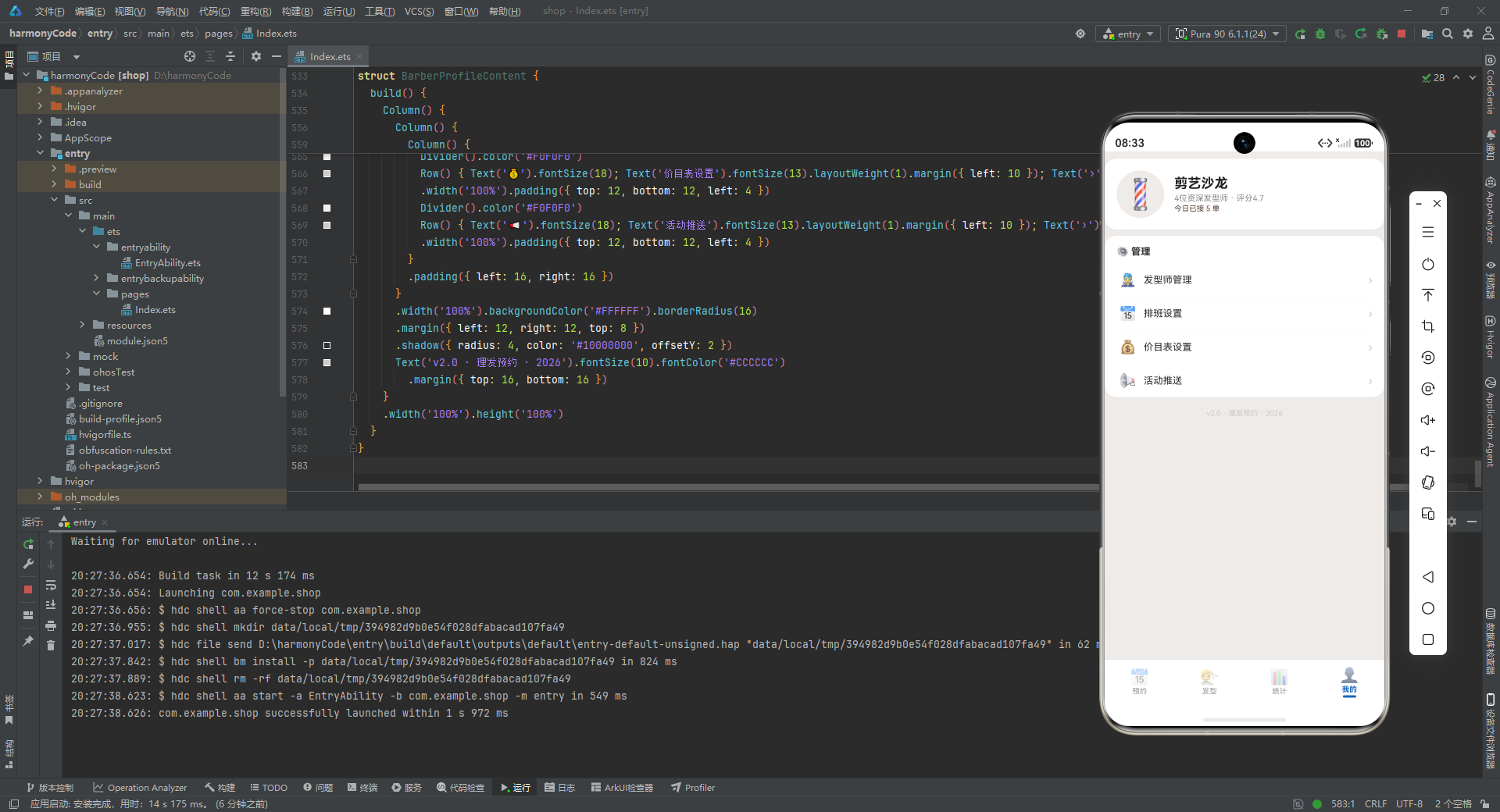
店铺信息卡顶部是一个 64x64 像素的圆形头像区域(borderRadius(32) 实现正圆效果),背景为品牌米色 #EFEBE9,居中放置💈理发柱 emoji。右侧是店铺名称"剪艺沙龙"、发型师数量与评分摘要、今日接单数。这里调用了 getAvgRating() 和 getTodayAppointments() 函数获取统计数据,体现了统计函数在多页面间的复用。fontColor('#5D4037') 将"今日已接N单"染为棕色,形成与品牌主色的呼应。
管理功能列表采用"设置项"的经典布局模式:每行由 emoji 图标、功能名称、右侧箭头"›"三部分组成。layoutWeight(1) 让功能名称占据中间空间,将箭头推到最右侧。箭头颜色为浅灰 #CCCCCC,作为"可点击进入"的视觉提示。四项管理功能分别是发型师管理、排班设置、价目表设置、活动推送,覆盖了沙龙运营的主要管理场景。行与行之间用 Divider 分割,保持列表的整齐节奏感。虽然当前这些菜单项尚未绑定 onClick 跳转逻辑,但 UI 结构已经为后续接入功能页面做好了准备。
版本号文本位于页面底部,10号字浅灰色,显示"v2.0 · 理发预约 · 2026",作为应用的版本标识和版权声明。这是移动端应用的标配元素,虽然不起眼,但体现了产品的完整度。
整个个人中心页面同样不包含状态管理,是一个纯展示型组件。它与管理功能列表配合,扮演着应用"设置入口"的角色。
总结:各模块关键技术点横向对比
| 对比维度 | 预约管理(Tab 1) | 发型展示(Tab 2) | 数据统计(Tab 3) | 个人中心(Tab 4) |
|---|---|---|---|---|
| 组件名称 | AppointmentContent | HairstyleContent | BarberStatsContent | BarberProfileContent |
| 核心功能 | 预约列表展示、新增预约表单、删除确认 | 发型图鉴网格浏览 | 营收概览、服务占比条形图、发型师业绩 | 店铺信息展示、管理功能菜单入口 |
| 状态管理要点 | 8个@State变量(弹窗控制3个+表单数据5个),状态最丰富 | 无状态,纯展示型组件 | 无状态,数据来自统计函数调用 | 无状态,数据来自统计函数调用 |
| 关键组件 | Stack层叠、Scroll纵向滚动、Scroll横向滚动、TextInput、TextArea、Flex换行 | Flex换行网格、Scroll纵向滚动 | Row三等分布局、自定义Column进度条、ForEach列表 | Row列表项、Divider分割线、圆形头像 |
| 布局模式 | Stack模态层叠 + Column纵向 + Row横向混合 | Flex两列换行网格 | Column卡片堆叠 + Row三等分 + Row进度条 | Column卡片堆叠 + Row列表项 |
| 设计模式 | 模态弹窗模式(遮罩+浮层)、表单预填默认值、参数化@Builder复用、条件渲染弹窗 | 哑组件模式、数据驱动渲染 | 数据桩函数模式、纯组件手绘图表、色彩编码 | 设置项列表模式、弹簧布局推右 |
| 数据来源 | mockAppointments常量 + BARBERS + SERVICES + 统计函数 | mockHairstyles常量 | 统计函数 + BARBERS + SERVICES | 统计函数 |
| 交互复杂度 | 最高(表单输入、弹窗开关、删除确认、列表滚动、横向滚动) | 最低(仅滚动浏览) | 低(仅滚动浏览) | 低(菜单项预留点击) |
| 视觉特色 | 自建模态弹窗、阴影浮层、服务色编码卡片 | 两列网格卡片、大号emoji图标 | 自绘条形图、三色数据看板 | 圆形头像、箭头设置项 |
| 复用@Builder | modalBg、addAppointmentModal、deleteModal、apptCard(4个) | 无 | 无 | 无 |
| ForEach使用 | 2处(发型师横向条目、服务选择标签) | 1处(发型卡片网格) | 1处(发型师业绩列表) | 无(手动展开4个菜单项) |
安装DevEco Studio程序

选择目标安装目录:

设置环境变量,但是需要重启一下:

新建一个空白模板:

设置API为24的模板项目:
初始化项目,自动下载相关依赖:

完整代码:
// 122.ets - 理发预约 Barber Shop Booking
// Brown (#5D4037) | Amber (#FFB300) | Deep Orange (#E64A19) | Bg (#EFEBE9)
// ==================== Interfaces ====================
interface ServiceMeta {
label: string
icon: string
duration: number
basePrice: number
color: string
bg: string
}
interface BarberMeta {
name: string
emoji: string
rating: number
specialty: string
experience: number
color: string
}
interface Appointment {
id: number
customer: string
barber: string
service: string
date: string
time: string
duration: number
price: number
status: string
phone: string
notes: string
}
interface HairstyleData {
id: number
name: string
emoji: string
description: string
difficulty: string
duration: number
price: number
rating: number
category: string
}
// ==================== Config ====================
const SERVICES: Record<string, ServiceMeta> = {
'精剪': { label: '精剪', icon: '✂️', duration: 30, basePrice: 68, color: '#5D4037', bg: '#EFEBE9' },
'烫发': { label: '烫发', icon: '🔄', duration: 120, basePrice: 398, color: '#E64A19', bg: '#FBE9E7' },
'染发': { label: '染发', icon: '🎨', duration: 90, basePrice: 358, color: '#7B1FA2', bg: '#F3E5F5' },
'护理': { label: '护理', icon: '💆', duration: 45, basePrice: 198, color: '#00838F', bg: '#E0F2F1' },
'造型': { label: '造型', icon: '💇', duration: 25, basePrice: 88, color: '#FF8F00', bg: '#FFF3E0' }
}
const BARBERS: BarberMeta[] = [
{ name: '阿杰', emoji: '👨🎤', rating: 4.9, specialty: '烫染专家', experience: 8, color: '#E64A19' },
{ name: 'Tony', emoji: '🕺', rating: 4.7, specialty: '创意造型', experience: 6, color: '#1565C0' },
{ name: '小林', emoji: '🧑🎨', rating: 4.8, specialty: '日系剪发', experience: 5, color: '#2E7D32' },
{ name: 'Mark', emoji: '💂', rating: 4.6, specialty: '欧美风格', experience: 7, color: '#5D4037' }
]
const SERVICE_LIST: string[] = ['精剪', '烫发', '染发', '护理', '造型']
// ==================== Data ====================
const mockAppointments: Appointment[] = [
{ id: 1, customer: '张先生', barber: '阿杰', service: '精剪', date: '2026-07-25', time: '10:00', duration: 30, price: 68, status: '已确认', phone: '138****5678', notes: '两边推短,顶部修剪' },
{ id: 2, customer: '李女士', barber: 'Tony', service: '烫发', date: '2026-07-25', time: '11:00', duration: 120, price: 398, status: '已确认', phone: '139****2345', notes: '大波浪卷,不要太卷' },
{ id: 3, customer: '王先生', barber: '小林', service: '染发', date: '2026-07-25', time: '14:00', duration: 90, price: 358, status: '已确认', phone: '136****8901', notes: '深棕色,遮盖白发' },
{ id: 4, customer: '赵女士', barber: 'Mark', service: '护理', date: '2026-07-25', time: '16:00', duration: 45, price: 198, status: '已确认', phone: '137****3456', notes: '深层修复护理' },
{ id: 5, customer: '陈先生', barber: '阿杰', service: '造型', date: '2026-07-25', time: '17:00', duration: 25, price: 88, status: '待确认', phone: '135****7890', notes: '参加晚宴需要造型' },
{ id: 6, customer: '刘女士', barber: 'Tony', service: '精剪', date: '2026-07-26', time: '09:30', duration: 30, price: 68, status: '已确认', phone: '138****1122', notes: '短发修剪' },
{ id: 7, customer: '孙先生', barber: '小林', service: '精剪', date: '2026-07-26', time: '10:30', duration: 30, price: 68, status: '已确认', phone: '139****3344', notes: '常规修剪' },
{ id: 8, customer: '周女士', barber: '阿杰', service: '烫发', date: '2026-07-26', time: '13:00', duration: 120, price: 398, status: '已确认', phone: '136****5566', notes: '羊毛卷' },
{ id: 9, customer: '吴先生', barber: 'Mark', service: '精剪', date: '2026-07-26', time: '15:30', duration: 30, price: 68, status: '待确认', phone: '137****7788', notes: '' },
{ id: 10, customer: '郑女士', barber: '阿杰', service: '染发', date: '2026-07-27', time: '10:00', duration: 90, price: 358, status: '已确认', phone: '135****9900', notes: '亚麻色' },
{ id: 11, customer: '冯先生', barber: 'Tony', service: '精剪', date: '2026-07-27', time: '11:00', duration: 30, price: 68, status: '已确认', phone: '138****1212', notes: '两边铲青' },
{ id: 12, customer: '何女士', barber: '小林', service: '护理', date: '2026-07-27', time: '14:00', duration: 45, price: 198, status: '已确认', phone: '139****3434', notes: '染后护理' },
{ id: 13, customer: '马先生', barber: 'Mark', service: '造型', date: '2026-07-27', time: '16:00', duration: 25, price: 88, status: '已完成', phone: '136****5656', notes: '' },
{ id: 14, customer: '朱女士', barber: '阿杰', service: '精剪', date: '2026-07-28', time: '09:00', duration: 30, price: 68, status: '已确认', phone: '137****7878', notes: '空气刘海' },
{ id: 15, customer: '沈先生', barber: '阿杰', service: '精剪', date: '2026-07-28', time: '10:00', duration: 30, price: 68, status: '已确认', phone: '135****9090', notes: '' },
{ id: 16, customer: '韩女士', barber: 'Tony', service: '烫发', date: '2026-07-28', time: '13:00', duration: 120, price: 398, status: '已确认', phone: '138****0101', notes: '纹理烫' },
{ id: 17, customer: '杨先生', barber: '小林', service: '精剪', date: '2026-07-28', time: '15:00', duration: 30, price: 68, status: '待确认', phone: '139****2323', notes: '' },
{ id: 18, customer: '黄女士', barber: '阿杰', service: '染发', date: '2026-07-29', time: '10:00', duration: 90, price: 358, status: '已确认', phone: '136****4545', notes: '奶茶色' },
{ id: 19, customer: '许先生', barber: 'Mark', service: '精剪', date: '2026-07-29', time: '11:30', duration: 30, price: 68, status: '已确认', phone: '137****6767', notes: '油头渐变' },
{ id: 20, customer: '林女士', barber: '阿杰', service: '护理', date: '2026-07-29', time: '14:00', duration: 45, price: 198, status: '已确认', phone: '135****8989', notes: '头皮护理' }
]
const mockHairstyles: HairstyleData[] = [
{ id: 1, name: '日系短发', emoji: '💇♂️', description: '清爽利落,适合上班族', difficulty: '中等', duration: 30, price: 68, rating: 4.8, category: '男' },
{ id: 2, name: '韩式纹理烫', emoji: '🦱', description: '自然蓬松的纹理感', difficulty: '困难', duration: 120, price: 398, rating: 4.7, category: '男' },
{ id: 3, name: '渐变油头', emoji: '💂', description: '经典绅士造型', difficulty: '困难', duration: 40, price: 128, rating: 4.6, category: '男' },
{ id: 4, name: '大波浪卷', emoji: '👩🦱', description: '浪漫优雅的长卷发', difficulty: '困难', duration: 120, price: 398, rating: 4.9, category: '女' },
{ id: 5, name: '羊毛卷', emoji: '🐑', description: '可爱俏皮的蓬松卷', difficulty: '困难', duration: 150, price: 458, rating: 4.8, category: '女' },
{ id: 6, name: '锁骨发', emoji: '💇♀️', description: '温柔知性韩式中发', difficulty: '中等', duration: 40, price: 98, rating: 4.7, category: '女' },
{ id: 7, name: '板寸', emoji: '🪒', description: '极致清爽的短寸', difficulty: '简单', duration: 20, price: 48, rating: 4.5, category: '男' },
{ id: 8, name: '法式慵懒卷', emoji: '💆♀️', description: '法式浪漫的自然卷度', difficulty: '中等', duration: 90, price: 328, rating: 4.8, category: '女' },
{ id: 9, name: '层次碎剪', emoji: '✂️', description: '层次丰富的动感短发', difficulty: '中等', duration: 35, price: 88, rating: 4.6, category: '男' },
{ id: 10, name: '高光挑染', emoji: '✨', description: '立体感挑染效果', difficulty: '困难', duration: 100, price: 428, rating: 4.7, category: '女' },
{ id: 11, name: '狼尾剪', emoji: '🐺', description: '潮流前长后短造型', difficulty: '中等', duration: 30, price: 78, rating: 4.5, category: '男' },
{ id: 12, name: '公主切', emoji: '👸', description: '日系经典公主切', difficulty: '中等', duration: 45, price: 128, rating: 4.6, category: '女' }
]
function getTodayAppointments(): number { return 5 }
function getWeeklyTotal(): number { return 20 }
function getMonthlyRevenue(): number { return 12860 }
function getAvgRating(): number { return 4.7 }
// ==================== Tab Enum ====================
enum BarberTab {
APPOINT = 0,
STYLE = 1,
STATS = 2,
PROFILE = 3
}
// ==================== Entry ====================
@Entry
@Component
struct BarberApp {
@State activeTab: BarberTab = BarberTab.APPOINT
@Builder contentArea() {
Column() {
if (this.activeTab === BarberTab.APPOINT) {
AppointmentContent()
} else if (this.activeTab === BarberTab.STYLE) {
HairstyleContent()
} else if (this.activeTab === BarberTab.STATS) {
BarberStatsContent()
} else {
BarberProfileContent()
}
}
.layoutWeight(1)
}
@Builder tabItem(icon: string, label: string, tab: BarberTab, accent: string) {
Column() {
Text(icon).fontSize(20).opacity(this.activeTab === tab ? 1.0 : 0.4)
Text(label).fontSize(10)
.fontColor(this.activeTab === tab ? accent : '#999999')
.fontWeight(this.activeTab === tab ? FontWeight.Bold : FontWeight.Normal)
.margin({ top: 2 })
if (this.activeTab === tab) {
Column().width(18).height(3).backgroundColor(accent).borderRadius(2).margin({ top: 2 })
}
}
.layoutWeight(1).alignItems(HorizontalAlign.Center)
.padding({ top: 5, bottom: 5 })
.onClick(() => { this.activeTab = tab })
}
build() {
Column() {
this.contentArea()
Divider().color('#E0E0E0').strokeWidth(0.5)
Row() {
this.tabItem('📅', '预约', BarberTab.APPOINT, '#5D4037')
this.tabItem('💇', '发型', BarberTab.STYLE, '#E64A19')
this.tabItem('📊', '统计', BarberTab.STATS, '#FFB300')
this.tabItem('👤', '我的', BarberTab.PROFILE, '#1565C0')
}
.width('100%').backgroundColor('#FFFFFF').padding({ top: 4, bottom: 6 })
}
.width('100%').height('100%').backgroundColor('#EFEBE9')
}
}
// ==================== Appointment Content ====================
@Component
struct AppointmentContent {
@State showAddModal: boolean = false
@State showDeleteConfirm: boolean = false
@State selectedAppt: Appointment | null = null
@State formBarber: string = '阿杰'
@State formService: string = '精剪'
@State formDate: string = '2026-07-25'
@State formTime: string = '10:00'
@State formNotes: string = ''
@Builder modalBg(onClose: () => void) {
Column().width('100%').height('100%')
.backgroundColor('rgba(0,0,0,0.5)').onClick(onClose)
}
@Builder addAppointmentModal() {
Column() {
this.modalBg(() => { this.showAddModal = false })
Column() {
Row() {
Text('📅 新增预约').fontSize(18).fontWeight(FontWeight.Bold).fontColor('#212121')
Row().layoutWeight(1)
Text('✕').fontSize(20).fontColor('#999999').onClick(() => { this.showAddModal = false })
}
.width('100%').padding({ left: 20, right: 20, top: 18, bottom: 10 })
Divider().color('#F0F0F0')
Scroll() {
Column() {
Text('选择发型师').fontSize(12).fontColor('#888888').margin({ top: 14, left: 20 })
Row() {
ForEach(BARBERS, (b: BarberMeta) => {
Column() {
Text(b.emoji).fontSize(28)
Text(b.name).fontSize(10).fontColor('#333333').margin({ top: 2 })
Text('⭐' + b.rating).fontSize(9).fontColor('#FFB300')
}
.padding({ top: 8, bottom: 8 }).borderRadius(12)
.backgroundColor(this.formBarber === b.name ? b.color + '20' : '#F5F5F5')
.border({ width: this.formBarber === b.name ? 2 : 0, color: this.formBarber === b.name ? b.color : 'transparent' })
.layoutWeight(1).alignItems(HorizontalAlign.Center).margin({ left: 4, right: 4 })
.onClick(() => { this.formBarber = b.name })
})
}
.margin({ left: 16, right: 16, top: 6 })
Text('服务项目').fontSize(12).fontColor('#888888').margin({ top: 14, left: 20 })
Flex({ wrap: FlexWrap.Wrap }) {
ForEach(SERVICE_LIST, (s: string) => {
Text(SERVICES[s]?.icon + ' ' + s + ' ¥' + (SERVICES[s]?.basePrice ?? 0))
.fontSize(11)
.fontColor(this.formService === s ? '#FFFFFF' : SERVICES[s]?.color ?? '#666666')
.backgroundColor(this.formService === s ? SERVICES[s]?.color : SERVICES[s]?.bg)
.padding({ left: 10, right: 10, top: 6, bottom: 6 })
.borderRadius(16).margin({ left: 4, right: 4, top: 4 })
.onClick(() => { this.formService = s })
})
}
.margin({ left: 16, right: 16, top: 6 })
Text('预约日期').fontSize(12).fontColor('#888888').margin({ top: 14, left: 20 })
TextInput({ placeholder: '2026-07-25' })
.placeholderColor('#BBBBBB').fontSize(14)
.backgroundColor('#F5F5F5').borderRadius(10)
.margin({ left: 20, right: 20, top: 4 })
.onChange((v: string) => { this.formDate = v })
Text('预约时间').fontSize(12).fontColor('#888888').margin({ top: 12, left: 20 })
TextInput({ placeholder: '10:00' })
.placeholderColor('#BBBBBB').fontSize(14)
.backgroundColor('#F5F5F5').borderRadius(10)
.margin({ left: 20, right: 20, top: 4 })
.onChange((v: string) => { this.formTime = v })
Text('备注').fontSize(12).fontColor('#888888').margin({ top: 12, left: 20 })
TextArea({ placeholder: '特殊需求...' })
.placeholderColor('#BBBBBB').fontSize(13).height(50)
.backgroundColor('#F5F5F5').borderRadius(10)
.margin({ left: 20, right: 20, top: 4 })
.onChange((v: string) => { this.formNotes = v })
}
.padding({ bottom: 16 })
}
.constraintSize({ maxHeight: '55%' })
Row() {
Text('取消').fontSize(14).fontColor('#888888')
.backgroundColor('#F5F5F5').borderRadius(22)
.padding({ left: 28, right: 28, top: 11, bottom: 11 })
.onClick(() => { this.showAddModal = false })
Text('确认预约').fontSize(14).fontColor('#FFFFFF')
.backgroundColor('#5D4037').borderRadius(22)
.padding({ left: 28, right: 28, top: 11, bottom: 11 }).margin({ left: 12 })
.onClick(() => { this.showAddModal = false })
}
.width('100%').justifyContent(FlexAlign.Center)
.padding({ left: 20, right: 20, top: 14, bottom: 16 })
}
.width('90%').backgroundColor('#FFFFFF').borderRadius(18)
.alignItems(HorizontalAlign.Center)
.position({ x: '5%', y: '10%' })
.shadow({ radius: 20, color: '#33000000', offsetY: 4 })
}
.width('100%').height('100%').position({ x: 0, y: 0 }).zIndex(999)
}
@Builder deleteModal() {
Column() {
this.modalBg(() => { this.showDeleteConfirm = false })
Column() {
Text('🗑️').fontSize(48).margin({ top: 24 })
Text('取消此预约?').fontSize(18).fontWeight(FontWeight.Bold).fontColor('#212121')
Row() {
Text(SERVICES[this.selectedAppt?.service ?? '精剪']?.icon ?? '✂️').fontSize(24)
Column() {
Text(this.selectedAppt?.customer ?? '').fontSize(14).fontWeight(FontWeight.Bold).fontColor('#333333')
Text((this.selectedAppt?.date ?? '') + ' ' + (this.selectedAppt?.time ?? '')).fontSize(11).fontColor('#888888').margin({ top: 2 })
}.margin({ left: 10 })
Text('¥' + (this.selectedAppt?.price ?? 0)).fontSize(14).fontWeight(FontWeight.Bold).fontColor('#E64A19').margin({ left: 8 })
}
.backgroundColor('#FFF5F5').borderRadius(12)
.padding({ left: 16, right: 16, top: 12, bottom: 12 }).margin({ top: 16 })
Row() {
Text('保留').fontSize(14).fontColor('#888888')
.backgroundColor('#F5F5F5').borderRadius(22)
.padding({ left: 28, right: 28, top: 11, bottom: 11 })
.onClick(() => { this.showDeleteConfirm = false })
Text('取消预约').fontSize(14).fontColor('#FFFFFF')
.backgroundColor('#F44336').borderRadius(22)
.padding({ left: 28, right: 28, top: 11, bottom: 11 }).margin({ left: 12 })
.onClick(() => { this.showDeleteConfirm = false })
}
.width('100%').justifyContent(FlexAlign.Center)
.padding({ left: 20, right: 20, top: 20, bottom: 20 })
}
.width('80%').backgroundColor('#FFFFFF').borderRadius(18)
.alignItems(HorizontalAlign.Center).position({ x: '10%', y: '38%' })
}
.width('100%').height('100%').position({ x: 0, y: 0 }).zIndex(999)
}
@Builder apptCard(a: Appointment) {
Row() {
Column() {
Text(SERVICES[a.service]?.icon ?? '✂️').fontSize(28)
}
.width(48).height(48)
.backgroundColor(SERVICES[a.service]?.bg ?? '#F5F5F5')
.borderRadius(12)
.alignItems(HorizontalAlign.Center).justifyContent(FlexAlign.Center)
Column() {
Row() {
Text(a.customer).fontSize(14).fontWeight(FontWeight.Bold).fontColor('#212121')
Text(a.status === '已确认' ? '✅' : (a.status === '已完成' ? '✔️' : '⏳')).fontSize(12).margin({ left: 8 })
}
Text(a.service + ' · ' + a.barber + ' · ¥' + a.price).fontSize(11).fontColor('#888888').margin({ top: 2 })
Text(a.date + ' ' + a.time + ' · ' + a.duration + '分钟').fontSize(10).fontColor('#999999').margin({ top: 1 })
}
.layoutWeight(1).alignItems(HorizontalAlign.Start).padding({ left: 10 })
Column() {
Text(a.phone).fontSize(10).fontColor('#AAAAAA')
Text('🗑️').fontSize(14).fontColor('#F44336').margin({ top: 6 })
.onClick(() => { this.selectedAppt = a; this.showDeleteConfirm = true })
}
.alignItems(HorizontalAlign.End)
}
.width('100%').padding(12).backgroundColor('#FFFFFF')
.borderRadius(12).margin({ left: 12, right: 12, top: 5 })
.shadow({ radius: 2, color: '#10000000', offsetY: 1 })
}
build() {
Stack() {
Column() {
Row() {
Column() {
Text('💈 剪艺沙龙').fontSize(22).fontWeight(FontWeight.Bold).fontColor('#5D4037')
Text(getTodayAppointments() + '个今日预约 · ' + getWeeklyTotal() + '个本周').fontSize(11).fontColor('#888888').margin({ top: 2 })
}
Row().layoutWeight(1)
Text('+').fontSize(24).fontColor('#FFFFFF')
.backgroundColor('#5D4037').width(38).height(38).borderRadius(19)
.textAlign(TextAlign.Center)
.onClick(() => { this.showAddModal = true })
}
.width('100%').padding({ left: 16, right: 16, top: 14, bottom: 10 })
Scroll() {
Row() {
ForEach(BARBERS, (b: BarberMeta) => {
Column() {
Text(b.emoji).fontSize(28)
Text(b.name).fontSize(11).fontWeight(FontWeight.Bold).fontColor('#212121').margin({ top: 2 })
Text('⭐' + b.rating).fontSize(10).fontColor('#FFB300')
Text(b.specialty).fontSize(9).fontColor('#888888').margin({ top: 2 })
}
.backgroundColor('#FFFFFF').borderRadius(12).padding({ top: 10, bottom: 10, left: 14, right: 14 })
.alignItems(HorizontalAlign.Center).margin({ left: 4, right: 4 })
.shadow({ radius: 2, color: '#10000000', offsetY: 1 })
})
}
.padding({ left: 8, right: 8 })
}
.scrollable(ScrollDirection.Horizontal).scrollBar(BarState.Off).height(90)
Text('📋 今日预约 ' + '(共' + getTodayAppointments() + '个)').fontSize(14).fontWeight(FontWeight.Bold).fontColor('#212121')
.width('100%').padding({ left: 16, top: 8, bottom: 4 })
Scroll() {
Column() {
this.apptCard(mockAppointments[0])
this.apptCard(mockAppointments[1])
this.apptCard(mockAppointments[2])
this.apptCard(mockAppointments[3])
this.apptCard(mockAppointments[4])
this.apptCard(mockAppointments[5])
this.apptCard(mockAppointments[6])
this.apptCard(mockAppointments[7])
this.apptCard(mockAppointments[8])
this.apptCard(mockAppointments[9])
this.apptCard(mockAppointments[10])
this.apptCard(mockAppointments[11])
this.apptCard(mockAppointments[12])
this.apptCard(mockAppointments[13])
this.apptCard(mockAppointments[14])
this.apptCard(mockAppointments[15])
this.apptCard(mockAppointments[16])
this.apptCard(mockAppointments[17])
this.apptCard(mockAppointments[18])
this.apptCard(mockAppointments[19])
}
.padding({ bottom: 20 })
}
.layoutWeight(1).scrollBar(BarState.Off)
}
.width('100%').height('100%')
if (this.showAddModal) { this.addAppointmentModal() }
if (this.showDeleteConfirm) { this.deleteModal() }
}
.width('100%').height('100%')
}
}
// ==================== Hairstyle Content ====================
@Component
struct HairstyleContent {
build() {
Column() {
Text('💇 热门发型').fontSize(18).fontWeight(FontWeight.Bold)
.width('100%').padding({ left: 16, top: 14, bottom: 4 })
Scroll() {
Column() {
Flex({ wrap: FlexWrap.Wrap }) {
ForEach(mockHairstyles, (h: HairstyleData) => {
Column() {
Text(h.emoji).fontSize(36).margin({ top: 4 })
Text(h.name).fontSize(13).fontWeight(FontWeight.Bold).fontColor('#212121').margin({ top: 4 })
Text(h.description).fontSize(10).fontColor('#888888').margin({ top: 2 })
Row() {
Text('⭐' + h.rating).fontSize(10).fontColor('#FFB300')
Text('·¥' + h.price).fontSize(10).fontColor('#E64A19').margin({ left: 4 })
Text('·' + h.duration + '分').fontSize(10).fontColor('#999999').margin({ left: 4 })
}
.margin({ top: 4 })
}
.width('48%').backgroundColor('#FFFFFF').borderRadius(12)
.padding({ top: 10, bottom: 10, left: 8, right: 8 })
.margin({ left: 4, right: 4, top: 6 })
.shadow({ radius: 3, color: '#10000000', offsetY: 2 })
.alignItems(HorizontalAlign.Center)
})
}
.padding({ left: 8, right: 8, bottom: 20 })
}
}
.layoutWeight(1).scrollBar(BarState.Off)
}
.width('100%').height('100%')
}
}
// ==================== Stats Content ====================
@Component
struct BarberStatsContent {
build() {
Column() {
Text('📊 数据统计').fontSize(18).fontWeight(FontWeight.Bold)
.width('100%').padding({ left: 16, top: 14, bottom: 8 })
Scroll() {
Column() {
Row() {
Column() {
Text('¥' + getMonthlyRevenue()).fontSize(24).fontWeight(FontWeight.Bold).fontColor('#E64A19')
Text('本月营收').fontSize(10).fontColor('#888888')
}.layoutWeight(1).alignItems(HorizontalAlign.Center)
Column() {
Text(getWeeklyTotal().toString()).fontSize(24).fontWeight(FontWeight.Bold).fontColor('#5D4037')
Text('本周预约').fontSize(10).fontColor('#888888')
}.layoutWeight(1).alignItems(HorizontalAlign.Center)
Column() {
Text(getAvgRating().toString()).fontSize(24).fontWeight(FontWeight.Bold).fontColor('#FFB300')
Text('平均评分').fontSize(10).fontColor('#888888')
}.layoutWeight(1).alignItems(HorizontalAlign.Center)
}
.width('100%').backgroundColor('#FFFFFF').borderRadius(16)
.margin({ left: 12, right: 12 }).padding({ top: 16, bottom: 16 })
.shadow({ radius: 4, color: '#10000000', offsetY: 2 })
Column() {
Text('✂️ 服务项目占比').fontSize(13).fontWeight(FontWeight.Bold)
.width('100%').padding({ left: 16, top: 14, bottom: 8 })
Column() {
Row() { Text('精剪').fontSize(11).fontColor('#5D4037').layoutWeight(1); Text('12次').fontSize(11).fontColor('#888888') }
Row() { Column().width('48%').height(7).backgroundColor('#5D4037').borderRadius(4); Row().layoutWeight(1) }
.width('100%').margin({ top: 4, bottom: 10 })
Row() { Text('烫发').fontSize(11).fontColor('#E64A19').layoutWeight(1); Text('5次').fontSize(11).fontColor('#888888') }
Row() { Column().width('20%').height(7).backgroundColor('#E64A19').borderRadius(4); Row().layoutWeight(1) }
.width('100%').margin({ top: 4, bottom: 10 })
Row() { Text('染发').fontSize(11).fontColor('#7B1FA2').layoutWeight(1); Text('3次').fontSize(11).fontColor('#888888') }
Row() { Column().width('12%').height(7).backgroundColor('#7B1FA2').borderRadius(4); Row().layoutWeight(1) }
.width('100%').margin({ top: 4, bottom: 10 })
Row() { Text('护理').fontSize(11).fontColor('#00838F').layoutWeight(1); Text('3次').fontSize(11).fontColor('#888888') }
Row() { Column().width('12%').height(7).backgroundColor('#00838F').borderRadius(4); Row().layoutWeight(1) }
.width('100%').margin({ top: 4, bottom: 10 })
Row() { Text('造型').fontSize(11).fontColor('#FF8F00').layoutWeight(1); Text('2次').fontSize(11).fontColor('#888888') }
Row() { Column().width('8%').height(7).backgroundColor('#FF8F00').borderRadius(4); Row().layoutWeight(1) }
.width('100%').margin({ top: 4 })
}
.padding({ left: 16, right: 16, bottom: 14 })
}
.width('100%').backgroundColor('#FFFFFF').borderRadius(16)
.margin({ left: 12, right: 12, top: 8 })
.shadow({ radius: 4, color: '#10000000', offsetY: 2 })
Column() {
Text('👨🎤 发型师业绩').fontSize(13).fontWeight(FontWeight.Bold)
.width('100%').padding({ left: 16, top: 14, bottom: 8 })
ForEach(BARBERS, (b: BarberMeta) => {
Row() {
Text(b.emoji).fontSize(24)
Column() {
Text(b.name).fontSize(13).fontWeight(FontWeight.Bold).fontColor('#212121')
Text(b.specialty + ' · ' + b.experience + '年经验').fontSize(10).fontColor('#888888').margin({ top: 2 })
}
.layoutWeight(1).alignItems(HorizontalAlign.Start).padding({ left: 8 })
Text('⭐' + b.rating).fontSize(14).fontWeight(FontWeight.Bold).fontColor('#FFB300')
}
.width('100%').padding({ top: 10, bottom: 10 })
Divider().color('#F0F0F0')
})
}
.width('100%').backgroundColor('#FFFFFF').borderRadius(16)
.margin({ left: 12, right: 12, top: 8 })
.shadow({ radius: 4, color: '#10000000', offsetY: 2 })
}
.padding({ bottom: 20 })
}
.layoutWeight(1).scrollBar(BarState.Off)
}
.width('100%').height('100%')
}
}
// ==================== Profile Content ====================
@Component
struct BarberProfileContent {
build() {
Column() {
Column() {
Row() {
Column() {
Text('💈').fontSize(40)
}
.width(64).height(64).backgroundColor('#EFEBE9').borderRadius(32)
.alignItems(HorizontalAlign.Center).justifyContent(FlexAlign.Center)
Column() {
Text('剪艺沙龙').fontSize(18).fontWeight(FontWeight.Bold).fontColor('#212121')
Text('4位资深发型师 · 评分' + getAvgRating()).fontSize(11).fontColor('#888888').margin({ top: 3 })
Text('今日已接 ' + getTodayAppointments() + ' 单').fontSize(10).fontColor('#5D4037').margin({ top: 2 })
}
.layoutWeight(1).alignItems(HorizontalAlign.Start).padding({ left: 14 })
}
.width('100%').padding(16)
}
.width('100%').backgroundColor('#FFFFFF').borderRadius(16)
.margin({ left: 12, right: 12, top: 10 })
.shadow({ radius: 4, color: '#10000000', offsetY: 2 })
Column() {
Text('⚙️ 管理').fontSize(13).fontWeight(FontWeight.Bold)
.width('100%').padding({ left: 16, top: 14, bottom: 8 })
Column() {
Row() { Text('👨🎤').fontSize(18); Text('发型师管理').fontSize(13).layoutWeight(1).margin({ left: 10 }); Text('›').fontColor('#CCCCCC') }
.width('100%').padding({ top: 12, bottom: 12, left: 4 })
Divider().color('#F0F0F0')
Row() { Text('📅').fontSize(18); Text('排班设置').fontSize(13).layoutWeight(1).margin({ left: 10 }); Text('›').fontColor('#CCCCCC') }
.width('100%').padding({ top: 12, bottom: 12, left: 4 })
Divider().color('#F0F0F0')
Row() { Text('💰').fontSize(18); Text('价目表设置').fontSize(13).layoutWeight(1).margin({ left: 10 }); Text('›').fontColor('#CCCCCC') }
.width('100%').padding({ top: 12, bottom: 12, left: 4 })
Divider().color('#F0F0F0')
Row() { Text('📢').fontSize(18); Text('活动推送').fontSize(13).layoutWeight(1).margin({ left: 10 }); Text('›').fontColor('#CCCCCC') }
.width('100%').padding({ top: 12, bottom: 12, left: 4 })
}
.padding({ left: 16, right: 16 })
}
.width('100%').backgroundColor('#FFFFFF').borderRadius(16)
.margin({ left: 12, right: 12, top: 8 })
.shadow({ radius: 4, color: '#10000000', offsetY: 2 })
Text('v2.0 · 理发预约 · 2026').fontSize(10).fontColor('#CCCCCC')
.margin({ top: 16, bottom: 16 })
}
.width('100%').height('100%')
}
}
架构总结
纵观整个应用,其架构设计呈现出以下特点:
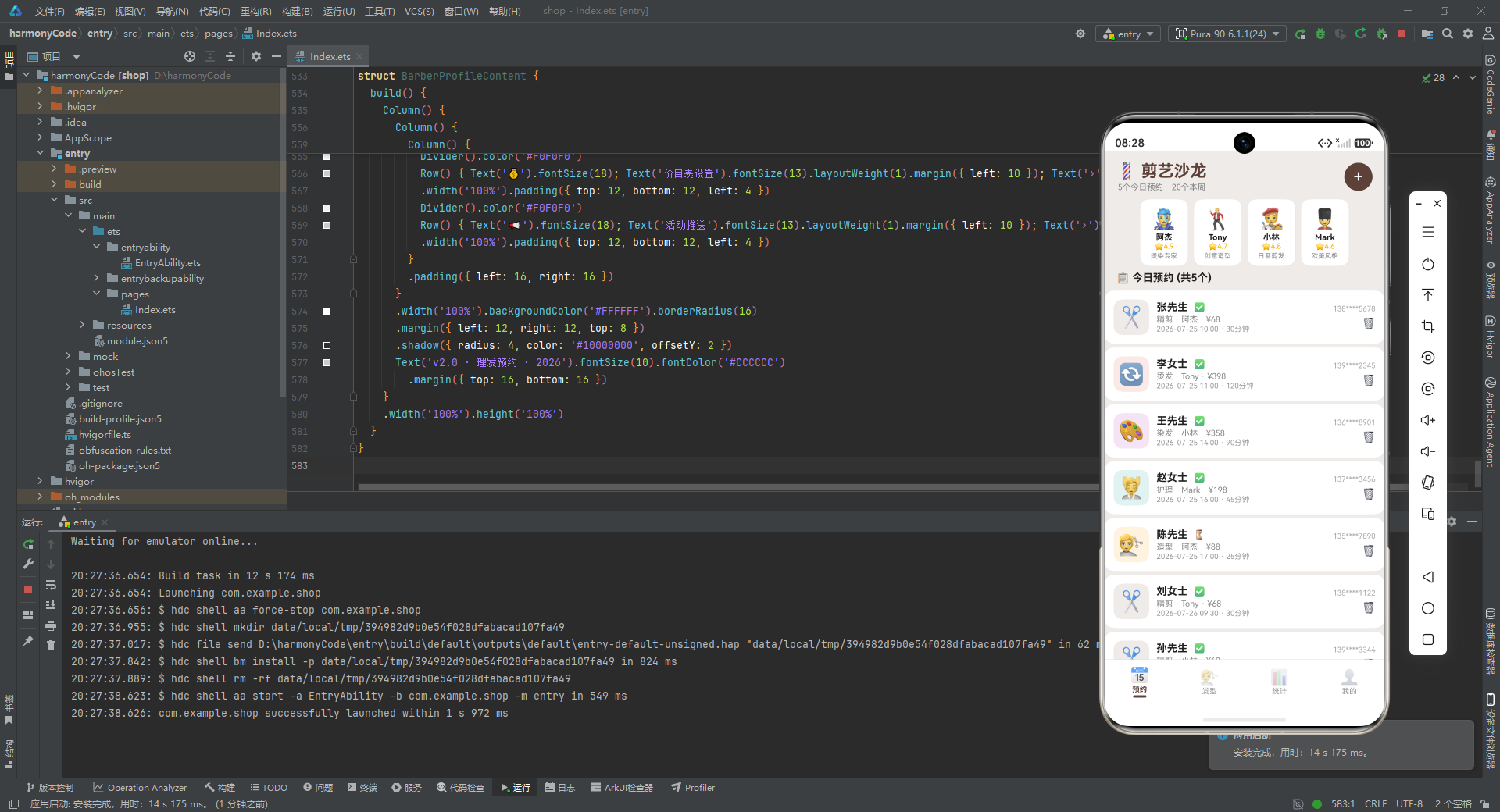
1. 单状态驱动的 Tab 路由:整个应用仅靠 BarberApp 组件中的一个 @State activeTab 变量驱动四个页面的切换,没有引入 Navigation 路由栈或页面跳转逻辑,保持了极简的导航架构。每个 Tab 页是一个独立的 @Component,组件之间零耦合,可独立开发和测试。
2. 配置与数据分离的三层架构:最底层是 interface 类型定义(数据契约),中间层是 const 配置常量和 mock 数据(数据源),上层是 @Component 组件(视图消费)。这种分层使得业务参数调整(如改价格、加服务)只需修改中间层常量,不影响视图代码。
3. @Builder 方法实现 UI 复用:应用中定义了 7 个 @Builder 方法(contentArea、tabItem、modalBg、addAppointmentModal、deleteModal、apptCard),将复杂的 UI 结构封装为可参数化的构建单元。特别是 modalBg 和 apptCard 通过参数传递实现了跨场景复用。
4. 自建模态弹窗替代系统组件:没有使用 ArkTS 的 CustomDialog 或 AlertDialog,而是通过 Stack 层叠 + position 绝对定位 + zIndex 层级 + 半透明遮罩,手工搭建了视觉效果完全可控的模态弹窗,获得了圆角、阴影、自定义布局等全部定制自由度。
5. 色彩编码体系贯穿全局:每项服务、每位发型师、每个 Tab 都拥有专属主题色,这些颜色从配置常量出发,流经表单选择、卡片展示、统计图表,在应用各个角落保持一致,形成了强烈的视觉识别系统。配色主调为温暖的棕褐色系,契合理发沙龙的行业气质。
6. 纯组件手绘数据可视化:统计页面的条形图完全使用 Column 宽度百分比 + 颜色填充实现,不依赖任何第三方图表库,展现了 ArkTS 原生布局组件在轻量级数据可视化场景下的表现力。
这个应用虽然使用 mock 数据且部分交互(如确认预约、删除预约)尚未接入真实数据变更逻辑,但其 UI 架构、状态管理范式、组件拆分策略和视觉设计体系已经具备了一个生产级应用的骨架。将 mock 数据替换为真实 API 调用、将 TextInput 升级为 DatePicker/TimePicker、为管理菜单项接入功能页面后,即可演进为一个完整的沙龙预约管理系统。

讨论HarmonyOS开发技术,专注于API与组件、DevEco Studio、测试、元服务和应用上架分发等。
更多推荐
 4
4 0
0- 0


 已为社区贡献85条内容

所有评论(0)