基于HarmonyOS API 24实战解析房屋装修管理应用Scroll+Column 纵向滚动;双层 Row 进度条;三行结构(标签+进度+数据)实现预算 Tab切换
引言:装修管理数字化的鸿蒙实践
在现代家庭生活中,房屋装修是一项涉及多工种协作、长周期推进、大额资金流转的复杂工程项目。从前期设计、墙体拆改,到水电改造、泥瓦铺设,再到木工制作、油漆喷涂、安装调试以及最终的软装布置,每一个阶段都需要严密的进度把控与精细的预算管理。传统的纸质记账、微信群沟通方式已经难以满足现代装修业主对信息透明化、进度可视化、预算可控化的诉求。正是在这样的背景下,基于 HarmonyOS(鸿蒙操作系统)ArkTS 声明式开发范式构建的"房屋装修管理"应用应运而生。
本应用是一款面向终端业主的轻量级装修管理工具,采用华为 HarmonyOS ArkUI 声明式 UI 框架开发。ArkTS 是在 TypeScript 基础上扩展而来的编程语言,它继承了 TypeScript 的静态类型检查能力,同时融入了 ArkUI 的声明式 UI 范式,开发者只需描述界面"是什么",框架便会自动处理界面如何变化。这种范式极大降低了状态同步的心智负担,让开发者能将注意力集中在业务逻辑本身。
从技术栈角度来看,本应用涵盖了以下 ArkTS 核心能力:其一,使用 interface 定义纯数据结构,实现接口契约式的类型约束;其二,使用 @Observed 装饰器将普通类升级为可观察对象,配合 @State 装饰器实现组件内响应式状态管理;其三,使用 @Builder 装饰器封装可复用的 UI 构建逻辑,实现视图层的高度模块化;其四,使用 enum 枚举类型对 Tab 页索引进行强类型约束,避免魔法数字带来的维护陷阱;其五,综合运用 Column、Row、Stack、Scroll、ForEach 等核心容器组件构建复杂的多层级布局。此外,应用还通过 position、zIndex、shadow、borderRadius 等样式属性实现了一个不依赖系统原生弹窗的自定义弹窗体系。
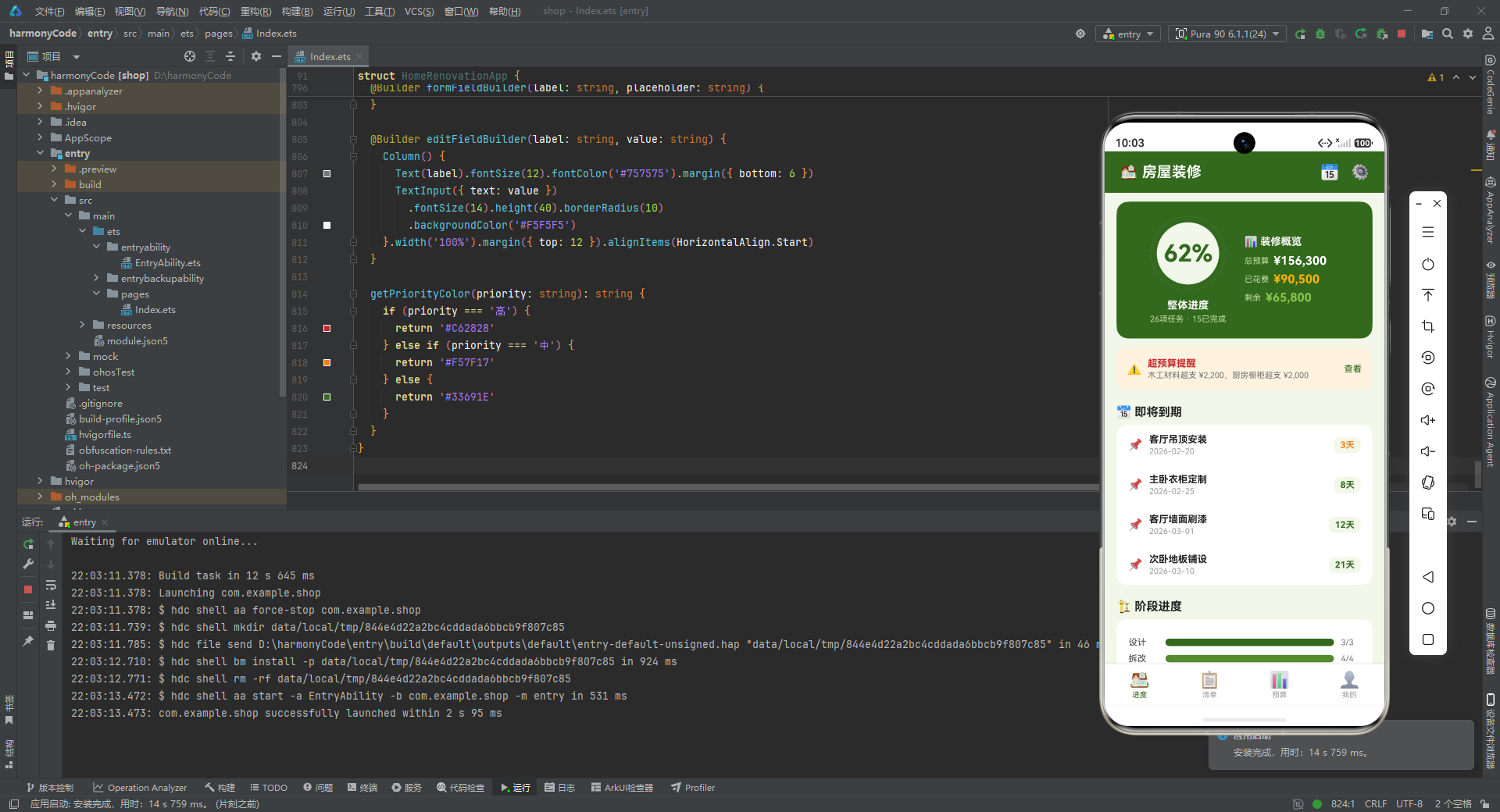
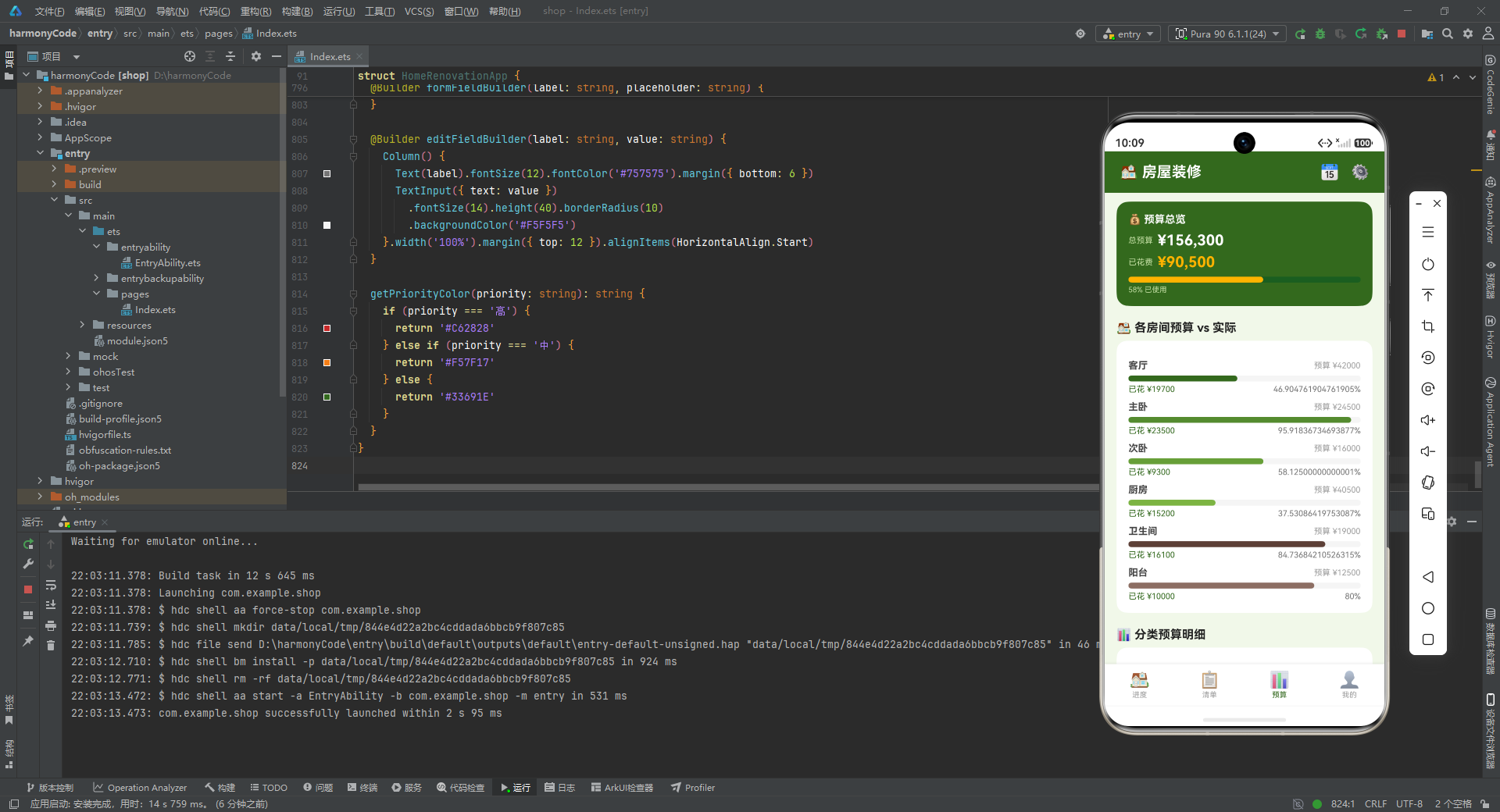
从产品功能角度来看,应用划分为四大功能 Tab:进度 Tab 提供整体进度环形展示、预算概览、超预算提醒、即将到期任务列表以及各阶段进度条;清单 Tab 提供按阶段筛选的任务列表,并支持新增、编辑、删除任务;预算 Tab 提供预算总览、各房间预算与实际花费对比、分类预算明细以及超预算项目告警;我的 Tab 提供项目信息卡片、统计数据、施工团队列表以及功能菜单入口。四大模块各司其职,共同构成了一个完整的装修管理闭环。
本文将严格按照源码顺序,逐段拆解每一个数据结构、每一个状态变量、每一个构建函数,深入分析其设计思路、实现细节和工程价值,帮助读者真正理解 ArkTS 声明式开发的思想精髓。
一、数据模型层:接口契约与可观察对象
1.1 首行注释与配色规范
// 房屋装修进度 — 灰绿 #33691E | 大地 #5D4037 | 背景 #F1F8E9
源码的第一行是一句注释,看似不起眼,实则蕴含了整个应用的视觉设计语言。这里明确声明了应用的三种核心配色:灰绿色 #33691E 作为主品牌色,传递出沉稳、自然、与"家"的温馨感相契合的视觉印象;大地色 #5D4037 作为辅助色,用于木工、安装等阶段的标识,呼应装修中木材与泥土的质感;浅绿背景色 #F1F8E9 作为全局底色,营造出柔和、舒适的浏览体验。这种在文件顶部统一声明配色方案的做法,是一种值得推广的工程实践,它让后续开发者在阅读任何一处颜色值时,都能快速回溯到设计源头,避免了散落各处的"幽灵色值"带来的维护成本。
1.2 RenovationTask 接口:装修任务的完整数据契约
interface RenovationTask {
  id: number
  name: string
  room: string
  phase: string
  cost: number
  budget: number
  actualCost: number
  assignee: string
  deadline: string
  isCompleted: boolean
  priority: string
  notes: string
}
RenovationTask 接口定义了一个装修任务的完整数据结构,这是整个应用最核心的数据契约。接口中包含 12 个字段,覆盖了任务管理的所有维度:id 作为唯一标识,便于列表渲染时的 key 管理与编辑删除操作的任务定位;name 是任务的可读名称,直接展示在列表主标题位置;room 标识任务所属房间,用于按空间维度进行统计与筛选;phase 标识任务所属装修阶段,是阶段进度统计的关键依据;cost、budget、actualCost 三个数值字段分别记录预估成本、预算金额与实际花费,三者之间的差异是预算超支告警的数据来源;assignee 记录负责人,用于施工团队统计与任务派单追溯;deadline 以字符串形式存储截止日期,便于直接展示同时为后续日期计算预留扩展空间;isCompleted 布尔值标记完成状态,是进度统计的核心字段;priority 以字符串存储优先级(‘高’/‘中’/‘低’),配合优先级配置表实现颜色映射;notes 存储备注信息,承载任务执行过程中的补充说明。
使用 interface 而非 class 来定义这一纯数据结构,是 ArkTS 推荐的做法。接口只描述形状不包含实现逻辑,适用于这种"数据载体"场景,编译后不会产生额外的运行时开销,同时也方便在多处复用同一类型约束。
1.3 PhaseProgress 接口:阶段进度统计模型
interface PhaseProgress {
  phase: string
  total: number
  completed: number
  percentage: number
  color: string
}
PhaseProgress 接口用于描述单个装修阶段的进度统计信息。phase 字段存储阶段名称(如"设计"、"拆改"等);total 与 completed 分别记录该阶段的总任务数与已完成任务数;percentage 是预计算好的百分比数值,避免了在 UI 渲染时反复进行除法运算;color 字段为每个阶段绑定一个专属颜色,使得进度条在视觉上具有层次感与区分度。这种将展示属性(颜色)与业务数据(任务数)合并存储的设计,在小型应用中可以减少 UI 层的映射逻辑,提升代码可读性。
1.4 RoomCost 接口:房间维度成本模型
interface RoomCost {
  room: string
  budget: number
  actual: number
  color: string
}
RoomCost 接口定义了按房间维度统计的成本数据结构。与 PhaseProgress 类似,它同样采用"业务数据+展示属性"的混合模式,room 标识房间名称,budget 与 actual 分别记录该房间的预算总额与实际花费,color 为该房间的进度条指定颜色。这一数据结构服务于预算 Tab 中的"各房间预算 vs 实际"模块,让业主能直观看到每个空间的花费占比与超支情况。
1.5 BudgetItem 接口:分类预算明细模型
interface BudgetItem {
  category: string
  budget: number
  actual: number
  color: string
}
BudgetItem 接口定义了按费用类别维度统计的预算明细数据结构。category 字段存储费用类别名称(如"设计费"、"水电材料"等),budget 与 actual 分别记录该类别的预算与实际支出,color 用于进度条着色。这一结构与 RoomCost 高度相似,体现了"按不同维度切分预算"这一业务需求的统一抽象。
1.6 TabConfig 与 PriorityConfig 接口:配置项模型
interface TabConfig {
  index: number
  label: string
  icon: string
}

interface PriorityConfig {
  level: string
  color: string
}
TabConfig 接口用于描述底部导航栏的配置项,包含 Tab 索引、显示文字与图标(使用 Emoji 字符)。PriorityConfig 接口用于描述优先级与颜色的映射关系。这两个接口的存在体现了"数据驱动 UI"的设计思想:导航栏的项数与内容不是硬编码在 build 方法中,而是由 tabConfigs 数组动态决定;优先级的颜色也不是散落在各处的 if-else 判断,而是统一收敛到 priorityConfigs 配置表中。这种做法使得后续新增 Tab 或调整优先级颜色时,只需修改数据源而无需改动 UI 逻辑。
1.7 @Observed TaskModel 类:可观察的任务模型
@Observed
class TaskModel {
  id: number
  name: string
  room: string
  phase: string
  cost: number
  budget: number
  actualCost: number
  assignee: string
  deadline: string
  isCompleted: boolean
  priority: string
  notes: string

  constructor(task: RenovationTask) {
    this.id = task.id
    this.name = task.name
    // ...其余字段赋值
  }
}
TaskModel 类使用 @Observed 装饰器修饰,这是 ArkTS 状态管理体系中的关键一环。@Observed 的作用是将一个普通类标记为"可观察对象",使得该类实例的属性变化能够被框架追踪并触发依赖该属性的 UI 重新渲染。需要注意的是,@Observed 本身只负责"声明可观察",真正的响应式更新还需要配合 @ObjectLink 或在 @State 数组中使用才能完整生效。
这里 TaskModel 的字段与 RenovationTask 接口完全一致,但通过构造函数接收一个 RenovationTask 类型的参数进行初始化。这种"接口定义数据契约 + 类承载可观察能力"的分层设计,既保证了类型安全,又获得了响应式能力。在实际项目中,这种模式常用于需要深度修改对象属性的场景:当任务的 isCompleted、actualCost 等字段被修改时,如果直接使用普通对象,UI 不会自动刷新;而使用 @Observed 修饰的类实例,则能确保属性变更驱动视图更新。
1.8 RenoTab 枚举:Tab 索引的强类型约束
enum RenoTab {
  Progress,
  Checklist,
  Budget,
  Mine
}
RenoTab 枚举定义了四个 Tab 页的索引值,默认从 0 开始递增。使用枚举而非魔法数字(如 0、1、2、3)来标识 Tab,是工程化的基本要求。这样做的好处是双重的:在编写代码时,RenoTab.Progress 比 0 具有更强的自描述性,开发者一眼就能明白语义;在维护代码时,如果需要调整 Tab 顺序或新增 Tab,只需修改枚举定义,所有引用处自动更新,避免了遗漏。这一枚举在 @State currentTab 的初始值设置、build() 中的条件分支判断、bottomTabBar 的选中态判断等多处被使用,是贯穿整个应用导航逻辑的核心常量。
二、主组件状态与数据初始化
2.1 @Entry @Component 装饰器与状态变量声明
@Entry
@Component
struct HomeRenovationApp {
  @State currentTab: number = RenoTab.Progress
  @State showAddModal: boolean = false
  @State showEditModal: boolean = false
  @State showDeleteModal: boolean = false
  @State editIndex: number = 0
  @State deleteIndex: number = 0
  @State selectedPhase: string = '全部'
  @State overallProgress: number = 62
@Entry 装饰器标志着 HomeRenovationApp 是应用的入口组件,即页面树的根节点。@Component 装饰器声明这是一个自定义组件,可以被复用和组合。这两个装饰器联用是 ArkTS 页面开发的标准范式。
组件内部声明了 8 个 @State 状态变量,每一个都承担着明确的职责。currentTab 记录当前激活的 Tab 索引,初始值为 RenoTab.Progress(即 0),它的变化会驱动 build() 中的条件分支切换不同的 Tab 内容视图。showAddModal、showEditModal、showDeleteModal 三个布尔值分别控制三种弹窗(新增、编辑、删除确认)的显示与隐藏,这种"一弹窗一状态"的设计使得弹窗管理清晰独立,互不干扰。editIndex 与 deleteIndex 记录当前正在编辑或删除的任务在数组中的索引,它们在点击任务卡片上的编辑/删除按钮时被赋值,随后弹窗通过这一索引读取对应任务数据进行展示。selectedPhase 记录清单 Tab 中当前选中的阶段筛选条件,初始值为 ‘全部’,它的变化会驱动任务列表的过滤展示(虽然当前实现中筛选逻辑更多是视觉态切换)。overallProgress 记录整体进度百分比,初始值 62,用于进度 Tab 顶部的环形进度展示。
@State 装饰器的核心机制是:当被装饰的变量值发生变化时,框架会自动重新调用 build() 方法中依赖该变量的部分,实现 UI 的局部刷新。这种"状态驱动视图"的模式,让开发者无需手动调用 setText、setVisibility 等 DOM 操作方法,极大简化了 UI 同步逻辑。
2.2 tasks 数据源:装修任务全集
private tasks: TaskModel[] = [
  new TaskModel({ id: 1, name: '客厅水电改造', room: '客厅', phase: '水电', cost: 8500, budget: 9000, actualCost: 8500, assignee: '张师傅', deadline: '2026-01-15', isCompleted: true, priority: '高', notes: '已完成管线布局' }),
  // ...共26条任务
  new TaskModel({ id: 26, name: '阳台封闭工程', room: '阳台', phase: '拆改', cost: 6800, budget: 7000, actualCost: 6800, assignee: '李师傅', deadline: '2026-01-22', isCompleted: true, priority: '高', notes: '无框玻璃' })
]
tasks 数组是整个应用的核心数据源,包含了 26 条装修任务记录,覆盖了设计、拆改、水电、泥瓦、木工、油漆、安装、软装全部 8 个阶段,涉及客厅、主卧、次卧、厨房、卫生间、阳台、全屋 7 个空间。每条任务都通过 new TaskModel({...}) 创建实例,传入的对象符合 RenovationTask 接口契约。
这组数据的设计颇有用心之处:任务 ID 从 1 到 26 连续递增,便于编辑删除时通过 id - 1 快速定位数组索引;任务的时间线从 2026-01-05 延伸到 2026-04-05,覆盖了约三个月的装修周期;部分任务存在超预算情况(如厨房瓷砖铺贴预算 10000 实际 12000、主卧衣柜定制预算 15000 实际 18000),为预算 Tab 的超支告警模块提供了真实数据支撑;任务负责人涵盖张师傅、李师傅、王师傅、赵师傅、陈师傅、刘师傅、设计师周、业主、保洁公司 9 个角色,为"我的"Tab 的施工团队统计提供了数据基础。这种将演示数据与功能模块紧密对应的做法,使得应用在无需后端接口的情况下就能呈现出完整的业务闭环。
2.3 phaseProgress 数据源:阶段进度统计
private phaseProgress: PhaseProgress[] = [
  { phase: '设计', total: 3, completed: 3, percentage: 100, color: '#33691E' },
  { phase: '拆改', total: 4, completed: 4, percentage: 100, color: '#558B2F' },
  { phase: '水电', total: 3, completed: 3, percentage: 100, color: '#689F38' },
  { phase: '泥瓦', total: 5, completed: 5, percentage: 100, color: '#7CB342' },
  { phase: '木工', total: 2, completed: 0, percentage: 0, color: '#9CCC65' },
  { phase: '油漆', total: 2, completed: 0, percentage: 0, color: '#C5E1A5' },
  { phase: '安装', total: 5, completed: 0, percentage: 0, color: '#5D4037' },
  { phase: '软装', total: 4, completed: 0, percentage: 0, color: '#8D6E63' }
]
phaseProgress 数组按装修的自然顺序列出了 8 个阶段的进度统计。可以看出,前四个阶段(设计、拆改、水电、泥瓦)已 100% 完成,后四个阶段(木工、油漆、安装、软装)尚未开始,这与 tasks 数组中各任务的 isCompleted 状态保持一致,呈现出"前期已完成、中期进行中、后期未开始"的真实装修节奏。
颜色配置上,前四个完成阶段使用了从深绿到浅绿的渐变色系(#33691E → #558B2F → #689F38 → #7CB342),后四个未完成阶段则切换为浅绿与大地棕色系,形成视觉上的"已完成 vs 未开始"区分。这种通过色彩明度与色相变化传递业务状态的设计手法,比单纯的文字描述更加直观高效。
2.4 roomCosts 与 budgetItems 数据源:多维度预算统计
private roomCosts: RoomCost[] = [
  { room: '客厅', budget: 42000, actual: 19700, color: '#33691E' },
  // ...6个房间
]

private budgetItems: BudgetItem[] = [
  { category: '设计费', budget: 10500, actual: 10500, color: '#33691E' },
  // ...8个类别
]
roomCosts 按 6 个房间维度统计预算与实际花费,budgetItems 按 8 个费用类别维度统计预算与实际花费。两组数据从不同切面对同一批装修支出进行了汇总,让业主既能看到"哪个房间花钱多",也能看到"钱花在了什么类别"。这种多维度统计的设计,是装修预算管理类应用的核心价值所在。值得注意的是,部分类别的 actual 为 0(如油漆材料、安装费、软装费),代表该类别尚未发生支出,这与任务数据的进度状态保持一致。
2.5 tabConfigs、phaseFilters、priorityConfigs 配置表
private tabConfigs: TabConfig[] = [
  { index: RenoTab.Progress, label: '进度', icon: '🏠' },
  { index: RenoTab.Checklist, label: '清单', icon: '📋' },
  { index: RenoTab.Budget, label: '预算', icon: '📊' },
  { index: RenoTab.Mine, label: '我的', icon: '👤' }
]

private phaseFilters: string[] = ['全部', '设计', '拆改', '水电', '泥瓦', '木工', '油漆', '安装', '软装']

private priorityConfigs: PriorityConfig[] = [
  { level: '高', color: '#C62828' },
  { level: '中', color: '#F57F17' },
  { level: '低', color: '#33691E' }
]
这三个配置表分别服务于底部导航栏、清单筛选条、优先级颜色映射。tabConfigs 将 Tab 的索引、文字、图标三元组绑定在一起,供 bottomTabBar 通过 ForEach 动态渲染;phaseFilters 列出了 9 个筛选选项(含"全部"),供清单 Tab 的横向滚动筛选条使用;priorityConfigs 定义了三个优先级对应的颜色(高=红色、中=橙色、低=绿色),通过 getPriorityColor 方法查询。这种"配置即数据"的模式,使得 UI 的可配置性与可扩展性大幅提升。
三、build() 主入口:页面骨架与弹窗层
3.1 build() 方法的整体结构
build() {
  Column() {
    Column() {
      // 顶部标题栏
      Row() {
        Text('🏠 房屋装修').fontSize(20).fontWeight(FontWeight.Bold).fontColor('#FFFFFF')
        Row().layoutWeight(1)
        Text('📅').fontSize(20).fontColor('#FFFFFF').margin({ right: 16 })
        Text('⚙️').fontSize(20).fontColor('#FFFFFF')
      }
      .width('100%').height(56).padding({ left: 20, right: 20 })
      .backgroundColor('#33691E').alignItems(VerticalAlign.Center)

      // 内容区域
      Column() {
        if (this.currentTab === RenoTab.Progress) {
          this.progressTab()
        } else if (this.currentTab === RenoTab.Checklist) {
          this.checklistTab()
        } else if (this.currentTab === RenoTab.Budget) {
          this.budgetTab()
        } else {
          this.mineTab()
        }
      }.layoutWeight(1).width('100%')

      // 底部导航栏
      this.bottomTabBar()
    }
    .width('100%').height('100%').backgroundColor('#F1F8E9')

    // 弹窗层
    if (this.showAddModal) {
      this.addModal()
    }
    if (this.showEditModal) {
      this.editModal()
    }
    if (this.showDeleteModal) {
      this.deleteModal()
    }
  }
}
build() 方法是 ArkTS 组件的渲染入口,它返回一个组件树,框架根据这棵树进行界面绘制。本应用的 build() 采用"外层 Column 包裹主体 + 弹窗层"的两段式结构。
外层 Column 内嵌一个内层 Column,内层 Column 又分为三部分:顶部标题栏、中间内容区域、底部导航栏。这种"上中下"三段式布局是移动端应用的经典骨架。顶部标题栏是一个 Row,左侧是应用名称"🏠 房屋装修",中间用 Row().layoutWeight(1) 作为弹性占位将右侧的日历图标和设置图标推向右端,这种"弹性占位"技巧是 ArkUI 中实现两端对齐的标准做法。标题栏背景色采用主品牌色 #33691E,高度 56vp,符合移动端状态栏的触达习惯。
中间内容区域通过 if-else if-else 条件分支,根据 currentTab 的值动态切换四个 Tab 的构建方法。这种基于条件渲染的 Tab 切换方式,相比 Tabs 容器组件,灵活性更高但需要自行管理切换状态。layoutWeight(1) 让内容区域占据标题栏与底部导航栏之间的所有剩余空间。
底部导航栏调用 this.bottomTabBar() 构建,作为内层 Column 的最后一个子元素,固定在页面底部。
弹窗层是 build() 方法的第二段,三个 if 条件分别控制三种弹窗的渲染。这些弹窗与主体内容平级地放在外层 Column 中,通过 position 绝对定位与 zIndex(999) 实现浮层效果。这种将弹窗与主内容解耦的设计,使得弹窗的显示逻辑清晰独立,且不影响主体布局的流式排列。
四、底部导航栏 bottomTabBar
@Builder bottomTabBar() {
  Row() {
    ForEach(this.tabConfigs, (item: TabConfig) => {
      Column() {
        Text(item.icon).fontSize(22)
        Text(item.label).fontSize(10).fontColor(this.currentTab === item.index ? '#33691E' : '#9E9E9E')
          .margin({ top: 2 })
      }.alignItems(HorizontalAlign.Center).layoutWeight(1)
      .onClick(() => { this.currentTab = item.index })
    }, (item: TabConfig) => item.index.toString())
  }
  .width('100%').height(56).backgroundColor('#FFFFFF')
  .alignItems(VerticalAlign.Center)
  .shadow({ radius: 8, color: '#1A000000', offsetY: -2 })
}
bottomTabBar 是底部导航栏的构建方法,使用 @Builder 装饰器封装。@Builder 的作用是将一段 UI 构建逻辑封装为可复用的函数,它与方法调用者的 this 上下文绑定,能够直接访问组件的状态变量。
导航栏的主体是一个 Row,内部通过 ForEach 遍历 tabConfigs 数组动态生成 4 个 Tab 项。每个 Tab 项是一个 Column,垂直排列图标(Emoji 字符)与文字标签。layoutWeight(1) 让 4 个 Tab 项均分导航栏宽度,实现等距分布。
选中态的视觉反馈通过三元运算符实现:当 this.currentTab === item.index 时,文字颜色为主品牌色 #33691E;否则为灰色 #9E9E9E。这种基于状态比较的样式切换,是声明式 UI 的典型写法——开发者只需声明"在什么条件下显示什么样式",框架自动处理样式更新。
ForEach 的第三个参数是键值生成函数,返回 item.index.toString() 作为每个项的唯一标识。这一参数对于列表的 diff 性能至关重要,当数据源变化时,框架通过 key 判断哪些项需要新增、删除、更新,避免全量重建。
onClick 事件处理器将 currentTab 切换为当前点击项的索引,触发 build() 重新执行,进而切换内容区域的 Tab 视图。导航栏的阴影效果通过 shadow 属性实现,offsetY: -2 让阴影向上投射,营造出导航栏悬浮于内容之上的层次感。
五、进度 Tab:进度概览与多维统计
5.1 progressTab 整体结构
@Builder progressTab() {
  Scroll() {
    Column() {
      // 总进度环形
      Row() { ... }
      // 超预算提醒
      Row() { ... }
      // 即将到期
      Row() { ... }
      Column() { ... }
      // 阶段进度
      Row() { ... }
      Column() { ... }
    }.padding({ left: 16, right: 16, top: 12, bottom: 16 })
  }.layoutWeight(1).scrollBar(BarState.Off)
}
progressTab 是进度 Tab 的构建方法,整体采用 Scroll 包裹 Column 的结构,使内容超出屏幕时可以纵向滚动。scrollBar(BarState.Off) 隐藏了滚动条,保持界面整洁。内层 Column 设置了 16vp 的左右内边距与 12vp 的顶部内边距,让内容与屏幕边缘保持舒适间距。
进度 Tab 包含四个主要模块:总进度环形与预算概览、超预算提醒、即将到期任务列表、阶段进度条。下面逐一分析。
5.2 总进度环形与预算概览模块
Row() {
  Column() {
    Stack() {
      Text(this.overallProgress + '%').fontSize(32).fontWeight(FontWeight.Bold).fontColor('#33691E')
    }.width(100).height(100).backgroundColor('#F1F8E9').borderRadius(50)
    .border({ width: 8, color: '#33691E' })
    .align(Alignment.Center)

    Column() {
      Text('整体进度').fontSize(14).fontWeight(FontWeight.Bold).fontColor('#FFFFFF')
      Text('26项任务 · 15已完成').fontSize(11).fontColor('#C5E1A5').margin({ top: 4 })
    }.margin({ top: 12 }).alignItems(HorizontalAlign.Center)
  }.alignItems(HorizontalAlign.Center).layoutWeight(1)

  Column() {
    Text('📊 装修概览').fontSize(14).fontWeight(FontWeight.Bold).fontColor('#FFFFFF')
    Row() {
      Text('总预算').fontSize(11).fontColor('#C5E1A5')
      Text('¥156,300').fontSize(16).fontWeight(FontWeight.Bold).fontColor('#FFFFFF').margin({ left: 6 })
    }.margin({ top: 8 })
    Row() {
      Text('已花费').fontSize(11).fontColor('#C5E1A5')
      Text('¥90,500').fontSize(16).fontWeight(FontWeight.Bold).fontColor('#FFB300').margin({ left: 6 })
    }.margin({ top: 6 })
    Row() {
      Text('剩余').fontSize(11).fontColor('#C5E1A5')
      Text('¥65,800').fontSize(16).fontWeight(FontWeight.Bold).fontColor('#8BC34A').margin({ left: 6 })
    }.margin({ top: 6 })
  }.layoutWeight(1).alignItems(HorizontalAlign.Start)
}
.width('100%').padding(20).backgroundColor('#33691E').borderRadius(16).alignItems(VerticalAlign.Center)
这一模块位于进度 Tab 顶部,是一个左右分栏的卡片式布局,整体背景为主品牌色 #33691E,圆角 16vp,内边距 20vp。
左侧是一个"伪环形进度"展示:使用 Stack 容器叠加一个居中的百分比文字,外层通过 width(100).height(100).borderRadius(50) 构建一个圆形,并设置 8vp 宽度的边框模拟进度环。严格来说,这并非真正的环形进度条(真正的环形进度需要使用 Progress 组件的 type: ProgressType.Ring),而是一个"圆形边框 + 居中文字"的视觉模拟。这种做法在原型阶段或简单展示场景下是可接受的,它以极低的实现成本达到了接近环形进度的视觉效果。下方是"整体进度"标题与"26项任务 · 15已完成"的副文本,使用浅绿色 #C5E1A5 与白色形成层次。
右侧是"装修概览"模块,垂直排列三行预算数据:总预算、已花费、剩余。三行数据采用"标签 + 数值"的横向布局,标签使用浅绿色小字,数值使用白色加粗大字。已花费数值使用橙色 #FFB300,剩余数值使用浅绿色 #8BC34A,通过色彩区分"已支出"与"可用"两种资金状态,符合用户对"花钱=警示色、余钱=安全色"的直觉认知。
5.3 超预算提醒模块
Row() {
  Text('⚠️').fontSize(16).margin({ right: 8 })
  Column() {
    Text('超预算提醒').fontSize(13).fontWeight(FontWeight.Bold).fontColor('#C62828')
    Text('木工材料超支 ¥2,200,厨房橱柜超支 ¥2,000').fontSize(11).fontColor('#757575').margin({ top: 2 })
  }.layoutWeight(1).alignItems(HorizontalAlign.Start)
  Text('查看').fontSize(12).fontColor('#33691E')
}.width('100%').padding(14).backgroundColor('#FFF3E0').borderRadius(12).margin({ top: 12 })
超预算提醒模块采用浅橙色背景 #FFF3E0(Material Design 的警告背景色),圆角 12vp,顶部外边距 12vp 与上方卡片保持间距。左侧是警告图标,中间是标题与详情,右侧是"查看"操作入口。标题使用红色 #C62828,详情使用灰色 #757575,形成"主信息醒目、辅助信息低调"的层次。这种告警卡片的设计模式,在装修、财务、健康等需要提醒用户关注异常的应用中非常常见。
5.4 即将到期任务列表
Row() {
  Text('📅 即将到期').fontSize(16).fontWeight(FontWeight.Bold).fontColor('#212121')
}.width('100%').margin({ top: 20, bottom: 8 })

Column() {
  this.deadlineItemBuilder('客厅吊顶安装', '2026-02-20', '3天', '#F57F17')
  this.deadlineItemBuilder('主卧衣柜定制', '2026-02-25', '8天', '#33691E')
  this.deadlineItemBuilder('客厅墙面刷漆', '2026-03-01', '12天', '#33691E')
  this.deadlineItemBuilder('次卧地板铺设', '2026-03-10', '21天', '#F57F17')
}.width('100%').backgroundColor('#FFFFFF').borderRadius(14)
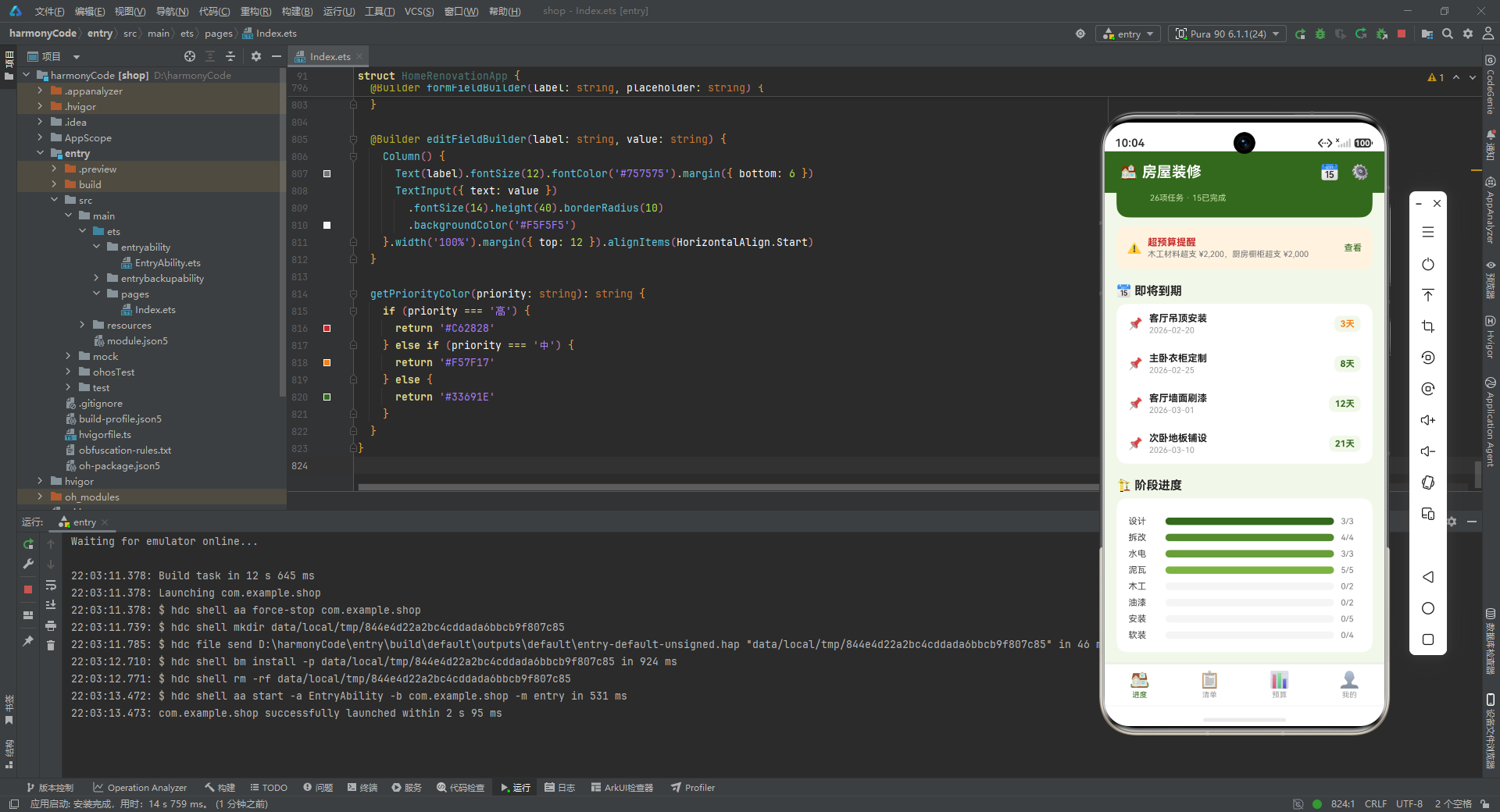
即将到期模块由一个标题行和一个白色卡片容器组成,卡片内通过四次调用 deadlineItemBuilder 渲染四条即将到期的任务。每条任务传入任务名称、截止日期、剩余天数、颜色四个参数。注意第一条"客厅吊顶安装"剩余 3 天,颜色为橙色 #F57F17 表示紧迫;其余任务剩余天数较多,颜色为绿色 #33691E 表示从容。这种通过颜色传递紧迫程度的设计,让用户无需细读数字就能快速识别需要优先关注的任务。
5.5 deadlineItemBuilder 构建
@Builder deadlineItemBuilder(name: string, date: string, remain: string, color: string) {
  Row() {
    Text('📌').fontSize(16).width(28)
    Column() {
      Text(name).fontSize(13).fontWeight(FontWeight.Bold).fontColor('#212121')
      Text(date).fontSize(11).fontColor('#9E9E9E').margin({ top: 2 })
    }.layoutWeight(1).alignItems(HorizontalAlign.Start)
    Text(remain).fontSize(12).fontColor(color).fontWeight(FontWeight.Bold)
      .backgroundColor('#F1F8E9').padding({ left: 8, right: 8, top: 4, bottom: 4 }).borderRadius(8)
  }.width('100%').padding({ left: 16, right: 16, top: 12, bottom: 12 }).alignItems(VerticalAlign.Center)
}
deadlineItemBuilder 是即将到期任务条目的构建方法,接收四个参数实现内容的动态填充。布局上是一个 Row:左侧是图钉图标,固定宽度 28vp;中间是任务名称与截止日期的纵向排列,使用 layoutWeight(1) 占据剩余空间;右侧是剩余天数标签,使用浅绿色背景胶囊样式。这种"图标-内容-标签"的三段式行布局,是列表项的经典结构,在通讯录、消息列表、待办事项等场景中广泛使用。
5.6 阶段进度与 phaseProgressBuilder
Row() {
  Text('🏗️ 阶段进度').fontSize(16).fontWeight(FontWeight.Bold).fontColor('#212121')
}.width('100%').margin({ top: 20, bottom: 8 })

Column() {
  this.phaseProgressBuilder(this.phaseProgress[0])
  // ...8个阶段
}.width('100%').padding(16).backgroundColor('#FFFFFF').borderRadius(14)

@Builder phaseProgressBuilder(item: PhaseProgress) {
  Row() {
    Text(item.phase).fontSize(12).fontColor('#424242').width(50)
    Row() {
      Column()
        .width(item.percentage + '%')
        .height(10)
        .backgroundColor(item.color)
        .borderRadius(5)
    }.layoutWeight(1).height(10).backgroundColor('#F5F5F5').borderRadius(5)
    Text(item.completed + '/' + item.total).fontSize(11).fontColor('#757575').width(36).textAlign(TextAlign.Center)
  }.width('100%').margin({ top: 8 }).alignItems(VerticalAlign.Center)
}
阶段进度模块展示 8 个装修阶段的完成进度。每行由三部分组成:左侧阶段名称(固定宽度 50vp)、中间进度条(layoutWeight(1) 弹性占据)、右侧完成数比值(固定宽度 36vp 居中对齐)。
进度条的实现颇具巧思:外层 Row 作为轨道,背景色 #F5F5F5(浅灰),高度 10vp,圆角 5vp;内层 Column 作为填充条,宽度通过 item.percentage + '%' 动态绑定百分比,背景色取自数据源的 color 字段,同样圆角 5vp。这种"外层轨道 + 内层填充"的双层结构,是手动实现进度条的标准做法,比使用 Progress 组件拥有更高的样式自定义自由度。
六、清单 Tab:任务列表与筛选
6.1 checklistTab 整体结构
@Builder checklistTab() {
  Column() {
    // 分类筛选
    Scroll() {
      Row() {
        ForEach(this.phaseFilters, (phase: string) => {
          Text(phase)
            .fontSize(12).fontColor(this.selectedPhase === phase ? '#FFFFFF' : '#33691E')
            .backgroundColor(this.selectedPhase === phase ? '#33691E' : '#E8F5E9')
            .padding({ left: 12, right: 12, top: 6, bottom: 6 })
            .borderRadius(16).margin({ right: 8 })
            .onClick(() => { this.selectedPhase = phase })
        }, (phase: string) => phase)
      }.padding({ left: 16, right: 16 })
    }.scrollable(ScrollDirection.Horizontal).scrollBar(BarState.Off).height(40)

    // 任务列表
    Scroll() {
      Column() {
        this.taskItemBuilder(this.tasks[0])
        // ...26条任务
        Row() {
          Text('➕ 添加新任务').fontSize(14).fontColor('#33691E').fontWeight(FontWeight.Bold)
        }.width('100%').height(48).justifyContent(FlexAlign.Center)
        .backgroundColor('#C5E1A5').borderRadius(12).margin({ top: 12 })
        .onClick(() => { this.showAddModal = true })
      }.padding({ left: 16, right: 16, top: 4, bottom: 16 })
    }.layoutWeight(1).scrollBar(BarState.Off)
  }.width('100%').height('100%')
}
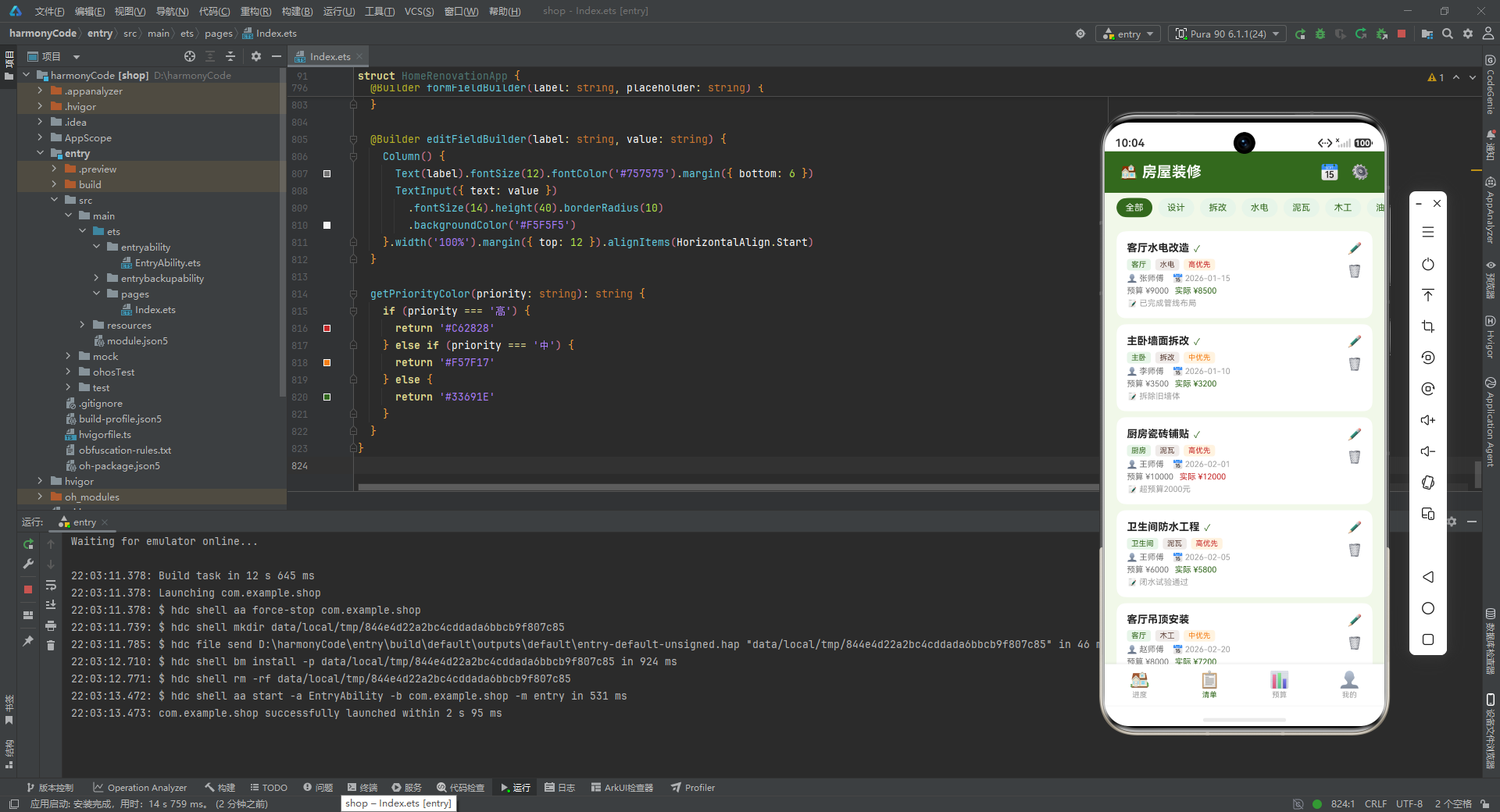
清单 Tab 采用"顶部横向筛选条 + 下方纵向任务列表"的两段式布局。
顶部的筛选条是一个横向滚动的 Scroll 容器,内部 Row 通过 ForEach 遍历 phaseFilters 数组生成 9 个筛选标签。每个标签是一个 Text,通过 selectedPhase === phase 的三元判断切换选中态:选中时白字绿底,未选中时绿字浅绿底。这种胶囊式筛选标签在移动端非常常见,用户通过点击切换筛选条件,onClick 中将 selectedPhase 赋值为当前点击的阶段名,触发 UI 重渲染。横向滚动的设计保证了在屏幕宽度有限的情况下,所有筛选项都能被访问到。
下方的任务列表是一个纵向滚动的 Scroll,内部 Column 依次调用 26 次 taskItemBuilder 渲染 26 条任务。列表底部是一个"添加新任务"按钮,点击后设置 showAddModal = true 触发新增弹窗。这种将新增入口放在列表末尾的设计,符合用户"看完列表后想要添加"的操作直觉。
6.2 taskItemBuilder 任务卡片
@Builder taskItemBuilder(task: TaskModel) {
  Row() {
    Column() {
      Row() {
        Text(task.name).fontSize(14).fontWeight(FontWeight.Bold).fontColor('#212121')
        if (task.isCompleted) {
          Text('✓').fontSize(12).fontColor('#33691E').margin({ left: 6 })
        }
      }.width('100%').alignItems(VerticalAlign.Center)

      Row() {
        Text(task.room).fontSize(10).fontColor('#33691E')
          .backgroundColor('#E8F5E9').padding({ left: 6, right: 6, top: 2, bottom: 2 }).borderRadius(4)
        Text(task.phase).fontSize(10).fontColor('#5D4037')
          .backgroundColor('#EFEBE9').padding({ left: 6, right: 6, top: 2, bottom: 2 })
          .borderRadius(4).margin({ left: 6 })
        Text(task.priority + '优先').fontSize(10).fontColor(this.getPriorityColor(task.priority))
          .backgroundColor('#FFF3E0').padding({ left: 6, right: 6, top: 2, bottom: 2 })
          .borderRadius(4).margin({ left: 6 })
      }.width('100%').margin({ top: 6 }).alignItems(VerticalAlign.Center)

      Row() {
        Text('👤 ' + task.assignee).fontSize(11).fontColor('#757575')
        Text('📅 ' + task.deadline).fontSize(11).fontColor('#9E9E9E').margin({ left: 12 })
      }.width('100%').margin({ top: 4 }).alignItems(VerticalAlign.Center)

      Row() {
        Text('预算 ¥' + task.budget).fontSize(11).fontColor('#757575')
        if (task.actualCost > 0) {
          Text('实际 ¥' + task.actualCost).fontSize(11)
            .fontColor(task.actualCost > task.budget ? '#C62828' : '#33691E')
            .margin({ left: 8 })
        }
      }.width('100%').margin({ top: 4 }).alignItems(VerticalAlign.Center)

      if (task.notes.length > 0) {
        Text('📝 ' + task.notes).fontSize(11).fontColor('#9E9E9E').margin({ top: 4 })
      }
    }.layoutWeight(1).alignItems(HorizontalAlign.Start)

    Column() {
      Text('✏️').fontSize(16).margin({ bottom: 12 })
        .onClick(() => {
          this.editIndex = task.id - 1
          this.showEditModal = true
        })
      Text('🗑️').fontSize(16)
        .onClick(() => {
          this.deleteIndex = task.id - 1
          this.showDeleteModal = true
        })
    }.alignItems(HorizontalAlign.Center)
  }
  .width('100%').padding(14).backgroundColor('#FFFFFF').borderRadius(12).margin({ top: 8 })
  .alignItems(VerticalAlign.Top)
}
taskItemBuilder 是清单 Tab 中最复杂的构建方法,它渲染一张完整的任务卡片。卡片整体是一个 Row,分为左右两部分:左侧是任务详情区(layoutWeight(1) 占据主要空间),右侧是操作按钮区(编辑、删除图标)。
左侧详情区纵向排列了五个信息层:第一层是任务名称与完成标记,已完成任务会在名称右侧显示一个绿色对勾;第二层是三个胶囊标签——房间(绿底)、阶段(棕底)、优先级(橙底),优先级标签的颜色通过 getPriorityColor(task.priority) 动态获取;第三层是负责人与截止日期,使用 Emoji 前缀增加视觉辨识度;第四层是预算与实际花费,实际花费仅在大于 0 时显示,且当 actualCost > budget 时文字变红,否则为绿色,实现了超预算的即时视觉告警;第五层是备注信息,仅当 notes.length > 0 时渲染,避免了空备注占位。
右侧操作区是两个图标按钮:编辑按钮点击后设置 editIndex 为 task.id - 1(通过 ID 反推数组索引)并打开编辑弹窗;删除按钮点击后设置 deleteIndex 并打开删除确认弹窗。这种"点击图标 → 记录索引 → 弹窗"的交互流程,是列表项操作的标准模式。
七、预算 Tab:多维度预算分析
7.1 budgetTab 整体结构
@Builder budgetTab() {
  Scroll() {
    Column() {
      // 预算总览
      Row() { ... }
      // 房间预算对比
      Row() { ... }
      Column() { ... }
      // 分类预算
      Row() { ... }
      Column() { ... }
      // 超预算项
      Row() { ... }
      Column() { ... }
    }.padding({ left: 16, right: 16, top: 12, bottom: 16 })
  }.layoutWeight(1).scrollBar(BarState.Off)
}
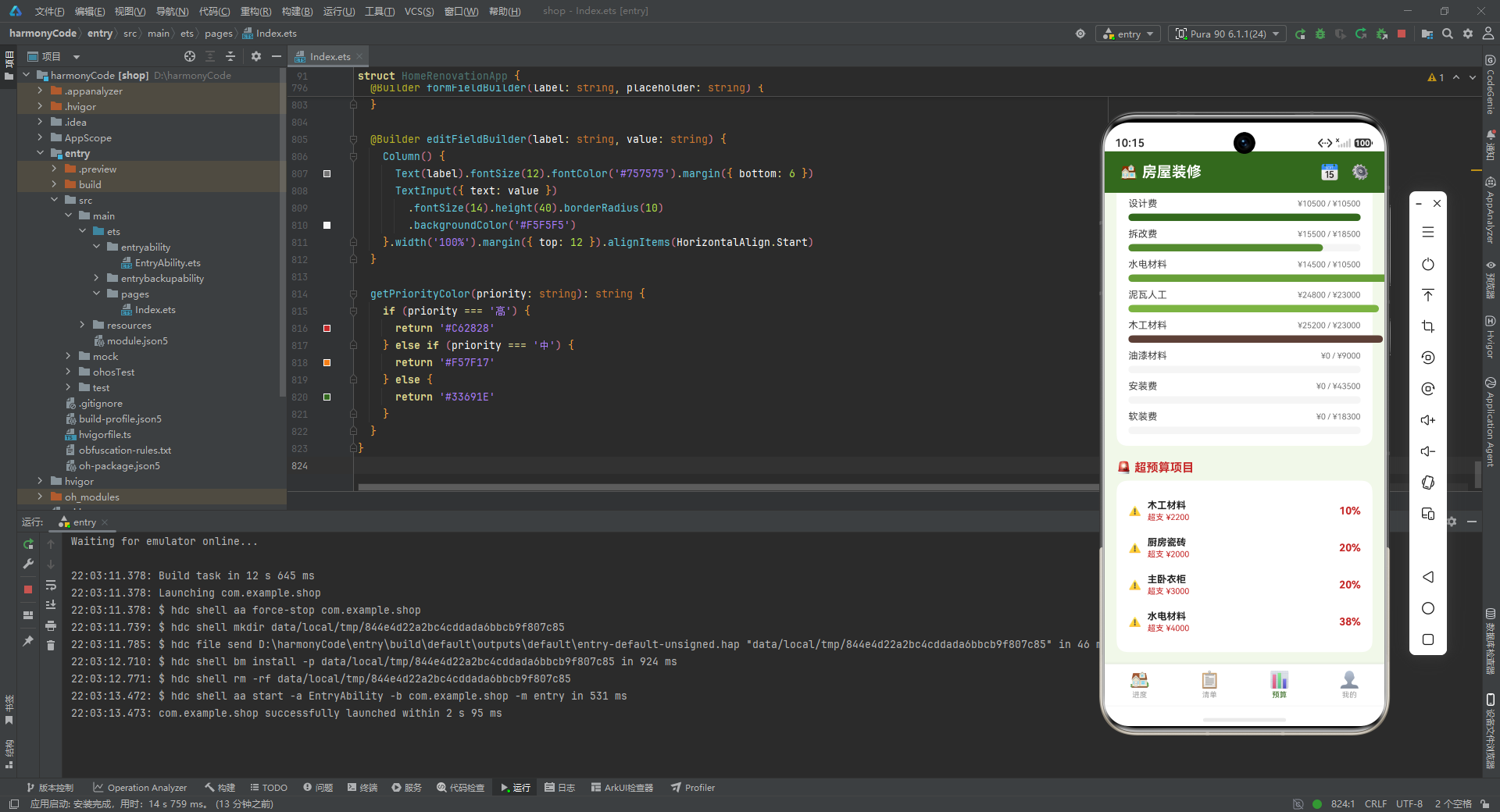
预算 Tab 采用纵向滚动的单列布局,包含四个模块:预算总览、各房间预算对比、分类预算明细、超预算项目。整体结构与进度 Tab 类似,但内容聚焦于资金维度。
7.2 预算总览模块
Row() {
  Column() {
    Text('💰 预算总览').fontSize(14).fontWeight(FontWeight.Bold).fontColor('#FFFFFF')
    Row() {
      Text('总预算').fontSize(11).fontColor('#C5E1A5')
      Text('¥156,300').fontSize(20).fontWeight(FontWeight.Bold).fontColor('#FFFFFF').margin({ left: 6 })
    }.margin({ top: 8 })
    Row() {
      Text('已花费').fontSize(11).fontColor('#C5E1A5')
      Text('¥90,500').fontSize(20).fontWeight(FontWeight.Bold).fontColor('#FFB300').margin({ left: 6 })
    }.margin({ top: 6 })
    // 预算使用进度条
    Row() {
      Column()
        .width('58%')
        .height(8)
        .backgroundColor('#FFB300')
        .borderRadius(4)
    }.width('100%').height(8).backgroundColor('#1B5E20').borderRadius(4).margin({ top: 8 })
    Text('58% 已使用').fontSize(10).fontColor('#C5E1A5').margin({ top: 4 })
  }.width('100%').alignItems(HorizontalAlign.Start).padding(16)
}.width('100%').backgroundColor('#33691E').borderRadius(16)
预算总览模块是一个全宽的深绿色卡片,内部纵向展示总预算、已花费两行数据,以及一个预算使用进度条。进度条的轨道使用深绿色 #1B5E20(比卡片背景更深的同色系),填充条使用橙色 #FFB300,宽度固定为 58%,下方标注"58% 已使用"。这种将关键指标与进度可视化结合的卡片设计,让用户一眼就能掌握预算使用全貌。相比进度 Tab 中的预算概览,这里的数值字号更大(20vp vs 16vp),强调了预算 Tab 的数据焦点。
7.3 roomCostBuilder 房间预算对比
@Builder roomCostBuilder(item: RoomCost) {
  Column() {
    Row() {
      Text(item.room).fontSize(13).fontColor('#424242').fontWeight(FontWeight.Bold)
      Row().layoutWeight(1)
      Text('预算 ¥' + item.budget).fontSize(11).fontColor('#9E9E9E')
    }.width('100%')
    Row() {
      Column()
        .width(item.actual / item.budget * 100 + '%')
        .height(8)
        .backgroundColor(item.color)
        .borderRadius(4)
    }.width('100%').height(8).backgroundColor('#F5F5F5').borderRadius(4).margin({ top: 6 })
    Row() {
      Text('已花 ¥' + item.actual).fontSize(11).fontColor(item.actual > item.budget ? '#C62828' : '#33691E')
      Row().layoutWeight(1)
      Text(item.actual / item.budget * 100 + '%').fontSize(11).fontColor('#757575')
    }.width('100%').margin({ top: 4 })
  }.width('100%').margin({ top: 10 })
}
roomCostBuilder 渲染单个房间的预算对比条目。布局分为三行:第一行是房间名称(左)与预算金额(右),中间用 Row().layoutWeight(1) 弹性占位实现两端对齐;第二行是进度条,宽度通过 item.actual / item.budget * 100 + '%' 动态计算实际花费占预算的百分比;第三行是已花金额(左)与百分比数值(右),已花金额在超预算时变红。
这种"标签行 + 进度条 + 数据行"的三行结构,与 phaseProgressBuilder 的"标签 + 进度条 + 比值"单行结构形成对比,体现了不同信息密度下的布局选择:阶段进度信息较简单,用单行即可;房间预算需要展示金额与百分比两个维度,因此扩展为三行。
7.4 budgetItemBuilder 分类预算明细
@Builder budgetItemBuilder(item: BudgetItem) {
  Column() {
    Row() {
      Text(item.category).fontSize(13).fontColor('#424242')
      Row().layoutWeight(1)
      Text('¥' + item.actual + ' / ¥' + item.budget).fontSize(11).fontColor('#757575')
    }.width('100%')
    Row() {
      Column()
        .width(item.budget > 0 ? item.actual / item.budget * 100 + '%' : '0%')
        .height(10)
        .backgroundColor(item.color)
        .borderRadius(5)
    }.width('100%').height(10).backgroundColor('#F5F5F5').borderRadius(5).margin({ top: 6 })
  }.width('100%').margin({ top: 10 })
}
budgetItemBuilder 渲染单个费用类别的预算明细。与 roomCostBuilder 相比,它简化为两行:第一行是类别名称与"实际/预算"金额比值,第二行是进度条。值得注意的是进度条宽度计算中加入了 item.budget > 0 的防御性判断,当预算为 0 时返回 ‘0%’ 避免除零错误。这种边界情况处理体现了代码的健壮性意识。
7.5 overBudgetBuilder 超预算项目
@Builder overBudgetBuilder(name: string, budget: number, actual: number) {
  Row() {
    Text('⚠️').fontSize(14).margin({ right: 8 })
    Column() {
      Text(name).fontSize(13).fontWeight(FontWeight.Bold).fontColor('#212121')
      Text('超支 ¥' + (actual - budget)).fontSize(11).fontColor('#C62828').margin({ top: 2 })
    }.layoutWeight(1).alignItems(HorizontalAlign.Start)
    Text(((actual - budget) / budget * 100).toFixed(0) + '%').fontSize(14).fontColor('#C62828').fontWeight(FontWeight.Bold)
  }.width('100%').padding({ top: 10, bottom: 10 }).alignItems(VerticalAlign.Center)
}
overBudgetBuilder 渲染单个超预算项目条目。左侧警告图标,中间是项目名称与超支金额,右侧是超支百分比。超支百分比通过 ((actual - budget) / budget * 100).toFixed(0) 计算,toFixed(0) 保留整数位,使得百分比显示简洁易读。所有超支相关的文字都使用红色 #C62828,强化了告警视觉语义。这个模块是预算 Tab 的"亮点"功能,它将分散在各处的超支项集中展示,帮助用户快速定位资金风险点。
八、我的 Tab:项目信息与团队管理
8.1 mineTab 整体结构
@Builder mineTab() {
  Scroll() {
    Column() {
      // 用户信息卡片
      Row() { ... }
      // 统计数据
      Row() { ... }
      // 施工团队
      Row() { ... }
      Column() { ... }
      // 功能列表
      Column() { ... }
    }.padding({ left: 16, right: 16, top: 16, bottom: 16 })
  }.layoutWeight(1).scrollBar(BarState.Off)
}
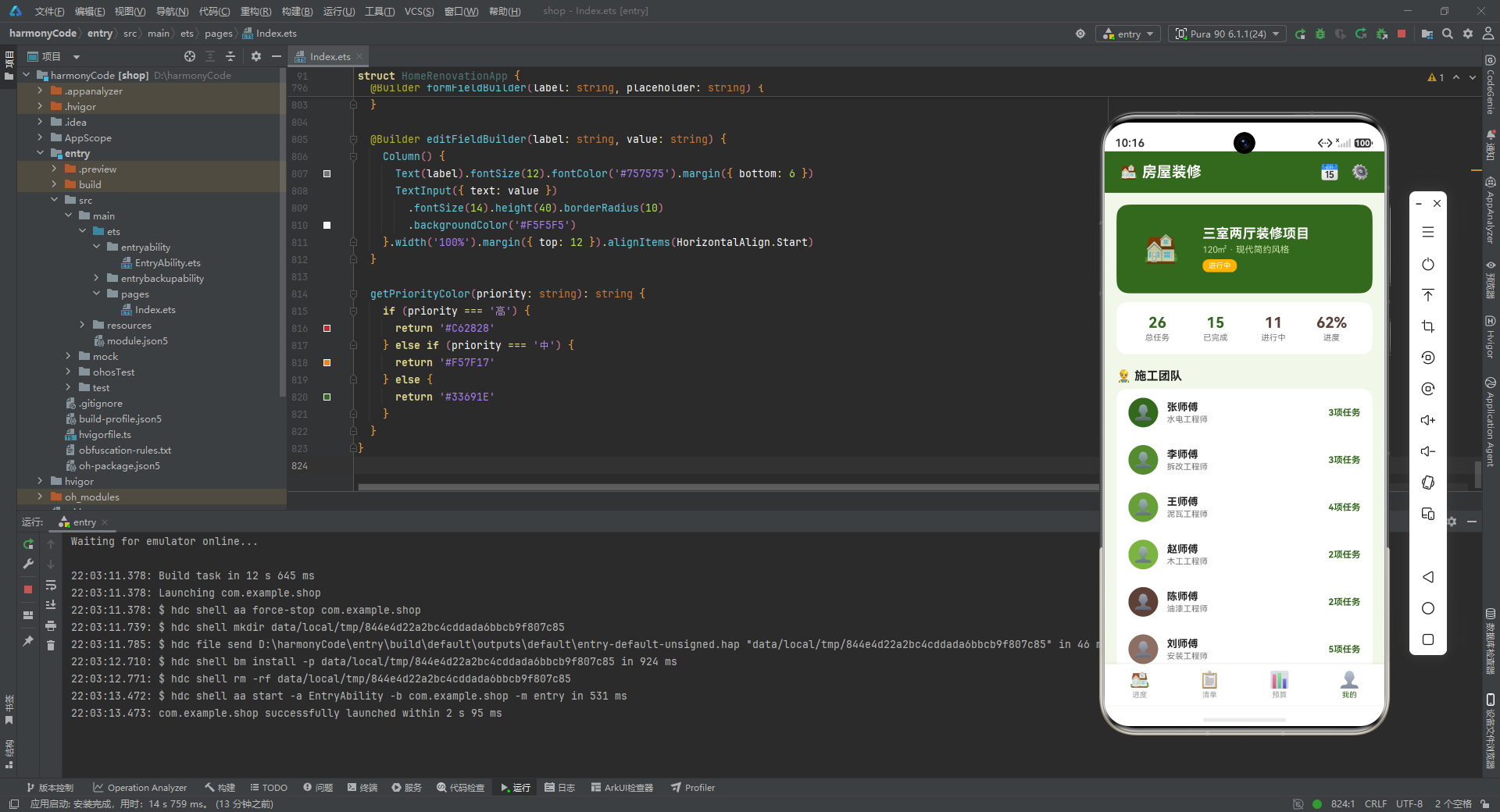
“我的” Tab 采用纵向滚动的单列布局,包含用户信息卡片、统计数据、施工团队、功能列表四个模块。这一 Tab 的定位是"项目总览 + 个人中心"的融合,既展示项目核心信息,又提供功能入口。
8.2 用户信息卡片
Row() {
  Stack() {
    Text('🏠').fontSize(40)
  }.width(80).height(80).backgroundColor('#33691E').borderRadius(40).align(Alignment.Center)

  Column() {
    Text('三室两厅装修项目').fontSize(18).fontWeight(FontWeight.Bold).fontColor('#FFFFFF')
    Text('120㎡ · 现代简约风格').fontSize(12).fontColor('#C5E1A5').margin({ top: 4 })
    Row() {
      Text('进行中').fontSize(10).fontColor('#FFFFFF')
        .backgroundColor('#FFB300').padding({ left: 8, right: 8, top: 3, bottom: 3 })
        .borderRadius(8)
    }.margin({ top: 6 })
  }.layoutWeight(1).margin({ left: 16 }).alignItems(HorizontalAlign.Start)
}.width('100%').padding(20).backgroundColor('#33691E').borderRadius(16)
用户信息卡片是一个深绿色全宽卡片,左侧是 80x80 的圆形头像(使用房屋 Emoji 作为占位),右侧是项目名称、面积与风格描述、状态标签。状态标签"进行中"使用橙色背景胶囊样式,与绿色卡片形成对比,醒目地标识项目当前状态。这种"头像 + 信息 + 标签"的卡片布局,是个人中心页面的标准结构。
8.3 统计数据模块
Row() {
  Column() {
    Text('26').fontSize(20).fontWeight(FontWeight.Bold).fontColor('#33691E')
    Text('总任务').fontSize(11).fontColor('#757575').margin({ top: 2 })
  }.layoutWeight(1).alignItems(HorizontalAlign.Center)
  // ...已完成、进行中、进度三个统计项
}.width('100%').padding(16).backgroundColor('#FFFFFF').borderRadius(14).margin({ top: 12 })
统计数据模块是一个白色卡片,内部 Row 横向排列四个统计项:总任务(26)、已完成(15)、进行中(11)、进度(62%)。每个统计项是一个 Column,上方是加粗大字数值,下方是灰色小字标签,通过 layoutWeight(1) 等分宽度。这种四宫格统计卡片在仪表盘类应用中极为常见,它以紧凑的空间呈现了项目的核心 KPI。
8.4 施工团队与 teamMemberBuilder
Column() {
  this.teamMemberBuilder('张师傅', '水电工程师', '3项任务', '#33691E')
  this.teamMemberBuilder('李师傅', '拆改工程师', '3项任务', '#558B2F')
  this.teamMemberBuilder('王师傅', '泥瓦工程师', '4项任务', '#689F38')
  this.teamMemberBuilder('赵师傅', '木工工程师', '2项任务', '#7CB342')
  this.teamMemberBuilder('陈师傅', '油漆工程师', '2项任务', '#5D4037')
  this.teamMemberBuilder('刘师傅', '安装工程师', '5项任务', '#8D6E63')
}.width('100%').backgroundColor('#FFFFFF').borderRadius(14)

@Builder teamMemberBuilder(name: string, role: string, taskCount: string, color: string) {
  Row() {
    Stack() {
      Text('👤').fontSize(20)
    }.width(40).height(40).backgroundColor(color).borderRadius(20).align(Alignment.Center)

    Column() {
      Text(name).fontSize(14).fontWeight(FontWeight.Bold).fontColor('#212121')
      Text(role).fontSize(11).fontColor('#757575').margin({ top: 2 })
    }.layoutWeight(1).margin({ left: 12 }).alignItems(HorizontalAlign.Start)

    Text(taskCount).fontSize(12).fontColor('#33691E').fontWeight(FontWeight.Bold)
  }.width('100%').padding({ left: 16, right: 16, top: 12, bottom: 12 }).alignItems(VerticalAlign.Center)
}
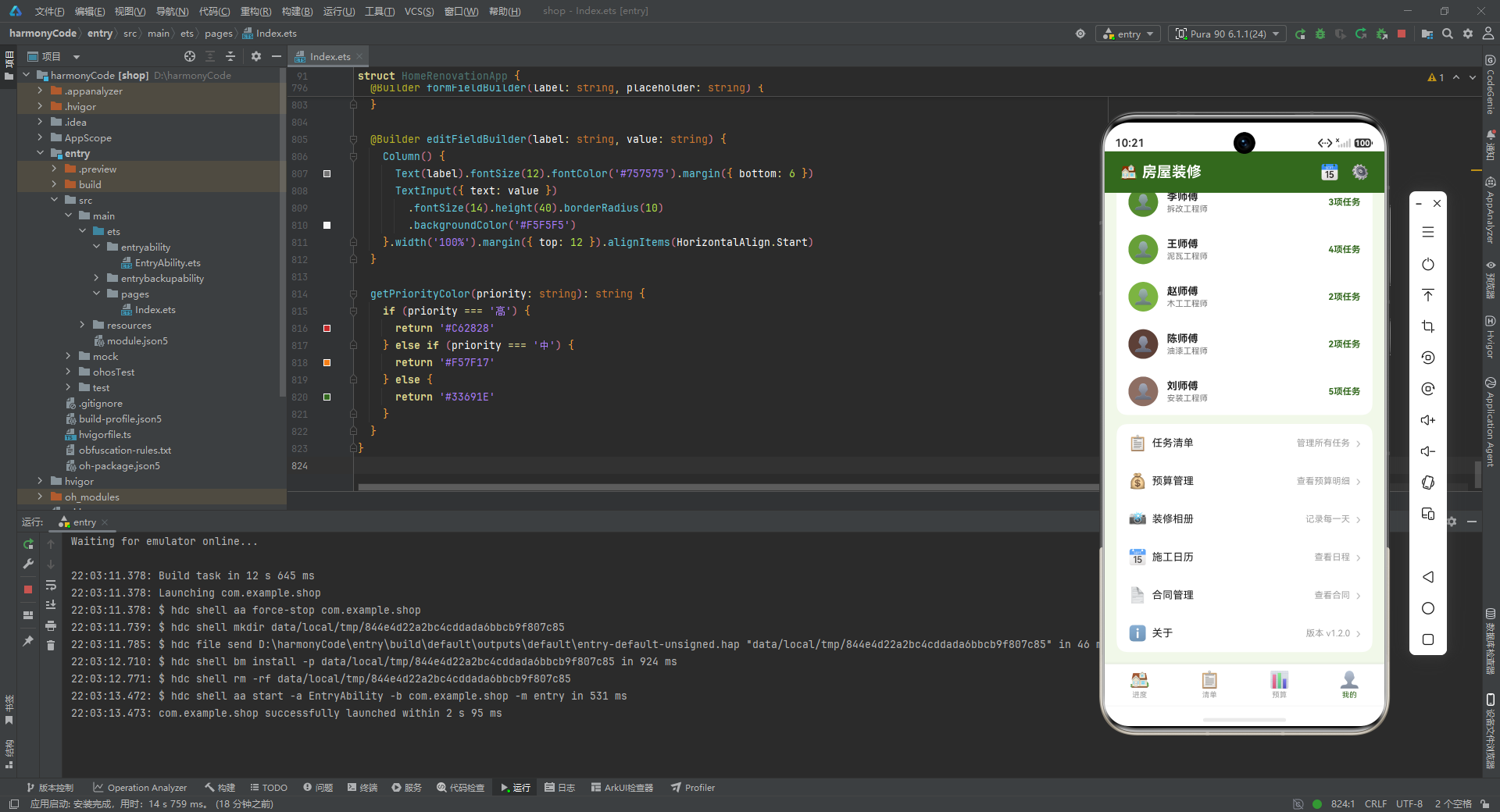
施工团队模块列出 6 位施工人员,每位通过 teamMemberBuilder 渲染。每行包含圆形头像(使用 Emoji 占位,背景色取自参数 color)、姓名、工种、任务数。6 位师傅的背景色从深绿到棕色渐变,与阶段进度条的色彩体系保持一致,形成了视觉上的统一感。任务数使用绿色加粗显示,让用户快速了解每位师傅的工作量分布。
8.5 功能列表与 menuItemBuilder
Column() {
  this.menuItemBuilder('📋', '任务清单', '管理所有任务')
  this.menuItemBuilder('💰', '预算管理', '查看预算明细')
  this.menuItemBuilder('📸', '装修相册', '记录每一天')
  this.menuItemBuilder('📅', '施工日历', '查看日程')
  this.menuItemBuilder('📄', '合同管理', '查看合同')
  this.menuItemBuilder('ℹ️', '关于', '版本 v1.2.0')
}.width('100%').backgroundColor('#FFFFFF').borderRadius(14).margin({ top: 12 })

@Builder menuItemBuilder(icon: string, title: string, desc: string) {
  Row() {
    Text(icon).fontSize(20).width(32)
    Text(title).fontSize(14).fontColor('#212121').layoutWeight(1)
    Text(desc).fontSize(12).fontColor('#9E9E9E')
    Text('›').fontSize(18).fontColor('#BDBDBD').margin({ left: 8 })
  }.width('100%').padding({ left: 16, right: 16, top: 14, bottom: 14 })
  .alignItems(VerticalAlign.Center)
}
功能列表模块是一个设置项列表,每项通过 menuItemBuilder 渲染。每行包含图标、标题、描述、右箭头四部分,这是移动端设置页/菜单页的标准行布局。右箭头 › 的存在向用户暗示"可点击进入下一级",虽然当前实现中这些菜单项未绑定 onClick 事件,但视觉上已经为后续功能扩展预留了交互入口。6 个菜单项覆盖了任务、预算、相册、日历、合同、关于等功能维度,构成了一个完整的产品功能图谱。
九、弹窗体系:自定义弹窗的实现
9.1 modalBg 背景遮罩
@Builder modalBg(onClose: () => void) {
  Column().width('100%').height('100%')
    .backgroundColor('rgba(0,0,0,0.5)').onClick(onClose)
}
modalBg 是所有弹窗共用的半透明背景遮罩。它是一个全屏的 Column,背景色使用 rgba(0,0,0,0.5) 实现 50% 透明度的黑色遮罩。onClick(onClose) 接收一个回调函数,点击遮罩时触发关闭操作。这种将遮罩抽取为独立 Builder 的做法,避免了在三个弹窗中重复编写遮罩代码,体现了 DRY(Don’t Repeat Yourself)原则。值得注意的是,onClose 参数是一个箭头函数类型 () => void,这是 ArkTS 中传递回调的标准方式。
9.2 addModal 新增任务弹窗
@Builder addModal() {
  Column() {
    this.modalBg(() => { this.showAddModal = false })
    Column() {
      Row() {
        Text('➕ 新增任务').fontSize(18).fontWeight(FontWeight.Bold).fontColor('#212121')
        Row().layoutWeight(1)
        Text('✕').fontSize(18).fontColor('#999999')
          .onClick(() => { this.showAddModal = false })
      }.width('100%').padding({ left: 20, right: 20, top: 18, bottom: 12 })
      Divider().color('#F0F0F0')
      Scroll() {
        Column() {
          this.formFieldBuilder('任务名称', '请输入任务名称')
          this.formFieldBuilder('房间', '客厅/主卧/次卧/厨房/卫生间/阳台')
          this.formFieldBuilder('阶段', '设计/拆改/水电/泥瓦/木工/油漆/安装/软装')
          this.formFieldBuilder('预算', '请输入金额')
          this.formFieldBuilder('实际花费', '请输入金额')
          this.formFieldBuilder('负责人', '请输入负责人')
          this.formFieldBuilder('截止日期', '如 2026-03-01')
          this.formFieldBuilder('优先级', '高/中/低')
          this.formFieldBuilder('备注', '请输入备注信息')
        }.padding({ left: 20, right: 20 })
      }.layoutWeight(1)
      Row() {
        Text('取消').fontSize(14).fontColor('#888888')
          .backgroundColor('#F5F5F5').borderRadius(20)
          .padding({ left: 24, right: 24, top: 10, bottom: 10 })
          .onClick(() => { this.showAddModal = false })
        Text('保存').fontSize(14).fontColor('#FFFFFF')
          .backgroundColor('#33691E').borderRadius(20)
          .padding({ left: 24, right: 24, top: 10, bottom: 10 })
          .margin({ left: 12 })
          .onClick(() => { this.showAddModal = false })
      }.width('100%').justifyContent(FlexAlign.Center)
      .padding({ left: 20, right: 20, top: 16, bottom: 16 })
    }
    .width('90%').constraintSize({ maxHeight: '80%' }).backgroundColor('#FFFFFF').borderRadius(18)
    .position({ x: '5%', y: '8%' }).shadow({ radius: 20, color: '#33000000', offsetY: 4 })
  }
  .width('100%').height('100%').position({ x: 0, y: 0 }).zIndex(999)
}
addModal 是新增任务弹窗的构建方法。外层 Column 全屏覆盖,通过 position({ x: 0, y: 0 }) 绝对定位到屏幕左上角,zIndex(999) 确保弹窗浮于所有内容之上。内部首先调用 modalBg 渲染遮罩,然后是一个白色弹窗主体。
弹窗主体宽度 90%,通过 position({ x: '5%', y: '8%' }) 定位到水平居中、距顶部 8% 的位置。constraintSize({ maxHeight: '80%' }) 限制最大高度为屏幕的 80%,防止表单项过多时溢出屏幕。弹窗主体分为三部分:标题栏(标题 + 关闭按钮)、表单滚动区、底部操作按钮栏。标题栏下方使用 Divider 分隔线与表单区视觉分隔。表单区是一个 Scroll,内部通过 9 次 formFieldBuilder 调用渲染 9 个表单字段。底部按钮栏横向排列"取消"与"保存"两个胶囊按钮,使用 justifyContent(FlexAlign.Center) 居中排列。
9.3 editModal 编辑任务弹窗
@Builder editModal() {
  Column() {
    this.modalBg(() => { this.showEditModal = false })
    Column() {
      Row() {
        Text('✏️ 编辑任务').fontSize(18).fontWeight(FontWeight.Bold).fontColor('#212121')
        Row().layoutWeight(1)
        Text('✕').fontSize(18).fontColor('#999999')
          .onClick(() => { this.showEditModal = false })
      }.width('100%').padding({ left: 20, right: 20, top: 18, bottom: 12 })
      Divider().color('#F0F0F0')
      Scroll() {
        Column() {
          this.editFieldBuilder('任务名称', this.tasks[this.editIndex].name)
          this.editFieldBuilder('房间', this.tasks[this.editIndex].room)
          this.editFieldBuilder('阶段', this.tasks[this.editIndex].phase)
          this.editFieldBuilder('预算', this.tasks[this.editIndex].budget.toString())
          this.editFieldBuilder('实际花费', this.tasks[this.editIndex].actualCost.toString())
          this.editFieldBuilder('负责人', this.tasks[this.editIndex].assignee)
          this.editFieldBuilder('截止日期', this.tasks[this.editIndex].deadline)
          this.editFieldBuilder('优先级', this.tasks[this.editIndex].priority)
          this.editFieldBuilder('备注', this.tasks[this.editIndex].notes)
        }.padding({ left: 20, right: 20 })
      }.layoutWeight(1)
      Row() {
        Text('取消').fontSize(14).fontColor('#888888')
          .backgroundColor('#F5F5F5').borderRadius(20)
          .padding({ left: 24, right: 24, top: 10, bottom: 10 })
          .onClick(() => { this.showEditModal = false })
        Text('保存').fontSize(14).fontColor('#FFFFFF')
          .backgroundColor('#5D4037').borderRadius(20)
          .padding({ left: 24, right: 24, top: 10, bottom: 10 })
          .margin({ left: 12 })
          .onClick(() => { this.showEditModal = false })
      }.width('100%').justifyContent(FlexAlign.Center)
      .padding({ left: 20, right: 20, top: 16, bottom: 16 })
    }
    .width('90%').constraintSize({ maxHeight: '80%' }).backgroundColor('#FFFFFF').borderRadius(18)
    .position({ x: '5%', y: '8%' }).shadow({ radius: 20, color: '#33000000', offsetY: 4 })
  }
  .width('100%').height('100%').position({ x: 0, y: 0 }).zIndex(999)
}
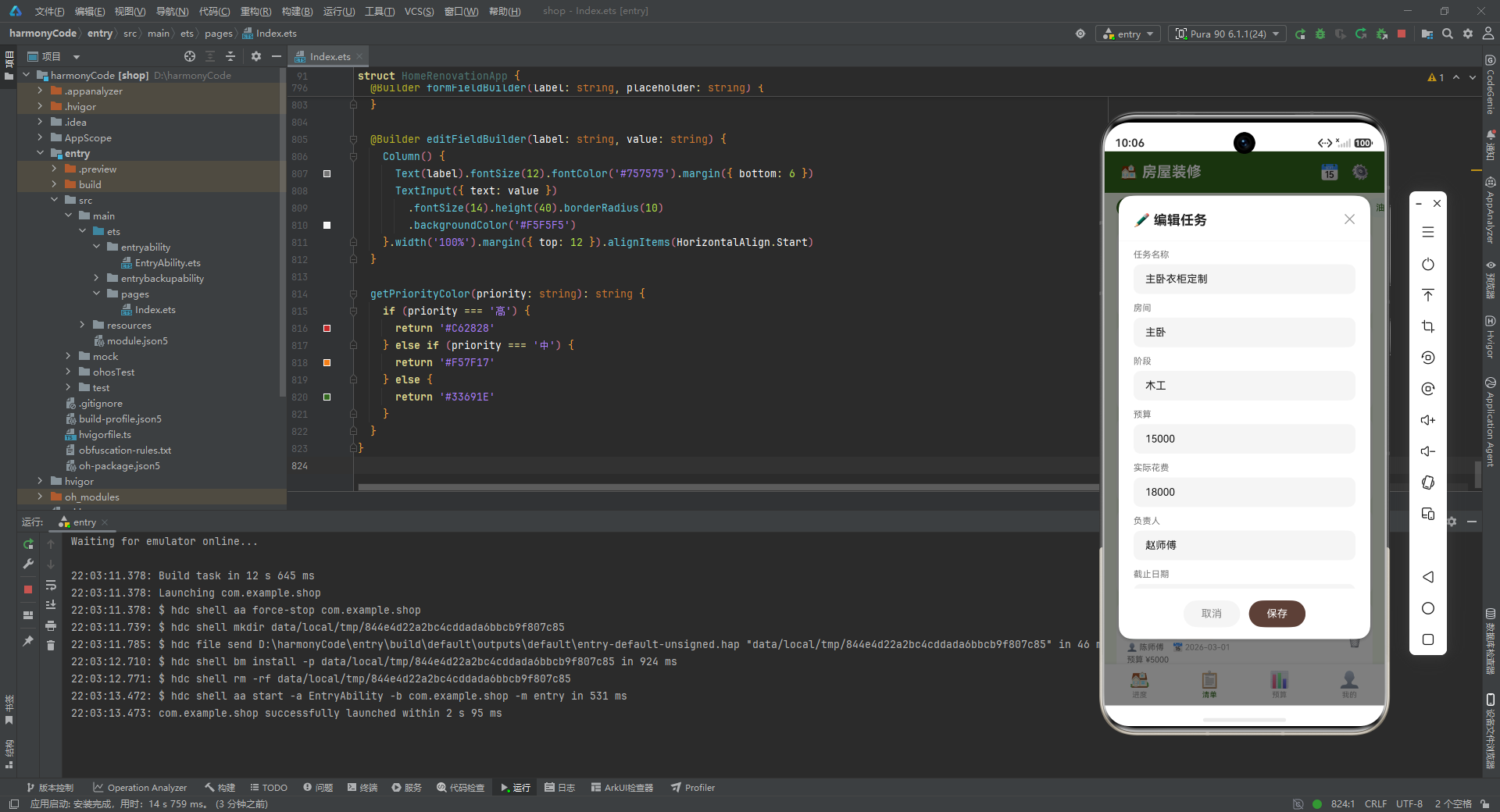
editModal 与 addModal 结构高度一致,区别在于:标题改为"编辑任务";表单字段使用 editFieldBuilder 而非 formFieldBuilder,前者接收任务对象的实际值进行预填;保存按钮背景色改为大地色 #5D4037,与新增弹窗的绿色按钮形成视觉区分。表单字段的值通过 this.tasks[this.editIndex] 读取,editIndex 在点击任务卡片的编辑按钮时被赋值为 task.id - 1,确保弹窗显示的是当前操作任务的数据。
9.4 deleteModal 删除确认弹窗
@Builder deleteModal() {
  Column() {
    this.modalBg(() => { this.showDeleteModal = false })
    Column() {
      Text('🗑️').fontSize(40).margin({ top: 24 })
      Text('确认删除?').fontSize(18).fontWeight(FontWeight.Bold).fontColor('#212121')
        .margin({ top: 12 })
      Text('删除后不可恢复,确定要删除「' + this.tasks[this.deleteIndex].name + '」吗?')
        .fontSize(13).fontColor('#757575').textAlign(TextAlign.Center)
        .margin({ top: 8, left: 24, right: 24 })

      Row() {
        Text('取消').fontSize(14).fontColor('#666666')
          .backgroundColor('#F5F5F5').borderRadius(20)
          .padding({ left: 32, right: 32, top: 10, bottom: 10 })
          .onClick(() => { this.showDeleteModal = false })
        Text('删除').fontSize(14).fontColor('#FFFFFF')
          .backgroundColor('#C62828').borderRadius(20)
          .padding({ left: 32, right: 32, top: 10, bottom: 10 })
          .margin({ left: 12 })
          .onClick(() => { this.showDeleteModal = false })
      }.margin({ top: 24, bottom: 24 }).justifyContent(FlexAlign.Center)
    }.width('80%').backgroundColor('#FFFFFF').borderRadius(18)
    .alignItems(HorizontalAlign.Center)
    .shadow({ radius: 20, color: '#33000000', offsetY: 4 })
  }.width('100%').height('100%').justifyContent(FlexAlign.Center)
  .position({ x: 0, y: 0 }).zIndex(999)
}
deleteModal 是删除确认弹窗,与新增、编辑弹窗的底部弹出样式不同,它采用居中弹出的对话框样式。弹窗主体宽度 80%,内容垂直居中排列:删除图标、确认标题、警告文案、操作按钮。警告文案中通过 this.tasks[this.deleteIndex].name 动态插入任务名称,让用户明确知道将要删除的是哪条任务。"删除"按钮使用红色 #C62828 背景,与"取消"按钮的灰色形成鲜明对比,通过色彩强化了删除操作的破坏性语义。外层 Column 使用 justifyContent(FlexAlign.Center) 使弹窗在屏幕垂直方向居中显示。
9.5 formFieldBuilder 与 editFieldBuilder
@Builder formFieldBuilder(label: string, placeholder: string) {
  Column() {
    Text(label).fontSize(12).fontColor('#757575').margin({ bottom: 6 })
    TextInput({ placeholder: placeholder })
      .fontSize(14).height(40).borderRadius(10)
      .backgroundColor('#F5F5F5')
  }.width('100%').margin({ top: 12 }).alignItems(HorizontalAlign.Start)
}

@Builder editFieldBuilder(label: string, value: string) {
  Column() {
    Text(label).fontSize(12).fontColor('#757575').margin({ bottom: 6 })
    TextInput({ text: value })
      .fontSize(14).height(40).borderRadius(10)
      .backgroundColor('#F5F5F5')
  }.width('100%').margin({ top: 12 }).alignItems(HorizontalAlign.Start)
}
这两个 Builder 分别用于新增弹窗和编辑弹窗的表单字段渲染。两者结构完全一致:上方是字段标签,下方是 TextInput 输入框。区别在于 TextInput 的参数:formFieldBuilder 使用 placeholder(占位提示文本,输入框为空时显示);editFieldBuilder 使用 text(预填值,输入框加载时即显示已有内容)。输入框统一使用浅灰背景 #F5F5F5、高度 40vp、圆角 10vp,保证了表单视觉的一致性。
十、辅助方法:getPriorityColor
getPriorityColor(priority: string): string {
  if (priority === '高') {
    return '#C62828'
  } else if (priority === '中') {
    return '#F57F17'
  } else {
    return '#33691E'
  }
}
getPriorityColor 是组件内定义的普通方法(非 @Builder),接收优先级字符串返回对应的颜色值。方法内部使用 if-else if-else 结构实现三分支判断:高优先级返回红色、中优先级返回橙色、低优先级返回绿色。
这一方法与 priorityConfigs 配置表存在功能重叠——配置表中已经定义了相同的映射关系,但 getPriorityColor 方法并未读取配置表,而是硬编码了判断逻辑。这是一个值得商榷的设计点:理想的做法应该是遍历 priorityConfigs 数组查找匹配项并返回其 color 字段,这样当优先级体系扩展(如新增"紧急"级别)时,只需修改配置表而无需改动方法逻辑。不过在当前仅有三个优先级且稳定的场景下,硬编码 if-else 的性能略优于数组遍历,且代码可读性也较高,这一取舍在实际工程中是可以接受的。
十一、整体架构与设计模式总结
纵观全篇源码,本应用体现了以下几个值得称道的架构思想与设计模式:
第一,声明式 UI 范式的全面贯彻。 整个应用的界面完全由 build() 方法及其调用的 @Builder 函数描述,不存在任何命令式的 DOM 操作。状态变量(@State)的变化自动驱动 UI 局部刷新,开发者只需关心"状态是什么"与"界面长什么样"两个问题,极大降低了状态同步的复杂度。
第二,Builder 模式的模块化复用。 应用共定义了 14 个 @Builder 方法,将复杂的界面拆解为高内聚低耦合的构建单元。例如 taskItemBuilder 封装了任务卡片的完整渲染逻辑,phaseProgressBuilder 封装了阶段进度条的渲染逻辑,这些 Builder 可以在不同的上下文中复用,也便于单独测试与维护。
第三,数据驱动的配置化设计。 底部导航栏的项数与内容由 tabConfigs 决定,筛选选项由 phaseFilters 决定,优先级颜色由 priorityConfigs 决定。这种"UI 元数据化"的设计,使得界面结构的调整无需修改渲染逻辑,只需增删配置数组中的元素即可。
第四,统一的视觉语言体系。 应用在首行注释中声明了三种核心配色,并在所有模块中严格遵循:主品牌色 #33691E 用于标题栏、按钮、选中态;大地色 #5D4037 用于辅助强调;浅绿背景 #F1F8E9 用于全局底色。阶段进度条采用从深绿到浅绿的渐变色系,优先级采用红橙绿三色体系,超预算告警统一使用红色。这种系统化的色彩管理,使得应用在视觉上高度统一。
第五,自定义弹窗体系的完整实现。 应用没有依赖系统原生的 AlertDialog 或 Toast,而是基于 position、zIndex、shadow 等样式属性,手动构建了一套包含遮罩、主体、表单、按钮的弹窗体系。这种做法虽然代码量更大,但赋予了开发者对弹窗样式与交互的完全控制权,能够实现与应用整体视觉风格高度一致的弹窗体验。
第六,边界情况的防御性处理。 budgetItemBuilder 中对 item.budget > 0 的判断避免了除零错误;taskItemBuilder 中对 task.actualCost > 0 与 task.notes.length > 0 的判断避免了空数据的冗余渲染。这些细节体现了代码的健壮性意识。
十二、各模块关键技术点横向对比总结
下表横向对比了应用四个 Tab 页及弹窗体系的关键技术点,帮助读者快速把握各模块的设计差异与技术特色:
| 模块名称 | 核功能定位 | 状态管理要点 | 关键组件与布局 | 主要 Builder 函数 | 设计模式与亮点 |
|---|---|---|---|---|---|
| 进度 Tab | 整体进度概览、预算汇总、超支提醒、到期任务、阶段进度条 | 读取 overallProgress、phaseProgress 静态数据 |
Scroll+Column 纵向滚动;Stack 模拟环形进度;双层 Row 实现进度条轨道 |
deadlineItemBuilder、phaseProgressBuilder |
伪环形进度(圆形边框+居中文字);色彩渐变区分完成阶段;胶囊式到期标签 |
| 清单 Tab | 任务列表展示、阶段筛选、新增/编辑/删除入口 | selectedPhase 驱动筛选态切换;editIndex/deleteIndex 记录操作目标 |
横向 Scroll 筛选条;纵向 Scroll 任务列表;ForEach 渲染筛选标签 |
taskItemBuilder |
五层信息卡片(名称/标签/人员/预算/备注);条件渲染完成对勾与超预算红字;Emoji 图标按钮触发弹窗 |
| 预算 Tab | 预算总览、房间维度对比、分类明细、超预算告警 | 读取 roomCosts、budgetItems 静态数据 |
Scroll+Column 纵向滚动;双层 Row 进度条;三行结构(标签+进度+数据) |
roomCostBuilder、budgetItemBuilder、overBudgetBuilder |
动态百分比宽度计算;budget>0 防御性除零;toFixed(0) 百分比取整;红色统一告警语义 |
| 我的 Tab | 项目信息、统计 KPI、施工团队、功能菜单 | 读取静态数据,无额外状态变量 | Scroll+Column;Stack 圆形头像;四宫格 layoutWeight 等分统计 |
teamMemberBuilder、menuItemBuilder |
头像+信息+状态标签卡片;四宫格 KPI 仪表盘;右箭头暗示可扩展菜单;团队色系与阶段色系统一 |
| 弹窗体系 | 新增任务、编辑任务、删除确认 | showAddModal/showEditModal/showDeleteModal 三布尔值独立控制 |
position 绝对定位+zIndex(999) 浮层;constraintSize 限高;justifyContent 居中 |
modalBg、addModal、editModal、deleteModal、formFieldBuilder、editFieldBuilder |
共用遮罩 Builder 复用;placeholder vs text 区分新增/编辑;删除弹窗居中对话框样式;红色按钮强化破坏性操作 |
| 导航与骨架 | 顶部标题栏、Tab 切换、底部导航栏 | currentTab 驱动条件渲染切换四个 Tab |
Column 三段式骨架;Row().layoutWeight(1) 弹性占位;ForEach 渲染导航项 |
bottomTabBar |
enum 强类型 Tab 索引;三元运算符切换选中态颜色;shadow 营造导航悬浮感;条件分支替代 Tabs 容器 |
安装DevEco Studio程序

选择目标安装目录:

设置环境变量,但是需要重启一下:

新建一个空白模板:

设置API为24的模板项目:
初始化项目,自动下载相关依赖:

完整代码:
// 房屋装修进度 — 灰绿 #33691E | 大地 #5D4037 | 背景 #F1F8E9
interface RenovationTask {
id: number
name: string
room: string
phase: string
cost: number
budget: number
actualCost: number
assignee: string
deadline: string
isCompleted: boolean
priority: string
notes: string
}
interface PhaseProgress {
phase: string
total: number
completed: number
percentage: number
color: string
}
interface RoomCost {
room: string
budget: number
actual: number
color: string
}
interface BudgetItem {
category: string
budget: number
actual: number
color: string
}
interface TabConfig {
index: number
label: string
icon: string
}
interface PriorityConfig {
level: string
color: string
}
@Observed
class TaskModel {
id: number
name: string
room: string
phase: string
cost: number
budget: number
actualCost: number
assignee: string
deadline: string
isCompleted: boolean
priority: string
notes: string
constructor(task: RenovationTask) {
this.id = task.id
this.name = task.name
this.room = task.room
this.phase = task.phase
this.cost = task.cost
this.budget = task.budget
this.actualCost = task.actualCost
this.assignee = task.assignee
this.deadline = task.deadline
this.isCompleted = task.isCompleted
this.priority = task.priority
this.notes = task.notes
}
}
enum RenoTab {
Progress,
Checklist,
Budget,
Mine
}
@Entry
@Component
struct HomeRenovationApp {
@State currentTab: number = RenoTab.Progress
@State showAddModal: boolean = false
@State showEditModal: boolean = false
@State showDeleteModal: boolean = false
@State editIndex: number = 0
@State deleteIndex: number = 0
@State selectedPhase: string = '全部'
@State overallProgress: number = 62
private tasks: TaskModel[] = [
new TaskModel({ id: 1, name: '客厅水电改造', room: '客厅', phase: '水电', cost: 8500, budget: 9000, actualCost: 8500, assignee: '张师傅', deadline: '2026-01-15', isCompleted: true, priority: '高', notes: '已完成管线布局' }),
new TaskModel({ id: 2, name: '主卧墙面拆改', room: '主卧', phase: '拆改', cost: 3200, budget: 3500, actualCost: 3200, assignee: '李师傅', deadline: '2026-01-10', isCompleted: true, priority: '中', notes: '拆除旧墙体' }),
new TaskModel({ id: 3, name: '厨房瓷砖铺贴', room: '厨房', phase: '泥瓦', cost: 12000, budget: 10000, actualCost: 12000, assignee: '王师傅', deadline: '2026-02-01', isCompleted: true, priority: '高', notes: '超预算2000元' }),
new TaskModel({ id: 4, name: '卫生间防水工程', room: '卫生间', phase: '泥瓦', cost: 5800, budget: 6000, actualCost: 5800, assignee: '王师傅', deadline: '2026-02-05', isCompleted: true, priority: '高', notes: '闭水试验通过' }),
new TaskModel({ id: 5, name: '客厅吊顶安装', room: '客厅', phase: '木工', cost: 7500, budget: 8000, actualCost: 7200, assignee: '赵师傅', deadline: '2026-02-20', isCompleted: false, priority: '中', notes: '正在进行中' }),
new TaskModel({ id: 6, name: '主卧衣柜定制', room: '主卧', phase: '木工', cost: 18000, budget: 15000, actualCost: 18000, assignee: '赵师傅', deadline: '2026-02-25', isCompleted: false, priority: '高', notes: '材料升级超预算' }),
new TaskModel({ id: 7, name: '客厅墙面刷漆', room: '客厅', phase: '油漆', cost: 4500, budget: 5000, actualCost: 0, assignee: '陈师傅', deadline: '2026-03-01', isCompleted: false, priority: '中', notes: '尚未开始' }),
new TaskModel({ id: 8, name: '次卧地板铺设', room: '次卧', phase: '安装', cost: 6800, budget: 7000, actualCost: 0, assignee: '刘师傅', deadline: '2026-03-10', isCompleted: false, priority: '中', notes: '等待地板到货' }),
new TaskModel({ id: 9, name: '厨房橱柜安装', room: '厨房', phase: '安装', cost: 22000, budget: 20000, actualCost: 0, assignee: '刘师傅', deadline: '2026-03-15', isCompleted: false, priority: '高', notes: '定制中' }),
new TaskModel({ id: 10, name: '阳台地砖铺设', room: '阳台', phase: '泥瓦', cost: 3200, budget: 3500, actualCost: 3200, assignee: '王师傅', deadline: '2026-02-08', isCompleted: true, priority: '低', notes: '防滑砖' }),
new TaskModel({ id: 11, name: '卫生间洁具安装', room: '卫生间', phase: '安装', cost: 8500, budget: 9000, actualCost: 0, assignee: '刘师傅', deadline: '2026-03-20', isCompleted: false, priority: '高', notes: '马桶+洗手台' }),
new TaskModel({ id: 12, name: '客厅设计规划', room: '客厅', phase: '设计', cost: 3000, budget: 3000, actualCost: 3000, assignee: '设计师周', deadline: '2026-01-05', isCompleted: true, priority: '高', notes: '方案已确认' }),
new TaskModel({ id: 13, name: '主卧设计规划', room: '主卧', phase: '设计', cost: 2500, budget: 2500, actualCost: 2500, assignee: '设计师周', deadline: '2026-01-05', isCompleted: true, priority: '中', notes: '方案已确认' }),
new TaskModel({ id: 14, name: '全屋水电走向图', room: '全屋', phase: '设计', cost: 5000, budget: 5000, actualCost: 5000, assignee: '设计师周', deadline: '2026-01-08', isCompleted: true, priority: '高', notes: '已出图' }),
new TaskModel({ id: 15, name: '客厅沙发采购', room: '客厅', phase: '软装', cost: 12000, budget: 10000, actualCost: 0, assignee: '业主', deadline: '2026-03-25', isCompleted: false, priority: '低', notes: '看中一款真皮沙发' }),
new TaskModel({ id: 16, name: '主卧窗帘安装', room: '主卧', phase: '软装', cost: 2800, budget: 3000, actualCost: 0, assignee: '业主', deadline: '2026-03-28', isCompleted: false, priority: '低', notes: '遮光帘' }),
new TaskModel({ id: 17, name: '厨房插座改造', room: '厨房', phase: '水电', cost: 2200, budget: 2500, actualCost: 2200, assignee: '张师傅', deadline: '2026-01-18', isCompleted: true, priority: '中', notes: '增加3个插座' }),
new TaskModel({ id: 18, name: '次卧墙面刷漆', room: '次卧', phase: '油漆', cost: 3800, budget: 4000, actualCost: 0, assignee: '陈师傅', deadline: '2026-03-05', isCompleted: false, priority: '中', notes: '等待吊顶完成' }),
new TaskModel({ id: 19, name: '阳台绿软装', room: '阳台', phase: '软装', cost: 1500, budget: 2000, actualCost: 0, assignee: '业主', deadline: '2026-04-01', isCompleted: false, priority: '低', notes: '花架+绿植' }),
new TaskModel({ id: 20, name: '卫生间瓷砖美缝', room: '卫生间', phase: '泥瓦', cost: 1800, budget: 2000, actualCost: 1800, assignee: '王师傅', deadline: '2026-02-10', isCompleted: true, priority: '低', notes: '金色美缝' }),
new TaskModel({ id: 21, name: '客厅灯饰安装', room: '客厅', phase: '安装', cost: 4500, budget: 5000, actualCost: 0, assignee: '刘师傅', deadline: '2026-03-22', isCompleted: false, priority: '中', notes: '主灯+射灯' }),
new TaskModel({ id: 22, name: '主卧电路改造', room: '主卧', phase: '水电', cost: 3800, budget: 4000, actualCost: 3800, assignee: '张师傅', deadline: '2026-01-16', isCompleted: true, priority: '中', notes: '增加床头USB' }),
new TaskModel({ id: 23, name: '全屋保洁服务', room: '全屋', phase: '软装', cost: 2000, budget: 2000, actualCost: 0, assignee: '保洁公司', deadline: '2026-04-05', isCompleted: false, priority: '低', notes: '开荒保洁' }),
new TaskModel({ id: 24, name: '厨房台面安装', room: '厨房', phase: '安装', cost: 8500, budget: 8000, actualCost: 0, assignee: '刘师傅', deadline: '2026-03-18', isCompleted: false, priority: '高', notes: '石英石台面' }),
new TaskModel({ id: 25, name: '次卧门窗更换', room: '次卧', phase: '拆改', cost: 5500, budget: 6000, actualCost: 5500, assignee: '李师傅', deadline: '2026-01-20', isCompleted: true, priority: '中', notes: '断桥铝窗' }),
new TaskModel({ id: 26, name: '阳台封闭工程', room: '阳台', phase: '拆改', cost: 6800, budget: 7000, actualCost: 6800, assignee: '李师傅', deadline: '2026-01-22', isCompleted: true, priority: '高', notes: '无框玻璃' })
]
private phaseProgress: PhaseProgress[] = [
{ phase: '设计', total: 3, completed: 3, percentage: 100, color: '#33691E' },
{ phase: '拆改', total: 4, completed: 4, percentage: 100, color: '#558B2F' },
{ phase: '水电', total: 3, completed: 3, percentage: 100, color: '#689F38' },
{ phase: '泥瓦', total: 5, completed: 5, percentage: 100, color: '#7CB342' },
{ phase: '木工', total: 2, completed: 0, percentage: 0, color: '#9CCC65' },
{ phase: '油漆', total: 2, completed: 0, percentage: 0, color: '#C5E1A5' },
{ phase: '安装', total: 5, completed: 0, percentage: 0, color: '#5D4037' },
{ phase: '软装', total: 4, completed: 0, percentage: 0, color: '#8D6E63' }
]
private roomCosts: RoomCost[] = [
{ room: '客厅', budget: 42000, actual: 19700, color: '#33691E' },
{ room: '主卧', budget: 24500, actual: 23500, color: '#558B2F' },
{ room: '次卧', budget: 16000, actual: 9300, color: '#689F38' },
{ room: '厨房', budget: 40500, actual: 15200, color: '#7CB342' },
{ room: '卫生间', budget: 19000, actual: 16100, color: '#5D4037' },
{ room: '阳台', budget: 12500, actual: 10000, color: '#8D6E63' }
]
private budgetItems: BudgetItem[] = [
{ category: '设计费', budget: 10500, actual: 10500, color: '#33691E' },
{ category: '拆改费', budget: 18500, actual: 15500, color: '#558B2F' },
{ category: '水电材料', budget: 10500, actual: 14500, color: '#689F38' },
{ category: '泥瓦人工', budget: 23000, actual: 24800, color: '#7CB342' },
{ category: '木工材料', budget: 23000, actual: 25200, color: '#5D4037' },
{ category: '油漆材料', budget: 9000, actual: 0, color: '#8D6E63' },
{ category: '安装费', budget: 43500, actual: 0, color: '#33691E' },
{ category: '软装费', budget: 18300, actual: 0, color: '#558B2F' }
]
private tabConfigs: TabConfig[] = [
{ index: RenoTab.Progress, label: '进度', icon: '🏠' },
{ index: RenoTab.Checklist, label: '清单', icon: '📋' },
{ index: RenoTab.Budget, label: '预算', icon: '📊' },
{ index: RenoTab.Mine, label: '我的', icon: '👤' }
]
private phaseFilters: string[] = ['全部', '设计', '拆改', '水电', '泥瓦', '木工', '油漆', '安装', '软装']
private priorityConfigs: PriorityConfig[] = [
{ level: '高', color: '#C62828' },
{ level: '中', color: '#F57F17' },
{ level: '低', color: '#33691E' }
]
build() {
Column() {
Column() {
// 顶部标题栏
Row() {
Text('🏠 房屋装修').fontSize(20).fontWeight(FontWeight.Bold).fontColor('#FFFFFF')
Row().layoutWeight(1)
Text('📅').fontSize(20).fontColor('#FFFFFF').margin({ right: 16 })
Text('⚙️').fontSize(20).fontColor('#FFFFFF')
}
.width('100%').height(56).padding({ left: 20, right: 20 })
.backgroundColor('#33691E').alignItems(VerticalAlign.Center)
// 内容区域
Column() {
if (this.currentTab === RenoTab.Progress) {
this.progressTab()
} else if (this.currentTab === RenoTab.Checklist) {
this.checklistTab()
} else if (this.currentTab === RenoTab.Budget) {
this.budgetTab()
} else {
this.mineTab()
}
}.layoutWeight(1).width('100%')
// 底部导航栏
this.bottomTabBar()
}
.width('100%').height('100%').backgroundColor('#F1F8E9')
// 弹窗层
if (this.showAddModal) {
this.addModal()
}
if (this.showEditModal) {
this.editModal()
}
if (this.showDeleteModal) {
this.deleteModal()
}
}
}
// 底部导航栏
@Builder bottomTabBar() {
Row() {
ForEach(this.tabConfigs, (item: TabConfig) => {
Column() {
Text(item.icon).fontSize(22)
Text(item.label).fontSize(10).fontColor(this.currentTab === item.index ? '#33691E' : '#9E9E9E')
.margin({ top: 2 })
}.alignItems(HorizontalAlign.Center).layoutWeight(1)
.onClick(() => { this.currentTab = item.index })
}, (item: TabConfig) => item.index.toString())
}
.width('100%').height(56).backgroundColor('#FFFFFF')
.alignItems(VerticalAlign.Center)
.shadow({ radius: 8, color: '#1A000000', offsetY: -2 })
}
// ===== 进度 Tab =====
@Builder progressTab() {
Scroll() {
Column() {
// 总进度环形
Row() {
Column() {
Stack() {
Text(this.overallProgress + '%').fontSize(32).fontWeight(FontWeight.Bold).fontColor('#33691E')
}.width(100).height(100).backgroundColor('#F1F8E9').borderRadius(50)
.border({ width: 8, color: '#33691E' })
.align(Alignment.Center)
Column() {
Text('整体进度').fontSize(14).fontWeight(FontWeight.Bold).fontColor('#FFFFFF')
Text('26项任务 · 15已完成').fontSize(11).fontColor('#C5E1A5').margin({ top: 4 })
}.margin({ top: 12 }).alignItems(HorizontalAlign.Center)
}.alignItems(HorizontalAlign.Center).layoutWeight(1)
Column() {
Text('📊 装修概览').fontSize(14).fontWeight(FontWeight.Bold).fontColor('#FFFFFF')
Row() {
Text('总预算').fontSize(11).fontColor('#C5E1A5')
Text('¥156,300').fontSize(16).fontWeight(FontWeight.Bold).fontColor('#FFFFFF').margin({ left: 6 })
}.margin({ top: 8 })
Row() {
Text('已花费').fontSize(11).fontColor('#C5E1A5')
Text('¥90,500').fontSize(16).fontWeight(FontWeight.Bold).fontColor('#FFB300').margin({ left: 6 })
}.margin({ top: 6 })
Row() {
Text('剩余').fontSize(11).fontColor('#C5E1A5')
Text('¥65,800').fontSize(16).fontWeight(FontWeight.Bold).fontColor('#8BC34A').margin({ left: 6 })
}.margin({ top: 6 })
}.layoutWeight(1).alignItems(HorizontalAlign.Start)
}
.width('100%').padding(20).backgroundColor('#33691E').borderRadius(16).alignItems(VerticalAlign.Center)
// 超预算提醒
Row() {
Text('⚠️').fontSize(16).margin({ right: 8 })
Column() {
Text('超预算提醒').fontSize(13).fontWeight(FontWeight.Bold).fontColor('#C62828')
Text('木工材料超支 ¥2,200,厨房橱柜超支 ¥2,000').fontSize(11).fontColor('#757575').margin({ top: 2 })
}.layoutWeight(1).alignItems(HorizontalAlign.Start)
Text('查看').fontSize(12).fontColor('#33691E')
}.width('100%').padding(14).backgroundColor('#FFF3E0').borderRadius(12).margin({ top: 12 })
// 即将到期
Row() {
Text('📅 即将到期').fontSize(16).fontWeight(FontWeight.Bold).fontColor('#212121')
}.width('100%').margin({ top: 20, bottom: 8 })
Column() {
this.deadlineItemBuilder('客厅吊顶安装', '2026-02-20', '3天', '#F57F17')
this.deadlineItemBuilder('主卧衣柜定制', '2026-02-25', '8天', '#33691E')
this.deadlineItemBuilder('客厅墙面刷漆', '2026-03-01', '12天', '#33691E')
this.deadlineItemBuilder('次卧地板铺设', '2026-03-10', '21天', '#33691E')
}.width('100%').backgroundColor('#FFFFFF').borderRadius(14)
// 阶段进度
Row() {
Text('🏗️ 阶段进度').fontSize(16).fontWeight(FontWeight.Bold).fontColor('#212121')
}.width('100%').margin({ top: 20, bottom: 8 })
Column() {
this.phaseProgressBuilder(this.phaseProgress[0])
this.phaseProgressBuilder(this.phaseProgress[1])
this.phaseProgressBuilder(this.phaseProgress[2])
this.phaseProgressBuilder(this.phaseProgress[3])
this.phaseProgressBuilder(this.phaseProgress[4])
this.phaseProgressBuilder(this.phaseProgress[5])
this.phaseProgressBuilder(this.phaseProgress[6])
this.phaseProgressBuilder(this.phaseProgress[7])
}.width('100%').padding(16).backgroundColor('#FFFFFF').borderRadius(14)
}.padding({ left: 16, right: 16, top: 12, bottom: 16 })
}.layoutWeight(1).scrollBar(BarState.Off)
}
@Builder deadlineItemBuilder(name: string, date: string, remain: string, color: string) {
Row() {
Text('📌').fontSize(16).width(28)
Column() {
Text(name).fontSize(13).fontWeight(FontWeight.Bold).fontColor('#212121')
Text(date).fontSize(11).fontColor('#9E9E9E').margin({ top: 2 })
}.layoutWeight(1).alignItems(HorizontalAlign.Start)
Text(remain).fontSize(12).fontColor(color).fontWeight(FontWeight.Bold)
.backgroundColor('#F1F8E9').padding({ left: 8, right: 8, top: 4, bottom: 4 }).borderRadius(8)
}.width('100%').padding({ left: 16, right: 16, top: 12, bottom: 12 }).alignItems(VerticalAlign.Center)
}
@Builder phaseProgressBuilder(item: PhaseProgress) {
Row() {
Text(item.phase).fontSize(12).fontColor('#424242').width(50)
Row() {
Column()
.width(item.percentage + '%')
.height(10)
.backgroundColor(item.color)
.borderRadius(5)
}.layoutWeight(1).height(10).backgroundColor('#F5F5F5').borderRadius(5)
Text(item.completed + '/' + item.total).fontSize(11).fontColor('#757575').width(36).textAlign(TextAlign.Center)
}.width('100%').margin({ top: 8 }).alignItems(VerticalAlign.Center)
}
// ===== 清单 Tab =====
@Builder checklistTab() {
Column() {
// 分类筛选
Scroll() {
Row() {
ForEach(this.phaseFilters, (phase: string) => {
Text(phase)
.fontSize(12).fontColor(this.selectedPhase === phase ? '#FFFFFF' : '#33691E')
.backgroundColor(this.selectedPhase === phase ? '#33691E' : '#E8F5E9')
.padding({ left: 12, right: 12, top: 6, bottom: 6 })
.borderRadius(16).margin({ right: 8 })
.onClick(() => { this.selectedPhase = phase })
}, (phase: string) => phase)
}.padding({ left: 16, right: 16 })
}.scrollable(ScrollDirection.Horizontal).scrollBar(BarState.Off).height(40)
// 任务列表
Scroll() {
Column() {
this.taskItemBuilder(this.tasks[0])
this.taskItemBuilder(this.tasks[1])
this.taskItemBuilder(this.tasks[2])
this.taskItemBuilder(this.tasks[3])
this.taskItemBuilder(this.tasks[4])
this.taskItemBuilder(this.tasks[5])
this.taskItemBuilder(this.tasks[6])
this.taskItemBuilder(this.tasks[7])
this.taskItemBuilder(this.tasks[8])
this.taskItemBuilder(this.tasks[9])
this.taskItemBuilder(this.tasks[10])
this.taskItemBuilder(this.tasks[11])
this.taskItemBuilder(this.tasks[12])
this.taskItemBuilder(this.tasks[13])
this.taskItemBuilder(this.tasks[14])
this.taskItemBuilder(this.tasks[15])
this.taskItemBuilder(this.tasks[16])
this.taskItemBuilder(this.tasks[17])
this.taskItemBuilder(this.tasks[18])
this.taskItemBuilder(this.tasks[19])
this.taskItemBuilder(this.tasks[20])
this.taskItemBuilder(this.tasks[21])
this.taskItemBuilder(this.tasks[22])
this.taskItemBuilder(this.tasks[23])
this.taskItemBuilder(this.tasks[24])
this.taskItemBuilder(this.tasks[25])
Row() {
Text('➕ 添加新任务').fontSize(14).fontColor('#33691E').fontWeight(FontWeight.Bold)
}.width('100%').height(48).justifyContent(FlexAlign.Center)
.backgroundColor('#C5E1A5').borderRadius(12).margin({ top: 12 })
.onClick(() => { this.showAddModal = true })
}.padding({ left: 16, right: 16, top: 4, bottom: 16 })
}.layoutWeight(1).scrollBar(BarState.Off)
}.width('100%').height('100%')
}
@Builder taskItemBuilder(task: TaskModel) {
Row() {
Column() {
Row() {
Text(task.name).fontSize(14).fontWeight(FontWeight.Bold).fontColor('#212121')
if (task.isCompleted) {
Text('✓').fontSize(12).fontColor('#33691E').margin({ left: 6 })
}
}.width('100%').alignItems(VerticalAlign.Center)
Row() {
Text(task.room).fontSize(10).fontColor('#33691E')
.backgroundColor('#E8F5E9').padding({ left: 6, right: 6, top: 2, bottom: 2 }).borderRadius(4)
Text(task.phase).fontSize(10).fontColor('#5D4037')
.backgroundColor('#EFEBE9').padding({ left: 6, right: 6, top: 2, bottom: 2 })
.borderRadius(4).margin({ left: 6 })
Text(task.priority + '优先').fontSize(10).fontColor(this.getPriorityColor(task.priority))
.backgroundColor('#FFF3E0').padding({ left: 6, right: 6, top: 2, bottom: 2 })
.borderRadius(4).margin({ left: 6 })
}.width('100%').margin({ top: 6 }).alignItems(VerticalAlign.Center)
Row() {
Text('👤 ' + task.assignee).fontSize(11).fontColor('#757575')
Text('📅 ' + task.deadline).fontSize(11).fontColor('#9E9E9E').margin({ left: 12 })
}.width('100%').margin({ top: 4 }).alignItems(VerticalAlign.Center)
Row() {
Text('预算 ¥' + task.budget).fontSize(11).fontColor('#757575')
if (task.actualCost > 0) {
Text('实际 ¥' + task.actualCost).fontSize(11)
.fontColor(task.actualCost > task.budget ? '#C62828' : '#33691E')
.margin({ left: 8 })
}
}.width('100%').margin({ top: 4 }).alignItems(VerticalAlign.Center)
if (task.notes.length > 0) {
Text('📝 ' + task.notes).fontSize(11).fontColor('#9E9E9E').margin({ top: 4 })
}
}.layoutWeight(1).alignItems(HorizontalAlign.Start)
Column() {
Text('✏️').fontSize(16).margin({ bottom: 12 })
.onClick(() => {
this.editIndex = task.id - 1
this.showEditModal = true
})
Text('🗑️').fontSize(16)
.onClick(() => {
this.deleteIndex = task.id - 1
this.showDeleteModal = true
})
}.alignItems(HorizontalAlign.Center)
}
.width('100%').padding(14).backgroundColor('#FFFFFF').borderRadius(12).margin({ top: 8 })
.alignItems(VerticalAlign.Top)
}
// ===== 预算 Tab =====
@Builder budgetTab() {
Scroll() {
Column() {
// 预算总览
Row() {
Column() {
Text('💰 预算总览').fontSize(14).fontWeight(FontWeight.Bold).fontColor('#FFFFFF')
Row() {
Text('总预算').fontSize(11).fontColor('#C5E1A5')
Text('¥156,300').fontSize(20).fontWeight(FontWeight.Bold).fontColor('#FFFFFF').margin({ left: 6 })
}.margin({ top: 8 })
Row() {
Text('已花费').fontSize(11).fontColor('#C5E1A5')
Text('¥90,500').fontSize(20).fontWeight(FontWeight.Bold).fontColor('#FFB300').margin({ left: 6 })
}.margin({ top: 6 })
// 预算使用进度条
Row() {
Column()
.width('58%')
.height(8)
.backgroundColor('#FFB300')
.borderRadius(4)
}.width('100%').height(8).backgroundColor('#1B5E20').borderRadius(4).margin({ top: 8 })
Text('58% 已使用').fontSize(10).fontColor('#C5E1A5').margin({ top: 4 })
}.width('100%').alignItems(HorizontalAlign.Start).padding(16)
}.width('100%').backgroundColor('#33691E').borderRadius(16)
// 房间预算对比
Row() {
Text('🏠 各房间预算 vs 实际').fontSize(16).fontWeight(FontWeight.Bold).fontColor('#212121')
}.width('100%').margin({ top: 20, bottom: 8 })
Column() {
this.roomCostBuilder(this.roomCosts[0])
this.roomCostBuilder(this.roomCosts[1])
this.roomCostBuilder(this.roomCosts[2])
this.roomCostBuilder(this.roomCosts[3])
this.roomCostBuilder(this.roomCosts[4])
this.roomCostBuilder(this.roomCosts[5])
}.width('100%').padding(16).backgroundColor('#FFFFFF').borderRadius(14)
// 分类预算
Row() {
Text('📊 分类预算明细').fontSize(16).fontWeight(FontWeight.Bold).fontColor('#212121')
}.width('100%').margin({ top: 20, bottom: 8 })
Column() {
this.budgetItemBuilder(this.budgetItems[0])
this.budgetItemBuilder(this.budgetItems[1])
this.budgetItemBuilder(this.budgetItems[2])
this.budgetItemBuilder(this.budgetItems[3])
this.budgetItemBuilder(this.budgetItems[4])
this.budgetItemBuilder(this.budgetItems[5])
this.budgetItemBuilder(this.budgetItems[6])
this.budgetItemBuilder(this.budgetItems[7])
}.width('100%').padding(16).backgroundColor('#FFFFFF').borderRadius(14)
// 超预算项
Row() {
Text('🚨 超预算项目').fontSize(16).fontWeight(FontWeight.Bold).fontColor('#C62828')
}.width('100%').margin({ top: 20, bottom: 8 })
Column() {
this.overBudgetBuilder('木工材料', 23000, 25200)
this.overBudgetBuilder('厨房瓷砖', 10000, 12000)
this.overBudgetBuilder('主卧衣柜', 15000, 18000)
this.overBudgetBuilder('水电材料', 10500, 14500)
}.width('100%').padding(16).backgroundColor('#FFFFFF').borderRadius(14)
}.padding({ left: 16, right: 16, top: 12, bottom: 16 })
}.layoutWeight(1).scrollBar(BarState.Off)
}
@Builder roomCostBuilder(item: RoomCost) {
Column() {
Row() {
Text(item.room).fontSize(13).fontColor('#424242').fontWeight(FontWeight.Bold)
Row().layoutWeight(1)
Text('预算 ¥' + item.budget).fontSize(11).fontColor('#9E9E9E')
}.width('100%')
Row() {
Column()
.width(item.actual / item.budget * 100 + '%')
.height(8)
.backgroundColor(item.color)
.borderRadius(4)
}.width('100%').height(8).backgroundColor('#F5F5F5').borderRadius(4).margin({ top: 6 })
Row() {
Text('已花 ¥' + item.actual).fontSize(11).fontColor(item.actual > item.budget ? '#C62828' : '#33691E')
Row().layoutWeight(1)
Text(item.actual / item.budget * 100 + '%').fontSize(11).fontColor('#757575')
}.width('100%').margin({ top: 4 })
}.width('100%').margin({ top: 10 })
}
@Builder budgetItemBuilder(item: BudgetItem) {
Column() {
Row() {
Text(item.category).fontSize(13).fontColor('#424242')
Row().layoutWeight(1)
Text('¥' + item.actual + ' / ¥' + item.budget).fontSize(11).fontColor('#757575')
}.width('100%')
Row() {
Column()
.width(item.budget > 0 ? item.actual / item.budget * 100 + '%' : '0%')
.height(10)
.backgroundColor(item.color)
.borderRadius(5)
}.width('100%').height(10).backgroundColor('#F5F5F5').borderRadius(5).margin({ top: 6 })
}.width('100%').margin({ top: 10 })
}
@Builder overBudgetBuilder(name: string, budget: number, actual: number) {
Row() {
Text('⚠️').fontSize(14).margin({ right: 8 })
Column() {
Text(name).fontSize(13).fontWeight(FontWeight.Bold).fontColor('#212121')
Text('超支 ¥' + (actual - budget)).fontSize(11).fontColor('#C62828').margin({ top: 2 })
}.layoutWeight(1).alignItems(HorizontalAlign.Start)
Text(((actual - budget) / budget * 100).toFixed(0) + '%').fontSize(14).fontColor('#C62828').fontWeight(FontWeight.Bold)
}.width('100%').padding({ top: 10, bottom: 10 }).alignItems(VerticalAlign.Center)
}
// ===== 我的 Tab =====
@Builder mineTab() {
Scroll() {
Column() {
// 用户信息卡片
Row() {
Stack() {
Text('🏠').fontSize(40)
}.width(80).height(80).backgroundColor('#33691E').borderRadius(40).align(Alignment.Center)
Column() {
Text('三室两厅装修项目').fontSize(18).fontWeight(FontWeight.Bold).fontColor('#FFFFFF')
Text('120㎡ · 现代简约风格').fontSize(12).fontColor('#C5E1A5').margin({ top: 4 })
Row() {
Text('进行中').fontSize(10).fontColor('#FFFFFF')
.backgroundColor('#FFB300').padding({ left: 8, right: 8, top: 3, bottom: 3 })
.borderRadius(8)
}.margin({ top: 6 })
}.layoutWeight(1).margin({ left: 16 }).alignItems(HorizontalAlign.Start)
}.width('100%').padding(20).backgroundColor('#33691E').borderRadius(16)
// 统计数据
Row() {
Column() {
Text('26').fontSize(20).fontWeight(FontWeight.Bold).fontColor('#33691E')
Text('总任务').fontSize(11).fontColor('#757575').margin({ top: 2 })
}.layoutWeight(1).alignItems(HorizontalAlign.Center)
Column() {
Text('15').fontSize(20).fontWeight(FontWeight.Bold).fontColor('#33691E')
Text('已完成').fontSize(11).fontColor('#757575').margin({ top: 2 })
}.layoutWeight(1).alignItems(HorizontalAlign.Center)
Column() {
Text('11').fontSize(20).fontWeight(FontWeight.Bold).fontColor('#5D4037')
Text('进行中').fontSize(11).fontColor('#757575').margin({ top: 2 })
}.layoutWeight(1).alignItems(HorizontalAlign.Center)
Column() {
Text('62%').fontSize(20).fontWeight(FontWeight.Bold).fontColor('#5D4037')
Text('进度').fontSize(11).fontColor('#757575').margin({ top: 2 })
}.layoutWeight(1).alignItems(HorizontalAlign.Center)
}.width('100%').padding(16).backgroundColor('#FFFFFF').borderRadius(14).margin({ top: 12 })
// 施工团队
Row() {
Text('👷 施工团队').fontSize(16).fontWeight(FontWeight.Bold).fontColor('#212121')
}.width('100%').margin({ top: 20, bottom: 8 })
Column() {
this.teamMemberBuilder('张师傅', '水电工程师', '3项任务', '#33691E')
this.teamMemberBuilder('李师傅', '拆改工程师', '3项任务', '#558B2F')
this.teamMemberBuilder('王师傅', '泥瓦工程师', '4项任务', '#689F38')
this.teamMemberBuilder('赵师傅', '木工工程师', '2项任务', '#7CB342')
this.teamMemberBuilder('陈师傅', '油漆工程师', '2项任务', '#5D4037')
this.teamMemberBuilder('刘师傅', '安装工程师', '5项任务', '#8D6E63')
}.width('100%').backgroundColor('#FFFFFF').borderRadius(14)
// 功能列表
Column() {
this.menuItemBuilder('📋', '任务清单', '管理所有任务')
this.menuItemBuilder('💰', '预算管理', '查看预算明细')
this.menuItemBuilder('📸', '装修相册', '记录每一天')
this.menuItemBuilder('📅', '施工日历', '查看日程')
this.menuItemBuilder('📄', '合同管理', '查看合同')
this.menuItemBuilder('ℹ️', '关于', '版本 v1.2.0')
}.width('100%').backgroundColor('#FFFFFF').borderRadius(14).margin({ top: 12 })
}.padding({ left: 16, right: 16, top: 16, bottom: 16 })
}.layoutWeight(1).scrollBar(BarState.Off)
}
@Builder teamMemberBuilder(name: string, role: string, taskCount: string, color: string) {
Row() {
Stack() {
Text('👤').fontSize(20)
}.width(40).height(40).backgroundColor(color).borderRadius(20).align(Alignment.Center)
Column() {
Text(name).fontSize(14).fontWeight(FontWeight.Bold).fontColor('#212121')
Text(role).fontSize(11).fontColor('#757575').margin({ top: 2 })
}.layoutWeight(1).margin({ left: 12 }).alignItems(HorizontalAlign.Start)
Text(taskCount).fontSize(12).fontColor('#33691E').fontWeight(FontWeight.Bold)
}.width('100%').padding({ left: 16, right: 16, top: 12, bottom: 12 }).alignItems(VerticalAlign.Center)
}
@Builder menuItemBuilder(icon: string, title: string, desc: string) {
Row() {
Text(icon).fontSize(20).width(32)
Text(title).fontSize(14).fontColor('#212121').layoutWeight(1)
Text(desc).fontSize(12).fontColor('#9E9E9E')
Text('›').fontSize(18).fontColor('#BDBDBD').margin({ left: 8 })
}.width('100%').padding({ left: 16, right: 16, top: 14, bottom: 14 })
.alignItems(VerticalAlign.Center)
}
// ===== 新增弹窗 =====
@Builder modalBg(onClose: () => void) {
Column().width('100%').height('100%')
.backgroundColor('rgba(0,0,0,0.5)').onClick(onClose)
}
@Builder addModal() {
Column() {
this.modalBg(() => { this.showAddModal = false })
Column() {
Row() {
Text('➕ 新增任务').fontSize(18).fontWeight(FontWeight.Bold).fontColor('#212121')
Row().layoutWeight(1)
Text('✕').fontSize(18).fontColor('#999999')
.onClick(() => { this.showAddModal = false })
}.width('100%').padding({ left: 20, right: 20, top: 18, bottom: 12 })
Divider().color('#F0F0F0')
Scroll() {
Column() {
this.formFieldBuilder('任务名称', '请输入任务名称')
this.formFieldBuilder('房间', '客厅/主卧/次卧/厨房/卫生间/阳台')
this.formFieldBuilder('阶段', '设计/拆改/水电/泥瓦/木工/油漆/安装/软装')
this.formFieldBuilder('预算', '请输入金额')
this.formFieldBuilder('实际花费', '请输入金额')
this.formFieldBuilder('负责人', '请输入负责人')
this.formFieldBuilder('截止日期', '如 2026-03-01')
this.formFieldBuilder('优先级', '高/中/低')
this.formFieldBuilder('备注', '请输入备注信息')
}.padding({ left: 20, right: 20 })
}.layoutWeight(1)
Row() {
Text('取消').fontSize(14).fontColor('#888888')
.backgroundColor('#F5F5F5').borderRadius(20)
.padding({ left: 24, right: 24, top: 10, bottom: 10 })
.onClick(() => { this.showAddModal = false })
Text('保存').fontSize(14).fontColor('#FFFFFF')
.backgroundColor('#33691E').borderRadius(20)
.padding({ left: 24, right: 24, top: 10, bottom: 10 })
.margin({ left: 12 })
.onClick(() => { this.showAddModal = false })
}.width('100%').justifyContent(FlexAlign.Center)
.padding({ left: 20, right: 20, top: 16, bottom: 16 })
}
.width('90%').constraintSize({ maxHeight: '80%' }).backgroundColor('#FFFFFF').borderRadius(18)
.position({ x: '5%', y: '8%' }).shadow({ radius: 20, color: '#33000000', offsetY: 4 })
}
.width('100%').height('100%').position({ x: 0, y: 0 }).zIndex(999)
}
// ===== 编辑弹窗 =====
@Builder editModal() {
Column() {
this.modalBg(() => { this.showEditModal = false })
Column() {
Row() {
Text('✏️ 编辑任务').fontSize(18).fontWeight(FontWeight.Bold).fontColor('#212121')
Row().layoutWeight(1)
Text('✕').fontSize(18).fontColor('#999999')
.onClick(() => { this.showEditModal = false })
}.width('100%').padding({ left: 20, right: 20, top: 18, bottom: 12 })
Divider().color('#F0F0F0')
Scroll() {
Column() {
this.editFieldBuilder('任务名称', this.tasks[this.editIndex].name)
this.editFieldBuilder('房间', this.tasks[this.editIndex].room)
this.editFieldBuilder('阶段', this.tasks[this.editIndex].phase)
this.editFieldBuilder('预算', this.tasks[this.editIndex].budget.toString())
this.editFieldBuilder('实际花费', this.tasks[this.editIndex].actualCost.toString())
this.editFieldBuilder('负责人', this.tasks[this.editIndex].assignee)
this.editFieldBuilder('截止日期', this.tasks[this.editIndex].deadline)
this.editFieldBuilder('优先级', this.tasks[this.editIndex].priority)
this.editFieldBuilder('备注', this.tasks[this.editIndex].notes)
}.padding({ left: 20, right: 20 })
}.layoutWeight(1)
Row() {
Text('取消').fontSize(14).fontColor('#888888')
.backgroundColor('#F5F5F5').borderRadius(20)
.padding({ left: 24, right: 24, top: 10, bottom: 10 })
.onClick(() => { this.showEditModal = false })
Text('保存').fontSize(14).fontColor('#FFFFFF')
.backgroundColor('#5D4037').borderRadius(20)
.padding({ left: 24, right: 24, top: 10, bottom: 10 })
.margin({ left: 12 })
.onClick(() => { this.showEditModal = false })
}.width('100%').justifyContent(FlexAlign.Center)
.padding({ left: 20, right: 20, top: 16, bottom: 16 })
}
.width('90%').constraintSize({ maxHeight: '80%' }).backgroundColor('#FFFFFF').borderRadius(18)
.position({ x: '5%', y: '8%' }).shadow({ radius: 20, color: '#33000000', offsetY: 4 })
}
.width('100%').height('100%').position({ x: 0, y: 0 }).zIndex(999)
}
// ===== 删除确认弹窗 =====
@Builder deleteModal() {
Column() {
this.modalBg(() => { this.showDeleteModal = false })
Column() {
Text('🗑️').fontSize(40).margin({ top: 24 })
Text('确认删除?').fontSize(18).fontWeight(FontWeight.Bold).fontColor('#212121')
.margin({ top: 12 })
Text('删除后不可恢复,确定要删除「' + this.tasks[this.deleteIndex].name + '」吗?')
.fontSize(13).fontColor('#757575').textAlign(TextAlign.Center)
.margin({ top: 8, left: 24, right: 24 })
Row() {
Text('取消').fontSize(14).fontColor('#666666')
.backgroundColor('#F5F5F5').borderRadius(20)
.padding({ left: 32, right: 32, top: 10, bottom: 10 })
.onClick(() => { this.showDeleteModal = false })
Text('删除').fontSize(14).fontColor('#FFFFFF')
.backgroundColor('#C62828').borderRadius(20)
.padding({ left: 32, right: 32, top: 10, bottom: 10 })
.margin({ left: 12 })
.onClick(() => { this.showDeleteModal = false })
}.margin({ top: 24, bottom: 24 }).justifyContent(FlexAlign.Center)
}.width('80%').backgroundColor('#FFFFFF').borderRadius(18)
.alignItems(HorizontalAlign.Center)
.shadow({ radius: 20, color: '#33000000', offsetY: 4 })
}.width('100%').height('100%').justifyContent(FlexAlign.Center)
.position({ x: 0, y: 0 }).zIndex(999)
}
@Builder formFieldBuilder(label: string, placeholder: string) {
Column() {
Text(label).fontSize(12).fontColor('#757575').margin({ bottom: 6 })
TextInput({ placeholder: placeholder })
.fontSize(14).height(40).borderRadius(10)
.backgroundColor('#F5F5F5')
}.width('100%').margin({ top: 12 }).alignItems(HorizontalAlign.Start)
}
@Builder editFieldBuilder(label: string, value: string) {
Column() {
Text(label).fontSize(12).fontColor('#757575').margin({ bottom: 6 })
TextInput({ text: value })
.fontSize(14).height(40).borderRadius(10)
.backgroundColor('#F5F5F5')
}.width('100%').margin({ top: 12 }).alignItems(HorizontalAlign.Start)
}
getPriorityColor(priority: string): string {
if (priority === '高') {
return '#C62828'
} else if (priority === '中') {
return '#F57F17'
} else {
return '#33691E'
}
}
}
技术点纵向归纳
从上表可以归纳出本应用的几项核心技术特征:
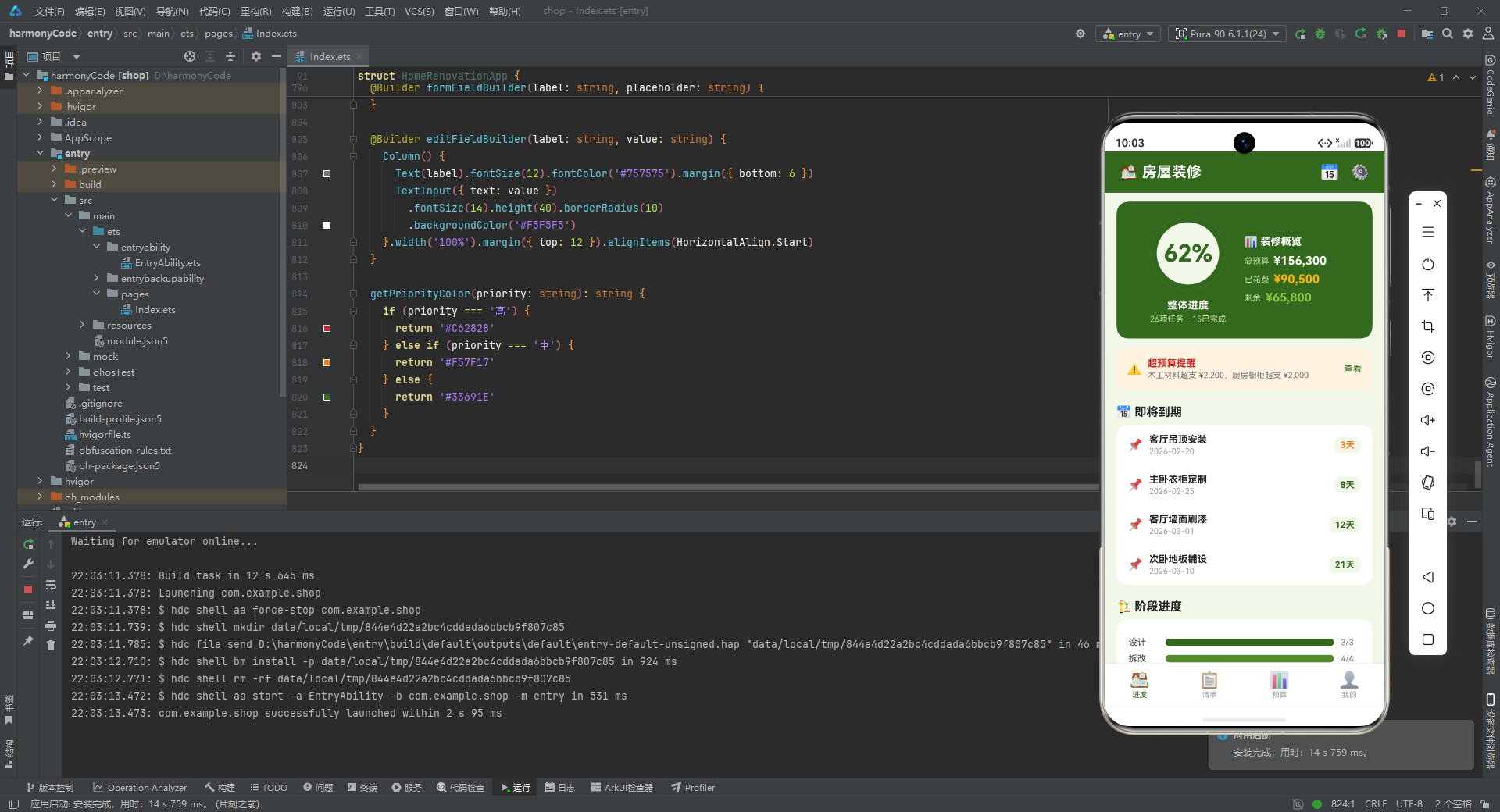
-
状态管理策略:进度 Tab 与预算 Tab 以只读静态数据为主,状态变量较少;清单 Tab 与弹窗体系是状态交互的核心区域,
selectedPhase、show*Modal、editIndex/deleteIndex等状态变量构成了完整的"查看-筛选-操作"交互闭环。 -
进度条实现统一性:进度 Tab 的阶段进度、预算 Tab 的房间预算与分类预算,均采用"外层
Row轨道 + 内层Column填充"的双层结构,宽度通过百分比字符串动态绑定,形成了跨模块统一的进度可视化方案。 -
Builder 复用层次:弹窗体系体现了最深的 Builder 复用层次——
modalBg被三个弹窗共用,formFieldBuilder/editFieldBuilder被addModal/editModal共用,形成了"基础 Builder → 功能 Builder → 弹窗 Builder"的三层复用链。 -
色彩语义体系:红色
#C62828统一表示超预算与删除告警;橙色#F57F17/#FFB300表示中优先级与已花费警示;绿色#33691E系列表示正常、完成、安全;大地色#5D4037表示木工/安装阶段与编辑操作。色彩不仅是装饰,更是业务状态的视觉编码。 -
布局组件使用频率:
Column与Row是绝对主力容器,配合layoutWeight、width/height百分比、margin/padding实现了所有布局需求;Stack用于头像与环形进度的层叠;Scroll用于所有可能超长的内容区域;ForEach用于动态数组渲染;TextInput用于表单输入。这套组件组合覆盖了 90% 以上的移动端界面场景。
本文从数据模型层、状态管理、主入口构建、四大 Tab 模块、弹窗体系、辅助方法等维度,对房屋装修管理应用的源码进行了逐段深度解析。通过对每一处代码的设计思路、实现细节与工程价值的剖析,读者可以全面掌握 ArkTS 声明式 UI 开发的核心方法论,包括接口契约设计、@Observed/@State 响应式状态管理、@Builder 模块化视图封装、数据驱动 UI、自定义弹窗体系等技术要点。这些知识不仅适用于装修管理类应用,也可迁移到任何需要列表管理、多 Tab 导航、表单交互、数据可视化的 HarmonyOS 应用开发场景中。

讨论HarmonyOS开发技术,专注于API与组件、DevEco Studio、测试、元服务和应用上架分发等。
更多推荐


 0
0 0
0- 0


 已为社区贡献95条内容

所有评论(0)